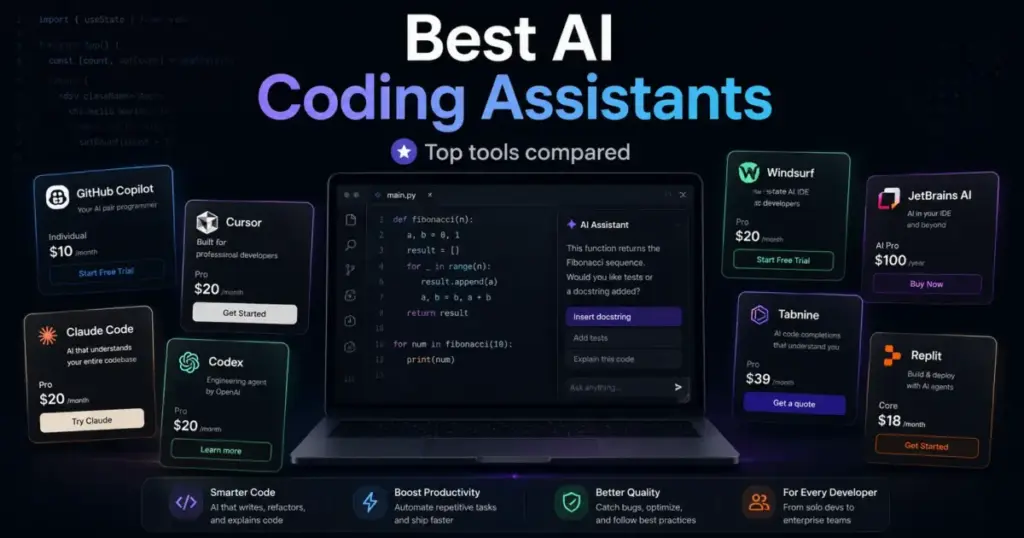
GitHub Copilot starts at $0 per month and scales to $39/user/month for Enterprise. That price range matters because most AI coding assistant lists treat every tool as if it costs the same. They do not. A solo developer testing autocomplete and an engineering team deploying cloud agents with SSO, audit logs, and pooled usage operate in different budget realities. The gap between a free plan and a $59/user/month annual commitment is where most buying decisions actually happen.
I evaluated 28 AI coding assistants and narrowed the list to 10 based on official pricing pages, feature documentation, usage limits, and governance controls. Pricing was verified in May 2026. The ranking below uses a weighted scoring system across pricing value, feature depth, ease of use, integrations, scalability, and user fit.
For most developers, GitHub Copilot is the safest starting point. Cursor is the better pick if you want an AI-native IDE with frontier models. Claude Code is the terminal agent for serious refactoring and multi-file work. Every product below has a specific buyer it fits and a specific buyer it does not. That is the point of this guide.
Quick answer: GitHub Copilot is the best AI coding assistant for most developers in 2026 because it combines broad IDE support, a usable free plan, low $10/user/month entry pricing, and GitHub-native team controls. Cursor is better for developers who want an AI-native IDE, while Claude Code is better for terminal-first refactoring.
Best AI Coding Assistants by Use Case
| Use case | Best pick | Why it fits |
|---|---|---|
| Best overall | GitHub Copilot | Broadest editor support, free tier, low entry price, GitHub-native workflows |
| Best AI-native IDE | Cursor | AI-first editor with agents, frontier models, MCPs, skills, and hooks |
| Best terminal agent | Claude Code | Handles complex refactors, tests, and multi-file edits directly in terminal |
| Best cloud coding agent | OpenAI Codex | Cloud task delegation, worktrees, automated reviews in ChatGPT ecosystem |
| Best for flow-state coding | Windsurf | Cascade, Tab, previews, deploys, and quota-based frontier-model usage |
| Best for AWS teams | Amazon Q Developer | Coding help, CLI, AWS Console assistance, security scanning, Java transformation |
| Best free Google ecosystem option | Gemini Code Assist | Free for individuals, strong Google Cloud and Firebase integration |
| Best for privacy and governance | Tabnine | On-prem deployment, zero code retention, governance controls, audit trails |
| Best for JetBrains users | JetBrains AI Assistant | Native integration with IntelliJ IDEA, PyCharm, WebStorm, GoLand, and Rider |
| Best for rapid prototyping | Replit | Browser workspace with AI Agent, built-in database, and one-click deploys |
What this means: There is no single “best” AI coding assistant. The right tool depends on whether you need an IDE plugin, a standalone AI-native IDE, a terminal agent, or a cloud-based coding environment. Budget matters, but so does editor preference, team governance requirements, and how much autonomy you want the AI to have.
How We Chose and Ranked These Tools
We evaluated 28 AI coding assistants based on a detailed analysis of official product documentation, feature specifications, pricing pages, and verified customer sentiment. Pricing was verified in May 2026. We did not rank tools by brand popularity or affiliate payout.
Each tool was scored across six weighted criteria:
| Criterion | Weight | What we checked |
|---|---|---|
| Pricing value | 20% | Starting price, free plan, minimum seats, annual terms, usage limits, overages, credits, quota model, hidden costs |
| Core feature depth | 20% | Autocomplete, chat, agent mode, multi-file edits, testing, debugging, code review, cloud tasks, terminal/IDE workflows |
| Ease of use | 15% | Onboarding, editor friction, workflow simplicity, interface fit, learning curve |
| Integrations | 15% | IDE support, GitHub/GitLab/Bitbucket, CLI, cloud provider ecosystem, MCP, SSO |
| Scalability | 15% | Team controls, SSO, RBAC, SCIM, audit logs, policy controls, enterprise deployment |
| User fit | 15% | Best-for and not-best-for clarity, caveat severity, use-case specificity |
Limitation: This evaluation is based on official research only. We reviewed official pricing pages, product documentation, help centers, and feature specifications. We did not conduct hands-on testing of these tools for this article. All pricing and feature claims are sourced from official product pages verified in May 2026.
Understanding what AI actually means in software tools helps separate genuine AI-powered features from marketing labels. Not every tool that says “AI” delivers autonomous coding ability.
Free Tier Champions
Three tools on this list offer genuinely usable free plans. Not trial-limited demos, but free tiers a solo developer can use as a daily driver with real limits.
GitHub Copilot: Best Overall AI Coding Assistant
Starting price: $0 Free; Pro starts at $10/user/month (as of May 2026)
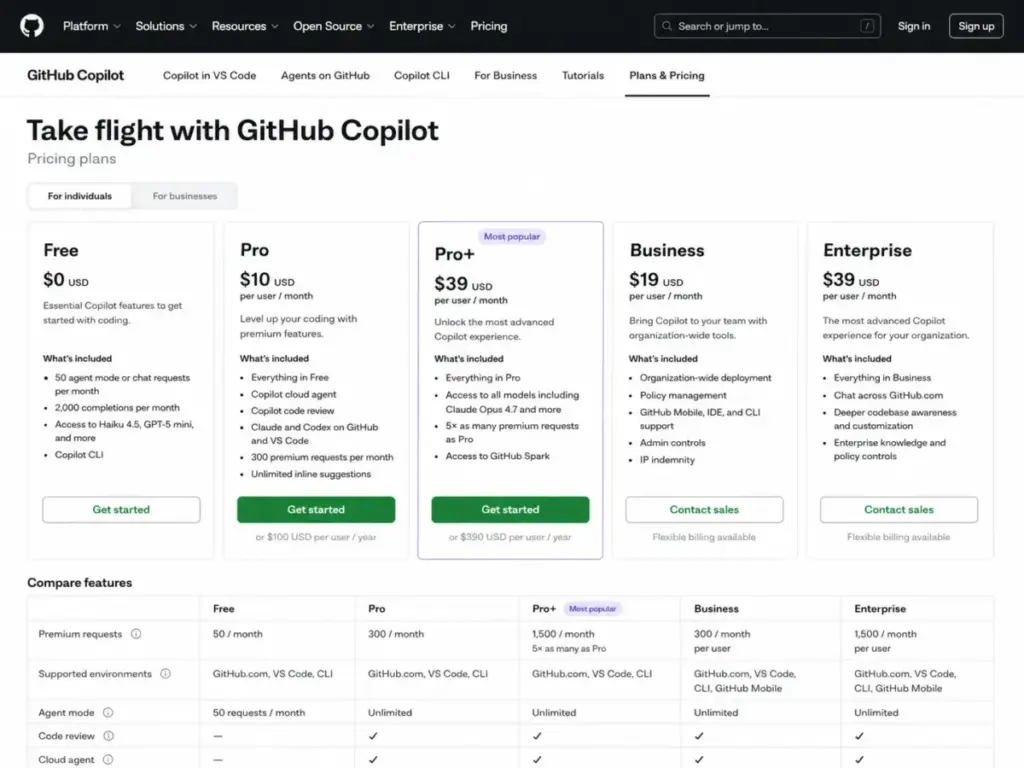
GitHub Copilot earns the top spot because it covers the widest range of editors, offers a free plan that works, and scales from individual developers to enterprise teams without forcing an IDE switch.
The Free plan includes 50 agent mode or chat requests per month and 2,000 completions per month. That is enough for a developer exploring AI autocomplete. Pro at $10/user/month bumps the cap to 300 premium requests per month. Pro+ at $39/user/month reaches 1,500 premium requests and unlocks third-party agent delegation. Business at $19/user/month and Enterprise at $39/user/month add organization-level policy controls, IP indemnity, and admin dashboards.
The hidden cost sits in premium requests. Chat, agent mode, code review, cloud agent, and Copilot CLI all consume from the same pool. Heavy users on Pro will hit the 300-request ceiling, and each extra request costs $0.04. At 500 requests per month, that adds $8 to your Pro bill.
What it does well:
- Broadest IDE support: VS Code, Visual Studio, Xcode, JetBrains IDEs, Neovim, Eclipse, Zed, and more
- Agent mode for multi-file edits and code review
- Cloud agent and Copilot CLI for terminal workflows
- GitHub-native pull request workflows
Where it falls short:
- Free plan caps are tight for active users
- Third-party agent delegation requires Pro+ or higher
- No standalone AI-native IDE experience
Best for: Developers and teams that want broad editor support, GitHub-native workflows, low entry price, and business controls.
Avoid if: You want a standalone AI-native IDE or a terminal-first autonomous agent.
Setup difficulty: Low. Install the extension in your editor, sign in, start coding.
Verdict: Choose GitHub Copilot if your priority is editor flexibility and low per-seat cost. The free tier is the best entry point in this category.
Gemini Code Assist: Best Free Google Ecosystem Option
Starting price: $0 for individuals; Standard starts at $22.80/user/month monthly or $19/user/month annually (as of May 2026)
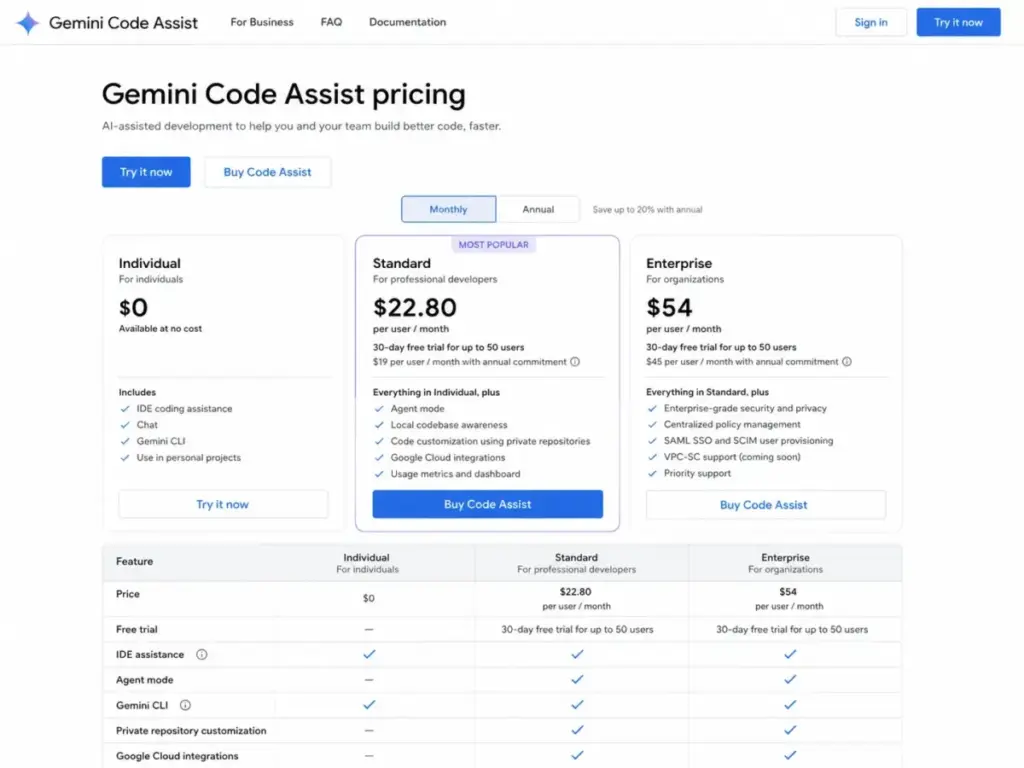
Gemini Code Assist stands out because its individual plan costs nothing and integrates directly with VS Code, JetBrains IDEs, Android Studio, Firebase, and Google Cloud services. For developers already in the Google ecosystem, the value proposition is immediate.
Standard at $22.80/user/month (or $19/user/month with annual commitment) and Enterprise at $54/user/month ($45 annually) add team controls and deeper Google Cloud integration. A 30-day free trial covers Standard and Enterprise for up to 50 users.
Key features include code completion, code generation, conversational IDE assistant, unit test generation, debugging help, and source citations. The agentic chat and documentation generation capabilities are relevant for developers working across Google Cloud services like Cloud Run, BigQuery, and Apigee.
Important caveat: Google states that Gemini for Google Cloud can generate plausible but incorrect output. Additionally, the individual-tier tooling is being migrated after June 18, 2026, according to Google Cloud documentation. Check official docs for the latest migration timeline.
Best for: Developers in Google Cloud, Firebase, or Android Studio who want Google-native code assistance at no cost.
Avoid if: Your team is not in the Google ecosystem and you want the most mature GitHub-native or terminal-first workflow.
Setup difficulty: Medium. Individual setup is straightforward, but Google Cloud project setup and paid-tier configuration require additional steps.
Verdict: Choose Gemini Code Assist if you are already building on Google Cloud and want a free, integrated coding assistant with source citations.
Replit: Best for Rapid Prototyping
Starting price: Starter free; Core starts at $25/month monthly or $20/month billed annually (as of May 2026)
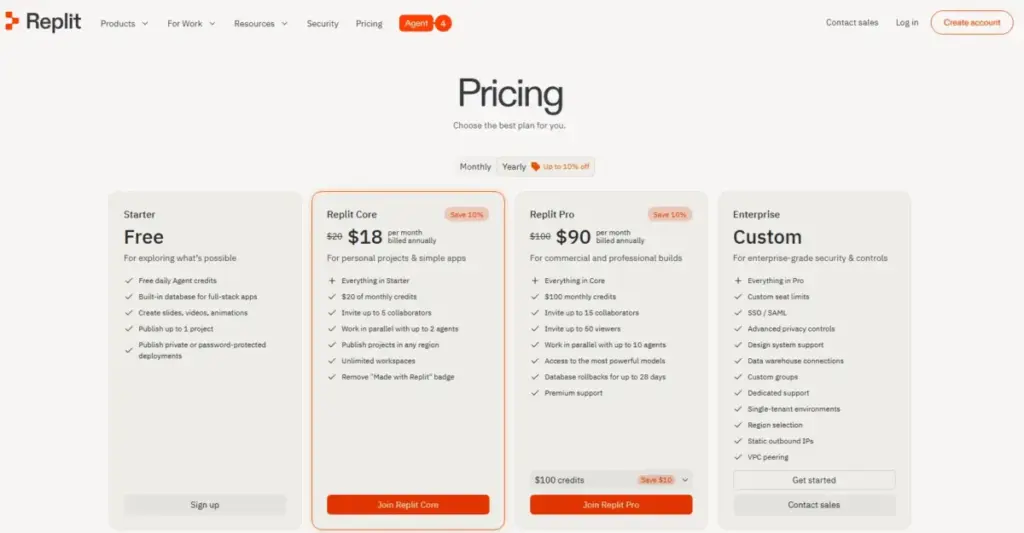
Replit is not a traditional AI coding assistant. It is a browser-based workspace that includes an AI Agent, a built-in database, deployment infrastructure, and collaboration tools. I include it here because its Agent can generate, edit, and deploy full applications from natural language prompts.
The Starter plan is free and includes daily Agent credits, a built-in database, and one published project. Core at $25/month (or $20/month annually) provides $25 monthly credits, up to 5 collaborators, and 2 agents in parallel. Pro at $100/month (or $95/month annually) scales to $100 monthly credits, 15 collaborators, 50 viewers, and 10 agents in parallel.
Best for: Founders, indie builders, students, and prototype teams that want AI app creation, hosting, database, collaboration, and deployment in one browser workspace.
Avoid if: You are a professional engineering team that needs local IDE autocomplete for existing repositories.
Setup difficulty: Low. Open a browser, sign in, start building.
Verdict: Choose Replit if you want to go from idea to deployed prototype without leaving the browser. Not a fit for teams working on existing local codebases.
Best Under $25/Month
These tools offer paid plans starting below $25 per user per month, making them accessible for individual developers and small teams.
Cursor: Best AI-Native IDE
Starting price: Free Hobby tier; Individual starts at $20/month (as of May 2026)
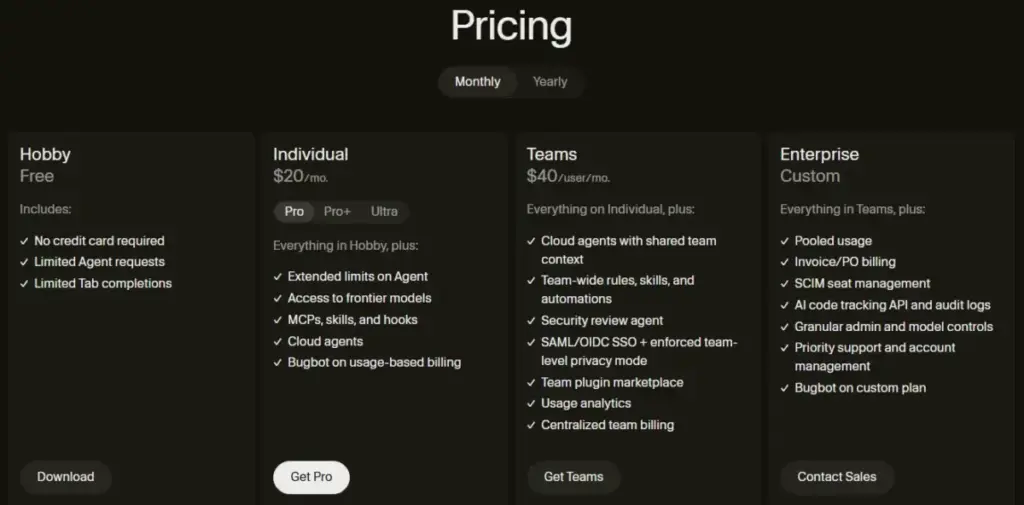
Cursor is the strongest AI-native IDE on this list, but using it means leaving your current editor. That trade-off defines the buying decision.
The Hobby plan is free with no credit card, but it limits Agent requests and Tab completions. Individual at $20/month removes those caps and adds extended Agent limits with frontier models. Teams at $40/user/month adds SAML/OIDC SSO, an admin dashboard, and a team marketplace. Enterprise pricing is custom.
The standout features are MCPs (Model Context Protocol servers), skills, hooks, cloud agents, and Bugbot. Cursor lets you connect external tools and data sources directly into the AI coding workflow, which none of the traditional IDE plugins match.
The cost caveat: On-demand model usage is billed in arrears after included usage is consumed. Bugbot usage is also billed separately. For heavy agent users, the actual monthly bill can exceed the published seat price. Track your usage dashboard.
Understanding what agentic AI actually does helps explain why Cursor’s agent mode is architecturally different from a simple autocomplete extension. Agents plan, execute, and iterate across files. Autocomplete suggests one line.
What it does well:
- AI-native IDE with native agent mode, not a bolt-on
- MCP support for connecting external tools and data
- Frontier model access across plans
- Cloud agents for background task execution
Where it falls short:
- Requires adopting a new editor (VS Code fork, but still a switch)
- Usage-based billing reduces cost predictability for heavy users
- JetBrains plugin exists but the full experience is Cursor IDE only
Best for: Developers who want an AI-first editor with frontier models, agents, and extensibility through MCPs and skills.
Avoid if: You must keep your existing IDE unchanged or need the cheapest per-seat option.
Setup difficulty: Low to Medium. Downloading Cursor is fast, but migrating extensions and settings from VS Code takes 15-30 minutes.
Verdict: Choose Cursor if you are willing to switch editors for the deepest AI-native coding experience. If IDE lock-in is a dealbreaker, GitHub Copilot gives you AI inside your current editor.
Windsurf: Best for Flow-State AI Coding
Starting price: $0 Free; Pro starts at $20/month (as of May 2026)

Windsurf positions itself around flow-state coding, where the AI stays in context through cascading multi-step workflows rather than resetting after each prompt. The Cascade feature tracks your intent across edits, terminal commands, and browser previews.
Free is $0/month with limited daily usage. Pro at $20/month includes premium models and a higher daily allowance. Max at $200/month pushes that ceiling further. Teams at $40/user/month adds admin controls and RBAC.
Daily and weekly usage quotas are measured by model token usage. After the included quota, extra usage is billed at API list prices. This quota reset model means free users may experience interruptions mid-session, and paid users should monitor token consumption during heavy agent workflows.
Windsurf also offers a JetBrains plugin, MCP support, terminal integration, browser previews, and docs/web search built into the editor. The concept of vibe coding aligns closely with Windsurf’s flow-state design philosophy, where you describe intent and the AI handles implementation details.
Best for: Developers who want a flow-oriented AI editor with cascading context, previews, and deploys.
Avoid if: You need fully predictable fixed usage without daily or weekly quota management.
Setup difficulty: Low to Medium. Editor download is fast; understanding quota mechanics takes some reading.
Verdict: Choose Windsurf if cascading multi-step context and flow-state coding matter more to you than editor universality.
JetBrains AI Assistant: Best for JetBrains IDE Users
Starting price: AI Free has 3 AI Credits per 30 days; AI Pro is $20 with 20 AI Credits per 30 days (as of May 2026)
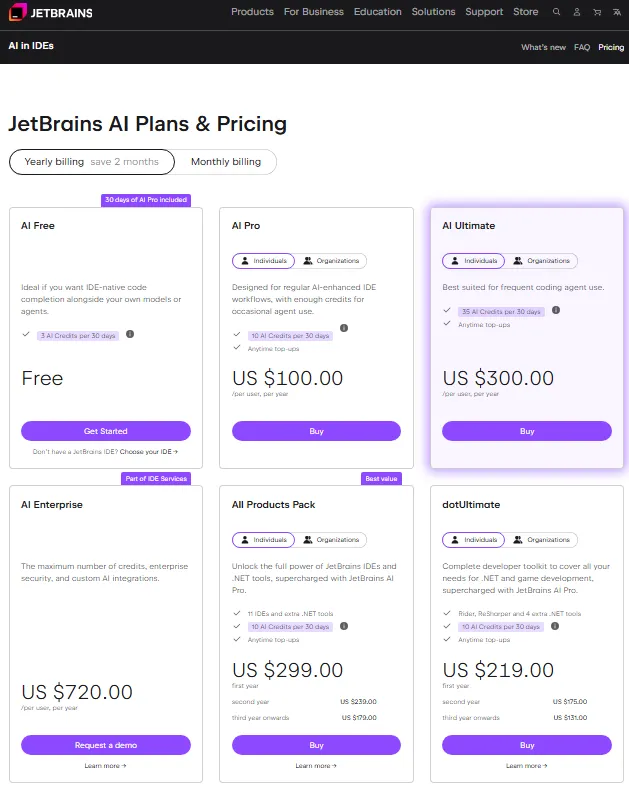
If your team is standardized on IntelliJ IDEA, PyCharm, WebStorm, GoLand, or Rider, JetBrains AI Assistant is the native option. It lives inside the IDE you already use, with zero editor switching.
AI Free gives you 3 AI Credits per 30 days, enough to explore but not enough to use daily. AI Pro at $20 provides 20 AI Credits per 30 days. AI Ultimate at $60 reaches 70 AI Credits per 30 days. AI Enterprise at $60 or higher adds team governance and quota management.
The Junie coding agent adds agent-mode capability. But AI Credits are consumed by all AI-powered features, and agent mode consumes them heavily. When your quota is exhausted, you can wait for the next cycle, purchase top-up credits, or upgrade your license.
Top-up AI Credits can only be purchased with an active JetBrains AI license. That detail is easy to miss and matters if you hit your quota mid-sprint.
Best for: Developers already standardized on JetBrains IDEs who want native AI integration without adding a third-party plugin.
Avoid if: You use VS Code primarily, need a terminal-first or cloud agent, or want the lowest-cost AI coding assistant.
Setup difficulty: Low. If you already have a JetBrains IDE, enabling AI Assistant is a settings toggle.
Verdict: Choose JetBrains AI Assistant if your IDE is JetBrains and you value native integration over cross-editor flexibility.
Best for Mid-Market and Teams: $25-$100/Month
These tools serve developers and teams willing to spend more for deeper agent capabilities, cloud coding features, or ecosystem-specific value.
Claude Code: Best Terminal Agent
Starting price: Claude Pro at $20/month or $17/month with annual subscription ($200 billed up front) (as of May 2026)
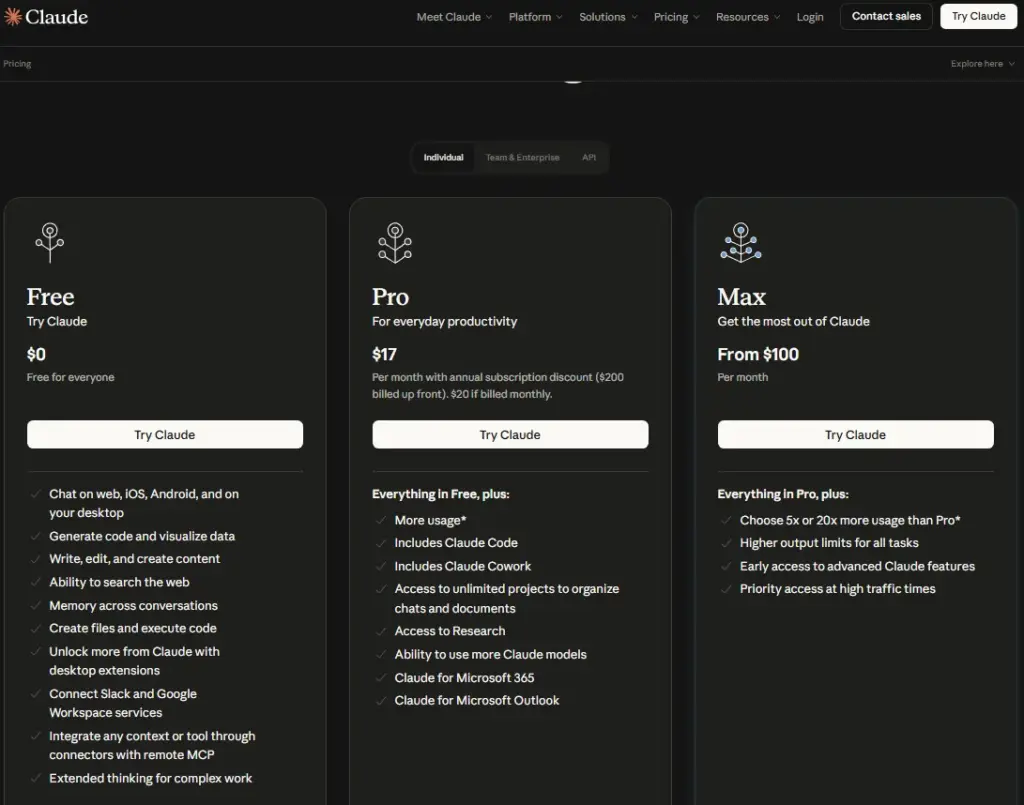
Claude Code is not an IDE plugin. It is a terminal agent that reads your codebase, edits files, runs commands with approval gates, and handles multi-file refactors that autocomplete tools cannot touch. If you spend more time in the terminal than in an editor sidebar, Claude Code fits your workflow.
Pro at $20/month gives you Claude Code access with usage limits. Max starts at $100/month for heavier usage. Claude Code can also use API credits through Claude Console at standard API rates, which gives flexibility but requires watching your spend.
The command approval mechanism improves safety by requiring confirmation before executing terminal commands. That adds trust but can slow unattended workflows. For background tasks, you trade speed for control.
You can connect Claude Code to VS Code, JetBrains, Claude desktop, Claude web, Slack, Git, and MCP servers. The surface area is broad, but the core strength is terminal-first file editing and codebase reasoning. If you want to explore the broader Claude AI ecosystem and capabilities, the SaaSZap review covers the full platform.
Best for: Terminal-first developers handling complex refactors, test generation, debugging, and multi-file codebase work.
Avoid if: You mainly need low-cost autocomplete inside a traditional IDE.
Setup difficulty: Medium. Terminal installation is simple, but configuring MCP servers and usage limits requires some setup.
Verdict: Choose Claude Code if your coding workflow lives in the terminal and you need an AI agent that can reason across your entire codebase.
OpenAI Codex: Best Cloud Coding Agent
Starting price: Usage-based; no fixed seat fee for Codex-only seats on ChatGPT Business and Enterprise workspaces (as of May 2026)
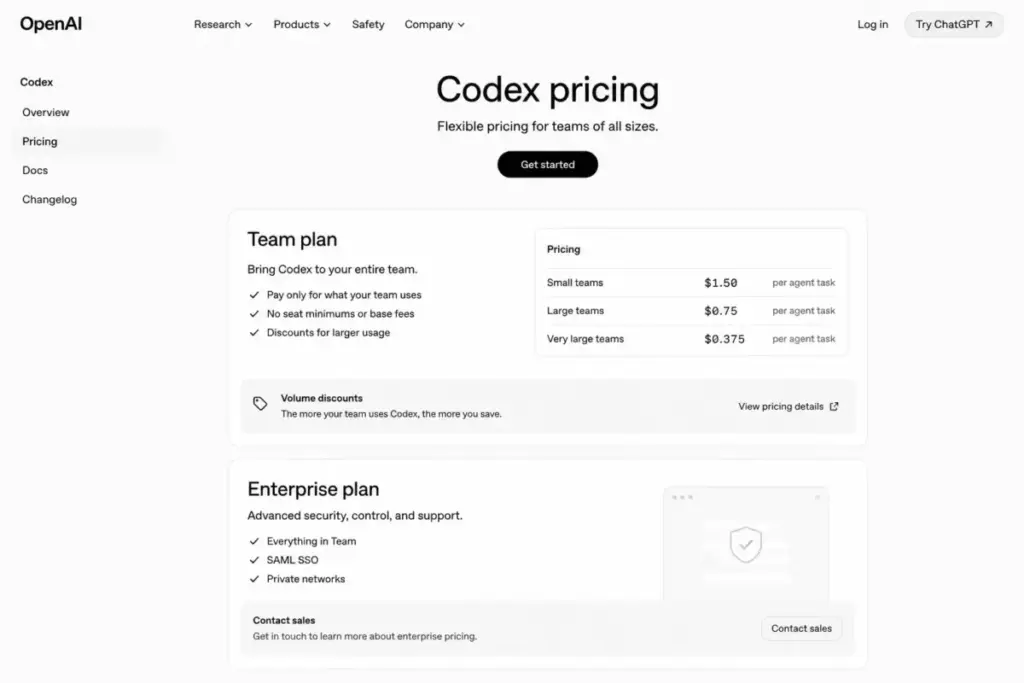
OpenAI Codex is not a simple IDE extension. It is a cloud coding agent that runs tasks asynchronously, creates worktrees, automates code and security reviews, and operates inside the ChatGPT ecosystem. The pricing model reflects this difference.
Teams on ChatGPT Business and Enterprise can add Codex-only seats with pay-as-you-go pricing and no fixed seat fee. Usage is billed on token consumption. Promotional credits may be available for eligible Business workspaces. Plus/Pro and Business plan usage limits vary, and Codex-only usage scales with credits.
The architecture is fundamentally cloud-first. You delegate tasks, Codex works in isolated environments, and you review the results. Local messages, cloud tasks, worktrees, and review automation are the core workflow. For a broader understanding of how ChatGPT’s platform and pricing work, the SaaSZap pricing guide covers all plan tiers.
The cost caveat: Token consumption, workspace credits, and plan-specific usage windows make total cost harder to predict than simple per-seat tools. If cost predictability is your priority, a fixed-seat tool like GitHub Copilot or Cursor is simpler to budget.
Best for: Teams that want cloud coding agents, worktrees, automated reviews, and async task delegation inside the OpenAI ecosystem.
Avoid if: You want a simple, fixed-price IDE plugin with predictable included usage.
Setup difficulty: Medium to High. Requires ChatGPT Business or Enterprise workspace configuration, seat assignment, and credit management.
Verdict: Choose OpenAI Codex if you want cloud-first task delegation and your team already operates in the ChatGPT ecosystem.
Amazon Q Developer: Best for AWS Development Teams
Starting price: $0 Free; Pro at $19/user/month (as of May 2026)
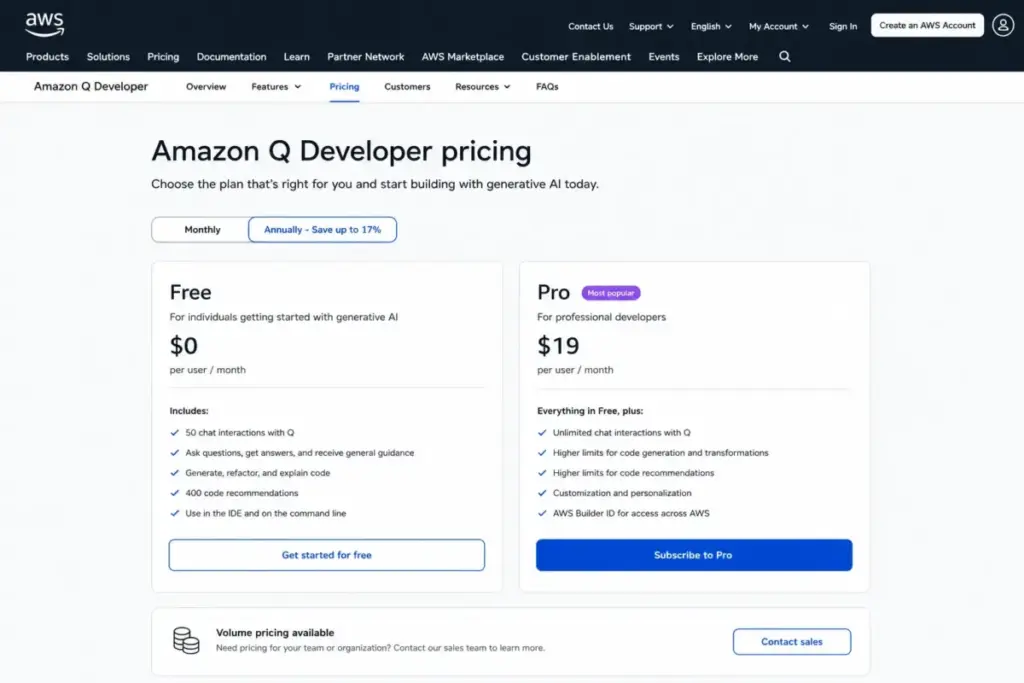
Amazon Q Developer is the specialist pick for teams building on AWS. It is not trying to be a general-purpose coding assistant. It connects coding help with AWS services, CLI commands, AWS Console navigation, security scanning, and Java application transformation.
The Free tier includes 50 agentic chat interactions per month and 1,000 lines of transformation per month. Pro at $19/user/month adds 4,000 LOC/month per user for Java transformation, pooled at the payer-account level. Overages cost $0.003 per LOC submitted.
One detail to watch: canceling before the month ends can still incur the full month’s subscription fee. That billing nuance is not highlighted on the pricing page.
IDE support covers VS Code, JetBrains, Visual Studio, and Eclipse (preview). The CLI and AWS Console integration are where the tool differentiates itself from general-purpose alternatives.
Best for: AWS-heavy developers who want coding help, CLI help, AWS Console assistance, security scanning, and Java transformation in one tool.
Avoid if: You work outside AWS and want a general-purpose coding agent or a multi-model AI IDE.
Setup difficulty: Medium. AWS IAM and Identity Center configuration adds setup steps that general-purpose tools do not require.
Verdict: Choose Amazon Q Developer if your stack is AWS and you want a coding assistant that understands your cloud environment natively.
Best for Enterprise and Governance: $39+/User/Month
These tools command premium pricing because they solve governance, privacy, and compliance requirements that lower-cost tools do not address.
8. Tabnine: Best for Privacy and Governance
Starting price: Code Assistant Platform at $39/user/month annual subscription (as of May 2026)
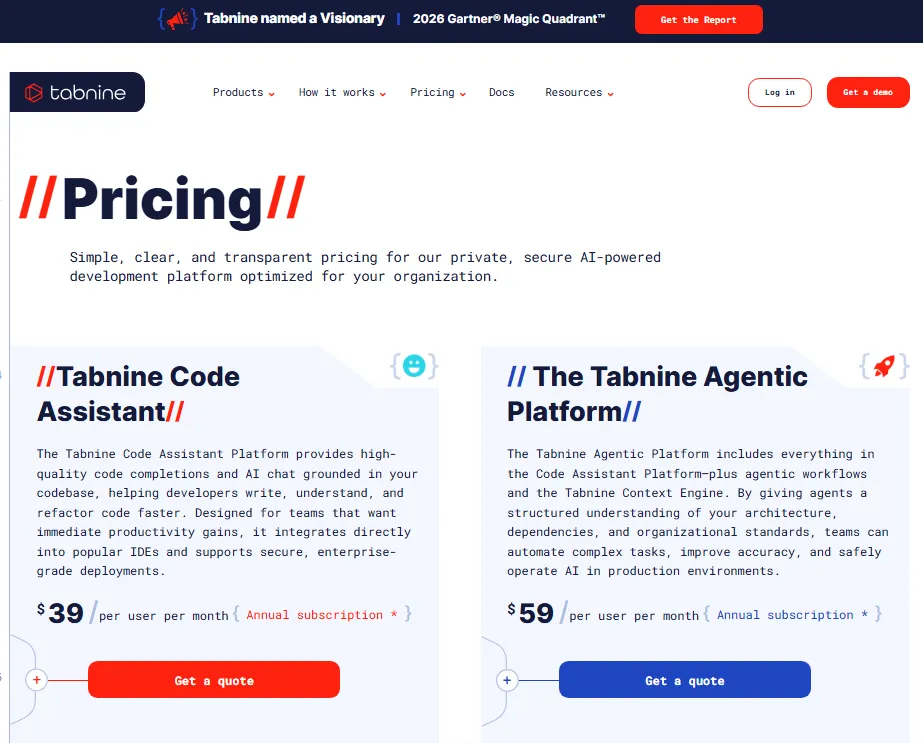
Tabnine is the most expensive entry point on this list, and it exists for a specific reason: regulated industries and enterprise teams that cannot send code to third-party cloud models.
Code Assistant Platform at $39/user/month (annual) and Agentic Platform at $59/user/month (annual) are the two tiers. The pricing reflects deployment flexibility: Tabnine can run on customer-owned LLMs on-premises or through customer cloud endpoints with zero code retention.
When using a customer-owned LLM, usage is unlimited. When using Tabnine-provided LLM access, a reserved token consumption quota applies with pricing based on provider rates plus a 5% handling fee. The Headless Agents feature is an optional add-on.
Tabnine supports major IDEs, Jira Cloud/Data Center, Confluence, GitHub, GitLab, Bitbucket, Perforce, MCP tools, Docker, and CI/CD systems. The Context Engine, governance controls, analytics, auditability, and code provenance features are what differentiate it from cheaper alternatives.
For teams evaluating whether the ChatGPT platform or a dedicated coding tool makes more sense, the key difference is that Tabnine offers deployment isolation that general-purpose AI platforms do not.
Best for: Enterprise and regulated teams that prioritize private, secure, compliant AI coding with deployment flexibility and zero code retention.
Avoid if: You are an individual developer looking for the lowest-cost AI coding assistant.
Setup difficulty: High. On-prem deployment, SSO configuration, and governance setup require IT involvement.
Verdict: Choose Tabnine if your organization requires deployment control, code privacy, and audit trails that cloud-only tools cannot provide.
Pricing Comparison: Starting Price vs Practical Tier
| Tool | Starting price | Practical tier | Free plan | Hidden costs |
|---|---|---|---|---|
| GitHub Copilot | $0 Free | $10/user/mo Pro | Yes (50 requests, 2,000 completions/mo) | Premium request overages at $0.04/request |
| Cursor | $0 Hobby | $20/mo Individual | Yes (limited agents and completions) | On-demand model usage billed in arrears |
| Claude Code | $20/mo Pro | $100/mo Max | No verified free plan | API credits, auto-reload spend |
| OpenAI Codex | Usage-based | Usage-based (credits) | No | Token consumption, workspace credits |
| Windsurf | $0 Free | $20/mo Pro | Yes (limited daily usage) | Extra usage at API list prices after quota |
| Amazon Q Developer | $0 Free | $19/user/mo Pro | Yes (50 chats, 1,000 LOC/mo) | Transformation overages at $0.003/LOC |
| Gemini Code Assist | $0 Individual | $19/user/mo Standard (annual) | Yes (free individual plan) | Google Cloud project setup, paid context |
| Tabnine | $39/user/mo (annual) | $59/user/mo Agentic (annual) | Limited free start | Reserved token quota, 5% handling fee |
| JetBrains AI Assistant | $0 AI Free | $20 AI Pro | Yes (3 credits/30 days) | Top-up credits, agent quota consumption |
| Replit | $0 Starter | $25/mo Core | Yes (daily Agent credits) | Agent credits, compute complexity |
Pricing verified May 2026 from official pricing pages. Check each vendor’s pricing page for current rates, as AI tool pricing changes frequently.
What this means: The cheapest plan is almost never the right comparison point. For GitHub Copilot, the practical tier is Pro at $10/user/month because the free plan caps at 50 requests. For Cursor, Individual at $20/month unlocks the extended Agent limits most developers need. For Tabnine, the entry price of $39/user/month reflects the governance overhead that regulated teams pay for. Always compare the plan that includes the features your workflow actually requires.
Feature Gate Comparison
| Tool | Autocomplete | Chat | Agent mode | Cloud agent | Code review | Terminal/CLI | MCP support |
|---|---|---|---|---|---|---|---|
| GitHub Copilot | All plans | All plans | Free+ | Pro+ | Pro+ | Pro+ | Not verified |
| Cursor | All plans | All plans | All plans | Teams+ | Via Bugbot | Cursor CLI | Yes |
| Claude Code | N/A (terminal) | Via Claude | Terminal agent | N/A | Via agent | Core feature | Yes |
| OpenAI Codex | N/A (cloud) | Via ChatGPT | Cloud agent | Core feature | Core feature | N/A | Not verified |
| Windsurf | All plans | All plans | Cascade | Higher tiers | Not verified | Terminal | Yes |
| Amazon Q Developer | All plans | All plans | Agentic chat | N/A | Security scan | CLI | Not verified |
| Gemini Code Assist | All plans | All plans | Agentic chat | Not verified | Not verified | Not verified | Not verified |
| Tabnine | All plans | All plans | Agentic Platform | Headless (add-on) | Via agent | CLI | Yes |
| JetBrains AI | All plans | All plans | Junie agent | N/A | Not verified | N/A | Not verified |
| Replit | N/A (browser) | Agent | Agent | N/A | N/A | Browser terminal | Not verified |
Note: “Not verified” means the feature was not confirmed in the official documentation we reviewed. It does not mean the feature does not exist.
Setup and Migration Difficulty
| Tool | Setup difficulty | Why |
|---|---|---|
| GitHub Copilot | Low | Install extension, sign in, start coding. Works in your existing editor. |
| Cursor | Low-Medium | Download new IDE, migrate VS Code settings and extensions. |
| Claude Code | Medium | Terminal installation is simple; MCP and API credit configuration takes time. |
| OpenAI Codex | Medium-High | Requires ChatGPT Business/Enterprise workspace, seat assignment, credit management. |
| Windsurf | Low-Medium | Editor download is fast; understanding quota mechanics requires reading. |
| Amazon Q Developer | Medium | AWS IAM and Identity Center configuration adds steps. |
| Gemini Code Assist | Medium | Individual setup is simple; Google Cloud project and paid tiers require configuration. |
| Tabnine | High | On-prem deployment, SSO, governance setup, and token quota configuration require IT. |
| JetBrains AI | Low | Already in your JetBrains IDE. Enable in settings. |
| Replit | Low | Open browser, sign in, start building. No local setup. |
Which AI Coding Assistant Should You Avoid?
Every tool on this list has a valid use case. But choosing the wrong one wastes more than money. Here are specific avoid-if scenarios:
Avoid GitHub Copilot if you want autonomous multi-file agents. Copilot is strong at completions and chat, but its agent capabilities are not as deep as Cursor or Claude Code.
Avoid Cursor if your team cannot switch editors. Cursor is a VS Code fork, but it is still a separate application. If IDE standardization is a policy requirement, the switching cost is real.
Avoid Claude Code if you mainly need autocomplete. Claude Code is a terminal agent, not an IDE autocomplete tool. Using it for simple line completions misses the point.
Avoid OpenAI Codex if you need predictable monthly billing. Usage-based token pricing with workspace credits is harder to budget than fixed per-seat plans.
Avoid Tabnine if you are an individual developer on a budget. The $39/user/month annual entry price is designed for enterprise governance requirements, not solo exploration.
Avoid Replit if you need local IDE integration for existing repositories. Replit is a browser workspace for building new projects, not a coding assistant for your existing codebase.
How to Choose the Right AI Coding Assistant
Start with these questions:
- Where do you code? If VS Code, most tools work. If JetBrains, your options narrow. If terminal-first, Claude Code leads. If browser-only, Replit.
- What is your budget per developer per month? Free plans exist for GitHub Copilot, Cursor, Windsurf, Amazon Q, Gemini Code Assist, JetBrains AI, and Replit. Paid plans range from $10/user/month to $59/user/month.
- Do you need agent mode or just autocomplete? If autocomplete is sufficient, GitHub Copilot Free or Gemini Code Assist Individual covers you. If you need agents that plan, execute, and iterate across files, Cursor, Claude Code, or OpenAI Codex is the category.
- Does your organization require governance controls? If yes, Tabnine (on-prem, zero retention), GitHub Copilot Enterprise (IP indemnity, policy controls), or Amazon Q Developer (AWS IAM integration) are the shortlist.
- Are you building on a specific cloud platform? AWS teams should evaluate Amazon Q Developer first. Google Cloud teams should start with Gemini Code Assist. General-purpose teams have more flexibility.
- How predictable does your billing need to be? Fixed per-seat pricing (GitHub Copilot, Cursor, Tabnine) is easier to budget. Usage-based pricing (OpenAI Codex, Claude Code API mode, Windsurf overage) requires monitoring.
- What is your team size? Solo developers can use free tiers. Teams of 5-20 benefit from Team plans with admin controls. Enterprise teams (50+) need SSO, SCIM, audit logs, and pooled usage.
For teams exploring how AI agents differ from traditional automation, our guide on what AI agents are and how they work explains the architectural shift from rule-based bots to autonomous task executors.
Common Mistakes When Choosing AI Coding Assistants
1. Choosing by starting price alone. The cheapest plan rarely includes the features developers actually use. GitHub Copilot Free caps at 50 requests. Windsurf Free resets daily quotas. JetBrains AI Free gives 3 credits per month. Compare the practical tier, not the entry tier.
2. Ignoring usage limits until they hit. Premium requests, AI credits, daily quotas, token consumption, and usage windows all create ceilings. A tool that costs $20/month with a 300-request cap is effectively more expensive than one at $39/month with unlimited usage on customer-owned models if you exceed 300 requests regularly.
3. Assuming all AI coding tools do the same thing. An IDE autocomplete plugin (GitHub Copilot), an AI-native IDE (Cursor), a terminal agent (Claude Code), a cloud coding agent (OpenAI Codex), and a browser workspace (Replit) are five different product categories sold under the same label. Match the tool type to your workflow. Kimi Code also belongs in this category; the Moonshot AI Kimi Code breakdown explains its membership-gated CLI and VS Code workflow.
4. Overlooking editor lock-in. Cursor and Windsurf require their own editors. JetBrains AI only works in JetBrains IDEs. GitHub Copilot works in 10+ editors. If editor flexibility matters, check IDE support before features.
5. Skipping governance evaluation for teams. SSO, RBAC, audit logs, code retention policies, and IP indemnity are not features most developers check. But if your organization handles regulated data or has compliance requirements, these controls determine which tools are even eligible.
6. Not calculating the real cost at team scale. A tool at $20/user/month costs $200/month for 10 developers and $2,400/year. At $40/user/month, the same team pays $4,800/year. Small per-seat differences compound at scale.
7. Treating the free plan as the product. Free tiers exist to convert you to paid plans. Evaluate the paid tier you will likely need within 90 days of serious usage. If the paid tier does not fit your budget, the free plan is a dead end, not a solution.
Final Verdict
GitHub Copilot is the best AI coding assistant for most developers in 2026. It offers the broadest editor support, a genuinely usable free tier, and paid plans starting at $10/user/month that scale to enterprise governance. No other tool on this list matches that combination of accessibility, IDE flexibility, and GitHub-native workflow integration.
However, “best overall” does not mean “best for you.” Here is the decision shortcut:
- Want the deepest AI-native IDE? Choose Cursor at $20/month.
- Terminal-first developer? Choose Claude Code with Claude Pro at $20/month.
- Need cloud coding agents? Choose OpenAI Codex on ChatGPT Business.
- AWS team? Choose Amazon Q Developer at $19/user/month.
- Google Cloud developer? Choose Gemini Code Assist free tier.
- Enterprise governance required? Choose Tabnine at $39/user/month annual.
- JetBrains standardized? Choose JetBrains AI Assistant at $20.
- Prototype fast in browser? Choose Replit Starter free.
The right AI coding assistant depends on where you code, what you build, how much autonomy you want the AI to have, and what your organization requires for security and billing predictability. Start with the free tier of the tool that matches your editor and workflow. Upgrade when you hit the usage ceiling, not before.
If you are also evaluating the AI models behind these tools, our Gemini platform analysis and Claude platform pricing breakdown cover the underlying platforms in detail.
FAQ
What is the best AI coding assistant overall?
GitHub Copilot is the best overall AI coding assistant for 2026. It supports more editors than any competitor, offers a free plan with 50 requests per month, and starts at $10/user/month for Pro. It fits individual developers and enterprise teams without requiring an editor switch.
What is the best free AI coding assistant?
GitHub Copilot Free and Gemini Code Assist Individual are the strongest free options. Copilot Free includes 50 agent/chat requests and 2,000 completions per month. Gemini Code Assist is free for individuals with VS Code, JetBrains, and Android Studio support. Both are real daily-driver tools, not limited trials.
Which AI coding assistant is cheapest for a team of 10?
GitHub Copilot Pro at $10/user/month costs $100/month for 10 developers, making it the lowest fixed-cost option. Amazon Q Developer Pro at $19/user/month costs $190/month. Gemini Code Assist Standard at $19/user/month annually costs the same. Tabnine at $39/user/month costs $390/month but includes governance controls.
Is Cursor better than GitHub Copilot?
Yes, if you want a deeper AI-native IDE experience with agents, MCPs, and frontier models. No, if you need broad editor support or the lowest entry price. Cursor requires adopting its editor, while Copilot works in VS Code, JetBrains, Xcode, Neovim, and more. The right choice depends on whether you value AI depth or editor flexibility.
Which AI coding assistant is best for enterprise teams?
Tabnine and GitHub Copilot Enterprise are the top enterprise picks. Tabnine offers on-prem deployment, zero code retention, and governance controls for regulated industries. Copilot Enterprise at $39/user/month adds IP indemnity, policy controls, and admin analytics within the GitHub ecosystem.
How much does an AI coding assistant cost per month?
Prices range from $0 (free tiers on GitHub Copilot, Cursor, Windsurf, Amazon Q, Gemini Code Assist, JetBrains AI, and Replit) to $59/user/month (Tabnine Agentic Platform). Most developers land between $10-$40/user/month on paid plans. Usage-based tools like OpenAI Codex can vary by token consumption.
What is the difference between an AI coding assistant and an AI coding agent?
An AI coding assistant suggests code completions and answers questions in a chat panel. An AI coding agent autonomously plans, writes, tests, and deploys code across multiple files. GitHub Copilot and JetBrains AI are primarily assistants with agent features. Claude Code, OpenAI Codex, and Cursor agent mode are coding agents that execute multi-step tasks.
Do AI coding assistants work with JetBrains IDEs?
Yes. GitHub Copilot, JetBrains AI Assistant, Amazon Q Developer, Windsurf (plugin), Tabnine, and Gemini Code Assist all support JetBrains IDEs. JetBrains AI Assistant is the only natively integrated option. Others run as plugins.