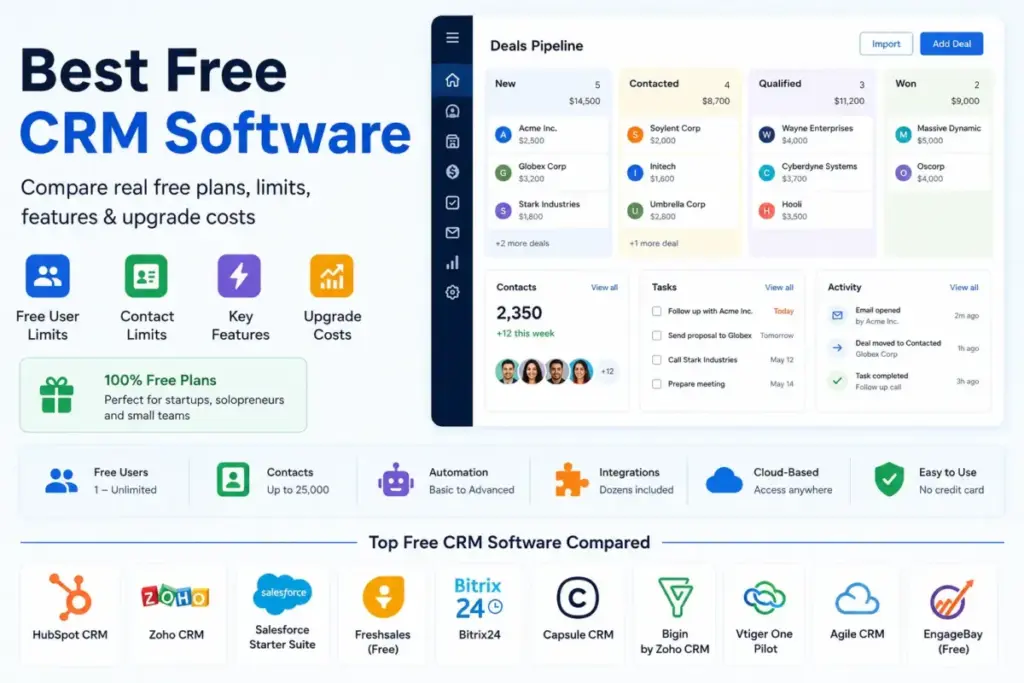
HubSpot gives you a free CRM with 2 users and 1,000 contacts. Zoho CRM gives you 3 users and deals. Agile CRM gives you 10 users and 1,000 contacts with one integration. Every free plan sounds generous until you hit the cap that forces the upgrade.
I evaluated 28 CRM software tools and narrowed them to 10 that offer a permanent free plan, not a trial disguised as free. The difference matters: a trial expires, a free plan lets you run your pipeline indefinitely within its limits. For each tool below, I documented the exact user cap, contact or record cap, and the first paid upgrade trigger so you can see where the free plan ends and the bill begins.
The best free CRM in 2026 is not the one with the longest feature list. It is the one whose free-plan limits match your team size, contact volume, and workflow needs before you pay. If you want to understand the fundamentals of this category first, see our guide on what CRM software is and how it fits different business models.
Quick Verdict: Best Free CRM Software by Use Case
| Use case | Best pick | Why it fits |
|---|---|---|
| Best overall free CRM | HubSpot CRM | 2 users, 1,000 contacts, largest app marketplace at $0 |
| Best for 3-person sales teams | Zoho CRM | Free forever for 3 users with leads, deals, and workflows |
| Best free enterprise on-ramp | Salesforce Free Suite | $0 entry into the Salesforce environment with 2 licenses |
| Best for phone and chat basics | Freshsales | 3 free users with built-in phone, email, and live chat |
| Best for sales plus support basics | EngageBay CRM & Sales Bay | 250 contacts, email tracking, appointment scheduling, and live chat |
| Best simple free CRM | Capsule CRM | Clean UI for 2 users and 250 contacts, minimal learning curve |
| Best free pipeline CRM for solopreneurs | Bigin by Zoho CRM | 1 user, 500 records, single pipeline, Zoho software access |
| Best free collaboration workspace | Bitrix24 | CRM plus tasks, calendars, chat, and video calls for 1-2 users |
| Best free all-in-one for tiny teams | Vtiger One Pilot | $0 forever for up to 10 users with CRM, help desk, and projects |
| Best free legacy all-in-one | Agile CRM | 10 free users with 1,000 contacts, but tight integration limits |
What this means: Every free CRM on this list is free indefinitely. But “free” has a ceiling. HubSpot caps at 2 users and 1,000 contacts. Zoho gives you 3 users but locks advanced automation. Agile CRM is generous on users (10) but restricts you to 1 integration. The best free CRM for your team is the one whose ceiling you will not hit within the first 6 months.
How We Chose and Ranked These Free CRM Tools
We evaluated 28 CRM products based on a detailed analysis of official product documentation, feature specifications, pricing pages, and publicly available product materials. Only tools with a confirmed permanent free plan (not a trial) made the final list. Trial-only CRMs like Pipedrive, and products without a straightforward free SaaS tier (Odoo, SuiteCRM) were excluded.
Pricing was verified in May 2026 using official pricing pages and product pages.
Ranking criteria:
| Criterion | Weight | What we checked |
|---|---|---|
| Pricing value | 20% | Free-plan generosity, user/contact caps, upgrade cost |
| Core feature depth | 20% | Contacts, deals, pipeline, reporting, automation |
| Ease of use | 15% | Onboarding, UI clarity, setup time, learning curve |
| Integrations | 15% | Native apps, marketplace, Gmail/Outlook, Zapier, API |
| Scalability | 15% | Upgrade path, team controls, paid tier structure |
| User fit | 15% | Best for, not best for, severity of limits |
Review limitation: This ranking is based on official research, documentation analysis, and publicly available product materials, not on hands-on testing of every product. Scores reflect feature-plan evidence and pricing math, not personal workflow testing.
Free Tier Champions
These tools have the most generous free plans in terms of users, contacts, and features available at $0.
HubSpot CRM: Best Overall Free CRM
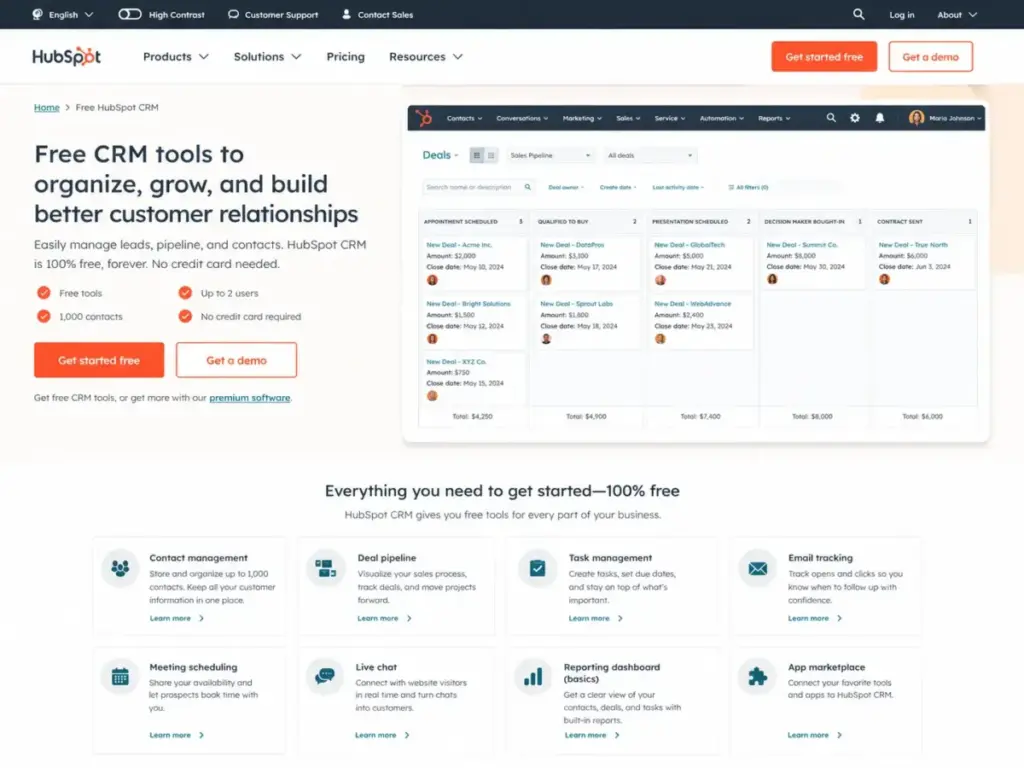
HubSpot CRM is the best free CRM for startups and small businesses that want contacts, deals, email tracking, meeting scheduling, and a large app directory at $0. The free plan includes up to 2 users and 1,000 contacts (as of May 2026).
What you get for free: Contact, deal, and task management. Email tracking and templates. Meeting scheduling. Live chat. Sales quotes. Document sharing. Access to the HubSpot App Marketplace with integrations including Gmail, Slack, Shopify, Mailchimp, Google Ads, and Zapier.
Where the ceiling hits: The 2-user cap means a 3-person sales team immediately needs a paid plan. Advanced automation, custom reporting, and predictive lead scoring are locked behind paid HubSpot editions. At 1,000 contacts, a growing startup could hit the cap within months depending on lead volume.
The upgrade math: The free CRM is $0. Paid HubSpot upgrades vary by hub (Sales, Marketing, Service) and seat packaging. HubSpot’s paid environment starts adding costs quickly when you need sequences, forecasting, or custom reports. The gap between the free CRM and the first meaningful paid tier is where most buyers feel the sticker shock.
If your team needs a full HubSpot CRM experience, the free plan is a genuine starting point, not a demo.
Best for: Startups and small businesses that want a connected free CRM with marketing, sales, and service basics.
Avoid if: Your team has more than 2 users, you need advanced automation, or you need complex permissions before you can justify paying.
Setup difficulty: Low. HubSpot’s onboarding is self-serve at the free tier.
Verdict: HubSpot CRM ranks first because it combines a real forever-free CRM, the broadest starter feature set, and the strongest integration network among free CRMs. The 2-user and 1,000-contact caps are the price of admission.
Pricing source: HubSpot official pricing page, verified May 2026.
Zoho CRM: Best Free CRM for Three-Person Sales Teams
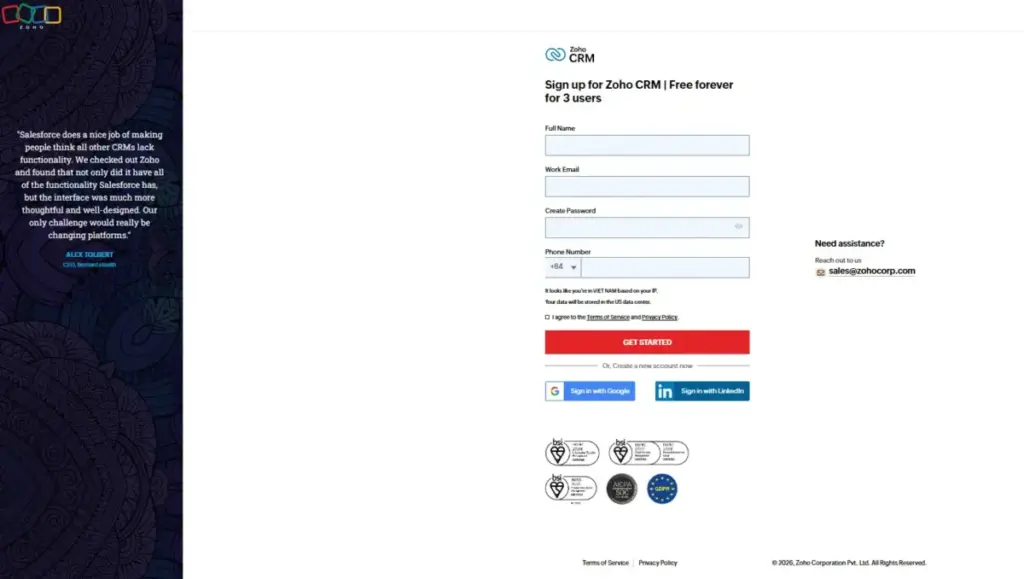
Zoho CRM Free Edition supports up to 3 users at $0 forever. That extra user compared to HubSpot matters for a 3-person sales team that does not want to split the bill on day one.
What you get for free: Leads, deals, workflows, reports, documents, and a mobile app. The Zoho product suite provides migration and support paths if you outgrow the free tier.
Where the ceiling hits: Advanced automation, Zia AI, advanced analytics, and larger teams require paid Zoho CRM editions. Paid USD pricing can be region-sensitive, so verify live pricing before budgeting for upgrades.
Zoho CRM fits the same small-team niche as HubSpot but gives micro sales teams one more free seat. If you want to compare these two directly, the HubSpot vs Zoho CRM comparison breaks down feature gates tier by tier.
Best for: Three-person sales teams moving from spreadsheets to leads, deals, workflows, reports, and mobile CRM.
Avoid if: You need advanced automation, AI-powered insights, or more than 3 free users.
Setup difficulty: Low to Medium. The Zoho interface has a learning curve compared to simpler CRMs, but setup is straightforward for basic contact and deal management.
Verdict: Zoho CRM ranks second because 3 free users plus essential CRM features make it the most practical no-cost option for micro sales teams. The upgrade trigger is the 4th user or advanced automation.
Pricing source: Zoho CRM official pricing page, verified May 2026.
Salesforce Free Suite: Best Free Enterprise On-Ramp
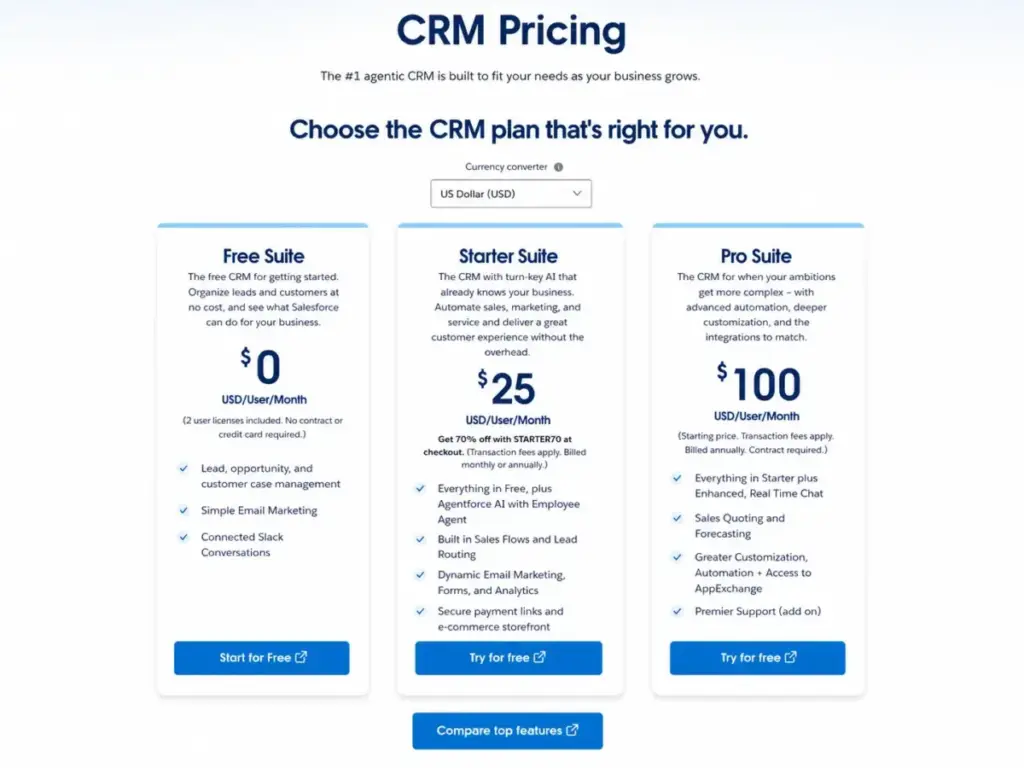
Salesforce Free Suite is $0 USD/user/month with 2 included user licenses, no contract, and no credit card required (as of May 2026). This is not a trial. It is a permanent free plan inside the Salesforce environment.
What you get for free: Lead management, opportunity management, customer case management, simple email marketing, and connected Slack conversations.
Where the ceiling hits: Automation, lead routing, dynamic email marketing, forms, analytics, commerce, and deeper customization all require Starter Suite ($25/user/month) or Pro Suite ($100/user/month billed annually with contract). The free plan is an intentional entry point, not a production-grade CRM for scaling teams.
For teams evaluating Salesforce CRM at scale, the Free Suite lets you experience the platform architecture before committing to a contract.
Best for: Small teams that want a free starting point inside the broader Salesforce platform and AppExchange path if you plan to scale into Salesforce paid tiers.
Avoid if: You want the lightest possible CRM without enterprise platform concepts. Salesforce is heavier than SMB-first CRMs like Capsule or Bigin.
Setup difficulty: Medium. Salesforce’s platform concepts (objects, records, flows) have a steeper learning curve than simpler CRMs, even on the free tier.
Verdict: Salesforce ranks third because it is the strongest free entry into an enterprise CRM platform. The 2-user limit and the Salesforce learning curve make it a better strategic bet than a quick-start tool.
Pricing source: Salesforce official pricing page, verified May 2026.
Best Free CRM Under $10/Month Upgrade Path
These tools have free plans and the lowest-cost upgrade options when you outgrow the free tier.
Freshsales: Best Free CRM for Phone and Chat Basics
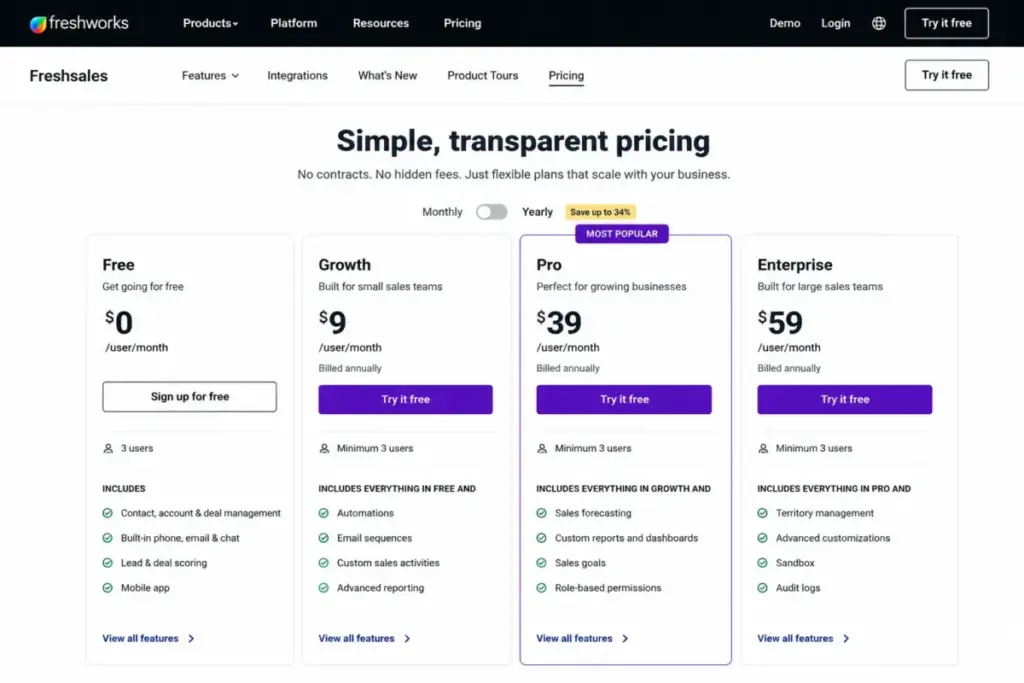
Freshsales offers a free plan at $0 for up to 3 users with Kanban views, email templates, built-in phone, and live chat (as of May 2026). The first paid upgrade, Growth, starts at $9/user/month billed annually.
What you get for free: Kanban views for contacts, accounts, and deals. Contact lifecycle stages. Built-in chat, email, and phone. Email templates. Basic workflows. Mobile app.
Where the ceiling hits: Freddy AI sessions, advanced reporting, custom pipelines, sandbox, permissions, and governance features are reserved for paid tiers (Pro at $39/user/month, Enterprise at $59/user/month billed annually). The free plan is practical for basic pipeline management, but teams that need AI-driven insights or CPQ will outgrow it quickly.
The Freshsales review covers the full feature-to-plan breakdown and where each tier starts adding real value.
Best for: Small sales teams that want free Kanban views, built-in phone, and live chat without paying for a separate communication tool.
Avoid if: You need advanced Freddy AI, advanced reporting, multiple pipelines, or enterprise governance at no cost.
Setup difficulty: Low. Freshsales has a clean onboarding flow and the free plan is usable within minutes.
Verdict: Freshsales ranks fourth because the free plan includes practical communication tools (phone, chat, email) that most free CRMs do not. The $9/user/month Growth upgrade is the cheapest first paid tier on this list.
Pricing source: Freshsales official pricing page, verified May 2026.
EngageBay CRM & Sales Bay: Best Free CRM for Sales Plus Support Basics
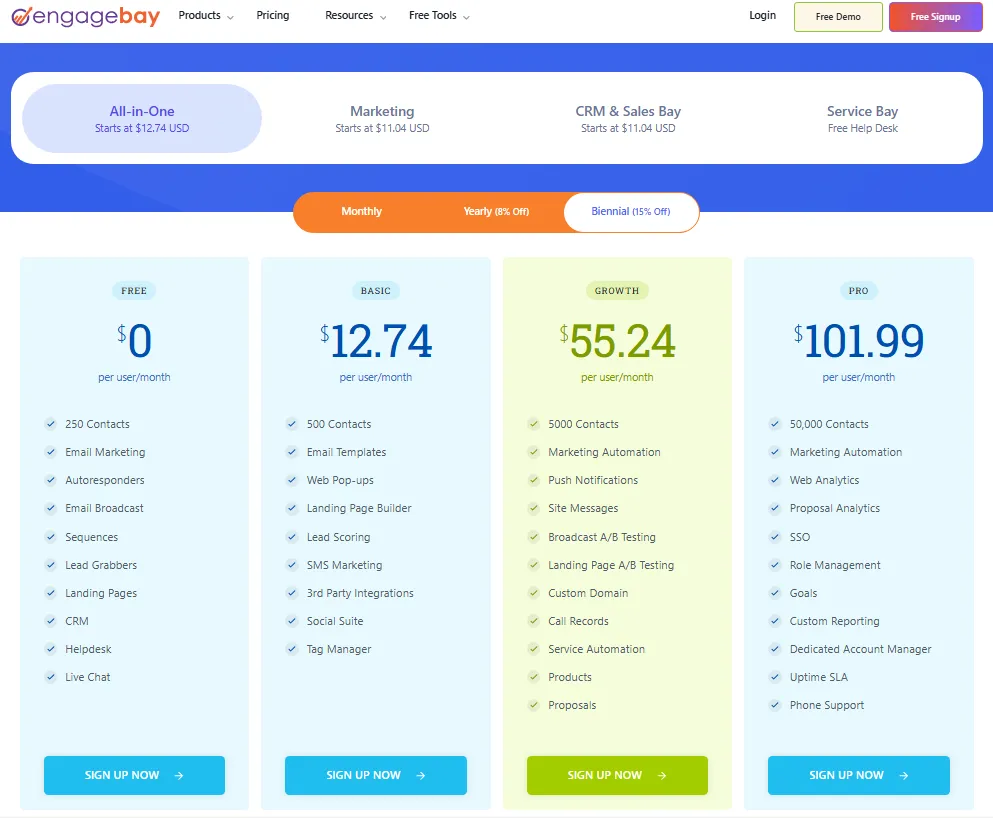
EngageBay’s free plan costs $0/user/month with 250 contacts and companies. Official navigation also describes free access for teams of up to 15 members (as of May 2026). The first paid tier starts at $11.04 USD.
What you get for free: Contact management with 360-degree contact view, deals, tasks, email tracking, appointment scheduling, Gsuite integration, and live chat. Third-party integrations include Zapier, Shopify, SendGrid, Mailgun, and Xero.
Where the ceiling hits: 250 contacts. That is the number. For a solopreneur with a small client list, 250 may last months. For an outbound sales team generating leads weekly, 250 contacts could fill up in weeks. Calling, predictive lead score, proposals, auto dialer, custom reporting, and higher contact limits all require paid tiers.
Best for: Small teams that want contacts, deals, email tracking, appointment scheduling, and live chat with a low upgrade cost.
Avoid if: You have more than 250 contacts or need advanced sales automation on the free tier. The contact cap is the upgrade trigger.
Setup difficulty: Low to Medium. The interface covers sales and service, so there are more features to work through than a pipeline-only CRM.
Verdict: EngageBay ranks fifth because it combines sales and service basics at $0, but the 250-contact cap is the tightest on this list. Budget $11.04/month when you outgrow it.
Pricing source: EngageBay official pricing page, verified May 2026.
Capsule CRM: Best Simple Free CRM
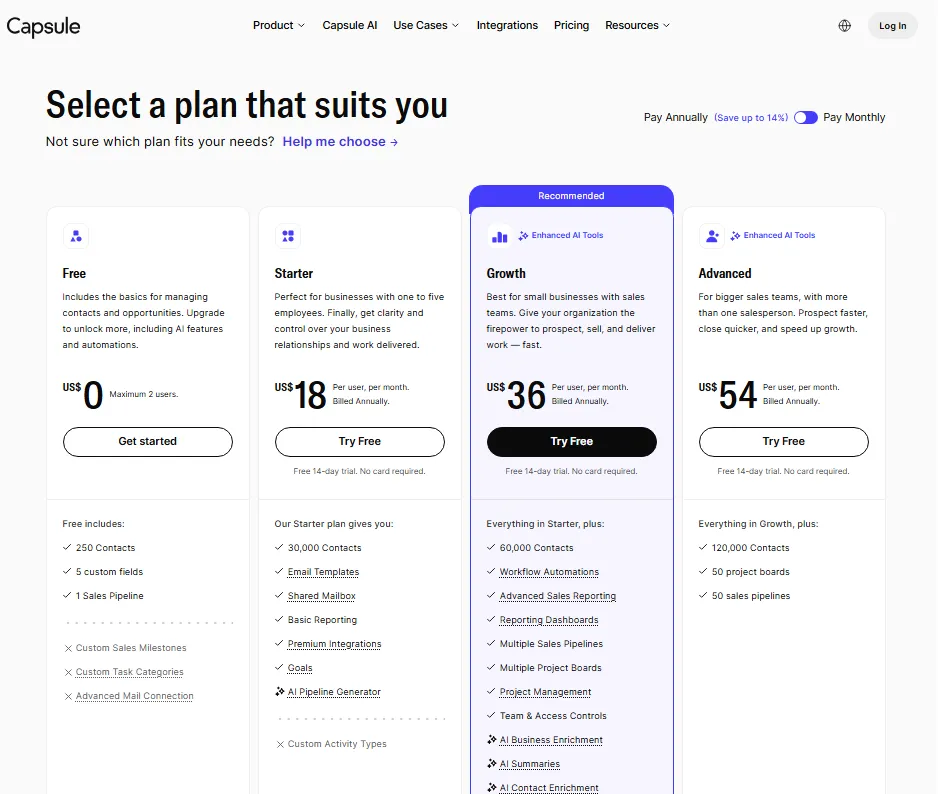
Capsule CRM’s free plan supports a maximum of 2 users, 250 contacts, 5 custom fields, and 1 sales pipeline (as of May 2026). Paid plans offer 14-day trials with no card required. If the 250-contact ceiling or paid automation gate becomes restrictive, compare Capsule CRM alternatives by free-plan limits, upgrade cost, workflow automation, and how quickly a small team will outgrow basic contact tracking.
What you get for free: Contact and opportunity management, custom sales milestones, custom task categories, and Gmail/Outlook mail connection. The interface is intentionally minimal.
Where the ceiling hits: 250 contacts, 5 custom fields, and 1 sales pipeline. AI features, automations, advanced reporting, more contacts, and premium integrations (Xero, Zendesk, Import2) are reserved for paid plans.
Capsule fits the same niche as Bigin by Zoho CRM in the simple pipeline category, but Capsule’s 2-user support gives it an edge for two-person teams.
Best for: Solopreneurs and two-person teams that want a clean, low-friction CRM with minimal setup and no feature overload.
Avoid if: You need generous contact limits, workflow automation, or multiple sales pipelines before paying. The 250-contact and 5-custom-field limits are intentionally narrow.
Setup difficulty: Low. Capsule is one of the fastest CRMs to set up on this list.
Verdict: Capsule ranks sixth because it is one of the clearest, simplest free CRMs available. The trade-off is that the free plan is deliberately narrow to encourage upgrades.
Pricing source: Capsule CRM official pricing page, verified May 2026.
Best Free CRM With Broader Limits
These tools offer higher user caps or record limits, making them viable for slightly larger teams before paying.
Bigin by Zoho CRM: Best Free Pipeline CRM for Solopreneurs
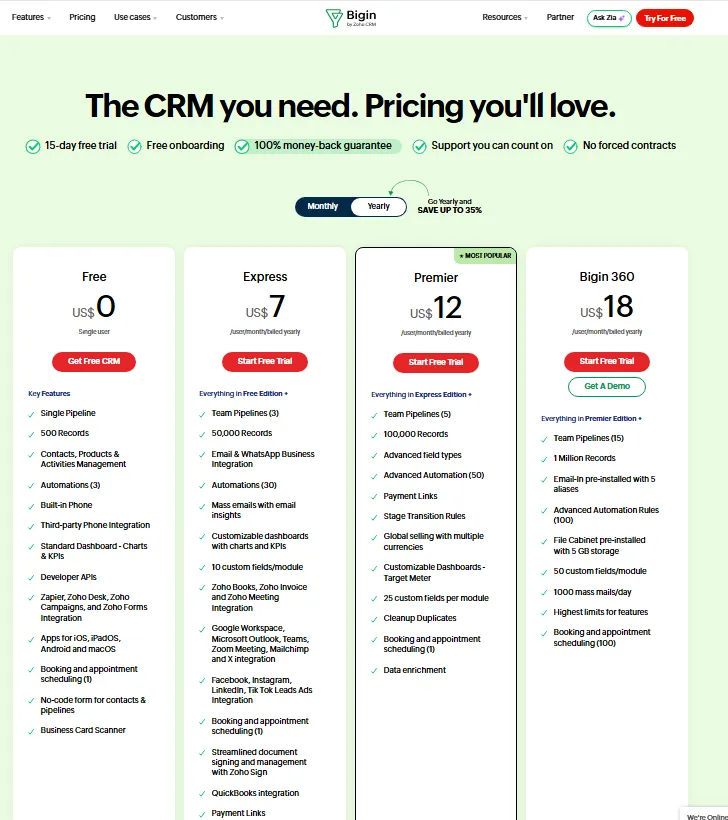
Bigin by Zoho CRM is $0 for a single user with 500 records, one pipeline, and 3 automations (as of May 2026). A 15-day trial is available for paid plans. After the trial, users move to the forever-free plan if they do not upgrade.
What you get for free: A single pipeline, 500 records, contacts, products and activities management, 3 automations, mobile apps, forms, and API access. Integrations include Gmail, Microsoft Outlook, Google Contacts, Google Calendar, Zapier, and Zoho Flow.
Where the ceiling hits: 1 user. If you need a second person on your CRM, you must pay. More users, 50,000+ records, additional automations, email and WhatsApp integration, and more dashboards require paid plans or add-ons.
If you are comparing Bigin to Zoho CRM’s free edition, the Zoho CRM review explains how the two products differ in scope and target audience.
Best for: Solopreneurs who want a polished pipeline CRM inside the Zoho product family without paying.
Avoid if: You are a team of two or more that needs a shared free CRM. Bigin’s free plan is solo-only.
Setup difficulty: Low. Bigin is designed for simplicity and launches faster than full Zoho CRM.
Verdict: Bigin ranks seventh because it is polished for solo pipeline tracking with 500 records and Zoho product family access. The one-user cap makes it narrower than Zoho CRM Free Edition.
Pricing source: Bigin by Zoho CRM official pricing page, verified May 2026.
Bitrix24: Best Free CRM Workspace for Collaboration Basics
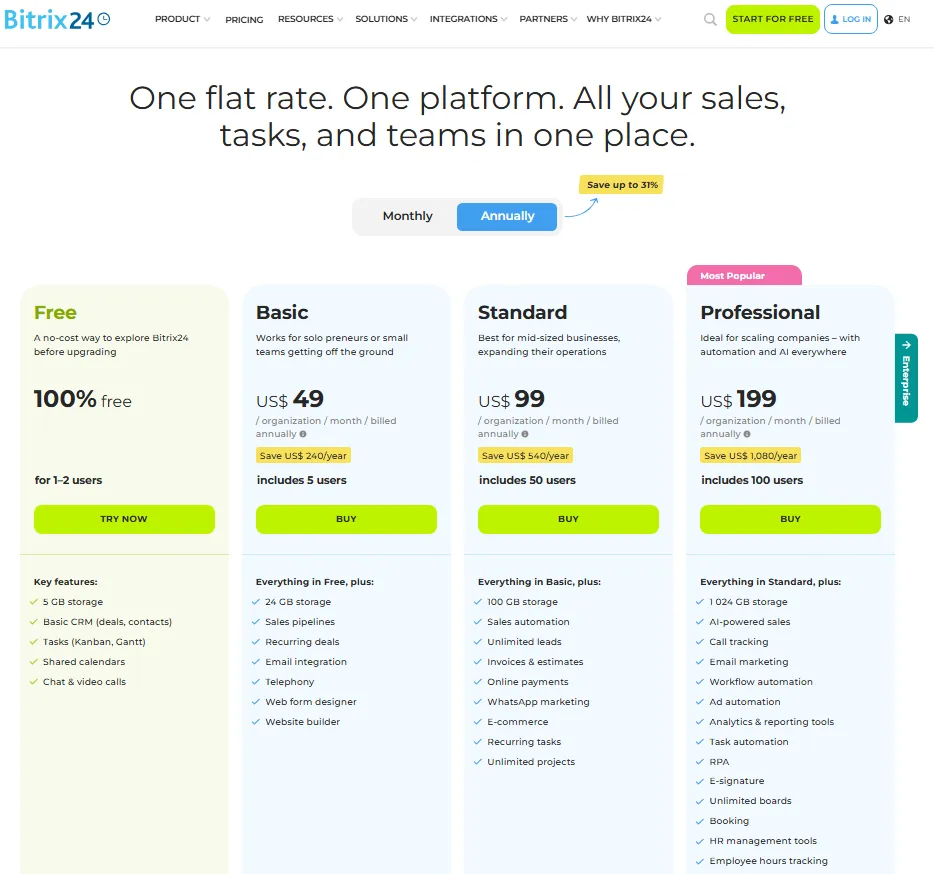
Bitrix24’s current official pricing shows the free plan as 100% free for 1 to 2 users with 5 GB storage (as of May 2026). The Basic paid plan is US$49/month billed annually for 5 users, or US$69/month billed monthly.
Important correction: Many older CRM roundups still list Bitrix24 as “unlimited free users.” The current official pricing page no longer supports that claim. The free plan is 1 to 2 users with 5 GB storage. If you are reading a competitor article that says otherwise, verify directly on the Bitrix24 pricing page.
What you get for free: Basic CRM deals and contacts, tasks, shared calendars, chat and video calls, and workspace tools.
Where the ceiling hits: Teams above 2 users need the Basic plan. The product breadth (CRM + tasks + chat + video + website tools) can add setup complexity even at the free tier.
The Bitrix24 CRM review covers whether the all-in-one workspace model helps or hinders daily CRM workflows.
Best for: One or two-person teams that want CRM plus tasks, calendars, chat, and video calls in one workspace without paying.
Avoid if: You expect unlimited free users (outdated claim) or you want the simplest CRM-only interface. Bitrix24 is a workspace platform, not a lightweight CRM.
Setup difficulty: Medium to High. The feature density means more configuration than a pipeline-only CRM.
Verdict: Bitrix24 ranks eighth because it remains useful as a free workspace CRM, but the current 1 to 2 user cap significantly reduces the free-plan advantage that older reviews still reference.
Pricing source: Bitrix24 official pricing page, verified May 2026.
Vtiger One Pilot: Best Free All-In-One CRM for Tiny Teams
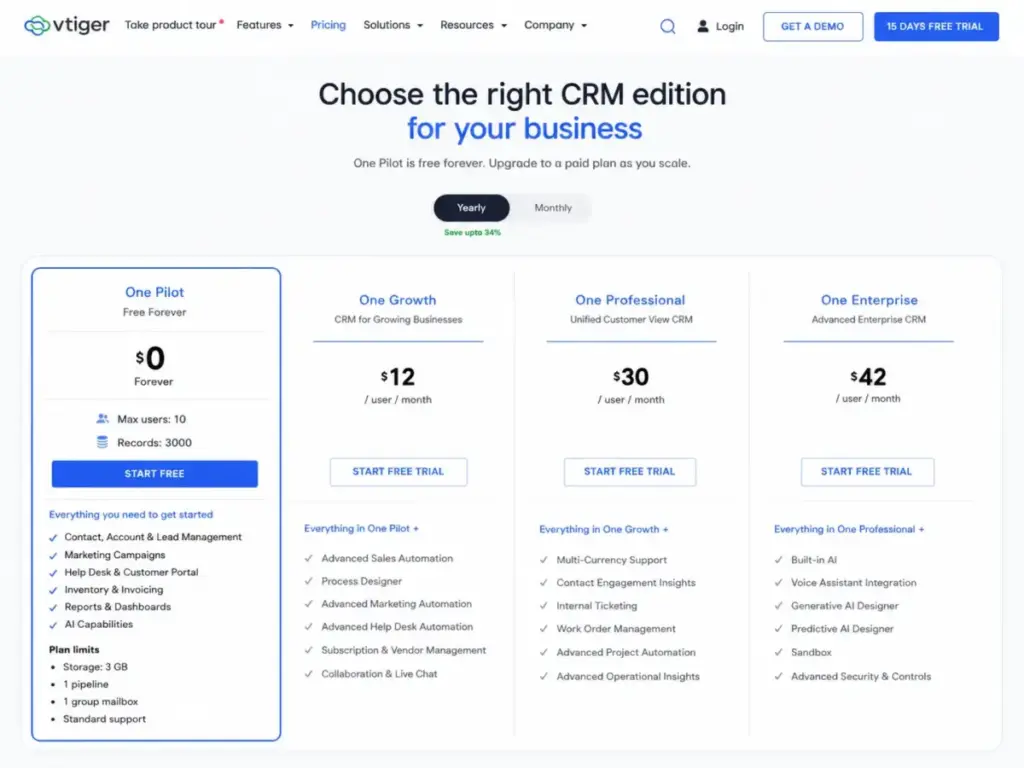
Vtiger One Pilot is $0 forever with a maximum of 10 users, 3,000 records, 3 GB storage, and 1,000 emails per month (as of May 2026). One Growth starts at $12/user/month.
What you get for free: One View (unified contact view), leads, contacts and organizations, email and phone integration, Zoom and Google Meet, sales pipeline, project management, help desk, and a mobile app. Integrations include Google and O365 add-ins.
10 free users is the highest user cap tied to Agile CRM on this list. The 3,000-record limit is reasonable for a small team, but booster packs can add cost if you need to expand specific limits without fully upgrading.
Where the ceiling hits: 3,000 records and 1,000 emails per month. If your team sends 50 emails per day, you hit the monthly email cap in 20 business days. Booster packs provide targeted expansions but are not free.
Best for: Tiny teams (up to 10 people) that want free CRM plus sales, marketing, help desk, project management, and mobile capabilities.
Avoid if: You want the simplest interface or you need no record ceiling. Vtiger’s breadth means more features to configure, and the record/email limits need monitoring.
Setup difficulty: Medium. Vtiger’s all-in-one scope means there are more modules to understand than a pipeline-only CRM.
Verdict: Vtiger ranks ninth because 10 free users with CRM, help desk, and project management is genuinely generous. The record and email limits are the constraints that need the most attention.
Pricing source: Vtiger official pricing page, verified May 2026.
Agile CRM: Best Free Legacy All-In-One CRM
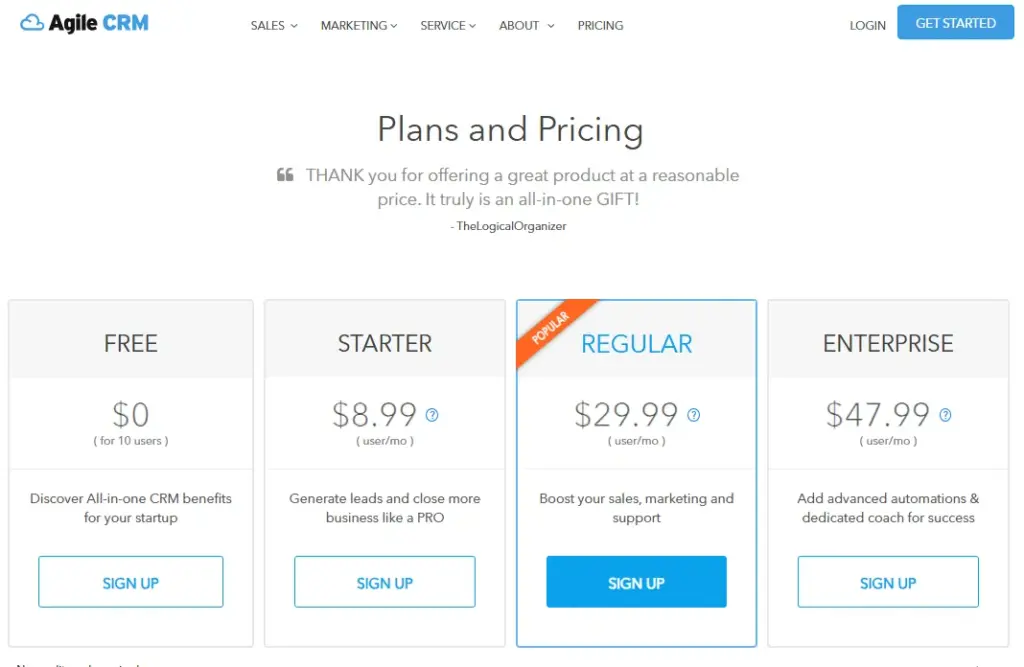
Agile CRM’s free plan supports 10 users with 1,000 contacts and companies, no credit card required (as of May 2026). Starter begins at $8.99/user.
What you get for free: Contact management, lead scoring, unlimited deals/tasks/documents, appointment scheduling, email tracking, campaigns, web-to-lead, helpdesk, and Google Sync. The free plan includes 5,000 branded emails.
Where the ceiling hits: 1 integration, 500 API calls/day, 1 campaign workflow, and 1 automation rule. Those are tight limits. A team that wants to connect Agile CRM to both their email provider and their invoicing tool is already over the integration cap.
The Agile CRM review digs deeper into whether the feature breadth justifies the integration and automation constraints.
Best for: Budget-constrained teams that want sales, marketing, and service basics with a generous free-user cap and are willing to accept tight integration limits.
Avoid if: You want a modern UX, many free integrations, or high API limits. Agile CRM should be framed as a legacy option: the features are functional, but the integration and automation constraints will feel limiting for teams used to modern CRM platforms.
Setup difficulty: Medium. The interface is older and less polished than newer competitors, which adds friction.
Verdict: Agile CRM ranks tenth because the 10-user free cap is generous, but 1 integration, 1 automation rule, and 500 API calls/day are the tightest free-plan constraints on this list.
Pricing source: Agile CRM official pricing page, verified May 2026.
Free-Plan Limits Comparison: The Numbers That Matter
| Tool | Free users | Contact/record limit | Pipelines | Automations | Key constraint |
|---|---|---|---|---|---|
| HubSpot CRM | 2 | 1,000 contacts | Yes | Limited | 2-user cap |
| Zoho CRM | 3 | Not disclosed publicly | Yes | Workflows included | 3-user cap |
| Salesforce Free Suite | 2 | Not disclosed publicly | Yes | Not on free | 2-user cap |
| Freshsales | 3 | Not disclosed publicly | Yes | Basic workflows | 3-user cap |
| EngageBay | Up to 15 | 250 contacts & companies | Yes | Limited | 250-contact cap |
| Capsule CRM | 2 | 250 contacts | 1 | None | 250 contacts, 5 custom fields |
| Bigin by Zoho CRM | 1 | 500 records | 1 | 3 | Solo user only |
| Bitrix24 | 1-2 | Not disclosed publicly | Yes | Limited | 5 GB storage, 2-user cap |
| Vtiger One Pilot | 10 | 3,000 records | Yes | Included | 3,000 records, 1,000 emails/mo |
| Agile CRM | 10 | 1,000 contacts | Yes | 1 rule | 1 integration, 500 API calls/day |
What this means: If your priority is maximum free users, Vtiger One Pilot (10) and Agile CRM (10) win. If your priority is integrations and app selection, HubSpot CRM wins at 2 users. If your priority is a 3-person team at $0, Zoho CRM and Freshsales are the only two options. The “best” free CRM depends entirely on which cap you will hit first.
Pricing verified May 2026. Check each vendor’s official pricing page for current rates, as free-plan limits can change.
First Paid Upgrade: What Each Tool Costs When You Outgrow Free
| Tool | First paid tier | Annual price | What you gain |
|---|---|---|---|
| HubSpot CRM | Varies by hub | Varies by hub + seat packaging | Automation, sequences, reporting, more users |
| Zoho CRM | Verify live | Region-sensitive USD pricing | Advanced automation, Zia AI, analytics |
| Salesforce Free Suite | Starter Suite | $25/user/month | Automation, lead routing, forms, analytics |
| Freshsales | Growth | $9/user/month billed annually | Slack collaboration, more features |
| EngageBay | CRM & Sales Bay | $11.04 USD | Calling, proposals, higher contact limits |
| Capsule CRM | Verify live | Paid plans on pricing page | AI, automations, more contacts, integrations |
| Bigin by Zoho CRM | Verify live | Region-sensitive | More users, records, automations |
| Bitrix24 | Basic | US$49/month billed annually (5 users) | 5 users, more storage, broader CRM |
| Vtiger One Pilot | One Growth | $12/user/month billed annually | More records, emails, advanced features |
| Agile CRM | Starter | $8.99/user | More integrations, automation rules, API calls |
What this means: Freshsales ($9/user/month) and Agile CRM ($8.99/user) have the lowest first paid upgrades. Salesforce ($25/user/month) and Bitrix24 ($49/month flat) represent the steeper jumps. For teams planning their first budget, estimate your team size at 6 months and calculate the paid cost at that headcount, not today’s headcount.
Feature Gate Comparison: What the Free Plan Actually Includes
| Tool | Pipeline mgmt | Email tracking | Automation | Reporting | AI features | Mobile app |
|---|---|---|---|---|---|---|
| HubSpot CRM | ✅ Free | ✅ Free | ❌ Paid | ❌ Paid | ❌ Paid | ✅ Free |
| Zoho CRM | ✅ Free | ✅ Free | ✅ Workflows | ✅ Reports | ❌ Paid | ✅ Free |
| Salesforce Free Suite | ✅ Free | ✅ Free | ❌ Paid | ❌ Paid | ❌ Paid | Not confirmed on free plan |
| Freshsales | ✅ Free | ✅ Free | ✅ Basic | ❌ Paid | ❌ Paid | ✅ Free |
| EngageBay | ✅ Free | ✅ Free | ❌ Paid | ❌ Paid | ❌ Paid | Not confirmed on free plan |
| Capsule CRM | ✅ Free (1) | ✅ Free | ❌ Paid | ❌ Paid | ❌ Paid | Not confirmed on free plan |
| Bigin | ✅ Free (1) | Not confirmed on free plan | ✅ 3 rules | Not confirmed on free plan | ❌ Paid | ✅ Free |
| Bitrix24 | ✅ Free | Not confirmed on free plan | ❌ Paid | ❌ Paid | ❌ Paid | Not confirmed on free plan |
| Vtiger One Pilot | ✅ Free | ✅ Free | ✅ Included | ✅ Included | ❌ Paid | ✅ Free |
| Agile CRM | ✅ Free | ✅ Free | ✅ 1 rule | ❌ Paid | ❌ Paid | Not confirmed on free plan |
What this means: If you need automation on the free plan, Zoho CRM, Freshsales, Bigin, and Vtiger One Pilot include it at some level. HubSpot, Salesforce, Capsule, and Bitrix24 lock automation behind paid tiers. Agile CRM technically includes 1 automation rule, but a single rule is barely functional for real workflows.
Setup and Migration Difficulty
| Tool | Setup difficulty | Why |
|---|---|---|
| HubSpot CRM | Low | Self-serve onboarding, intuitive UI, templates available |
| Zoho CRM | Low-Medium | Clean setup, but Zoho interface has a learning curve |
| Salesforce Free Suite | Medium | Platform concepts (objects, records, flows) add complexity |
| Freshsales | Low | Fast onboarding, minimal configuration needed |
| EngageBay | Low-Medium | Sales + service scope means more features to work through |
| Capsule CRM | Low | Fastest setup on this list, minimal feature surface |
| Bigin by Zoho CRM | Low | Designed for simplicity, single pipeline focus |
| Bitrix24 | Medium-High | Workspace breadth adds configuration overhead |
| Vtiger One Pilot | Medium | All-in-one scope means more modules to understand |
| Agile CRM | Medium | Older interface, less polished onboarding |
Which Free CRM Should You Avoid?
No free CRM is bad in absolute terms. But some are bad for specific buyers.
Avoid Salesforce Free Suite if you want the simplest possible CRM. Salesforce is built for enterprise scale, and even the free tier carries enterprise-level concepts. If you are a solopreneur who wants to manage 50 contacts and 10 deals, Capsule or Bigin will get you running in 5 minutes.
Avoid Agile CRM if you need more than 1 integration. A CRM that cannot connect to both your email tool and your invoicing software is a CRM that creates data silos. The 10-user cap looks generous until you realize the 1-integration limit makes it hard to build a connected sales stack. If that integration ceiling blocks your workflow, evaluate Agile CRM alternatives by free-plan limits, integration depth, automation rules, and first paid upgrade cost.
Avoid Bitrix24 if you read an older review claiming “unlimited free users.” The current official pricing page shows 1 to 2 free users with 5 GB storage. Build your evaluation on current data, not cached claims. If the updated 1-2 user limit or workspace-heavy interface changes your shortlist, compare Bitrix24 alternatives by free-plan limits, CRM simplicity, storage capacity, and upgrade cost.
Avoid EngageBay if you have more than 250 contacts. The 250-contact cap means an outbound sales team could fill the free plan in 2 to 4 weeks. Check whether the upgrade cost fits your budget before investing setup time.
How to Choose the Right Free CRM Software
Start with these questions:
- How many users need access today? If more than 3, only Vtiger One Pilot and Agile CRM support that on a free plan. Everyone else caps at 1 to 3.
- How many contacts or records do you have? If over 1,000, HubSpot’s free plan is not enough. If over 3,000, even Vtiger One Pilot’s free plan is tight.
- Do you need automation on the free tier? If yes, narrow your options to Zoho CRM, Freshsales, Bigin, or Vtiger One Pilot.
- Do you need integrations beyond email? If yes, avoid Agile CRM (1 integration) and verify integration availability on every free plan.
- How complex is your sales pipeline? Single pipeline tools like Capsule and Bigin work for simple sales processes. Multi-stage, multi-pipeline workflows need HubSpot or Zoho CRM’s paid tiers.
- What is your 6-month team growth plan? If you expect to add 2 to 3 users in 6 months, pick a CRM whose first paid tier fits your budget at that headcount.
- Do you need CRM only, or CRM plus support/marketing? If you want all-in-one, EngageBay, Vtiger, and Bitrix24 cover more ground. If you want CRM-only simplicity, Capsule or Bigin are cleaner choices.
Common Mistakes When Choosing Free CRM Software
- Choosing by user cap alone. Agile CRM gives you 10 users, but 1 integration and 1 automation rule may cost you more in workarounds than a $9/user/month upgrade on Freshsales.
- Ignoring the contact/record ceiling. A 250-contact limit (EngageBay, Capsule) fills quickly for outbound teams. Calculate your monthly lead volume before committing.
- Assuming free means no cost. Setup time, data entry, and learning curves are real costs. A CRM that takes 3 weeks to configure is not free, it is a time investment.
- Relying on outdated reviews. Bitrix24 no longer offers unlimited free users. Insightly no longer has a publicly available free plan. Always verify directly on the official pricing page.
- Skipping the upgrade path. The best free CRM is the one you can afford to upgrade. If HubSpot’s paid tiers are outside your budget, starting on HubSpot Free and migrating later costs more than starting on Zoho CRM Free from day one.
- Not testing with real data. Import 50 contacts, create 10 deals, and run your actual workflow for a week before committing. Free plans exist so you can test without risk.
- Choosing the tool with the most features. Feature count is not the same as feature fit. A solopreneur does not need Vtiger’s help desk module or Bitrix24’s website builder. Extra features add clutter without adding value.
Final Verdict: Best Free CRM for Most Teams
HubSpot CRM is the best overall free CRM for 2026. The 2-user and 1,000-contact limits are real constraints, but the feature set, integration network, and upgrade path make it the safest starting point for US startups and small businesses.
By buyer type:
- Best for 3-person sales teams: Zoho CRM. The extra free user matters.
- Best for solopreneurs: Bigin by Zoho CRM. Clean, fast, solo pipeline focus.
- Best simple CRM: Capsule CRM. Least friction, least complexity.
- Best for enterprise path: Salesforce Free Suite. Start free, scale into Salesforce paid tiers.
- Best for built-in communication: Freshsales. Free phone, chat, and email in one tool.
- Best for teams of 5-10 at $0: Vtiger One Pilot. 10 users, CRM + help desk + projects.
- Best budget upgrade: Freshsales Growth at $9/user/month or Agile CRM Starter at $8.99/user.
The right free CRM is not the one with the most features. It is the one whose free-plan ceiling you will not hit before your revenue justifies the upgrade. For a broader view of paid and free CRM options, see our full best CRM for small business ranking.
If you are specifically looking at CRM tools for freelancers, several of these free plans work well for solo operators managing client relationships. And for teams evaluating CRM for startups, the free plan is often the right place to validate whether a CRM fits your sales process before budgeting for a paid tier.
FAQ
What is the best free CRM software overall?
HubSpot CRM is the best free CRM for most teams in 2026. It offers 2 users, 1,000 contacts, email tracking, meeting scheduling, and the largest integration marketplace at $0 with no expiration date.
What is the best free CRM for small businesses?
For small businesses with up to 3 team members, Zoho CRM Free Edition is the strongest option. It includes leads, deals, workflows, reports, and a mobile app for 3 users at no cost.
Is there a truly free CRM with no time limit?
Yes. All 10 tools on this list offer permanent free plans, not time-limited trials. HubSpot CRM, Zoho CRM, Salesforce Free Suite, Freshsales, EngageBay, Capsule, Bigin, Bitrix24, Vtiger One Pilot, and Agile CRM each have a forever-free tier with documented user and feature limits.
Which free CRM supports the most users?
Vtiger One Pilot and Agile CRM both support up to 10 free users. Vtiger includes 3,000 records, while Agile CRM is limited to 1,000 contacts and 1 integration.
How much does CRM software cost after the free plan?
First paid tiers range from $8.99/user/month (Agile CRM Starter) to $49/month for 5 users (Bitrix24 Basic). Freshsales Growth at $9/user/month and Vtiger One Growth at $12/user/month billed annually represent the lowest per-user upgrade costs.
Can I use a free CRM for my startup?
Yes, if your team is 1 to 3 people and your contact list is under 1,000. HubSpot CRM (2 users, 1,000 contacts) and Zoho CRM (3 users) are the most commonly used free CRMs by US startups. Plan your upgrade budget for when you exceed those limits.
What features are usually locked on free CRM plans?
Advanced automation, AI-powered insights, custom reporting, multiple pipelines, role-based permissions, and premium integrations are the most commonly gated features across free CRM plans. Pipeline management, basic contact tracking, and email features are usually included.
Should I pick a free CRM with the most features?
No. Pick the free CRM whose limits match your team size, contact volume, and workflow. A feature-rich CRM you do not fully use adds setup complexity without adding value. Start simple and upgrade when your process demands it.
Pricing and free-plan details verified as of May 2026 from official product and pricing pages. Free-plan limits can change. Check each vendor’s official pricing page for current rates.