HubSpot CRM costs $0 for two users and 1,000 contacts. That is enough for most freelancers to manage a pipeline without paying a dollar. The problem starts when you need proposals, contracts, invoices, and payment collection inside the same system, because HubSpot does not do that natively.
That tension defines the best CRM for freelancers in 2026: standalone pipeline CRM versus all-in-one clientflow system. Most roundup articles on the best CRM software treat freelancers like small businesses with fewer employees. They are not. A freelancer needs a tool that handles lead capture, follow-up, proposal, invoice, and repeat work without bolting on five separate apps. A 50-person sales team needs Salesforce. A solo consultant does not.
This evaluation is based on independent editorial research, analyzing official product documentation, feature specifications, pricing pages, and verified customer feedback. Pricing verified in May 2026. I did not rank tools by brand popularity or affiliate payout.
I analyzed 30 CRM and clientflow products and narrowed the list to 10 that match real freelancer workflows. The ranking weighs pricing value (20%), core feature depth (20%), ease of use (15%), integrations (15%), scalability (15%), and freelancer workflow fit (15%).
Best CRM for Freelancers by Use Case
| Use case | Best pick | Why it fits |
|---|---|---|
| Best overall free-to-scale CRM | HubSpot CRM | Free for 2 users and 1,000 contacts with growth path |
| Best sales pipeline CRM | Pipedrive | Clearest pipeline UI for consultative freelance selling |
| Best low-cost customizable CRM | Zoho CRM | Free for 3 users with broad customization |
| Best for built-in outreach | Freshsales | Free plan plus built-in phone, email, and chat |
| Best clientflow CRM for creatives | HoneyBook | Proposals, contracts, invoices, and scheduling in one place |
| Best for packaged freelance services | Bonsai | CRM plus service library, contracts, and billing |
| Best freelance operating system | Moxie | One workspace: CRM, invoicing, time tracking, accounting |
| Simplest flat-price CRM | Less Annoying CRM | $15/user/month, no tiers, no contracts |
| Best lightweight relationship CRM | Capsule CRM | Clean contact management with accounting integrations |
| Best Gmail-native CRM | Streak CRM | Pipeline, mail merge, and email tracking inside Gmail |
What this means: if you sell services that require proposals, contracts, and invoices, look at HoneyBook, Bonsai, or Moxie first. If you need a traditional sales pipeline with deal stages and forecasting, start with HubSpot CRM (free) or Pipedrive (paid). Budget is the deciding variable, not the feature count on a comparison page.
How We Chose and Ranked These CRM Tools
I evaluated 30 CRM and client management products against six weighted criteria:
- Pricing value (20%): Starting price, free plan availability, free trial, annual versus monthly spread, minimum seats, and hidden costs.
- Core feature depth (20%): Contact management, lead capture, pipelines, follow-ups, proposals, contracts, invoices, automations, and reports.
- Ease of use (15%): Solo onboarding, UI simplicity, setup time, learning curve, and inbox fit.
- Integrations (15%): Native integrations, Google and Microsoft email, accounting, payments, Zapier, Make, and public API.
- Scalability (15%): Team controls, user roles, advanced reporting, security, permissions, and higher-tier growth path.
- User fit (15%): Best-for specificity, not-best-for clarity, plan caveat severity, and freelancer workflow match.
Data sources include official product websites, official pricing pages, official help documentation, and verified third-party analysis. I did not test each tool with a live multi-week freelance deployment. Specific workflow behaviors and credit consumption should be confirmed directly with each vendor.
Review limitation: This evaluation is based on official pricing, public product documentation, and verified user sentiment. I did not run a live deployment of each CRM with active freelance clients, so onboarding time and real-world workflow performance should be verified with each vendor directly.
Free Tier Champions
HubSpot CRM: Best Overall Free-to-Scale CRM

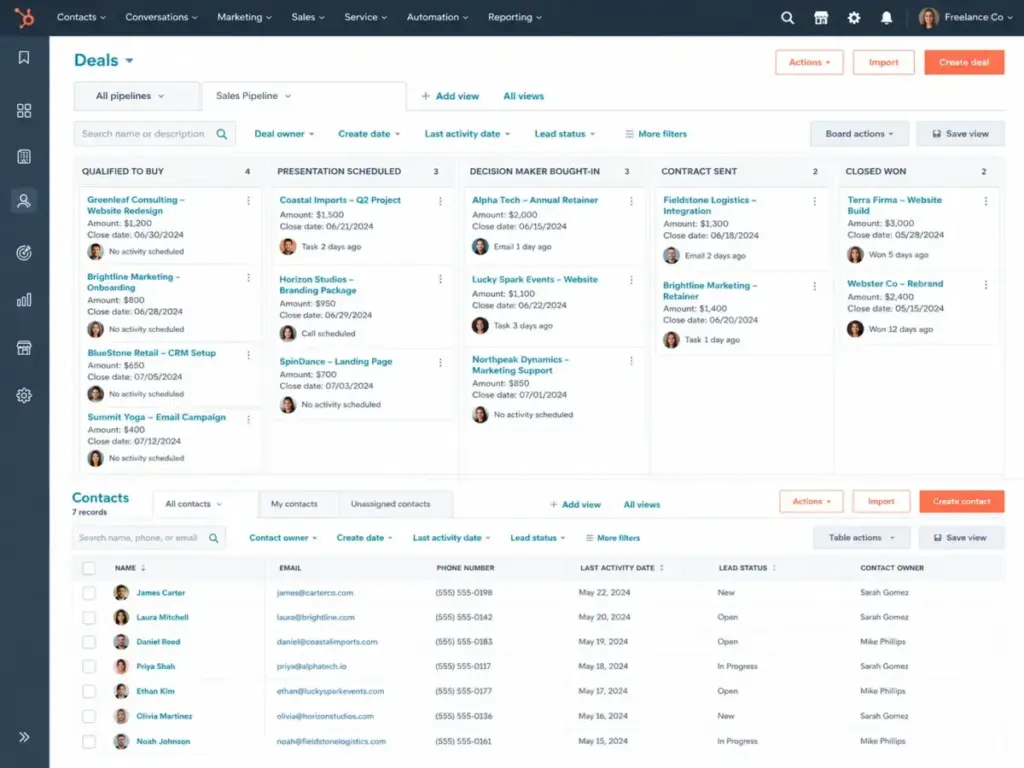
HubSpot CRM gives freelancers a free CRM with up to two users and 1,000 contacts (as confirmed on HubSpot’s CRM product page). That is a real free tier, not a 14-day trial.
The free plan includes contact management, deal pipelines, a reporting dashboard, CRM import, and the Breeze Assistant beta. For a freelancer tracking 50 to 200 active contacts, the free tier handles day-to-day pipeline work without hitting a paywall.
Where it falls short: HubSpot is a platform CRM, not a freelancer clientflow tool. Proposals, contracts, invoices, and payment collection are not native features. Paid hubs, additional seats, marketing contacts, automation, custom reporting, onboarding, and advanced sales tools add cost quickly once you outgrow the free tier. HubSpot’s pricing page shows Starter pricing, but the exact amount varies by hub and promotion, so check the live page before budgeting.
I keep coming back to this gap: HubSpot is the strongest free starting point, but the moment you need client-facing documents, you are adding HoneyBook or Bonsai alongside it.
Best for: Freelancers who want a free CRM with a path to marketing, sales, service, content, and commerce tools later.
Avoid if: You need built-in proposals, contracts, invoices, and payment collection without separate tools or paid add-ons.
Setup difficulty: Low. Free signup, no credit card.
Verdict: Start here if you want CRM depth for $0 and plan to add clientflow tools separately.
Zoho CRM: Best Low-Cost Customizable CRM

Zoho CRM offers a Free Edition for 3 users, confirmed on Zoho CRM’s pricing page. The Standard plan is commonly listed around $14/user/month billed annually, though regional pricing can display differently.
Zoho gives freelancers more customization than any other free CRM on this list. Leads, deals, workflows, reports, mobile app, forecasting, scoring, dashboards, and Zoho Marketplace integrations are all available. The Zoho ecosystem (Desk, Campaigns, Forms, Google Workspace, Slack) extends the CRM without third-party glue.
The tradeoff: Zoho CRM is more configurable than most freelancers need. If you dislike setting up modules, fields, automations, and integrations, this is not the simplest option. Advanced AI, portals, analytics, and higher automation limits require paid tiers.
Best for: Freelancers who want affordable customization, Zoho app ecosystem integration, and a path from solo CRM to small business CRM.
Avoid if: You want the simplest possible setup or dislike configuring modules and workflows.
Setup difficulty: Medium. Powerful but requires configuration.
Verdict: Choose Zoho CRM if you want a free CRM with broad customization and do not mind spending time on initial setup.
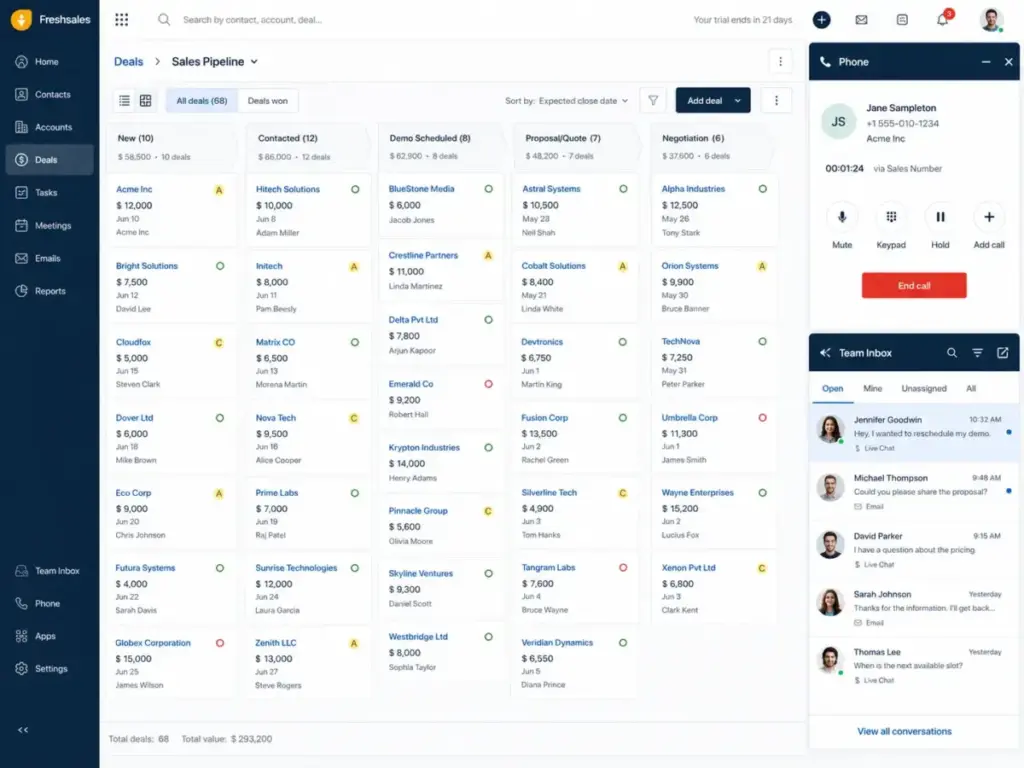
Freshsales: Best CRM for Built-In Outreach

Freshsales has a free plan and paid plans starting from $9 USD, according to Freshsales’ official pricing page. A free trial is also available.
Freshsales stands out for freelancers who generate leads through outbound outreach. The CRM includes built-in email, phone, live chat, contact and account management, Kanban views, email templates, and AI-assisted CRM workflows. That is a lot of outreach infrastructure for $9/month.
The catch: CPQ, AI session packs, and phone usage add cost. The third-party app ecosystem is narrower than HubSpot’s. Some lead generation and AI features are plan-gated.
Best for: Freelancers who want CRM plus built-in email, phone, chat, lead capture, and AI-assisted sales workflows.
Avoid if: You need a broad app marketplace or a full proposal-contract-invoice platform.
Setup difficulty: Low to Medium.
Verdict: Choose Freshsales if outbound outreach is your primary client acquisition channel and you want phone, email, and chat inside the CRM.
Best Under $25/Month
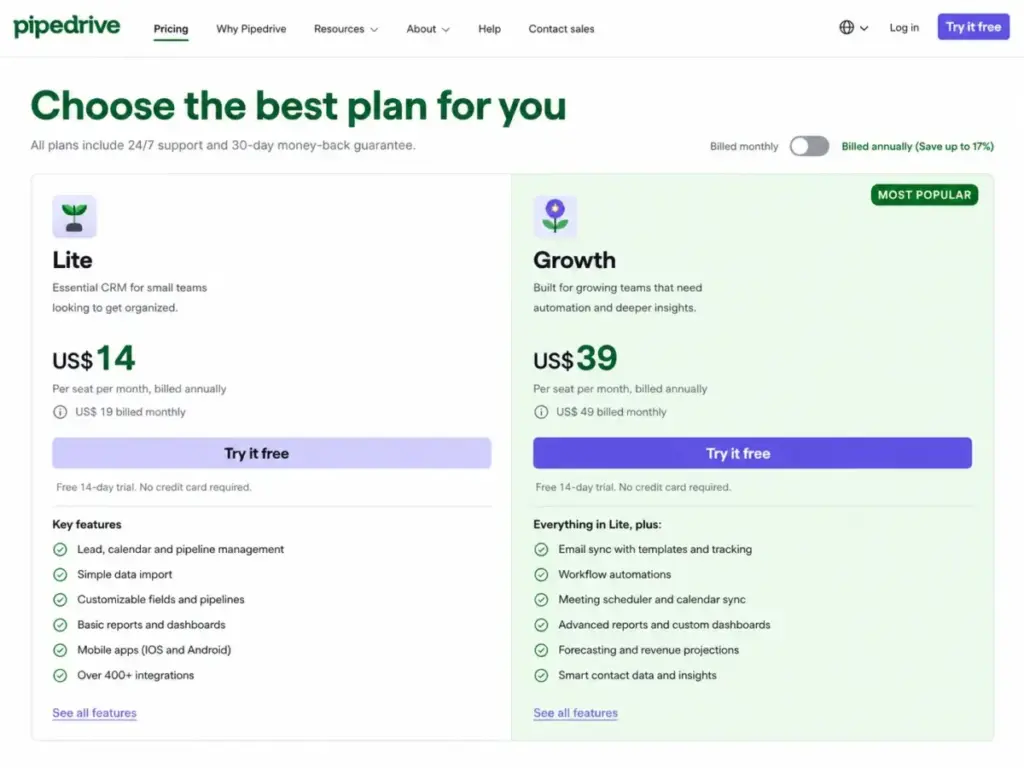
Pipedrive: Best Sales Pipeline CRM

Pipedrive starts at $14 per seat/month billed annually for the Lite plan, with no permanent free plan. A 14-day trial is available. These figures come from Pipedrive’s official pricing page.
Pipedrive is the CRM I recommend when a freelancer’s primary workflow is consultative selling with multiple deal stages. Lead, deal, contact, and calendar management work together. Email sync, automations, meeting scheduler, forecast reports, and AI reports unlock on Growth ($39/seat/month billed annually) and higher.
The Lite plan is affordable but limited. Email sync and automation require the Growth plan. That pushes the practical entry point to $39/seat/month for freelancers who need email tracking and follow-up automation.
I suspect most freelancers doing 10+ active deals per month will outgrow Lite within the first quarter. The pipeline UI is the best in this list, but the feature gates between Lite and Growth are where Pipedrive makes its money.
Best for: Freelance consultants and service providers with active sales pipelines, follow-ups, and deal-stage tracking.
Avoid if: You need native contracts, invoices, client portals, and payment workflows inside the CRM.
Setup difficulty: Low. Clear onboarding, quick pipeline setup.
Verdict: Read the Pipedrive review if your freelance business runs on deal stages and pipeline velocity.
Moxie: Best Freelance Operating System

Moxie starts at $10/month billed annually or $12/month monthly for the Starter plan, with a 14-day free trial. Pricing is confirmed on Moxie’s official pricing page.
Moxie is built specifically for freelancers. One workspace handles CRM, projects, invoices and payments, proposals and contracts, time tracking, sales pipeline, basic accounting, universal calendar, and inbox. The Pro plan ($20/month billed annually) adds API integrations, Zapier, Make, Webhooks, Public API, and QuickBooks.
The honest assessment: Starter is affordable but gates many of the features that make Moxie a complete operating system. White-label portal, automations, communicator line, Zapier, Make, Webhooks, Public API, and QuickBooks all require Pro or higher. Teams is needed for full small-agency access (up to five team members at $32/month billed annually).
Best for: Freelancers who want one workspace for CRM, projects, invoices, proposals, contracts, time tracking, accounting basics, calendar, inbox, and AI assistant.
Avoid if: You want CRM only, or you need white-label portal, automations, QuickBooks, and API integrations on the cheapest plan.
Setup difficulty: Low. Designed for solo operators.
Verdict: Choose Moxie if you want a single tool instead of assembling five apps. Budget for Pro if you need integrations and automations.
Less Annoying CRM: Simplest Flat-Price CRM

Less Annoying CRM costs $15/user/month after a 30-day free trial. No tiers, no contracts, no additional fees. This comes from Less Annoying CRM’s official help page. No annual discount exists.
This is the CRM for freelancers who hate software complexity. Contact management, simple pipeline, task tracking, calendar, and follow-up workflows. That is the entire product. No AI upsell, no advanced reporting tier, no plan gates.
The limitation is straightforward: lightweight feature set compared with HubSpot, Zoho, Pipedrive, and the clientflow tools. No proposals, invoices, marketing automation, or deep analytics. No permanent free plan.
Does that matter? For a freelancer managing 30 to 100 contacts with a simple follow-up cadence, Less Annoying CRM does exactly what you need without the overhead of learning a larger platform. I am not fully convinced it scales past 200 active contacts, but for the solo operator who wants to track clients and tasks without friction, the $15/month is fair.
Best for: Freelancers who want simple contact, pipeline, task, and follow-up management without plan complexity.
Avoid if: You need built-in proposals, invoices, advanced marketing automation, AI, or deep analytics.
Setup difficulty: Low. Minimal configuration.
Verdict: Choose Less Annoying CRM if software bloat is your primary frustration.
Bonsai: Best CRM for Packaged Freelance Services

Bonsai starts at $15/month for Basic or $9/month if paid annually, with a 7-day free trial. Pricing is confirmed on Bonsai’s official pricing page. Essentials is $25/month ($19 annually), Premium is $39/month ($29 annually), and Elite is $59/month ($49 annually).
Bonsai is designed for freelancers who sell packaged services and need CRM, service library, contracts, proposals, forms, scheduling, deals pipeline, custom client fields, and a client portal in one place. The service library feature lets you define and price your offerings, which speeds up proposal creation.
The pricing math matters here. A freelancer on Basic gets CRM and documents. A freelancer on Essentials gets the features most operators actually need. Premium adds client portals and advanced controls. Elite adds multi-user support.
Some features are gated by plan. Custom-domain-related features are marked as expected in 2026 but not confirmed current. Payment processing fees vary. Branding, domain, and advanced client features are tier-gated.
Best for: Freelancers selling packaged services who want CRM, proposals, contracts, billing, forms, scheduling, and client portal support.
Avoid if: You need a classic sales-team CRM with deep forecasting and a large app marketplace.
Setup difficulty: Low to Medium.
Verdict: Choose Bonsai if your freelance business revolves around service packages and client-facing documents.
Best for $25-100/Month
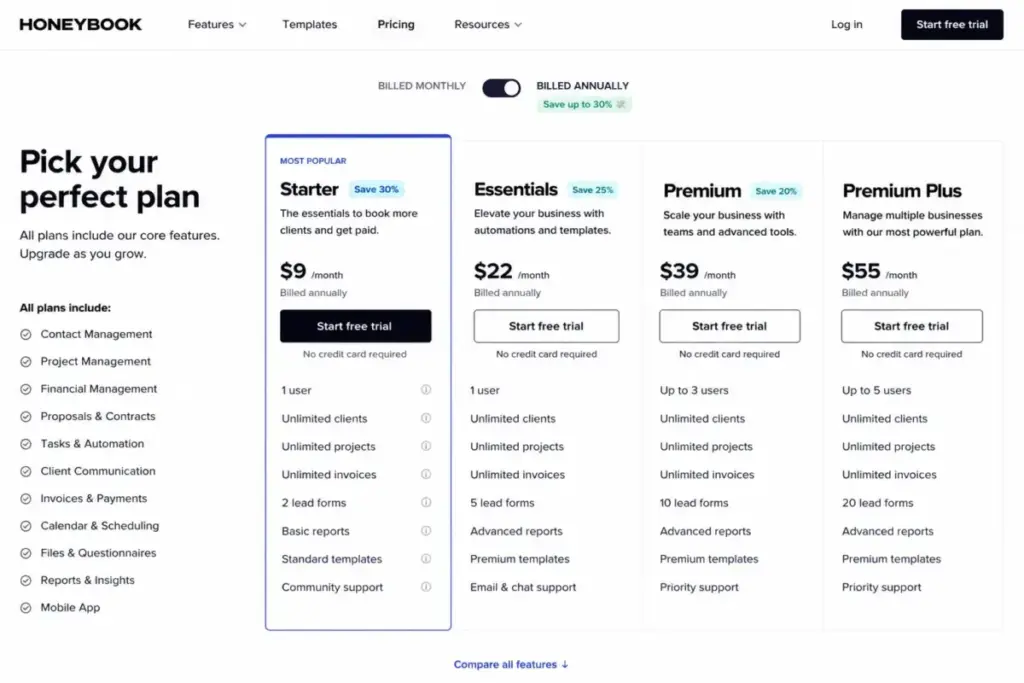
HoneyBook: Best Clientflow CRM for Creatives

HoneyBook starts at $29/month billed yearly for the Starter plan. All plans start with a free trial. Pricing is confirmed on HoneyBook’s official pricing page.
HoneyBook combines unlimited clients and projects, invoices and payments, proposals and contracts, calendar, templates, client portal, and HoneyBook AI into a single clientflow system. For creative freelancers, coaches, consultants, event professionals, and service businesses, this eliminates the need to stitch together CRM, invoicing, scheduling, and contract tools.
Starter includes unlimited clients and projects but limits live lead forms to 2. Higher plans expand lead forms and team features. Payment processing fees, automations, QuickBooks Online, SMS reminders, support, and team features are tier-gated.
I almost missed the lead form limit on Starter. If you run more than two intake forms (say, one for inquiries and one for bookings), you hit that cap immediately. Most freelancers generating leads from multiple channels will need the next tier.
Best for: Creative freelancers, coaches, consultants, event professionals, and service businesses that want proposals, contracts, invoices, scheduling, and client portals together.
Avoid if: You only need a lightweight contact database or classic sales pipeline reporting.
Setup difficulty: Low. Template-driven, visual onboarding.
Verdict: Choose HoneyBook if you want to replace 3 to 4 separate tools with one clientflow system.
Capsule CRM: Best Lightweight Relationship CRM

Capsule CRM offers a free plan with 2 users and 250 contacts. Starter is commonly listed at $18/user/month billed annually ($21 monthly), with a 14-day trial. These figures are supported by public pricing materials and confirmed via Capsule’s signup page.
Capsule focuses on contact management, sales pipelines, project boards, custom fields, email templates, shared mailbox, and activity reporting. AI assists are available on paid tiers. Integrations include Google Workspace, Microsoft 365, Xero, QuickBooks, Mailchimp, and Zapier. Freelancers who need more automation, deeper reporting, or broader client workflow coverage should compare Capsule CRM alternatives by accounting integration, contact limits, pipeline depth, and the cost of adding tools around Capsule.
The free plan is limited to 250 contacts, which fills up fast for an active freelancer. Starter bumps that to 30,000 contacts. Automation, advanced reports, AI enrichment, higher contact limits, and email marketing require higher tiers.
Best for: Freelancers who rely on referrals, relationship tracking, simple pipelines, task follow-up, and accounting or marketing integrations.
Avoid if: You need deep marketing automation, heavy outbound sequences, or large-scale enterprise customization.
Setup difficulty: Low.
Verdict: Choose Capsule CRM if relationship management and accounting integration are your priorities.
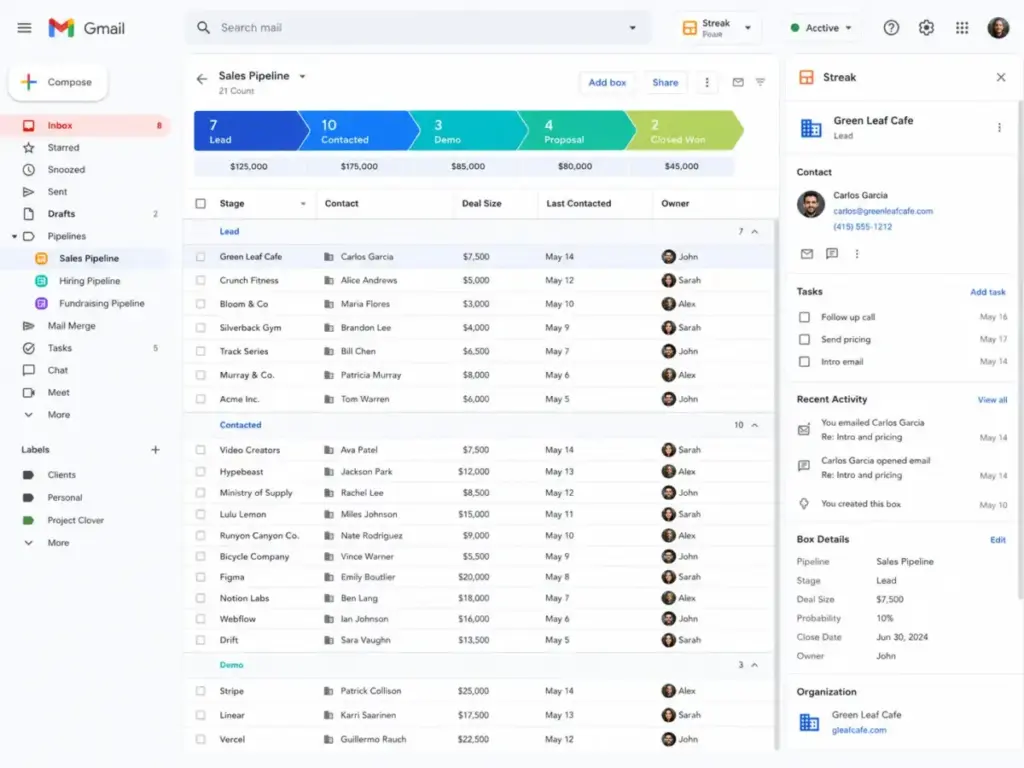
Streak CRM: Best Gmail-Native CRM

Streak CRM Pro starts at $49/user/month billed annually or $59/user/month monthly. Pro+ is $69/$89, and Enterprise is $129/$159. A Pro+ 14-day free trial is available. No permanent full CRM free plan is verified. Pricing comes from Streak’s official pricing page.
Streak lives entirely inside Gmail. Pipeline, shared contacts, mail merge, snippets, and email history without leaving the inbox. For freelancers whose entire client communication happens in Gmail, this removes the context-switching tax.
AI credits vary by plan and do not roll over. Additional AI credits are paid add-ons. Enterprise requires annual billing for teams of 10 or more.
The pricing is the caveat. At $49/user/month , Streak is the most expensive entry point on this list. A freelancer paying $49/month for CRM when HubSpot is free and Pipedrive is $14 needs a strong reason. That reason is Gmail workflow lock-in. If you refuse to leave Gmail for anything, Streak makes the pipeline work inside your inbox. If you are open to a separate CRM tab, the math does not justify Streak’s premium. Freelancers who like inbox-native selling but reject that $49/month premium should compare Streak CRM alternatives by Gmail workflow fit, solo-user cost, pipeline depth, and the effort of moving client communication into a standalone CRM.
Best for: Freelancers who live in Gmail and want pipeline, shared contacts, mail merge, snippets, and email history without leaving the inbox.
Avoid if: You work outside Gmail or need proposals, contracts, invoices, payments, and full client portals.
Setup difficulty: Low (Gmail extension install).
Verdict: Choose Streak CRM only if Gmail is your operating system and you refuse to use a standalone CRM.
Pricing Comparison: Starting Price vs. Practical Cost
All pricing verified as of May 2026 from official product pages. Check each vendor’s live pricing page before committing, as prices can change.
| CRM | Starting price | Practical tier | Free plan | Trial | Billing | Hidden costs |
|---|---|---|---|---|---|---|
| HubSpot CRM | Free | Free (2 users, 1,000 contacts) | Yes | N/A | Per user | Paid hubs, seats, automation, reporting |
| Pipedrive | $14/seat/mo (annual) | Growth $39/seat/mo (annual) | No | 14 days | Per user | Email sync, AI, campaigns on higher tiers |
| Zoho CRM | Free (3 users) | Standard ~$14/user/mo (annual) | Yes | Check site | Per user | AI, portals, analytics on higher tiers |
| Freshsales | Free | Paid from $9 USD | Yes | Yes | Per user | CPQ, AI sessions, phone usage |
| HoneyBook | $29/mo (annual) | $29/mo Starter | No | Yes | Flat rate | Payment fees, automations, QuickBooks tier-gated |
| Bonsai | $9/mo (annual) | Essentials $19/mo (annual) | No | 7 days | Flat rate | Payment fees, branding, domain tier-gated |
| Moxie | $10/mo (annual) | Pro $20/mo (annual) | No | 14 days | Flat rate | Automations, API, QuickBooks on Pro+ |
| Less Annoying CRM | $15/user/mo | $15/user/mo (only tier) | No | 30 days | Per user | None stated; taxes may apply |
| Capsule CRM | Free (250 contacts) | Starter ~$18/user/mo (annual) | Yes (2 users) | 14 days | Per user | Automation, reports, AI on higher tiers |
| Streak CRM | $49/user/mo (annual) | Pro $49/user/mo (annual) | No full CRM | 14 days (Pro+) | Per user | AI credits, enterprise minimums |
What this means: the cheapest starting price is not the right comparison point. HubSpot and Zoho win on free plans. Moxie and Bonsai win on all-in-one value under $25/month. Pipedrive wins on pipeline quality but costs more at the practical tier. Streak is the premium outlier. For most freelancers billing under $10K/month, the budget sweet spot is $0 to $29/month.
Feature Comparison: Pipeline CRM vs. Clientflow Systems
The core tension in this list is between pipeline CRMs (HubSpot, Pipedrive, Zoho, Freshsales, Less Annoying, Capsule, Streak) and clientflow systems (HoneyBook, Bonsai, Moxie). This table maps which features are native to each tool.
| Feature | HubSpot | Pipedrive | Zoho | Freshsales | HoneyBook | Bonsai | Moxie | LACRM | Capsule | Streak |
|---|---|---|---|---|---|---|---|---|---|---|
| Contact management | ✓ | ✓ | ✓ | ✓ | ✓ | ✓ | ✓ | ✓ | ✓ | ✓ |
| Deal pipelines | ✓ | ✓ | ✓ | ✓ | Limited | ✓ | ✓ | ✓ | ✓ | ✓ |
| Proposals | Add-on | No | No | No | ✓ | ✓ | ✓ | No | No | No |
| Contracts | Add-on | No | No | No | ✓ | ✓ | ✓ | No | No | No |
| Invoicing | Add-on | No | No | No | ✓ | ✓ | ✓ | No | No | No |
| Payment collection | Add-on | No | No | No | ✓ | ✓ | ✓ | No | No | No |
| Time tracking | No | No | No | No | No | No | ✓ | No | No | No |
| Scheduling | No | ✓ | No | No | ✓ | ✓ | No | No | No | No |
| Built-in phone | No | No | No | ✓ | No | No | No | No | No | No |
| Gmail-native | No | No | No | No | No | No | No | No | No | ✓ |
What this means: if your freelance workflow requires client-facing documents (proposals, contracts, invoices), HoneyBook, Bonsai, and Moxie eliminate the need for separate tools. If your workflow is pipeline-heavy with deal tracking and forecasting, HubSpot, Pipedrive, and Zoho provide deeper CRM functionality. The clientflow tools sacrifice CRM depth for operational breadth.
Setup and Onboarding Difficulty
| CRM | Setup difficulty | Why |
|---|---|---|
| HubSpot CRM | Low | Free signup, no credit card, guided setup |
| Pipedrive | Low | Clear onboarding, pipeline setup in minutes |
| Zoho CRM | Medium | Powerful but requires module and field configuration |
| Freshsales | Low-Medium | Straightforward but phone and chat setup adds steps |
| HoneyBook | Low | Template-driven, visual onboarding for creatives |
| Bonsai | Low-Medium | Service library setup needs upfront effort |
| Moxie | Low | Designed for solo operators, minimal configuration |
| Less Annoying CRM | Low | Simplest onboarding on this list |
| Capsule CRM | Low | Quick setup, accounting integration adds a step |
| Streak CRM | Low | Gmail extension install, no separate app |
What this means: no tool on this list requires enterprise-grade implementation. The hardest setup is Zoho CRM, which is still manageable for a solo operator willing to spend an afternoon on configuration.
Which CRM Should a Freelancer Avoid?
Not every CRM on this list fits every freelancer. These are the honest anti-recommendations:
- Avoid Streak CRM if you are price-sensitive. At $49/user/month with no free CRM plan, it costs 3.5x more than Pipedrive Lite and infinitely more than HubSpot Free. The Gmail-native experience is the only justification.
- Avoid HubSpot CRM paid tiers if you are a solo freelancer with no growth plans. The paid hubs add complexity and cost that a one-person operation rarely needs. Stay on free.
- Avoid Zoho CRM if you want zero-configuration simplicity. The customization power that makes Zoho attractive for growing teams creates setup overhead for a freelancer who just wants to track contacts.
- Avoid HoneyBook and Bonsai if you only need pipeline tracking. Paying $29/month for clientflow when you only use the CRM portion means you are subsidizing features you ignore.
- Avoid Less Annoying CRM if you need automation, AI, or advanced reporting. The simplicity that makes it approachable also makes it the least capable tool on this list for scaling. Freelancers who are moving beyond basic follow-up should compare Less Annoying CRM switching options by automation, client workflow coverage, and long-term contact management needs.
How to Choose the Right CRM for Your Freelance Business
Start with these questions:
- What does your client workflow look like? If it is lead to deal to close, choose a pipeline CRM (HubSpot, Pipedrive, Zoho, Freshsales). If it is inquiry to proposal to contract to invoice to payment, choose a clientflow system (HoneyBook, Bonsai, Moxie).
- What is your monthly CRM budget? If $0, start with HubSpot or Zoho free. If under $20/month, Bonsai or Moxie. If under $50/month, any tool on this list.
- How many active contacts do you manage? Under 250: Capsule free works. Under 1,000: HubSpot free. Over 1,000: budget for a paid tier.
- Do you need proposals, contracts, and invoices inside the CRM? If yes, only HoneyBook, Bonsai, and Moxie deliver this natively.
- Which tools must the CRM integrate with? If Gmail is non-negotiable, consider Streak. If QuickBooks matters, check which tier unlocks it (Moxie Pro, HoneyBook paid tiers).
- How much setup time can you invest? If the answer is “none,” choose Less Annoying CRM or Pipedrive. If you have an afternoon, Zoho CRM gives you more for less.
- Will you add team members in the next 12 months? If yes, choose a per-user CRM that scales (HubSpot, Pipedrive, Zoho). If no, flat-rate tools (HoneyBook, Bonsai, Moxie) avoid per-seat cost surprises.
Common Mistakes When Choosing a CRM as a Freelancer
- Choosing by starting price alone. Pipedrive Lite at $14/month locks email sync behind the $39 Growth plan. The practical cost is not the entry price.
- Picking a tool built for sales teams. A CRM designed for 50-person sales floors has pipeline reporting you will never use and lacks the invoicing you need daily.
- Ignoring billing model. Per-user pricing penalizes growth. Flat-rate pricing (HoneyBook, Bonsai, Moxie) stays predictable.
- Skipping the free plan test. HubSpot and Zoho CRM offer real free tiers. Use them before paying for anything.
- Overbuying for “someday” features. A freelancer does not need enterprise reporting, SOC 2, or SCIM provisioning. Buy for today, upgrade when the workflow demands it.
- Not checking payment processing fees. HoneyBook, Bonsai, and Moxie handle invoicing, but payment processing fees add to every transaction. Factor this into your cost comparison.
- Assuming all-in-one means best-at-everything. Clientflow tools sacrifice CRM pipeline depth for operational breadth. If pipeline management matters more than invoicing, a dedicated CRM is the stronger pick.
Final Verdict: Best CRM for Freelancers in 2026
HubSpot CRM earns the top rank because freelancers can start free with 2 users and 1,000 contacts, build a real pipeline, and scale into paid hubs only when the business demands it. No other CRM on this list matches that combination of zero cost, CRM depth, and upward growth path.
For freelancers who need client-facing documents: HoneyBook (creatives and service businesses) or Bonsai (packaged service sellers) handle proposals, contracts, invoicing, and payments inside one tool.
For freelancers who want the best pipeline experience: Pipedrive (paid) delivers the clearest deal-stage tracking for consultative sellers.
For budget-conscious freelancers: Moxie Starter at $10/month and Bonsai Basic at $9/month (annually) offer the most all-in-one value under $15.
For simplicity above everything: Less Annoying CRM at $15/month with zero complexity.
For Gmail-only operators: Streak CRM at $49/month, but only if the Gmail workflow premium is worth the 3.5x price difference.
The best CRM for freelancers is not the biggest CRM. It is the tool that matches your actual client workflow from lead capture to follow-up, proposal, invoice, and repeat work.
Frequently Asked Questions
What is the best CRM for freelancers overall?
HubSpot CRM is the best overall CRM for freelancers in 2026 because of its free tier (2 users, 1,000 contacts), real pipeline management, and scalable platform. Freelancers who need proposals, contracts, and invoicing in one place should look at HoneyBook or Bonsai instead, since HubSpot does not include those features natively.
Is a CRM worth it for a freelancer with fewer than 50 clients?
Yes, if you struggle to follow up on time or lose track of client conversations. A CRM replaces the spreadsheet habit and adds pipeline visibility. No, unless you are managing fewer than 10 clients and track everything in your head comfortably. Under 10 clients, a simple task manager works fine.
Can I get a good CRM for free as a freelancer?
Yes, if you only need contact and pipeline management. HubSpot CRM (2 users, 1,000 contacts) and Zoho CRM (3 users) offer genuine free tiers. Capsule CRM is free for 2 users and 250 contacts. No, unless you define “good” as including proposals, invoicing, and payment collection, because no tool on this list offers those for free.
Should I use a CRM or a clientflow tool like HoneyBook?
It depends on your service delivery model. If you sell services that require proposals, contracts, invoices, and client portals, a clientflow tool (HoneyBook, Bonsai, Moxie) eliminates app-switching. If you sell through a multi-stage pipeline with deal tracking and forecasting, a traditional CRM (HubSpot, Pipedrive) gives you deeper sales analytics.
Is Pipedrive too expensive for freelancers?
No, unless you need features locked behind the Growth plan. Pipedrive Lite at $14/seat/month is affordable for pipeline tracking. The issue is that email sync and automation require Growth at $39/seat/month, which pushes the practical monthly cost past Bonsai, Moxie, and HoneyBook’s flat rates. Solo freelancers doing fewer than 10 deals/month should start with a free CRM first.
Which CRM is best for creative freelancers?
HoneyBook fits creative freelancers, photographers, event planners, coaches, and consultants who need proposals, contracts, invoicing, scheduling, and a client portal in one system. The Starter plan costs $29/month billed yearly and includes unlimited clients and projects. Bonsai is the alternative if you sell packaged services and want a service library feature.
Is Streak CRM worth $49/month for freelancers?
Yes, if Gmail is your entire workspace and you refuse to use a standalone CRM app. The pipeline, mail merge, email tracking, and shared contacts inside Gmail save context-switching time. No, unless you have a strong reason to stay in Gmail. HubSpot CRM is free, Pipedrive starts at $14, and both offer more CRM features for less money.
What is the cheapest CRM for freelancers with invoicing?
Bonsai Basic at $9/month billed annually includes CRM, proposals, contracts, invoicing, and forms. Moxie Starter at $10/month billed annually includes CRM, invoicing, project management, and time tracking. HoneyBook starts higher at $29/month but includes unlimited clients, projects, and a broader clientflow feature set.