Your team picked Asana because it looked clean, felt organized, and the free plan worked fine for two people. Then you added a third teammate, needed a Gantt chart, wanted to track goals, and suddenly you were staring at a $24.99/user/month bill on Advanced just to do the things most teams consider table stakes. That jump is the real Asana story in 2026, and most reviews skip right past it.
This Asana review breaks down exactly which project management software plan fits which team, where the feature gates create friction, and when a competitor is the smarter pick. I evaluated Asana across official documentation, verified pricing data (as of May 2026), and cross-referenced user sentiment from G2, Capterra, TrustRadius, and Software Advice to build this assessment. I did not score this product based on brand popularity alone.
TL;DR: Asana Quick Verdict
| Category | Detail |
|---|---|
| Score | 7.8/10 |
| Best For | Cross-functional teams (marketing, ops, PMO) needing clear task ownership, Timeline/Gantt, forms, dashboards, and workflow automation |
| Not For | Solo users needing cheap Gantt, engineering teams needing sprint admin, budget teams needing portfolios/goals without Advanced pricing |
| Starting Price | $0 (Personal, 2 users) / $10.99/user/month annual (Starter) |
| Verdict | Try on Starter; Buy on Advanced only if you need goals, portfolios, workload, or approvals |
| Best Alternative | ClickUp for budget flexibility; monday.com for visual customization; Jira for engineering |
Asana earns a strong score for daily task management and cross-functional coordination. The catch: many features buyers expect from a mature work management platform only unlock at Advanced or higher. That plan-gate cliff shapes the entire buying decision.
The 60-Second Version
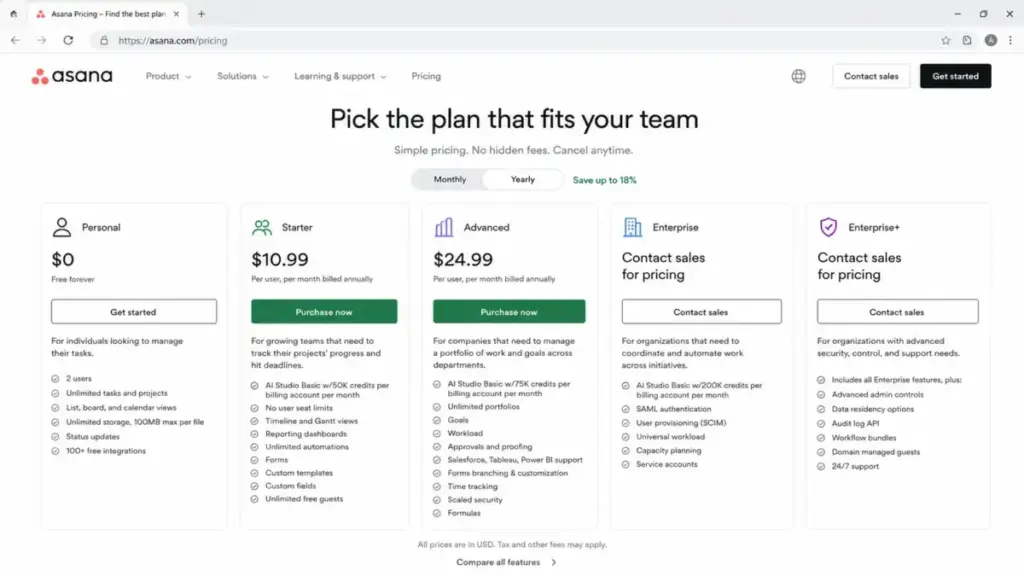
Asana is a work management platform built for teams that need clean task ownership, multiple project views, and workflow automation without Jira-level configuration complexity. The Personal plan covers 2 users with unlimited tasks, projects, and list/board/calendar views. Starter at $10.99/user/month (annual) adds Timeline/Gantt, dashboards, automations, forms, custom fields, and unlimited guests.
The real decision point is Advanced at $24.99/user/month (annual), which unlocks portfolios, goals, workload, approvals, proofing, time tracking, forms branching, Salesforce/Tableau/Power BI support, and formulas. Enterprise and Enterprise+ require contacting sales and add SAML, SCIM, universal workload, capacity planning, audit logs, data residency, and compliance governance.
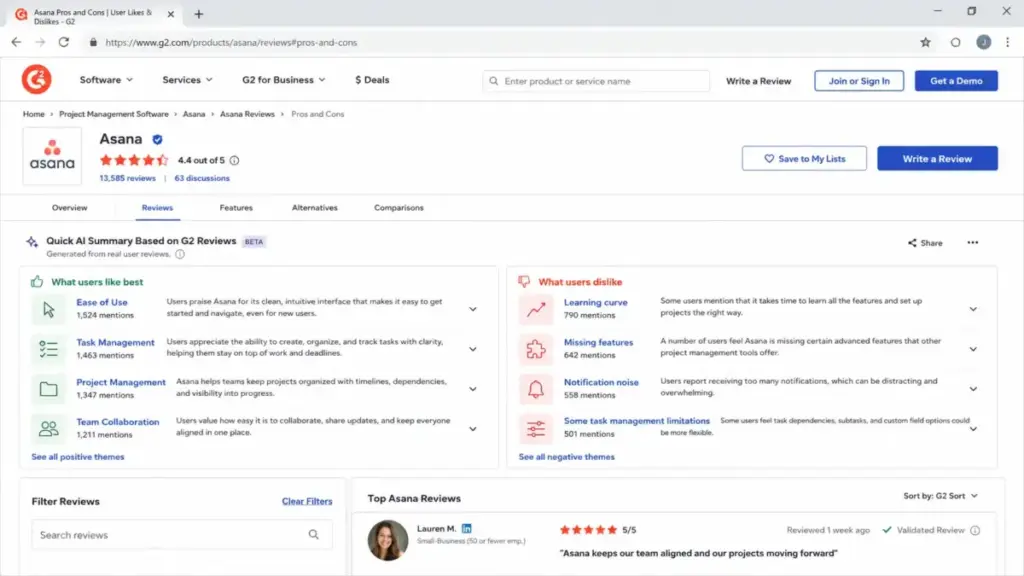
Based on user sentiment across 13,585 G2 reviews (4.4 rating) and 13,524 Capterra reviews (4.5 rating) as of May 14, 2026, Asana consistently earns praise for ease of use and task tracking but draws complaints about notification noise, plan-gated features, and the per-seat cost at scale.
The 3 Problems Asana Solves Well
Cross-Functional Work Visibility Without a Learning Cliff
Asana’s strongest position is connecting work across marketing, operations, creative, product, and PMO teams in one workspace. A 10-person marketing team running campaign intake through forms, tracking deliverables on Timeline, and reporting progress through dashboards gets a clean system that new hires can learn in days, not weeks.
The project views tell that story. List, board, calendar, Timeline, and Gantt are all available from Starter upward. Tasks live in multiple projects simultaneously without duplication, which means a single deliverable can appear in both a campaign tracker and a resource calendar. That multi-homing model is something teams coming from spreadsheets or Trello immediately appreciate.
One thing worth noting: the Asana vs monday.com comparison often comes down to this exact use case. Asana favors structured task ownership. Monday.com favors visual board customization. Neither is wrong, but they attract different workflows.
Workflow Automation That Scales Across Projects
Asana’s workflow builder and automation rules handle intake routing, status changes, assignee updates, due date shifts, and approval triggers. Starter includes unlimited automations, which removes the quota ceiling that tools like ClickUp impose on lower tiers.
For a 50-person cross-functional organization, this means a single project template with rules for request triage, review cycles, and stakeholder notifications can run without anyone manually moving tasks. I looked at how teams describe this in practice: according to user review patterns on G2, workflow automation and task assignment rank among the top-praised capabilities.
The friction point: Asana’s automation builder handles rule-based logic well, but teams needing conditional branching in forms or approval chains must upgrade to Advanced. That is a plan-gate trigger many buyers discover only after they try to build their second or third workflow.
Goal and Portfolio Rollup for Executive Reporting
Asana positions itself as a platform for connecting company-wide goals, strategic plans, and daily execution. According to Asana’s product page, the platform is built for scale where goals, strategic plans, projects, tasks, and AI-powered coordination live in one system.
For a PMO or operations lead, portfolios aggregate project status across teams. Goals align OKRs to actual task completion. Workload shows who is over-assigned and who has capacity. These are the features that separate Asana from lightweight task trackers.
But here is the catch. Portfolios, goals, and workload all start at Advanced ($24.99/user/month annual). A 25-person team pays $7,497/year on Advanced versus $3,297/year on Starter. That is a $4,200/year difference for features that many teams consider operational necessities, not premium add-ons.
The 2 Problems Asana Creates
The Starter-to-Advanced Plan-Gate Cliff
This is the part most reviews skip. Asana’s Starter plan covers task tracking, project views, dashboards, automations, forms, custom fields, and guests. That sounds complete. It is not.
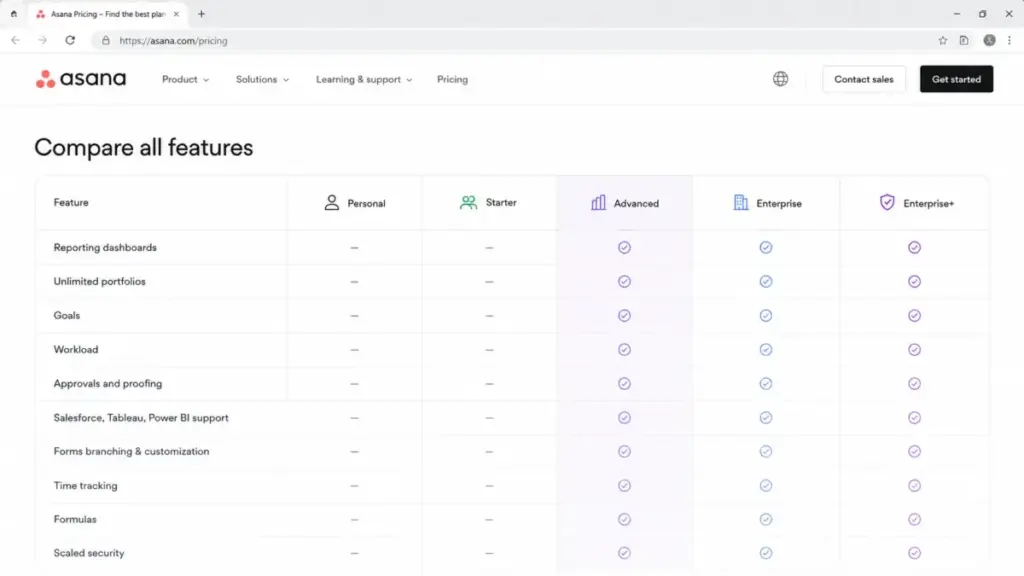
The moment a team needs any of the following, they must upgrade to Advanced:
| Feature Need | Plan Required | Annual Cost per User |
|---|---|---|
| Portfolios (multi-project rollup) | Advanced | $24.99/month |
| Goals and OKRs | Advanced | $24.99/month |
| Workload management | Advanced | $24.99/month |
| Approvals and proofing | Advanced | $24.99/month |
| Time tracking | Advanced | $24.99/month |
| Forms branching and customization | Advanced | $24.99/month |
| Salesforce, Tableau, Power BI support | Advanced | $24.99/month |
| Formulas in custom fields | Advanced | $24.99/month |
| Scaled security features | Advanced | $24.99/month |
That is a $14/user/month jump from Starter ($10.99) to Advanced ($24.99) on annual billing. For a team of 15, the annual difference is $2,520. For 50 users, it is $8,400/year.
Why does this matter? Because many teams adopt Asana on Starter, build workflows, onboard collaborators, and then realize their operational needs (goals, portfolios, workload, approvals) sit behind a plan wall. The switching cost at that point is real: migrating projects, retraining, and rebuilding automations.
According to user review patterns on Capterra and Software Advice, pricing and plan-gated features consistently appear as a negative theme. The 4.5 Capterra rating (across 13,524 reviews as of May 14, 2026) comes with recurring complaints about costs growing with advanced features and lack of lower-tier feature access.
Notification Noise and Single-Task Ownership Friction
Asana sends notifications for task assignments, comments, status changes, project updates, and rule triggers. For a 5-person team, that is manageable. For a 50-person organization running 20+ active projects, it becomes noise.
Capterra’s pros and cons summary shows that the “overwhelming notification system” appears as a negative theme in 51% of negative reviews (out of 697 reviews flagged in that category) as of May 14, 2026. G2 review patterns echo this: “not intuitive” and “limited features” appear alongside notification-related frustrations.
The second friction pattern is task ownership. Asana’s model favors a single directly responsible individual per task. Teams doing shared QA, inventory management, support triage, or collaborative review work often need multiple assignees on one task. Asana’s workaround is subtasks or collaborators, but TrustRadius review excerpts specifically list multiple-assignee limitations as a con. G2 and Capterra users report similar friction.
This is not a dealbreaker for every team. But if your workflow involves shared accountability on individual items (not just project-level collaboration), you will feel the friction early.
Asana Pricing in 2026: The Real Math
Asana’s official pricing page lists five plans (as of May 2026):
| Plan | Monthly Price | Annual Price | Key Inclusions | AI Studio Credits |
|---|---|---|---|---|
| Personal | $0 | $0 | 2 users, unlimited tasks/projects, list/board/calendar, 100MB file limit | None |
| Starter | $13.49/user/mo | $10.99/user/mo | No user limit, Timeline/Gantt, dashboards, automations, forms, custom fields, unlimited guests | 50K/account/mo |
| Advanced | $30.49/user/mo | $24.99/user/mo | Portfolios, goals, workload, approvals, proofing, time tracking, forms branching, Salesforce/Tableau/Power BI, formulas | 75K/account/mo |
| Enterprise | Contact sales | Contact sales | SAML, SCIM, universal workload, capacity planning, service accounts, view-only licenses, workflow bundles | 200K/account/mo |
| Enterprise+ | Contact sales | Contact sales | SIEM integrations, data residency, audit logs, managed workspaces, compliance governance | Contact sales |
Where Pricing Starts to Pinch
The pinch point is clear: Advanced at $24.99/user/month is where Asana becomes a full work management platform. Everything below that is task management with views.
Here is the cost math by team size on annual billing:
| Team Size | Starter Annual | Advanced Annual | Difference |
|---|---|---|---|
| 5 users | $659/year | $1,499/year | $840 |
| 15 users | $1,978/year | $4,498/year | $2,520 |
| 30 users | $3,956/year | $8,997/year | $5,041 |
| 50 users | $6,594/year | $14,994/year | $8,400 |
A 30-person team on Advanced pays nearly $9,000/year. That is before add-ons.
Costs That Do Not Fit Neatly in the Pricing Table
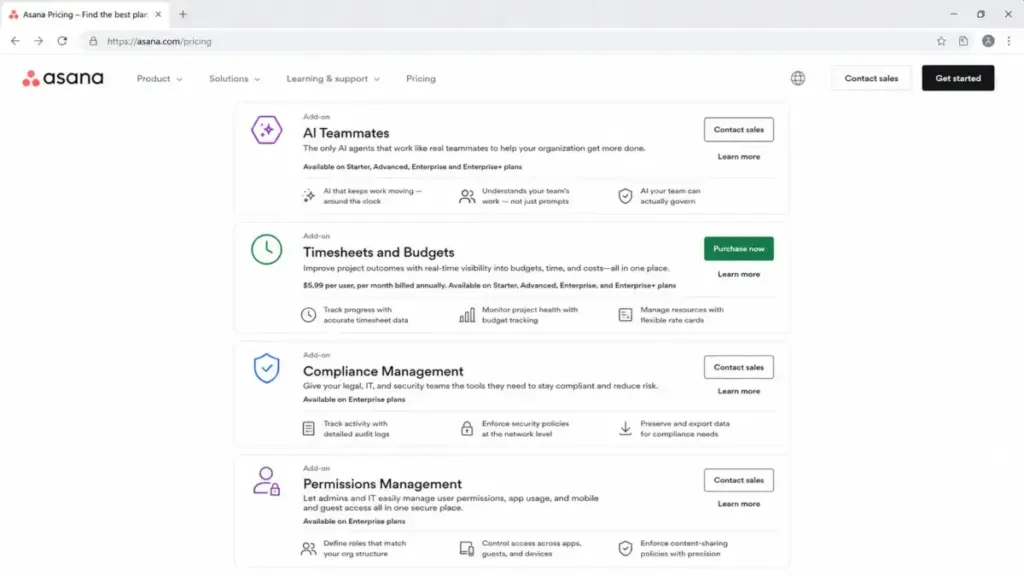
Asana’s pricing page reveals several add-on costs that most reviews ignore:
| Add-On | Availability | Price |
|---|---|---|
| Timesheets and Budgets | Starter, Advanced, Enterprise, Enterprise+ | $5.99/user/month (annual) |
| AI Teammates | Starter, Advanced, Enterprise, Enterprise+ | Contact Asana for pricing |
| Compliance Management | Enterprise plans | Contact Asana for pricing |
| Permissions Management | Enterprise plans | Contact Asana for pricing |
| AI Studio Plus / Pro | Paid upgrade beyond included Basic | Contact Asana for pricing |
The Timesheets and Budgets add-on alone adds $5.99/user/month on top of the base plan. For 30 users on Advanced, that is an extra $2,156/year, bringing the total above $11,000/year.
Before You Buy: Billing Details Most Reviews Miss
According to Asana’s pricing FAQ:
- Sales tax and VAT/GST apply depending on jurisdiction. The listed price is not always the final price.
- No refunds after cancellation. Paid features remain until the subscription period ends.
- Seat increments follow specific rules: 1-seat increments from 2 to 5 users, 5-seat increments up to 30, 10-seat increments up to 100, 25-seat increments up to 500, and 50-seat increments above 500.
That seat increment rule matters. A team of 12 on a paid plan purchases in 5-seat blocks (after reaching 5 users). You pay for 15 seats, not 12. A team of 33 pays for 40 seats (next 10-seat increment after 30). Factor this into your budget.
For a detailed comparison of Asana’s per-seat economics against competitors, see our Asana pricing breakdown.
Asana AI in 2026: Useful Add-On or Pricing Fog?
Asana’s features page lists AI Studio, AI Teammates, Smart Chat, Smart Editor, Smart Fields, Smart Projects, and Smart Status. The question is whether any of this changes the buying decision.
Every paid plan includes AI Studio Basic with rate-limited credits: 50,000 credits/account/month on Starter, 75,000 on Advanced, and 200,000 on Enterprise. Those credits cover AI-generated status updates, project summaries, and field suggestions. AI Teammates is a separate add-on available on Starter and above (pricing not publicly listed as of May 2026). AI Studio Plus and Pro are paid upgrades beyond Basic.
What does this mean for a buyer? The included AI credits give teams basic summarization and smart fields. If your team sends 20 status updates per week across 10 projects, the Basic credit pool handles that. For teams wanting AI-driven workflow agents (AI Teammates), expect an additional line item on the invoice.
I suspect most teams in 2026 will not choose or reject Asana based on AI features alone. The AI layer adds convenience but does not replace the core question: does your team need goals, portfolios, and workload badly enough to pay for Advanced?
Integrations, API, and Technical Scale Limits
Asana lists 100+ free integrations on its pricing page, including connections to Microsoft 365, Google Workspace, Slack, Salesforce, Tableau, Power BI, Jira, Zendesk, HubSpot, Figma, and many reporting and file-sharing tools. The Asana app directory covers connector partners, security integrations, and developer tools.
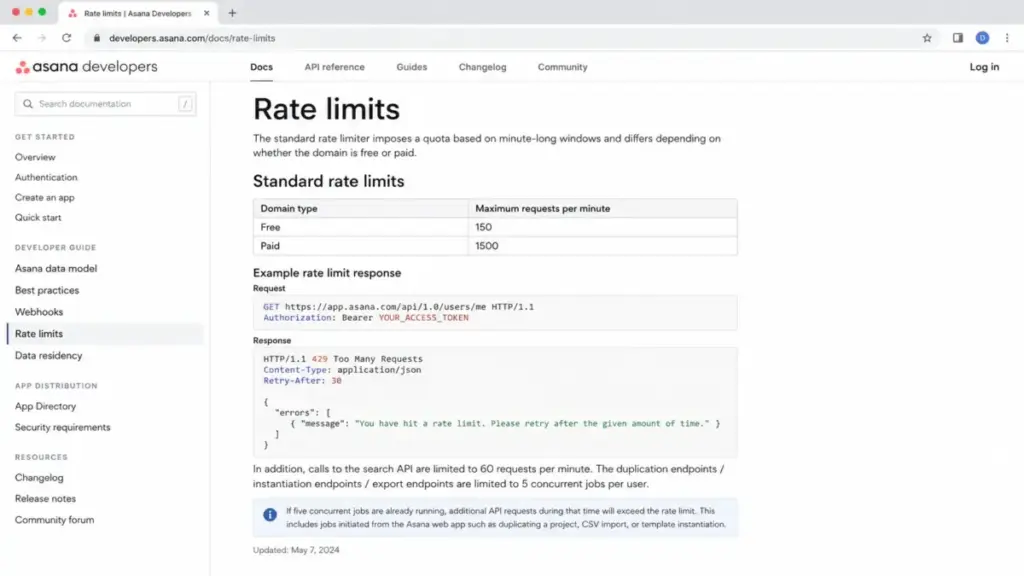
For teams building custom integrations, the developer platform includes REST API, webhooks, app components, and rule actions. According to Asana’s developer documentation, the API rate limits are:
| Endpoint Type | Free Domains | Paid Domains |
|---|---|---|
| Standard API | 150 requests/min | 1,500 requests/min |
| Search API | 60 requests/min | 60 requests/min |
| Duplication/Export jobs | 5 concurrent per user | 5 concurrent per user |
That 10x jump from free to paid API limits matters for RevOps and IT teams running data syncs, migration scripts, or reporting pipelines. The 5-concurrent-job limit on duplication, instantiation, and export endpoints is a bottleneck for organizations running parallel project templates or bulk data exports.
Asana Pros and Cons: Evidence-Based
What Works
- Clean task ownership and project structure. Asana’s task model assigns clear ownership, due dates, and project membership. G2 users consistently praise ease of use and task tracking across 13,585 reviews (as of May 14, 2026).
- Unlimited automations on Starter. No action caps at $10.99/user/month. ClickUp limits automations on lower tiers. Asana does not.
- Multi-project task homing. A single task lives in multiple projects without duplication. Marketing teams tracking deliverables across campaign and resource views rely on this daily.
- Strong integration ecosystem. 100+ integrations, with official support for Slack, Google Workspace, Microsoft 365, Salesforce, Jira, and Figma.
- Five project views from Starter. List, board, calendar, Timeline, and Gantt all available without needing Advanced.
- Unlimited free guests on paid plans. External collaborators (clients, contractors, vendors) join without consuming a paid seat.
What Does Not Work
- Plan-gate cliff from Starter to Advanced. Goals, portfolios, workload, approvals, time tracking, and forms branching all require Advanced at $24.99/user/month. The $14/user jump is the steepest in this comparison.
- Notification overload at scale. 51% of negative Capterra reviews (697 reviews) cite overwhelming notifications. Teams running 20+ active projects need custom notification rules.
- Single-assignee task model. No native multiple-assignee support. Teams doing shared QA, support, or inventory work must use subtasks or collaborator workarounds.
- Mobile app limitations. Forbes Advisor lists weak mobile applications as a con. Capterra users report mobile prioritization friction. Desktop and web remain the primary experience.
- Customer support complaints on lower tiers. Forbes Advisor flags subpar customer service. Asana’s pricing page confirms 24/7 support and 99.9% uptime SLA only on higher-tier plans.
- Seat increment billing. Teams of 12 pay for 15 seats. Teams of 33 pay for 40. The increment structure adds invisible cost at non-round team sizes.
Security, Compliance, and Governance
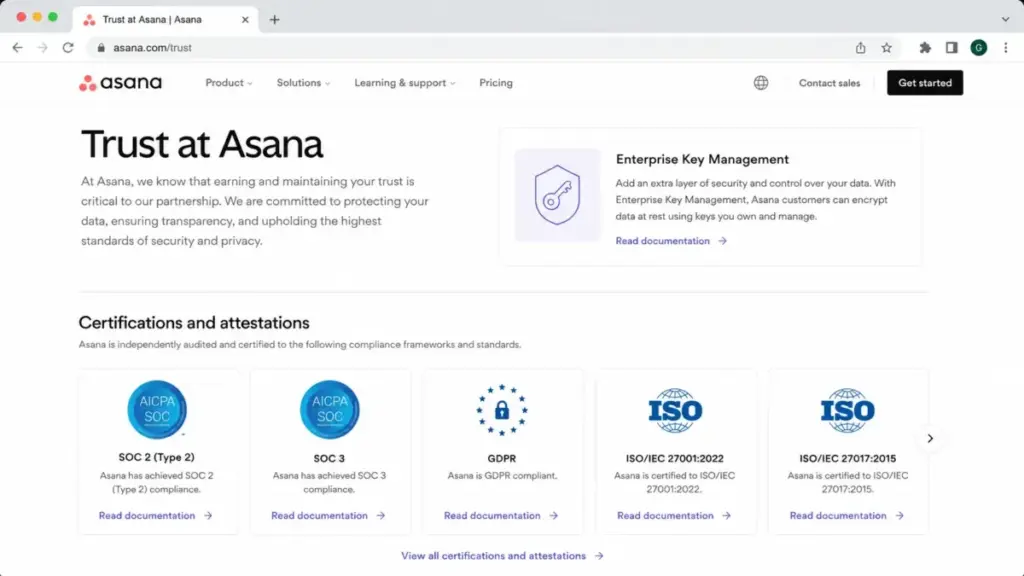
Enterprise buyers need to know exactly which plan or add-on unlocks their compliance requirements. Based on Asana’s Trust page and official pricing:
| Requirement | Plan / Add-On |
|---|---|
| SAML authentication | Enterprise |
| SCIM user provisioning | Enterprise |
| Service accounts | Enterprise |
| View-only licenses | Enterprise |
| Guest invite permissions | Enterprise |
| Project admin controls | Enterprise |
| Universal workload | Enterprise |
| Capacity planning | Enterprise |
| Audit logs | Enterprise+ / Compliance Management add-on |
| SIEM/DLP/eDiscovery integrations | Enterprise+ / Compliance Management add-on |
| Data residency | Enterprise+ |
| Managed workspaces | Enterprise+ |
| Mobile and attachment controls | Permissions Management add-on (Enterprise) |
| Advanced permissions and sandboxes | Permissions Management add-on (Enterprise) |
Asana references SOC 2 Type II, SOC 3, GDPR, ISO 27001, ISO 27017, ISO 27018, ISO/IEC 27701, HIPAA support for eligible configurations, and Enterprise Key Management. The platform runs on dedicated servers within AWS data centers.
For regulated industries, the distinction between Enterprise and Enterprise+ matters. Audit logs, SIEM integrations, and data residency require Enterprise+ or the Compliance Management add-on. Factor that into procurement conversations.
Who Wins and Who Loses with Asana
| Buyer Scenario | Best Plan | Why |
|---|---|---|
| 2-person founder managing personal projects | Personal ($0) or consider Trello/Notion | Free, unlimited tasks, but no Timeline/Gantt or paid features |
| 10-person marketing team running campaigns | Starter ($10.99/user/mo annual) | Timeline, dashboards, automations, forms, and custom fields cover campaign workflows |
| 50-person org with OKRs and executive reporting | Advanced ($24.99/user/mo annual) | Portfolios, goals, workload, approvals, and Salesforce/Tableau/Power BI support |
| Enterprise PMO with regulated data | Enterprise or Enterprise+ (contact sales) | SAML, SCIM, universal workload, capacity planning, audit logs, data residency |
Choose Asana Starter if your team needs clean task tracking, Timeline/Gantt views, dashboards, forms, and automations, and you do not yet need goals, portfolios, or workload visibility.
Choose Asana Advanced if your team runs OKRs, manages portfolios across departments, needs approval workflows, or requires time tracking and Salesforce/Tableau/Power BI connections.
Avoid Asana if your core work is agile software issue tracking (Jira fits better), you need built-in team chat and docs as first-class objects (Notion or ClickUp), or you need many Advanced-only features but have a tight per-seat budget.
Better Alternatives for the Wrong Fit
No single tool fits every team. Here is when a competitor solves an Asana limitation better:
| Choose Instead | When Asana Falls Short | Trade-Off | Best For |
|---|---|---|---|
| ClickUp | Need portfolios, goals, and docs on cheaper plans | Steeper learning curve, more configuration complexity | Budget-conscious teams wanting all-in-one flexibility |
| monday.com | Need visual board customization and drag-drop workflows | Higher per-seat pricing on upper tiers | Marketing and creative teams wanting visual project management |
| Trello | Need simple Kanban for a small team without paying $10.99/user | Limited views, no native Gantt or goals | Solo users and small teams under 10 who need basic task boards |
| Jira | Need agile sprint management, issue tracking, and developer workflows | Complex admin, steeper learning curve for non-engineering teams | Software development teams running Scrum or Kanban sprints |
| Wrike | Need built-in proofing, time tracking, and resource management on mid-tier plans | Less polished UX than Asana | Creative production teams needing approval and proofing workflows |
| Notion | Need docs, databases, wikis, and project tracking in one workspace | Weaker native project management features than Asana | Teams wanting a single workspace for knowledge base and project tracking |
| Smartsheet | Need spreadsheet-style project management with Gantt and resource management | Less intuitive for non-spreadsheet users | PMO and operations teams comfortable with grid-based interfaces |
For deeper comparisons, see our ClickUp review, Jira review, Trello review, Wrike review, and Smartsheet review.
Teams considering moving from Asana to monday.com should also review our Notion project management review for an all-in-one workspace comparison.
Asana Review 2026: Frequently Asked Questions
Is Asana worth it in 2026?
Asana is worth it for teams that value clean task ownership, Timeline/Gantt views, workflow automation, and cross-functional project visibility. Starter at $10.99/user/month (annual) covers the core experience. The value question sharpens at Advanced ($24.99/user/month), where portfolios, goals, workload, and approvals unlock. If your team needs those features, the price is justified. If not, Starter or a cheaper alternative like ClickUp or Trello covers most workflows.
How much does Asana cost per user?
Personal is free for 2 users. Starter costs $10.99/user/month billed annually or $13.49 monthly. Advanced costs $24.99/user/month annually or $30.49 monthly. Enterprise and Enterprise+ require contacting sales. Add-ons like Timesheets and Budgets cost an extra $5.99/user/month (annual). Pricing verified from Asana’s pricing page as of May 2026.
What is included in Asana Starter?
Starter includes unlimited users, Timeline and Gantt views, reporting dashboards, unlimited automations, forms, custom templates, custom fields, unlimited free guests, and AI Studio Basic with 50,000 credits per account per month. It does not include portfolios, goals, workload, approvals, time tracking, or forms branching.
What is included in Asana Advanced?
Advanced includes everything in Starter plus unlimited portfolios, goals, workload management, approvals and proofing, Salesforce/Tableau/Power BI support, forms branching and customization, time tracking, scaled security, formulas, and AI Studio Basic with 75,000 credits per account per month.
Does Asana have Gantt charts?
Yes. Asana includes Timeline and Gantt views starting on Starter ($10.99/user/month annual). Personal (free) does not include Timeline or Gantt.
Does Asana have time tracking?
Asana includes native time tracking on Advanced ($24.99/user/month annual) and above. Starter does not include time tracking. Teams on Starter can use third-party time tracking integrations like Everhour or Harvest.
Is Asana good for small businesses?
Asana works well for small businesses that need task tracking, project views, and forms. Starter covers teams of 3-15 at a reasonable per-seat cost. The challenge for small businesses comes when operational needs (goals, portfolios, workload) require Advanced pricing. A 10-person team pays $2,999/year on Advanced versus $1,319/year on Starter.
Is Asana better than ClickUp?
Asana offers a cleaner interface and faster adoption for non-technical teams. ClickUp offers more features on lower-priced plans, including docs, goals, and dashboards on its Free and Unlimited tiers. Choose Asana if ease of adoption matters most. Choose ClickUp if feature density per dollar matters most. See our best free project management tools for a broader comparison.
Is Asana better than monday.com?
Asana favors structured task ownership and workflow automation. Monday.com favors visual board customization and flexible column types. For marketing and creative teams, both work well. Asana’s unlimited automations on Starter give it an edge for rule-heavy workflows. Monday.com’s visual flexibility appeals to teams building custom dashboards.
What are the main limitations of Asana?
The top limitations are: (1) goals, portfolios, workload, and approvals locked behind Advanced at $24.99/user/month, (2) notification overload at scale, (3) single-assignee task model without native multiple-assignee support, (4) mobile app friction reported by Forbes Advisor and Capterra users, and (5) seat increment billing that creates phantom seats at non-round team sizes. If those limitations are the switching trigger, evaluate Asana replacement options by cost at real headcount, automation access, workload reporting, mobile usability, and how each tool handles task ownership.
Does Asana work well for remote teams?
Asana supports remote teams through desktop apps (macOS, Windows), iOS and Android mobile apps, and web access. The platform integrates with Slack, Microsoft Teams, Zoom, and Google Workspace for communication. The main remote work challenge is notification management: distributed teams generating high task volumes need notification rules to prevent inbox overload.
Is Asana good for software development teams?
Asana handles project tracking and task management, but it is not built for agile sprint administration, issue tracking with severity levels, or developer-specific workflows. Engineering teams running Scrum or Kanban sprints get better tooling from Jira, Linear, or Shortcut.
Asana works for software teams managing product roadmaps and cross-functional launch coordination, not for daily development issue tracking. If Jira is the default next step, compare Jira alternatives by sprint administration, issue severity handling, developer workflow support, roadmap visibility, and how much configuration your engineering team can maintain.
Final Verdict: Asana Scores 7.8/10
Asana earns 7.8/10 in this review. It is the strongest pick for cross-functional teams (marketing, operations, creative production, PMO) that need clean task ownership, structured project views, workflow automation, and executive-level work visibility without heavy configuration overhead.
It is not the right pick for engineering teams needing sprint tooling, solo users seeking cheap Gantt charts, or budget-conscious teams that need goals, portfolios, workload, and approvals without paying $24.99/user/month.
Choose ClickUp if per-dollar feature density matters most. Choose Jira if your team runs agile development workflows. Choose Notion if you want docs, databases, and project tracking in one workspace. Choose monday.com if visual customization drives your team’s adoption.
The upgrade from Starter to Advanced only makes sense when your team actively needs portfolios for multi-project oversight, goals for OKR tracking, workload for capacity review, or approval workflows for creative proofing. If your team runs fine on task tracking, Timeline views, automations, and dashboards, Starter at $10.99/user/month delivers strong value without the Advanced price tag.
Start with Asana Starter. Upgrade to Advanced when (and only when) a specific feature gate blocks your workflow.