The commodity answer is that Ideogram renders readable text and Midjourney makes prettier pictures. That answer is correct and almost useless, because it ignores the three things that decide the purchase: which plan gives you private generation, whether you can automate output, and what the tool costs once your team grows past one seat.
Choose Ideogram if you need legible typography, a spreadsheet-driven batch workflow, official API access, a low-cost private tier, or self-serve team billing. Choose Midjourney if your output is cinematic concept art, moodboard-driven brand imagery, or image-to-video, and you do not need automation or exact text. This comparison maps both tools against five real workflows, then breaks down pricing units, plan gates, privacy thresholds, and enterprise readiness using official 2026 documentation.
If you want the wider category first, our roundup of the best AI image generators covers where these two sit against DALL-E, Firefly, and the rest. If the underlying mechanics are new to you, start with how text-to-image AI works.
Quick Verdict: Midjourney vs Ideogram
Ten dimensions, one winner each. Midjourney takes the aesthetic and motion categories. Ideogram takes almost everything tied to text, price, and workflow.
| Dimension | Winner | Why |
|---|---|---|
| Readable text and typography | Ideogram | Ideogram 4.0 is built around dense text rendering and layout control |
| Cinematic and artistic output | Midjourney | Positioned and reviewed as the stronger tool for mood-driven, polished imagery |
| Entry price and free plan | Ideogram | Free plan plus a $20 Plus tier; Midjourney has no free plan |
| API and automation | Ideogram | Publishes API pricing; Midjourney prohibits automation and offers no general API |
| Bulk production from a spreadsheet | Ideogram | CSV Batch Generation on Pro and Team; Midjourney has no CSV batch workflow |
| Image-to-video | Midjourney | Turns a single image into a 5-second video; no Ideogram equivalent found |
| Low-cost private generation | Ideogram | Private generation starts at Plus ($20); Midjourney Stealth needs Pro ($60) |
| Enterprise procurement | Ideogram | Publishes SOC 2, DPA, SSO, and retention controls |
| Small-team billing | Ideogram | Self-serve Team plan from 2 seats; Midjourney bulk billing targets 50+ seats |
| Style steering and taste control | Midjourney | Style Reference, Moodboards, and Personalization give finer aesthetic control |
What this means: the split is not artistic versus practical. It is one tool built for aesthetics and motion against one tool built for text, automation, and team purchasing.
Buyers who think they want “the better image generator” usually want the one that survives their specific workflow. The next five sections test exactly that.
Midjourney vs Ideogram at a Glance
| Midjourney | Ideogram | |
|---|---|---|
| Best for | Concept art, moodboards, cinematic brand imagery, image-to-video | Text graphics, posters, logo concepts, batch ads, API workflows |
| Starting paid price | $10/month (Basic) | $20/month (Plus); Free plan available |
| Practical tier for pros | Standard $30 or Pro $60 | Plus $20 or Pro $60 |
| Free plan | None | Yes, public images only |
| Metering unit | Fast GPU hours | Priority and Slow credits |
| Private generation from | Pro ($60), via Stealth Mode | Plus ($20) |
| Official API | No, automation prohibited | Yes, from $0.03 per image |
| CSV batch generation | Not found in docs | Pro and Team, 500-row file limit |
| Image-to-video | Yes, 5-second clips | Not found in docs |
| Mobile app | niji journey listed; general app unverified | Official iOS app |
| Current model | V8.1 | Ideogram 4.0 |
| Setup difficulty | Medium | Low to medium |
What this means: the two products do not even meter usage the same way, so the sticker prices are not directly comparable. Midjourney sells GPU time; Ideogram sells credits. That distinction drives the pricing section, and it is the single fact most comparison pages skip.
How I Compared Midjourney and Ideogram
This is a documentation-based comparison, not a hands-on benchmark. I did not run prompt tests, score outputs, or time generations. Every product fact here traces to official pricing pages, help documentation, community guidelines, terms of service, and app store listings, cross-checked against third-party review patterns for sentiment only.
Pricing and plan gates were checked on July 3, 2026, against the official Midjourney plan documentation and Ideogram pricing pages. Where a third-party page conflicts with an official source, I use the official source. Model versions referenced are Midjourney V8.1 and Ideogram 4.0.
Two limits are worth stating up front. Because I did not test outputs, I do not claim exact text-accuracy percentages or artistic-quality scores, and where I describe one tool as stronger for text or aesthetics, that reflects official positioning and consistent third-party sentiment rather than a SaaSZap test. As SaaSZap’s AI editor, I read these tools the way I read every AI product for this site, byline Daniel Rivera: the marketing claim is the starting point, the plan gate is the real story.
Workflow 1: Marketing Graphics With Readable Text
Ideogram wins this one, and it is the clearest gap between the two. Ideogram 4.0 is positioned around dense text rendering, object placement, and 2K output, which is the exact job a quote graphic, event poster, or product label demands.
Midjourney can place text, but its own reviewers and third-party comparisons repeatedly flag text reliability as the weak spot. For a social manager producing a run of captioned graphics, that means more regenerations and more manual correction.
There is a caveat that stops Ideogram from being a full logo solution. Ideogram’s FAQ states it does not support SVG or vector formats, so anything you generate is a raster concept, not a production-ready vector file.
Fact to recommendation: if your work is captioned marketing assets and posters, Ideogram Plus at $20/month is the entry point, and readable text is where it earns the money. If those graphics need to end as scalable vector logos, treat Ideogram as the concept step and finish in vector software. Even Ideogram’s own docs concede its text can still produce spelling errors, so a human proofread stays in the loop.
Workflow 2: Cinematic Concept Art and Moodboards
Midjourney wins here, and it is not close. Its positioning as a research lab focused on visual quality, plus consistent third-party sentiment, points to Midjourney for atmospheric, art-directed, mood-driven imagery.
The reason is control surface, not just the base model. Midjourney exposes Style Reference for matching a visual vibe, Moodboards and Personalization profiles for steering taste, and Omni Reference for carrying a person, object, or creature across generations.
That consistency feature carries a cost most pages ignore. Omni Reference runs at 2x GPU time versus a regular image and is not compatible with some editing modes, so character-consistent workflows burn your Fast GPU hours faster.
Fact to recommendation: a concept artist or editorial illustrator who lives in style references and iteration should budget Midjourney Standard at $30/month for 15 Fast GPU hours, and step up to Pro if consistency work eats that time. The first thing that breaks on Basic is not quality, it is GPU headroom, because 3.3 Fast hours disappears quickly once Omni Reference doubles the cost.
Workflow 3: Bulk Social and Ad Variants From a Spreadsheet
Ideogram wins bulk production outright, because it is the only one of the two with a documented spreadsheet workflow. Ideogram Batch Generation accepts a CSV upload and produces variants at scale, which is how a team spins up dozens of ad or social permutations without prompting each one by hand.
Two gates decide whether this workflow is even available to you. Batch Generation is limited to Pro and Team plans, and uploaded files carry a 500-row limit including the header row, so a single batch tops out around 499 generations.
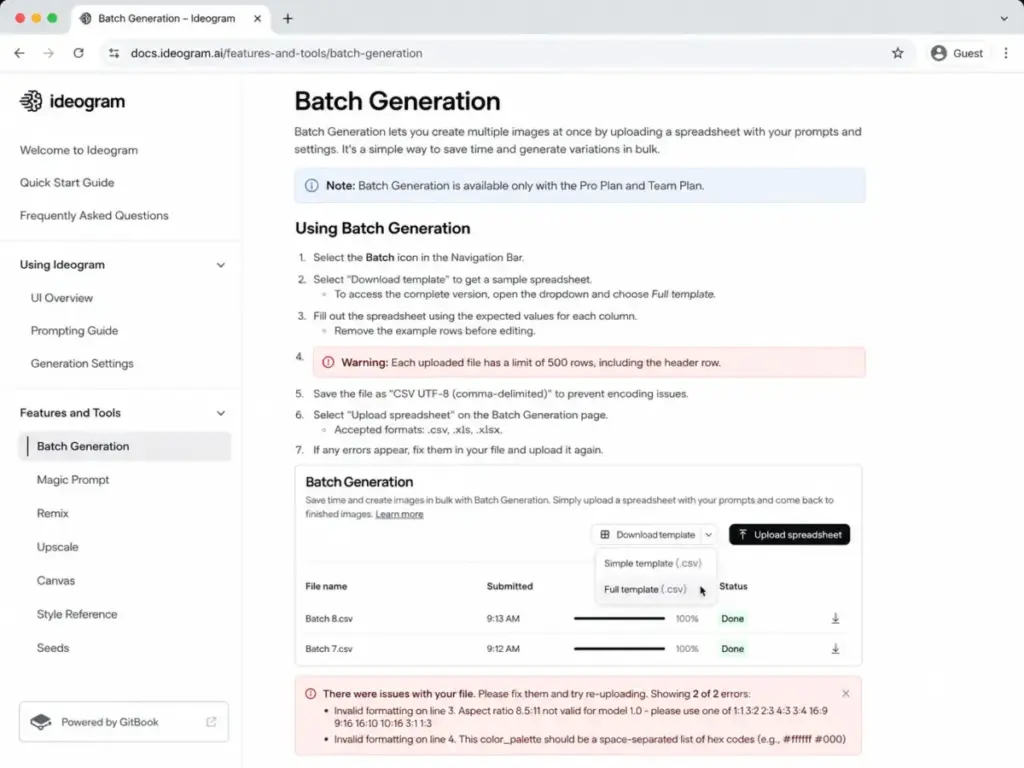
Midjourney has repeat and permutation parameters, but no equivalent CSV-driven batch pipeline appears in its documentation. For a marketer who thinks in campaigns and variants, that absence is the deciding factor.
Fact to recommendation: if your production model is “one spreadsheet, many creatives,” Ideogram Pro at $60/month opens Batch Generation with 3,500 Priority credits, and the 500-row ceiling sets your per-batch planning. Batch runs consume Priority credits, so a human still has to watch credit burn on large campaigns, not just row counts.
Workflow 4: Automated Generation Inside an App or Pipeline
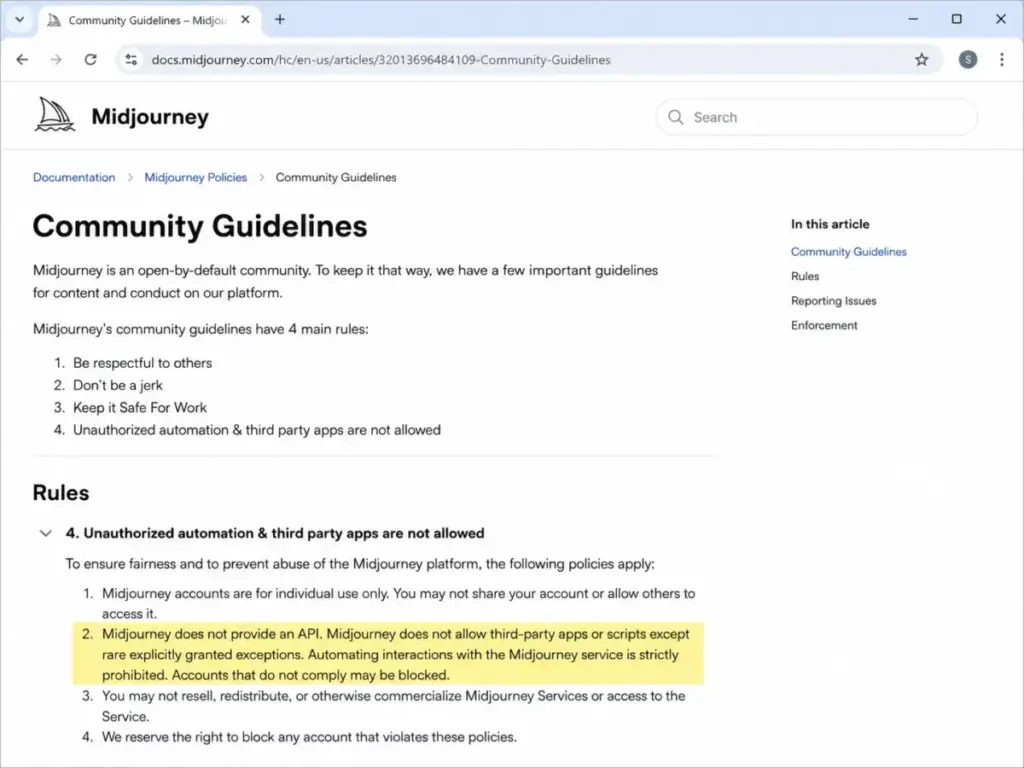
This is the workflow that quietly disqualifies one tool. If you need to generate images from code, inside an app, or through an automated pipeline, Ideogram is the only viable pick, because Midjourney’s official community guidelines state that, with rare exceptions, it does not provide an API and automated interaction is prohibited.
Ideogram publishes real API pricing with no subscription required. Per-image rates run $0.03 for 4.0 Turbo, $0.06 for 4.0 Default, and $0.10 for 4.0 Quality, with other endpoints priced separately, and a default rate limit of 10 in-flight requests.
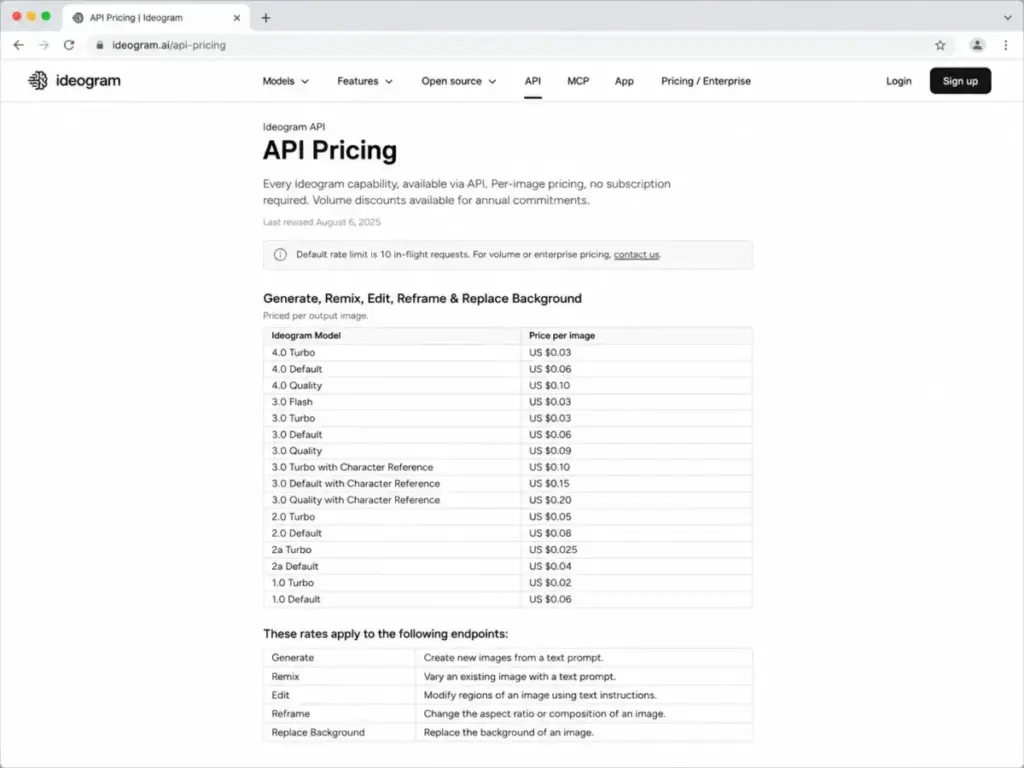
That API is a separate billing system from the app subscription, which is a common point of confusion. Your Plus or Pro credits do not fund API calls; API usage is metered per output image on its own meter.
Fact to recommendation: a developer or marketing-ops team embedding generation into a product should price Ideogram’s API directly, where 1,000 Turbo images cost about $30, and treat Midjourney as off the table for standard automation. If you are new to this, our primer on what an API is explains why “no API” is a hard stop, not a minor gap. The 10 in-flight request cap is the first ceiling you will hit at scale, so plan queueing before volume, not after.
Workflow 5: Confidential Client Work and Private Generation
Privacy is plan-gated on both tools, but at very different price points, and the defaults matter more than most buyers realize. Ideogram’s free images are public by default, and private generation begins on the Plus plan at $20/month.
Midjourney’s privacy control, Stealth Mode, is gated higher. It requires Pro at $60/month or Mega, and even with Stealth on, creations made in public Discord channels stay visible, so true privacy also means working through the web Create flow, a DM, or a private server.
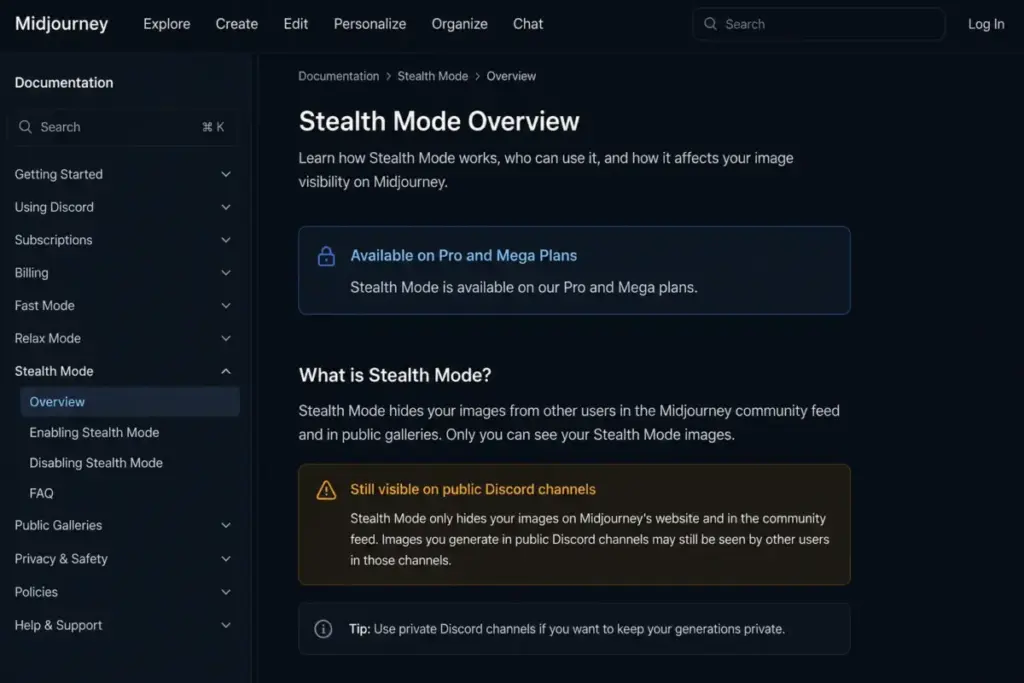
For an agency or product team handling unreleased brand work, that difference is a $40/month gap for the cheapest compliant private tier. Ideogram reaches private generation at a third of the price.
Fact to recommendation: if confidentiality is a requirement and not a preference, Ideogram Plus is the cheapest safe entry, and Midjourney only becomes reasonable for private work once you are already committed to Pro for its output. Do not treat Ideogram’s free plan as client-safe; its public-by-default behavior makes it a testing and public-concepting tool, not a place for confidential assets.
Pricing and Value per Dollar
Before comparing prices, fix the units, because this is where sticker-price comparisons mislead. Midjourney meters Fast GPU time in hours; Ideogram meters Priority and Slow credits. An hour of GPU time and a credit are not interchangeable, so “cheaper per image” claims that ignore this are guesses.
What a Dollar Actually Buys
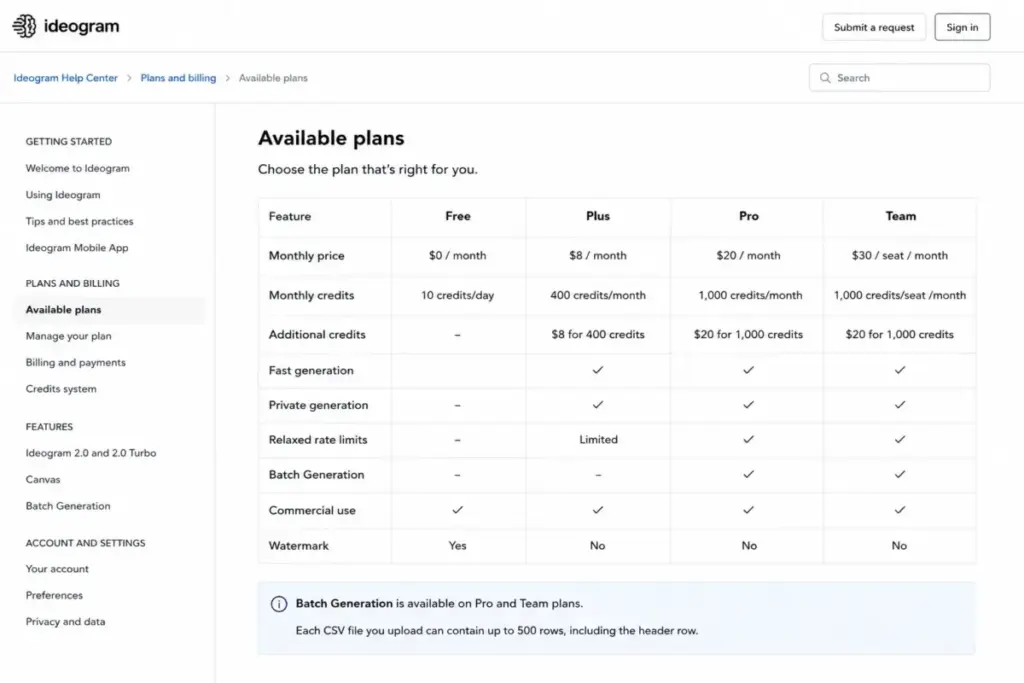
Ideogram is the only side of this comparison you can reduce to rough per-image math, because it publishes credit allotments. Plus includes 1,000 Priority credits for $20, Pro includes 3,500 for $60, and each top-up pack of 150 to 250 credits costs $4.
Priority credits map to premium, faster generations, while Slow credits cover the unlimited-but-queued path on paid tiers, where waits can run several minutes at peak. So a Plus user gets a fixed monthly pool of fast generations plus an unmetered slow queue for everything else.
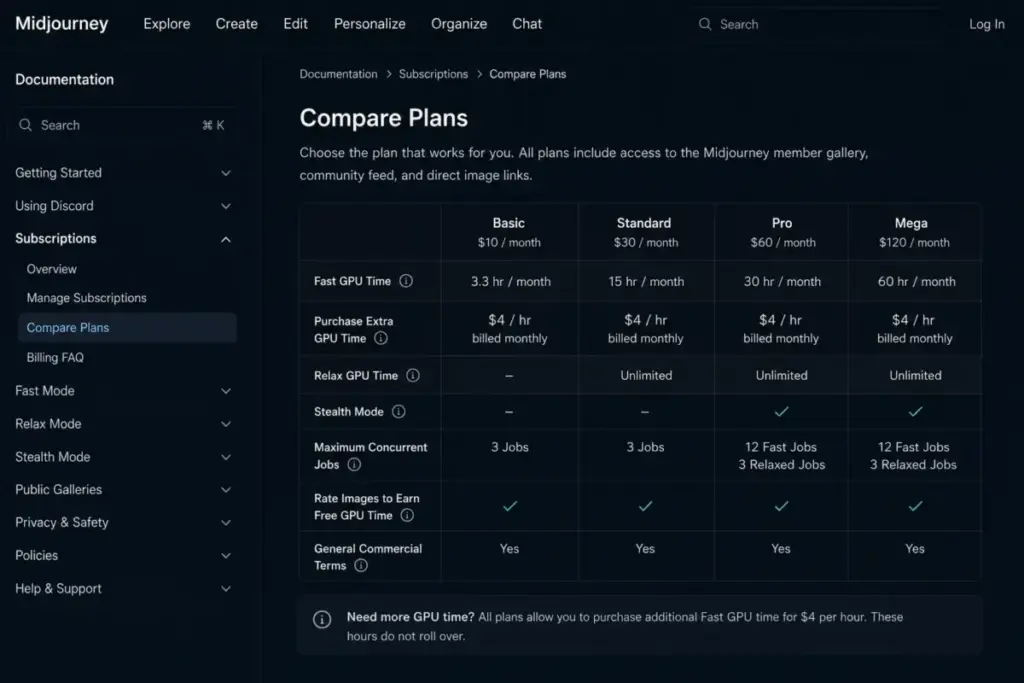
Midjourney resists the same math on purpose. Fast GPU time varies by model, resolution, video, and features, and Omni Reference alone doubles the GPU cost, so any “cost per image” for Midjourney is an average that hides wide variance. That is why I compare plan units and caveats rather than publishing a single Midjourney per-image figure that would mislead.
Here is the plan structure for both, with the caveats that change the real cost.
| Plan | Midjourney | Ideogram |
|---|---|---|
| Free | None | 10 Slow credits/week, public images, 2 canvases |
| Entry paid | Basic $10/mo, 3.3 Fast GPU hrs, no Stealth | Plus $20/mo, 1,000 Priority credits, private generation |
| Mid tier | Standard $30/mo, 15 Fast GPU hrs, unlimited Relax | Pro $60/mo, 3,500 Priority credits, Batch Generation |
| Upper tier | Pro $60/mo, 30 Fast GPU hrs, Stealth | Team $30/member/mo, 1,500 credits/member |
| Top tier | Mega $120/mo, 60 Fast GPU hrs, Stealth | Enterprise, custom pricing |
| Overage | Extra GPU time $4/hour | Top-up credit packs from $4 |
What this means: the two “$60 tiers” buy different things. Midjourney Pro buys 30 Fast GPU hours plus Stealth; Ideogram Pro buys 3,500 Priority credits plus CSV Batch Generation. You can see the full breakdowns on the Midjourney pricing page and the Ideogram pricing details, but the tiers only line up on dollars, not on value.
Three hidden costs decide the real bill. Midjourney’s unused subscription Fast time does not roll over month to month, so irregular users overpay on higher tiers.
Ideogram’s monthly Priority credits expire at the cycle end, while purchased top-up credits roll over and are spent after the monthly allotment. That rewards steady usage and punishes bursty months on the subscription side.
Ideogram’s Basic plan is also legacy: it cannot be repurchased after cancellation, so new buyers should treat Plus as the real entry paid tier. Recommending Basic to a new user, as some pricing pages still do, points them at a plan they may not be able to buy.
There is a commercial gate on Midjourney that catches growing companies. Its plan documentation states that companies making more than $1,000,000 in gross revenue per year must buy Pro or Mega, so a business on Basic or Standard is out of compliance regardless of usage.
The 10-User Cost Nobody Calculates
Team math exposes the biggest structural difference. Midjourney has no per-seat team plan below bulk scale; its group billing help targets organizations needing 50 or more yearly Pro or Mega plans, and it states no discounts or free plans for organizations.
So a 10-person team on Midjourney pays ten individual subscriptions. Ten Standard seats run $300/month; ten Pro seats run $600/month, with no central admin below the 50-seat bulk threshold.
Ideogram Team is self-serve from a 2-member minimum. Ten Team seats run $300/month billed monthly, or roughly $200/month on annual billing, with centralized billing and member management included.
What this means: for a 10-person creative team that wants one invoice and shared administration, Ideogram Team is both cheaper and structurally simpler. Midjourney only makes team sense as a stack of individual pro subscriptions or at 50-plus-seat bulk scale. One caveat protects you from over-promising internal collaboration: Ideogram’s Team docs note members may need to make images public for teammates to view them, and team-private sharing is still being built.
Creative Control and Model Versions
Winner depends on the kind of control you want, so this is a rare split rather than a clean win. Midjourney gives finer aesthetic steering; Ideogram gives more structured design and production controls.
Midjourney’s control surface leans artistic: aspect ratio, chaos, stylize, Style Reference, Omni Reference, Personalization, Moodboards, and a full editor with smart selection and Retexture. Ideogram’s leans design: styles, color controls, Magic Prompt, a Canvas with Magic Fill and Extend, and batch tooling.
One freshness note matters for anyone reading older comparisons. Midjourney V8.1 released on midjourney.com on April 30, 2026 and became default on June 10, 2026, and Ideogram’s current model is 4.0, so any page still citing Midjourney v6.1 or v7 is describing a product that no longer ships as default.
Ideogram’s Canvas has a documented limitation worth knowing before you rely on it. Some rendering options are not yet available inside Canvas, so it is a strong editing surface but not a complete replacement for the main generation flow.
Fact to recommendation: a taste-driven artist gets more from Midjourney’s reference and personalization stack; a designer running structured layouts and color systems gets more from Ideogram’s Canvas and Magic Prompt. Neither replaces a human art director, because both still need prompt iteration and correction.
Enterprise and Team Readiness
Ideogram wins enterprise procurement based on what each vendor publishes. Ideogram’s enterprise page states SOC 2 audited controls, an available DPA, SSO via Microsoft and Google, configurable data retention, and a commitment that enterprise inputs are not used to train shared models, with custom training opt-in.
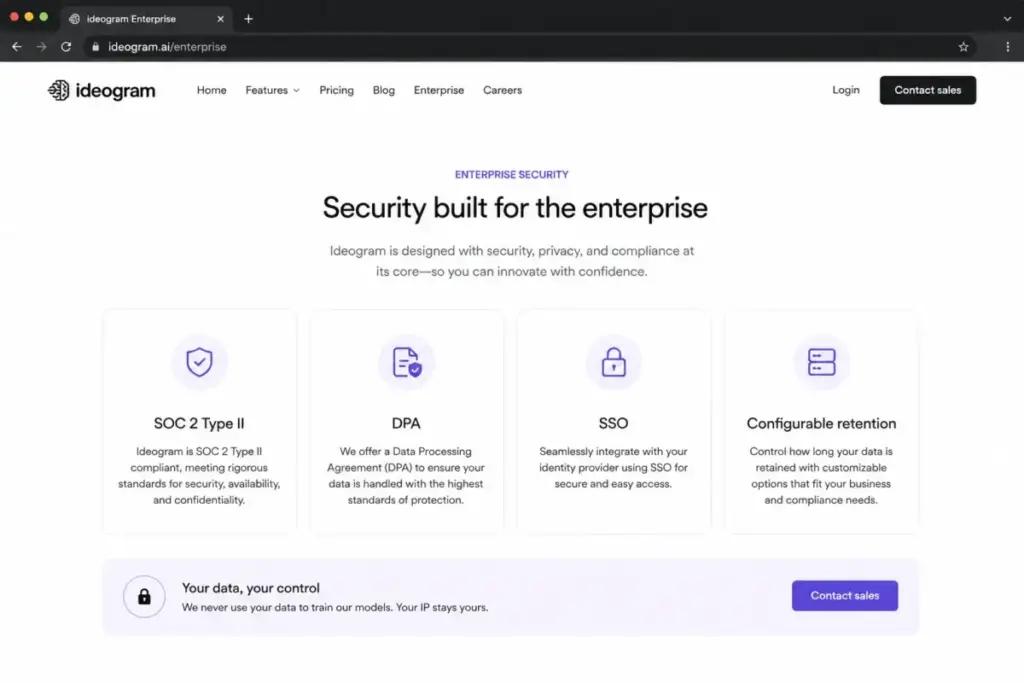
Midjourney’s public documentation in this research set centers on self-serve subscriptions, a privacy policy, and bulk billing rather than a comparable enterprise trust page. I did not find equivalent public SOC 2, SSO, or DPA documentation, which is not proof it does not exist privately, only that it was not available to review.
For a security review, that asymmetry is the whole game. A procurement team can hand Ideogram’s enterprise controls to legal and move; a Midjourney rollout at that level requires asking the vendor directly for artifacts I could not locate publicly.
Fact to recommendation: an enterprise brand team that needs SSO, a DPA, retention control, and training-data guarantees should shortlist Ideogram Enterprise and contact sales for pricing. A team that only needs creative output and can accept self-serve terms can still run Midjourney, but should not assume enterprise-grade paperwork is on the shelf.
Setup and Migration Difficulty
Both tools are quick to start, with a slight edge to Ideogram for first-run simplicity.
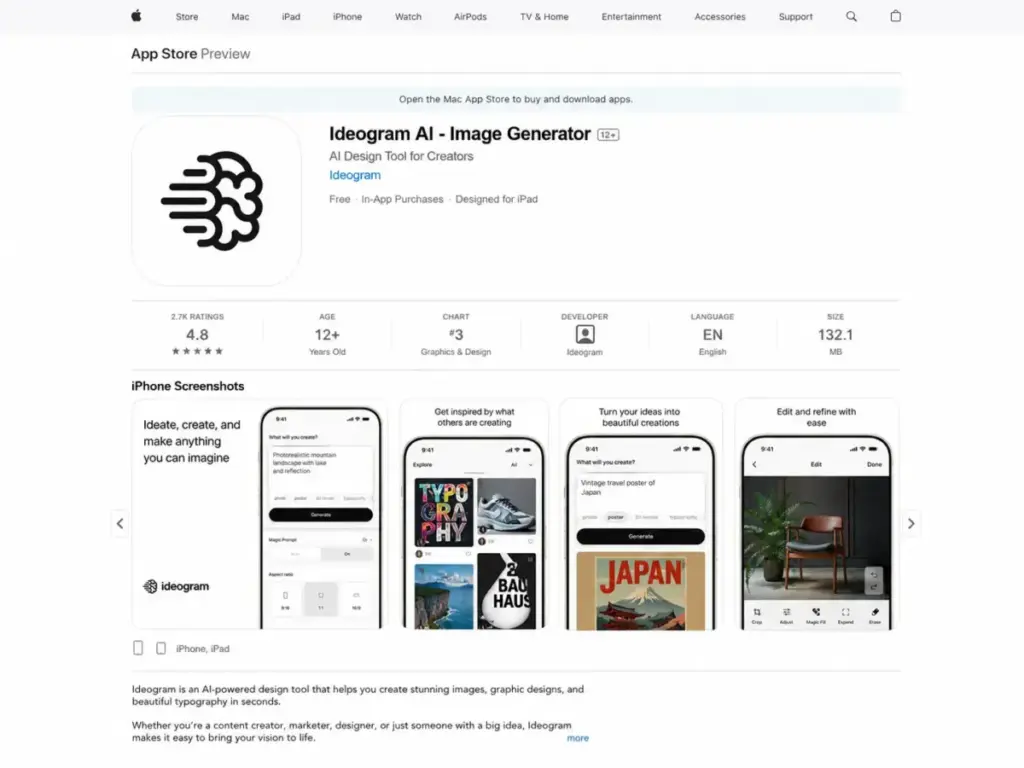
Ideogram setup is low to medium. Signup runs through Google or Apple, there is an official iOS app for mobile work, and the web interface is immediately usable, though advanced use still means learning credits, public versus private generation, Canvas, and API pricing.
Midjourney setup is medium. It now has a web interface, but full capability still involves Discord or Google account linking, GPU modes, parameters, and reference types, and mobile access is ambiguous because the official App Store developer page lists niji journey rather than a verified general Midjourney app.
Migration between them is light in one direction and heavy in another. Prompts and reference images move easily, but Midjourney’s style-reference and personalization results do not transfer to Ideogram, and Ideogram’s batch and API workflows have no Midjourney equivalent to migrate into.
What this means: switching for output style is cheap; switching for workflow is not. A team leaving Midjourney for Ideogram gains batch and API but loses fine style steering, and a team going the other way loses automation entirely.
Where Midjourney Wins
Four scenarios where Midjourney is the correct call, with more on output quality in our Midjourney review.
Cinematic concept art. For atmospheric, art-directed imagery, Midjourney’s model and reference stack lead, and this is its core strength.
Character and object consistency. Omni Reference carries a subject across generations for series work, accepting the 2x GPU cost as the tradeoff.
Image-to-video. Midjourney turns a single image into a 5-second video and gates video resolution and Relax video by plan, a capability with no Ideogram equivalent in this research set.
Taste-driven brand imagery. Style Reference, Moodboards, and Personalization give an art director finer control over a consistent visual signature than Ideogram’s design-oriented controls.
Where Ideogram Wins
Six scenarios where Ideogram is the correct call, with the full feature teardown in our Ideogram review.
Readable typography. Text-heavy posters, quote graphics, and labels are Ideogram 4.0’s design target, and it is the stronger text tool.
Spreadsheet-driven bulk output. CSV Batch Generation on Pro and Team produces campaign variants at scale, capped at 500 rows per file.
API automation. Published per-image API pricing from $0.03 makes Ideogram the only automatable choice of the two.
Low-cost privacy. Private generation starts at Plus for $20/month, $40 cheaper than Midjourney Stealth at Pro.
Enterprise procurement. SOC 2, DPA, SSO, and retention controls give security teams something to sign off on.
Small-team billing. A self-serve Team plan from 2 seats with central billing beats stacking individual subscriptions.
Who Should Choose Midjourney
Pick Midjourney if you match these buyer profiles.
You are a solo concept artist, illustrator, or creative director whose main output is cinematic, atmospheric, or art-directed imagery. You need character or object consistency across a series and accept Omni Reference’s 2x GPU cost. You want image-to-video from stills as part of your creative process.
You value fine aesthetic steering through style references and personalization over structured design controls. And you do not need an API, CSV batch runs, or a sub-$60 private tier, because those are the areas where Midjourney will not serve you.
Who Should Choose Ideogram
Pick Ideogram if you match these buyer profiles.
You are a social manager, marketer, or ecommerce creative producing captioned graphics, posters, and ad variants where readable text is the job. You are a developer or ops team that needs official API access and automated generation. You run spreadsheet-driven campaigns and want CSV Batch Generation.
You need private generation on a budget, starting at $20/month. You are a 2-to-10 person team that wants one invoice and shared admin. Or you are an enterprise buyer who needs SOC 2, SSO, a DPA, and retention controls to clear procurement.
Who Should Avoid Both
Two profiles should not force either tool.
Teams needing production-ready vector logos. Ideogram does not export SVG or vector formats, and Midjourney is weaker on exact text, so neither produces a final vector brand identity. Generate concepts in Ideogram, then finish in dedicated vector software, or evaluate a design-first tool.
Buyers who want a single tool for everything. If you need cinematic art, readable text, video, and API in one subscription, no single plan here covers all four. The rational move is often a two-tool stack: Ideogram Plus for text, automation, and privacy at $20, plus Midjourney Standard at $30 for cinematic work, for $50/month combined rather than compromising on one.
If neither fits your budget or output style, our list of Midjourney alternatives covers the wider set of options worth testing first.
Alternatives to Midjourney and Ideogram
Three alternatives worth a look when the head-to-head leaves a gap.
DALL-E. Strong prompt adherence and tight ChatGPT integration make it a fast option for conversational generation. Choose it if you already work inside the OpenAI stack; our Midjourney vs DALL-E breakdown covers the aesthetic tradeoffs.
Adobe Firefly. Built around commercial-safe training data and native Creative Cloud editing. Choose it if licensing certainty and Photoshop integration outrank raw aesthetics.
Leonardo AI. Model variety, fine-tuned styles, and generous generation controls for game and asset artists. Choose it if you want more model switching than Midjourney exposes.
For teams treating images as one part of a larger production stack, the broader set of AI tools for content creation puts these image models in context with writing and video tools.
Final Verdict
There is no single winner, because the two tools are built for different jobs, but the decision is not vague once you name your workflow.
Choose Midjourney if your output is cinematic concept art, consistent character work, image-to-video, or taste-driven brand imagery, and you can accept no API, no CSV batch, and private generation only from $60/month. Standard at $30 is the practical tier; Pro at $60 is the privacy-and-headroom tier.
Choose Ideogram if your work involves readable text, batch production, API automation, cheap private generation, small-team billing, or enterprise procurement. Plus at $20 is the practical entry tier; Pro at $60 adds Batch Generation and higher credit volume.
For marketers, developers, and small teams, Ideogram is the stronger buy in 2026 on price, text, automation, and purchasing. For artists and creative directors chasing a specific look or motion, Midjourney still leads.
For anyone who genuinely needs both capabilities, a $50/month two-tool stack beats forcing one tool to do work it was not built for. Verified against official documentation on July 3, 2026, byline Daniel Rivera, SaaSZap.
FAQ
Is Ideogram better than Midjourney for text in images?
Yes, for readable typography. Ideogram 4.0 is built around dense text rendering and layout control, and both official positioning and consistent third-party sentiment treat it as the stronger text tool. Midjourney can place text but is widely flagged as less reliable at it, so for captioned graphics and posters Ideogram needs fewer corrections. Note that even Ideogram’s own docs admit its text can still produce spelling errors, so a proofread stays necessary.
Which is cheaper, Midjourney or Ideogram?
Ideogram, at the entry and small-team levels. Ideogram has a free plan and a $20 Plus tier with private generation, while Midjourney’s cheapest paid plan is $10 Basic with no private mode and only 3.3 Fast GPU hours. For a 10-person team, Ideogram Team runs about $200 to $300 per month with central billing; ten Midjourney seats run $300 to $600 with no shared admin below 50 seats.
Does Midjourney have an API in 2026?
No, not for standard use. Midjourney’s official community guidelines state that, with rare exceptions, it does not provide an API and automated interaction is prohibited. If you need to generate images from code or inside an automated pipeline, Midjourney is the wrong tool, and Ideogram, which publishes API pricing from $0.03 per image, is the practical choice.
Does Ideogram have a free plan?
Yes. Ideogram’s free plan offers around 10 Slow credits per week with a small number of canvases, but every image is public by default and there is no priority queue. It is fine for testing and public concepting, but the public-by-default behavior makes it unsuitable for confidential client or unreleased brand work, which requires a paid plan with private generation.
Can Midjourney generate videos?
Yes, image-to-video. Midjourney turns a single image into a 5-second video, and the plan table gates video resolution and unlimited Relax video to higher tiers. This is not the same as full video-with-audio production, but it is a real differentiator, since no equivalent image-to-video feature appears in Ideogram’s documentation.
Which plan should a small marketing team buy?
For a 2-to-10 person team that wants readable text, private generation, and one invoice, Ideogram Team at $30 per member per month (or about $20 annually) is the cleaner buy, because it includes central billing and member management from a 2-seat minimum. If the team is purely artistic and does not need shared admin, individual Midjourney Standard seats at $30 each work, but expect no central administration below 50 seats.
Can I make production-ready vector logos in Ideogram?
No, not final vector files. Ideogram is strong for readable logo concepts and mockups, but its FAQ states it does not support SVG or vector formats. Treat it as the concept and text-layout step, then vectorize the result in dedicated design software before delivery. If final vector output is your core need, neither Ideogram nor Midjourney finishes the job alone.
Should I just pay for both?
Often, yes, if you need cinematic art and readable text or automation. A two-tool stack of Ideogram Plus at $20 and Midjourney Standard at $30 costs $50 per month and covers text, batch, privacy, and API on the Ideogram side plus cinematic output and image-to-video on the Midjourney side. That is usually more rational than forcing one tool to do work it was not designed for.