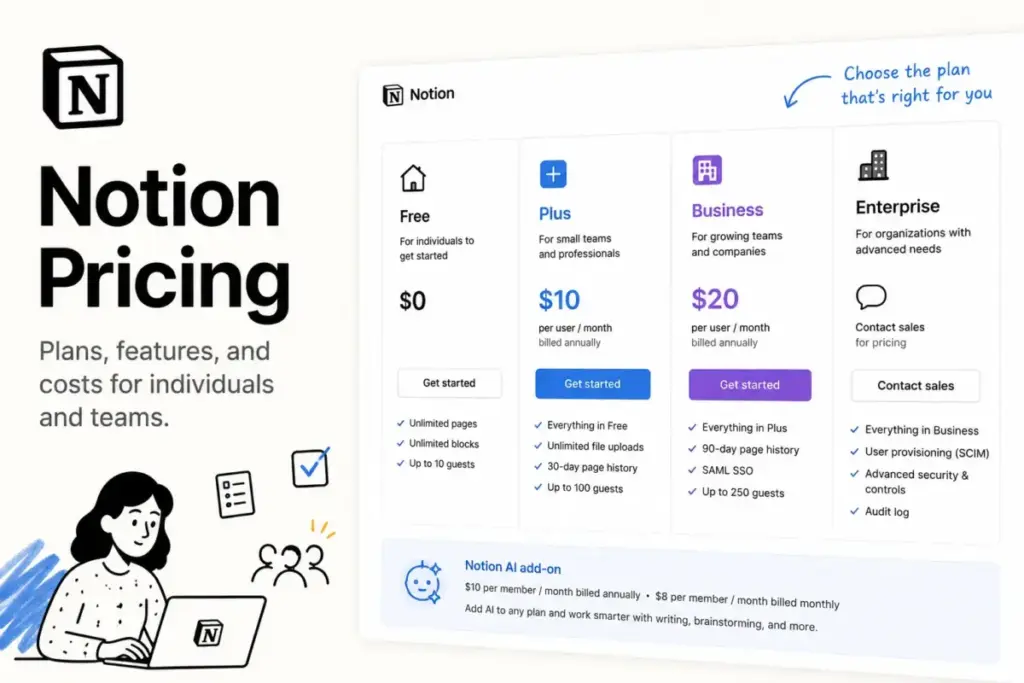
If your team is toggling between Slack, email, and a spreadsheet to track one project, Notion consolidates that workspace. The cost of this consolidation scales quickly once you add team members, custom domains, and AI features.
Selecting the best knowledge base software options requires analyzing these pricing shifts. The real decision is not Free versus Plus.
The real question is whether you need Business-only security, private teamspaces, and AI features to justify the price. This guide breaks down the true cost of Notion pricing.
This evaluation is based on independent editorial research, analyzing official product documentation, feature specifications, and verified customer feedback.
| Starting Price | Free Plan / Trial | Best Plan for Most Teams | Plan to Avoid | Biggest Hidden Cost | Best Alternative | Pricing Verified Date |
|---|---|---|---|---|---|---|
| $10/member/month (annual) | Free plan (1 user); 30-day Business Plan trial | Plus Plan ($10/member/month) | Business Plan if you only need basic note-taking | Prorated charges for mid-cycle seat additions | Coda ($10/Doc Maker/month) | May 25, 2026 |
The Advertised Price vs The Real Price
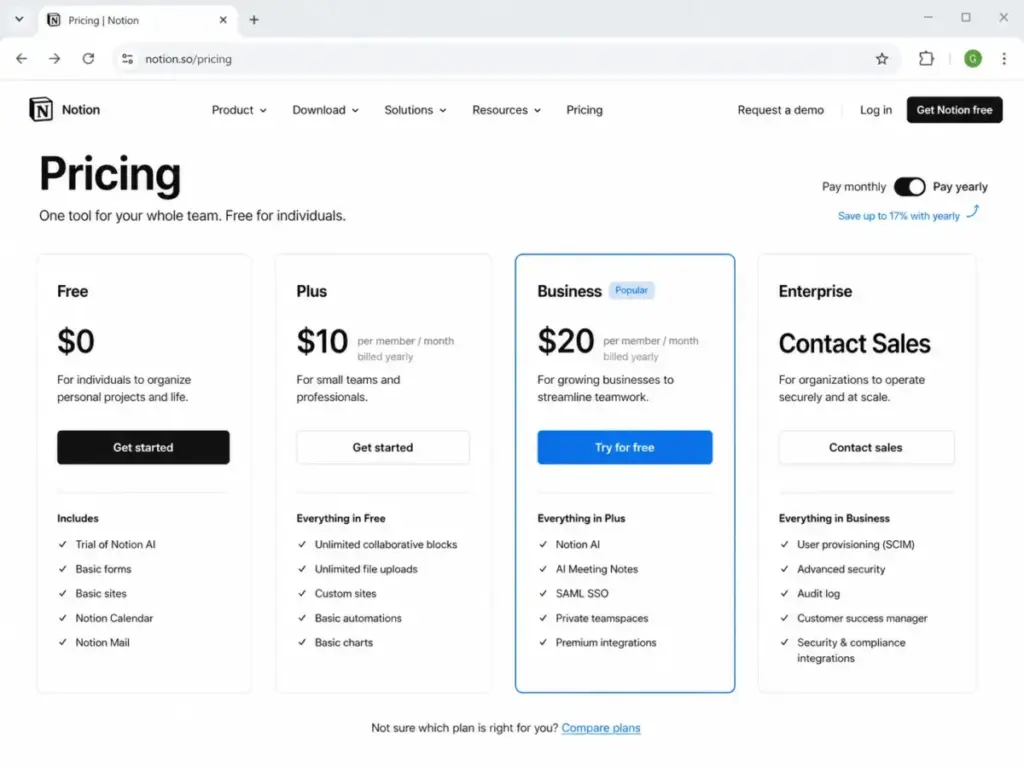
On paper, Notion is inexpensive. The pricing page lists Plus at $10/member/month on annual billing. It lists Business at $20/member/month on annual billing. But these numbers only tell part of the story.
If you select monthly billing, your costs rise immediately. Plus becomes $12/member/month on monthly billing. Business becomes $24/member/month on monthly billing. This represents a 16.7% monthly billing markup.
When you analyze what a knowledge base is, you realize that these systems require active members to maintain documentation. The seat count is your primary cost driver.
Below is the gap between advertised rates and real-world TCO at scale.
| Plan | Advertised Annual Price | Advertised Monthly Price | The “Real Price” Drivers (Hidden/Add-On Costs) | Practical Real-World TCO (at 10 Users) |
|---|---|---|---|---|
| Free | $0 | $0 | Block caps on collaborative workspaces | $0 (limited to 1 active member) |
| Plus | $10/member/month | $12/member/month | Custom domain fee ($8–$10/month); AI Trial limit | $1,200/year (annual billing) |
| Business | $20/member/month | $24/member/month | Custom Agent credits ($10/1,000 credits); Workers Beta | $2,400/year (annual billing) |
| Enterprise | Custom Quote | Custom Quote | Negotiation minimums; compliance add-ons | Custom |
The table shows that monthly billing increases your expenses. A team of 10 users on the Plus plan saves $240/year by paying annually. The same team on the Business plan saves $480/year by selecting annual billing.
These subscription fees do not include add-on modules. Connecting a custom domain or running AI automations will increase your monthly invoice.
The Five Hidden Costs of Notion
Most reviews ignore the line-item expenses that appear after setup. Here are the five hidden costs you must factor into your budget.
1. Mid-Cycle Seat Additions (Prorated Charges)
Notion bills you immediately when you add a member. If you add a user mid-month, Notion charges a prorated paid-seat fee for the remaining days. This ensures that you pay for every active day of workspace access.
The system calculates this charge based on the time left in the current cycle. For example, adding a member halfway through a monthly billing cycle triggers a 50% seat charge. The next invoice resets to the full monthly rate.
These prorated charges can surprise growing startups. If your team adds five members in a week, you receive an immediate bill. Keeping track of active seats is essential.
2. Mid-Cycle Seat Removals (No Immediate Credits)
Removing a member does not trigger an immediate refund. The paid seat remains active in your billing pool. You can assign a new user to that seat until the current billing cycle ends. The credit only applies to your next renewal.
This model prevents teams from cycling seats to avoid payments. If you remove three members, those paid seats stay active. You do not get cash back.
The seats simply remain open. You can add new members to those open seats without extra charges. The next annual renewal will reflect the reduced seat count.
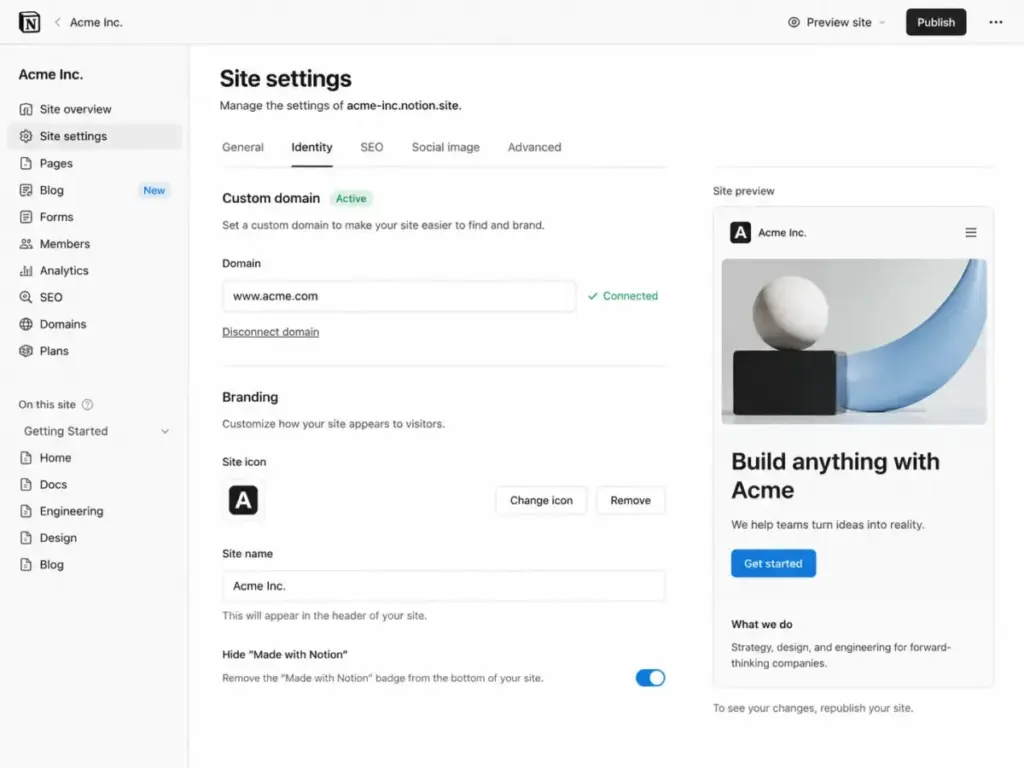
3. Custom Domain Fee for Notion Sites
Notion allows you to publish public web pages. But using a custom domain and removing Notion branding requires a paid add-on. Notion charges $8/month/domain paid annually or $10/month/domain paid monthly for this privilege.
Connecting a custom domain is useful for help centers and public roadmaps. But it adds $96/year per domain to your bill. This is a separate charge from your user subscriptions.
If you publish three different sites, you pay three domain fees. Competitors sometimes bundle custom domains into their paid tiers. Notion treats it as a strict add-on.
4. Custom Agent Usage Credits
Notion Agents run on credit-based billing. Notion charges $10 per 1,000 monthly Notion credits for Custom Agents on Business and Enterprise plans. These credits fund automated runs that trigger workspace actions.
The Business plan includes a limited number of credits. If your database automations run thousands of times, you will burn through this limit. You must buy credit packs to keep automations running.
This usage model matches the pricing of standalone automation tools. But it means your monthly cost fluctuates with your automation activity. High-volume teams pay significantly more than the base subscription rate.

5. Implementation and Workspace Architecture
Setting up complex databases is not always self-serve. Large teams often hire external consultants to design database architecture and configure templates. Third-party consultants typically charge $100 to $200 per hour for setup and governance support.
A poorly structured workspace slows down your team. Custom templates, relation columns, and rollups require planning. If you do not have an internal expert, implementation costs add up quickly.
These setup fees are one-time expenses. But they represent a significant initial investment. You must budget for consulting hours alongside your subscription costs.
| Cost Name | Amount | When It Applies |
|---|---|---|
| Mid-cycle seat additions | Prorated paid-seat charge | When adding a member without an available seat |
| Mid-cycle seat removals | No immediate credit | When removing a member during a billing cycle |
| Custom domain for Notion Sites | $8/month/domain (annual) or $10/month/domain (monthly) | When using custom domains and removing branding |
| Custom Agent usage | $10 per 1,000 monthly credits | When running Custom Agents beyond the trial limits |
| Implementation / Consultant | $100–$200/hour (third-party) | When hiring consultants for database setup and migration |
Plan-by-Plan Breakdown
Notion structures its pricing around four plans. Each plan targets a specific team size and workflow complexity.
1. Notion Free Plan (Best for Individual Users)
Notion Free provides unlimited pages and blocks for solo users. But the moment you add a second member to your workspace, Notion restricts your blocks. The free plan also caps file uploads at 5 MB per file and limits page history to 7 days. You can share workspaces with up to 10 external guests.
- What It Includes: Unlimited blocks (solo), 5 MB uploads, 7-day history, 10 guests, limited trial AI.
- Missing Features: Unlimited collaborative blocks for teams, private teamspaces, custom domains, SAML SSO.
- Avoid If: You need to collaborate with 2 or more team members in a shared workspace.
- Mini Verdict: Perfect for personal notes, checklists, and portfolio organization.
2. Notion Plus Plan (Best for Small Collaborative Teams)
Notion Plus costs $10/member/month billed annually or $12/member/month monthly. It removes the team block cap and allows unlimited file uploads (up to 5 GB per file). Page history extends to 30 days. You also get custom forms, custom sites, and basic connections.
- What It Includes: Unlimited blocks, 5 GB uploads, 30-day history, custom forms, custom sites, basic connections.
- Missing Features: Full Notion AI, Custom Agents, SAML SSO, private teamspaces.
- Avoid If: Your organization requires SAML SSO or granular workspace permissions.
- Mini Verdict: The most practical plan for small startups and teams under 10 users.
3. Notion Business Plan (Best for AI-Heavy Teams and Mid-Sized Businesses)
Notion Business costs $20/member/month billed annually or $24/member/month monthly. It bundles Notion Agent, AI Meeting Notes, and Enterprise Search. It also adds SAML SSO, private teamspaces, granular database permissions, and premium connections.
- What It Includes: Notion Agent, AI Meeting Notes, SAML SSO, granular permissions, private teamspaces, 90-day history.
- Missing Features: Zero-data-retention compliance, SCIM user provisioning, audit logs, customer success manager.
- Avoid If: You do not plan to use AI features or require single sign-on security.
- Mini Verdict: Necessary for growing teams that need private workspaces and single sign-on.
4. Notion Enterprise Plan (Best for Security-Conscious Organizations)
Notion Enterprise requires custom sales-assisted pricing. It unlocks SCIM provisioning, audit logs, and domain management. It also ensures zero-data-retention with LLM providers, protecting your proprietary data.
- What It Includes: Zero-data-retention compliance, SCIM user provisioning, audit logs, domain management, customer success manager.
- Missing Features: Public self-serve pricing (requires contacting sales).
- Avoid If: Your team has fewer than 100 employees and does not require enterprise security.
- Mini Verdict: Essential for large compliance-driven companies and enterprise deployments.
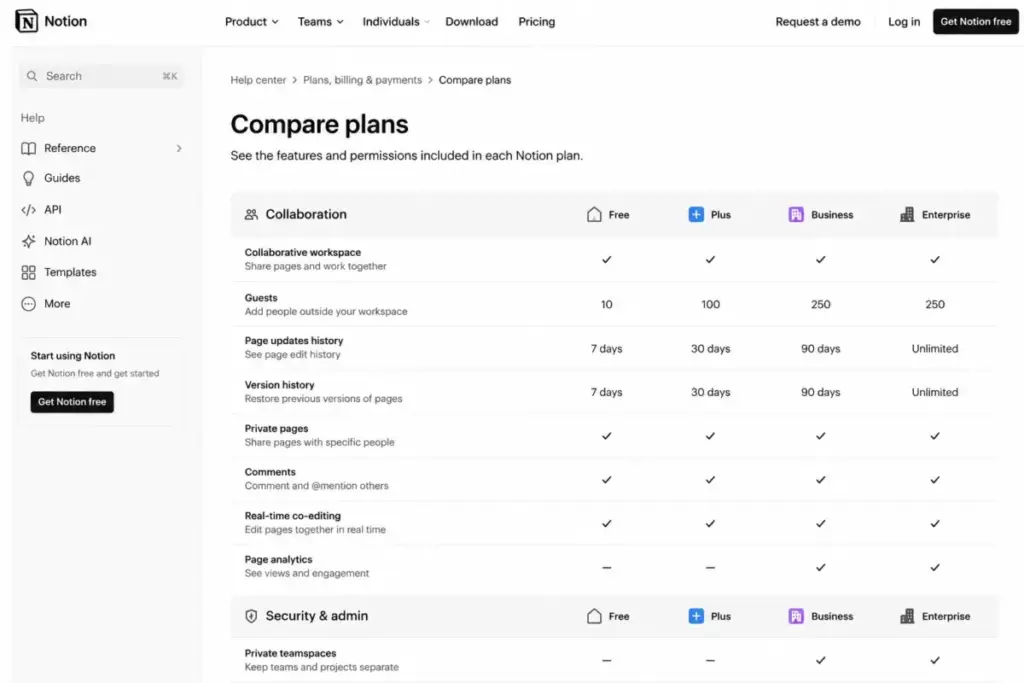
Feature Gates: What You Actually Get by Plan
Notion locks advanced features behind higher tiers. Understanding these feature gates helps you avoid unnecessary upgrades.
The table below maps critical features across all plans.
| Feature Name | Free | Plus | Business | Enterprise |
|---|---|---|---|---|
| Unlimited Collaborative Blocks | No | Yes | Yes | Yes |
| File Uploads Above 5 MB | No | Yes | Yes | Yes |
| Page History Beyond 7 Days | No | Yes (30 days) | Yes (90 days) | Yes (Unlimited) |
| Full Notion AI | Trial only | Trial only | Yes | Yes |
| Notion Agent | Trial only | Trial only | Yes | Yes |
| AI Meeting Notes | Trial only | Trial only | Yes | Yes |
| Private Teamspaces | No | No | Yes | Yes |
| SAML SSO | No | No | Yes | Yes |
| Granular Database Permissions | No | No | Yes | Yes |
| SCIM User Provisioning | No | No | No | Yes |
| Audit Logs | No | No | No | Yes |
| Zero Data Retention with LLM | No | No | No | Yes |
Private teamspaces are a key gate. On the Plus plan, all members can see all teamspaces. If you need private folders for HR or finance, you must buy Business.
SAML SSO is another major gate. Security-conscious teams must purchase Business to enforce single sign-on. Plus does not support corporate security policies.
Audit logs and SCIM provisioning are Enterprise exclusives. You cannot access these admin tools on the Business plan. Large companies require these features for compliance.
When the Free Plan Stops Working
Notion Free is generous for solo users. But it is a trap for team collaboration.
The moment you invite a second member to your workspace, Notion restricts your blocks. You will hit a limit of 1,000 blocks quickly. If you reach this block cap, Notion restricts your editing privileges.
The 5 MB file upload cap is another blocker. Teams cannot share video files or large PDF presentations. Plus provides a 5 GB file limit.
Before upgrading, you can read our detailed Notion review to understand the overall capabilities of the workspace.
For example, a marketing team sharing high-resolution images will hit the 5 MB limit immediately. A technical team publishing database schemas will exhaust 1,000 blocks in a week.
Solo freelancers can use the Free plan indefinitely. The block caps only apply when you share a workspace. If you work alone, the Free plan remains a viable option.
Real Cost Scenarios
Every user added to your workspace requires a paid seat. The pricing model means your bill scales directly with your headcount.
Below is the cost projection for teams on Plus and Business tiers.
| Scenario (Users) | Recommended Plan | Monthly Cost (Annual Billing) | Monthly Cost (Monthly Billing) | Total Annual Cost |
|---|---|---|---|---|
| 5 Users | Plus Plan | $50 | $60 | $600 |
| 10 Users | Plus Plan | $100 | $120 | $1,200 |
| 20 Users | Business Plan | $400 | $480 | $4,800 |
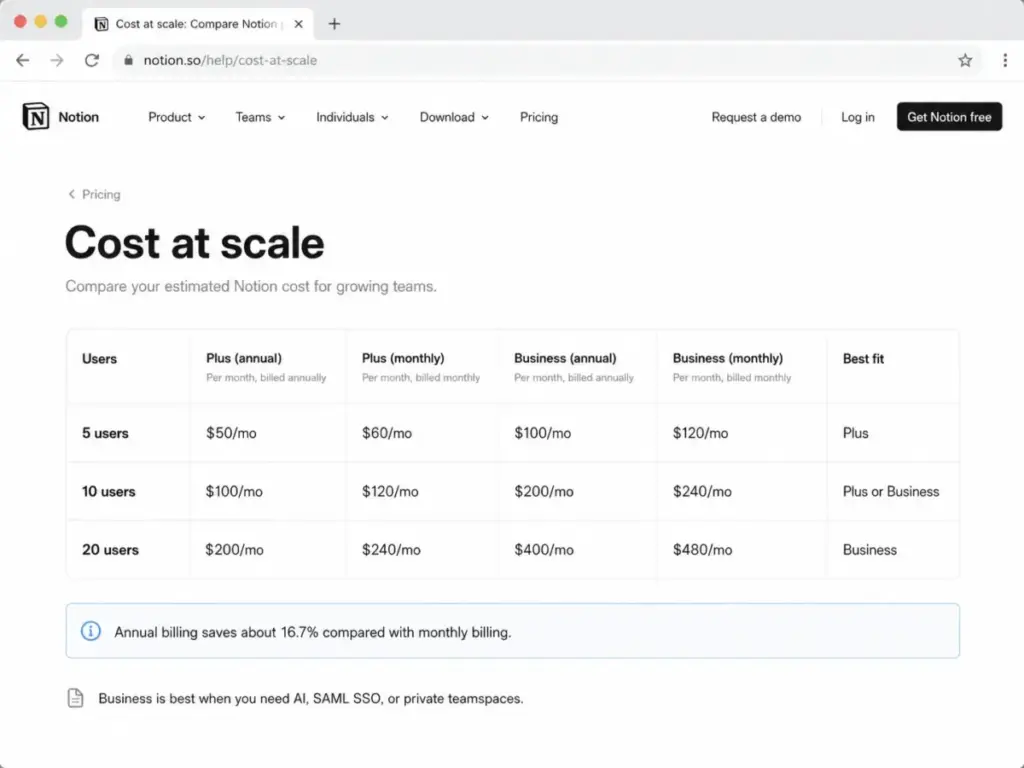
At 5 users, the Plus plan costs $50/month on annual billing. If you bill monthly, you pay $60/month.
For 10 users, the Plus plan costs $1,200/year. If your team needs AI or SAML SSO, you must upgrade to Business. This upgrade increases your cost to $2,400/year.
At 20 users, the Business plan costs $4,800/year. This price excludes additional custom domain costs or AI credits.
For a 50-user organization, the Business plan costs $12,000/year. At this scale, consulting fees and custom domain add-ons become meaningful variables. The total cost of ownership is higher than the base seat price.
Which Notion Plan Should You Choose?
I recommend evaluating your team’s security and AI needs before picking a tier.
- Choose the Free Plan if you are a solo user, freelancer, or student. The free plan handles basic document organization with no cost.
- Choose the Plus Plan if you have a team of 2 to 10 users collaborating on documentation. It removes block limits and supports large file sharing.
- Choose the Business Plan if your team uses AI tools daily or requires SAML SSO. It provides private teamspaces for sensitive documents.
- Choose the Enterprise Plan if you have more than 100 employees or operate in a regulated industry. It guarantees zero-data-retention for security.
If your team needs a structured wiki, you might want to read our Notion vs Confluence comparison.
Your choice should depend on feature gates, not user limits. A 5-person team that needs private folders must buy Business. A 50-person team that only needs public notes can stay on Plus.
Which Notion Plan Should You Avoid?
I recommend avoiding the Business plan if you only need basic document sharing. The jump from Plus to Business doubles the price from $10 to $20/member/month on annual billing.
If only one or two team members need AI writing help, the Business plan is a bad deal. It forces you to buy AI access for every user in the workspace. It is cheaper to keep the team on Plus and purchase standalone AI subscriptions for your writers.
You should also avoid the Free plan if you have a team. The 1,000 block limit makes collaboration impossible after a few days.
Paying monthly is another mistake to avoid. The monthly billing markup adds up quickly. If your team is stable, annual billing is the only logical choice.
Notion Pricing vs Competitors
Notion is not the only option in the productivity market.
- Coda bills $10/Doc Maker/month (annual). You only pay for users who create documents. Viewers and editors are free. Our our Coda review analyzes how this maker-based pricing model compares to Notion.
- ClickUp bills $7/user/month (annual) for the Unlimited tier. It is cheaper than Notion Plus.
- Confluence costs $6.70/user/month (annual) for the Standard tier.
- Asana costs $10.99/user/month (annual) for Starter.
- Airtable charges $20/collaborator/month (annual) for its Team plan.
Below is a head-to-head comparison of these platforms.
| Competitor | Starting Price (Annual) | Practical Tier (Per User) | 10-User Cost (Monthly Equivalent) | Best For |
|---|---|---|---|---|
| Notion | $10/member/month | Plus Plan ($10) | $100 | Collaborative notes and wiki workspaces |
| Coda | $10/Doc Maker/month | Pro Plan ($10) | $100 (depends on makers) | Interactive documents and data tables |
| ClickUp | $7/user/month | Unlimited ($7) | $70 | Project tracking and task management |
| Confluence | $6.70/user/month | Standard ($6.70) | $67 | Corporate wikis and technical documentation |
| Asana | $10.99/user/month | Starter ($10.99) | $109.90 | Cross-functional project workflows |
| Airtable | $20/collaborator/month | Team Plan ($20) | $200 | Database-driven custom applications |
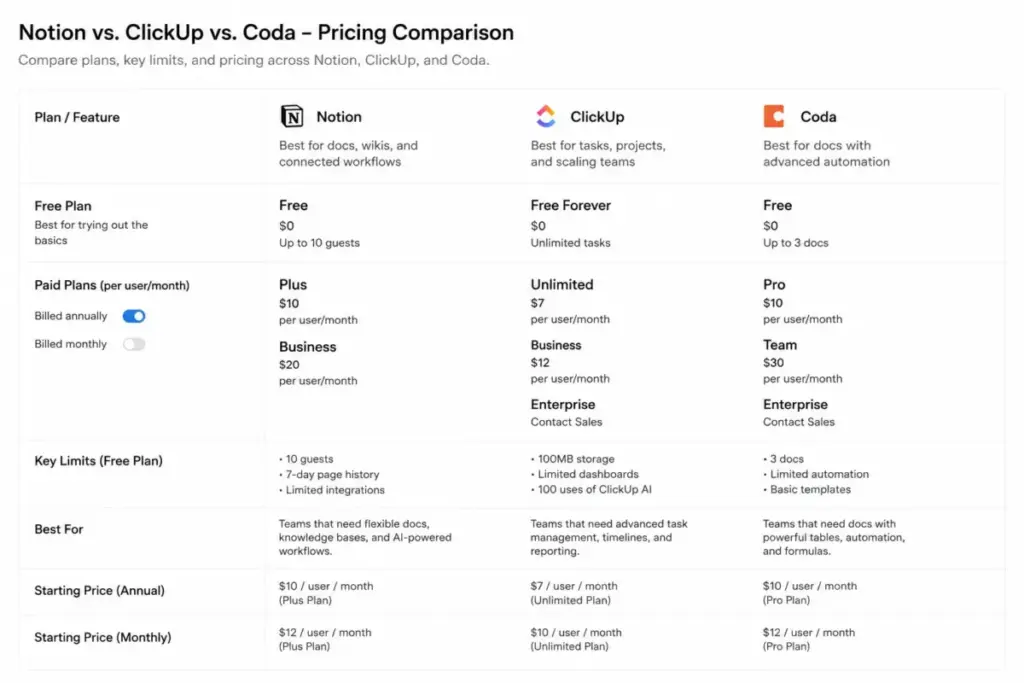
Coda’s billing model is highly competitive. If your team has many passive readers, Coda saves you money. You do not pay for users who only consume information.
ClickUp and Confluence are cheaper per-user options. They fit teams focused strictly on task tracking or corporate documentation. Notion is better for teams combining both workflows.
Airtable is more expensive than Notion Plus. It targets complex database automation rather than document editing.
Is Notion Worth the Price?
Notion is worth the price for teams using the platform as a central wiki and project tracker. The Plus plan provides solid value at $10/member/month on annual billing.
It is not worth the price if you only need notes or basic text documents. Standalone editors like Google Docs are free.
If the cost of Notion is too high, you can evaluate these Notion alternatives.
How to Avoid Overpaying for Notion
- Audit your paid seats quarterly. Remove inactive users to stop prorated charges.
- Use guest access for external clients. Notion guest limits are generous, and guests do not require paid seats.
- Compare standalone AI tools. Buying ChatGPT Plus for two writers is cheaper than upgrading a 15-person team to Notion Business just for AI.
- Use free domains for internal sites. Connect a custom domain only if the site is public-facing.
- Monitor your Custom Agent credit usage. Avoid running unnecessary automated runs.
- Check startup and education discounts. Notion offers discounts of up to 100% for eligible startups and students.
FAQ
How much does Notion cost per month?
Notion Plus costs $12/member/month (monthly) or $10/member/month (annual). Business costs $24/member/month (monthly) or $20/member/month (annual).
Is Notion Free really free?
Yes, for individuals. If you add 2 or more members, Notion caps your workspace at 1,000 blocks.
What is included in Notion Plus?
Notion Plus includes unlimited collaborative blocks, unlimited file uploads, custom forms, custom sites, and 30-day page history.
Does Notion AI cost extra?
Notion AI is bundled into the Business plan ($20/member/month). Plus plan users only get a limited trial of Notion AI.
How much is Notion for 10 users?
Notion Plus costs $100/month on annual billing. Notion Business costs $200/month on annual billing.
Does Notion have a student discount?
Yes. Notion Education Plus is free for students and educators, but it restricts the workspace to 1 member.
Does Notion charge for guests?
No. Guests are free, but they can only access the specific pages you share with them.
Which Notion plan includes SAML SSO?
The Business plan ($20/member/month) and Enterprise plan include SAML SSO.
Does Notion require a credit card for trials?
Not always. You can start a Business trial without entering payment information. Notion will prompt you to enter a card before the trial ends.
Can I run Custom Agents on the Plus plan?
No. Custom Agents require the Business or Enterprise plan. These plans support credit-based automation runs.
If you are comparing Notion to project management platforms, you can read our ClickUp review.