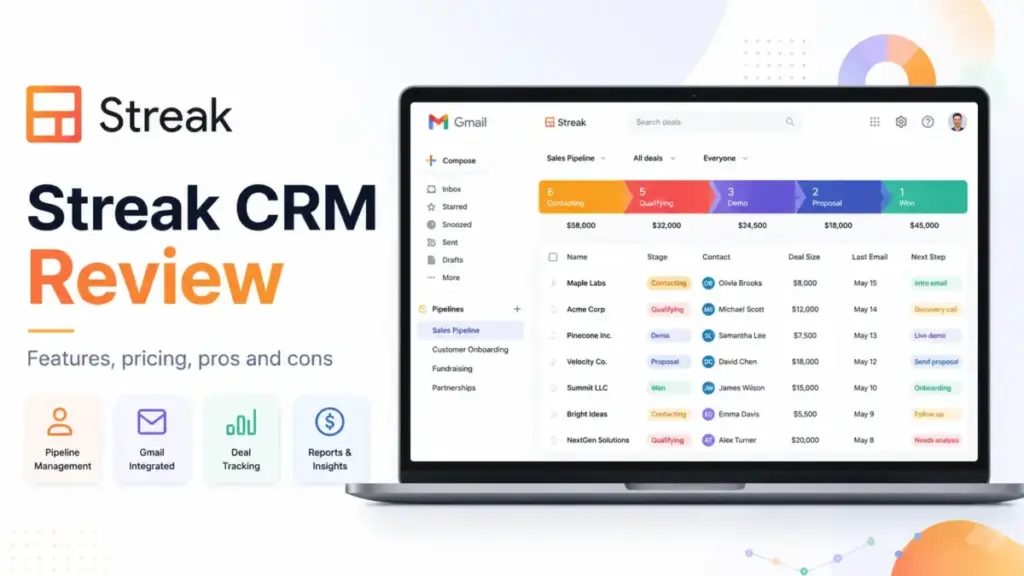
Most small teams abandon their first CRM software within 90 days. The usual reason is not missing features. It is adoption friction. Reps do not want another tab, another login, another dashboard competing with the inbox they already live in. Streak CRM tries to solve this by building the entire CRM inside Gmail. No separate app. No tab-switching.
Your pipeline, deals, contact history, and email tracking sit right next to your inbox threads. This Streak CRM review breaks down whether that promise holds up in 2026, what it costs for real teams, and where the Gmail-native approach starts working against you. If you are comparing options, start with our guide to the best CRM software for a wider view before drilling into Streak specifically.
Quick Verdict
| Category | Detail |
|---|---|
| Score | 7.8 / 10 |
| Best For | Solo consultants and 2 to 10 person teams that run their sales process entirely in Gmail |
| Not For | Outbound sales teams needing calls, SMS, advanced sequences, or non-Gmail workflows |
| Starting Paid Price | $49/user/month (annual) |
| Biggest Strength | True inbox-native CRM that lives inside Gmail, not beside it |
| Biggest Limitation | Advanced automation and reports locked behind Pro+ at $69/user/month |
| Best Alternative (Budget) | Less Annoying CRM at $15/user/month |
| Best Alternative (Google Workspace) | Copper CRM for broader CRM outside the inbox |
| Best Alternative (Sales Depth) | Pipedrive for dedicated pipeline management |
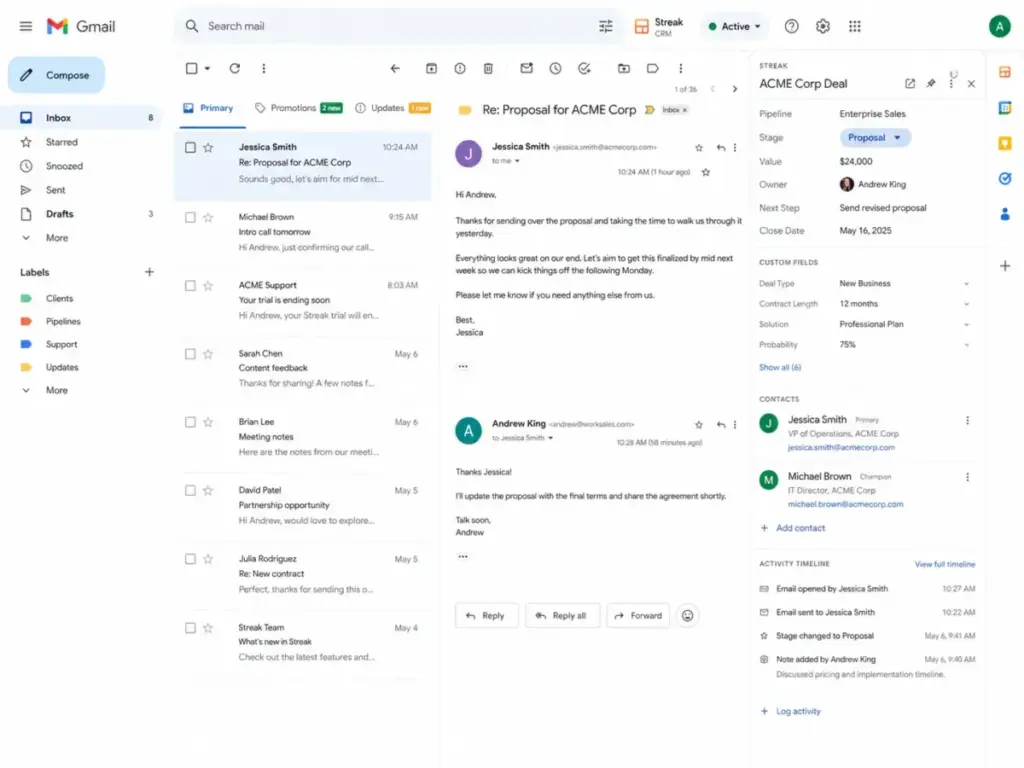
Final Verdict on Streak CRM
Streak CRM earns a 7.8 out of 10 for Gmail-dependent small teams in 2026. It remains one of the few CRMs that genuinely lives inside your inbox rather than syncing with it from another platform. For solo consultants managing 50 to 200 relationships and small agencies running deal flow through email, that inbox-native design removes the adoption barrier that kills most CRM implementations.
The score reflects strong marks in Gmail adoption (9.2/10) and email workflow tools (8.5/10), balanced against weaker results in reporting depth (6.0/10), automation access (6.5/10), and pricing value at scale (6.8/10). Streak is not a budget CRM. At $49/user/month on the Pro plan, a 5-person team pays $245/month before any AI credit add-ons. Teams that outgrow light reporting or need automation beyond basic rules will pay $69/user/month for Pro+.
I recommend Streak when your team answers “yes” to two conditions: Gmail is your primary work surface, and your sales process is email-first. The moment phone calls, SMS, social selling, or multi-channel sequences become central, Streak’s value drops sharply. This score follows the SaaSZap review methodology.
Alex Morrison’s Quick Take: Streak is not cheap CRM. It is Gmail adoption insurance. The product is strongest before your sales process becomes a real sales operation. If email is how you sell, Streak removes friction. If email is just one channel, look elsewhere.
What Is Streak CRM?
Streak CRM is a customer relationship management tool built directly into the Gmail interface. It runs as a browser extension for Chrome, Safari, and Microsoft Edge. Unlike CRMs that sync with Gmail from a separate dashboard, Streak places pipelines, deal records (called “boxes”), contact timelines, and collaboration tools inside the Gmail window itself.
Streak claims over 750,000 users and 4,000 companies, and it holds Google Premier Partner status. The company stores data on Google Cloud Platform in the United States and authenticates through Google OAuth.
The distinction matters. A CRM “with Gmail integration” pulls emails into its own interface. Streak does the opposite: it pulls CRM into Gmail. Your reps never leave their inbox.
Streak CRM Features in Gmail
Streak’s feature set centers on making Gmail the operating system for your customer relationships. Every core function, from pipeline management to email tracking, operates inside the Gmail interface. Here is what each feature area delivers and where each falls short.
Streak CRM Pipelines and Boxes
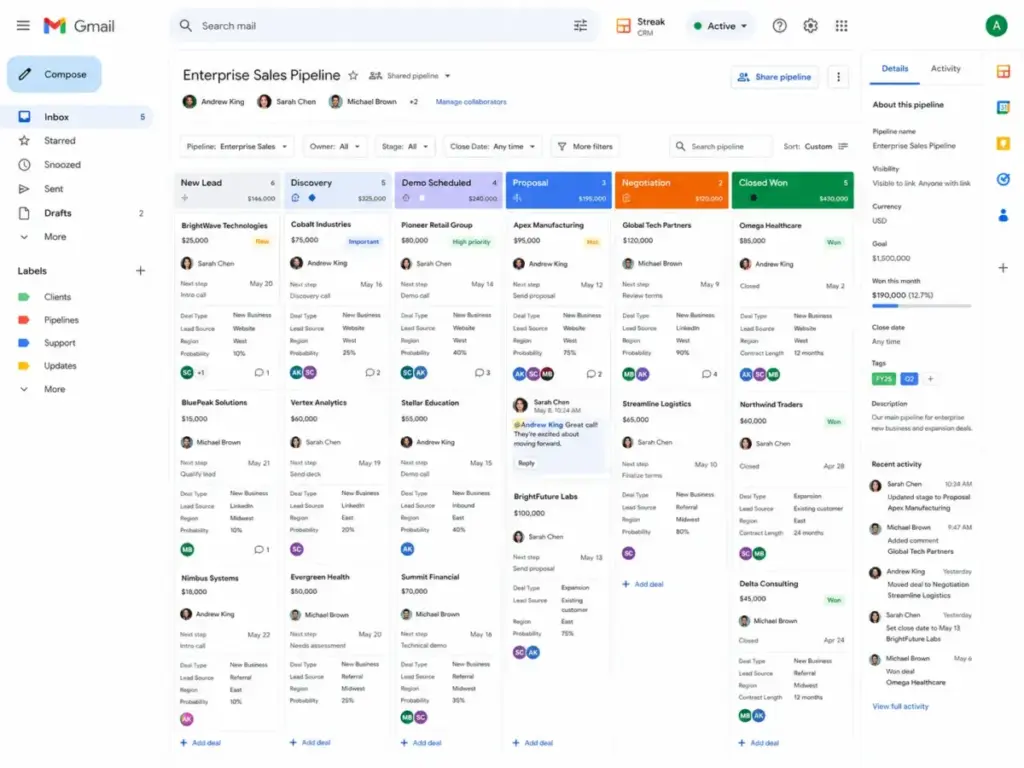
Pipelines in Streak represent any process with stages: sales deals, hiring candidates, support tickets, fundraising rounds, or project tracking. Each item inside a pipeline is a “box.” Boxes hold custom fields, magic fields (auto-populated data), email threads, call logs, meeting notes, file attachments from Google Drive, tasks, and reminders.
Pipeline filters let you segment boxes by stage, owner, date, or custom field values. Shared pipelines allow team members to view and edit the same pipeline, and automatic email sharing means threads linked to a box become visible to everyone with pipeline access.
The pipeline view is functional for teams tracking under 1,000 active opportunities. Beyond that size, users on G2 report that the interface becomes harder to manage, particularly when advanced filtering or territory-based views are needed.
Streak CRM Email Tracking and Mail Merge
Streak offers email tracking and link tracking as free tools, even without a paid CRM plan. You can see when a recipient opens your email and which links they click. This works directly inside Gmail with no separate dashboard required.
Mail merge lets you send personalized bulk emails from Gmail. The sending limits depend on your account type. Personal Gmail accounts are capped at 400 emails per day due to Google’s own sending restrictions. Google Workspace accounts can reach up to 1,500 emails per day on paid Streak plans. Snippets (text templates) and Thread Splitter (splitting merged email threads) are also included in the free tier.
As one user on Streak’s website puts it: “Streak is slick. I love that I can use it right out of my inbox.” (Reba Patton, Streak website testimonial, Nov 2024.)
Streak CRM AI Autofill and AI Credits
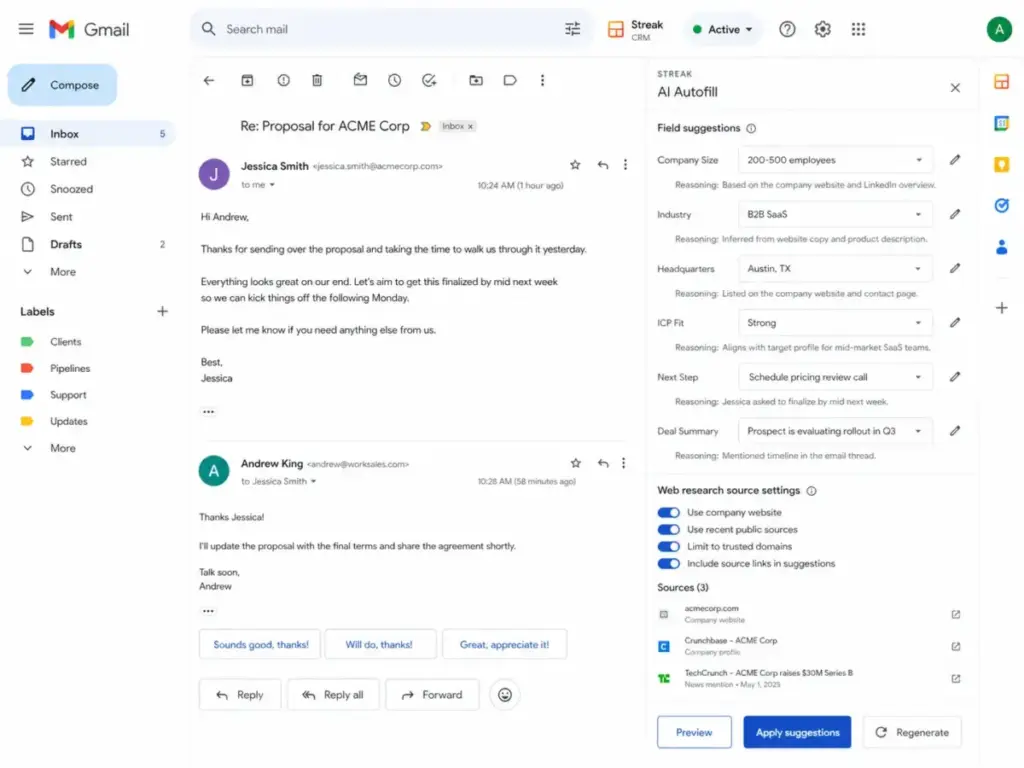
Streak’s AI Autofill is the most notable AI feature in the product. It fills CRM fields automatically by reading deal timeline data or pulling information from web research. AI Autofill can populate next steps, deal status, lead context, ICP fit, company size, industry, funding stage, headquarters location, and custom outreach openers. You can write custom instructions for each field.
AI action steps in automations include AI Autofill, Ask AI about a box, Generate a box summary, and AI Response. AI previews are free and do not consume credits.
How AI credits work:
| AI Action | Credit Cost |
|---|---|
| Box summary | 1 credit |
| Ask a question about a box | 1 credit |
| Autofill from timeline | 1 credit per field |
| Autofill from web research | 2 credits per field |
| Integration AI response | 0.1 credit |
| Formula column generation | Free |
| Pipeline generation | Free |
| Meeting agenda generation | Free |
Monthly credit allowances by plan:
| Plan | Credits per User per Month |
|---|---|
| Pro | 20 |
| Pro+ | 150 |
| Enterprise | 500 |
Credits are pooled across the team and expire at the end of each billing month. If your 5-person Pro team has 100 pooled credits and you run Autofill on 10 fields for 10 boxes, that is 100 credits consumed in a single batch. Additional credit packs start at $100/month for 1,000 credits, scaling to $1,000/month for 25,000 credits. For a detailed breakdown, see the Streak AI credits guide.
Streak’s AI is useful for CRM hygiene, keeping fields updated without manual entry. But credits make usage planning necessary, especially on the Pro plan where 20 credits per user runs out quickly.
Streak CRM Integrations and API
Streak integrates natively with Google Workspace: Gmail, Calendar, Drive, Sheets, and Chat. It offers an API for custom integrations and supports connections through Zapier and similar automation platforms. If your team relies on Zapier alternatives for workflow connections, Streak can plug into those as well.
The integration story is strong within the Google ecosystem. Outside of it, the options narrow. Streak does not offer the breadth of native third-party integrations found in Pipedrive or HubSpot. Teams using Slack, Microsoft Teams, or non-Google tools will rely on Zapier or the API for connections.
Streak CRM Mobile Apps
Streak offers iOS and Android mobile apps. The mobile experience gives you access to pipelines, boxes, contact details, and basic CRM functions on the go. It does not replicate the full Gmail sidebar experience, but it covers the essentials for checking deal status, adding notes, and reviewing contact history away from your desk.
User Experience and Daily Workflow
Streak’s daily workflow experience is defined by one fact: you never leave Gmail. That is the product’s core value proposition and its primary constraint. For teams that spend most of their day in Gmail, this means zero context-switching between a CRM dashboard and their inbox.
The First 30 Days With Streak CRM
This is what the onboarding timeline looks like based on documented feature analysis and user feedback patterns:
Days 1 to 3: Setup. Install the browser extension. Connect your Google account through OAuth. Create your first pipeline. Streak offers pre-built templates for sales, hiring, fundraising, support, and custom workflows. The initial setup is fast because there is no separate platform to configure.
Week 1: Early value. Email tracking activates immediately. You start seeing open and click notifications inside Gmail. Creating boxes for active deals takes minutes. Snippets save time on repetitive emails. Tasks and reminders keep follow-ups visible.
Week 2 to 3: Team adoption. Shared pipelines let teammates see the same deal data. Automatic email sharing means every thread connected to a box is visible to the team. This is where Streak’s adoption advantage shows: reps do not need training on a new interface.
Month 1: Friction points appear. Managers start wanting pipeline reports. On Pro, you get basic reporting. Advanced reports, including custom dashboards and deeper analytics, require Pro+ at $69/user/month. Automation needs surface. Workflow rules and integrations also require Pro+. This is the point where teams either commit to upgrading or start evaluating alternatives.
As Igor T., a Real Estate Sales Manager, noted in a Streak website testimonial (May 2024): “I have used streak in multiple ways as a sales CRM to manage clients and make notes about them.”
Gmail-Native Is the Feature and the Constraint
Streak’s inbox-native design creates a specific dependency chain:
The dependency stack:
- Streak requires Gmail or Google Workspace. It does not work with Outlook, Yahoo, or other email providers.
- Streak runs as a browser extension. It currently supports Chrome, Safari, and Microsoft Edge. Firefox and other browsers are not supported.
- Streak authenticates through Google OAuth and requests access to Gmail, Google Drive, Contacts, and Calendar APIs.
- Streak stores its own data on Google Cloud Platform in the United States. It says it does not store email body content, instead fetching email bodies via the Gmail API on request.
What this means in practice:
- If a team member uses a non-Gmail address, they cannot use Streak.
- If your company moves from Google Workspace to Microsoft 365, Streak becomes unusable.
- Browser extension updates must pass Chrome team review. Extension conflicts or browser changes can temporarily affect access.
- Your CRM data lives within Google’s infrastructure. Streak says it uses encryption when transmitting information and undergoes Google OAuth API review yearly. See the Streak security page for their full security statement.
This is not a flaw. It is a design choice. But it is a choice with consequences that grow as your team or tech stack evolves.
Streak CRM Pricing and Plans
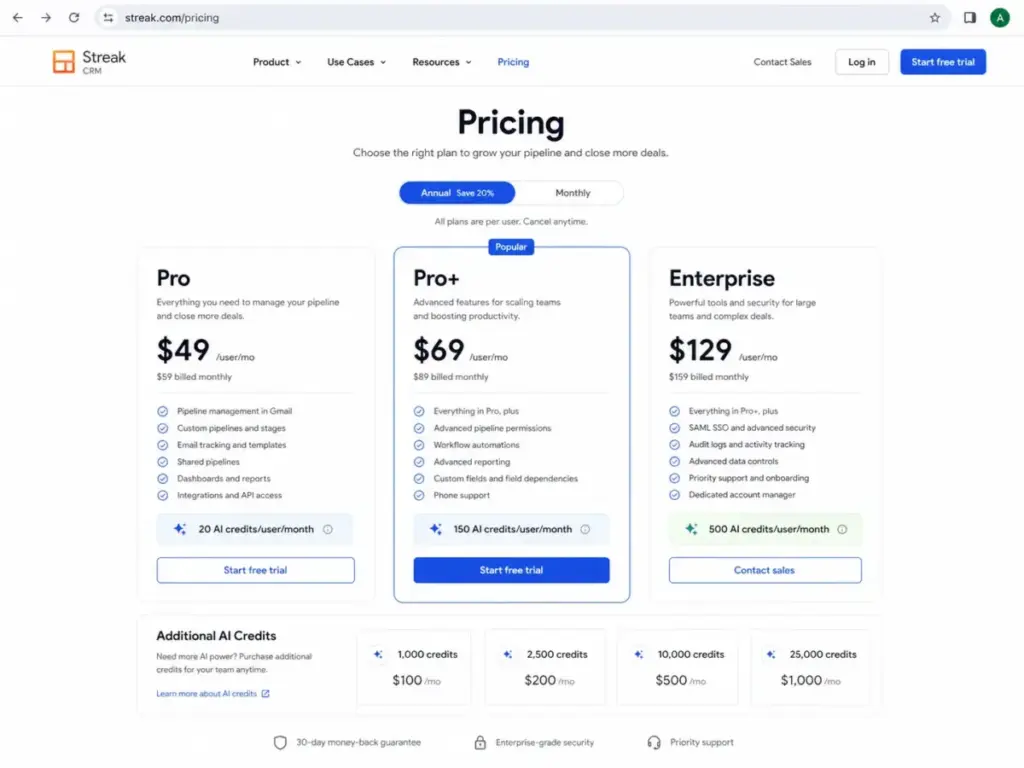
Streak’s pricing follows a per-user model with three paid tiers. Everyone on a team must be on the same plan. There is no option for view-only seats at a lower price. This means your entire team, including managers who only review data, pay the full per-seat cost.
Streak also offers free email power tools (email tracking, link tracking, snippets, 50/day mail merge, Thread Splitter) that do not require a paid plan.
Streak CRM Pricing Table
| Plan | Annual Price (per user/month) | Monthly Price (per user/month) | Best For | Key Limits | AI Credits | Verified |
|---|---|---|---|---|---|---|
| Free Tools | $0 | $0 | Individuals needing email productivity | No CRM pipelines, 50/day mail merge | None | Apr 2026 |
| Pro | $49 | $59 | Teams needing full CRM with collaboration | Basic reports, no advanced automations | 20/user/month | Apr 2026 |
| Pro+ | $69 | $89 | Teams needing automations and advanced reports | No custom roles, no data validation | 150/user/month | Apr 2026 |
| Enterprise | $129 | $159 | Large teams needing access management | Requires 10+ users, annual billing only | 500/user/month | Apr 2026 |
Source: Streak CRM pricing page, verified April 28, 2026.
Streak CRM Cost Reality: 1, 5, and 10 Users
| Team Size | Pro (Annual) | Pro+ (Annual) | Enterprise (Annual) |
|---|---|---|---|
| 1 user | $49/month | $69/month | $129/month |
| 5 users | $245/month | $345/month | $645/month |
| 10 users | $490/month | $690/month | $1,290/month |
For comparison:
- Less Annoying CRM at 5 users: $75/month (flat $15/user, no tiers).
- Copper CRM Professional at 5 users: $295/month (annual billing).
- Pipedrive Essential at 5 users: pricing varies by tier and add-ons.
Streak is not the cheapest CRM for small teams. At 5 users on Pro, you pay $245/month. A team on Less Annoying CRM pays $75/month for the same headcount. The price difference is $170/month, or $2,040/year. The question is whether Gmail-native adoption and inbox workflow tools justify that premium.
If you are exploring budget-friendly options, see our list of the best free CRM software.
AI Credit Add-on Pricing
| Credit Pack | Monthly Cost |
|---|---|
| 1,000 credits | $100 |
| 2,500 credits | $200 |
| 10,000 credits | $500 |
| 25,000 credits | $1,000 |
Additional credits are billed separately from the CRM plan. Unused credits expire monthly.
Streak CRM Pros and Cons
Every CRM involves trade-offs. Streak’s trade-offs are sharper than most because of its Gmail-only design. Here are the specific advantages and disadvantages based on documented feature analysis, official pricing, and third-party user feedback.
- True inbox-native CRM. Streak runs inside Gmail, not in a separate tab. Reps manage deals, contacts, and pipelines without leaving their inbox. This removes the adoption barrier that causes most CRM implementations to fail.
- Zero onboarding for Gmail users. If your team already uses Gmail, the interface is immediately familiar. There is no new platform to learn. Pipeline creation takes minutes.
- Free email power tools. Email tracking, link tracking, snippets, Thread Splitter, and 50/day mail merge are available at no cost. This is a real entry point, not a trial.
- AI Autofill saves manual data entry. AI Autofill populates CRM fields from email threads and web research. For teams that hate updating deal records, this is a practical time saver.
- Strong Google Workspace integration. Native connections to Calendar, Drive, Sheets, and Chat keep workflows within the Google ecosystem without third-party middleware.
- Flexible pipeline use cases. Pipelines work for sales, hiring, fundraising, support, and custom workflows. The same tool adapts to different team functions.
- No non-Gmail support. Streak requires Gmail or Google Workspace. If any team member uses Outlook, Yahoo, or another provider, they cannot use the product. This is a hard boundary, not a soft limitation.
- Advanced reports and automations require Pro+. The Pro plan at $49/user/month includes only basic reporting. Custom dashboards, advanced analytics, workflow automations, and integrations require Pro+ at $69/user/month. This means a 5-person team pays $345/month to access features many CRMs include at lower tiers.
- No view-only pricing. Every team member pays the full per-seat cost. Managers who only need to review pipeline data pay the same as reps who use the CRM daily. On a 10-person team, this inflates costs quickly.
- AI credits expire monthly. Unused credits do not roll over. On the Pro plan, 20 credits per user is thin. Running Autofill on 10 fields across 2 boxes consumes an entire user’s monthly allowance.
- Reporting is light for sales management. G2 users consistently cite “inadequate analytics” as a pain point. Managers needing forecasting, territory views, or revenue attribution will find Streak’s reports insufficient compared to Pipedrive or HubSpot.
- Browser extension dependency. Streak operates as a browser extension. It supports Chrome, Safari, and Edge. Extension updates, browser policy changes, or conflicts with other extensions can disrupt access.
- Pricing is not budget-friendly at scale. At $49/user/month, Streak costs more than three times what Less Annoying CRM charges ($15/user/month). For teams prioritizing cost over inbox-native design, Streak is expensive.
What Streak CRM Does Not Tell You
Streak’s marketing focuses on the inbox-native advantage. That advantage is real. But there are friction points the marketing does not emphasize. Here are the details a buyer should know before committing.
Gmail dependency is a strategic risk. If your organization ever migrates from Google Workspace to Microsoft 365, Streak becomes unusable. There is no Outlook version. There is no web-only fallback. Your CRM is tied to your email provider.
Automation is gated behind Pro+. The word “automations” appears prominently in Streak’s feature marketing. But workflow automations and integration-based automations require Pro+. The Pro plan does not include them. A buyer who signs up for Pro expecting automation will need to upgrade.
AI credits can run out faster than expected. A 5-person Pro team gets 100 pooled credits per month. Autofill from web research costs 2 credits per field. If you auto-fill 5 fields for 10 boxes using web research, that is 100 credits, your entire monthly pool, in one batch. Additional credits start at $100/month for 1,000 credits.
No view-only seats exist. Every user on the team must be on the same plan. Streak does not offer a discounted viewer or observer role. This is unusual in the CRM market, where many products offer reduced pricing for non-active users.
Reporting limits hurt sales managers. Pro plan reporting covers basic pipeline metrics. Managers who need win-rate analysis, sales cycle duration, rep performance comparisons, or custom report builders must pay for Pro+ or Enterprise. For teams that prioritize data-driven sales management, this is a gap.
Personal Gmail mail merge is capped. If you use Streak with a personal Gmail account (not Google Workspace), mail merge is limited to 400 emails per day due to Google’s sending restrictions. Workspace accounts on paid plans can reach 1,500/day.
Streak CRM Alternatives
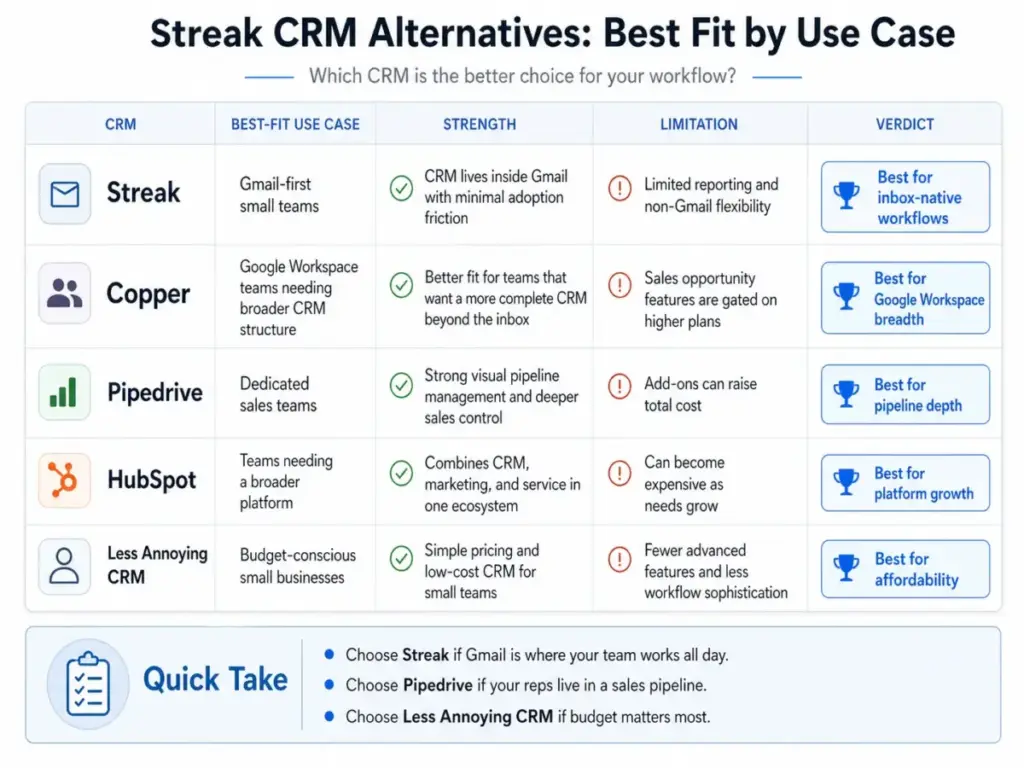
Streak is not the only CRM option for Gmail users or small teams. Each alternative below wins in specific scenarios. The right choice depends on your team’s workflow, budget, and growth trajectory. Teams comparing those trade-offs should evaluate Streak CRM alternatives by Gmail workflow retention, per-seat cost, automation depth, reporting limits, and migration effort away from inbox-native selling.
Alternatives Comparison Table
| CRM | Starting Price (Annual) | Best For | Beats Streak When |
|---|---|---|---|
| Copper CRM | $9/seat/month | Google Workspace teams needing broader CRM | Team wants structured CRM beyond the inbox |
| Pipedrive | Varies by tier + add-ons | Dedicated sales teams wanting pipeline depth | Reps live in a CRM dashboard, not Gmail |
| HubSpot CRM | Free tier available | Teams needing marketing + sales + service | Team needs a platform, not just a CRM |
| Less Annoying CRM | $15/user/month | Budget-conscious small businesses | Cost control matters more than Gmail-native design |
| NetHunt CRM | Varies | Gmail CRM users wanting stronger automation | Team needs deeper workflow automation in Gmail |
Streak CRM vs Copper CRM
Both Streak and Copper target Google Workspace users, but they solve different problems. Streak puts CRM inside Gmail. Copper builds a broader CRM that connects with Google Workspace apps.
Copper’s pricing starts lower: $9/seat/month for Starter (annual). But Sales Opportunities, the feature most comparable to Streak’s pipelines, are not available until the Professional plan at $59/seat/month. So for pipeline management, the effective starting price is similar.
Choose Copper when: Your team needs a CRM workspace with project tracking, structured contacts, and workflows outside of email threads. Read our full Copper CRM review for details. When the decision is not Streak versus Copper but whether Copper is worth keeping at the Professional tier, compare alternatives to Copper CRM against Gmail-native adoption, pipeline depth, and per-seat cost.
Choose Streak when: Inbox-native adoption matters more than CRM breadth.
Streak CRM vs Pipedrive
Pipedrive is built for sales teams that want to live inside a CRM dashboard. It offers deeper pipeline views, sales forecasting, and add-on modules for lead generation, web tracking, and document management.
Pipedrive’s add-on model can push costs higher (LeadBooster from $32.50, Web Visitors from $41), but its core pipeline management and reporting exceed what Streak offers at any tier.
Choose Pipedrive when: Your sales reps work primarily in a CRM interface rather than their inbox, and you need stronger reporting and sales process controls. See our Pipedrive CRM review.
Choose Streak when: Your team resists adopting a separate CRM platform and email is the primary sales channel.
Streak CRM vs HubSpot CRM
HubSpot is a platform, not just a CRM. Its free tier offers basic CRM functions. Its paid tiers bundle marketing, sales, service, and operations tools.
For small teams that just need inbox-native deal tracking, HubSpot is overkill. For teams planning to grow into marketing automation, landing pages, ticketing, and multi-channel sales, HubSpot offers a growth path Streak cannot match.
Choose HubSpot when: You need a CRM that scales into marketing and service, or you want a free CRM starting point with a large ecosystem. See our HubSpot CRM review.
Choose Streak when: You want minimal CRM friction inside Gmail and do not need platform-level marketing or service tools.
Streak CRM vs Less Annoying CRM
Less Annoying CRM charges $15/user/month. No tiers. No feature gating. Unlimited contacts, companies, pipelines, and custom fields. Free email and phone support.
At 5 users, Less Annoying CRM costs $75/month. Streak Pro costs $245/month. That is a $2,040/year difference. If price is the reason you are considering the switch, compare Less Annoying CRM cost alternatives by inbox workflow, feature depth, and the yearly savings your team actually keeps.
Choose Less Annoying CRM when: Budget predictability and simplicity matter more than Gmail-native features. See our Less Annoying CRM review.
Choose Streak when: You specifically want CRM inside Gmail and are willing to pay the premium for inbox-native adoption.
For more small business options, see our guide to the best CRM for small business.
Who Should Use Streak CRM?
Streak fits specific team profiles. Here are the buyers who will get the most value.
Solo consultant managing 50 to 200 relationships in Gmail. If you track client relationships, follow-ups, and deal stages through email, Streak replaces spreadsheets without adding a new tool to learn. The free email tools alone provide value. The Pro plan adds pipeline management at a reasonable cost for a single seat.
2 to 10 person agency using Google Workspace. Small agencies running projects, client pipelines, and team coordination through Gmail and Drive benefit from shared pipelines and automatic email sharing. Everyone sees the same deal context without forwarding threads.
Founder-led sales team with email-first selling. Founders who sell through personal relationships and email threads get immediate CRM value from Streak. No training sessions. No dashboard adoption battles. The CRM lives where the selling happens.
Real estate or fundraising team tracking relationship stages in Gmail. These workflows are relationship-driven and email-heavy. Streak’s custom pipelines adapt to property deals, investor outreach, donor management, and similar stage-based processes.
Who Should Not Use Streak CRM?
Streak is a poor fit for these scenarios. I recommend specific alternatives for each.
15+ rep outbound sales team needing calls, SMS, and advanced sequences. Streak’s strength is email. It does not offer built-in phone dialing at the depth of Pipedrive or HubSpot Sales Hub. Teams running multichannel outbound will outgrow Streak quickly. Consider Pipedrive or explore options from our best CRM for sales teams guide.
Team using Outlook or mixed inboxes. Streak requires Gmail. Full stop. If any team member uses Outlook, the CRM cannot function for them.
Revenue team needing deep forecasting and territory reporting. Streak’s reporting, even on Pro+, does not match the analytical depth of Pipedrive, HubSpot, or Salesforce. Teams that need weighted pipeline forecasting, territory management, or multi-level reporting should look elsewhere.
Budget-sensitive team comparing $49/user/month with $15/user/month alternatives. If cost per seat is the primary decision factor, Less Annoying CRM at $15/user/month or Copper Starter at $9/seat/month will deliver more value per dollar. Streak’s premium buys Gmail-native design, not feature superiority.
Team needing advanced automation but unwilling to pay Pro+. If workflow automation is a core requirement, paying $69/user/month for Pro+ is the minimum. Teams that need automations at a lower price point should evaluate NetHunt CRM or Pipedrive.
Gmail-Native CRM Fit Score
Before choosing Streak, answer these five questions to gauge your fit:
| # | Question | Your Answer |
| – | ——————————————————————— | ———– |
| 1 | Does your team spend 70%+ of customer communication in Gmail? | Yes / No |
| 2 | Do you manage fewer than 1,000 active opportunities or relationships? | Yes / No |
| 3 | Is email more important than phone, SMS, chat, or social selling? | Yes / No |
| 4 | Can managers live with light reporting? | Yes / No |
| 5 | Is adoption more important than advanced sales operations? | Yes / No |
Scoring:
- 5 yes answers: Streak is a strong fit. Start with Pro.
- 3 to 4 yes answers: Streak is a possible fit. Evaluate Pro+ if automation matters.
- 0 to 2 yes answers: Choose another CRM. Look at Pipedrive, HubSpot, or Copper.
Micro-Cohort Fit Scores
| Team Profile | Fit Score |
|---|---|
| Solo consultant using Gmail | 8.6 / 10 |
| 2 to 10 person agency in Google Workspace | 8.2 / 10 |
| 15+ rep outbound team | 5.9 / 10 |
| Non-Gmail team | 3.0 / 10 |
| Team needing advanced reporting | 6.0 / 10 (unless on Pro+ or Enterprise) |
Streak CRM FAQ
Here are answers to the most common questions about Streak CRM in 2026.
Is Streak CRM worth it in 2026?
Streak CRM is worth it if your team runs on Gmail and values inbox-native adoption over feature breadth. At $49/user/month on Pro, it is not the cheapest option. But for teams where CRM adoption has failed before, the Gmail-native approach can justify the premium. Teams needing advanced automation or reporting should budget for Pro+ at $69/user/month.
How much does Streak CRM cost?
Streak Pro costs $49/user/month billed annually or $59 billed monthly. Pro+ costs $69/user/month annually or $89 monthly. Enterprise costs $129/user/month annually or $159 monthly. Everyone on a team must be on the same plan. See the Streak CRM pricing page for current details.
Does Streak CRM have a free plan?
Streak does not offer a free CRM plan with pipelines. It does offer free email power tools: email tracking, link tracking, snippets, Thread Splitter, and 50/day mail merge. These work without a paid subscription.
Is Streak CRM only for Gmail?
Yes. Streak CRM requires Gmail or Google Workspace. It does not work with Outlook, Yahoo, or other email providers. It runs as a browser extension on Chrome, Safari, and Microsoft Edge.
Is Streak CRM better than Copper CRM?
Streak is better when inbox-native design and email-first workflows are the priority. Copper is better when you need a broader Google Workspace CRM with structured contacts, project features, and workflows beyond email threads. Copper’s Sales Opportunities require the Professional plan at $59/seat/month.
Is Streak CRM better than Pipedrive?
Streak is better for teams that refuse to leave Gmail. Pipedrive is better for dedicated sales teams that want a CRM-first dashboard with deeper reporting, sales forecasting, and add-on sales tools. If your reps work in a CRM window most of the day, Pipedrive wins. If they work in Gmail, Streak wins.
How do Streak AI credits work?
Each AI action consumes credits. Box summaries and Ask AI cost 1 credit each. Autofill from timeline costs 1 credit per field. Autofill from web research costs 2 credits per field. Pro includes 20 credits/user/month, Pro+ includes 150, Enterprise includes 500. Credits are pooled across the team, expire monthly, and additional packs start at $100/month for 1,000 credits. See the Streak AI credits guide for full details.
Is Streak CRM secure?
Streak authenticates through Google OAuth and stores data on Google Cloud Platform in the United States. Streak says it does not store email body content, instead fetching it via the Gmail API on request. It temporarily stores email metadata for indexing. Streak undergoes yearly Google OAuth API review and each extension version passes Chrome team review. Streak has a HackerOne page for vulnerability reports. See the Streak security page for their full statement.
Does Streak CRM work for sales teams?
Streak works well for small, email-first sales teams. It supports pipelines, deal tracking, email tracking, mail merge, and team collaboration inside Gmail. It does not match the sales operations depth of Pipedrive or HubSpot for teams needing advanced sequences, phone/SMS integration, or deep forecasting.
What is the best Streak CRM alternative?
The best alternative depends on your situation. For budget: Less Annoying CRM at $15/user/month. For Google Workspace breadth: Copper CRM. For sales pipeline depth: Pipedrive. For platform growth: HubSpot CRM. For Gmail CRM with stronger automation: NetHunt CRM.
Scoring Methodology
This Streak CRM review uses a weighted scoring rubric:
| Category | Weight | Score | Weighted |
|---|---|---|---|
| Gmail-native adoption | 20% | 9.2 | 1.84 |
| CRM fundamentals | 15% | 7.8 | 1.17 |
| Email workflow tools | 15% | 8.5 | 1.28 |
| Pricing value | 15% | 6.8 | 1.02 |
| Automation and AI | 10% | 6.5 | 0.65 |
| Reporting and analytics | 10% | 6.0 | 0.60 |
| Integrations and scalability | 10% | 6.8 | 0.68 |
| Security and admin controls | 5% | 7.2 | 0.36 |
| Total | 100% | 7.60 |
Final adjusted score: 7.8 / 10 (rounded up from 7.6 to reflect the category-leading inbox-native adoption advantage, which carries outsized practical value for the target buyer).