Eighty-two percent of organizations say they want a 360-degree customer view. Fourteen percent have actually built one. That gap, reported in a public summary of a Gartner customer data survey, tells you everything about why Customer 360 remains one of the most misunderstood concepts in SaaS.
The problem is not a lack of tools. The average SaaS portfolio still sits at 342 apps, according to Productiv. The problem is that most teams treat Customer 360 as a dashboard project when it is actually a data architecture, identity resolution, governance, and activation challenge. And the confusion gets worse when vendors brand their own products “Customer 360,” blurring the line between a universal concept and a specific product suite.
This guide explains what Customer 360 actually means as a concept, how the underlying data pipeline works, which architecture fits your team, where the biggest implementation mistakes happen, and when a 360-degree customer view is worth pursuing. I built this from official product documentation, public pricing pages, analyst research, and community discussions, not from hands-on platform testing.
If you are evaluating CRM platform options or customer data tools, understanding Customer 360 as a concept will shape better buying decisions than any vendor demo.
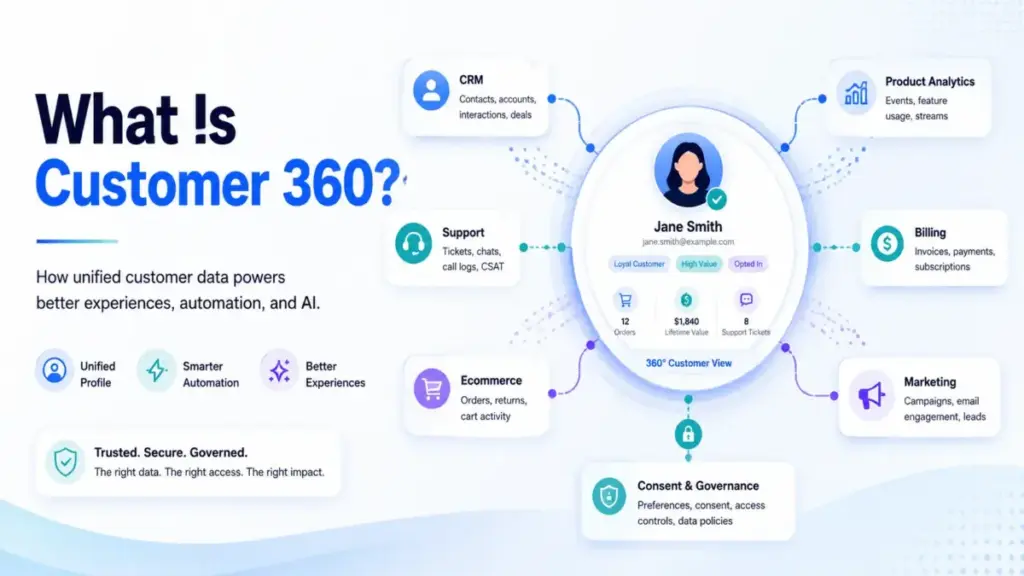
Quick Answer: Customer 360 is a unified, governed view of an individual customer that combines identity, behavioral, transactional, service, marketing, and consent data from multiple systems into a single usable profile. It is not a product you buy. It is an operating layer you build across CRM, CDP, data warehouse, or MDM systems, and the hard part is identity resolution, data quality, and team agreement on what “useful” means.
What Customer 360 Actually Means
The Simple Definition
Customer 360 is a master customer record that aggregates all data about a customer from across an organization. Precisely defines it as creating this master record by bringing together identity, purchase history, billing, service interactions, social data, and channel preferences into a single view.
Think of it like a medical chart. A doctor does not treat you based on one lab result. They need your history, medications, allergies, vitals, and notes from specialists, all in one place, updated, and governed. Customer 360 does the same thing for business relationships.
The Technical Definition
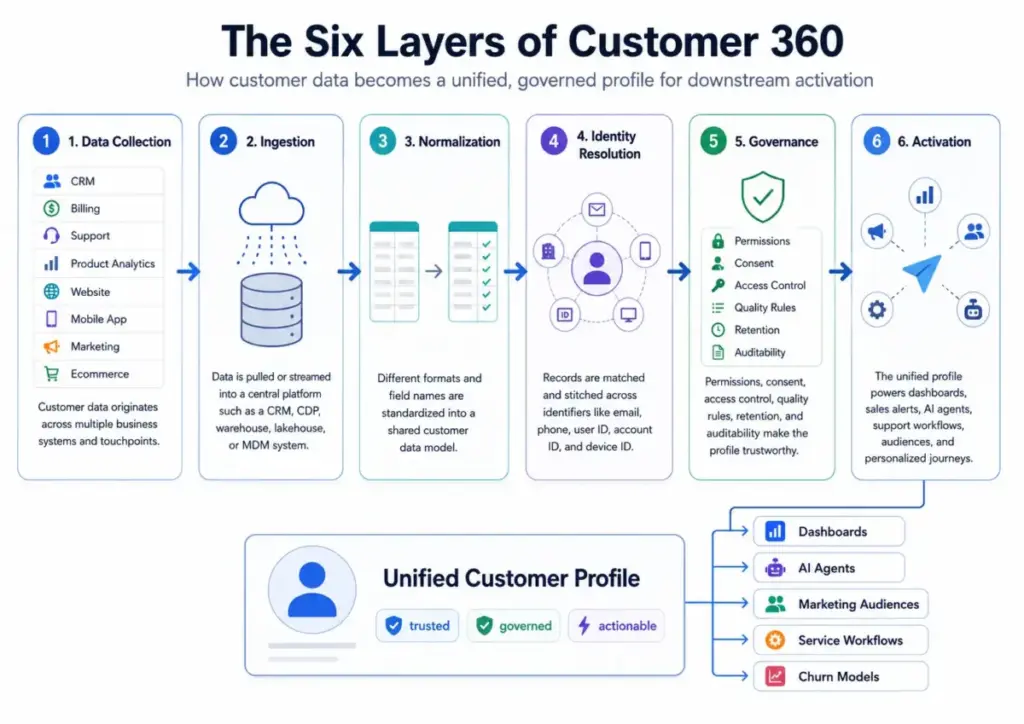
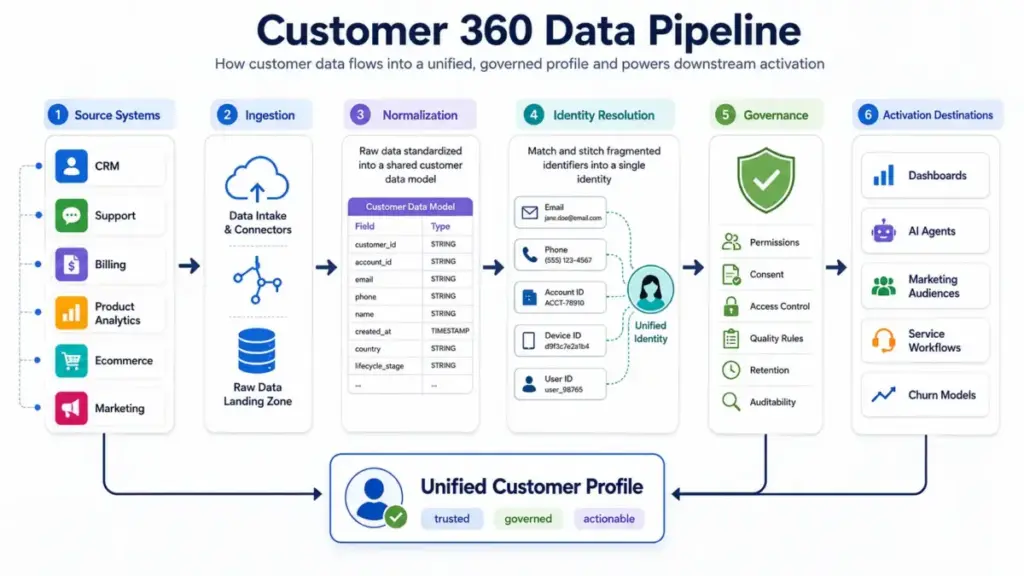
At the technical layer, Customer 360 involves six stages: collecting data from source systems (CRM, billing, support, product analytics, website, mobile app, marketing, commerce); ingesting that data into a central system such as a CDP, data warehouse, lakehouse, or MDM platform; normalizing it into a shared data model; resolving identities to merge duplicates and connect anonymous and known identifiers; applying governance rules for permissions, consent, data quality, retention, and access; and activating the unified profile into dashboards, audiences, AI agents, service workflows, or personalized journeys.
Identity resolution is the technical linchpin. Without it, you have five records for one customer: an email subscriber, a website visitor with a cookie, a support ticket submitter, a billing contact, and a product user. Stitching those into one profile requires matching rules across email, phone, user ID, device ID, account hierarchy, and domain.
The Business Definition
From a business perspective, Customer 360 is the operating layer that lets sales, marketing, support, customer success, product, finance, and AI systems share a common understanding of each customer. When it works, a support agent sees purchase history without switching tabs, a renewal team sees product usage alongside contract dates, and an AI agent can answer customer questions using verified, permissioned context.
The business value is not “more data.” Gartner-linked reporting found that 60% of respondents believed they needed every data point possible, but 72% of those same respondents also reported that the more data they collected, the less benefit they saw. The value comes from accurate, permissioned, actionable data that teams actually use.
Concept vs. product: Customer 360 is a concept any organization can implement. Salesforce Customer 360 is a vendor-branded product suite. Microsoft, HubSpot, Adobe, Twilio Segment, and dozens of other vendors offer their own implementations. Do not confuse one vendor’s branding with the universal idea.
How Customer 360 Works
The process is not a single integration. It is a layered pipeline, and each layer can fail independently.
Step 1: Data collection. Customer data lives across CRM, support desk, email platform, ecommerce system, billing, product analytics, website tracking, mobile app events, call center logs, surveys, and consent management tools. Most organizations underestimate how many systems contain customer data.
Step 2: Ingestion. Data flows into a central system. This could be a CRM platform, a customer data platform, a cloud data warehouse like Snowflake, a data lakehouse like Dremio, or a master data management system. The choice of central system shapes everything downstream.
Step 3: Normalization. Data from different sources uses different formats, field names, and standards. A “customer name” in your CRM might be “contact_name” in billing and “user.full_name” in product analytics. Normalization maps these into a shared data model with trusted fields: lifecycle stage, revenue, product usage, support history, consent status, churn risk, renewal date, and preferred channel.
Step 4: Identity resolution. This is where most Customer 360 projects succeed or fail. The system must match records across identifiers (email, phone, user ID, account ID, device ID, loyalty ID, domain) and merge duplicates without false matches. Community discussions on data engineering forums show real confusion about whether identity resolution should produce a single flat table, a graph, or a collection of linked views.
Step 5: Governance. Permissions, consent, data quality rules, role-based access, retention policies, auditability, and deletion processes. Without governance, a Customer 360 profile becomes a privacy liability. With it, you have a permissioned, trustworthy record.
Step 6: Activation. The unified profile feeds dashboards, sales alerts, marketing audiences, AI agent context, churn models, service workflows, personalized journeys, or next-best-action recommendations. If no team activates the profile, the entire pipeline produces zero value.
Where things break: The two most common failure points are identity resolution (merging too aggressively creates false matches; merging too conservatively leaves duplicates) and governance (no data ownership, unclear consent, no quality rules). Gartner-linked reporting identified “poor customer data quality” and “lack of consensus on what a 360-degree view means” as the two major hurdles.
Customer 360 vs CRM, CDP, and Data Warehouse
One of the most common points of confusion is treating Customer 360 as interchangeable with a CRM, a CDP, or a data warehouse. They are related but different.
| Concept | What it is | Relationship to Customer 360 |
|---|---|---|
| CRM | A system for managing customer relationships, sales pipelines, and service interactions | A CRM can be the foundation of a Customer 360 view, but by itself it only covers sales and service data |
| Customer Data Platform (CDP) | Packaged software that creates a persistent, unified customer database accessible to other systems (as defined by David Raab of the CDP Institute) | A CDP is one of the strongest enabling technologies for Customer 360, but buying a CDP does not automatically create a useful 360-degree view |
| Data Warehouse / Lakehouse | A governed analytical data store for BI, machine learning, and downstream activation | A warehouse or lakehouse can host a Customer 360 data model, especially for analytics and reverse ETL activation |
| Master Data Management (MDM) | A system focused on deduplication, authoritative identifiers, data quality, and hierarchy management | MDM provides the “golden record” layer that many Customer 360 implementations depend on |
| Single Customer View | Another name for the same concept | Synonymous with Customer 360 in most usage |
| Golden Record | The single authoritative record for a customer after deduplication | A component of Customer 360, not the whole thing |
What this means: Customer 360 is the outcome. CRM, CDP, warehouse, and MDM are architectures that can deliver it. The right choice depends on your starting point, team structure, and activation use case.
Types of Customer 360 Architecture
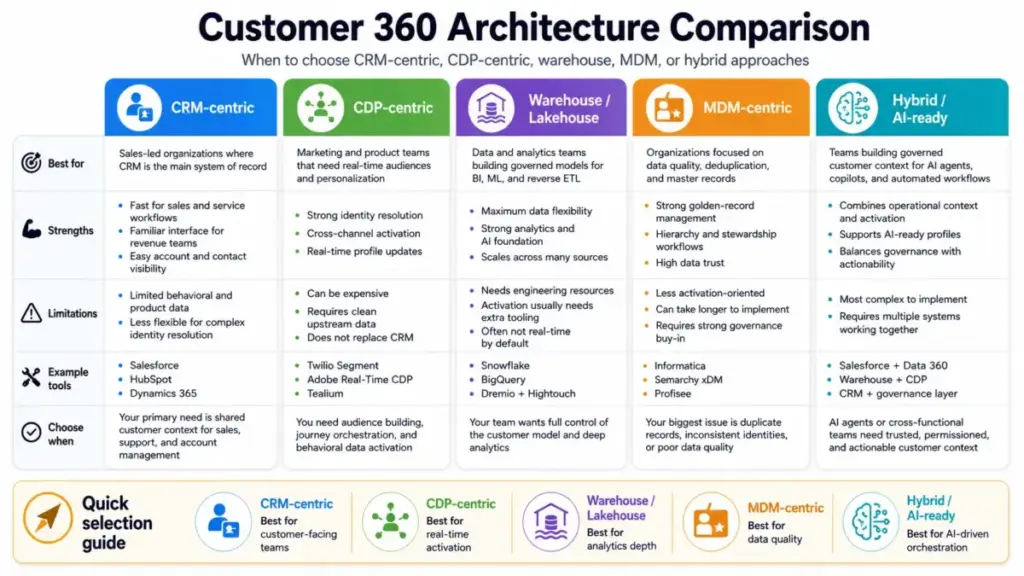
Not every organization should build Customer 360 the same way. The architecture depends on where your customer data already lives, which teams need the profile, and what you plan to activate.
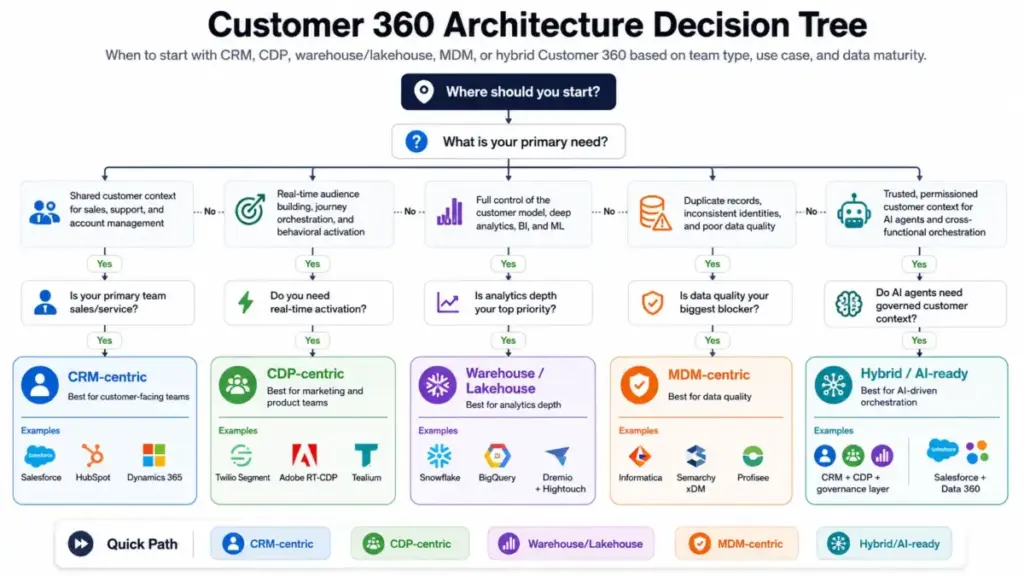
| Architecture | Best for | Strengths | Limitations | Example tools |
|---|---|---|---|---|
| CRM-centric | Sales-led organizations where CRM is the primary system of record | Familiar to sales and service teams; fast to activate for customer-facing workflows | Limited to CRM data; weak on product analytics, behavioral data, and marketing events | Salesforce, HubSpot, Dynamics 365 |
| CDP-centric | Marketing and product teams needing real-time audiences, journeys, and personalization | Strong identity resolution; real-time profile; built for activation across channels | Can be expensive; requires clean data inputs; does not replace CRM for sales workflows | Twilio Segment, Adobe Real-Time CDP, Tealium |
| Warehouse / Lakehouse | Data and analytics teams building governed customer models for BI, ML, and reverse ETL | Full data control; scalable; supports complex analytics and AI models | Requires engineering resources; not real-time by default; activation needs reverse ETL tools | Snowflake, Dremio, BigQuery + Hightouch |
| MDM-centric | Organizations focused on data quality, deduplication, and authoritative master records | Strong deduplication; hierarchy management; data stewardship workflows | Less focused on real-time activation; requires organizational buy-in for data ownership | Informatica, Semarchy xDM, Profisee |
| AI-ready (hybrid) | Teams building governed context layers for AI agents, copilots, and automated workflows | Combines identity resolution with consent and governance; supports AI answer accuracy | Most complex to implement; requires multiple systems working together | Salesforce + Data 360, warehouse + CDP + governance layer |
How to Implement Customer 360
Implementation should start with a use case, not a technology purchase.
Step 1: Define the business use case first
Support context? Churn prevention? Lifecycle marketing? Sales prioritization? AI agent context? Account health scoring? The use case determines which data you need, which teams own the profile, and which architecture fits.
Step 2: Create a shared definition of the customer
Is the customer a person, a household, an account, a company, a buyer, a user, a subscriber, or a device? This sounds simple, but Gartner-linked reporting found that nearly 50% of respondents lacked alignment on what constituted a 360-degree view. Without agreement on the customer entity, every downstream decision breaks.
Step 3: Inventory your data sources
CRM, support desk, email platform, ecommerce, billing, product analytics, website events, app events, data warehouse, call center, surveys, and consent tools. Most teams discover more sources than they expected.
Step 4: Choose the architecture
CRM-centric, CDP-centric, warehouse/lakehouse, MDM, or hybrid. Match the architecture to your team’s technical maturity, existing systems, and activation goals.
Step 5: Map identifiers and identity rules
Email, phone, user ID, account ID, device ID, loyalty ID, domain, company hierarchy, and anonymous-to-known conversion rules. Define match confidence thresholds and false-match tolerance.
Step 6: Normalize the data model
Define trusted fields across systems: lifecycle stage, revenue, product usage, support history, consent status, churn risk, renewal date, last interaction, and preferred channel.
Step 7: Implement governance
Ownership, data quality rules, privacy constraints, role-based access, consent enforcement, retention policies, auditability, and deletion processes. This step is where most projects stall, because governance requires organizational decisions, not just technology.
Step 8: Activate one or two high-value workflows
Do not try to activate everything at once. Start with one workflow: service next-best action, renewal risk alert, personalized onboarding, AI support context, or a win-back campaign. Prove value before expanding.
Step 9: Measure business impact and profile quality
Track profile match rate, duplicate profile rate, data freshness, and activation latency before adding more data sources.
Limitations and Misconceptions
Why Customer 360 Projects Fail
The most common failures are not technical. They are organizational.
Poor data quality. If your source systems contain duplicates, missing fields, and outdated records, unifying them just creates a bigger mess. Governance and data quality work must happen before or alongside unification.
No team agreement. Nearly 50% of respondents in the Gartner-linked survey lacked consensus on what a 360-degree view even meant. Without agreement, different teams build competing profiles.
Over-collection. The instinct to collect every possible data point backfires. The Gartner-linked survey found that 72% of respondents who believed they needed every data point also reported diminishing returns. A useful Customer 360 profile is purpose-led and permissioned, not exhaustive.
Technology-first thinking. Buying a CDP, upgrading your CRM, or deploying a data warehouse does not automatically create a Customer 360 view. The technology is one layer. Identity resolution, governance, and activation require process and people.
No activation. If no team uses the unified profile for decisions or workflows, the entire project is infrastructure without output.
Five Common Misconceptions
Misconception: Customer 360 means collecting every possible data point.
Reality: A useful profile prioritizes accurate, permissioned, actionable data. More data without governance produces less value.
Misconception: Customer 360 is just a CRM dashboard.
Reality: A dashboard can display a Customer 360 view, but the real work is data integration, identity resolution, governance, and activation underneath.
Misconception: A CDP automatically solves Customer 360.
Reality: CDPs are strong enabling technology, but Gartner-linked reporting said CDP adoption alone was not sufficient. Organizations still need consensus, governance, and data quality.
Misconception: Customer 360 is only for marketing teams.
Reality: Marketing uses it for segmentation and journeys, but sales, service, customer success, finance, product, commerce, and AI teams all use the same profile for different decisions.
Misconception: Real-time data is always necessary.
Reality: Real-time updates matter for service, ecommerce triggers, fraud detection, and AI agents. But account planning, renewal forecasting, and quarterly analytics often work fine with governed batch updates.
How to Measure Customer 360 Success
If you cannot measure whether the unified profile is working, you cannot justify the investment.
| Metric | What it measures | Why it matters |
|---|---|---|
| Profile match rate | Percentage of known customers with a unified profile | Shows whether identity resolution is working |
| Duplicate profile rate | Percentage of remaining duplicates after resolution | High rates indicate resolution rules need tuning |
| Identity resolution accuracy | False match and false non-match rates | Too aggressive = merged wrong customers; too conservative = still fragmented |
| Consent coverage | Percentage of profiles with explicit consent status | Required for privacy compliance and responsible activation |
| Data freshness SLA | How recently the profile was updated | Stale profiles produce wrong decisions |
| Source coverage | Number of systems feeding the profile vs total customer systems | Low coverage means blind spots |
| Activation latency | Time from profile update to downstream action | Matters for real-time use cases like service and AI agents |
| Support handle time | Average time to resolve a customer issue | Shorter handle time indicates agents have the context they need |
| First-contact resolution | Percentage of issues resolved without escalation | Higher rates suggest the profile provides enough context |
| Churn reduction | Change in churn rate after implementing Customer 360 | The business impact metric that justifies investment |
| Customer lifetime value | Revenue per customer over time | Shows whether unified data improves retention and cross-sell |
Why Customer 360 Matters in 2026
Three forces make Customer 360 more relevant now than when the concept first emerged.
SaaS fragmentation persists. Even with consolidation efforts, Productiv reported that average SaaS portfolios remained at 342 apps. Customer data is still spread across dozens of systems.
AI agents need reliable context. In 2026, AI copilots, support agents, and recommendation systems are moving from experimental to operational. These systems need accurate, governed, permissioned customer context to answer questions, take actions, or personalize safely. An AI agent pulling from fragmented, duplicate, or ungoverned records will hallucinate customer facts, a risk that grows with every automated interaction.
Privacy regulation is tightening. A Customer 360 profile without consent management, data quality, and governance is a compliance liability. Purpose-led data collection with clear consent status is no longer optional.
Benjamin Bloom of Gartner stated: “When organizations don’t have consensus on a 360-degree view of the customer, they risk investing in the wrong tools.”
Tools That Enable Customer 360
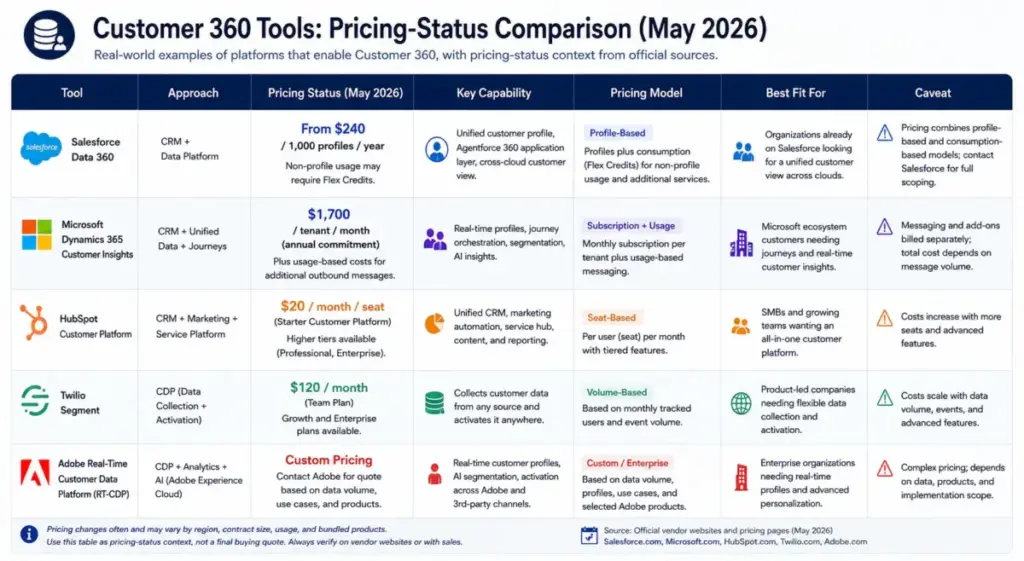
This is not a ranked list. These are real-world examples of tools that implement Customer 360 concepts, with pricing-status context from official pages (as of May 2026).
| Tool | Approach | Pricing status | Key capability | Caveat |
|---|---|---|---|---|
| Salesforce Data 360 | CRM + data platform | Profile-based: from $240/1,000 profiles/year; non-profile usage may require Flex Credits | Unified profile, Agentforce 360 application layer, cross-cloud customer view | Pricing combines profile-based and consumption-based models; contact sales for full scoping |
| Microsoft Dynamics 365 Customer Insights | CRM + unified data + journeys | $1,700/tenant/month (annual), includes 100K Unified People and 10K Interacted People | Unified customer profiles with personalized journey orchestration | Availability may vary by market |
| HubSpot Smart CRM | CRM-centric unified platform | Starter Customer Platform: $20/seat/month (normal price); free CRM available | System of record that unifies customer data across marketing, sales, service, content, and commerce | Contact database limits and email send limits may require upgrades |
| Twilio Segment | CDP-centric | CDP plans: custom pricing, contact sales; Connections has free tier and 14-day trial | Collects, cleans, resolves identity, builds audiences, and activates data across destinations | CDP plan pricing requires vendor engagement |
| Adobe Real-Time CDP | CDP + real-time profile | Pricing/packaging page available but exact dollar pricing not publicly extractable; requires vendor engagement | Harmonizes zero-, first-, second-, and third-party data; real-time audiences; privacy-conscious personalization | Enterprise-grade; typically requires Adobe ecosystem commitment |
What this means: The pricing range is wide. HubSpot offers a free CRM entry point. Microsoft lists a fixed tenant price with included capacity. Salesforce and Adobe use consumption or profile-based models that scale with usage. Twilio Segment requires a sales conversation for CDP pricing. The right tool depends on your architecture choice, existing stack, and activation goals.
When to Use and When to Avoid Customer 360
Use Customer 360 when:
- Customer interactions happen across multiple systems and no single team sees the full picture
- Support agents waste time switching between tools to find customer context
- Marketing personalization depends on behavioral and transactional history that lives in separate systems
- AI agents or copilots need trusted, governed customer context to answer questions or take actions
- Revenue teams need unified account health combining product usage, support history, and renewal data
- Duplicate customer profiles are causing conflicting outreach, inaccurate reporting, or compliance risk
Delay or avoid Customer 360 when:
- The business operates from a single customer system and teams already share context
- There is no clear activation use case (no team has said “I need this data to make a decision”)
- Consent practices are weak and collecting more data increases privacy risk without clear benefit
- No one owns data quality, and leadership expects a tool purchase alone to fix broken data definitions
- Integration resources are insufficient, and the project would stall at the ingestion layer
Common Mistakes
Starting with technology before use case. Teams buy a CDP or upgrade their CRM before identifying which workflow the unified profile should improve. Start with the business question, then choose the architecture.
Trying to collect every field. More fields does not mean better profiles. Each field needs an owner, a quality rule, and a reason to exist. Gartner-linked data showed diminishing returns from over-collection.
Ignoring consent. A Customer 360 profile that combines data without tracking consent status is a compliance risk. Consent should be a first-class field in every profile.
Merging identities too aggressively. Matching customers by email alone seems safe until two people share a family email address. False merges corrupt the profile and erode trust.
Treating Customer 360 as a dashboard project. A dashboard is the visible tip. The real work is ingestion, normalization, identity resolution, governance, and activation underneath.
Not assigning data owners. Every trusted field in the profile needs an owner who is responsible for accuracy. Without ownership, data decays.
Building a view that no team activates. If no workflow, alert, campaign, or AI agent uses the unified profile, the project is infrastructure without output.
Making AI agents depend on ungoverned records. In 2026, the stakes of bad customer data are higher because AI agents act on it automatically. An AI agent with stale or duplicate context will produce wrong answers at scale.
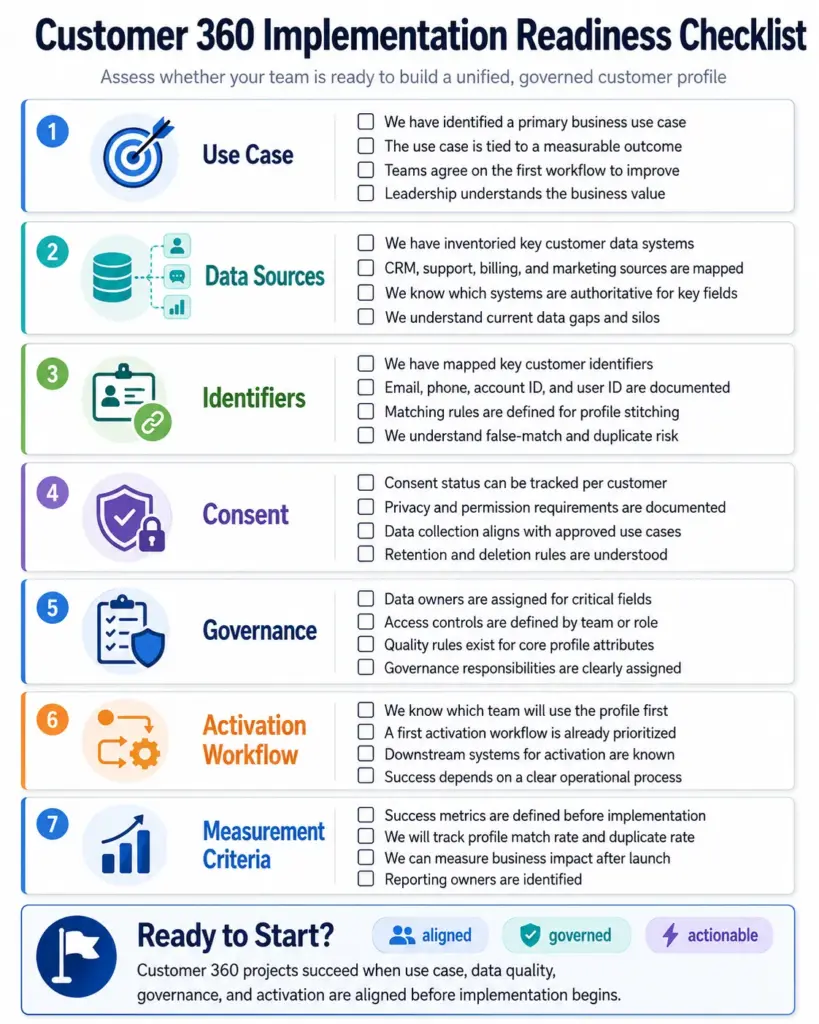
Customer 360 Readiness Checklist
Use this to assess whether your organization is ready to start a Customer 360 project.
- [ ] We have identified a specific business use case (support context, churn prevention, AI agent context, lifecycle marketing, or sales prioritization)
- [ ] We have agreed on what “customer” means (person, account, household, subscriber)
- [ ] We have inventoried at least 5 data sources containing customer data
- [ ] We have mapped the key identifiers across systems (email, phone, user ID, account ID)
- [ ] We have a consent tracking mechanism in place or planned
- [ ] We have assigned data ownership for the most critical customer fields
- [ ] We have identified which team will activate the unified profile first
- [ ] We have integration resources (internal or vendor) to connect at least 3 source systems
- [ ] We have defined 3-5 success metrics we will track after launch
- [ ] Leadership understands this is a governance project, not just a tool purchase
Decision Framework: Choosing the Right Architecture
If your CRM is the primary customer system and sales/service teams need the profile: Start CRM-centric. Salesforce, HubSpot, or Dynamics 365 can serve as the foundation, and you expand from there.
If marketing and product teams need real-time audiences and cross-channel activation: A CDP-centric approach (Twilio Segment, Adobe Real-Time CDP) gives you identity resolution, audience building, and activation out of the box.
If your data and analytics team needs a governed customer model for BI, ML, and reverse ETL: Build the Customer 360 in a warehouse or lakehouse (Snowflake, Dremio) and activate through reverse ETL tools like Hightouch.
If your biggest problem is duplicate records and data quality: An MDM-centric approach (Informatica, Semarchy, Profisee) focuses on deduplication, golden records, and data stewardship before activation.
If AI agents need governed customer context: You likely need a hybrid approach. The AI context layer requires identity resolution, consent, data quality, and real-time access, which usually means combining a CRM or CDP with a governed data layer.
FAQ
What is Customer 360 in simple terms?
Customer 360 is a unified view of a customer that brings together data from every system they interact with, including sales, support, marketing, billing, product usage, and website activity, into one governed profile. The goal is to give every team the context they need to make better decisions without switching between tools or relying on incomplete data.
Is Customer 360 the same as CRM?
No. A CRM manages customer relationships and sales pipelines, but it typically only contains data from sales and service interactions. Customer 360 is broader. It combines CRM data with marketing, product analytics, billing, support, ecommerce, and behavioral data into a unified profile. A CRM can be the foundation of a Customer 360 view, but it is not the whole thing.
Is Salesforce Customer 360 a product or a concept?
Both, and that causes confusion. Customer 360 as a concept is universal: any organization can build a unified customer view. Salesforce Customer 360 is also a branded product suite that Salesforce describes as unified applications across sales, service, marketing, commerce, and more. Community discussions on Salesforce forums show real confusion about whether it is a licensed product or a concept baked into Salesforce clouds.
Do I need a CDP for Customer 360?
Not necessarily. A CDP is one of the strongest enabling technologies for Customer 360, especially for marketing activation and identity resolution. But you can also build a Customer 360 view through a CRM-centric approach, a data warehouse with reverse ETL, or an MDM system. The right choice depends on your primary use case and existing stack.
Can a data warehouse create a Customer 360 view?
Yes. A data warehouse or lakehouse can host a governed customer data model for analytics, BI, machine learning, and downstream activation. The difference is that warehouse-based Customer 360 typically requires reverse ETL tools (like Hightouch or Census) to push unified profiles back into operational systems. It is strongest for analytics teams and weakest for real-time service or marketing activation without additional tooling.
What data should go into a Customer 360 profile?
Start with the data that supports your activation use case. Common fields include identity data (name, email, phone, account), demographic data, transaction and purchase history, support interactions, product usage, marketing engagement, consent status, lifecycle stage, and churn risk. The mistake is trying to include every possible field. Each field should have an owner, a quality rule, and a purpose.
What is identity resolution in Customer 360?
Identity resolution is the process of matching and merging customer records across systems to create a single profile. It connects different identifiers, such as email addresses, phone numbers, user IDs, device IDs, and anonymous cookies, into one identity graph. It is the most technically challenging part of Customer 360 because matching too aggressively creates false merges, while matching too conservatively leaves duplicates.
How does Customer 360 help AI agents?
AI agents, copilots, and recommendation systems need accurate, governed customer context to answer questions, take actions, or personalize correctly. A Customer 360 profile provides that context layer. Without it, an AI agent pulls from fragmented or duplicate records and risks producing wrong answers. With it, the agent has a verified, permissioned view of the customer’s history, preferences, and status.
What is the difference between Customer 360 and a single customer view?
They mean the same thing. “Single customer view,” “unified customer profile,” “golden record,” and “360-degree customer view” are all variations of the same concept. The terminology varies by vendor and region, but the goal is identical: one governed, unified profile per customer.
When should a company not implement Customer 360?
Delay Customer 360 if your business runs on a single customer system with no fragmentation, if you have no clear activation use case, if consent practices are not in place, if no one owns data quality, or if leadership expects a tool purchase alone to solve data problems. A Customer 360 project without governance, ownership, and a defined use case will produce cost without value.
Methodology Note
This article is based on official product documentation, public pricing pages, published analyst research (including a public summary of a Gartner customer data survey), vendor educational content, and community discussions. I did not conduct hands-on testing of the platforms mentioned. Pricing data was verified from official pages as of May 2026. For current pricing, check the official links provided in the tools section. Where exact pricing is not publicly available (Adobe Real-Time CDP, Twilio Segment CDP plans), I have noted that vendor engagement is required.