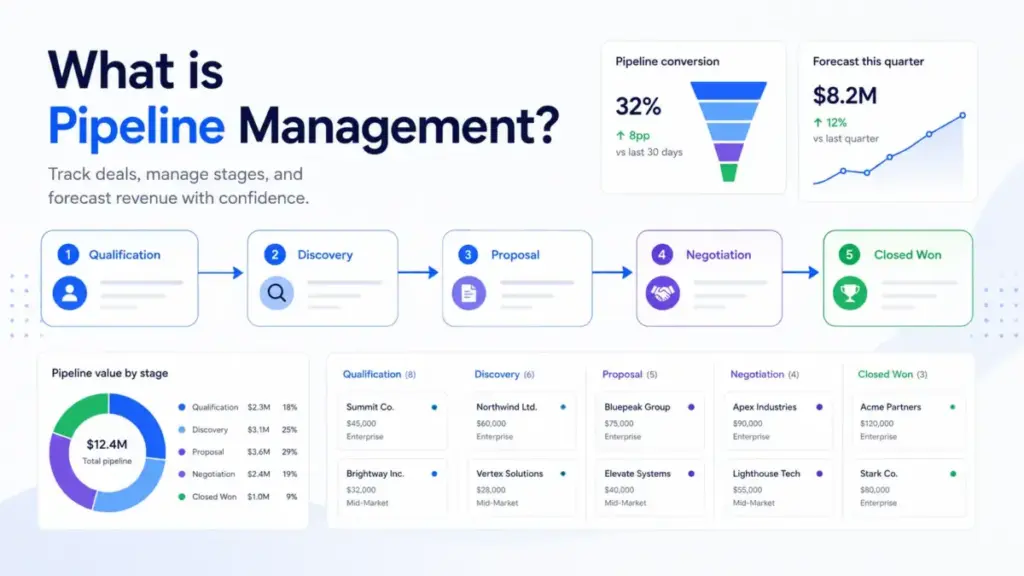
Pipeline management is not a CRM feature. It is the operating discipline that determines whether your sales team can forecast revenue, identify stuck deals, and make informed decisions about where to spend selling time. Most teams treat their pipeline like a filing cabinet for open deals. The ones that consistently hit targets treat it like an operating system with rules, evidence requirements, and accountability at every stage.
If you are evaluating the best CRM software options or trying to make your existing pipeline data more reliable, this guide breaks down what pipeline management means in practice, how it differs from a sales funnel, what metrics matter, where teams fail, and which tools support the process.
Quick Answer: Pipeline management is the practice of tracking, qualifying, and advancing sales opportunities through defined stages based on buyer evidence, not seller optimism. It includes stage governance, data hygiene, review cadence, forecasting, and CRM enforcement. According to Salesforce, sales pipeline management means overseeing and tracking prospects as they move through the sales process using defined activities tied to each stage.
What Pipeline Management Actually Means
Pipeline management is the recurring work of overseeing active sales opportunities as they move through defined stages, from first qualification to closed won or closed lost. It covers how deals enter the pipeline, what evidence moves them forward, when stale deals get removed, and how managers use stage data to forecast revenue and coach reps.
That definition sounds straightforward. The gap between understanding it and executing it well is where most sales teams lose money.
The Simple Explanation
Think of a sales pipeline as a visual board showing every open deal, grouped by stage. Pipeline management is everything you do to keep that board accurate: qualifying new opportunities, advancing deals when buyer evidence changes, removing deals that stalled, and using the board to predict what closes this quarter.
The Technical Explanation
Pipeline management operates on structured data inside a CRM system. Each opportunity record contains an owner, deal value, expected close date, current stage, probability, next action, source, decision maker, and last activity date. Stage transitions follow defined entry and exit criteria. Automation handles reminders and task creation, but deal advancement requires human judgment tied to observable buyer behavior. Reporting layers pull conversion rates, velocity, aging, and coverage ratios from this data to produce forecasts.
The Business Explanation
For sales leaders, pipeline management answers three questions every week: Do we have enough qualified pipeline to hit target? Where are deals stuck? Is the forecast credible? Without stage discipline and data hygiene, the answers to all three questions are unreliable. Gartner reports that executives rank pipeline management and sales forecasting as one of the top areas where sales operations functions are least effective, according to their sales analytics research.
How Pipeline Management Works
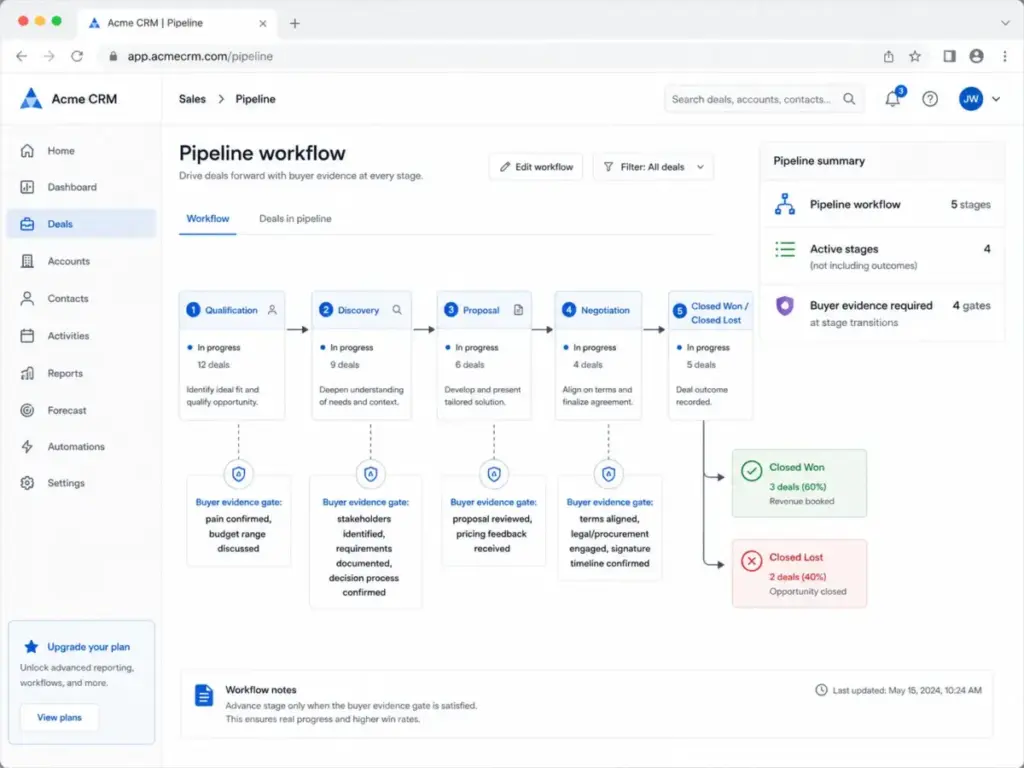
Pipeline management follows a repeating cycle. A deal enters the pipeline when it meets minimum qualification criteria, moves through stages as buyer evidence changes, and exits as closed won, closed lost, or disqualified. The mechanism matters more than the concept.
Step 1: Qualification gate. Not every lead belongs in the pipeline. Require confirmed pain, budget range, decision timeline, or stakeholder access before creating an opportunity. Skipping this step inflates pipeline counts and destroys forecast accuracy.
Step 2: Stage mapping. Define stages that reflect observable buyer progress. Common stages include prospecting, qualification, discovery, proposal, negotiation, and closed won or closed lost. Each stage needs exit criteria tied to what the buyer did, not what the rep believes.
Step 3: CRM enforcement. Set required fields on every deal record: owner, value, expected close date, next step, source, stage, probability, last activity date, decision maker, loss reason, and forecast category. Missing fields create blind spots.
Step 4: Weekly pipeline review. Managers check for stale deals, missing next steps, stage bottlenecks, slipping close dates, and bloated forecast categories. This review is where coaching happens.
Step 5: Measurement and adjustment. Track stage conversion, win rate, sales velocity, pipeline coverage, and forecast accuracy. Adjust process, qualification criteria, or stage definitions based on what the data shows.
The failure points are predictable. Deals advance without buyer evidence. Stale opportunities sit in the pipeline for months. Close dates slip repeatedly without consequence. CRM data gets updated the night before a pipeline review instead of in real time. Each of these failures makes the forecast less reliable and coaching less effective.
Stage Exit Criteria and Buyer Evidence
This is the part most pipeline management guides skip entirely. Listing stages is easy. Defining the evidence required to move between them is what separates a real operating system from a wishful deal board.
| Stage | Buyer Evidence Required to Advance | Common Mistake |
|---|---|---|
| Prospecting → Qualification | Confirmed pain or need; prospect engaged with outreach | Moving on a rep’s gut feeling |
| Qualification → Discovery | Budget range discussed; decision timeline shared | Advancing because the prospect agreed to a meeting |
| Discovery → Proposal | Stakeholders identified; requirements documented; decision process confirmed | Sending proposals before understanding how the buyer decides |
| Proposal → Negotiation | Proposal reviewed by decision makers; pricing feedback received | Assuming silence means progress |
| Negotiation → Closed Won | Terms agreed; legal or procurement engaged; signature timeline confirmed | Forecasting a deal as “commit” without procurement involvement |
Without exit criteria, stages become labels reps drag deals through based on optimism. With them, the pipeline reflects where buyers actually stand.
Pipeline Management vs Related Concepts
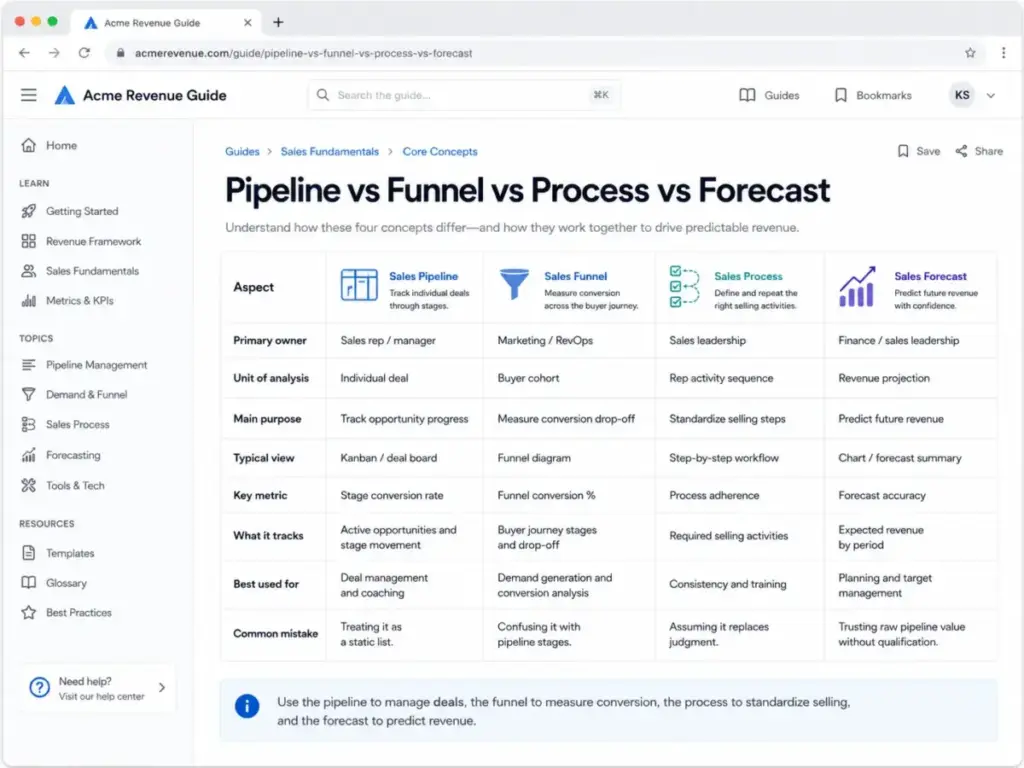
I see these terms used interchangeably. They are not the same thing, and the confusion causes real operational problems.
| Concept | Owner | Unit of Analysis | Purpose | Key Metric | Common Mistake |
|---|---|---|---|---|---|
| Sales Pipeline | Sales rep / manager | Individual deal | Track where each opportunity stands | Stage conversion rate | Treating it as a static snapshot |
| Sales Funnel | Marketing / RevOps | Buyer cohort | Measure conversion drop-off through journey stages | Funnel conversion % | Confusing funnel stages with pipeline stages |
| Sales Process | Sales leadership | Rep activity sequence | Define the repeatable steps reps follow | Process adherence | Assuming the process replaces pipeline judgment |
| Sales Forecast | Finance / CRM | Revenue projection | Predict future revenue from pipeline data | Forecast accuracy | Relying on pipeline value without weighting by stage |
As IBM explains, a pipeline tracks salesperson actions and deal status, while a funnel shows conversion drop-off through buyer stages. Mixing them up leads to reports that answer the wrong questions.
How to Implement Pipeline Management
Implementation is where concept becomes practice. These steps are based on what I have seen work across CRM deployments, not abstract best practices.
1. Define what counts as a real opportunity
Require qualification evidence before a lead enters the pipeline. If every inbound inquiry automatically becomes a deal, your pipeline count means nothing.
2. Map stages to buyer progress
Use stages that describe observable buyer behavior. “Interested” is not a stage. “Budget confirmed, decision maker identified” is a stage.
3. Create entry and exit criteria for each stage
A deal moves when buyer evidence changes, not because a rep feels optimistic. Document what changes: confirmed pain, budget range, decision process, stakeholder alignment, proposal acceptance, procurement engagement.
4. Set required CRM fields
Owner, deal value, expected close date, next step, source, stage, probability, last activity date, decision maker, loss reason, and forecast category. Every field you skip is a question you cannot answer later.
5. Choose a CRM view reps will update daily
Keep the sales board simple enough for daily use. If the CRM feels like data entry homework, reps maintain side spreadsheets. The data in the pipeline becomes fiction.
6. Run weekly pipeline reviews
Check for stale deals, missing next steps, stage bottlenecks, low conversion stages, slipping close dates, and bloated forecast categories. Review the pipeline, not just the forecast number.
7. Track movement metrics
Stage conversion rate, win rate, sales velocity, average deal size, cycle length, pipeline coverage, forecast accuracy, deal aging, and next-step compliance. These metrics show whether the pipeline is healthy, not just whether it is big.
8. Automate carefully
Automate reminders, task creation, routing, and reporting. Do not let automation advance deals without buyer evidence. A deal that auto-moves to “Proposal” because a PDF was emailed is not a deal in the proposal stage.
9. Coach from pipeline data
Managers should coach next steps, qualification quality, deal risk, stakeholder coverage, and close plan quality. Pipeline reviews that only ask “when will this close?” miss the point.
10. Connect to recurring revenue (SaaS teams)
For SaaS companies, pipeline management extends beyond first-sale revenue. Connect pipeline reporting to ARR, retention, expansion, renewal, and customer success handoff data. A closed-won deal that churns in 90 days was never really won.
Common Mistakes and How to Avoid Them
Pipeline Hygiene Checklist
Pipeline accuracy depends on regular data discipline. Use this checklist weekly.
- [ ] Every deal has a next step with a specific date
- [ ] No deal has been in the same stage for more than 2x the average stage duration
- [ ] Close dates that slipped more than twice are re-qualified or removed
- [ ] Every deal has a named decision maker, not just a contact
- [ ] Deals closed lost have a documented loss reason
- [ ] Last activity date is within the last 14 days for active deals
- [ ] Forecast category matches stage probability
- [ ] Owner is the person actually working the deal
- [ ] Deal value reflects current scope, not the original estimate
- [ ] Disqualified deals are removed, not left in “Negotiation”
[SCREENSHOT: Pipeline hygiene checklist with stale deal thresholds, required fields, and weekly review cadence]
The Mistakes That Waste Your Pipeline
Using too many stages. Seven to eight stages is usually enough. Twelve or more stages create confusion about where deals actually are. Keep it simple enough that reps use it without a reference guide.
Advancing deals without buyer evidence. This is the most common and most expensive mistake. A deal in “Negotiation” where no decision maker has reviewed the proposal is not in negotiation.
Letting stale deals inflate the forecast. Deals older than 2x the average sales cycle with no recent buyer activity should be flagged, re-qualified, or moved to closed lost. A $200,000 deal that has been “about to close” for six months is not worth $200,000.
Failing to define loss reasons. Without loss reasons, you cannot diagnose why deals fail. “Lost to competitor,” “no decision,” “budget cut,” and “wrong fit” require different responses.
Measuring only deal count. A pipeline with 200 deals at $50 average is not the same as 20 deals at $5,000 average. Volume without quality data is noise.
Separating pipeline reviews from coaching. If pipeline review meetings only produce updated forecast numbers and no coaching on next steps, deal strategy, or qualification quality, the meeting is a reporting exercise, not a management tool.
Automating bad process. Sales automation speeds up whatever process you have. If your process is broken, automation makes it break faster.
How to Measure Pipeline Health
Not every metric answers the same question. Map your metrics to the management question you need answered.
| Management Question | Metric | What It Tells You |
|---|---|---|
| Are we creating enough pipeline? | Pipeline coverage ratio | Whether pipeline value covers the revenue target (typically 3x-4x coverage needed) |
| Is it qualified? | Lead-to-opportunity conversion | Whether leads entering the pipeline meet qualification criteria |
| Is it moving? | Sales velocity, stage conversion rate | Whether deals advance through stages at a healthy pace |
| Where is it stuck? | Stage bottleneck analysis, deal aging | Which stages have the longest dwell time and why |
| Is the forecast credible? | Forecast accuracy, close-date slippage | Whether committed deals actually close when and at the value predicted |
| Are reps taking next actions? | Next-step compliance, last activity date | Whether reps are executing the actions required to move deals forward |
| Why do we lose? | Closed-lost reason analysis | Whether losses come from pricing, competition, timing, or qualification gaps |
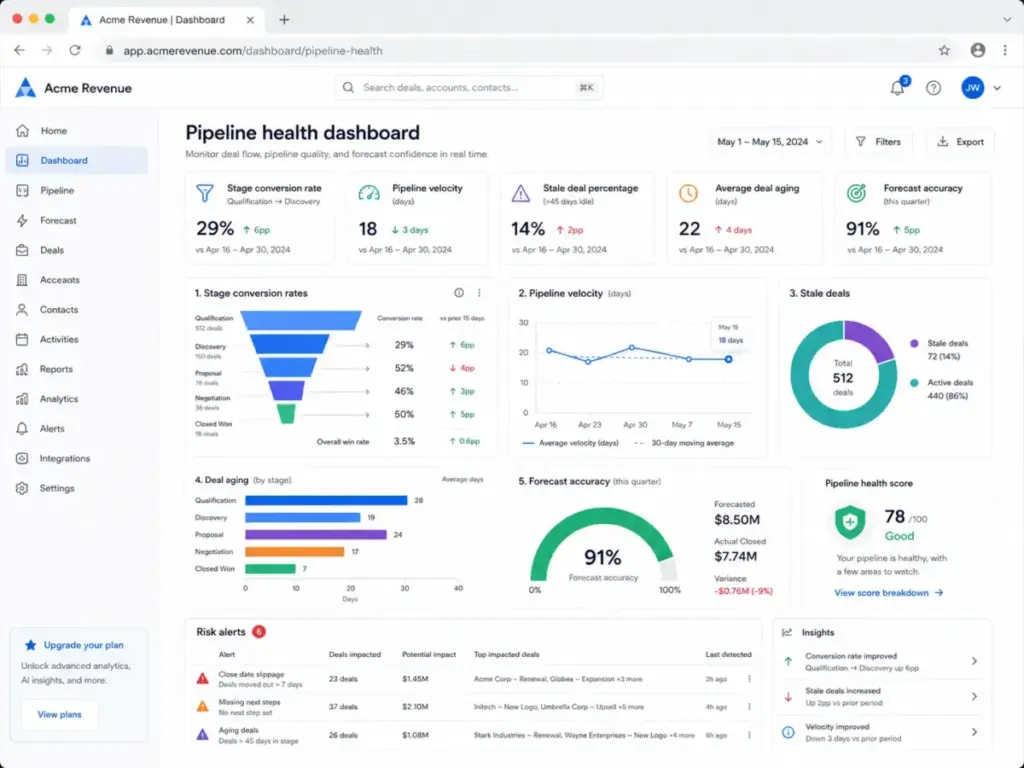
For SaaS teams, add ARR pipeline, expansion pipeline, renewal risk, and customer lifecycle metrics. A healthy new-business pipeline means nothing if churn is consuming the gains.
When Pipeline Management Requires Software
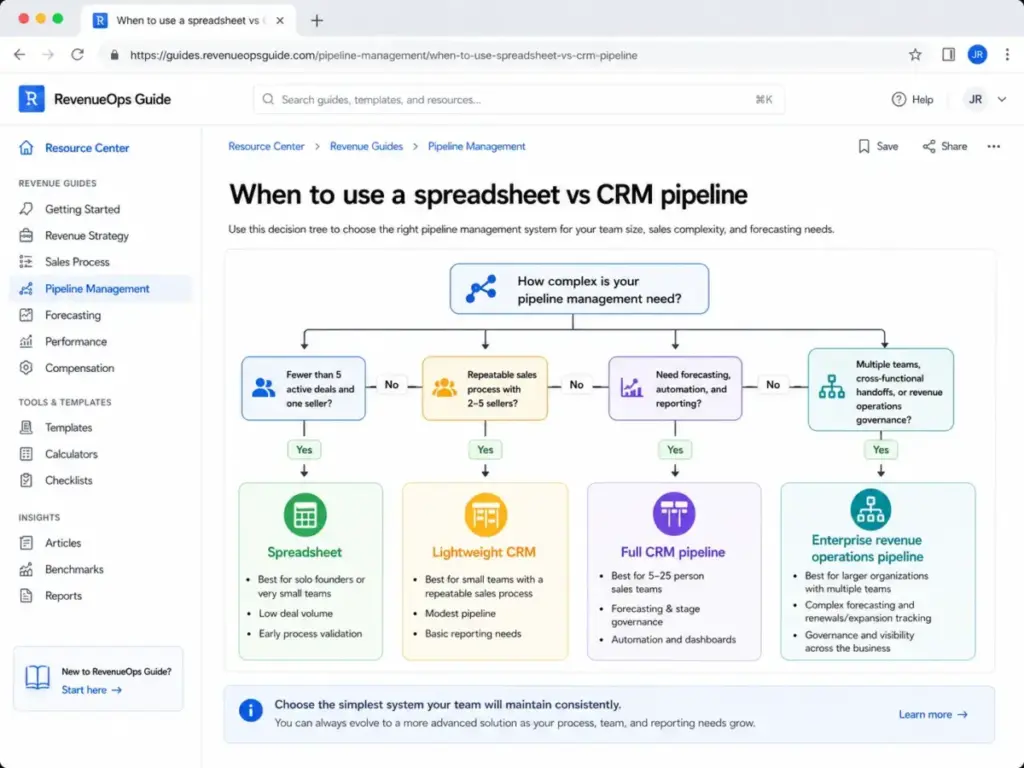
Not every team needs a full CRM pipeline from day one. Here is how to decide.
You need pipeline management software when:
- Your team has more than 5 active opportunities at any time
- You have multiple sellers working different deals
- Deals take more than one conversation to close
- You need to forecast revenue for the next quarter
- Marketing hands off leads that sales must follow up
- You are running SaaS renewals, expansions, or retention motions
- Managers need visibility into deal progress without asking each rep
You do not need it yet when:
- Sales are one-click self-serve and do not involve rep interaction
- Deal volume is extremely low (fewer than 5 active deals total)
- The sales motion is not yet validated, and you are still finding product-market fit
In those cases, start with a simple spreadsheet or lightweight lead tracker. Upgrade when stage data becomes useful for decisions. Overbuilding pipeline management before you have a repeatable process creates overhead without insight.
CRM Tools That Support Pipeline Management
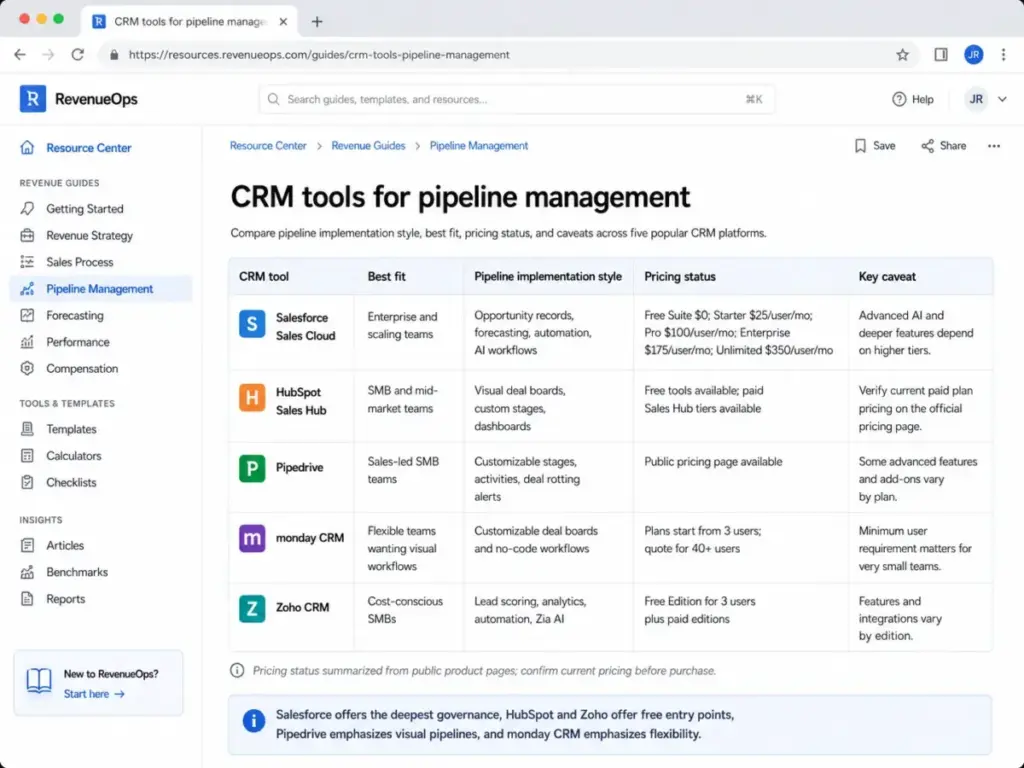
These five CRM platforms implement pipeline management differently. Each fits a different team profile. I have included pricing status and caveats based on official documentation.
| CRM Tool | Best Fit | Pipeline Approach | Pricing Status (as of May 2026) | Key Caveat |
|---|---|---|---|---|
| Salesforce Sales Cloud | Enterprise and scaling teams needing deep customization | Opportunity records, defined stages, forecasting, automation, AI workflows | Free Suite $0; Starter $25/user/mo; Pro $100/user/mo; Enterprise $175/user/mo; Unlimited $350/user/mo (pricing page) | AI features require Enterprise or above; contact sales for detailed pricing on some options |
| HubSpot Sales Hub | Small and mid-market teams wanting fast setup | Visual deal boards, customizable stages, drag-and-drop, dashboards | Free pipeline management tools available; paid Sales Hub tiers add advanced functionality (pricing page) | Exact paid tier prices should be verified on official pricing page |
| Pipedrive | Sales-led SMBs wanting a visual, activity-driven CRM | Customizable stages, deal cards, deal rotting alerts, 500+ integrations | Public pricing page available (pricing page) | Some advanced features are plan- or add-on-dependent |
| monday CRM | Teams wanting flexible, visual boards with no-code workflows | Customizable Deals board for pipeline stages (support docs) | Plans start from 3 users; monthly billing available without discount; 40+ users require a quote (pricing page) | Minimum user requirements affect solo users and very small teams |
| Zoho CRM | Cost-conscious SMBs in the Zoho ecosystem | Lead scoring, assignment, funnel analytics, dashboards, automation, Zia AI | Free Edition for 3 users; Standard, Professional, Enterprise, and Ultimate editions available (pricing page) | Integrations and advanced features vary by edition; third-party integrations may require separate paid licenses (feature comparison) |
What this table means: Salesforce gives you the most pipeline governance depth, but the pricing and complexity scale with it. HubSpot and Zoho offer free entry points, which work for small teams but push upgrades as you add automation and reporting. Pipedrive stays focused on the visual pipeline experience. monday CRM offers flexibility through board customization but requires a minimum team size.
When to Use Pipeline Management and When to Simplify
| Team Situation | Recommendation |
|---|---|
| Solo founder with fewer than 5 deals | Spreadsheet or simplelead management tracker |
| 2-5 person team with repeatable sales process | Lightweight CRM pipeline (HubSpot Free, Zoho Free, Pipedrive) |
| 5-25 person sales team with forecasting needs | Full CRM pipeline with stage governance, automation, and reporting |
| 25+ person sales org with revenue operations | Enterprise CRM with cross-functional pipeline governance, AI forecasting, and ARR tracking |
The common mistake is overbuilding. A 3-person startup does not need the same pipeline governance as a 50-person sales org. Start with what your team will actually maintain. Add structure as the data becomes useful for decisions.
Common Misconceptions About Pipeline Management
Misconception: Pipeline management and sales funnel management mean the same thing.
A pipeline tracks seller actions and deal status. A funnel shows buyer journey conversion drop-off. Salesforce and IBM both separate these concepts. Using them interchangeably leads to reports that confuse deal progress with marketing conversion.
Misconception: A bigger pipeline is always healthier.
A bloated pipeline with stale, unqualified, or low-fit deals makes forecasting less reliable and wastes seller time. Pipeline quality matters more than pipeline volume. Gartner notes that organizations prioritizing pipeline quality are more likely to exceed customer acquisition expectations, according to their sales pipeline research.
Misconception: Pipeline management is just a CRM feature.
CRM software helps visualize and automate the pipeline. The discipline depends on process design, qualification rules, review cadence, and data hygiene. You can have the best CRM and still have a broken pipeline if no one enforces stage criteria.
Misconception: Moving a deal to the next stage means progress.
A deal should move only when observable buyer evidence changes: confirmed pain, budget discussed, decision process known, stakeholders aligned, proposal reviewed, or procurement engaged. Stage movement without evidence is optimism, not progress.
Pipeline Management for SaaS Teams
SaaS pipeline management adds a layer that traditional pipeline articles ignore. In subscription businesses, pipeline management does not stop at closed won.
First-sale pipeline tracks new customer acquisition through standard sales stages. This is what most guides cover.
Expansion pipeline tracks upsell and cross-sell opportunities within existing accounts. Stage criteria differ because you already have a relationship and usage data.
Renewal pipeline tracks contracts approaching renewal with risk signals: declining usage, support escalation, champion departure, or competitive evaluation.
ARR pipeline connects all three, measuring annual recurring revenue impact rather than one-time deal value.
Gartner’s 2026 sales operations guidance emphasizes that sales operations leaders should reassess investment around data analytics, AI utilization, and forecasting accuracy, including AI to improve pipeline accuracy, per their 2026 priorities webinar.
For SaaS teams, a healthy new-business pipeline that feeds a leaky retention bucket produces growth on paper and stagnation in practice. Connect pipeline reporting to customer lifecycle data.
Pipeline Management Beginner Checklist
Use this checklist to set up pipeline management from scratch or audit your current process.
- [ ] Define 5-8 pipeline stages that match your buyer journey
- [ ] Document entry and exit criteria for each stage with required buyer evidence
- [ ] Set required CRM fields: owner, value, close date, next step, source, decision maker
- [ ] Require a loss reason for every closed-lost deal
- [ ] Schedule weekly pipeline reviews with a fixed agenda
- [ ] Set a stale deal threshold (e.g., 2x average cycle length with no activity)
- [ ] Create a dashboard showing stage conversion, velocity, and aging
- [ ] Train reps on what qualifies a deal to enter the pipeline
- [ ] Automate task reminders and activity logging, not stage advancement
- [ ] Connect pipeline reporting to forecast categories
- [ ] Review and clean the pipeline monthly: remove dead deals, update close dates, verify deal values
- [ ] For SaaS: add renewal and expansion pipeline tracking alongside new business
FAQ
What is pipeline management in simple terms?
Pipeline management is the process of tracking sales deals through defined stages, qualifying opportunities, removing stale deals, and using the data to forecast revenue. It turns a list of open deals into a system for deciding where sellers should focus.
What is the difference between pipeline management and sales funnel management?
A pipeline tracks individual deals and seller actions. A funnel tracks buyer cohort conversion through journey stages. Pipeline management focuses on deal-level progress and forecasting. Funnel management focuses on aggregate conversion rates and marketing effectiveness.
What are the most important pipeline management metrics?
Stage conversion rate, win rate, sales velocity, pipeline coverage ratio, average deal size, sales cycle length, forecast accuracy, stale deal percentage, and next-step compliance. The right metric depends on the management question: volume, quality, movement, or forecast credibility.
How often should a sales pipeline be reviewed?
Weekly reviews are the standard for most sales teams. Daily CRM updates from reps feed the weekly review. Monthly pipeline cleaning removes stale deals and resets close dates. Quarterly reviews assess whether stages, criteria, and metrics need adjustment.
What is a healthy sales pipeline?
A healthy pipeline has enough coverage (typically 3x-4x the revenue target), deals moving through stages at a consistent pace, low stale deal percentage (under 15-20%), accurate close dates, and documented next steps on every active deal. Volume alone does not indicate health.
Is pipeline management the same as sales forecasting?
Pipeline management is the discipline that produces the data forecasting relies on. If pipeline data is inaccurate, stale, or based on optimism rather than buyer evidence, the forecast built from it will be wrong. Pipeline management feeds forecasting, but they are separate functions.
What pipeline stages should a SaaS startup use?
Most SaaS startups work well with 5-7 stages: Prospecting, Qualification, Discovery, Proposal or Demo, Negotiation, Closed Won, and Closed Lost. Add stages only when you have enough data to measure conversion between them. Too many stages too early creates complexity without insight.
When should a small business start using pipeline management software?
When you have more than 5 active deals, more than one person selling, or when you need to forecast revenue for the next quarter. Before that threshold, a spreadsheet or simple tracker works. The transition point is when you can no longer track deals accurately from memory.
What CRM fields should be required on every deal?
Owner, deal value, expected close date, current stage, next step with date, lead source, decision maker, probability, last activity date, loss reason (for closed-lost deals), and forecast category. Every missing field is a question you cannot answer during pipeline review.
Can automation move deals between pipeline stages?
Automation should handle reminders, task creation, activity logging, and reporting. It should not automatically advance deals between stages unless the trigger is based on confirmed buyer evidence (e.g., a signed proposal returned). Auto-advancing deals based on time or rep activity creates false pipeline progress.