Most teams track leads in one system, deals in another, tickets in a third, and renewals on a spreadsheet. The customer lifecycle is the shared map that connects all of those activities into one sequence. But what is the customer lifecycle, exactly, and why do so many teams get it wrong?
The customer lifecycle describes the full arc of a customer’s relationship with a business, from the moment they first hear about you to the point where they renew, expand, refer others, or leave. It is not a marketing diagram. It is a data model that tells every team what stage a contact is in, who owns that stage, and what should happen next. When lifecycle stages are clear, CRM software becomes a decision engine. When they are vague, it becomes a database full of labels nobody trusts.
This guide covers how the customer lifecycle works in practice, which stages matter, what metrics to track, and how to avoid the most common mistakes I see inside real CRM implementations. If you are evaluating best CRM software to manage lifecycle data, this article will help you define the stages before you pick the tool.
What Is Customer Lifecycle?
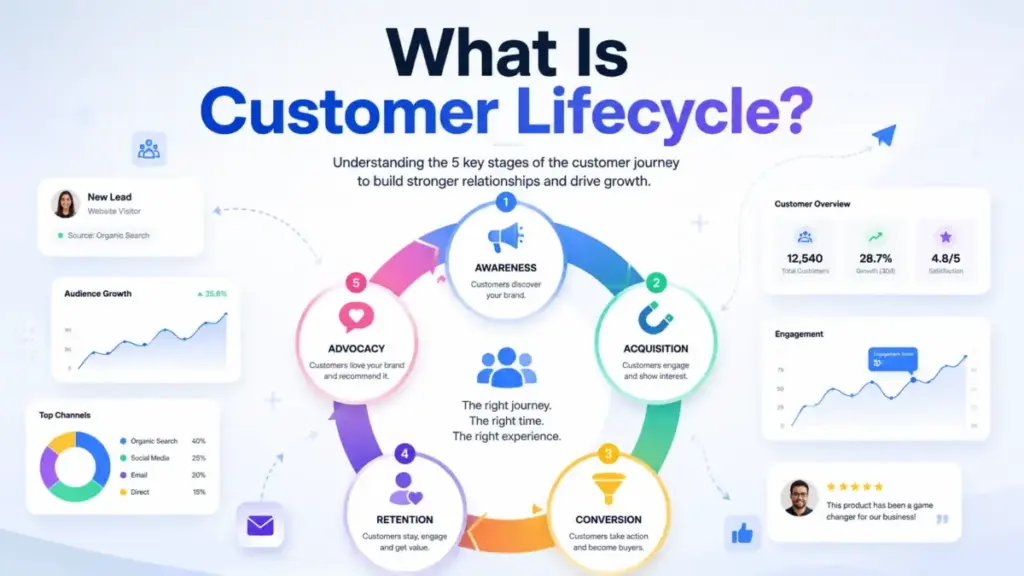
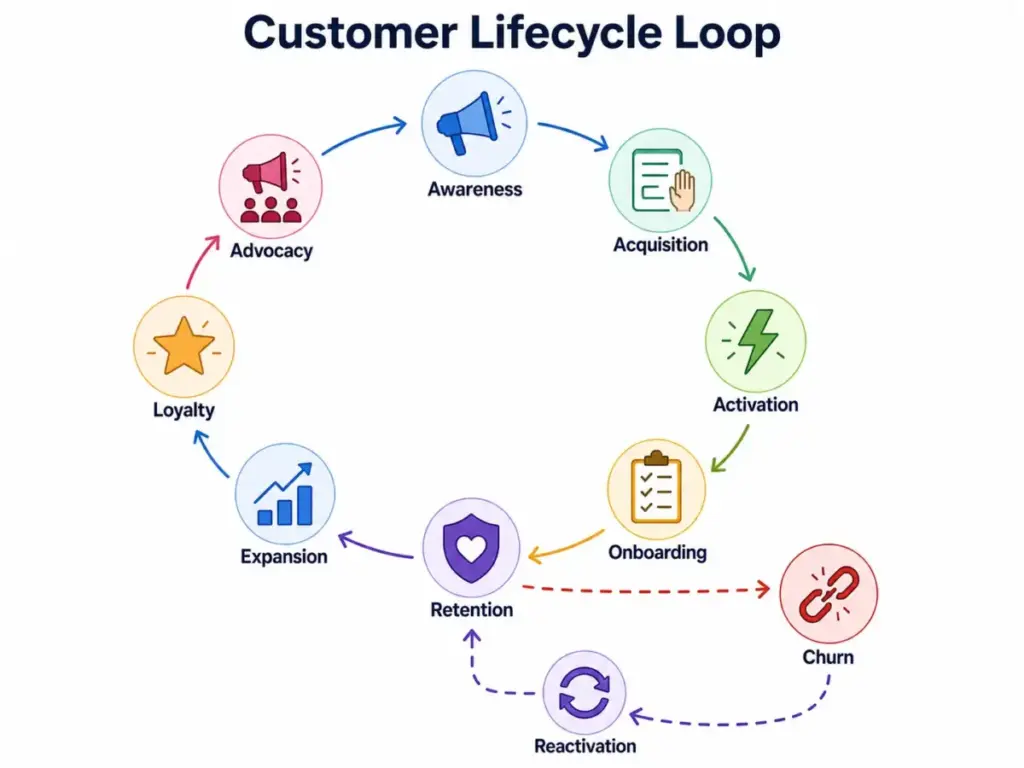
The customer lifecycle is the complete sequence of stages a person or account moves through during their relationship with your business. It begins at first awareness and extends through acquisition, conversion, onboarding, retention, expansion, and advocacy. It also includes churn and reactivation, because real relationships are not always linear.
Think of it this way. A visitor reads a blog post (awareness). They sign up for a free trial (acquisition). They activate a core feature within the first week (activation). They convert to a paid plan (conversion). Three months later, they upgrade to a higher tier (expansion). A year later, they refer a colleague (advocacy). That entire arc is one customer lifecycle.
The lifecycle is a business classification system. It answers one question: “Where is this person in their relationship with us right now?” It does not describe every touchpoint, email, or support ticket. That is the customer journey, which is a different concept I will compare later.
Customer lifecycle covers the relationship from awareness to advocacy, churn, or reactivation. Every stage has an owner, a trigger, a metric, and a risk. When those four elements are defined, lifecycle data becomes operational. When they are missing, lifecycle becomes a dropdown field that marketing set up once and nobody updated since.
How Customer Lifecycle Works in CRM
Lifecycle stage is the single most important property in your CRM, and it is also the most frequently misconfigured. In CRM systems like HubSpot, Salesforce, and Pipedrive, lifecycle stage is a contact-level or account-level property that classifies where each record sits in the relationship.
Each stage needs four things: a clear definition, an owner, an entry trigger, and a primary metric. Without those, automation rules fire incorrectly, reports show misleading numbers, and teams argue about what “customer” actually means.
Here is how lifecycle stages typically map for a B2B SaaS company with a sales-assisted motion.
| Lifecycle Stage | Business Question | Owner | Entry Trigger | Primary Metric | Warning Signal |
|---|---|---|---|---|---|
| Subscriber | Who knows we exist? | Marketing | Email opt-in or content download | List growth rate | High unsubscribe rate |
| Lead | Who showed buying interest? | Marketing | Form fill, demo request, or pricing page visit | MQL conversion rate | Low engagement score |
| MQL | Who is ready for sales review? | Marketing | Lead score threshold or ICP match | MQL-to-SQL rate | Stale MQLs older than 14 days |
| SQL | Who has sales accepted? | Sales | Sales rep accepts and qualifies | SQL-to-opportunity rate | No activity within 7 days |
| Opportunity | Who is in active deal cycle? | Sales | Deal created with value and close date | Win rate, sales cycle length | Deal stalled over 30 days |
| Customer | Who is paying us? | Customer Success | Closed-won deal or subscription start | Activation rate, time to value | No product login within 14 days |
| Churned | Who left? | Customer Success | Subscription cancelled or not renewed | Churn rate, reason code | No exit interview captured |
| Evangelist | Who actively promotes us? | Marketing or CS | Referral made, case study, or review posted | Referral rate, NPS above 9 | Declining engagement after referral |
This table should live in your CRM documentation, not just in a strategy deck. Every new team member should be able to read this table and know exactly which stage a contact belongs in and who is responsible for moving them forward.
As one Reddit user in r/CRM put it: “one source of truth, lifecycle stages, data hygiene, and how teams use it to make decisions.” That is the goal. The lifecycle stage property is the spine of that source of truth.
Customer Lifecycle Stages
Each lifecycle stage represents a distinct phase where the business question, the owner, and the risk profile change. Most models list five stages. I prefer seven core stages with two recovery stages (churn and reactivation), because post-sale stages deserve the same operational rigor as acquisition.
Awareness
The contact knows your brand exists but has not taken action. They may have seen an ad, read a blog post, or heard a podcast mention. Marketing owns this stage. The primary metric is reach: impressions, branded search volume, and new website visitors. The failure risk is spending on awareness channels without tracking which ones produce downstream leads. If your awareness stage has no attribution data, you are buying visibility with no feedback loop.
Acquisition
The contact takes a measurable action: subscribes to a newsletter, downloads a resource, fills out a form, or signs up for a free account. Marketing still owns this stage. The metric shifts to conversion rate by channel and cost per lead. A common mistake is treating every form fill as equal. A pricing page inquiry and a blog subscriber carry different intent signals.
Activation or Conversion
This is where the contact experiences your product’s core value for the first time. For SaaS, activation might mean completing onboarding, importing data, or using a key feature. For ecommerce, it is the first purchase. Sales and product teams share ownership here. The metric is activation rate and time to first value. The failure risk is high: Amplitude’s research shows that users who do not activate within the first session rarely return.
Onboarding
The new customer learns how to use your product in the context of their workflow. Customer success or onboarding specialists own this stage. The metric is onboarding completion rate and time to go-live. The failure risk is silent churn: customers who never fully adopt, pay for a few months, and then cancel. Most CRMs do not have a dedicated onboarding lifecycle stage. They should, especially for products with setup complexity or multi-user rollouts.
Retention
The customer stays, renews, and continues using the product. Customer success owns this stage. The metrics are renewal rate, product usage frequency, support ticket trends, and net revenue retention. The warning signal is declining login frequency or a spike in support tickets. Retention is where most lifecycle models lose detail. Teams track whether someone renewed but not whether usage dropped 60% in the quarter before renewal. Gainsight’s customer lifecycle framework gives this post-sale phase equal weight, which is the right approach for subscription businesses.
Expansion
The customer buys more: upgrades, adds seats, purchases add-ons, or adopts a second product. Sales or customer success owns this stage, depending on your go-to-market model. The metrics are expansion revenue, upsell rate, and net revenue retention (NRR). The failure risk is pushing expansion on a customer who has not fully adopted the first product. Expansion should follow proven adoption, not just contract timing.
Loyalty and Advocacy
The customer actively promotes your product through referrals, reviews, case studies, or community participation. Marketing and customer success co-own this stage. The metrics are referral rate, NPS (specifically promoters scoring 9 or 10), published reviews, and case study participation. The failure risk is assuming loyal customers will advocate without being asked. Most advocacy programs require a structured ask at the right moment.
Post-sale stages matter as much as acquisition for subscription businesses. If your lifecycle model ends at “customer,” you are missing half the revenue story.
Customer Lifecycle Metrics by Stage
Every lifecycle stage has a primary metric, and tracking the wrong metric at the wrong stage creates blind spots. Here is a stage-by-metric map that I recommend starting with.
| Lifecycle Stage | Primary Metric | Secondary Metric | Data Source |
|---|---|---|---|
| Awareness | Website traffic, branded search volume | Impression share, social reach | Google Analytics, Search Console |
| Acquisition | Conversion rate by channel, CAC | Cost per lead, lead source mix | CRM, ad platforms |
| Activation | Activation rate, time to first value | Feature adoption rate | Product analytics (Amplitude) |
| Onboarding | Onboarding completion rate | Time to go-live, support tickets during setup | CS platform, CRM |
| Retention | Churn rate, renewal rate, product usage | CSAT, cohort retention | CRM, product analytics, support |
| Expansion | Expansion revenue, upsell rate, NRR | Cross-sell conversion rate | CRM, billing |
| Advocacy | Referral rate, NPS (promoters) | Reviews posted, case studies completed | NPS tool, CRM |
The important principle: retention metrics belong inside lifecycle reporting, not only inside customer success dashboards. When lifecycle reporting stops at conversion, the executive team sees acquisition health but not revenue durability.
Customer Lifecycle vs Customer Journey
Lifecycle stage is a business classification, not a detailed customer journey map. This distinction matters because teams that confuse the two end up with lifecycle stages that are too granular and journey maps that are too vague.
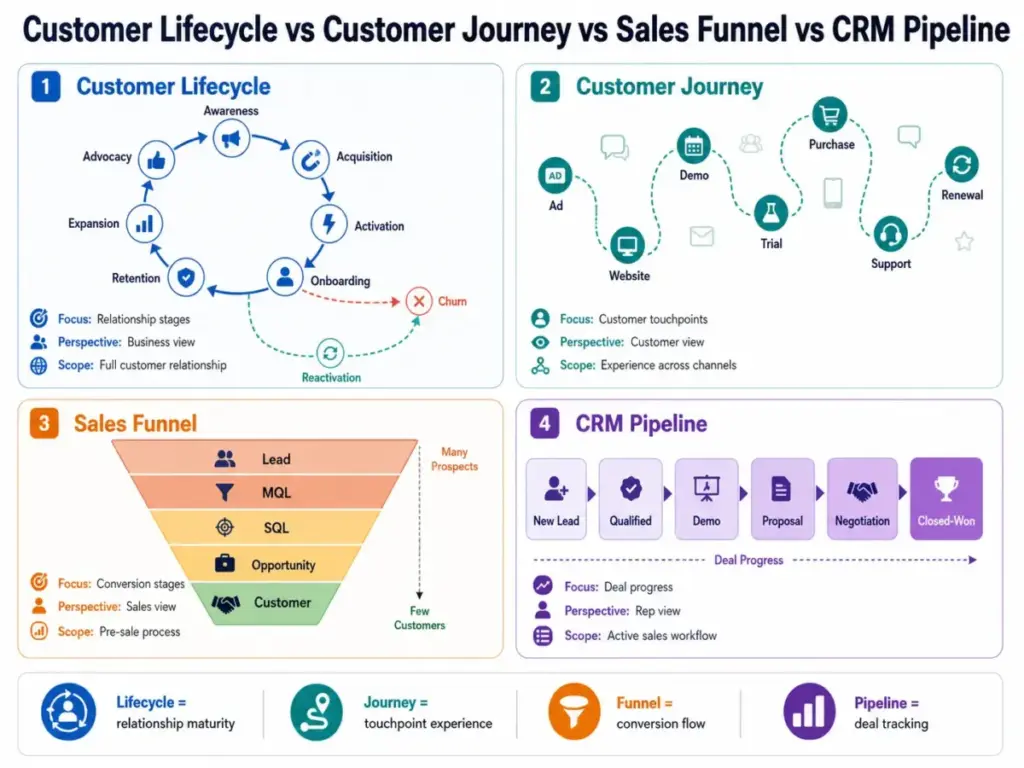
| Concept | What It Describes | Owner | Granularity | Direction | Common Mistake |
|---|---|---|---|---|---|
| Customer Lifecycle | Relationship maturity stage | Cross-functional | 5 to 9 stages | Mostly forward, allows loops | Treating it as a journey map |
| Customer Journey | Every touchpoint and experience | Marketing, CX | Dozens of touchpoints | Non-linear | Making it too abstract to act on |
| Sales Funnel | Deal progression from lead to close | Sales | 4 to 7 stages | Linear, downward | Ignoring post-sale entirely |
| Buyer Journey | Decision process from problem to purchase | Marketing | 3 stages (aware, consider, decide) | Linear | Confusing it with lifecycle |
| Lead Status | Current sales activity on a contact | Sales | 5 to 10 statuses | Resets per opportunity | Confusing it with lifecycle stage |
| Deal Stage | Position of a specific deal in pipeline | Sales | 5 to 8 stages | Linear per deal | One contact, multiple deals |
| Pipeline Stage | Visual position in sales pipeline | Sales | Same as deal stage | Linear | Reporting pipeline as lifecycle |
As Reddit user Marlon1896 explained in r/hubspot: “Lifecycle stage answers the question of how far someone has ever gotten in their customer journey.” Lead status, by contrast, describes what is happening right now in a sales conversation. A contact can be lifecycle stage “Customer” and lead status “Open” if they are being re-engaged for an upsell.
Lead status describes current sales activity, while lifecycle stage describes relationship maturity. Mixing these two properties is the most common CRM configuration mistake I encounter. Reviewing the SaaS Zap review methodology for CRM tools, this distinction comes up repeatedly in how platforms handle contact properties.
Why Customer Lifecycle Matters
A clearly defined customer lifecycle changes how teams make decisions, not just how they label contacts. Here are the specific operational benefits, with one measurable detail for each.
Better marketing-to-sales handoff. When MQL and SQL stages have defined entry criteria, marketing stops passing unqualified leads, and sales stops ignoring qualified ones. Teams that define MQL criteria see fewer “junk lead” complaints within the first quarter.
Cleaner CRM reporting. Lifecycle stage filters let you report on contacts by relationship maturity instead of arbitrary lists. You can answer “how many SQLs did we create this month?” without building a custom report from scratch.
Earlier churn detection. When retention is a defined lifecycle stage with usage-based warning signals, customer success can intervene before the renewal conversation. Watching product usage trends 90 days before renewal is more effective than reacting to a cancellation request.
Stronger segmentation. Lifecycle stage is the most reliable segmentation property inside email marketing tools. Sending onboarding content to a subscriber or a renewal reminder to an MQL damages trust and open rates.
More relevant automation. Automation rules tied to lifecycle stage transitions (lead to MQL, customer to churned) fire at the right moments. Rules tied to arbitrary triggers fire unpredictably.
Clearer team ownership. When each lifecycle stage has one owner, accountability is visible. No one argues about whether marketing or sales owns a stale lead if the lifecycle governance table answers that question.
Connected acquisition and retention data. Lifecycle reporting that spans awareness through advocacy shows whether customers acquired from a specific channel retain better than others. That data connects CAC to CLV, which is the most important ratio in subscription economics.
Common Customer Lifecycle Mistakes
The biggest mistake teams make with customer lifecycle is adding more stages. It feels productive. It feels precise. But in practice, more stages usually mean worse reporting, weaker automation, and slower adoption.
As one Reddit user in r/hubspot summarized what actually works: “Clear, plain-English stage definitions. Fewer stages, not more. Sales actually buying into them.”
Here are the most frequent lifecycle mistakes I see.
Too many stages. A 15-stage lifecycle model looks thorough on a whiteboard. In CRM, it creates confusion. Reps do not know the difference between “Engaged Lead” and “Active Lead.” Reports become fragmented. Fewer lifecycle stages often create cleaner reporting for small teams. Start with 6 to 8 stages and add only when reporting proves a gap.
Vague stage names. “Prospect” means something different to marketing, sales, and support. If you cannot write a one-sentence definition that all three teams agree on, the stage name is too vague.
No entry or exit criteria. CRM lifecycle stages fail when teams lack entry and exit criteria. A stage without criteria is just a label. Define what moves a contact in and what moves them out.
Automation without oversight. Letting workflows move contacts through lifecycle stages without any human checkpoint creates phantom progress. A lead score can trigger MQL status, but someone should review whether those MQLs are actually converting.
Confusing lead status with lifecycle stage. Lead status is “New,” “Contacted,” “Unresponsive.” Lifecycle stage is “Lead,” “MQL,” “Customer.” They track different things and should be separate CRM properties.
Ignoring reactivation. Most lifecycle models have no path for a churned customer who comes back. Without a reactivation stage or workflow, returning customers get treated like new leads, losing all their history.
Reporting only acquisition. If your lifecycle dashboard ends at “Customer,” you are measuring half the business. Post-sale stages (retention, expansion, advocacy) drive the revenue that makes acquisition profitable.
Customer Lifecycle Edge Cases
Real customers do not follow a clean seven-stage path. Here are the edge cases that most lifecycle articles skip and most CRM admins face.
Lost Prospects
A sales-qualified lead goes dark. The deal is marked closed-lost. What happens to the contact’s lifecycle stage? Most teams leave it at SQL forever, which inflates SQL counts in reports. Better practice: create a “Disqualified” or “Recycled” status within lead status, and keep lifecycle stage at SQL. This preserves history while showing current sales activity clearly.
Churned Customers
A customer cancels. Their lifecycle stage should move to “Churned” or “Former Customer” with a churn date and reason code. Do not reset them to “Lead.” Their history, usage data, and support interactions have value for win-back campaigns and churn analysis.
Reactivated Customers
A former customer returns. They should move back to “Customer” with a reactivation tag and date. This is one case where lifecycle stages should move backward. HubSpot’s lifecycle stage documentation supports forward and manual backward movement for exactly this reason.
Free Users vs Paid Customers
Freemium and free-trial models create a category that sits between lead and customer. Define whether free users are “Activated” or a custom stage like “Free User.” Do not call them “Customers” if they are not paying; it distorts revenue reporting.
Multi-Product Customers
A customer using Product A gets pitched Product B. Are they a “Customer” or an “Opportunity”? The answer depends on your CRM architecture. Account-level lifecycle should stay at “Customer.” The new product opportunity exists at the deal level, not the lifecycle level.
Non-Customer Contacts
Investors, partners, vendors, job applicants, and press contacts all end up in CRM databases. Without a lifecycle stage like “Other” or “Non-Customer,” they pollute every lifecycle report. Tag them early and exclude them from marketing automation.
Accounts with Multiple Contacts
A single company account may have a champion (Customer), a new stakeholder (Lead), and a departing user (Inactive). Account-level lifecycle should reflect the overall relationship. Contact-level lifecycle can vary. Set rules for which contact’s stage drives account-level reporting.
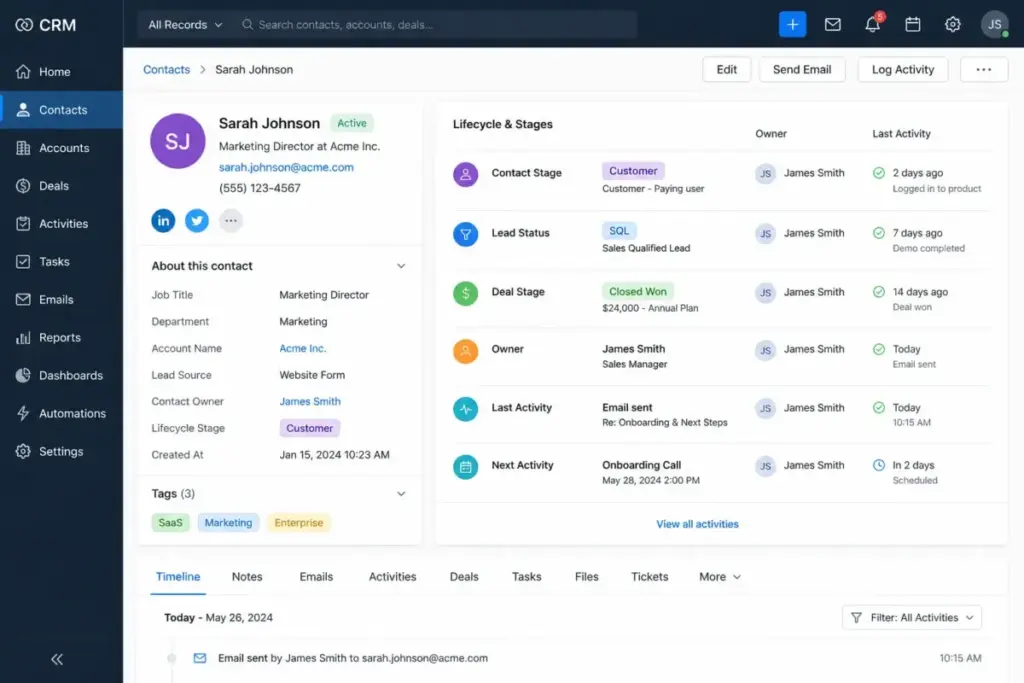
Best Practices for Customer Lifecycle Management
Customer lifecycle management works when it is treated as an operating discipline, not a one-time CRM setup. Here are eight practices that hold up across company sizes.
1. Define stages in plain English. Every lifecycle stage should have a one-sentence definition that a new hire can understand on day one. If the definition requires CRM jargon, simplify it.
2. Assign one owner per transition. The move from MQL to SQL is owned by sales development. The move from Opportunity to Customer is owned by the account executive. The move from Customer to Churned is owned by customer success. No transition should be unowned.
3. Use fewer stages until reporting proves you need more. Start with Subscriber, Lead, MQL, SQL, Opportunity, Customer, and Churned. Add Evangelist, Reactivated, or Free User only when you have data showing those distinctions change team behavior.
4. Separate lifecycle stage from lead status. Lifecycle stage is permanent relationship maturity. Lead status is current activity. Keep them as separate properties with separate automation rules.
5. Track stage entry dates. Recording when each contact entered each stage lets you measure velocity: how long does it take to move from MQL to SQL? From Customer to Churned? Stage dates are the foundation of funnel velocity analysis.
6. Review lifecycle data monthly. Run a monthly report showing stage distribution, stage transition rates, and contacts stuck in a single stage for over 90 days. Stale records signal broken processes.
7. Audit automation rules quarterly. Workflows that move contacts through lifecycle stages should be reviewed every quarter. Check for rules that conflict, rules that no longer match your sales process, and rules that create circular loops.
8. Keep post-sale stages visible. Retention, expansion, and advocacy stages should appear in the same lifecycle report as acquisition stages. If executives only see top-of-funnel data, they will only invest in top-of-funnel activity.
Best Tools for Customer Lifecycle
Tool selection should match where your lifecycle data breaks first. If your problem is messy contact stages, start with CRM. If your problem is invisible churn signals, start with product analytics or customer success software.
CRM and lifecycle stage tracking. HubSpot includes built-in lifecycle stage properties with automation rules for stage transitions. The HubSpot CRM review covers how these stages work in free and paid tiers. Salesforce offers custom lifecycle fields with granular workflow rules; see the Salesforce CRM review for implementation detail. The Pipedrive CRM review and Zoho CRM review cover lighter-weight options suited for smaller teams.
Customer support and retention signals. Zendesk connects support ticket data to customer health, which is critical for spotting churn risk during the retention stage; the Zendesk review explains how Sell and Support modules interact. Freshdesk and Intercom are strong options for teams where support conversations are a primary retention signal.
Customer success and expansion. Gainsight specializes in post-sale lifecycle management: health scores, renewal tracking, expansion triggers, and advocacy programs.
Product analytics and activation. Amplitude tracks activation, engagement, and retention behavior at the product level. This data feeds lifecycle stage decisions, especially for product-led growth models where activation rate determines conversion.
The best approach is connecting lifecycle stage data across these tools. A customer who is “Retained” in CRM but showing declining usage in Amplitude is a churn risk that only cross-tool lifecycle visibility can catch.
Customer Lifecycle FAQ
Answers to the most common lifecycle questions from CRM admins, revenue teams, and founders.
What is customer lifecycle in simple terms?
Customer lifecycle is the full relationship between a customer and a business, from the first time they hear about you to the point where they buy, stay, grow, refer others, or leave. It is a way to classify where every contact stands so teams know what to do next.
What are the main customer lifecycle stages?
The core stages are awareness, acquisition, activation, onboarding, retention, expansion, and advocacy. Most CRM implementations also include churned and reactivated stages. The exact number depends on your business model, but 6 to 9 stages cover most scenarios.
What is customer lifecycle management?
Customer lifecycle management is the practice of defining lifecycle stages, assigning ownership, tracking transitions, and using that data to improve retention, expansion, and customer experience across every team. It connects marketing, sales, customer success, and support under one shared framework.
Is customer lifecycle the same as customer journey?
No. Customer lifecycle describes relationship maturity from a business perspective (lead, customer, churned). Customer journey describes every experience and touchpoint from the customer’s perspective (saw an ad, read a review, talked to sales, submitted a ticket). Lifecycle has 5 to 9 stages. Journey can have dozens of touchpoints.
Is customer lifecycle the same as sales funnel?
No. A sales funnel tracks deal progression from lead to closed-won. It is owned by sales and ends at purchase. Customer lifecycle extends through retention, expansion, and advocacy. A customer who bought from you left the sales funnel but is still in the lifecycle.
How does CRM software track customer lifecycle?
CRM platforms use a lifecycle stage property (or custom field) on each contact or account record. When a trigger fires (form submission, deal creation, subscription start), the lifecycle stage updates. Some CRMs, like HubSpot, include default lifecycle stages. Others, like Salesforce, require custom configuration.
What metrics measure customer lifecycle performance?
Key metrics by stage: CAC and conversion rate for acquisition, activation rate for onboarding, churn rate and renewal rate for retention, expansion revenue and NRR for growth, and NPS and referral rate for advocacy. No single metric covers the full lifecycle.
How many lifecycle stages should a small business use?
Start with 6 to 8 stages: Subscriber, Lead, MQL, SQL, Customer, and Churned. Add Opportunity if you have a sales team and Evangelist if you run a referral program. Do not add more stages unless your reporting shows a clear gap that a new stage would fix.
Can a customer move backward in the lifecycle?
Yes. A customer who cancels moves to Churned. A churned customer who returns moves back to Customer. Lifecycle stages are not a one-way escalator. Your CRM should allow backward movement with date stamps and reason codes so reporting stays accurate.
What is an example of customer lifecycle?
A marketing manager sees a LinkedIn ad for a project management tool (awareness). She visits the website and signs up for a free trial (acquisition). She creates her first project and invites her team (activation). She converts to a paid plan after 14 days (conversion). Six months later, she upgrades to a business plan (expansion). She writes a G2 review and refers a colleague (advocacy). The full arc, from ad impression to referral, is her customer lifecycle.
Which team owns customer lifecycle management?
No single team owns the entire lifecycle. Marketing owns awareness through MQL. Sales owns SQL through opportunity. Customer success owns onboarding through renewal. Support contributes retention signals. Revenue operations or CRM administration typically governs the lifecycle stage definitions, automation rules, and reporting.
What tools help manage customer lifecycle?
CRM platforms (HubSpot, Salesforce, Pipedrive, Zoho CRM) track lifecycle stages. Customer success tools (Gainsight) manage post-sale retention and expansion. Support platforms (Zendesk, Intercom, Freshdesk) capture churn signals. Product analytics tools (Amplitude) measure activation and engagement. The right combination depends on where your lifecycle data gaps are.
Final Takeaway
Alex Morrison’s Quick Take
A customer lifecycle model is useful only when teams define stages, assign ownership, and connect each stage to a measurable action. Otherwise, it becomes another CRM dropdown nobody trusts.
I have seen teams with three lifecycle stages outperform teams with fifteen. The difference was never the number of stages. It was whether each stage had a clear owner, a defined entry trigger, and a metric that someone reviewed every month.
If you are setting up lifecycle stages for the first time, start small. Six stages. Plain English definitions. One owner per transition. Track entry dates. Review monthly. Add complexity only when your data tells you a new stage would change a decision.
Customer lifecycle is not a theory exercise. It is the operating system for how your company treats the people who pay you. Get the stages right, and every team, from marketing to support, works from the same map.