Every sales team has a version of the same story. A prospect fills out a demo request form on Tuesday. By Friday, nobody has called them. The lead sits in a CRM with no owner, no status, and no next step. By the time someone follows up, the buyer has already scheduled a demo with a competitor.
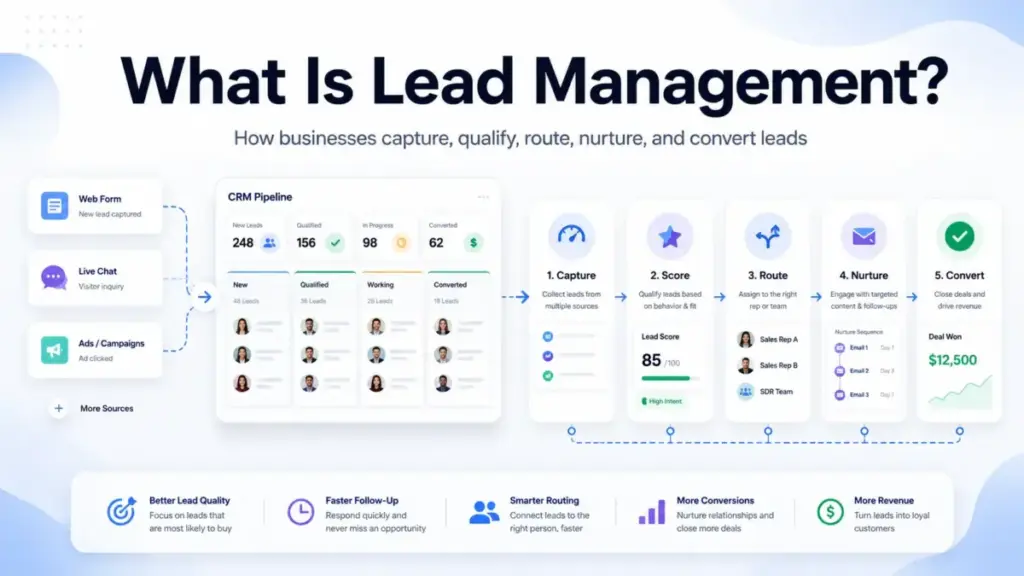
That is not a lead generation problem. It is a lead management problem. And the gap between capturing a lead and converting it is where most revenue leakage happens. Lead management is the structured process of capturing, organizing, qualifying, scoring, routing, nurturing, tracking, and converting prospective customers from first expression of interest through sales outcome. Salesforce defines it as managing prospective customers from first interaction to purchase. HubSpot frames it as capturing, qualifying, routing, nurturing, and tracking leads from initial contact to close.
This guide breaks down how lead management works operationally, where it differs from lead generation and CRM tools, which stages matter, which tools enable it, how to measure it, and when not to overbuild the process.
Quick Answer: Lead management is the operating system that decides which leads are captured, qualified, scored, routed, nurtured, measured, and converted. It is not the same as lead generation (which creates interest) or CRM (which stores records). Lead management handles what happens after a prospect raises their hand, and before they become a customer or get disqualified.
What Lead Management Actually Means
Lead management covers the end-to-end workflow from first expression of interest through sales outcome. Three layers make it clearer.
Simple definition: Lead management is how a business tracks and follows up with people who have shown interest in buying. It answers three questions: who is this lead, who owns it, and what happens next.
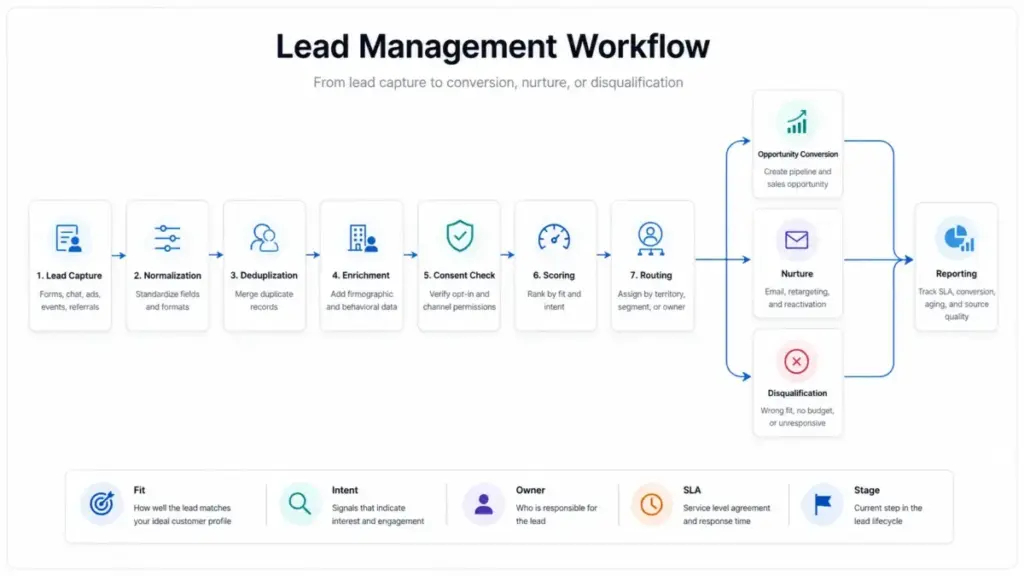
Technical definition: A lead management system normalizes incoming lead data from forms, chat, events, ads, referrals, outbound lists, and product signups. It deduplicates records, enriches firmographic and behavioral data, checks consent status, assigns a source, applies qualification rules or scores, routes the lead to the correct owner or queue, triggers follow-up tasks or sequences, tracks every interaction, updates lifecycle status, and either converts the lead into an opportunity, continues nurture, disqualifies it, or archives it with a reason. The workflow depends on shared definitions for lead source, lead status, MQL (marketing qualified lead), SQL (sales qualified lead), owner, SLA, next step, and closed-loop attribution.
Business definition: Lead management is the process that prevents qualified opportunities from falling through the cracks. It gives every lead a status, an owner, a next step, and a measurable path to conversion. Without it, sales teams cherry-pick the leads they like, marketing cannot prove which sources drive revenue, and managers have no visibility into response time, conversion rates, or pipeline contribution.
How Lead Management Works
A lead enters the system when a prospect completes a form, starts a chat, attends an event, clicks an ad, gets referred, signs up for a product trial, or gets added manually by a sales rep. From that point, the system runs a series of steps.
Step 1: Capture and normalize
The lead record is created with required fields: name, email, company, source, source detail, consent status, and timestamp. Data normalization standardizes formats, company names, and regional conventions.
Step 2: Deduplicate and enrich
The system checks for existing records to prevent duplicates. If the lead already exists, records merge. Enrichment adds firmographic data (company size, industry, location, revenue) and behavioral data (pages visited, content downloaded, emails opened).
Step 3: Check consent and source
Consent status is verified: did this lead opt in, what did they opt into, and through which channel? Source and source detail are assigned so attribution works downstream. For teams operating under GDPR or similar regulations, this step determines what sales can legally do next.
Step 4: Score and qualify
Scoring models assign points based on fit (company size, industry, job title, budget signals) and intent (demo request, pricing page visit, content engagement, product usage). Teams define thresholds for MQL and SQL. A lead that scores high on engagement but low on fit is not the same as a lead that scores high on both.
Step 5: Route to the right owner
Routing rules assign the lead to a specific rep or queue based on territory, segment, product line, company size, language, account ownership, or round-robin logic. The goal is speed: high-intent leads like demo requests need tighter response SLAs than low-intent content downloads.
Step 6: Follow up within SLA
The assigned owner receives an alert and a task. The SLA defines how quickly they must respond. Workato’s 2026 lead response study across 114 B2B companies found that only 1 company sent a personalized email within 5 minutes. Phone responses averaged 14 hours and 29 minutes. Companies using lead routing tools still took an average of 3 hours and 32 minutes to respond, while companies without routing tools averaged nearly 13 hours. Speed-to-lead remains a competitive gap even when tools exist.
Step 7: Nurture, convert, or disqualify
Leads that are not sales-ready enter nurture paths: educational content, retargeting, email sequences, webinars, or product-led signals. Leads that are ready move to opportunity. Leads that are unqualified get disqualified with a reason (wrong fit, no budget, competitor chose, unresponsive) and archived for potential reactivation.
Step 8: Measure and close the loop
Every stage generates data. Source-to-lead rate, MQL-to-SQL rate, response time, contact rate, lead aging, conversion rate, close rate, disqualification reasons, and pipeline value by source all feed back into scoring, routing, and source investment decisions.
Where it breaks
The process fails when fields are missing, owners are inactive, SLAs are undefined, scoring models are not recalibrated, consent is not tracked, or old leads sit open forever. Automation does not fix a broken process. According to Workato’s study, the SLA and workflow design matter as much as the tool.
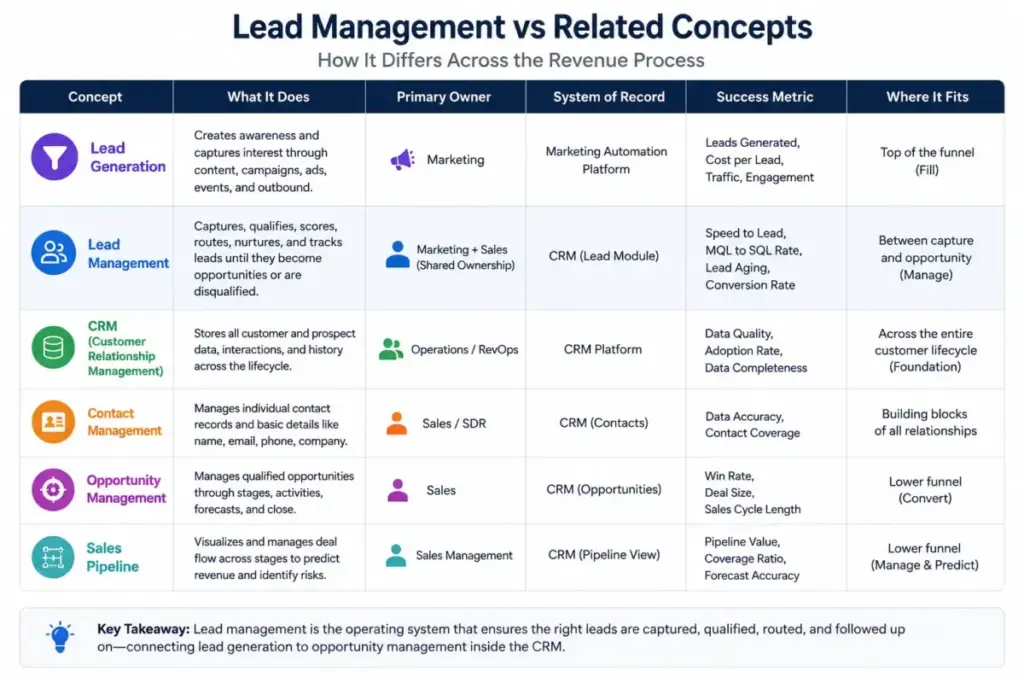
Lead Management vs Related Concepts
One of the content gaps across most SERP results is the blurred line between lead management and adjacent terms. This table clarifies.
| Concept | What it does | Primary owner | System of record | Success metric |
|---|---|---|---|---|
| Lead generation | Creates interest and captures prospects through ads, content, events, and outbound | Marketing / SDRs | Marketing automation, ad platforms | Number of leads, cost per lead |
| Lead management | Handles what happens after interest: qualification, routing, nurturing, conversion, disqualification | Marketing + Sales (shared) | CRM + marketing automation | Response time, MQL-to-SQL rate, conversion rate |
| CRM | Stores and tracks leads, contacts, accounts, deals, and activities | Sales + RevOps | CRM platform | Data completeness, pipeline visibility, adoption |
| Contact management | Organizes contact records, communication history, and relationship data | Sales / account management | CRM or contact database | Contact accuracy, engagement tracking |
| Opportunity management | Manages qualified deals through pipeline stages to close | Sales | CRM | Win rate, deal velocity, average deal size |
| Sales pipeline | Visual representation of deals at each stage from qualified to closed | Sales | CRM | Pipeline value, stage conversion, forecast accuracy |
Lead generation creates the interest. Lead management handles the operating workflow after interest appears. CRM software stores the records and activities. These are connected but not interchangeable.
How to Implement Lead Management
The practical guide below covers the steps that most SERP articles skip: CRM field design, routing logic, SLA frameworks, and handoff rules.
Define the lead lifecycle first
Before choosing software, define the stages a lead can occupy: raw lead, captured lead, MQL, SAL (sales accepted lead), SQL, opportunity, customer, nurture, disqualified, and archived. Each stage needs entry criteria, exit criteria, an owner, and a required action.
| Stage | Entry criteria | Owner | Required action | Exit criteria |
|---|---|---|---|---|
| Raw lead | Created from any source | System / queue | Normalize, deduplicate, enrich | Fields complete, consent verified |
| MQL | Meets scoring threshold (fit + intent) | Marketing | Route to sales within SLA | Sales accepts or rejects with reason |
| SAL | Sales reviews and accepts | Sales rep | Contact within SLA, validate fit | Qualifies as SQL or returns to nurture |
| SQL | Sales-validated buying readiness | Sales rep | Create opportunity, advance pipeline | Moves to opportunity or disqualified |
| Nurture | Not ready for sales (timing, budget, fit gap) | Marketing | Sequence, retarget, re-score | Re-enters MQL when threshold met |
| Disqualified | Does not meet fit criteria or unresponsive | Sales / marketing | Log reason, archive | Closed with reason, eligible for reactivation review |
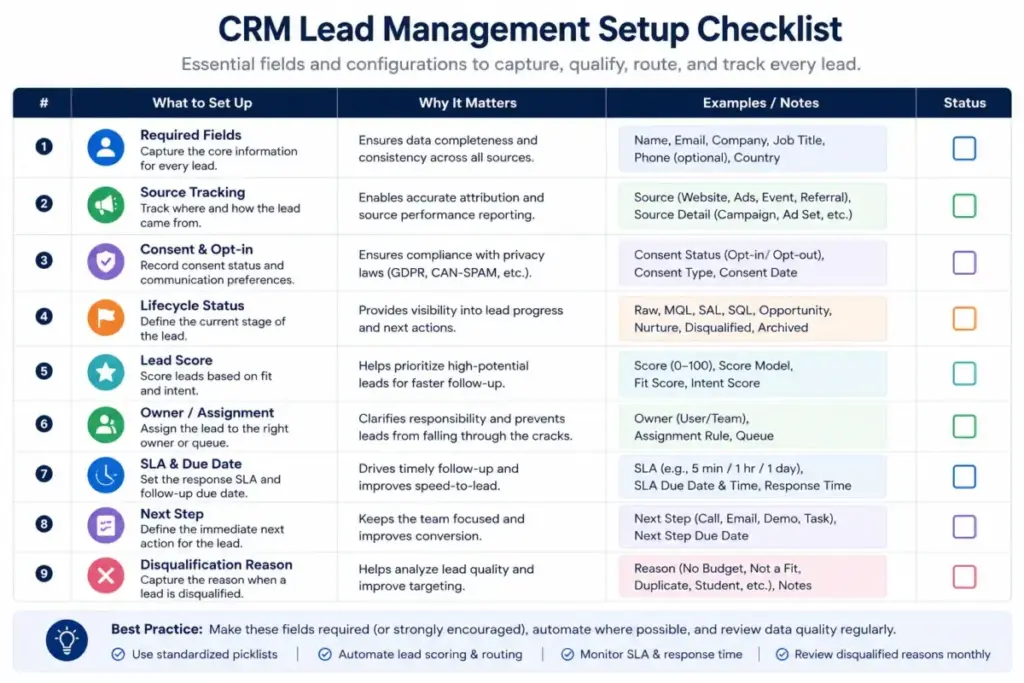
Standardize CRM fields
Most teams skip this step, and it is one of the main reasons lead management breaks down. At minimum, capture these fields for every lead:
- [ ] Full name
- [ ] Company name
- [ ] Lead source (first touch)
- [ ] Lead source detail (campaign, event, form)
- [ ] Consent status (opted in, channel, date)
- [ ] Lead status (lifecycle stage)
- [ ] Lead owner (assigned rep or queue)
- [ ] Company size or employee count
- [ ] Region or territory
- [ ] Use case or product interest
- [ ] Timeline or urgency signal
- [ ] Budget signal (if captured)
- [ ] Lead score (fit + intent)
- [ ] Last activity date
- [ ] Next step (task or sequence)
- [ ] SLA due date
- [ ] Disqualification reason (if applicable)
Build routing rules
Route leads by territory, segment, product line, company size, language, account ownership, rep capacity, or round-robin queue. High-intent leads (demo requests, pricing inquiries) need tighter SLAs than low-intent content downloads.
I have seen teams spend weeks building complex scoring models while ignoring routing. Scoring tells you which leads matter. Routing determines whether anyone actually calls them.
Set speed-to-lead SLAs
According to research from Harvard Business Review, most companies historically did not respond to online sales leads nearly fast enough. That finding still holds. Workato’s 2026 experiment found that only 31% of companies responded by phone, and none called within 5 minutes.
| Lead type | Recommended SLA | Metric to track |
|---|---|---|
| Demo request / pricing inquiry | Under 5 minutes (email), under 1 hour (phone) | First-touch time |
| Free trial signup | Under 15 minutes (automated), under 4 hours (personal) | Time to first personal contact |
| Content download | Under 24 hours (nurture sequence) | Sequence enrollment rate |
| Event or webinar attendee | Under 4 hours (post-event) | Contact rate |
| Outbound prospected lead | Within defined cadence | Sequence completion rate |
| Referral | Under 2 hours | Response time to referrer + lead |
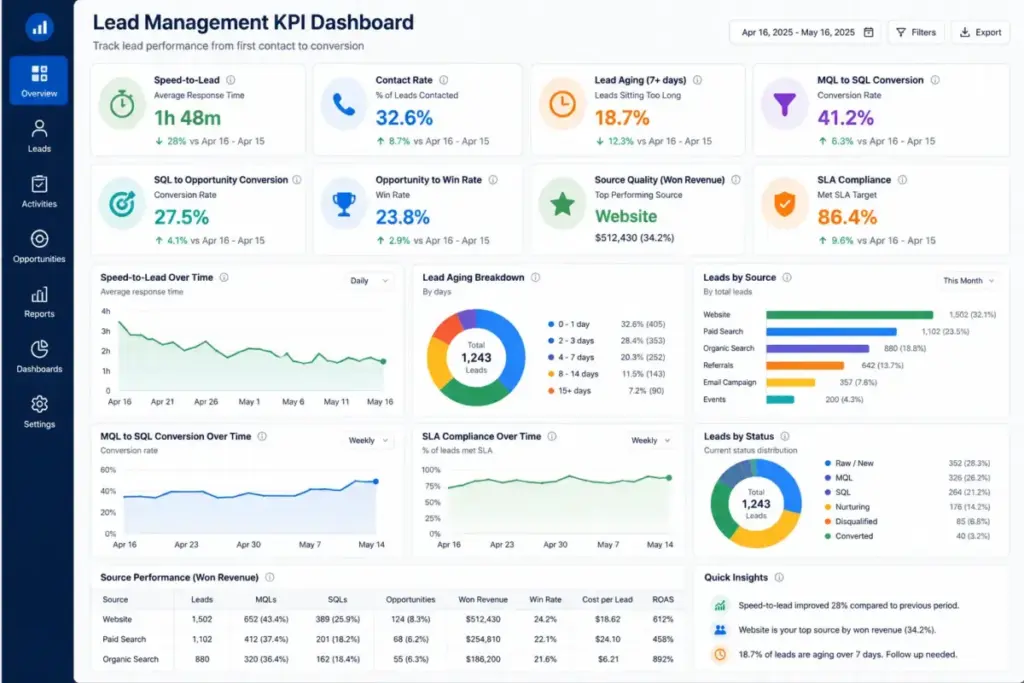
Instrument metrics
Track these across the lead lifecycle:
| Metric | What it measures | Why it matters |
|---|---|---|
| Lead response time | Time from form submit to first sales touch | Directly affects contact rate and conversion |
| SLA compliance rate | Percentage of leads contacted within SLA | Identifies routing or capacity gaps |
| Contact rate | Percentage of leads reached by phone/email | Shows whether leads are reachable and timing is right |
| MQL-to-SQL conversion rate | Percentage of MQLs accepted by sales | Indicates scoring and handoff quality |
| SQL-to-opportunity rate | Percentage of SQLs that create pipeline | Shows sales qualification accuracy |
| Lead aging | Average time leads spend in each stage | Identifies bottleneck stages |
| Disqualification reason mix | Breakdown of why leads are removed | Highlights source quality or fit issues |
| Source-to-pipeline contribution | Revenue generated per lead source | Guides marketing investment |
| Cost per qualified lead | Total spend divided by qualified leads | Measures efficiency |
| Rep follow-up completion rate | Percentage of assigned tasks completed | Tracks accountability |
Common Mistakes and Misconceptions
Mistakes that break lead management
Over-scoring low-intent actions. Counting every email open and page view as buying readiness inflates scores without improving conversion. Gartner’s 2025 lead scoring research notes that organizations misinterpreting high buyer effort as readiness to buy suffer from marketing-sales misalignment.
Treating all leads equally. A demo request from a 200-person company is not the same as a whitepaper download from a student. Without fit and intent differentiation, sales wastes time on leads that will never close.
Failing to define MQL and SQL. If marketing and sales do not agree on what qualifies a lead for handoff, every handoff becomes a debate. Define the criteria, write them down, and review them monthly.
Routing leads to inactive owners. Leads assigned to reps on vacation, reps who left the company, or queues nobody monitors die silently. Audit owner coverage monthly.
Measuring volume without quality. More leads can create more leakage if scoring, routing, and sales capacity are weak. Lead quality, speed, and fit often matter more than volume.
Using AI scoring without explainability. AI scoring can help prioritize leads, but teams still need explainable criteria, human review, conversion feedback loops, and periodic recalibration. If the team cannot explain why a lead scored 85, the scoring model is a black box, not a decision tool.
Ignoring consent and source tracking. Leads captured without consent tracking create compliance risk. Leads without accurate source data make attribution meaningless.
Buying a CRM before documenting the process. A CRM stores and tracks leads, but the process still needs fields, ownership rules, SLAs, status definitions, data hygiene, and follow-up accountability. The tool does not replace the workflow design.
Leaving old leads open forever. Stale leads with no recent activity clutter the pipeline and distort metrics. Set aging thresholds: if a lead has no activity for 30 days, escalate, reassign, or move to nurture. If no activity for 90 days, disqualify with a reason and review for reactivation quarterly.
Misconceptions
“Lead management is the same as lead generation.” Lead generation creates interest and captures prospects. Lead management handles what happens after interest appears: qualification, routing, nurturing, conversion, disqualification, and reporting.
“A CRM automatically solves lead management.” A CRM stores and tracks leads. The process still needs fields, ownership rules, SLAs, status definitions, data hygiene, and follow-up accountability.
“More leads always means more revenue.” More leads can create more leakage if scoring, routing, and sales capacity are weak.
“AI lead scoring can replace sales judgment.” AI scoring helps prioritize, but teams still need explainable criteria, human review, and periodic recalibration based on actual closed-deal data.
“Lead nurturing is just sending a drip campaign.” Nurturing includes segmentation, timing, content relevance, channel preference, lifecycle status, and signals that determine when a lead should return to sales.
Limitations and When NOT to Use Lead Management
When formal lead management is overkill
Avoid overbuilding when the company has very low lead volume, one person handles every inquiry directly, there is no repeatable sales process yet, or the cost of automation exceeds the risk of missed follow-up. In those cases, start with a simple CRM, clear statuses, and task reminders before adding scoring and routing complexity.
A solo founder getting 5 inbound leads per week does not need AI scoring, automated routing, or multi-step nurture sequences. A shared inbox and a daily task list covers it.
Limitations of lead management systems
Scoring can mislead teams. High activity is not the same as buying readiness. A competitor researching your product scores high on engagement but will never buy.
Automation does not fix a broken process. Even with routing tools, companies in Workato’s study still averaged over 3 hours to respond. The workflow design, SLA enforcement, and team accountability matter as much as the software.
CRM packaging hides operational gaps. Some tools reserve AI scoring, advanced automation, enrichment, web visitor tracking, or routing features for higher pricing tiers or paid add-ons. Check feature gates before committing to a platform.
Tools That Enable Lead Management
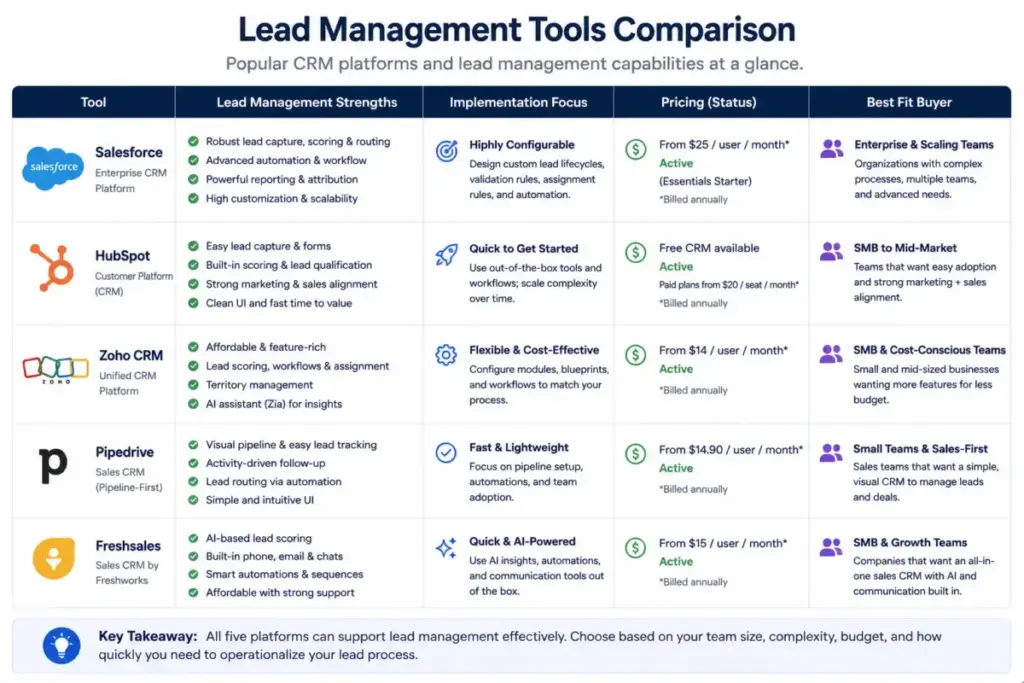
Five CRM platforms for sales teams illustrate how different tools implement lead management. Each approaches capture, scoring, routing, and conversion differently, and each has packaging caveats buyers need to understand.
| Tool | Best for | Pricing status (as of May 2026) | Key caveat |
|---|---|---|---|
| Salesforce Sales Cloud | Enterprise and scaling teams needing advanced CRM customization, AI, and forecasting | Starter Suite at$25/user/month; higher editions vary by contract and region (pricing page) | Advanced AI, automation, and customization features require higher-tier editions |
| HubSpot Sales Hub | Teams wanting CRM, lead tracking, live chat, deal tracking, and AI forecasting in a connected platform | Free at $0; Starter from$10/seat/month (limited-time discount); Professional at $100/seat/month; Enterprise at $150/seat/month | AI lead scoring requires Enterprise tier; discount pricing is limited-time for new customers |
| Zoho CRM | Small and mid-sized teams wanting affordable lead capture, scoring, webforms, and consent tracking | Free Edition for3 users; paid editions with tiered limits (pricing page) | Scoring rules, webform counts, email limits, and API credits vary by edition |
| Pipedrive | Sales-led SMB teams wanting visual pipeline management, Leads Inbox, and simple routing | Paid CRM plans plus add-ons: LeadBooster from$32.50, Web Visitors from $41 (pricing page) | Lead generation features (Chatbot, Prospector, Web Visitors) are paid add-ons, not included in base plans |
| Freshsales | SMBs wanting built-in phone, chat, Kanban views, AI scoring, and auto-assignment | Free for3 users; Growth at $9/user/month; Pro at $39/user/month; Enterprise at $59/user/month (billed annually, pricing page) | Freddy AI contact scoring, auto-assignment rules, territory management, and sales sequences require Pro tier or higher |
How each tool implements lead management
Salesforce Sales Cloud positions lead management as part of its AI CRM platform. Sales Cloud covers lead capture, automation, AI-powered insights, integrated customer data across departments, and CRM-wide visibility. For teams needing cross-department data integration and advanced customization, Salesforce remains the reference platform. The tradeoff: complexity and cost scale with edition and add-ons. Check Salesforce pricing before budgeting.
HubSpot Sales Hub connects lead tracking, live chat, deal tracking, automated outreach, forecasting, and AI-powered features. The free tier includes deal tracking and live chat. Professional adds AI forecasting and automated follow-ups. Enterprise adds AI lead scoring and conversation intelligence. The tier jump from Starter to Professional is where most growing teams feel the pricing pressure. See our HubSpot CRM analysis for the full breakdown.
Zoho CRM captures leads through webforms, imports, and card scanner workflows. It supports duplicate prevention, enrichment, lead scoring, omnichannel communication, and consent tracking including double opt-in. Scoring rules and advanced features are tiered by edition, so teams should compare the feature list before selecting a plan. For a detailed review, see our Zoho CRM evaluation.
Pipedrive supports a Leads Inbox that stores incoming leads until qualification, plus Web Forms, Chatbot, Live Chat, Prospector, and Web Visitors. The Leads Inbox helps prevent leads from getting cold by supporting filtering, sorting, editing, and activity tracking. The important caveat: lead generation features like LeadBooster and Web Visitors are paid add-ons, not included in base CRM plans. Our Pipedrive CRM review covers the full feature-to-plan map.
Freshsales supports lead capture, qualification, routing, tracking, Kanban sales views, Freddy AI intent scoring, auto-assignment rules, territory management, sales sequences, and advanced workflows. The free plan covers 3 users with basic CRM. Pro at $39/user/month unlocks AI scoring, auto-assignment, and multiple pipelines. The 21-day trial gives teams time to evaluate before committing. See our Freshsales review for the complete analysis.
AI in Lead Management: Useful, Not Magic
AI plays a growing role in lead management through predictive scoring, conversational AI, enrichment, summarization, and next-best-action recommendations. Forrester predicted that generational buying shifts combined with the rapid rise of generative AI are fundamentally altering the B2B buying landscape, and that more than half of large B2B purchases would be processed through digital self-serve channels.
That context makes AI-assisted lead management appealing. But the governance layer matters more than the technology.
What AI does well: Prioritizes large lead volumes by fit and intent signals, surfaces patterns humans miss in behavioral data, automates data enrichment and deduplication, and summarizes lead activity for reps before calls.
What AI does not replace: Sales judgment on deal readiness, relationship context that scoring models cannot capture, explainable qualification criteria that marketing and sales agree on, and periodic recalibration when market conditions or product positioning change.
The risk: Gartner’s research on lead scoring highlights that organizations facing poor lead quality and customer acquisition issues suffer from marketing-sales misalignment, not from a lack of AI. Over-relying on AI scores without understanding the underlying model creates false confidence.
I recommend treating AI scoring as a prioritization input, not a decision engine. Require that every AI-scored lead can be explained in plain language: “This lead scored 85 because the company has 200 employees in our target industry, the contact visited the pricing page three times this week, and they downloaded the integration guide.” If the team cannot reconstruct the logic, the score is noise.
When You Need Lead Management Software
You need formal lead management when:
- Leads arrive from more than 3 sources (website, events, outbound, referrals, product signups)
- More than one sales rep handles leads, creating ownership ambiguity
- Marketing-to-sales handoffs are informal or undocumented
- Response times exceed 4 hours for high-intent leads
- Leads get lost in spreadsheets, shared inboxes, or disconnected tools
- You need attribution data to justify marketing spend
- Sales managers have no visibility into lead aging, conversion, or SLA compliance
You probably do not need it yet when:
- Lead volume is under 20 per month and one person handles all follow-up
- There is no repeatable sales process (you are still finding product-market fit)
- The cost of the software exceeds the revenue risk of missed follow-up
In the early stage, start with a free CRM, clear lead statuses, task reminders, and a weekly review. Add scoring and routing when volume or team size creates the need.
How to Choose the Right Lead Management Tool
- Map the workflow before shopping. Define lifecycle stages, required fields, routing rules, and SLA targets. The tool should fit the process, not the other way around.
- Compare the practical tier, not the starting price. The features most teams need (scoring, automation, routing, custom reports) are often locked behind mid-tier or higher plans.
- Check what is included vs add-on. Some platforms bundle lead generation features. Others charge separately for chatbots, web visitor tracking, prospecting, and enrichment.
- Evaluate consent and compliance capabilities. If the team operates across regions, double opt-in, consent tracking, and data residency options matter.
- Test speed-to-lead in the trial. Submit a test lead through every capture channel. Measure how quickly the system routes, assigns, and alerts the owner.
- Ask about AI scoring explainability. If the platform offers AI scoring, ask how the score is calculated, what data it uses, and how to override or adjust it.
- Plan for data hygiene. Duplicate detection, merge logic, stale lead cleanup, and field validation prevent the CRM from becoming a data graveyard.
Lead Management Beginner Checklist
Use this checklist to build or audit your lead management process:
- [ ] Lead lifecycle stages defined (raw, MQL, SAL, SQL, opportunity, nurture, disqualified, archived)
- [ ] Lead sources mapped and tagged in CRM
- [ ] Required fields standardized for every lead record
- [ ] Consent status captured and tracked per lead
- [ ] Scoring model built with fit, intent, and disqualification criteria
- [ ] Routing rules configured by territory, segment, or round-robin
- [ ] Speed-to-lead SLAs set by lead intent level
- [ ] Nurture paths created for leads not ready for sales
- [ ] Metrics dashboard built (response time, conversion rate, lead aging, source quality)
- [ ] Weekly or monthly lead quality review scheduled between marketing and sales
- [ ] Data hygiene audit scheduled monthly (duplicates, stale leads, invalid owners)
- [ ] Disqualification reasons standardized and reported
FAQ
What is lead management in simple terms?
Lead management is the process of tracking and following up with people who have shown interest in buying. It covers who the lead is, who owns it, what happens next, and whether the lead converts, gets nurtured, or gets disqualified.
What is the difference between lead generation and lead management?
Lead generation creates interest and captures prospects through ads, content, events, and outbound outreach. Lead management handles what happens after: qualification, routing, follow-up, nurturing, conversion, and reporting. Generation fills the top of the funnel. Management operates the funnel.
Is lead management part of CRM?
CRM platforms include lead management features like lead records, status tracking, assignment rules, and activity logging. But lead management as a process also requires scoring models, SLA definitions, handoff rules, consent tracking, and measurement frameworks that go beyond what a CRM provides out of the box.
What is the difference between MQL and SQL?
An MQL (marketing qualified lead) meets marketing’s scoring threshold based on fit and engagement criteria. An SQL (sales qualified lead) has been reviewed and accepted by sales as having genuine buying readiness. The gap between them is the handoff: sales reviews the MQL, validates fit and intent, and either accepts it as SQL, returns it to nurture, or disqualifies it.
How fast should sales follow up with a new lead?
The target for high-intent leads (demo requests, pricing inquiries) is under 5 minutes by email and under 1 hour by phone. Workato’s 2026 study found that only 1 of 114 B2B companies achieved a personalized email within 5 minutes. Faster response correlates with higher contact rates and conversion.
What metrics should you track for lead management?
Track lead response time, SLA compliance rate, contact rate, MQL-to-SQL conversion rate, SQL-to-opportunity rate, lead aging, disqualification reason mix, source-to-pipeline contribution, cost per qualified lead, and rep follow-up completion rate.
Can AI replace lead scoring by sales reps?
AI scoring helps prioritize leads at scale, but it does not replace sales judgment. Teams need explainable scoring criteria, human validation, conversion feedback loops, and periodic recalibration. AI scores work best as a prioritization input alongside, not instead of, sales review.
What are common lead management mistakes?
Over-scoring low-intent actions, treating all leads equally, failing to define MQL and SQL criteria, routing leads to inactive owners, measuring volume without quality, ignoring consent tracking, leaving stale leads open indefinitely, and buying a CRM before documenting the lead management process.
When should a small team invest in lead management software?
When leads arrive from more than 3 sources, more than one person handles follow-up, response times regularly exceed 4 hours for high-intent leads, or leads get lost in spreadsheets. Before that point, a free CRM with clear statuses and task reminders covers the basics.
What is lead aging and why does it matter?
Lead aging measures how long a lead has been in a given stage without progressing. High lead aging signals bottlenecks: leads stuck in MQL status without sales review, leads assigned to inactive owners, or leads with no scheduled next step. Monitoring aging helps managers identify where leads die in the pipeline.
Review methodology: This guide synthesizes official product documentation, vendor pricing pages, authoritative third-party research (Harvard Business Review, Forrester, Gartner, Workato), and SERP competitive analysis verified as of May 2026. I did not run a live multi-week deployment of each CRM platform, so implementation-specific behaviors like exact enrichment accuracy, routing speed under load, and AI scoring precision should be confirmed directly with each vendor.