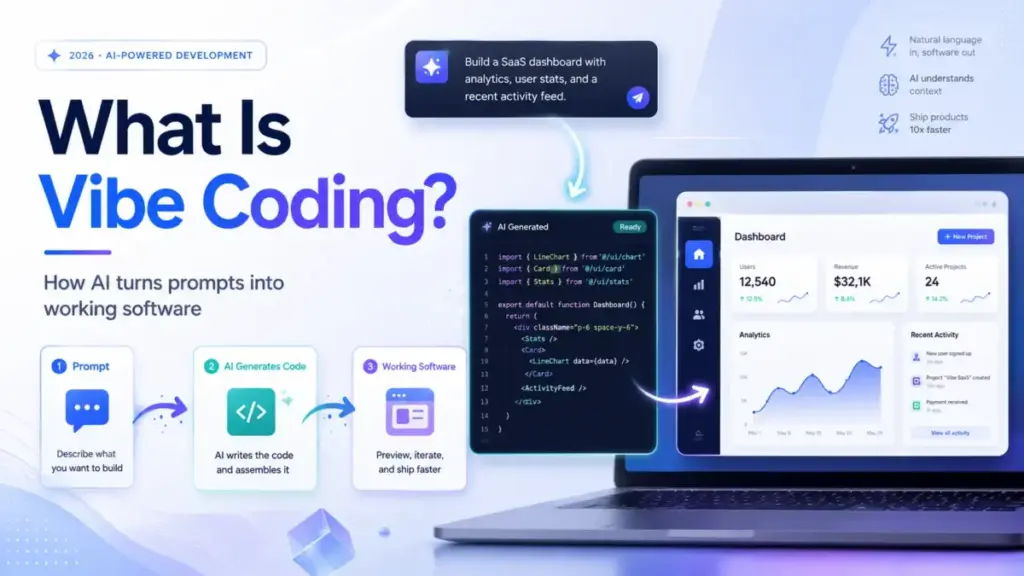
Vibe coding started as a meme. In 2026, it is a real workflow question that affects how teams prototype, ship, and accidentally expose customer data. The term describes a style of AI-assisted development where you describe what you want in plain language, an AI agent generates the code, and you accept the output without fully reading or understanding every line.
That last part is what separates vibe coding from responsible AI-assisted engineering, and it is where most of the risk starts. Collins Dictionary named it the 2025 Word of the Year. Merriam-Webster added it to its slang dictionary the same year. The hype cycle moved fast.
The governance conversation did not keep up. This guide explains what vibe coding actually means, how it works, which tools enable it, where it breaks, and what you need to check before anything you build this way touches real users. If you are evaluating best AI coding assistants for 2026, vibe coding is the workflow behind most of them.
Quick Answer: Vibe coding is a natural-language, AI-assisted way to create software where a user describes the desired app or feature, and an LLM-powered agent generates, edits, and runs code. It differs from responsible AI-assisted programming because the user typically accepts generated output without reviewing every line. It is useful for prototypes and risky for production without testing, review, and security controls.
Methodology: This guide was researched using official product pages, pricing pages, security documentation, developer docs, public research papers, and reporting from technology and security publications. We did not claim hands-on testing unless a workflow was directly verified. Pricing figures reference official sources as of May 2026; verify on each tool’s pricing page before purchase, as plans and credit allocations change frequently.
The 60-Second Explanation of Vibe Coding
Vibe coding is building software by typing instructions to an AI instead of writing code yourself. You describe what you want. The AI writes the code.
That is the simple version. The term comes from a February 2025 post by Andrej Karpathy on X, who described a style where you “fully give in to the vibes, embrace exponentials, and forget that the code even exists.” The phrase caught on because it captured something real: a growing number of people were building functional apps without reading, debugging, or understanding the code underneath.
At the technical layer, vibe coding relies on LLM-powered coding agents. These agents use model context, project files, framework patterns, and sometimes external tools to generate code from prompts. The user previews the result, copies errors back into the chat, asks for changes, accepts diffs, and repeats. The AI does not just autocomplete a line. It plans tasks, edits files, creates components, and sometimes deploys the result.
At the business layer, vibe coding matters because it lowers the barrier to building software. Non-technical founders can prototype an MVP in hours. Product managers can create internal tools without filing a ticket. Marketing teams can generate landing pages without waiting for a sprint. The tradeoff: what you gain in speed, you lose in control. Understanding what artificial intelligence actually does at the code-generation level helps you decide when that tradeoff makes sense.
How Vibe Coding Actually Works (Pipeline, Review Gates, and Failure Points)
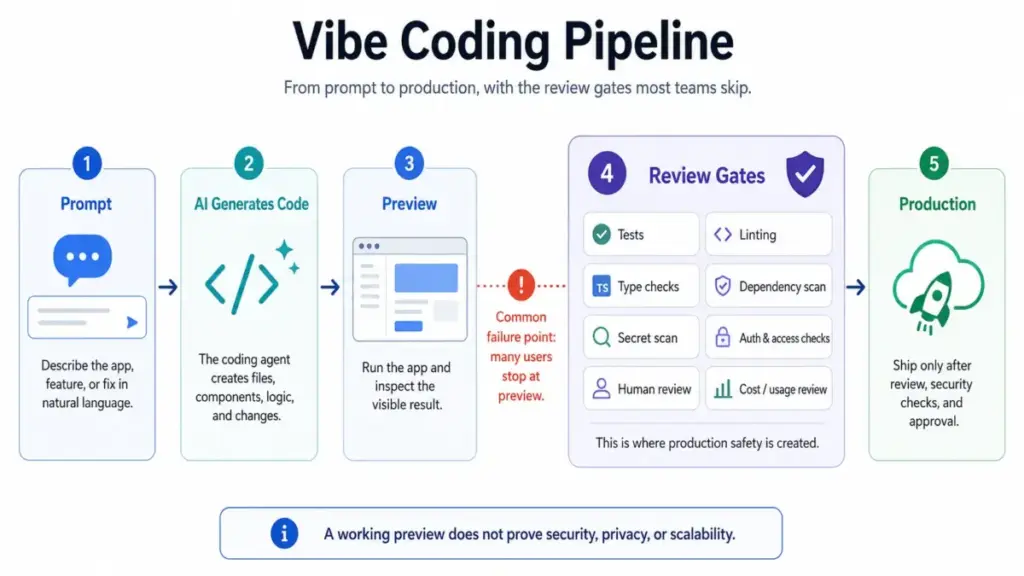
Vibe coding follows a loop, not a straight line. The user prompts. The AI generates. The user previews. The user prompts again. Most tutorials stop there. The failure points live in the steps most people skip.
Step 1: Write a product brief before prompting
Define the project boundary first. Prototype, internal tool, MVP, or production feature. List users, core workflow, data model, permissions, UI states, integrations, and failure cases. Skipping this step produces code that works in preview and breaks under real conditions.
Step 2: Prompt in small milestones
Ask for the schema first, then the UI, then the logic, then integrations, then tests. A single giant prompt produces a single giant blob of code that is hard to review and harder to fix.
Step 3: The AI generates code
The agent uses model context, project files, and framework patterns to produce diffs, new files, or full components. Different tools handle this differently. IDE agents (Cursor, GitHub Copilot) edit existing repositories. App builders (Replit, Lovable, Bolt.new) generate full-stack scaffolding from scratch.
Step 4: Preview and inspect
Run the app locally or in the platform’s preview environment. This is where most vibe coders stop. A working preview does not prove authentication, authorization, data privacy, dependency security, or scalability.
Step 5: Add review gates (where most vibe coders fail)
Add automated tests, linting, type checks, dependency scanning, secret scanning, and role-based access checks. Separate test and production data. Never let an AI agent operate directly on production databases without backups and approvals.
Step 6: Human review before publishing
Review pricing controls: credits, token limits, premium requests, usage-based billing, and admin caps. Use human review before publishing anything that handles customer data, payments, health, finance, authentication, or internal company information.
Where things go wrong: Steps 4 through 6. An arXiv safety benchmark (Jimenez et al., 2025) reported that in one evaluated setup, 61% of SWE-Agent with Claude 4 Sonnet solutions were functionally correct but only 10.5% were secure. The code worked. The code was not safe.
Vibe Coding vs AI-Assisted Programming vs Agentic Engineering
Simon Willison put it clearly: “Vibe coding is not the same thing as writing code with the help of LLMs.” That distinction matters more than most definition articles acknowledge. Here is the breakdown:
| Approach | Code review | Testing | Security checks | User skill needed | Best for |
|---|---|---|---|---|---|
| Vibe coding | Minimal or none | Optional | Rarely applied | Low | Prototypes, demos, personal projects |
| AI-assisted programming | Human reviews every diff | Required | Applied per policy | Developer-level | Production features, team codebases |
| Agentic engineering | AI plans + human approves | Automated + manual | CI/CD pipeline gates | Developer + architect | Governed software delivery |
| No-code app building | Not applicable (visual) | Platform-dependent | Platform-dependent | Low | Simple apps, landing pages, forms |
The practical difference: a developer using GitHub Copilot to write a function, reviewing the output, running tests, and committing after verification is doing AI-assisted programming. A non-engineer describing an app to Lovable, accepting the result, and clicking deploy is vibe coding. Addy Osmani frames vibe coding as fast creative flow and AI-assisted engineering as disciplined use of AI within a software lifecycle.
Both can produce working software. Only one consistently produces software you can maintain, secure, and explain to an auditor.
Step-by-Step: Using Vibe Coding Without Losing Control
The safest vibe coding workflow adds structure without killing the speed advantage. This section maps to the practitioner, not the theorist.
Choose the right tool type for your situation
IDE agents (Cursor, GitHub Copilot) work best for developers editing existing codebases. App builders (Replit Agent, Lovable, Bolt.new) work best for non-technical users building new full-stack prototypes. UI generators work for frontend-only components.
| Builder persona | Tool type | Example tools | When to use |
|---|---|---|---|
| Developer in existing repo | IDE agent | Cursor, GitHub Copilot | Adding features, refactoring, code review |
| Non-technical founder | Prompt-to-app builder | Lovable, Bolt.new | New MVP, landing page, internal tool |
| Product manager prototype | Platform agent | Replit Agent | Demo, proof of concept, stakeholder preview |
| Team with governance needs | Agentic platform | GitHub Copilot (cloud agent), Cursor | Production features with PR review gates |
Inspect diffs, not just previews
Ask the agent to explain risky files or architectural choices. If you cannot explain why a file exists, you cannot maintain it. If you cannot explain the authentication logic, you cannot secure it.
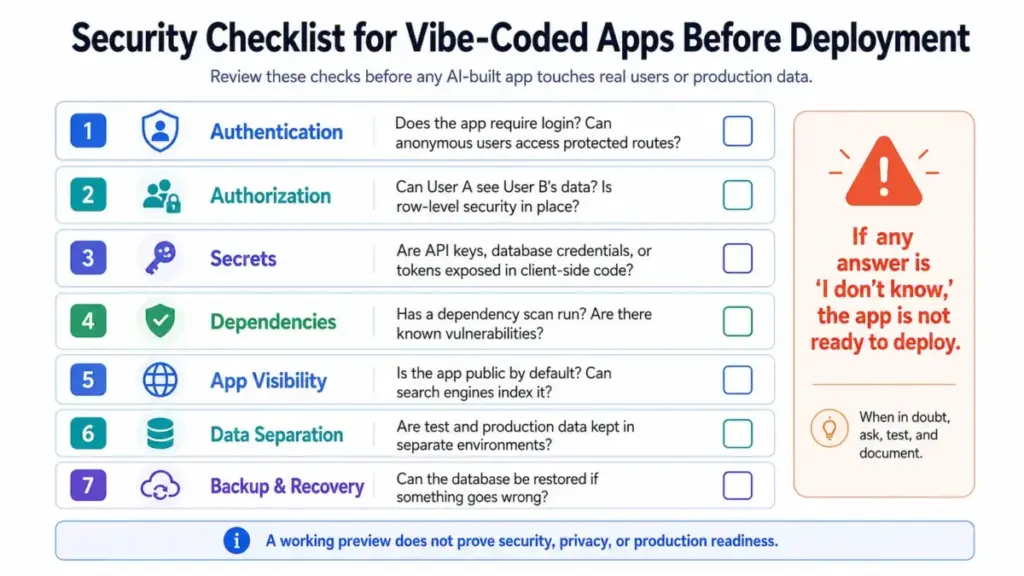
Run the production-readiness checklist
Before publishing any vibe-coded app that handles real data, verify:
- Authentication: Does the app require login? Can anonymous users access protected routes?
- Authorization: Does row-level security exist? Can User A see User B’s data?
- Secrets: Are API keys, database credentials, or tokens exposed in client-side code?
- Dependencies: Has a dependency scan run? Are there known vulnerabilities?
- App visibility: Is the app public by default? Can search engines index it?
- Data separation: Are test accounts and production accounts in separate environments?
- Backup: Can the database be restored if the AI agent corrupts it?
This matters now. A WIRED investigation (May 2026) reported that thousands of vibe-coded apps are leaking corporate and personal data on the open web, published without access controls.
The Mistakes That Cost You the First Month
Most vibe coding failures are not technical. They are workflow failures. I see the same patterns in every tool.
Mistake 1: Accepting all diffs without reading them. The AI generates a working login page. The login page stores passwords in plain text. The preview looks correct. The security is broken.
Mistake 2: Publishing public apps that should be private. Some platforms default new projects to public. If you do not change the setting, your app’s URL, data, and source code can be indexed by search engines.
Mistake 3: Pasting secrets or customer data into prompts. Every prompt you type goes to an LLM provider’s API. If you paste a database connection string or customer email list into the prompt, that data leaves your environment.
Mistake 4: Skipping tests because the preview looks right. A preview tests the happy path. It does not test edge cases, error states, concurrent users, or malicious input. Understanding what AI agents actually do behind the scenes helps you anticipate what they miss.
Mistake 5: Confusing working UI with secure backend logic. The frontend renders correctly. The API endpoint behind it returns all user records to any authenticated request. This is the most common vibe coding security failure.
Mistake 6: Ignoring usage-based costs. Many AI coding tools use credits, tokens, premium requests, or effort-based billing. A complex iterative session can burn through a month’s allocation in a day. The “free tier” runs out faster than the marketing page suggests.
Mistake 7: Using vibe coding for compliance-heavy systems without engineering review. SOC 2, GDPR, HIPAA, and PCI-DSS requirements do not disappear because an AI wrote the code.
Common Misconceptions About Vibe Coding
Misconception: Vibe coding is the same as all AI-assisted programming. Reality: Responsible AI-assisted programming requires reading, testing, and understanding code. Vibe coding specifically describes the practice of accepting AI output without that review. Simon Willison, Addy Osmani, and GitHub’s own definition all draw this line.
Misconception: Vibe coding means no engineering skill is needed. Reality: Non-engineers can build simple apps with vibe coding. Production systems still need architecture, security, data modeling, review, and operational judgment. The AI generates code. It does not generate governance.
Misconception: If an app works in preview, it is ready to launch. Reality: Preview success proves the UI renders. It does not prove authentication, authorization, data privacy, dependency security, maintainability, or scalability. The arXiv benchmark data confirms this: functional correctness and security correctness are separate measurements.
Misconception: AI app builders are free or predictable once subscribed. Reality: Many tools use credits, tokens, premium requests, or effort-based billing. Real cost depends on iteration volume and task complexity, not just the subscription price.
When to Use and When to Avoid Vibe Coding
Use vibe coding when:
- Building prototypes, demos, or weekend projects where speed matters more than long-term maintainability
- Creating internal mockups or stakeholder previews that will never touch production data
- Learning a new framework by having the AI scaffold examples you can study
- Building personal tools or experiments you plan to review or replace later
- Generating an early MVP to validate a concept before investing in engineered code
Avoid pure vibe coding when:
- Handling regulated data (health, finance, education records, PII)
- Processing payments or storing credit card information
- Building production databases without backup and rollback controls
- Working on complex legacy refactors where the AI lacks full system context
- Deploying security-critical workflows (authentication, authorization, encryption)
- The maintainer cannot explain and test the generated code
The dividing line: if the consequences of a bug are embarrassment, vibe coding is fine. If the consequences are data loss, regulatory fines, or customer harm, add engineering review.
Real-World Tools That Enable Vibe Coding
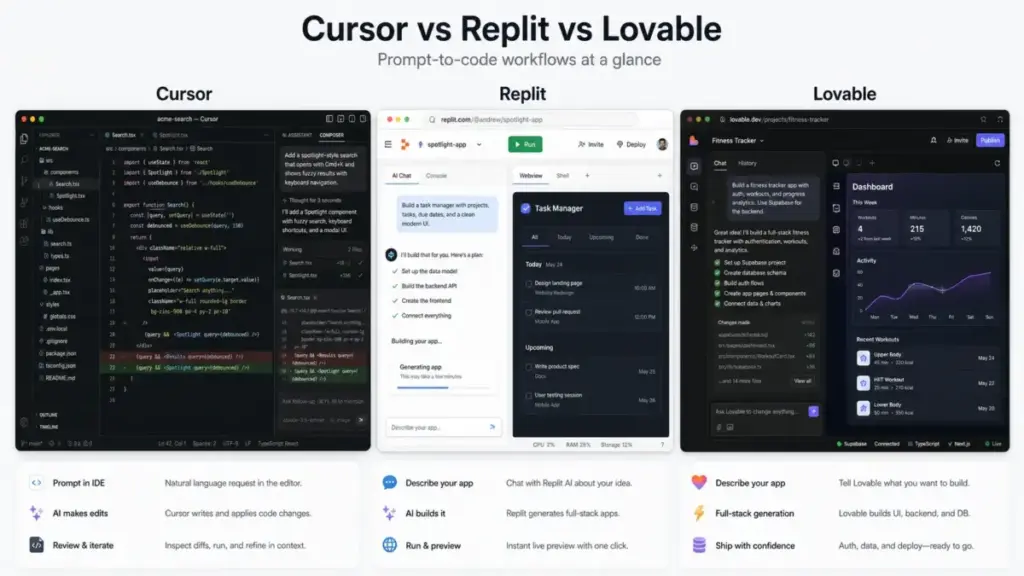
Five tools represent the current vibe coding spectrum. Each works differently, costs differently, and fails differently.
Cursor
Cursor is an AI coding editor built by Anysphere. It runs agents that can plan tasks, edit files across a project, search code, and use cloud-based background agents. It operates as a desktop IDE with web and mobile surfaces.
According to Cursor’s official pricing page, the Pro plan starts at $20/month and includes a pool of premium model requests. Usage beyond the included pool costs extra. Privacy Mode lets users opt out of server-side data retention, which matters for client code.
The tradeoff: Cursor is developer-facing. Non-technical users will find it overwhelming. It does not deploy apps or host projects. It edits code in a local or cloud environment. If you want a full Lovable app builder evaluation, the comparison is instructive: Cursor gives control, Lovable gives speed.
GitHub Copilot
GitHub Copilot is an AI coding assistant and cloud agent that can research repositories, create implementation plans, make code changes on branches, and support pull request workflows. It integrates directly into GitHub’s platform.
According to GitHub’s pricing page, Copilot Free provides a limited number of completions and chat messages per month at $0. Copilot Pro costs $10/month and Copilot Pro+ costs $39/month, adding unlimited completions, access to multiple model choices, and extended context. Copilot Business and Enterprise tiers add organization-level controls, policy management, and IP indemnity.
The tradeoff: Copilot is strongest inside the GitHub ecosystem. Teams already using GitHub get the most value. The cloud agent can submit pull requests, making it more reviewable than most vibe coding tools. It does not build or deploy standalone apps.
Replit
Replit is a prompt-to-app platform where Replit Agent turns natural-language ideas into apps or websites. It includes hosting, deployment, billing credits, and security scan options. The platform handles frontend, backend, and database scaffolding.
Replit’s free tier provides limited compute and storage. According to Replit’s pricing page, the Core plan costs $25/month (or $20/month billed annually) and includes more compute credits and deployment features. AI agent billing is effort-based: complex tasks consume more credits than simple ones.
The tradeoff: Replit’s agent can build and deploy full apps without local setup. The risk is that non-technical users deploy apps without reviewing authentication, database exposure, or public visibility settings. Credit burn on complex iterative tasks can exceed expectations.
Lovable
Lovable is a full-stack AI development platform for building, iterating, and deploying web applications using natural language. It generates frontend, backend, database integrations, authentication, and deployment scaffolding.
Lovable offers free and paid plans. Verify current pricing on Lovable’s official pricing page before purchase, as plan structures and credit allocations have changed multiple times. Credit-based usage means iteration-heavy projects cost more than the base subscription.
The tradeoff: Lovable excels at turning a prompt into a working full-stack app in minutes. The risk: apps may default to public, Supabase database configurations may lack row-level security, and users who do not understand backend logic may expose sensitive data.
Bolt.new
Bolt.new by StackBlitz is a browser-based AI website and app builder that turns natural-language prompts into working code. It uses token-based plans, hosting, databases, and project sharing features.
Bolt.new’s free tier provides a limited number of tokens. According to Bolt.new’s pricing page, paid plans start around $25/month depending on billing cycle and token tier. Additional tokens can be purchased. Higher tiers provide more tokens and priority access.
The tradeoff: Bolt.new runs entirely in the browser with no local setup. It is fast for prototypes. Token limits mean complex projects can exhaust the monthly allocation quickly, especially during iterative debugging sessions.
Pricing and Status Summary
| Tool | Type | Starting price | Free tier | Cost model | Key risk |
|---|---|---|---|---|---|
| Cursor | IDE agent | $20/month (Pro), per official pricing | Limited free | Subscription + premium request pool | Developer-only, no hosting |
| GitHub Copilot | IDE agent + cloud | $0 (Free) / $10/month (Pro) / $39/month (Pro+) | Yes (limited) | Subscription + usage tiers | Requires GitHub ecosystem |
| Replit | Prompt-to-app | $25/month (Core) / $20/month annual | Yes (limited) | Subscription + effort-based AI credits | Credit burn on complex tasks |
| Lovable | Full-stack builder | Free + paid plans; verify on official page | Yes (limited) | Subscription + credit-based | Public app defaults, RLS gaps |
| Bolt.new | Browser builder | Paid plans start ~$25/month (varies by tier) | Yes (limited) | Subscription + token allocation | Token exhaustion on iterations |
Pricing sourced from each tool’s official pricing page as of May 2026. Plans, credits, and token allocations change frequently. Always verify on the official page before purchasing.
How to Measure Vibe Coding Success (Metrics Table)
If you use vibe coding for anything beyond personal experiments, track these metrics:
| Metric | What it measures | Why it matters |
|---|---|---|
| Time from idea to working prototype | Speed advantage of vibe coding | The core value proposition. If it takes longer than manual coding, the tool is wrong for this task. |
| Manual edits after AI generation | Code quality gap | High edit count means the AI output needs significant human correction. |
| Test pass rate | Functional correctness | Percentage of generated code that passes automated tests without modification. |
| Security scan findings | Vulnerability exposure | Number of high/critical findings from dependency and static analysis scans. |
| Prompt or credit cost per feature | Real cost of iteration | The subscription price is not the real cost. Iteration volume determines actual spend. |
| Percentage of generated code reviewed | Review coverage | If less than 50% of generated code gets human review, production risk increases. |
| Production incidents from AI-generated changes | Downstream impact | Tracks whether vibe-coded features cause outages, data leaks, or rollbacks. |
| PR review comments on AI-generated code | Code maintainability | High comment counts signal code that colleagues cannot understand or maintain. |
Tools That Support Safer Vibe Coding Workflows
Vibe coding does not have to mean zero review. Several tools add safety layers:
- Cursor Privacy Mode lets users control whether code is stored server-side. Relevant for teams working with client code or proprietary algorithms.
- GitHub Copilot pull request workflow routes AI-generated changes through standard code review before merging. This is the closest integration between vibe coding and established engineering governance.
- Replit security scans can identify known vulnerabilities in generated dependencies before deployment.
- Supabase Row-Level Security (RLS) protects database access in apps built with Lovable and other platforms that use Supabase as a backend. RLS is not enabled by default in most vibe-coded setups.
A broader point: AI agents can assemble open-source libraries faster than any human. That speed does not remove the need for license review, dependency maintenance, and upstream engagement. The ChatGPT review covers how LLM outputs interact with training data and licensing questions.
Beginner Checklist: Your First Vibe Coding Project
Use this checklist before and during your first vibe-coded project:
- Define the project boundary: prototype, internal tool, MVP, or production feature
- Write a product brief: users, workflow, data model, permissions, failure cases
- Choose the right tool type: IDE agent for existing code, app builder for new projects
- Prompt in small milestones: schema first, then UI, then logic, then tests
- Preview every change before accepting the diff
- Run a security check: authentication, authorization, secrets, dependencies, app visibility
- Check credit/token usage: how much did this session cost?
- Separate test data from production data
- Add at least one automated test before deploying
- Get human review on anything that handles customer data, payments, or auth
- Check if the app defaults to public; change to private if needed
- Document what the AI built so a human can maintain it later
FAQ
What does vibe coding mean?
Vibe coding means creating software by describing what you want to an AI agent in natural language, then accepting the generated code without fully reviewing or understanding every line. The term was popularized by Andrej Karpathy in February 2025 and entered mainstream dictionaries by late 2025.
Who coined the term vibe coding?
Andrej Karpathy coined the term in a February 2025 post on X, describing a development style where you “fully give in to the vibes, embrace exponentials, and forget that the code even exists.”
Is vibe coding the same as AI-assisted programming?
No. AI-assisted programming includes reviewing, testing, and understanding the generated code. Vibe coding specifically describes accepting AI output without that level of scrutiny. Simon Willison and Addy Osmani both draw this distinction explicitly.
Is vibe coding safe for production?
Not without safeguards. Vibe coding is safe for prototypes, demos, and personal projects. For production use, add automated tests, security scans, code review, environment separation, and human approval before deployment. Research shows that functionally correct AI-generated code is frequently insecure.
Can vibe coding replace developers?
For simple apps and prototypes, vibe coding reduces the need for a developer. For production systems that handle customer data, payments, compliance, or complex business logic, engineering review remains necessary. The AI generates code. It does not generate architecture decisions, security policies, or operational judgment.
What are the best tools for vibe coding?
Cursor and GitHub Copilot for developers editing existing codebases. Replit Agent, Lovable, and Bolt.new for non-technical users building new apps from prompts. The right choice depends on whether you need IDE-level control or prompt-to-deploy simplicity.
Why do developers criticize vibe coding?
The criticism centers on three risks. First, accepting unreviewed code leads to security vulnerabilities, especially in authentication and data access. Second, vibe-coded apps that look correct in preview can fail under real traffic, edge cases, or adversarial input. Third, code nobody understands becomes code nobody can maintain, debug, or extend.
How much does vibe coding cost?
Subscription prices range from $0 (GitHub Copilot Free, limited) to $39/month (GitHub Copilot Pro+). The real cost depends on iteration volume. Credit-based and token-based tools charge more for complex or extended sessions. A single debugging session can consume days’ worth of allocation. Check each tool’s official pricing page for current rates.
What is the difference between vibe coding and no-code?
No-code tools use visual builders (drag-and-drop, form editors, workflow canvases) to create apps without any code generation. Vibe coding uses AI to generate actual source code from natural language prompts. Vibe coding produces editable code. No-code produces platform-locked configurations. Both lower the skill barrier. Neither eliminates the need for security and testing.
What should I check before publishing a vibe-coded app?
Check authentication (login required?), authorization (can users see other users’ data?), secrets (API keys exposed in client code?), dependencies (known vulnerabilities?), app visibility (public by default?), data separation (test vs production), and backup (can you restore the database?). If any answer is “I don’t know,” the app is not ready to publish.