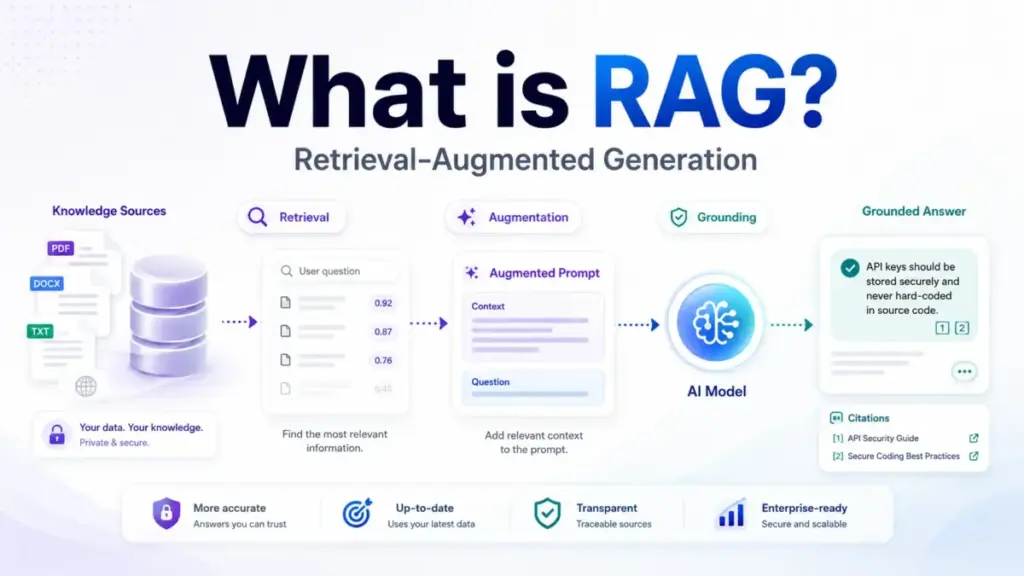
RAG does not give your AI a better memory. It gives your AI a research assistant that pulls relevant documents before the model writes an answer. Retrieval-Augmented Generation is an application architecture, not a single feature, and the quality of the answer depends more on what gets retrieved than on which model generates the response.
Most explainers define the acronym and stop there. This guide explains how the RAG pipeline actually works, where it breaks, what SaaS teams use it for, when it beats fine-tuning or long-context prompting, and what the real cost components look like. If you are evaluating AI chatbot platforms or building AI features on top of company data, this is the operational context those vendor pages leave out.
Quick Answer: RAG (Retrieval-Augmented Generation) is an AI architecture that retrieves relevant information from external sources, adds that information to the model’s prompt, and generates a response grounded in the retrieved material. It differs from fine-tuning because it works at query time without retraining. RAG reduces hallucinations when retrieval quality is high, but it does not eliminate wrong answers.
What RAG Actually Means
Simple definition. RAG is a system that looks up relevant information before an AI model answers a question. Instead of relying only on what the model learned during training, RAG fetches current, specific documents and feeds them into the prompt so the answer reflects real source material.
Technical definition. The original 2020 research paper by Patrick Lewis et al. describes RAG models as combining parametric memory from a pretrained sequence-to-sequence model with non-parametric memory from a dense vector index. In practice, this means the model’s frozen knowledge gets supplemented by a searchable external index at inference time. The retrieval step uses embeddings and similarity search (and increasingly hybrid search with keyword matching) to find the most relevant chunks, which then get inserted into the generation prompt.
Business definition. For SaaS teams, RAG is the architecture that lets an AI chatbot answer questions using your help center, product docs, policy library, or customer records without retraining the underlying large language model every time a document changes. The value is speed to deployment and source attribution: users can verify where the answer came from.
| Layer | What it answers | Example |
|---|---|---|
| Simple | What does RAG do? | Looks up documents before answering |
| Technical | How does it work? | Embeddings, vector index, retrieval, prompt augmentation, generation |
| Business | Why should a team care? | AI answers grounded in current company data, with citations |
How RAG Works
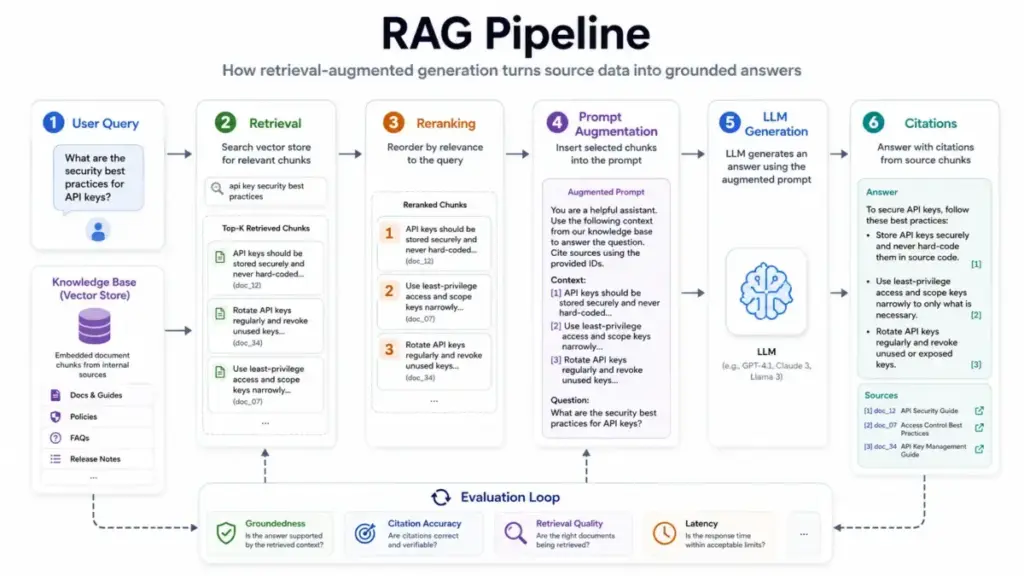
The RAG pipeline has two phases: ingestion and query-time retrieval. During ingestion, documents get parsed, cleaned, split into chunks, converted into embeddings, and stored in a searchable index. During query time, the user’s question triggers a search, the system retrieves relevant chunks, inserts them into the prompt, and asks the model to generate an answer from that evidence.
Here is the step-by-step flow:
- Ingest data. Collect documents, web pages, knowledge base articles, PDFs, database records, or code repositories. Parse and clean them.
- Chunk the content. Split by semantic boundaries (headings, procedures, Q&A units) rather than arbitrary character counts. Poor chunking is the single most common source of bad RAG answers.
- Generate embeddings. Convert each chunk into a vector representation and store it in a vector database or search index with metadata.
- Receive a query. When a user asks a question, the system transforms the query (sometimes rewriting or expanding it) and searches the index.
- Retrieve relevant chunks. The system pulls the top matching chunks using dense retrieval, keyword search, or hybrid search. Optionally, a reranker reorders results by relevance.
- Augment the prompt. The selected chunks, source IDs, and the user question get inserted into the model prompt with instructions to answer from the evidence.
- Generate and cite. The model produces an answer grounded in the retrieved context and, in well-built systems, returns citations pointing back to specific source documents.
- Evaluate. A production system tracks whether the answer is grounded, whether citations are accurate, and whether the retrieval found the right chunks.
Where things go wrong. The pipeline has failure points at every step. Stale source documents produce confidently wrong answers. Bad chunking splits a procedure across two chunks so neither chunk makes sense alone. Vector similarity misses exact identifiers, table data, or recent updates. The model ignores retrieved context or hallucinates details the chunks do not contain. I cover these failure modes in the limitations section below.
RAG vs Fine-Tuning vs Long-Context Prompting vs Vector Database
This is where most confusion lives. Forums are full of questions like “Is RAG just search plus ChatGPT?” and “Why do I need an LLM if the vector database already retrieves the answer?” The answer: these are different tools for different problems.
| Approach | What it does | Best for | Not ideal for |
|---|---|---|---|
| RAG | Retrieves external evidence at query time and augments the prompt | Private, current, source-grounded, changing data | Purely creative tasks, deterministic lookups |
| Fine-tuning | Changes model behavior, style, or domain vocabulary by retraining | Consistent tone, specialized output format, domain jargon | Frequently changing facts, per-query knowledge |
| Long-context prompting | Passes entire documents into a large context window | Small document sets, bounded reference material | Large knowledge bases, permissioned data, cost control |
| Vector database | Stores and searches embeddings | One component inside a RAG pipeline | Not a complete answer system by itself |
| Semantic search | Finds relevant documents by meaning | Retrieval step of RAG | Does not generate answers or cite sources |
A vector database stores searchable embeddings. RAG is the full workflow that retrieves evidence, augments the prompt, generates the answer, returns citations, and evaluates groundedness. Confusing the two leads teams to buy a vector database and assume the hard work is done. The hard work is data preparation, chunking strategy, retrieval quality, access control, and evaluation.
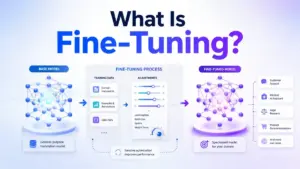
Fine-tuning and RAG solve different problems. Fine-tuning changes how a model writes. RAG changes what a model knows at query time. Many production systems use both: fine-tuning for consistent output format, RAG for current source-grounded knowledge.
Long-context models can reduce the need for retrieval when the document set is small and bounded. They do not replace RAG when data is large, frequently updated, permissioned across different user roles, expensive to pass into every prompt, or requires citations back to source.
The Moonshot AI long-context review shows where Kimi’s 262K-token API can reduce retrieval needs but still leaves token-cost tradeoffs.
Types of RAG
Not every RAG system works the same way. The RAG survey paper categorizes the evolution into distinct paradigms, and production systems increasingly use combinations.
| Type | How it works | Best for |
|---|---|---|
| Naive RAG | Basic retrieve-then-generate: chunk, embed, retrieve top matches, generate | Simple FAQ bots, internal search prototypes |
| Advanced RAG | Adds query rewriting, hybrid search, metadata filters, reranking, and post-retrieval validation | Production support chatbots, knowledge assistants |
| Modular RAG | Composes retrieval, routing, query planning, memory, and generation as swappable modules | Complex multi-source workflows |
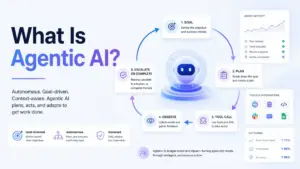
| Agentic RAG | An LLM-powered planner breaks complex queries into subqueries, calls multiple sources in parallel, and returns structured evidence | Multi-step research tasks, enterprise copilots |
| Graph RAG | Combines retrieval with knowledge graphs for connected facts and multi-hop reasoning | Legal compliance, entity relationships, regulatory Q&A |
| Multimodal RAG | Retrieves and reasons over text plus PDFs, tables, images, diagrams, or audio | Document-heavy workflows with visual content |
The distinction matters because choosing the wrong type wastes engineering time. A naive RAG prototype that works on 50 help articles can fail completely when scaled to 10,000 documents with metadata, permissions, and multi-format content. Agentic retrieval adds latency and cost but handles questions that require pulling evidence from multiple knowledge sources.
Common Mistakes and Misconceptions
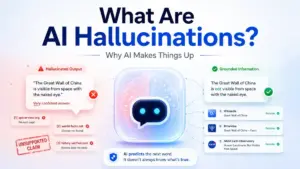
Misconception: RAG fixes hallucinations. RAG can reduce hallucinations by grounding answers in retrieved documents. The model can still misread evidence, ignore retrieved context, overgeneralize, or cite irrelevant chunks. Groundedness evaluation is not optional.
Misconception: RAG is the same as a vector database. A vector database is one component. RAG includes retrieval, prompt augmentation, generation, citations, evaluation, and governance. Buying a vector database without building the rest produces a search engine, not an answer system.
Misconception: Long-context models make RAG obsolete. Long context helps with small, bounded document sets. RAG still matters when data is large, frequently updated, permissioned, expensive to pass into context, or requires source attribution.
Misconception: Uploading PDFs is enough. PDF parsing, table extraction, page references, chunk boundaries, metadata, and version control all affect answer quality. A “drag and drop your files” demo hides the data preparation work that determines production accuracy.
Common mistakes SaaS teams make:
| Failure point | Symptom | Likely cause | Fix |
|---|---|---|---|
| Wrong answer with high confidence | Bot cites irrelevant source | Bad chunking or missing metadata | Chunk by semantic boundaries, add metadata filters |
| Correct retrieval, wrong answer | Model ignores evidence | Prompt does not enforce grounding | Add explicit grounding instructions and citation requirements |
| Missing answer | Bot says “I don’t know” for covered topics | Content not indexed or query mismatch | Check ingestion pipeline, add query expansion or hybrid search |
| Stale answer | Bot cites outdated policy | Index not refreshed | Automate ingestion sync, track document freshness |
| Permission leak | User sees restricted content | No access control in retrieval | Implement per-user filtering at retrieval time |
| High cost, slow answers | Budget overruns, user complaints | Too many chunks passed to model, no reranking | Reduce top-k, add reranker, monitor token usage |
Limitations and When NOT to Use RAG
RAG adds complexity and cost. It is not always the right choice.
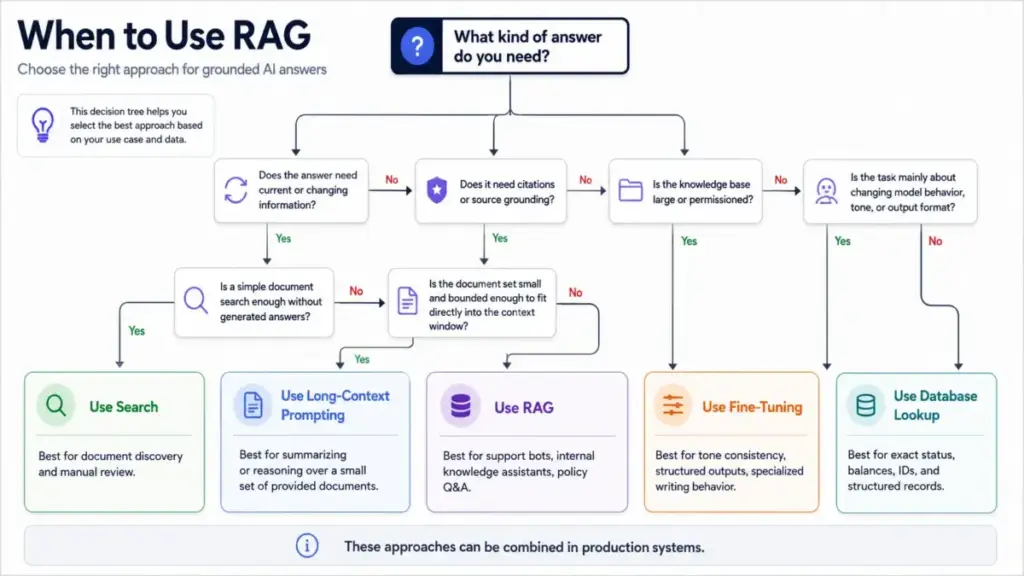
Use RAG when the AI answer must depend on private, current, domain-specific, source-grounded, frequently changing, or permissioned information.
Avoid or delay RAG when:
- Source data is unreliable, outdated, or poorly maintained
- The task is purely creative with no factual grounding requirement
- Exact deterministic rules are required (use a rules engine)
- A simple database lookup or search result is sufficient
- The organization cannot commit to data quality and access controls
The Seven Failure Points paper documents that RAG systems can reduce hallucinated responses and link sources, but still suffer from retrieval and LLM limitations that require ongoing evaluation and maintenance.
How to Implement RAG: A 10-Step Checklist
Before touching any tool, check whether your data is ready.
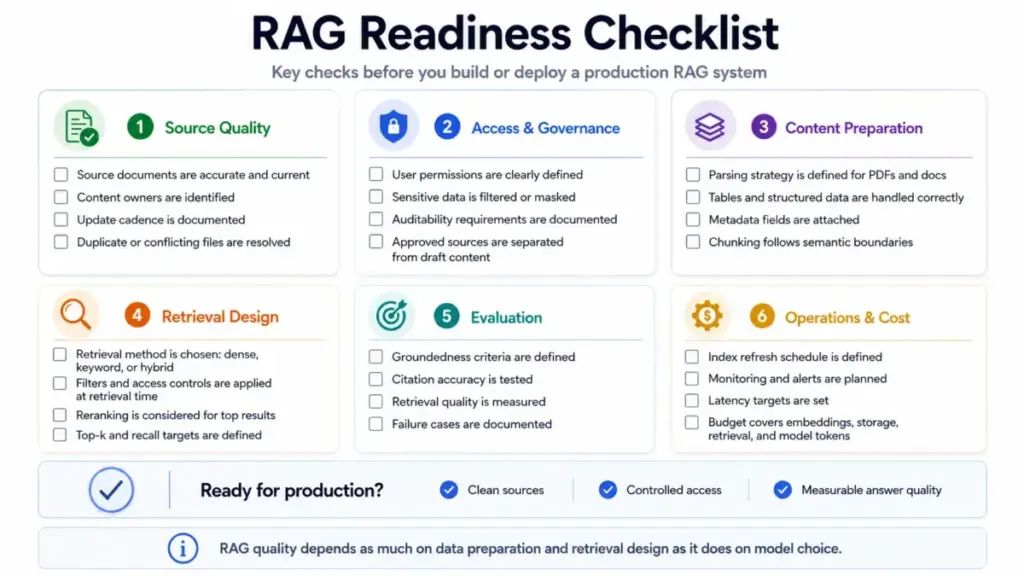
RAG readiness checklist:
- Source documents are accurate, current, and owned by an identifiable team
- Update cadence is documented (daily, weekly, quarterly)
- Access permissions are defined (who can see which documents)
- Metadata exists (titles, sections, dates, document types)
- Duplicate and conflicting documents are resolved
- PDF and table extraction strategy is defined
- Evaluation criteria are agreed (what does a good answer look like)
- Cost budget covers embeddings, storage, retrieval, model tokens, and evaluation
Implementation steps:
- Define the user task. Support Q&A, policy search, contract summary, developer assistant, or AI agent workflow.
- Choose trusted knowledge sources. Only include documents that are accurate, permissioned, and maintainable.
- Prepare the data. Parse files, remove duplicates, preserve hierarchy, normalize tables, attach metadata.
- Chunk by semantic boundaries. Headings, procedures, topics, or Q&A units produce better retrieval than fixed character splits.
- Generate embeddings and index. Store vectors plus metadata in a vector store, search service, or managed RAG engine.
- Design retrieval. Use hybrid search, filters, access rules, reranking, and top-k tuning based on the use case.
- Augment the prompt. Insert retrieved context, source IDs, answer rules, and citation requirements.
- Generate and cite. Ask the model to answer from the evidence and explain when the knowledge base is insufficient.
- Evaluate. Track retrieval recall, answer groundedness, citation accuracy, latency, and cost per answer.
- Maintain. Refresh indexes, archive stale documents, monitor failed queries, and update retrieval strategy as content grows.
How to Measure a RAG System
Most SERP pages stop at “RAG reduces hallucinations.” Here are the metrics that tell you whether the system actually works.
| Metric | What it measures | Why it matters |
|---|---|---|
| Retrieval recall | Did the system find the right source chunks? | Wrong retrieval = wrong answer, regardless of model quality |
| Answer groundedness | Is the answer supported by the retrieved evidence? | Catches model hallucination even with good retrieval |
| Citation accuracy | Do the citations point to the actual source of each claim? | Users who click a citation and find irrelevant content lose trust |
| Unsupported-claim rate | What percentage of answer claims lack source backing? | Quantifies hallucination risk per answer |
| Answer acceptance rate | Do users accept the answer or escalate to a human? | Measures real-world utility |
| Latency | How long from query to answer? | Users abandon slow AI assistants |
| Cost per resolved answer | Total cost including retrieval, model, and evaluation per useful answer | Controls budget as usage scales |
| Stale-source rate | What percentage of retrieved chunks come from outdated documents? | Detects data freshness problems before users notice |
Tools That Enable RAG
Five cloud and SaaS products demonstrate how RAG gets implemented in production. Costs depend on architecture and usage for all of these, so I am listing pricing structures rather than universal monthly prices.
| Product | What it provides | Pricing structure | Main caveat |
|---|---|---|---|
| Amazon Bedrock Knowledge Bases | Managed RAG workflow: ingestion, chunking, embeddings, vector storage, retrieval, source attribution | Usage-based, depends on selected model and Bedrock capabilities | S3 Vectors integration has metadata limits and supports semantic search only |
| Google Vertex AI RAG Engine | Managed RAG framework with ingestion, transformation, embeddings, vector search, retrieval, reranking | Component-based billing: ingestion, parsing, embeddings, Spanner-backed database, retrieval, reranking | Data residency and AXT security controls not supported |
| Azure AI Search | Classic RAG and agentic retrieval with hybrid search, semantic ranking, chunking, OCR, image analysis | Flat hourly rate per search unit, agentic retrieval adds model-based query planning charges | Agentic retrieval and connected knowledge sources add separate billing layers |
| OpenAI File Search and Vector Stores | Vector stores as indexes for semantic search, file search for parsing, chunking, embedding, and retrieval | Storage at $0.10/GB/day (1 GB free), File Search tool calls at $2.50 per 1,000 calls (Responses API only) | Tool call pricing applies to Responses API only, storage billed separately |
| Pinecone Assistant | Managed knowledge layer for chat and agent applications | Fully usage-based: ingestion, storage, chat, context retrieval, evaluation tokens | Plan-specific rate limits for assistant, file, and multimodal operations |
What this means: No vendor charges a single “RAG price.” Costs break down across model tokens, file search calls, vector storage, ingestion, parsing, reranking, and evaluation. Budget by component, not by feature label.
Where SaaS Teams Use RAG
RAG powers a growing range of SaaS AI features. The pattern is consistent: take existing company content and make it queryable through a generative AI interface with source attribution.
- Customer support chatbots. Answer questions from help center articles, product docs, and troubleshooting guides. The bot retrieves the relevant article section and generates a contextual response with a link to the source.
- Internal knowledge assistants. Sales enablement, HR policy lookup, engineering documentation search. RAG lets employees ask questions instead of searching through wikis and Confluence pages.
- AI copilots for SaaS products. In-app assistants that answer user questions about the product they are using, pulling from the vendor’s own documentation.
- Contract and compliance review. Legal teams use RAG to query policy libraries and extract relevant clauses with citations to specific document sections.
- Developer documentation search. Code repositories, API references, and SDK guides indexed for semantic retrieval, with generated answers that cite specific endpoints and examples.
Patrick Lewis, lead author of the original RAG paper, noted that “providing provenance for their decisions and updating their world knowledge remain open research problems.” Six years later, those problems are closer to solved in production systems, but NLP research continues to push retrieval quality, multi-hop reasoning, and multimodal grounding forward.
FAQ
What is RAG in simple terms?
RAG is a system that looks up relevant documents before an AI model answers your question. Instead of relying only on training data, the model gets specific, current information retrieved from your sources. This makes the answer more accurate and lets you trace it back to a source.
How does retrieval-augmented generation work?
RAG works in two phases. First, documents get chunked, embedded, and stored in a searchable index. Second, when a user asks a question, the system searches the index, retrieves relevant chunks, inserts them into the model prompt, and generates an answer grounded in that evidence.
Is RAG the same as a vector database?
No. A vector database stores searchable embeddings and is one component of a RAG system. RAG includes the full workflow: retrieval, prompt augmentation, generation, citations, evaluation, and governance. You need more than a vector database to build a working RAG application.
What is the difference between RAG and fine-tuning?
Fine-tuning changes model behavior, style, or domain vocabulary by retraining on specific data. RAG retrieves external knowledge at query time without retraining. Fine-tuning is for how the model writes. RAG is for what the model knows when it answers. Many production systems use both.
Does RAG stop hallucinations?
RAG reduces hallucinations by grounding answers in retrieved documents, but it does not eliminate them. The model can still misread evidence, ignore context, overgeneralize, or cite irrelevant chunks. Evaluation metrics like groundedness and citation accuracy are necessary to catch remaining errors.
Do I need a vector database to build RAG?
Not necessarily. Managed RAG services like Amazon Bedrock Knowledge Bases and Google Vertex AI RAG Engine handle vector storage internally. You can also use hybrid search services like Azure AI Search. A standalone vector database gives you more control but adds infrastructure work.
What are the main costs of a RAG system?
RAG costs include model tokens for generation, embedding generation, vector storage, search or retrieval calls, reranking, ingestion and parsing, evaluation, and data synchronization. No vendor charges a single “RAG price.” Budget by component based on your expected query volume and data size.
When should a company avoid RAG?
Avoid RAG when your source data is unreliable, the task is purely creative, deterministic rules are required, a simple knowledge base search is sufficient, or your organization cannot maintain data quality and access controls. RAG adds complexity that is only justified when answers need to be source-grounded and current.
What is agentic RAG?
Agentic RAG uses an AI agent or LLM-powered planner to break complex queries into subqueries, call multiple knowledge sources or tools, retrieve in parallel, and return structured evidence for generation. Azure AI Search supports agentic retrieval that decomposes queries into focused subqueries and executes them in parallel, returning structured responses for chat completion models.
How do I keep RAG answers up to date?
Automate index refreshes on a schedule matching your document update cadence. Monitor stale-source rates to catch outdated content before users notice. Archive deprecated documents, track document freshness metadata, and build alerts for retrieval failures on recently changed topics.