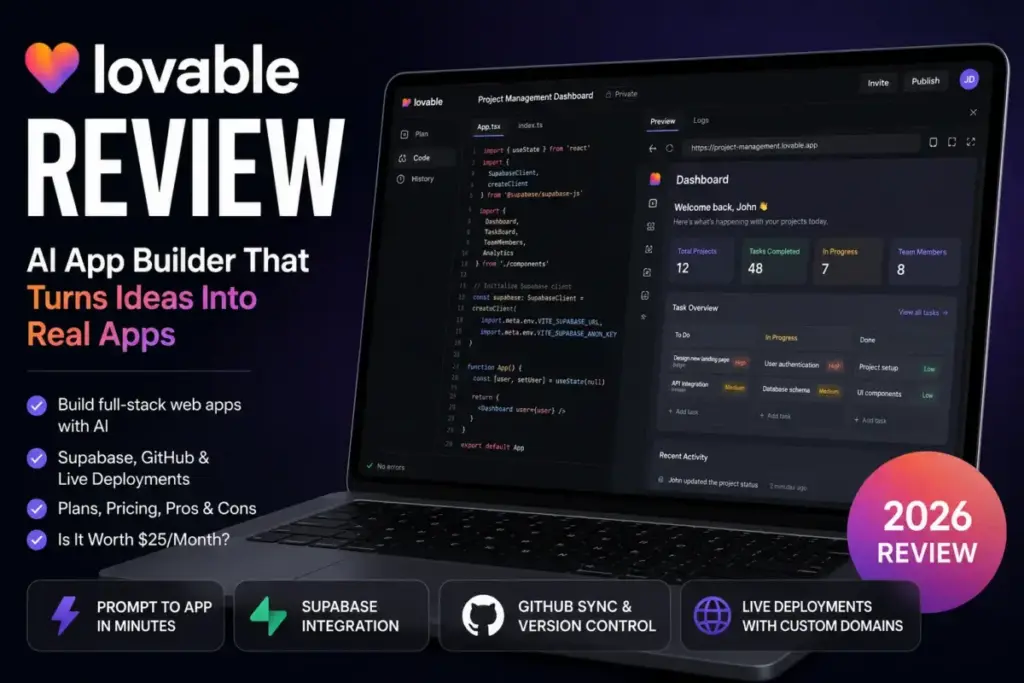
Lovable turns a text prompt into a working web app with a Supabase backend, GitHub sync, and a live deployment URL. The $25/month Pro plan sounds cheap until you factor in credit burn on complex workflows, separate Cloud and AI runtime charges, and governance gates that lock features like SSO, restricted publishing, and data-training controls behind the $50/month Business tier or higher.
This review breaks down every plan, maps the real cost at scale, and tells you exactly where Lovable fits in your stack and where it does not. If you are evaluating code-focused alternatives like Cursor or Claude Code alongside browser-based builders, our best AI coding assistants guide covers the full spectrum.
This review is based on official Lovable documentation, pricing research, public product materials, and verified user-review patterns across G2, Capterra, and TrustRadius. We did not rely on unverified pricing claims from third-party pages. All plan details, credit structures, and feature gates were cross-referenced against Lovable’s official pricing page as of May 2026.
Quick Verdict
| Category | Rating |
|---|---|
| Ease of use | 9/10 |
| Feature depth | 7.5/10 |
| Pricing transparency | 6.5/10 |
| Production readiness | 5.5/10 |
| Overall | 7.5/10 |
Best for: Solo founders, product managers, designers, and agencies building SaaS MVPs, dashboards, internal tools, and landing pages where speed matters and a developer can review the output later.
Not best for: Teams needing native iOS/Android app generation, fixed build costs, private published-app access on Pro, or production deployment of sensitive-data apps without developer and security review.
If you are exploring what vibe coding actually means before committing, start there. Lovable is one of the tools that defines the category, but the buying decision is more nuanced than the headline price suggests.
What Is Lovable?
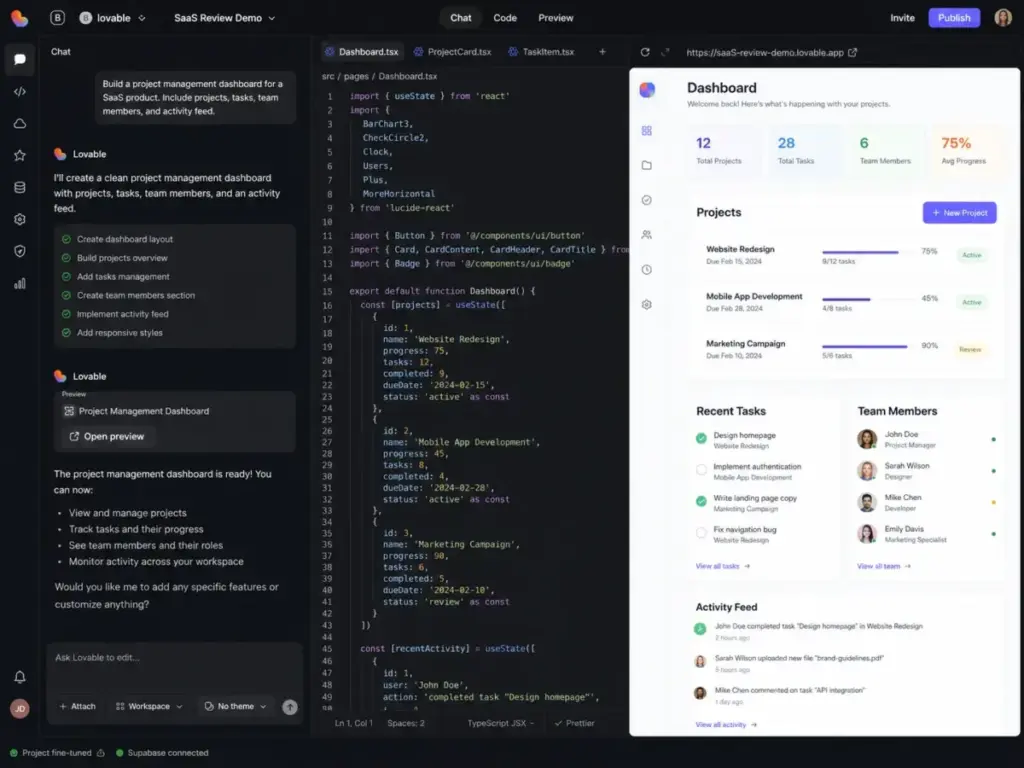
Lovable is a full-stack AI development platform built by Lovable Labs Incorporated. It lets users describe an app in natural language, then generates a working React + Vite + Tailwind web application with real, editable source code. The generated project connects to Supabase for database, authentication, and edge functions, or to Lovable Cloud for a managed backend, and syncs to GitHub or GitLab for version control.
The platform supports Plan mode (AI maps out steps before building), Code mode (direct code editing for Pro and above), and Visual Edits (click-to-change UI adjustments). Lovable publishes to .lovable.app subdomains on all plans and supports custom domains on Pro, Business, and Enterprise. In the growing AI and design tools landscape, Lovable focuses exclusively on code generation rather than visual design collaboration.
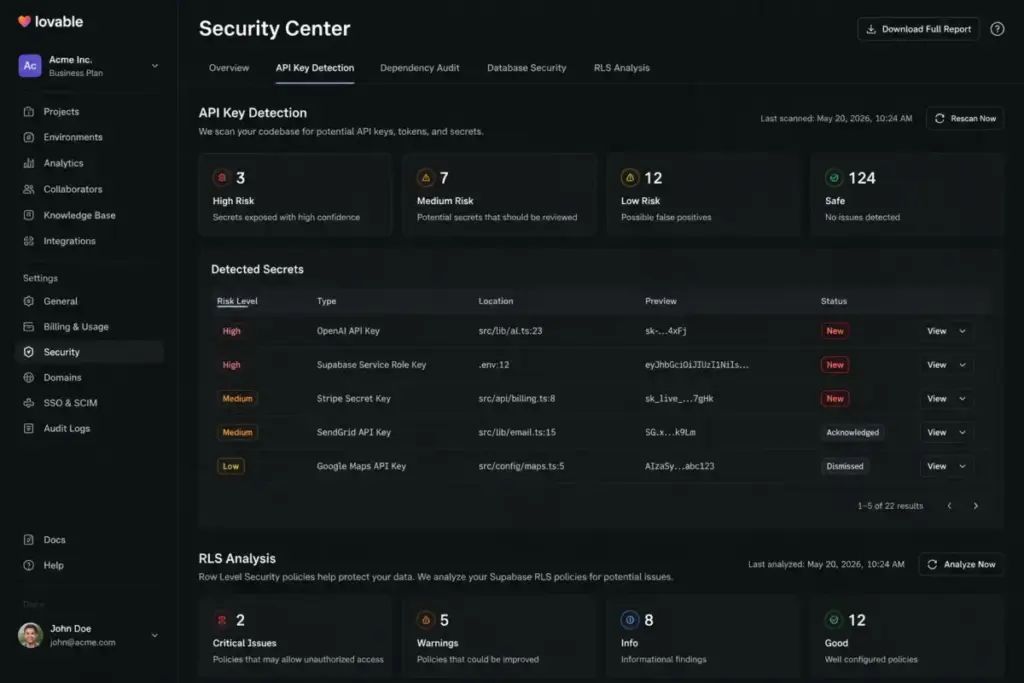
Lovable holds SOC 2 Type II and ISO 27001:2022 certifications, complies with GDPR, offers 2FA, and provides a security center with API key detection, dependency audits, database security checks, and RLS analysis on Business and above. Official documentation states explicitly that automated security checks support but do not replace thorough security review.
How Lovable Works: From Prompt to Published App
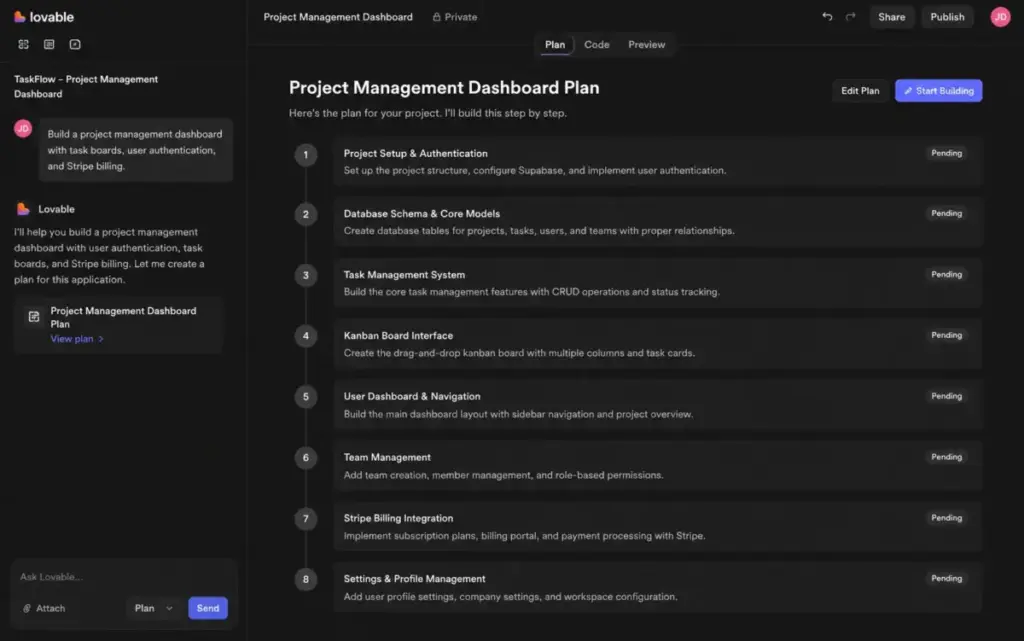
The workflow moves through four stages: describe, build, iterate, and deploy.
Describe. You type a natural-language prompt. Example: “Build a project management dashboard with task boards, user authentication, and Stripe billing.” Lovable’s AI interprets the prompt and enters Plan mode to map out the build steps.
Build. The AI generates the full-stack codebase. React handles the frontend, Supabase or Lovable Cloud handles the backend, and the app renders in a live preview pane beside the code editor. Each generation step consumes credits.
Iterate. You refine with follow-up prompts, use Visual Edits for UI tweaks (some visual edits are free), or switch to Code mode (Pro and above) for direct code changes. Complex iterations, debugging loops, and backend changes consume additional credits.
Deploy. Publish to a .lovable.app URL or a custom domain (Pro and above). Connect GitHub for two-way sync and export the codebase for external deployment to Vercel, Netlify, Cloudflare Pages, AWS, GCP, or Azure.
One constraint most reviews skip: Lovable cannot start a project from an existing GitHub codebase. You build inside Lovable first, then sync outward. That matters if you planned to import an existing project. For automation beyond the app itself, teams often pair Lovable builds with tools like Zapier or Make to connect the generated app to external workflows.
Key Features That Matter
Natural-Language Full-Stack Generation
Lovable generates React + Vite + Tailwind frontends paired with Supabase PostgreSQL backends. Edge functions handle server-side logic. The output is real code, not a visual drag-and-drop abstraction. You own the code and can export it at any time through GitHub or GitLab sync.
Plan Mode, Code Mode, and Visual Edits
Plan mode maps the AI’s intended build steps before executing, reducing wasted credits on misunderstood prompts. Code mode (Pro and above) opens a full code editor for direct changes. Visual Edits let you click on UI elements and adjust text, colors, spacing, and layout without writing code. Some visual edit commits are free; others consume credits depending on complexity.
Lovable Cloud and Supabase Backend Options
Supabase provides a PostgreSQL database, authentication, row-level security, and edge functions. Lovable Cloud is a managed alternative that bundles backend hosting and AI features (like AI Gateway). After enabling Lovable Cloud, you cannot disconnect it from that project, and Cloud usage is billed separately from your monthly build credits after included allowances.
GitHub and GitLab Sync
Two-way sync with GitHub keeps your repository updated. GitLab sync is also available. GitHub Enterprise Cloud and Enterprise Server are supported on the Enterprise plan. The sync enables external deployment workflows, but there are limitations: schema changes in Supabase may not always revert cleanly, and importing an existing GitHub project into Lovable is not supported.
Security Scanning and Compliance
The security center (Business and above) scans for API key exposure, checks database security, analyzes row-level security policies, reviews code security, and audits dependencies. Lovable’s official guidance: these tools support your security workflow but do not replace a thorough security review by a qualified professional.
Mobile Companion App
Lovable launched an iOS and Android companion app in 2026 for queueing prompts, receiving build notifications, and switching between phone and computer. This is a companion app for managing your Lovable workspace, not native mobile app generation. Lovable generates responsive web apps only.
Lovable Pricing 2026: Every Plan, Credit Tier, and Hidden Cost
Pricing data verified from Lovable’s official pricing page on May 22, 2026.
Plan Comparison
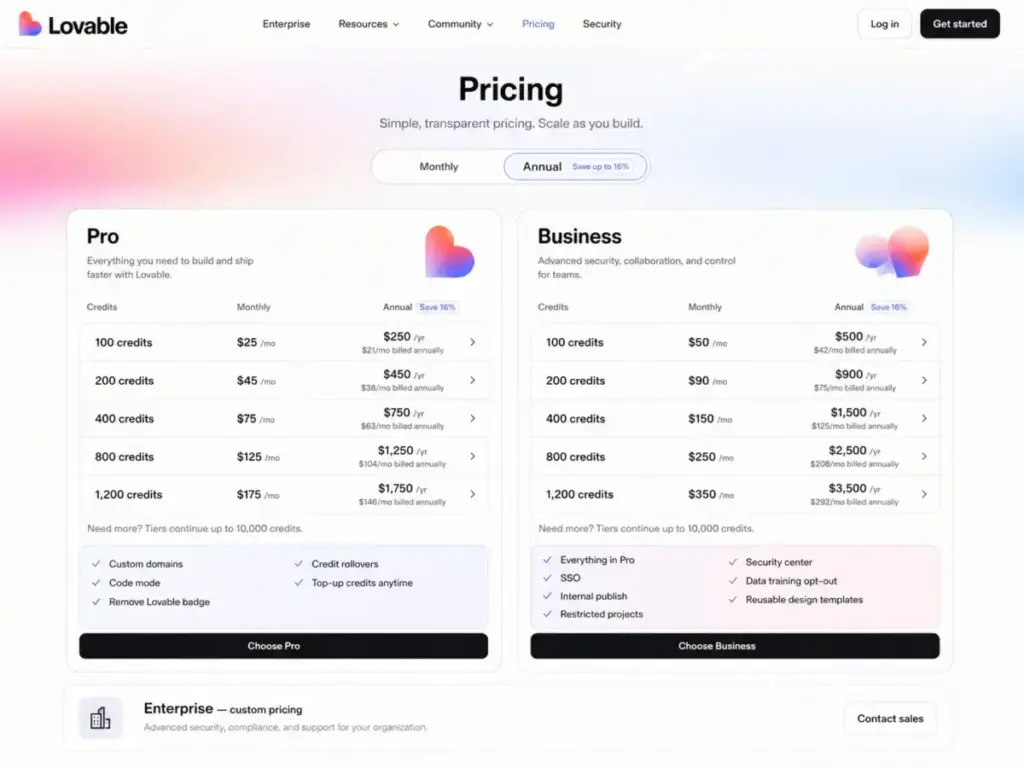
| Plan | Monthly Price | Annual Equivalent | Monthly Credits | Daily Credit Cap | Key Governance Features |
|---|---|---|---|---|---|
| Free | $0 | $0 | 30 (via daily drip) | 5/day | Private projects, unlimited workspace members |
| Pro 100 | $25/mo | $21/mo ($250/yr) | 100 + 5 daily (up to 150) | 5/day bonus | Custom domains, Code mode, badge removal, rollovers, top-ups, roles/permissions |
| Pro (expanded) | $50 – $2,250/mo | $42 – $1,875/mo | 200 – 10,000 | 5/day bonus | Same as Pro 100 |
| Business 100 | $50/mo | $42/mo ($500/yr) | 100 + 5 daily (up to 150) | 5/day bonus | SSO, internal publish, restricted projects, security center, data-training opt-out, reusable templates |
| Business (expanded) | $100 – $4,300/mo | $84 – $3,584/mo | 200 – 10,000 | 5/day bonus | Same as Business 100 |
| Enterprise | Custom | Custom | Volume-based | Custom | SCIM, audit logs, custom connectors, dedicated support, onboarding services, publishing/sharing controls |
Credit Top-Up Economics
When monthly credits run out, Pro and Business users buy top-ups in 50-credit increments:
| Plan Type | Cost Per 50 Credits | Cost Per Credit | Max Per Purchase |
|---|---|---|---|
| Pro | $15 | $0.30 | 1,000 credits |
| Business | $30 | $0.60 | 1,000 credits |
Top-ups are valid for 12 months. Minimum purchase is 50 credits. Monthly credits roll over while the subscription stays active, but daily bonus credits do not roll over. Canceling the subscription can expire your remaining credits. Credits are non-refundable except where required by law.
A student discount of up to 50% off Lovable Pro is advertised.
The Hidden Cost Layer: Cloud and AI Runtime
This is the pricing detail most AI tool reviews miss entirely. Lovable separates three cost buckets:
- Subscription credits pay for building and iterating on your app (prompts, code generation, Plan mode steps).
- Lovable Cloud balance pays for hosting and running your deployed app after included allowances are used.
- AI Gateway balance pays for AI features your app uses in production after included allowances.
Your $25/month Pro subscription does not cover unlimited Cloud hosting or AI runtime. If your deployed app gets significant traffic or uses AI features, you will see separate charges. Lovable offers usage dashboards and the ability to set hard budgets, pause services, or auto-pause when Cloud balance runs low.
Pros: What Lovable Gets Right
1. Prompt-to-app speed is among the fastest available. A working dashboard with authentication, database, and a live URL in under an hour. For simple to medium-complexity MVPs, Lovable is among the fastest tools we found for moving from prompt to deployed web app.
2. Real, exportable code. Unlike visual builders that lock you into proprietary formats, Lovable generates standard React + Vite + Tailwind code. GitHub sync means you can leave the platform and continue development locally or on any hosting provider.
3. Plan mode reduces credit waste. Plan mode shows the AI’s intended steps before execution. You catch misunderstood prompts before the AI burns credits building the wrong thing.
4. Visual Edits lower the barrier for non-technical users. Click on any UI element, change text or colors, and see the result instantly. Some visual edits are free, which helps preserve credits for backend work.
5. Supabase integration is production-grade for simple apps. PostgreSQL database, row-level security, edge functions, and authentication are built in. For straightforward CRUD apps and dashboards, the Supabase backend is solid.
6. Security certifications add credibility. SOC 2 Type II, ISO 27001:2022, and GDPR compliance are verified. The security center (Business) adds automated scanning for API keys, dependencies, and RLS gaps.
7. Generous free plan for exploration. 5 daily credits and up to 30 monthly credits let you build a basic prototype without payment. Private projects and unlimited workspace members are included.
8. Custom domains and badge removal on Pro. At $25/month, you can publish on your own domain and remove the Lovable badge, which matters for client-facing prototypes and MVPs.
Cons: Where Lovable Falls Short
1. Credit burn is unpredictable on complex workflows. Debugging loops, backend schema changes, and multi-step iterations consume credits at varying rates. A simple UI tweak might cost 1 credit; a complex Supabase integration fix might burn 5-10 credits across multiple attempts. Planning your prompts carefully is essential.
2. Cloud and AI runtime costs are separate and easy to miss. After included allowances, Lovable Cloud hosting and AI Gateway usage bill separately from build credits. Teams that deploy an app with real traffic can face unexpected charges beyond their subscription.
3. Free and Pro published apps are accessible to anyone with the link. There is no way to restrict who can access a published website on Free or Pro plans. If you need internal-only access or login-gated publishing, you must upgrade to Business ($50/month) or Enterprise for restricted projects and internal publish controls.
4. No import from existing GitHub projects. You cannot bring an existing codebase into Lovable. Every project starts inside the platform. This blocks teams that want to use Lovable to iterate on an existing app.
5. No native mobile app generation. Lovable builds responsive web apps only. The companion app (iOS/Android) manages your Lovable workspace; it does not generate App Store or Play Store binaries. Teams that need native mobile output should look at FlutterFlow or similar tools. Other AI development tools in the same category, like Gobii and i10X, also focus on web-app generation rather than native mobile.
6. AI output requires verification. Lovable’s own terms and documentation warn that AI-generated output may be inaccurate. For apps handling customer data, payments, or regulated workflows, every generated component needs human review.
7. Business top-ups are 2x the cost of Pro top-ups. Business users pay $30 per 50 credits versus $15 for Pro. If you are on Business primarily for SSO and restricted publishing but burn credits heavily, top-up costs escalate quickly.
Which Plan Fits Your Use Case? A Decision Matrix
| Scenario | Recommended Plan | Why |
|---|---|---|
| Exploring vibe coding for the first time | Free | 30 monthly credits, private projects, zero commitment |
| Solo founder building a first SaaS MVP | Pro 100 ($25/mo) | Custom domain, Code mode, badge removal, credit rollover, top-ups at $0.30/credit |
| Agency building client prototypes | Pro 400-800 or Business | Client work burns credits fast; Business adds reusable templates, restricted projects, and workspace controls |
| Company building internal tools with SSO | Business 100+ ($50/mo+) | SSO, internal publish, restricted projects, security center, role-based access |
| Regulated or security-sensitive production app | Business + developer review, or alternative workflow | Automated checks do not replace thorough security review; sensitive data needs safeguards |
| Enterprise-wide rollout | Enterprise (custom) | Volume credit pricing, SCIM, audit logs, dedicated support, publishing/sharing controls |
When Business Is Worth 2x the Price of Pro
Business costs $50/month versus Pro’s $25/month for the same 100 credits. The premium buys five capabilities Pro lacks:
- SSO for team authentication
- Internal publish and restricted projects for private app access
- Security center with automated scanning
- Data-training opt-out controls to prevent your data from training Lovable’s models
- Reusable design templates for consistent multi-project workflows
If you need any of these, Business is the correct starting point. If you only need build credits, custom domains, and Code mode, Pro covers it.
Lovable Plan Gates: Feature Access by Tier
| Feature | Free | Pro | Business | Enterprise |
|---|---|---|---|---|
| Custom domain | No | Yes | Yes | Yes |
| Code mode | No | Yes | Yes | Yes |
| Remove Lovable badge | No | Yes | Yes | Yes |
| Credit rollovers | No | Yes | Yes | Yes |
| Credit top-ups | No | Yes | Yes | Yes |
| Roles and permissions | No | Yes | Yes | Yes |
| SSO | No | No | Yes | Yes |
| Restricted projects | No | No | Yes | Yes |
| Internal publish | No | No | Yes | Yes |
| Security center | No | No | Yes | Yes |
| Data-training opt-out | No | No | Yes | Yes |
| Reusable design templates | No | No | Yes | Yes |
| SCIM | No | No | No | Yes |
| Audit logs | No | No | No | Yes |
| Custom connectors | No | No | No | Yes |
| Dedicated support | No | No | No | Yes |
| Publishing/sharing controls | No | No | No | Yes |
Production-Readiness Checklist
Before launching any Lovable-built app to real users, run through this checklist. Lovable’s own documentation supports every item:
- Run the security center scan (Business/Enterprise): check for API key exposure, dependency vulnerabilities, and database security gaps
- Review row-level security (RLS) policies: verify that database access rules match your intended permissions
- Keep API keys out of frontend code: use Supabase edge functions or server-side logic for sensitive operations
- Validate AI-generated output: test authentication flows, payment integrations, and data handling manually
- Check published-app access: confirm whether your plan supports restricted access (Business/Enterprise) or if the app is public to anyone with the link (Free/Pro)
- Review terms for sensitive data: Lovable’s terms restrict high-risk use cases and sensitive data processing without safeguards
- Have a developer or security professional review before handling real customer data, payments, or regulated information
- Test the GitHub export path: confirm that the synced codebase builds and runs independently outside Lovable
Lovable vs. Alternatives: Where the Gaps Are
Lovable vs. Bolt.new
Bolt.new is the closest direct competitor. Both generate full-stack web apps from prompts. Lovable’s advantage: Plan mode for credit-saving prompt validation, stronger Supabase integration with RLS guidance, and a wider range of published pricing tiers. Bolt.new’s advantage: potentially lower entry cost depending on the plan, and a different credit model. For MVP prototyping, both are competitive. The choice often comes down to which prompt style and code output you prefer.
Lovable vs. Cursor
Cursor is an AI-powered code editor, not an app builder. It augments developers who already write code. Lovable replaces the blank-project phase entirely. If you cannot write React code, Lovable gets you further. If you can code and want AI assistance inside VS Code, Cursor is the better fit. They are not direct substitutes.
Lovable vs. Bubble
Bubble is a visual no-code platform with a proprietary runtime. You cannot export Bubble apps as standard code. Lovable generates real React code that syncs to GitHub. Bubble offers more mature production features (user permissions, native database, workflows) but locks you into Bubble’s ecosystem. For teams that value code ownership and developer handoff, Lovable wins. For non-technical teams building complex apps without developers, Bubble’s visual builder may be more manageable.
Automation and API Access: Build with URL and MCP Server
Lovable offers two automation interfaces for paid users:
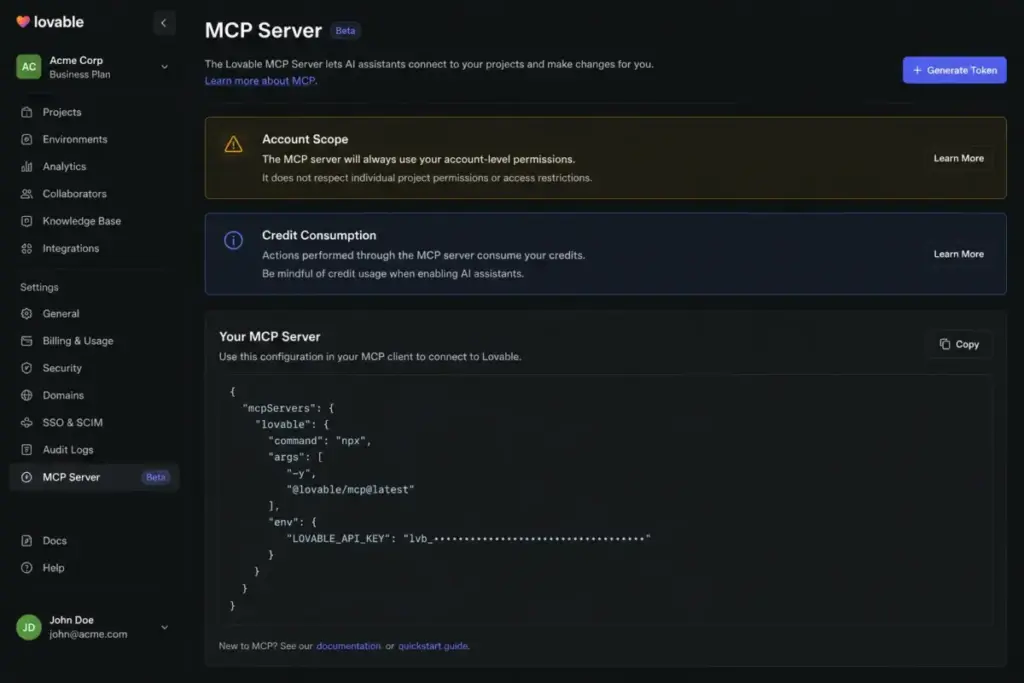
Build with URL triggers app creation via a URL endpoint. Lovable MCP server (research preview, Pro and Business required) allows external AI agents to interact with your Lovable account programmatically.
The MCP server carries real operational risk: it can act across your full Lovable account, runs live actions, consumes real credits, and may deploy public URLs. Treat it like giving an AI agent your account credentials. Use it with deliberate scope controls and credit monitoring.
Who Should Use Lovable
- Solo founders validating a SaaS idea who need a working prototype with authentication, database, and a live URL in hours instead of weeks
- Product managers and designers building functional prototypes to test with users before investing in full development
- Agencies creating client demos and proof-of-concept builds where speed justifies the credit cost
- Small teams building dashboards, admin panels, and internal tools with straightforward CRUD requirements
- Anyone who values code ownership and wants to start with AI-generated code, then hand off to developers for production hardening
Who Should NOT Use Lovable
- Teams that need native iOS or Android apps: Lovable does not generate mobile binaries
- Organizations requiring fixed build costs: credit consumption varies by prompt complexity and iteration count
- Regulated industries handling sensitive data without developer/security review capacity: automated checks are a starting point, not a replacement
- Teams importing existing codebases: Lovable starts every project from scratch inside the platform
- Anyone who needs private published-app access on a $25/month budget: restricted access requires Business ($50/month) or Enterprise
Final Verdict
Lovable earns a 7.5/10 for 2026. It is genuinely one of the fastest paths from product idea to working web app. The code is real, exportable, and production-capable for simple to medium-complexity applications. Plan mode, Code mode, and Visual Edits create a workflow that serves both technical and non-technical builders.
The buying decision turns on three factors most reviews understate:
- Credit predictability. Simple apps fit comfortably within Pro 100 credits. Complex apps with backend integrations, debugging iterations, and security hardening burn credits faster than you expect.
- Runtime cost separation. Build credits and Cloud/AI runtime are separate budgets. Plan for both.
- Plan-gated governance. SSO, restricted publishing, security scanning, and data-training controls require Business or Enterprise. Do not assume Pro covers everything.
For solo founders and small teams building MVPs, Lovable Pro at $25/month is a strong starting point. For companies needing internal tools with access controls and compliance features, Business at $50/month is the correct floor. For regulated or security-sensitive production apps, Lovable is a prototyping accelerator, not a replacement for engineering discipline.
You can review our full evaluation framework to see how we score every product.
FAQ
Is Lovable worth it in 2026?
Lovable is worth it for fast web-app prototyping, MVP validation, and internal tools where speed outweighs the need for granular cost control. Pro at $25/month covers most solo founder and small-team use cases. The value drops if your project requires heavy iterations (credit burn), production-grade security (developer review still needed), or native mobile apps (not supported).
How much does Lovable cost?
Free plan: $0 with 30 monthly credits. Pro starts at $25/month for 100 credits, scaling to $2,250/month for 10,000 credits. Business starts at $50/month for 100 credits, scaling to $4,300/month for 10,000 credits. Enterprise pricing is custom. Credit top-ups cost $15 per 50 credits (Pro) or $30 per 50 credits (Business). Lovable Cloud and AI Gateway runtime usage may add separate charges.
Does Lovable generate real code?
Yes. Lovable generates React + Vite + Tailwind code that syncs to GitHub or GitLab. You own the code and can export, modify, and deploy it independently. The code is not locked in a proprietary format.
Do I own the code from Lovable?
You retain ownership of the code you generate using Lovable. GitHub sync exports the full repository. You can clone it, deploy it elsewhere, and continue development without Lovable.
Can Lovable build production apps?
Lovable can generate apps that function in production for straightforward use cases like dashboards, landing pages, and simple SaaS tools. For apps handling customer data, payments, or regulated workflows, Lovable’s own documentation recommends developer and security review before production deployment.
How many credits do I actually need for an MVP?
A simple landing page or single-page app may use 10-30 credits. A multi-page SaaS MVP with authentication, database, and Stripe integration can consume 50-200+ credits depending on prompt clarity and iteration count. Complex backend logic and debugging loops increase credit usage. Plan mode helps reduce wasted credits.
Can I restrict who accesses my published Lovable app?
On Free and Pro, published websites are accessible to anyone with the link. Business and Enterprise plans offer internal publish and restricted project controls that limit who can access the published app. If private access matters, start with Business.
Does Lovable support native mobile apps?
No. Lovable generates responsive web apps that work on mobile browsers. The Lovable companion app (iOS/Android) is for managing your workspace, not generating native mobile binaries. For native mobile app generation, consider dedicated tools like FlutterFlow.
What is Lovable Cloud and how is it billed?
Lovable Cloud is a managed backend alternative to Supabase. It bundles hosting and AI features. Usage is included up to a monthly allowance with your subscription. After the allowance, Cloud usage is billed separately from build credits. Once enabled on a project, Lovable Cloud cannot be disconnected.
Can I export a Lovable app and leave the platform?
Yes. GitHub and GitLab sync export your full codebase. You can clone the repository, deploy it to any hosting provider, and continue development without Lovable. The constraint: you cannot import an existing GitHub project back into Lovable to resume AI-assisted building.