Most teams that think they need fine-tuning actually need better prompts. A common pattern: a SaaS team spends $3,000 preparing training data, runs a fine-tuning job, and gets results that a well-structured system prompt could have produced for free. That does not mean fine-tuning is overrated. It means the decision boundary is poorly understood, and most AI tool guides skip the part that matters: when the investment pays back and when it does not.
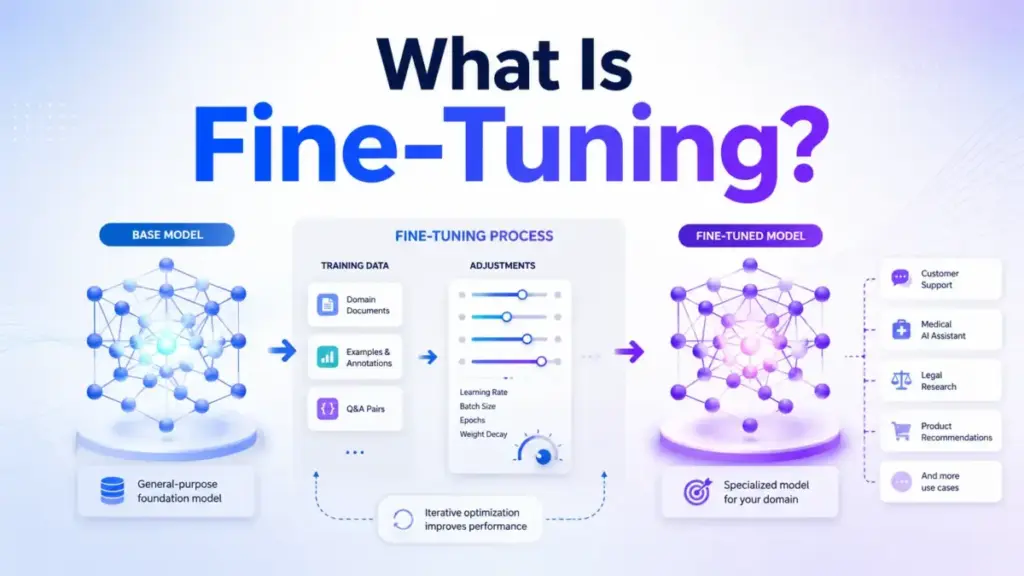
Fine-tuning is the process of taking a pre-trained AI model and training it further on a smaller, task-specific dataset so the model changes its behavior, tone, or output structure for a particular use case. Unlike prompting, which adjusts instructions at runtime, fine-tuning modifies the model’s internal weights. Unlike retrieval-augmented generation, which feeds the model new knowledge at query time, fine-tuning permanently alters how the model responds.
Quick Answer: What Is Fine-Tuning?
Fine-tuning adapts a pre-trained AI model to a specific task by training it on curated examples that modify its internal weights. It changes model behavior (tone, format, style) rather than adding new knowledge. Use fine-tuning when prompt engineering hits a ceiling on consistency. Use RAG when the model needs access to private or changing data. Most teams should exhaust prompting and RAG before fine-tuning.
The 60-Second Explanation of Fine-Tuning
Simple: Fine-tuning is teaching an existing AI model to do a specific job by showing it hundreds of examples of correct input-output pairs. Think of it like training a new hire who already knows the industry but needs to learn your company’s specific processes.
Technical: Fine-tuning applies supervised learning to a pre-trained foundation model. You provide a dataset of prompt-completion pairs formatted in JSONL. The training process updates the model’s weight parameters through backpropagation across your examples, typically adjusting a subset of layers (in methods like LoRA) rather than retraining the full model. The output is a new model checkpoint that retains the base model’s general capability while specializing in the patterns your data encodes.
Business: Fine-tuning lets a SaaS team create a model that consistently follows brand voice, applies internal classification rules, or formats outputs in a proprietary structure without relying on long prompts. The trade-off is upfront cost ($50 to $10,000+ depending on platform and dataset size), ongoing hosting fees for the custom model, and the operational burden of maintaining training data as business rules change.
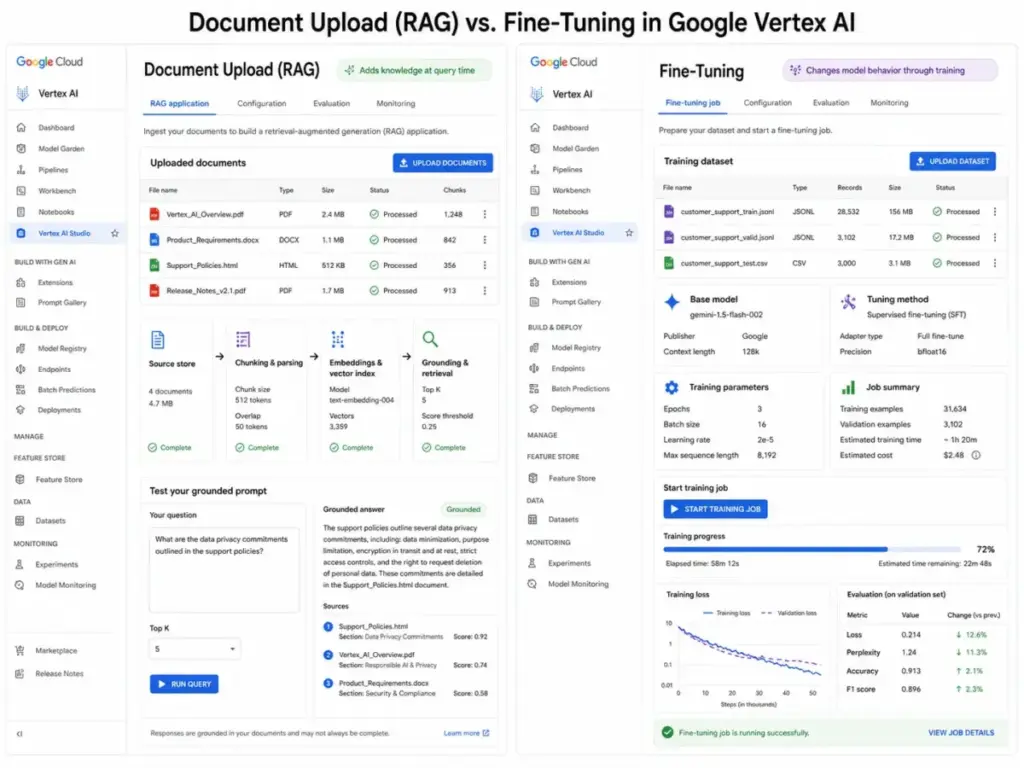
This three-layer distinction matters because vendors blur them constantly. Uploading documents to ChatGPT or Google AI Studio is retrieval, not fine-tuning. The model reads your files at query time. Fine-tuning changes the model itself.
How Fine-Tuning Actually Works
Fine-tuning follows a five-stage pipeline. Most failures happen at stages one and three. The breakdown below flags where teams lose time and money.
Stage 1: Define the Task Boundary
Before touching any data, you need a precise definition of what the model should do differently after fine-tuning. “Write better marketing copy” is too broad. “Generate product descriptions in our brand voice using a 3-sentence structure with a benefit-first opening” is specific enough to build training data around.
The failure point: teams skip this step and start collecting data without a clear behavioral target. The model trains on a noisy dataset and produces inconsistent outputs that are no better than a good system prompt.
Stage 2: Prepare Training Data
Fine-tuning requires structured examples, typically in JSONL format with each line containing a prompt and the ideal completion. OpenAI documentation recommends a minimum of 50 examples (OpenAI Fine-Tuning Guide, accessed May 2026). Google Vertex AI recommends 100 to 500 examples for supervised tuning (Google Cloud Docs, accessed May 2026). Public benchmarks and practitioner reports consistently show that 200 to 500 high-quality examples produce noticeably better results than 50 rushed ones.
Data quality is everything. One hundred carefully curated examples beat 1,000 scraped ones. Each example must demonstrate the exact behavior you want the model to learn.
Stage 3: Select the Base Model and Method
Not every fine-tuning approach is the same. The three most common methods in 2026:
| Method | What It Does | Best For | Typical Cost |
|---|---|---|---|
| Full Fine-Tuning | Updates all model parameters | Maximum control, large datasets | $500 to $10,000+ |
| LoRA (Low-Rank Adaptation) | Updates a small adapter layer | Cost-efficient, smaller datasets | $50 to $500 |
| Supervised Fine-Tuning (SFT) | Updates with labeled prompt-completion pairs | Task-specific behavior | $100 to $2,000 |
What this means: LoRA has become the default for most SaaS teams because it trains faster, costs less, and produces a small adapter file that sits on top of the base model. Full fine-tuning is only justified when you need deep behavioral changes across a large model and have the compute budget to match.
Stage 4: Run the Training Job
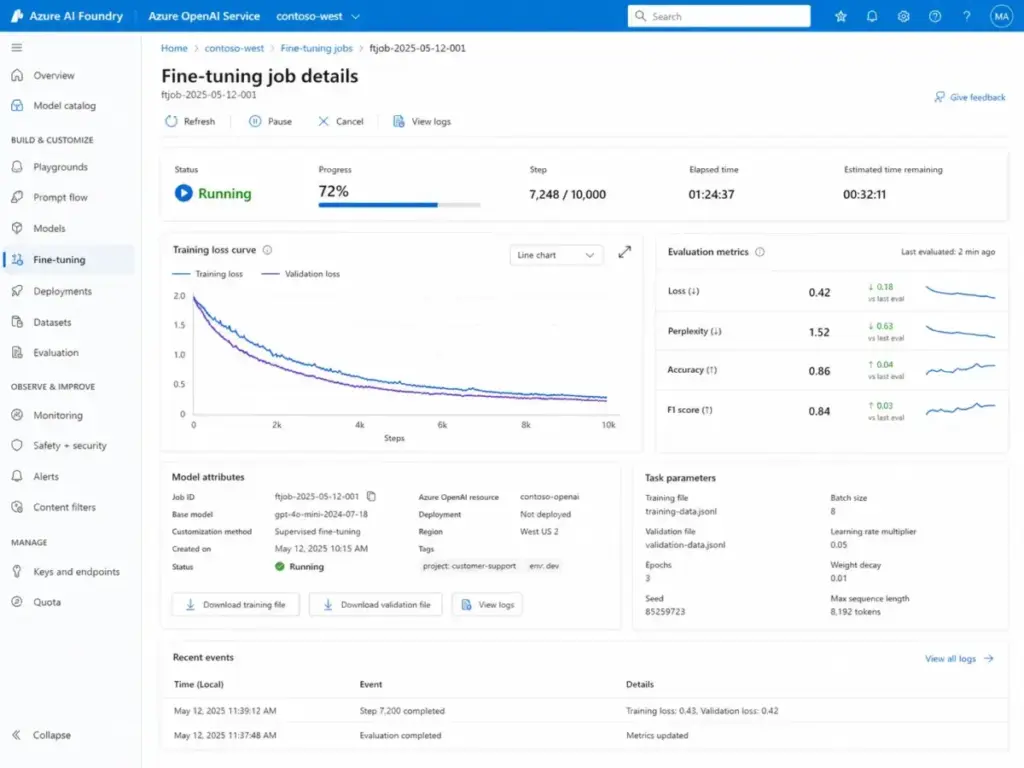
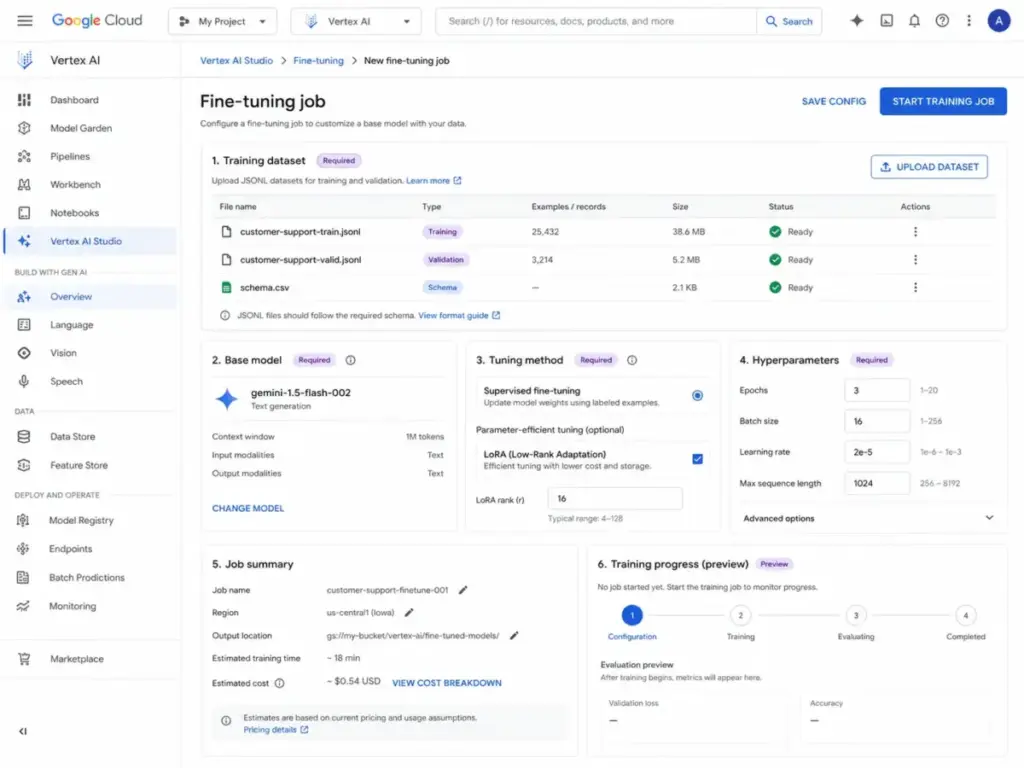
Most managed platforms (Azure, Vertex AI, Bedrock, Together AI) abstract this step into an API call or a web interface. You upload your JSONL, select the base model, set hyperparameters (epochs, learning rate, batch size), and start the job. Training a LoRA adapter on 500 examples against a 7B-parameter model typically takes 30 to 90 minutes on these platforms.
Stage 5: Evaluate and Deploy
Run your fine-tuned model against a held-out evaluation set. Compare outputs to the base model on the same prompts. If the fine-tuned version does not show measurable improvement on your specific task, the training data or task definition needs revision, not more epochs.
Teams that skip this evaluation step and push straight to production often end up with a custom model that hallucinates in a new way that a system prompt would have caught.
Fine-Tuning vs Prompting vs RAG
This is the decision most teams get wrong. The question is not “which is better?” The question is “which problem am I actually solving?”
| Approach | Changes | Best For | Limitation | Cost to Start |
|---|---|---|---|---|
| Prompt Engineering | Instructions at runtime | Format, tone, simple rules | Long prompts increase latency and token cost | $0 |
| RAG | Knowledge at query time | Private data, recent data, citations | Does not change model behavior | $50 to $200/month (vector DB) |
| Fine-Tuning | Model weights permanently | Consistent behavior, style, classification | Requires training data, ongoing maintenance | $50 to $10,000+ |
What this means: If your problem is “the model does not know our internal data,” use RAG. If your problem is “the model knows what to say but does not say it the way we need,” fine-tuning is the right tool. If you have not tested a structured system prompt with few-shot examples first, do that before spending money on either approach.
The practical sequence for most teams: prompt engineering first, RAG second, fine-tuning third. Each step only makes sense when the previous one hits a ceiling you can clearly document.
Step-by-Step: Implementing Fine-Tuning in 2026
The five platforms below represent the practical options for SaaS teams implementing fine-tuning today. Each is evaluated based on official documentation, public pricing pages, and platform help resources.
Microsoft Azure AI (OpenAI Service)
Azure hosts OpenAI models (GPT-4o, GPT-4o-mini) with enterprise-grade fine-tuning. Training costs $25 per million tokens for GPT-4o-mini and roughly $80 per million tokens for GPT-4o (Azure OpenAI pricing page, accessed May 2026). The catch: you pay per hour for the deployed model, starting around $1.70/hour for GPT-4o-mini. That is $1,224/month if you keep it running 24/7.
Avoid Azure if your team is under 10 people and the fine-tuned model will handle fewer than 1,000 queries per day. The hosting economics do not justify the spend at low volume.
Google Gemini (Vertex AI)
Google prices Gemini supervised fine-tuning through Gemini Enterprise Agent Platform. Training cost depends on training tokens (dataset tokens multiplied by epochs), and standard Gemini inference pricing applies after tuning (Google Cloud Vertex AI documentation, accessed May 2026). Public documentation does not list a separate hosting fee for tuned models, which could be a meaningful cost advantage over Azure’s per-hour deployment model. Buyer teams should verify current pricing directly, as Google has restructured its AI platform pricing multiple times.
The main limitation based on public documentation: Vertex AI’s fine-tuning interface gives fewer hyperparameter controls than Azure or Together AI. For most SaaS tasks, the defaults work. For edge cases, you want more knobs.
Amazon Bedrock
Bedrock offers fine-tuning for Llama, Titan, and select third-party models. Bedrock pricing can include both customization costs and provisioned throughput for custom model inference, so teams should model training and serving costs together (AWS Bedrock pricing documentation, accessed May 2026). The advantage is model variety: compare fine-tuned outputs across open-weight and proprietary models in the same console.
The drawback based on public documentation: Bedrock’s fine-tuning setup documentation lags behind Azure and Google in clarity. Multiple user reports flag data format debugging as a friction point.
Together AI
Together AI targets teams that want to fine-tune open-weight models (Llama 3, Mistral, Qwen) without managing GPU infrastructure. Together AI publishes fine-tuning prices per 1M processed tokens, with LoRA supervised fine-tuning starting at $0.48 per 1M tokens for models up to 16B (Together AI pricing page, accessed May 2026). That makes small-scale experimentation genuinely affordable compared to cloud hyperscalers.
The trade-off is infrastructure maturity. If you need enterprise-grade SLAs, SOC 2 compliance, or guaranteed uptime, Together AI’s platform is less mature than Azure or Google Cloud.
Choose Together AI if cost-per-experiment matters more than enterprise compliance. Avoid it if your fine-tuned model serves production traffic that requires 99.9% uptime guarantees.
Hugging Face AutoTrain
AutoTrain is the lowest-barrier entry point for fine-tuning. You upload a CSV or JSONL dataset, select a base model from the Hugging Face Hub (thousands of options), and AutoTrain handles hyperparameter optimization automatically. AutoTrain can run locally, while AutoTrain on Hugging Face Spaces is billed pay-as-you-go based on compute resources (Hugging Face documentation, accessed May 2026). Storage may be billed separately depending on repository and storage tier.
The trade-off is control. AutoTrain makes decisions about learning rate, batch size, and training duration for you. For teams that want a quick proof-of-concept, this removes friction. For teams that need reproducible training runs with specific hyperparameter configurations, AutoTrain’s automation becomes a constraint.
AutoTrain works well for rapid prototyping. When a fine-tuning experiment proves the concept, teams typically move to Together AI or Vertex AI for the production version where they control every parameter.
The Mistakes That Waste Your First Month
Five patterns that surface repeatedly when SaaS teams attempt fine-tuning for the first time:
Mistake 1: Fine-tuning when RAG solves the problem. If the model needs access to your product documentation or customer data, uploading that information via RAG is faster, cheaper, and does not require retraining when the data changes. Fine-tuning does not teach the model new facts reliably. It teaches behavior.
Mistake 2: Training on insufficient or noisy data. Fifty low-quality examples produce a model that has memorized patterns without learning generalizable behavior. Public documentation and practitioner reports consistently recommend 200 to 500 carefully validated examples minimum, reviewed by someone who understands both the task and the expected output quality.
Mistake 3: Ignoring ongoing hosting costs. Training a fine-tuned model is a one-time expense. Running it is not. Azure charges $1.70/hour for hosted GPT-4o-mini models. A fine-tuned model nobody uses still costs $1,224/month to keep deployed. Budget for inference, not just training.
Mistake 4: Skipping evaluation against the base model. If you cannot quantify the improvement over the base model plus a good system prompt, you cannot justify the cost. Run blind A/B comparisons. If reviewers cannot tell the difference, prompt engineering is sufficient.
Mistake 5: Treating fine-tuning as a one-time project. Your business rules, brand voice, and product terminology change. A fine-tuned model trained on January data will drift from your current standards by July. Plan for quarterly retraining cycles and version your training datasets.
Common Misconceptions
Misconception: Fine-tuning teaches a model new knowledge.
Reality: Fine-tuning primarily changes behavior, tone, format, and classification patterns. It is not a reliable method for injecting factual knowledge into a model. For knowledge grounding, RAG is the correct approach. Models that learn facts through fine-tuning often hallucinate those facts in incorrect contexts.
Misconception: Uploading documents to ChatGPT or Gemini is fine-tuning.
Reality: Document upload is retrieval (RAG). The model reads your files at query time without changing its weights. Fine-tuning modifies the model itself through a separate training process. Vendors blur this distinction in their marketing. Google AI Studio, in particular, labels document grounding in ways that confuse it with tuning.
Misconception: More training data always produces better results.
Reality: Data quality dominates data quantity. One hundred expertly curated examples regularly outperform 2,000 scraped ones. After approximately 500 high-quality examples, improvements plateau for most classification and formatting tasks. Beyond that threshold, diminishing returns set in fast.
Misconception: Fine-tuning is too expensive for small teams.
Reality: LoRA fine-tuning on Together AI or Hugging Face AutoTrain can cost under $10 for a training run on open-weight models based on published per-token rates. The expensive part is not training. It is preparing quality data and paying for ongoing inference. A 3-person team can run a fine-tuning experiment at very low cost, but should verify current pricing before budgeting.
Misconception: Fine-tuned models are always better than prompted ones.
Reality: A well-engineered system prompt with few-shot examples often matches fine-tuned model performance for tasks with fewer than 10 classification categories or simple format requirements. Fine-tuning pulls ahead on tasks requiring consistent multi-turn behavior, complex output structures, or strict stylistic adherence across thousands of generations.
When to Use Fine-Tuning and When to Avoid It
Use fine-tuning when:
- Prompt engineering produces inconsistent outputs across runs and you need 95%+ format compliance
- Your task requires a specific tone, classification schema, or output structure that cannot be reliably controlled through system prompts alone
- You need to reduce prompt length (and therefore latency and token cost) by encoding instructions into the model weights
- Your team generates enough volume (1,000+ queries per day) to justify hosting costs
- You have 200+ validated training examples
Avoid fine-tuning when:
- Your problem is knowledge access (the model does not know your data). Use RAG instead
- Your output requirements change frequently (monthly product updates, seasonal campaigns). Retraining is expensive
- You have not tested a structured system prompt with few-shot examples first
- Your query volume is under 100 per day. The hosting cost per query becomes prohibitive
- You lack someone who can evaluate training data quality. Bad data produces confidently wrong outputs
The case for fine-tuning is weaker than it was 18 months ago. The prompting and RAG capabilities of Claude and current-generation models have improved so much that the behavioral gap fine-tuning used to close has narrowed significantly. Does that justify $2,000+ in training data preparation and monthly hosting fees for teams under 25 people? Based on public pricing, for most teams, not yet.
How to Measure Fine-Tuning Success
| Metric | What It Measures | Why It Matters |
|---|---|---|
| Task Accuracy | % of outputs matching expected format/classification | Primary success signal. Below 85% means data or task definition needs work |
| Consistency Rate | % of outputs that follow the same structure across 100+ runs | Fine-tuning’s main advantage over prompting. Target 95%+ |
| Latency Reduction | Decrease in response time vs. long-prompt alternative | Shorter encoded prompts reduce inference time by 20-40% |
| Cost Per Query | Total (hosting + inference) divided by query count | Must be lower than the equivalent long-prompt cost at your volume |
| Hallucination Rate | % of outputs containing fabricated facts | Should not increase vs. base model. If it does, training data is contaminated |
| Retraining Frequency | How often you need to update the model | More than quarterly signals unstable task definition |
What this means: the most common mistake is measuring accuracy without measuring cost per query. A fine-tuned model that scores 92% accuracy but costs $0.45 per query is worse than a prompted model at 89% accuracy and $0.03 per query for most SaaS applications. Always evaluate performance and economics together.
What Good Fine-Tuning Looks Like
Before fine-tuning (prompted GPT-4o): A customer support team uses a 2,000-token system prompt to generate ticket responses. The model follows the format 70% of the time, occasionally drops the required reference number, and uses casual language that violates the brand guide. Each query costs $0.08 in tokens because of the long prompt.
After fine-tuning (LoRA on GPT-4o-mini): The same team fine-tunes GPT-4o-mini on 400 examples of correct ticket responses. Format compliance jumps to 96%. The system prompt shrinks to 200 tokens. Per-query cost drops to $0.02. The model consistently uses the brand-approved tone and includes reference numbers without explicit instruction.
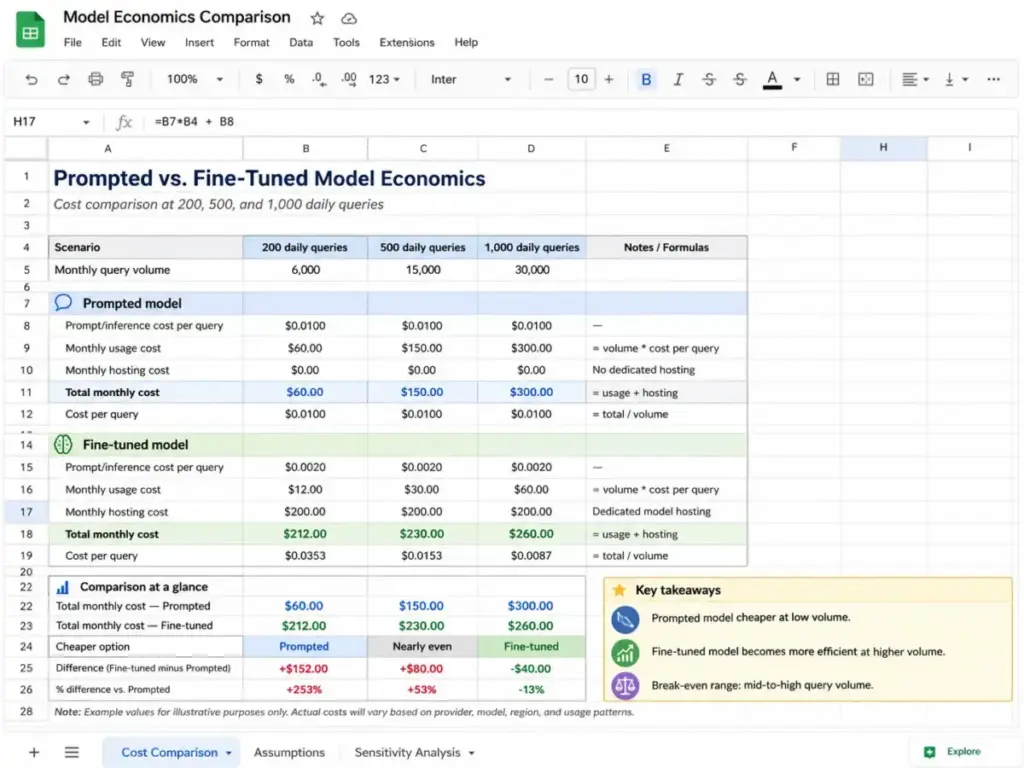
The math: at 500 tickets per day, the prompted approach costs $40/day ($1,200/month). The fine-tuned approach costs $10/day ($300/month) plus the $1.70/hour hosting fee ($1,224/month on Azure, or approximately $150/month on Together AI). On Azure, the economics break even at roughly 800 queries per day. On Together AI, they break even at around 200 queries per day.
This is the kind of calculation most AI writing tool reviews never show. The platform choice changes the break-even point by 4x.
Tools That Make Fine-Tuning Easier
Fine-tuning is not a standalone activity. It connects to the broader AI and machine learning ecosystem that SaaS teams are increasingly building around. Before selecting a fine-tuning platform, clarify where fine-tuning sits in your workflow:
- If you need knowledge grounding + behavior control, combine RAG with fine-tuning. Use RAG for factual retrieval and fine-tuning for output formatting.
- If you are building AI agents, fine-tuning improves tool-calling accuracy and agentic workflows that require consistent function call formatting.
- If you are evaluating AI platforms for your team, start with the best AI tools for content creation to understand what prompting alone can achieve before investing in fine-tuning infrastructure.
For a deeper understanding of the models you are fine-tuning, our guide on large language models covers the foundation architecture that fine-tuning modifies.
Review limitation: This guide is based on official documentation, public pricing pages, and platform help resources. It does not claim hands-on production testing across every provider. Enterprise SLA specifics, volume discount thresholds, and current pricing should be confirmed directly with each vendor before committing.
FAQ
Is fine-tuning worth the cost for a small team?
Yes, if your team processes 500+ structured queries per day and prompt engineering produces inconsistent results. No, if your volume is under 100 queries daily. At low volume, the hosting cost per query exceeds what a long system prompt would cost. Run the math on your specific volume before committing.
Can I fine-tune ChatGPT or Claude directly?
OpenAI documentation still describes supervised fine-tuning, but OpenAI’s pricing page indicates its fine-tuning platform is being wound down and is no longer accessible to new users (OpenAI pricing page, accessed May 2026). Existing users may have limited time to create new jobs, and fine-tuned models will only serve inference until the base model is deprecated. Buyer teams should verify availability directly before planning around OpenAI fine-tuning. Anthropic does not currently offer public fine-tuning for Claude models. For Claude, prompt engineering and RAG remain the primary customization paths.
What is the difference between fine-tuning and RAG?
Fine-tuning changes the model’s internal weights to alter behavior (tone, format, classification). RAG feeds external data to the model at query time without modifying it. Use RAG for knowledge problems (the model does not know your data). Use fine-tuning for behavior problems (the model knows what to say but says it wrong).
How much training data do I need for fine-tuning?
Start with 200 to 500 high-quality examples for most tasks. OpenAI’s minimum is 10 examples, but results below 50 examples are unreliable. Quality matters more than quantity. One hundred expert-curated examples outperform 2,000 scraped ones. For complex classification tasks with 10+ categories, plan for 50 to 100 examples per category.
Will fine-tuning stop my model from hallucinating?
No, unless the hallucination is caused by inconsistent formatting that fine-tuning corrects. Fine-tuning can reduce certain error patterns if your training data consistently demonstrates correct behavior. But it can also introduce new hallucination patterns if your training data contains errors. RAG with source grounding is a more reliable anti-hallucination strategy.
Should I fine-tune or use prompt engineering first?
Start with prompt engineering. Always. A structured system prompt with 5 to 10 few-shot examples solves 80% of formatting and behavior problems at zero additional cost. Fine-tune only when you can document a specific consistency gap that persists across 100+ prompted generations and your query volume justifies the hosting expense.
How long does a fine-tuning job take to complete?
LoRA fine-tuning on a 7B to 13B parameter model with 500 examples typically finishes in 30 to 90 minutes on managed platforms based on vendor documentation. Full fine-tuning (all parameters) on larger models can take 12 to 48 hours and requires significantly more compute budget. Actual times vary by platform queue depth and cluster availability.
Is fine-tuning the same as training an AI model from scratch?
No. Training from scratch builds a model from random weights using massive datasets (trillions of tokens) and costs millions of dollars. Fine-tuning starts with a pre-trained model that already understands language and adjusts it with a small dataset (hundreds to thousands of examples) for a specific task. The cost difference is roughly 10,000x.