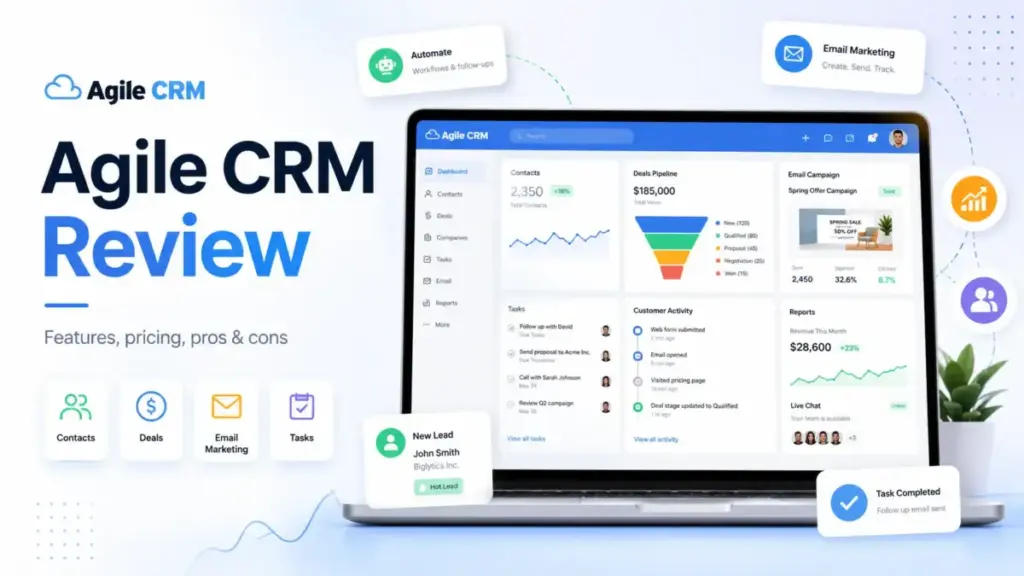
Most buyers find Agile CRM because the headline says “FREE for 10 Users,” but this Agile CRM review starts where that headline stops. The free plan caps you at 1,000 contacts, 1 campaign workflow, 1 automation rule, 1 plugin, and 500 API calls per day. That is not a free CRM for a growing business. That is a trial dressed as a plan.
Agile CRM sells itself as an all-in-one platform for sales, marketing automation, and customer service. For buyers who understand what CRM software does, the real question is whether Agile CRM delivers enough depth per dollar once you pass the free tier. The answer depends on your team size, your contact volume, and how many integrations you need running at once. Among the options on our CRM software list, Agile CRM occupies a specific budget niche.
This Agile CRM review is based on an editorial evaluation using official documentation, pricing data verified on May 11, 2026, real user review signals, and workflow scenarios for solo, 10-user, and 50-user CRM buyers. Our full review methodology explains how we evaluate every product. I did not score this product based on brand popularity alone.
Quick Verdict
Agile CRM scores 6 out of 10. It bundles sales, marketing, and service tools at a low per-user price, but plan gates on contacts, plugins, and automation rules limit its real value for growing teams.
| Category | Verdict |
|---|---|
| Score | 6/10 |
| Best For | Solo consultants and teams under 10 users with fewer than 10,000 contacts |
| Not For | 25+ user sales teams needing polished pipeline UX and fast live support |
| Best Plan | Regular at $29.99/user/month for real automation access |
| Pricing Trap | Starter limits you to 3 plugins, which forces an upgrade to Regular |
| Best Alternative | Freshsales for modern UI; Zoho CRM for deeper customization |
The 60-Second Version
Agile CRM is a budget all-in-one CRM that bundles sales, marketing automation, and help desk tools into a single platform. Here is what you need to know before you buy:
- Worth it? Only for small teams under 10 users who need basic CRM plus email campaigns plus help desk and want to avoid buying three separate tools.
- Who should buy? Solo consultants, 5-person agencies, and bootstrapped startups managing under 10,000 contacts.
- Who should skip? Teams over 25 users, ecommerce brands needing advanced segmentation, and anyone expecting responsive live support.
- Biggest pricing trap: The Starter plan looks affordable at $8.99/user/month, but it caps you at 3 plugins. Most teams connecting Google, Shopify, Stripe, and Zapier will exceed that limit on day one.
- Best alternative: Choose Freshsales if you want a cleaner modern interface. Choose Zoho CRM if you need deeper customization. Choose Pipedrive if you only need sales pipeline management.
TL;DR by Team Size
Not every team gets the same value from Agile CRM. The plan gates hit different buyer types at different points. Here is how the math works for each micro-cohort.
| Buyer Type | Recommendation | Why | Better Alternative |
|---|---|---|---|
| Solo consultant, 50 to 300 contacts | Try | Free plan covers basic contact management and 1 campaign | HubSpot free CRM for a larger contact database |
| 5-person agency, 2,500 contacts | Try | Starter at $44.95/month total gives CRM plus email, but only 3 plugins | Zoho CRM for broader app ecosystem |
| 10-user SaaS sales team, 15,000 contacts | Buy Regular | Regular at $299.90/month gives 50,000 contacts, 10 workflows, 50+ plugins | Freshsales Pro for AI scoring and sequences |
| 10-user team needing pipeline-first UX | Skip | Dated interface slows daily pipeline work | Pipedrive for sales-focused UX |
| 50-user sales org, 100,000+ contacts | Skip | Enterprise at $2,399.50/month still has UI and support limits | Salesforce or HubSpot Sales Hub |
| Service business needing CRM plus invoicing | Skip | Agile CRM lacks native invoicing workflows | Keap for follow-up and billing flows |
Buyers looking for the best CRM for small business should match their contact count and integration needs to the plan grid before committing.
Platform Architecture
Agile CRM is built as four connected modules inside one login: sales CRM, marketing automation, service automation, and integrations. Every module shares the same contact database. Every module is gated by the same plan limits. Understanding this architecture matters because most pricing frustrations come from hitting a gate in one module while the others still have room.
The official product page describes the platform as “Sales Enablement + Marketing Automation + Customer Service.” That framing is accurate at the top tier. On lower plans, you get a restricted version of each module.
| Product Layer | Who It Is For | Data Access | Pricing Gate | Main Limitation |
|---|---|---|---|---|
| Sales CRM | Sales reps, account managers | Contacts, deals, calendar, telephony | Contact limit: 1K to unlimited | Dated UI slows daily pipeline work |
| Marketing Automation | Marketers, growth teams | Email campaigns, landing pages, web engagement | Workflow limit: 1 to unlimited; node limit: 5 to 50 | Low node counts on Free and Starter restrict campaign logic |
| Service Automation | Support agents | Tickets, groups, smart views, canned responses | Same plan gates as sales | No standalone service plan |
| Integrations | Ops, developers | Plugins for Shopify, Stripe, Twilio, Zapier, Google Apps | Plugin limit: 1 to 50+ | Starter caps at 3 plugins |
| API | Developers, agencies | REST, JavaScript, PHP, Java, Python, Node JS, webhooks | API calls/day: 500 to 25,000 | Free and Starter plans restrict high-volume sync |
The API page lists SDKs for PHP, Java, C#, Ruby, Node JS, Python, and iOS. It also documents webhooks and SSO guides. For agencies building custom integrations, the 500 API calls/day cap on the free plan is a hard wall. Even Starter’s 5,000 calls/day can be tight for teams syncing contacts across multiple tools.
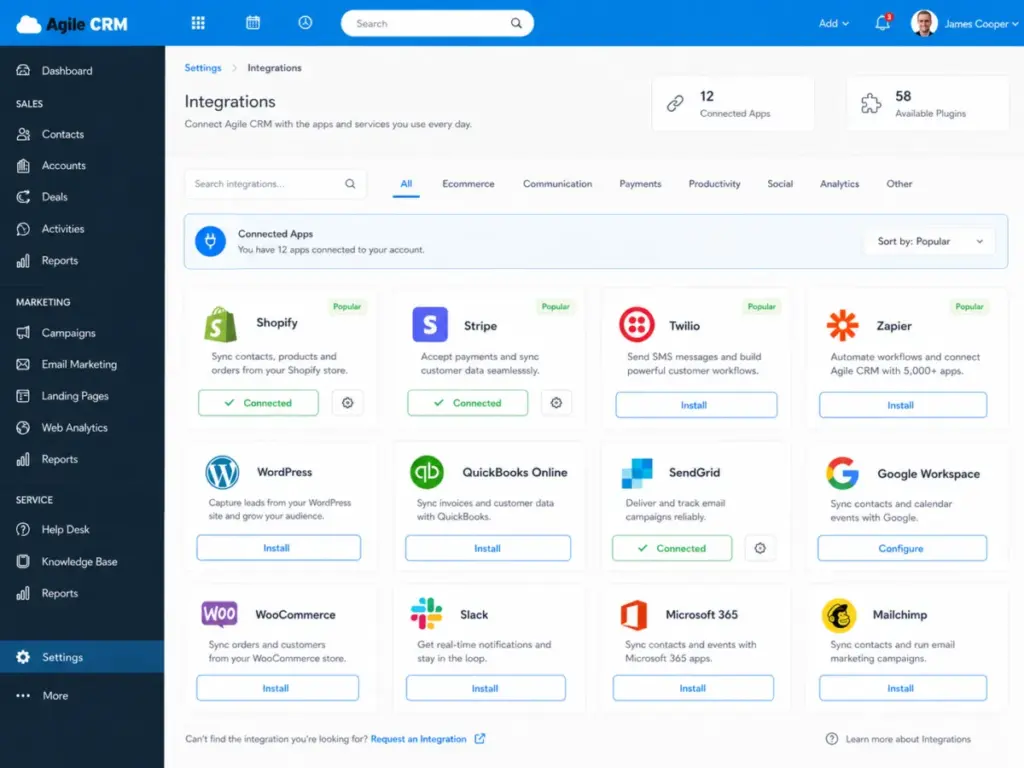
The integrations page lists connections to Twitter, Facebook, LinkedIn, Zendesk, HelpScout, Google Apps, Microsoft Exchange, Twilio, RingCentral, Mandrill, SendGrid, Amazon SES, Stripe, FreshBooks, QuickBooks, Shopify, WooCommerce, Magento, WordPress, Unbounce, LeadPages, Gravity Forms, and Zapier. The plugin count on your plan determines how many of these you can activate at once.
The First 30 Minutes With Agile CRM
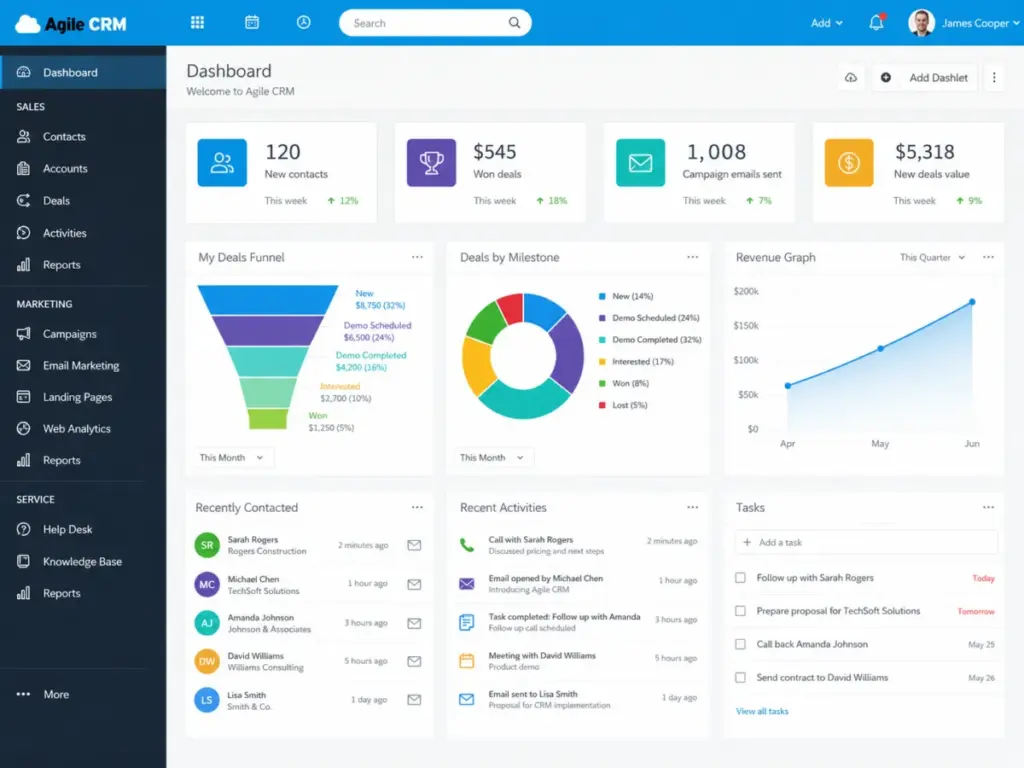
You can create an Agile CRM account in under two minutes with no credit card. The signup flow drops you into a dashboard with four main navigation tabs: contacts, deals, campaigns, and service. Here is what the first editorial walkthrough looks like.
Account creation: The signup asks for name, email, and company. No payment details required for the free plan. You land on a clean but visually dated dashboard. The interface uses a tab-based layout that recalls 2018-era SaaS design.
Contact import: You can add contacts manually or import from a CSV file. The import tool maps fields and tags. For a CRM implementation guide perspective, the import process is functional but not guided. There is no onboarding wizard walking you through your first 10 contacts.
First deal: Creating a deal takes a few clicks. You name it, assign a value, pick a milestone, and link it to a contact. The deal pipeline view works, but the visual design lacks the drag-and-drop polish of Pipedrive or Freshsales.
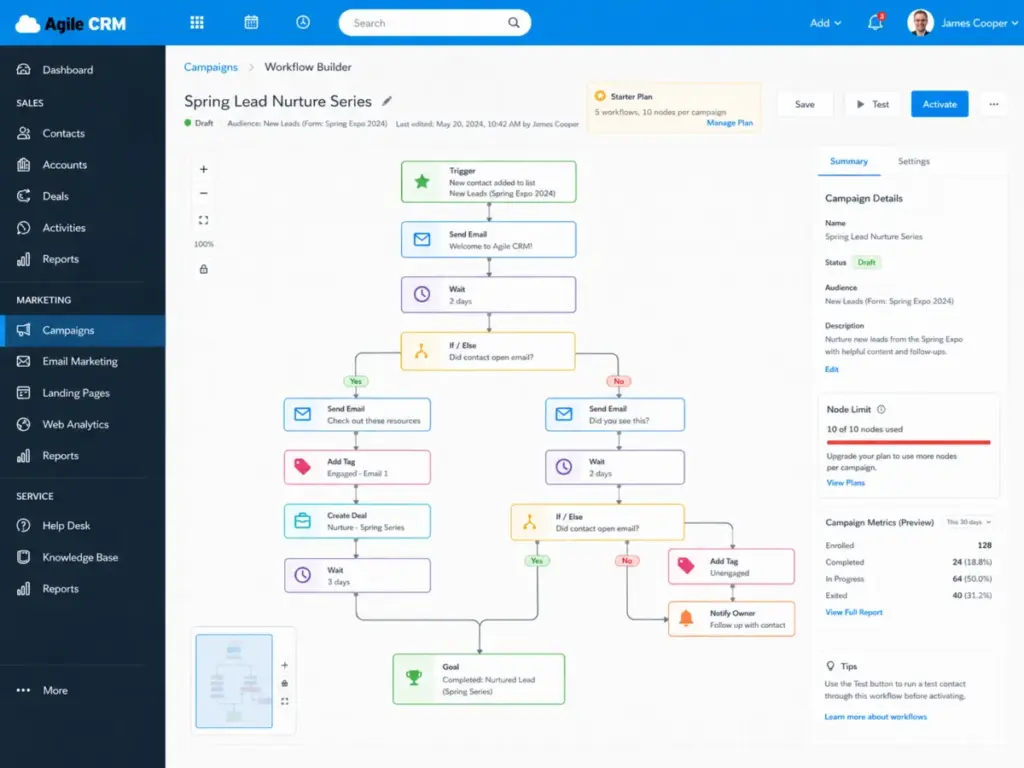
First campaign: The campaign builder uses a visual workflow editor. On the free plan, you get 1 campaign workflow with 5 nodes. That means you can build a trigger, a delay, an email, a condition, and one more step. Anything beyond that requires Starter or higher.
First limit noticed: The 1-plugin cap on the free plan means you can connect Google Apps or Zapier, but not both. This is the first real friction point. Teams that need even basic two-tool connectivity must upgrade.
What This Actually Costs
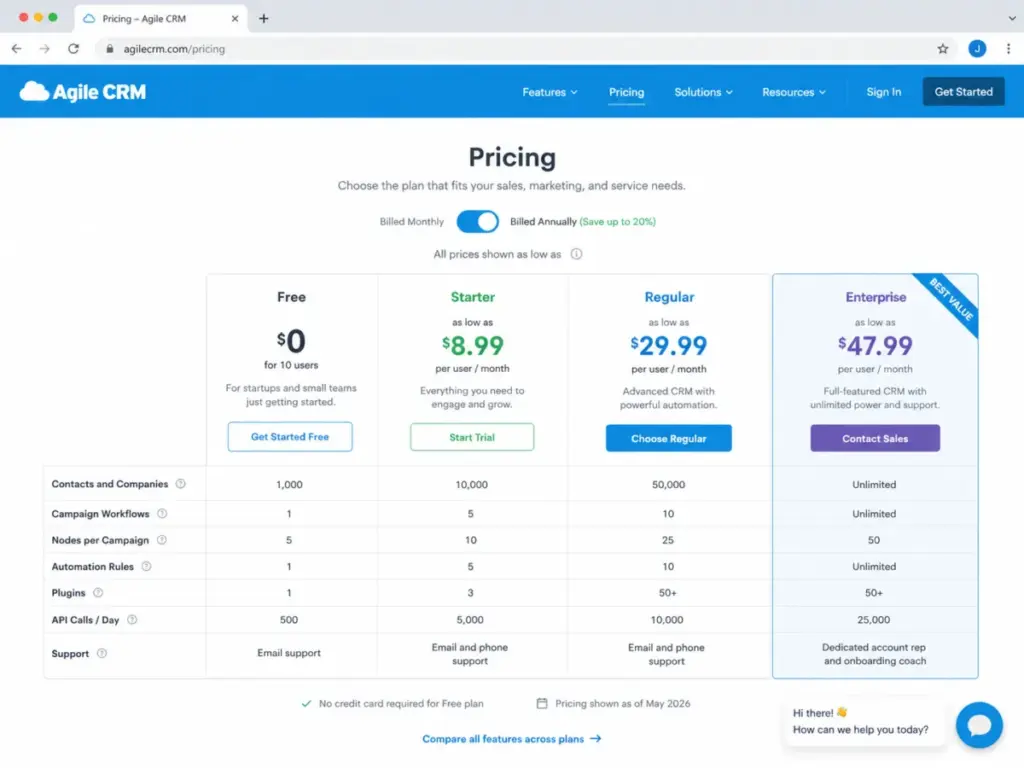
The Agile CRM pricing page shows four plans, but the headline prices do not tell the full buying story. Each plan gates contacts, campaign workflows, campaign nodes, automation rules, plugins, API calls per day, and support access. The real cost includes the base price plus the limits you will hit.
All prices below are verified as of May 11, 2026 from the Agile CRM pricing page. Prices are listed as “as low as” on the official page, meaning annual billing may be required for the lowest rate.
| Plan | Starting Price | Contact Limit | Campaign Workflows | Nodes Per Campaign | Automation Rules | Plugins | API Calls/Day | Support |
|---|---|---|---|---|---|---|---|---|
| Free | $0 for up to 10 users | 1,000 | 1 | 5 | 1 | 1 | 500 | Email only |
| Starter | $8.99/user/month | 10,000 | 5 | 10 | 5 | 3 | 5,000 | Email and phone |
| Regular | $29.99/user/month | 50,000 | 10 | 25 | 10 | 50+ | 10,000 | Email and phone |
| Enterprise | $47.99/user/month | Unlimited | Unlimited | 50 | Unlimited | 50+ | 25,000 | Dedicated account rep |
Here is the math that most review sites skip. This table shows what Agile CRM costs at three team sizes across paid plans.
| Scenario | Plan | Monthly Base Cost | Annual Base Cost | Hidden Cost Risk | Worth It? |
|---|---|---|---|---|---|
| 1 user | Starter | $8.99 | $107.88 | Low, but 3-plugin cap limits integrations | Yes, for solo contact management |
| 1 user | Regular | $29.99 | $359.88 | Moderate, may overpay for unused capacity | Only if you need 50+ plugins or 10 workflows |
| 1 user | Enterprise | $47.99 | $575.88 | High, solo users rarely need unlimited contacts | No, unless you need dedicated support |
| 10 users | Starter | $89.90 | $1,078.80 | High, 3 plugins for 10 people is too tight | Only for basic CRM without integrations |
| 10 users | Regular | $299.90 | $3,598.80 | Moderate, 50K contacts and 10 workflows fit most SMBs | Yes, best value for 10-user teams |
| 10 users | Enterprise | $479.90 | $5,758.80 | Low risk, full access to all features and support | Yes, if you need account rep and onboarding |
| 50 users | Starter | $449.50 | $5,394.00 | Very high, plan gates will block daily work | No |
| 50 users | Regular | $1,499.50 | $17,994.00 | High, 50K contact cap may not fit 50-user orgs | Maybe, only if contacts stay under 50K |
| 50 users | Enterprise | $2,399.50 | $28,794.00 | Moderate, but UI and support may not match price | Compare to Salesforce or HubSpot first |
Beyond the base price, factor in these hidden cost risks: extra email volume packages if you exceed the branded email cap, time spent configuring workflows without guided onboarding on lower plans, migration costs if you outgrow the platform, and training time due to the dated interface.
Where Pricing Starts to Pinch
The free plan is not enough for serious marketing automation. One campaign workflow with 5 nodes and 1 automation rule gives you a taste, not a tool. Buyers exploring best free CRM software options should know that Agile CRM’s free tier works for contact storage and basic deal tracking, not for running real campaigns.
Starter looks cheap at $8.99/user/month, but the 3-plugin limit matters. A typical small team connects Google Apps, Stripe, and Zapier. That is three plugins. Add Shopify or Twilio and you need Regular. The jump from $8.99 to $29.99 per user per month is a 233% price increase triggered by needing a fourth plugin.
Regular is the first practical plan for teams needing real automation. It gives you 50,000 contacts, 10 campaign workflows, 25 nodes per campaign, 10 automation rules, and 50+ plugins. For a 10-user team, that is $299.90/month or $3,598.80/year.
Enterprise is for teams that need unlimited contacts, unlimited workflows, and a dedicated account rep. At $47.99/user/month, a 50-user team pays $2,399.50/month. At that price point, buyers should also price HubSpot Sales Hub and Salesforce Essentials.
Agile CRM Features That Matter
Agile CRM packs more feature categories than most CRMs at this price point, but plan gates limit which features you can actually use. The feature set spans sales pipeline management, marketing automation, customer service ticketing, and third-party integrations. Instead of listing every feature, here is what matters grouped by the buyer problem each one solves.
Agile CRM Contact and Deal Management
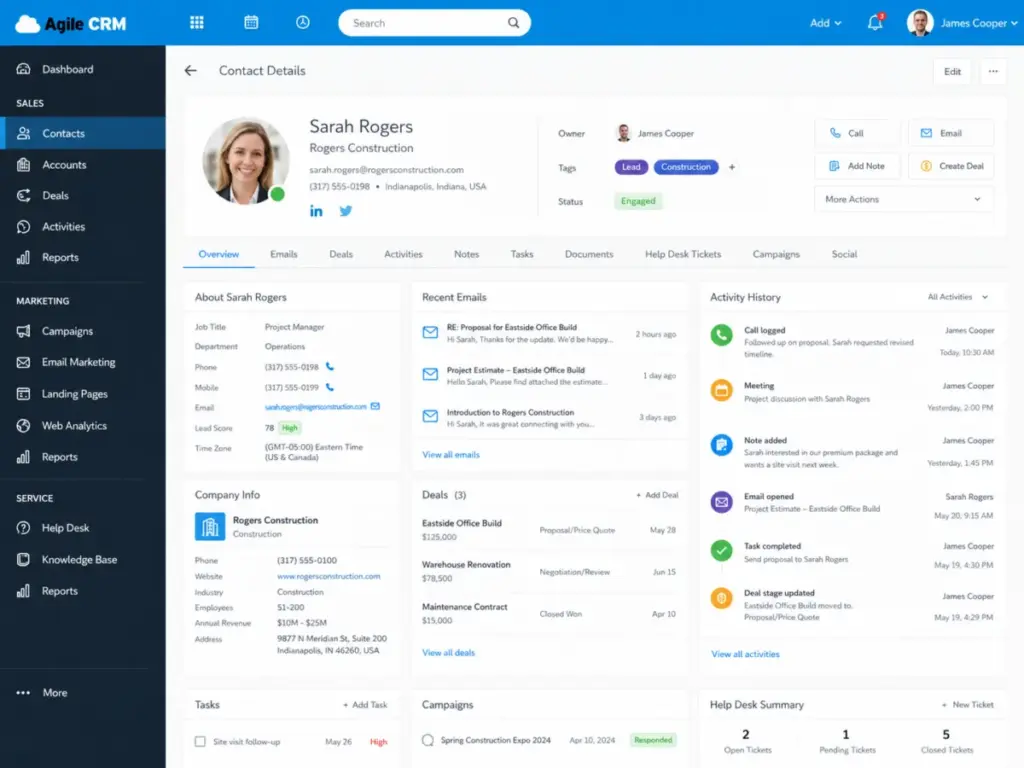
The contact record includes a 360-degree view showing emails, calls, notes, social profiles, deals, and support tickets linked to one person. Lead scoring assigns point values based on contact behavior. Deal management uses a pipeline view with customizable milestones.
For teams managing under 10,000 contacts, the Starter plan handles contact and deal tracking well. The appointment scheduling feature lets contacts book time directly. Gamification features add leaderboards for sales teams, though this matters more for teams of 5 or more reps.
Agile CRM Marketing Automation
The campaign builder uses a visual drag-and-drop workflow editor. You set triggers, add delays, send emails, apply conditions, and branch paths. The real constraint is the node limit. Free gives you 5 nodes per campaign. Starter gives you 10. Regular gives you 25. Enterprise gives you 50.
Email marketing includes newsletters, email tracking, and multichannel campaigns. Landing pages and form builders let you capture leads without external tools. Web engagement features include exit intent popups and push notifications. Social CRM connects Twitter, Facebook, and LinkedIn for social listening and posting.
For a 5-person agency running 3 to 5 email campaigns per month, the Starter plan’s 5 workflows and 10 nodes per campaign might work. For a 10-user team running segmented drip sequences, Regular’s 25 nodes per campaign gives more room.
Agile CRM Service Automation
The help desk module includes ticketing, ticket labels, groups, smart views, and canned responses. Service automation workflows let you route tickets by priority or type. A knowledge base feature lets you publish support articles.
Customer feedback collection is built in. For teams that want CRM and support ticketing in one tool without buying Zendesk separately, this module adds value. The limitation is that there is no standalone service plan. You get service features tied to the same plan gates as sales and marketing.
Agile CRM Integrations and API
Agile CRM lists integrations with Shopify, WooCommerce, Magento, Stripe, FreshBooks, QuickBooks, Twilio, RingCentral, SendGrid, Amazon SES, Mandrill, WordPress, Unbounce, LeadPages, Gravity Forms, and Zapier on the integrations page.
The gating mechanism is the plugin count. Free allows 1 plugin. Starter allows 3. Regular and Enterprise allow 50+. For teams that rely on 4 or more connected tools, Regular is the minimum viable plan.
API access includes REST, JavaScript, PHP, Java, C#, Ruby, Node JS, and Python SDKs. Webhooks and SSO are documented. The daily API call limits scale from 500 on Free to 25,000 on Enterprise. Stack Overflow threads show developers working with the PHP API for contact creation and phone number search, which suggests an active but small developer community.
Agile CRM Reporting and Controls
Reporting covers deal analytics, campaign performance, and contact growth. The depth of reporting increases by plan. Enterprise adds custom reporting options. For teams that need advanced analytics dashboards, Agile CRM’s reporting may feel limited compared to Salesforce or HubSpot.
Upgrade Pressure Map
The real story of Agile CRM pricing is not the per-user cost. It is the limit that forces you to the next plan. This table shows every major gate across all four plans so you can see exactly where the upgrade trigger hits.
| Limit | Free | Starter | Regular | Enterprise | Buyer Impact |
|---|---|---|---|---|---|
| Contacts and Companies | 1,000 | 10,000 | 50,000 | Unlimited | Growing lists force upgrades fast |
| Campaign Workflows | 1 | 5 | 10 | Unlimited | Teams running more than 5 campaigns need Regular |
| Nodes Per Campaign | 5 | 10 | 25 | 50 | Complex drip sequences require Regular or higher |
| Automation Rules | 1 | 5 | 10 | Unlimited | Sales automation at scale requires Enterprise |
| Plugins | 1 | 3 | 50+ | 50+ | 3-plugin cap on Starter is the most common upgrade trigger |
| API Calls Per Day | 500 | 5,000 | 10,000 | 25,000 | Agencies and dev teams hit API caps on lower plans |
| Support | Email 24/5 | Email and phone | Email and phone | Dedicated account rep and onboarding coach | Dedicated support only on Enterprise |
| Account Rep | No | No | No | Yes | Teams needing onboarding help must pay $47.99/user/month |
The most common upgrade path runs like this: a team signs up for Free, hits the 1-plugin cap in the first week, moves to Starter, then hits the 3-plugin limit within a month. The jump to Regular costs 233% more per user but removes the plugin bottleneck. That jump is where most small teams either commit or leave.
Agile CRM Pros and Cons
Every CRM has trade-offs, and Agile CRM’s trade-offs are tied directly to plan limits and platform age. Here are the specific pros and cons with buyer context.
- All-in-one pricing below $30/user/month. The Regular plan at $29.99/user/month gives you sales, marketing, and service tools. Buying those modules separately from other vendors would cost $50 to $100+ per user per month.
- Free plan supports up to 10 users. A 10-person team can test contact management and basic deal tracking for $0. No other CRM offers a free plan for that many users.
- Built-in marketing automation with visual campaign builder. You do not need a separate email marketing tool on Starter or above. One reviewer on Capterra noted the product “had the right feature-set and price balance for us at the time” (Capterra).
- Service desk included in every plan. Ticketing, canned responses, and knowledge base come standard. Teams avoiding a separate Zendesk or Freshdesk subscription save $15 to $50/user/month.
- Broad integration list with Shopify, Stripe, Twilio, and Zapier. The integrations cover ecommerce, payments, telephony, and workflow automation. Ana from a civic organization with 11 to 50 employees noted on SoftwareFinder: “It combines many functionalities into one program which I like the most” (SoftwareFinder).
- REST API with SDKs in 7+ languages. Developer teams can build custom integrations using PHP, Java, Python, Node JS, C#, Ruby, or JavaScript.
- Starter’s 3-plugin cap creates forced upgrades. A team connecting Google Apps, Stripe, and Zapier fills all 3 slots. Adding Shopify or Twilio means jumping to Regular at $29.99/user/month, a 233% increase.
- Support is limited by time and plan. The support page shows email support at 24/5 and phone support from 09:00am to 05:00pm EST, Monday to Friday. Dedicated account reps are only available on Enterprise. G2 snippets mention customer support problems.
- The interface looks and feels dated. Multiple G2 reviewers mention clunky UI and slow loading with large datasets. The visual design has not kept pace with Freshsales, Pipedrive, or HubSpot (G2).
- Product update visibility raises freshness questions. The official product updates page shows many visible entries from 2020 and older. Buyers should ask sales what has changed in the last 12 months.
- Free plan conversion pressure is real. The 1,000-contact, 1-workflow, 1-plugin, 500-API-call limits make the free plan a testing sandbox, not a production CRM. Teams outgrow it in weeks, not months.
- Email volume may create extra cost pressure. The branded email cap on lower plans can force teams to buy extra email packages or use external senders like SendGrid or Amazon SES.
- 50,000-contact cap on Regular limits mid-market growth. A 50-user sales org with 100,000+ contacts must go to Enterprise at $47.99/user/month or leave the platform.
Who Should Use Agile CRM?
Agile CRM fits a specific buyer profile: small teams with modest contact counts who want CRM, email marketing, and help desk in one tool without paying enterprise prices. Here are the micro-cohorts that get the best value.
Choose Agile CRM if you are a solo consultant managing 50 to 300 contacts who needs a free CRM for basic contact history, notes, and appointment scheduling. The free plan covers this without any cost.
Choose Agile CRM if you are a 5-person agency with 2,500 contacts that needs CRM plus basic email campaigns. The Starter plan at $44.95/month total gives you 5 campaign workflows and 10,000 contacts. Just make sure you can live with 3 plugins.
Choose Agile CRM if you are a 10-user SaaS sales team that needs affordable contact management, deal tracking, and simple email automation. The Regular plan at $299.90/month gives you 50,000 contacts, 10 workflows, 25 nodes per campaign, and 50+ plugins.
Choose Agile CRM if you are a local service business that wants contact history, appointment scheduling, and follow-up reminders in one place. The Starter plan handles this at $8.99/user/month.
Choose Agile CRM if you are a bootstrapped startup that wants to avoid buying separate CRM, email marketing, and help desk tools. The Regular plan bundles all three for less than most standalone email marketing platforms charge.
As one reviewer on Findstack noted: “They are progressive so far, and it’s affordable” (Findstack).
Who Should Avoid Agile CRM?
Agile CRM is not the right fit for every team, and knowing when to walk away saves more money than finding a discount. Here are the buyer types that should look elsewhere.
Avoid Agile CRM if you are a 25+ person outbound sales team that needs polished daily pipeline UX. The dated interface slows down reps who open their CRM 50+ times per day. Pipedrive or Freshsales will feel faster.
Avoid Agile CRM if you are an ecommerce brand relying on advanced segmentation and deliverability reporting. The email marketing module works for basic campaigns, but it lacks the segmentation depth and deliverability analytics of dedicated email platforms.
Avoid Agile CRM if you are an enterprise sales org needing strict governance and modern analytics. At $2,399.50/month for 50 users on Enterprise, you are in Salesforce and HubSpot Sales Hub pricing territory with less polish.
Avoid Agile CRM if you are a technical team needing high-volume API access on lower plans. The 500 API calls/day on Free and 5,000 on Starter will block serious integrations.
Avoid Agile CRM if your team expects fast live support across time zones. Phone support runs 09:00am to 05:00pm EST, Monday to Friday. There is no 24/7 chat. There is no weekend coverage.
Agile CRM Alternatives Compared
If Agile CRM does not fit your team, the right alternative depends on why it fails for you. Here is a scenario-based decision table.
| Scenario | Best Choice | Why | Avoid If |
|---|---|---|---|
| Need a modern, clean CRM interface | Freshsales | Cleaner UI, AI-assisted scoring, sales sequences | You need built-in help desk in the same tool |
| Need sales pipeline focus only | Pipedrive | Built for pipeline-first sales teams | You also need marketing automation and help desk |
| Need a larger CRM ecosystem for growth | HubSpot CRM | Strongest free database and future Sales Hub path | You want to avoid HubSpot’s higher-tier pricing |
| Need deep CRM customization and suite depth | Zoho CRM | Broader app ecosystem with deeper field-level control | You want a simpler setup experience |
| Need CRM plus invoicing and billing workflows | Keap | Follow-up plus invoicing for consultants and service businesses | You need a large sales team CRM |
Agile CRM vs HubSpot CRM
HubSpot CRM offers a larger free contact database and a stronger long-term ecosystem. The free CRM covers contact management, deal tracking, and email logging for unlimited users. Paid Sales Hub plans add sequences, forecasting, and custom reporting.
For our full breakdown, read our HubSpot CRM review.
Verdict: HubSpot wins for ecosystem scale and long-term platform growth. Choose Agile CRM only if you need built-in marketing automation and help desk at a lower price than HubSpot’s Marketing Hub and Service Hub add-ons.
Agile CRM vs Zoho CRM
Zoho CRM offers deeper customization, a broader app ecosystem, and tighter integration with Zoho’s 45+ business apps. Zoho’s free edition supports 3 users compared to Agile CRM’s 10, but paid Zoho plans give more field-level control and workflow depth.
For details, see our Zoho CRM review.
Verdict: Zoho wins for teams wanting deeper CRM customization and a connected suite of business apps. Choose Agile CRM if you need a simpler all-in-one tool and 10-user free access matters.
Agile CRM vs Pipedrive
Pipedrive is built for sales teams that live inside their pipeline. Its plans (Lite, Growth, Premium, Ultimate) focus on deal management, activity tracking, and sales forecasting. Pipedrive does not include built-in marketing automation or help desk.
Read our Pipedrive CRM review for plan details.
Verdict: Pipedrive wins for sales pipeline focus and daily rep UX. Choose Agile CRM if you need marketing automation and help desk in the same tool and can accept a less polished pipeline interface.
Agile CRM vs Freshsales
Freshsales offers a free plan for 3 users, Growth at $9/user/month, Pro at $39/user/month, and Enterprise at $59/user/month (billed annually). It includes AI-powered lead scoring, sales sequences, and territory management on Pro and above.
See our Freshsales review for the full analysis.
Verdict: Freshsales wins for modern CRM workflow, cleaner interface, and AI-assisted sales features. Choose Agile CRM if you need 10-user free access and built-in help desk at a lower per-user price than Freshsales Pro.
Agile CRM vs Keap
Keap targets consultants and service businesses that need CRM plus follow-up automation plus invoicing in one platform. It includes appointment scheduling, payment collection, and quote-to-invoice workflows.
Read our Keap CRM review for pricing and plan details. For a direct comparison, see our Keap CRM vs Agile CRM analysis.
Verdict: Keap wins for consultants and service businesses that need follow-up and billing-style flows built into their CRM. Choose Agile CRM if you do not need invoicing and want a lower per-user cost.
What Agile CRM Does Not Make Obvious
The Agile CRM product page promotes one platform, but the plan grid tells the real story. Here are the things buyers should know before signing up.
Product freshness is unclear. The official product updates page shows many visible entries from 2020 and older. That does not mean the product is abandoned, but buyers should ask the sales team what has changed in the last 12 months before committing to an annual contract.
Privacy policy includes broad data categories. The privacy policy states that customer information is hosted on Google and Amazon clouds. Google Apps Sync collects contacts, emails, phone numbers, organization details, postal address, birthday, gender, calendar entries, Drive files, Google profile data, and Gmail emails. The policy notes that no internet transmission or storage method is 100% secure.
Support availability is limited by time and plan. Email support runs 24/5. Phone support runs 09:00am to 05:00pm EST, Monday to Friday, at 1-800-980-0729. Dedicated account reps and onboarding coaches are Enterprise-only features. Teams in Pacific, Mountain, or international time zones should plan around these hours.
Email volume may create cost pressure. The branded email cap on lower plans can force teams toward external email services like SendGrid or Amazon SES, which adds both cost and configuration complexity.
The plugin limit is the hidden gatekeeper. The Starter plan’s 3-plugin cap is not highlighted on the main product page. Buyers discover this limit after signup when they try to connect a fourth tool.
Final Verdict: Is Agile CRM Worth It?
Agile CRM earns 6 out of 10. It is best for solo consultants and small teams under 10 users who need CRM, email marketing, and help desk in one tool at a budget price. It is not the best fit for 25+ user sales organizations that need polished pipeline UX, responsive support, and modern analytics.
The pricing math tells the real story. A 10-user team on the Regular plan pays $299.90/month or $3,598.80/year. That is competitive for an all-in-one platform. But a 50-user team on Enterprise pays $2,399.50/month, and at that price, HubSpot Sales Hub and Salesforce offer more polish, better support, and deeper reporting.
Capterra lists Agile CRM at 4.1 stars across 524 reviews. Software Advice shows a 4.1 overall rating with 4.0 for ease of use and 4.0 for customer support. These scores reflect a functional product that works for its target audience but does not impress power users.
This Agile CRM review finds the product fills a real gap for budget-conscious small teams. Choose Freshsales if you want a modern interface with AI features. Choose Zoho CRM if you need deeper customization. Choose Pipedrive if you only need sales pipeline management. Choose Keap if you need CRM plus invoicing workflows. For a broader switching framework, compare Agile CRM alternatives by automation limits, contact caps, support coverage, and the operational reason Agile CRM no longer fits.
Before you buy, map your contact count, plugin needs, workflow depth, and API volume to the plan grid. The headline price is never the full price. The plan gate you hit first determines your real cost.
Agile CRM FAQ
Here are direct answers to the most common buyer questions about Agile CRM.
Is Agile CRM worth it in 2026?
Agile CRM is worth it for small teams under 10 users managing fewer than 50,000 contacts who want sales, marketing, and service tools in one platform. It is not worth it for teams over 25 users or teams needing modern UI, fast support, and advanced reporting. The Regular plan at $29.99/user/month offers the best value.
How much does Agile CRM cost?
Agile CRM has four plans: Free ($0 for up to 10 users), Starter (as low as $8.99/user/month), Regular (as low as $29.99/user/month), and Enterprise (as low as $47.99/user/month). Pricing was verified on May 11, 2026. A 10-user team on Regular pays $299.90/month or $3,598.80/year.
Is Agile CRM free?
Agile CRM offers a free plan for up to 10 users with no credit card required. The free plan caps contacts at 1,000, campaign workflows at 1, nodes per campaign at 5, automation rules at 1, plugins at 1, and API calls at 500 per day. It works for testing, not for production marketing automation.
What are Agile CRM's main pros and cons?
Pros include all-in-one pricing below $30/user/month, a 10-user free plan, built-in marketing automation, and a service desk in every plan. Cons include a dated UI, a 3-plugin cap on Starter that forces upgrades, limited support hours, unclear product update frequency, and email volume pressure on lower plans.
Who should use Agile CRM?
Solo consultants managing under 300 contacts, 5-person agencies with basic email needs, 10-user SaaS teams on the Regular plan, local service businesses needing scheduling and follow-up, and bootstrapped startups avoiding separate CRM, email, and help desk subscriptions.
Who should avoid Agile CRM?
Teams over 25 users needing polished pipeline UX, ecommerce brands needing advanced segmentation, enterprise sales orgs needing governance and analytics, technical teams needing high-volume API access on lower plans, and teams expecting fast live support outside EST business hours.
What is the best Agile CRM alternative?
The best alternative depends on your need. Choose Freshsales for modern UI and AI features. Choose Zoho CRM for deeper customization. Choose Pipedrive for sales pipeline focus. Choose HubSpot CRM for ecosystem scale. Choose Keap for CRM plus invoicing and billing workflows.
Is Agile CRM better than HubSpot?
Agile CRM is cheaper per user and includes marketing automation and help desk in its base plans. HubSpot CRM offers a larger free contact database, a stronger ecosystem, and better long-term scalability. HubSpot wins for growing teams. Agile CRM wins only on short-term per-user cost for small teams.
Does Agile CRM include marketing automation?
Yes. Agile CRM includes a visual campaign builder, email marketing, newsletters, email tracking, landing pages, form builder, web engagement, exit intent popups, push notifications, and social CRM. The depth of automation depends on your plan. Free gives 1 workflow with 5 nodes. Enterprise gives unlimited workflows with 50 nodes.
What are Agile CRM's contact limits?
Free supports 1,000 contacts and companies. Starter supports 10,000. Regular supports 50,000. Enterprise supports unlimited contacts. These limits include both contacts and companies in the same count. Teams outgrowing the Regular plan’s 50,000 cap must upgrade to Enterprise at $47.99/user/month.
Does Agile CRM have API access?
Yes. Agile CRM provides REST API access with SDKs for PHP, Java, C#, Ruby, Node JS, Python, JavaScript, and iOS. It also supports webhooks and SSO. API call limits scale from 500/day on Free, to 5,000 on Starter, 10,000 on Regular, and 25,000 on Enterprise.
Is Agile CRM good for small businesses?
Agile CRM works well for small businesses with fewer than 10 users and under 10,000 contacts. It bundles CRM, email marketing, and help desk at a lower total cost than buying separate tools. Small businesses with 25+ employees, advanced reporting needs, or high integration counts should consider Zoho CRM or Freshsales instead.