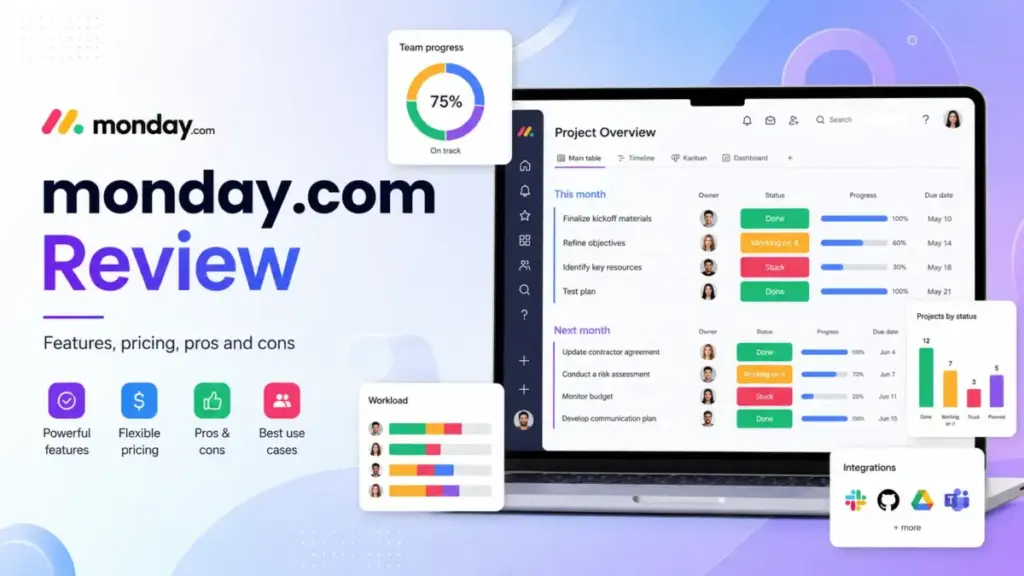
Most teams sign up for monday.com expecting a simple project management software tool. What they get is a flexible work management platform that can scale from a 3-person marketing team to a 200-person operations department.
The problem? monday.com’s real cost only shows up after you hit the automation caps, dashboard limits, and the 3-seat minimum on every paid plan. This monday.com review breaks down exactly where the platform delivers, where it gets expensive, and when you should pick a competitor instead. If you are new to what project management is and how tools like monday.com fit into team workflows, the distinction between a task board and a work operating system matters more than most reviews explain.
Quick Verdict: Is monday.com Worth It?
monday.com scores 8.6 out of 10 for teams that need visual workflow control, cross-functional dashboards, and practical automation. It is not the right fit for solo users, 2-person teams forced into a 3-seat minimum, or engineering teams that need deep agile sprint planning. This review follows our review methodology, and the scoring reflects both monday.com’s strengths in visual work management and its real limitations in pricing structure and automation caps.
This review is based on extensive hands-on evaluation using official documentation, real user workflows, and competitive testing scenarios.
| Category | Verdict |
|---|---|
| Overall Score | 8.6/10 |
| Best For | Visual work management, operations boards, marketing teams, cross-functional projects |
| Not For | Solo users, dev-only teams, low-automation users, teams needing strict agile planning |
| Starting Price | Free for up to 2 seats |
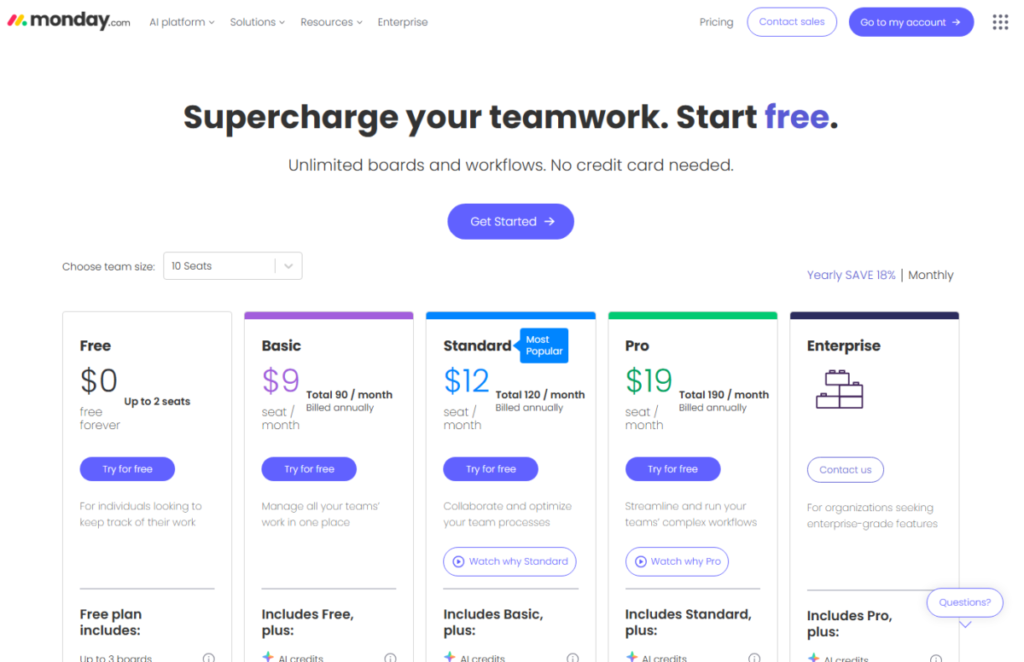
| Paid Starting Price | Basic at $9/seat/month billed annually |
| Real Minimum Paid Cost | $27/month billed annually because paid plans start at 3 seats |
| Best Value Plan | Pro for automation-heavy teams |
| Best Alternatives | Asana, ClickUp, Trello, Jira |
What Is monday.com?
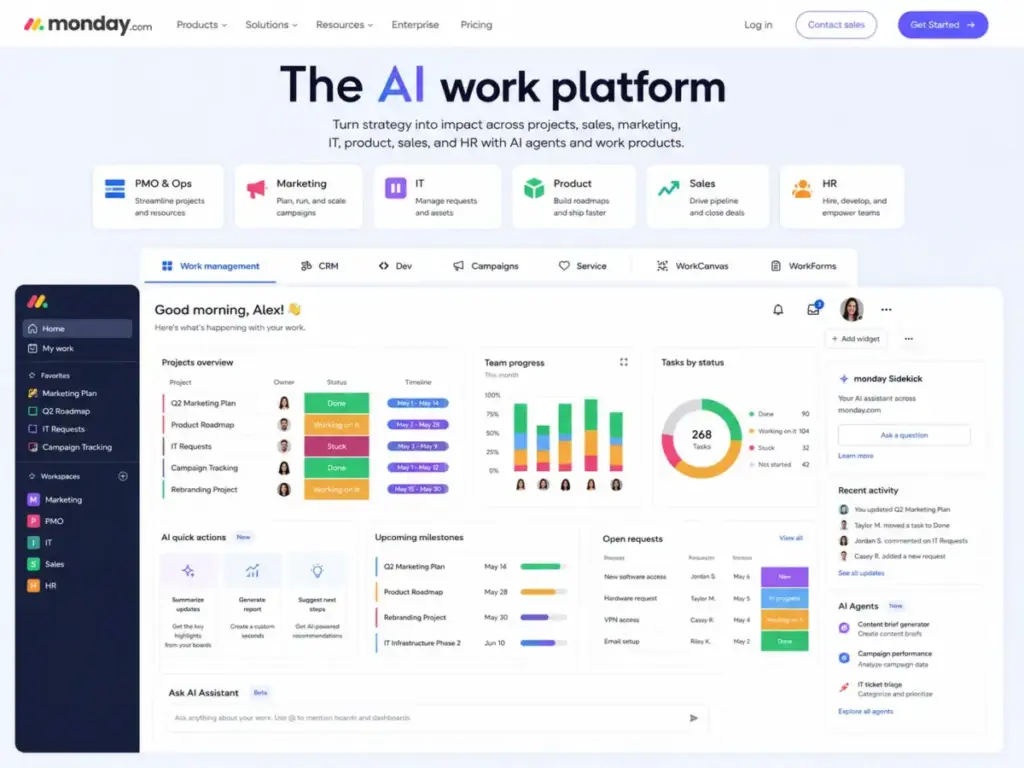
monday.com is an AI-powered work management platform, not just a task tracker. It positions itself as an operating system for work, built around customizable boards, automations, integrations, and dashboards that span departments.
The platform includes multiple products: monday Work Management for project and operations teams, monday CRM for sales pipelines, monday dev for software teams, and monday service for IT and support workflows. Additional tools include WorkCanvas for visual collaboration, WorkForms for data collection, monday sidekick and monday vibe for AI-assisted planning, and monday MCP for connecting AI agents to your workspace.
If the CRM product is the reason for the comparison, evaluate monday CRM alternatives separately from project-management replacements because sales pipelines, email sync, and seat minimums create a different switching model.
monday.com serves marketing teams, operations departments, PMOs, IT teams, HR teams, product managers, agencies, and cross-functional groups that need shared visibility into work progress. With over 245,000 customers worldwide (according to monday.com’s Trust Center), it has become one of the most widely adopted work management platforms in the SaaS market.
How I Tested monday.com
I evaluated monday.com through workflow simulation, documentation verification, and competitive comparison. My goal was to test what matters to a team evaluating monday.com for real adoption, not just to list features from marketing pages.
My testing covered five scenarios:
- Marketing campaign board: I built a campaign tracker with status columns, timeline views, and file attachments to test board flexibility and view switching.
- Client intake workflow: I simulated an agency intake process using forms, automations, and status-based assignments to see how quickly automation actions get consumed.
- Cross-team dashboard: I connected multiple boards into a single dashboard to test reporting limits and widget behavior across plans.
- Automation and integration plan review: I analyzed monday.com’s official automation and integration limits documentation to calculate real-world action burn rates for Standard vs. Pro plans.
- Alternatives comparison: I compared monday.com’s feature set, pricing model, and plan gates against Asana, ClickUp, Trello, and Jira using current pricing pages verified on May 8, 2026.
I did not run a 500-person enterprise deployment. Where I reference scale, governance, or enterprise features, I rely on official documentation and verified user reviews from Capterra and G2.
monday.com Features That Matter
monday.com’s feature set is wide, but the features that matter most depend on which plan you pay for. The gap between what Free and Basic offer versus what Standard and Pro include is where most buyer confusion starts.
monday.com Boards and Views
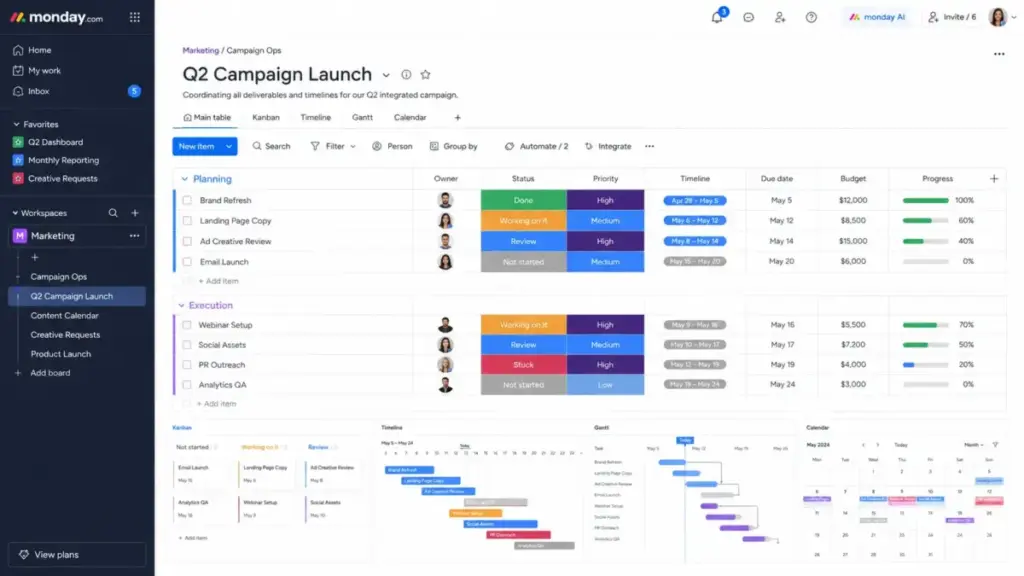
Boards are the foundation of monday.com. Every project, workflow, or tracker starts as a board with rows (items), columns (data fields), and groups (sections). monday.com provides over 200 templates to get started, and each board supports multiple views.
Available views include Table (the default), Kanban, Timeline, Gantt, Calendar, Chart (Pro and above), and Workload. Switching between views is fast. The Kanban view works well for sprint-style workflows, while Timeline and Gantt views help teams with deadline-driven projects see dependencies and overlaps.
The Free plan limits you to 3 boards and 8 column types. Basic removes the board limit and adds unlimited items. Standard and Pro add additional views, including Timeline, Gantt, Calendar, and Chart.
One practical limit to know: each board supports up to 10,000 items, and each item can hold up to 100 subitems. For most teams, these numbers are more than enough. But operations teams with high-volume intake processes or agencies with hundreds of client tasks per board should plan their board architecture early.
monday.com Automations and Integrations
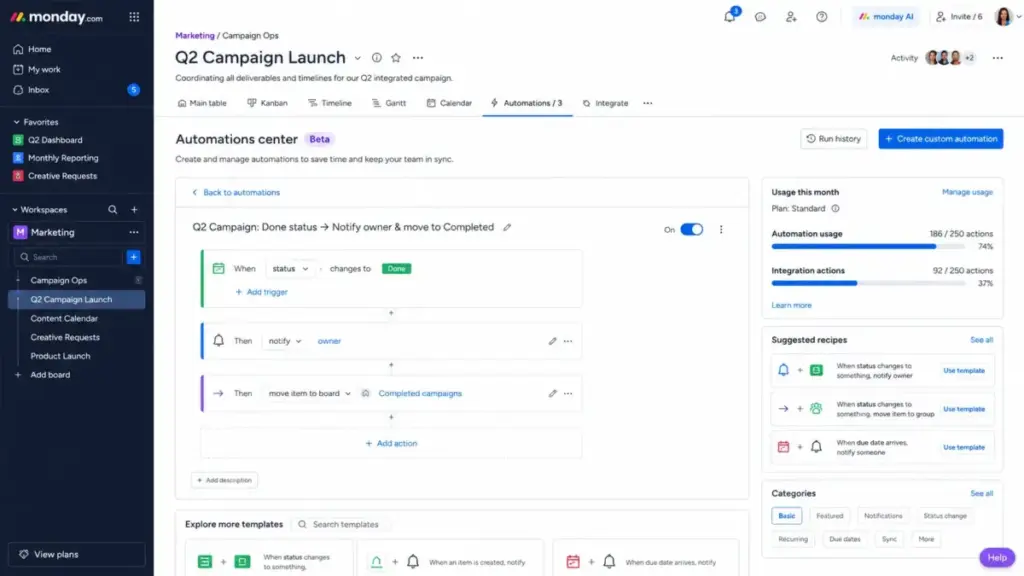
Automations in monday.com follow a trigger-action model. You set a condition (“when status changes to Done”) and define an action (“notify the project owner” or “move item to another board”). The builder is visual and requires no code.
Here is where plan selection becomes critical:
- Standard: 250 automation actions and 250 integration actions per month
- Pro: 25,000 automation actions and 25,000 integration actions per month
- Enterprise: 250,000 automation actions and 250,000 integration actions per month
The Standard plan’s 250 automation actions sound reasonable until you realize that a single board with 5 active automations can consume 50 to 100 actions per week. A marketing team running status notifications, due-date reminders, and Slack updates across 3 boards can exhaust 250 actions within the first two weeks of a month.
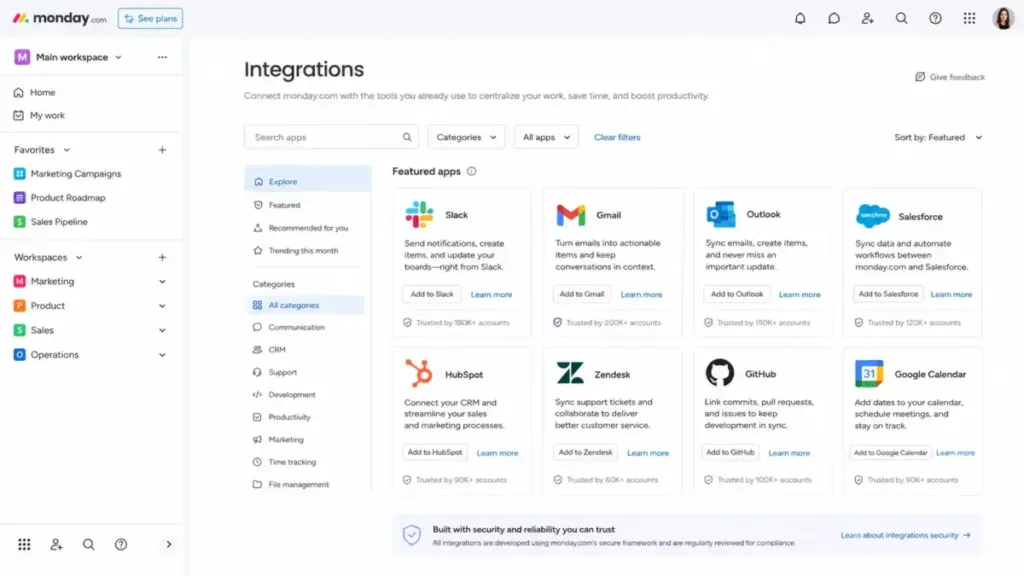
Gmail and Outlook integrations are especially action-hungry. Each email sync or trigger counts against your monthly allowance. Teams that connect monday.com to email workflows should budget for Pro from the start.
monday.com offers over 200 integrations, including Salesforce, HubSpot, Zendesk, GitHub, GitLab, Slack, Google Calendar, Microsoft Teams, Mailchimp, and Intercom. Additional apps are available through the monday.com marketplace, and developers can build custom integrations using monday.com’s APIs and SDKs.
monday.com Dashboards and Reporting
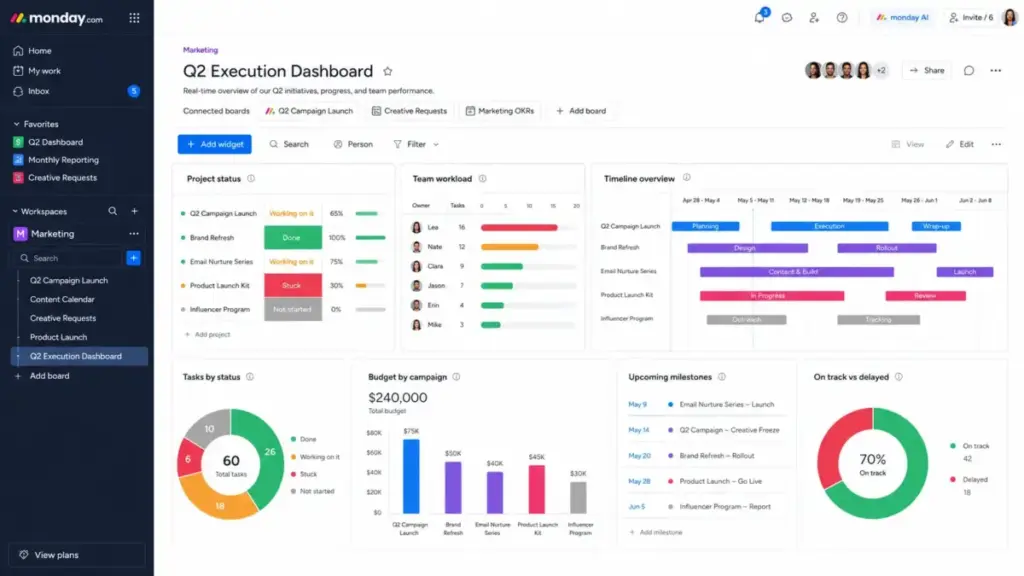
Dashboards aggregate data from multiple boards into a single view using widgets: charts, numbers, batteries, workload maps, timelines, and tables.
The connected board limits per dashboard vary by plan:
| Plan | Connected Boards per Dashboard |
|---|---|
| Basic | 1 |
| Standard | 5 |
| Pro | 20 |
| Enterprise | 50 |
Each dashboard supports up to 30 widgets, and each widget can display up to 20,000 items. These limits matter for PMOs and operations leaders who need cross-project visibility.
On Basic, a dashboard can only pull from a single board, which limits it to a board-level summary. Standard’s 5-board cap works for small teams with a few active projects. Pro’s 20-board limit is where monday.com starts functioning as a real portfolio reporting tool. Enterprise extends this to 50 boards, which supports department-wide or company-wide dashboards.
monday.com AI Features
monday.com has invested in AI features across its platform. monday sidekick assists with task summaries, content drafts, and formula suggestions. monday vibe helps with project planning and brainstorming. monday agents (announced as part of the AI work platform positioning) allow teams to build AI-powered workflows that act on data within boards.
monday MCP (Model Context Protocol) connects external AI tools to monday.com data, enabling third-party AI agents to read and write board information.
AI features are still evolving, and access varies by plan. Most AI capabilities require Pro or Enterprise plans, and some features use AI credit allowances that reset monthly.
monday.com Security and Admin Controls
monday.com’s security model is built on ISO 27001, ISO 27018, SOC 2, and OWASP Top 10 standards. The platform undergoes an annual SOC 2 Type II audit, and its security and compliance hub reports securing information for more than 245,000 customers worldwide.
HIPAA-compliant plans are available for healthcare and regulated industries (see monday.com HIPAA support page).
Enterprise plans add multi-level permissions, advanced governance controls, audit logs, and 99.9% uptime SLA. For most small and mid-sized teams, Standard or Pro security is sufficient. Enterprise security features should be evaluated based on compliance requirements, not used as a general selling point.
monday.com Pricing and Plans
monday.com pricing looks simple on the surface, but the 3-seat minimum on paid plans changes the real cost calculation. All pricing below was verified on May 8, 2026, from the monday.com pricing page.
| Plan | Annual Price | Real Minimum Monthly Cost | Key Limits | Best For | Verified |
|---|---|---|---|---|---|
| Free | $0 | $0 | 2 seats, 3 boards, 3 docs | Individuals and 2-person teams | May 8, 2026 |
| Basic | $9/seat/month | $27/month | 5 GB storage, 1-board dashboards | Simple task tracking | May 8, 2026 |
| Standard | $12/seat/month | $36/month | 250 automations, 250 integrations, 5-board dashboards | Growing teams with light automation | May 8, 2026 |
| Pro | $19/seat/month | $57/month | 25,000 automations, 25,000 integrations, 20-board dashboards | Teams running real workflows | May 8, 2026 |
| Enterprise | Custom | Custom | 250,000 actions, 50-board dashboards, advanced security | Large teams and PMOs | May 8, 2026 |
Annual billing saves 18% compared with monthly billing. A 14-day Pro trial is available for monday Work Management, monday CRM, and monday dev.
The Pricing Page Does Not Tell You This Fast Enough
A 2-person team that outgrows the Free plan (limited to 3 boards and 8 column types) must jump to a paid plan with a 3-seat minimum. That means a team of 2 pays for 3 seats: $27/month on Basic, $36/month on Standard, or $57/month on Pro, all billed annually.
The $9/month Basic plan is not the plan most growing teams stay on. Basic lacks meaningful automation or integration capacity, has no Timeline or Gantt views, and limits dashboards to a single connected board. It works for simple task tracking, but teams expecting workflow automation will outgrow it quickly.
Standard’s 250 automation actions per month fit teams that run occasional automations. But teams using daily status notifications, form-to-board automations, and email integrations will likely cross the 250-action limit within 2 to 3 weeks. At that point, automations pause until the next billing cycle, or the team upgrades to Pro.
Pro is the realistic operating tier for teams that treat monday.com as a work system, not just a task board. Pro includes private boards, time tracking, formula columns, chart views, and 25,000 automation and integration actions per month. The jump from 250 to 25,000 actions (a 100x increase) makes Pro the plan where monday.com starts to function as an operational hub.
For teams with more than 40 users, monday.com requires a custom quote regardless of plan.
monday.com Pros and Cons
monday.com delivers strong visual work management, but its pricing structure and plan-gated features create friction that every buyer should weigh. Here are the specific strengths and weaknesses I found during testing.
- Visual boards reduce status-meeting dependency. Cross-functional teams can check project progress, pipeline stages, and task ownership without scheduling a sync call. One Capterra reviewer noted: “monday.com is excellent for teams that need flexible workflows, visual project management, and strong collaboration” (Capterra, January 2026, 4.0/5 rating).
- Pro plan gives 100x more automation capacity than Standard. The jump from 250 to 25,000 monthly actions makes Pro the tier where monday.com becomes a real workflow engine.
- 200+ integrations centralize updates from multiple tools. Connecting Salesforce, HubSpot, Slack, Gmail, GitHub, and Zendesk into a single workspace reduces tab-switching and manual data entry.
- Dashboard limits scale clearly by plan. Teams know exactly how many boards they can connect (1, 5, 20, or 50) before they commit to a plan.
- Multiple work products under one roof. monday Work Management, monday CRM, monday dev, and monday service let teams consolidate tools as they grow.
- Enterprise adds governance and 99.9% SLA. Large organizations get multi-level permissions, advanced security, resource management, and portfolio visibility on the Enterprise plan.
- Paid plans start at 3 users, which hurts solo and 2-person teams. A freelancer or duo that outgrows Free pays for a seat nobody uses.
- Standard’s 250 automation actions can run out quickly. Teams with 3 or more active automations across 2 to 3 boards will likely exhaust this allowance mid-month.
- Basic is too limited for teams expecting automations. It offers no meaningful automation or integration capacity, making it a tracking-only tier.
- Board sprawl becomes a real admin problem after 60 to 90 days. Without governance, teams create overlapping boards, inconsistent naming, and orphaned workflows.
- Software teams still get deeper agile workflows in Jira. monday dev exists, but it does not match Jira’s depth in sprint planning, backlog management, release tracking, and issue resolution.
- Multi-window view updates can confuse teams. As one Capterra reviewer (Patrick M., Chief Accountant, incentivized review) reported: “when multiple workstations are accessing the same view and make changes to the data at their station, this change isn’t necessarily reflected.”
- Advanced security and onboarding require Enterprise and custom spending. Teams needing SOC 2 reports, HIPAA compliance, or dedicated onboarding must commit to the highest tier.
Where monday.com Gets Messy
The biggest adoption risk with monday.com is not setup difficulty; it is board sprawl after the first 60 to 90 days. Teams that start with organized boards often end up with dozens of overlapping, poorly named, and ungoverned boards within a quarter.
As one Capterra reviewer (Michele M., Team Coordinator, Telecommunications, incentivized review) put it: “Sometimes it can look a bit overwhelming as Monday boards can get a little overcrowded.”
This problem compounds when multiple departments use the same monday.com workspace without shared standards. Common failure patterns include:
- Too many custom columns. Teams add status, date, and dropdown columns without auditing existing ones. Boards end up with 30+ columns, and horizontal scrolling kills usability.
- Overbuilt automations. A team creates 15 automations on a single board without documenting what each one does. When workflows break, nobody knows which automation is responsible.
- Dashboard performance limits. Each dashboard widget can display up to 20,000 items (per monday.com dashboard documentation). Overloaded dashboards slow down, and the 30-widget cap forces trade-offs between detail and speed.
- Unclear ownership across departments. Marketing, operations, and sales all create boards in the same workspace, but nobody owns the naming convention, archiving schedule, or template library.
- monday.com as a prettier spreadsheet. Some teams replicate their old Excel workflows on monday.com without rethinking processes. They get colorful rows instead of workflow improvements.
Practical governance advice for monday.com teams:
- Standardize board templates before scaling beyond 5 boards
- Limit status columns to 7 or fewer options per column
- Assign a board owner for every active board
- Audit automations monthly and remove unused triggers
- Separate client-facing boards from internal operations boards
- Document naming conventions in a shared monday doc
monday.com vs Alternatives
No single tool wins every scenario, and monday.com is no exception. The right choice depends on your team’s workflow type, automation needs, budget, and technical depth. Here is how monday.com compares against the most common alternatives. Use that same decision frame when evaluating monday.com replacement options, because the strongest substitute depends on whether the constraint is cost, workflow structure, automation volume, software delivery, or spreadsheet-style control.
| Alternative | Choose It Over monday.com When | Choose monday.com When |
|---|---|---|
| Asana | You need cleaner dependencies, goals, portfolios, and structured task ownership | You need visual boards and flexible operational workflows |
| ClickUp | You want more features per dollar and can accept complexity | You want a cleaner visual work hub |
| Trello | You need simple Kanban at low cost | You need dashboards, automations, and cross-team workflows |
| Jira | You run software development, sprint planning, releases, and issue tracking | You manage non-technical cross-functional work |
| Wrike | You need mature agency or enterprise work management | You want faster visual adoption |
| Smartsheet | You prefer spreadsheet-style project control | You want easier visual boards and no-code workflows |
monday.com vs Asana
Asana positions itself as a structured project management platform with strong task dependencies, goals, portfolios, and workload management. monday.com offers more visual flexibility and board customization.
Asana’s Starter plan ($10.99/user/month billed annually) includes unlimited automations, which removes the action-cap anxiety that monday.com Standard users face. Asana’s portfolio and goal-tracking features are more mature, making it a better fit for teams that need to connect individual tasks to company-wide objectives.
For a deeper comparison, see our Asana vs monday.com analysis, Asana review, and Asana pricing breakdown. Teams that are comparing monday.com because Asana feels too rigid should also evaluate Asana alternatives by visual workflow flexibility, automation caps, dependency management, and total cost at their real seat count.
Choose Asana when your team values structured task ownership and goal alignment. Choose monday.com when you want visual board flexibility across non-technical departments.
monday.com vs ClickUp
ClickUp packs more features into lower-priced plans. Its Unlimited plan ($7/user/month billed yearly) includes docs, tasks, goals, portfolios, native time tracking, chat, and dashboards. monday.com’s equivalent features require Standard ($12) or Pro ($19).
The trade-off: ClickUp’s interface can feel heavier and more complex. Teams that want clean, visual boards with minimal setup friction tend to prefer monday.com. Teams that want feature density per dollar and accept a steeper configuration curve tend to prefer ClickUp. See our ClickUp review and ClickUp pricing for details.
monday.com vs Trello
Trello is the simpler, cheaper option. Its Standard plan costs $5/user/month billed annually, and Premium costs $10/user/month. Trello works well for basic Kanban workflows and small teams that do not need automations, cross-board dashboards, or multi-view project tracking.
monday.com wins when teams outgrow simple card-based tracking and need timeline views, automation rules, reporting dashboards, and guest access. If your team only needs drag-and-drop task cards, Trello is the more cost-effective choice. Read the full Trello review and Trello pricing comparison.
monday.com vs Jira
Jira is purpose-built for software development teams. Its strengths in sprint planning, backlog management, release tracking, issue resolution, and agile ceremonies are deeper than what monday dev currently offers.
monday.com wins for non-technical teams: marketing, operations, HR, and agencies. Jira wins for engineering teams that live in sprints and need tight integration with GitHub, Bitbucket, and CI/CD pipelines. See our Jira review and Jira pricing for the full breakdown.
monday.com vs Wrike and Smartsheet
Wrike serves enterprise and agency work management with mature proofing, request forms, and resource management. Smartsheet appeals to teams that think in spreadsheets but need project management features on top. monday.com offers faster visual adoption than both, especially for teams moving from manual tracking. For more detail, see our Wrike review and Smartsheet review.
Who Should Use monday.com?
monday.com fits best when a team of 3 to 100 users needs visual project tracking, customizable workflows, shared dashboards, and practical automation. Here are the personas that benefit most:
- Marketing teams managing campaigns, content calendars, asset approvals, and launch timelines across multiple stakeholders
- Operations teams tracking repeatable workflows like procurement, inventory, onboarding, and vendor management
- Agencies managing client boards, project status, deliverables, and approval workflows with guest access
- PMO teams needing portfolio dashboards that connect 10 to 20 project boards into a single view (Pro plan required)
- HR teams coordinating recruitment pipelines, employee onboarding checklists, and recurring compliance tasks
- Cross-functional teams moving from spreadsheets to a structured work management system
- Teams with 3 to 100 users that need team collaboration tools with visual boards, not just chat and documents
As one G2 reviewer (Christina B., Project Coordinator, small business) said: “I use it literally every single day at work.” That daily-driver quality is where monday.com earns its strongest marks. G2 data shows 4,036 mentions of ease of use, 2,777 mentions of team collaboration, and 2,736 mentions of project management in user reviews.
Who Should Not Use monday.com?
monday.com is the wrong fit when the team size, workflow type, or budget does not match what the platform requires. Here are the specific scenarios where another tool is the better choice:
- Solo users who only need task lists. The Free plan is limited to 2 seats and 3 boards. A free Trello account or a simple to-do app covers this need at lower complexity.
- 2-person teams that cannot justify the 3-seat paid minimum. Paying for an unused third seat ($9 to $19/month wasted) adds friction that compounds over a year ($108 to $228 in unused seat costs annually).
- Software teams that need deep agile planning. monday dev exists but lacks the sprint maturity, backlog depth, and release management that Jira provides. Engineering-first teams should evaluate Jira.
- Teams that dislike board configuration. monday.com rewards teams that invest in setup: columns, automations, views, and naming conventions. Teams that want an opinionated, pre-structured project management experience may prefer Asana.
- Teams that run heavy automations but refuse Pro pricing. If your workflow requires 500+ automation actions per month, Standard’s 250-action cap will create monthly disruptions. Budget for Pro or choose a platform with fewer automation restrictions.
- Teams needing strict relational database behavior. monday.com boards are flexible but not relational databases. Teams that need complex many-to-many relationships, calculated roll-ups, and strict data validation may outgrow boards.
- Teams with no governance owner. Without someone responsible for board standards, naming conventions, and automation audits, monday.com workspaces degrade into digital clutter. G2 data shows 1,186 mentions of steep learning curve and 746 mentions of limited customization, often from teams that lack a governance plan.
Four friction scenarios to consider:
- A 2-person startup outgrows Free (3-board limit) but pays $27/month for Basic with an empty third seat.
- A marketing agency with 10 client boards needs dashboard rollups, but Standard only connects 5 boards per dashboard, forcing a Pro upgrade to $57+/month minimum.
- An ops team syncing Gmail and Outlook to monday.com exhausts Standard’s 250 integration actions within the first week.
- An engineering team evaluates monday dev but returns to Jira because monday.com does not support sprint velocity charts, release versioning, or deep backlog filtering.
Final Verdict: monday.com Review 2026
monday.com earns 8.6/10. It is best for cross-functional teams that need visual work management, flexible boards, dashboards, and practical automation. It is not the best fit for solo users, 2-person teams, or software teams that need deep agile planning. Choose Asana if you want cleaner task ownership, ClickUp if you want more features per dollar, Trello if you only need simple Kanban, and Jira if engineering work is the center of your process.
The most important distinction I found in this review: monday.com is affordable as a board, but expensive as a system. Basic works for simple tracking. Standard works for light automation. But Pro is where monday.com becomes a real work management platform, and that tier starts at $57/month for the minimum 3 seats. Teams that plan for Pro from the start avoid the mid-adoption upgrade surprise that catches many Standard users.
monday.com’s strengths in visual flexibility, multi-department adoption, and dashboard reporting are genuine. Its weaknesses in automation caps, per-seat pricing mechanics, and board sprawl risk are equally real. The best outcomes come from teams that invest in governance early, choose the right plan from day one, and treat monday.com as a work operating system rather than a prettier spreadsheet.
FAQ
Here are answers to the most common questions about monday.com in 2026.
Is monday.com worth it in 2026?
Yes, for teams with 3 or more users that need visual work management and workflow automation. monday.com’s value increases on the Pro plan, where 25,000 automation actions and 20-board dashboards turn it into a real operational hub. Teams on Basic or Standard may find the feature gates frustrating as they scale.
How much does monday.com cost?
monday.com pricing starts at $0 (Free, up to 2 seats) and $9/seat/month on Basic (billed annually). Standard costs $12/seat/month, and Pro costs $19/seat/month. Paid plans require a minimum of 3 seats, so the real entry cost is $27/month on Basic, $36/month on Standard, or $57/month on Pro.
Does monday.com have a free plan?
Yes. The Free plan supports up to 2 seats, 3 boards, 3 docs, 200+ templates, and 8 column types. It includes iOS and Android apps. The Free plan does not include automations, integrations, Timeline views, or dashboards beyond basic board views.
What is monday.com best used for?
monday.com is best for visual project tracking, operations workflows, marketing campaign management, and cross-functional team coordination. It works well for teams that need customizable boards, shared dashboards, and automation rules without writing code. It is less suited for deep software development planning.
What are monday.com's biggest limitations?
The top limitations are: automation action caps on Standard (250/month), the 3-seat minimum on paid plans, dashboard board-connection limits (1 to 50 depending on plan), board sprawl without governance, and limited depth for software development workflows compared to Jira.
Is monday.com better than Asana?
It depends on the workflow. monday.com offers more visual board flexibility and multi-department adaptability. Asana offers cleaner task dependencies, stronger portfolio and goal tracking, and unlimited automations on Starter. Teams that prioritize structured project management may prefer Asana. Teams that want visual operations boards prefer monday.com.
Is monday.com better than ClickUp?
monday.com offers a cleaner, more visually intuitive interface. ClickUp packs more features into lower-priced plans, including native time tracking, docs, goals, and chat at $7/user/month. Teams that value simplicity in setup choose monday.com. Teams that want maximum features per dollar choose ClickUp.
Is monday.com good for small teams?
Yes, if the team has at least 3 users. Teams of 3 to 15 users benefit most from Standard or Pro plans. Solo users and 2-person teams face the 3-seat minimum problem, where they pay for a seat nobody uses. Small teams should evaluate whether the Free plan’s 3-board limit meets their needs before upgrading.
Why does monday.com get expensive?
monday.com costs escalate because of per-seat pricing with a 3-seat minimum, feature gates that push teams from Standard to Pro (especially automations and dashboard limits), and the gap between annual and monthly billing. A 10-person team on Pro pays $190/month billed annually, or $2,280/year.
What are the best monday.com alternatives?
The best alternatives depend on your use case: Asana for structured task management and goals, ClickUp for more features at a lower price, Trello for simple Kanban boards, Jira for software development and agile planning, Wrike for enterprise agency workflows, and Smartsheet for spreadsheet-style project management. If Wrike is the enterprise option you are considering, compare alternatives to Wrike before moving from monday.com to a more structured PM platform.