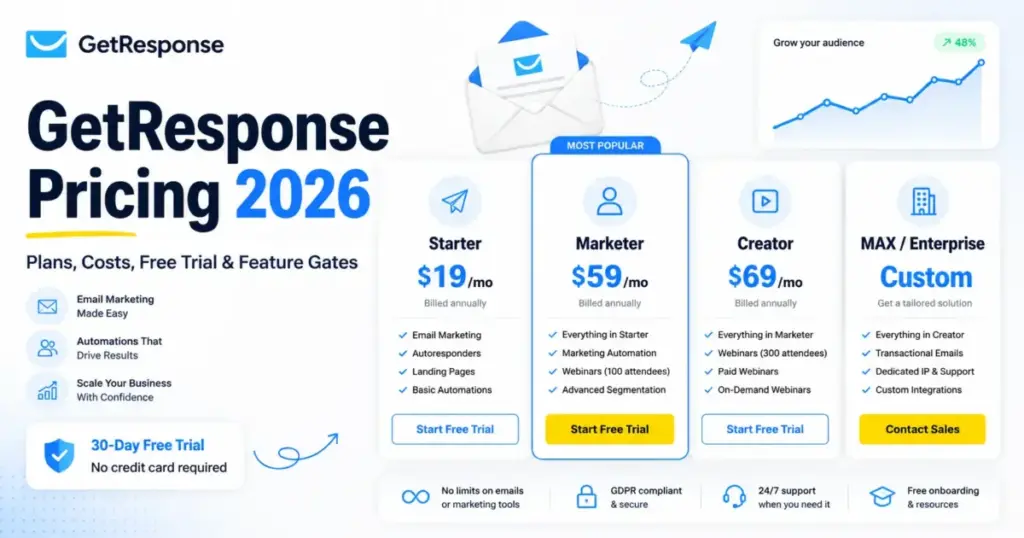
GetResponse charges by contact count, not by emails sent. That single decision shapes who saves money and who overpays. If your list is small and your campaigns are simple, GetResponse pricing starts at $19/mo on Starter for up to 1,000 contacts. The number that actually changes your bill is rarely the contact count, though. It is the feature gate. Starter caps you at one automation workflow and 3 users, so most ecommerce and automation teams land on Marketer at $59/mo instead.
This guide breaks down every plan, the contact-tier jumps, the seat limits, the add-ons that need a sales call, and which plan to avoid. If GetResponse is still one of several tools on your shortlist, our guide to the best email marketing software covers the wider field. All figures are based on GetResponse’s official pricing pages and documentation checked on June 30, 2026. Higher contact-tier numbers beyond the official 1,000-contact starting prices are labeled as third-party-corroborated estimates, not official checkout quotes.
Quick Pricing Verdict
| Question | Answer |
|---|---|
| Starting price | $19/mo (Starter, up to 1,000 contacts) |
| Free plan | Yes, free forever, up to 500 contacts, 2,500 newsletters/month |
| Free trial | 14 days of premium feature access, no credit card |
| Best plan for most teams | Marketer ($59/mo) for automation and ecommerce |
| Plan to avoid | Starter if you need real automation or more than 3 seats |
| Biggest hidden cost | Local taxes (all plans), plus custom add-ons (transactional email, SMS, dedicated IP) on Enterprise/MAX |
| Best alternative if too expensive | Brevo (send-based billing) for low-frequency senders |
| Pricing verified | June 30, 2026 (GetResponse official pricing page) |
What this means: GetResponse is competitive at small list sizes when you need email plus landing pages plus automation in one tool, and you can confirm every current rate on GetResponse’s live pricing page. The cost climbs as contacts grow and climbs faster when you cross a feature gate, not just a list-size threshold.
A 2026 Freshness Note Before You Compare Prices
Several pages ranking for GetResponse pricing are stale. Some still mention a 30-day trial or old plan names like Basic, Plus, and Professional. Those do not match GetResponse’s current 2026 structure. The trial is 14 days, and the public paid plans are Starter, Marketer, Creator, with Enterprise/MAX as the custom tier above them.
Here is how to read the conflicting claims you will see in search results.
| Claim seen in search results | Official 2026 evidence | How to interpret it |
|---|---|---|
| “30-day free trial” | 14-day premium access on a free account | Treat the 30-day claim as outdated |
| “Basic / Plus / Professional plans” | Starter, Marketer, Creator, Enterprise/MAX | Old plan names, do not use for budgeting |
| “Email Marketing / Marketing Automation / Ecommerce” tiers | Same current four-tier structure | Older third-party naming, map to current plans |
| “No free plan” | Free plan exists, up to 500 contacts | Stale; GetResponse Free is live in 2026 |
What this means: Use official pages for plan names and starting prices; GetResponse’s own free-trial help page confirms the 14-day window. Use third-party tables only for higher contact-tier estimates, and treat them as corroboration rather than fact.
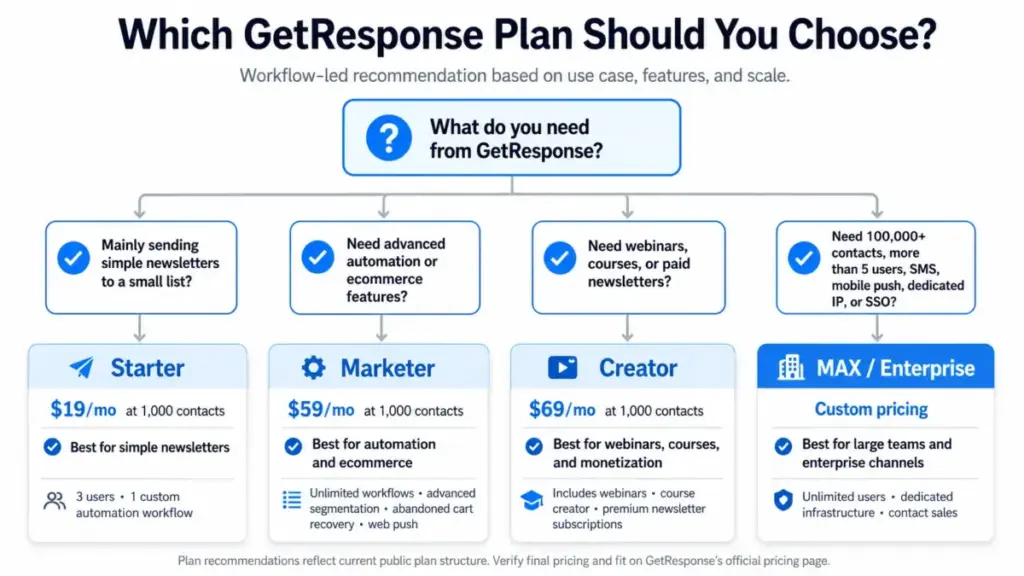
If You Send Simple Newsletters Under 1,000 Contacts
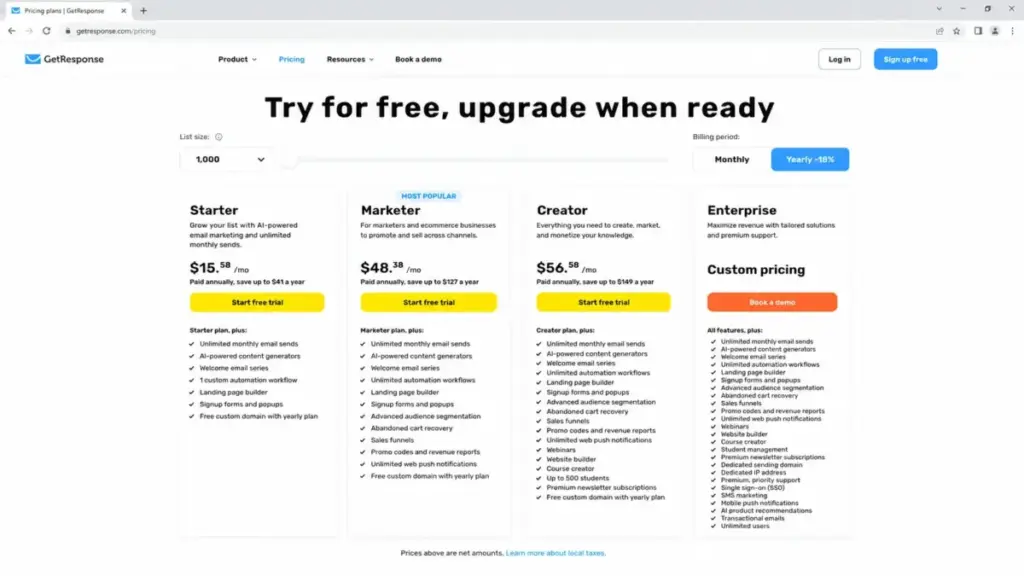
Best plan: Starter at $19/mo. Real cost at 1,000 contacts: $19/mo, or $15.58/mo on annual billing.
Starter fits one job well: sending newsletters and basic welcome emails to a small list. You get unlimited monthly email sends, landing pages, signup forms, AI email generators, and a single automation workflow. For a solo creator or a small business sending one or two campaigns a week, that is enough.
The ceiling shows up fast for anyone doing more. Starter includes one custom automation workflow and 3 users. Even basic email automation flows beyond a single sequence are off the table here, along with advanced segmentation, abandoned cart recovery, sales funnels, and web push. If your “newsletter” plan slowly turns into a “we need a welcome series, a re-engagement flow, and a cart reminder” plan, you have already outgrown Starter.
My read: Starter is a real plan, not a teaser, but only if your needs stay simple. The moment automation enters the conversation, price your budget around Marketer instead.
If You Run an Ecommerce or Automation Team
Best plan: Marketer at $59/mo. Real cost at 1,000 contacts: $59/mo, or $48.38/mo on annual billing.
Marketer is the plan most growing teams actually need, and it is the best value in the lineup for automation-heavy work. It opens unlimited marketing automation tools, advanced segmentation, abandoned cart recovery, sales funnels with revenue reports, and web push notifications. Those are the flows that drive revenue for a DTC brand or a B2B nurture program.
Seats matter here. Marketer includes 5 users. A 5-person marketing team fits cleanly. A 6-person team does not, and there is no public way to add a sixth seat without moving to a custom Enterprise contract.
The honest caveat: Marketer is the right plan for ecommerce and automation, and the wrong plan if your real need is webinars, online courses, or paid newsletters. Those live one tier up.
If You Sell Webinars, Courses, or Paid Newsletters
Best plan: Creator at $69/mo. Real cost at 1,000 contacts: $69/mo, or $56.58/mo on annual billing.
Creator is the monetization tier. It includes everything in Marketer and adds webinars, a website builder, a course creator with up to 500 students, and premium (paid) newsletter subscriptions. For a creator or educator building a business around live sessions and paid content, that bundle replaces several separate tools.
It still carries the 5-user seat limit. And it stops short of enterprise channels. There is no SMS, no mobile push, no transactional email, no dedicated IP, and no SSO on Creator. Those require Enterprise/MAX.
My recommendation: only pay the $10/mo jump from Marketer to Creator if webinars, courses, a website, or paid newsletters are part of the plan. If they are not, Creator is paying for shelf space you will not use.
If You Have a Large List or a Big Team
Best plan: Enterprise / GetResponse MAX. Real cost: custom, contact sales.
GetResponse MAX is the custom tier for larger senders. Official guidance suggests considering it around 100,000+ contacts (MAX page). It supports unlimited users, bespoke contracts (monthly, 12-month, or 24-month), and enterprise capabilities such as dedicated IP and sending domain, SSO, SMS, mobile push, transactional email, priority support, and dedicated services.
There is no public price. Anyone telling you the exact MAX rate is guessing. What you can do before the sales call is build your trigger list, then ask for a quote against it.
Likely Enterprise triggers, based on official documentation:
- 100,000 or more contacts
- More than 5 users on one account
- Dedicated IP or dedicated sending domain
- Single sign-on (SSO)
- SMS or mobile push as a marketing channel
- Transactional email at volume
- Priority support or a dedicated account manager
Negotiation tip: enterprise email contracts often have room on the annual or biennial term. If you can commit to 24 months, ask what that earns you on price before you sign a 12-month deal.
Full Plan Breakdown
Here is the public lineup at the 1,000-contact starting tier, which is the only tier GetResponse exposes as an official fixed price.
| Plan | Monthly | Annual equivalent | Billing basis | Users | Best for | Key limits |
|---|---|---|---|---|---|---|
| Free | $0 | $0 | Contacts | 1 | Testing, tiny lists | 500 contacts, 2,500 newsletters/mo, 1 landing page |
| Starter | $19/mo | $15.58/mo | Contacts + feature tier | 3 | Simple newsletters | 1 automation workflow, no advanced features |
| Marketer | $59/mo | $48.38/mo | Contacts + feature tier | 5 | Ecommerce, automation | No webinars, courses, SMS, dedicated IP |
| Creator | $69/mo | $56.58/mo | Contacts + feature tier | 5 | Webinars, courses, paid newsletters | No SMS, mobile push, transactional email, SSO |
| Enterprise / MAX | Custom | Custom | Custom contract | Unlimited | 100k+ lists, enterprise channels | Quote-based, no public price |
What this means: The dollar gaps between Starter, Marketer, and Creator are small at 1,000 contacts. The real difference is the feature gate, not the price. Pick the plan by the job you need done, then budget for how that price scales as your list grows.
What each plan includes, in one line
- Free includes the basics to test GetResponse, then drops to free-plan limits after 14 days of premium access. Avoid it as a long-term home if you need automation or branding removal.
- Starter includes sends, landing pages, and one workflow. Avoid it if you need real automation or a fourth seat.
- Marketer includes the full automation and ecommerce toolkit. Avoid it if your core need is webinars or courses.
- Creator includes monetization tools on top of Marketer. Avoid it if you will not use webinars, courses, the website builder, or paid newsletters.
- Enterprise/MAX includes everything plus dedicated infrastructure. Avoid it if your list and team fit inside a public plan, because you are paying for a sales process you do not need.
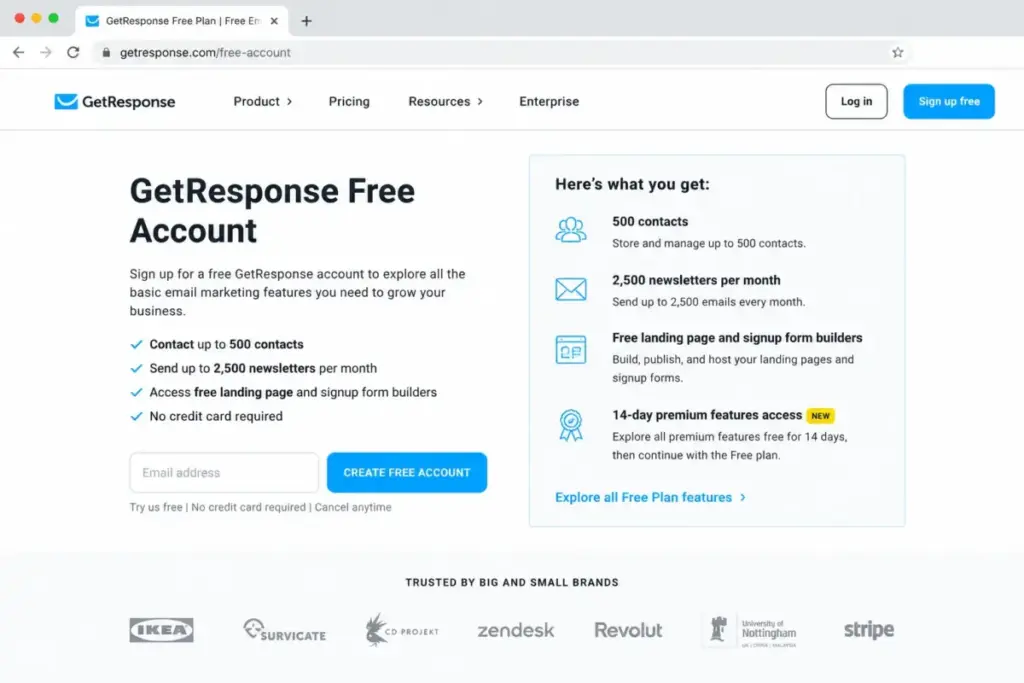
The free plan deserves its own note, because the search results misstate it constantly. GetResponse Free is free forever, needs no credit card, and includes 14 days of premium feature access before the account settles into free-plan limits (free plan page). The free account and the 14-day premium window are the same thing. There is no separate paid trial.
Feature Gates: What You Actually Get by Plan
This is where most GetResponse pricing pages stay vague. They say higher plans have “more features.” The useful version names the exact gate that forces an upgrade.
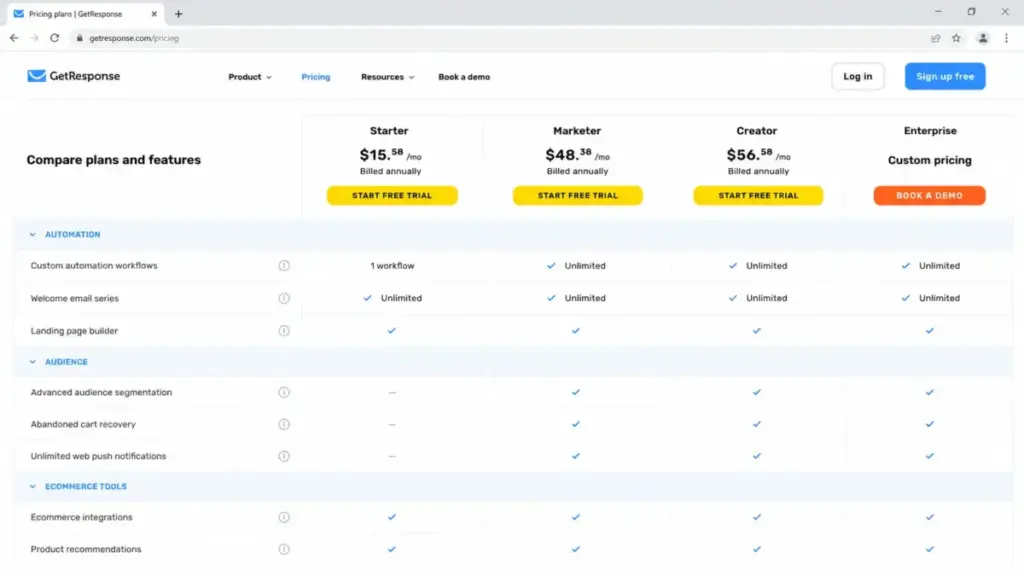
| Feature | Free | Starter | Marketer | Creator | Enterprise |
|---|---|---|---|---|---|
| Unlimited monthly sends | No (2,500/mo) | Yes | Yes | Yes | Yes |
| Custom automation workflows | Limited | 1 workflow | Unlimited | Unlimited | Unlimited |
| Advanced segmentation | No | No | Yes | Yes | Yes |
| Abandoned cart recovery | No | No | Yes | Yes | Yes |
| Sales funnels + revenue reports | No | No | Yes | Yes | Yes |
| Web push notifications | No | No | Yes | Yes | Yes |
| Webinars | No | No | No | Yes | Yes |
| Online courses (to 500 students) | No | No | No | Yes | Yes |
| Paid newsletters | No | No | No | Yes | Yes |
| SMS marketing | No | No | No | No | Yes/custom |
| Mobile push notifications | No | No | No | No | Yes/custom |
| Transactional email | No | No | No | No | Paid add-on |
| Dedicated IP / SSO / priority support | No | No | No | No | Yes/custom |
What this means: Three gates do most of the upgrade work. Automation and ecommerce push you from Starter to Marketer. Webinars, courses, and paid newsletters push you from Marketer to Creator. SMS, mobile push, transactional email, dedicated IP, and SSO push you all the way to Enterprise/MAX. Map your must-have features to this table before you look at price.
Cost at Scale: How GetResponse Pricing Grows With Contacts
The 1,000-contact starting price hides the real budgeting question, which is what happens as your list grows. GetResponse re-prices every plan at each contact tier.
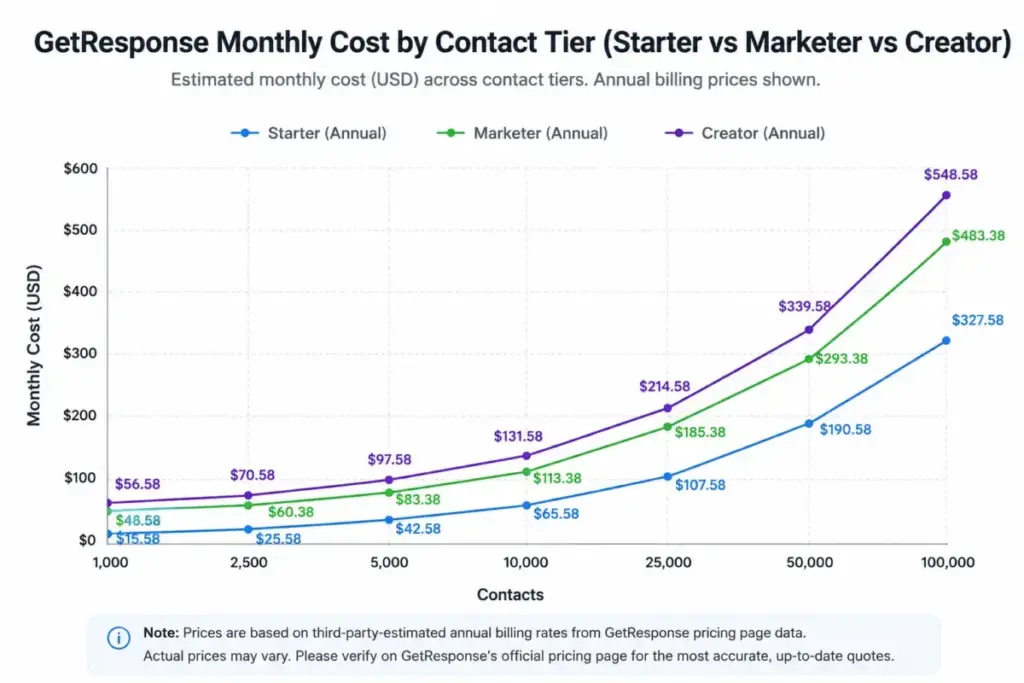
The table below shows monthly prices by contact size. Only the 1,000-contact row is an official GetResponse price. Every higher tier is a third-party-corroborated estimate drawn from independent pricing trackers and recent reviews, not an official checkout quote. Verify your exact number on the official pricing page by entering your contact count.
| Contacts | Starter (mo) | Marketer (mo) | Creator (mo) |
|---|---|---|---|
| 1,000 (official) | $19 | $59 | $69 |
| 2,500 (est.) | $29 | $69 | $79 |
| 5,000 (est.) | $54 | $95 | $109 |
| 10,000 (est.) | $79 | $114 | $134 |
| 25,000 (est.) | $174 | $215 | $249 |
| 50,000 (est.) | $299 | $359 | $414 |
| 100,000 (est.) | $539 | $599 | $690 |
What this means: GetResponse stays affordable through about 5,000 contacts, then climbs steeply. Crossing from 10,000 to 25,000 contacts roughly doubles every plan. At 100,000 contacts the gap between Starter and Creator narrows, because list size now dominates the bill more than the feature tier does. That is also the point where GetResponse’s own documentation suggests asking about MAX.
Seat scale: when your team outgrows the public plans
Contacts are not the only limit. User seats cap out fast.
| Team size | Plan that fits | Note |
|---|---|---|
| 1 to 3 users | Starter | Starter includes 3 users |
| 4 to 5 users | Marketer or Creator | Both include 5 users |
| 6 to 10 users | Enterprise/MAX | No public seat upgrade above 5 |
| 25 to 100 users | Enterprise/MAX | Unlimited users, custom price |
What this means: A 6-person team has no public plan, even on a tiny list. Seat count alone can force you into a sales conversation. If your team is growing past five marketers, factor an Enterprise quote into your plan from the start.
Hidden Costs and Add-Ons
Public plan prices are not the whole bill. A few costs sit outside the plan cards, and several are quote-based rather than published.
| Cost | Status | What to expect |
|---|---|---|
| Local taxes | May apply | Prices are net amounts; tax is added at checkout |
| Transactional email | Paid add-on | Priced by monthly send limit; not publicly listed |
| SMS balance and setup | Custom | Top-ups plus US/Canada number setup; no public price |
| Professional Services | Bespoke | Implementation help, included only by contract |
| Enterprise/MAX | Custom | Quote-based, contact sales |
What this means: None of these are surprise traps if you know about them, but they are easy to miss. Taxes apply to everyone. GetResponse’s docs confirm that transactional email is priced by send volume, that SMS needs balance top-ups and number setup, and that Professional Services is included only by contract. None of those rates are published, so ask for the numbers in writing before you sign.
Monthly vs Annual Billing
GetResponse applies an 18% discount for annual billing on its public plans, and a 50% discount for verified charities and NGOs. Prices are shown as net amounts, so local tax can sit on top.
Here is what the annual discount saves at the 1,000-contact tier. These are examples calculated from verified starting prices, not separate quotes.
| Plan | Monthly (12 mo) | Annual (12 mo) | You save per year |
|---|---|---|---|
| Starter | $228 | ~$187 | ~$41 |
| Marketer | $708 | ~$581 | ~$127 |
| Creator | $828 | ~$679 | ~$149 |
What this means: Annual billing is worth taking once you have decided GetResponse is your tool. The savings scale with the plan, so the higher your tier, the more the discount matters. The trade-off is commitment. Pay monthly while you are still testing fit, then switch to annual once you are sure.
Which GetResponse Plan Should You Avoid?
Avoid Starter if you need marketing automation, advanced segmentation, ecommerce recovery, or a team larger than three. Starter’s single-workflow cap is the gate most buyers hit within weeks, and discovering it after you have built your list is a frustrating place to upgrade from.
The exception: Starter is the right call for a genuine newsletter-only operation that will not add automation. If your whole use case is “write and send,” Starter does that without making you pay for tools you will ignore.
Avoid Creator if webinars, courses, the website builder, and paid newsletters are not on your roadmap. At a 1,000-contact list it is only $10/mo more than Marketer, which makes it tempting, but you are paying for monetization features you will not open. Marketer is the cleaner fit for pure email and automation.
GetResponse Pricing vs Competitors
GetResponse against Brevo, Mailchimp, Kit, and ActiveCampaign is not an apples-to-apples price comparison. Each tool bills on a different model, so a “starting price” race is misleading. The model is the real comparison.
| Tool | Starting price | Billing model | Free plan |
|---|---|---|---|
| GetResponse | $19/mo | Contacts + feature tier | Yes (500 contacts) |
| Brevo | $9/mo (Starter) | Email volume + contacts | Yes (300 emails/day) |
| Mailchimp | ~$13/mo (Essentials) | Contacts + send limits + overages | Yes (250 contacts) |
| Kit | $33/mo (Creator, 1k subs) | Subscriber-tiered | Yes (Newsletter plan) |
| ActiveCampaign | ~$15 to $19/mo | Contacts + feature tier | No (14-day trial) |
Competitor figures come from official pricing pages checked June 30, 2026: Brevo, Mailchimp, Kit, and ActiveCampaign. Mailchimp and ActiveCampaign render some USD prices dynamically, so confirm your exact rate on their pages. Kit pricing is subscriber-based, not per-user.
What this means: If you send infrequently to a large list, Brevo’s send-based pricing usually beats GetResponse, because you stop paying for contacts you rarely email. Mailchimp’s overage model can surprise you when you exceed a send limit.
If you live in automation, ActiveCampaign pricing competes hardest on the same contact-plus-feature model. Kit is built for creators who sell on a subscriber basis. GetResponse wins when you want email, landing pages, and automation bundled in one contact-tiered plan.
Is GetResponse Worth the Price?
GetResponse is worth it if you want an all-in-one platform and you will use the bundle. The value sits in Marketer at $59/mo, where unlimited automation, advanced segmentation, abandoned cart recovery, sales funnels, and web push come together for ecommerce and B2B nurture. For a 5-person team on a list under 10,000 contacts that runs real automation, the price is fair against what you would pay to stitch separate tools together. Our full GetResponse review covers how those features hold up beyond the price tag.
It is not worth it if your needs are narrow. A low-frequency sender with a large list pays for stored contacts they rarely email, and a send-based tool like Brevo will cost less. A creator who only sells courses may find Kit pricing or a dedicated course platform cheaper than Creator. And any team that needs SMS, dedicated IP, or SSO is pushed into a custom Enterprise quote, where the published-price advantage disappears.
My recommendation by segment: ecommerce brands doing real lifecycle automation should start on Marketer. Creators selling webinars and courses should compare Creator against a dedicated stack before committing. Large senders and enterprise teams should get a MAX quote and a Brevo quote, then decide on total cost, not starting price.
This analysis was prepared by Sarah Chen for saaszap.com, based on GetResponse’s official pricing and documentation rather than hands-on account testing.
How to Avoid Overpaying for GetResponse
- Buy by feature gate, not by list size. Match your must-have features to the gate table, then pick the lowest plan that clears every gate.
- Do not jump to Creator for $10. The Marketer-to-Creator gap is small, but only pay it if you will use webinars, courses, the website builder, or paid newsletters.
- Clean your list before you price it. Contacts drive the bill. Removing dead contacts can drop you a full pricing tier.
- Take the 18% annual discount only after you are sure. Pay monthly during testing, then commit annually to lock the saving.
- Get add-on prices in writing. Transactional email, SMS, and dedicated IP are quote-based. Ask for numbers before you sign, not after.
- Check the nonprofit rate. Charities and NGOs qualify for a 50% discount that is easy to miss.
- Quote MAX against your trigger list. If you need 100k+ contacts, six or more seats, or enterprise channels, build the trigger list first and ask for the longer-term contract price.
GetResponse Pricing FAQ
How much does GetResponse cost?
GetResponse pricing starts at $19/mo for Starter at up to 1,000 contacts, $59/mo for Marketer, and $69/mo for Creator. Enterprise/MAX is custom. Annual billing takes 18% off.
Is GetResponse free?
Yes. GetResponse Free is free forever, with up to 500 contacts and 2,500 newsletters per month. It also includes 14 days of premium feature access with no credit card.
Does GetResponse have a free trial?
Yes, 14 days of premium feature access on a free account, no credit card required. Pages claiming a 30-day trial are out of date.
Is GetResponse pricing based on contacts or emails?
It is based on contacts plus your feature tier. Sends are unlimited on paid plans, so storing more contacts, not sending more emails, is what raises your bill.
Which GetResponse plan includes automation?
Marketer is the first plan with unlimited automation workflows and advanced segmentation. Starter includes only one workflow.
Which GetResponse plan includes webinars and courses?
Creator. It adds webinars, a website builder, courses for up to 500 students, and paid newsletters on top of Marketer’s features.
Does GetResponse charge per user?
No, but seats are capped. Starter includes 3 users, Marketer and Creator include 5, and only Enterprise/MAX offers unlimited users.
What are GetResponse's hidden costs?
Local taxes apply on top of net prices. Transactional email, SMS, dedicated IP, and Professional Services are add-on or enterprise costs that GetResponse does not publish.
Is GetResponse cheaper than Mailchimp?
It depends on your list and sends. GetResponse starts higher than Mailchimp Essentials but bundles more automation. Our Mailchimp pricing breakdown shows where the overage billing bites, so compare on your real usage.
When should I move to GetResponse MAX?
Consider MAX around 100,000+ contacts, or sooner if you need more than five seats, SMS, mobile push, dedicated IP, or SSO. It is custom-priced, so request a quote against your specific needs.