Most marketing teams set up a welcome email, connect it to a signup form, and call it “automation.” Six months later, the welcome flow is still sending outdated content, two other workflows are firing on the same contact within 24 hours, and the spam complaint rate is climbing past 0.2%.
That is not a technology problem. That is what happens when email automation is treated as a scheduling feature instead of what it actually is: a data-triggered workflow system that only works when consent, segmentation, deliverability, measurement, and customer journey logic are designed together.
This guide explains how email automation works at the workflow level, where it breaks, which tools support it, how to measure results, and when automation can harm your sender reputation if handled carelessly. If you are evaluating email marketing platforms or building your first automated sequence, start here.
Quick Answer: Email automation is software that sends targeted email messages automatically when predefined triggers, schedules, conditions, or customer behaviors are met. It differs from a scheduled newsletter because automation runs continuously and reacts to individual actions, not calendar dates. It works best when paired with clean data, proper consent, sender authentication, and ongoing workflow maintenance.
What Email Automation Actually Means
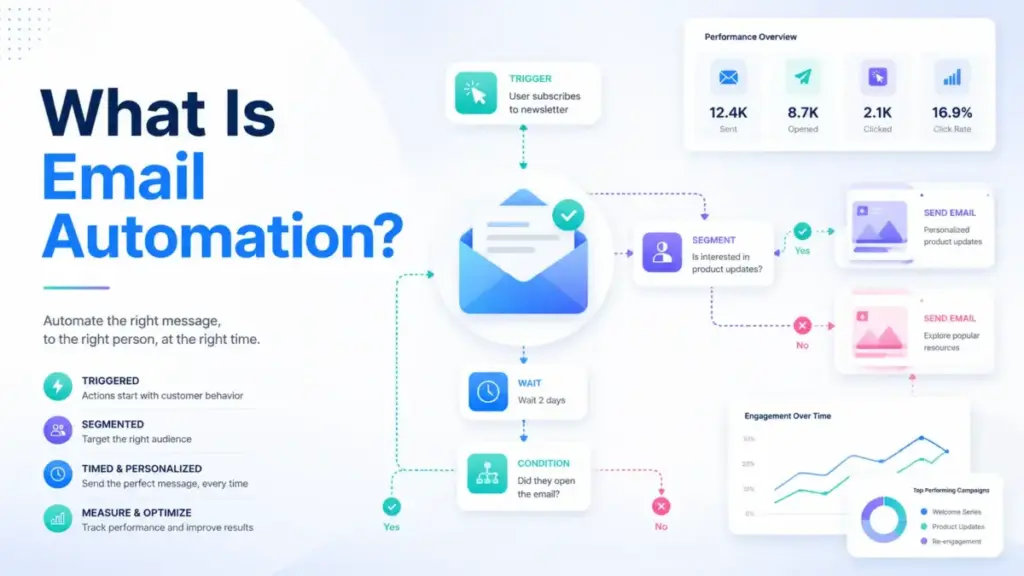
Email automation sends targeted messages based on rules tied to user behavior, data conditions, or time intervals rather than manual sends. That is the simple version.
At the technical level, email automation connects customer data to workflow logic. A trigger starts the workflow. The system then applies rules, delays, filters, conditional branches, and suppression checks before selecting the right email, inserting personalization fields, verifying eligibility, and sending through an email service provider. After delivery, it records metrics: delivery, open, click, conversion, unsubscribe, complaint, and revenue attribution.
From a business perspective, email automation supports lead nurturing, onboarding, cart recovery, post-purchase follow-up, re-engagement, and transactional communications across the entire customer lifecycle. According to Mailchimp’s marketing glossary, email marketing automation uses predefined rules that trigger and personalize email messages based on customer actions or inactions. ActiveCampaign’s glossary classifies common triggers into three categories: actions, dates, and conditions.
The distinction that matters: a scheduled campaign is a one-time or calendar-based send. Automation runs continuously and reacts to individual triggers and behavior. A drip campaign is one type of automation, usually a fixed sequence. Modern automation also includes branching, behavioral triggers, suppression rules, lead scoring, transactional workflows, and AI-assisted timing.
Why Email Automation Matters in 2026
Email remains a high-scale customer channel, but inbox providers and users are less tolerant of generic, unauthenticated, or poorly timed messages. Google and Yahoo sender requirements now make authentication, unsubscribe handling, and spam-rate control operational requirements, not optional deliverability details.
Neil Kumaran, Group Product Manager for Gmail Security & Trust, announced: “Starting in 2024, we’ll require bulk senders to authenticate their emails, allow for easy unsubscription and stay under a reported spam threshold” (Gmail Security blog). Those requirements are now enforced. Any automation that sends at volume without SPF, DKIM, DMARC, and one-click unsubscribe handling is at risk of rate limiting, blocking, or spam classification.
AI is also shifting automation from static drip sequences toward adaptive segmentation, send-time optimization, and journey orchestration. The shift is real, but consent, data quality, and QA still determine whether AI-assisted automation helps or creates noise.
How Email Automation Works
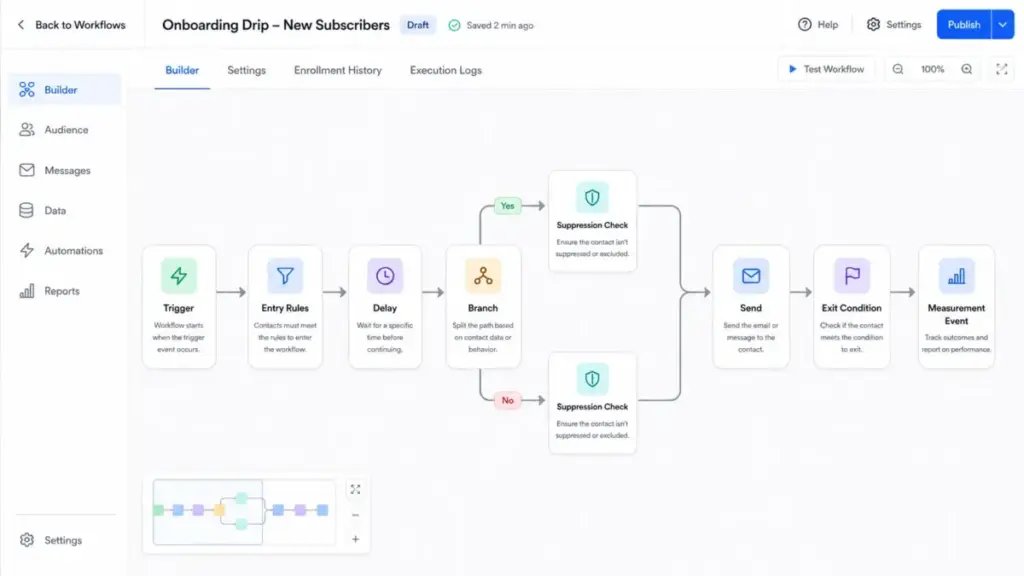
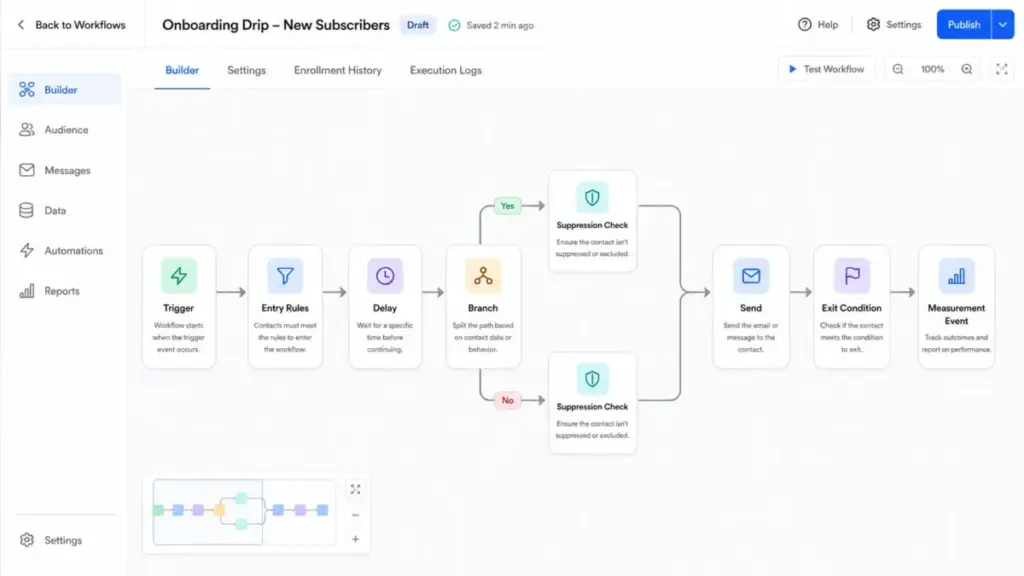
An automated email workflow has more moving parts than most articles explain. Here is the anatomy of a single workflow, step by step:
- Trigger fires. A customer signs up, abandons a cart, makes a purchase, hits a lead score threshold, reaches a subscription renewal date, or enters a segment.
- Entry conditions filter. Not everyone who triggers the event qualifies. Entry conditions check consent status, segment membership, previous engagement, or suppression list status.
- Delay applies. A wait step controls timing. Send immediately, wait 1 hour, wait 3 days, or wait until a specific time window.
- Branch evaluates. Conditional logic splits the audience. Did the contact already purchase? Are they a new customer or returning? Is their cart above a threshold value? Each path gets different content.
- Suppression checks run. The system verifies the contact is not on a suppression list, has not already received this email, has not exceeded a frequency cap, and has not unsubscribed.
- Email sends. The system selects the template, inserts personalization fields or dynamic content, and sends through the ESP. Sender authentication (SPF, DKIM, DMARC) must be configured before this step.
- Exit condition triggers. The contact exits the workflow after completing the desired action (purchasing, booking, replying) or after the maximum number of emails.
- Measurement records. The platform logs delivery, bounce, open, click, conversion, unsubscribe, complaint, and revenue attribution data.
Where things break: overlapping workflows can send too many emails to the same contact. If a welcome flow, abandoned cart flow, and promotional campaign all fire within 48 hours, the customer experience degrades. Suppression rules, exit criteria, priority rules, and frequency caps prevent this, but most definition articles skip the topic entirely.
Trigger Types at a Glance
| Trigger Type | Examples | Best For |
|---|---|---|
| Behavior-based | Signup, purchase, cart abandonment, link click, page visit | Ecommerce, SaaS onboarding, lead nurture |
| Time-based | Birthday, renewal date, subscription anniversary, webinar reminder | Retention, loyalty, re-engagement |
| Lifecycle | Onboarding stage, activation milestone, repeat purchase, win-back | Customer journey orchestration |
| Transactional | Order confirmation, shipping update, password reset, receipt | Operational communication |
| Segment-based | Lead score threshold, engagement level, customer value tier | Targeted campaigns, ABM |
| AI-assisted | Predicted send time, recommended content, next-best-action | Optimization at scale |
Email Automation vs Related Concepts
| Concept | What It Is | When to Use | Key Difference |
|---|---|---|---|
| Email campaign | A one-time or calendar-based send to a list | Announcements, promotions, newsletters | Manual, not triggered by behavior |
| Drip campaign | A fixed sequence of emails on a time delay | Simple onboarding, educational series | Linear, no branching or behavioral logic |
| Email automation | Continuous workflows triggered by behavior, data, or time | Cart recovery, lead nurture, lifecycle | Branching, suppression, triggers, conditions |
| Marketing automation | Multi-channel orchestration (email + SMS + ads + CRM) | Full-funnel demand generation | Email automation is one component |
| Transactional email | Operational messages triggered by user actions | Receipts, password resets, confirmations | Compliance rules differ from marketing email |
| CRM automation | Workflow automation within a CRM (tasks, deals, alerts) | Internal sales and service processes | Not limited to email |
For a deeper look at how marketing automation extends beyond email, see our dedicated guide.
Zapier’s email automation guide draws a useful line: email automation broadly can include personal inbox workflows, while email marketing automation focuses on one-to-many communication with leads, customers, or subscribers. This article covers the marketing and lifecycle side.
How to Set Up Email Automation (Step by Step)
Step 1: Define One Workflow Goal First
Do not start with 10 workflows. Start with one: welcome, onboarding, cart recovery, renewal, lead nurture, webinar follow-up, post-purchase, or re-engagement. Map the exact trigger, entry condition, exit condition, suppression rules, and success event before opening any tool.
Step 2: Audit Your Data
Email automation depends on data quality. Audit: email permission status, source, lifecycle stage, purchase history, product interest, engagement recency, country, consent basis, and CRM or ecommerce fields. Stale data, purchased lists, and missing consent records will undermine any workflow you build.
Step 3: Choose a Platform That Matches Your Workflow
Choose a platform that supports the trigger type, segmentation depth, integrations, reporting, and compliance controls your workflow requires. A simple welcome series has different requirements than a multi-branch cart recovery flow with SMS fallback.
Step 4: Build Workflow Logic
Set up delays, branches, filters, exclusion lists, frequency caps, and fallback paths. Match email content to the user action and lifecycle stage. Generic newsletter copy in a behavior-triggered email defeats the purpose.
Step 5: Configure Sender Authentication and Compliance
Before launching any automation, configure SPF, DKIM, DMARC, one-click unsubscribe headers, preference center, physical postal address, and suppression lists. Google’s sender guidelines and Yahoo’s sender best practices require these for bulk senders. The FTC’s CAN-SPAM compliance guide requires accurate header information, non-deceptive subject lines, identification of ads where applicable, a physical postal address, a clear opt-out method, and honoring opt-out requests.
Step 6: QA and Test
Test the workflow with sample contacts, broken-link checks, merge-field checks, mobile rendering, and edge cases. Verify that suppression rules actually prevent duplicate sends.
Step 7: Launch and Monitor
Launch to a limited audience or low-risk workflow first. Monitor delivery rate, complaint rate, unsubscribe rate, clicks, conversions, and revenue for the first 7-14 days.
Step 8: Review Every 30-90 Days
Automation replaces repeated sending, not ownership. Bloomreach’s email automation guide states it directly: “Even with email marketing automation tools, no email is truly ‘set it and forget it'” (Bloomreach). Review every 30-90 days for outdated content, inactive branches, conflicting flows, poor-performing steps, and changes in sender requirements.
Common Mistakes and Misconceptions
Mistakes That Waste Your First Month
- Starting with too many workflows. Build one, measure it, then expand. Running five untested flows simultaneously creates overlap and makes debugging impossible.
- Using automation before consent and data quality are ready. Automation amplifies whatever you feed it. Bad data, weak segmentation, or outdated content get sent faster, not better.
- Treating open rate as the main success metric. Open rates are less reliable due to Apple Mail Privacy Protection, Gmail image proxying, and bot pre-fetching. Click-through rate, conversion rate, and revenue per recipient are more actionable.
- Failing to cap frequency. When welcome, cart, campaign, and win-back flows overlap on the same contact, the result is email fatigue, unsubscribes, complaints, and sender reputation damage.
- Not testing merge fields and links. A personalization field that renders as “{first_name}” or a broken link in an automated email runs 24/7 until someone catches it.
- Ignoring sender authentication requirements. SPF, DKIM, DMARC, one-click unsubscribe, and complaint rate monitoring are not optional for bulk senders.
- Buying or scraping lists. Automation does not fix list quality. It exposes it faster.
Misconceptions vs Reality
| Misconception | Reality |
|---|---|
| Email automation is the same as scheduling newsletters | Scheduled campaigns are one-time sends. Automation runs continuously and reacts to individual triggers and behavior. |
| A drip campaign and email automation are identical | A drip campaign is one type of automation (fixed sequence). Modern automation includes branching, suppression, lead scoring, and AI-assisted timing. |
| Once an automation is live, it can be ignored | Automation needs ongoing QA, deliverability monitoring, content updates, A/B testing, and flow conflict checks. |
| Personalization means adding a first name | Useful personalization depends on behavior, lifecycle stage, preferences, purchase history, consent, and timing. |
| More automation always means better marketing | Too many workflows cause email fatigue, unsubscribes, complaints, flow conflicts, and poor sender reputation. |
Limitations and When NOT to Use Email Automation
When Automation Helps
Use email automation when: the audience has opted in, the trigger reflects real intent or timing, the message provides timely value, the data source is reliable, and the workflow can be measured and maintained.
When to Delay or Avoid
Avoid or delay automation when: consent is unclear, lists are purchased, data is stale, deliverability is already weak, the message is highly sensitive and requires human review, the workflow would create excessive frequency, or the organization cannot monitor performance and complaints.
Deliverability and Compliance Preflight Checklist
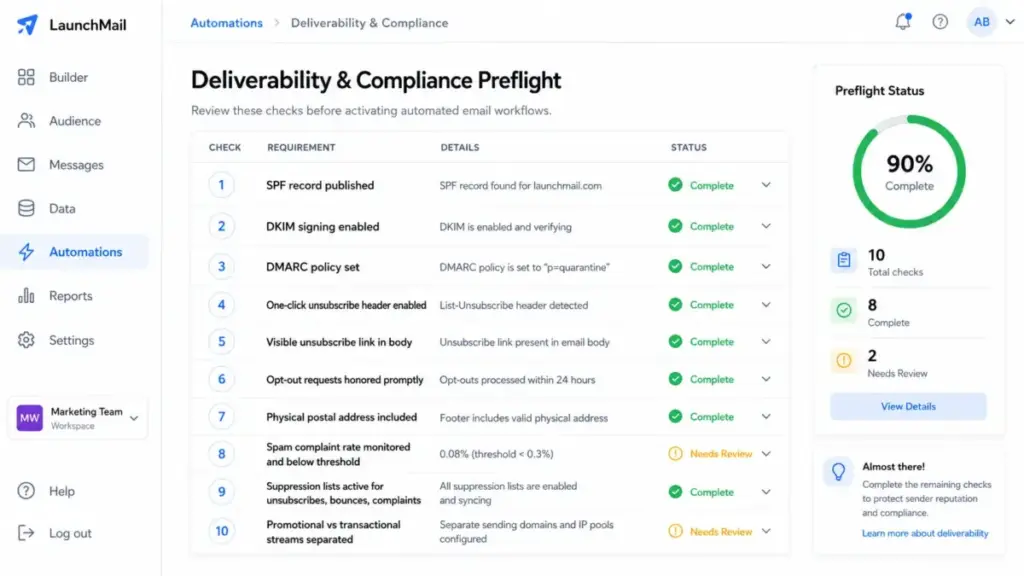
Before activating any automated workflow, verify:
- SPF record published and passing
- DKIM signing enabled and verified
- DMARC policy set (at minimum p=none with reporting)
- One-click unsubscribe header (RFC 8058) included
- Visible unsubscribe link in email body
- Opt-out requests honored within 2 days
- Physical postal address included
- Spam complaint rate below 0.3%
- Suppression lists active (unsubscribes, bounces, complaints)
- Promotional vs transactional emails separated by sending stream
This checklist draws from Google Workspace sender guidelines and Yahoo sender best practices.
How to Measure Email Automation Success
As Twilio SendGrid’s best practices guide explains, automated email is any marketing or transactional email sent based on predefined rules or triggers. Measuring success requires matching metrics to the workflow goal, not using the same KPIs for every flow.
| Workflow Type | Primary Metric | Secondary Metrics | Why Open Rate Is Not Enough |
|---|---|---|---|
| Welcome series | Activation rate, click-through rate | Unsubscribe rate, list growth rate | Opens do not measure whether the user took the intended next step |
| Abandoned cart | Recovery revenue, conversion rate | Click-to-open rate, revenue per recipient | Recovery revenue directly measures business impact |
| Onboarding | Time-to-first-action, workflow completion rate | Reply rate, feature adoption | Engagement depth matters more than opens |
| Lead nurture | Lead-to-MQL conversion, reply rate | Click-through rate, suppression rate | Progression through funnel is the goal |
| Re-engagement | Re-activation rate, unsubscribe rate | Complaint rate, delivery rate | High unsubscribes may indicate list needs pruning, not flow failure |
| Post-purchase | Repeat purchase rate, review submission rate | Revenue per recipient, click-through rate | Revenue and retention signals outweigh opens |
| Transactional | Delivery rate, bounce rate | Complaint rate, rendering accuracy | Delivery reliability is the primary concern |
One 2026 report summarized by TechRadar found that fewer than half of organizations can reliably track email ROI and that deliverability gaps affect the ability to capture email returns. Measuring email automation success requires connecting workflow data to conversion and revenue systems, not relying on opens and clicks alone.
Tools That Support Email Automation
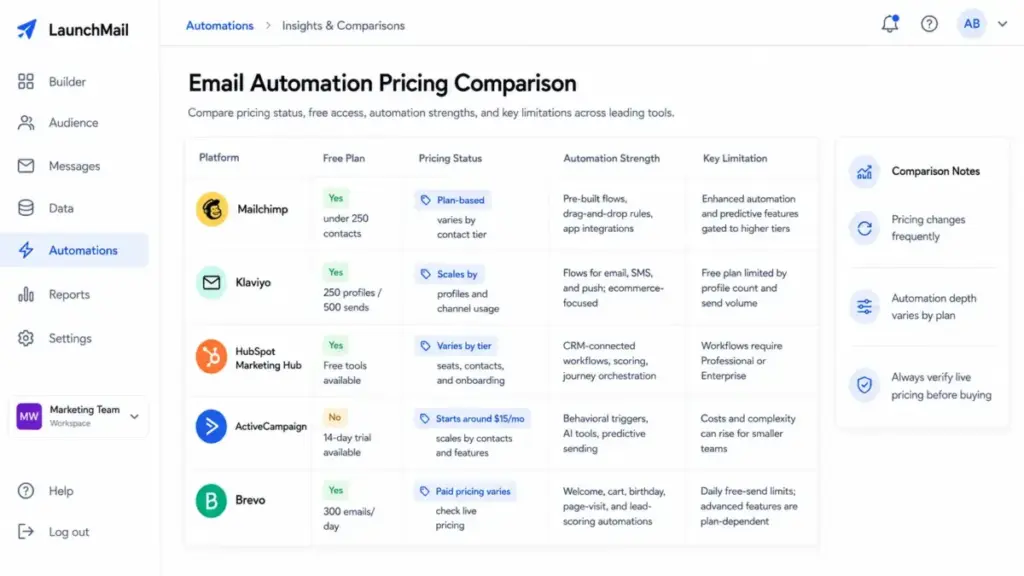
Five platforms illustrate how email automation features, pricing, and limitations vary in practice:
| Platform | Free Plan | Starting Price Caveat | Automation Strength | Key Limitation |
|---|---|---|---|---|
| Mailchimp | Under 250 contacts | Plan-based limits vary by contact tier and feature access | Pre-built flows, drag-and-drop rules, app integrations | Enhanced automation flows and predictive segmentation gated to higher tiers |
| Klaviyo | 250 profiles, 500 sends/month | Scales by profiles and channel usage | Flows for email, SMS, push with ecommerce-oriented templates | Free plan limited by profile count and send volume |
| HubSpot Marketing Hub | Free tools available | Pricing varies by tier, seats, contacts, billing, and onboarding | CRM-connected workflows, lead scoring, journey orchestration | Workflows require Professional or Enterprise subscription |
| ActiveCampaign | No free plan (14-day trial) | Packages start at $15/month, scaling by contacts and features | Behavioral triggers, AI campaign builder, predictive sending, cross-channel | Learning curve and costs that can rise for smaller businesses |
| Brevo | 300 emails/day, 100K contacts | Paid plan amounts should be checked on Brevo’s live pricing page | Welcome, cart, birthday, page-visit, lead scoring automations | Daily send limit on free plan; advanced features plan-dependent |
Pricing verified as of May 2026 using official sources. Check each platform’s live pricing page before buying, as contact tiers, plan structures, and add-ons change frequently.
Other platforms that support email automation include Twilio SendGrid, Braze, Bloomreach Engagement, Customer.io, Omnisend, Salesforce Marketing Cloud, Adobe Marketo Engage, and Constant Contact. The right choice depends on your trigger requirements, channel needs, integration stack, contact volume, and budget.
When to Evaluate Software
You likely need a dedicated email marketing tool when:
- You are sending behavior-triggered emails manually
- Your email list exceeds 500 active contacts
- You need multi-step sequences with conditional logic
- Your ecommerce store requires cart recovery and post-purchase flows
You need to coordinate email with SMS marketing tools, push, or CRM workflows - Deliverability, authentication, and compliance reporting matter to your team
You probably do not need dedicated automation software yet if your list is under 200 contacts, you send fewer than 4 emails per month, or your business model does not involve recurring email-based engagement.
How to Choose the Right Tool
- Map your workflow requirements (triggers, branches, channels) before comparing features.
- Check whether the automation depth you need is available on the plan you can afford.
- Verify integration support for your ecommerce platform, CRM, or CDP.
- Test deliverability, not just features. An email your subscriber never sees does not exist.
- Confirm compliance controls: suppression lists, unsubscribe handling, consent management.
- Evaluate reporting depth: can you measure conversion and revenue, not just opens?
Email Automation Beginner Checklist
Use this checklist before launching your first automated workflow:
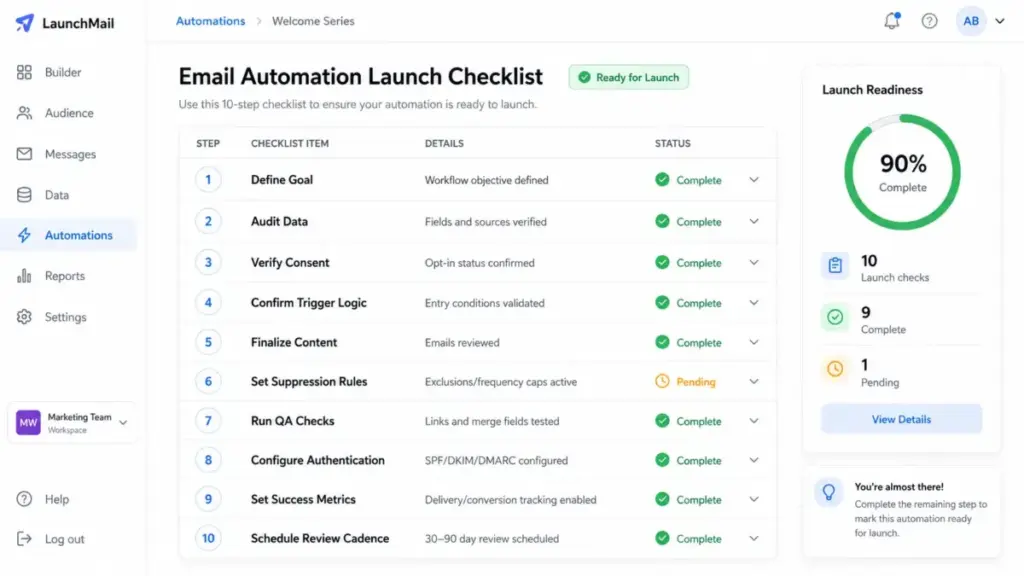
- Define one workflow goal (welcome, cart recovery, onboarding, nurture)
- Map the trigger, entry condition, exit condition, and success event
- Audit email list for consent, data quality, and suppression readiness
- Choose a platform that supports your trigger type and integrations
- Configure SPF, DKIM, DMARC, and one-click unsubscribe before sending
- Write email content matched to the user action and lifecycle stage
- Build workflow logic with delays, branches, suppression, and frequency caps
- QA with test contacts: check merge fields, links, mobile rendering, edge cases
- Launch to a small audience and monitor for 7-14 days
- Schedule 30-90 day review cycle for content, performance, and flow conflicts
Related Resources
- Mailchimp review for detailed platform analysis
- Klaviyo review for ecommerce-focused evaluation
- ActiveCampaign review for automation depth
- Brevo review for sends-based pricing
- What is workflow automation? for broader automation context
- ConvertKit review for creator-focused email automation
FAQ
What is email automation in simple terms?
Email automation is software that sends emails automatically based on triggers like signups, purchases, or time delays. Instead of manually sending each message, you set up rules once and the system sends the right email to the right person when the trigger fires. It runs continuously until you pause or update it.
Is a drip campaign the same as email automation?
No. A drip campaign is a fixed sequence of emails sent on a time delay. Email automation includes drip campaigns but also supports behavioral triggers, conditional branching, suppression rules, lead scoring, transactional workflows, and AI-assisted timing. A drip campaign is one automation type, not the whole category.
What should I automate first in email marketing?
Start with a welcome sequence. It triggers on signup, has a clear goal (introduce your brand and drive a first action), and affects every new subscriber. Once the welcome flow is running and measured, expand to cart recovery, onboarding, or re-engagement based on your business model.
Why are my automated emails going to spam?
Common causes: missing SPF, DKIM, or DMARC authentication; spam complaint rate above 0.3%; no one-click unsubscribe header; sending to purchased or unengaged lists; or content that triggers spam filters. Check Google’s sender guidelines and audit your authentication before troubleshooting content.
How many emails should be in a welcome sequence?
Three to five emails over 7-14 days is a practical starting point. The first email should send immediately after signup. Space subsequent emails 2-3 days apart. Test completion rates and unsubscribe rates to decide whether to add or remove steps. More emails are not automatically better.
How do I stop welcome and cart flows from sending at the same time?
Use suppression rules or flow priority settings. Most platforms (including Klaviyo and ActiveCampaign) let you exclude contacts who are active in another flow, set flow priority, or apply frequency caps. Without these rules, a new subscriber who also abandons a cart can receive 4-6 emails in 48 hours.
Can I automate cold email legally in the US?
The CAN-SPAM Act allows commercial email to recipients without prior consent, provided you include accurate headers, a non-deceptive subject line, a physical postal address, and a clear opt-out mechanism, and honor opt-outs promptly. Consent requirements differ under GDPR (EU), CASL (Canada), and other regulations. Purchased lists carry high complaint risk regardless of legality.
How often should automated email workflows be reviewed?
Every 30-90 days. Check for outdated content, broken links, inactive branches, poor-performing steps, flow conflicts, and changes in sender requirements. Automation replaces repeated manual sending. It does not replace ongoing ownership and optimization.
What data do I need before building automated emails?
At minimum: verified email addresses with consent, a trigger event source (signup form, ecommerce platform, CRM), and basic segmentation fields (lifecycle stage, product interest, or engagement level). Advanced automation also requires purchase history, behavioral data, lead scores, and integration with your data platform.
How do I measure email automation ROI?
Connect your email platform to conversion tracking (ecommerce revenue, lead-to-customer conversion, or goal completions). Track revenue per recipient, conversion rate, and recovery revenue by workflow. Open rate alone does not measure ROI. Recent reports suggest fewer than half of organizations can reliably track email ROI, so start with one workflow and build measurement depth over time.