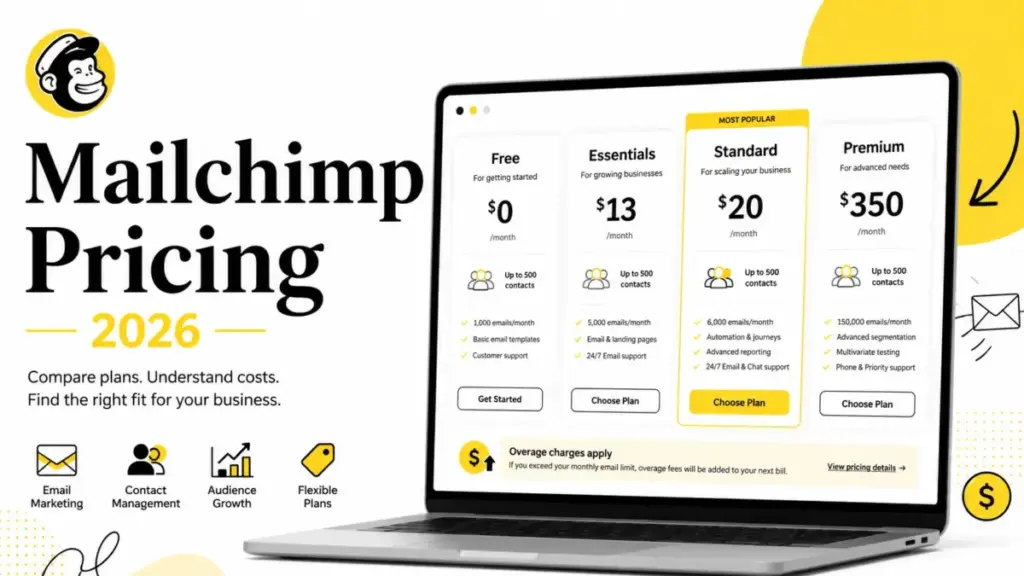
Mailchimp lists $15/month for Essentials on its pricing page. That number applies to the first 12 months, at the lowest contact tier, for a single user. A 5-person marketing team that needs advanced automations, segmentation, and reporting will land on Standard at $25/month before contacts, SMS credits, transactional email blocks, and overage charges enter the bill. The pricing page shows one number. The invoice shows another.
That gap is the real story of Mailchimp pricing in 2026, and it is what this guide breaks down. If you are comparing best email marketing platforms, the plan price is only the first layer. Contact tiers, user-seat gates, send limits, add-on eligibility, and overage exposure behind that plan determine what you pay.
I verified all pricing against Mailchimp’s official marketing pricing page on May 25, 2026. Where annual pricing or exact overage amounts are not publicly exposed, I note that and use caveated language instead of guessing.
| Detail | Answer |
|---|---|
| Starting price | $0 (Free plan) |
| Free plan | Yes, 250 contacts, 500 sends/month |
| Free trial | 14 days, no credit card required (send limits restricted without card) |
| Best plan for most teams | Standard at $25/month (first 12 months, 500 contacts) |
| Plan to avoid | Essentials, if you need automations beyond 4 steps, segmentation, or AI |
| Biggest hidden cost | Peak contact billing plus overage blocks |
| Best alternative if too expensive | MailerLite Advanced at $10/month with unlimited users |
| Pricing verified | May 25, 2026 |
The Advertised Price vs the Real Price
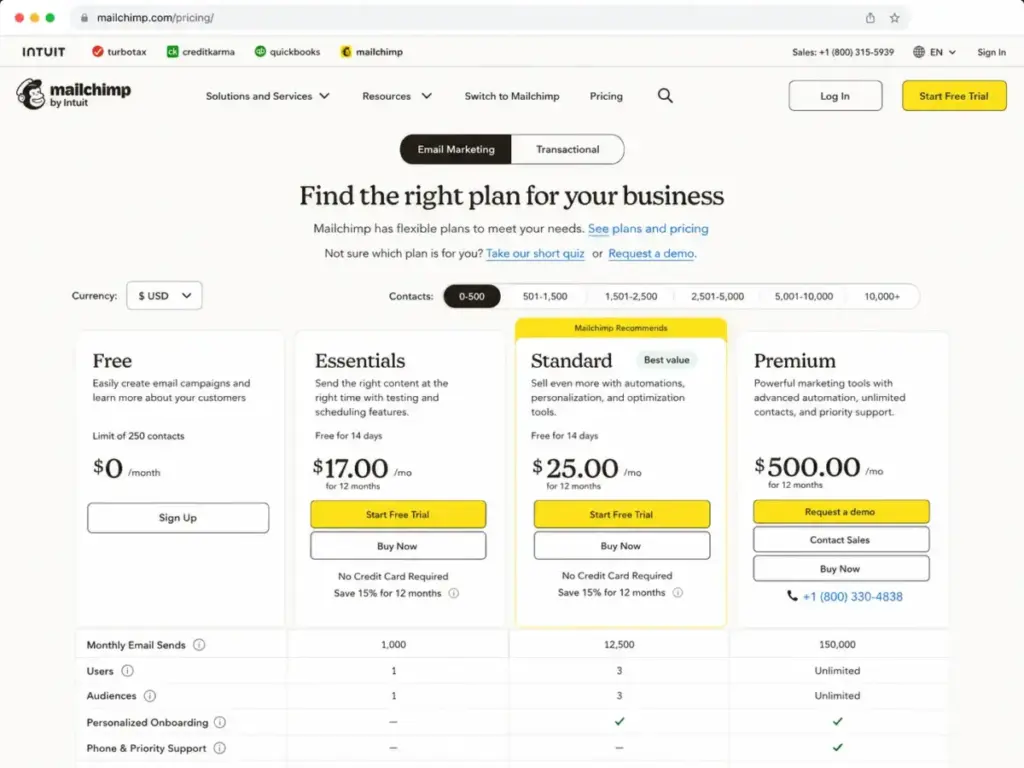
Mailchimp displays first-12-month promotional pricing on its US-facing page. The table below shows what you see on the site versus what affects your actual bill.
| Plan | Displayed price | What the price covers | What it does not cover |
|---|---|---|---|
| Free | $0/month | 250 contacts, 500 sends/month, 1 user, 1 audience | No scheduled sends, no automations, no branding removal, email support ends after 30 days |
| Essentials | $15/month | 500 contacts, 10x send limit, 3 users, 3 audiences | No advanced segmentation, no generative AI, no custom reports, no dynamic content |
| Standard | $25/month | 500 contacts, 12x send limit, 5 users, 5 audiences | Transactional email and SMS are separate paid add-ons, annual pricing is sales-gated at 10,000+ contacts |
| Premium | $420/month | 10,000 contacts, 15x send limit, unlimited users, unlimited audiences | Custom pricing for 200,000+ contacts, post-promotional pricing not publicly listed |
What this means: Every displayed price is the entry point at the lowest contact tier. Moving from 500 to 5,000 contacts raises the monthly cost. Moving from 5,000 to 50,000 raises it again. Mailchimp’s pricing is contact-based, but the contact count is just one variable. User seats, send volume, add-ons, and overages stack on top.
Mailchimp’s displayed pricing applies to the first 12 months. Annual plans for Standard and Premium at 10,000+ contacts are available through sales but not self-serve on the public page. Verify your renewal price before committing.
The 5 Hidden Costs Nobody Mentions
1. Peak contact billing
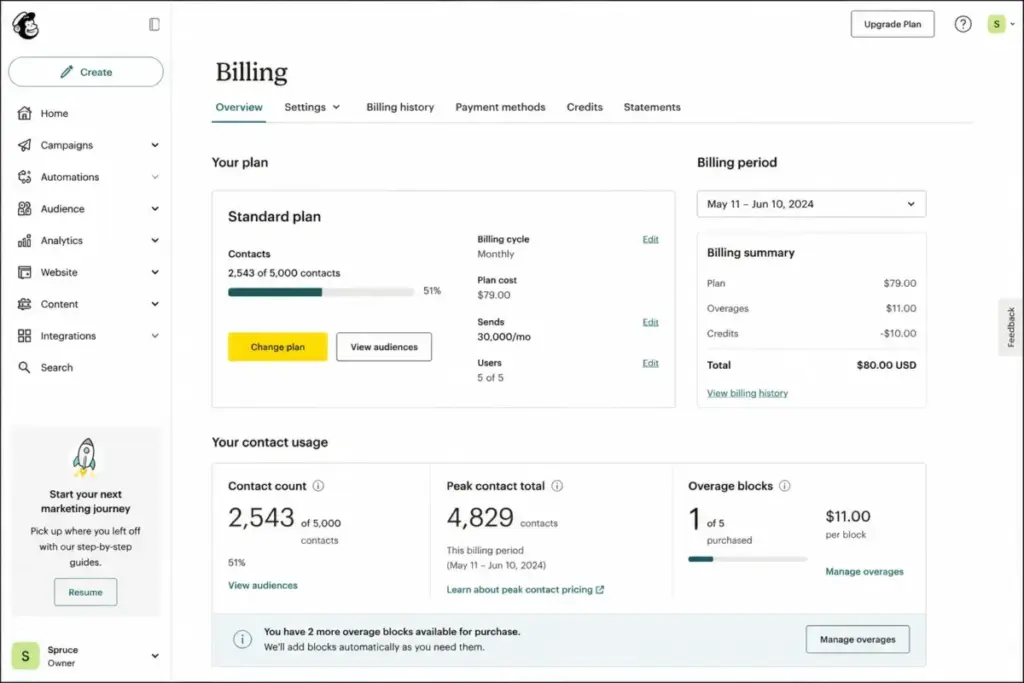
Mailchimp bills based on the highest contact total reached during your billing period, not the number at the end. If you import 5,000 contacts, delete 2,000 the next day, and end the month at 3,000, you are billed for the 5,000 peak. This catches teams that run list imports, one-time campaigns to large audiences, or seasonal promotions.
2. Non-subscribed contacts still count
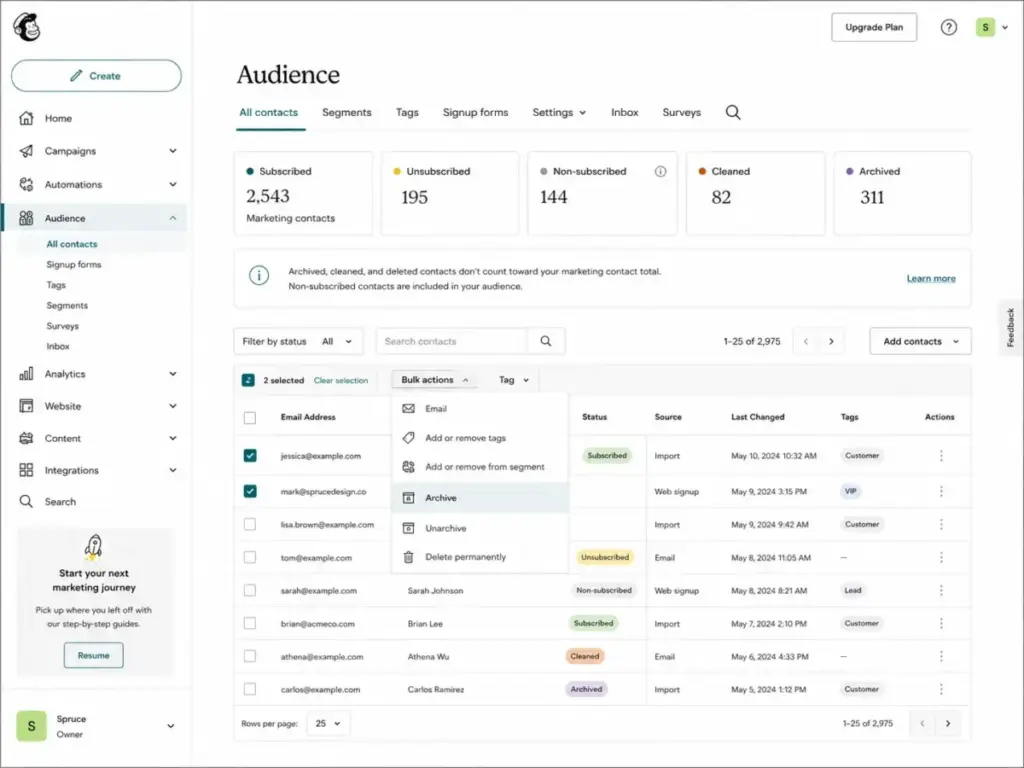
Unsubscribed contacts that remain in your audience still count toward your contact total. Only archived, cleaned, and deleted contacts stop counting. If you are not regularly archiving unsubscribed contacts, you are paying for people who will never open your emails. This is a billing behavior most email marketing platforms handle differently, and it matters at scale.
3. Transactional email is a separate bill
Transactional email (order confirmations, password resets, shipping notifications) is not included in any marketing plan. It requires the Transactional Email add-on, available only on Standard and Premium. Pricing starts at $20 per block of 25,000 emails at the lowest volume tier. A dedicated IP costs an additional $29.95/month. Unused blocks do not roll over.
4. SMS credits expire and cost extra
SMS marketing requires paid credits purchased separately from your marketing plan. Credits expire and do not roll over. MMS is available only on Standard and Premium in the US and Canada. The exact credit table is not fully exposed on the public pricing page, so request a quote before budgeting. If SMS is a core channel, compare dedicated SMS marketing platforms that include credits in their base pricing.
5. Overage charges are automatic
When your contact total or email sends exceed your plan limit, Mailchimp adds overage blocks automatically. The exact dollar amount varies by plan and tier and is not fully disclosed on the static pricing page. On the Free plan, exceeding the 250-contact or 500-send limit pauses your account entirely until you upgrade.
Plan-by-Plan Breakdown
Free: Testing only
The Free plan covers 250 contacts, 500 email sends per month (250 per day), 1 audience, and 1 user seat. Email support lasts 30 days. After that, you are on your own.
What you cannot do on Free: schedule emails, run multi-step automations, A/B test, remove Mailchimp branding, use advanced segmentation, or access generative AI features. This is a testing sandbox, not a production tool.
Upgrade trigger: You will hit the 250-contact cap or need scheduled sends within the first month. If you are a solo creator sending a weekly newsletter to under 250 people and you do not mind the Mailchimp badge, Free works. Everyone else outgrows it fast.
Essentials: The trap plan
Essentials starts at $15/month for 500 contacts and scales to 50,000 contacts. It includes 3 user seats, 3 audiences, A/B testing, email scheduling, and marketing automations up to 4 steps.
Here is the problem. Four automation steps is not enough for any serious drip campaign. No advanced segmentation. No generative AI. No custom reports. No dynamic content. Essentials gives you enough to start, then gates every feature that makes email automation productive behind Standard.
Who Essentials works for: A 1-2 person team sending scheduled campaigns to a small list with no automation requirements beyond a basic welcome sequence.
Why I call it a trap: Teams that choose Essentials because it is $10 cheaper than Standard typically upgrade within 3-6 months once they need segmentation, reporting, or multi-step automations. You save $10/month for a few months, then pay the upgrade fee and re-learn the platform at a higher tier. Start at Standard if your list is over 1,000 contacts.
Standard: Best value for most teams
Standard starts at $25/month for 500 contacts and scales to 100,000 contacts. It includes 5 user seats, 5 audiences, a 12x contact send limit, and the features that make Mailchimp a real marketing platform: advanced segmentation, up to 200 automation flows, generative AI (no additional cost), custom reports, dynamic content, custom-coded templates, and one personalized onboarding session.
Standard is where the Mailchimp review verdict gets positive. Five user seats cover most small marketing teams. The 12x send multiplier means a 10,000-contact list gets 120,000 monthly sends. Advanced segmentation and custom reports let you measure what matters. The AI tools are bundled, not gated behind another paywall.
The catch: Transactional email and SMS are still separate paid add-ons. Annual pricing for Standard at 10,000+ contacts is handled through sales, not the self-serve page. And the $25/month is first-12-month pricing at the lowest tier. A 10,000-contact list on Standard costs more, and the post-promotional price is not publicly disclosed.
Premium: Unlimited users, premium price
Premium starts at $420/month for 10,000 contacts. It supports up to 200,000 contacts on the public plan. The send limit is 15x your contact count. Users and audiences are unlimited.
Premium adds phone and priority support, co-browsing support sessions, four personalized onboarding sessions, and a dedicated onboarding specialist with migration services. If your team has more than 5 users, Premium is the only public plan that removes the seat cap.
Who needs Premium: Organizations with 6+ marketing users, 10,000+ contacts, and a need for phone support or dedicated migration assistance. If your team is under 5 users and under 10,000 contacts, Standard does the job at a fraction of the cost.
Above 200,000 contacts: Mailchimp’s public pricing tops out at 200,000 contacts on Premium. Larger lists or enterprise-style needs require contacting sales for custom pricing.
Feature Gates: What You Get by Plan
| Feature | Free | Essentials | Standard | Premium |
|---|---|---|---|---|
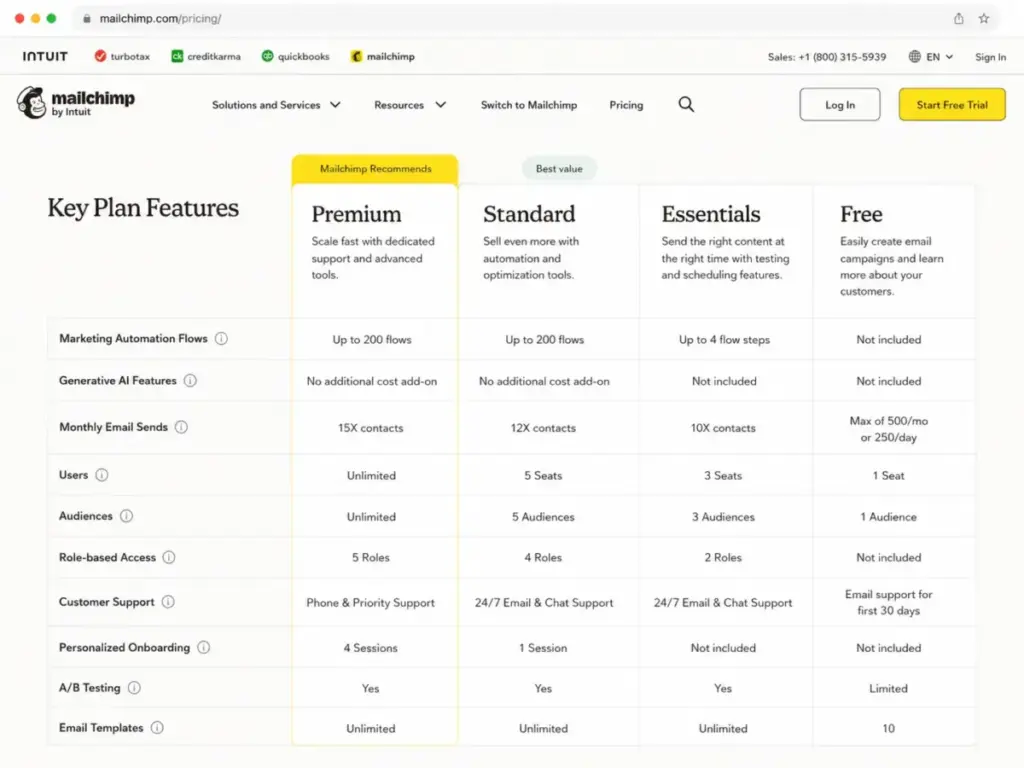
| Monthly email sends | 500/month, 250/day | 10x contact limit | 12x contact limit | 15x contact limit |
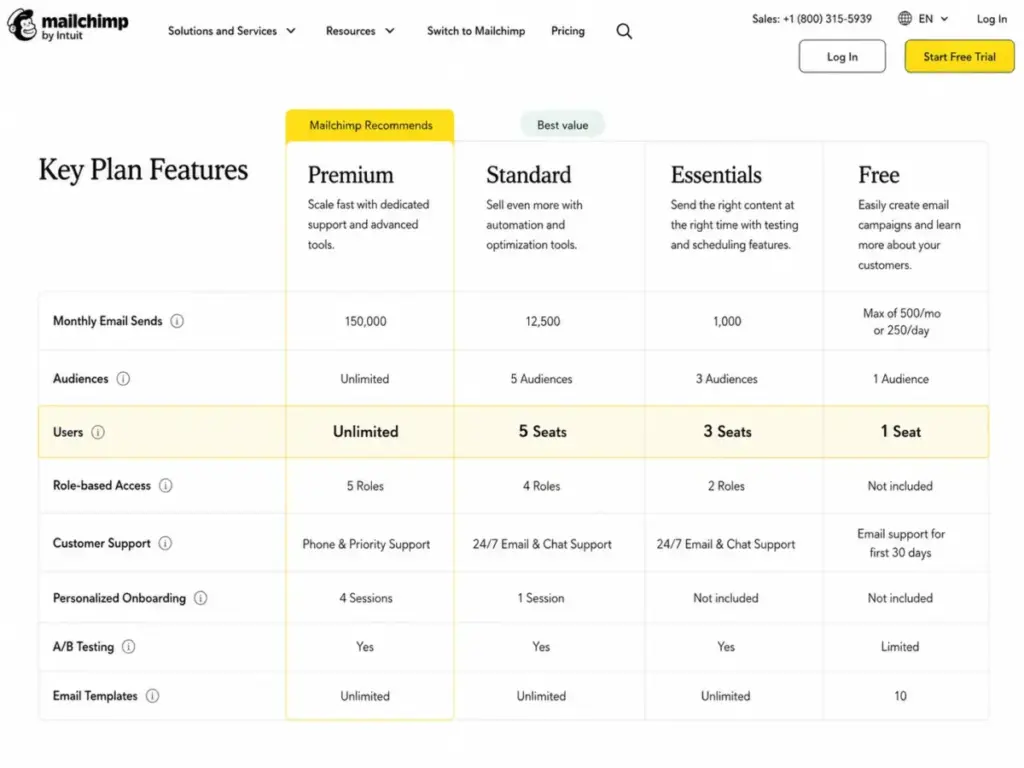
| User seats | 1 | 3 | 5 | Unlimited |
| Audiences | 1 | 3 | 5 | Unlimited |
| Email scheduling | No | Yes | Yes | Yes |
| Marketing automations | No | Up to 4 steps | Up to 200 flows | Up to 200 flows |
| A/B testing | No | Yes | Yes | Yes |
| Remove Mailchimp branding | No | Yes | Yes | Yes |
| Advanced segmentation | No | No | Yes | Yes |
| Custom reports | No | No | Yes | Yes |
| Dynamic content | No | No | Yes | Yes |
| Generative AI add-on | No | No | Yes (included) | Yes (included) |
| Personalized onboarding | No | No | 1 session | 4 sessions + specialist |
| Phone support | No | No | No | Yes |
| Transactional Email add-on | Demo only | Demo only | Yes | Yes |
| SMS/MMS add-on | No | SMS only (select regions) | SMS + MMS (US/Canada) | SMS + MMS (US/Canada) |
What this means: The jump from Essentials to Standard is where Mailchimp turns from a basic campaign sender into a real marketing platform. Advanced segmentation, 200 automation flows, AI, custom reports, and dynamic content all unlock at Standard. The jump from Standard to Premium is primarily about seat count and support level. If your feature needs are met by Standard and your team is 5 or fewer, Premium is unnecessary.
When the Free Plan Stops Working
The Free plan stops working the moment any of these happen:
- Your list exceeds 250 contacts
- You need to schedule an email for a specific date and time
- You need more than 1 user or 1 audience
- You want to remove Mailchimp branding from your emails
- You need A/B testing or any automation flow
- Your 30-day email support window expires
- You need drip campaign workflows
For most teams, that happens within the first 2-4 weeks. The Free plan is a demo with a 250-contact ceiling, not a long-term operating tier.
Free trial details
Mailchimp offers a 14-day free trial of Essentials or Standard. No credit card is required to start. But there is a caveat: without adding a payment method, your sending limits are restricted. Adding a card unlocks full sending capacity and SMS setup eligibility. This means the no-card trial lets you explore the interface, but not test at full volume.
Real Cost Scenarios
The table below estimates what Mailchimp costs by team size. These assume the lowest contact tier and exclude SMS, transactional email, and overage blocks.
| Team size | Required plan | Displayed monthly price | Annual equivalent | Notes |
|---|---|---|---|---|
| 1 user | Free or Essentials | $0 or $15/month | $0 or $180/year | Free works for under 250 contacts with no automation needs |
| 3 users | Essentials | $15/month | $180/year | Essentials includes 3 seats but lacks advanced automations |
| 5 users | Standard | $25/month | $300/year | Standard is the first plan with 5 included seats |
| 10 users | Premium | $420/month | $5,040/year | Premium is the first plan with unlimited seats |
| 25 users | Premium | $420/month | $5,040/year | Seat count does not raise Premium price, but contact volume can |
| 50 users | Premium | $420/month | $5,040/year | Useful only if contact volume stays within public Premium limits |
| 100 users | Premium | $420/month | $5,040/year | Enterprise needs at this scale may require sales |
What this means: Mailchimp’s user-seat gate is the force multiplier most pricing pages ignore. A 6-person marketing team with 2,000 contacts is forced into the $420/month Premium plan not because of list size, but because Standard caps at 5 users. That is a $395/month jump for one extra seat. If user seats drive your upgrade, check whether a competitor gives you more seats at a lower tier.
Monthly vs Annual Billing
Mailchimp’s public pricing page displays monthly billing rates. Annual pricing is not self-serve for most tiers.
For businesses with 10,000+ contacts, Mailchimp advertises a 15% introductory offer for the first 12 months on annual plans for Standard and Premium. This is handled through sales, not the public page. The exact post-offer renewal price is not publicly disclosed.
For smaller contact tiers (under 10,000), annual plans are not prominently surfaced. Monthly-equivalent estimates based on displayed pricing: Essentials at $15/month equals $180/year; Standard at $25/month equals $300/year; Premium at $420/month equals $5,040/year. These are rough benchmarks, not confirmed annual billing prices.
My recommendation: If you have 10,000+ contacts and plan to stay on Mailchimp for at least a year, contact sales to request annual pricing with the 15% introductory offer. For smaller lists, month-to-month billing gives you flexibility to switch if your needs change or if a competitor offers better value at your scale.
Plan to Avoid
Essentials. It costs $15/month and delivers a restricted version of Mailchimp. No advanced segmentation. No generative AI. No custom reports. No dynamic content. Automations are limited to 4 steps. For $10 more per month, Standard removes all of those gates and adds 2 extra user seats.
The only scenario where Essentials makes sense: a solo user or 2-person team sending scheduled campaigns with no automation, segmentation, or reporting needs, and no plan to grow past those requirements. That is a narrow use case.
Plan to Choose
Standard at $25/month is the right starting plan for most small businesses. It unlocks 5 user seats, 200 automation flows, advanced segmentation, custom reports, generative AI at no extra cost, dynamic content, and one onboarding session. The feature set is where Mailchimp becomes competitive with tools like ActiveCampaign or Klaviyo.
If your team has 6+ users, Premium is the only public option. If your team has 1-2 users and a tiny list, Free or Essentials covers you, but expect to upgrade quickly.
Mailchimp Pricing vs Competitors
| Platform | Starting price | Free plan | Billing model | 10-user cost (public) |
|---|---|---|---|---|
| Mailchimp | $0 (Free), $15/month (Essentials) | Yes, 250 contacts | Contact + plan tier | $420/month (Premium, unlimited users) |
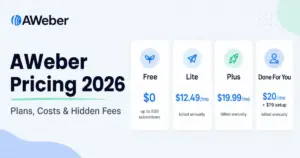
| Brevo | $9/month | Yes | Email volume + feature tier | $499/month (Professional, 10 seats) |
| Constant Contact | $12/month | No permanent free plan | Contact + plan tier | $80/month (Premium, unlimited users) |
| MailerLite | $10/month | Yes | Subscriber + feature tier | $20/month (Advanced, unlimited users) |
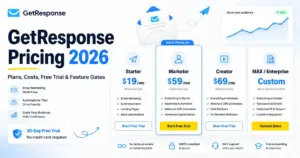
| GetResponse | $19/month | 14-day trial only | Contact + feature tier | Custom (Enterprise) |
What this means: Mailchimp is not the most expensive platform at entry, but it becomes expensive at scale. MailerLite Advanced at $20/month includes unlimited users, making the Brevo review and MailerLite the strongest value alternatives for teams that need many seats without Premium pricing. Constant Contact Premium at $80/month also includes unlimited users at a fraction of Mailchimp Premium. If user-seat cost is your primary concern, Mailchimp loses the comparison.
Is Mailchimp Worth the Price?
Worth it if:
- You have a team of 5 or fewer marketing users
- You need advanced automations, segmentation, and custom reports on Standard
- You send scheduled campaigns and multi-step workflows to a list under 50,000 contacts
- You want generative AI tools included in the plan price
- You value the Mailchimp ecosystem (landing pages, forms, CRM-lite features, transactional email add-on)
Not worth it if:
- Your team has 6+ users and you do not want to jump to $420/month for seats alone
- You mainly send newsletters and do not use advanced automations or segmentation
- You need predictable pricing without contact-tier billing, overage blocks, and peak-contact surprises
- You are a creator or small team that wants simpler, cheaper email tooling
- Your SMS needs require transparent, upfront credit pricing
If Mailchimp does not fit, compare MailerLite for unlimited users at low cost, Brevo for sends-based billing, or Constant Contact for unlimited seats under $100/month. Understanding what email deliverability means also matters more than feature count, so test inbox placement before committing to any platform.
How to Avoid Overpaying for Mailchimp
- Start on Standard, skip Essentials. The $10/month savings on Essentials disappears the moment you need segmentation, AI, or reporting. Standard is $25/month and removes every meaningful gate.
- Archive unsubscribed contacts before each billing cycle. Non-subscribed contacts count toward your billed total. Archived and cleaned contacts do not. Set a monthly reminder to clean your list.
- Watch your peak contact count. Mailchimp bills on the highest contact total reached during the billing period. If you plan a large import or one-time campaign, time it carefully relative to your billing date.
- Do not buy SMS credits until you have a clear send plan. SMS credits expire and do not roll over. Calculate your expected monthly SMS volume before purchasing credits.
- Request annual pricing through sales if you have 10,000+ contacts. Mailchimp offers a 15% introductory discount for businesses with 10,000+ contacts on annual plans, but it requires contacting sales. The self-serve page does not surface this option.
- Evaluate whether you need transactional email through Mailchimp. Transactional email starts at $20 per 25,000-email block. If your transactional volume is low, a dedicated provider like Postmark or Amazon SES may cost less.
- Audit your user-seat needs before choosing a plan. If your team has more than 5 users, check whether MailerLite Advanced or Constant Contact Premium gives you unlimited seats at a lower total cost than Mailchimp Premium.
FAQ
How much does Mailchimp cost per month in 2026?
Mailchimp’s Free plan costs $0/month for 250 contacts. Essentials starts at $15/month, Standard at $25/month, and Premium at $420/month. All paid prices are displayed as first-12-month pricing at the lowest contact tier. Your actual cost depends on your contact count, user seats, add-ons, and plan tier.
Is Mailchimp still free in 2026?
Yes. The Free plan still exists, but it is limited to 250 contacts, 500 email sends per month, 1 user seat, 1 audience, and email support for the first 30 days only. There are no automations, no scheduled sends, and no branding removal on Free.
Does Mailchimp charge for unsubscribed contacts?
Yes. Non-subscribed contacts that remain in your audience count toward your billed contact total. Only archived, cleaned, and deleted contacts stop counting. Archive unsubscribed contacts regularly to avoid paying for inactive records.
What is the difference between Mailchimp Essentials and Standard?
Standard adds advanced segmentation, up to 200 automation flows (versus 4-step flows on Essentials), generative AI, custom reports, dynamic content, 2 extra user seats (5 vs 3), and a higher send multiplier (12x vs 10x contact limit). Standard costs $10/month more than Essentials and removes every major feature gate.
Does Mailchimp have a free trial?
Yes. Mailchimp offers a 14-day free trial of Essentials or Standard with no credit card required. Sending limits are restricted without adding a payment method. Adding a card unlocks full sending capacity and SMS marketing eligibility.
Does Mailchimp offer annual pricing?
Annual plans are available for Standard and Premium at 10,000+ contacts through sales. A 15% introductory offer is publicly shown for qualifying businesses. The self-serve pricing page does not surface annual pricing for the lowest contact tiers.
How much does Mailchimp transactional email cost?
Transactional email through Mailchimp starts at $20 per block of 25,000 emails at the lowest volume tier. A dedicated IP costs $29.95/month extra. The add-on is available only on Standard and Premium plans. Unused blocks do not roll over.
What is the best Mailchimp plan for small business?
Standard at $25/month is the best plan for most small businesses. It includes 5 user seats, advanced automations, segmentation, custom reports, and AI tools. Essentials is $10 cheaper but gates the features most growing teams need within 3-6 months.
Does Mailchimp offer a nonprofit discount?
Mailchimp references nonprofit and charity pricing eligibility in its terms. Contact Mailchimp sales directly to confirm current discount rates and eligibility requirements, as the specific percentage is not fully exposed on the public pricing page.
Is Mailchimp expensive compared to alternatives?
Mailchimp is competitively priced at entry. It becomes expensive when your team exceeds 5 users (forcing a jump to $420/month Premium), when contact tiers raise your base cost, or when SMS and transactional email add-ons stack on top. MailerLite and Constant Contact offer unlimited users at significantly lower price points. Compare the total cost at your team size and contact volume, not just the starting price.
Pricing data in this article was verified against Mailchimp’s official US pricing page on May 25, 2026. Annual pricing, post-promotional rates, SMS credit tables, and exact overage amounts that are not publicly exposed on the static page are noted with caveated language. Confirm your specific pricing directly with Mailchimp before purchasing.