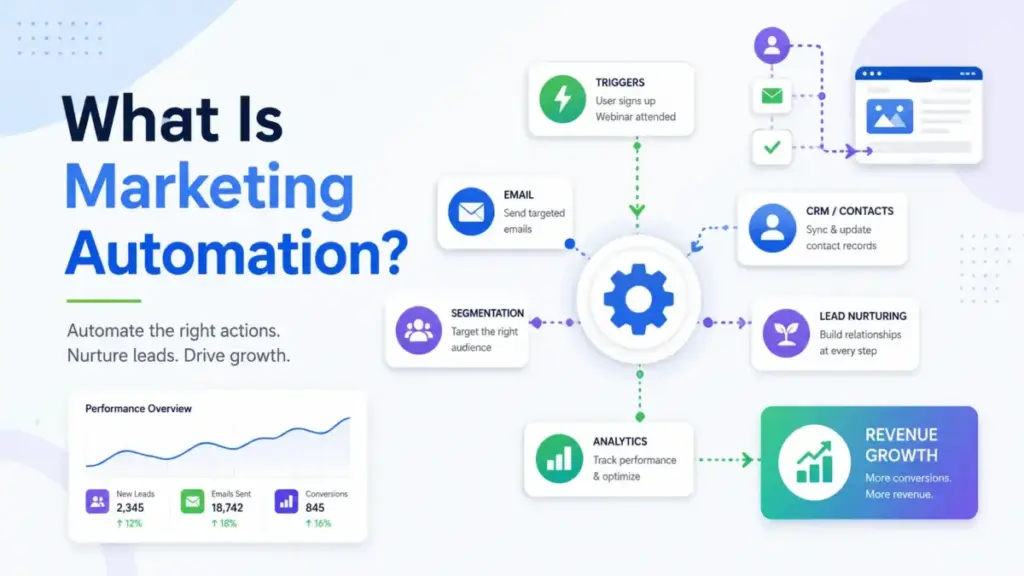
Marketing automation is not scheduled email. It is a system of data, triggers, workflows, segmentation, and measurement that only creates value when tied to the customer journey. Most guides define it correctly, then immediately default to email examples, as if the entire discipline fits inside a newsletter tool. It does not.
I have spent the past seven years deploying email marketing platforms and CRM-connected campaign tools for B2B and DTC brands. The pattern I keep seeing: teams buy automation software before mapping a single workflow, then wonder why their “personalized” sequences feel generic and their CRM stays disconnected. The problem is almost never the tool. It is the missing layer between data readiness and campaign execution.
This guide explains what marketing automation actually is, how the workflow engine runs, the types that exist, which marketing software categories fit different use cases, what metrics matter, and when automation is the wrong first move.
The 60-Second Explanation of Marketing Automation
Marketing automation is the use of software to manage, trigger, execute, and measure routine marketing processes across channels such as email, web, SMS, social, ads, landing pages, and CRM-connected lead workflows. IBM describes it as software that manages routine marketing processes and tasks across multiple channels. Salesforce frames it as technology that manages marketing processes and multifunctional campaigns across multiple channels automatically.
The simple version: marketing automation replaces manual, repetitive marketing tasks with rules-based workflows that respond to customer behavior in real time.
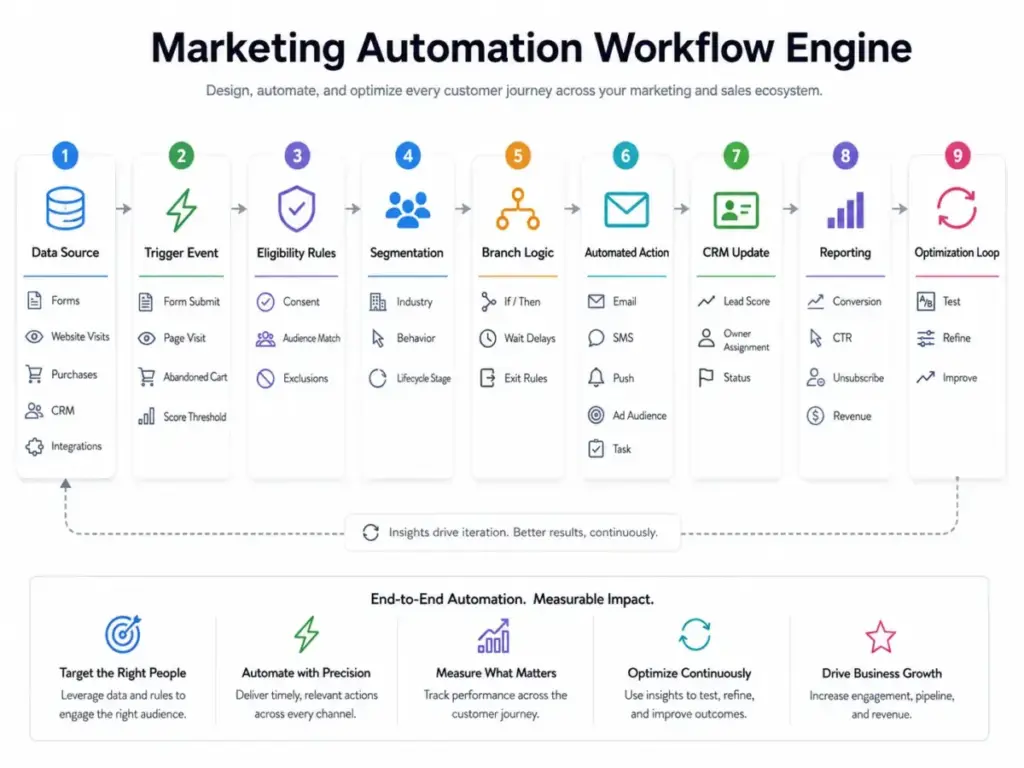
The technical version: the system collects customer data from forms, web visits, purchases, and CRM records. It segments audiences based on attributes and behavior. It fires triggers when conditions are met (form submission, page visit, cart abandonment, score threshold). It runs conditional logic (if/then branches, delays, suppression rules, personalization tokens). It sends or updates actions across email, SMS, push, web, ads, or CRM fields. It measures results and feeds data back into the next cycle.
The business version: marketing automation gives teams a way to respond to customer behavior at scale without adding headcount for every new campaign, channel, or lifecycle stage. It connects marketing to the sales funnel by scoring leads, routing qualified contacts to CRM owners, and measuring pipeline influence.
How Marketing Automation Actually Works
Marketing automation runs through a repeatable loop with five stages. Each stage has failure points that most beginner guides skip entirely.
Stage 1: Data collection. The system captures customer or lead data from forms, landing pages, web tracking, purchases, CRM imports, and API integrations. Failure point: dirty data, missing consent fields, duplicate contacts, or incomplete source tracking break every downstream step.
Stage 2: Segmentation. The platform groups contacts by attributes (industry, company size, location) and behavior (pages visited, emails clicked, products purchased, lifecycle stage). Failure point: segments built on assumptions rather than observed behavior produce generic messaging at scale.
Stage 3: Trigger and workflow logic. A trigger fires when a defined event occurs: form submission, abandoned cart, email click, score threshold, lifecycle stage change, purchase, or inactivity window. The workflow then applies if/then rules, timing delays, branch conditions, personalization tokens, suppression logic, and exit criteria. Failure point: workflows without clear exit rules keep sending to contacts who have already converted, unsubscribed, or become irrelevant.
Stage 4: Action and delivery. The system executes the action: sends an email, updates a CRM field, adds a tag, triggers a sales alert, sends an SMS, pushes a notification, or updates an ad audience. Failure point: poor deliverability, missing channel permissions, or consent violations erode trust and inbox placement over time.
Stage 5: Measurement and optimization. The platform records conversion rates, click rates, workflow completion, unsubscribe rates, revenue attribution, and handoff metrics. Teams review results and refine timing, content, segmentation, scoring thresholds, channel mix, and suppression rules. Failure point: using open rate as the only success metric ignores the conversion, revenue, and lead quality signals that actually matter.
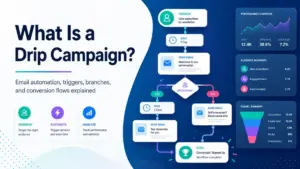
A B2B webinar example: a prospect fills out a registration form (trigger). The workflow sends a confirmation email, a reminder 24 hours before, a follow-up with recording link, then enters the contact into a nurture sequence. If the contact visits the pricing page within 7 days, the system increases their lead score and sends a sales alert to the CRM owner. If the contact does not open the follow-up, the workflow waits 5 days and sends a different message. The workflow exits when the contact books a demo, unsubscribes, or reaches the end of the sequence.
Marketing Automation vs Related Concepts
| Concept | What it does | Key difference from marketing automation |
|---|---|---|
| Email marketing | Sends campaigns and newsletters to a list | One channel only; limited behavioral triggers and CRM integration |
| CRM software | Manages contacts, deals, pipeline, and sales activities | Stores relationship data; marketing automation acts on that data across channels |
| Sales automation | Automates outreach sequences, follow-ups, and deal updates for sales reps | Focused on 1:1 sales activities, not 1:many marketing campaigns |
| Customer data platform (CDP) | Unifies customer data from multiple sources into one profile | Collects and structures data; marketing automation uses that data to trigger actions |
| Campaign management | Plans, schedules, and coordinates marketing campaigns | Handles scheduling and coordination; marketing automation adds behavioral triggers and workflow logic |
What this means: If you only send monthly newsletters, you are using email marketing. If you trigger sequences based on behavior, score leads, route contacts to sales, and measure lifecycle outcomes across channels, you are using marketing automation. The distinction matters because choosing the wrong category leads to buying tools that either underdeliver or cost more than the use case requires.
Types of Marketing Automation
Not every team needs the same type. The trigger, the workflow, the metric, and the best-fit platform differ by use case.
| Type | Trigger example | Workflow example | Key metric | Best-fit team |
|---|---|---|---|---|
| Email automation | Welcome, product education, re-engagement | New subscriber enters 5-email onboarding series | Conversion rate, click rate | Any team with a growing list |
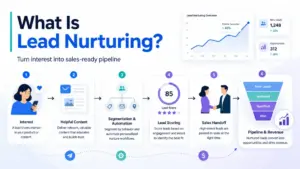
| Lead nurturing | Content download, webinar registration | Multi-touch sequence educating prospect over 30 days | MQL-to-SQL rate | B2B teams with longer sales cycles |
| Lead scoring and routing | Score threshold, lifecycle stage change | Contact reaches 80 points, sales alert fires, CRM owner assigned | Lead response time, qualified rate | B2B teams with marketing-sales handoff |
| Ecommerce lifecycle | Abandoned cart, post-purchase, winback | Cart abandoned, 1h delay, email with cart items, 3-day follow-up | Cart recovery revenue, repeat purchase rate | DTC and ecommerce brands |
| Omnichannel journey | Cross-channel behavior sequence | Email + SMS + push + ad audience coordination | Revenue per recipient, attribution | Brands with multi-channel presence |
| ABM and B2B revenue | Account engagement, buying committee signals | Account-level nurture, sales-marketing handoff, pipeline attribution | Pipeline influenced, campaign revenue | Enterprise B2B with complex buying committees |
| AI-assisted automation | AI-suggested segments, send-time optimization | AI drafts campaign, suggests audience, optimizes timing | Workflow completion, conversion lift | Teams with enough data to train models |
Step-by-Step Implementation
Starting with too many workflows at once is the most common mistake. Here is the sequence that works.
Step 1: Define the business goal. Lead capture, trial activation, ecommerce recovery, event attendance, renewal, upsell, winback, or sales qualification. One goal per first workflow.
Step 2: Map the customer journey. Identify the trigger points that justify automation: form submissions, page visits, purchases, abandoned carts, lifecycle stage changes, inactivity, or score thresholds. Do not automate a journey you have not mapped.
Step 3: Audit data readiness. Check CRM fields, consent status, source tracking, segmentation fields, lifecycle stages, duplicate contacts, suppression lists, and channel permissions. Bad data produces bad automation at scale.
Step 4: Choose one high-value workflow first. A welcome series, webinar follow-up, lead nurture, abandoned cart sequence, product onboarding flow, or re-engagement campaign. Prove the system works before building more.
Step 5: Build workflow logic. Set trigger, entry criteria, exclusions, delays, branches, message content, CRM updates, sales alerts, and exit rules.
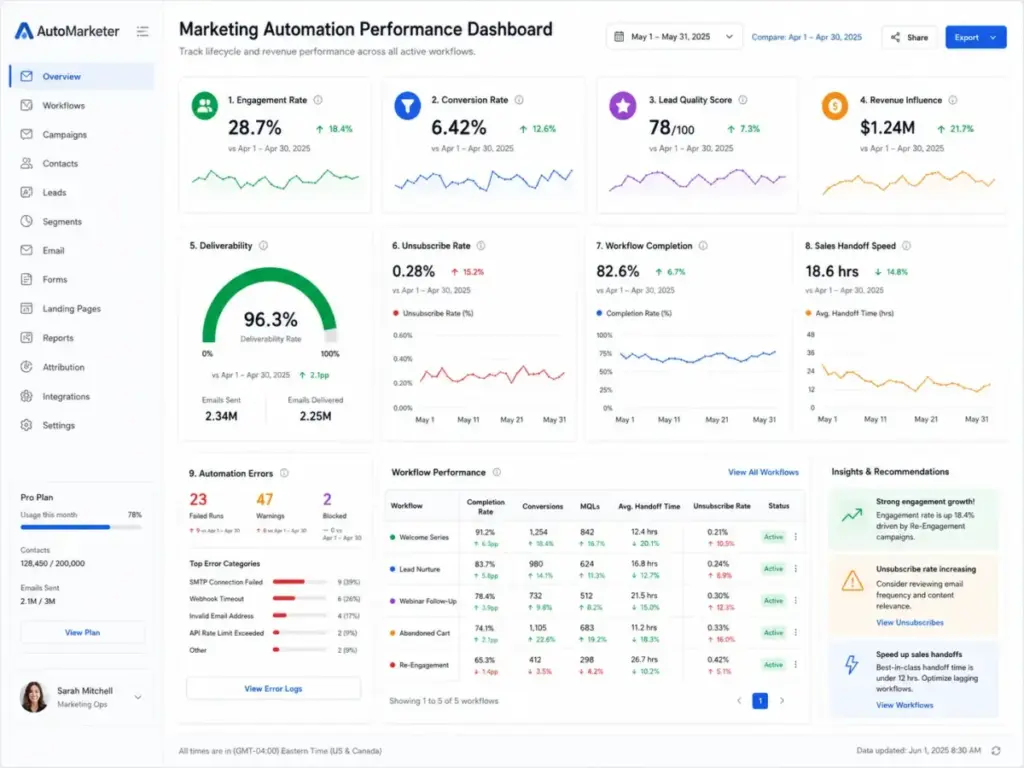
Step 6: Set measurement before launch. Define conversion goal, qualified lead rate, revenue attribution, unsubscribe rate, deliverability, workflow completion, handoff SLA, and cost per qualified action.
Step 7: Test with internal contacts. Check personalization tokens, mobile rendering, consent logic, CRM updates, and duplicate entry rules before enabling for real users.
Step 8: Launch to a controlled segment. Review early performance, then iterate on timing, message, segmentation, scoring thresholds, channel mix, and suppression rules.
Step 9: Create governance. Assign a workflow owner, set review cadence, establish naming conventions, document workflows, define rollback process, run compliance checks, and archive old automations.
The Mistakes That Waste Your First 3 Months
Starting with too many workflows. Teams build 10 automations in week one, then cannot maintain any of them by month two. Start with one. Prove it works. Add the next.
Automating without clean data. If your CRM has duplicate contacts, missing consent fields, and unreliable lifecycle stages, automation will scale those problems faster than any human could.
Treating every contact the same. A first-time visitor, an active trial user, and a paying customer should not receive the same sequence. Segmentation is not optional.
Ignoring consent and deliverability. Sending automated messages without proper consent damages inbox placement and brand trust. Suppression lists, opt-out handling, and permission management are part of the system, not add-ons.
Using open rate as the only success metric. Open rate measures attention, not conversion. Track workflow completion, qualified lead rate, revenue per recipient, and handoff speed instead.
Not aligning lead stages with sales. If marketing calls a contact “qualified” but sales disagrees, the automation is producing noise, not pipeline. Agree on stage definitions and score thresholds before launching.
Letting workflows run for years without review. Automations decay. Offers expire, links break, products change, and segments drift. Set a quarterly review cadence.
Common Misconceptions
Misconception: Marketing automation means sending scheduled email blasts.
Reality: Scheduled email is one small use case. Full marketing automation uses customer data, behavioral triggers, segmentation, multi-channel workflows, CRM updates, lead scoring, and performance analytics.
Misconception: Automation replaces the marketing team.
Reality: Automation replaces repetitive execution. It does not replace strategy, positioning, creative direction, compliance review, segmentation logic, or customer insight.
Misconception: The best marketing automation tool is the one with the most features.
Reality: The best fit depends on use case depth, CRM integration needs, data quality, channel mix, pricing model, deliverability, and the team’s ability to maintain workflows.
Misconception: AI automation can run without monitoring.
Reality: AI-assisted workflows still need guardrails, brand review, consent compliance, data governance, and human oversight for sensitive or revenue-critical journeys. As David Visser (CEO of Zyber and Unlocked) noted in Klaviyo’s 2026 trend report, automation tools should “handle the heavy lifting so marketers can focus on creativity, strategy, and community connection,” not run unattended.
Misconception: Marketing automation is only for enterprise B2B teams.
Reality: Small businesses use simple welcome, lead capture, and abandoned-cart flows. Enterprise teams need deeper governance, attribution, segmentation, and CRM handoff controls.
When to Use and When to Avoid
Use marketing automation when:
- The team repeats the same follow-up manually across leads or customers
- You have enough data to segment contacts responsibly
- Clear triggers and outcomes exist for at least one workflow
- Consistent lifecycle communication is a business requirement
- You can measure conversion or revenue impact
Avoid or delay marketing automation when:
- The list is tiny (under a few hundred contacts)
- The offer or value proposition is unclear
- Consent data is missing or unreliable
- CRM data quality is poor
- Content for the sequences is not ready
- The team cannot maintain workflows after launch
- The business only wants to send generic promotions faster
How to Measure Success
| Metric | What it measures | Why it matters |
|---|---|---|
| Lead-to-MQL conversion rate | Percentage of leads reaching marketing-qualified status | Shows whether automation moves leads forward or just sends messages |
| MQL-to-SQL conversion rate | Percentage of MQLs accepted by sales | Validates alignment between marketing automation and sales criteria |
| Pipeline influenced | Revenue from deals touched by automated campaigns | Connects automation to business outcomes, not just engagement |
| Workflow completion rate | Percentage of contacts who reach the workflow end | Reveals drop-off points and content gaps |
| Email click rate | Percentage of recipients who click | Better engagement signal than open rate |
| Unsubscribe rate | Percentage opting out per campaign | High rates signal over-automation or poor targeting |
| Lead response time | Time from MQL to first sales contact | Automation should reduce this, not create delays |
| Cart recovery revenue | Revenue from abandoned cart workflows | Direct ROI for ecommerce automation |
| Customer retention rate | Percentage of customers retained over a period | Lifecycle automation should improve retention, not just acquisition |
| Cost per qualified lead | Total automation cost divided by qualified leads | Shows whether automation is efficient or just expensive |
What Good Marketing Automation Looks Like in Practice
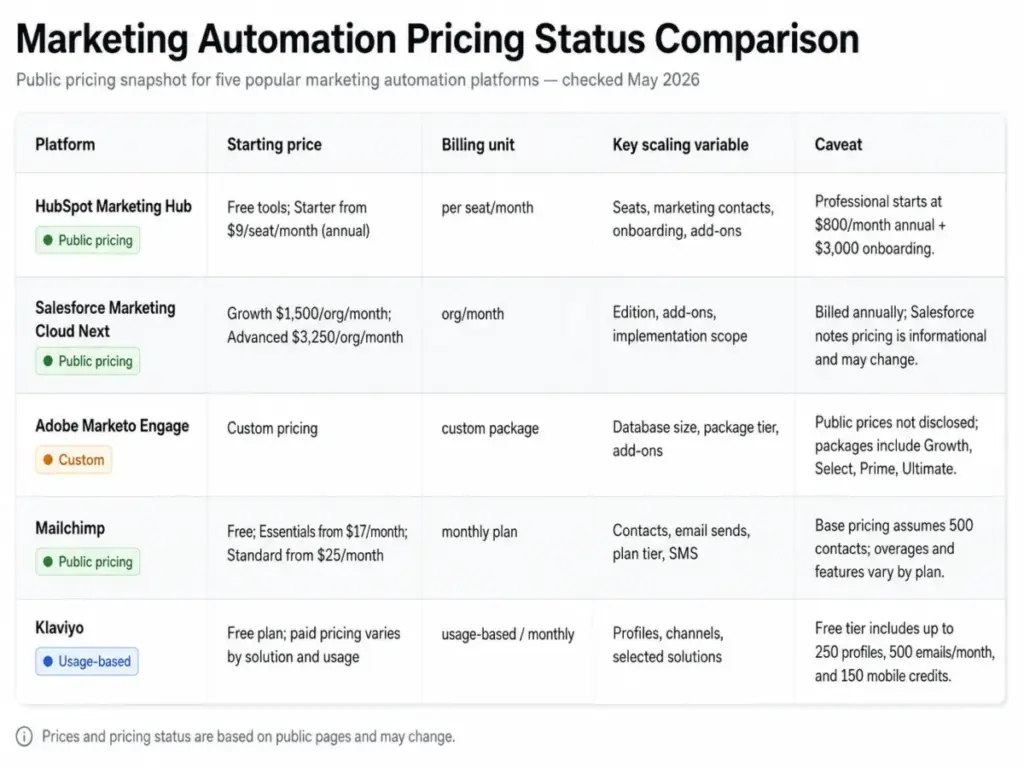
Five platforms represent different approaches to marketing automation. Each fits a different use case, pricing model, and team profile.
| Platform | Best fit | Entry pricing (as of May 2026) | Pricing model | Key caveat |
|---|---|---|---|---|
| HubSpot Marketing Hub | Teams wanting CRM, email automation, landing pages, scoring, and reporting in one platform | Free tools available; Starter from$9/seat/month annually | Seat, tier, marketing contacts, onboarding, add-ons | Costs increase with contacts, seats, onboarding, SMS, API, and advanced add-ons. Professional jumps to $800/month annually plus $3,000 onboarding |
| Salesforce Marketing Cloud Next | Salesforce-centric teams needing CRM-native multi-channel journeys and AI campaign creation | Growth Edition at$1,500 USD/org/month billed annually | Org/month annual billing | Salesforce states pricing is informational and subject to change; implementation and add-on costs may apply |
| Adobe Marketo Engage | B2B and enterprise teams needing sophisticated nurture, account engagement, and revenue alignment | Custom pricing; Growth, Select, Prime, and Ultimate packages | Custom package pricing | Exact prices, included database limits, and implementation costs are not public |
| Mailchimp | Small businesses and ecommerce marketers wanting email-first automation and low-friction entry | Free plan at$0/month (250-contact limit); Essentials from $17/month | Contact-tier and plan-based with email send limits | Final cost changes with contacts, sends, SMS, overages, and annual-plan eligibility |
| Klaviyo | B2C, ecommerce, and retail brands needing behavior-based flows across email, SMS, push, and social | Free plan at$0 (up to 250 profiles, 500 emails/month, 150 mobile credits) | Profile, channel, solution, and add-on based | Paid pricing is calculator-based and depends on profiles, channel mix, and selected solutions |
What this means: The pricing model shapes everything. Contact-based pricing (Mailchimp, HubSpot) means every unengaged contact costs money. Profile-based pricing (Klaviyo) has the same dynamic. Org-based pricing (Salesforce) looks simpler but hides implementation scope. Custom pricing (Marketo) means you cannot comparison-shop without a sales conversation. Start by understanding the billing model before comparing feature lists.
AI and Marketing Automation in 2026
AI copilots are entering marketing automation platforms in 2026. HubSpot, Salesforce, Klaviyo, and Marketo all list AI-assisted campaign creation, segment suggestions, and send-time optimization in their current feature sets.
The value is real for specific tasks: AI can draft subject lines, suggest audience segments, optimize delivery timing, and score behavioral patterns faster than manual analysis. Zac Fromson, co-founder of Lilo Social, described the direction in Klaviyo’s 2026 trends report: workflows are starting to “move from scheduled workflows to self-optimizing systems.”
The guardrails matter more than the features. AI should not own consent rules, audience policy, sensitive messaging, or revenue-critical workflows without human oversight. Brand review, data governance, and compliance checks are still manual responsibilities. The teams getting the most from AI automation in 2026 are the ones treating it as a copilot, not an autopilot.
Tools That Support Marketing Automation
If you are ready to evaluate platforms, the choice depends on your use case, data maturity, sales cycle, channel mix, and workflow complexity.
- Newsletter and simple automation: A basic email marketing tool handles welcome sequences, scheduled campaigns, and list growth. Start here if your list is small and your workflows are straightforward. For SMS-specific automation, see our best SMS marketing platforms.
- CRM-connected marketing automation: Platforms like HubSpot connect marketing workflows directly to CRM data for lead scoring, sales alerts, and pipeline reporting.
- Ecommerce lifecycle automation: Klaviyo and Mailchimp specialize in abandoned cart, post-purchase, and retention flows tied to purchase behavior.
- Enterprise B2B automation: Marketo and Salesforce Marketing Cloud serve teams with complex buying committees, multi-touch attribution, and sales-marketing alignment requirements.
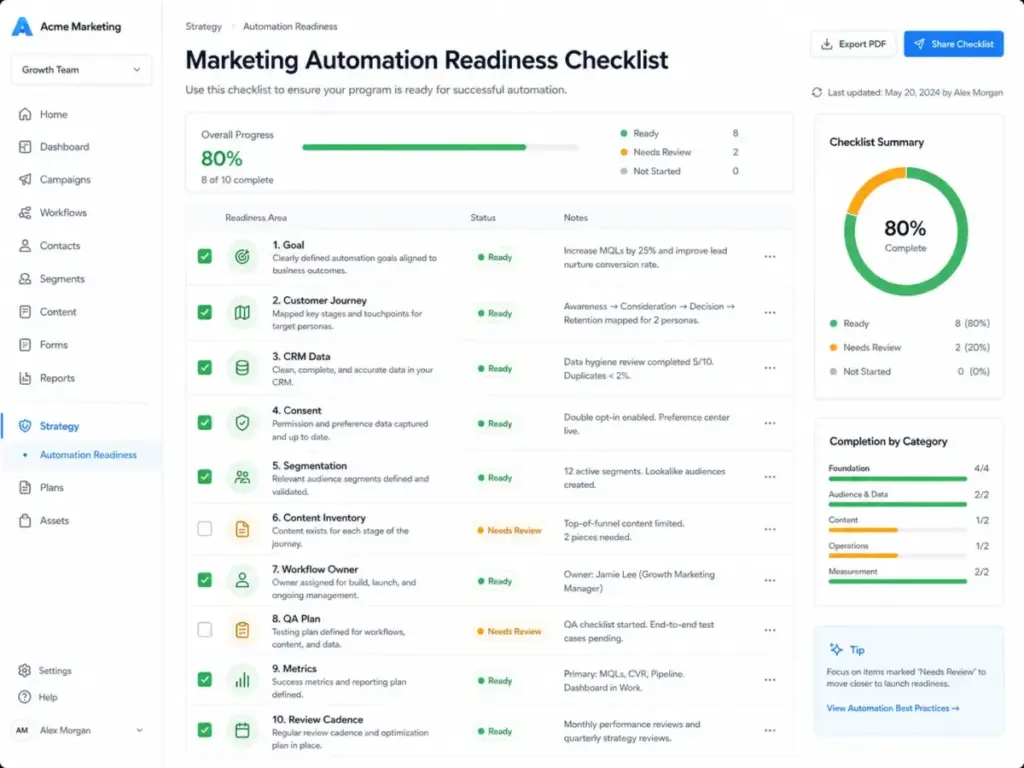
Marketing Automation Readiness Checklist
Use this before buying any platform:
- [ ] Business goal defined for the first workflow
- [ ] Customer journey mapped with trigger points identified
- [ ] CRM data audited: fields, consent, duplicates, lifecycle stages
- [ ] At least one audience segment defined with behavioral criteria
- [ ] Content ready for the first sequence (3-5 messages minimum)
- [ ] Success metrics chosen before launch (not just open rate)
- [ ] Workflow owner assigned with review cadence set
- [ ] QA plan in place: test contacts, edge cases, mobile rendering
- [ ] Suppression and consent logic documented
- [ ] Budget accounts for contacts, channels, onboarding, and scaling costs
FAQ
What is marketing automation in simple terms?
Marketing automation is software that triggers marketing actions based on customer behavior across channels like email, SMS, web, and CRM. Instead of manually sending every follow-up, the system uses rules and data to deliver the right message at the right time. It goes beyond email scheduling by adding segmentation, lead scoring, workflow logic, and performance measurement.
Is marketing automation the same as email marketing?
No. Email marketing is one channel. Marketing automation uses email as one of several channels and adds behavioral triggers, workflow branching, CRM updates, lead scoring, and cross-channel coordination. A team sending a monthly newsletter is doing email marketing. A team triggering sequences based on page visits, purchases, and lifecycle stages is using marketing automation.
What is the first workflow I should automate?
Start with a welcome series for new subscribers or leads. It has the highest engagement rates of any automated sequence, requires minimal content (3-5 emails), and proves your system works before you build more complex workflows.
How do I know if my team is ready for marketing automation?
Check three things: Is your CRM data clean enough to segment? Do you have content ready for at least one sequence? Can someone on the team own the workflow after launch? If any answer is no, fix that first.
What metrics prove marketing automation is working?
Track lead-to-MQL conversion rate, MQL-to-SQL conversion rate, workflow completion rate, revenue per recipient, cart recovery revenue, unsubscribe rate, and lead response time. Open rate alone does not tell you whether automation is generating business results.
Can AI run marketing automations without human oversight?
Not reliably. AI can draft content, suggest segments, optimize timing, and score behavior. It should not own consent rules, brand messaging for sensitive topics, audience policy, or revenue-critical workflows without human review. Treat AI as a copilot, not an autopilot.
When should a business NOT use marketing automation?
Delay automation if your list is tiny, your offer is unclear, consent data is missing, CRM data is unreliable, or your team cannot maintain workflows after launch. Automation amplifies whatever exists in your data and processes, including problems.
What is the difference between marketing automation and CRM?
CRM stores and manages customer data, deals, and sales activities. Marketing automation acts on that data by triggering campaigns, scoring leads, and delivering messages across channels. Most marketing automation platforms integrate with CRM systems, and some (like HubSpot) include both in one platform.
How much does marketing automation cost?
Costs range from free (Mailchimp, Klaviyo free tiers with contact limits) to $1,500+/month (Salesforce Marketing Cloud Growth Edition). The real cost depends on your contact volume, channel mix, required features, onboarding fees, and add-ons. Always check the billing model: contact-based, profile-based, seat-based, or org-based pricing changes your total cost at scale.
Do I need marketing automation if I only send newsletters?
Probably not. A newsletter is a scheduled send, not a triggered workflow. If you plan to add welcome sequences, lead scoring, behavioral triggers, or multi-channel campaigns, marketing automation becomes necessary. If you only need to send one email per week to a list, a simple email marketing tool is sufficient and cheaper.