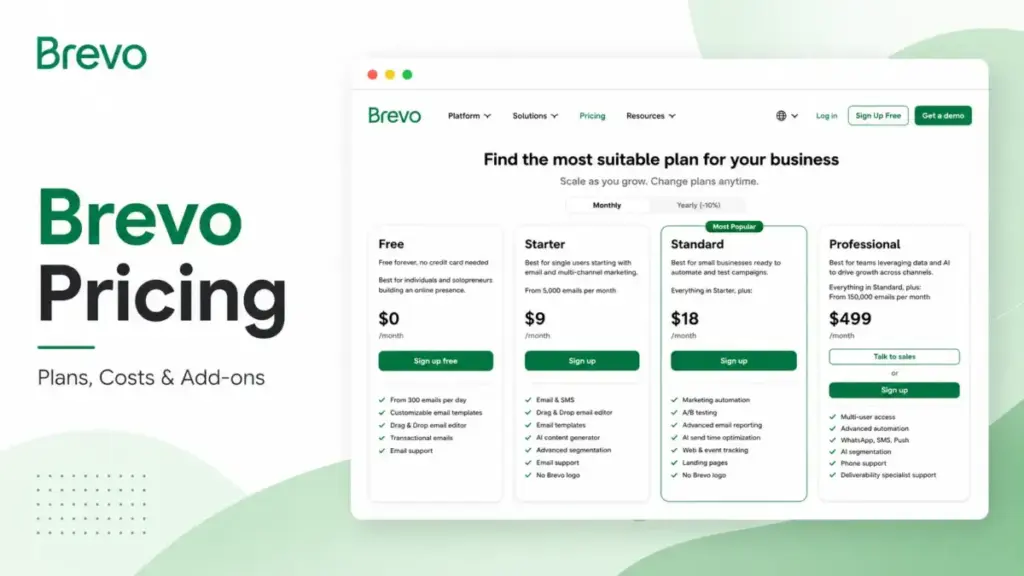
If you have a large contact list but send campaigns only a few times a month, Brevo is one of the most cost-effective serious email platforms you can pick, and for that profile the gap over contact-priced rivals is wide.
If you run heavy automation, need more than three people in the marketing account, or have to meet security requirements, the advertised $9 entry price stops describing your bill almost immediately.
That gap is the whole story. Brevo charges by emails sent, not by contacts stored, which flips the usual pricing logic that tools like Mailchimp and Klaviyo run on. The number you see first is real, but it is the floor for a single-user, low-automation account.
The plan most growing teams actually live on is Standard, and the jump to Professional is where the bill quietly multiplies.
This guide breaks down every plan, the add-on stack, the hidden costs, real cost by team size, and how Brevo compares with five rivals, all in US dollars and verified against Brevo’s official pricing page and help center in June 2026.
One finding up front that most pricing pages skip: the cost difference between Starter and Standard is driven less by email volume and more by a 2,000-contact automation ceiling. That single limit reshapes the buying decision, and I will get to why.
Brevo Pricing Quick Verdict
Here is the short version before the detail. All prices are US dollars, monthly billing, verified against Brevo’s official sources (as of June 2026).
| Question | Answer |
|---|---|
| Starting paid price | $9/month (Starter, from 5,000 emails) |
| Free plan? | Yes, $0 forever, 300 emails/day, no credit card |
| Best plan for most teams | Standard, from $18/month |
| Plan to approach carefully | Starter, once you need branding removal or real automation |
| Biggest hidden cost | The seat ceiling: Standard caps at 3 users, then you jump to Professional at $499/month |
| Annual discount | 10% off, charged upfront for the year |
| Best alternative if too expensive | MailerLite (Power from $25/month with unlimited seats) |
| Pricing verified | June 2026, US/USD |
What this means: Brevo’s headline price is honest, but it answers a narrow question. For a solo sender pushing newsletters to a big list, $9 or even $0 can carry you a long way. The moment a second marketer joins, automation scales past a starter audience, or branding has to go, your real plan is Standard or higher, and the cost conversation changes completely.
The Advertised Price vs the Real Price
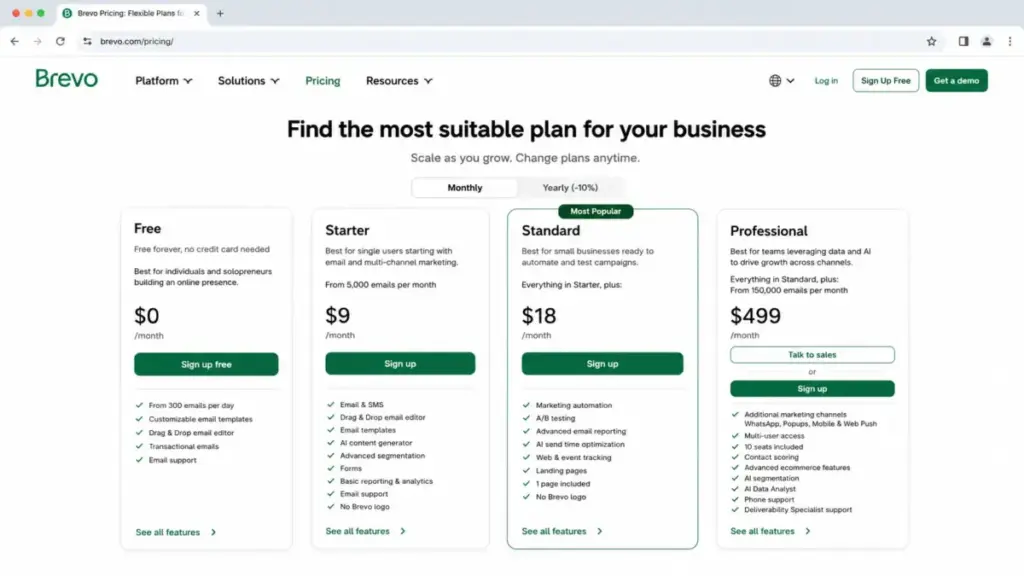
Brevo advertises Starter at $9/month. For a one-person newsletter that does not run automation past a couple thousand contacts, that price holds. For most teams shopping for an email platform, it does not, because three of the features buyers assume are included sit behind paid gates or higher tiers.
The table below shows where the advertised number and the working number separate.
| What you want | Advertised entry | What it actually costs |
|---|---|---|
| Send to a large list, no branding | Starter $9/month | $9 plan + $9/month logo removal add-on = $18/month |
| Automation for a growing audience | Starter $9/month | Standard from $18/month (Starter caps automation at 2,000 contacts) |
| A/B testing and advanced reports | Starter $9/month | Standard from $18/month (both gated above Starter) |
| A second marketer in the account | Starter $9/month | Standard + $9/month per seat, hard cap at 3 users |
| 5+ marketers in the account | Standard $18/month | Professional $499/month (first plan above 3 seats) |
What this means: The honest comparison is rarely “$9 Starter versus $18 Standard.” Once you add logo removal to Starter, you are already at $18 and still missing automation, A/B testing, advanced reporting, and a landing page that Standard includes at the same price point. That is the trap. Starter plus the logo add-on costs the same as Standard while delivering far less. For any team that wants its emails unbranded, Standard is the rational floor, not Starter.
The Hidden Costs Nobody Mentions
Brevo’s pricing FAQ frames the platform as free of hidden fees, and in a literal sense that is fair: you choose a plan or buy credits, and nothing bills you by surprise. But total cost is shaped by add-ons, taxes, and tier ceilings that the plan cards do not foreground. Based on Brevo’s official help center (verified June 2026), here are the costs that change the real number.
Branding removal on Starter
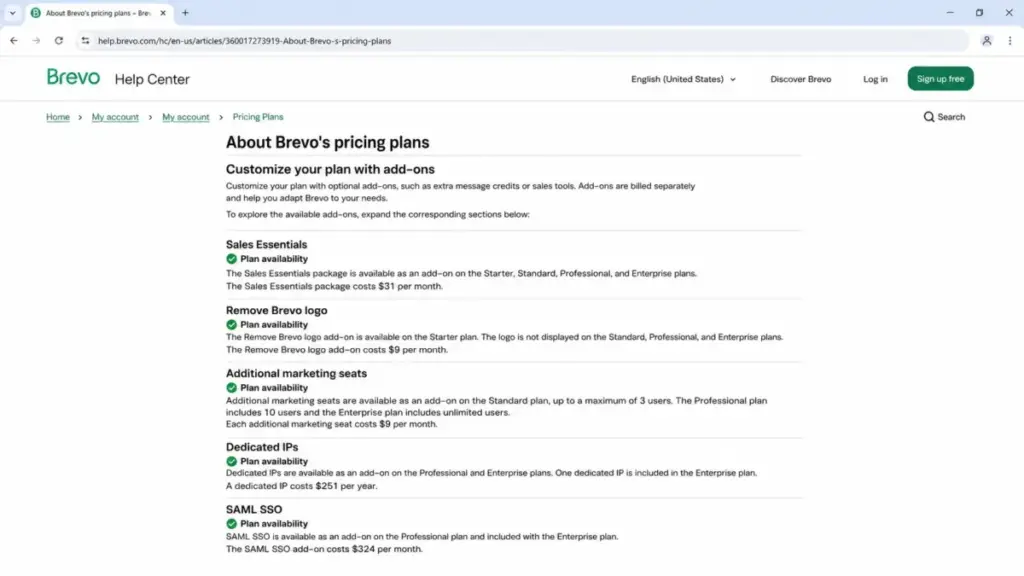
Removing the “Sent with Brevo” sticker is a $9/month add-on on Starter. Standard and above never display the logo. For any brand-conscious sender, this is the cleanest example of why Starter underprices itself relative to Standard.
The seat ceiling between Standard and Professional
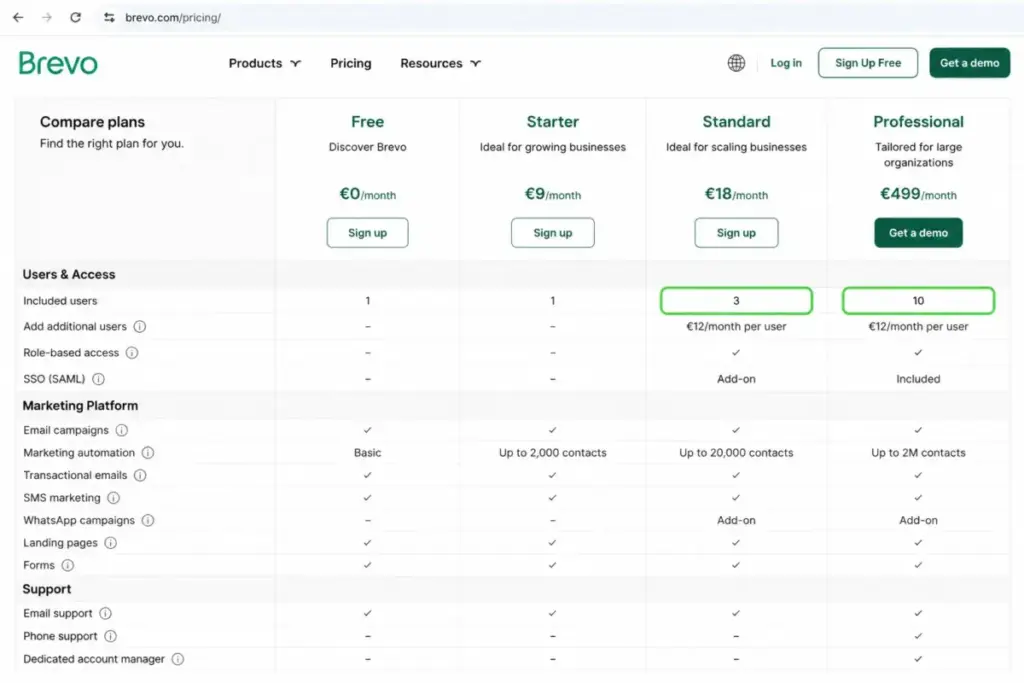
Standard includes a base seat and lets you add marketing users at $9/month each, up to a maximum of 3 users total. There is no fourth seat on Standard at any price. The next plan with more capacity is Professional, which includes 10 seats and starts at $499/month. So a four-person marketing team does not pay a little more than a three-person team. It pays roughly 14 times that team’s $36/month bill, because the only plan that fits is Professional. This is the single biggest cost cliff in Brevo’s lineup.
Security and deliverability add-ons
Two procurement triggers sit on Professional as paid extras. SAML SSO costs $324/month as an add-on, and a dedicated sending IP costs $251/year. Both are included on Enterprise. If your security team requires single sign-on before approving a vendor, that requirement alone can push the decision from Professional toward an Enterprise quote, because paying $324/month for SSO on top of $499/month narrows the gap to a custom plan that bundles it.
Sales tools as separate packages
Brevo’s CRM-style sales features are add-ons, not bundled marketing functionality. Sales Essentials runs $31/month and opens up unlimited deals and pipelines, sales automation, and chatbot scenarios. Sales Advanced runs $64/month and adds outreach sequences, a VoIP phone, call recording, and AI call transcription. If you expected a full CRM inside the email plan, budget for these separately.
Usage credits that vary
Prepaid email credits are available on every plan, never expire, and come in packs from 5,000 up to 1 million emails, with one credit equal to one email to one contact. SMS credits are available on all plans, while WhatsApp credits are limited to Professional and Enterprise. All of these vary by pack size, recipient country, and WhatsApp template type, so Brevo does not publish one fixed figure. Treat them as variable line items, not flat fees.
Taxes and annual prepayment
Displayed prices exclude tax, which is calculated at checkout based on your location. And the 10% annual discount comes with a cash-flow condition: Brevo charges the full year upfront even though your email credits renew monthly on the billing date. The discount is real, the prepayment is the cost of capturing it.
Plan-by-Plan Breakdown
Here is the full lineup with feature gates by plan. Annual equivalents reflect Brevo’s 10% yearly discount (as of June 2026).
| Plan | Monthly | Annual equivalent | Billing basis | Seats | Best for |
|---|---|---|---|---|---|
| Free | $0 | $0 | Emails/day | 1 | Testing Brevo, tiny lists, low daily volume |
| Starter | From $9 | From $8.08/month | Emails/month | 1 | Solo newsletters, large list, light automation |
| Standard | From $18 | From $16.17/month | Emails/month | Up to 3 (with add-on) | Growing marketing teams that need automation |
| Professional | From $499 | From $449.08/month | Emails/month | 10 included | Larger teams, multichannel, ecommerce |
| Enterprise | Custom | Custom | Custom | Unlimited | 25+ seats, SSO, custom data needs |
What this means: Pricing scales by your selected email-send tier within each plan, so the starting numbers are floors. Contact storage on Starter and Standard tracks your send tier rather than a flat cap, which is why “unlimited contacts” claims you see elsewhere need a caveat. Professional publicly supports up to 2 million stored contacts and 150,000 to 10 million monthly sends, and Enterprise removes the published ceilings entirely.
Free: real, but it breaks in predictable places
Brevo Free costs nothing, needs no credit card, and supports up to 100,000 stored contacts with 300 email sends per day. That is generous on storage and tight on throughput. It includes email and SMS campaigns, transactional email, Aura AI, and basic reporting. The catch is everything around the edges: the “Sent with Brevo” sticker stays, statistics are basic only, automation is capped at 2,000 unique contacts, you get one user, and sales tools are limited to 50 open deals and a single pipeline.
Starter: the solo sender plan
Starter from $9/month removes the daily sending limit and replaces it with a monthly allowance starting at 5,000 emails. It is built for one person sending to a sizable list. Automation still carries the 2,000-contact ceiling, there is no A/B testing, no advanced reports, no landing pages, and the logo is a paid add-on. It is a fine plan for a newsletter writer and an awkward one for a marketing team.
Standard: the plan most teams actually need
Standard from $18/month is where Brevo becomes a marketing platform rather than a send engine. It removes the automation contact cap, adds A/B testing, AI send-time optimization, advanced reports, web and event tracking, one landing page, priority email support, and drops the branding. Up to three marketing users can share it. For the majority of growing email programs, this is the correct plan and the best value in the lineup.
Professional: powerful, and a big step up
Professional from $499/month is a different category. It supports 150,000 to 10 million monthly sends, includes 10 seats, and adds WhatsApp campaigns, popups, mobile and web push, contact scoring, ecommerce features, AI segmentation, an analytics studio, 10 landing pages, phone support, and deliverability strategist hours. SAML SSO and a dedicated IP remain paid add-ons here.
Enterprise: quote-only
Enterprise is custom priced and built for scale: unlimited seats and contacts, sub-organization management, custom objects, 40,000 push subscribers per campaign, mobile wallet notifications, data warehouse and SFTP access, one dedicated IP, SAML SSO, an SLA, and a Customer Success Manager. Brevo does not publish a minimum, so you have to request a quote.
When the Free Plan Stops Working
The Free plan does not fail gradually. It hits specific walls, and knowing which one you will reach first tells you exactly when to upgrade.
The most common wall is the 300-emails-per-day limit. Unused sends do not roll over, so if you email 1,000 subscribers in one campaign, only 300 go out that day unless you manually resend the rest later. For a list of any real size, this alone makes Free unworkable for scheduled campaigns.
The second wall is branding. Free cannot remove the “Sent with Brevo” sticker, and it cannot schedule future campaigns once the daily cap is reached. The third is depth: statistics are basic only, automation tops out at 2,000 contacts, and you are limited to one user. Sales features cap at 50 open deals, one pipeline, one connected calendar, and one connected inbox.
What this means: Free is a genuine forever plan for testing or for a hobby list under a few hundred contacts. The trigger to leave is almost always one of three things: you need more than 300 sends in a day, you need the logo gone, or a second person needs access. Hit any one and you are shopping paid plans.
Pattern interrupt: the 100,000-contact allowance on Free looks like the headline number, but it is a decoy. You will run out of daily sends long before you run out of contact storage. The send limit is the real constraint, not the list size.
Real Cost Scenarios: 5, 10, and 20 Users
Because Brevo does not price per user the way most platforms do, team size interacts with its plans in a way that surprises buyers. Here is the practical cost by marketing headcount (as of June 2026), holding send volume at the entry tier for each plan.
| Marketing users | Recommended plan | Monthly cost | Annual equivalent | Notes |
|---|---|---|---|---|
| 1 | Standard | $18 | $194/year | Standard is the value floor once branding matters |
| 3 | Standard + 2 seats | $36 | About $388/year (estimate) | $18 base plus $9 per extra seat, at the 3-user ceiling |
| 5 | Professional | $499 | $5,389/year | No public plan between 3 and 10 seats forces the jump |
| 10 | Professional | $499 | $5,389/year | 10 seats included, so cost per user drops sharply |
| 20+ | Enterprise | Custom | Custom | Professional caps at 10 seats; Enterprise must be quoted |
What this means: The cost curve is not smooth. Going from three users to five is the most expensive single step in Brevo, because Standard’s hard 3-seat ceiling sends you straight to Professional. A five-person team pays the same $499 as a ten-person team, so if you are at five, the platform is effectively charging you for ten. That is an argument either to keep marketing access at three seats and share logins carefully, or to grow into the full ten before the per-user cost feels fair.
Monthly vs Annual Billing
Brevo’s pricing page offers a Monthly and a Yearly toggle, with the yearly option marked at 10% off. That discount produces annual equivalents of roughly $8.08/month on Starter, $16.17/month on Standard, and $449.08/month on Professional.
The savings are straightforward, but the structure has a wrinkle worth planning for. Yearly subscriptions are charged upfront for the full twelve months and renew annually, while your email credits still renew monthly on the billing date. So you commit a year of cash to save 10%, and on Professional that 10% is meaningful: the difference between $499 and $449.08 across twelve months is roughly $599 a year.
My recommendation: on Starter and Standard, the dollar savings from annual billing are small enough that monthly billing is fine if you want flexibility while you confirm the platform fits. On Professional, where the annual discount saves close to $600 a year, prepay if your cash flow allows it.
Which Brevo Plan Should You Choose?
Brevo’s pricing rewards matching the plan to your send pattern and headcount, not to your list size. Here is how I would advise different buyers.
Solo newsletter writers and creators with a large list and infrequent sends get the most from Brevo’s model. Start on Free to test, then move to Starter only if you can tolerate the branding, or jump to Standard if you want the logo gone and any real automation. For most of you, Standard at $18/month is the right home.
Small marketing teams of two or three should go straight to Standard and add seats as needed, up to the three-user cap. You get unlimited-contact automation, A/B testing, advanced reporting, and a landing page, which covers the daily work of most growing email programs.
Mid-market and ecommerce teams that need WhatsApp, push, contact scoring, or product recommendations belong on Professional. The $499 entry is steep, but it bundles 10 seats and a multichannel toolkit that would cost more to assemble elsewhere.
Larger organizations with 20 or more marketing seats, single sign-on requirements, or custom data pipelines should request an Enterprise quote rather than stacking add-ons on Professional. Once SSO at $324/month enters the picture, the Enterprise bundle usually makes more sense.
Which Brevo Plan Should You Avoid?
Starter is the plan to be careful with, and the reason is specific. On paper it looks like the affordable entry to paid Brevo. In practice, the features most teams expect are missing: no A/B testing, no advanced reports, no landing pages, automation still capped at 2,000 contacts, and the logo behind a $9/month add-on. Add that add-on and you are paying $18, the exact price of Standard, for a materially weaker plan.
The exception is real and worth stating: if you are one person sending newsletters to a large list, you do not run automation past a couple thousand contacts, and you genuinely do not mind the Brevo sticker, Starter at $9 is the cheapest legitimate way to send at scale. For that narrow profile, it is the right pick. For everyone running an actual marketing program, Standard is the floor and Starter is a false economy.
Brevo Pricing vs Competitors
Brevo’s emails-sent billing model is the thing to test against rivals, because most of them charge by contacts or subscribers instead. That difference, not the headline price, decides who is cheaper for you. The table below uses US starting prices for context (as of June 2026); exact quotes depend on contacts, seats, sends, and billing cycle.
| Platform | Starting price | Billing basis | Free plan | Seat notes |
|---|---|---|---|---|
| Brevo | $9/month Starter; $18 Standard; $499 Professional | Emails sent | Yes, 300/day | Standard caps at 3; Professional includes 10 |
| Mailchimp | $13 Essentials; $20 Standard; $350 Premium | Contacts + send caps | Yes, 250 contacts | Essentials 3 seats; Standard 5; Premium unlimited |
| ActiveCampaign | $19/month Starter (or $15 annual) at 1,000 contacts | Contacts + add-ons | No permanent free | Starter 1 user; higher tiers add seats |
| Constant Contact | $12 Lite; $35 Standard; $80 Premium | Contacts + send multipliers | No permanent free | Lite 1; Standard 3; Premium unlimited |
| MailerLite | $12 Comfort; $25 Power | Subscribers | Yes, 250 subscribers | Power includes unlimited seats |
| Omnisend | From $16/month paid | Contacts/list size | Yes, 250 contacts | Not seat-constrained in public pricing |
What this means: For a large list that sends a few campaigns a month, Brevo wins on price because you pay for the sends you make, not the contacts you store. A 50,000-contact list mailed twice a month costs far less on Brevo than on a contact-priced tool. Flip the pattern, a small list mailed daily, and contact-based tools with unlimited sends can pull ahead. On seats, Brevo’s 3-user Standard ceiling is tighter than MailerLite’s unlimited-seat Power plan or Mailchimp’s 5-seat Standard, so multi-marketer teams should weigh that. To go deeper on the contact-based side, see the Mailchimp pricing breakdown, and for unlimited-seat value at a low price, the MailerLite review covers where it fits. Teams that want a heavier automation builder can compare the ActiveCampaign review, while the Constant Contact review and the Omnisend review cover the small-business and ecommerce angles respectively. If you are still deciding which category fits, our roundup of the best email marketing platforms maps the field, and the basics of marketing automation explain why that 2,000-contact cap matters so much.
Is Brevo Worth the Price?
Brevo is worth it if you have a large contact database and a moderate send frequency, want email plus transactional messaging plus light CRM in one tool, and can live within the seat structure. For newsletter publishers, SMBs, and SaaS teams sending transactional and marketing email together, the emails-sent model is genuinely cheaper than the alternatives, and Standard delivers real marketing capability at $18/month.
Brevo is not worth it if you need 20 or more marketing seats, mandatory SSO, advanced ecommerce personalization, or custom data controls without budgeting for Professional or Enterprise. At that point you are comparing a $499-plus bill against ActiveCampaign, Klaviyo, or a dedicated ecommerce platform, and the email-volume advantage matters less than the depth of automation and segmentation you are buying. Deliverability is also worth weighing here: a dedicated IP is a paid add-on until Enterprise, and email deliverability is the difference between a sent email and a seen one.
The honest caveat: Brevo is excellent for high-contact, moderate-send programs and increasingly ordinary as your automation, seat count, and security needs grow. It is brilliant in its lane and merely competitive outside it.
How to Avoid Overpaying for Brevo
A few specific moves keep your Brevo bill matched to what you actually use.
Skip Starter if you want unbranded emails. Adding the $9 logo-removal add-on makes Starter cost the same as Standard while delivering less, so go straight to Standard.
Keep marketing access at three seats if you can. The leap from Standard to Professional is the costliest step in the lineup, so share logins responsibly before adding a fourth marketer forces the $499 plan.
Match your plan to your send tier, not your list size. Brevo prices by emails sent, so storing a large but lightly mailed list is cheap. Do not over-buy a higher tier for contacts you rarely email.
Buy prepaid email credits for spiky volume. If your sending is occasional rather than steady, non-expiring credit packs can beat a higher monthly allowance you would not use most months.
Prepay annually only on Professional. The 10% discount saves close to $600 a year there, which justifies the upfront commitment. On Starter and Standard, the savings are small enough that monthly flexibility is often the better trade.
Treat SSO as an Enterprise trigger. If your security team requires single sign-on, price the $324/month add-on against an Enterprise quote that includes it before defaulting to Professional.
Confirm your region’s pricing at checkout. This guide uses US/USD figures, and Brevo can localize pricing by currency and region, so the numbers you see may shift outside the US.
Frequently Asked Questions
How much does Brevo cost in 2026?
Brevo’s paid plans start at $9/month for Starter, $18/month for Standard, and $499/month for Professional, with a custom-priced Enterprise tier. There is also a free plan at $0. Annual billing applies a 10% discount. Your exact cost depends on the email-send tier you select, since Brevo prices by emails sent rather than contacts stored (verified June 2026).
Is Brevo really free?
Yes. Brevo’s free plan costs nothing, requires no credit card, and supports up to 100,000 stored contacts with 300 email sends per day. It includes email and SMS campaigns, transactional email, and basic reporting. The trade-offs are the daily send cap, the “Sent with Brevo” branding, automation limited to 2,000 contacts, and a single user seat.
Does Brevo charge by contacts or by emails sent?
Brevo charges primarily by emails sent, not by contacts stored. This is the opposite of Mailchimp and Klaviyo, which bill by contacts or active profiles. For a large list mailed infrequently, the emails-sent model is usually cheaper, because you are not paying monthly for contacts you rarely email.
What does Brevo Standard include that Starter does not?
Standard removes the 2,000-contact automation ceiling and adds A/B testing, AI send-time optimization, advanced reports, web and event tracking, one landing page, priority email support, and removes the Brevo logo. Starter lacks all of these. Since logo removal is a $9 add-on on Starter, Standard often costs the same while delivering far more.
How many users can I add to Brevo?
The free and Starter plans include one user. Standard allows up to three marketing users, with additional seats at $9/month each. Professional includes 10 seats, and Enterprise offers unlimited seats. The hard 3-user cap on Standard is the main reason teams jump to the much pricier Professional plan.
Is Brevo cheaper than Mailchimp?
Often, yes, for large lists. Because Brevo charges by emails sent while Mailchimp charges by contacts, a big list mailed a few times a month costs much less on Brevo. If you have a small list that you email daily, Mailchimp’s contact-based plans with higher send allowances can be competitive. The list-size-to-send-frequency ratio decides it.
What are Brevo's hidden costs?
The main ones are the $9/month logo-removal add-on on Starter, additional seats at $9/month on Standard, SAML SSO at $324/month and a dedicated IP at $251/year on Professional, plus variable SMS and WhatsApp credits. Displayed prices also exclude tax, and annual plans are charged upfront for the full year.
Does Brevo include single sign-on?
SAML SSO is a paid add-on on Professional at $324/month and is included on Enterprise. It is not available on Free, Starter, or Standard. If your organization requires SSO, factor it into the cost comparison, because adding it to Professional often makes an Enterprise quote the better value.