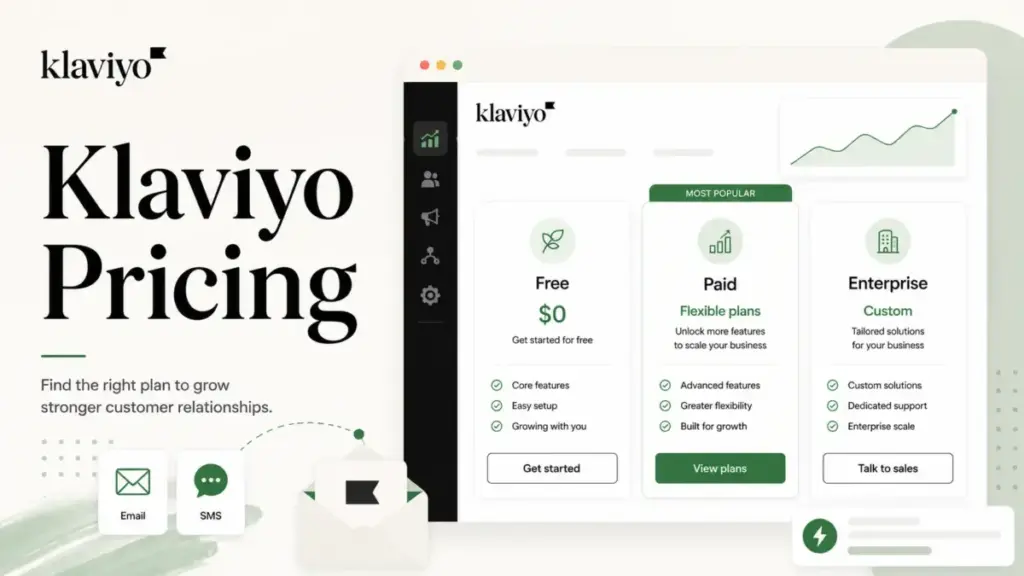
Klaviyo charges by active profiles, not by seats and not by emails sent. That single decision shapes everything about who saves money here and who quietly overpays.
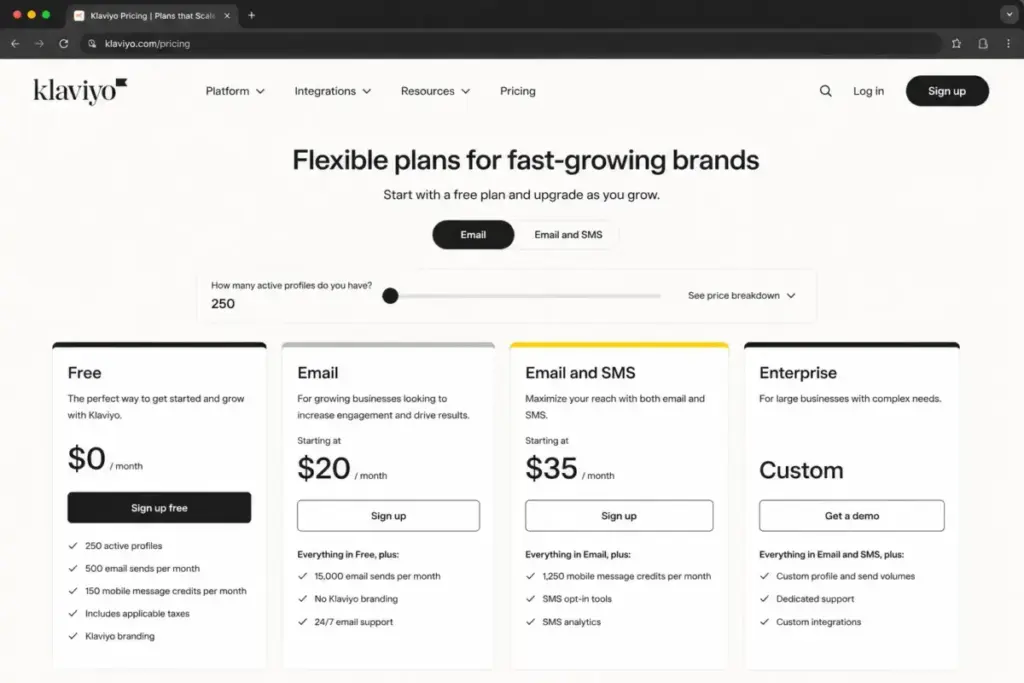
The Free plan costs $0 for up to 250 active profiles, paid Email pricing commonly starts around $20 a month, and the headline most articles repeat ends there.
The real Klaviyo bill is the profile meter plus SMS credits, plus channel and analytics add-ons, plus overage behavior most buyers never model until the invoice arrives.
This guide breaks down every plan, the active-profile billing nobody explains well, SMS credit math, the add-on stack, hidden costs, total-cost scenarios by list size, and when a cheaper platform is the smarter call.
If you run a real ecommerce list and use lifecycle flows, keep reading. If you send two newsletters a month, you can probably stop at the verdict and look at the best email marketing platforms for lighter-weight options.
Quick Pricing Verdict
Here is the short version before the detail. Treat paid dollar figures below the Free plan as Klaviyo calculator estimates, not fixed list prices, because Klaviyo runs a dynamic pricing calculator and exact tiers shift with your active-profile count.
| Decision point | Answer (as of June 2026) |
|---|---|
| Starting price | $0 Free plan; paid Email commonly starts near $20/month for 251-500 active profiles |
| Free plan | Yes, up to 250 active profiles, 500 email sends, 150 mobile message credits per month |
| Best plan for most teams | Paid Email for ecommerce brands that actively run segmentation and flows |
| Biggest hidden cost | SMS credits, Marketing Analytics, and Advanced KDP add-ons stacked on top of base |
| Plan to avoid | Free plan if you are already near 250 profiles or 500 monthly sends |
| Best alternative if too expensive | Brevo or Omnisend for lighter sending volume and lower entry cost |
| Billing model | Hybrid: active profiles plus message usage plus add-ons, billed monthly |
What this means: Klaviyo is cheap to start and expensive to scale. The Free plan is a sandbox, not a growth plan, and the paid bill is a stack of meters rather than one line item. Budget for the meters you will actually turn on, and confirm live figures on the official Klaviyo pricing page before you commit.
How We Verified Klaviyo Pricing
We reviewed Klaviyo’s official pricing page, billing documentation, and help-center articles in June 2026. Because Klaviyo uses a dynamic pricing calculator, paid plan figures beyond the Free plan are treated as calculator-based estimates, not fixed public list prices. We also separate official pricing facts from third-party calculator captures where exact public prices were not directly available.
Executive Summary: Klaviyo Cost at 5, 10, and 20 “Users”
Klaviyo does not price by internal users in its public materials. Asking what 10 users cost in Klaviyo is the wrong question. The bill is driven by active profiles, message volume, and add-ons. So the scenarios below map team sizes to typical active-profile tiers reported in third-party calculator captures, then state the assumption out loud.
| Team proxy | Assumed active profiles | Estimated Email monthly | Annual if paid monthly | What is not included |
|---|---|---|---|---|
| Solo / 5 people | 2,500 | ~$60 | ~$720 | SMS, analytics, service modules |
| 10 people | 10,000 | ~$150 | ~$1,800 | SMS credits, add-ons, KDP |
| 20-25 people | 25,000 | ~$400 | ~$4,800 | SMS, analytics, customer service |
| 50 people | 50,000 | ~$720 | ~$8,640 | governance, enterprise support |
| 100 people | 100,000 | ~$1,380 | ~$16,560 | enterprise terms may differ |
What this means: These are profile-scale estimates from calculator captures, not per-seat prices, and they cover email only. A 10,000-profile store on roughly $150 a month can easily double that once SMS and analytics are switched on. Verify your exact tier in Klaviyo’s live calculator before you commit, since these figures are triangulated estimates rather than guaranteed official rates.
The one thing to understand first: Klaviyo is not priced per seat. It is priced mainly by active profiles plus message usage plus add-ons. Every unsuppressed active profile sitting in your list can become a billable line every month until you suppress or remove it.
Line-Item Cost Breakdown
Klaviyo bills as several separate products. Profiles and email are the base. Mobile messaging, Reviews, Customer Hub, Customer Agent, Marketing Analytics, and Advanced KDP are each their own meter. All plans bill monthly.
| Plan | Monthly | Billing basis | Key limits |
|---|---|---|---|
| Free | $0 | Profile and send limited | 250 active profiles, 500 emails, 150 mobile credits, Klaviyo branding |
| ~$20 starting (calculator) | Active profiles | Entry tier maps to 251-500 profiles; scales with profile count | |
| Email plus SMS | ~$35 starting (calculator) | Profiles plus mobile credits | Entry tier reported with ~1,250 SMS/MMS credits |
| Enterprise / Klaviyo One | Custom | Quote-based | Large profile counts, governance, services; pricing not publicly disclosed |
What this means: The jump from Free to paid Email is small on paper. The cost that surprises people is everything that is not in this table. Marketing Analytics, Advanced KDP, and high-volume SMS are separate subscriptions, so the entry Email tier is a floor, not a ceiling.
How active-profile billing actually works
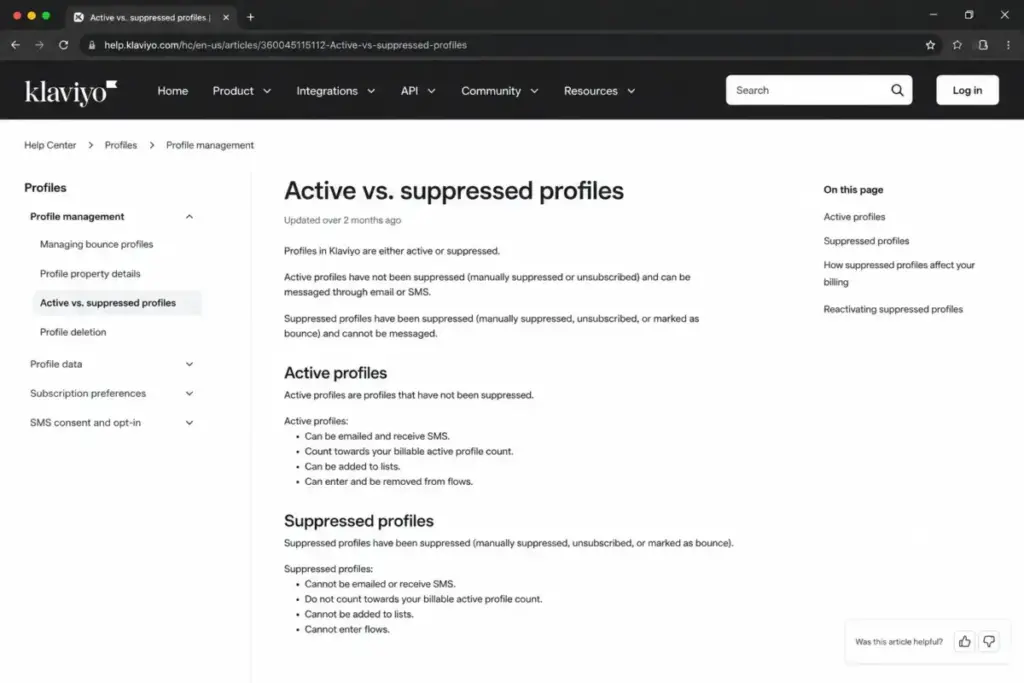
An active or billable profile is what Klaviyo counts toward your tier. Suppressed and unsubscribed profiles stay in your account for historical reporting but are not billed once processed. This is the lever competitors flatten into the word “contacts.” It matters because list hygiene directly lowers your bill, and because tight customer segmentation is what makes profile-based pricing pay off. Cleaning out unengaged profiles is not just deliverability housekeeping here; it is cost control.
Klaviyo SMS pricing is credit-based, and credits are not messages
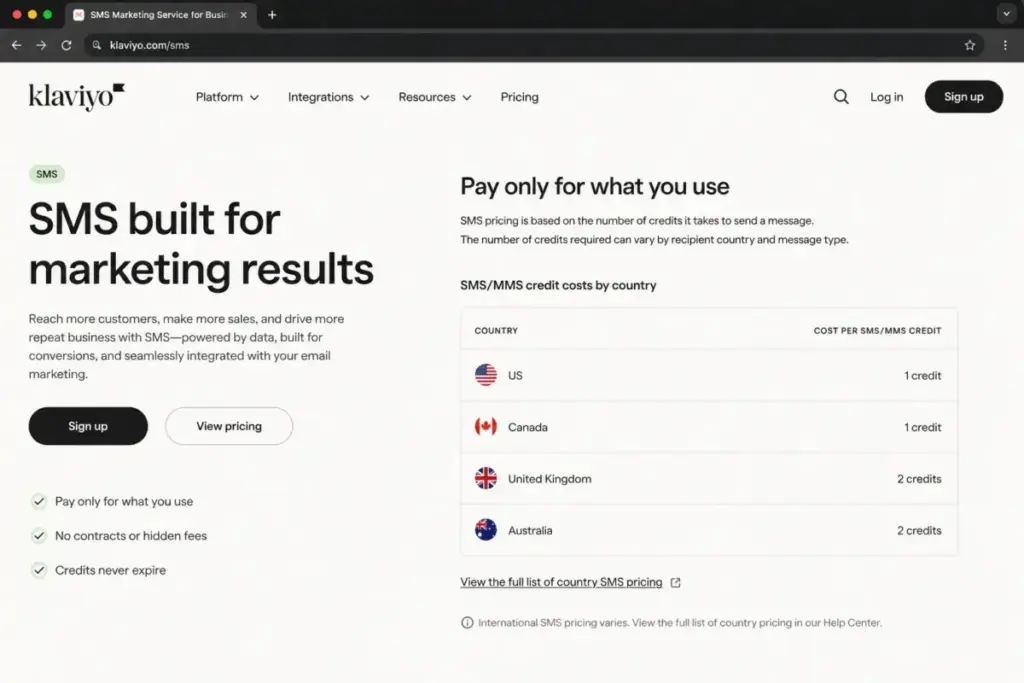
This is where SMS bills run past the plan card. Klaviyo mobile messaging runs on credits, and one message does not always equal one credit. Credit consumption varies by recipient country, message type, and the number of segments in the message. A US text and a Canada text do not cost the same number of credits. Short codes are billed separately, and failed deliveries can still consume credits depending on the billing rules.
So when a third-party page reports 1,250 credits at the entry Email plus SMS tier, read that as a starting allowance, not a fixed number of sends. Heavy MMS use, longer messages, and international audiences burn credits faster.
Why your SMS bill exceeds the plan card: credits scale with country, message length, and message type. Model your real audience mix before you assume the included credits will last the month.
Feature Gates by Plan
Knowing the price is half the decision. The other half is what unlocks where. The table below maps the gates that change the buying calculus. Add-on items are separate subscriptions regardless of base plan.
| Feature | Free | Paid Email | Email plus SMS | Enterprise |
|---|---|---|---|---|
| Up to 250 active profiles | Yes | Higher tiers start above this | Yes | Yes |
| 500 email sends/month | Yes | Higher allowance | Yes | Yes |
| 150 mobile message credits | Yes | More via SMS plan | Yes | Custom |
| Remove Klaviyo branding | No | Yes | Yes | Yes |
| Ongoing email support | First 60 days only | Yes | Yes | Yes |
| Chat support | No | Yes | Yes | Yes |
| SMS/MMS marketing | Limited credits | Separate or via Email plus SMS | Credit-based | Usage-based |
| Marketing Analytics | No | Add-on | Add-on | Add-on or custom |
| Advanced KDP | No | Add-on | Add-on | Custom or add-on |
| Customer Hub / Helpdesk / Customer Agent | Limited or none | Add-on | Add-on | Add-on or custom |
What this means: The gates that catch growing stores are branding removal, ongoing support, and SMS. Free support runs only for the first 60 days, then drops off unless you upgrade. For a store running revenue-critical flows, losing support access alone is usually enough reason to leave the Free plan.
Annual vs Monthly: The Real Savings Math
Here is an honest caveat that separates this guide from the calculator clones: I cannot show you an annual discount, because no public annual discount percentage was verified in Klaviyo’s official pricing and billing sources. Klaviyo’s billing docs confirm plans are billed monthly. Several competitors advertise a clear annual saving; Klaviyo’s public model does not.
So do not budget around an assumed yearly discount. If a sales rep offers annual terms, treat any savings as negotiated rather than published, and get the number in writing before you sign.
What this means: Plan your Klaviyo budget on monthly figures. Any annual deal is a conversation with sales, not a posted rate, and modeling phantom savings into your forecast is how teams end up surprised.
Add-Ons, Overages, and Surprise Costs
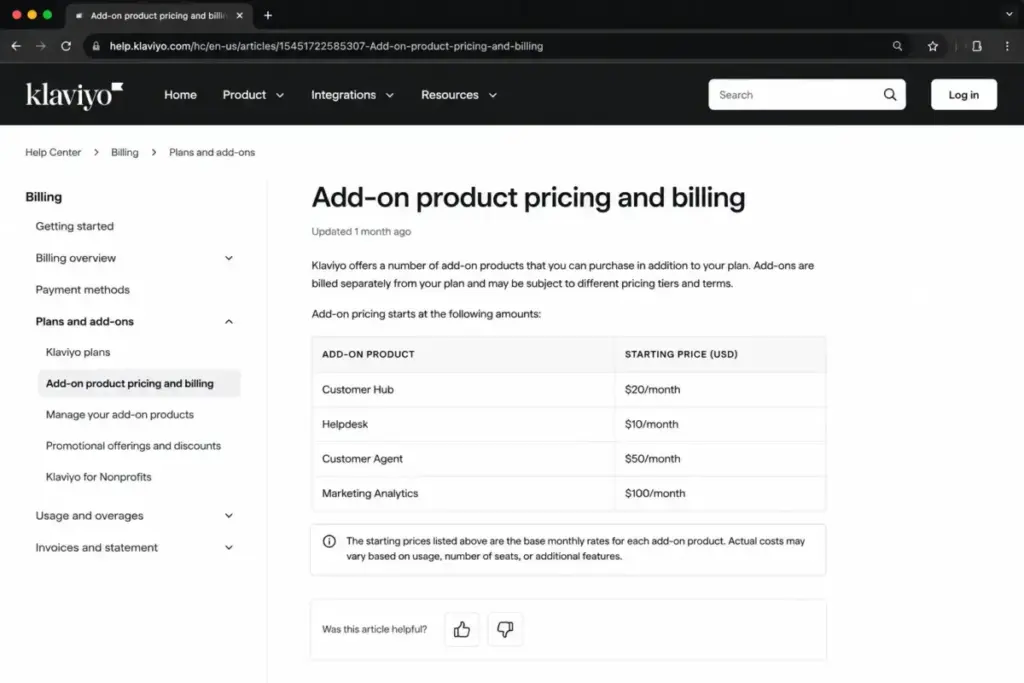
The $20 Email plan is not the full paid cost. It is the base before the growth stack. Each add-on below is a separate meter, and together they are how a “cheap” email tool becomes a commerce platform bill.
| Add-on | Starting price | What it unlocks |
|---|---|---|
| Customer Hub | From $20/month, up to 10,000 profiles | Logged-in shopper service experience |
| Helpdesk | From $10/month, up to 50 tickets | Shopper support ticketing |
| Customer Agent | From $50/month, up to 75 conversations | AI customer agent conversations |
| Marketing Analytics | From $100/month, up to 13,500 profiles | Advanced analytics not in base plans |
| Advanced KDP | Tiered; official example $4,765/month at 1M profiles | Advanced data platform, billed by total profiles |
| Reviews | Order-based; exact public price not verified | Reviews for Shopify and WooCommerce |
| SMS/MMS/WhatsApp credits | Usage-based, varies by country and type | Mobile messaging beyond included credits |
What this means: A store can start at $20 for Email and still land a four-figure monthly bill once Marketing Analytics and Advanced KDP are added. Price the modules you will actually use, not the ones the demo shows.
The Advanced KDP trap
Advanced KDP is the costliest surprise in the catalog, and it bills differently from everything else. It is a separate subscription based on total profiles, not only active profiles. That distinction matters because total profiles include the suppressed and unsubscribed records that do not count toward your email tier.
Klaviyo’s own billing documentation gives a concrete example: 520,000 excess profiles produced a $2,480.40 overage on top of a $4,765 monthly plan. The overage alone dwarfs entry Email pricing by two orders of magnitude. If you are nowhere near enterprise data volumes, you will never see this. If you are, model total profiles carefully before enabling it.
Overage, auto-upgrade, and downgrade behavior
Paid accounts behave differently from free ones when limits are hit. Klaviyo’s billing docs describe automatic upgrades to the next tier, flexible sending options for going over, downgrade timing, and no refund for a mid-cycle downgrade. Free accounts do not auto-upgrade, but sending can pause until you drop back under the limit or upgrade.
Two practical consequences. First, downgrades take effect at the next billing cycle, so you keep paying the current rate even after you cut your plan. Second, if flexible sending is enabled, going over your limit costs money rather than stopping you, which is convenient until the invoice lands.
Before you upgrade, run this checklist:
- Suppress or remove unengaged profiles to drop your billable count first.
- Confirm whether flexible sending or overage settings are enabled, and decide if you want them.
- Time any planned downgrade for the end of a billing cycle, since there is no mid-cycle refund.
- Separate total profiles from active profiles before considering Advanced KDP.
- Model SMS credits against your real country mix, not the included headline number.
Which Klaviyo Plan Should You Choose?
The right plan depends on your store stage and how hard you use lifecycle marketing, not your headcount. Here is the by-segment recommendation.
Brand-new or pre-launch stores: Start on Free. Use it as a setup sandbox to build flows, forms, and segments. Just know the Klaviyo branding stays in your footer and direct support ends after 60 days, so it is not a place to live long term.
Ecommerce stores with real flow revenue: Paid Email is the practical tier. If abandoned cart, post-purchase, win-back, and segmented campaigns drive meaningful revenue, profile-based pricing pays for itself. This is the segment Klaviyo is built for.
Stores adding SMS: Move to Email plus SMS only after you have modeled credit consumption for your audience. SMS is a strong channel and a common bill-inflator, so go in with a credit budget.
Large brands needing governance or data tooling: This is Enterprise or Klaviyo One territory, which is quote-based and not publicly priced. Higher-tier accounts may include onboarding or customer success manager access automatically if the account qualifies.
Which Klaviyo Plan Should You Avoid?
Avoid the Free plan if your store is already near 250 active profiles or 500 monthly email sends. At that point sending can pause mid-campaign, branding stays attached, and support is limited, which is the worst combination for a store that depends on email revenue. The Free plan is genuinely useful as a sandbox; it is a poor production plan for anything growing.
Separately, avoid bolting on SMS or advanced modules without modeling them first. Turning on Marketing Analytics, Advanced KDP, or high-volume SMS without a credit and profile plan is how a $20 base becomes a bill you did not forecast. The exception: if you have already validated the revenue those modules drive, they earn their keep.
Klaviyo Pricing vs Competitors
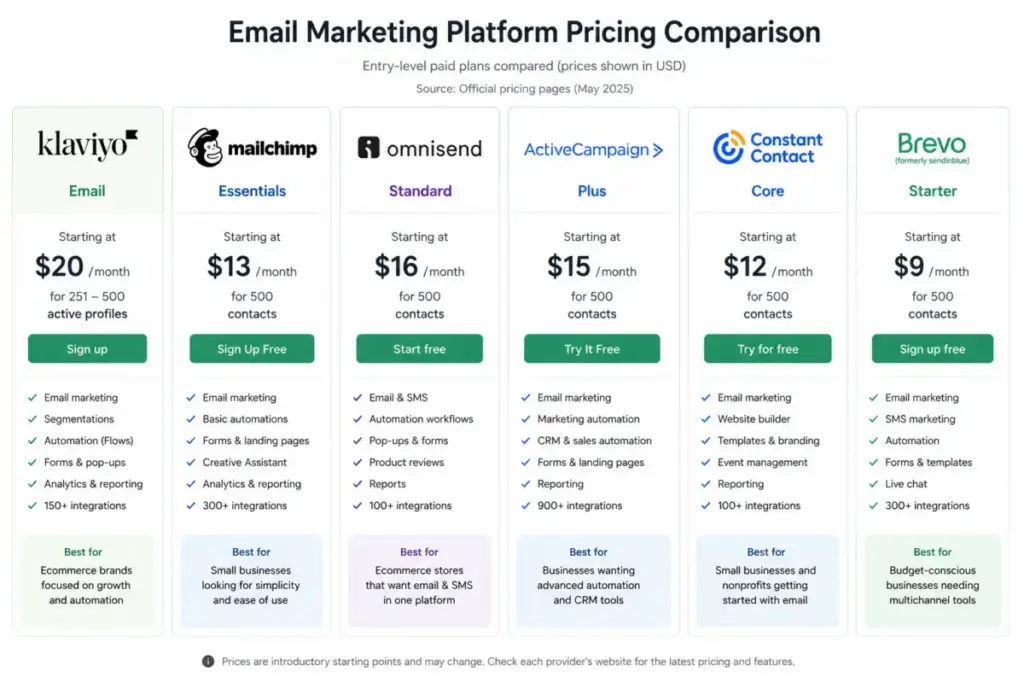
Competitor comparisons only help when the assumptions are normalized. Headline starting prices hide different billing models, so the table below compares on the levers that actually move cost. Figures are current observed US rates or caveated secondary-source figures as of June 2026.
| Platform | Starting price | Free plan | Billing model | Notes |
|---|---|---|---|---|
| Klaviyo | ~$20/month Email (calculator) | Yes, 250 profiles | Active profiles plus usage | Deepest ecommerce flows, most meters |
| Mailchimp | ~$13/month Essentials | Yes, 250 contacts | Contacts plus seat limits | Standard caps at 5 seats; Premium unlimited |
| Omnisend | ~$16/month Standard; Pro $59 | Yes, 250 contacts | Contacts plus send multiplier | SMS add-on from $0.007/SMS since May 2026 |
| ActiveCampaign | ~$15/month annual, $19 monthly | No, trial only | Contacts plus plan | Plan family confirmed; no setup fees |
| Constant Contact | $12/month Lite | No verified free plan | Contacts plus send multiplier | Lite 1 user, Premium unlimited; SMS add-on from $10 |
| Brevo | $9/month Starter | Yes, 300 emails/day | Email volume, not profiles | Sends-based, friendlier for low-volume senders |
What this means: Klaviyo is rarely the cheapest entry, and it is not trying to be. Its model rewards stores that send often to engaged, segmented lists. If your value comes from sending volume rather than profile depth, a sends-based tool like Brevo can cost a fraction of Klaviyo for the same outcome. For lighter sending you can compare the full Mailchimp pricing breakdown or read the Omnisend platform review and Brevo platform review before deciding. For a Klaviyo-style automation feel at a different price point, the ActiveCampaign platform review and Constant Contact platform review are useful next reads, and the Mailchimp platform review covers the seat-limit catch in detail.
Is Klaviyo Worth the Price?
It depends, and the honest answer splits cleanly by store type. Klaviyo is brilliant within its niche and overpriced for everything outside it.
Worth it if you run a Shopify, WooCommerce, or BigCommerce store with real revenue from lifecycle flows: abandoned cart, post-purchase, win-back, and repeat-purchase campaigns. The profile-based model and ecommerce event data turn into measurable revenue, and that is exactly what justifies the meter.
Not worth it if you send low-volume newsletters, have no ecommerce event data, need only basic broadcasts, or are highly sensitive to list-growth costs. In those cases you are paying for an engine you will not run. A sends-based or simpler contact-based tool will cost less and do the job.
Klaviyo’s pricing model is the review thesis here. If your marketing is driven by segmentation and behavioral flows, the model works in your favor. If it is driven by occasional sends to a slowly growing list, the same model works against you.
How to Avoid Overpaying for Klaviyo
A few specific tactics keep the Klaviyo bill honest.
- Suppress unengaged and unsubscribed profiles regularly. Billable active profiles are the main lever, so list hygiene is direct cost control.
- Audit your active-profile count before each billing cycle so an auto-upgrade does not catch you off guard.
- Model SMS credits against your real country and message-type mix instead of trusting the included headline number.
- Add Marketing Analytics, Advanced KDP, and service modules only after you have validated the revenue they drive.
- Separate total profiles from active profiles before enabling Advanced KDP, since it bills on the larger number.
- Time downgrades for the end of a cycle, because there is no mid-cycle refund.
- If most of your cost comes from list size rather than sending behavior, price a sends-based competitor before renewing.
FAQ
How much does Klaviyo cost per month?
The Free plan is $0 for up to 250 active profiles. Paid Email pricing commonly starts around $20 a month for 251-500 active profiles, based on Klaviyo’s calculator and third-party captures as of June 2026. Real cost rises with active-profile count and any SMS credits or add-ons you enable, so the entry figure is a floor rather than a typical bill.
Is Klaviyo free to use?
Yes, Klaviyo offers a genuine Free plan, not just a trial. It includes up to 250 active profiles, 500 email sends, and 150 mobile message credits per month, with editors, automations, segmentation, and reports. The catches are Klaviyo branding in your emails, direct support limited to the first 60 days, and sending that can pause once you exceed the free limits.
Does Klaviyo charge for unsubscribed contacts?
No. Klaviyo bills on active or billable profiles. Suppressed and unsubscribed profiles remain in your account for historical reporting but are not counted toward your billing tier once processed. This is why cleaning your list lowers your bill: removing or suppressing unengaged profiles drops the number Klaviyo charges you for each month.
How much does Klaviyo SMS cost?
Klaviyo SMS runs on usage-based credits rather than a flat fee. One message does not always equal one credit, because consumption varies by recipient country, message type, and the number of segments in the message. Short codes are billed separately, and failed deliveries can still consume credits. Model your real audience before assuming the included credits will cover a month.
Does Klaviyo have an annual discount?
No public annual discount was verified in Klaviyo’s official pricing and billing sources as of June 2026. Klaviyo’s billing docs confirm plans are billed monthly. If a sales representative offers annual terms, treat any savings as negotiated rather than published, and confirm the exact figure in writing before committing.
Is Klaviyo cheaper than Mailchimp?
Not usually at entry. Mailchimp Essentials starts around $13 a month and Klaviyo Email near $20. The bigger difference is the model: Mailchimp caps seats per plan and bills by contacts, while Klaviyo bills by active profiles with no public seat limit. For deep ecommerce flows Klaviyo often delivers more value per dollar; for simple newsletters Mailchimp can be cheaper.
What happens if you exceed Klaviyo plan limits?
On paid plans, Klaviyo can automatically upgrade you to the next tier or apply flexible sending charges if those settings are enabled. On the Free plan, there is no auto-upgrade, but sending can pause until you fall back under the limit or upgrade. Downgrades take effect at the next billing cycle, and there is no refund for a mid-cycle downgrade.
What Klaviyo add-ons cost extra?
Several. Customer Hub starts at $20 a month, Helpdesk at $10, Customer Agent at $50, and Marketing Analytics at $100, each with its own usage limits. Advanced KDP is a separate subscription billed by total profiles, with a documented example of $4,765 a month at one million profiles. Reviews is order-based, and SMS, MMS, and WhatsApp credits are usage-based on top of all of these.
Does Klaviyo have a pricing calculator?
Yes. Klaviyo uses a dynamic pricing calculator, so your exact price changes with active profile count, email volume, SMS credits, and selected products.
Is Klaviyo pricing based on contacts or subscribers?
Klaviyo pricing is based mainly on active or billable profiles, not simply newsletter subscribers. Suppressed profiles are treated differently from active profiles.
How much does Klaviyo cost for Shopify stores?
The cost is the same pricing model, but Shopify stores often pay more as their active customer profiles, abandoned-cart flows, SMS campaigns, and analytics needs grow.
The Bottom Line on Klaviyo Pricing
Klaviyo pricing is honest once you stop reading it as an email tool and start reading it as a commerce growth stack with several meters. The Free plan is a sandbox, the $20 Email tier is a floor, and the real bill is active profiles plus SMS credits plus the add-ons you switch on. For ecommerce brands with revenue-driving flows, that model is fair and often a bargain. For low-volume senders, it is an engine you will pay for and barely use.
Decide on the meter, not the headline. Count your active profiles, model your SMS credits, and price only the add-ons you will run. Do that, and Klaviyo pricing stops being a surprise and starts being a plan.
Pricing verified June 2026 against Klaviyo’s official pricing page and billing documentation. Klaviyo uses a dynamic calculator, so confirm exact paid tiers in the live tool before purchase. Prices change; check the official source for current rates.