Kit charges by how many subscribers you store, not by how many emails you send. That one decision is the whole story of this pricing page, and it produces a paradox that almost no one explains: the free Newsletter plan holds up to 10,000 subscribers, while the paid Creator plan starts at 1,000.
So you do not upgrade because you outgrew the free list. You upgrade because you need something the free plan locks behind a paywall.
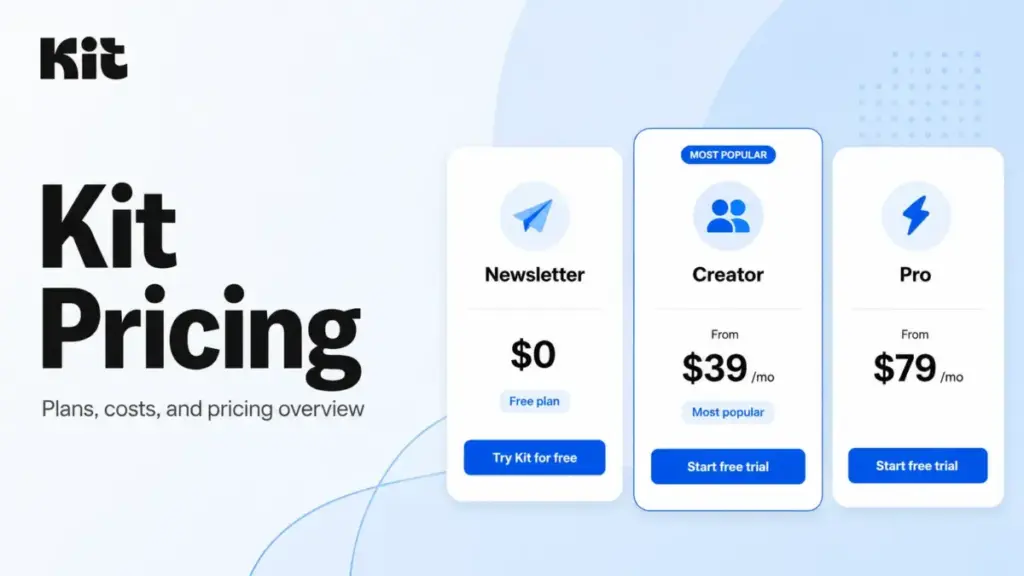
That distinction changes how you should read the advertised numbers. Newsletter is $0. Creator starts at $39/month and Pro starts at $79/month for up to 1,000 subscribers, with annual billing knocking both down to $33 and $66 per month (as of June 2026, verified on Kit’s official pricing page).
Those are real prices. They are also incomplete, because the bill grows with your list, and because Kit takes a cut of money you make through Commerce and Paid Recommendations.
I cover email and marketing automation tools for SaaSZap, where Kit appears in our best email marketing software guide.
Kit (the platform formerly known as ConvertKit) is one of the more honestly priced creator tools I evaluate. But “honest” is not the same as “cheap,” and the gap between the sticker price and the real price is where most buyers get surprised.
This guide separates what Kit officially confirms from what only third-party trackers report, so you know exactly which numbers to trust before you commit.
Quick Pricing Verdict
Here is the decision compressed into one table. Everything below is the evidence.
| Question | Answer |
|---|---|
| Starting price | $0 (Newsletter); paid plans from $39/mo (Creator), $79/mo (Pro) at 1,000 subscribers |
| Free plan? | Yes, free up to 10,000 active unique subscribers |
| Free trial? | 14 days on Creator and Pro, no credit card required |
| Best plan for most people | Creator, for any creator monetizing through automations and sequences |
| Plan to avoid | Pro, unless you need a team larger than 2, advanced analytics, or a referral system |
| Biggest hidden cost | Subscriber-based scaling. The bill rises as your list grows, not your feature use |
| Best alternative if too expensive | A simpler ESP like Mailchimp or MailerLite if you only send basic broadcasts |
| Pricing verified | June 30, 2026 |
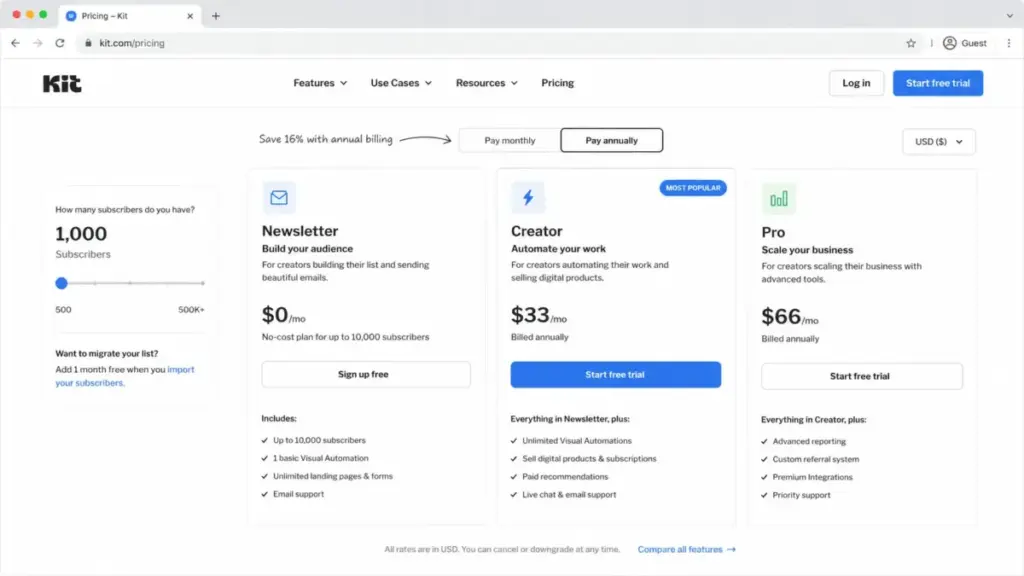
A note on sourcing before we go deeper. This guide is based on Kit’s official pricing page, help center, and feature pages, plus SaaSZap editorial analysis; it does not claim hands-on testing of the platform. Kit’s pricing slider is dynamic, and the official page reliably exposed only the 1,000-subscriber starting tier during this research. The higher subscriber bands you will see later (5,000, 10,000, 50,000 and up) come from third-party pricing trackers and are labeled as such. Treat the 1,000-subscriber numbers as confirmed and recheck the higher bands in Kit’s live slider before you buy. I would rather flag that than pretend every figure is gospel.
The Advertised Price vs The Real Price
The numbers on the pricing page describe a creator with exactly 1,000 subscribers who never sells anything. Most people Kit is built for do not match that profile. Here is where the advertised price and the price you actually pay diverge.
| What the page shows | What you actually pay | Why it differs |
|---|---|---|
| Creator “$39/mo” | $39 to $679/mo depending on list size | Price scales by active unique subscribers |
| Pro “$79/mo” | $79 to $879/mo depending on list size | Same subscriber-based scaling |
| “Sell digital products” | Sale price minus a transaction fee | Kit Commerce charges a per-transaction fee |
| “Earn from Recommendations” | Earnings minus 23.5% | Paid Recommendations carries a platform fee |
| “Free up to 10,000 subscribers” | Free, but one Recommendation slot pays Kit, not you | Newsletter keeps a Kit-managed slot |
None of this is hidden in a dishonest way. It is on the pricing page and in the help center. But it is spread across several pages and several fee structures, so the all-in cost is rarely what the headline suggests. The rest of this guide reassembles those pieces into one picture.
The 5 Hidden Costs Nobody Mentions
Starting price alone is misleading here. These five costs determine what Kit really sets you back.
1. Subscriber-based scaling
This is the big one. Kit prices both paid plans by active unique subscribers, so the same Creator plan that costs $39/month at 1,000 subscribers costs much more as your list grows. Third-party trackers report Creator at roughly $89/month at 5,000 subscribers, $139 at 10,000, and $379 at 50,000, with Pro running about $50 higher at each band (recheck these in Kit’s live slider). Your feature set does not change across those prices. You are paying purely for list size.
The practical implication: a creator who grows from 1,000 to 25,000 engaged subscribers can see their bill multiply roughly five times without adding a single feature. Plan your budget around your growth, not your starting list.
2. The Commerce transaction fee
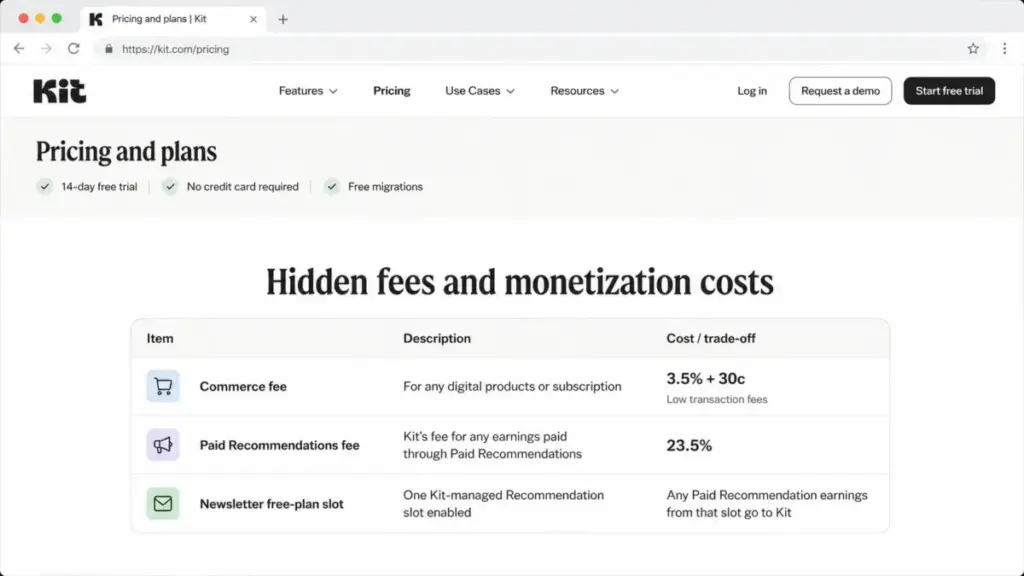
If you sell digital products, paid newsletters, subscriptions, or run a tip jar through Kit, the platform takes a cut. Kit’s pricing page lists a bundled Commerce transaction fee of 3.5% + $0.30 per transaction across all three plans. Worth noting honestly: Kit’s separate Commerce feature page describes the fee differently, as a 0.6% platform cut plus standard Stripe card-processing fees. Those two descriptions do not match, so before you build your pricing around either number, confirm the current rate inside your own Kit account at checkout.
3. The Paid Recommendations fee
This one catches creators who confuse it with the Commerce fee. When you earn money through Kit’s Paid Recommendations on the Creator or Pro plan, Kit keeps 23.5% of those earnings. Newsletter users do not get this fee because they cannot earn through Paid Recommendations in the same way. If sponsorship and recommendation income is part of your model, run the math at 76.5% of gross, not 100%.
4. The free-plan Recommendation slot
On the free Newsletter plan, Kit keeps one Recommendation slot enabled, and any Paid Recommendation earnings generated from that slot go to Kit rather than to you. It is not a line item you pay. It is income you forgo. For a small creator that may be nothing. For a fast-growing newsletter sending tens of thousands of opens, it is a quiet opportunity cost, and it is one reason monetizing creators move off free quickly.
5. The team-seat ceiling
Kit does not charge per user, which sounds generous until you hit the ceiling. Newsletter includes 1 user. Creator includes 2. The moment a third person needs account access, you are not buying a seat. You are buying Pro, which jumps your base price from $39 to $79/month at the same subscriber count. For a three-person creator business, “free unlimited users on Pro” really means a mandatory $40/month upgrade triggered by headcount, not features.
Plan-by-Plan Breakdown
Here is what each plan actually includes, with the feature gates that matter. Kit prices the paid plans by subscriber count, so the monthly figures below assume the 1,000-subscriber starting tier.
| Plan | Monthly | Annual (per mo) | Billing basis | Best for | Key limits |
|---|---|---|---|---|---|
| Newsletter | $0 | $0 | Free up to 10,000 subs | Audience growth before monetizing | 1 user, 1 basic automation, 1 sequence |
| Creator | $39 | $33 ($390/yr) | Per subscriber, from 1,000 | Monetizing solo creators and 2-person teams | 2 users, no Pro analytics |
| Pro | $79 | $66 ($790/yr) | Per subscriber, from 1,000 | Teams of 3+, referral and analytics needs | No public enterprise/SSO tier confirmed |
Newsletter (Free): more generous than it looks, more limited than you’d hope
The free plan is the reason Kit gets recommended so often. It supports up to 10,000 active unique subscribers and includes unlimited forms, landing pages, email broadcasts, digital products, and subscriptions, plus a Creator Profile and one basic visual automation with a single email sequence. For a writer building an audience, that is a lot of runway at zero cost.
What it withholds: unlimited automations and sequences, third-party integrations and RSS campaigns, branding removal, full control over Recommendations, and Paid Recommendations earnings. Avoid staying on free if you have started monetizing, because the missing automation and integration layer is exactly what turns a list into revenue.
Creator: the plan most monetizing creators actually need
Creator gives you unlimited Visual Automations and email sequences, apps and integrations, RSS campaigns, branding removal, and 24/7 email and chat support, with up to 2 users. This is the tier where Kit stops being a newsletter tool and starts being an automation platform. For most solo creators and small partnerships, it is the right answer.
What it withholds: everything in the Pro column below, including advanced reporting, subscriber scoring, content A/B testing, and team access beyond 2 people.
Pro: analytics and team access, not just “more”
Pro adds unlimited team members, email content A/B testing, advanced deliverability reporting, subscriber engagement scoring, an insights dashboard, Facebook Custom Audiences sync, a newsletter referral system (powered by SparkLoop), edit links in already-sent broadcasts, and priority support, per Kit’s Creator vs Creator Pro help doc. Pro is not simply a bigger Creator. It is the analytics, collaboration, and growth tier.
What it withholds: a published enterprise plan. Kit’s public pricing centers on Newsletter, Creator, and Pro. If you need governance controls like verified SSO or SCIM, that was not confirmed in public pricing, so ask Kit sales directly.
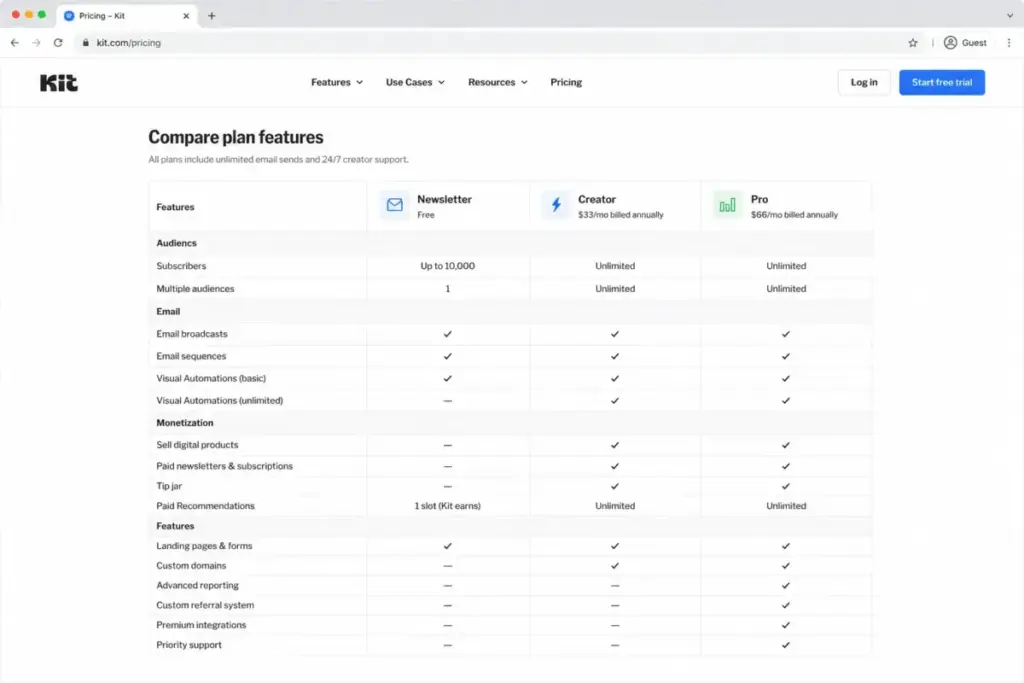
Feature gates at a glance
| Feature | Newsletter | Creator | Pro |
|---|---|---|---|
| Active unique subscribers | Up to 10,000 | From 1,000, then scales | From 1,000, then scales |
| Users | 1 | 2 | Unlimited |
| Visual Automations | 1 basic | Unlimited | Unlimited |
| Email sequences | 1 | Unlimited | Unlimited |
| Remove Kit branding | No | Yes | Yes |
| Apps, integrations, RSS | Gated | Yes | Yes |
| A/B testing | Limited | 2 subject-line variants | Up to 5 variants + content testing |
| Paid Recommendations earnings | No (slot pays Kit) | Yes | Yes |
| Deliverability reporting | No | No | Yes |
| Subscriber engagement scoring | No | No | Yes |
| Facebook Custom Audiences | No | No | Yes |
| Newsletter referral system | No | No | Yes |
| Insights dashboard | No | No | Yes |
| Support | 24/7, 24-72h target | 24/7 email + chat | 24/7 priority |
When the Free Plan Stops Working
Because the free plan holds 10,000 subscribers, the upgrade trigger is almost never “I ran out of room.” It is a feature wall. You move off Newsletter when one of these becomes true:
- You need more than one automation or sequence to run a real funnel.
- You want to connect Kit to other apps or pull in content via RSS.
- You need to remove Kit branding from your forms and emails.
- You want to keep 100% of your Recommendation earnings instead of handing one slot to Kit.
- You are ready to earn through Paid Recommendations, which free users cannot.
If none of those apply yet, stay free. I have watched creators upgrade out of a vague sense that paying means they are “serious,” then use exactly one welcome sequence. The tool matters less than the habit of emailing consistently. Upgrade when a missing feature is actively blocking revenue, not before.
Real Cost Scenarios: 5, 10, and 20 Users
Because Kit does not bill per seat, team size barely moves the number, which is the opposite of how most email marketing software prices. What moves the number is your subscriber count. These scenarios hold subscribers at 1,000 to isolate the seat effect.
| Team size | Required plan | Monthly | Annual | Why |
|---|---|---|---|---|
| 5 users | Pro | $79 | $790 | Creator caps at 2 users, so Pro is forced |
| 10 users | Pro | $79 | $790 | Same as 5 users; seats are unlimited on Pro |
| 20 users | Pro | $79 | $790 | Still $79; subscriber count is the only lever |
The takeaway is unusual: going from a 2-person team to a 20-person team costs you exactly one upgrade, from $39 to $79/month, and nothing after that at the same list size. The real cost variable lives in the subscriber slider, not the seat count. For a content team running a large list, that is genuinely good economics. For a solo creator who only needed unlimited automations, paying for Pro just to add a virtual assistant is the most common way to overpay.
Cost at Scale: How the Subscriber Slider Changes Everything
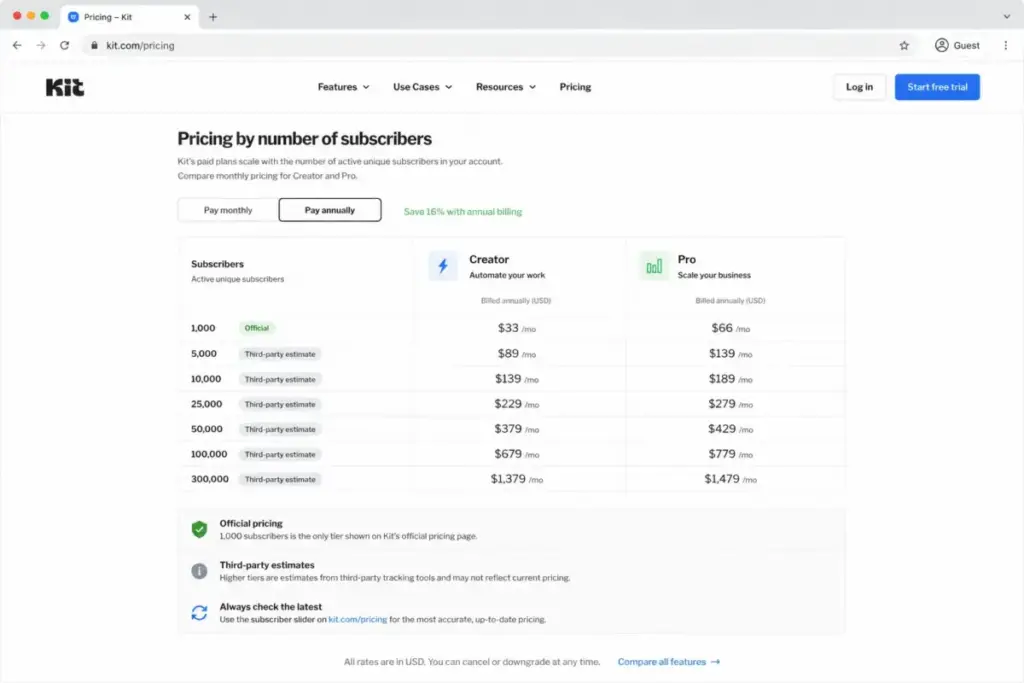
This table is where the “starts at $39” framing breaks down. The 1,000-subscriber row is from Kit’s official page. Every row below it is third-party validated and should be confirmed in the live slider before purchase.
| Subscribers | Creator (mo) | Pro (mo) | Source confidence |
|---|---|---|---|
| 1,000 | $39 | $79 | Official |
| 5,000 | ~$89 | ~$139 | Third-party |
| 10,000 | ~$139 | ~$189 | Third-party |
| 25,000 | ~$199 | ~$279 | Third-party |
| 50,000 | ~$379 | ~$519 | Third-party |
| 100,000 | ~$679 | ~$879 | Third-party |
A 50,000-subscriber creator on Pro is looking at roughly $519/month, or about $433/month billed annually, versus $79 at the entry tier. If your growth is fast, model the cost at your projected list size 12 months out, not today’s. The platform that feels cheap at launch can feel expensive at scale, and a subscriber-based ESP punishes you for keeping unengaged contacts on the list. Prune dead subscribers regularly. On this billing model, every inactive address is money.
Monthly vs Annual Billing
Kit’s annual discount is straightforward: pay yearly and you get two months free, which works out to about 16.7% off. Concretely, Creator drops from an effective $468/year (paid monthly) to $390/year, saving $78. Pro drops from $948 to $790, saving $158, at the 1,000-subscriber tier.
| Plan | Monthly billing (per yr) | Annual billing | You save |
|---|---|---|---|
| Creator | $468 | $390 | $78 |
| Pro | $948 | $790 | $158 |
If you are confident you will keep Kit for a year, annual is an easy call. Annual billing is officially described as two months free, but exact annual-equivalent prices at higher subscriber bands were not confirmed in this research, so verify those in the slider. If you are still trialing the platform or comparing it against alternatives, stay monthly until you have sent real campaigns and watched your deliverability and open rates settle.
Which Kit Plan Should You Choose?
Match the plan to your situation, not to your ambition.
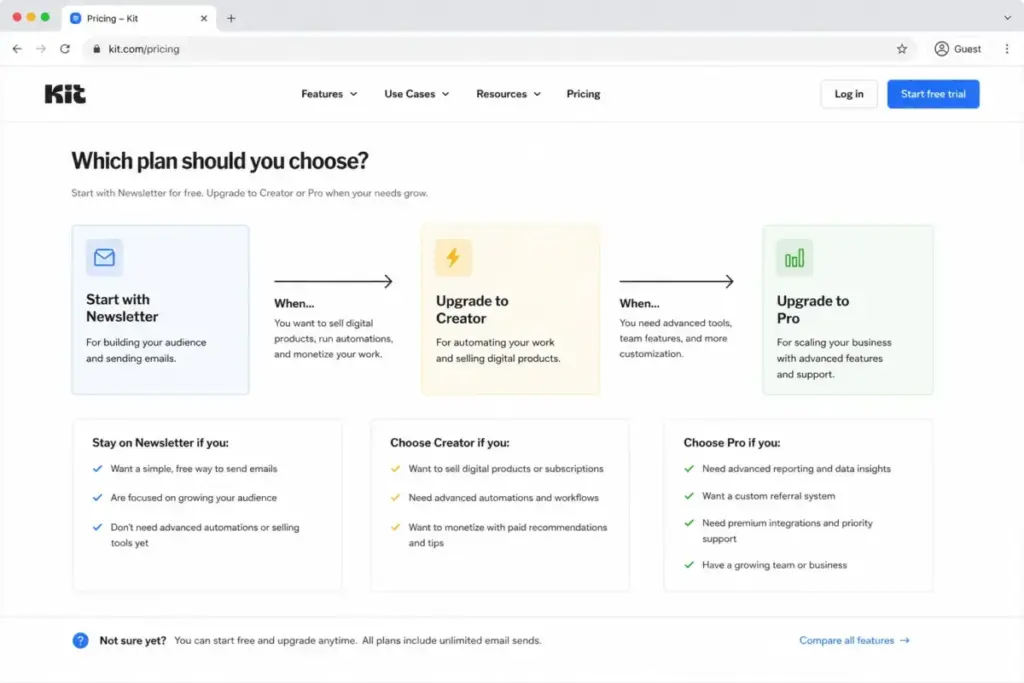
- Solo creator still building an audience: Newsletter (free). You have up to 10,000 subscribers of runway. Spend the money you save on growth, not software.
- Solo creator or 2-person team monetizing: Creator ($39/mo). This is the best-value plan for most people who actually make money from their list. Unlimited automations, sequences, integrations, and branding removal cover the vast majority of creator workflows.
- Team of 3 or more: Pro ($79/mo). The seat ceiling forces the upgrade, and you get analytics and collaboration as a bonus.
- Newsletter operator who needs referral growth and deliverability data: Pro. The referral system, subscriber scoring, and deliverability reporting are the genuine reasons to pay the premium, not the team seats.
Which Kit Plan Should You Avoid?
Avoid Pro if you are a solo creator whose only needs are unlimited automations and branding removal. Those live on Creator, $40/month cheaper. The Pro-only features (deliverability reporting, subscriber engagement scoring, Facebook Custom Audiences, the referral system, edit-after-send, content A/B testing, and unlimited seats) are real, but they serve teams and data-driven newsletter operations. A one-person course business rarely touches them.
The exception: if you genuinely run content A/B tests on every send and live inside engagement analytics, Pro pays for itself in better-performing campaigns. The test is simple. List the Pro-only features above. If fewer than two are on your weekly to-do list, Creator is your plan.
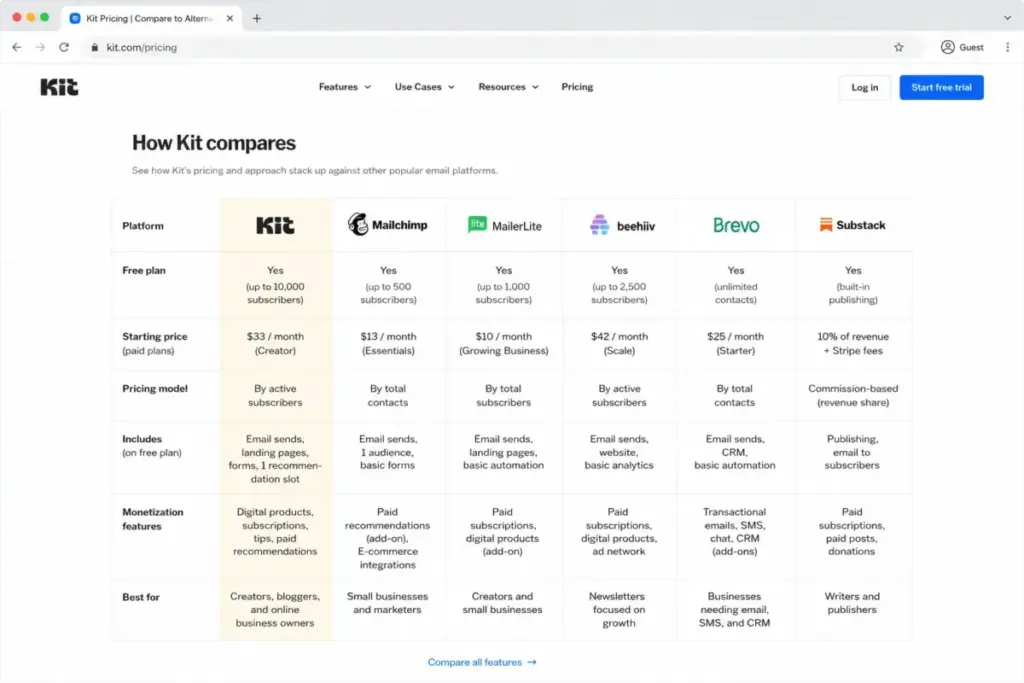
Kit Pricing vs Competitors
Kit’s subscriber-based model is one of several, and the right billing model depends entirely on your business type. Here is how the main alternatives price, with each company’s official figures where they were available.
| Platform | Starting price | Billing model | Free plan | Best for |
|---|---|---|---|---|
| Kit | $0; paid from $39/mo | Per active subscriber | Up to 10,000 subs | Creators monetizing via automations |
| Mailchimp pricing | $13/mo (Essentials) | Per contact + send limits | Up to 250 contacts | All-purpose marketing with overage risk |
| MailerLite | $0 Free | Per subscriber + email volume | Up to 250 subs | Budget-conscious newsletter writers |
| beehiiv | $0 Launch; paid from $49/mo | Subscriber-tiered flat plans | Up to 2,500 subs | Newsletters keeping 100% of paid-sub revenue |
| Brevo | $0 Free | Email volume + feature tier | Yes (send-capped) | High-volume senders and SMS |
| Substack | $0 | 10% revenue share | Yes | Writers who want zero fixed cost |
A few honest caveats. Mailchimp’s Premium plan, the one with unlimited users, starts at $350/month, so it is not a like-for-like cheaper option for teams. MailerLite and Brevo use dynamic pricing pages, and their exact paid-tier dollar figures were not exposed during this research, so I am only stating their confirmed free limits and billing models, not invented prices. For beehiiv, the official FAQ says paid plans start at $49/month, while an annual snapshot shows Scale around $43/month and Max around $96/month.
The deciding question is your monetization model, not the sticker price. If you sell sponsorships and paid newsletters, Kit’s 23.5% Paid Recommendations cut and Commerce fee matter more than the subscription. If you want zero platform fee on paid subscriptions, beehiiv’s model is friendlier. If you publish a paid newsletter and want no fixed cost at all, Substack’s 10% revenue share trades a monthly bill for a slice of income. And if you only send simple broadcasts to a small list, a cheaper ESP like Brevo beats paying creator-platform prices for automation features you will never use.
Is Kit Worth the Price?
Kit charges by subscribers, not emails, and that single decision shapes everything about who should and should not pay.
It is worth it if you are a creator who can attribute revenue to email: courses, memberships, paid newsletters, digital products, or sponsorships routed through automated sequences and segmentation. For that buyer, Creator at $39/month is one of the better-value tools in the category, and the free Newsletter plan is a legitimately generous on-ramp. Kit’s positioning as a creator-first platform is earned, not marketing, as our Kit (ConvertKit) review covers in more depth.
It is not worth it if you only send simple broadcasts to a modest list, because you are paying for an automation and monetization engine you will not use. It is also a poor fit if you need heavy ecommerce segmentation, or enterprise governance like verified SSO and SCIM, which Kit’s public pricing does not confirm. Budget newsletter writers should look at MailerLite or Brevo. Ecommerce-heavy senders should consider a dedicated platform like Klaviyo.
One more thing worth saying plainly: Kit raised its entry-level prices in late 2025, and third-party commentators noted increases in the range of $10 to $20/month for entry plans. That makes the free plan more valuable than ever and the “is Creator worth it” question slightly tighter than it was a year ago. The platform is still a strong pick for monetizing creators. It is just no longer the obvious budget choice for people who only want to send a weekly email.
How to Avoid Overpaying for Kit
Seven ways to keep the bill honest:
- Stay on Newsletter until a feature blocks revenue. The 10,000-subscriber free cap means most creators upgrade too early. Wait for a real wall.
- Prune unengaged subscribers regularly. On subscriber-based pricing, dead contacts cost you every month. Clean your list quarterly.
- Do not buy Pro just to add a teammate. If your only reason for Pro is a third user, ask whether one shared login on Creator covers it short-term while you confirm the need.
- Pay annually once you are committed. Two months free is a clean 16.7% saving on a tool you already trust.
- Model your cost at next year’s list size. Quote the slider at your projected subscribers, not today’s, so the scaling does not surprise you.
- Use the free migration. Kit includes migration with every paid plan: an Essentials migration (subscribers, tags, lists, segments) for under 10K subscribers, and a Concierge migration (plus forms, automations, templates, integrations) for 10K and up. That removes most of the switching cost from leaving an incumbent.
- Separate Commerce fees from Paid Recommendations fees in your revenue model. They are different rates on different income. Confusing them will throw off your margins.
FAQ
How much does Kit cost in 2026?
Kit’s Newsletter plan is free up to 10,000 subscribers. Paid plans start at $39/month for Creator and $79/month for Pro at 1,000 subscribers, dropping to $33 and $66 per month on annual billing. Prices rise as your subscriber count grows (verified June 2026).
Is Kit free?
Yes. The Newsletter plan is genuinely free for up to 10,000 active unique subscribers and includes unlimited forms, landing pages, broadcasts, and digital products, plus one basic automation. The catch is that advanced automations, integrations, branding removal, and Paid Recommendations earnings are paywalled.
Is Kit really free up to 10,000 subscribers when Creator starts at 1,000?
Yes, and it is the platform’s defining quirk. The free plan holds more subscribers than the entry paid plan because the upgrade is feature-driven, not list-size-driven. You pay for automations, integrations, and monetization tools, not for room to grow your list.
Does Kit charge transaction fees?
Yes. Kit’s pricing page lists a Commerce transaction fee of 3.5% + $0.30 per sale across all plans, though its Commerce feature page describes the fee as 0.6% plus Stripe processing. Confirm the live rate in your account. Separately, Paid Recommendations earnings carry a 23.5% platform fee on paid plans.
What is the difference between Kit Creator and Pro?
Creator gives you unlimited automations, sequences, integrations, branding removal, and 2 users. Pro adds unlimited users, content A/B testing, deliverability reporting, subscriber scoring, Facebook Custom Audiences, a newsletter referral system, and an insights dashboard. Most solo creators only need Creator.
Does Kit charge for extra users?
Not directly. Newsletter includes 1 user and Creator includes 2. Pro includes unlimited users at no per-seat cost. The practical effect is that adding a third teammate forces a $39-to-$79/month plan upgrade, even if your subscriber count and feature needs stay the same.
Does Kit offer a free trial, and is a card required?
Yes, a 14-day free trial on both Creator and Pro, with no credit card required, per Kit’s official pricing and help pages. (A 30-day money-back guarantee is mentioned by some third-party sites but was not confirmed in Kit’s official sources.)
Is Kit cheaper than Mailchimp?
For monetizing creators, often yes, because Kit’s free plan is far more generous and Creator at $39/month undercuts Mailchimp’s automation tiers. But Mailchimp’s Essentials starts lower at $13/month, so for simple low-volume sending Mailchimp can be cheaper. Compare them on your contact count and feature needs, not the headline price.
What happens when I pass 10,000 subscribers on the free plan?
You will need to move to a paid plan, since 10,000 active unique subscribers is the free Newsletter ceiling. At that point Kit’s free migration tools and subscriber-based pricing both come into play, so check the live slider for the cost at your exact list size.
Are the higher subscriber-tier prices official?
Only the 1,000-subscriber tier was confirmed on Kit’s official page in this research. Prices for 5,000 subscribers and above come from third-party trackers and should be rechecked in Kit’s live pricing slider before you commit.
The Bottom Line
Kit’s pricing is honest but layered. The free Newsletter plan is one of the best audience-building deals in email, Creator at $39/month is the right call for most monetizing creators, and Pro earns its premium only for teams of three or more and data-driven newsletter operations. The number that should drive your budget is not the $39 sticker. It is your projected subscriber count and the fees Kit takes on Commerce and Paid Recommendations. Model those three things honestly, and Kit’s pricing holds up well for the creators it is built for, and overcharges everyone else.