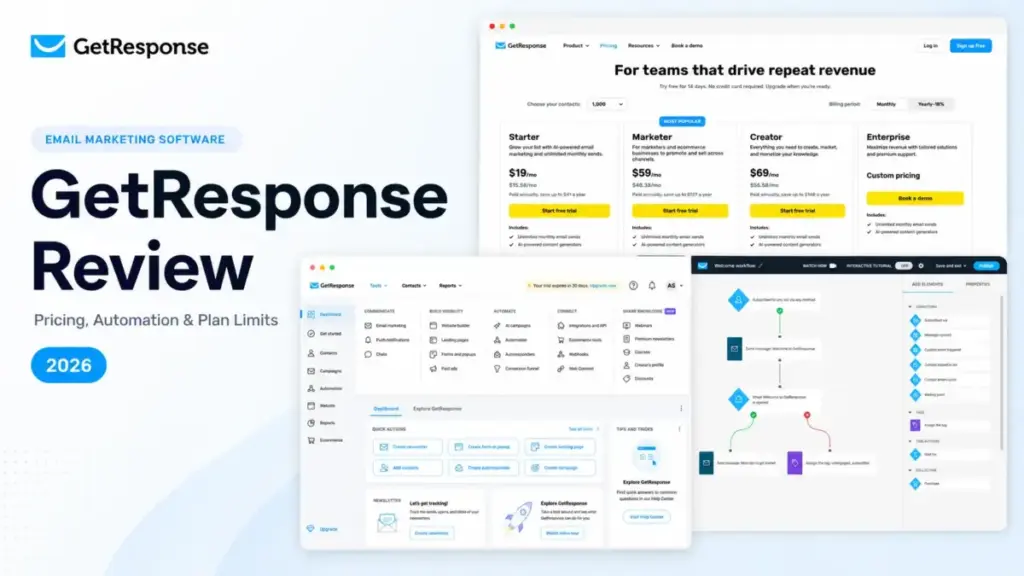
GetResponse works best when the buyer knows exactly which plan to pick before subscribing. That is not a generic disclaimer. It is the thesis of this entire review.
At $19 per month for Starter and $69 per month for Creator, GetResponse looks like a consolidation bargain: email, landing pages, automation workflows, webinars, courses, and forms in one login. And for the right team, it is.
But that value proposition has fine print that ten ranking reviews either missed or papered over with stale plan names and obsolete trial information.
Among the best email marketing platforms available in 2026, GetResponse stands out for breadth. Whether it stands out for value depends on how your list is structured, which workflows you need, and whether you read the billing documentation before your first annual invoice.
The Starter plan caps you at one custom automation workflow. The same email address on two lists can be counted and billed twice. Exceeding your contact limit, even mid-year on an annual plan, can trigger a recurring list-extension fee. If none of those details were on your radar, this review will save you money.
| Quick Verdict | |
|---|---|
| Best for | 3-to-10-person marketing teams consolidating email, landing pages, automation, webinars, or courses in one platform |
| Not ideal for | Buyers expecting full automation on the cheapest plan, teams needing phone support below Enterprise, or organizations with heavily overlapping lists |
| Starting price | Free (500 contacts, 2,500 sends/month); Starter at $19/month (1,000 contacts) |
| Practical plan | Marketer at $59/month (1,000 contacts) for teams needing more than one automation workflow |
| Free plan | Yes, forever-free with 500 contacts, 2,500 messages/month, and GetResponse branding |
| Setup difficulty | Medium. Basic newsletters are simple; automation, funnels, ecommerce sync, and list accounting take time |
| Main strength | Breadth: email, forms, landing pages, automation, webinars, courses, funnels, and AI generators under one roof |
| Main limitation | Starter allows only one custom automation workflow; contact-list accounting can inflate costs |
| Best alternative | ActiveCampaign for deeper automation; Mailchimp for simpler campaigns; Klaviyo for ecommerce |
GetResponse Pros and Cons
| Pros | Cons |
|---|---|
| All-in-one: email, landing pages, forms, webinars, courses, funnels, and AI in one subscription | Starter limits you to one custom automation workflow |
| Free plan with 500 contacts and 2,500 monthly sends, no credit card required | Same email on multiple lists can count multiple times toward your contact limit |
| Unlimited email sends on all paid plans | Exceeding contact or student limits triggers a recurring list-extension fee, even on annual billing |
| Built-in webinar hosting on Creator (no separate Zoom subscription) | Phone support restricted to Enterprise |
| Visual automation builder with event triggers and scoring on Marketer and above | Transactional email available only on Enterprise |
| REST API with 30,000 calls per 10-minute window and real-time webhooks | Official help pages show conflicting Creator webinar capacity numbers |
What this means: GetResponse delivers real value for teams that pick the right plan upfront. The cons are not deal-breakers for most buyers, but every one of them becomes expensive if you discover it after committing to an annual subscription.
What Is GetResponse?
GetResponse is an email marketing and marketing automation platform built by GetResponse S.A. It covers email campaigns, autoresponders, visual automation workflows, landing pages, signup forms, popups, conversion funnels, webinars, online courses, premium newsletters, web push notifications, and AI content generation.
The platform runs on five plan tiers in 2026: Free, Starter, Marketer, Creator, and Enterprise. Several ranking reviews still reference retired plan names like Email Marketing, Marketing Automation, and Ecommerce Marketing, and describe a 30-day trial that no longer exists. The current official offer is a 14-day premium-feature window on the free plan, after which branding and feature restrictions apply.
GetResponse advertises more than 170 integrations, including Shopify, WooCommerce, WordPress, Magento, PrestaShop, Zapier, Salesforce, Stripe, PayPal, Google Analytics, and Facebook.
How We Reviewed GetResponse
This review is based on official pricing documentation, help center pages, API documentation, and third-party validation from G2, Capterra, and TrustRadius. The testing level is third-party validated: I cross-referenced official GetResponse sources with user sentiment patterns across three review platforms rather than running a hands-on product trial.
Pricing was verified against GetResponse’s official pricing page on June 19, 2026, using USD values at the default 1,000-contact tier. I audited the top 10 SERP results for “GetResponse Review” and found that five of them still use retired plan names, at least two reference an obsolete 30-day trial, and none explain the recurring list-extension fee or the duplicate-contact billing rule in actionable detail.
Methodology limitation: This is not a hands-on test. I did not measure deliverability rates, A/B test the editor, or time the onboarding flow. I relied on official documentation and review-platform patterns for feature claims, supplemented by Sarah Chen’s experience evaluating 35+ email marketing and automation platforms for SaaSZap since 2022.
Setup and Onboarding Experience
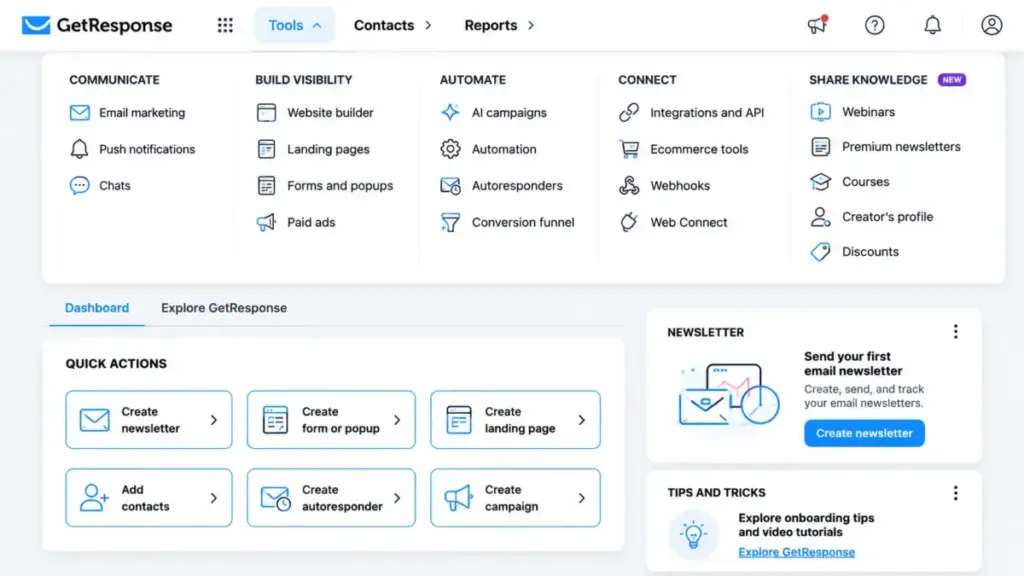
Getting a GetResponse account running is straightforward. The free plan requires no credit card, and the interface loads with a step-by-step guide for importing contacts, creating your first newsletter, and building a landing page.
G2 and Capterra reviews consistently describe the email editor and basic newsletter flow as approachable. On Capterra, Andrea L., a Sales Manager, wrote: “It’s perfect software for a beginner. If you want basic or full automation, you’re covered.”
The first friction shows up in navigation. GetResponse has grown from a simple autoresponder into a platform covering email, automation, funnels, webinars, courses, landing pages, forms, popups, web push, and an AI suite. That breadth means the left sidebar has more items than most email tools. Review-platform feedback is mixed: some users find everything logically organized; others report an adjustment period, especially around list-management settings and contact security configurations.
Mobile access: GetResponse has iOS and Android apps for managing contacts, creating and resending newsletters, sending drafts, changing autoresponder status, and viewing statistics. The app handles campaign management and monitoring, but does not appear to offer full desktop-equivalent workflow, funnel, website, or course construction.
Core Workflows and Plan Limits
The workflow question is where GetResponse either saves or costs you money. Here is the pricing model frame that shapes the buying decision: GetResponse charges by contacts, scales pricing at defined tiers, and gates automation depth by plan. That single model determines whether the platform is a bargain or a budget surprise.
Email Campaigns and Autoresponders
All paid plans include unlimited monthly sends, AI content generators, a visual email editor, and autoresponders. The free plan caps sends at 2,500 per month for up to 500 contacts. If you are sending a weekly newsletter to a list under 500, the free plan works. If you need to remove GetResponse branding or exceed those limits, Starter is the entry point.
Automation Workflows
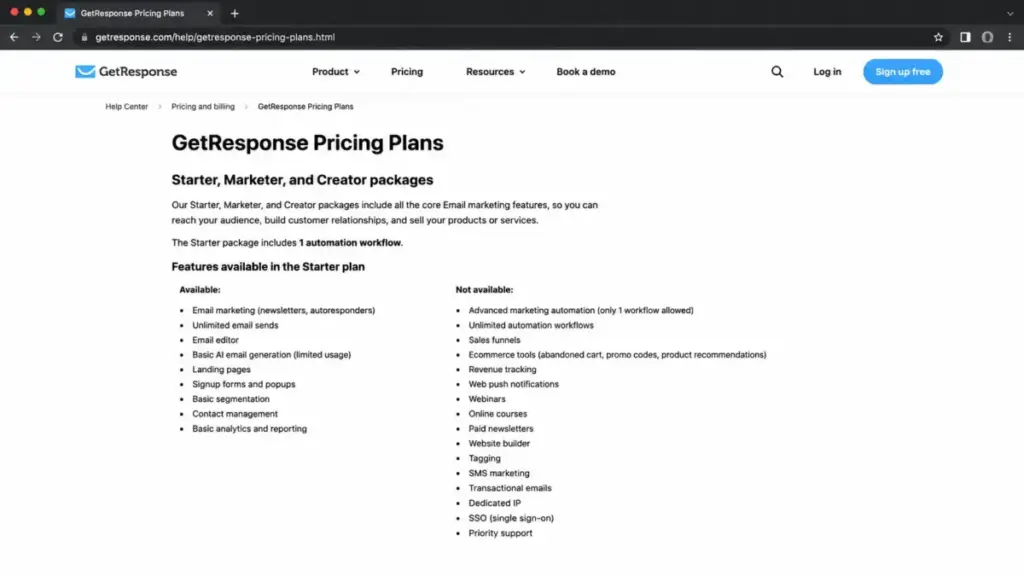
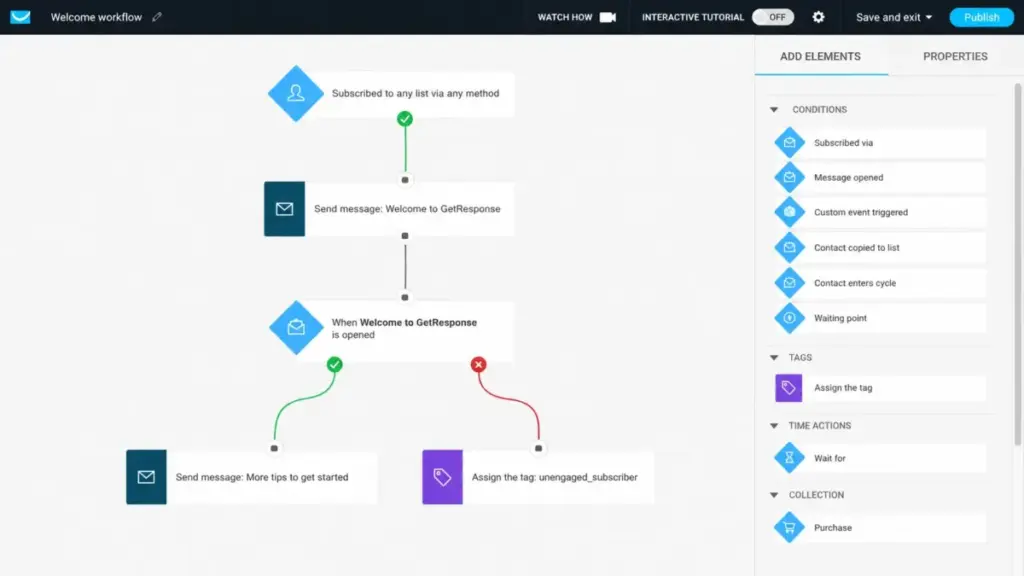
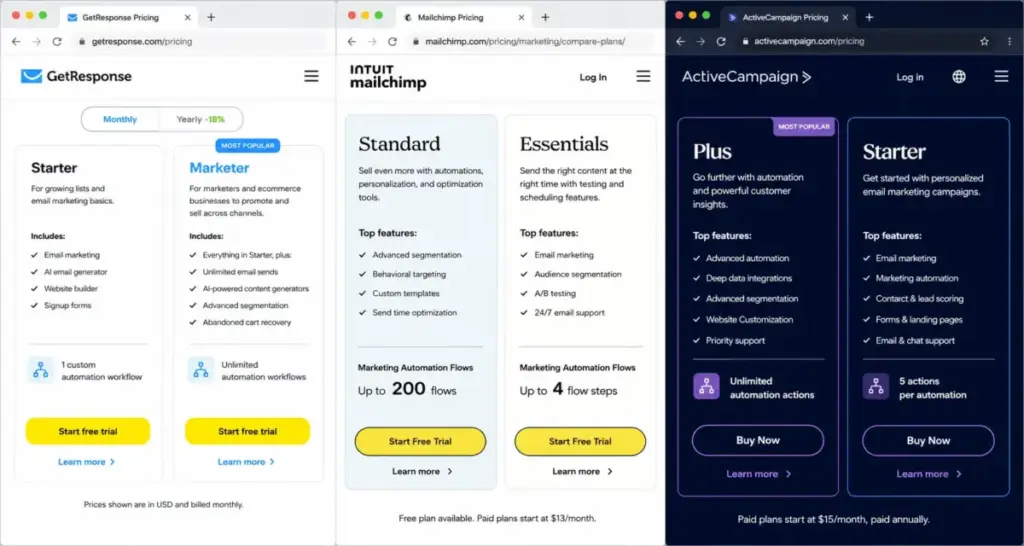
Here is the gate most buyers miss. Starter gives you one custom automation workflow. One. If your marketing runs a welcome sequence and an abandoned-cart flow, you have already exceeded the Starter allocation. You need Marketer at $59 per month to get unlimited workflows.
Marketer also opens advanced segmentation, contact scoring, abandoned-cart recovery, sales funnels, promo codes, revenue reports, and web push notifications. For a Shopify store running behavioral email triggers, Marketer is the practical plan, not Starter.
Webinars and Creator Tools
Webinars are locked behind the Creator plan at $69 per month. Creator adds Marketer features plus webinar hosting, a website builder, course creator, up to 500 students, and premium newsletter subscriptions.
One caveat: official GetResponse help pages show conflicting information about the Creator webinar attendee capacity. I cannot confirm an exact attendee cap. If webinar size matters to your team, verify the current limit directly with GetResponse before subscribing.
Ecommerce and Integrations
GetResponse connects directly with Shopify, WooCommerce, Magento, and PrestaShop. Marketer opens the ecommerce-specific tooling: abandoned-cart recovery, purchase-aware automation, promo codes, and revenue reporting. If you are evaluating GetResponse specifically for ecommerce, you can compare it against our Klaviyo review, which covers a platform built specifically around ecommerce data.
Limitations That Appear as Your List Grows
The One-Workflow Ceiling
If you subscribed to Starter because the $19 price looked right, the single-workflow limit will become the forcing function for an upgrade within the first month. Most marketing teams that send more than a newsletter need at least two workflows: a welcome sequence and some form of re-engagement or cart recovery. That second workflow requires Marketer.
Contact Accounting Surprises
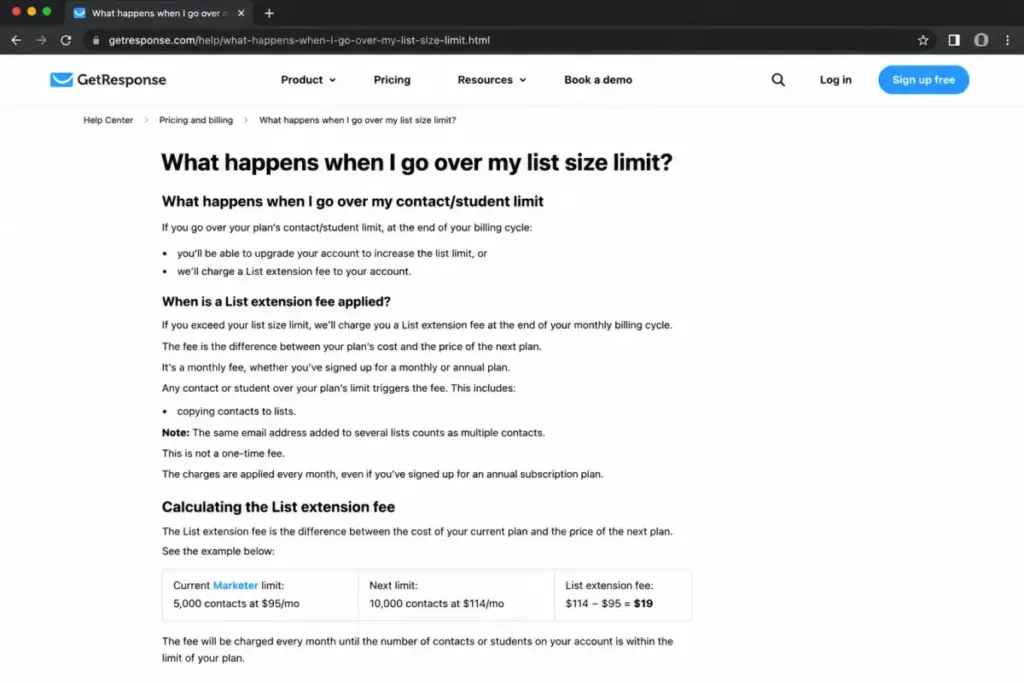
This is the cost trap that no ranking review explains well. GetResponse can count the same email address multiple times if it sits on multiple lists. A contact on your Newsletter list and your Webinar Registrants list may consume two slots. If your list structure creates duplicates, your effective contact count rises, and you move into a higher pricing tier faster than expected.
Exceeding your contact limit or active student limit (on Creator) can trigger a recurring list-extension fee. This fee can continue even during an annual subscription. It is based on the next list-size tier, not a pro-rated per-contact charge. If you are budgeting tightly on an annual plan, this mechanism can add unplanned recurring costs.
Support Access by Plan
Email support is available 24/7 in seven languages with a stated response target within 24 hours. Human English live chat runs 7 AM to 11 PM GMT+1, with shorter weekend hours. A multilingual chatbot covers 24/7.
Phone support appears only on Enterprise.
If your team expects to pick up the phone when something breaks on a Saturday, GetResponse Starter, Marketer, and Creator do not offer that. For comparison, some competitors include chat and phone support on mid-tier plans. Our Brevo review covers one such option.
API and Developer Limits
GetResponse provides a REST API, callbacks, and real-time webhooks. Published API limits are 30,000 calls per 10-minute window, 80 calls per second, and 10 simultaneous requests. Webhooks report events including opens, clicks, subscriptions, rejections, unsubscribes, bounced-contact removal, and custom-field changes.
Those limits are generous for most small-to-mid-market integrations. But if you are building a high-frequency data sync with a custom application, the 10-concurrent-request cap and 80-calls-per-second ceiling are worth testing against your expected volume before committing.
Security and Compliance
GetResponse publicly states GDPR compliance and provides two-factor authentication across listed plans. Its security page says customers may request a PCI DSS certificate, Data Processing Agreement, penetration-test summary, and SOC 2-related materials. I cannot confirm that GetResponse holds a public SOC 2 certification based on available documentation.
Enterprise adds dedicated sending domain and IP, SSO, SMS, mobile push, AI product recommendations, transactional email, unlimited users, and priority support.
The Pricing Math Nobody Shows You
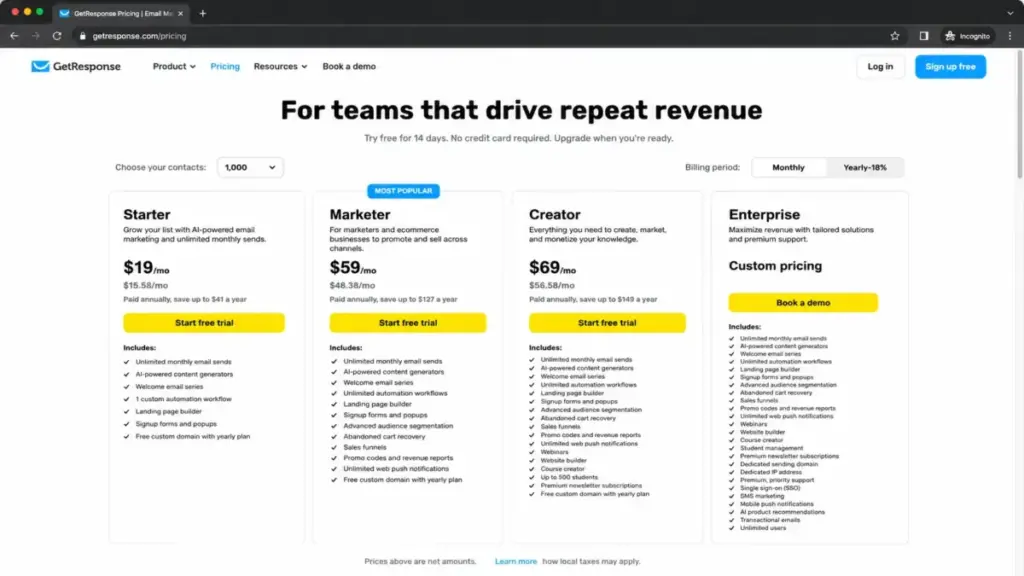
Prices were verified against the official GetResponse pricing page on June 19, 2026.
| Plan | Monthly Price (1,000 contacts) | Annual Equivalent | Key Unlocks |
|---|---|---|---|
| Free | Free | Free | 500 contacts, 2,500 sends/month, 1 landing page, GetResponse branding, 14-day premium window |
| Starter | $19/month | $15.58/month | Unlimited sends, AI generators, landing pages, forms, popups, 1 custom workflow |
| Marketer | $59/month | $48.38/month | Unlimited workflows, advanced segmentation, abandoned-cart recovery, funnels, promo codes, revenue reports, web push |
| Creator | $69/month | $56.58/month | Marketer features + webinars, website builder, courses, 500 students, premium newsletters |
| Enterprise | Custom | Custom | Dedicated domain/IP, priority support, SSO, SMS, mobile push, transactional email, unlimited users, phone support |
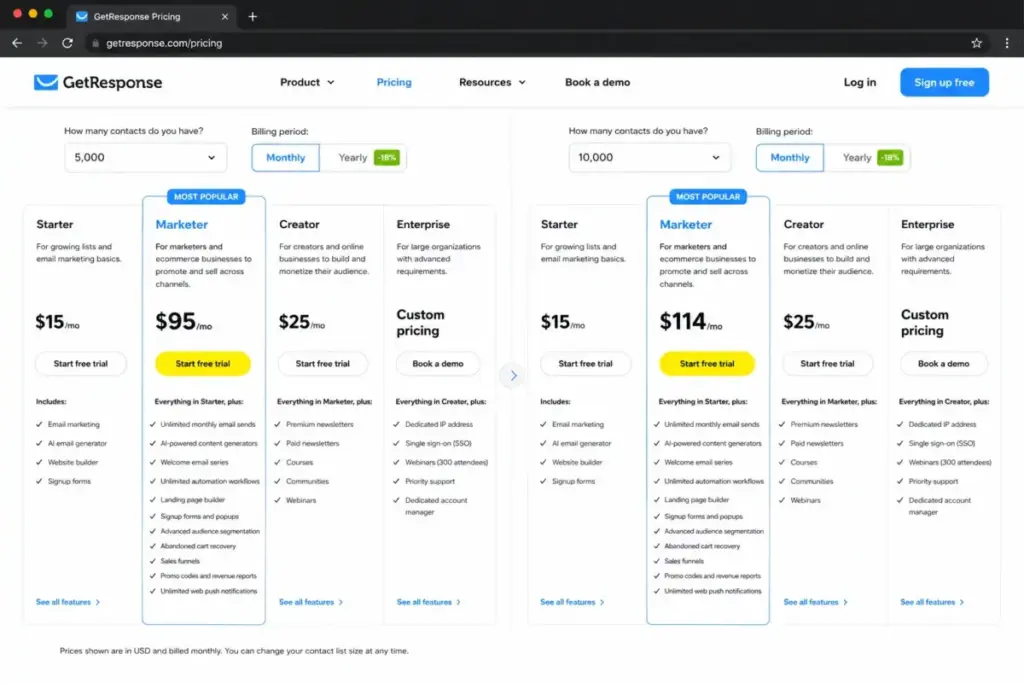
What this means: Annual billing saves roughly 18% on the displayed monthly equivalent. Prices scale with contacts at tiers of 1,000, 2,500, 5,000, 10,000, 25,000, 50,000, and 100,000. The pricing selector on the official page adjusts dynamically. Starter, Marketer, and Creator top out at 100,000 contacts; larger lists require Enterprise.
The Real Cost at 5,000 Contacts
The public pricing page uses the default 1,000-contact tier. Most teams outgrow that within months. At 5,000 contacts, use the interactive pricing selector on the official page to get exact figures, as add-on prices are not publicly itemized in a static table.
Hidden Cost Summary
| Cost Factor | Impact |
|---|---|
| Duplicate contacts across lists | Same email on two lists can count twice, pushing you into a higher tier |
| List-extension fee | Exceeding your contact or student limit triggers a recurring fee at the next tier price, even mid-annual plan |
| Add-on purchases | Starter can purchase webinar and multi-user access for additional monthly charges; exact add-on prices were not publicly itemized in reviewed documentation |
| Taxes | Published prices are net amounts; applicable taxes may be added |
| Transactional email | Available only on Enterprise (custom pricing) |
Starter vs Marketer: Where the Real Decision Lives
The $40 monthly gap between Starter ($19) and Marketer ($59) is the decision most buyers face. Here is how to think about it:
Choose Starter if you send newsletters and use one welcome sequence. You do not need behavioral triggers, abandoned-cart recovery, or multi-step nurture workflows.
Choose Marketer if you need more than one automation workflow, want ecommerce triggers, need advanced segmentation, or plan to use sales funnels and revenue reporting. For most marketing teams with active campaigns, Marketer is the practical plan. For a deeper look at how Mailchimp pricing compares at different list sizes, I have broken down those costs separately.
Choose Creator if you run webinars, sell courses, or publish premium newsletters. The $10 gap between Marketer and Creator is small relative to replacing a standalone webinar platform.
Choose Enterprise only if you need SSO, dedicated sending infrastructure, transactional email, phone support, or unlimited users. The custom pricing requires a sales conversation.
Who Should Use GetResponse?
- Newsletter businesses with under 2,500 contacts that want email, landing pages, and a single automation workflow on one bill. Starter covers this at $19 per month.
- Marketing teams running webinars and automated lead nurture. Creator at $69 per month combines unlimited workflows, segmentation, webinars, website tools, and content monetization. For a five-person SaaS team running monthly webinars and nurture sequences, Creator is the strongest single-platform option.
- Shopify or WooCommerce stores needing abandoned-cart recovery and revenue reporting. Marketer at $59 per month includes purchase-aware automation, promo codes, and direct ecommerce data sync.
- Course creators and premium-newsletter publishers. Creator supports up to 500 students, course hosting, and paid newsletter subscriptions. If your audience fits within 500 active students, this is cheaper than most standalone course platforms.
- Budget-conscious teams under 500 contacts. The free plan is genuinely free, with no credit card required.
Who Should Avoid GetResponse?
- Teams expecting behavioral automation on Starter. If your marketing plan includes more than one automated workflow, you need Marketer from day one. Buying Starter and upgrading later means reconfiguring and paying the price difference.
- Organizations with many overlapping lists. If your list architecture places contacts on multiple lists, GetResponse’s duplicate-contact counting can inflate your bill. Consider platforms that deduplicate by email address across all lists.
- Teams that need phone support. Phone support is Enterprise-only. If your team handles their own marketing tech and expects to call support, this is a disqualifier below custom pricing.
- Stores needing transactional email. Order confirmations, shipping notifications, and password resets require Enterprise. Below Enterprise, you need a separate transactional email provider.
- Designers expecting a best-in-class website builder. GetResponse includes a website builder on Creator, but it is not a WordPress or Webflow competitor. If your main business website needs to live inside GetResponse, temper expectations on design flexibility.
GetResponse Alternatives
| Alternative | Choose If | Starting Price | Key Difference |
|---|---|---|---|
| Mailchimp | You want a simpler, widely-known email platform for basic campaigns | $13/month (500 contacts) | Larger template library, broader brand recognition, but charges by contacts including unsubscribed |
| ActiveCampaign | You need deeper automation workflows and CRM-like lead scoring | $15/month (1,000 contacts) | More complex automation builder, CRM included, steeper learning curve |
| Brevo | You want sends-based billing instead of contact-based billing | $9/month (500 emails/day) | Charges by sends rather than contacts, includes transactional email on lower plans |
| Klaviyo | You run a Shopify or ecommerce store and need predictive analytics | Free up to 250 contacts | Built for ecommerce, deep Shopify integration, higher cost at scale |
| Kit (ConvertKit) | You are a creator building a subscriber-first newsletter business | Free up to 10,000 subscribers | Simpler, creator-focused, but fewer features than GetResponse’s all-in-one |
If automation depth is your primary concern, the ActiveCampaign review explains where that platform excels and where it creates its own cost challenges.
If you are a creator evaluating simpler newsletter tools, our ConvertKit analysis covers the tradeoffs of a subscriber-first platform.
Verdict: Keep It or Kill It?
GetResponse is worth paying for in 2026 if you pick the correct plan before subscribing and manage your list structure to avoid duplicate-contact billing.
For a two-person newsletter team with fewer than 500 contacts, start with the free plan. It covers 2,500 monthly sends, one landing page, and a 14-day premium window. Upgrade to Starter when branding restrictions or traffic demands it.
For a five-person marketing team running webinars, automated lead nurture, and content monetization, Creator at $69 per month is the practical recommendation. It replaces a separate email tool, webinar platform, and course host.
For a Shopify store needing abandoned-cart recovery and revenue reporting, Marketer at $59 per month delivers ecommerce-specific automation without requiring a dedicated commerce email platform. For stores where predictive analytics and deep product data matter more, Klaviyo is the stronger ecommerce-first alternative.
For Enterprise buyers requiring SSO, dedicated IP, transactional email, and phone support, GetResponse Enterprise is worth evaluating only if those capabilities justify custom pricing and a longer contract commitment. Do not assume public SOC 2 certification; request documentation directly.
GetResponse is not for everyone. It is not the deepest automation platform (ActiveCampaign goes further). It is not the simplest newsletter tool (Kit is more focused). It is not the cheapest sends-based option (Brevo undercuts on that model). But for teams that want email, landing pages, forms, automation, webinars, and courses in one login without managing five vendor relationships, GetResponse is one of the stronger consolidation options at this price.
The catch is always the same: read the billing documentation, structure your lists carefully, and start on the plan that matches your actual workflow count, not the one that looks cheapest on the pricing page. After evaluating 35+ email marketing platforms, Sarah Chen’s view is that GetResponse rewards preparation and punishes impulse upgrades.
FAQ
Is GetResponse worth it in 2026?
Yes, for teams that match their workflow needs to the correct plan. Starter at $19 per month suits single-workflow newsletter operations. Marketer at $59 per month is the practical choice for behavioral automation and ecommerce triggers. Creator at $69 per month consolidates email, webinars, and courses. The value breaks down when buyers overpay for features they do not use or underbuy and hit the one-workflow ceiling.
Does GetResponse have a free plan?
Yes. The forever-free plan supports up to 500 contacts and 2,500 messages per month. It includes one landing page and GetResponse branding. The first 14 days open premium features; after that, restrictions apply. No credit card is required to sign up.
How much does GetResponse cost per month?
Paid plans start at $19 per month for Starter at the default 1,000-contact tier. Marketer starts at $59 per month, Creator at $69 per month, and Enterprise is custom-priced. Annual billing reduces the monthly equivalent by approximately 18%. Prices increase at 2,500, 5,000, 10,000, 25,000, 50,000, and 100,000 contacts.
Does GetResponse count duplicate contacts across lists?
Yes. The same email address placed on multiple lists can be counted multiple times toward your contact limit. This can push you into a higher pricing tier and trigger a recurring list-extension fee. To manage costs, consolidate contacts onto fewer lists and use tags or segments instead of separate lists for audience segmentation.
How many automation workflows does GetResponse Starter include?
Starter includes one custom automation workflow. If your marketing requires two or more automated sequences (for example, a welcome series plus an abandoned-cart flow), you need Marketer at $59 per month for unlimited workflows.
Does GetResponse include webinar software?
Yes, but only on the Creator plan ($69 per month) or Enterprise. Starter and Marketer do not include webinar hosting. Starter can purchase webinar access as an add-on, but the exact add-on price was not publicly itemized in the documentation reviewed. Note that official help pages show conflicting Creator webinar attendee capacity numbers; verify the current limit with GetResponse before subscribing.
Does GetResponse offer phone support?
Phone support appears only on the Enterprise plan. Starter, Marketer, and Creator have email support (24/7 with a stated 24-hour response target) and human English live chat (7 AM to 11 PM GMT+1, with shorter weekend hours). A multilingual chatbot is available 24/7.
What happens if my GetResponse contact list exceeds my plan limit?
Exceeding your contact limit or active student limit can trigger a recurring list-extension fee. This fee is based on the next list-size tier and can continue during an annual subscription. It is not a one-time charge. Monitor your contact count and list structure to avoid unexpected billing.
Is GetResponse better than Mailchimp for small business?
It depends on your needs. GetResponse offers more built-in features (automation, webinars, courses, funnels) and unlimited sends on all paid plans. Mailchimp offers a larger template library, broader brand recognition, and a more intuitive interface for basic campaigns. GetResponse charges by contacts (with potential duplicates across lists). Mailchimp also charges by contacts and includes unsubscribed contacts in your count unless you archive them. For deeper automation, GetResponse Marketer is the better pick. For simple newsletter campaigns, Mailchimp’s Standard plan is more straightforward. Our Mailchimp review covers that platform’s strengths and limitations in detail.
Can GetResponse replace a standalone webinar platform?
For small to mid-sized webinars, Creator can reduce your need for a separate tool like Zoom Webinars. It includes webinar hosting alongside email, automation, and course tools. The tradeoff: webinar capacity documentation from GetResponse shows conflicting numbers, and webinar features are less mature than dedicated platforms. If webinars are your primary revenue channel and you need advanced interactive features, test the capacity limits before committing.