Most CRM pricing pages show you the starting price. They do not show you the email send cap, the marketing contact surcharge, or the moment automation gets locked behind a tier that costs three times more. The gap between a CRM that includes marketing automation and a CRM that bolts it on as an add-on changes your total cost by hundreds of dollars per month.
I evaluated 30 CRM software platforms across pricing tiers, native automation depth, contact limits, and hidden plan gates. These 10 earned their spots because they connect sales data to marketing automation workflows without requiring a second subscription or a third-party connector.
Best CRM for Marketing Automation by Use Case
| Use case | Best pick | Why it fits |
|---|---|---|
| Best overall CRM marketing platform | HubSpot Marketing Hub | Native CRM + inbound tools + automation in one platform |
| Best automation depth | ActiveCampaign | Strongest visual automation builder with behavior triggers |
| Best for Salesforce B2B teams | Salesforce Marketing Cloud Account Engagement | Native Salesforce CRM alignment with ABM and lead scoring |
| Best value customer experience suite | Zoho CRM Plus | Eight bundled apps (CRM, marketing, support, analytics) per user |
| Best low-cost multichannel CRM | Brevo | Free plan with email, SMS, WhatsApp, and CRM pipeline |
| Best for service businesses | Keap | CRM with appointments, invoices, payments, and follow-up automation |
| Best Freshworks CRM-marketing bundle | Freshsales Suite | Free CRM tier plus affordable marketing add-on |
| Best for online service funnels | Ontraport | CRM with pages, payments, memberships, and lifecycle automation |
| Best sales CRM with campaign add-on | Pipedrive with Campaigns | Sales-first pipeline CRM with bolt-on email campaigns |
| Best budget all-in-one | EngageBay All-in-One Suite | Free for 15 users with CRM, email, helpdesk, and landing pages |
What this means: The best CRM for marketing automation is not the tool with the longest feature list. It is the system that keeps sales data, audience segmentation, campaign automation, and handoff reporting usable at your real team size and budget. Start from the use case that matches your workflow, not from the lowest starting price.
How We Chose and Ranked These Tools
This evaluation is based on independent editorial research, analyzing official product documentation, feature specifications, pricing pages, and verified customer feedback. Pricing data in this article reflects information verified in May 2026 from official vendor pricing pages.
We scored each platform against six weighted criteria:
| Criterion | Weight | What we checked |
|---|---|---|
| Pricing value | 20% | Starting price, free plan, minimum seats, add-ons, hidden costs, contact tiers |
| Core feature depth | 20% | CRM depth, automation builder, segmentation, lead scoring, journeys, forms, reporting |
| Ease of use | 15% | Onboarding, UI clarity, setup time, beginner friendliness |
| Integrations | 15% | Native integrations, CRM ecosystem, API, Zapier/Make support |
| Scalability | 15% | Team controls, permissions, enterprise features, contact growth, reporting |
| User fit | 15% | Best for, not best for, limitation severity, buyer clarity |
We did not rank tools by brand popularity. Each platform was scored against the same weighted criteria. We did not conduct hands-on testing for this evaluation. Where limitations exist in our research depth, I note them in each product section.
Free Tier Champions
HubSpot Marketing Hub: Best Overall CRM Marketing Platform

HubSpot Marketing Hub earns the top spot because it combines a mature CRM database with inbound marketing tools, workflow automation, reporting, and a 1,400+ app marketplace under one login. No other platform on this list matches HubSpot’s breadth of native CRM-to-marketing coverage.
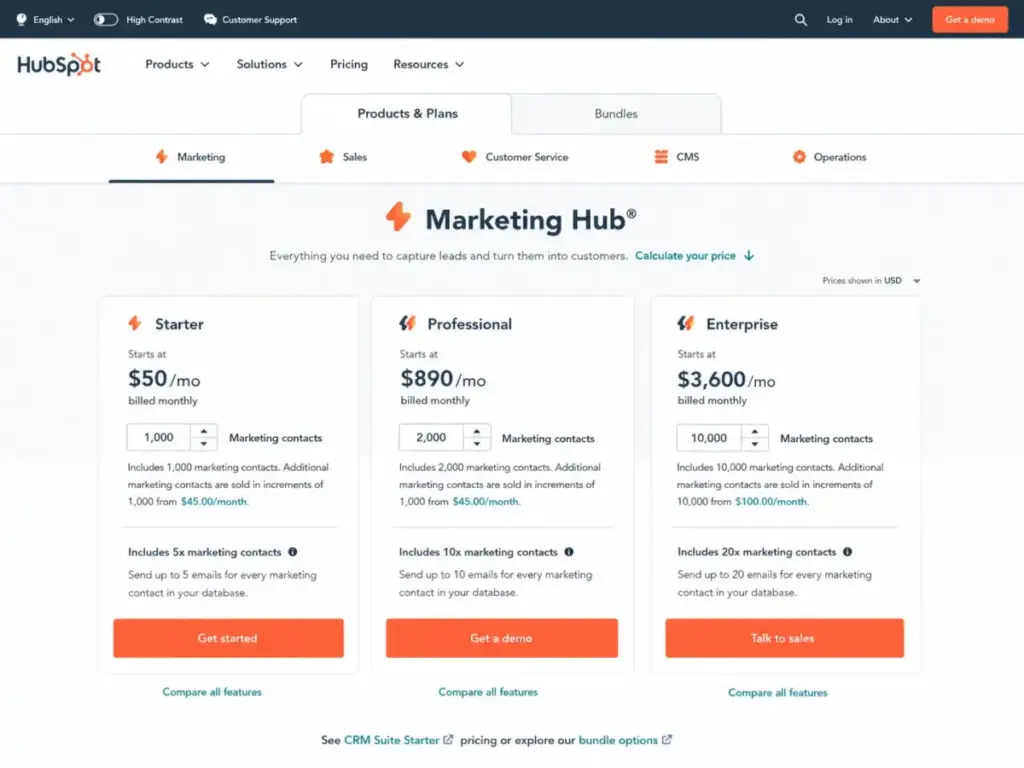
According to HubSpot’s official pricing page, the free tools tier includes forms, landing pages, email marketing, and CRM with no time limit. Starter begins around $15/month per seat (as of May 2026). The catch: workflow automation, A/B testing, and advanced reporting require Professional or Enterprise tiers, where pricing scales by seats, marketing contacts, and onboarding fees.
What it does well:
- Smart CRM with unified contact timeline across sales, marketing, and service
- Visual workflow automation builder with branching logic (Professional+)
- Forms, landing pages, and email marketing included from the free tier
- Lead scoring and attribution reporting on Professional and above
- Breeze AI features for content and prospecting assistance
Where it falls short:
- Professional/Enterprise pricing climbs fast with marketing contacts and core seats
- Mandatory onboarding on higher tiers adds thousands to the first-year cost
- Automation is gated: Starter users get limited workflows
Best for:
- B2B teams that want CRM, forms, landing pages, email automation, and reporting in one platform
- Growing teams that plan to scale past 10 users and need a single source of truth
- Inbound marketing teams already using HubSpot’s free CRM
Avoid if: You only need lightweight email automation and your budget cannot absorb the Professional tier jump. For smaller email-focused needs, ActiveCampaign or Brevo costs less.
Setup difficulty: Medium. Free tools set up in minutes. Professional/Enterprise requires CRM configuration, workflow design, and possibly a partner.
Verdict: HubSpot is the safest choice for teams that need CRM and marketing in one system and can budget for the practical tier. Start free, then model the real cost at your contact volume before committing to Professional.
Brevo: Best Low-Cost Multichannel CRM

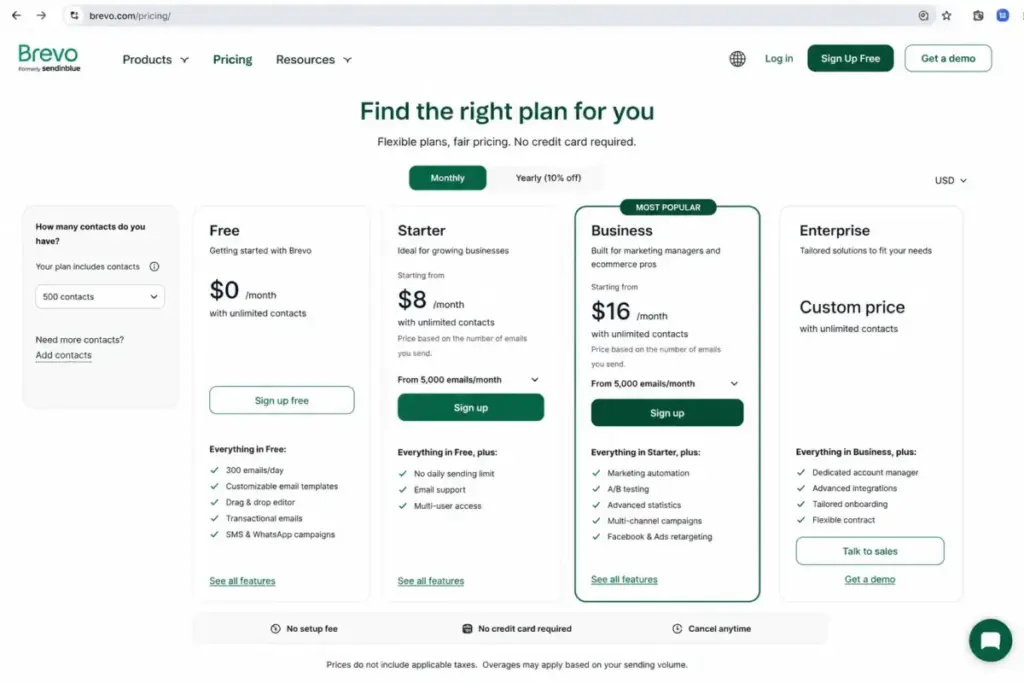
Brevo gives small businesses something most CRM marketing platforms do not: a genuine free plan with 300 emails/day, CRM pipeline tools, and multichannel reach across email, SMS, and WhatsApp. For teams spending under $50/month, Brevo delivers the widest channel coverage per dollar.
Brevo’s official pricing page lists paid marketing plans that scale by email volume, not contacts. That billing model means you can store unlimited contacts on any plan and pay only for the sends you use.
What it does well:
- Free plan with 300 daily emails and CRM pipeline tools
- No-code automation for email, SMS, and WhatsApp sequences
- Sends-based pricing means unengaged contacts cost nothing
- Live chat, meetings, and sales pipeline in one platform
Where it falls short:
- CRM depth is lighter than HubSpot or Salesforce for complex pipelines
- Marketing, Sales, and Conversations are separate product suites with separate pricing
- Advanced automation and reporting require higher tiers or separate plans
Best for:
- Small businesses that need affordable email, SMS, WhatsApp, and CRM in one platform
- Teams with large contact lists but moderate send volume
- Budget-conscious teams that want multichannel without per-contact charges
Avoid if: You need deep enterprise CRM customization, advanced B2B attribution, or a full-featured sales pipeline. Brevo’s CRM works for basic pipeline tracking, not for complex sales operations.
Setup difficulty: Low. The dashboard is straightforward, and email/SMS campaigns launch without technical setup.
Verdict: Brevo is the best pick for teams that want multichannel marketing with CRM basics at a fraction of HubSpot’s cost. The sends-based pricing model saves money if you have a large contact list with moderate email frequency.
EngageBay All-in-One Suite: Best Budget All-in-One

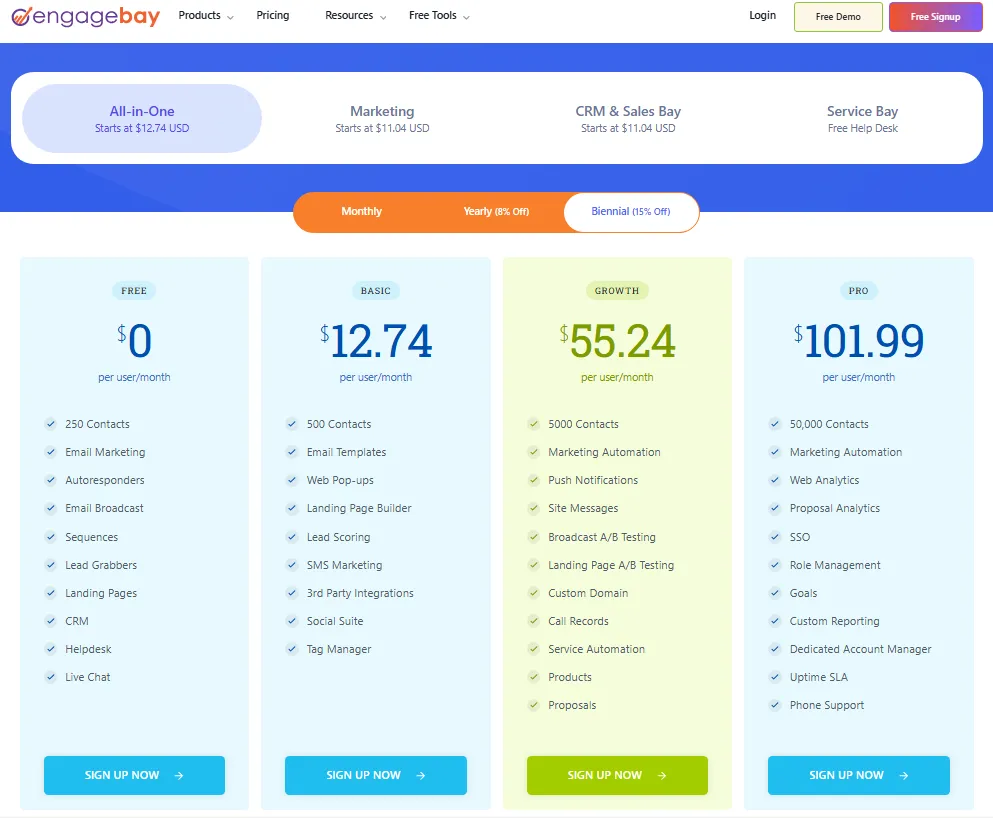
EngageBay packs CRM, email marketing, landing pages, autoresponders, helpdesk, and live chat into a free plan that supports up to 15 users. At $14.99/user/month on the Basic tier, it is the cheapest true all-in-one on this list.
According to EngageBay’s pricing page, the free plan includes 250 contacts, basic CRM, email broadcasts, and helpdesk. Discounted biennial billing drops the Basic plan to around $12.74/user/month.
What it does well:
- Free for up to 15 users with CRM, email, and helpdesk
- Sales automation, sequences, and autoresponders on paid tiers
- Landing pages and marketing automation included (not add-ons)
- Pricing stays low even at 10+ users compared to competitors
Where it falls short:
- Advanced analytics and enterprise-grade admin controls are limited
- Third-party integration ecosystem is smaller than HubSpot or Zoho
- Feature polish and UX refinement lag behind higher-ranked tools
Best for:
- Microbusinesses, startups, and nonprofits that need CRM + email + support cheaply
- Teams under 15 people that want to start free with real functionality
- Budget-first buyers who prioritize cost over interface polish
Avoid if: Your team needs enterprise reporting, complex attribution, or deep admin controls. EngageBay works well for basic to intermediate automation but runs out of depth for 50+ person organizations.
Setup difficulty: Low. Quick onboarding with minimal configuration needed.
Verdict: EngageBay earns the budget badge because no other tool on this list offers CRM, email, helpdesk, and live chat to 15 users for $0. The tradeoff is depth and polish, but for cash-constrained teams, that tradeoff is worth it.
Best Under $25/Month
Freshsales Suite: Best Freshworks CRM-Marketing Bundle

Freshsales Suite bridges sales CRM and marketing automation for teams already in the Freshworks ecosystem. Freshsales offers a free CRM plan for up to 3 users, and Freshmarketer pricing starts from $15 USD for marketing contacts and campaign tools.
The suite value comes from combining Freshsales CRM (contact management, pipeline, AI assistant) with Freshmarketer (email campaigns, landing pages, visitor tracking, chatbots). The 360-degree customer view connects marketing touchpoints to deal progression without a Zapier connector.
What it does well:
- Free Freshsales CRM for up to 3 users with basic pipeline
- 360-degree customer view linking marketing interactions to sales deals
- AI chatbots (Freddy AI) for visitor engagement and lead qualification
- Landing pages, visitor tracking, and campaign automation in Freshmarketer
Where it falls short:
- Third-party marketplace is smaller than HubSpot’s 1,400+ app ecosystem
- Marketing contacts, bot sessions, and AI add-ons can complicate total cost
- Suite packaging between Freshsales and Freshmarketer requires careful configuration
Best for:
- SMBs that want sales CRM and marketing tools from one vendor
- Freshworks-friendly teams already using Freshdesk or other Freshworks products
- Teams that need a free CRM starter with an affordable marketing upgrade path
Avoid if: You need the largest integration ecosystem or highly advanced enterprise marketing attribution. Freshsales Suite works best for mid-complexity workflows.
Setup difficulty: Low to Medium. Freshsales onboarding is straightforward; Freshmarketer configuration depends on landing page and automation complexity.
Verdict: Freshsales Suite is a practical choice for teams that want CRM + marketing in one Freshworks login. The free CRM tier lowers the barrier. Watch add-on costs at scale.
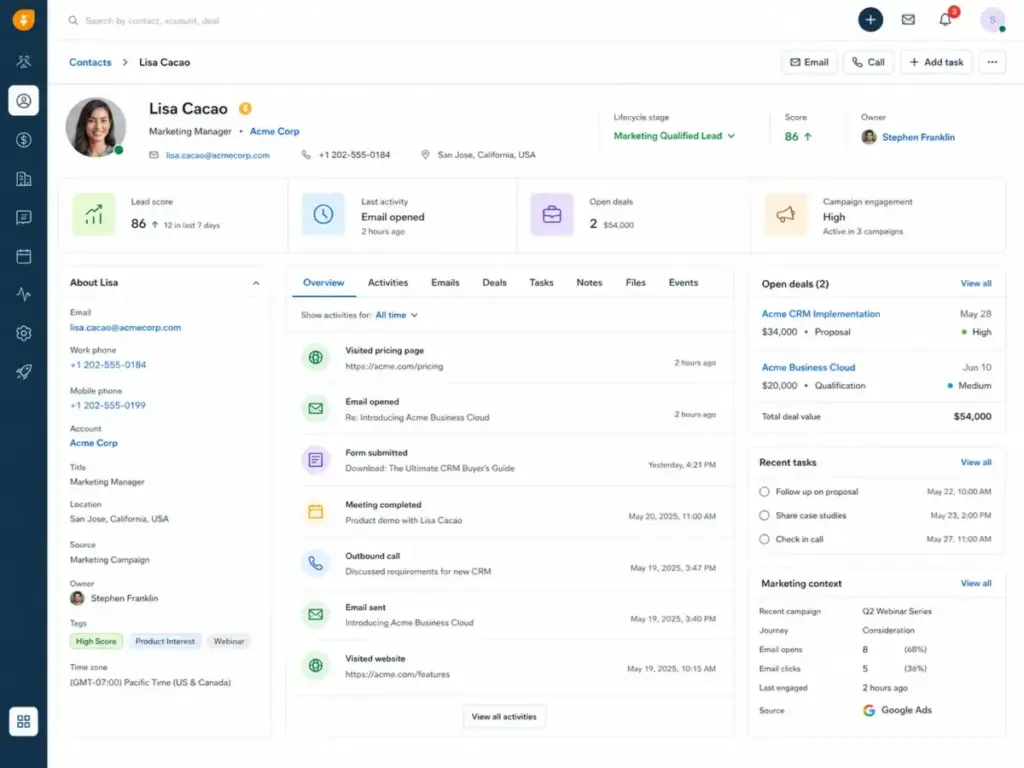
Pipedrive with Campaigns: Best Sales CRM Add-on

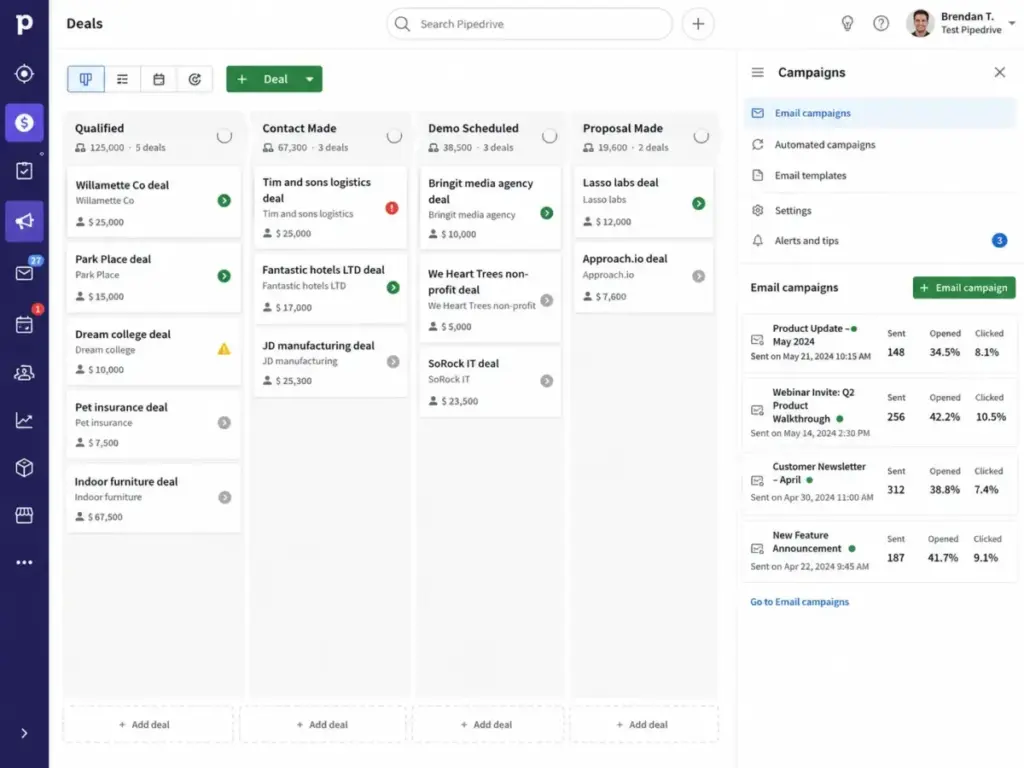
Pipedrive is the easiest CRM to use on this list. The visual pipeline feels fast, deal management is intuitive, and sales reps adopt it without training. The marketing automation piece comes from Campaigns, a paid add-on that layers email marketing onto the CRM.
According to current references (as of May 2026), Pipedrive’s Lite CRM starts at $14/user/month billed annually. Growth is $39/user/month, Premium is $59/user/month, and Ultimate is $79/user/month. Campaigns is a separate paid add-on with its own tiers and marketing contact limits (via Pipedrive’s pricing page).
What it does well:
- Best-in-class visual deal pipeline with drag-and-drop stages
- Email sync, tracking, workflow automation, and AI sales assistant
- Campaigns add-on for email marketing and automated campaign sequences
- 400+ marketplace integrations including Slack, Gmail, and Microsoft Teams
Where it falls short:
- Marketing automation is add-on-based, not natively deep
- Campaigns does not match ActiveCampaign or HubSpot for multi-step nurturing
- LeadBooster, Projects, Web Visitors, and Smart Docs are all separate paid add-ons
Best for:
- Sales-led teams that want the simplest pipeline CRM and enough email campaigns for basic marketing
- Teams that prioritize deal management over lifecycle marketing
- Small sales teams under 15 reps looking for fast adoption
Avoid if: Your primary need is advanced marketing automation, multi-step nurturing, web behavior triggers, or multichannel lifecycle campaigns. Pipedrive’s Campaigns is a campaign tool, not a marketing automation engine.
Setup difficulty: Low. Pipedrive’s pipeline sets up in under 10 minutes. Campaigns requires separate configuration.
Verdict: Pipedrive is the right choice when your team’s core need is sales pipeline management and you want to add basic email campaigns without switching platforms. For marketing-first teams, look at ActiveCampaign or HubSpot instead.
Best for Mid-Market $50-300/Month
ActiveCampaign: Best Automation Depth

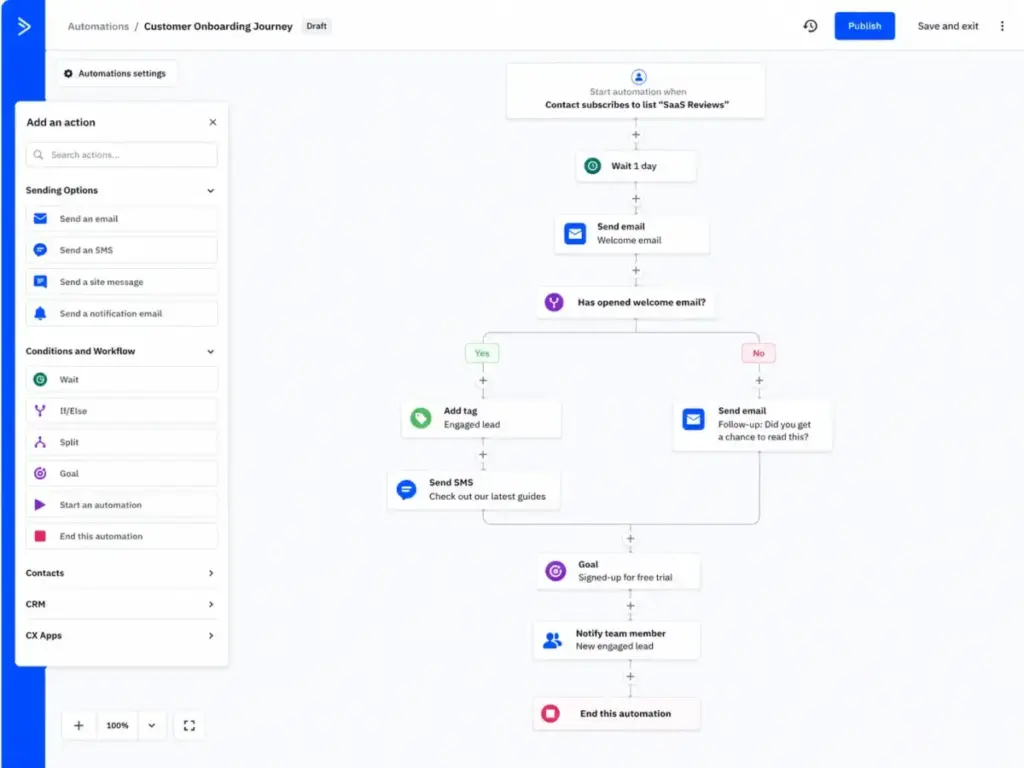
ActiveCampaign has the strongest visual automation builder of any CRM-linked marketing platform I evaluated. The branching logic, conditional content, behavior-based triggers, and multi-step journey design are deeper than HubSpot Starter and more flexible than Keap.
ActiveCampaign’s pricing page offers a 14-day free trial with no credit card required. Plan pricing scales by package and contact count. The entry price is competitive, but costs increase as your contact list grows, and CRM, SMS/WhatsApp, and transactional email capabilities require higher tiers or add-ons.
What it does well:
- Visual automation builder with branching, conditions, and behavior-based triggers
- Active Intelligence for predictive sending and engagement scoring
- Segmentation depth that goes beyond basic list management
- CRM with pipeline, deal scoring, and win probability
Where it falls short:
- CRM is less polished than sales-first platforms like Pipedrive or Salesforce
- Deep automation creates a learning curve for beginners
- Costs scale with contact count, which can surprise teams with large lists
Best for:
- Marketing teams that prioritize advanced customer journeys and behavior-based CRM follow-up
- Ecommerce brands that need abandoned cart, win-back, and post-purchase sequences
- Teams that outgrew Mailchimp or Brevo automation and need more branching logic
Avoid if: You need the strongest standalone sales CRM with forecasting and CPQ. ActiveCampaign’s CRM is functional but not its primary strength.
Setup difficulty: Medium. The automation builder is powerful but requires time to configure journeys and learn the interface.
Verdict: ActiveCampaign is the best pick for teams that rank automation depth above everything else. The ActiveCampaign review on SaaSZap covers the full feature-to-plan breakdown. For sales-first teams, pair Pipedrive or HubSpot CRM with ActiveCampaign via integration.
Zoho CRM Plus: Best Value Customer Experience Suite

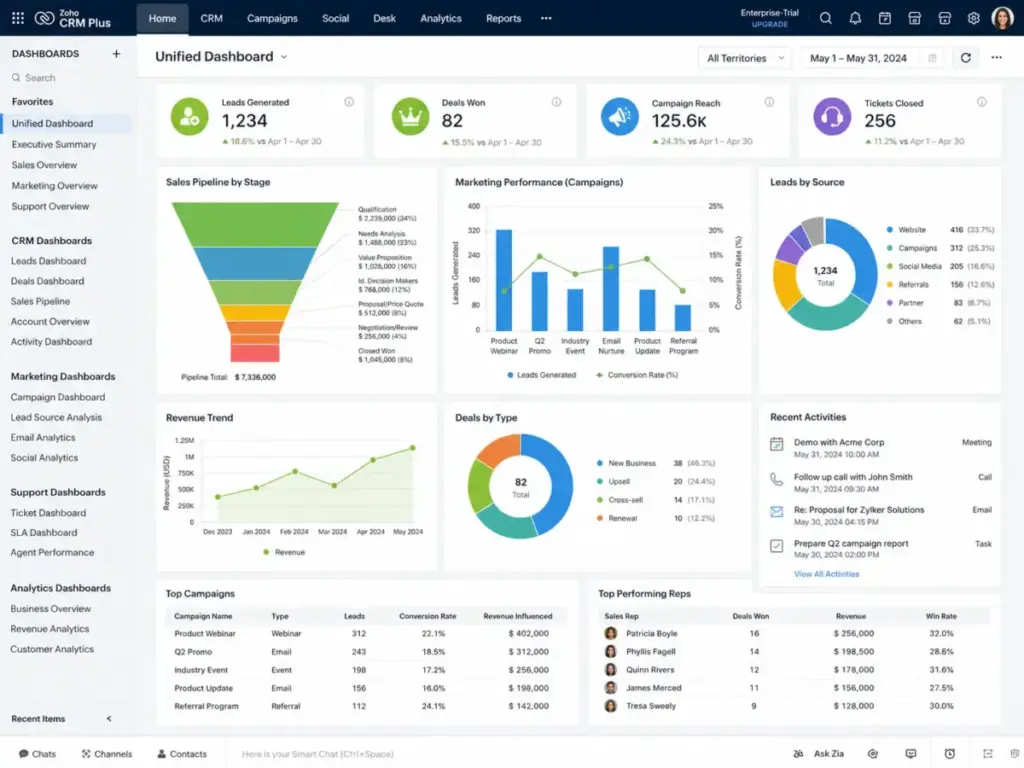
Zoho CRM Plus bundles eight applications (CRM, Marketing Automation, Desk, Analytics, Social, Campaigns, Survey, and SalesIQ) into a single per-user subscription. At a price point below HubSpot Professional or Salesforce’s entry tier, the value-per-feature ratio is the highest on this list.
Zoho CRM Plus offers a 30-day free trial with no credit card required. Monthly and yearly subscription options are available, with exact USD pricing confirmed at live checkout. The key distinction: CRM Plus is a suite license, not individual app purchases stitched together.
What it does well:
- Eight integrated apps covering CRM, marketing, support, analytics, and social
- Marketing automation with multichannel campaigns and lead engagement scoring
- Analytics dashboards that pull data from CRM, marketing, and support in one view
- Zoho ecosystem integration (Flow, SalesIQ, Campaigns) for workflow automation
Where it falls short:
- Configuration spans multiple apps and settings panels, which can feel complex
- Individual app depth in marketing automation trails ActiveCampaign’s builder
- Separate add-ons may apply for advanced features beyond bundled limits
Best for:
- SMBs that want CRM, marketing automation, support, and analytics under one subscription
- Teams that value breadth (8 apps) over single-app depth
- Organizations already using Zoho apps that want unified customer data
Avoid if: You only need standalone email marketing or do not want to configure multiple Zoho apps. For a single-app experience, HubSpot or Brevo is simpler.
Setup difficulty: Medium to High. Each Zoho app requires its own configuration, data mapping, and workflow rules.
Verdict: Zoho CRM Plus is the best value suite if you need CRM, marketing, and support in one license and are willing to invest setup time. The cost savings over HubSpot Professional are significant for teams under 25 users. Read the Zoho CRM review for a detailed breakdown of core CRM capabilities.
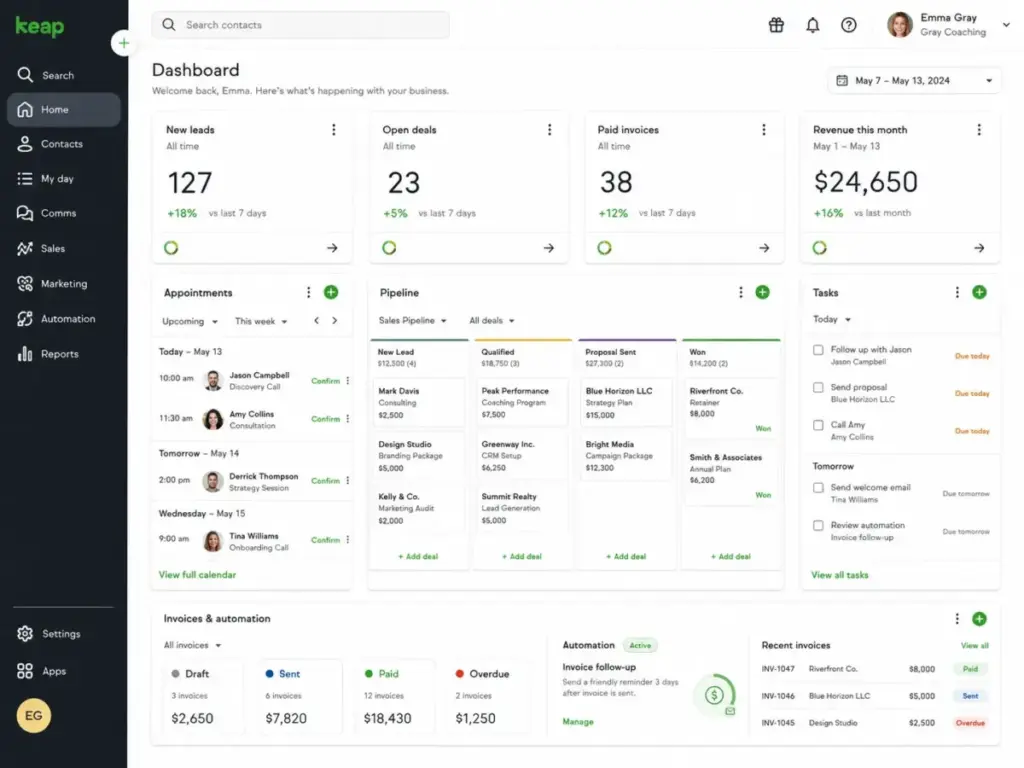
Keap: Best for Service Businesses

Keap is purpose-built for service businesses: coaches, consultants, contractors, and local service providers who need CRM, follow-up automation, appointments, invoices, and payments in one system. The starting price is higher than most SMB CRMs at $249/month (as of May 2026, per Keap’s pricing page), but the value comes from replacing 3-4 separate tools.
That $249 entry point commonly includes 2 users. Additional users, contacts beyond the base allotment, SMS, and implementation can increase total cost.
What it does well:
- CRM with built-in appointment scheduling, invoices, and payment processing
- Marketing automation for email, follow-up sequences, and tag-based segmentation
- Landing pages and forms tied directly to CRM contact records
- Sales pipeline management with automated deal progression
Where it falls short:
- $249/month starting price is steep for solo operators or very small budgets
- Not ideal for large low-value contact databases (contact pricing scales)
- Less flexible than ActiveCampaign for complex multi-step marketing journeys
Best for:
- Service businesses (consulting, coaching, contracting) that need booking + billing + CRM + email in one tool
- Small service teams of 2-10 people with moderate to high deal values
- Businesses that want to replace separate scheduling, invoicing, and email marketing apps
Avoid if: Your budget is under $200/month or you primarily need newsletter automation. For email-focused marketing automation, ActiveCampaign costs less. For basic CRM, Freshsales or EngageBay is more affordable. If Keap is too expensive for the workflow you actually need, review Keap CRM alternatives that preserve automation coverage without forcing every buyer into an appointment-to-invoice stack.
Setup difficulty: Medium. Keap’s templates accelerate setup, but configuring automation sequences and payment workflows takes planning.
Verdict: Keap earns the service business badge because it consolidates appointment-to-invoice workflows that other CRMs require plugins for. The price is justified if your average deal value supports $249+/month in tool costs. Read the Keap CRM review for a full feature analysis.
Ontraport: Best for Online Service Funnels

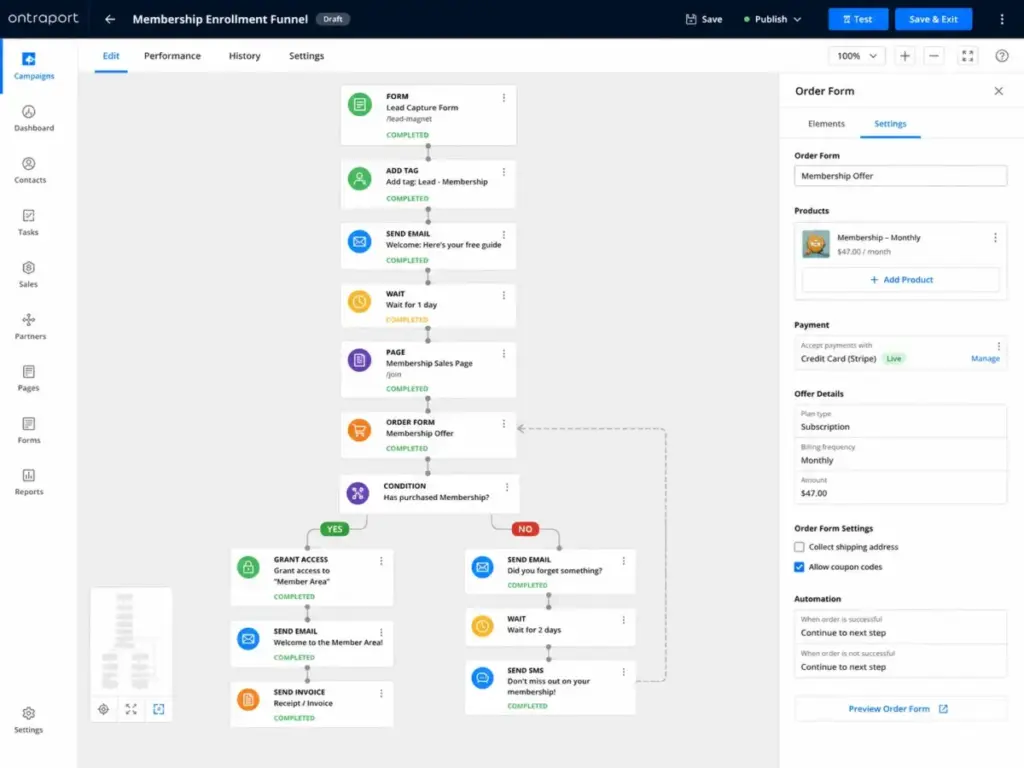
Ontraport targets a specific buyer that most CRM marketing tools ignore: online service sellers who need CRM, pages, forms, payments, memberships, email, and SMS automation in a single platform. If you sell courses, coaching packages, or membership programs, Ontraport’s native infrastructure handles the full lifecycle from lead capture to recurring billing.
The Ontraport pricing page lists the Plus plan at $83/month and the Pro plan at $124/month (as of May 2026), with a 14-day free trial.
What it does well:
- CRM with native pages, forms, payment processing, and membership tools
- Email and SMS automation tied to purchase behavior and membership status
- Funnel builder designed for coaches, consultants, and digital product sellers
- Support tools and task management integrated with the CRM
Where it falls short:
- Less recognizable ecosystem than HubSpot or Salesforce for enterprise buyers
- More complex than sales-first CRMs for teams that only need pipeline management
- Smaller third-party integration library compared to HubSpot or Pipedrive
Best for:
- Coaches, consultants, and course creators who need CRM + pages + payments + memberships
- Online service businesses selling digital products with recurring billing
- Solopreneurs and small teams that want one platform instead of Kajabi + Stripe + Mailchimp + CRM
Avoid if: You run a traditional sales team and only need pipeline CRM. Pipedrive or Freshsales is simpler and cheaper for standard deal management.
Setup difficulty: Medium. The all-in-one approach means fewer integrations but more internal configuration for pages, funnels, and payment rules.
Verdict: Ontraport is the best pick for online service businesses that sell memberships, courses, or coaching packages. If your revenue model depends on recurring payments and lifecycle automation, Ontraport handles that natively where other CRMs require 3-4 plugins.
Best for Enterprise $1,000+/Month
Salesforce Marketing Cloud Account Engagement: Best for Salesforce B2B Teams
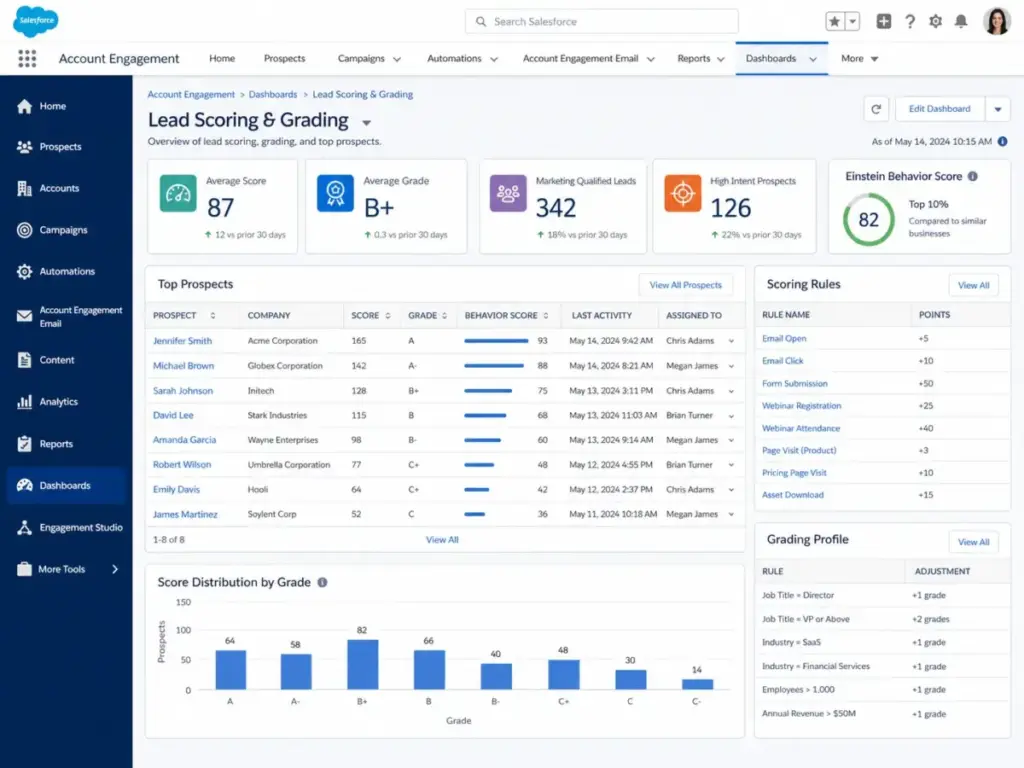
Salesforce Marketing Cloud Account Engagement (formerly Pardot) is the only marketing automation platform on this list that shares a native data layer with Salesforce CRM. For B2B companies already running their sales operations on Salesforce, the alignment between lead scoring, grading, account-based marketing, and CRM pipeline data is unmatched.
The official pricing page shows four editions billed annually: Growth+ at $1,250/org/month, Plus+ at $2,750/org/month, Advanced+ at $4,400/org/month, and Premium+ at $15,000/org/month (as of May 2026).
What it does well:
- Native Salesforce CRM alignment with shared data model and flow automation
- B2B lead nurturing with scoring, grading, and engagement history
- Account-based marketing capabilities with multi-touch attribution
- Agentforce and Marketing Cloud Next features for AI-assisted campaigns
- Enterprise scalability: multi-business unit support, advanced analytics, Data 360
Where it falls short:
- $1,250/org/month minimum puts it out of reach for most SMBs
- Setup requires Salesforce administration expertise or an implementation partner
- Credits for data, AI, messaging, and analytics can add costs beyond the base subscription
- Learning curve is steep for teams without prior Salesforce experience
Best for:
- Salesforce-centered B2B companies that need lead nurturing, scoring, and ABM
- Enterprise marketing teams with dedicated Salesforce admins
- Organizations that require SOC 2, HIPAA, or advanced compliance frameworks
Avoid if: You are a small business without Salesforce admins, implementation partners, or an enterprise budget. For B2B marketing automation under $500/month, HubSpot Professional or ActiveCampaign is a better fit.
Setup difficulty: High. Implementation typically requires Salesforce governance, data migration, and partner support.
Verdict: Salesforce Account Engagement is the right choice only if your sales team already lives in Salesforce CRM and you need native B2B marketing automation without a third-party sync. The cost is enterprise-grade. The alignment is unmatched. Compare options in our HubSpot vs Salesforce analysis to see where each platform wins.
Pricing Comparison: Starting Price vs Practical Tier
| Tool | Starting price | Practical tier | Free plan | Trial | Billing basis | Hidden costs |
|---|---|---|---|---|---|---|
| HubSpot Marketing Hub | ~$15/seat/mo (Starter) | Professional (contact-dependent) | Yes (with limits) | Free tools available | Per seat | Marketing contacts, seats, onboarding, credits |
| ActiveCampaign | Entry price on pricing page | Mid-tier with CRM + automation | No | 14-day free trial | Contact-based | Contact scaling, SMS, CRM add-ons |
| Salesforce MCAE | $1,250/org/mo (Growth+) | Plus+ at $2,750/org/mo | No | Not publicly verified | Per org (annual) | Credits, analytics, implementation, partner fees |
| Zoho CRM Plus | Suite subscription pricing | CRM Plus per-user license | No (standalone Zoho CRM has free) | 30-day free trial | Per user | Add-ons beyond bundled app limits |
| Brevo | Free plan available | Paid marketing (volume-based) | Yes (300 emails/day) | Free plan | Volume-based | Separate Sales, Conversations, SMS pricing |
| Keap | $249/mo | $249/mo (2 users included) | No | Try for free | Flat rate | Additional users, contacts, SMS, onboarding |
| Freshsales Suite | $15 (Freshmarketer) | Mid-tier Freshmarketer + CRM | Yes (3 users CRM) | 21-day free trial | Per user | Bot sessions, AI, phone credits |
| Ontraport | $83/mo (Plus) | Pro at $124/mo | No | 14-day free trial | Flat rate | Extra users, contacts, email credits |
| Pipedrive + Campaigns | $14/user/mo (Lite) | Growth at $39/user/mo + Campaigns | No | 14-day free trial | Per user | Campaigns, LeadBooster, Projects, Web Visitors add-ons |
| EngageBay | $14.99/user/mo (Basic) | Basic monthly (or ~$12.74 discounted) | Yes (15 users, 250 contacts) | Free plan | Per user | Higher contact limits, custom reporting require paid tiers |
Pricing verified from official pricing pages as of May 2026. Check vendor pricing pages for current rates, as pricing can change.
What this means: The cheapest plan is rarely the right comparison point. For each tool, look at the first tier that unlocks the marketing automation features most teams actually need: workflow builders, segmentation, lead scoring, and multi-step campaigns. HubSpot’s free tools are generous, but real automation requires Professional. Brevo’s free tier is the most usable no-cost starting point. Salesforce’s entry price reflects enterprise positioning. EngageBay and Freshsales offer the lowest barrier for small teams that need both CRM and marketing.
Feature Gate Comparison
| Tool | Automation builder | Lead scoring | Landing pages | Reporting | AI features |
|---|---|---|---|---|---|
| HubSpot | Professional+ | Professional+ | Free (with branding) | Professional+ | Breeze AI (varies by tier) |
| ActiveCampaign | All paid tiers | Mid-tier+ | Mid-tier+ | All paid tiers | Active Intelligence |
| Salesforce MCAE | All editions | All editions | Growth+ | All editions (advanced: Plus+) | Agentforce (premium) |
| Zoho CRM Plus | Bundled via Marketing Automation | Available | Bundled | Zoho Analytics bundled | Zia AI |
| Brevo | Paid marketing plans | Higher tiers | Paid plans | Paid plans | Not prominently featured |
| Keap | Included | Included | Included | Included | Basic AI features |
| Freshsales Suite | Paid tiers | Paid tiers | Freshmarketer | Paid tiers | Freddy AI |
| Ontraport | Plus+ | Plus+ | Plus+ | Pro+ | Not prominently featured |
| Pipedrive + Campaigns | Growth+ (CRM) + Campaigns | Not native (via add-ons) | Campaigns add-on | Growth+ | AI Sales Assistant |
| EngageBay | Paid tiers | Growth+ | Free+ | Paid tiers | Basic |
What this means: Automation builders and lead scoring are the two features most commonly gated behind mid-tier plans. HubSpot locks automation at Professional. Brevo and EngageBay gate advanced automation at higher paid tiers. Salesforce includes automation across all editions but at enterprise price points. ActiveCampaign is the most accessible for automation depth relative to its price.
Setup and Migration Difficulty
| Tool | Setup difficulty | Why |
|---|---|---|
| HubSpot Marketing Hub | Medium | Free tools are instant. Professional/Enterprise requires CRM architecture and workflow design. |
| ActiveCampaign | Medium | Automation builder requires journey design time. CRM migration from another platform adds complexity. |
| Salesforce MCAE | High | Requires Salesforce admin expertise, implementation planning, and often a consulting partner. |
| Zoho CRM Plus | Medium-High | Eight apps to configure with separate settings panels and data mapping across modules. |
| Brevo | Low | Dashboard is intuitive. Email and SMS campaigns launch without technical configuration. |
| Keap | Medium | Templates help, but automation sequences and payment workflows need planning. |
| Freshsales Suite | Low-Medium | Freshsales CRM is quick. Freshmarketer adds configuration for landing pages and chatbots. |
| Ontraport | Medium | All-in-one reduces integrations but increases internal page, funnel, and payment setup. |
| Pipedrive + Campaigns | Low | Pipeline sets up fast. Campaigns is a separate add-on requiring its own configuration. |
| EngageBay | Low | Quick onboarding with minimal configuration for basic CRM and email marketing. |
Which CRM Marketing Tool Should You Avoid?
No tool on this list is universally bad. The avoid signals depend on your buyer profile:
- Avoid Salesforce MCAE if you are an SMB without Salesforce admins or a budget under $1,000/month. The platform is built for enterprise governance, not quick SMB setup.
- Avoid Keap if your average deal value is under $500/year. The $249/month cost needs high-margin service revenue to justify.
- Avoid Pipedrive with Campaigns if marketing automation is your primary need. Campaigns is a supplement, not a marketing engine. Use ActiveCampaign or HubSpot instead.
- Avoid EngageBay if you need enterprise-grade reporting, role-based permissions, or advanced admin controls. The platform trades depth for affordability.
- Avoid Zoho CRM Plus if your team lacks the patience to configure multiple apps. The value is real, but the setup commitment is higher than single-app solutions.
How to Choose the Right CRM for Marketing Automation
Start with these questions before comparing features:
- How many marketing contacts do you need? HubSpot, ActiveCampaign, and Brevo all price differently based on contacts vs. sends vs. seats. Model your cost at 5,000 and 25,000 contacts.
- Do you need CRM and marketing in one platform, or is an integration acceptable? Pipedrive + Campaigns is an integration approach. HubSpot and Zoho are unified platforms.
- What automation depth do you actually use? If you run 3 automations (welcome, follow-up, re-engagement), you do not need ActiveCampaign’s 500-step builder. Brevo or EngageBay handles that.
- What is your team size today and in 12 months? Per-seat pricing (HubSpot, Pipedrive, EngageBay) behaves differently at 5 vs. 25 users than per-org pricing (Salesforce, Keap).
- Do you need multichannel (email + SMS + WhatsApp)? Brevo and Keap include SMS natively. HubSpot and ActiveCampaign offer SMS as add-ons or higher-tier features.
- Are you already in a vendor ecosystem? Salesforce teams should stay with Salesforce MCAE. Freshworks teams should look at Freshsales Suite. Zoho teams benefit from CRM Plus.
- What is your total budget including onboarding? HubSpot Professional and Salesforce both require onboarding investments. Factor that into year-one TCO.
Understanding these distinctions will help you understand what CRM software actually fits your marketing workflow, not just your feature checklist.
Common Mistakes When Choosing a CRM for Marketing Automation
Mistake 1: Choosing by starting price. HubSpot’s Starter at $15/seat/month looks affordable until you realize automation requires Professional. The practical tier is the number that matters.
Mistake 2: Treating all “marketing automation” as equal. Pipedrive Campaigns is email automation. ActiveCampaign is lifecycle automation. Salesforce MCAE is enterprise ABM automation. These are different products solving different problems at different price points.
Mistake 3: Ignoring contact pricing tiers. HubSpot charges by marketing contacts. ActiveCampaign charges by total contacts. Brevo charges by email volume. At 25,000 contacts, these models produce wildly different bills.
Mistake 4: Buying CRM and marketing automation separately when you could buy unified. Running Pipedrive CRM + Mailchimp + Zapier costs more and syncs worse than HubSpot or Zoho CRM Plus at the same total spend.
Mistake 5: Skipping the onboarding cost. HubSpot Professional requires onboarding. Salesforce implementations frequently involve consulting partners. These are not optional costs for most teams.
Mistake 6: Over-buying automation depth. If your marketing team sends a monthly newsletter and a 3-email welcome sequence, you do not need ActiveCampaign’s Enterprise tier. Brevo or EngageBay handles that at a fraction of the cost.
Mistake 7: Not testing with your actual workflow. A 14-day trial is enough to test whether lead scoring works with your data, whether the automation builder fits your team’s skill level, and whether CRM-to-marketing handoff reports show useful information.
Final Verdict
HubSpot Marketing Hub is the best CRM for marketing automation for most teams because it combines CRM, inbound marketing, automation, and reporting in a single platform with the strongest ecosystem. The free tier is genuinely usable. The practical cost starts at Professional.
By buyer type:
- Best for inbound B2B teams: HubSpot Marketing Hub. Best breadth, strongest ecosystem.
- Best for automation-first marketers: ActiveCampaign. Deepest automation builder per dollar.
- Best for Salesforce enterprises: Salesforce Marketing Cloud Account Engagement. Native CRM alignment.
- Best value multi-app suite: Zoho CRM Plus. Eight apps per user at a lower price than enterprise competitors.
- Best budget multichannel: Brevo. Free plan with email, SMS, WhatsApp, and CRM.
- Best for service businesses: Keap. CRM + appointments + invoices + automation in one.
- Best for online funnels: Ontraport. CRM + pages + payments + memberships.
- Best for sales teams adding campaigns: Pipedrive with Campaigns. Best pipeline UX with email add-on.
- Best budget all-in-one: EngageBay. Free for 15 users with CRM, email, and helpdesk.
Do not pick the longest feature list. Pick the best sales and marketing software that works at your real team size, at your real contact volume, at the tier that actually unlocks the features you need.
FAQ
What is the best CRM for marketing automation overall?
HubSpot Marketing Hub is the best overall CRM for marketing automation because it combines a mature CRM, inbound tools, workflow automation, and a 1,400+ app marketplace in one platform. The free tier is usable, and the paid tiers scale with team needs.
Is there a free CRM with marketing automation?
Yes. HubSpot offers free CRM and marketing tools with limits and branding. Brevo provides a free plan with 300 daily emails, CRM, and multichannel features. EngageBay is free for up to 15 users with basic CRM, email, and helpdesk.
What is the cheapest CRM with marketing automation?
EngageBay starts at $14.99/user/month for the Basic All-in-One Suite, with a free plan supporting 15 users and 250 contacts. Brevo’s paid marketing plans start from its published entry price with volume-based billing. Freshsales Suite’s Freshmarketer starts from $15 USD.
Which CRM has the deepest marketing automation?
ActiveCampaign has the deepest marketing automation builder with visual branching logic, behavior-based triggers, conditional content, and multi-step journey design. It outperforms HubSpot Starter and Keap for workflow complexity.
Is Salesforce good for marketing automation?
Yes, if you are a B2B enterprise already using Salesforce CRM. Salesforce Marketing Cloud Account Engagement provides native lead scoring, grading, ABM, and CRM alignment. It starts at $1,250/org/month billed annually, making it unsuitable for small businesses.
What is the best CRM for small business marketing automation?
For small businesses under 10 users, HubSpot’s free tools or Brevo’s free plan offer the lowest-risk starting points. For affordable paid options, EngageBay ($14.99/user/month) or Freshsales Suite (free CRM + $15 Freshmarketer) deliver CRM and email automation at the lowest cost.
Should I buy CRM and marketing automation from the same vendor?
In most cases, yes. A unified platform (HubSpot, Zoho CRM Plus, Keap, EngageBay) reduces data sync issues, eliminates connector costs, and provides a single customer timeline. Separate tools (Pipedrive + Mailchimp + Zapier) work but cost more at scale and create data lag.
How much does CRM marketing automation cost for a team of 10?
Costs vary dramatically. EngageBay Basic: approximately $150/month. Brevo paid plans: variable by email volume. HubSpot Starter: approximately $150/month (seats only, contacts extra). ActiveCampaign: depends on contact count. Zoho CRM Plus: check live pricing for 10 users. Salesforce MCAE: $1,250+/org/month. Always model with your actual contact count and required feature tier.
What features should I look for in a CRM with marketing automation?
Focus on five capabilities: native contact segmentation, visual workflow automation, lead scoring tied to CRM data, campaign reporting connected to deal outcomes, and scalable contact pricing that fits your 12-month growth plan.