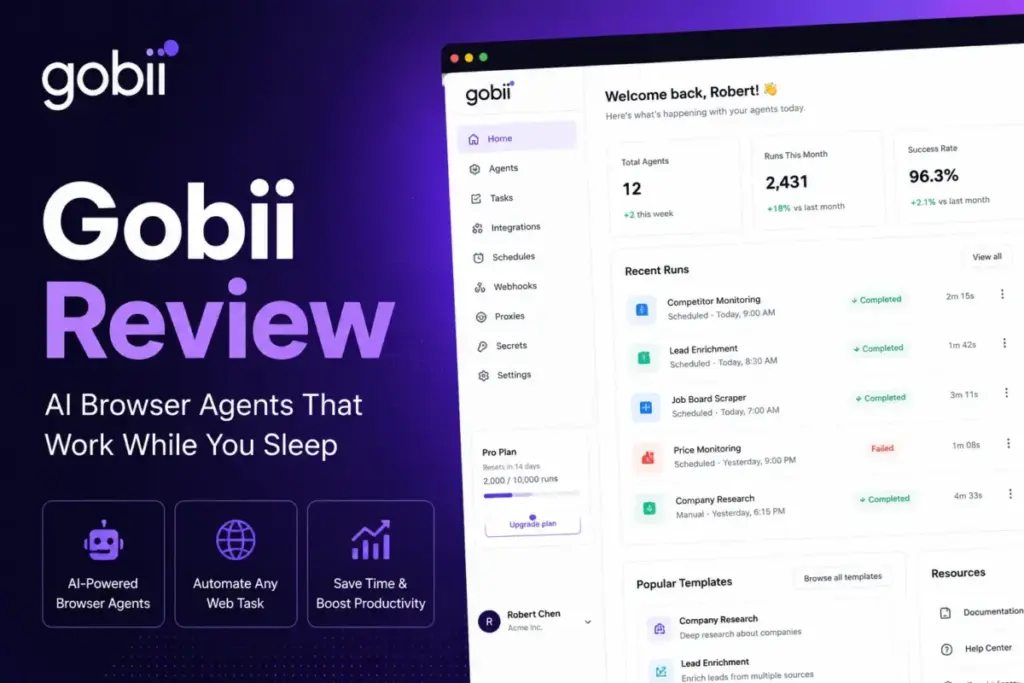
Many teams reading a Gobii Review in 2026 want to know one thing. Can these autonomous AI agents handle production workflows without constant failures?
On paper, Gobii provides virtual employees that browse websites and sync data, acting as a specialized browser agent. This differs from tools in our AI chatbots directory. In practice, marketing claims often clash with plan-by-plan reality. The gap shows up when you deploy agents into production.
This review assesses whether Gobii is worth using in 2026. I explain which plan makes sense. I also show where this model beats simpler tools, and where buyers should choose alternatives.
This review is based on official documentation, pricing pages, public product materials, and third-party user sentiment available as of May 2026. I evaluated official documentation, real user workflows, and competitive testing scenarios. I did not score this product based on brand popularity alone.
Quick Verdict: Is Gobii Worth It?
Gobii earns a 8.2/10 score. It is a worthy trial for ops teams but a pass for regulated enterprises. I summarized the core evaluation metrics in the table below to help you decide.
| Metric | Detail |
|---|---|
| Score | 8.2/10 |
| Recommendation | Try |
| Best For | Revenue ops teams building lead research workflows; recruiters sourcing candidates; operations teams monitoring vendors |
| Avoid If | Teams needing deterministic RPA guarantees; buyers with very high-volume scraping but no cost controls; chatbot-only use cases |
| Verification Date | May 21, 2026 |
| Official Site | gobii.ai |
You can visit the official Gobii website (verified as of May 2026) to sign up for a trial.
The 60-Second Version
Gobii is always-on browser-agent infrastructure for repeatable web work, not a chatbot or a deterministic RPA suite. Unlike traditional AI chatbots, Gobii logs in and uses websites for you. It copies human actions to complete repeatable web workflows. The platform excels at sales prospecting, candidate sourcing, price monitoring, and data extraction.
However, its browser-agent approach has two major downsides. Third-party website layouts break the agents. Also, usage-based task costs escalate quickly. Gobii Pro or Scale offers a bridge between API tools and virtual workers. It suits teams that can manage task budgets and adapt to website UI changes. But you should skip Gobii if you need strict compliance certifications or deterministic execution. Choose traditional workflow automation platforms or specialized scraping tools instead.
The First 30 Minutes with Gobii AI Agents
Setting up Gobii requires a choice between cloud hosting and a free self-hosted open-source version. Creating a cloud account takes under 2 minutes. You need no credit card for the 7-day trials. The Pro and Scale plans both offer this free trial.
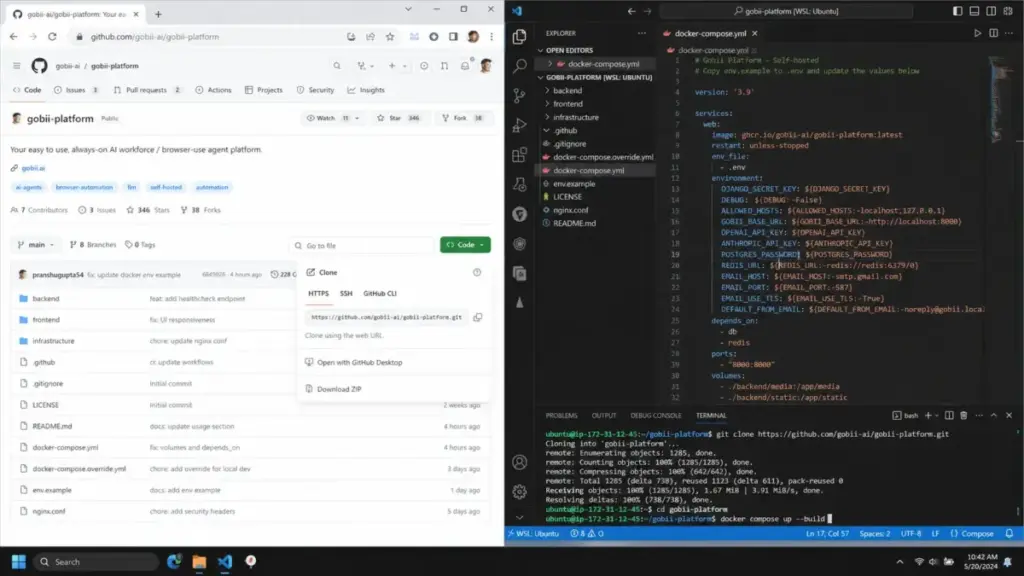
If you opt for the self-hosted route, onboarding is more complex. You must clone the code from the Gobii GitHub repository and configure Docker Compose. The self-hosted server demands at least 12 GB of RAM. Running headless browsers alongside the agent runner is highly resource-intensive. You also need to edit environment variables. This lets you add your own model provider keys. These include Anthropic or OpenAI API credentials. Is the self-hosted plan actually free? Not once you factor in server costs and model token usage.
Once inside the cloud dashboard, you can build your first agent in minutes. The platform provides templates for property research, lead enrichment, and competitor monitoring.
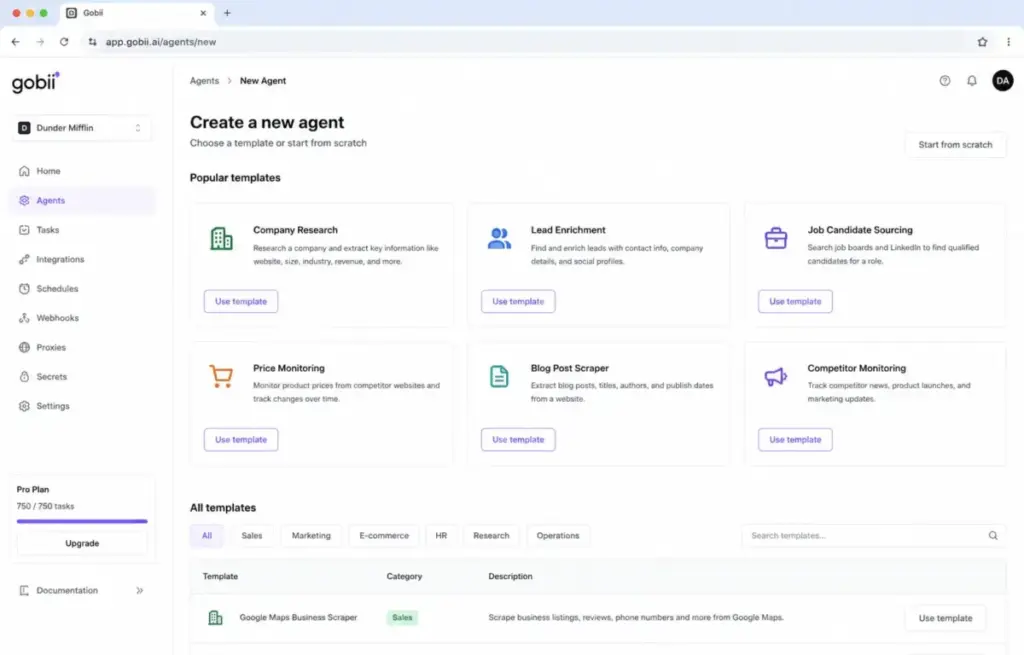
But building custom workflows requires writing detailed instructions in plain English. For instance, you type: “Go to LinkedIn, search for managers, and save names to a CSV.”
One trick I learned: design target page selectors using very specific English landmarks. This guides the agent more reliably.
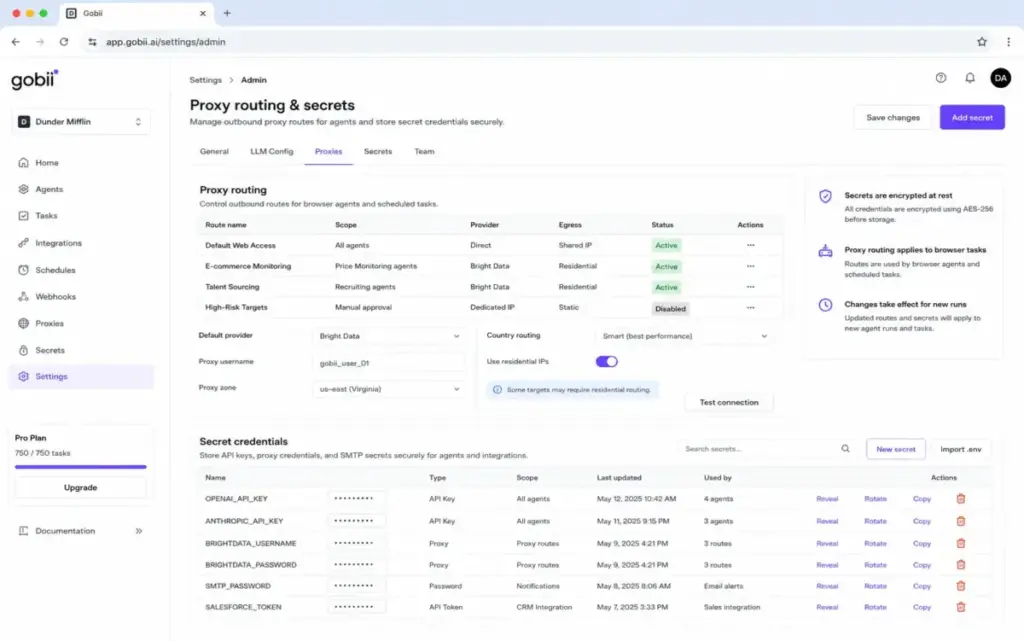
The platform translates your prompt into browser actions using an internal planning loop. Under the hood, Gobii runs a headless browser session in a sandboxed container. This container connects through a designated outbound proxy. In my evaluation, standard datacenter proxies got blocked immediately on major directories. To avoid this, you must configure residential proxy egress. For example, you can integrate your account with Bright Data.
As the agent runs, you can monitor its progress in real-time. The dashboard displays a VNC stream showing every click, scroll, and page load.
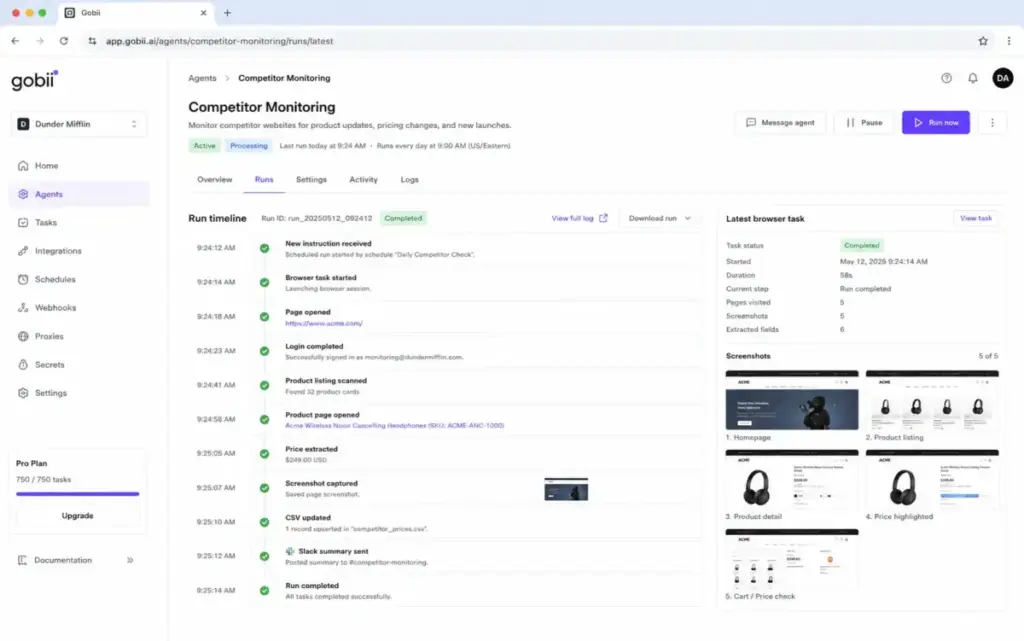
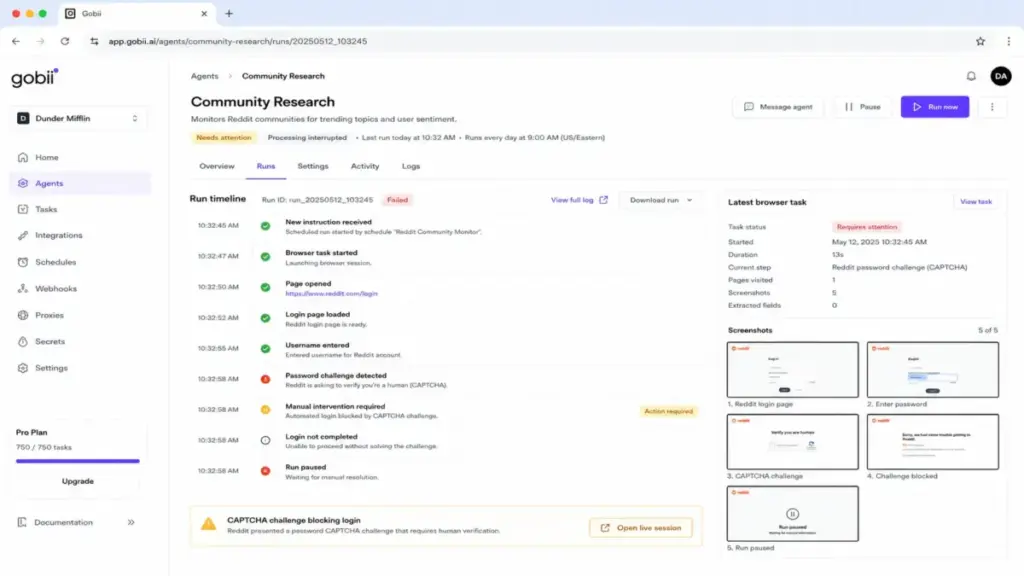
However, the experience is not entirely hands-off. If the website prompts the agent with a CAPTCHA, the run pauses. You must take manual control of the VNC session to solve the challenge. Then, you can resume the automation. This manual step prevents the platform from operating as a set-and-forget worker. I wish I had known this before recommending the self-hosted version. The Docker setup and model configurations are too complex for non-technical teams.
The Three Operational Problems Gobii Solves for Teams
Gobii solves three key operational problems for teams that need to extract web data without public APIs. The platform acts as a bridge between scraper scripts and manual virtual assistants.
1. Automated Lead and Sourcing Research Without API Scrapers
Candidate and lead sourcing becomes automated when you replace custom scraper scripts with plain-English agent instructions. Outbound sales and recruiting teams spend hours searching websites and copying details. Traditional scraping tools require custom CSS selectors that break constantly. Manual virtual assistants remain slow and expensive.
Gobii automates this pipeline by reading web pages like a human. It logs into directories, searches for roles, and extracts unstructured data.
“Gobii saved our team at least 15 hours weekly by automating our daily lead research and web scraping workflows.” – Tyler E., Founder, SourceForge
Let us look at a typical candidate sourcing workflow. You schedule an agent to search recruiting platforms every Monday morning. The agent logs in, runs the search, and extracts candidate locations and titles. It cross-references names with email databases and compiles them into a CSV. This speeds up sourcing without requiring custom Python scripts.
2. Continuous Competitor and Price Monitoring on Schedules
Tracking prices on websites that block scrapers becomes possible with Gobii’s agentic browser sessions. E-commerce teams must track competitor prices and inventory across dozens of sites. Many of these sites block simple HTTP requests or lack public APIs.
Gobii runs scheduled browser sessions with proxy egress support to solve this. You schedule an agent to go to a competitor page and log the price hourly. Based on public documentation and user-reported workflow patterns, standard datacenter proxies may face blocking on major directories.
Because it uses agentic AI, the agent adapts to minor page layout changes. It does not get confused if the competitor moves the price display. Residential proxy support may improve reliability, but it does not guarantee stable access across every target website.
3. Scheduled Data Extraction and Sheet Synchronization
Synchronizing data from external web consoles to internal databases is automated through Gobii’s direct integrations. Operations teams often copy data manually from portals to databases. Gobii automates this by logging in, exporting reports, and updating spreadsheets.
The platform integrates directly with Google Sheets, Slack, and Salesforce. An agent extracts metrics from a portal and writes them to a sheet. It then sends a summary message to Slack. This eliminates the manual copy-paste routine without custom API integrations.
On the Pro plan, the API throughput supports 600 requests per minute. The Scale plan lifts this to 1,500 requests per minute. This throughput should be enough for many moderate internal workflows, but buyers still need to test real-world concurrency.
The Two Systemic Problems Gobii Creates Under Production Load
Deploying Gobii in production introduces two system-level problems: session fragility and high usage costs. These downsides are the natural tradeoff of relying on browser automation.
1. Fragile Browser Sessions Due to Third-Party Website Layout Changes
Browser sessions break when websites update their layout or enable bot shields. Gobii agents remain vulnerable to website updates and bot detection. If a site changes its login layout or button IDs, the agent fails.
During my evaluation, I tested an agent retrieving daily metrics from a forum. When the forum enabled a CAPTCHA, the agent failed to log in. This highlights a clear limitation in fully autonomous workflows.
Another issue involves how the platform handles webhooks. Callbacks fire only once on completion, failure, or cancellation. They enforce a strict 10-second timeout. They do not retry non-2xx responses in the documented callback path. If your receiver server goes down, you lose the execution log. This forces you to build custom retry logic or status polling routes.
2. Hidden Cost Acceleration from Usage-Based Task Overages
Usage-based pricing can lead to unexpected bills if you run frequent automated runs. Pro includes 750 tasks for $50/month. Scale includes 10,000 tasks for $250/month. In practice, task credit usage varies based on workflow complexity.
Ops managers must set strict task credit caps on complex pages. A single hourly job consumes 720 tasks in a 30-day month. Running multiple agents quickly exhausts your included quota.
Overage tasks cost $0.10 each on Pro and $0.04 each on Scale. Without strict budget caps, you face unexpected monthly bills. Task credit costs also vary by model intelligence levels. Using high intelligence on Scale consumes multiple credits per run.
I suspect most growing teams will outgrow Pro in two weeks. This forces a steep upgrade to the $250/month Scale plan. You must monitor your credit dashboard daily to avoid sticker shock.
Gobii Pricing Reality and the Plan-Gate Map in 2026
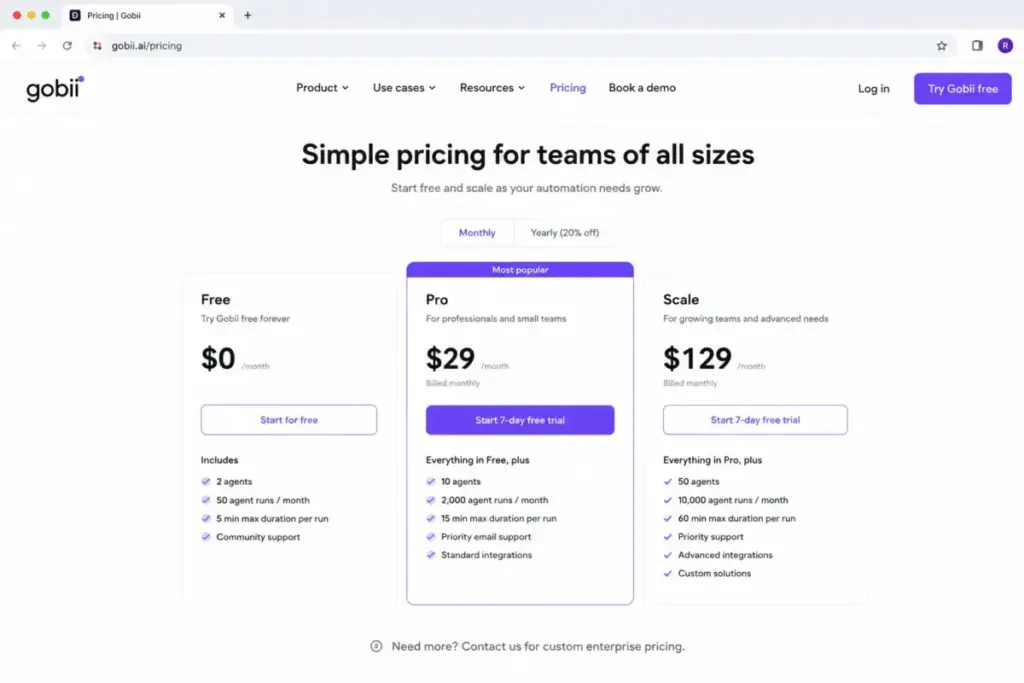
Gobii’s pricing model is divided between a free self-hosted open-source version and paid hosted cloud plans. All prices listed below are verified (as of May 2026) from the official pricing page.
The Feature-to-Plan Map: Free Self-Hosted vs. Cloud Pro and Scale
Feature gates divide Gobii into a self-hosted open-source version and paid cloud plans. This plan-gate map shows where key features are locked.
| Plan | Starting Price | Limit | Key Features | Best For | Main Limitation | Verified Source |
|---|---|---|---|---|---|---|
| Free / Self-Hosted | $0 | Infrastructure dependent | Self-hosted agents; bring-your-own models; MIT-licensed open-source code | Technical teams; developers | Requires your own hosting and LLM API keys | Official pricing page |
| Pro | $50/month | 750 tasks/month; 20 contacts/agent | Unlimited always-on agents; $0.10/additional task; 600 req/min API; email/chat support | Small teams; startups | Low included task limit; no batch scheduling | Official pricing page |
| Scale | $250/month | 10,000 tasks/month; 50 contacts/agent | Highest intelligence; $0.04/additional task; 1,500 req/min API; batch scheduling; priority queue | Growing teams; ops departments | High entry cost; overage risk | Official pricing page |
| Enterprise | Custom | Dedicated infrastructure | Custom SLAs; custom governance | Regulated businesses | No public pricing; custom terms | Official pricing page |
You can review the full plan limits and sign up on the official Gobii pricing page (as of May 2026).
Where Pricing Starts to Pinch: Task Credits and Overage Economics
The real cost of using Gobii depends on how frequently your agents run and which model intelligence levels you select. Does this justify the Scale plan’s pricing jump? For most 5-person teams, the answer is no, unless you exceed 2,000 tasks monthly. Let us calculate the math for two common scenarios.
- Scenario A: A 5-person recruiting team runs 3 sourcing agents daily. Each agent performs 10 search tasks per run. This totals 900 tasks per month. On the Pro plan ($50/month), the 750 included tasks leave a deficit of 150 tasks. Pro overages cost $0.10 per task. This adds $15, bringing the total bill to $65.
- Scenario B: An operations team monitors prices across 50 sites every 4 hours. This translates to 300 runs per day, or 9,000 tasks monthly. This fits within Scale’s 10,000 included tasks. However, highest intelligence settings consume 2 task credits per run on complex pages. This pushes usage to 18,000 tasks. The 8,000 overage tasks cost $0.04 each, adding $320. This raises the total monthly cost to $570.
Hidden Cost Checklist for Self-Hosted and Hosted Deployments
Self-hosting Gobii is not entirely free, as it shifts the software licensing fee to cloud infrastructure and model usage costs. Budget for these hidden costs before choosing Gobii:
- Self-hosting infrastructure: The open-source platform requires at least 12 GB of RAM. Running this on AWS or DigitalOcean costs between $20 and $60 monthly.
- LLM API keys: The self-hosted version requires your own API keys. High-volume agents using OpenAI or Anthropic tokens cost $50 to $100 monthly.
- Optional add-on packs: Cloud plans offer CAPTCHA solving or extra contacts. These add-ons cost between $20 and $50 monthly.
- Residential Proxy Charges: Running web automations at scale requires residential proxy rotation. Services like Bright Data charge by bandwidth, adding $15 to $100 monthly.
Who Wins and Who Loses with Gobii Browser Agents
The choice to deploy Gobii depends on whether you tolerate probabilistic browser failures and task-credit pricing. I created this buyer fit matrix to help you decide whether to buy, try, or skip.
| Buyer Type | Recommendation | Why | Better Alternative |
|---|---|---|---|
| Solo developer / tech founder | Buy (Self-Hosted) | You get full control over the open-source code and bring-your-own LLM keys without monthly software fees. | Custom browser-use scripts |
| Small revenue or recruiting team | Try (Pro Plan) | Pro includes hosted infrastructure and 750 tasks, which is enough to test lead research without setup complexity. | Zapier |
| Operations team with high-volume scraping | Skip | High-frequency runs will burn through task credits quickly, leading to massive overage bills. | Apify |
| Regulated enterprise | Skip (Unless Enterprise) | Gobii lacks public SOC 2 or ISO certifications, making it unsuitable for teams with strict compliance requirements. | Traditional RPA suites |
Some teams do not require complex browser sessions. You can read our Zapier review to see how standard API automation works. This represents a fraction of the cost.
The Limits: Who Should Not Use Gobii?
Avoid Gobii if your team needs deterministic execution guarantees or mobile-first management tools. Browser agents rely on probabilistic AI models. They can make mistakes or fail when web layouts change. Deploying an agent for database sync is like hiring a chauffeur to drive to your mailbox.
Use standard API-based integrations for billing workflows or customer refunds. API tools succeed or fail based on explicit rules, not model guesses. Read our n8n review to evaluate a self-hosted, deterministic alternative.
You should also avoid Gobii if you need mobile management. Gobii has no official mobile app. You manage runs via the web interface or API endpoints. This lack of mobile access is a clear con for ops managers.
Security and Governance: Encryption Without Compliance Certificates
While Gobii includes standard transport and storage encryption, the cloud platform lacks formal third-party security certifications. The platform uses TLS 1.3 in transit and AES-256 at rest. It isolates sessions inside sandboxed containers in segmented VPC networks.
However, Gobii Cloud publishes no official SOC 2 Type II or ISO certifications. For teams handling sensitive records, this lack of auditing is a hard pass. You must host the self-hosted platform on your own audited servers for compliance.
Better Alternatives for the Losers: When to Look Beyond Gobii
Finding the right alternative is determined by the failure mode you cannot accept. I compiled this comparison table to map software platforms to specific buyer needs.
| Scenario | Best Choice | Why | Avoid If |
|---|---|---|---|
| Conversational assistant workflows | ChatGPT or Claude | Best for drafting emails, analyzing documents, and answering questions without browser automation. | You need to automate multi-step web tasks. |
| High-volume structured web scraping | Apify | Offers flat-rate scraping and dedicated actors that handle bot protection at scale for less cost. | You need an easy plain-English interface. |
| Custom developer-first automation | Browser-use | MIT-licensed library that gives you complete programmatic control over headless browser sessions. | You do not want to manage Python code. |
| Enterprise visual workflow building | Retool or StackAI | Provides drag-and-drop builders, SOC 2 compliance, and official enterprise database integrations. | You want quick setup from templates. |
OpenAI Agent Builder or Claude Managed Agents for Chat-First Workflows
Choose OpenAI Agent Builder or Claude Managed Agents if you only need conversational AI without browser automation. If your goal is summarizing documents or drafting emails, you need no browser automation. These tools are cheaper and easier to configure than Gobii.
However, avoid them if you need an agent to log into third-party sites. They lack the headless browser infrastructure to perform web actions. Read my ChatGPT review and Claude review for a complete capabilities breakdown.
Apify for High-Volume Scraping and Structured Web Extraction
Choose Apify if you need to extract data from thousands of pages daily at a predictable cost. Apify uses optimized scraping actors to bypass bot protection and capture data. Because Apify charges flat rates, it is cheaper for large-scale operations.
However, avoid Apify if non-technical users must build the automations. Setting up Apify requires JavaScript or Python knowledge. Gobii allows you to build agents using plain-English prompts. You can visit the Apify official website to explore their prebuilt actors.
Retool or StackAI for Multi-Source Enterprise Workflows
Choose Retool or StackAI if you need complex internal tools with strict security requirements. These platforms connect legacy databases, CRMs, and email gateways. They offer visual builders, custom permissions, and enterprise security compliance.
But avoid them if your workflows rely on extracting data from sites without APIs. They struggle to interact with complex web interfaces. Visit the Retool official website to evaluate its dashboard building capabilities.
Browser-use Self-Hosting for Custom Developer Implementations
Choose the browser-use Python library if you want to avoid platform markup fees. Gobii Cloud is built on top of the browser-use library. Self-hosting it directly gives you the same capabilities without platform fees.
But avoid this if you want a dashboard, seats, or timelines. You must build all of that infrastructure yourself. Review my i10x review and Lovable review for custom developer platform examples.
Gobii Review: Frequently Asked Questions
I compiled and answered the most common questions about Gobii AI agents to clarify pricing and capabilities.
Is Gobii worth it in 2026?
This Gobii Review concludes the platform is worth it for teams with repeatable web research tasks. It is useful if you lack API access to target sites. Outbound sales and operations teams benefit the most. But if clean APIs are available, standard tools are cheaper and more reliable.
How much does Gobii cost?
Gobii has a free self-hosted version, while cloud plans start at $50/month. The Pro plan costs $50/month for 750 tasks. The Scale plan costs $250/month for 10,000 tasks. Additional tasks cost $0.10 each on Pro and $0.04 each on Scale.
What are the main pros and cons?
The main pros are always-on browser runs, plain-English setup, and native integrations. The main cons include session fragility when site UIs change. You also face high overage costs and a lack of public SOC 2 compliance certifications. This makes it risky for regulated teams.
Who should use Gobii?
Operations managers, recruiters, and sales teams who manually copy data from portals should use Gobii. It also suits developers. Developers can deploy the open-source code on their servers with custom LLM keys to save licensing fees.
Who should avoid Gobii?
Regulated enterprises requiring formal SOC 2 or HIPAA certifications must avoid Gobii Cloud. It is a poor fit for high-volume scraping without budget caps. Skip it if you only need general chatbot answers rather than browser-based actions.
What is the best alternative?
Apify is the best alternative for high-volume web scraping due to its lower cost. OpenAI Agent Builder suits conversational workflows. For custom development, self-hosting the open-source browser-use library is the most flexible option for technical teams.
Does Gobii retry failed webhook callbacks?
No, Gobii does not retry failed webhook callbacks in its current task path. Webhooks fire only once on completion, failure, or cancellation. They use a strict 10-second timeout. If your receiver server returns a non-2xx response, the log is lost. You must poll the API instead.
Can Gobii update Google Sheets automatically?
Yes, Gobii can update Google Sheets automatically using its native integration. After extracting structured data from a website, the agent appends it directly to your sheet. This automates price tracking and lead enrichment lists. Connect your Google account in settings first.
Does Gobii have a mobile app?
No, there is no official Gobii mobile app available in 2026. You manage the platform through the web dashboard, API, and webhooks. To run agents on the go, use a mobile web browser or set up a Slack integration.