Google’s marketing positions NotebookLM as a free AI research assistant. The reality: the free tier caps at 50 sources per notebook, 50 chat queries per day, and 3 Audio Overviews per day. For anyone running a literature review, marketing research sprint, or policy analysis across dozens of documents, those limits hit within the first week.
This NotebookLM review breaks down exactly where the free plan stops working, what the paid Google AI Plus, Pro, and Ultra tiers actually unlock, and which workflows should skip NotebookLM entirely in favor of tools better suited for open-ended writing or live web research. Among the best AI chatbots available in 2026, NotebookLM occupies a unique niche: it only answers from sources you provide.
This review is based on official Google documentation, verified pricing pages, G2 review patterns, and Reddit workflow reports. I did not score this product based on brand popularity alone. The analysis maps every plan-gated limit, every privacy boundary, and every workflow breakpoint that competitors’ reviews gloss over.
NotebookLM earns 7.8/10. Strong for source-grounded synthesis. Weak for general writing, editable slide production, and cross-notebook querying. Try it free; pay for Pro only if you routinely exceed 50 sources or need 20+ Audio Overviews per day.
| Category | Detail |
|---|---|
| Product | NotebookLM |
| Score | 7.8/10 |
| Best for | Students, analysts, marketers with trusted source material |
| Not for | General AI writing, live web research, regulated compliance |
| Free plan | Yes (50 sources/notebook, 50 chats/day) |
| Starting price | $7.99/month (Google AI Plus) |
| Recommendation | Try free, upgrade to Pro if limits restrict your workflow |
The 3 Problems NotebookLM Solves Better Than Most AI Tools
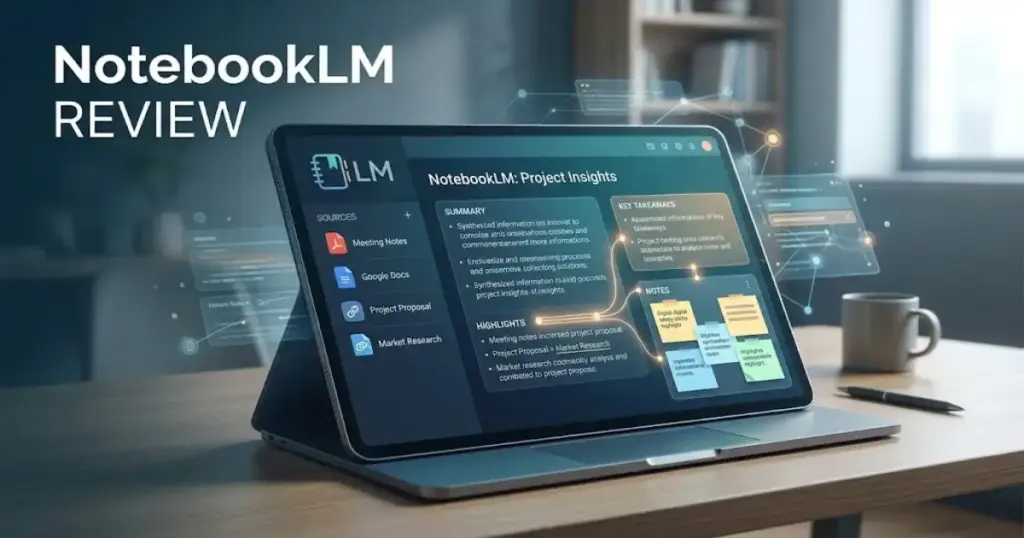
NotebookLM is not a general-purpose chatbot. It is a source-grounded research workspace powered by Google’s Gemini ecosystem. The distinction matters: every answer NotebookLM generates cites specific passages from sources you uploaded, not from the open internet. That single design choice makes it genuinely useful for three categories of work that generative AI tools handle poorly when left unsupervised.
Problem 1: Synthesizing Across Dozens of Documents Without Hallucination
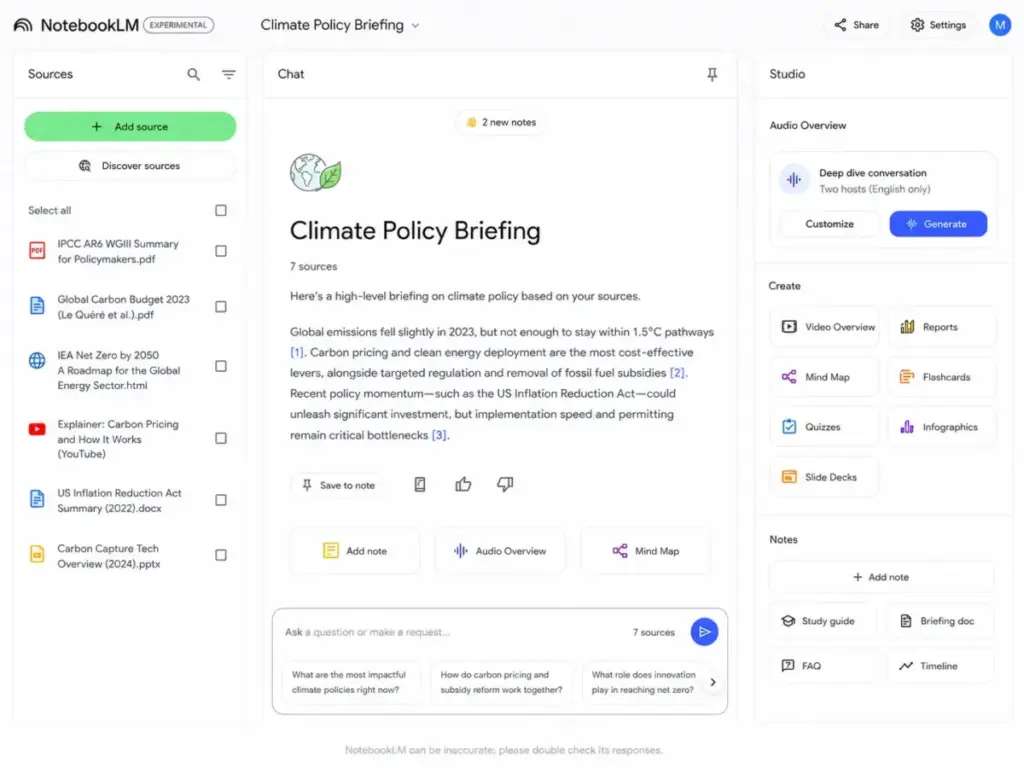
The core strength is citation fidelity. Upload 30 PDFs, paste 15 website URLs, and add 5 YouTube transcripts into a single notebook. Ask a question. NotebookLM returns an answer with inline citations pointing to the exact source passages. For a graduate student reviewing 40 papers for a literature review, or an analyst consolidating market research from mixed formats, this eliminates the “which document said that?” problem.
According to official NotebookLM documentation, each source can contain up to 500,000 words or 200 MB for local uploads. Supported formats include Google Drive files, PDFs, public websites, public YouTube videos with captions, and audio files. That breadth of input types in a single workspace is something ChatGPT, Claude, and Perplexity do not replicate at this document scale without API-level integrations.
Problem 2: Turning Dense Material Into Consumable Formats
NotebookLM’s Studio panel transforms uploaded sources into Audio Overviews (podcast-style discussions), Video Overviews, mind maps, reports, flashcards, quizzes, infographics, and slide decks. The Audio Overviews alone justify evaluation. According to official help documentation, formats include Deep Dive, The Brief, and The Critique, each tuned for different learning styles.
For a product manager preparing board briefings, or a consultant distilling client interview transcripts into actionable summaries, the transformation pipeline saves hours of manual reformatting. The outputs are grounded in the uploaded material, not pulled from the model’s training data.
Problem 3: Collaborative Knowledge Sharing Without Rewriting
NotebookLM supports public notebook sharing, letting teams distribute a grounded knowledge base where stakeholders can query the same source set. The Google Workspace Updates blog confirmed on May 12, 2026 that NotebookLM now integrates with Google Workspace Studio via an Ask NotebookLM step, enabling existing notebooks to act as grounded AI knowledge sources for automations.
This positions NotebookLM as more than a personal research tool. A sales enablement team can build a notebook from competitor pages, sales call transcripts, and battlecard PDFs, then let the entire team query it. The source-grounded constraint means every answer traces back to the uploaded material, not to model speculation.
The 2 Problems NotebookLM Creates (And Most Reviews Skip)
No source-grounded tool is free of friction. NotebookLM creates two categories of workflow breakpoints that directly affect whether you should pay for a higher tier, pair it with other tools, or avoid it for specific use cases.
The Notebook Silo Problem
Each notebook is a sealed environment. Sources, chats, and generated artifacts in Notebook A cannot query or reference Notebook B. G2 review patterns and Reddit workflow reports confirm this is a persistent pain point for users managing multiple projects, clients, or research threads.
A marketing user on r/notebooklm described NotebookLM as a strong first layer for filtering customer, competitor, and sales material, but hit friction because notebooks do not talk to each other, generated content does not always serve as a usable first draft, and slide outputs require significant manual editing.
This silo model also means source copies can become stale. Imported Google Drive files are copied into NotebookLM and do not automatically track every change in the original file. Non-Google source types (PDFs, websites, audio) require manual deletion and re-upload to refresh. Before high-stakes work like a board presentation or compliance review, verify that your sources reflect the latest versions.
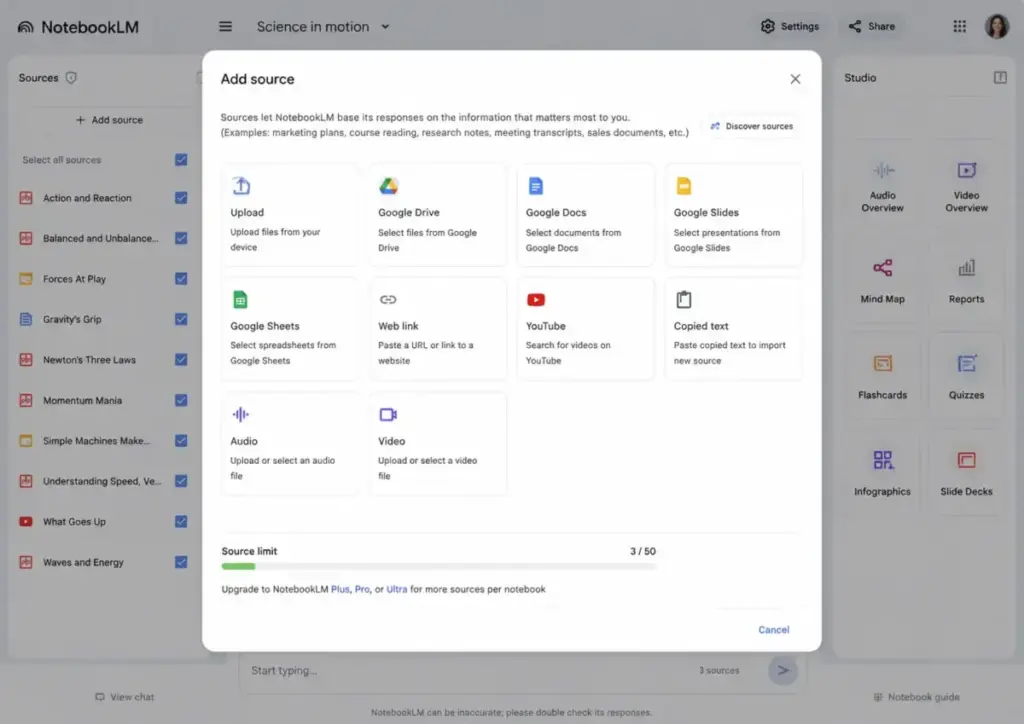
The “Great Outline, Bad Final Draft” Problem
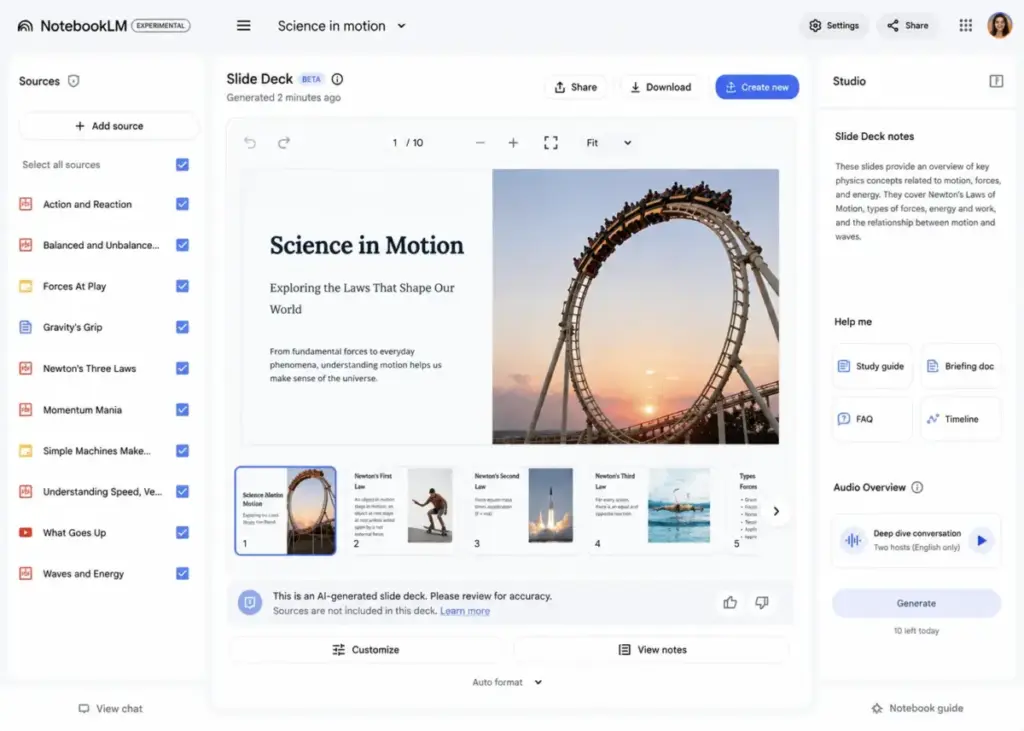
NotebookLM excels at extraction and synthesis. It does not excel at producing polished, editable deliverables. Slide Decks can be generated and exported as PDF or PowerPoint, but official documentation confirms that revisions create a new slide deck (you cannot add or remove individual slides during revisions), and sources are not taken into account during slide revisions.
Video Overviews carry similar caveats. According to official help pages, they may contain inaccuracies or audio glitches and can take more than 30 minutes to generate. Cinematic Video Overviews are Ultra-only and restricted to English and users 18+.
The practical workflow: use NotebookLM for source-grounded extraction and synthesis, then move to Claude, ChatGPT, or Gemini for drafting, and to Google Slides, PowerPoint, or Canva for final presentation formatting. NotebookLM is the research layer, not the production layer.
NotebookLM Pricing in 2026: What Each Tier Gets You
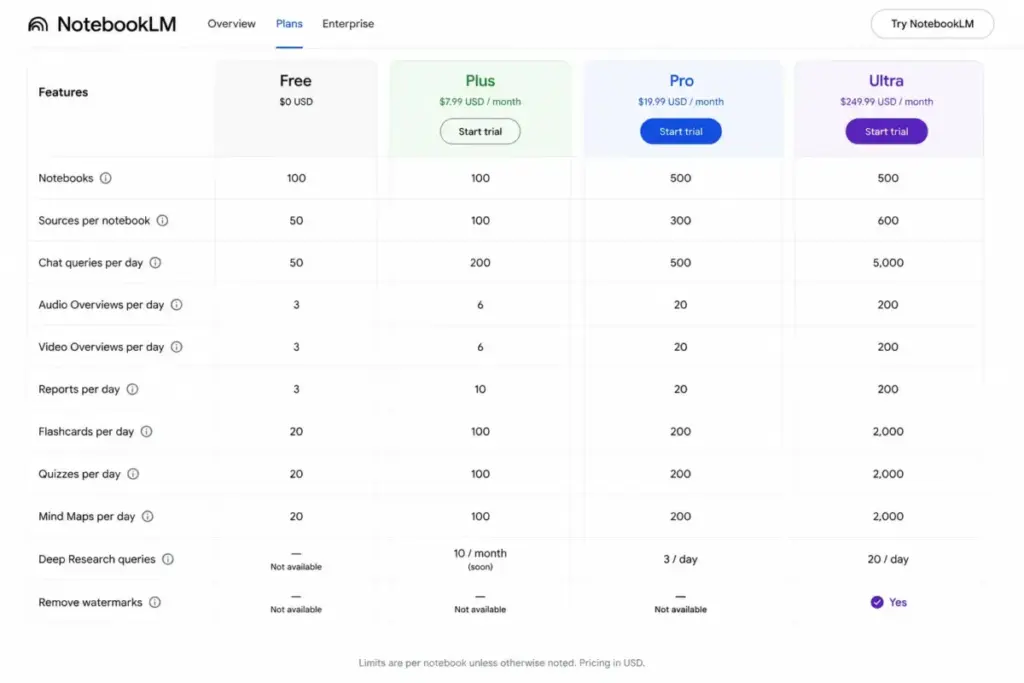
NotebookLM’s free tier is functional. The paid tiers are where Google makes the buying decision complicated. According to official plan documentation and the NotebookLM plans page (verified May 2026), here is the complete feature-to-plan map.
| Feature | Free | Plus ($7.99/mo) | Pro ($19.99/mo) | Ultra ($249.99/mo) |
|---|---|---|---|---|
| Notebooks | 100 | 200 | 500 | 500 |
| Sources per notebook | 50 | 100 | 300 | 600 |
| Chats per day | 50 | 200 | 500 | 5,000 |
| Audio Overviews/day | 3 | 6 | 20 | 200 |
| Video Overviews/day | 3 | 6 | 20 | 200 |
| Reports/day | 10 | 20 | 100 | 1,000 |
| Flashcards/day | 10 | 20 | 100 | 1,000 |
| Quizzes/day | 10 | 20 | 100 | 1,000 |
| Mind Maps/day | 10 | 20 | 100 | 1,000 |
| Deep Research | 10/month | 3/day | 20/day | 200/day |
| Watermark removal | No | No | No | Yes |
| Google One storage | N/A | 200 GB | 5 TB | 30 TB |
All Google AI plan pricing is for personal Google Accounts. Workspace customers follow a separate licensing path through Gemini add-ons.
Where Pricing Starts to Pinch
The free tier works for casual exploration: a student uploading 20 papers, a product manager querying 10 meeting transcripts, or anyone experimenting with Audio Overviews. Three audio generations per day and 50 chat queries are enough for light use.
The first breakpoint is source count. A graduate student with 50+ PDFs for a dissertation chapter fills the free notebook in one project. A marketing team uploading competitor pages, interview transcripts, and sales decks hits 50 sources within a single research sprint.
Google AI Plus at $7.99/month doubles sources to 100 per notebook and quadruples daily chats to 200. But here is where Reddit users report confusion: Plus allows 100 sources per notebook, not 300. The official upgrade page is the source of truth. If you need 300 sources per notebook, you need Google AI Pro at $19.99/month.
Google AI Ultra at $249.99/month is a different conversation entirely. The 600-source limit, 5,000 daily chats, and watermark removal for infographics and slide decks position it for power users or small teams sharing a single Google Account. For most individual researchers and analysts, Pro covers the realistic ceiling.
Enterprise pricing for NotebookLM Enterprise was not publicly verified from official sources. Organizations needing enterprise-grade security, admin controls, and the NotebookLM Enterprise API preview should contact Google Cloud directly.
NotebookLM Privacy and Compliance: Three Different Realities
Most NotebookLM reviews say “your data is private” without specifying which context. The privacy model differs across three deployment types, and the differences matter for regulated teams.
| Context | Data handling | Compliance |
|---|---|---|
| Personal / consumer | Data protected, not used for training unless user provides feedback | No ISO, SOC, HIPAA, FedRAMP, or HIPAA BAA coverage |
| Workspace (work/school) | Uploaded files, chats, and model outputs not reviewed by human reviewers and not used to improve generative AI models | Same compliance caveats as consumer per Workspace Privacy Hub |
| NotebookLM Enterprise | Enterprise-grade security, VPC-SC compliant, admin controls | Enterprise-specific compliance posture |
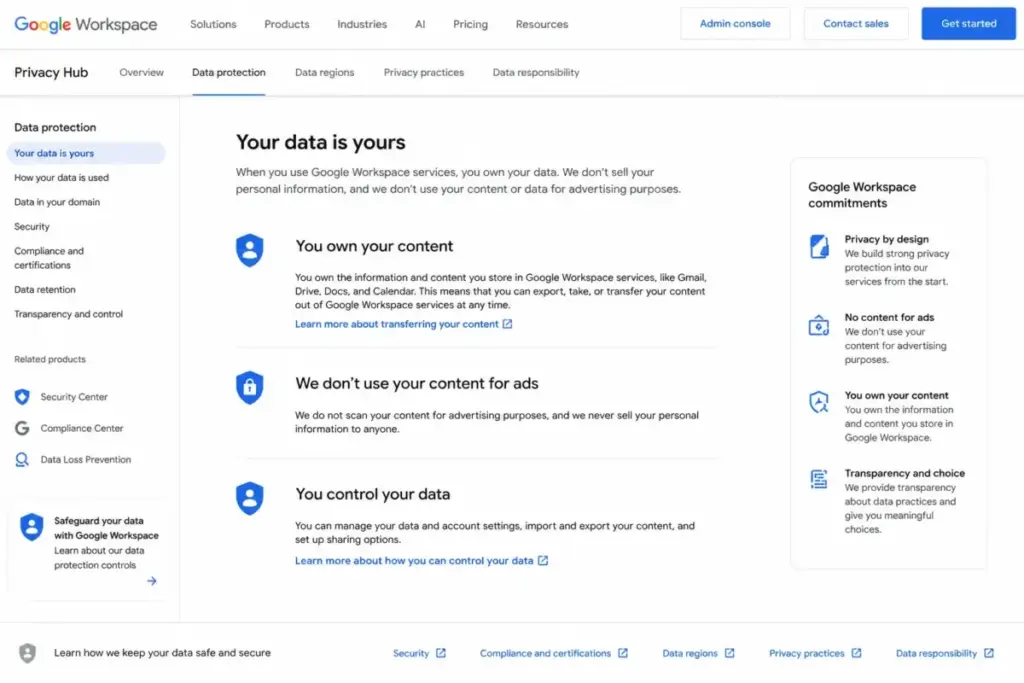
The Google Workspace Privacy Hub confirms that consumer NotebookLM does not currently support ISO, SOC, HIPAA, or FedRAMP and is not covered by Google’s BAA for HIPAA compliance.
For teams handling patient data, financial records, or government documents, NotebookLM Enterprise is the only official path. Personal and Workspace accounts lack the compliance certifications that regulated industries require.
One additional privacy note: public notebook sharing gives viewers access to sources and artifacts. The chat-only view hides some materials for focus, but it does not completely revoke underlying access to notebook contents. Verify what you are sharing before making a notebook public.
NotebookLM Mobile App: Useful but Not Full Parity
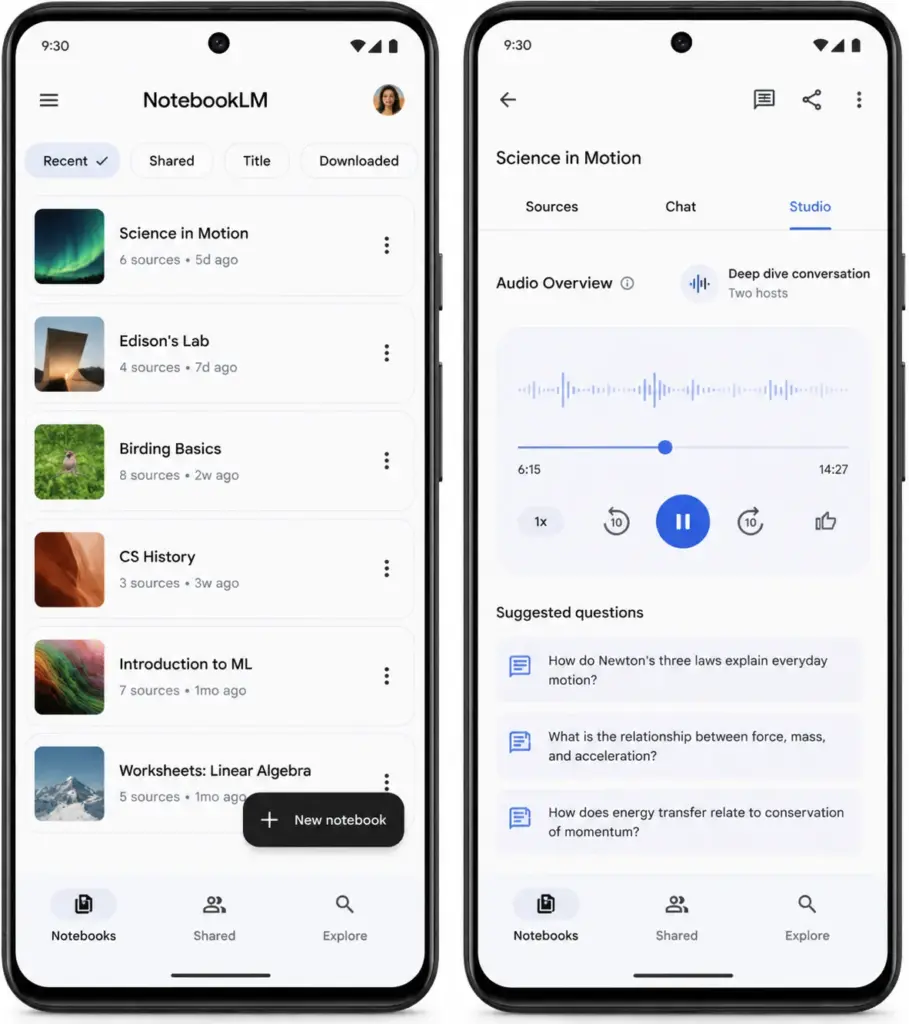
The NotebookLM mobile app for Android (updated May 8, 2026) supports core features: creating and accessing notebooks, asking questions about sources, listening to Audio Overviews with background playback and offline access, generating flashcards, quizzes, infographics, and slide decks, and sharing websites, PDFs, and YouTube videos into NotebookLM.
The limitations are real. Mind Maps are not supported on mobile at the time of the official help page. Video Overviews cannot be downloaded on mobile. Audio Overviews are not downloadable as a regular device file. Sync delays can occur between mobile and desktop. The featured notebooks tab present on desktop is missing from the app.
For students listening to Audio Overviews during a commute or professionals reviewing flashcards between meetings, the mobile app adds value. For research-intensive work that involves adding sources, querying across dozens of documents, and generating reports or slide decks, desktop is still the recommended environment.
Automation and API: What Actually Exists in 2026
Consumer API access for NotebookLM was not verified in official consumer documentation. The ChatGPT review and Claude review cover products with mature API access; NotebookLM is not there yet for consumer users.
NotebookLM Enterprise has an official API preview for creating, retrieving, listing recently viewed, deleting, and sharing notebooks. This API is subject to Pre-GA Offerings Terms and carries limited support. It should be described as preview, not stable API availability.
The most significant automation development: Google Workspace Studio now includes an Ask NotebookLM step (announced May 12, 2026), letting existing notebooks serve as grounded AI knowledge sources for Workspace automations. For Workspace admins building workflows that need cited, source-grounded answers, this is the first official integration path.
Who Wins and Who Loses With NotebookLM
The buying decision is not “should I use NotebookLM?” but “does my workflow benefit more from source-grounded synthesis than from open-ended generation?” Here is the scenario breakdown.
| Buyer scenario | Best plan | Why |
|---|---|---|
| Graduate student reviewing 40-50 PDFs | Free initially; Pro if source count exceeds 50 | Free supports 50 sources/notebook; Pro raises the ceiling to 300 |
| Marketing team synthesizing interviews, competitor pages, and sales calls | Pro or Workspace/Enterprise | Reddit sentiment shows cross-notebook silos and output limits mean teams still need companion drafting tools |
| Executive team preparing board packs and policy explainers | NotebookLM Enterprise | Enterprise fit depends on admin control, security posture, and governance requirements |
| Casual user wanting AI to write blog posts and brainstorm from the web | Not NotebookLM | General writing and web research are better handled by ChatGPT, Claude, Gemini, or Perplexity |
Who Should Use NotebookLM
Choose NotebookLM if you already have trusted source material (PDFs, transcripts, policies, research papers, sales recordings) and need cited synthesis, grounded Q&A, study aids, or audio/video summaries. The tool earns its value when the source set is defined and the task is extraction, not generation.
Who Should NOT Use NotebookLM
Avoid NotebookLM if you need a general-purpose AI writing assistant, editable slide design with full creative control, autonomous live web research, cross-notebook knowledge graphs, a mature consumer API, or confirmed ISO/SOC/HIPAA/FedRAMP compliance at the consumer level. For open-ended content creation, tools like Jasper AI or Copy.ai serve that workflow better.
Better Alternatives for Specific Workflows
NotebookLM does not need to be replaced entirely. It often works best when paired with other tools.
For Open-Ended Research and Web Queries
Perplexity searches the live web and returns cited answers from current sources. NotebookLM only queries what you upload. If your workflow starts with “what does the market say?” before “what do my documents say?”, use Perplexity for discovery and NotebookLM for deep extraction.
For Polished Content Drafting
ChatGPT and Claude produce editable, style-controlled long-form content. NotebookLM’s outputs are summaries and extractions, not polished drafts. Use NotebookLM to extract key findings, then move to ChatGPT or Claude for final drafting.
For Team Knowledge Bases With Editing
Notion AI offers a combined workspace where teams write, organize, and query documents in the same environment. NotebookLM separates the source layer from the production layer, which preserves citation integrity but adds friction when you want to edit outputs in place. The Notion review covers this distinction in detail.
FAQ
Is NotebookLM worth it in 2026?
NotebookLM is worth using for free if you have a defined source set and need cited synthesis. It is worth paying for Google AI Pro at $19.99/month if you routinely exceed 50 sources per notebook, need 20+ Audio Overviews per day, or run Deep Research queries daily. The free tier handles most casual and student use cases without cost.
How much does NotebookLM cost?
NotebookLM’s free tier costs $0. Google AI Plus costs $7.99/month, Pro costs $19.99/month, and Ultra costs $249.99/month (all U.S. pricing, verified May 2026 via official Google AI plans). Enterprise pricing requires direct contact with Google Cloud.
What is the difference between NotebookLM Free, Plus, Pro, and Ultra?
The primary differences are source count per notebook (50/100/300/600), daily chat queries (50/200/500/5,000), daily Audio Overviews (3/6/20/200), and Deep Research limits (10/month vs 3/20/200 per day). Ultra also removes watermarks from infographics and slide decks.
Does NotebookLM use your data to train AI?
According to official documentation, your data is protected and not used to train NotebookLM unless you provide feedback. For Workspace accounts, uploaded files, chats, and model outputs are not reviewed by human reviewers or used to improve generative AI models.
Can NotebookLM replace ChatGPT for research?
NotebookLM is stronger for source-grounded analysis where you upload specific documents and need cited answers. ChatGPT is stronger for open-ended writing, broad ideation, and live web browsing. The ChatGPT vs Claude comparison explores generation-focused tools in depth. Use NotebookLM for extraction and ChatGPT or Claude for generation.
Does NotebookLM have a mobile app?
Yes. The Android app supports notebooks, Audio Overview playback (with background and offline access), flashcards, quizzes, infographics, and slide decks. Limitations include no Mind Map support on mobile, no Video Overview downloads, and possible sync delays with desktop.
Is NotebookLM safe for company documents?
Consumer NotebookLM does not currently support ISO, SOC, HIPAA, or FedRAMP compliance. Workspace accounts offer no-human-review and no-training-data guarantees. For regulated environments, NotebookLM Enterprise through Google Cloud provides enterprise-grade security and VPC-SC compliance.
Can NotebookLM create editable PowerPoint slides?
NotebookLM generates slide decks that can be downloaded as PowerPoint or PDF. Revisions create a new deck (you cannot add or remove individual slides), and sources are not considered during revisions. For full design control, export to Google Slides or PowerPoint and edit there.
How many sources can I upload to NotebookLM Plus?
Google AI Plus supports 100 sources per notebook (not 300). The official NotebookLM upgrade page is the source of truth. Pro supports 300 sources per notebook, and Ultra supports 600.
Does NotebookLM have an API?
Consumer API access was not verified in official documentation. NotebookLM Enterprise has a preview API for notebook management (create, retrieve, list, delete, share). The API is in preview and subject to Pre-GA terms.
Final Verdict
NotebookLM earns 7.8/10. It is the strongest source-grounded research tool in Google’s ecosystem, and the free tier provides genuine value for students, researchers, and knowledge workers who need cited synthesis from their own documents. The 2026 upgrades (Video Overviews, Slide Decks, Mind Maps, Deep Research, Workspace Studio integration) move it beyond a simple summarizer into a real research workspace.
It is not the right tool for open-ended writing, live web research, editable presentation design, or cross-notebook querying. Teams needing regulated compliance at the consumer level should wait for NotebookLM Enterprise or use tools with established ISO/SOC/HIPAA certifications.
Choose Google AI Pro at $19.99/month if source limits or daily generation caps restrict your workflow. Choose Enterprise if governance and compliance are non-negotiable. For casual use, the free tier works. Start at notebooklm.google and test with your actual source material before paying.