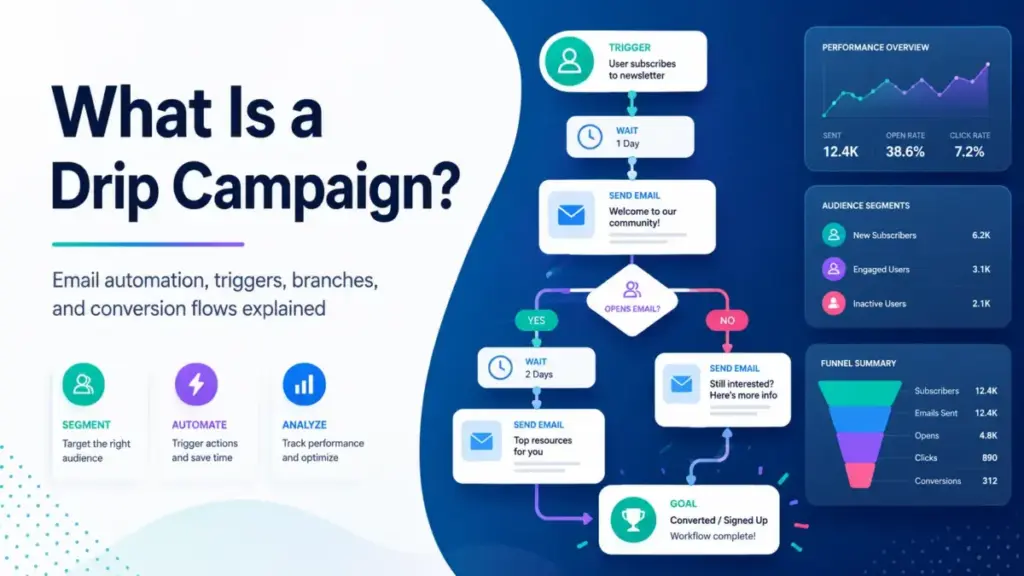
Most marketing teams set up a welcome email, maybe a follow-up, and call it automation. That is not a drip campaign. A drip campaign is a controlled automation system with entry triggers, wait steps, conditional branches, exit conditions, suppression rules, and measurable conversion goals.
The difference between a timed sequence and a real drip campaign is the difference between a schedule and a strategy. If your email automation sends the same six messages to every subscriber regardless of behavior, you have an autoresponder, not a drip.
This guide breaks down how drip campaigns actually work, which types exist, how to build one safely, which tools support them (with pricing caveats), and when automated sequences do more harm than good.
Quick Answer: A drip campaign is a pre-planned series of automated messages, usually email, sent to a contact over time based on a trigger, schedule, lifecycle status, or behavioral event. Unlike newsletters or one-off campaigns, drip sequences respond to individual actions, follow conditional logic, and exit contacts when a goal is reached. The term applies across email marketing platforms, CRM automation, and multichannel journey tools.
What Is a Drip Campaign?
A drip campaign sends the right message at the right moment because it reacts to what a contact does, not just when they signed up.
Simple definition: A drip campaign is a series of automated emails triggered by an action (signup, purchase, inactivity) and delivered on a schedule until a goal is reached or an exit condition fires.
Technical definition: A drip campaign is an automation workflow composed of entry triggers, wait/delay nodes, conditional branches (if/then splits), message actions, suppression filters, frequency caps, exit conditions, and reporting endpoints. The platform evaluates each contact against the workflow logic in real time, advancing or removing them based on data attributes and behavioral events.
Business definition: A drip campaign is a conversion system. It takes a defined lifecycle moment (trial signup, abandoned cart, lead qualification, renewal window) and automates the communication path toward a measurable outcome: activation, purchase, demo booking, or re-engagement. For marketing automation teams, drips reduce manual follow-up and create repeatable, measurable revenue paths.
I keep coming back to one distinction: a drip campaign is not the same as “sending automated emails.” Automation is the mechanism. The drip campaign is the strategy layered on top: who enters, what they receive, when they exit, and how you measure whether the sequence worked.
Drip Campaign Example
A SaaS company offers a 14-day free trial. A new user signs up on Monday. Immediately, the platform sends a welcome email with login credentials and a quick-start link. Two days later, a setup guide arrives explaining how to connect integrations. On day 5, the system checks whether the user activated the core feature. If they did not, a targeted email explains the feature with a 2-minute walkthrough video. If they did, the system skips that email and waits. On day 8, if the user visits the pricing page twice, the workflow triggers a sales handoff: a personal email from an account executive with a calendar link. If the user upgrades to a paid plan at any point, they exit the trial drip and enter a separate onboarding sequence.
This is a functioning drip campaign because it has a defined trigger (trial signup), conditional branches (activated vs. not activated, pricing page visits), an exit condition (upgrade), and a measurable goal (trial-to-paid conversion). Remove any of those elements, and it becomes a timed email blast.
Most teams I talk to start with a simpler version: 3 emails over 7 days with no branching. That works as a starting point. The conditional logic and exit conditions are what separate a drip from a broadcast.
How a Drip Campaign Works
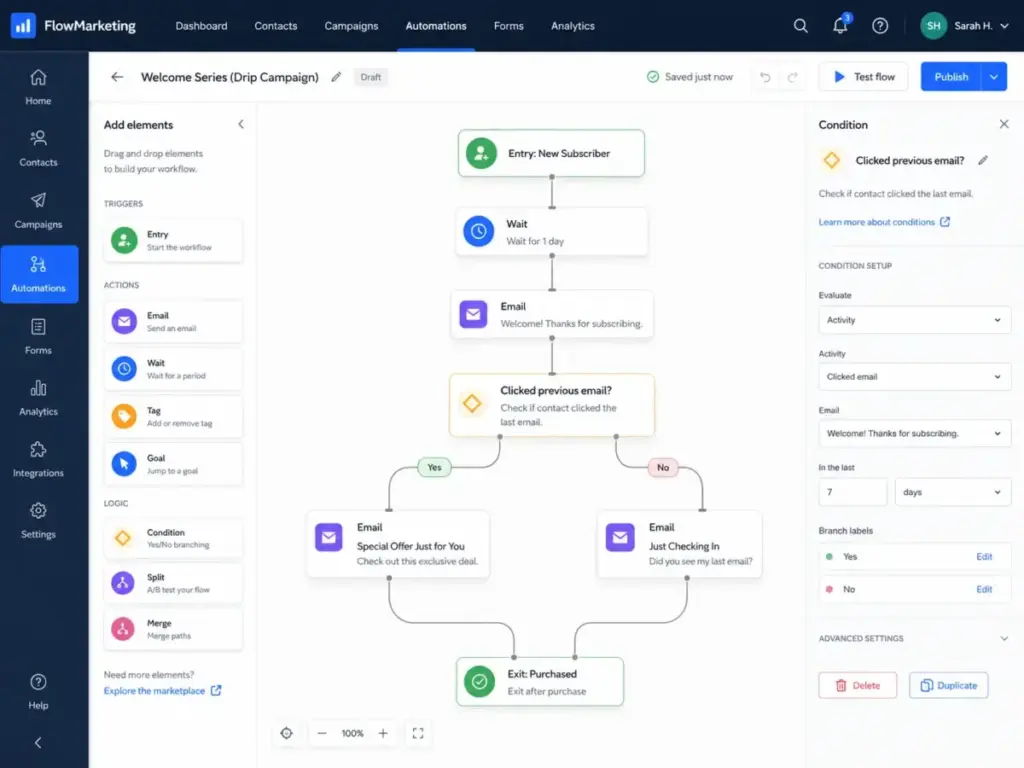
A drip campaign starts when a contact meets an entry condition and ends when a goal is reached or a suppression rule fires. Between those two points, the platform executes a defined sequence of waits, messages, and decisions.
Here is the anatomy of a functioning drip workflow:
- Entry trigger. A contact enters the drip when they perform a specific action: form submission, trial signup, purchase, cart abandonment, page visit, date-based event (birthday, renewal), or lifecycle stage change.
- Enrollment rules. The platform checks whether the contact qualifies. Enrollment filters prevent duplicates, exclude existing customers, or limit entry to a specific segment.
- Wait step. A delay separates messages. Delays can be fixed (wait 2 days) or dynamic (wait until Tuesday at 10am in the contact’s timezone).
- Message step. The platform sends an email (or SMS, push, in-app) using the contact’s profile data for personalization: name, company, product interest, last action.
- Conditional branch. An if/then split checks a condition: did the contact open the previous email? Did they visit the pricing page? Did they purchase? Each branch leads to a different message path.
- Exit condition. The contact leaves the drip when the goal is met (purchase completed, demo booked, feature activated) or a suppression rule fires (unsubscribed, marked as spam, moved to a different lifecycle stage).
- Reporting. The platform tracks per-email and per-branch metrics: delivery, open, click, conversion, unsubscribe, spam complaint, and revenue attribution.
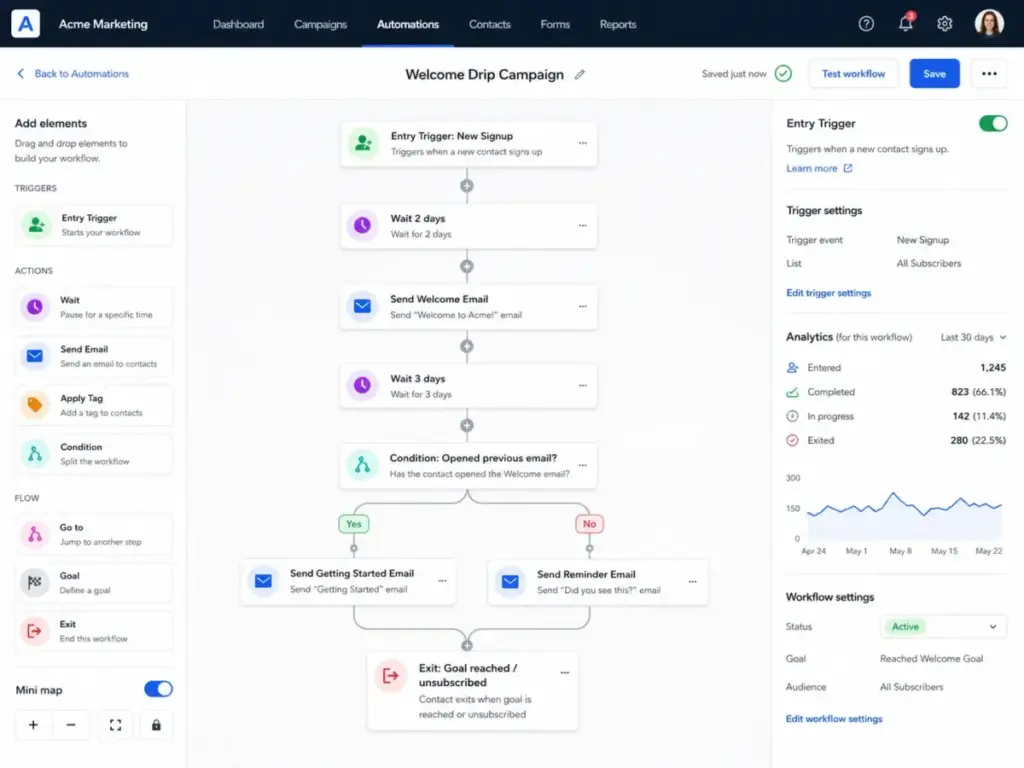
Where things go wrong: Most drip failures happen at steps 2, 5, and 6. Teams skip enrollment filters, so buyers receive nurture emails after purchasing. They skip conditional branches, so every contact gets the same path. They skip exit conditions, so contacts receive stale promotions weeks after converting. According to Mailchimp’s official documentation on automation flows, their Marketing Automation Flows now support dynamic paths with multiple triggers, branches, actions, and exit conditions, which addresses exactly these gaps.
Types of Drip Campaigns
Drip campaigns are not one-size-fits-all. Each type maps to a different lifecycle moment, trigger, and business goal. Here are the seven most common types:
| Type | Entry Trigger | Best Used For | Typical Length | Exit Condition |
|---|---|---|---|---|
| Welcome drip | New subscriber or signup | First impressions, brand introduction, expectations | 3-5 emails over 7-14 days | Engagement threshold or next lifecycle stage |
| Onboarding drip | Trial start or first purchase | Feature activation, setup guidance, time-to-value | 5-8 emails over 14-30 days | Core feature activated or trial expires |
| Lead nurture drip | Content download, webinar, MQL | Education, trust-building, sales readiness | 6-12 emails over 4-12 weeks | Demo booked, SQL qualified, or replied |
| Abandoned cart drip | Cart created, checkout not completed | Revenue recovery, purchase completion | 2-4 emails over 1-7 days | Purchase completed or product removed |
| Re-engagement drip | Inactivity threshold (30, 60, 90 days) | Win-back, list hygiene, reactivation | 2-3 emails over 7-14 days | Re-engaged (opened/clicked) or suppressed |
| Post-purchase drip | Order confirmed or subscription started | Retention, cross-sell, review request, education | 3-5 emails over 14-30 days | Next purchase, review submitted, or upsell accepted |
| Renewal drip | Subscription renewal approaching | Churn prevention, contract renewal, upgrade prompt | 3-4 emails starting 30-60 days before renewal | Renewed, upgraded, or churned |
What this means: The type of drip determines the entry trigger, message cadence, and success metric. A welcome drip optimizes for engagement and brand perception. An abandoned cart drip optimizes for immediate revenue recovery. A renewal drip optimizes for retention. Choosing the wrong type for the wrong lifecycle moment wastes both your sending reputation and the contact’s attention.
Welcome drip
The most common entry point. Sends immediately after signup or subscription. Goal: set expectations, introduce the brand or product, and drive the first meaningful action (profile setup, first feature use, content consumption). Keep it under 5 emails. Longer welcome drips risk fatigue before the contact reaches the product.
Onboarding drip
Triggers after a trial start or first purchase. Goal: reduce time-to-value by guiding the user through setup, integration, and core feature activation. The exit condition matters here: if the user activates the target feature, skip the remaining onboarding emails. Continuing to explain features someone already uses signals that your automation is not paying attention.
Lead nurture drip
The longest and most complex type. Feeds MQLs with education, case studies, and social proof until they reach sales readiness. Sequence length depends on the buying cycle: a 29/monthtoolneeds3−4emails;a50K enterprise contract needs 8-12 over several months.
Abandoned cart drip
The highest-ROI drip type for ecommerce. Fires when a shopper adds items to a cart but does not complete checkout. According to the Baymard Institute, the average documented cart abandonment rate across 49 studies is 70.19%. A 3-email recovery sequence (1 hour, 24 hours, 72 hours) with the product image and a direct checkout link captures a meaningful share of that lost revenue.
Re-engagement drip
Targets contacts who stopped opening or clicking. Goal: confirm interest or clean the list. If the contact re-engages (opens, clicks, visits), they stay active. If they ignore the full sequence, suppress them. Keeping unengaged contacts on your active list damages sender reputation and inflates costs on contact-based pricing platforms.
Post-purchase drip
Starts after a purchase or subscription activation. Goal: reduce buyer’s remorse, drive product adoption, request reviews, and introduce cross-sell or upsell opportunities. Timing matters: a review request too early feels premature; a cross-sell too late misses the engagement window.
Renewal drip
Triggers 30-60 days before a subscription renewal date. Goal: remind the customer of value received, address potential objections, and offer incentives if churn risk is detected. SaaS companies with annual contracts use renewal drips to prevent silent churn, where the customer simply does not renew because nobody reminded them.
Drip Campaign vs Newsletter vs Transactional Email
These three terms overlap in practice, but they serve different purposes and follow different rules. A comparison table helps clarify:
| Concept | Trigger | Audience | Frequency | Exit Condition | Compliance |
|---|---|---|---|---|---|
| Drip campaign | Action, status, behavior, date | Segmented contacts | Automated sequence | Goal reached or suppression | CAN-SPAM, opt-in required |
| Newsletter | Editorial calendar | Entire list or segment | One-off or recurring | Manual unsubscribe | CAN-SPAM, opt-in required |
| Transactional email | System event (order, password reset) | Individual user | Per-event, not scheduled | None (event-driven) | Different rules apply when primary purpose is transactional; promotional content added to transactional emails can still create compliance risk |
What this means: A drip campaign is not a newsletter with delays. Newsletters broadcast to a list on the editor’s schedule. Drip campaigns respond to individual triggers and branch based on behavior. Transactional emails respond to system events and are not marketing messages. Conflating these three creates compliance risk and deliverability problems.
The confusion matters because teams sometimes build a “drip campaign” that is actually a timed newsletter: the same content, same schedule, no branches, no exit conditions. That is a broadcast series, not a drip. The value of a drip comes from the conditional logic, not just the timing.
How to Build a Drip Campaign Step by Step
Building a drip campaign that performs requires defining the system before writing any copy. Most teams start with the message. Start with the architecture.
Step 1: Define one business goal
Pick one measurable outcome: trial activation, demo booking, first purchase, cart recovery, onboarding completion, renewal, or reactivation. One goal per drip. Multi-goal drips lose focus and make measurement impossible.
Step 2: Choose the entry trigger
The trigger determines who enters: form submission, signup, download, trial start, purchase, page visit, abandoned cart, date, lifecycle stage change, or inactivity threshold.
Step 3: Define the exit condition before writing copy
This is the step most lead nurturing sequences skip. Define when a contact leaves: purchased, booked a meeting, replied, activated, unsubscribed, suppressed, became a customer, or reached the end of the sequence. Without an exit condition, your drip keeps sending to people who already converted. That is the fastest path to spam complaints.
Exit condition checklist:
- Contact purchased or completed the goal
- Contact booked a demo or meeting
- Contact replied to a sales email
- Contact activated the target feature
- Contact unsubscribed or filed a spam complaint
- Contact moved to a suppressed or do-not-contact list
- Contact reached the end of the sequence with no conversion
Step 4: Segment the audience
One drip sequence should not serve everyone. Segment by lifecycle stage, source, product interest, behavior, customer status, or intent level. A trial user and a returning customer need different messages, different timing, and different CTAs.
Step 5: Map the sequence with delays, branches, and suppression
Include a frequency cap so contacts do not receive multiple active flows at once. If a subscriber is in your welcome drip and triggers an abandoned cart flow simultaneously, one should take priority. Most platforms call this “smart sending” or “flow priority.”
Step 6: Write each message to stand alone
Contacts may skip, ignore, or enter at different points. Each email should deliver value independently. Do not assume the reader saw message 1 before opening message 4.
Step 7: Set compliance and deliverability basics
Commercial emails need consent records, unsubscribe links, sender authentication (SPF, DKIM, DMARC), spam monitoring, and suppression list management. Skipping authentication increases the chance that your drip lands in spam instead of the inbox.
Step 8: Test the workflow before launch
Test with sample contacts and edge cases: already purchased, unsubscribed, inactive, multiple triggers, wrong segment, duplicate entry. The workflow should handle every edge case gracefully before it touches real contacts.
Step 9: Review performance by email, branch, and cohort
Track click rate, conversion rate, unsubscribe rate, spam complaint rate, revenue per recipient, and branch drop-off. Optimize based on results, not assumptions.
I am genuinely surprised how many teams skip steps 3 and 5. Those two steps prevent the most common drip campaign failure: over-sending to contacts who already converted or who are enrolled in multiple competing flows.
Common Drip Campaign Mistakes
Drip campaigns fail for operational reasons more often than copywriting reasons. Here are the mistakes that cost teams the most time and credibility.
Mistake 1: No exit condition. The drip keeps sending after the contact converts. Buyers receive a “still interested?” email the day after purchasing. This damages trust and inflates spam complaints.
Mistake 2: No frequency cap across flows. A contact triggers a welcome drip, an onboarding drip, and a promotional drip simultaneously. They receive three emails in one day. Smart sending or flow priority rules prevent this, but teams have to configure them.
Mistake 3: Treating all contacts as one segment. Sending the same nurture drip to a first-time visitor and a returning customer wastes the returning customer’s attention and underperforms on conversion.
Mistake 4: Measuring only opens. Open rates are diagnostic signals, not business metrics. Click-through rate shows intent. Conversion rate, placed order rate, activation milestones, and revenue per recipient prove impact.
Mistake 5: Letting old promotions run. A drip with a “20% off this week” offer that expired three months ago erodes credibility. Review active drips quarterly for outdated offers, broken links, and stale content.
Mistake 6: Ignoring spam complaints. Many deliverability teams treat complaint rates around 0.10% as a warning threshold, especially for Gmail and Yahoo inbox placement. If your drip generates more than 1 complaint per 1,000 emails, reduce frequency, improve targeting, or pause the flow.
Mistake 7: Poor data quality drives bad personalization. “Hi {first_name},” looks worse than no personalization at all when the merge field is empty or wrong. Validate data quality before relying on personalization fields.
Common Misconceptions
Misconception: A drip campaign is the same as a newsletter. Reality: A newsletter broadcasts to a list on a recurring schedule. A drip campaign is triggered by an individual action and follows conditional logic. They serve different purposes and operate on different mechanics.
Misconception: More emails always mean better nurture. Reality: Sequence length should match intent, content value, and sales cycle length. A 12-email drip for a $9/month product is overkill. A 3-email drip for a 6-month enterprise sales cycle is too thin. Match volume to buyer journey length.
Misconception: Once the drip is live, it runs forever without review. Reality: Drips need monitoring for unsubscribe spikes, spam complaints, conversion decay, broken links, outdated offers, and audience fatigue. Schedule quarterly reviews at minimum.
Misconception: Drip campaigns are only for email. Reality: Email is the most common channel. Modern tools coordinate SMS, push notifications, in-app messages, WhatsApp, ad audience syncs, sales task assignments, and webhooks within the same workflow. See our SMS marketing tools comparison for platforms that support SMS drip sequences.
Misconception: Automation replaces the marketer. Reality: Automation executes the system. Marketers define strategy, messaging, segmentation, compliance, quality control, and optimization. “Successful drip marketing requires personalisation,” as Salesforce notes in their drip marketing guide. Automation without strategy produces spam, not nurture.
When to Use and When Not to Use Drip Campaigns
Use a drip campaign when:
- A clear lifecycle moment exists (signup, trial, purchase, renewal, inactivity)
- A repeatable education path matches the buyer journey
- A known trigger reliably identifies intent or status change
- A multi-step buying decision benefits from timed content delivery
- A high-intent action (cart abandonment, pricing page visit) warrants follow-up
Avoid or pause drip campaigns when:
- You lack explicit consent or cannot authenticate sending domains
- Data quality is too low for accurate segmentation or personalization
- The message is urgent or transactional (use transactional email instead)
- Human judgment is needed instead of automated follow-up (complex sales negotiations)
- You cannot define a clear CTA or exit condition
- Your spam complaint rate already exceeds safe thresholds
How to Measure Drip Campaign Performance
Open rate alone does not tell you whether a drip campaign works. Here are the metrics that matter, organized by what they actually reveal:
| Metric | What It Measures | Why It Matters |
|---|---|---|
| Click-through rate | Engagement with CTA | Shows whether content drives action |
| Conversion rate | Goal completion (purchase, demo, activation) | Proves business impact |
| Revenue per recipient | Dollar value per contact in the drip | Connects automation to revenue |
| Unsubscribe rate | Audience rejection signal | Flags over-sending or poor targeting |
| Spam complaint rate | Deliverability risk | Above 0.10% risks inbox penalties |
| Bounce rate | List quality indicator | High bounces damage sender reputation |
| Sequence completion rate | How many contacts finish the full drip | Shows engagement depth |
| Branch drop-off | Where contacts disengage within the flow | Identifies weak messages or bad timing |
| Time to conversion | Days from drip entry to goal completion | Measures nurture efficiency |
What this means: Unsubscribe rate and spam complaint rate are risk metrics. Click-through and conversion rate are performance metrics. Revenue per recipient is the business case metric. Track all three layers. Measuring only opens tells you almost nothing about whether the drip is working.
Best Drip Campaign Tools and Pricing Caveats
Five platforms demonstrate how drip campaign tools actually work, including the plan gates and pricing limits that affect implementation.
| Platform | Entry Price | Automation Access | Key Limit | Best Fit |
|---|---|---|---|---|
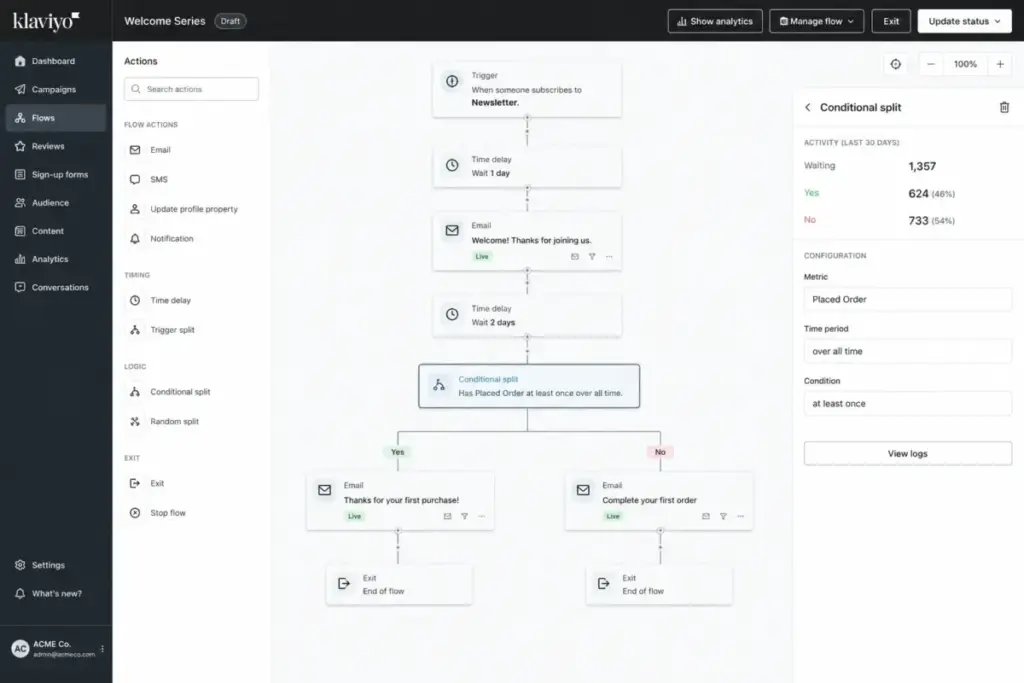
| Klaviyo | Free (250 profiles, 500 emails/mo) | Included on Free | 250 active profiles; SMS credits region-dependent | Ecommerce and B2C brands needing behavior-based flows |
| HubSpot Marketing Hub | Starter from $20/mo/seat | Advanced workflows require Professional ($890/mo) | Professional includes 3 core seats; onboarding costs apply | B2B SaaS and sales-led teams with CRM integration needs |
| Mailchimp | Contact-tier pricing; Free max 500/mo | Automation flow access varies by plan | Overages billed; high-volume requires sales contact | Small businesses and creators needing approachable automation |
| Drip | $39/mo for 1-2,500 people | Entry tier includes up to 50 workflows | Cost scales by active people and email volume | Commerce-focused brands wanting purpose-built ecommerce automation |
| Customer.io Journeys | Essentials from $100/mo | Visual workflow builder included | 5,000 profiles and 1M emails/mo in Essentials | Product-led SaaS and data-rich teams using event-based automation |
What this means: Entry pricing alone does not tell you whether a platform supports the drip campaign you need. Klaviyo‘s free plan includes Flows (their automation builder) with over 60 prebuilt templates for ecommerce workflows, but is limited to 250 profiles. HubSpot locks advanced workflow automation behind Professional at **890/month∗∗(asofMay2026),whichisasignificantjumpfromStarter.Drip′sentrytierincludesupto50workflowsat39/month, but the platform is purpose-built for ecommerce and delivers the most value for online stores.
Before selecting a tool, verify: which plan tier unlocks the automation features your drip campaign requires, how pricing scales as your contact list grows, and whether the platform supports the exit conditions, frequency caps, and compliance controls your workflow needs.
As David Visser, CEO of Zyber and Unlocked, notes via Klaviyo’s marketing automation trends report: “AI will become every marketer’s copilot.” That makes the automation builder more accessible to create, but it also raises the risk of over-automated, generic messages unless marketers define triggers, consent, frequency limits, and conversion goals clearly.
Pricing verified as of May 2026. Check each platform’s official pricing page for current rates.
When You Need Drip Campaign Software
You need dedicated software when:
- Your email list exceeds 500 active contacts
- You send more than 2 automated sequences simultaneously
- Your buying cycle involves more than one touchpoint
- You need conditional branching based on contact behavior
- You track conversion events beyond email opens
- Compliance requirements demand unsubscribe management and authentication
- Your team manages flows for multiple products, segments, or lifecycle stages
You probably do not need it yet when:
- Your list is under 100 contacts and growing slowly
- You send one follow-up email after a form submission
- Manual follow-up is faster and more personal at your current scale
If you are evaluating email marketing platforms for drip campaigns, start with the automation capabilities on each plan tier, not the advertised entry price.
How to Choose the Right Drip Campaign Tool
- Match the tool to your business model. Ecommerce brands benefit from platforms with native cart abandonment, browse abandonment, and post-purchase flows (Klaviyo, Drip). B2B SaaS teams benefit from CRM-integrated workflow builders with lead scoring and sales handoff (HubSpot). Data-rich product teams benefit from event-based platforms with webhook and API support (Customer.io).
- Check automation plan gates. Verify which plan tier unlocks the features your drip needs: conditional branches, A/B testing, frequency caps, SMS, multi-step workflows. Mailchimp and HubSpot both gate advanced automation behind higher tiers.
- Evaluate pricing at your actual contact count. Contact-based pricing scales fast. Run the cost calculation at your current list size and projected 12-month growth.
- Test deliverability. The best drip campaign is invisible if it lands in spam. Check whether the platform supports SPF, DKIM, DMARC, and provides deliverability monitoring tools.
- Confirm exit condition and frequency cap support. Not every platform makes it easy to suppress contacts across multiple active flows. Ask before committing.
Explore our Mailchimp review and Klaviyo review for detailed plan-by-plan breakdowns of automation capabilities.
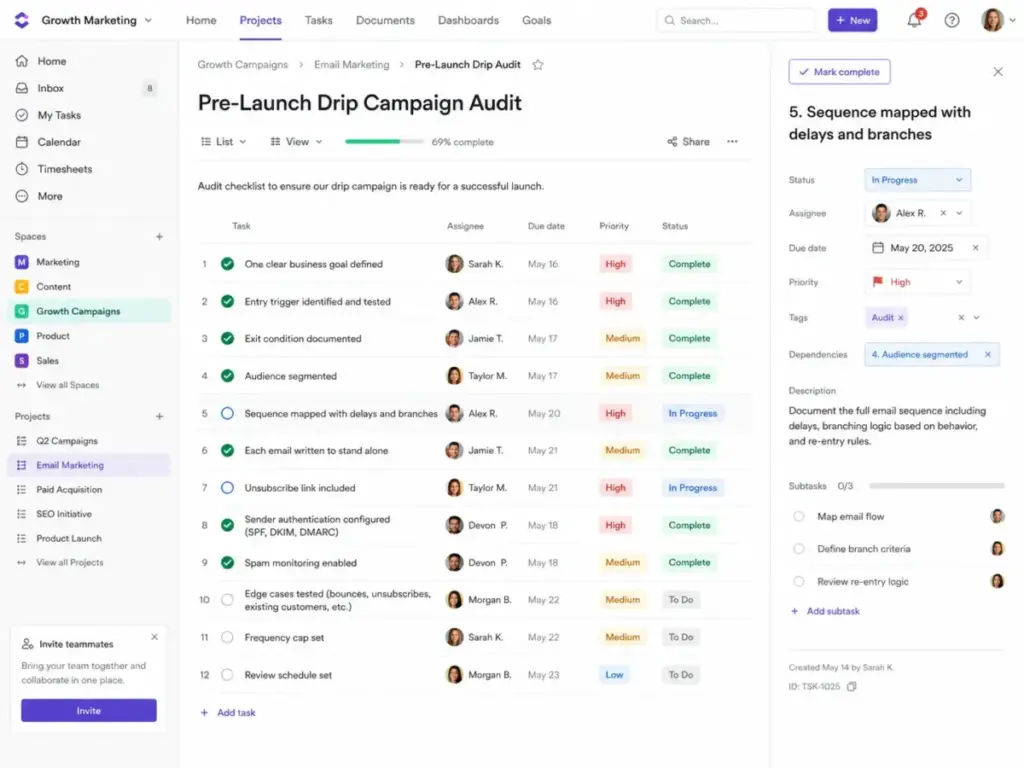
Drip Campaign Beginner Checklist
Use this checklist before launching your first drip campaign:
- One clear business goal defined (activation, purchase, demo, reactivation)
- Entry trigger identified and tested
- Exit condition documented before writing any copy
- Audience segmented (not sending to entire list)
- Sequence mapped with delays, branches, and suppression rules
- Each email written to stand alone
- Unsubscribe link included in every message
- Sender authentication configured (SPF, DKIM, DMARC)
- Spam monitoring enabled with threshold alerts
- Edge cases tested: already purchased, unsubscribed, duplicate entry
- Frequency cap set to prevent flow overlap
- Review schedule set (quarterly minimum)
FAQ
Is a drip campaign just spam if it is automated?
No, if it is built correctly. A well-designed drip campaign sends relevant, consented messages triggered by real actions, with clear exit conditions and unsubscribe options. It becomes spam when it lacks consent, ignores unsubscribes, sends too frequently, or continues after the contact converts.
How many emails should a drip campaign have?
There is no universal number. Match sequence length to the buying cycle and content value. A welcome drip for a $9/month tool might need 3 emails over 5 days. A lead nurture drip for a 6-month enterprise sale might need 8-10 over several weeks. Test and measure completion rates to find the right length for your audience.
Should I remove buyers from a lead nurture drip?
Yes. This is what exit conditions are for. If a contact purchases, books a demo, or achieves the drip’s goal, remove them immediately. Continuing to send nurture content after conversion annoys buyers and inflates unsubscribe rates.
How long should I wait between drip emails?
Start with 2-3 day gaps for high-intent sequences (abandoned cart, trial onboarding). Use 5-7 day gaps for longer nurture cycles. Test timing against click-through and unsubscribe rates. If unsubscribes spike after a specific email, the gap before it may be too short.
Can a welcome series and abandoned cart flow run at the same time?
Yes, but use frequency caps or flow priority rules to prevent over-sending. If a subscriber receives a welcome email and an abandoned cart email on the same day, the experience feels disorganized. Most platforms let you set priority so one flow pauses while a higher-priority flow is active.
What is the difference between a drip campaign and marketing automation?
A drip campaign is one type of marketing automation. Marketing automation is the broader category that includes drip sequences, one-off triggered emails, lead scoring, audience segmentation, ad audience syncing, CRM updates, and multichannel orchestration. Every drip campaign uses automation. Not every automation is a drip campaign.
How do I measure a drip campaign beyond open rate?
Track click-through rate for engagement, conversion rate for goal completion, revenue per recipient for business impact, unsubscribe rate and spam complaint rate for risk, and branch drop-off to identify weak points in the sequence. Open rate is a diagnostic signal, not a success metric.
What data do I need before building a drip campaign?
At minimum: contact email, consent source, entry trigger event, and lifecycle stage. For personalization: first name, company, product interest, and purchase history. For conditional branching: behavioral data like page visits, email clicks, and cart activity. Poor data quality makes personalization inaccurate and damages trust.
Is a drip campaign worth the effort for a small list?
Yes, if you have a clear trigger and a repeatable goal. Even with 200 contacts, an automated welcome or onboarding drip saves manual follow-up time and creates a consistent first impression. The tool cost at small scale is often free (Klaviyo Free, Mailchimp Free tier).
Why are my drip emails going to spam?
Common causes: missing SPF, DKIM, or DMARC authentication on your sending domain; high spam complaint rate (above 0.10%); sending to unengaged contacts; purchased or scraped email lists; missing one-click unsubscribe headers. Fix authentication first, then clean your list, then reduce sending frequency to engaged contacts.