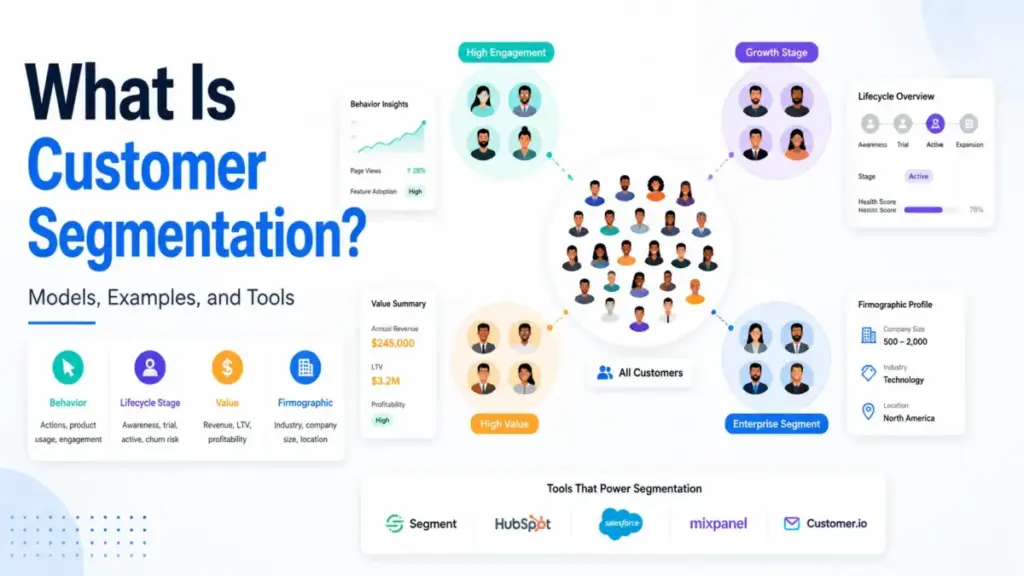
Customer segmentation splits your existing customers into groups based on shared attributes, behaviors, value, or lifecycle signals so teams can tailor marketing, sales, product, and service actions to each group. That definition sounds simple. The operational reality is not. Every segment you create adds data governance, campaign maintenance, reporting complexity, and activation work. The question is not whether to segment. It is whether each segment earns its operational cost by producing a measurably different outcome.
This guide explains how customer segmentation works in modern CRM software and SaaS systems, which models exist, how to implement segments that teams can actually activate, which tools support it (with pricing caveats from official sources), and when segmentation creates more noise than signal.
Quick Answer: Customer segmentation is the process of dividing customers into smaller groups based on shared attributes, behaviors, needs, value, or lifecycle stage. Unlike market segmentation (which targets broad audiences before acquisition), customer segmentation works with known customer data to drive different actions per group. It works only when each segment is large enough to measure, reachable in a channel, and tied to a specific business outcome.
The 60-Second Explanation of Customer Segmentation
For beginners: Customer segmentation means sorting your customers into groups so you can treat each group differently. Instead of sending the same email to 10,000 people, you send different messages to different groups based on what they have done, what they need, or how valuable they are.
At the technical level: Segmentation uses criteria from CRM records, billing data, product usage events, email engagement, support history, surveys, and customer data platforms to build inclusion and exclusion rules. Segments can be static (fixed membership captured at one moment) or dynamic (membership updates automatically as customer data changes). Dynamic segments power lifecycle automation. Static segments work for one-off campaigns, experiments, or historical cohorts.
For business decision-makers: Customer segmentation is the operating system for deciding which customers get which message, offer, product experience, or support motion. According to Salesforce’s customer expectations research, customers increasingly expect companies to adapt to their changing needs. The risk: more data does not automatically create better segments. Teams still need consent, clean data, clear business outcomes, and measurable activation plans.
As Ajay Sirsi, Director at the Centre for Customer Centricity at York University’s Schulich School of Business, puts it: “The idea behind customer segmentation is that different customers have different needs.” That principle has not changed. What has changed is the infrastructure available to act on it.
How Customer Segmentation Actually Works
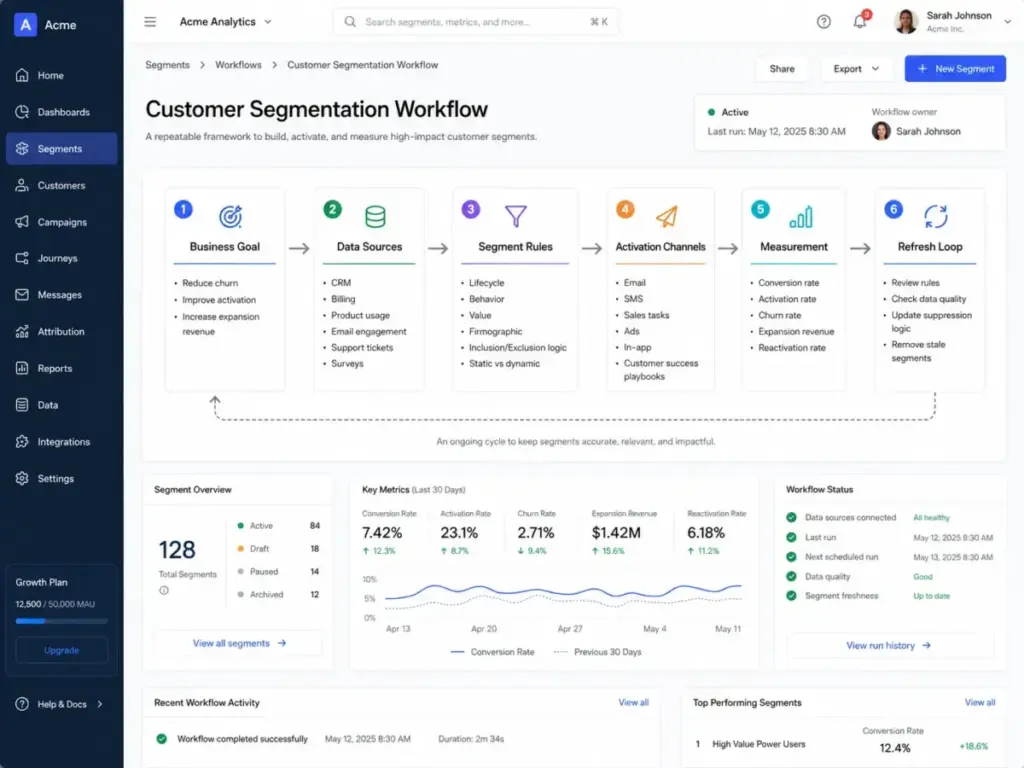
Customer segmentation starts with a business goal, not a data export. Teams that skip this step build segments nobody activates. Here is how the process works in practice, including where it breaks.
Step 1: Define the business outcome. Reduce churn, improve trial activation, increase expansion revenue, personalize onboarding, or improve campaign conversion. Without a clear outcome, teams create segments that sit unused in a CRM.
Step 2: Inventory available customer data. Pull from CRM fields, billing records, product usage events, email engagement, support tickets, ecommerce purchases, surveys, and consent or preference data. If the data is incomplete or outdated, the segment will be unreliable. This is where most segmentation projects fail silently.
Step 3: Choose the segmentation model that matches the outcome. Use lifecycle segments for onboarding, behavioral segments for product adoption, value-based segments for customer success prioritization, firmographic segments for B2B routing, and needs-based segments for messaging.
Step 4: Define inclusion and exclusion criteria. Decide whether the segment should be static, dynamic, account-level, user-level, or predictive. A segment without exclusion logic will include customers who should not receive the action.
Step 5: Validate segment size and actionability. A segment must be large enough to measure, distinct enough to justify a different action, reachable in a channel, and tied to a clear KPI. If you cannot act differently on a segment, it does not need to exist.
Step 6: Activate the segment. Route it into email, SMS, ads, sales tasks, product onboarding, customer success playbooks, support prioritization, or in-app experiences.
Step 7: Measure incremental lift. Compare segment-specific performance against a baseline or control group. Without measurement, segmentation is just labeling.
Step 8: Refresh and govern. Review stale rules, data quality, privacy requirements, suppression logic, and whether the segment still produces useful decisions.
| Segment example | Data source | Activation channel | Automated action | Owner | Success metric |
|---|---|---|---|---|---|
| Trial users with no activation event | Product analytics | Email, in-app | Onboarding sequence | Growth | Activation rate |
| Power users ready for expansion | Usage data, billing | Sales task | Expansion outreach | CS/Sales | Expansion revenue |
| Accounts with declining usage | Product analytics | Customer success | Retention playbook | CS | Churn rate |
| Enterprise leads by industry | CRM firmographics | Sales routing | Territory assignment | Sales ops | Pipeline velocity |
| Dormant customers needing winback | Email engagement, billing | Email, SMS | Winback campaign | Marketing | Reactivation rate |
What this means: Segmentation is not a one-time exercise. It is a cycle. Teams that build segments and never revisit them accumulate stale rules that produce misleading results.
Customer Segmentation vs Related Concepts
Readers often confuse customer segmentation with market segmentation, cohorts, personas, tags, and lists. Each serves a different purpose.
| Concept | Definition | Data source | Best use case | Common mistake |
|---|---|---|---|---|
| Customer segmentation | Groups known customers by shared attributes, behaviors, or value | CRM, CDP, product analytics, billing | Targeting different actions per group | Creating segments with no activation plan |
| Market segmentation | Divides a broad market into groups before or during go-to-market planning | Market research, TAM analysis | Positioning, pricing, GTM strategy | Confusing it with customer segmentation |
| Cohort | Time-based group sharing a common experience (e.g., all users who signed up in March) | Product analytics, billing | Retention analysis, feature adoption tracking | Using cohorts for ongoing campaigns |
| Buyer persona | Fictional profile representing an ideal customer type | Interviews, surveys, sales data | Messaging, content strategy, sales training | Treating personas as actionable segments |
| Tag | Manual label applied to individual contacts | CRM, email platform | Ad-hoc organization, one-off identification | Using tags instead of dynamic segments for automation |
| List | Static collection of contacts, often exported or imported | Email platform, CRM | One-off sends, event invitations, exports | Treating lists as segments without rules |
| Dynamic segment | Rule-based group that updates automatically as data changes | CRM, CDP, email platform | Lifecycle automation, triggered campaigns | Not reviewing rules for data drift |
What this means: A customer 360 view brings all of these data points together, but the distinction matters. Tags label. Lists collect. Cohorts measure time. Personas describe. Segments act.
Types of Customer Segmentation Models
Not all segmentation models solve the same problem. Here are the primary models, when each works, and when each fails.
Demographic segmentation groups customers by age, gender, income, education, or role. Useful for broad consumer messaging but weak on its own for SaaS behavior. A 35-year-old marketing director and a 35-year-old engineering lead have entirely different software needs.
Firmographic segmentation groups B2B customers by company size, industry, geography, revenue, or employee count. Useful for sales routing, account scoring, and enterprise pipeline management. If your sales pipeline routes all accounts the same way regardless of company size, firmographic segmentation is where to start.
Behavioral segmentation groups customers by actions: visits, purchases, feature usage, logins, email engagement, trial activity, or support interactions. This is often the most actionable SaaS model because behavior predicts intent better than demographics.
Value-based segmentation groups customers by revenue, profitability, customer lifetime value, expansion potential, or retention risk. Useful for prioritizing customer success resources and account management. Teams using lead scoring often extend similar logic to existing customers.
Psychographic segmentation groups customers by motivations, attitudes, values, and goals. Useful for positioning and messaging but usually requires surveys, interviews, or preference data. Harder to operationalize in automated workflows.
Needs-based segmentation groups customers by the job they are trying to solve. Useful for product packaging, onboarding, and solution messaging. This model works well when the same product serves different use cases.
Lifecycle segmentation groups customers by journey stage: visitor, lead, MQL, SQL, trial user, new customer, active customer, dormant account, or advocate. This model powers most sales automation and lifecycle marketing workflows.
Predictive or AI-assisted segmentation uses models, propensity scores, or AI-assisted criteria to identify likely churners, likely buyers, or high-value customers. Useful only when data quality, consent, and human validation are strong. I will cover the boundaries of AI segmentation later in this guide.
Step-by-Step Implementation
Implementing customer segmentation is less about choosing the right model and more about connecting the model to a measurable action.
1. Start with the business decision, not the data. Ask: “What will we do differently for this group?” If the answer is nothing, you do not need a segment.
2. Audit your data readiness. Check for unique identifiers, CRM field completeness, event tracking coverage, consent records, historical data depth, account-versus-user clarity, sync latency between systems, and activation destinations.
3. Pick one model and one outcome. Do not build five segment types on day one. Start with the model that matches your highest-priority outcome.
4. Build the segment with inclusion and exclusion rules. Test the rule logic against known customers to verify the segment captures who you expect and excludes who it should.
5. Validate before activating. Check: Is the segment large enough to measure? Is it distinct from existing segments? Can you reach these customers in at least one channel? Is a KPI tied to the segment?
6. Activate in one channel first. Email, SMS, sales routing, or in-app experience. Do not activate across five channels simultaneously. That compounds debugging complexity.
7. Measure against a baseline. Compare conversion rate, activation rate, retention, churn, revenue per recipient, or customer lifetime value against a control group or previous period.
8. Refresh quarterly at minimum. Review stale rules, check for data quality drift, update suppression logic, and remove segments that no longer produce different actions.
The Mistakes That Waste Your First Month
Starting with demographics instead of a business decision. Demographics describe customers. They rarely predict what customers will do next. Behavioral and lifecycle data are more actionable for SaaS teams.
Creating too many segments. Every segment adds maintenance. A segment must justify separate campaigns, content, or workflows. If two segments receive the same treatment, merge them.
Building segments that cannot be reached. A segment exists in your CRM but has no activation path to email, SMS, ads, or sales tasks. That segment is a report, not a tool.
Ignoring consent and data minimization. Privacy guidance from organizations like the Future of Privacy Forum supports using permitted, relevant, and limited data for segmentation. Segments built on data that exceeds consent damage trust and create compliance risk.
Mixing user-level and account-level logic. In B2B SaaS, one account has multiple users. A segment rule that mixes individual behavior with account attributes produces unpredictable membership. Decide the unit of analysis first.
Treating AI-suggested segments as automatically correct. AI can suggest or score segments, but teams still need clean data, consent, business judgment, and validation against outcomes. If you cannot explain why a segment exists, do not activate it.
Measuring without a baseline. Sending a targeted campaign and seeing a 3% conversion rate means nothing without knowing what the rate was before segmentation or what a control group achieved.
Common Misconceptions
Misconception: Customer segmentation is the same as market segmentation.
Reality: Market segmentation divides a broad market during go-to-market planning. Customer segmentation works with known customer, lead, or user data so teams can act differently on specific groups.
Misconception: Demographics are enough.
Reality: Demographics help, but SaaS teams often need behavioral, lifecycle, value, firmographic, and product-usage signals to make segments actionable.
Misconception: More segments always mean better personalization.
Reality: Every segment creates operational work. A useful segment must be large enough, measurable, reachable, distinct, and tied to a different action.
Misconception: AI can automatically find the right segments.
Reality: AI can suggest or score segments. Teams still need clean data, consent, business judgment, and validation against outcomes.
Misconception: Segments are only for marketing emails.
Reality: Segments drive sales routing, customer success playbooks, onboarding, support prioritization, product personalization, pricing experiments, and retention workflows.
When to Use and When to Avoid Customer Segmentation
Use segmentation when:
- Customers differ meaningfully in need, behavior, lifecycle stage, value, risk, or channel preference
- The team can take a measurably different action for each group
- Data quality supports reliable segment membership
- Consent covers the intended data use
- The expected lift justifies the added operational complexity
Avoid or delay segmentation when:
- The audience is too small to split into measurable groups
- The data is unreliable, incomplete, or stale
- The team cannot act differently on each segment
- Consent is unclear for the intended data use
- The segment is based on sensitive proxies
- The added complexity outweighs the expected improvement
How to Measure Customer Segmentation Success
| Goal | Key metric | Why it matters |
|---|---|---|
| Acquisition | Conversion rate, cost per acquisition | Shows whether targeted messaging outperforms broadcast |
| Activation | Trial-to-paid conversion, onboarding completion | Measures whether segments receive the right onboarding |
| Retention | Churn rate, retention rate | Reveals whether at-risk segments receive effective intervention |
| Expansion | Expansion revenue, upsell rate | Tests whether high-value segments receive expansion offers |
| Email performance | Revenue per recipient, click rate, unsubscribe rate | Compares segmented versus unsegmented campaign performance |
| Product adoption | Feature adoption rate, DAU/MAU by segment | Shows whether product experience differs by segment |
| Support efficiency | Support volume by segment, CSAT, resolution time | Identifies whether priority routing improves outcomes |
What this means: The single most useful metric is incremental lift versus baseline. If a segmented campaign does not outperform the unsegmented version, the segment is not adding value.
Tools That Support Customer Segmentation
The tools below are not ranked as a buyer’s guide. They illustrate how segmentation works differently across CRM, CDP, email, and customer data platforms, with pricing-status caveats from official sources. No hands-on testing was performed for this knowledge article. All claims below come from official documentation and pricing pages.
| Tool | Category | Segmentation approach | Pricing status (as of May 2026) | Key caveat |
|---|---|---|---|---|
| HubSpot Marketing Hub | CRM and marketing automation | Active (dynamic) and static segments, AI-assisted segment creation on eligible plans, up to 250 filters per segment | Starter starts at$20/month per seat; Professional starts at $890/month; Enterprise starts at $3,600/month per official catalog | Total cost depends on seats, contacts, onboarding fees, and add-ons |
| Salesforce Data 360 | Enterprise customer data platform | Unified profiles, segment and activate functionality within Data 360 packaging | Flex Credits at$500 per 100K credits; Profiles at $240 per 1,000 profiles/year per pricing page | Pricing is complex and explicitly subject to change; contact Salesforce for exact configuration |
| Klaviyo | Email, SMS, and customer marketing | Real-time updating segments, all-time customer history, predictive analytics, RFM analysis, activation across email, SMS, forms, reviews, and onsite | Free plan supports up to250 active profiles and 500 monthly email sends per pricing page | Paid costs scale with active profiles, email, and SMS usage |
| Mailchimp | Email marketing and audience management | Audience segments built from contact data, targeted email, SMS, ads, and campaign sends | Plan-based pricing varies by contact tier and features per pricing page; Premium custom pricing for 250,000+ contacts | Exact pricing depends on plan, contact count, send volume, and feature tier |
| Twilio Segment | Customer data platform | Event collection, audiences, computed traits, profile enrichment, AI predictions, activation across destinations | Customer Data Pipeline pricing is public; CDP packaging requires contact sales per pricing page | Advanced audiences, AI predictions, and journeys may require Business plan or custom pricing |
For teams evaluating email marketing platforms or marketing automation tools, segmentation capability and pricing limits should be part of the evaluation criteria. Feature availability varies sharply by plan tier across all of these platforms.
How AI Changes Customer Segmentation in 2026
AI assists customer segmentation in specific, bounded ways. It does not replace the need for business judgment, consent, or measurement.
Where AI helps: Suggesting segments from patterns in behavioral data. Predicting churn risk, purchase likelihood, or customer value. Analyzing RFM (recency, frequency, monetary) data at scale. Building audiences from natural-language descriptions on platforms like HubSpot (eligible plans) and Twilio Segment. Salesforce’s State of Marketing report positions AI, data, and personalization as key themes for current marketing teams.
Where humans still decide: Whether the segment deserves a separate action. Whether consent covers the intended data use. Whether the business logic makes sense. Whether the segment produces measurably better outcomes than a simpler approach. Whether the AI suggestion reflects correlation or causation.
I am cautious about treating AI-suggested segments as finished products. The models surface patterns. The team decides whether those patterns justify operational complexity.
When You Need Software for Customer Segmentation
You likely need segmentation software when:
- Your customer base exceeds 500 contacts and manual grouping breaks down
- You need segments to update automatically as customer data changes
- Your team runs lifecycle campaigns across email, SMS, or in-app channels
- You need to route leads or accounts differently based on attributes
- Your churn rate, activation rate, or expansion rate varies by customer type
- Multiple teams (marketing, sales, CS) need to act on the same customer data
You probably do not need segmentation software yet when:
- Your total customer base is under 100
- You can manage groups manually in a spreadsheet
- Your team sends the same message to everyone and it works
How to Choose the Right Segmentation Tool
- Define which segmentation model you need first. CRM-native segmentation (HubSpot, Salesforce) works for teams already in those systems. CDP-based segmentation (Twilio Segment, Salesforce Data 360) works for teams unifying data across multiple sources. Email-native segmentation (Klaviyo, Mailchimp) works for teams focused on marketing activation.
- Check whether dynamic segments are included in your plan tier. Some platforms reserve dynamic or AI-assisted segments for higher tiers.
- Verify activation destinations. The segment must reach the channel where your team acts: email, SMS, ads, sales CRM, product, or support.
- Evaluate pricing at your scale. Contact-based pricing means your cost grows with your audience. Usage-based pricing means cost grows with activity.
- Test segment creation before committing. Build one real segment during a trial or demo and verify it captures the right customers.
For a broader view, see our guide to CRM software and how it connects to segmentation, contact management, and customer lifecycle workflows.
Beginner Checklist: Your First Customer Segmentation Project
- [ ] Define one business outcome the segment should improve
- [ ] Identify the data sources available (CRM, billing, product, email, support)
- [ ] Choose one segmentation model (behavioral, lifecycle, value, firmographic)
- [ ] Write inclusion and exclusion criteria
- [ ] Verify segment size is large enough to measure
- [ ] Confirm the segment is reachable in at least one activation channel
- [ ] Tie the segment to a specific KPI
- [ ] Build the segment in your platform (CRM, CDP, or email tool)
- [ ] Activate in one channel first
- [ ] Measure performance against a baseline or control group
- [ ] Schedule a quarterly review to refresh rules and check data quality
FAQ
What is customer segmentation in simple terms?
Customer segmentation divides your customers into groups based on shared traits, behaviors, or value so you can take different actions for each group. For example, sending a different onboarding email to trial users who activated a key feature versus those who did not.
What is the difference between customer segmentation and market segmentation?
Market segmentation divides a broad market into groups during go-to-market planning, often before you have customers. Customer segmentation works with known customer data from CRM, product analytics, or billing systems to drive different actions per group.
How many customer segments should a business have?
There is no universal number. Start with 3 to 5 segments tied to distinct business outcomes. Each segment should justify a different measurable action. If two segments receive the same treatment, merge them.
Should segments update automatically or stay fixed?
It depends on the use case. Dynamic segments update automatically as customer data changes, which works for lifecycle automation and triggered campaigns. Static segments capture a fixed list at one point in time, which works for one-off campaigns, exports, or historical analysis.
What is the difference between a tag and a segment?
A tag is a manual label applied to individual contacts for ad-hoc organization. A segment is a rule-based group, often dynamic, that determines which customers receive a specific action. Tags label. Segments act.
Is customer segmentation only for marketing?
No. Segments drive deal management routing, customer success playbooks, onboarding personalization, support prioritization, product experiences, pricing experiments, and retention workflows.
What data do you need for customer segmentation?
At minimum: unique customer identifiers, CRM fields (lifecycle stage, company size, industry), and at least one behavioral signal (email engagement, product usage, purchase history). Better segmentation adds billing data, consent records, support history, and event-level product analytics.
How do you know if segmentation is working?
Compare segment-specific performance against a baseline or control group. Track conversion rate, activation rate, retention, churn, revenue per recipient, or customer lifetime value. If the segmented approach does not outperform the unsegmented version, the segment is not adding value.
Can customers belong to more than one segment?
Yes. A customer can be in a “high-value” segment and a “declining usage” segment simultaneously. This is normal and useful, but teams should manage overlapping segments carefully to avoid conflicting messages or duplicate outreach.
What tools are best for customer segmentation?
The best tool depends on your existing stack and segmentation needs. HubSpot and Salesforce offer CRM-native segmentation. Klaviyo and Mailchimp offer email-native segmentation. Twilio Segment and Salesforce Data 360 offer CDP-level segmentation across multiple data sources and activation destinations. Check plan-level feature availability and pricing at your contact or profile scale before committing.