Mailchimp is one of the most recognized names in email marketing software, but recognition alone does not make it the right pick. This Mailchimp review covers what the platform does well, where it falls short, and who should look elsewhere in 2026.
Mailchimp, now owned by Intuit, remains strong for polished email campaigns and beginner-friendly workflows. It gets less attractive once your contact list grows, your automation needs deepen, or your budget tightens. I scored it 8.1 out of 10 after evaluating its campaign builder, automation flows, pricing structure, support access, and competitive position against Brevo, ActiveCampaign, MailerLite, and Klaviyo.
Quick Verdict Box
Score: 8.1/10
Best for: Beginners, newsletters, small teams, simple ecommerce campaigns
Not for: Automation-heavy teams, budget-sensitive growing lists, advanced ecommerce lifecycle marketing
Best alternative by scenario:
- Budget-first sender: Brevo
- Deep automation: ActiveCampaign
- Ecommerce lifecycle: Klaviyo
- Simple newsletters: MailerLite
Mailchimp Review Verdict
Mailchimp earns an 8.1/10 in this Mailchimp review because it delivers where most beginners and small teams need it: clean templates, fast campaign creation, and a broad integrations directory. It loses points on contact-based pricing pressure, plan-gated automation, and support restrictions.
The platform works best when your email needs are straightforward. A weekly newsletter, a product launch sequence, a seasonal sale campaign. When workflows get complex or your list exceeds a few thousand contacts, the cost math starts favoring competitors. I will explain exactly where that threshold sits in the pricing section below.
We score every product using the SaaS Zap review methodology, which weighs features, pricing transparency, support access, scalability, and competitive positioning.
What Is Mailchimp?
Mailchimp is an email marketing and marketing automation platform owned by Intuit. It helps businesses create email campaigns, build audiences, set up automation flows, design landing pages, and manage signup forms.
The platform serves over 11 million active users globally, according to its own claims based on December 2023 publicly available customer-count data. Mailchimp positions itself as the number one email marketing and automation platform. It offers four plan tiers: Free, Essentials, Standard, and Premium.
SMS marketing is available as an add-on to paid plans in select countries. If you are evaluating Mailchimp as your first platform, understanding how email marketing works – from consent and segmentation to the metrics that measure success – helps you assess whether Mailchimp’s feature set matches your actual workflow needs.
Mailchimp rebranded its Customer Journey Builder to Automation Flows in June 2025. This change reflected a shift toward simpler naming, though the underlying feature set remained largely the same.
Mailchimp Fit Matrix
Not every email marketing tool fits every team. This matrix maps Mailchimp’s fit level by buyer type so you can decide quickly whether to keep reading or skip to alternatives.
| Buyer Type | Fit Level | Why It Works | Watch-Out | Better Alternative If… |
|---|---|---|---|---|
| Small newsletter (under 500 contacts) | Best fit | Free plan covers basics; templates are polished | Free plan caps at 250 contacts and 500 sends/month | You need more than 250 contacts free: MailerLite |
| Small business (500-5,000 contacts) | Best fit | Essentials plan is affordable; easy campaign builder | Costs climb as contacts grow | You send high volume on a tight budget: Brevo |
| Creator newsletter | Acceptable fit | Good templates and landing pages | Limited automation depth on lower plans | You want subscriber tagging and sequences: ConvertKit |
| Small ecommerce store | Acceptable fit | Shopify and WooCommerce integrations exist | Ecommerce automation is basic compared to specialists | You need lifecycle and cart flows: Klaviyo |
| Marketing team (5,000-25,000 contacts) | Acceptable fit | Standard plan unlocks expanded automation and custom reports | Price scales with contacts, not sends | You need deep multi-branch automation: ActiveCampaign |
| Automation-heavy SaaS team | Poor fit | Automation flows have step limits on lower plans | Essentials caps flows at 4 steps | You depend on conditional logic: ActiveCampaign |
| High-volume sender (50,000+ contacts) | Poor fit | Pricing becomes expensive at scale | Premium starts at $350/month for 10,000 contacts | You prioritize send volume over contacts: Brevo |
| Agency managing multiple clients | Poor fit | Audience and seat limits per plan restrict multi-client use | Free has 1 audience, 1 seat | You manage multiple brands: ActiveCampaign or HubSpot |
Mailchimp Features Tested
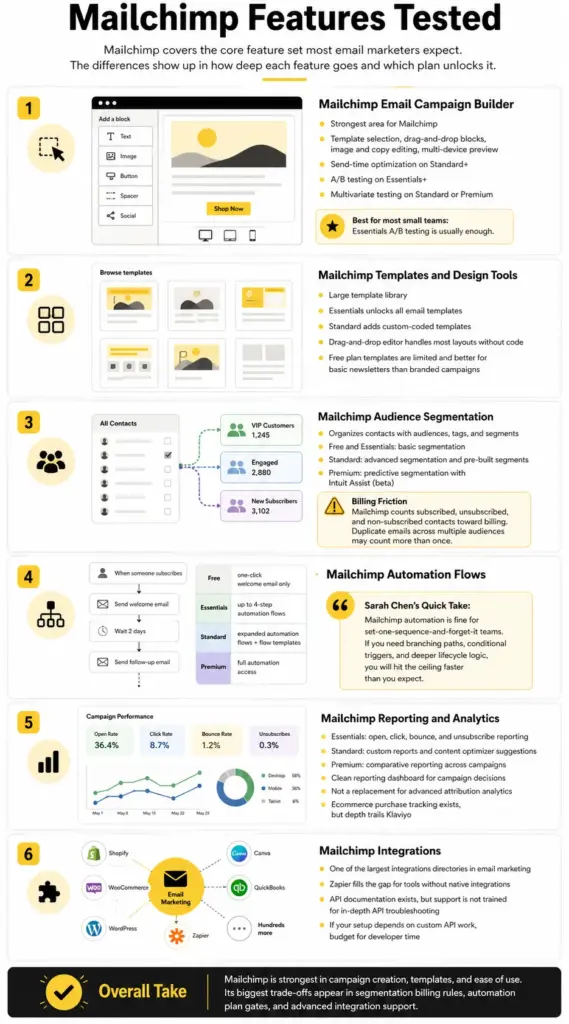
Mailchimp covers the core feature set most email marketers expect. The differences show up in how deep each feature goes and which plan unlocks it.
Mailchimp Email Campaign Builder
The campaign builder is Mailchimp’s strongest area. You pick a template, drag content blocks into place, add your copy and images, and preview across devices. The editor feels responsive. Scheduling options include send-time optimization on Standard and above.
A/B testing is available on Essentials plans and higher. Multivariate testing, which lets you test combinations of subject lines, send times, and content, requires Standard or Premium. For most small teams, A/B testing on Essentials is enough.
Mailchimp Templates and Design Tools
Mailchimp offers a large template library. Essentials unlocks all email templates. Standard adds custom-coded templates for teams that want full HTML control.
The drag-and-drop editor handles most layout needs without code. If you need pixel-perfect brand alignment, the custom-coded template option on Standard gives you that flexibility. The Free plan includes limited templates, which work for basic newsletters but feel restrictive for branded campaigns.
Mailchimp Audience Segmentation
Audience management is where Mailchimp gets both useful and frustrating. The platform uses audiences (formerly lists), tags, and segments to organize contacts.
Free and Essentials plans offer basic segmentation. Standard unlocks advanced segmentation with pre-built segments and more complex filter logic. Premium adds predictive segmentation powered by Intuit Assist (beta, available to certain users in select countries and English only).
The friction point: Mailchimp counts all contacts toward your billing limit, including unsubscribed and non-subscribed contacts. If the same email exists in multiple audiences, it may count as a separate billable contact for each audience. This billing model penalizes list growth in ways that are not obvious from the pricing page.
Mailchimp Automation Flows
Automation is where Mailchimp’s plan gates become most visible. Here is what each tier gives you:
- Free: One-click automated welcome email only. No multi-step flows.
- Essentials: Automation flows up to 4 steps. Single email automations. This covers basic welcome sequences and simple drip campaigns.
- Standard: Expanded automation flows with flow templates. This is the entry point for meaningful marketing automation.
- Premium: Full automation access with all flow capabilities.
If you need conditional branching, multi-path logic, or event-triggered sequences beyond 4 steps, Essentials will not be enough. Standard is the minimum for teams that treat automation as a core channel. For teams that depend on automation depth, I recommend reading our ActiveCampaign review before committing to Mailchimp.
Sarah Chen’s Quick Take: Mailchimp automation is fine for “set one sequence and forget it” teams. If you think in terms of branching paths, conditional triggers, and lifecycle stages, you will hit the ceiling faster than you expect.
Mailchimp Reporting and Analytics
Essentials includes basic reporting: open rates, click rates, bounce rates, and unsubscribe tracking. Standard adds custom reports and content optimizer suggestions. Premium adds comparative reporting across campaigns.
The reporting dashboard is clean and easy to read. It gives you what you need for campaign-level decisions. It does not replace a dedicated analytics platform for attribution modeling or revenue tracking. Ecommerce users on Shopify or WooCommerce get purchase tracking, but the depth does not match Klaviyo’s ecommerce analytics.
Mailchimp Integrations
Mailchimp’s integrations directory is one of the largest in the email marketing category. It connects with Shopify, WooCommerce, WordPress, Canva, QuickBooks, and hundreds more.
For tools without a native integration, Zapier fills the gap. Mailchimp is one of Zapier’s most-connected apps, which means almost any SaaS tool can feed data into your Mailchimp audience.
One limitation: Mailchimp’s API documentation exists at mailchimp.com/developer, but the support team is not trained for in-depth API troubleshooting. If your integration depends on custom API work, budget for developer time rather than support tickets.
Mailchimp User Experience
Mailchimp’s interface is clean, well-labeled, and designed for people who are not email marketing experts. It does not feel like enterprise software. That is a strength for its target audience.
The First 30 Minutes With Mailchimp
Here is what a realistic first session looks like, based on an editorial walkthrough of the standard onboarding path:
- Account creation (minutes 1-3). Sign up, confirm email, answer onboarding questions about your business and goals. Mailchimp uses these answers to suggest features.
- Audience import (minutes 4-8). Upload a CSV or connect a source. The import wizard maps columns to Mailchimp fields. You can add tags during import.
- Template selection (minutes 9-14). Browse the template library. Pick a layout. The drag-and-drop editor opens with placeholder content you replace with your own.
- Campaign creation (minutes 15-22). Write your subject line, preview text, and body content. Add images. Preview on desktop and mobile. Set up tracking options.
- Test send and schedule (minutes 23-27). Send a test email to yourself. Review rendering. Pick a send time or use send-time optimization (Standard and above).
- Review report (after send). Check opens, clicks, and bounces in the reporting dashboard once your campaign delivers.
The onboarding is fast for simple campaigns. The complexity increases when you start building automation flows or managing multiple audiences. That is where Mailchimp’s simplicity starts working against power users.
Mailchimp Pricing in 2026
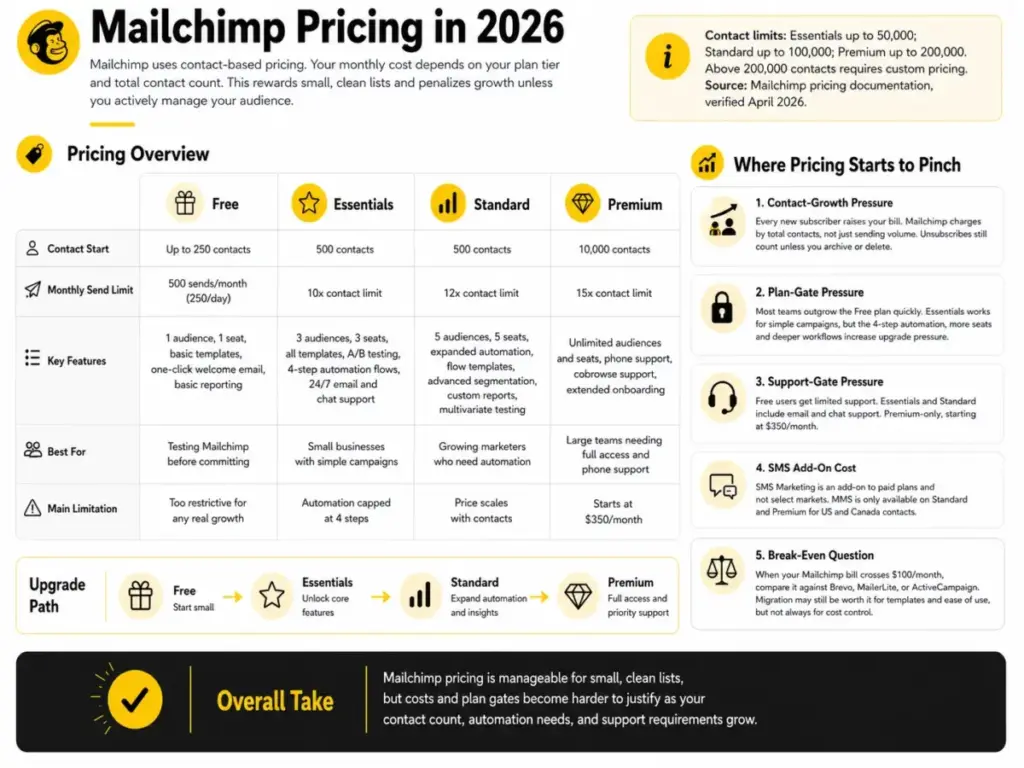
Mailchimp uses contact-based pricing. Your monthly cost depends on your plan tier and total contact count. This model rewards small, clean lists and penalizes growth unless you actively manage your audience.
For the most up-to-date numbers, check the Mailchimp pricing page and plan comparison.
| Plan | Contact Start | Monthly Send Limit | Key Features | Best For | Main Limitation |
|---|---|---|---|---|---|
| Free | Up to 250 | 500 sends/month (250/day) | 1 audience, 1 seat, basic templates, one-click welcome email, basic reporting | Testing Mailchimp before committing | Too restrictive for any real growth |
| Essentials | 500 | 10x contact limit | 3 audiences, 3 seats, all templates, A/B testing, 4-step automation flows, 24/7 email and chat support | Small businesses with simple campaigns | Automation capped at 4 steps |
| Standard | 500 | 12x contact limit | 5 audiences, 5 seats, expanded automation, flow templates, advanced segmentation, custom reports, multivariate testing | Growing marketers who need automation | Price scales with contacts |
| Premium | 10,000 | 15x contact limit | Unlimited audiences and seats, phone support, cobrowse support, extended onboarding | Large teams needing full access and phone support | Starts at $350/month |
Contact limits: Essentials up to 50,000; Standard up to 100,000; Premium up to 200,000. Above 200,000 contacts requires custom pricing. Source: Mailchimp pricing documentation, verified April 2026.
Where Mailchimp Pricing Starts to Pinch
Mailchimp’s pricing page shows clean starting prices. The reality gets complicated as you grow:
Contact-growth pressure. Every new subscriber raises your bill. Unlike Brevo, which prices by send volume with unlimited contacts, Mailchimp charges by total contacts in your account. Unsubscribed contacts still count toward your limit unless you archive or delete them. This creates a cleanup tax that most beginners do not expect.
Plan-gate pressure. You start on Essentials because the Free plan is too small. You hit the 4-step automation limit. You upgrade to Standard. Your team grows past 5 seats. You consider Premium. Each step raises cost and complexity.
Support-gate pressure. Free users get limited support. Paid users on Essentials and Standard get email and chat. Phone support is Premium-only, starting at $350/month. If your team needs phone support but your list is under 10,000 contacts, you are paying for Premium capacity you do not use. Official source: Mailchimp support options.
SMS add-on cost. SMS Marketing is an add-on to paid plans in select countries. MMS is only available on Standard and Premium for US and Canada contacts. These costs sit outside your base subscription.
The break-even question. When your Mailchimp bill crosses $100/month, compare it against Brevo, MailerLite, or ActiveCampaign at the same contact count. Mailchimp’s template quality and brand familiarity may justify the premium. Or they may not. Run the math for your specific list size. For a deeper cost breakdown, see our Mailchimp pricing breakdown.
Mailchimp Pros and Cons
Every platform has trade-offs. These are specific, not vague.
- Fast campaign creation for beginners. The drag-and-drop builder gets a first campaign live in under 30 minutes. No design skills required.
- Strong template library. Essentials and above include all email templates. Standard adds custom-coded templates for full control.
- Broad integrations directory. Hundreds of native integrations plus deep Zapier support. Most SaaS tools connect without custom code.
- Solid Standard plan for growing marketers. Expanded automation, advanced segmentation, custom reports, and multivariate testing make Standard the sweet spot for teams between 1,000 and 20,000 contacts.
- Familiar brand and large ecosystem. Mailchimp’s market presence means more tutorials, community answers, and third-party resources than any competitor.
- Free plan is too limited for serious growth. 250 contacts and 500 sends per month with a 250 daily cap is a trial, not a working plan.
- Contact-based pricing gets expensive. Your bill grows with every subscriber, including unsubscribed and non-subscribed contacts unless you manually clean them.
- Advanced automations are plan-gated. Essentials limits flows to 4 steps. Meaningful automation requires Standard, which costs more.
- Phone support is Premium-only. At $350/month minimum, phone access is out of reach for most small teams.
- API troubleshooting support is limited. The support team is not trained for in-depth API debugging. Custom integration issues fall on your developers.
- Ecommerce brands may outgrow it. Cart abandonment, post-purchase flows, and product recommendation engines are stronger in Klaviyo and ActiveCampaign.
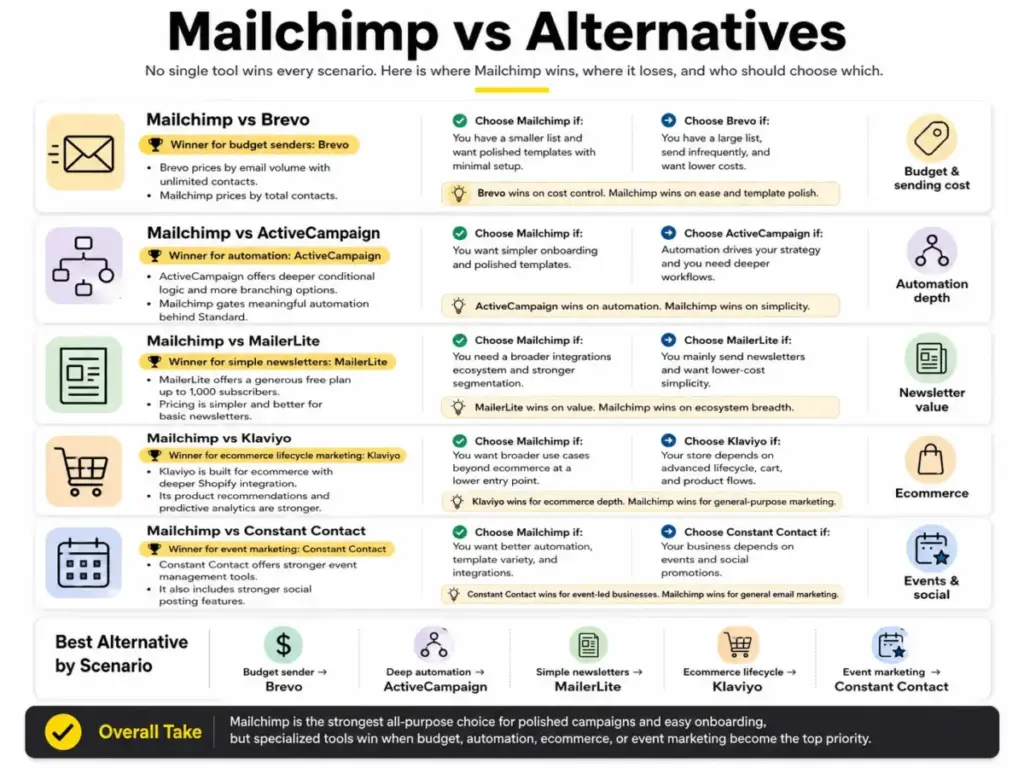
Mailchimp vs Alternatives
No single tool wins every scenario. Here is where Mailchimp wins, where it loses, and who should choose which.
Mailchimp vs Brevo
Winner for budget senders: Brevo. Brevo prices by email volume with unlimited contacts. Mailchimp prices by contacts. If you have a large list but send infrequently, Brevo costs less. If you have a small list and want polished templates with minimal setup, Mailchimp wins. Read our full Brevo review for the detailed comparison.
Mailchimp vs ActiveCampaign
Winner for automation: ActiveCampaign. ActiveCampaign offers deeper conditional logic, more branching options, and CRM-like contact management across all paid plans. Mailchimp gates meaningful automation behind Standard. If automation drives your marketing strategy, ActiveCampaign is the better investment. Mailchimp wins on template polish and onboarding simplicity.
Mailchimp vs MailerLite
Winner for simple newsletters: MailerLite. MailerLite offers a generous free plan (up to 1,000 subscribers), clean templates, and straightforward pricing. If your needs stop at newsletters and basic automation, MailerLite delivers more value at lower cost. Mailchimp wins if you need a wider integrations ecosystem and more advanced segmentation.
Mailchimp vs Klaviyo
Winner for ecommerce lifecycle marketing: Klaviyo. Klaviyo is built for ecommerce. Its product recommendation engine, predictive analytics, and deep Shopify integration outperform Mailchimp for online stores. Mailchimp wins on breadth: it covers more use cases beyond ecommerce at a lower entry price. Read our Klaviyo review for the full breakdown.
Mailchimp vs Constant Contact
Winner for event marketing: Constant Contact. Constant Contact has stronger event management tools and social media posting features. Mailchimp wins on automation, template variety, and integrations. For general email marketing, Mailchimp is the better choice. For event-driven businesses, Constant Contact deserves a look.
Who Should Use Mailchimp?
Mailchimp works best for teams that value speed and simplicity over depth and customization.
- Small businesses sending weekly or biweekly newsletters to under 5,000 contacts.
- Creators who want polished email templates without learning HTML.
- Ecommerce stores running simple promotional campaigns and order confirmations.
- Marketing teams that need a familiar tool with broad integration support.
- Founders who want to launch an email list in one afternoon without a learning curve.
Who Should Not Use Mailchimp?
Some teams will hit Mailchimp’s limits faster than they expect. If you match any of these profiles, start your search with a competitor.
- Automation-heavy SaaS teams that rely on multi-branch, event-triggered sequences. ActiveCampaign or HubSpot will serve you better.
- High-volume senders on tight budgets. Brevo’s send-based pricing with unlimited contacts is more cost-effective.
- Advanced ecommerce lifecycle marketers. Klaviyo’s product recommendation engine and predictive analytics outperform Mailchimp for online stores.
- Teams needing phone support without paying for Premium. At $350/month, phone access is expensive for small teams.
- Users needing advanced CRM or sales pipeline tools. Mailchimp’s audience management is not a CRM replacement.
Final Verdict
Mailchimp earns 8.1/10 in this Mailchimp review. It remains one of the fastest ways to launch polished email campaigns, and its template ecosystem is hard to beat. The Standard plan offers real value for growing marketers who need segmentation, expanded automation, and custom reporting.
The platform’s weaknesses are structural. Contact-based pricing creates cost pressure as you grow. The Free plan is too small for anything beyond a quick test. Automation is gated behind higher plans. Phone support requires Premium. These are not bugs; they are business decisions that push users toward upgrades.
If you are a small team sending simple campaigns to a clean list under 5,000 contacts, Mailchimp is a strong choice. If automation, budget, or ecommerce depth drives your decision, look at ActiveCampaign, Brevo, or Klaviyo first.
My recommendation: start with Mailchimp Standard if your list is under 10,000 contacts and your automation needs are moderate. Revisit the decision when your monthly bill crosses $100 or your automation flows need more than what Standard provides.
FAQ
Here are answers to the most common questions about Mailchimp in 2026.
1. Is Mailchimp worth it in 2026?
Yes, for beginners and small teams with simple email needs. Mailchimp’s campaign builder and template library remain among the best in the category. It becomes less worthwhile as your contact list grows past 5,000 or your automation needs exceed basic sequences.
2. What are the main pros and cons of Mailchimp?
Pros include fast campaign creation, strong templates, and broad integrations. Cons include contact-based pricing that scales expensively, plan-gated automation, Premium-only phone support, and a Free plan that caps at 250 contacts and 500 sends per month.
3. How much does Mailchimp cost in 2026?
Mailchimp offers a Free plan (250 contacts, 500 sends/month). Essentials starts at $13/month for 500 contacts. Standard starts at $20/month. Premium starts at $350/month for 10,000 contacts. Costs increase as your contact count grows. Check the official pricing page for current rates.
4. Is Mailchimp free plan still useful?
Only for testing. The Free plan limits you to 250 contacts, 500 sends per month, 1 audience, and 1 seat. It includes Mailchimp branding and offers only a one-click welcome email for automation. It works for evaluating the platform but not for running a real email program.
5. What is Mailchimp best used for?
Mailchimp is best for newsletters, simple promotional campaigns, and small business email marketing. Its drag-and-drop builder, template library, and integrations directory make it ideal for teams that prioritize ease of use over automation depth.
6. Who should not use Mailchimp?
Teams needing deep automation, high-volume senders on tight budgets, advanced ecommerce marketers, and anyone requiring phone support without a $350/month Premium subscription. These teams should evaluate ActiveCampaign, Brevo, Klaviyo, or MailerLite instead.
7. Is Mailchimp better than Brevo?
Mailchimp has better templates and a larger integrations ecosystem. Brevo offers unlimited contacts with send-based pricing, making it cheaper for large lists. Brevo wins on budget; Mailchimp wins on design polish and ease of use.
8. Is Mailchimp better than ActiveCampaign?
Mailchimp is easier to start with and has better templates. ActiveCampaign offers deeper automation, more conditional logic, and CRM-like contact management. For automation-first teams, ActiveCampaign is the better choice.
9. Is Mailchimp good for ecommerce?
Acceptable for simple ecommerce campaigns. Mailchimp integrates with Shopify and WooCommerce and supports basic purchase tracking. For advanced lifecycle marketing, cart recovery flows, and product recommendations, Klaviyo is the stronger option.
10. Does Mailchimp charge by contacts or emails?
Mailchimp charges by total contacts in your account. This includes subscribed, unsubscribed, and non-subscribed contacts unless you archive or delete them. Each plan tier also has a monthly email send limit based on a multiplier of your contact count.
11. Does Mailchimp have automation?
Yes. The Free plan includes a one-click welcome email. Essentials offers automation flows up to 4 steps. Standard unlocks expanded flows with templates. Premium provides full automation access. Mailchimp rebranded Customer Journey Builder to Automation Flows in June 2025.
12. What are the best Mailchimp alternatives?
The best alternatives depend on your priority. Brevo for budget and unlimited contacts. ActiveCampaign for deep automation. Klaviyo for ecommerce lifecycle marketing. MailerLite for simple newsletters. ConvertKit for creator-focused email workflows.