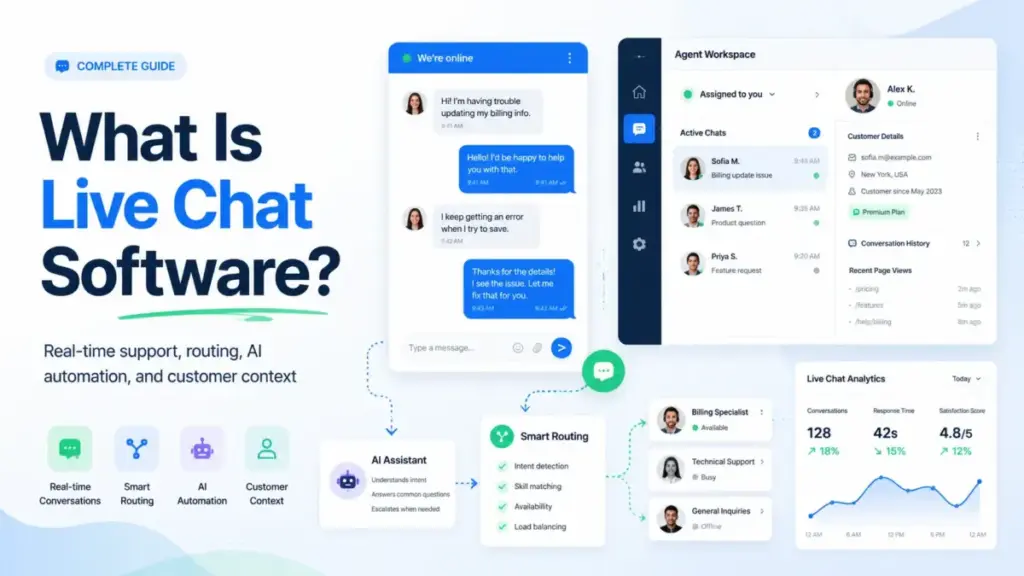
Most teams buy live chat software expecting a simple widget. What they get is an operating system for real-time customer conversations that touches routing, CRM data, AI automation, and agent workload all at once. If your help desk platform already includes a chat module, the question is not whether you need chat. The question is whether your current setup routes conversations to the right person, with the right context, before the customer gives up.
Live chat software is the layer between your website visitor and your support or sales team. It handles the real-time messaging interface, the rules that determine who responds, the AI that deflects common questions, and the analytics that tell you whether any of it is working.
This guide explains how live chat actually operates behind the widget, where implementations go wrong, what it costs at real team sizes, and when you should use chat versus a chatbot versus a full help desk system.
Quick Answer: Live chat software enables real-time text conversations between website visitors and support or sales agents through an embedded widget. Unlike email ticketing, chat operates synchronously with sub-60-second response expectations. Unlike standalone chatbots, live chat includes human routing, CRM context, and conversation history. Most tools start at $15-29 per agent per month, with AI features adding $0.50-2.00 per automated resolution.
The 60-Second Explanation of Live Chat Software
For beginners: Live chat is the small message window on a website that lets you type a question and get an answer from a real person (or a bot) without leaving the page. Think of it as instant messaging between a customer and a company.
For technical teams: Live chat software is a real-time communication layer that combines WebSocket-based messaging, rule-based routing engines, CRM data lookups, chatbot automation, and agent workspace interfaces. The widget is the visible 5%. The backend handles queue management, skill-based routing, conversation tagging, SLA timers, and API integrations with your CRM, help desk, and analytics stack.
For business leaders: Live chat is a revenue and retention tool disguised as a support channel. When configured correctly, it reduces average handle time by routing conversations with pre-loaded customer context, deflects repetitive questions through AI automation, and captures leads that would otherwise abandon your pricing page. The cost structure is typically per-seat, but the real expense is in AI resolution fees, which can scale unpredictably if you automate without guardrails.
How Live Chat Software Actually Works
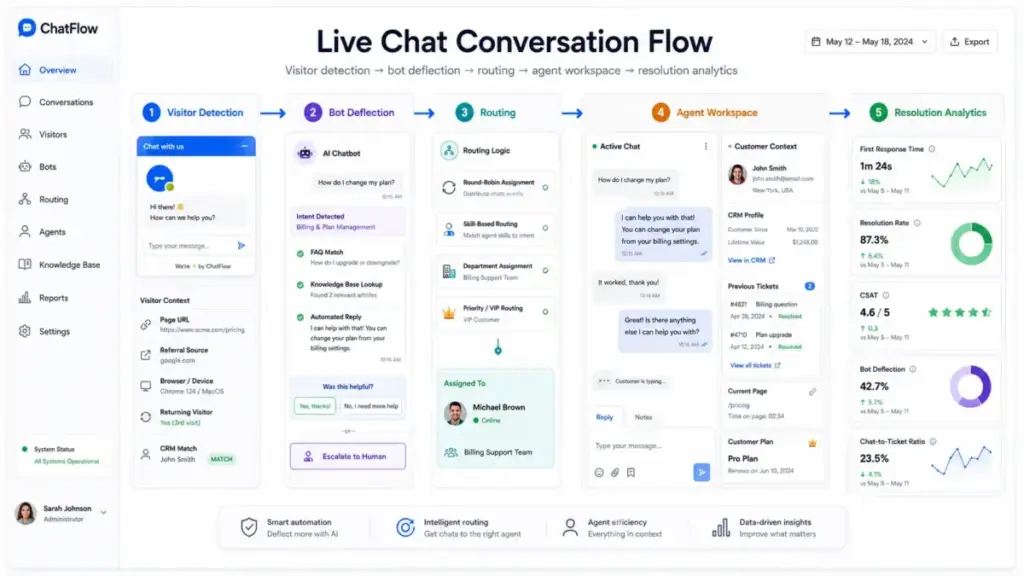
The chat widget your customers see is the surface layer. Here is the pipeline that runs underneath every conversation, from the moment a visitor clicks the chat icon to the moment the conversation closes.
Step 1: Widget Load and Visitor Detection
When a page loads, the chat widget script checks the visitor’s browser data, URL path, referral source, and (if available) CRM record. This pre-chat detection determines which chat flow to trigger. A visitor on your pricing page gets a different greeting than a visitor reading a help article.
Where things go wrong: Teams that skip page-level targeting show the same generic “How can I help?” message everywhere. This kills conversion on high-intent pages where a specific offer or routing rule would capture the lead.
Step 2: Pre-Chat Rules and Bot Deflection
Before a human agent sees the conversation, the system applies routing rules. Most platforms (Zendesk, Intercom, LiveChat) run a decision tree: Is the question in the FAQ database? Can a bot resolve it? Does the visitor qualify for sales routing based on company size or plan?
Intercom’s Fin AI agent, for example, attempts resolution using your help center content before creating a ticket. Zendesk’s AI agents work similarly, pulling from your knowledge base articles to answer questions automatically.
Where things go wrong: Bots configured without a clear escalation path frustrate visitors. The bot keeps asking clarifying questions, the visitor wants a human, and there is no visible “talk to a person” option. Intercom addresses this with configurable handoff triggers. Tidio provides a visual chatbot builder that lets non-technical teams define exactly when the bot should stop and route to an agent.
Step 3: Agent Routing and Queue Assignment
If the bot cannot resolve the issue, the conversation enters the agent queue. Routing depends on the platform’s engine:
- Round-robin: Distributes evenly across available agents (most basic).
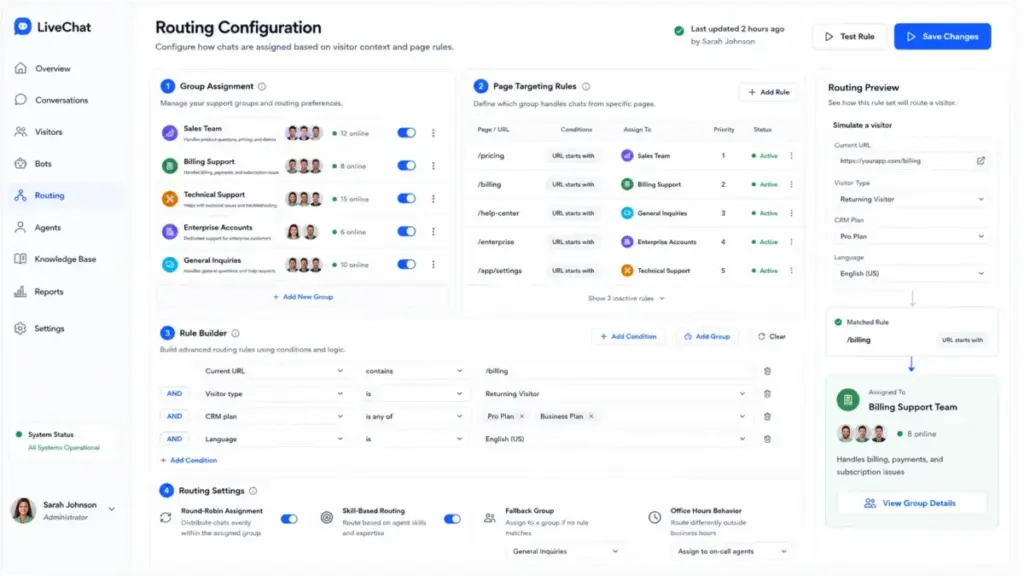
- Skill-based: Routes by language, product expertise, or customer tier.
- Load-balanced: Considers each agent’s current conversation count.
- CRM-aware: Zendesk and HubSpot can route based on the customer’s plan level, lifetime value, or assigned account manager.
LiveChat uses a group-based routing system where you assign agents to product or department groups. Conversations match groups by the page the visitor is on or by pre-chat form selections.
Step 4: Agent Workspace and CRM Context
The agent sees the conversation alongside customer context: previous tickets, CRM record, purchase history, and current page URL. This context panel is what separates live chat from a basic messaging app.
HubSpot’s live chat, for example, pulls the full CRM timeline into the agent sidebar. Zendesk shows the customer’s ticket history and satisfaction scores. Without this context, agents waste the first 2-3 messages asking questions the system already knows the answer to.
Where things go wrong: When CRM integration is incomplete, agents fly blind. They ask “What plan are you on?” when that data sits in Salesforce. They cannot see the customer’s open tickets. This creates the exact friction live chat is supposed to eliminate.
Step 5: Resolution, Tagging, and Analytics
After the conversation ends, the system logs resolution data: handle time, customer satisfaction (CSAT), tags, and whether the conversation was resolved by a bot or a human. These metrics feed reporting dashboards and identify where the system needs improvement.
Live Chat vs Chatbots vs Help Desk Software
These three terms overlap, but they serve different operational purposes. Here is the distinction that matters for buying decisions:
| Feature | Live Chat | Chatbot | Help Desk |
|---|---|---|---|
| Primary function | Real-time human conversations | Automated responses from FAQ/AI | Ticket management across all channels |
| Response model | Synchronous (seconds) | Instant (automated) | Asynchronous (hours to days) |
| Best for | Sales conversations, urgent support | FAQ deflection, after-hours coverage | Complex issues, SLA tracking, team workflows |
| Agent required? | Yes (human in the loop) | No (but should have escalation path) | Yes (ticket assignment) |
| CRM context | Real-time sidebar | Limited (depends on integration) | Full ticket history |
| Typical cost | $15-29/agent/month | Often included or $0.50-2/resolution | $19-89/agent/month |
| When to avoid | After-hours with no staff | Complex troubleshooting | Real-time sales conversations |
Most modern platforms blur these lines. Zendesk and Intercom include all three. Tidio combines chatbot and live chat in one interface. The decision is not “which one” but “which combination” and how the handoff between them works.
Step-by-Step Implementation
Step 1: Define Your Chat Coverage Model
Before installing anything, decide when and where chat will be available. The three common models:
- Business-hours only: Chat widget appears during work hours, replaced by an email form after hours. Lowest cost, but misses international visitors.
- Bot-first, human-fallback: Bot handles all initial contacts 24/7. Escalates to humans during work hours. Best for teams under 10 agents.
- 24/7 staffed: Requires shift scheduling or a distributed team. Necessary for SaaS products with global users. Most expensive.
Step 2: Configure Page-Level Targeting
Do not show chat on every page. Target high-value pages: pricing, checkout, product comparison, and contact. On blog posts, use a passive “Help” button instead of a proactive pop-up. Tidio and LiveChat both allow page-URL-based targeting rules. Intercom uses audience filters tied to user attributes and page visits.
Step 3: Build Your Bot Deflection Layer
Map your top 20 support questions. Build bot responses for each using your knowledge base content. Set a clear escalation trigger: if the visitor says “talk to a person,” types a question not in the bot’s training data, or expresses frustration (negative sentiment detection), route immediately to a human.
Intercom’s Fin and Zendesk’s AI agents can pull directly from your help center articles. For teams without a mature knowledge base, Tidio’s visual flow builder lets you create decision-tree bots without code.
Step 4: Set Up Routing Rules
Assign agents to groups by skill or department. Configure routing logic: sales inquiries go to the sales team, billing questions go to support, enterprise accounts go to senior agents. Test by submitting chat requests from different pages and verifying they reach the correct group.
Step 5: Connect Your CRM and Help Desk
Integrate chat with your CRM (HubSpot, Salesforce, Zoho) so agents see customer records. Connect to your help desk (Zendesk, Freshdesk) so unresolved chats create tickets automatically. Without this integration, chat becomes an isolated channel that agents have to manually reconcile.
Step 6: Define Escalation and SLA Rules
Set maximum wait times before a chat auto-assigns to the next available agent. Define when an unresolved chat converts to a ticket. Establish CSAT survey triggers (post-resolution, not mid-conversation).
The Mistakes That Waste Your First Month
Mistake 1: Treating chat like email. Chat is synchronous. If your average response time exceeds 60 seconds, you are training customers to leave. Staff accordingly or use bot deflection to manage volume.
Mistake 2: No bot-to-human handoff path. Bots that loop without offering a human option cause more frustration than no bot at all. Every bot flow needs a clear exit to a live agent.
Mistake 3: Ignoring after-hours coverage. If your chat widget shows “We’re offline” to 40% of your traffic, you are losing leads. Either use a bot for after-hours or replace the widget with a callback/email form.
Mistake 4: Skipping CRM integration. Agents asking “What’s your account email?” when that data exists in your CRM waste 30-60 seconds per conversation. Multiply that by 50 daily chats.
Mistake 5: Over-automating without monitoring. AI deflection rates look great in dashboards, but if the bot is resolving tickets by giving wrong answers, your CSAT drops silently. Audit bot resolution quality weekly for the first month.
Common Misconceptions
Misconception: “Live chat replaces email support.” Reality: Chat handles urgent, simple questions. Complex issues requiring screenshots, file attachments, or multi-step troubleshooting still work better as tickets. Chat and email are complementary channels, not substitutes.
Misconception: “AI chatbots eliminate the need for human agents.” Reality: Even the most advanced AI agents (Intercom Fin, Zendesk AI) achieve 30-60% deflection rates on well-documented topics. The remaining 40-70% still requires human judgment. AI reduces headcount growth, it does not eliminate it.
Misconception: “Live chat is only for customer support.” Reality: Sales teams use chat for lead qualification on pricing pages. Marketing teams use it for event registration and content gating. Product teams use in-app chat for onboarding. The software is channel-neutral.
Misconception: “Free live chat tools are good enough for small teams.” Reality: Free tiers (Tidio, HubSpot) work for 1-2 agents handling under 50 conversations per month. Beyond that, you hit limits on chat history, automation rules, or integrations that force an upgrade. The practical starting cost is $15-29/agent/month.
When to Use Live Chat and When to Avoid It
Use live chat when:
- Your website traffic exceeds 5,000 monthly visitors and you have a sales or support team ready to respond.
- Average response time matters: SaaS products, e-commerce checkout, and financial services where visitors leave if they wait.
- You need to qualify leads in real time on pricing or demo pages.
- Your support team handles a high volume of repetitive questions that a bot can deflect.
Avoid live chat when:
- You have no staff to respond during business hours. An unattended chat widget is worse than no widget.
- Your product requires deep technical support that needs asynchronous communication (file uploads, screen recordings, multi-day investigation).
- Your team is under 3 people and already managing email, phone, and social channels. Adding chat without capacity creates another channel to neglect.
How to Measure Live Chat Success
| Metric | What It Measures | Why It Matters |
|---|---|---|
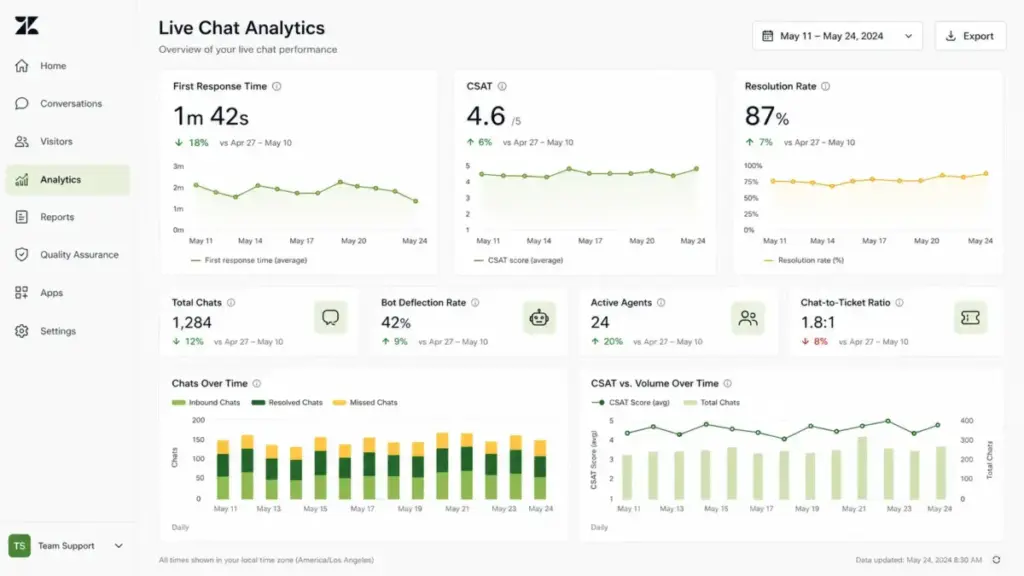
| First Response Time | Seconds between visitor message and agent reply | Target under 30 seconds. Above 60 seconds, abandonment spikes. |
| CSAT Score | Post-chat satisfaction rating | Direct measure of conversation quality. Benchmark: 85%+ |
| Resolution Rate | Percentage of chats resolved without escalation | High rate means routing and training are working. Target: 70%+ |
| Bot Deflection Rate | Percentage of chats resolved by AI without human | Measures automation ROI. Healthy range: 30-50% |
| Chat-to-Ticket Ratio | Chats that convert to help desk tickets | High ratio signals bot/agent cannot resolve. Investigate root causes. |
| Agent Utilization | Active chat time vs. available time | Above 80% means understaffed. Below 40% means over-invested. |
| Cost Per Resolution | Total chat spend divided by resolved conversations | Compare against email and phone cost per resolution. |
What Good Live Chat Looks Like
Before implementation: Support emails pile up. Average response time is 4-8 hours. Sales team misses pricing page visitors. Repetitive questions consume 40% of agent time.
After proper implementation: Bot handles FAQ questions instantly, deflecting 35-45% of incoming volume. Agents receive conversations with full CRM context loaded. Pricing page visitors get routed to a sales agent within 15 seconds. CSAT improves because customers get answers without switching channels.
Real-world examples of how products implement this:
- Zendesk embeds chat within its unified agent workspace, so agents handle chats, emails, and social messages from one queue. AI agents pull from your Guide knowledge base for automated responses. Pricing starts at $19/agent/month (Support Team), with AI add-on at $1.00 per automated resolution (as of May 2026).
- Intercom positions chat as part of a broader customer messaging platform. Fin AI agent resolves questions using your help center content. The Starter plan begins at $29/seat/month, with Fin charged at $0.99 per resolution (as of May 2026).
- LiveChat focuses specifically on the chat experience with a clean agent workspace and robust reporting. Group-based routing allows department-level targeting. Pricing starts at $20/agent/month on the Starter plan (as of May 2026).
- HubSpot includes live chat free within its CRM platform, with full CRM context in the chat sidebar. The free tier supports basic chat for small teams. Paid Service Hub plans start at $20/month for additional features (as of May 2026).
- Tidio combines AI chatbot (Lyro) with live chat in a single interface, designed for small to mid-size teams. The visual chatbot builder requires no coding. Free plan available for up to 50 conversations/month; paid plans start at $29/month (as of May 2026).
Tools That Help You Implement Live Chat
If you have read this far, you understand that live chat is not just a widget. It is an operational layer that connects messaging, routing, AI deflection, and CRM context. The right tool depends on what you already have in your stack.
If you already use a help desk: Check whether your platform includes chat. Zendesk, Freshdesk, and Intercom all bundle live chat with their help desk products. Adding a separate chat tool creates a data silo. Read our Zendesk review or Freshdesk evaluation to see how their chat modules compare.
If you need standalone chat: LiveChat and Tidio are purpose-built for teams that want chat without a full help desk migration. See our Intercom analysis for comparison.
If you want chat inside your CRM: HubSpot’s free chat widget lives natively in the CRM, so every conversation creates or updates a contact record. For teams already on HubSpot, this eliminates integration complexity.
For a broader view of the help desk landscape, including how chat fits within ticket management and customer service platforms, explore our help desk hub.
When comparing specific platforms head to head, our Zendesk vs Intercom comparison breaks down pricing, AI capabilities, and routing differences.
When You Need Live Chat Software
Signals you are ready:
- Your website generates more than 5,000 monthly visits and you have a team available to respond.
- Email response times exceed 4 hours and customers complain about delays.
- Your sales team reports losing leads who visit the pricing page but never fill out a form.
- Repetitive questions (password resets, shipping status, plan features) consume more than 30% of support time.
- You are expanding to new time zones and need after-hours coverage through automation.
Signals you are not ready yet:
- Your team has fewer than 2 support agents and cannot guarantee response during business hours.
- You have no knowledge base content for a bot to reference.
- Your CRM and help desk are not set up yet. Adding chat to a broken foundation amplifies the mess.
How to Choose the Right Live Chat Tool
- Start with your existing stack. If you use Zendesk, Freshdesk, or Intercom for ticketing, use their built-in chat. Do not add a third-party widget.
- Evaluate AI pricing models. Per-resolution pricing ($0.50-2.00/resolution) scales unpredictably. Calculate your expected monthly volume before committing.
- Test routing rules during trial. Submit test chats from different pages and verify they reach the correct agent group.
- Check CRM integration depth. Can agents see customer records in the chat sidebar? Does the integration sync conversation history back to the CRM?
- Verify mobile experience. Test the widget on mobile. Some tools display poorly on smaller screens or lack mobile agent apps.
- Ask about conversation limits. Free and starter plans often cap monthly conversations or chat history retention.
Beginner Checklist: Your First 30 Days With Live Chat
- Choose a tool that integrates with your existing CRM and help desk
- Define business hours and after-hours behavior (bot, email form, or offline message)
- Install the widget on 3-5 high-value pages first (pricing, checkout, contact)
- Map your top 20 FAQ questions and build bot responses for each
- Configure at least 2 routing groups (sales and support)
- Connect CRM so agents see customer context in the chat sidebar
- Set first response time target: under 30 seconds
- Create an escalation rule: bot transfers to human after 2 failed resolution attempts
- Enable post-chat CSAT survey
- Review bot resolution quality weekly for the first month
- Track cost per resolution and compare against email support costs
FAQ
Is live chat software the same as a chatbot?
No. Live chat connects visitors with human agents in real time. A chatbot automates responses using pre-built flows or AI. Most platforms now combine both: the bot handles initial contact and escalates to a human when needed. The distinction matters for staffing, because chat requires available agents while bots run independently.
How much does live chat software cost for a small team?
For a 5-agent team, expect $75-145/month on entry-tier plans. LiveChat starts at $20/agent/month ($100 for 5 agents). Tidio’s paid plans start at $29/month for the platform plus per-agent fees. Free options exist (HubSpot, Tidio free tier) but limit conversations, history, or automation rules. Budget an additional $50-200/month for AI resolution fees if you enable bot automation.
Can I use live chat for sales, not just support?
Yes. Sales teams use chat to engage pricing page visitors, qualify leads with pre-chat forms, and route high-value prospects to account executives. HubSpot’s chat integrates directly with its CRM pipeline so conversations convert to deals. Intercom’s product tours and targeted messages serve both sales and onboarding use cases.
What is a good first response time for live chat?
Under 30 seconds is the benchmark for high-performing teams. Above 60 seconds, abandonment rates increase significantly. If your team cannot consistently respond within 60 seconds during business hours, you either need more agents, better bot deflection, or to limit chat availability to fewer pages.
Do I need live chat if I already have email support?
It depends on your response time expectations and customer behavior. If email support responds within 1-2 hours and your customers are comfortable with that pace, chat is optional. If visitors leave your pricing page because they cannot get an immediate answer, chat fills that gap. The two channels complement each other: chat for urgency, email for complexity.
How do I measure whether live chat is working?
Track five metrics: first response time (target under 30 seconds), CSAT score (target 85%+), resolution rate (target 70%+), bot deflection rate (healthy range 30-50%), and cost per resolution (compare against email). If first response time is high, you are understaffed. If CSAT is low despite fast response, check agent training and bot answer quality.
What happens to live chat conversations after business hours?
This depends on your configuration. Options include: showing an offline email form (simplest), running a bot that handles FAQ questions 24/7 (recommended for most teams), or staffing across time zones for true 24/7 coverage (most expensive). The worst option is leaving the widget active with no one to respond.
Can live chat integrate with my existing CRM?
Most established platforms integrate with major CRMs. HubSpot chat is native to HubSpot CRM. Zendesk and Intercom offer Salesforce, HubSpot, and Zoho integrations. LiveChat connects through Zapier or direct integrations. The key question is integration depth: can the agent see full CRM history in the chat sidebar, or just a name and email?
Review Limitation
This guide is based on official product documentation, published pricing pages, and verified vendor feature sets as of May 2026. I did not conduct a multi-week deployment of each platform with a live support team. AI resolution accuracy rates, actual deflection percentages, and enterprise pricing should be confirmed directly with each vendor before purchasing.