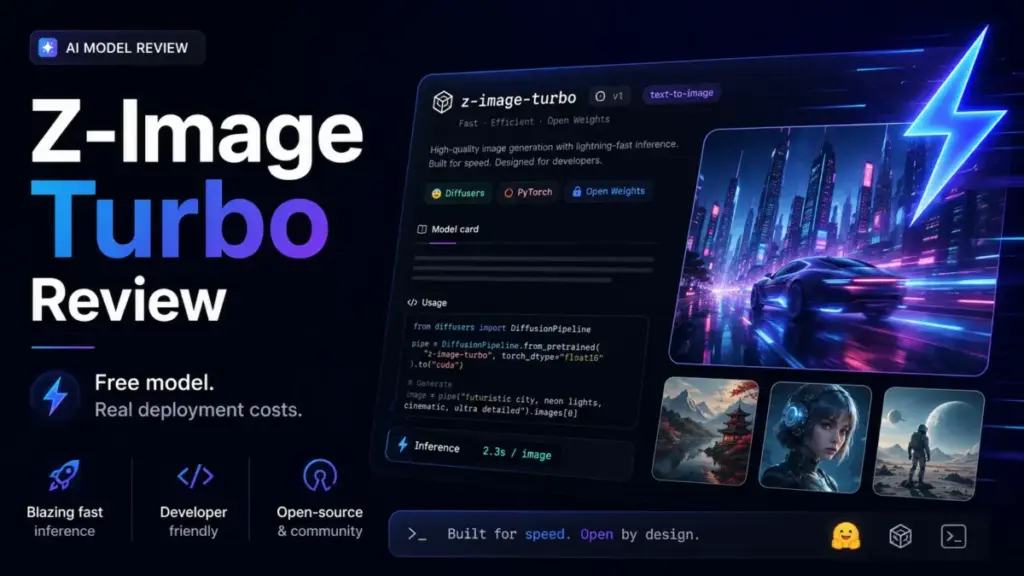
Z-Image Turbo is free. The model weights sit on Hugging Face under an Apache-2.0 license, and anyone can download them today. That sentence alone explains why the best AI image generators conversation shifted when this model dropped. But “free model” and “free to use in production” are two different claims, and most coverage treats them as one.
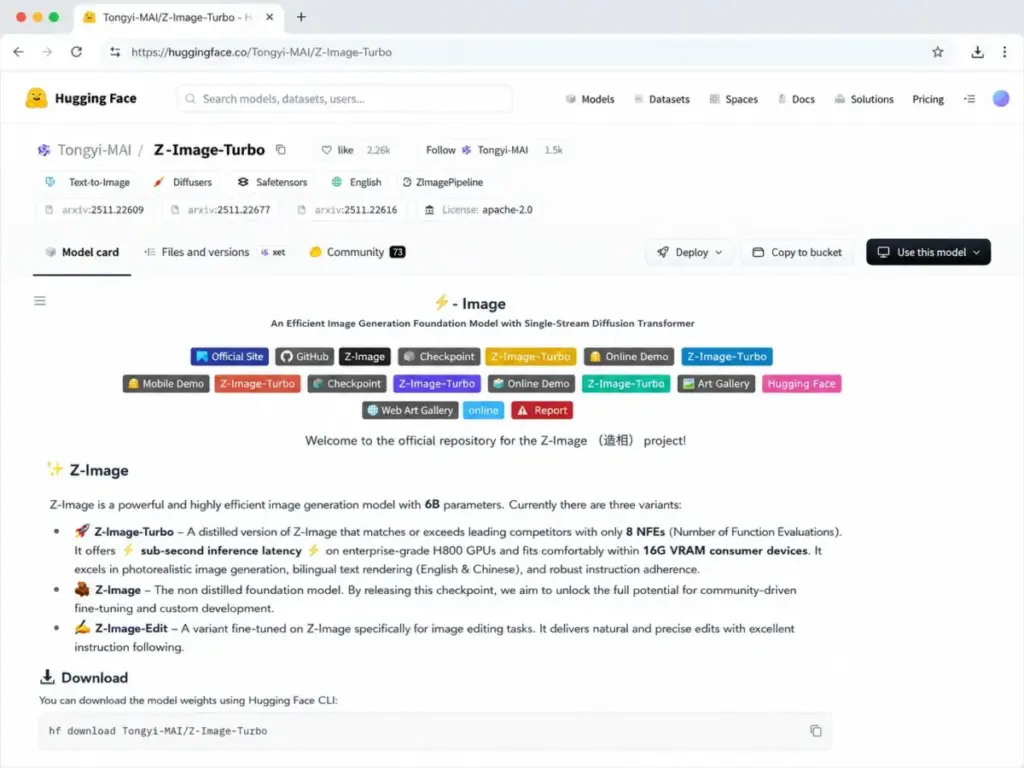
Here is what the marketing buzz skips: Z-Image Turbo is a 6-billion-parameter text-to-image model from Tongyi Lab (Alibaba Group), distilled down to 8 inference steps for speed. It generates photorealistic images fast, renders bilingual English and Chinese text, and targets consumer GPUs with roughly 16 GB VRAM. On paper, that checks every box for developers and technical creators who want an open-source alternative to Midjourney or DALL-E.
In practice, the model has no classifier-free guidance (CFG), official documentation marks its diversity as “low,” and fine-tunability is listed as “N/A.” Those three gaps shape everything about who should and should not build workflows around Z-Image Turbo in 2026. This review breaks down where the model delivers, where it creates new problems, and what deployment actually costs once you move past the Hugging Face demo.
| Quick Verdict | |
|---|---|
| Best for | Developers, AI prototypers, ComfyUI users, and technical creators who want a fast open model for local or API-wrapped text-to-image workflows |
| Not ideal for | Non-technical marketing teams needing a finished SaaS workspace with brand controls, compliance docs, team permissions, and customer support SLAs |
| Starting price | Free (open-source model weights under Apache-2.0) |
| Practical plan | Free model + cloud GPU or third-party API ($0.015/image on getimg.ai as reference) |
| Free plan/trial | Yes, free model weights. Hugging Face demo available but capacity varies |
| Setup difficulty | Medium to high for local deployment; low for browser demos |
| Main strength | Fast 8-step photorealistic generation with open licensing |
| Main limitation | No CFG, low output diversity, fine-tunability marked N/A |
| Best alternative | FLUX.2 Dev for diversity and fine-tuning; Midjourney for non-technical creative teams |
What this means: Z-Image Turbo is a text-to-image AI model layer decision, not a SaaS subscription decision. If your team can handle GPU infrastructure or is comfortable using third-party API providers, the model itself costs nothing. If your team needs a login, a dashboard, and a support email, Z-Image Turbo is the wrong product category entirely.
Z-Image Turbo Pros and Cons
- Free and open-source under Apache-2.0, no licensing fee for the model itself
- 8-step inference keeps generation fast, with official claims of sub-second speed on H800 enterprise GPUs
- 6B parameters fit within a consumer-grade 16 GB VRAM target
- Bilingual English and Chinese text rendering, a gap for most Western-origin models
- Strong Diffusers, ComfyUI, and ModelScope ecosystem support
- Photorealistic output quality competitive with much larger models at launch benchmarks
- No CFG support limits prompt control versus the base Z-Image model
- Official diversity rating is “low,” meaning outputs can cluster around similar compositions
- Fine-tunability marked N/A by the official model zoo (use Z-Image Base instead)
- No native SaaS product layer: no workspace, no team management, no compliance documentation
- Community reports of visible compression artifacts and banding in artwork and anime-style outputs
- Sub-second speed claim references H800 enterprise GPUs, not consumer hardware
How We Reviewed Z-Image Turbo
This review is based on official documentation, third-party benchmark data, and community discussion analysis. SaaSZap did not perform hands-on model testing for this data package.
Data sources used:
- Official Z-Image project homepage (Tongyi-MAI)
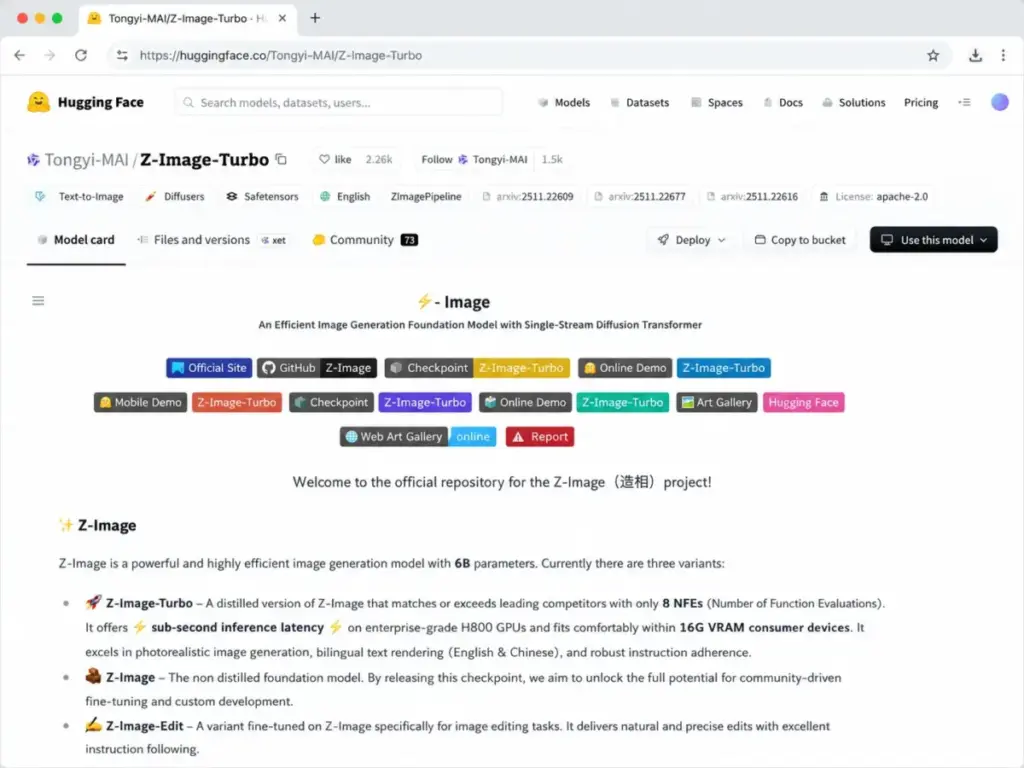
- Hugging Face model card and repository (Tongyi-MAI/Z-Image-Turbo)
- GitHub README and model zoo documentation
- Artificial Analysis model benchmark page
- Reddit community discussions (r/StableDiffusion)
- Third-party API provider documentation (getimg.ai, fal.ai, Replicate)
Pricing verified: May 2026 from the Hugging Face model card and official project pages.
Limitation: This review does not include hands-on generation testing by SaaSZap. Performance claims, artifact observations, and speed benchmarks are sourced from official documentation and third-party reports. Readers should test the model on their own prompts and hardware before committing to production workflows.
The 3 Problems Z-Image Turbo Solves
Fast photorealistic generation without a subscription
Most closed image generators charge per image or per month. Z-Image Turbo removes the subscription entirely. The model uses 8 inference steps (compared to 50+ steps for some diffusion models), which translates to faster generation times on both enterprise and consumer hardware.
Official documentation reports sub-second inference on H800 GPUs. On consumer hardware with roughly 16 GB VRAM, generation is slower but still practical for prototyping and development workflows.
For a developer building an image generation API, this speed-plus-openness combination is the core value proposition. You own the model, control the infrastructure, and pay only for compute.
Bilingual text rendering that Western models struggle with
Z-Image Turbo renders both English and Chinese text inside generated images. This is not a minor feature. Poster design, social media content for bilingual markets, and localized product imagery all depend on in-image text accuracy.
The model was built by Tongyi Lab under Alibaba Group, and its training data reflects bilingual capabilities that models like Stable Diffusion XL or FLUX typically lack at this quality level. For teams serving Chinese-speaking markets or creating bilingual assets, this removes a real bottleneck.
Open licensing for commercial and developer use
The Hugging Face model card lists Z-Image Turbo under Apache-2.0. That license allows commercial use of the model weights, modification, and redistribution.
Compare this to Midjourney (closed, subscription-only, no local deployment), DALL-E (API access controlled by OpenAI), or even FLUX.1 Dev (non-commercial license for certain variants). The Apache-2.0 status makes Z-Image Turbo one of the most permissively licensed generative AI image models available in 2026.
There is a caveat here. Apache-2.0 covers the model weights. It does not automatically resolve every question about generated output ownership, training data provenance, or downstream commercial rights in every jurisdiction. Teams with strict legal requirements should review the license with their own counsel before production deployment.
The 2 Problems Z-Image Turbo Creates
Control and diversity sacrificed for speed
The speed gains come at a cost. Z-Image Turbo disables classifier-free guidance (CFG), which is the primary mechanism most diffusion models use to let users control prompt adherence versus output variety.
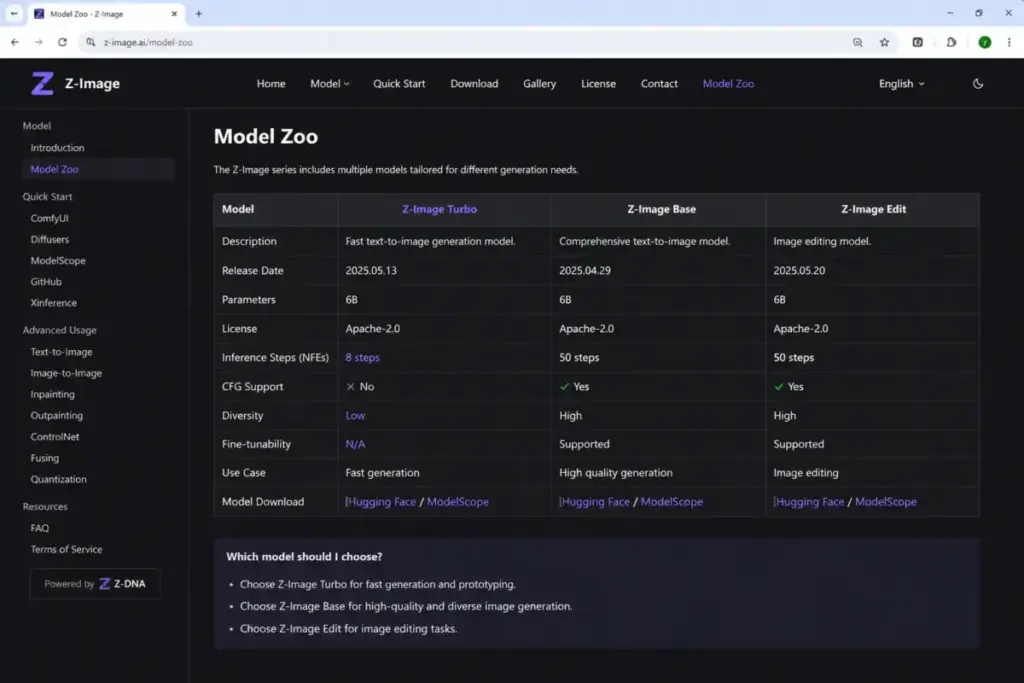
The official model zoo is direct about this tradeoff:
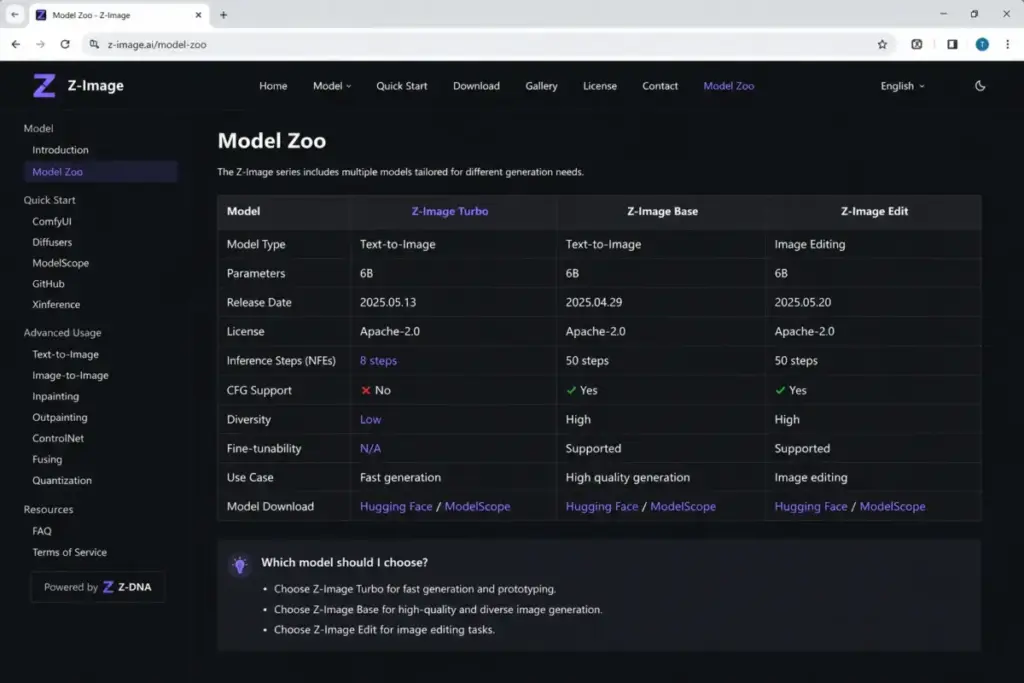
- Z-Image Turbo: No CFG. Low diversity. Fine-tunability: N/A.
- Z-Image Base: Supports CFG. Higher diversity. Fine-tunability: supported.
- Z-Image-Edit: Editing-focused variant with different capabilities.
| Variant | CFG Support | Diversity | Fine-tunability | Speed (NFEs) | Best For |
|---|---|---|---|---|---|
| Z-Image Turbo | No | Low | N/A | 8 steps | Fast prototyping, photorealistic generation |
| Z-Image Base | Yes | High | Supported | 50 steps | Controlled generation, fine-tuning, style variety |
| Z-Image-Edit | Varies | Varies | Varies | Varies | Image editing workflows |
What this means: if your workflow depends on prompt iteration with negative prompts, style exploration, or LoRA fine-tuning, Z-Image Turbo is the wrong variant. The official model family includes Z-Image Base for exactly those use cases, but at 50 inference steps, you lose the speed advantage.
Community discussions on Reddit confirm this pattern. Users praise Turbo’s photorealistic potential but report that outputs tend to converge on similar compositions. For a studio that needs style variation across a project, that convergence is a workflow bottleneck, not a feature.
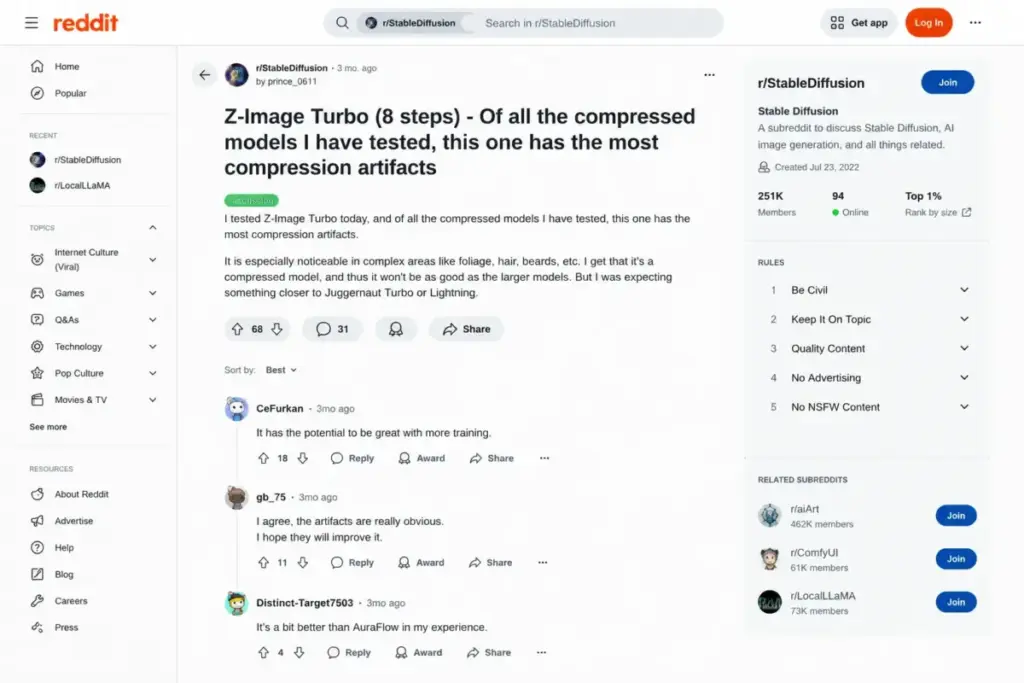
Several Reddit users in r/StableDiffusion have flagged visible compression artifacts, banding, and quality issues in artwork and anime-style outputs. Photorealistic results tend to hold up better, but non-photorealistic use cases should be tested carefully before production commitment.
No product layer means you build everything yourself
Z-Image Turbo is a model, not a product. There is no login page, no dashboard, no team workspace, no admin console, no asset library, no approval workflow, no usage analytics, no compliance documentation, and no customer support line.
For a developer, that is expected. For a marketing director evaluating AI image tools, it is a disqualifier.
The gap between “model available on Hugging Face” and “production image generation system” includes:
- GPU infrastructure (purchase or rental)
- Inference hosting and queue management
- Image storage and delivery
- Content moderation and safety filtering
- User access controls and permissions
- Monitoring, logging, and cost tracking
- Support and incident response
Some of these gaps are filled by third-party providers. Platforms like getimg.ai, fal.ai, Replicate, and Runware host Z-Image Turbo as an API endpoint. But each provider sets its own pricing, parameters, rate limits, and terms. The “free model” becomes a paid service once you add a hosting layer.
Z-Image Turbo Pricing: Free Model, Not Free Infrastructure
| Deployment Path | Model Cost | Infrastructure Cost | Best For |
|---|---|---|---|
| Hugging Face demo | Free | Free (capacity varies) | Quick exploration, testing prompts |
| Local GPU (16 GB VRAM) | Free | Hardware cost ($300-$2,000+ for GPU) | Developers with existing hardware |
| Cloud GPU (e.g., RunPod, Lambda) | Free | $0.40-$2.00+/hour depending on GPU | Short-term projects, experimentation |
| Third-party API (getimg.ai) | Free | ~$0.015/image (as of May 2026) | API-backed apps, prototyping |
| Self-hosted production | Free | Variable (GPU + hosting + storage + ops) | Teams with ML infrastructure |
What this means: the pricing question for Z-Image Turbo is not “how much does the software cost?” It is “how much does your chosen deployment path cost?” The model weights are free under Apache-2.0. Everything around them, GPU compute, hosting, moderation, storage, support, costs money.
This is the cost structure most reviews miss. A developer running Z-Image Turbo locally on existing hardware pays nothing for the model. A product team deploying it through a cloud GPU service or third-party API pays per image, per hour, or per API call. An enterprise team self-hosting pays for GPU clusters, MLOps staff, monitoring tools, and compliance infrastructure.
Hidden costs to budget for:
- Cloud GPU rental (ongoing, scales with usage)
- API provider margins above raw compute cost
- Image storage and CDN delivery
- Content moderation (manual or automated)
- Team access management (built in-house or via wrapper)
- Observability and error tracking
- Legal review of Apache-2.0 for your specific commercial use
Benchmark freshness note: The official Z-Image README referenced a December 2025 ranking milestone on Artificial Analysis benchmarks. Benchmark leaderboards change frequently. Current rankings should be verified directly on the Artificial Analysis model page, not assumed from launch-era claims.
Key Features with Deployment Gates
6B-parameter architecture
Z-Image Turbo uses a 6-billion-parameter single-stream diffusion transformer (S3-DiT). This is smaller than many competing foundation models, which means lower VRAM requirements and faster inference per step.
The tradeoff: smaller parameter count can mean less stylistic range compared to larger models. For photorealistic portraits and standard compositions, the 6B architecture is competitive. For complex multi-subject scenes or niche artistic styles, larger models may produce more consistent results.
Available on: All deployment paths. This is the base model architecture.
8-step Turbo inference
The Turbo variant uses Decoupled Denoising Matching Distillation (Decoupled-DMD/DMDR) to reduce generation from the standard 50 steps to 8 steps (NFEs). Fewer steps mean faster output.
Caveat: The official sub-second claim references enterprise H800 GPUs. Consumer GPUs with 16 GB VRAM will be slower. Community reports vary depending on GPU model, batch size, resolution, and software stack. Do not plan production SLAs around H800 benchmark numbers unless you are running H800 hardware.
Available on: Turbo variant only. Z-Image Base uses 50 steps.
Diffusers and ComfyUI integration
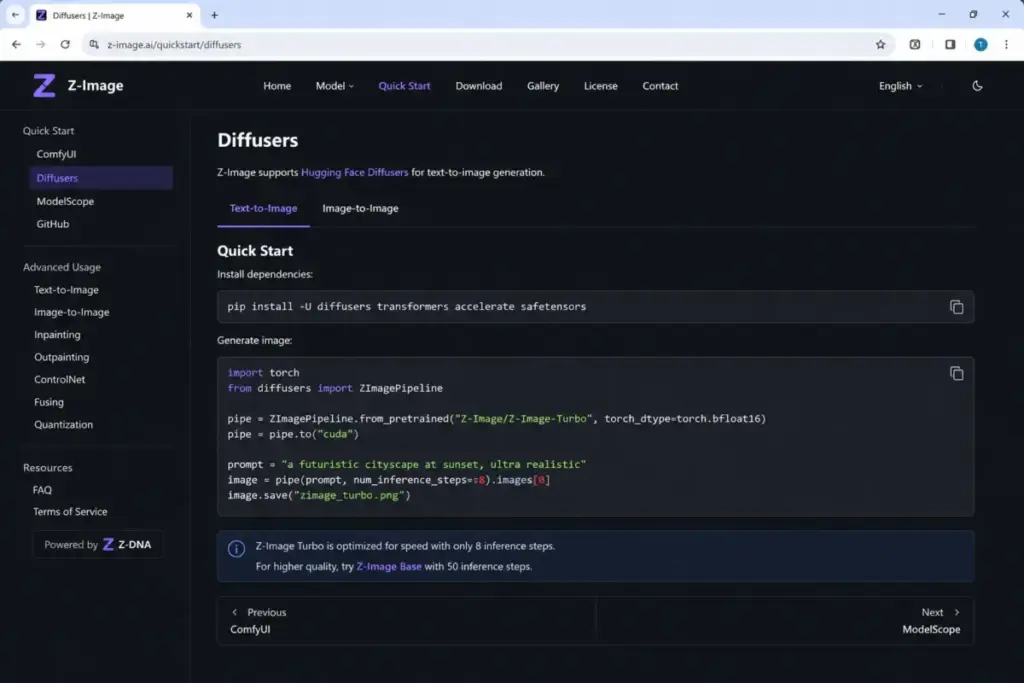
Official documentation provides Diffusers quick-start code and the model is available through multiple integration paths:
- Diffusers: Python pipeline, standard Hugging Face workflow
- ComfyUI: Community workflow support
- stable-diffusion.cpp: C++ inference option
- DiffSynth-Studio, vllm-omni, SGLang-Diffusion, Candle: Additional framework support
- ModelScope: Chinese-market model hosting and API
For a developer, Diffusers support means standard Python integration. For a creator using ComfyUI, it means drag-and-drop workflow compatibility. For neither audience does setup happen automatically.
Available on: Local deployment. Third-party APIs handle integration on their side.
Bilingual text rendering (English and Chinese)
Z-Image Turbo handles in-image text generation in both English and Chinese. This is a differentiator versus most Western-origin models where text rendering remains inconsistent across languages.
Limitation: Text rendering quality depends on the prompt and context. Not every generated text block will be perfect. Production use cases for text-heavy designs (posters, menus, signage) should include a quality review step.
Available on: All deployment paths.
Ease of Use and Setup
| Setup Path | Difficulty | Time to First Image | Technical Requirements |
|---|---|---|---|
| Hugging Face demo | Low | 1-2 minutes | Browser only |
| Diffusers (local) | High | 30-60 minutes | Python, GPU, pip, model download (~12 GB) |
| ComfyUI (local) | Medium-High | 20-40 minutes | ComfyUI installed, custom nodes, model files |
| Third-party API | Low-Medium | 5-15 minutes | API key, HTTP client, provider account |
| Self-hosted production | High | Hours to days | MLOps experience, GPU infrastructure, deployment pipeline |
What this means: the “ease of use” answer depends entirely on which user you are. A developer with a Python environment and a compatible GPU can generate images within an hour. A non-technical user can try the Hugging Face Space demo in minutes but cannot customize, scale, or rely on it for production work.
The Stable Diffusion review pattern applies here: open-source image models are accessible but not easy. Accessibility means the weights exist and anyone can download them. Ease means you can go from idea to image without technical friction. Z-Image Turbo delivers accessibility, not ease.
Integrations and Ecosystem
Z-Image Turbo connects to the open-source AI infrastructure ecosystem rather than to SaaS business tools:
Official and community integrations:
- Hugging Face (model hosting, Spaces demo, Diffusers pipeline)
- ModelScope (model hosting, Chinese-market access)
- ComfyUI (visual workflow builder)
- stable-diffusion.cpp (C++ inference)
- DiffSynth-Studio (generation framework)
- vllm-omni, SGLang-Diffusion (inference engines)
- Candle (Rust-based inference)
Third-party API providers:
- getimg.ai (~$0.015/image as of May 2026)
- fal.ai
- Replicate
- Runware
- AI/ML API
There are no native integrations with Slack, Google Workspace, Adobe Creative Cloud, Canva, Figma, or any traditional business SaaS tool. If you need Z-Image Turbo outputs inside a business workflow, you build the integration yourself or use a third-party wrapper.
Security, Support, and Compliance
Security: No dedicated SOC 2, ISO 27001, HIPAA, or GDPR compliance documentation exists for Z-Image Turbo as a standalone product. Security posture depends entirely on your deployment path. Self-hosted means you own security. Third-party API means their security applies. The Hugging Face demo inherits Hugging Face’s infrastructure security.
Support: Open-source channels only. GitHub Issues, Hugging Face community discussions, ModelScope documentation, and ComfyUI community resources. No SLA, no dedicated support team, no enterprise support tier.
Admin controls: None built in. The model has no user management, role-based access, audit logging, or usage controls. These would need to be built or sourced separately for any team deployment.
For teams evaluating Z-Image Turbo against something like the Adobe Firefly review or Midjourney review, the compliance gap is significant. Closed platforms handle moderation, content policies, and terms of service. With Z-Image Turbo, those are your responsibility.
Z-Image Turbo Limitations
- No CFG means limited prompt control. You cannot use negative prompts or adjust guidance scale to steer outputs. What the model generates on the first pass is what you get, with minimal directional correction available.
- Low diversity outputs. Official documentation rates Turbo’s diversity as “low.” In practical terms, running the same prompt multiple times may produce visually similar compositions. For creative exploration or A/B testing visual concepts, this is a bottleneck.
- Fine-tuning not supported on Turbo. The official model zoo marks fine-tunability as N/A for the Turbo variant. Teams that need LoRA, DreamBooth, or other fine-tuning approaches should use Z-Image Base instead, accepting slower generation.
- Compression artifacts reported in non-photorealistic styles. Reddit community feedback flags banding and JPEG-like artifacts in artwork and anime-style generations. Photorealistic use cases appear less affected, but the issue is worth testing on your target output style.
- No built-in content moderation. The model does not include a safety filter by default. Production deployments handling user-submitted prompts need external moderation to prevent misuse.
- Benchmark rankings are perishable. Launch-era rankings from December 2025 do not reflect the current leaderboard state. New models from competing teams (Seedream, HunyuanImage, HiDream) continue entering the space. Verify current rankings before citing them in business cases.
Who Wins and Who Loses
Who should use Z-Image Turbo
Solo developer building an image generation feature. You have a GPU, you know Python, and you need a fast text-to-image model without licensing restrictions. Z-Image Turbo is the correct choice. The Apache-2.0 license, Diffusers support, and 16 GB VRAM target make it practical for prototyping and small-scale production.
Technical creator using ComfyUI. If you already run ComfyUI workflows with Stable Diffusion models, adding Z-Image Turbo is a model swap, not a workflow rebuild. The speed advantage over SDXL is noticeable for iterative work.
AI research team comparing models. Z-Image Turbo’s open weights, documented architecture, and benchmark presence make it a useful reference point for image generation research and model evaluation.
Product team prototyping an AI image API. Before committing to a closed provider, testing with Z-Image Turbo through Diffusers or a third-party API validates feasibility without vendor lock-in.
Bilingual content team (English + Chinese). The model’s bilingual text rendering fills a gap that most Western-origin models leave open.
Who should avoid Z-Image Turbo
Non-technical marketing teams. If nobody on your team can install Python packages, manage GPU drivers, or configure API endpoints, Z-Image Turbo will create more problems than it solves. Closed platforms like Canva AI image tools or Adobe Firefly offer the product layer you need.
Enterprise teams needing compliance documentation. Z-Image Turbo has no SOC 2 report, no GDPR data processing agreement, no enterprise support SLA. If your procurement process requires these, the model alone is not sufficient. You need a hosting provider that adds these layers.
Studios that need style diversity and fine-tuning. Turbo’s low diversity and N/A fine-tunability make it wrong for projects requiring varied artistic styles, custom-trained models, or heavy prompt engineering with negative prompts. Use Z-Image Base or a model ecosystem like DALL-E image generation with built-in style controls.
Teams expecting predictable monthly billing. The model is free, but production costs fluctuate with GPU pricing, API call volume, and infrastructure choices. If your finance team needs a fixed monthly line item, a subscription-based platform provides that predictability.
Better Alternatives for Teams That Should Not Use Z-Image Turbo
FLUX.2 Dev: Best for diversity and fine-tuning control
FLUX.2 Dev offers higher output diversity and supports fine-tuning workflows. For studios that need to train custom styles or explore wide creative ranges, FLUX models provide the control Z-Image Turbo sacrifices for speed.
Choose FLUX.2 Dev if: you need CFG control, negative prompts, LoRA fine-tuning, and do not mind slower generation times.
Midjourney: Best for non-technical creative teams
Midjourney is a closed platform with a Discord and web interface, consistent output quality, and a subscription model. No GPU, no Python, no infrastructure management.
Choose Midjourney if: your team wants polished image generation without any technical setup. Starting at $10/month (as of May 2026).
DALL-E 3 / GPT Image: Best for API-first developers on OpenAI
DALL-E integrates with the OpenAI API ecosystem. For teams already using GPT models and wanting image generation in the same API framework, DALL-E provides a single-vendor path.
Choose DALL-E if: you are already in the OpenAI ecosystem and want image generation alongside text AI under one API key.
Leonardo AI: Best for creative professionals wanting a SaaS platform
Leonardo AI provides a browser-based platform with model selection, fine-tuning, and team features. Our Leonardo AI review covers its pricing and limitations in detail. It sits between the open-source model approach and fully closed platforms.
Choose Leonardo AI if: you want more control than Midjourney but less infrastructure work than self-hosting.
| Alternative | Best For | Pricing Model | Open Source | Fine-tuning |
|---|---|---|---|---|
| FLUX.2 Dev | Diversity + fine-tuning | Free model + compute | Yes (check license) | Yes |
| Midjourney | Non-technical teams | $10-$120/month subscription | No | No |
| DALL-E 3 / GPT Image | OpenAI API users | Per-image API pricing | No | No |
| Leonardo AI | Creative professionals | Freemium + subscription | No | Yes (limited) |
Final Verdict: Is Z-Image Turbo Worth It in 2026?
Z-Image Turbo is worth it for technical teams that understand what they are getting: a fast, open, 6B-parameter image model, not a finished SaaS product.
Use Z-Image Turbo if you are a developer prototyping an image API, a ComfyUI user who wants fast photorealistic generation, or a technical creator who values open licensing and infrastructure control over product polish.
Skip Z-Image Turbo if you need a turnkey image platform, compliance documentation, team workspace, customer support, or predictable monthly billing. In that case, a closed platform or hosted API provider is the safer choice, even if it costs more.
The bottom line: Z-Image Turbo solves the “fast, free, open image model” problem well. It does not solve the “I need a complete image generation product” problem at all. The question is not whether Z-Image Turbo is good. The question is whether your team’s needs stop at the model layer or extend into infrastructure, governance, and support. That answer determines whether Z-Image Turbo is your best option or a dead end.
For developers evaluating the broader AI image generation space, Z-Image Turbo belongs on the shortlist. Just budget for everything the model itself does not include.
FAQ
Is Z-Image Turbo free to use?
The model weights are free to download and use under the Apache-2.0 license. Production use requires compute infrastructure (local GPU, cloud GPU, or third-party API), which has its own cost. Third-party API pricing starts around $0.015 per image on getimg.ai as of May 2026. The model is free. Running it at scale is not.
Is Z-Image Turbo open source?
Yes. The official Hugging Face model card lists Z-Image Turbo under Apache-2.0, one of the most permissive open-source licenses. Code, model weights, and documentation are publicly available through Hugging Face and ModelScope. The Apache-2.0 license permits commercial use, modification, and redistribution of the model weights.
How much does Z-Image Turbo cost in 2026?
The model itself is free. Third-party API access starts around $0.015 per image (getimg.ai pricing as of May 2026). Local deployment costs depend on GPU hardware. Cloud GPU rental runs $0.40-$2.00+ per hour depending on the GPU tier. Total production cost depends on volume and deployment path.
What GPU do I need for Z-Image Turbo?
Official documentation targets consumer GPUs with roughly 16 GB VRAM. Cards like the NVIDIA RTX 4060 Ti (16 GB) or RTX 3090 (24 GB) are commonly referenced in community discussions. Lower VRAM cards may work with optimization but are not officially documented.
Can I run Z-Image Turbo locally?
Yes. The model supports local deployment through Diffusers (Python), ComfyUI, stable-diffusion.cpp, and other frameworks. You need a compatible GPU with roughly 16 GB VRAM, a Python environment, and the model files (approximately 12 GB download). Consumer GPUs like the RTX 4060 Ti or RTX 3090 are commonly referenced in community setups.
What is the difference between Z-Image Turbo and Z-Image Base?
Turbo uses 8 inference steps with no CFG, low diversity, and no fine-tuning support. Base uses 50 steps with CFG support, higher diversity, and fine-tuning capabilities. Turbo is for speed. Base is for control. Choose based on whether your workflow prioritizes generation speed or output variety.
Does Z-Image Turbo work with ComfyUI?
Yes. Community-built ComfyUI nodes and workflows support Z-Image Turbo. Setup requires downloading the model files and installing the appropriate custom nodes. The workflow is similar to adding any new model to an existing ComfyUI setup. Check the official Z-Image GitHub repository for current ComfyUI documentation and supported nodes.
Can Z-Image Turbo be fine-tuned?
No. The official model zoo marks Turbo fine-tunability as N/A. If you need fine-tuning with LoRA, DreamBooth, or similar approaches, use Z-Image Base instead, which supports fine-tuning but uses 50 inference steps. The fine-tuning limitation is a direct consequence of the distillation process that enables Turbo’s 8-step speed advantage.
Is Z-Image Turbo safe for commercial projects?
The model weights are licensed under Apache-2.0, which permits commercial use. Questions about generated output ownership, training data provenance, and jurisdiction-specific rights are separate from the model license. Teams with commercial deployment plans should review the license terms and consult legal counsel for their specific use case.
Does Z-Image Turbo have a mobile app?
No. Z-Image Turbo is a model, not a consumer application. It has no dedicated mobile app. Users can access the Hugging Face demo through a mobile browser or use third-party platforms that may offer mobile interfaces, but the model itself is infrastructure, not an app.