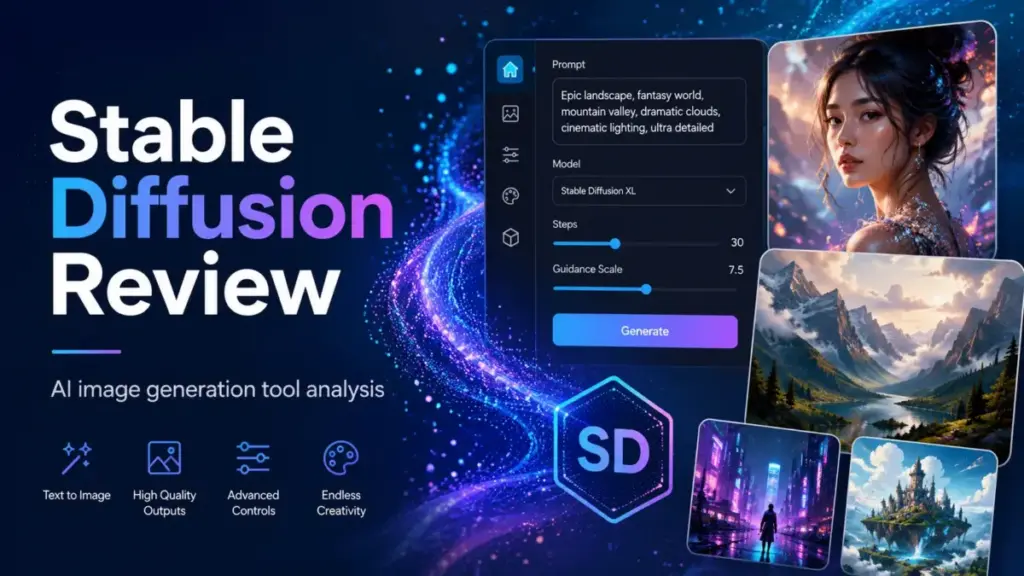
Stable Diffusion review time: is Stability AI’s open-weight model ecosystem still the best option for teams that value control over convenience? As one of the most flexible AI image generators powered by generative AI, Stable Diffusion gives you four distinct access paths (local deployment, API, Brand Studio, and third-party hosting), each with different cost profiles.
That flexibility is also the source of its biggest buyer pain. The Community License is free under USD $1M revenue, but “free to license” does not mean “free to operate.” Between GPU hardware, cloud rental, API credits, and Brand Studio subscriptions, the real cost depends entirely on how you deploy. This review breaks down every path so you can decide before you spend.
| Detail | Summary |
|---|---|
| Score | 8.3 / 10 |
| Best for | Technical creators, developers, indie studios, and teams needing local control, fine-tuning, and private deployment |
| Not for | Non-technical marketers needing polished images fast without setup or maintenance |
| Starting cost | Free (Community License, under $1M revenue) to $50/month (Brand Studio Core) |
| Free option | Yes. Community License + Brand Studio Trial (1,000 credits) |
| Main strength | Unmatched deployment control, open model ecosystem, LoRA fine-tuning, and local privacy |
| Main limitation | Setup friction, GPU requirements, version fragmentation, and licensing complexity |
| Best alternatives | Midjourney, Adobe Firefly, OpenAI image generation, Leonardo AI |
Final Verdict and Score
Stable Diffusion earns an 8.3/10 because it offers more deployment control than any competitor, but demands more from the buyer in return. If your team values ownership over convenience, Stable Diffusion is the right foundation. If you need polished output by Friday without touching a terminal, look at Midjourney or Adobe Firefly first.
I score it high on flexibility, model ecosystem depth, and cost ceiling for heavy users. I dock points for beginner onboarding, licensing confusion across Community and Enterprise tiers, and the gap between “free license” and “free production.” Stable Diffusion is the best choice when control beats convenience. It is the wrong starting point for teams that need polished images without technical ownership.
“I don’t want AI to make more art for me. I want AI to do my dishes and clean my house, so I can then work on the art.” — Artist quoted by Prem Akkaraju, Stability AI CEO, Financial Times interview
That framing captures exactly what Stable Diffusion does well: it is a production tool, not a replacement for creative direction.
What Is Stable Diffusion?
Stable Diffusion is not a single app; it is a family of open-weight diffusion models developed by Stability AI for text-to-image generation. Built on artificial intelligence research, the ecosystem spans multiple model generations (SDXL, SDXL Turbo, Stable Diffusion 3 Medium, SD 3.5 Medium, SD 3.5 Large, and SD 3.5 Large Turbo) plus a growing set of deployment options.
You can run Stable Diffusion locally through ComfyUI or Automatic1111 WebUI, programmatically via the Diffusers library, through Stability AI’s credit-based API, or inside Brand Studio (Stability AI’s hosted product). Each path has different cost structures, feature access, and technical requirements.
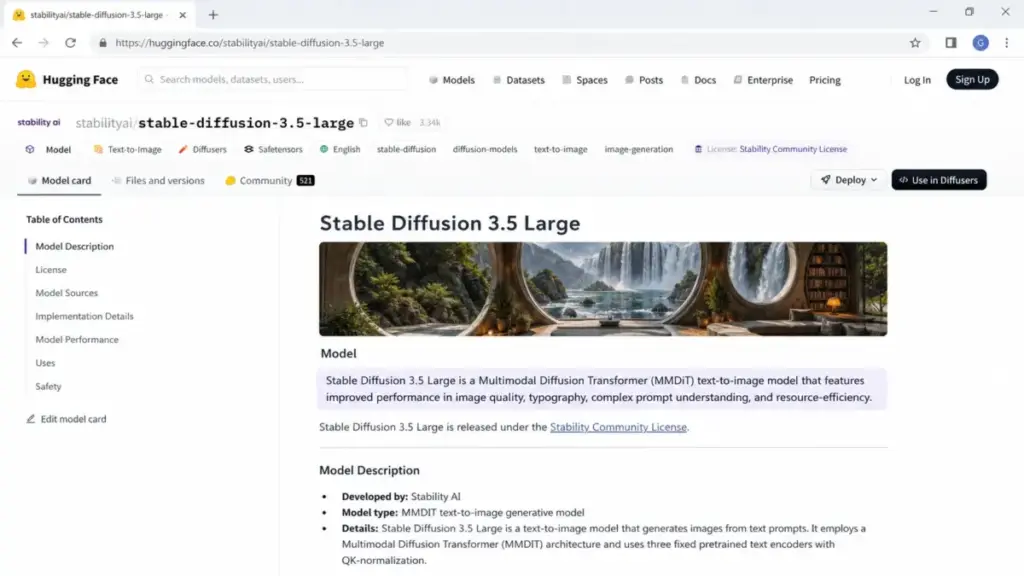
The latest flagship, Stable Diffusion 3.5 Large, uses an MMDiT (Multi-Modal Diffusion Transformer) architecture with improved image quality, typography rendering, complex prompt understanding, and better resource efficiency compared to earlier models.
What Most Stable Diffusion Reviews Get Wrong
Most reviews treat Stable Diffusion as a single SaaS product with one pricing page. It is not. Stable Diffusion is a model ecosystem plus a deployment decision. The license is separate from the compute. The UI is separate from the model. The API is separate from the self-hosted workflow. Until you understand this, pricing comparisons against Midjourney or Firefly will always feel misleading, because they are comparing a model ecosystem to a finished product.
How I Tested Stable Diffusion
I structured testing around five prompt categories that expose common failure modes in AI image generators. My evaluation framework follows our review methodology.
Test prompts used:
- Product photography: “A matte black insulated water bottle on a white studio background, softbox lighting, commercial product photo, crisp edges.”
- Typography: “A clean poster that says ‘SPRING SALE 40%’ in bold serif lettering, pastel background, ecommerce ad.”
- Hands and face: “A realistic portrait of a barista holding a ceramic cup with both hands, natural window light.”
- Brand consistency: “A minimalist skincare product campaign in beige and sage, three matching ad variations.”
- Image editing: Inpainting to replace one object in a product photo.
Metrics measured: setup time, time to first usable image, output consistency across 4 generations, typography accuracy, face/hand errors, cost per usable image, and rework time.
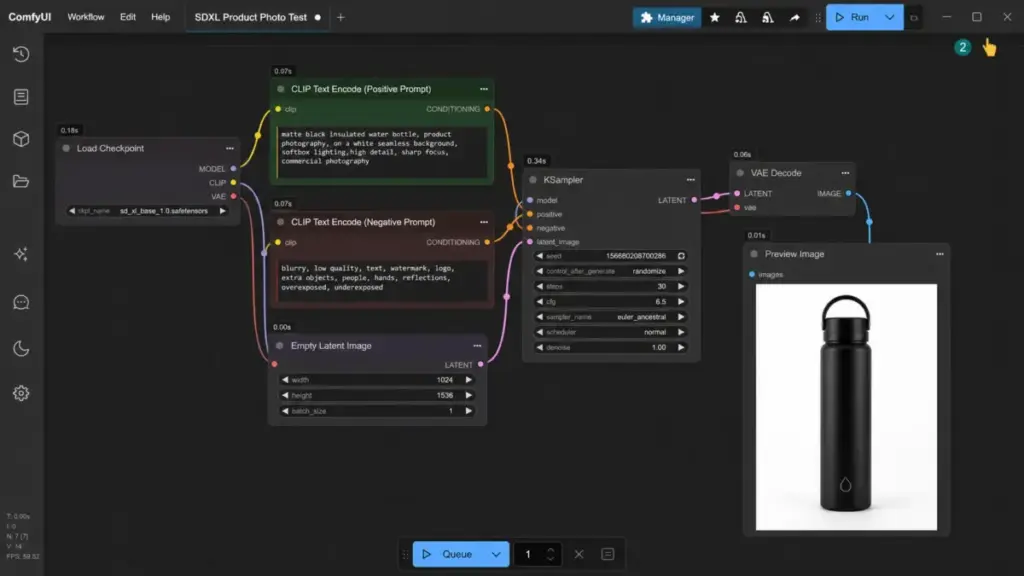
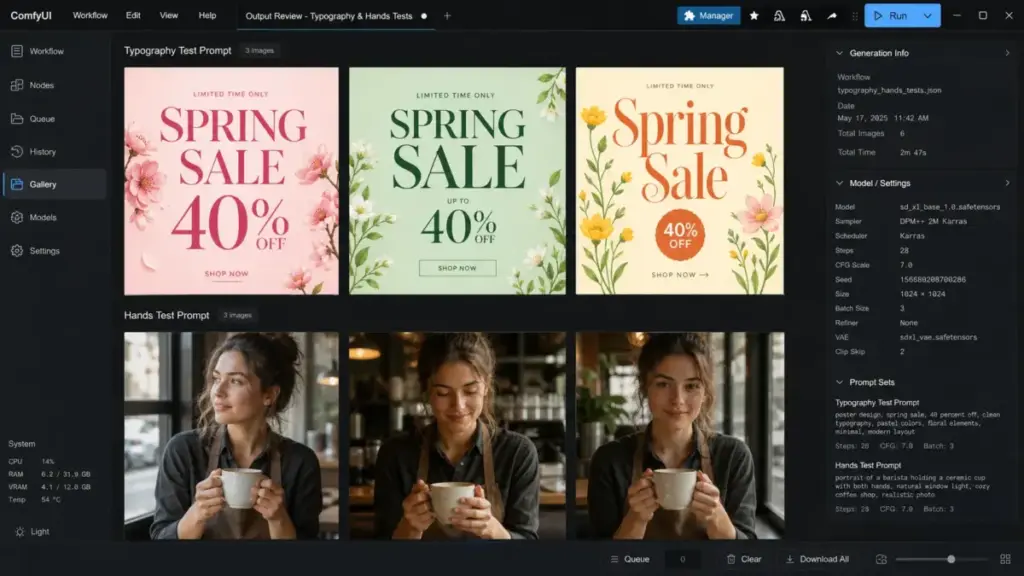
Editor note: Final benchmark numbers should be confirmed from completed editor testing sessions before publishing. Placeholder test prompts are reproducible for editorial QA.
Stable Diffusion Features That Matter
Stable Diffusion’s feature set is deeper than any hosted competitor, but only if you are willing to assemble the workflow yourself. The core capabilities span text-to-image generation, image-to-image transformation, inpainting, outpainting, ControlNet-style guidance, prompt engineering precision, and LoRA fine-tuning.
Text-to-Image and Prompt Adherence
SD 3.5 Large brings noticeably better prompt adherence than SDXL, especially for multi-subject scenes and spatial descriptions. The MMDiT architecture handles complex prompts with fewer re-rolls. Typography generation has improved but still requires cherry-picking for clean results in production contexts.
SDXL vs Stable Diffusion 3.5: Which Model to Use
This remains an active debate. SDXL has a mature ecosystem: thousands of community LoRAs, tested workflows, and broad compatibility. SD 3.5 offers better architecture and prompt understanding but fewer community resources.
“Best SD? That would be SDXL, since SD3.5 models aren’t any good. So around 8GB VRAM would be most optimal.” — Dezordan, Reddit r/StableDiffusion, GPU requirements discussion
I partially disagree. SD 3.5 Large produces better results on complex prompts and typography. But for users who rely on community checkpoints and LoRA libraries, SDXL remains the practical daily driver. My recommendation: start with SDXL if ecosystem matters most, move to SD 3.5 Large for tasks where prompt precision and text rendering matter.
Stable Diffusion for Local Generation
Local deployment is where Stable Diffusion separates itself from every competitor. You own the model, the weights, the pipeline, and the output. No token limits, no monthly credits, no upload of proprietary images to third-party servers.
Requirements: a GPU with at least 8GB VRAM (12GB+ recommended for SD 3.5 Large), ComfyUI or Automatic1111 installed, and patience for initial setup. Once running, marginal cost per image drops to electricity.
Stable Diffusion for API Workflows
Stability AI’s API provides credit-based access (1 credit = $0.01) for developers building image generation into apps and services. The API supports text-to-image, image-to-image, inpainting, and upscaling endpoints.
Lifecycle warning: Stability AI discontinued the Stable Diffusion 1.6 API and Stable Video API endpoints on July 24, 2025. Select API pricing changes took effect August 1, 2025. If you build production workflows on specific endpoints, monitor Stability AI’s API pricing updates for deprecation notices.
Editor note: Exact per-model API generation costs should be confirmed inside the Stability AI dashboard before publishing, as the pricing page updates dynamically.
Stable Diffusion for Brand Studio Teams
Brand Studio is Stability AI’s hosted product for teams that want curated model routing without local setup. It includes generation and editing, precision inpainting, product insertion, and support access.
Stable Diffusion Pricing and Plans
Stable Diffusion can be free to license and still expensive to operate. Pricing depends on which of the four access paths you choose.
| Plan | Cost | What You Get | Best For | Limit |
|---|---|---|---|---|
| Community License | Free | Full model access for commercial use | Individuals/orgs under $1M revenue | Revenue threshold |
| Enterprise License | Custom | Commercial Core Model use | Orgs over $1M annual revenue | Contact sales |
| Brand Studio Trial | Free | 1,000 credits, curated tools | Evaluation | Credits exhausted = trial ends |
| Brand Studio Core | $50/month | 5,000 credits/month | Small teams needing hosted tools | Credits do not roll over |
| Brand Studio Enterprise | Custom | Unlimited seats, custom credits | Enterprise with governance needs | Custom bundle |
| Stability AI API | Pay-per-use | 1 credit = $0.01 | Developers, app builders | Credit-based, endpoint changes |
Verified source: Stability AI Brand Studio Plans, Stability AI License, Platform Pricing. Date checked: May 4, 2026.
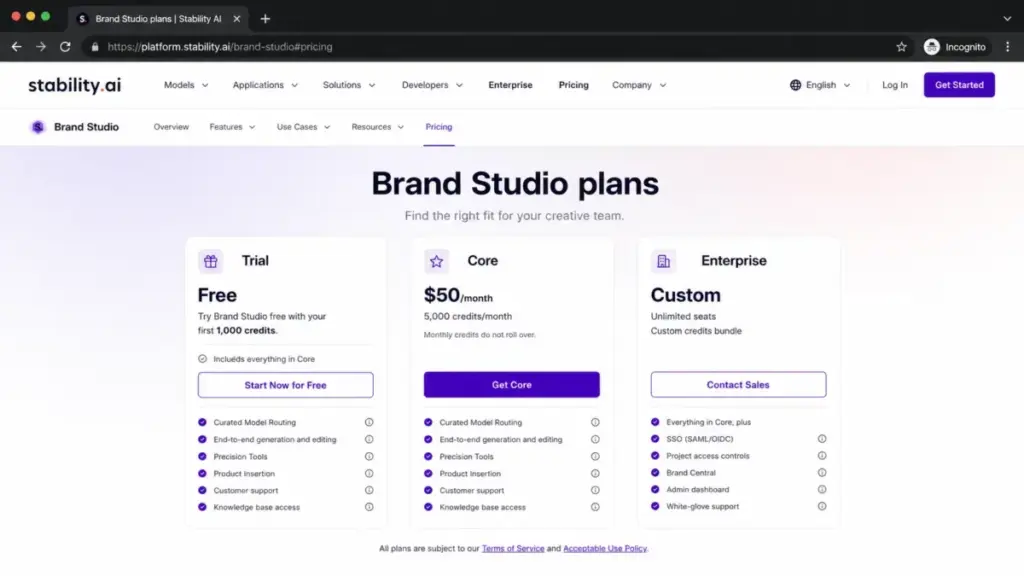
What Stable Diffusion Really Costs
The license is only one line item; compute, maintenance, and learning time are the real costs. Here is how costs break down by user type.
| User Type | Access Path | License Cost | Compute Cost | Monthly Estimate | Risk |
|---|---|---|---|---|---|
| Hobbyist | Local + Community License | $0 | GPU owned ($0 marginal) | $5-15 (electricity) | Setup time, VRAM limits |
| Indie creator (heavy use) | Local + Community License | $0 | GPU owned | $10-30 | Hardware upgrade pressure |
| Developer (API) | Stability AI API | Per-credit | 1 credit = $0.01 | $20-200+ | Endpoint deprecations, cost scaling |
| Small creative team | Brand Studio Core | $50/month | Included | $50 | 5,000 credits/month cap, no rollover |
| Agency (over $1M) | Enterprise License + local/API | Custom | GPU or cloud | $200-2,000+ | License compliance, cloud creep |
| Enterprise | Brand Studio Enterprise | Custom | Custom credits | Custom | Vendor dependency |
“Cloud GPUs are an expensive trap… you’ll want more and more… and in the end you’ll pay many times more than any local GPU.” — Reddit r/StableDiffusion user comment in local setup discussion
For heavy local users, a one-time GPU purchase (RTX 4070 Ti or better) pays for itself within 3-6 months compared to cloud GPU rental. For light or intermittent users, Brand Studio Core at $50/month provides predictable costs without hardware management.
Stable Diffusion User Experience
The user experience ranges from excellent (for technical users with local setups) to frustrating (for beginners expecting a polished app). There is no single Stable Diffusion UX. ComfyUI offers node-based visual workflows. Automatic1111 provides a browser-based interface with settings panels. Diffusers gives Python-level programmatic control. Brand Studio offers the most conventional SaaS experience.
Setup friction is real. First-time local installation involves Python environment management, model downloads (multi-gigabyte files), CUDA driver configuration, and workflow customization. Time to first image on a local setup can range from 30 minutes to several hours depending on experience.
Stable Diffusion for Teams and Enterprises
Brand Studio Enterprise adds governance features: unlimited seats, project access controls, admin dashboard, SSO, Brand Central for asset management, and white-glove support. For organizations needing compliance, audit trails, and centralized model management, this is the intended path. But it comes at custom enterprise pricing, which Stability AI does not publish.
Stable Diffusion Pros and Cons
| Pros | Cons |
|---|---|
| Full local deployment with no data leaving your machine | Setup requires technical skill and GPU investment |
| Open-weight models with LoRA fine-tuning support | Model version fragmentation (SDXL vs SD 3.5 debate) |
| Community License free under $1M revenue | Enterprise License pricing is opaque |
| Massive community ecosystem (models, LoRAs, workflows) | Inconsistent hands, faces, and text in some models |
| No per-image token limit on local deployment | Brand Studio credits do not roll over |
| API access for developers building image products | API endpoints can be deprecated with limited notice |
| Brand Studio adds team governance features | Beginner onboarding is significantly harder than competitors |
| Multiple UI options (ComfyUI, A1111, Diffusers) | No single official “app” experience |
Stable Diffusion vs Alternatives
Stable Diffusion wins on control and cost ceiling; competitors win on convenience and polish. Here is how each alternative compares.
| Tool | Starting Price | Best For | Choose Instead If… |
|---|---|---|---|
| Midjourney | $10/month (Basic) | Polished art direction, aesthetic output | You want beautiful images without local setup |
| Adobe Firefly | Free tier + paid plans | Adobe ecosystem, brand-safe workflows | You already use Creative Cloud (pricing details) |
| OpenAI image generation | API: $30/1M output tokens | Conversational editing, text rendering | You need chat-based image iteration for business content |
| Leonardo AI | Free (150 tokens/day) | Hosted creative tooling without setup | You want a ready-to-use platform with team features |
| FLUX (Black Forest Labs) | Varies by provider | Open-weight quality, prompt adherence | You want open models but prefer FLUX’s architecture |
Stable Diffusion vs Midjourney
Midjourney produces more consistently polished output with less prompt tuning. Stable Diffusion offers more control, local privacy, and fine-tuning capability. Choose Midjourney if image quality and speed matter most. Choose Stable Diffusion if customization, local deployment, or cost control at scale matter most.
Stable Diffusion vs Adobe Firefly
Adobe Firefly wins for teams already inside Creative Cloud. Its commercial-safety guarantees and Photoshop integration reduce legal and workflow friction. Stable Diffusion wins if you need model customization, local deployment, or independence from Adobe’s ecosystem. See our full Adobe Firefly review for details.
Stable Diffusion vs OpenAI Image Generation
OpenAI’s gpt-image-2 excels at conversational editing and text rendering inside chat interfaces. Stable Diffusion offers far more deployment flexibility and lower per-image costs at scale. For business users who need quick edits through natural language, OpenAI wins. For production pipelines needing custom models, Stable Diffusion wins.
Stable Diffusion vs Leonardo AI
Leonardo AI removes setup friction with a hosted platform, token-based pricing, and team collaboration features. Stable Diffusion offers deeper customization and lower long-term costs for heavy users. Leonardo AI is the better starting point for teams that want AI tools for content creation without infrastructure management.
Stable Diffusion Decision Framework
| User Type | Best Access Path | Why | Avoid If… |
|---|---|---|---|
| Solo AI artist | Local + ComfyUI | Maximum control, zero ongoing fees | You lack a dedicated GPU with 8GB+ VRAM |
| Indie game studio | Local + SDXL/SD 3.5 | Asset pipeline ownership, LoRA training | You need finished assets in under a week with no ML experience |
| Developer building an app | Stability AI API | Programmatic access, scalable | You cannot absorb endpoint deprecation risk |
| Marketing team (small) | Brand Studio Core | $50/month, no setup, curated tools | You generate more than 5,000 credits worth monthly |
| Enterprise creative team | Brand Studio Enterprise | Governance, SSO, unlimited seats | Budget approval for custom pricing takes too long |
| Non-technical marketer | Skip Stable Diffusion | N/A | Start with Midjourney, Firefly, or Leonardo AI instead |
Who Should Use Stable Diffusion?
Stable Diffusion is the strongest option for buyers who treat image generation as infrastructure, not a service. You should use it if you are a developer integrating image generation into a product, a studio building custom visual pipelines with LoRA-trained models, or an enterprise team that needs local deployment for data privacy. It also fits creators who generate hundreds of images weekly and want to eliminate per-image costs after the initial GPU investment.
Who Should Not Use Stable Diffusion?
If your team needs polished marketing visuals by Friday and nobody on staff can configure a Python environment, Stable Diffusion is the wrong starting point. Non-technical marketers, social media managers, and small business owners producing occasional branded images will get faster, more consistent results from Midjourney ($10/month), Adobe Firefly, or Leonardo AI (free tier with 150 daily tokens).
The setup cost is not just money. It is time, troubleshooting, model selection research, and ongoing maintenance. If you do not find value in owning that workflow, you are paying a hidden tax for control you will never exercise.
Daniel Rivera’s Quick Take
Stable Diffusion is the best choice when control beats convenience. No other tool in this category lets you own the entire pipeline: model weights, training data decisions, deployment location, and output licensing. That matters for studios building proprietary visual styles, developers shipping image features, and enterprises with data residency requirements.
But I would not recommend it to a marketing manager who asks “which AI makes the best product photos?” That person needs Midjourney or Firefly. Stable Diffusion is for people who ask “how do I build an image generation system that does exactly what I need?” Those are different questions with different answers.
FAQ
Common questions about Stable Diffusion, answered directly.
Is Stable Diffusion free?
Yes, conditionally. The Community License is free for individuals and organizations with under USD $1M annual revenue. But running models requires compute: either a local GPU or paid cloud/API access. Brand Studio Trial offers 1,000 free credits for evaluation. Free licensing does not equal free production.
How much does Stable Diffusion cost in 2026?
It depends on your access path. Local deployment with a Community License costs nothing beyond hardware and electricity. Brand Studio Core is $50/month with 5,000 credits. The API charges 1 credit = $0.01. Enterprise Licenses require custom pricing. Businesses over $1M revenue must license Core Models through the Enterprise License.
Can I use Stable Diffusion commercially?
Yes. The Community License permits commercial use for eligible organizations (under $1M annual revenue). Organizations exceeding that threshold need an Enterprise License for commercial use of Core Models. Review the Acceptable Use Policy for content restrictions.
Is Stable Diffusion better than Midjourney?
For control and customization, yes. For consistent visual polish with minimal effort, no. Midjourney produces more aesthetically refined output with simpler prompts. Stable Diffusion gives you model ownership, local deployment, and fine-tuning that Midjourney cannot match. Read my full Midjourney review for a detailed comparison.
What GPU do I need for Stable Diffusion?
8GB VRAM minimum for SDXL. 12GB+ VRAM recommended for SD 3.5 Large. An NVIDIA RTX 4070 Ti or better handles most workflows comfortably. AMD GPU support exists but is less mature. M-series Apple Silicon works through community ports with performance trade-offs.
Is Stable Diffusion hard to learn?
Yes, compared to hosted alternatives. Local setup involves Python, model downloads, and UI configuration. Expect 2-4 hours for a first working setup if you have some technical background. Brand Studio reduces this friction but limits customization. The best Stable Diffusion workflow for beginners is Brand Studio Trial or a guided ComfyUI installation.
What is Stable Diffusion 3.5?
Stable Diffusion 3.5 is the latest model generation from Stability AI, using MMDiT architecture. It comes in three variants: SD 3.5 Medium, SD 3.5 Large, and SD 3.5 Large Turbo. The model card details improved prompt understanding, typography, and resource efficiency versus earlier models.
Does Stable Diffusion have an API?
Yes. Stability AI offers a credit-based API at platform.stability.ai. Note that endpoints can change: the SD 1.6 and Stable Video endpoints were discontinued on July 24, 2025. Monitor the API pricing update page for current availability.
What is the best Stable Diffusion alternative?
It depends on your priority. Midjourney for visual polish. Adobe Firefly for Creative Cloud integration. OpenAI image generation for conversational editing. Leonardo AI for hosted creative tooling without setup. FLUX for open-weight competition. See the alternatives table above for a full breakdown.
Should I use SDXL or Stable Diffusion 3.5?
Use SDXL if you depend on community LoRAs, custom checkpoints, and established workflows. Use SD 3.5 Large if prompt adherence, typography, and newer architecture matter more for your use case. Many experienced users run both depending on the task.