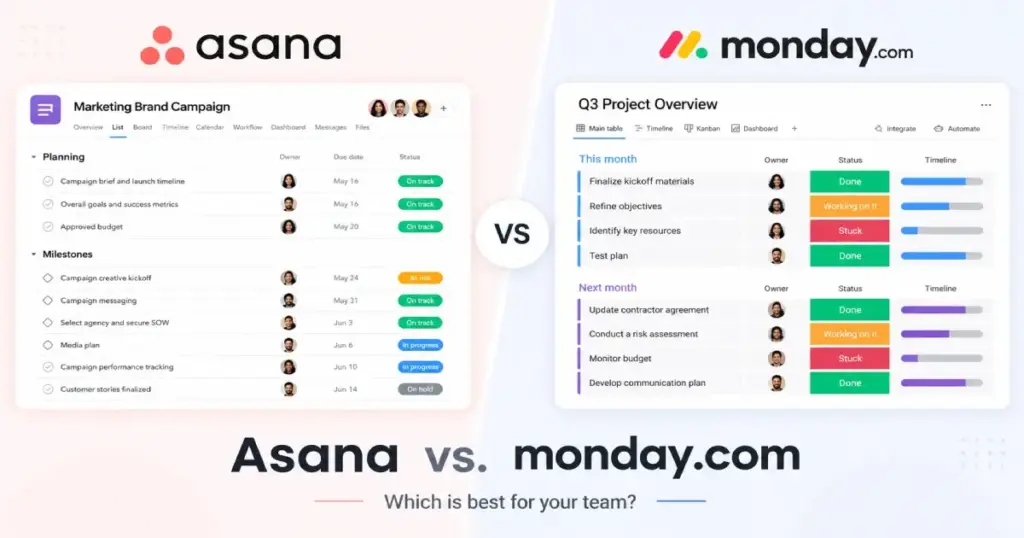
Your team just spent 20 minutes in a standup debating whether a task is “in progress” or “blocked,” and nobody can find the dependency that caused the delay. That is the friction Asana and monday.com both promise to fix, but they approach it from opposite directions.
The real Asana vs. monday.com decision is not about which tool has more features. It is about whether your team needs structured project execution with clear ownership, dependencies, and portfolios, or flexible visual workflows with customizable boards, dashboards, and cross-department operations. I evaluated both platforms across official documentation, verified pricing data, real workflow simulations, and third-party reviewer observations to help project management teams make this call with actual numbers instead of marketing claims.
This comparison covers pricing at 5, 10, 25, and 50 users, automation action limits, AI credit caps, feature-gate differences by plan, and the migration friction most reviews skip entirely.
| Category | Winner | Why |
|---|---|---|
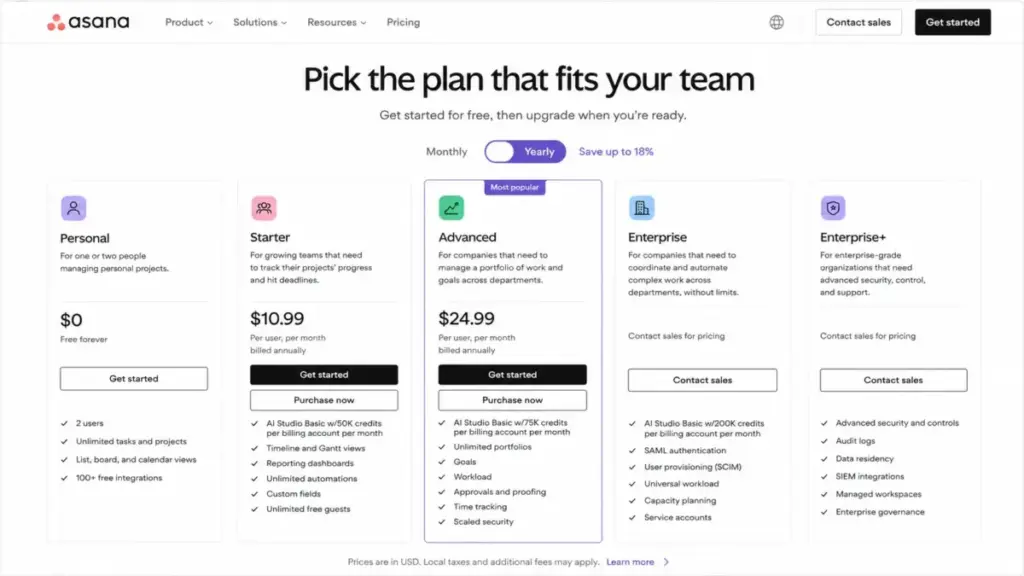
| Entry-tier pricing (5-50 users) | Asana | Starter at$10.99/user/month beats monday Standard at $12/seat/month (annual) |
| Advanced-tier pricing (5-50 users) | monday.com | Pro at$19/seat/month undercuts Asana Advanced at $24.99/user/month (annual) |
| Structured project execution | Asana | Dependencies, portfolios, goals, milestones, approvals |
| Visual workflow flexibility | monday.com | Customizable boards, columns, dashboards, advanced views |
| Ease of setup | monday.com | Non-technical teams start faster with board-first design |
| Automation limits | Depends | monday Standard caps at 250 actions/month; Asana uses plan-gated workflow rules |
| Enterprise security | Tie | Both publish SOC 2 Type II, GDPR, and enterprise governance controls |
The Workflow Setup: How Each Tool Thinks About Work
Asana and monday.com share the same goal but use fundamentally different architectures to reach it.
Asana structures work around tasks, projects, and portfolios. Every task has an owner, a due date, and sits inside a project. Dependencies link tasks together. Portfolios group projects for cross-functional visibility. Goals connect team work to organizational outcomes. This creates a top-down accountability chain: goal to portfolio to project to task to subtask. According to Asana’s official company page, the platform positions itself as a work management system for human and AI collaboration, built to connect goals to work.
monday.com structures work around boards, items, and columns. A board is a customizable workspace. Items are rows. Columns are data fields you define: status, date, person, formula, mirror, dependency, or any of dozens of column types. According to monday.com’s support documentation, the platform describes itself as a flexible system for managing tasks, projects, and cross-team processes with customizable workflows.
The difference matters in practice. A project manager tracking a product launch with 12 dependencies, 3 milestone gates, and a portfolio rollup will find Asana’s structure natural. A marketing operations lead building a visual campaign tracker with custom status columns, conditional automations, and a client-facing dashboard will find monday.com’s flexibility faster to configure.
The Pricing Reality: When the Budget Winner Flips
Pricing is where most Asana vs monday.com comparisons miss the story. At entry tier, Asana wins. At advanced tier, monday.com wins. The flip point depends on which feature set your team actually needs.
Cost at Scale (Annual Billing, Verified May 2026)
| Users | Asana Starter | monday Standard | Entry-Tier Winner | Asana Advanced | monday Pro | Advanced-Tier Winner |
|---|---|---|---|---|---|---|
| 5 | $54.95/mo | $60/mo | Asana | $124.95/mo | $95/mo | monday.com |
| 10 | $109.90/mo | $120/mo | Asana | $249.90/mo | $190/mo | monday.com |
| 25 | $274.75/mo | $300/mo | Asana | $624.75/mo | $475/mo | monday.com |
| 50 | $549.50/mo | $600/mo | Asana | $1,249.50/mo | $950/mo | monday.com |
Pricing sources: Asana pricing page and monday.com pricing page, both verified as of May 2026.
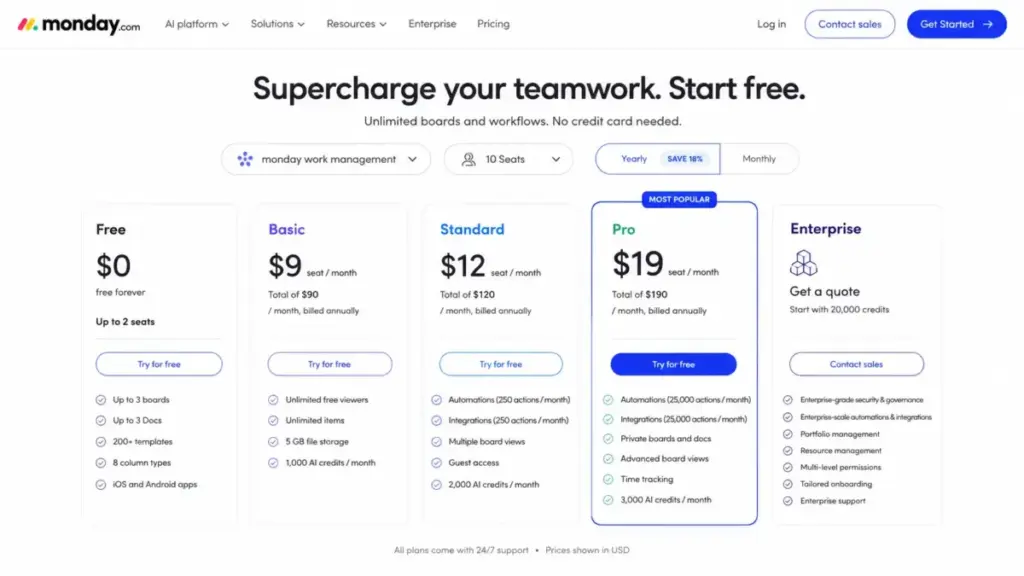
Asana Starter costs $10.99/user/month billed annually. monday.com Standard costs $12/seat/month billed annually. For a 10-person team, that is a $10.10/month difference at entry tier, favoring Asana.
The story reverses at the advanced tier. Asana Advanced costs $24.99/user/month billed annually. monday.com Pro costs $19/seat/month billed annually. At 50 users, that is $299.50/month more for Asana Advanced than monday Pro.
The monday.com Bucket Pricing Trap
Here is the detail that most comparison articles bury. According to monday.com’s pricing support documentation, paid plans require a minimum of 3 seats, then scale in multiples of 5.
What does that mean in practice? A team of 4 must buy 5 seats. A team of 6 must buy 10 seats. A team of 11 must buy 15 seats.
A 6-person team on monday Standard pays for 10 seats at $12/seat = $120/month, not 6 seats at $72/month. That same 6-person team on Asana Starter pays for exactly 6 users at $10.99 = $65.94/month. The gap is $54.06/month, or $648.72/year in wasted seats.
One thing I learned: always map your actual headcount to monday’s bucket tiers before comparing sticker prices. The per-seat number on the pricing page tells half the story.
Hidden Costs Worth Tracking
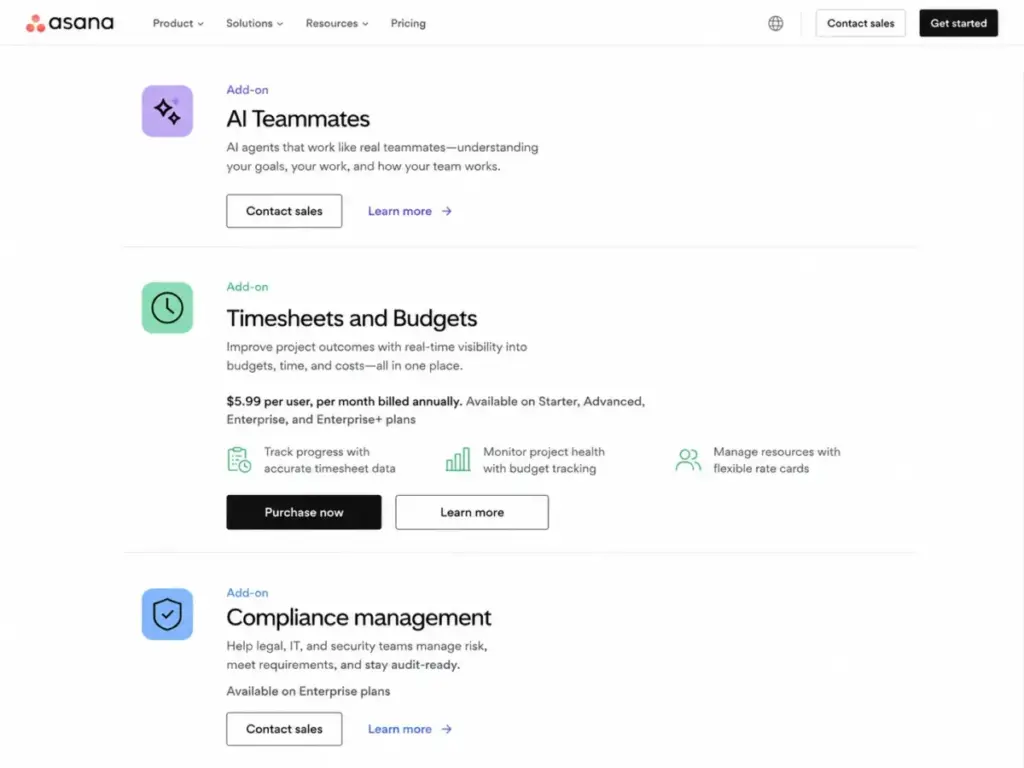
Asana hidden costs: Timesheets and Budgets is a separate add-on at $5.99/user/month billed annually (Asana pricing page). AI Studio Plus and AI Studio Pro are paid access options, but exact public prices were not confirmed on the official pricing page during this research. Enterprise security add-ons (compliance management, permissions management) are enterprise-only or require add-on purchases.
monday.com hidden costs: Automation and integration actions are capped by plan. Each monday product (Work Management, CRM, Dev, Service) is individually priced. Bundled products must share the same billing cycle. Marketplace apps and expert implementation help carry separate costs.
The Feature Gate Map: What Each Plan Actually Unlocks
Feature gates are where the real buying decision lives. Both platforms lock critical capabilities behind higher tiers.
| Feature | Asana Plan Gate | monday.com Plan Gate | Buyer Impact |
|---|---|---|---|
| Task dependencies | Starter ($10.99/user/mo) | Standard ($12/seat/mo) | Both require first paid tier |
| Portfolios | Advanced ($24.99/user/mo) | Enterprise (custom) | Asana gives portfolio access 1 tier lower |
| Goals and OKRs | Advanced | Enterprise | Same pattern: Asana is more accessible |
| Timeline / Gantt view | Starter | Standard (Gantt via views) | Comparable access |
| Custom fields | Starter | Standard (custom columns) | Comparable access |
| Private boards / docs | All plans (project privacy) | Pro ($19/seat/mo) | Asana offers privacy controls earlier |
| Time tracking | Add-on ($5.99/user/mo) | Pro ($19/seat/mo) | Both lock this behind extra cost |
| Advanced dashboard views | Starter (reporting) | Pro ($19/seat/mo) | monday gates dashboards higher |
| Guest access | Starter | Standard | Comparable access |
| SAML / SSO | Enterprise | Enterprise | Both enterprise-only |
| SCIM provisioning | Enterprise | Enterprise | Both enterprise-only |
| 99.9% uptime SLA | Enterprise / Enterprise+ | Enterprise | Both enterprise-only |
| AI credits (per account/mo) | 50K (Starter) to 200K+ (Enterprise) | 1,000 (Basic) to 20,000 (Enterprise) | Different credit models |
The pattern is clear. Teams that need portfolio-level project tracking and goals get those features at Asana Advanced ($24.99/user/month). monday.com locks portfolio management and resource management behind Enterprise (custom pricing). If portfolio visibility is a hard requirement, Asana gives you access at a predictable, published price.
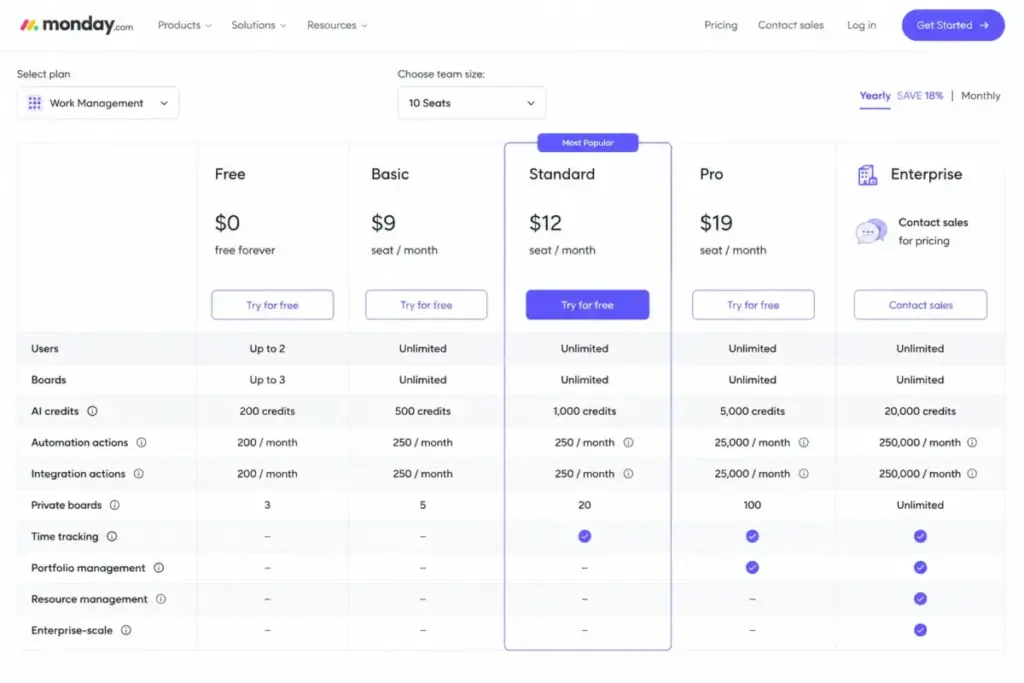
Teams that need private boards, advanced views, time tracking, and advanced columns reach those features at monday Pro ($19/seat/month). That is cheaper than Asana Advanced, and it includes 25,000 automation actions per month.
The Automation Ceiling: Action Limits That Shape the Decision
Automation is where monday.com’s plan structure creates the most surprising friction.
| Platform | Entry Paid Plan | Mid Plan | Pro/Advanced Plan | Enterprise | Notes |
|---|---|---|---|---|---|
| monday.com | Basic: 0 actions | Standard: 250/month | Pro: 25,000/month | Up to 250,000/month | Actions cover both automations AND integrations |
| Asana | Starter: workflow builder | Starter: plan-gated rules | Advanced: more automation | Enterprise: workflow bundles | API: 1,500 requests/min (paid domains) |
monday.com Standard includes 250 automation actions and 250 integration actions per month. That sounds reasonable until you consider what counts as an action. According to monday.com’s support documentation on automation actions, every triggered automation or integration execution consumes one action.
A busy operations board with 10 automations firing 5 times per day burns through 250 actions in 5 business days. The remaining 15 days of the month run without automation. Operations teams that will hit that cap should compare monday.com alternatives by monthly automation allowances, failure visibility, workflow volume, reporting needs, and whether higher tiers are required for routine operations.
The jump to monday Pro unlocks 25,000 actions/month, a 100x increase. That gap between Standard and Pro is the single biggest gotcha in monday.com’s pricing structure for automation-heavy teams.
Asana takes a different approach. Workflow rules and the workflow builder are plan-gated by tier, and the Asana developer API allows 1,500 requests per minute for paid domains with 50 concurrent GET requests. Asana does not publish a per-month action cap in the same way monday.com does.
Third-party reviewers at Zapier describe Asana’s automation as stronger for project-oriented workflows, while monday.com’s automation is stronger for customizable operational triggers (Zapier’s comparison).
AI Credits: The Feature Most Articles Gloss Over
Both platforms are building AI into their products, but the credit limits tell a different story than the marketing pages.
Asana AI Studio provides credits at the billing account level. Starter includes 50,000 credits/month. Advanced includes 75,000 credits/month. Enterprise includes higher allocations. These credits apply across the entire billing account, not per user.
monday.com AI credits are allocated per plan tier. Basic includes 1,000 credits/month. Standard includes 2,000 credits/month. Pro includes 3,000 credits/month. Enterprise starts at 20,000 credits/month.
The credit models are hard to compare directly because each platform uses credits for different AI features. What matters for buyers: if your team plans to use AI features heavily, check whether your plan’s credit allocation covers your actual usage patterns. Both platforms leave room for future paid AI upgrades beyond the included credits.
Enterprise Security: A Tie with Plan-Gated Nuance
Both vendors publish enterprise-grade compliance postures. According to Asana Trust, the platform holds SOC 2 Type 2, SOC 3, GDPR compliance, US state privacy law compliance, and Enterprise Key Management. According to monday.com Trust Center, the platform’s security model is based on ISO 27001, ISO 27018, SOC 2, and OWASP Top 10. monday.com also publishes SOC 2 Type II audit information and confirms GDPR compliance.
The catch: advanced security controls on both platforms concentrate in Enterprise tiers. Asana gates SAML authentication, SCIM provisioning, data residency, SIEM integrations, and audit logs behind Enterprise and Enterprise+. monday.com gates enterprise governance, multi-level permissions, and enterprise support behind its Enterprise tier.
For regulated industries evaluating both platforms, the compliance badges are comparable. The question is whether your procurement team can negotiate the Enterprise contract terms you need.
Support and Onboarding: Different Strengths by Team Size
monday.com offers 24/7 support across plans, chat support, community forums, daily webinars, and tailored onboarding for enterprise customers (monday.com support). According to Asana’s pricing page, the platform provides a Help Center, Forum, Academy, Asana Support on paid tiers, customer success options for eligible plans, 24/7 support on higher plans, and weekend support for complex data migrations on eligible enterprise plans.
For a 10-person team getting started, monday.com’s visual board model and 24/7 support make initial setup faster. Third-party reviewers at Tech.co note that monday work management felt slightly easier in usability testing.
For a 100-person enterprise migrating from another platform, Asana’s structured migration support and customer success resources become more relevant. Complex deployments with dependencies, portfolios, goals, and cross-functional permissions require configuration discipline that goes beyond “drag items onto a board.”
Switching Between Platforms: The Migration Reality
Most reviews say switching is possible. Few explain why it is harder than it sounds.
Asana to monday.com (Medium difficulty): Tasks become items. Projects become boards. Custom fields become columns. Dependencies map to monday dependencies. Portfolios and goals do not have direct equivalents on monday Standard or Pro, requiring dashboard workarounds or Enterprise portfolio management.
monday.com to Asana (Medium to High difficulty): Boards become projects. Items become tasks. Custom columns must map to Asana custom fields. Docs, dashboards, and automations require rebuilding. Heavily customized monday workspaces with conditional automations, formula columns, and multi-board dependencies are the hardest to migrate cleanly.
Both platforms offer APIs and developer documentation for data transfer. The practical friction is not the data export. It is reconfiguring workflows, permissions, and team habits around a different work architecture.
The Verdict: Choose by Workflow Type, Not by Brand
The Asana vs monday.com answer depends on 5 specific variables: team size, workflow structure, automation volume, dashboard needs, and budget tier.
| Scenario | Choose Asana If | Choose monday.com If | Watch-Out |
|---|---|---|---|
| 5-person team, first PM tool | Budget is tight; Starter at $54.95/mo beats Standard at $60/mo | Team prefers visual boards over task lists | monday bucket pricing means 5 seats minimum on paid plans |
| 10-person marketing ops team | Team needs strict dependencies and approvals | Team needs visual dashboards, board automations, cross-dept workflows | monday Standard 250 automation actions fill fast |
| 25-person product team | Dependencies, portfolios, goals, and milestone tracking are daily workflows | Team wants flexible operational boards with custom columns | Asana Advanced is $149.75/mo more than monday Pro at 25 users |
| 50-person operations team | Team prioritizes governance, accountability, and structured cross-functional execution | Heavy dashboard and automation needs; Pro at $950/mo saves $299.50 vs Asana Advanced | ClickUp undercuts both on feature count per dollar |
| Regulated enterprise | PMO governance, structured rollout, Enterprise Key Management | Multi-department flexibility, broader monday product ecosystem (CRM, Dev, Service) | Both gate advanced security behind Enterprise pricing |
Choose Asana if your team manages complex projects with dependencies, task owners, deadlines, portfolios, goals, and cross-functional accountability. Asana excels when the work model is: plan the project, assign the tasks, track the dependencies, report on the portfolio.
Choose monday.com if your team wants visual workflows, customizable boards, dashboards, automations, and a broader platform that extends into CRM, dev, and service products. monday.com excels when the work model is: build the board, customize the columns, automate the triggers, visualize the dashboard.
Consider alternatives if neither fits. Teams needing all-in-one low-cost workspaces should compare ClickUp. Agencies needing client portals and billable work tracking should evaluate Teamwork. Teams preferring spreadsheet-grade resource planning should look at Smartsheet. Deep software sprint management teams should evaluate Jira. If neither platform fits the team’s workflow or budget, compare Asana alternatives by switching trigger: lower cost, simpler Kanban, spreadsheet-style planning, agile depth, client work, or enterprise governance.
FAQ
Is Asana better than monday.com?
Asana is better for teams that need structured project execution with dependencies, portfolios, goals, and clear task ownership. monday.com is better for teams that want visual board-based workflows, customizable dashboards, and flexible cross-department operations. The better choice depends on whether your team prioritizes governance or customization.
Is monday.com cheaper than Asana?
At entry tier, Asana Starter ($10.99/user/month annually) is cheaper than monday Standard ($12/seat/month annually). At advanced tier, monday Pro ($19/seat/month) is cheaper than Asana Advanced ($24.99/user/month). monday’s bucket pricing (minimum 3 seats, then multiples of 5) can inflate costs for teams that do not fit the seat increments.
Does monday.com have a seat minimum on paid plans?
Yes. According to monday.com’s pricing support documentation, paid plans start at a minimum of 3 seats and then increase in multiples of 5. A team of 4 must purchase 5 seats. A team of 6 must purchase 10 seats. Asana does not use bucket pricing on its paid plans.
Which is better for marketing teams, Asana or monday.com?
monday.com is the stronger choice for marketing operations teams. Customizable boards, visual dashboards, conditional automations, and guest access on Standard plan give marketing teams the flexibility to build campaign trackers, editorial calendars, and client-facing project views. Asana suits marketing project managers who need dependency tracking and portfolio reporting across campaigns.
How many automation actions does monday.com Standard include?
monday.com Standard includes 250 automation actions and 250 integration actions per month. For a team running 10 automations at 5 triggers per day, that budget depletes in roughly 5 business days. Teams needing more than 250 actions should evaluate monday Pro (25,000 actions/month) or Enterprise (up to 250,000 actions/month).
Can I migrate from Asana to monday.com?
Migration is possible but requires remapping tasks to items, projects to boards, custom fields to columns, and dependencies to monday dependencies. Portfolios and goals do not have direct equivalents on monday Standard or Pro. Both platforms offer APIs for data transfer, but workflow configurations, permissions, and team habits need manual reconfiguration.
Can I migrate from monday.com to Asana?
Migration difficulty is medium to high. Boards convert to projects, items to tasks, and custom columns to Asana custom fields. Docs, dashboards, and automations require complete rebuilding in Asana. Heavily customized monday workspaces with formula columns, multi-board dependencies, and conditional automations are the hardest to migrate cleanly.
Does Asana have a free plan?
Asana Personal is free for up to 2 users with unlimited tasks and projects, and includes list, board, and calendar views. monday.com Free is also free for up to 2 seats but limits users to 3 boards, 3 Docs, 8 column types, and 200+ templates. Asana’s free tier is less restrictive on feature scope.
Which tool has better AI features in 2026?
Both platforms include AI features with credit-based limits. Asana AI Studio provides 50,000 to 200,000+ credits per billing account per month depending on plan. monday.com provides 1,000 to 20,000 credits per month depending on plan. The credit models differ, making direct comparison difficult. Evaluate based on your team’s specific AI usage patterns rather than headline credit numbers.
What are the best alternatives to both Asana and monday.com?
ClickUp offers broader all-in-one functionality at lower entry pricing. Smartsheet fits teams that prefer spreadsheet-style project planning. Teamwork serves agencies needing client portals and billable work tracking. Jira is the standard for software sprint management. Wrike suits enterprise teams needing advanced resource planning. If spreadsheet-style planning is what you need, compare best Smartsheet alternatives before choosing outside Asana or monday.com.