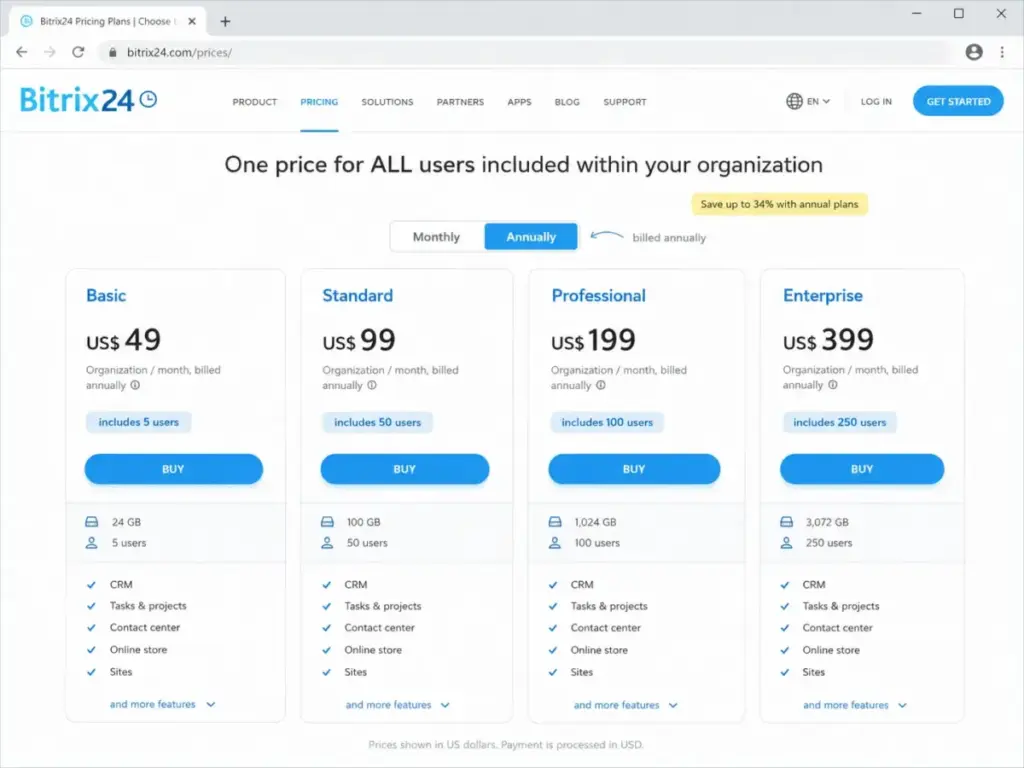
Bitrix24 Standard covers 50 users at $99/month billed annually (as of May 2026). HubSpot Smart CRM Starter charges $20/month per seat, which means those same 50 users cost $1,000/month. The price gap is not a rounding error; it is a 10x multiplier that reshapes the entire CRM software conversation.
But price alone does not pick your CRM. HubSpot earns higher ease-of-use scores on Capterra and Software Advice, ships a 2,000+ app marketplace, and gives sales teams a cleaner path from signup to first deal.
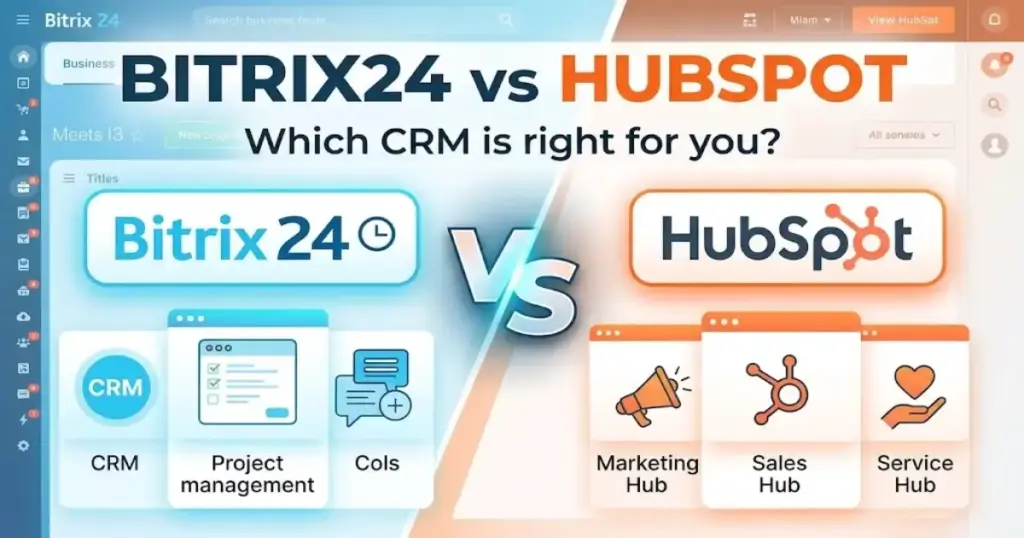
Bitrix24 bundles tasks, projects, chat, telephony, websites, and HR tools into one workspace, which can either save you five subscriptions or overwhelm a team that only needs contact management. For a product-level breakdown, Bitrix24 pricing and features explains the workspace trade-offs beyond this HubSpot comparison.
I evaluated both platforms using official documentation, verified pricing data, third-party review analysis on G2, Capterra, and Software Advice, and competitive workflow simulations across the best CRM software category. This comparison settles which platform fits your team size, budget, workflow complexity, and implementation capacity.
| Category | Winner | Why |
|---|---|---|
| Pricing and total cost at scale | Bitrix24 | Flat-rate organization pricing vs per-seat scaling |
| Ease of use and adoption | HubSpot | Higher third-party ratings; cleaner CRM-first UX |
| All-in-one operations breadth | Bitrix24 | CRM + tasks + projects + chat + telephony + websites |
| Sales and marketing ecosystem | HubSpot | 2,000+ marketplace apps; stronger marketing-sales alignment |
| Automation and API capacity | Tie | Bundled operational automation vs documented API limits |
| Security and deployment control | Bitrix24 | On-premise option; Enterprise SOC-compliant AWS hosting |
| Support access by tier | HubSpot | Clearer support entitlements: community, email/chat, phone |
How the Two Pricing Models Actually Work
Bitrix24 and HubSpot use fundamentally different pricing architectures, and confusing them is the fastest way to misbudget your CRM rollout.
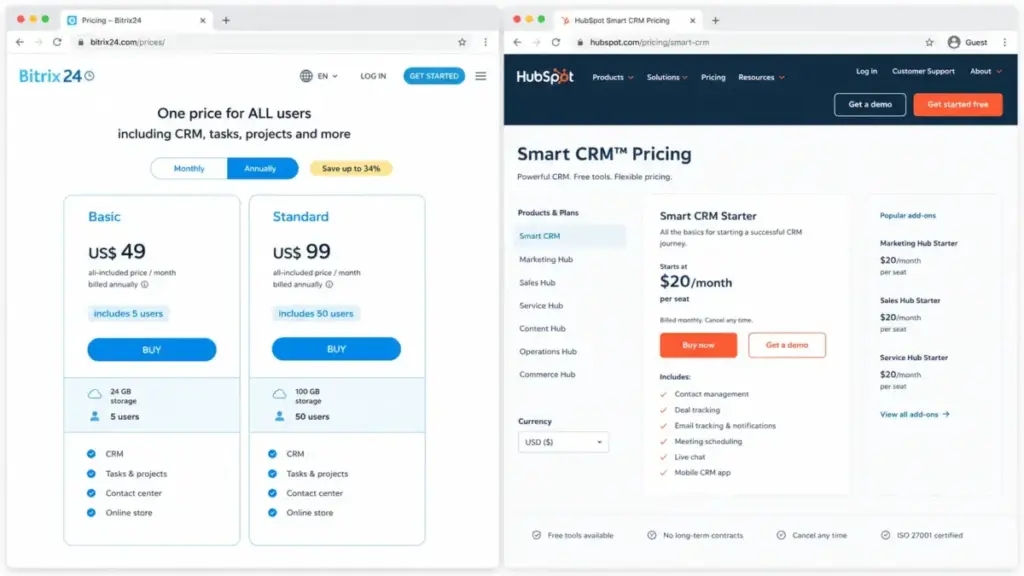
Bitrix24 charges a flat monthly fee per organization with a bundled user cap. According to Bitrix24’s official pricing page (as of May 2026), the Basic plan costs $49/month billed annually for 5 users. The Standard plan covers 50 users at $99/month billed annually. Professional includes 100 users at $199/month billed annually. Enterprise starts at $399/month billed annually for 250 users and scales to 10,000 users.
The trade-off: Bitrix24 does not offer a plan constructor. According to Bitrix24’s helpdesk documentation, you cannot select specific features or an exact user count. If your team has 6 users, you jump from the 5-user Basic plan to the 50-user Standard plan. That inflexibility cuts both ways: you get capacity headroom, but you pay for a bundle whether or not you use all of it.
HubSpot charges per seat, per month. According to the HubSpot product and services catalog (as of May 2026), Smart CRM Starter costs $20/month per seat. Smart CRM Professional costs $50/month per seat. Smart CRM Enterprise costs $75/month per seat. Sales Hub tiers run from $20/seat (Starter) to $100/seat (Professional) to $150/seat (Enterprise), with Enterprise requiring annual billing and a $3,500 one-time onboarding fee.
One detail most reviews skip: HubSpot uses different seat types. Full Professional or Enterprise sales functionality requires Sales Seats, not just Core or View-Only access. That distinction means your actual cost depends on how many team members need full sales tooling versus basic CRM access.
Cost at Scale: The Math Nobody Shows You
Here is what the Bitrix24 vs HubSpot pricing comparison looks like at real team sizes:
| Users | Bitrix24 Plan | Bitrix24 Monthly Cost | Bitrix24 Annual Cost | HubSpot Plan | HubSpot Monthly Cost | Winner |
|---|---|---|---|---|---|---|
| 5 | Basic | $69/mo | $49/mo | Smart CRM Starter ($20/seat) | $100/mo | Bitrix24 |
| 10 | Standard | $144/mo | $99/mo | Smart CRM Starter ($20/seat) | $200/mo | Bitrix24 |
| 25 | Standard | $144/mo | $99/mo | Smart CRM Starter ($20/seat) | $500/mo | Bitrix24 |
| 50 | Standard | $144/mo | $99/mo | Smart CRM Starter ($20/seat) | $1,000/mo | Bitrix24 |
Bitrix24 wins on raw cost at every team size. At 50 users, the gap is staggering: $99/month versus $1,000/month on entry paid CRM tiers. But cost alone does not determine value. HubSpot teams often report faster adoption, less admin overhead, and shorter time to first productive use, according to Capterra and Software Advice comparison snapshots.
Hidden Costs That Inflate the Real Bill
Bitrix24 hidden costs: Plan jumps when exceeding user caps; marketplace app fees; telephony usage charges; implementation or customization through certified partners; free users receive no direct specialist support.
HubSpot hidden costs: Per-seat scaling across multiple hubs (Marketing, Service, Content); Sales Professional and Enterprise seats required for full functionality; Enterprise onboarding fee ($3,500); API Limit Increase at $500/month; HubSpot Credits at $0.010 per credit for AI features; workflow limit packs, reporting packs, team limit packs, and custom object/contact record packs add incremental cost.
The biggest mistake most CRM buyers make with HubSpot is assuming the per-seat price is the total price. By the time you add a second hub, upgrade seat types, and purchase limit packs, the bill often doubles.
Workflow 1: Setting Up CRM and Closing Deals
HubSpot wins on CRM setup speed and sales workflow clarity.
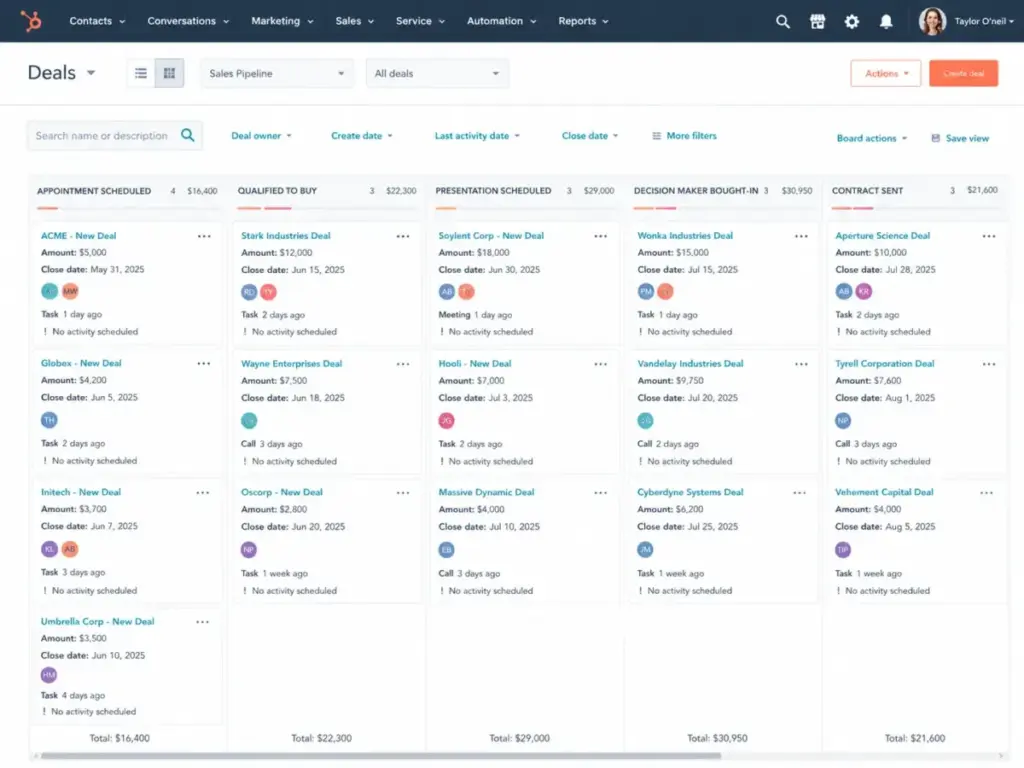
HubSpot’s free CRM includes contact, company, deal, task, and activity management with email tracking, meeting scheduling, live chat, and a shared inbox. According to HubSpot’s CRM product page, the platform positions itself as an AI-powered customer platform connecting marketing, sales, service, and Breeze AI tools around a unified customer record. Sales Hub Starter at $20/seat adds deal pipelines and sales productivity tools without onboarding friction.
Bitrix24 also includes CRM pipeline management on every plan, plus contact and company records, CRM forms, invoices, and estimates. The Standard plan unlocks sales automation, unlimited leads, and online payments. The difference is context: Bitrix24’s CRM sits inside a much broader workspace, which means sales reps navigate alongside tasks, projects, chat windows, and website builders. On G2, reviewers praise Bitrix24 for combining CRM and project management in one platform, but some note the interface can feel cluttered for newcomers.
Is the setup complexity a deal-breaker? For a 5-person sales team that only needs pipeline tracking and email logging, HubSpot’s focused CRM delivers faster time-to-value. For a 25-person agency that also manages project delivery and client communication, Bitrix24’s breadth saves separate subscriptions for Slack, Asana, and a telephony provider.
Software Advice’s comparison snapshot rates HubSpot CRM at 4.5 from 4,442 reviews, with higher scores for ease of use, value for money, customer support, and functionality compared with Bitrix24’s 4.2 from 979 reviews.
Workflow 2: Managing Projects, Tasks, and Team Collaboration
Bitrix24 wins on operational breadth.
Bitrix24 bundles tasks, projects, recurring tasks, Kanban boards, Gantt charts, chat, video calls, shared calendars, and internal collaboration tools across all paid plans. The Standard plan includes unlimited projects. Professional adds task automation, RPA, time tracking, booking, and HR tools. For teams that need both sales pipeline management and project delivery tracking in one workspace, Bitrix24 consolidates what would otherwise be three or four separate tools.
HubSpot does not include a project management module. Task management exists within deals and contacts, but it covers sales follow-ups, not project delivery. Teams using HubSpot typically pair it with Asana, Monday.com, or ClickUp for project work, which means a second subscription, a second login, and a data sync challenge.
This is where the Bitrix24 vs HubSpot decision splits sharply by team type. A marketing-led SaaS company running inbound funnels will get more from HubSpot’s sales-marketing alignment. A service firm or agency juggling client projects, billable hours, and deal pipelines simultaneously will extract more daily value from Bitrix24’s single-workspace model.
One thing I noticed during my evaluation: Bitrix24’s breadth can become its own problem. When a workspace includes CRM, projects, chat, telephony, HR, and website tools, the navigation bar gets crowded. Teams that only use CRM and ignore the other modules end up paying for features they do not touch, with no way to strip them out.
Workflow 3: Integrations, Automation, and API Limits
This is a tie, and the winner depends on what you are building.
HubSpot’s Marketplace lists 2,000+ apps according to HubSpot’s technology partner page. Native integrations with Gmail, Outlook, Slack, Facebook Messenger, and the broader HubSpot hub ecosystem (Marketing Hub, Service Hub, Content Hub) give growth teams a pre-wired stack. The HubSpot product catalog documents API limits of 250,000 calls/day for Free and Starter, 650,000/day for Professional, and 1,000,000/day for Enterprise, with rate limits of 100 requests per 10 seconds (Free/Starter) or 190 per 10 seconds (Professional/Enterprise). Teams needing more capacity pay $500/month for an API Limit Increase adding 1,000,000 calls/day, with a maximum of two capacity packs.
Bitrix24’s Marketplace references 710+ apps and integrations. The platform includes built-in Salesforce data migration, WordPress/WooCommerce connectors, Twilio SMS, WhatsApp connectors, and REST API extensions. Bitrix24’s API documentation notes that even 2 requests per second equals 172,800 requests per day per account. Enterprise plans include an API boost, though the exact quantity is not publicly confirmed in the accessible pricing data.
So does HubSpot’s larger marketplace justify the per-seat premium? For a marketing-led team that depends on attribution tracking, ad platform sync, and CRM-email alignment, yes. For a service business that primarily needs CRM, telephony, and internal workflow automation, Bitrix24’s bundled tools reduce integration dependencies.
Bitrix24 Professional at $199/month billed annually includes workflow automation, ad automation, call tracking, email marketing, and AI-powered sales for 100 users. Achieving equivalent functionality in HubSpot requires Sales Hub Professional ($100/seat) plus Marketing Hub, which multiplies the cost rapidly for mid-size teams.
How Security and Deployment Control Compare
Bitrix24 wins for buyers who need deployment flexibility.
Both platforms maintain strong security foundations. HubSpot’s security page confirms a confidential SOC 2 Type II report covering availability, confidentiality, and security of customer data. HubSpot’s DPA notes infrastructure provider controls audited for SOC 2 Type II and ISO 27001 compliance.
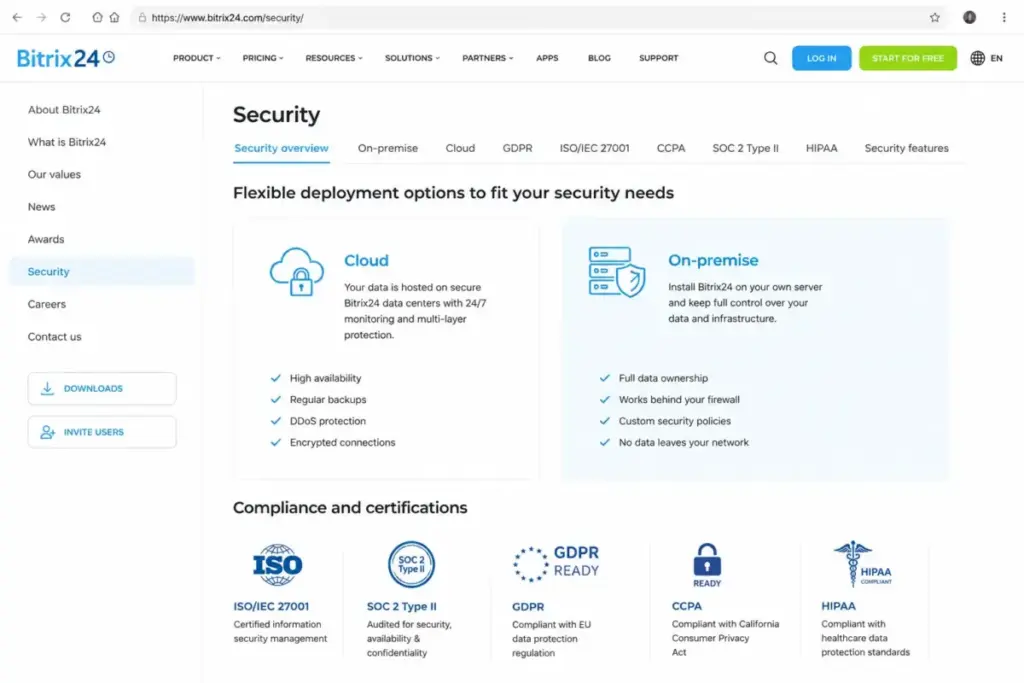
Bitrix24’s security page states the platform provides protections supporting HIPAA, GDPR, and other frameworks. Cloud data runs on AWS in the United States and European Union, with AWS meeting HIPAA, GDPR, ISO 27001, SOC 1/2/3, and PCI DSS Level 1 standards. Enterprise plans include SOC-compliant AWS hosting, encryption at rest, login history, Active Directory integration, and multi-level permissions.
The differentiator: Bitrix24 offers an on-premise deployment option. HubSpot is a SaaS-only customer platform. For regulated industries, government contractors, healthcare organizations, or IT-controlled businesses requiring infrastructure control over data location, Bitrix24’s on-premise option is a capability HubSpot does not match.
How Support Access Differs by Plan Tier
HubSpot publishes clearer support entitlements.
According to HubSpot Help Center (as of May 2026), Free tools and View-Only Seat users get Community support only. Starter accounts add email and chat support. Professional and Enterprise accounts add phone support. HubSpot Academy, Knowledge Base, and Community are available as self-serve resources across all tiers.
According to Bitrix24 Helpdesk (as of May 2026), free accounts are limited to self-support resources including product manuals, helpdesk articles, video tutorials, and webinars. Access to technical support specialists requires a commercial plan. Partner services can be purchased separately for training, setup, customization, and implementation.
For non-technical SMBs evaluating their first CRM, HubSpot’s escalating support model (community to email/chat to phone) provides a more predictable path. Bitrix24’s support structure means free users troubleshoot independently, and complex configuration issues may require paid partner engagement.
Migration and Switching Costs
Before committing, consider the cost of moving later. The difficulty runs in both directions, and it is not symmetrical.
Moving from Bitrix24 to HubSpot (medium to high difficulty): Bitrix24 supports CSV import/export, migration from other CRMs, contact imports from vCard/Gmail/Outlook/Yahoo, and exports to CSV, Excel, and Outlook. The challenge is mapping CRM records, pipelines, tasks, communication history, file links, project data, custom fields, and automation rules into HubSpot’s object and hub model. Teams heavily using Bitrix24’s project management, telephony, and internal collaboration tools face the added burden of replacing those capabilities with separate subscriptions.
Moving from HubSpot to Bitrix24 (medium difficulty): Core contacts, companies, and deals transfer more cleanly. The risk increases for teams depending on HubSpot-specific marketing attribution, lists, sequences, Sales Hub workflows, and multi-hub integrations. Those workflows do not have direct equivalents in Bitrix24 and require rebuilding from scratch.
This is something I wish I had known before recommending either platform to clients: the switching cost is not just data migration. It is workflow reconstruction, team retraining, and integration rewiring. Factor 2-4 weeks of productivity disruption into any CRM implementation plan.
The Verdict by Team Type
The Bitrix24 vs HubSpot CRM decision does not have a universal winner. It has a conditional one, and the conditions are specific.
| Buyer Scenario | Better Choice | Reason | Watch-Out |
|---|---|---|---|
| 5-person startup choosing first CRM | HubSpot CRM | Free tools and clean onboarding make first adoption easier | Per-seat costs scale fast past 10 users |
| 25-person agency needing CRM + delivery tracking | Bitrix24 | Standard plan covers 50 users at flat rate; includes projects, tasks, and automation | Interface complexity requires admin investment |
| Marketing-led SaaS with inbound funnels | HubSpot CRM | Stronger sales-marketing alignment; 2,000+ app marketplace; Breeze AI | Multi-hub pricing compounds quickly |
| Regulated business needing deployment control | Bitrix24 | On-premise option; Enterprise SOC-compliant AWS hosting; encryption at rest | On-premise requires internal IT capacity |
| Sales team needing advanced productivity tools | HubSpot CRM | Sales Hub Professional/Enterprise with Sales Seats; phone support | $100-150/seat; $3,500 Enterprise onboarding |
Choose Bitrix24 If:
- Your team has 10-50 active users and budget predictability matters most
- You need CRM plus project management, internal chat, telephony, and operational workflows in a single workspace
- You can invest admin time in setup and configuration
- You need on-premise deployment or stricter infrastructure control over data location
Choose HubSpot CRM If:
- You need the fastest CRM adoption path with the cleanest contact management workflows
- You depend on inbound marketing, sales enablement, and a large app marketplace
- Your team is comfortable managing per-seat costs and hub upgrades
- You value phone support at Professional/Enterprise tiers
Avoid Bitrix24 If:
Your team only wants a lightweight CRM and will not use tasks, projects, chat, telephony, websites, or workflow automation. You would pay for a full operating workspace while using 20% of its features.
Avoid HubSpot If:
You have many active users, tight budget constraints, and no appetite for seat planning, hub upgrades, onboarding fees, or limit packs. The per-seat model punishes large teams with modest budgets.
When Neither Platform Is the Right Fit
If both Bitrix24 and HubSpot feel too broad or too expensive for your use case, these alternatives address specific gaps. For a full list of CRM options by use case, see our HubSpot CRM alternatives guide. If the core issue is Bitrix24’s workspace breadth rather than HubSpot’s pricing, evaluate Bitrix24 CRM alternatives by onboarding speed, pipeline focus, project-management overlap, and total administration load.
Zoho CRM
Best for budget-conscious teams that want a dedicated CRM with broad customization but less all-in-one workspace complexity than Bitrix24. Often considered when HubSpot becomes expensive and Bitrix24 feels too broad.
Pipedrive
Best for sales teams that want a simple, pipeline-first CRM without heavy marketing or operations modules. A good fallback if both Bitrix24 and HubSpot feel too platform-heavy for a pure sales workflow.
Salesforce Sales Cloud
Best for enterprise sales organizations needing deeper governance, customization, analytics, and ecosystem depth. A better fit when a buyer has complex enterprise sales operations and the budget for admin resources. See our Salesforce CRM review for a full evaluation.
| Alternative | Best For | Starting Price | When to Choose Over Bitrix24/HubSpot |
|---|---|---|---|
| Zoho CRM | Budget CRM with customization | $14/user/month (Standard) | HubSpot too expensive; Bitrix24 too broad |
| Pipedrive | Sales-only pipeline management | $14/user/month (Essential) | Neither platform’s breadth is needed |
| Salesforce | Enterprise-grade operations | $25/user/month (Starter) | Complex enterprise sales with admin capacity |
Frequently Asked Questions
Which is better, Bitrix24 or HubSpot?
Neither is universally better. Bitrix24 wins on cost at scale, operational breadth, and deployment control. HubSpot wins on ease of use, sales-marketing ecosystem, and support access. The right choice depends on team size, budget, workflow complexity, and admin capacity.
Is Bitrix24 cheaper than HubSpot?
Bitrix24 is significantly cheaper at scale. Bitrix24 Standard covers 50 users at $99/month billed annually. HubSpot Smart CRM Starter at $20/user/month costs $1,000/month for the same 50 users. The cost gap widens with every additional user.
Does HubSpot have a free CRM?
Yes. HubSpot Free Tools include lite versions of paid products and free Smart CRM functionality for up to two free users. The free plan includes contact, company, deal, and task management plus email tracking, meeting scheduling, and live chat.
Does Bitrix24 have a free plan?
Yes. Bitrix24 Free is available for 1-2 users and includes 5 GB storage, basic CRM, tasks, shared calendars, chat, and video calls. Access to technical support specialists requires a commercial plan.
What is the main difference between Bitrix24 and HubSpot?
Bitrix24 is a flat-rate all-in-one workspace combining CRM, tasks, projects, telephony, and collaboration tools. HubSpot is a per-seat customer platform focused on CRM, sales, and marketing with a large app marketplace. The core difference is bundled operations depth versus focused CRM adoption speed.
Can Bitrix24 replace HubSpot?
Bitrix24 can replace HubSpot’s CRM and basic sales functionality while adding project management and collaboration tools. It cannot match HubSpot’s marketing-sales-service hub ecosystem, marketplace depth, or Breeze AI integration for inbound-focused teams.
Which CRM is easier to use, HubSpot or Bitrix24?
HubSpot scores higher on ease of use in Capterra and Software Advice comparisons. Bitrix24’s broader feature set creates a steeper learning curve and more navigation complexity. Teams that need only CRM will find HubSpot faster to adopt.
How hard is it to migrate from Bitrix24 to HubSpot?
Medium to high difficulty. Core contacts and deals export via CSV, but tasks, project data, communication history, custom fields, and automation rules require manual mapping into HubSpot’s object and hub model.
Which CRM has better integrations?
HubSpot has a larger app marketplace with 2,000+ integrations. Bitrix24 lists 710+ apps and integrations. HubSpot’s ecosystem advantage is strongest for marketing, sales enablement, and SaaS stack alignment. Bitrix24’s built-in tools reduce the number of integrations needed.
Is Bitrix24 good for small businesses?
Bitrix24 suits small businesses that need CRM plus project management and collaboration at one price. It is not the best fit for small sales teams that want a simple, focused CRM experience without navigating a full workspace.