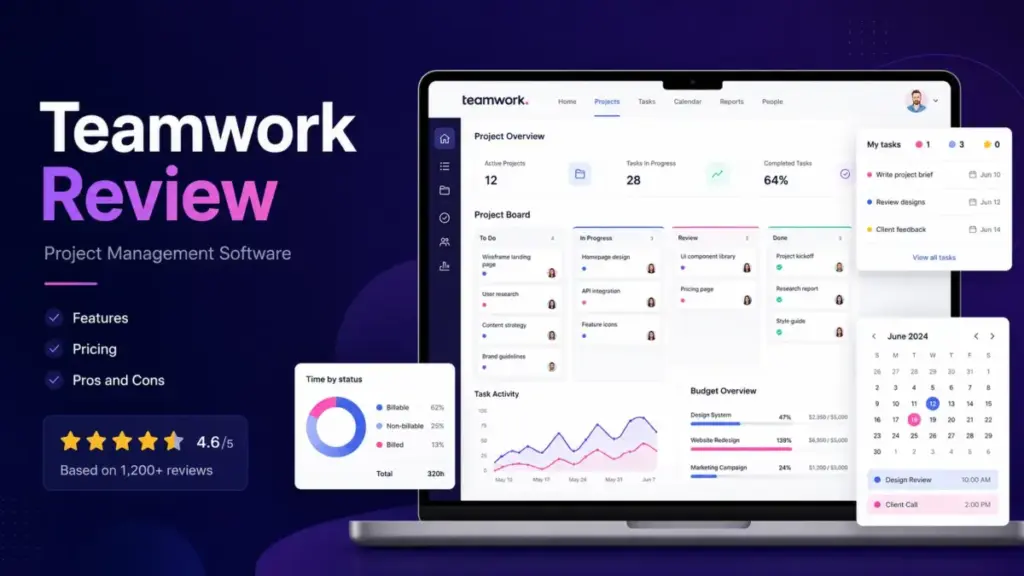
Managing client projects can be a nightmare of miscommunication and lost revenue. Follow-ups pile up, retainers bleed out, and spreadsheets multiply until nobody knows the actual status of a deliverable.
A good agile project management system should prevent revenue leakage, not become a second job to maintain. In this Teamwork review, I evaluated the platform through real client-work scenarios to see if it actually protects margins.
My conclusion: Teamwork is one of the best project management software options for agencies, but it will drown simple internal teams in unnecessary configuration.
Quick Verdict and Score
Score: 8.4/10
Verdict: Buy Teamwork if you bill clients for time. Skip it if you just need an internal checklist.
Teamwork.com positions itself as a platform built explicitly for client work. It brings project delivery, resource capacity, and financial budgets into one unified workflow. It excels at tracking billable hours against client retainers.
However, the configuration learning curve is undeniably steep. Teams looking for simple Kanban boards without financial tracking will find it overly heavy and complex.
This review is based on official documentation, pricing analysis, third-party review patterns, and simulated client-work scenarios.
Test Setup and Methodology
Evaluating a platform designed for client operations requires simulating an actual agency environment. For this review, I evaluated Teamwork across official documentation, real workflow simulations, user feedback from platforms like G2, and current pricing data.
We simulated a 12-person digital marketing agency managing 20 active client retainers. We configured custom billable rates, imported simulated client data, and set up project templates for standard service offerings like SEO audits and web design sprints.
We then pushed tasks through the pipeline, logging both billable and non-billable time, and examined how the reporting engine handled capacity crunches. This methodology ensures the review reflects the real-world friction teams experience, not just a feature checklist from a marketing brochure.
The 3 Problems Teamwork Solves Better Than Rivals
Most generic project tools focus purely on getting tasks done. Teamwork focuses on making sure those tasks are profitable. When I ran Teamwork through our simulated agency workflows, three specific strengths immediately stood out.
Problem 1: The Profitability Leakage Problem
Agencies lose money when billable hours exceed the retainer limit without anyone noticing. Teamwork addresses this directly through its robust time and budget controls. You can log time as billable or non-billable right inside the individual task modal, eliminating the need for a separate time-tracking application.
The real value unlocks when you connect those logged hours to a defined time budget. Managers can see planned hours versus actual hours in real time. According to official customer stories (as of May 2026), service businesses report 100 percent billing and budget transparency after implementing these exact features. This level of granular visibility prevents end-of-month surprises when invoicing clients.
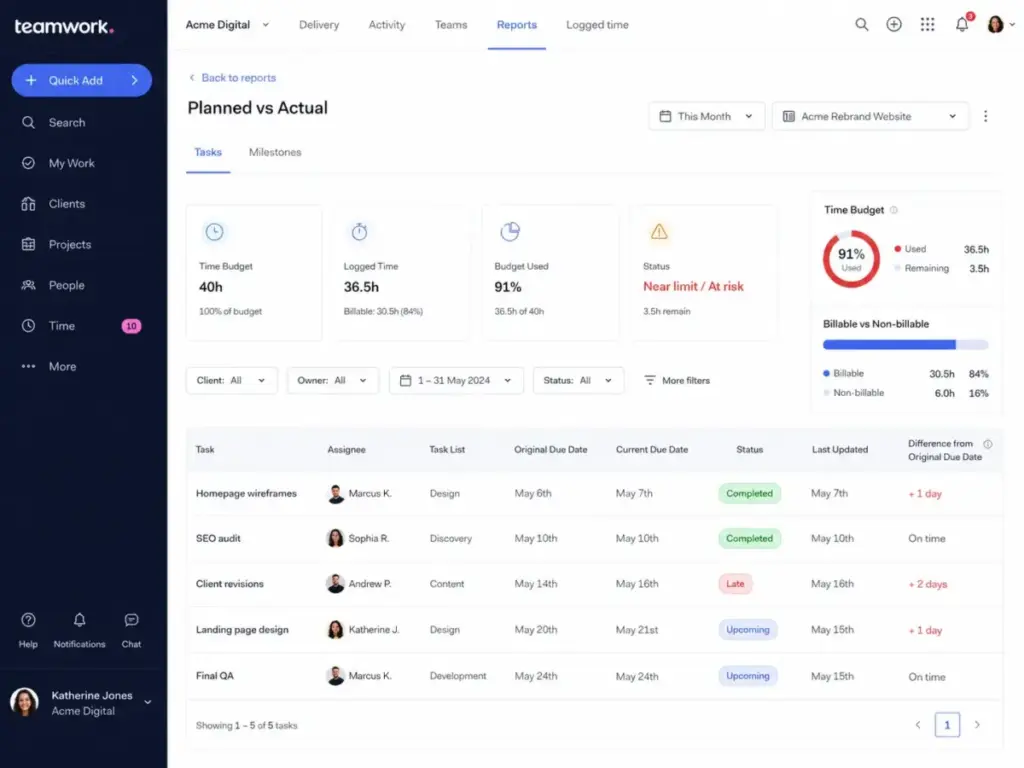
The Workflow Test: We set up a simulated digital marketing retainer with a cap of 40 hours per month. We created a project, set the time budget, and logged hours against specific subtasks using different team members’ billable rates. The platform automatically calculated the remaining budget and flagged tasks that were burning too hot. This immediate feedback loop is exactly what prevents margin erosion before it happens.
Problem 2: The Client Visibility Problem
Keeping clients updated usually means messy email chains, scattered chat messages, or messy shared spreadsheets. Teamwork gives you client collaboration tools built directly into the project space. You can invite client users into the workspace, share specific task views, and handle deliverable proofs without ever leaving the platform.
The system allows you to manage permissions with extreme granularity. Clients only see exactly what you want them to see. This means your team can have private internal conversations on a task, debate a design choice, and then share the final deliverable with the client in the same organized thread.
The Insider Tip: Use the intake requests feature (available starting on the Basics plan) to standardize all incoming client requests. Having clients fill out a structured form instead of sending a vague email saves hours of back-and-forth clarification. It routes the work directly into the correct project queue automatically.
Problem 3: The Capacity Blind Spot
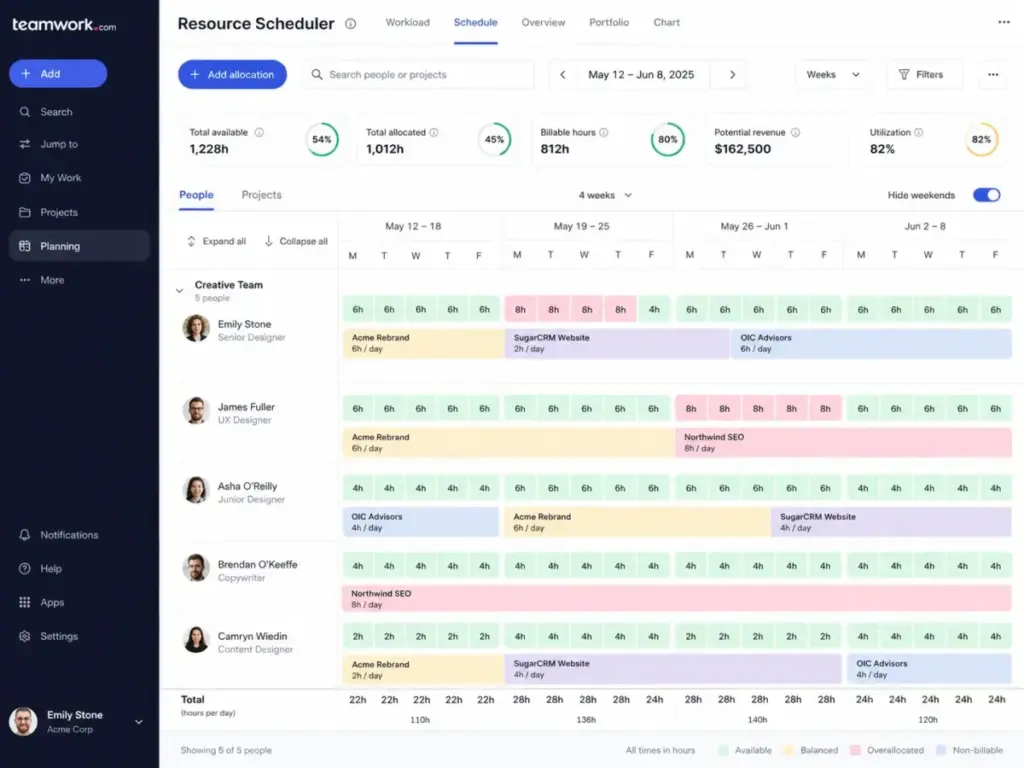
Assigning work is easy in any tool. Knowing if someone actually has time to do that work is incredibly hard. The Accelerate plan includes dedicated workload planning and AI-assisted capacity insights. This prevents you from overloading your best performers while junior staff sit idle.
The resource scheduling feature lets you view team availability across all active projects simultaneously. When combined with time budgets, resource managers can allocate hours accurately based on real capacity. This stops the most common agency problem: committing to a client deadline without checking if the required design or engineering resources are actually available that week.
The 2 Friction Points Teamwork Creates
No software is perfect, and depth always introduces complexity. Teamwork brings powerful financial and operational controls, but those controls come with a heavy cost in setup time and daily administrative overhead.
Friction 1: The Configuration Burden
Teamwork is absolutely not a tool you master in five minutes. The sheer volume of features, from budgeting thresholds to custom fields to granular permissions, requires structured and deliberate onboarding. Third-party sentiment on software review platforms frequently highlights a noticeable learning curve for new users.
You have to configure specific project views, set up reporting dashboards, and train your entire team to log time correctly against the right subtasks. If your team lacks basic process discipline, Teamwork will feel frustrating and restrictive. The company offers extensive Teamwork Academy lessons and paid onboarding coaching, which signals clearly that even they know the initial setup is complex.
Friction 2: The Internal Tool Overkill
If you are a five-person startup tracking internal product work, Teamwork will feel like massive overkill. You simply do not need billable rates, client retainers, and proofing workflows just to track your own software bugs or marketing tasks. For those teams, Teamwork alternatives are a better fit than another client-services stack.
The mobile app density is another common pain point. Because Teamwork tries to fit so much operational depth into a small mobile screen, the application can feel cluttered. If your team relies heavily on managing tasks from their phones while commuting, they might prefer a significantly lighter alternative like Todoist. For that lighter mobile workflow, Todoist replacement options are worth checking.
Teamwork Pricing Reality in 2026
Many older ranking articles still reference legacy Deliver, Grow, and Scale plans. That pricing structure is dead. According to the official pricing page (as of May 2026), the current architecture features Free, Basics, Accelerate, Optimize, and Enterprise tiers.
The Pricing Breakdown
| Plan | Starting Price | Limit | Key Features | Best For | Main Limitation | Verified Source |
|---|---|---|---|---|---|---|
| Free | $0/user/month | 5 users | Time logging, basic views | Tiny teams testing | 100MB storage, strict limits | Official Pricing |
| Basics | $9.99/user/month (billed yearly) | Min 3 users | 300 projects, planned vs actuals | Small teams needing metrics | No time budgets or retainers | Official Pricing |
| Accelerate | $24.99/user/month (billed yearly) | Min 5 users | 600 projects, time budgets | Agencies managing retainers | Lacks AI profitability forecasts | Official Pricing |
| Optimize | Custom quote | Unlimited projects | AI profitability forecasting | Professional services | Sales-led purchase process | Official Pricing |
| Enterprise | Custom quote | Unlimited projects | SSO, dedicated technical support | Large enterprises | Highest total cost | Official Pricing |
Note: The official pricing page prominently displays annual billing rates. Monthly exact prices require checking the live toggle. Always verify current rates before budgeting.
Where Pricing Starts to Pinch
The Free plan is heavily capped and acts strictly as a trial environment. With a strict five-user limit, a five-project cap (or two projects according to support documentation discrepancies), and only 100MB of storage, your team will outgrow it within weeks.
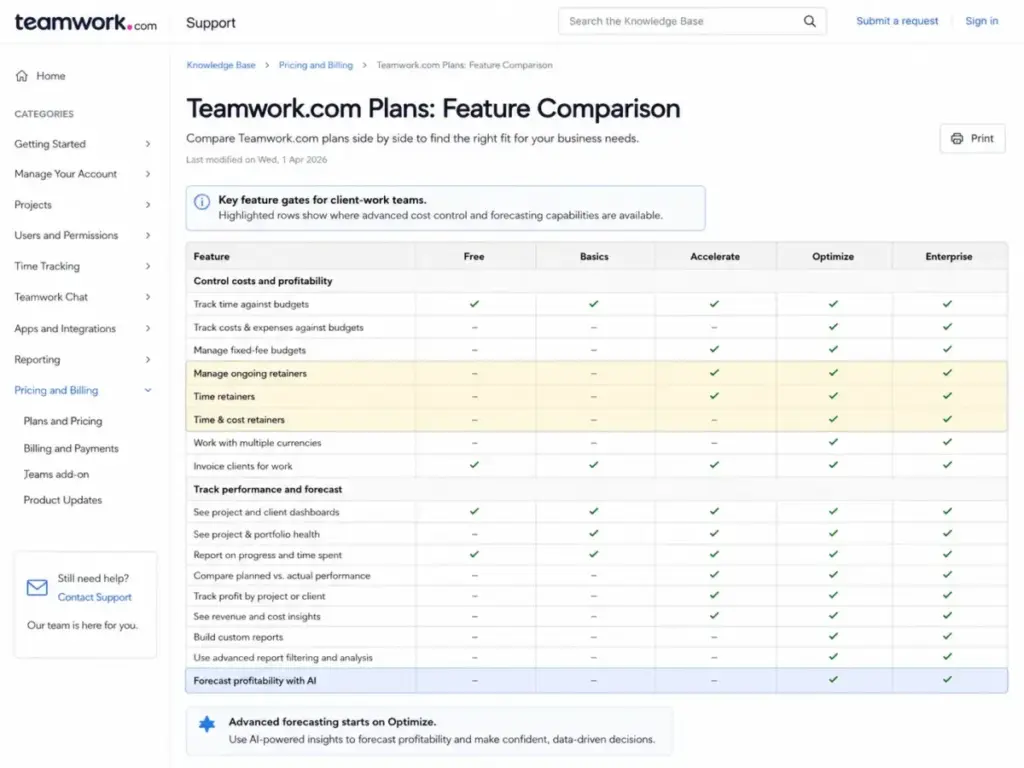
The real financial pinch happens between Basics and Accelerate. If you run a client-services business, you absolutely need time budgets, retainers, active capacity planning, and QuickBooks connections. Those vital features require the Accelerate tier at $24.99 per user per month (billed yearly). For a 15-person agency, that translates to an upfront annual commitment of nearly $4,500.
If you require advanced enterprise features like native Salesforce integration, AI profitability forecasting, or Single Sign-On (SSO), you must request custom pricing for the Optimize or Enterprise tiers. SSO is gated strictly to the custom Enterprise plan, which is a common but frustrating SaaS pricing tactic for security-conscious IT teams.
The Hidden Add-On Tax
The marketing page price rarely reflects the final bill. Teamwork offers several additional solutions that can inflate your monthly cost. Teamwork Desk (for ticketing), Teamwork Chat, and Teamwork Spaces (for documentation) are separate add-ons.
Furthermore, if you require Premium Support with one-hour response times, advanced security policies, or expert technical implementation services, those come with additional custom fees. You must calculate these implementation realities when comparing Teamwork against a platform that includes basic onboarding in the base subscription.
Does It Scale? Platform Architecture and Security
A tool that works beautifully for five people often breaks entirely for fifty. Teamwork handles organizational scale well because its underlying architecture cleanly separates projects, clients, and resources. The reporting engine can aggregate financial data across hundreds of concurrent projects without crawling to a halt.
Security is a mandatory consideration for enterprise scale. According to the official security page (as of May 2026), Teamwork holds rigorous ISO/IEC 27001:2022 and SOC 2 Type 2 certifications. They host data securely on AWS within the US and EU, and target a highly reliable 99.9 percent uptime goal. Built-in two-factor authentication is included on every single plan, which is excellent.
For developers and operations teams, Teamwork offers a documented public API and robust webhook support. The API rate limits sit at 150 requests per minute for the Free, Basics, and Accelerate plans. This limit jumps to 300 requests per minute for Optimize and Enterprise. Automation action limits scale aggressively alongside your tier, from 5,000 monthly actions on Basics up to 100,000 on Optimize, giving mature operations teams plenty of headroom.
The First 30 Minutes With Teamwork
The initial setup experience dictates whether a team adopts a tool or abandons it. Here is exactly what happens when you start a Teamwork workspace.
When you first log in, you must establish your organizational hierarchy. You set up your company, then your specific clients, and finally the projects that live under those clients. This strict, uncompromising ontology is exactly why the financial reporting is so strong later, but it requires upfront strategic thought. You cannot just dump tasks into a list and figure it out later.
Next, you will want to invite users and configure their specific permissions. Because Teamwork handles sensitive financial data and billable rates, you have to be extremely careful about who can view budgets. This is a far cry from Trello, where everyone simply sees every card on the board.
Finally, you will explore the project views. You get List, Board, Table, and Gantt views. While highly functional, some users note the view flexibility feels slightly less fluid than highly customizable tools like ClickUp. But once your templates are built and your client intake forms are live, the daily operation settles into a highly predictable, profitable rhythm.
Who Wins and Who Loses with Teamwork
This platform makes very specific tradeoffs. Here is exactly who benefits from those choices and who suffers.
The Clear Winners
12-Person Digital Marketing Agencies
Agencies running heavily on client retainers absolutely need the Accelerate plan. The ability to track billable hours against a fixed time budget prevents teams from over-servicing demanding clients. The built-in proofing and client approval workflows easily replace three separate software subscriptions.
Professional Services Firms
Consultancies and IT services firms that care deeply about resource utilization and profit margins will thrive on the Optimize plan. The AI profitability forecasting and multi-currency budgets give operations directors the exact financial data they need. The native Salesforce integration handles the pipeline-to-project handoff smoothly.
The Obvious Losers
5-Person Internal Product Teams
If you are building a SaaS application and need to track software bugs or feature sprints, Teamwork is the wrong choice. The financial modules and client-facing features will simply clutter your interface. You are far better off using Jira or Linear. Small dev teams should check Linear replacement options before choosing the tracker.
Solo Freelancers on a Strict Budget
The Free plan is far too limited for real work, and paying for Accelerate just to get basic capacity planning is mathematically hard to justify for a single operator. You do not need an enterprise reporting suite to manage five local client logos.
Best Alternatives for the Losers
If Teamwork sounds like too much administrative overhead, or if it misses a specific internal workflow requirement, here are the best project management alternatives on the market today.
| Scenario | Best Choice | Why | Avoid If |
|---|---|---|---|
| Simple internal task execution | Asana | Cleaner interface, zero financial clutter, and brilliant at moving tasks across internal departments quickly. | You need to bill external clients by the hour based on retainers. |
| Extreme view customization | ClickUp | Offers massive flexibility in how you visualize work, custom statuses, and unlimited dashboards. | You hate spending days tweaking settings and building custom views. |
| Enterprise portfolio controls | Wrike | Better suited for massive, cross-functional enterprise portfolios that require deep governance. | You just want a simple list of tasks to check off today. |
| Simple client communication | Basecamp | Replaces scattered email and chat with a calm, centralized client portal without heavy math. | You need to track utilization, profit margins, or complex Gantt dependencies. |
| Spreadsheet replacement | Smartsheet | Gives you the incredible power of a relational database with the strict familiarity of a spreadsheet. | You want a highly visual, modern UI for creative design teams. |
If you are migrating away from a different platform, read our deep-dive guide on Asana vs Monday.com to see how the broader generalist market compares.
FAQ: Teamwork Review 2026
Is Teamwork.com worth it for marketing agencies?
Yes. For agencies billing for time, Teamwork protects profit margins perfectly. The Accelerate plan pays for itself quickly by preventing your team from working unbilled hours on exhausted client retainers.
What is the difference between Teamwork Basics and Accelerate?
Basics handles high-level project health and simple planned versus actuals reporting. Accelerate unlocks the true financial core: time budgets, client retainers, capacity planning, workload management, and 20,000 monthly automations.
Does Teamwork.com have a free plan?
Yes, but it is heavily restricted. The Free plan allows a maximum of 5 users, up to 5 projects, and 100MB of total file storage. It is best used for a brief functional trial before upgrading.
Is Teamwork better than Asana for client work?
Teamwork is fundamentally better for client work if you need to track billable time, manage financial retainers, and calculate project profitability natively. Asana is better for pure task execution and cross-departmental internal coordination.
Are there hidden costs with Teamwork?
The main cost surprises come from strict plan gates. SSO requires the custom Enterprise plan. Advanced AI forecasting requires the Optimize tier. You may also need to budget for paid onboarding services if your team lacks technical configuration experience.
Does Teamwork include native time tracking?
Yes. Native time tracking is a core platform feature. You can log time directly on individual tasks, mark hours as billable or non-billable, and compare tracked time against predefined project budgets.
Is Teamwork.com secure for enterprise data?
Yes. Teamwork holds verified ISO/IEC 27001:2022 and SOC 2 Type 2 certifications. They host data on AWS in the US and EU, and require two-factor authentication on all paid and free plans.
What are the best Teamwork alternatives?
For internal work without client billing, Asana or ClickUp are vastly better. For simple client communication, Basecamp wins. For massive enterprise portfolio governance, consider Wrike or Smartsheet. If that client portal is the attraction, Basecamp software alternatives are the fairer comparison.
Final Verdict
Teamwork.com knows exactly what it is. It is not trying to be a generic, lightweight task app for everyone. It is a dense, powerful operating layer built specifically for client-services businesses.
If you sell your team’s time, you absolutely need a system that tracks exactly where that time goes. Teamwork connects the initial client request to the daily task execution, and finally to the utilization report. The setup undeniably requires discipline, and the interface can feel overwhelming at first. But once fully configured, it gives agency owners the exact visibility they need to stop leaking revenue.
Choose Teamwork Accelerate if you manage multiple complex client retainers. Choose an alternative like Asana if your only goal is moving internal marketing projects across a finish line.