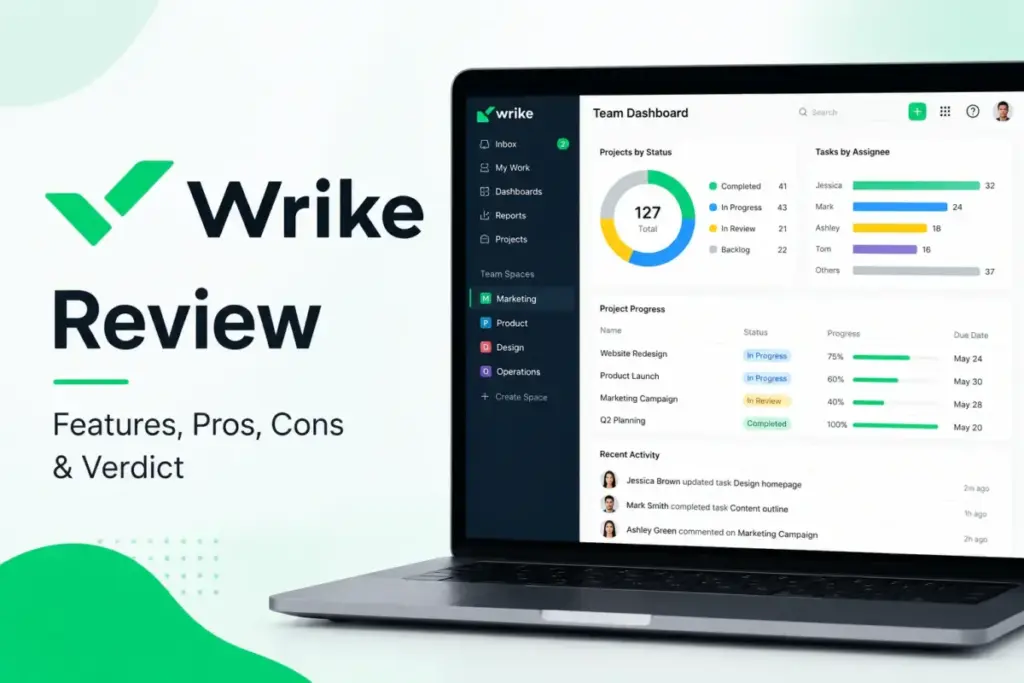
Your team tracks work in three places, nobody knows which dashboard to trust, and the last “simple project tool” collapsed under its own weight the moment you added a second department. That frustration is exactly why Wrike keeps showing up on shortlists for teams that have outgrown basic task boards.
This Wrike review breaks down the 2026 pricing reset, plan-gated features, real onboarding costs, and the specific team profiles that get the most value from the best project management software options built for structured workflows.
I evaluated Wrike through official documentation, third-party review validation across G2, Capterra, and TrustRadius, and direct pricing page verification as of May 2026. I did not score this product based on brand popularity alone.
The short version: Wrike earns 7.8/10. It solves real workflow problems for teams that need intake forms, approvals, reporting, and cross-department visibility. It creates new problems for teams that only need a Kanban board and a shared to-do list.
The 60-Second Wrike Verdict
| Detail | Summary |
|---|---|
| Score | 7.8/10 |
| Best for | Marketing ops, PMOs, creative teams, and cross-functional departments (20-200+ users) needing structured intake, approvals, dashboards, and governance |
| Not for | Solo users, freelancers, small teams wanting simple Kanban, teams that avoid setup work |
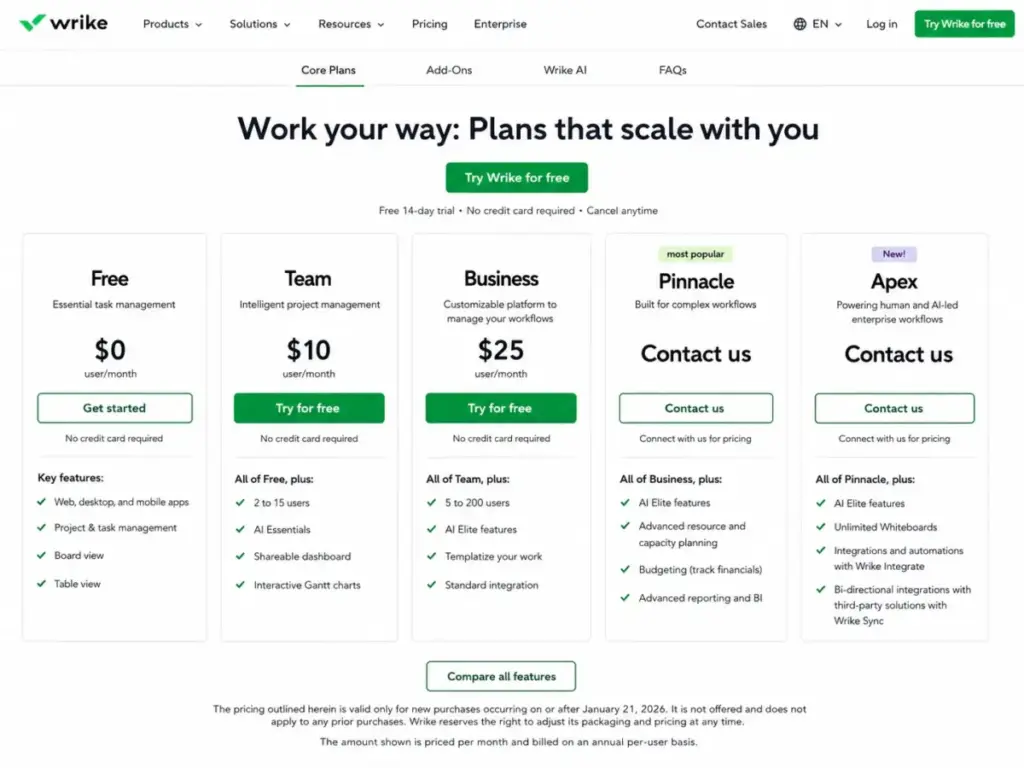
| Starting price | $0 (Free), $10/user/month (Team), $25/user/month (Business), custom (Pinnacle, Apex) |
| Billing | Annual per-user billing for Team and above; Business and above are annual only |
| Free plan | Yes, unlimited users, but capped at200 active tasks per account |
| Verdict | Try if your workflows need structure. Skip if you want plug-and-play simplicity. |
The 3 Problems Wrike Solves
Wrike is not a minimalist task tracker. It is a work management platform built for teams that need process control, and that distinction matters. Here are three problems where Wrike delivers clear value.
The “Nobody Knows What is Happening” Problem
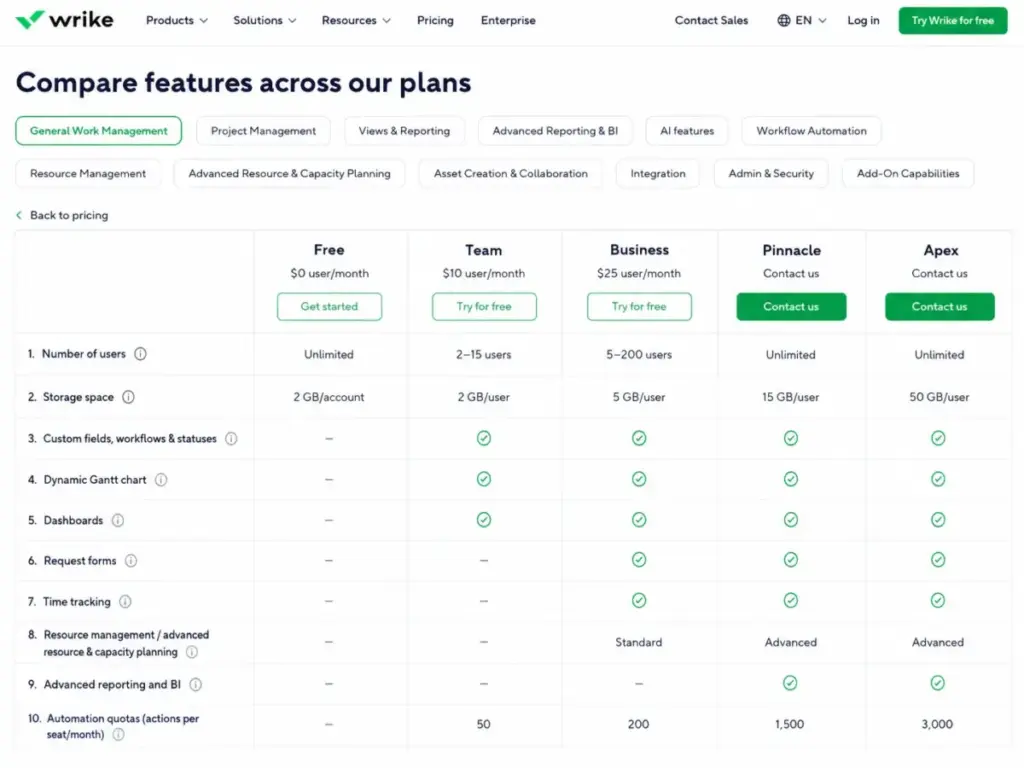
Cross-functional teams lose hours chasing updates across email, chat, and spreadsheets. Wrike centralizes task status, dependencies, and deadlines into board, table, Gantt, calendar, and dashboard views. According to Wrike’s official comparison table, Team and above unlock shareable dashboards, Gantt charts, custom fields, and custom workflows.
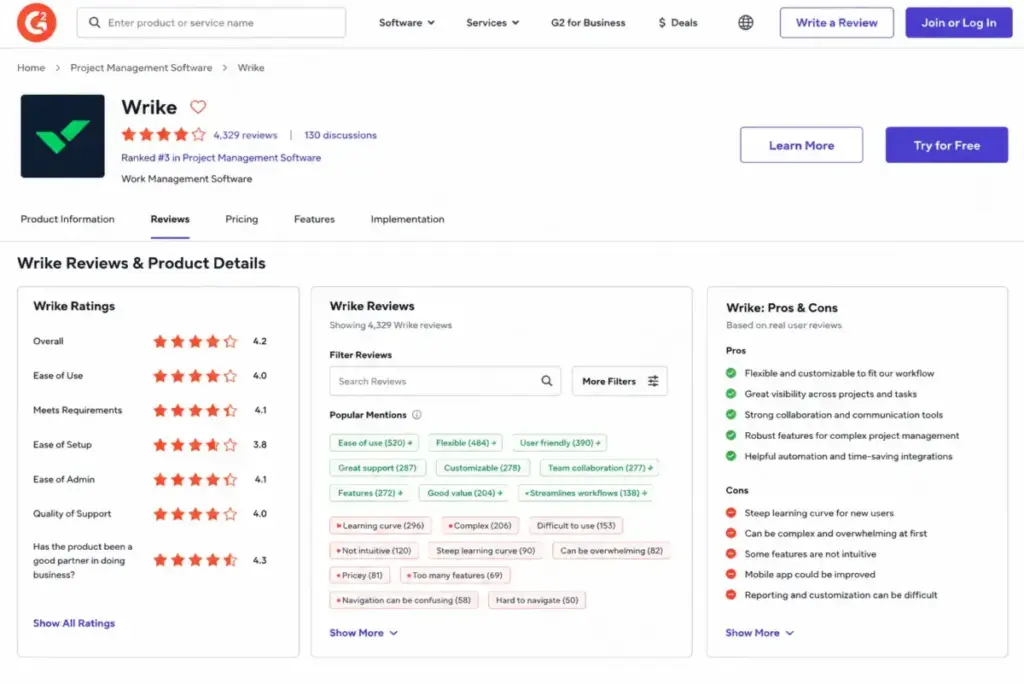
One thing I noticed during evaluation: the dashboard and Gantt views become genuinely useful once you invest time in custom fields and status configurations. A G2 reviewer (Dresler Z., Project Manager, IT Support) noted that Wrike gives useful visibility across projects, tasks, and workloads, even though views and automations can feel less intuitive at first.
The visibility payoff is real. But it requires upfront design work that lighter tools skip entirely.
The “Approvals and Intake Are a Mess” Problem
Request forms, approvals, proofing, and guest review workflows sit behind the Business plan ($25/user/month, billed annually). For creative and marketing operations teams, this is where Wrike separates from simpler tools.
According to Wrike’s plan documentation, Business adds request forms, blueprints, custom item types, approvals, guest approvals, time tracking, timesheets, and workload/resource features. A TrustRadius reviewer (Megan Kappes, Social Media Manager) described using Wrike for campaign workflows, public forms, guest review, custom workflows, and automation, while still wanting more nuance in automations and field inheritance.
If your team routes creative briefs, manages client feedback, or needs structured intake, Wrike Business is built for that job. If you just assign tasks in a list, you do not need this level of structure.
The “Reporting Does Not Tell Me What I Need” Problem
Basic project tools give you task counts and due dates. Wrike Pinnacle and Apex unlock advanced reporting and BI, Tableau integration, BI API, budgeting, job roles, utilization dashboards, and advanced capacity planning. According to Wrike’s comparison table, these upper-tier capabilities include advanced resource and capacity planning, advanced security controls, and automation quotas up to 1,500 per seat/month (Pinnacle) and 3,000 per seat/month (Apex).
For a PMO or professional services team tracking utilization, budgets, and portfolio health, this is the tier where Wrike competes with enterprise planning tools. For a 10-person marketing team, Pinnacle is likely more than you need.
The 2 Problems Wrike Creates
Every platform that solves complex problems introduces new ones. Wrike is no exception.
The Setup and Learning Curve Tax
Wrike is not a tool you configure in an afternoon. Capterra review patterns consistently mention that Wrike becomes valuable after setup, but onboarding can feel overwhelming and the learning curve is steep.
Wrike’s own pricing page lists Professional Services deployment as an add-on and notes that all new teams should work with a consultant. Teams of 20 or more users should use guided deployment.
Here is the honest framing most reviews miss: Wrike’s complexity is not automatically a flaw. It becomes a flaw when teams buy it without a workflow owner, naming conventions, a request intake model, and admin governance. The biggest mistake most project managers make is treating Wrike like a task list instead of a workflow system. Without someone owning the workspace architecture, teams pile up folders, duplicate workflows, and burn through automation limits without realizing it.
One practical tip: review your automation rules quarterly. Teams stack them and forget, which burns through your monthly action quotas and creates conflicting triggers nobody troubleshoots until something breaks.
The Plan-Gate and Pricing Escalation Problem
Wrike’s feature gates create real cost pressure as teams grow.
The feature-to-plan gate table below shows exactly where each capability unlocks:
| Feature | Free | Team ($10) | Business ($25) | Pinnacle (Custom) | Apex (Custom) | |
|---|---|---|---|---|---|---|
| Tasks | 200 active | Unlimited | Unlimited | Unlimited | Unlimited | |
| Storage | 2GB/account | 2GB/user | 5GB/user | 15GB/user | 50GB/user | |
| Gantt charts | No | Yes | Yes | Yes | Yes | |
| Dashboards | No | Yes | Yes | Yes | Yes | |
| Custom fields/workflows | No | Yes | Yes | Yes | Yes | |
| Request forms | No | No | Yes | Yes | Yes | |
| Approvals | No | No | Yes | Yes | Yes | |
| Time tracking | No | No | Yes | Yes | Yes | |
| Custom item types | No | No | Yes | Yes | Yes | |
| Resource/capacity planning | No | No | Basic | Advanced | Advanced | |
| Advanced reporting/BI | No | No | No | Yes | Yes | |
| Budgeting | No | No | No | Yes | Yes | |
| Automation/seat/month | N/A | 50 | 200 | 1,500 | 3,000 | |
| AI | N/A | AI Essentials | AI Elite starter | AI Elite | 10x AI Elite | |
| Whiteboards | N/A | N/A | N/A | N/A | Unlimited |
Wrike Pricing Reality in 2026
Wrike updated its plan packaging effective January 21, 2026. The prices below come from Wrike’s official pricing page, verified on May 18, 2026.
| Plan | Price | Billing | Users | Storage | Best For |
|---|---|---|---|---|---|
| Free | $0/user/month | Free | Unlimited | 2GB/account | Testing, personal use |
| Team | $10/user/month | Annual | 2-15 | 2GB/user | Small structured teams |
| Business | $25/user/month | Annual only | 5-200 | 5GB/user | Marketing ops, creative teams, PMOs |
| Pinnacle | Custom | Contact sales | Unlimited | 15GB/user | Enterprise PMO, BI, capacity planning |
| Apex | Custom | Contact sales | Unlimited | 50GB/user | Large-scale governance, max AI, integrations |
Where Pricing Starts to Pinch
The sticker price is only the beginning. Here is what Wrike’s pricing page does not make obvious.
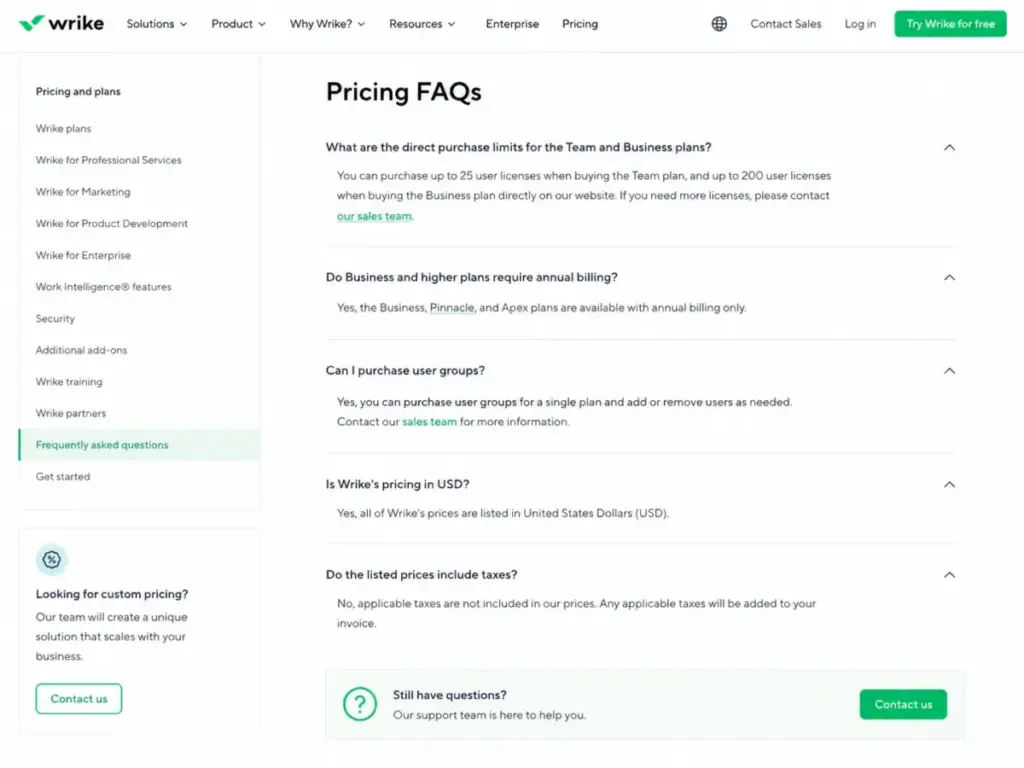
Seat block purchasing. According to Wrike’s pricing FAQ, users are sold in groups of 5 up to 30 seats, groups of 10 from 30 to 100 seats, and groups of 25 above 100 seats. A 16-person team cannot buy exactly 16 seats on Team or Business through direct purchase. You enter a different procurement path because Team and Business can only be purchased directly for up to 15 users with no add-ons. Anything larger requires contacting a sales representative.
Annual billing is mandatory for Business and above. There is no monthly option. Taxes are not included. For a 25-person team on Business, the minimum annual commitment is $25 x 25 x 12 = $7,500/year before taxes, add-ons, or support upgrades.
Add-ons add up. Wrike Whiteboard costs $15/user/month. Wrike Integrate, Wrike Sync, Wrike Lock, Wrike Datahub, and AI Elite action packs carry separate pricing. Premium and Premium Plus support packages add cost for in-app live support, faster web form response targets, phone support, and VIP admin support.
Professional services. Wrike recommends all new teams work with a consultant. For teams of 20 or more, guided deployment is the official recommendation. This is a paid service.
Before you commit, watch out for the gap between “per user per month” and “total annual commitment plus add-ons plus support plus taxes.” That gap is where most Wrike budget surprises happen.
Wrike Pros and Cons in 2026
Not every strength matters equally to every buyer. Here is what stands out after mapping Wrike’s capabilities against real team scenarios.
What Wrike Gets Right
- Structured workflow control across departments. Custom workflows, statuses, request forms, and approvals give operations teams the process layer that basic PM tools lack. This matters because marketing ops, creative teams, and PMOs need intake routing and approval chains, not just task lists.
- Visibility through dashboards and multiple views. Board, table, Gantt, calendar, and dashboard views let different team members see work in their preferred format. G2 users (4.2/5 from 4,526 reviews) consistently praise Wrike for cross-project visibility and task management.
- Request forms and blueprints for repeatable work. Business plan and above include request forms that standardize how work enters the system. For agencies and marketing teams managing dozens of concurrent requests, this replaces email chaos with structured intake.
- Time tracking and resource management built in. Business plan includes time tracking, timesheets, and workload features. Pinnacle extends this to advanced capacity planning, budgeting, job roles, and utilization dashboards. Teams that track billable hours or resource allocation do not need a separate tool.
- Security and compliance for regulated teams. Wrike holds SOC 2 Type II, ISO 27001:2013, ISO 27018:2019, and CSA STAR certifications. GDPR and CCPA compliance, EU data center availability, SAML SSO, and Active Directory integration are available depending on plan. For enterprise procurement, these certifications reduce vendor risk review friction.
- AI features across plans. Team gets AI Essentials. Business gets an AI Elite starter pack. Pinnacle and Apex increase AI action allocations. The AI is tied to work management tasks, not a standalone chatbot.
What Wrike Gets Wrong
- Onboarding is a project in itself. Capterra reviewers repeatedly describe the learning curve as steep. Wrike officially recommends professional services for new teams and insists on guided deployment for 20+ users. That is an extra cost and timeline most buyers do not budget for.
- Feature gates push costs higher than the sticker price. Request forms, approvals, time tracking, and custom item types all require Business ($25/user/month). Advanced reporting, BI, and capacity planning require Pinnacle (custom pricing). The gap between “entry price” and “the plan with the features I actually need” is where frustration starts.
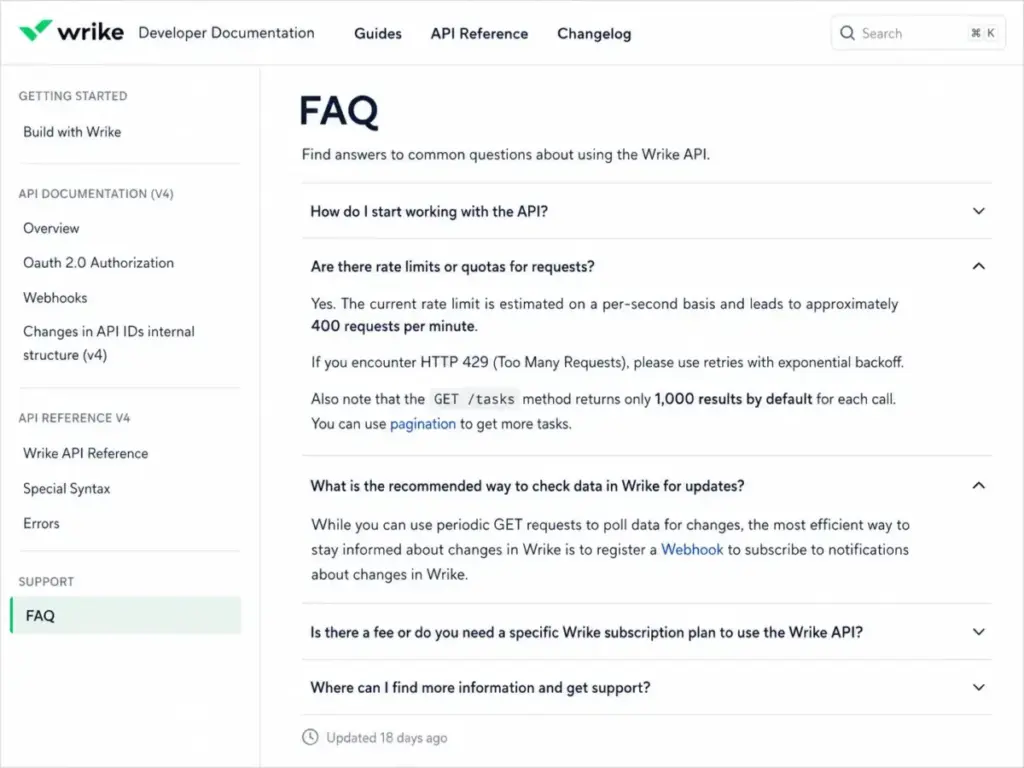
- Support tiers create a paywall for faster help. According to Wrike’s support packages page, Help Center live agent support is available 24/5 for paid accounts. In-app live support, faster web form response targets, phone support, and VIP admin support require Premium or Premium Plus support packages at additional cost.
- Search and task retrieval friction. A G2 reviewer (Ivy M.) noted that searching for older tasks or specific comments can be frustrating and sometimes requires advanced filters. For teams with large task volumes, this search friction compounds over time.
- Automation quotas create ceilings. Team gets 50 automations per seat/month. Business gets 200. Teams that automate heavily hit these ceilings faster than expected, especially when multiple departments share a workspace.
- Annual billing lock-in. Business and above require annual billing. No monthly option exists. For a team evaluating Wrike, that means committing to a full year before confirming the platform fits daily workflows.
Integrations, API, and Automation Reality
Wrike integrates with Microsoft Teams, Slack, Google Workspace, Microsoft Outlook, SharePoint, OneDrive, Jira, Azure DevOps, Tableau, Adobe Creative Cloud, Zapier, Workato, and more.
The Wrike API is available on Free, Team, Business, Pinnacle, and Apex plans. It supports OAuth, permanent tokens, app registration, webhooks, and Developer Portal access.
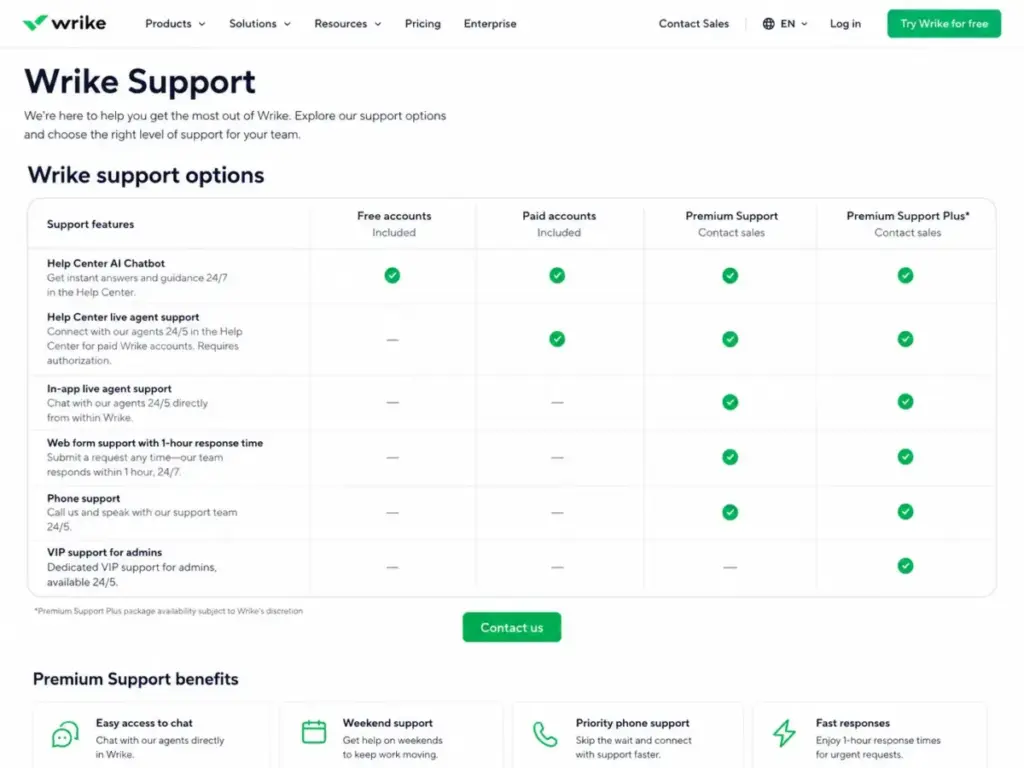
One detail most reviews miss about Wrike’s API: the developer FAQ states an approximate rate limit of 400 requests per minute. GET /tasks returns 1,000 results by default and requires pagination for larger datasets. For integration-heavy operations teams building custom dashboards or syncing Wrike with a data warehouse, these limits matter during planning.
Wrike Integrate (custom connector platform), Wrike Sync, and the API App Activity Panel are gated to upper-tier plans or available as add-ons. Teams that rely on deep two-way integrations beyond native connectors should confirm which plan or add-on covers their needs before signing.
Security and Compliance by Plan
Wrike’s security page lists SOC 2 Type II, ISO 27001:2013, ISO 27018:2019, CSA STAR, GDPR, and CCPA compliance. Wrike reports over 99.9% uptime.
The security controls that matter for enterprise procurement are plan-gated. SAML SSO, Active Directory integration, two-step verification, password policies, network access policies, customizable access roles, and locked spaces depend on plan tier. Advanced admin and security controls unlock at Pinnacle and Apex.
For IT and procurement teams evaluating Wrike against an internal security checklist, confirm which controls require Pinnacle before assuming they are available on Business.
Wrike Mobile App: Useful but Not Complete
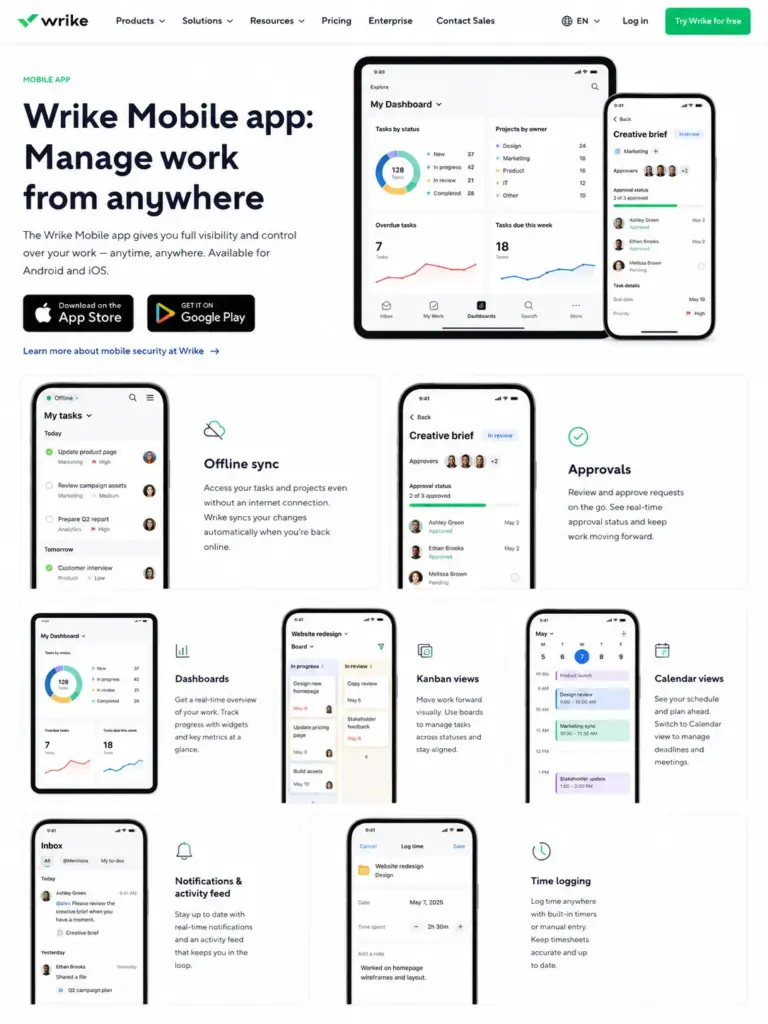
Wrike offers Android and iOS apps with cross-device sync, offline mode sync, notifications, approvals, dashboards, Kanban and calendar views, and time logging. For field teams, traveling managers, or anyone who needs to approve requests and check dashboards on the go, the mobile app covers the essentials.
Set realistic expectations: the mobile app handles updates, approvals, and status checks well. Advanced workspace administration, complex workflow configuration, and detailed reporting remain web-first work.
Who Wins and Who Loses With Wrike
Choose Wrike If
- Your team has 20 to 200+ users across multiple departments sharing workflows, requests, and reporting.
- You need structured intake through request forms, approval chains, and guest review cycles.
- Marketing operations, creative production, or PMO governance is a primary use case.
- You need Gantt charts, dashboards, resource management, and time tracking in one platform.
- Your workflows are mature enough to justify the configuration and training investment.
- Enterprise security certifications (SOC 2, ISO 27001, SAML SSO) are part of vendor evaluation.
Skip Wrike If
- You are a solo user or freelancer who needs a personal task manager. The Todoist review covers a better fit for individual productivity.
- Your team has fewer than 10 people and only needs a Kanban board. Trello handles that with less overhead.
- You want a low-setup tool that works on day one without workflow design. The Asana review shows how Asana balances structure with approachability.
- Your budget cannot absorb annual billing, add-ons, and potential professional services costs.
- You need field workforce scheduling, GPS tracking, or geofencing. Wrike is not built for that.
Better Alternatives by Scenario
No single tool is best for every team. Here is when to look elsewhere.
| Scenario | Better Alternative | Why |
|---|---|---|
| Approachable task and project coordination for mid-size teams | Asana | Lower learning curve, faster onboarding, strong task management without heavy configuration |
| Flexible board-style work OS with visual automation | monday.com | More visual setup experience, easier for non-technical teams to adopt quickly |
| Maximum feature density on a budget | ClickUp | Broader free plan, more features at lower tiers, though its own complexity trade-offs exist |
| Spreadsheet-like portfolio work for data-heavy teams | Smartsheet | Grid-first interface for teams comfortable with spreadsheet logic and large data sets |
| Software development sprint management | Jira | Purpose-built for engineering teams with sprint boards, backlog grooming, and dev integrations |
| Simple Kanban for small teams | Trello | Minimal setup, free tier covers basic boards, no workflow configuration required |
If your team needs free project management software that balances structured workflow control with faster setup, the ClickUp review and Jira review are worth reading next.
Wrike Review FAQ
Is Wrike worth it in 2026?
Wrike is worth it for teams with 20+ users that need structured workflows, request intake, approvals, dashboards, and governance. It is not worth it for solo users or teams that only need simple task tracking. The value shows up when your workflows are complex enough to justify the setup investment and annual billing commitment.
How much does Wrike cost per user?
Wrike Free costs $0/user/month. Team costs $10/user/month billed annually. Business costs $25/user/month billed annually. Pinnacle and Apex require custom pricing from sales. Prices are in USD, taxes not included, and apply to new purchases on or after January 21, 2026 according to Wrike’s pricing page.
What are the main limitations of Wrike?
Wrike’s main limitations include a steep learning curve, feature gates that push critical capabilities to higher-priced plans, annual billing for Business and above, paid support packages for faster help, seat block purchasing rules, and search friction when retrieving older tasks in large workspaces.
Is Wrike good for small teams?
Wrike Team supports 2 to 15 users at $10/user/month and includes Gantt charts, dashboards, and custom workflows. Small teams benefit if they need structured project views and workflow control. Teams that prefer simple Kanban or minimal setup should consider Trello, Asana, or monday.com instead. Teams drawn to Trello for minimal setup should compare Trello alternatives by Kanban simplicity, reporting tradeoffs, Gantt access, dashboard depth, and how much structure the workflow will need after the first few boards.
Does Wrike have time tracking?
Yes. Time tracking, timesheets, and workload features are available on Business ($25/user/month) and above. Free and Team plans do not include time tracking. Teams that need time tracking as a core requirement should factor Business plan pricing into their budget from the start.
Does Wrike integrate with Slack and Microsoft Teams?
Yes. Wrike integrates natively with Slack, Microsoft Teams, Google Workspace, Outlook, SharePoint, OneDrive, Jira, Tableau, Adobe Creative Cloud, Zapier, and more. The API is available across all plans. Advanced integration capabilities through Wrike Integrate and Wrike Sync are gated to upper-tier plans or sold as add-ons.
What is the best Wrike alternative?
The best alternative depends on your specific need. Asana is the strongest alternative for teams that want structured project coordination with a lower learning curve. monday.com fits teams that prefer visual, board-first workflows. ClickUp offers more features at lower price points but carries its own complexity. Jira is the pick for software engineering teams. See the Smartsheet review for spreadsheet-style portfolio management.
For a closer look at how Asana, monday.com, ClickUp, Jira, and Smartsheet compare as Wrike alternatives, use the full switching guide before you narrow your shortlist.
See the Smartsheet review for spreadsheet-style portfolio management. Software teams choosing Jira from that shortlist should compare Jira alternatives by sprint depth, developer integrations, learning curve, governance overhead, and whether a lighter engineering tool fits better.
Does Wrike have a free plan?
Yes. Wrike Free includes unlimited users, board and table views, web, desktop, and mobile apps, and 2GB of account storage. The catch: Free is capped at 200 active tasks and subtasks per account. That limit makes Free suitable for personal evaluation but not for team production work.
Is Wrike secure enough for enterprise use?
Wrike holds SOC 2 Type II, ISO 27001:2013, ISO 27018:2019, and CSA STAR certifications. It supports GDPR, CCPA, and EU data center hosting. Plan-gated security controls include SAML SSO, Active Directory integration, password policies, network access policies, and customizable access roles. Enterprise buyers should confirm which controls require Pinnacle or above through Wrike’s security documentation.
How does Wrike compare to Asana?
Wrike offers deeper workflow configuration, request forms, approvals, and resource management features at Business and above. Asana tends to be faster to adopt with a lower learning curve. Wrike fits teams that need governance, reporting, and structured intake. Asana fits teams that prioritize onboarding speed and cleaner task coordination.
The right choice depends on your workflow maturity and willingness to invest in setup. Read the full Asana review on SaaSZap for a detailed comparison. Teams considering Asana for lower setup friction should compare Asana alternatives by onboarding speed, governance needs, resource planning, annual billing exposure, and workflow complexity.
Final Verdict: Wrike Review 2026
Wrike earns 7.8/10. It is the right platform for marketing operations teams, creative departments, PMOs, professional services teams, and cross-functional organizations that need structured intake, approvals, workflow automation, reporting, and resource visibility.
It is not the right fit for solo users, freelancers, small teams that want plug-and-play simplicity, or organizations that cannot justify annual billing, potential add-on costs, and the onboarding investment that Wrike’s depth requires.
If I could give just one piece of advice about Wrike: buy it only when your team has enough workflow complexity to use the features you are paying for. A 10-person team that only assigns tasks and tracks due dates will pay for capabilities it never configures. A 50-person marketing operations team managing hundreds of monthly requests, approvals, and campaign timelines will find Wrike’s structure earns back the setup cost within the first quarter.
Choose Asana if you want faster adoption with less configuration. Choose ClickUp if you want more features at lower entry pricing. Choose Wrike if your workflows are complex enough to justify the investment.
Score: 7.8/10. Recommendation: Try (evaluate on Business plan with a guided deployment).