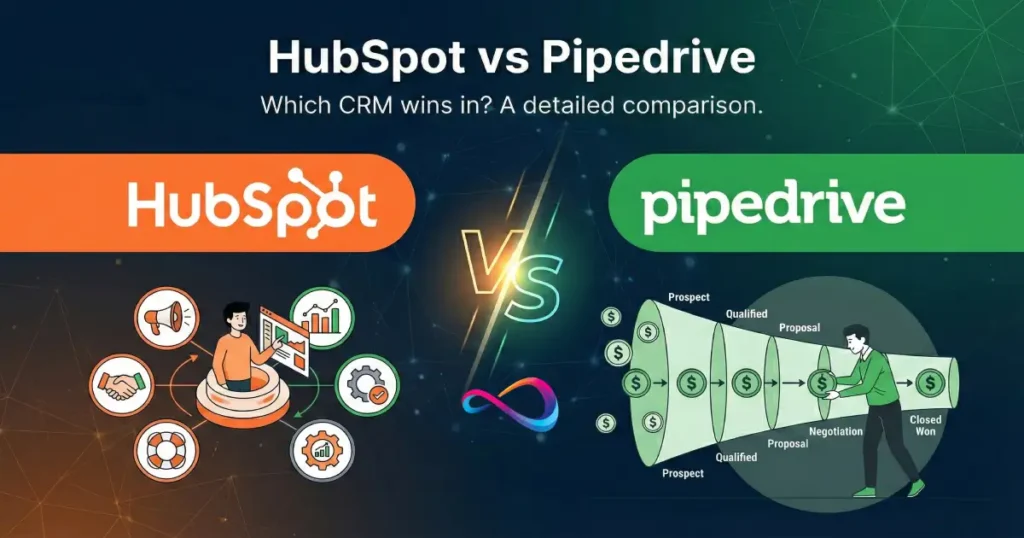
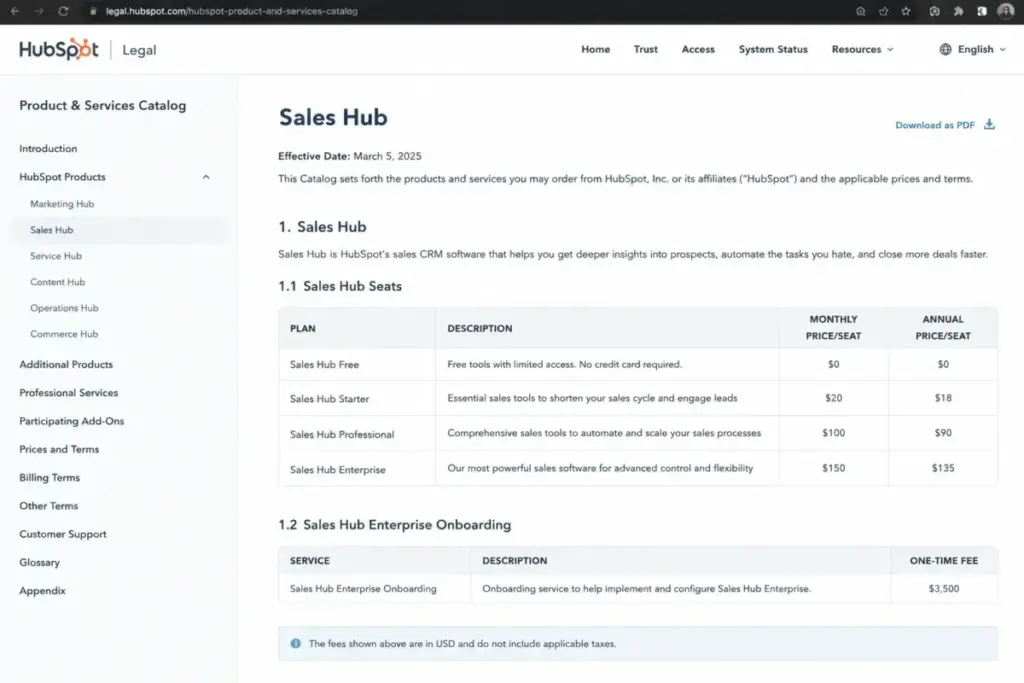
HubSpot Sales Hub Professional costs $100/month per seat at list price. Pipedrive Premium costs $59/month per seat billed annually. At 10 sales users, that gap is $410/month before add-ons, onboarding fees, or marketing tools enter the equation. The HubSpot vs Pipedrive decision in 2026 is not about which CRM software has more features. It is about whether your team needs a unified customer platform or a focused sales pipeline tool, and how much you are willing to pay for that answer.
I evaluated both platforms through official documentation, verified pricing from each vendor’s catalog and pricing pages, third-party review signals from G2 and Capterra, and competitive workflow analysis. This comparison uses HubSpot’s Product and Services Catalog list prices and Pipedrive’s official annual billing prices, both verified as of May 2026. Every price in this article links to its official source so you can verify before buying.
This is the part most comparison articles skip: the real math, the plan-gated limits, the API ceilings, and the migration friction that shape your actual experience after the trial ends.
Quick Verdict: HubSpot vs Pipedrive at a Glance
HubSpot wins when your team needs sales, marketing, service, and reporting in one connected platform. Pipedrive wins when your team needs a visual sales CRM that reps adopt quickly at lower per-seat cost. The table below shows where each platform leads across the top CRM software comparison dimensions that matter most.
| Category | Winner | Why |
|---|---|---|
| Pricing and total cost at scale | Pipedrive | $59/seat/month vs $100/seat/month at comparable sales tiers |
| Ease of use and sales adoption | Pipedrive | Pipeline-first design, faster rep onboarding |
| Sales automation depth | HubSpot | Up to 1,000 workflows on Enterprise, deeper cross-object automation |
| Marketing and lifecycle breadth | HubSpot | Native Sales, Marketing, Service, Content, Data, and Commerce Hubs |
| Integrations and ecosystem | HubSpot | 2,000+ integrations vs 500+ for Pipedrive |
| Security and compliance | Tie | Both publish SOC 2, SOC 3, encryption, and data hosting controls |
| Support access by plan | Tie | Best support depends on chosen tier for both platforms |
How We Evaluated Both CRMs
I did not score these products based on brand popularity alone. This comparison maps seven dimensions: pricing at scale, ease of use, sales automation depth, marketing platform breadth, integrations, security, and support access. For each dimension, I used official vendor documentation as the primary source, cross-referenced with third-party review platforms, and applied the same buyer scenarios across both tools.
Pricing data comes from HubSpot’s Product and Services Catalog and Pipedrive’s official pricing page, both verified on May 14, 2026. Where HubSpot shows different prices across its product page, blog, and legal catalog, I default to the catalog list price and note any discrepancies.
Pricing Reality: What 5, 10, 25, and 50 Sales Seats Actually Cost
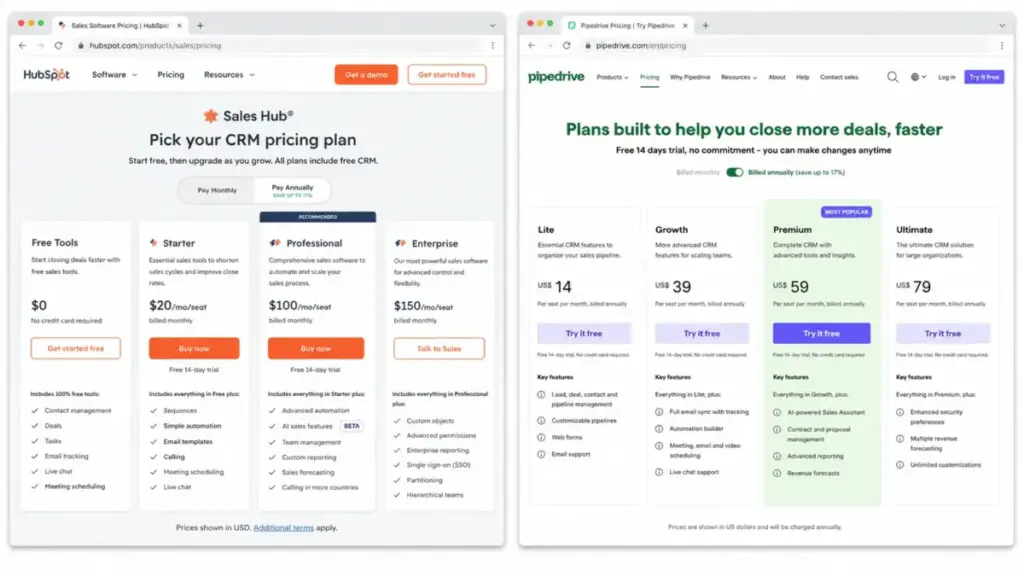
HubSpot Sales Hub Professional lists at $100/month per seat in the official catalog. Pipedrive Premium lists at $59/month per seat billed annually. Comparing entry-level plans is misleading because serious sales teams typically need automation, sequences, and reporting features that live on these mid-tier plans. Here is what comparable sales tiers cost at scale.
| Users | HubSpot Sales Hub Professional | Pipedrive Premium | Winner | Notes |
|---|---|---|---|---|
| 5 | $500/month | $295/month | Pipedrive | $205/month gap before add-ons |
| 10 | $1,000/month | $590/month | Pipedrive | $410/month gap, $4,920/year savings |
| 25 | $2,500/month | $1,475/month | Pipedrive | $1,025/month gap compounds fast |
| 50 | $5,000/month | $2,950/month | Pipedrive | $2,050/month, $24,600/year difference |
HubSpot Sales Hub Professional and Pipedrive Premium prices are list prices excluding add-ons and one-time onboarding. HubSpot’s catalog references an annual billing discount (the HubSpot blog mentions $90/month per seat with annual commitment), but the catalog list price remains $100/month per seat. Always verify the checkout price before committing.
Where Pricing Gets Complicated
HubSpot has multiple official price surfaces. The product page can show limited-time promotional pricing. The legal catalog lists standard seat prices. The HubSpot blog references annual discounts and onboarding fees. For this comparison, I use the catalog list price because it represents the standard rate most buyers encounter after promotional periods end.
On Pipedrive’s side, the pricing page shows annual billing prices. Monthly billing prices exist but are higher, and the exact monthly toggle values were not captured in the accessible pricing page text. I use annual billing prices throughout this article.
Hidden Costs Most Buyers Miss
Both platforms have costs beyond the per-seat price. For budget planning at any team size, factor these in before signing.
HubSpot hidden costs:
- Enterprise onboarding: $3,500 one-time fee (required per the catalog)
- Marketing Hub Professional (if marketing automation is needed): starts at $890/month with 3 Core Seats included
- API Limit Increase: $200/month
- Workflow Limit Increase: $200/month per 100 additional workflows
- Promotional pricing can differ from catalog list price; verify before purchase
Pipedrive hidden costs:
- LeadBooster add-on: from $32.50/month
- Projects add-on: from $6.67/month
- Campaigns add-on: from $13.33/month
- Web Visitors add-on: from $41/month
- Smart Docs add-on: from $32.50/month
- API token top-ups, data enrichment credits, and custom visibility groups are additional
Pipedrive add-ons are charged per company, not per user. HubSpot’s biggest hidden cost is Marketing Hub, which is entirely separate from Sales Hub and creates a major cost jump when teams need full marketing automation.
For a deeper breakdown of each platform’s pricing individually, see our HubSpot pricing analysis and Pipedrive pricing guide.
Feature Gates: What Each Plan Actually Includes
The marketing pages for both products emphasize their strongest features. The reality is that key capabilities are locked behind specific plan tiers. This table maps the features that matter most for sales teams to the plan where each becomes available.
| Feature | HubSpot Plan Gate | Pipedrive Plan Gate | Why It Matters |
|---|---|---|---|
| Visual pipeline management | Free (basic) | Lite ($14/seat/month) | Both offer this at entry level |
| Full email sync and tracking | Starter ($20/seat/month) | Growth ($39/seat/month) | Required for outbound follow-up |
| Sales automation workflows | Professional ($100/seat/month) | Growth ($39/seat/month) | Automation is where deals scale |
| Sequences / nurturing | Professional ($100/seat/month) | Growth ($39/seat/month) | Follow-up automation for reps |
| Lead scoring | Professional ($100/seat/month) | Premium ($59/seat/month) | Prioritization for larger pipelines |
| Custom objects | Enterprise ($150/seat/month) | Not available natively | Complex data models need Enterprise |
| Sandbox testing | Enterprise ($150/seat/month) | Ultimate ($79/seat/month) | Safe testing before production changes |
| E-signatures and contracts | Not native (requires integration) | Premium ($59/seat/month) | Close deals without leaving CRM |
The gap is clear: HubSpot gates its deepest sales automation behind Professional at $100/seat/month, while Pipedrive unlocks automations and sequences at Growth for $39/seat/month. That is a $61/seat/month difference for comparable automation access. The catch: HubSpot Professional includes up to 300 fully customizable workflows with deeper cross-object logic, while Pipedrive Growth has plan-level automation caps.
Sales Automation Depth: HubSpot Wins, but Plan Limits Matter
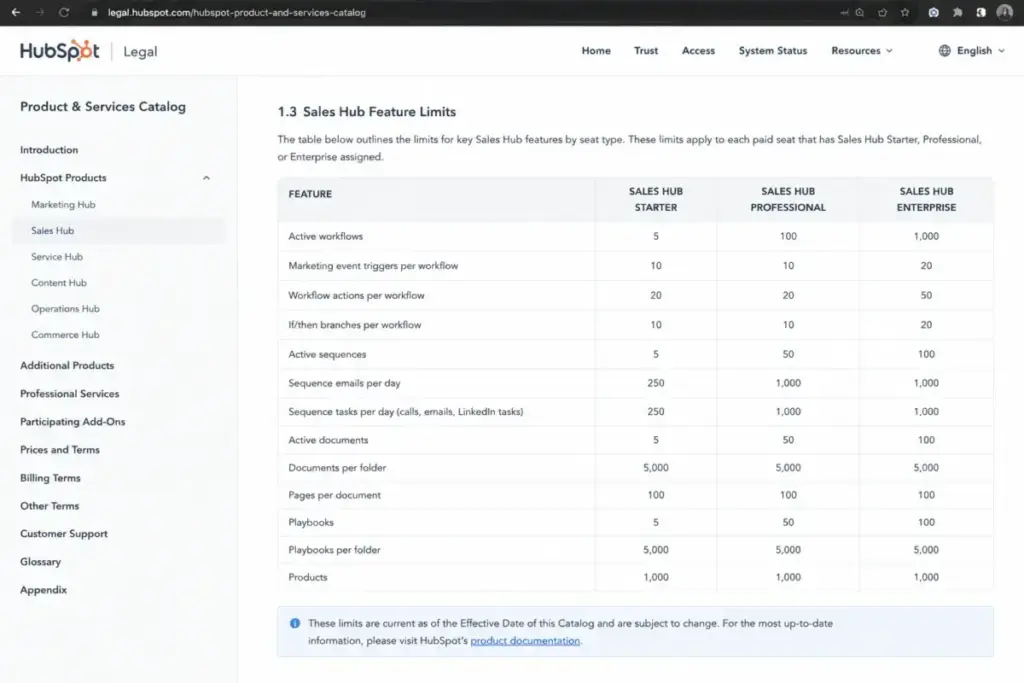
HubSpot Sales Hub Professional supports up to 300 fully customizable workflows and 5,000 sequences per account with 500 sends per user per day. Enterprise increases this to 1,000 workflows and 1,000 sequence sends per user per day. These numbers come from HubSpot’s Product and Services Catalog.
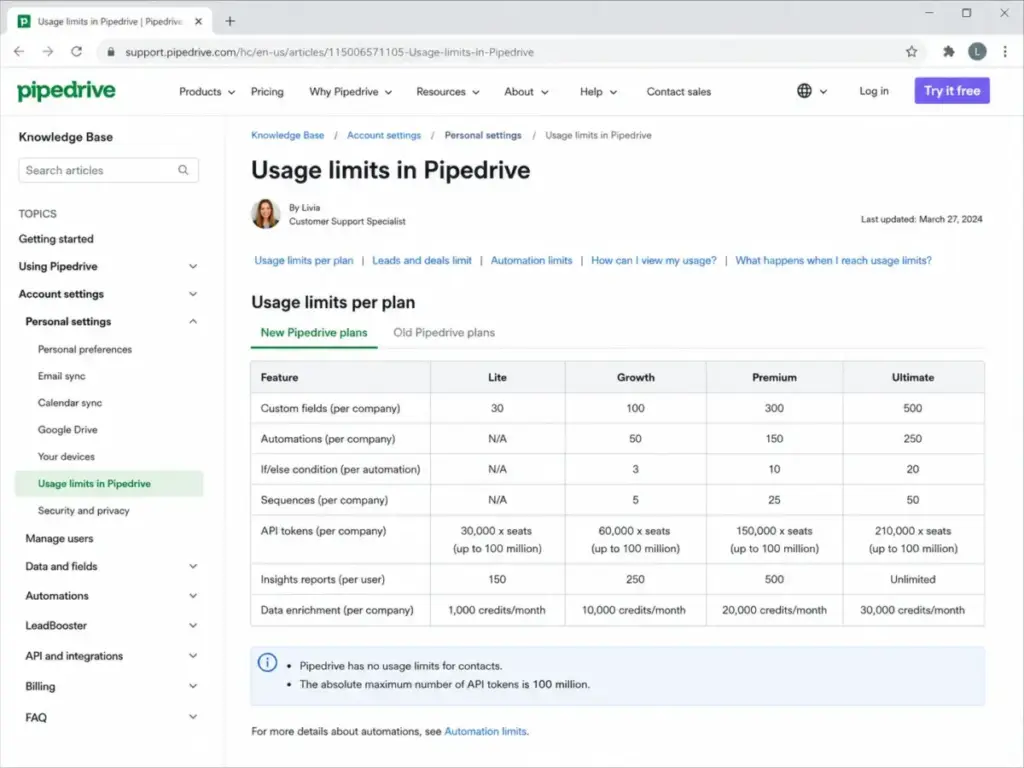
Pipedrive offers practical sales automation starting at Growth, but introduces plan-level caps on automations, sequences, if/else logic, and API usage that matter as teams scale. According to Pipedrive’s usage limits documentation, limits apply to leads and deals per company, automation count, sequence count, report count, and custom field count by plan.
| Limit | HubSpot | Pipedrive | Buyer Risk |
|---|---|---|---|
| Workflows / automations | 300 (Professional), 1,000 (Enterprise) | Plan-based caps, increasing by tier | RevOps teams hit Pipedrive caps faster |
| Sequences per account | 5,000 (Professional and Enterprise) | Plan-based sequence limits | High-volume outbound teams need headroom |
| Sequence sends per user/day | 500 (Professional), 1,000 (Enterprise) | Plan-based send limits | Outbound-heavy reps need send capacity |
| Custom objects | Enterprise only ($150/seat/month) | Not available natively | Complex data models require HubSpot Enterprise |
| API requests (burst) | 100-190/app/10s depending on plan | 20-120/token/2s depending on plan | Integration-heavy teams need higher limits |
| API requests (daily) | 250K-1M/day depending on plan | Token budget system with top-ups | Data warehouse sync and enrichment workflows |
For a 5-person team running basic pipeline automations, Pipedrive Growth handles the job at lower cost. For a 25-person RevOps team with complex multi-step workflows, conditional logic, and cross-object automation, HubSpot Professional or Enterprise provides deeper configurability.
API Limits for Integration-Heavy Teams
Teams using Zapier, Make, custom enrichment tools, or data warehouse syncs need to understand API limits before committing. This is the section most comparison articles skip entirely.
According to HubSpot’s API usage guidelines, private app limits scale by plan:
- Free and Starter: 100 requests per app per 10 seconds, 250,000 per account per day
- Professional: 190 requests per app per 10 seconds, 625,000 per day
- Enterprise: 190 requests per app per 10 seconds, 1,000,000 per day
According to Pipedrive’s API rate limiting documentation, burst rate limits are per token and plan:
- Lite: 20 requests per 2 seconds (API token), 80 (OAuth apps)
- Growth: 40 and 160
- Premium: 100 and 400
- Ultimate: 120 and 480
- Search API: 10 requests per 2 seconds across all plans
Pipedrive also uses daily API token budgets with top-ups available for purchase. Teams running custom integrations that pull thousands of records daily need to calculate whether their sync frequency fits within these limits.
The practical impact: a team syncing Pipedrive with a data warehouse every 15 minutes will hit Lite and Growth limits faster than a team doing the same sync on HubSpot Professional. Check your integration volume against these numbers before choosing.
Integrations and Ecosystem Breadth
HubSpot lists 2,000+ integrations across Gmail, Shopify, Mailchimp, Zapier, Google Ads, Slack, Gong, Aircall, Fivetran, Calendly, and more. Pipedrive lists 500+ integrations through its Marketplace, including Zapier, Zoom, Lemlist, QuickBooks, Trello, Asana, Slack, and PandaDoc.
Both ecosystems cover the core sales stack. The difference shows up for multi-function GTM teams: HubSpot’s marketplace has broader coverage for marketing, service, content, and commerce tools because HubSpot itself operates as a multi-hub platform. Pipedrive’s marketplace focuses on sales-adjacent tools.
For a team that only needs pipeline plus email plus meeting scheduling, both ecosystems work. For a team connecting sales with marketing attribution, customer service, content operations, and commerce data, HubSpot’s native hub connections eliminate middleware that Pipedrive requires.
Ease of Use: Pipedrive Wins for Sales Adoption Speed
Pipedrive positions itself as an easy and effective CRM for sales teams, built around visual pipeline management. Third-party review platforms support this positioning: on Capterra, both HubSpot CRM and Pipedrive score 4.5 overall, with Pipedrive rated slightly higher for value-for-money and ease of use. On Gartner Peer Insights, HubSpot holds 4.4 stars (463 reviews) and Pipedrive holds 4.2 stars (357 reviews) in the Sales Force Automation Platforms market.
Paraphrased G2 sentiment: users commonly praise HubSpot Sales Hub for centralized communication, lead tracking, and workflow automation, while noting that advanced features can become costly at higher tiers.
Paraphrased Capterra and G2 sentiment: reviewers rate Pipedrive highly for visual pipeline management and fast sales adoption, while noting weaker native marketing and broader lifecycle features compared with HubSpot.
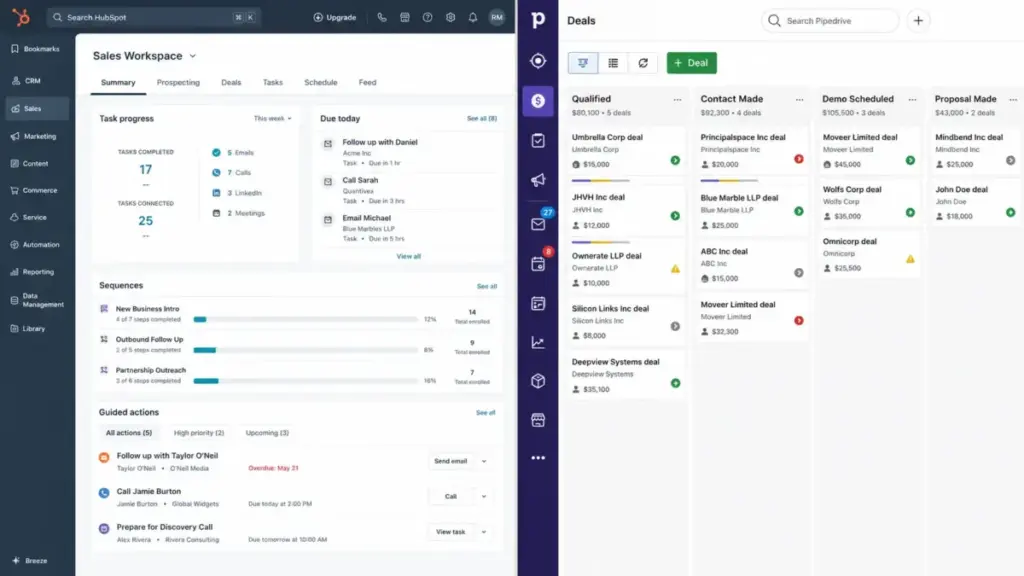
The question is not which product has a better interface. Both are well-designed. The question is how quickly a sales rep, not an admin, can start using the CRM productively on day one. Pipedrive’s pipeline-first design gets reps into deal tracking faster. HubSpot’s broader workspace takes longer to configure but rewards teams that use multiple hubs.
Security and Compliance: Both Platforms Meet Enterprise Standards
Both vendors publish strong security and compliance controls. Neither platform is clearly weaker here, so I am calling this a tie with a caveat: your specific compliance requirements determine which vendor’s documentation matters more.
HubSpot security (per HubSpot’s security page):
- Publishes SOC 3 reports publicly
- Provides confidential SOC 2 Type 2 reports to customers and prospects
- EU data hosting in Frankfurt
- TLS 1.2 or 1.3 encryption in transit
- AES-256 encryption at rest
- 99.95% uptime commitment
Pipedrive security (per Pipedrive’s privacy and security page):
- States compliance with GDPR
- Adheres to SOC 2, SOC 3, EU-US Data Privacy Framework
- ISO/IEC 27001:2013 and ISO 27701:2019 certifications
- AWS data centers in Europe and US
- HTTPS encryption, separate customer databases, daily backups
Pipedrive lists more ISO certifications. HubSpot explicitly states a 99.95% uptime commitment. Both use encryption in transit and at rest. For teams with EU data residency requirements, both offer European hosting options.
Support Access by Plan: Check Before You Buy
Support quality depends on which plan you buy. Both platforms gate their fastest support channels behind higher tiers.
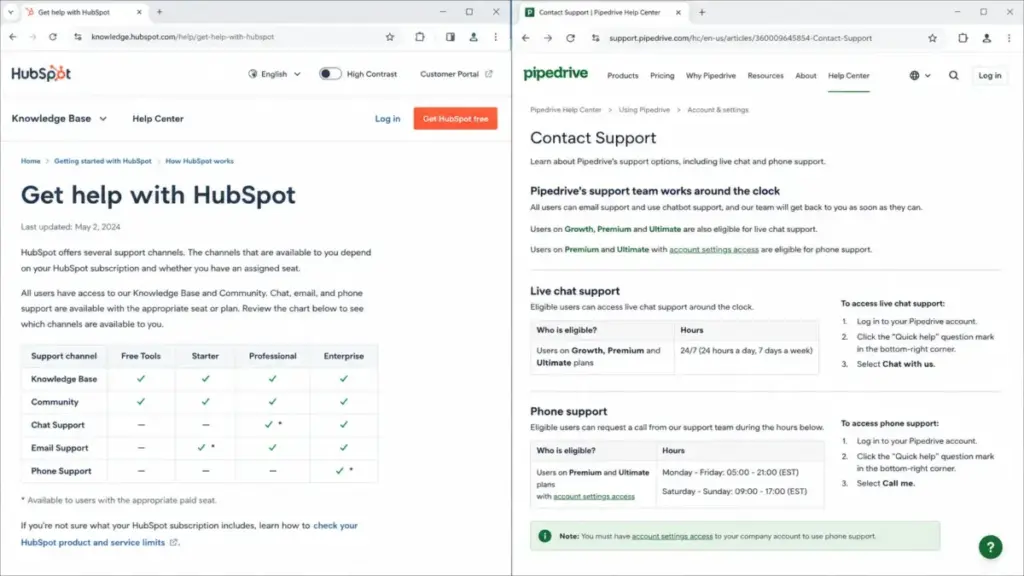
| Support Channel | HubSpot | Pipedrive |
|---|---|---|
| Knowledge Base / self-serve | All plans | All plans (chatbot) |
| Email support | Starter and above | All plans (anytime) |
| Live chat | Starter and above | Growth and above (business hours M-F) |
| 24/7 live chat | Not specified by tier | Premium and Ultimate |
| Phone / callback | Professional and Enterprise | Premium and Ultimate (eligible users) |
Source: HubSpot support documentation and Pipedrive support contact page.
Free HubSpot users get only Knowledge Base and Community. Pipedrive Lite users get email anytime and chatbot, but no live chat. If fast support matters for your implementation timeline, factor the plan cost of getting phone access into your budget.
Switching and Migration: Neither Direction Is Free
Vendor comparison pages make switching sound simple. The reality: migration friction depends on how deeply your team has configured the source CRM. I rate HubSpot-to-Pipedrive migration as medium difficulty and Pipedrive-to-HubSpot migration as high difficulty.
HubSpot to Pipedrive (medium): Easier when the sales process is straightforward. Contacts, deals, and basic activity history transfer well. The problems start with marketing automation workflows, service tickets, custom objects, lifecycle stage history, and cross-hub reporting. These either do not map to Pipedrive or require middleware and manual rebuilds.
Pipedrive to HubSpot (high): Teams usually move from Pipedrive to HubSpot when they outgrow sales-only CRM and need marketing automation, multi-touch attribution, customer service, and lifecycle reporting. HubSpot lists Pipedrive among supported CRM migration sources in its Product and Services Catalog and offers guided migration services. The complexity comes from rebuilding field mappings, activity history, email records, custom fields, workflow logic, deduplication, permissions, and user training in a new platform.
Migration checklist for either direction:
- Audit all custom fields and map them to the target CRM
- Export and verify activity history (calls, emails, notes, meetings)
- Document existing automations and sequences for manual rebuild
- Plan for deduplication during import
- Test permission and visibility settings before going live
- Budget 2-4 weeks for a 10-person team migration, longer for 25+
Can You Use Both? The Hybrid Strategy
Some teams use Pipedrive for sales and HubSpot Marketing Hub for inbound campaigns. This hybrid approach can work for budget-conscious teams, but requires middleware (Zapier, Make, or native sync), clear ownership rules for contact records, and ongoing sync monitoring. If your long-term plan involves consolidating onto one platform, starting with both creates migration debt.
The Verdict by Team Type
The right CRM depends on your team size, budget, sales motion, marketing dependency, automation needs, and scaling trajectory. Here is the buyer scenario matrix with specific recommendations.
| Scenario | Better Choice | Reason | Watch-Out |
|---|---|---|---|
| 5-person sales-led startup | Pipedrive | Lower cost, faster adoption, simpler setup | Automation and sequence limits as you grow |
| 10-person B2B SaaS with inbound marketing | HubSpot | Shared records, lifecycle tracking, native forms and campaigns | Marketing Hub is a separate cost from Sales Hub |
| 25-person outbound agency | Pipedrive | Better per-seat value for focused sales motion | Check automation caps, API limits, and sequence limits at this scale |
| 50-person revenue team with RevOps | HubSpot | Multi-function GTM, custom objects, governance, advanced reporting | Enterprise onboarding fee of $3,500 required |
| Budget-conscious pipeline-only team | Pipedrive | Growth or Premium covers practical sales workflows at lower cost | Weaker native marketing and service capabilities |
Choose HubSpot If:
- You need sales plus marketing, service, reporting, and customer data in one connected platform
- Your team runs inbound marketing campaigns that feed directly into the sales pipeline
- You need advanced workflows (up to 300-1,000), custom objects, and lifecycle reporting
- Your organization has dedicated RevOps or admin capacity to configure and maintain the platform
- You plan to scale past 25 users and need enterprise governance, sandbox testing, and permission controls
Choose Pipedrive If:
- Your primary need is a visual sales CRM that reps adopt quickly
- Your team is under 25 users with a focused outbound or pipeline-driven sales motion
- Budget predictability matters and you want lower per-seat pricing without surprise tier jumps
- You do not need native marketing automation, customer service, or content management
- Setup speed matters: your team needs to be productive within days, not weeks
Avoid HubSpot If:
- You are a sales-only team under 10 users with limited budget
- You have no marketing automation need and no dedicated admin or RevOps capacity
- You want predictable, low monthly cost without onboarding fees or Marketing Hub pricing jumps
Avoid Pipedrive If:
- You already need full inbound marketing, multi-touch attribution, and customer service
- You need cross-functional reporting across sales, marketing, and service
- Your data model requires custom objects that only HubSpot Enterprise supports
- You depend on lifecycle stage tracking across the full customer journey
Decision Tree: Which CRM Should You Pick?
If you are still deciding, walk through these questions in order:
- Do you need marketing, service, and sales in one platform? Yes: choose HubSpot. No: continue.
- Is your team under 10 sales users with a simple pipeline? Yes: choose Pipedrive. No: continue.
- Do you need advanced workflows, custom objects, or enterprise governance? Yes: choose HubSpot. No: continue.
- Is per-seat cost the primary constraint at 10+ users? Yes: compare Pipedrive Premium ($59/seat) against HubSpot Professional ($100/seat) before deciding.
- Do you only need pipeline management, email sync, and basic automation? Yes: choose Pipedrive.
- Does neither fit? Consider Salesforce for enterprise CRM depth, Zoho CRM for broader functionality at lower cost, or monday sales CRM for work management plus light CRM.
Alternatives to Consider If Neither Fits
Not every team fits neatly into the HubSpot or Pipedrive camp. Here are three alternatives worth evaluating.
Salesforce Sales Cloud: Best for enterprise teams needing deep CRM customization, complex permissions, and mature admin operations. Consider Salesforce when HubSpot is not customizable enough and Pipedrive is too lightweight for your sales operations.
Zoho CRM: Best for budget-sensitive teams wanting broad CRM functionality and customization without HubSpot-level pricing. Consider Zoho when you want a wider business suite than Pipedrive but lower cost than HubSpot.
monday sales CRM: Best for teams that want CRM plus flexible work management and project tracking. Consider monday when CRM adoption depends on spreadsheet-like workflows, visual boards, and cross-functional collaboration.
For more options, browse our complete guide to CRM alternatives to Pipedrive and alternatives to HubSpot.
FAQ
Is HubSpot better than Pipedrive?
HubSpot is better for teams that need sales, marketing, service, and reporting in one platform. Pipedrive is better for sales-focused teams that prioritize fast adoption and lower per-seat cost. At comparable automation tiers, HubSpot Professional costs $100/seat/month versus Pipedrive Premium at $59/seat/month (as of May 2026).
What is the main difference between HubSpot and Pipedrive?
HubSpot is a multi-hub customer platform connecting sales with marketing, service, content, data, and commerce. Pipedrive is a focused sales CRM built around visual pipeline management. The main difference is platform breadth versus sales execution depth.
Is Pipedrive cheaper than HubSpot?
Yes, at comparable sales tiers. Pipedrive Premium costs $59/seat/month billed annually. HubSpot Sales Hub Professional costs $100/seat/month at list price. At 10 users, that is $590/month versus $1,000/month, excluding add-ons. Pipedrive add-ons are per company, not per user.
Does HubSpot have a free CRM?
Yes. HubSpot offers free sales tools including basic deal tracking, live chat, and meeting scheduling. The HubSpot blog states free sales tools support up to two users. Advanced features like workflows, sequences, and lead scoring require Professional ($100/seat/month) or above.
Does Pipedrive have a free plan?
No. Pipedrive offers a 14-day free trial with no credit card required, but does not have a permanent free plan. The lowest tier is Lite at $14/seat/month billed annually.
Which CRM is easier to use, HubSpot or Pipedrive?
Pipedrive is consistently rated higher for ease of use across third-party review platforms. Its pipeline-first design gets sales reps productive faster. HubSpot offers a broader workspace that takes longer to configure but provides more depth once set up.
Can Pipedrive integrate with HubSpot?
Yes. Teams can connect Pipedrive and HubSpot through Zapier, Make, or other middleware tools. Some teams use Pipedrive for sales and HubSpot Marketing Hub for inbound campaigns. This hybrid approach works but requires sync monitoring and clear data ownership rules.
How hard is it to migrate from Pipedrive to HubSpot?
I rate Pipedrive-to-HubSpot migration as high difficulty. Teams moving to HubSpot typically need marketing automation, lifecycle data, and cross-functional reporting that requires field mapping, activity history migration, workflow rebuilds, and user training. HubSpot lists Pipedrive as a supported migration source and offers guided services.
Which CRM is better for startups?
For startups under 10 users with a focused sales motion, Pipedrive offers faster setup and lower cost. For startups with an inbound marketing strategy that feeds into sales, HubSpot’s platform breadth pays off earlier. See our guide to the best CRM for startups.
Which CRM is better for marketing automation?
HubSpot wins for marketing automation. Its Marketing Hub provides native forms, campaigns, workflows, lead scoring, and multi-touch attribution. Pipedrive handles marketing automation through add-ons like Campaigns ($13.33/month) and integrations, but does not match HubSpot’s native lifecycle marketing depth.