Pipedrive Lite costs $14/user/month billed annually. Salesforce Starter Suite costs $25/user/month. At 10 users, that gap is $110/month before either platform adds a single add-on. The Pipedrive vs Salesforce decision looks straightforward until you realize the cheaper CRM caps your automation ceiling and the more expensive one can triple your year-one budget with implementation, admin, and support plan costs.
This comparison is based on official pricing data, documentation analysis, and third-party review validation from both CRM software platforms. I evaluated each product’s plan gates, API constraints, hidden costs, and real-world fit boundaries so you can stop reading generic “Pipedrive is easier, Salesforce is more powerful” articles and start making an actual decision. If you are comparing sales pipeline tools, the answer depends on your team size, admin capacity, and how much process control you need in the next 12 to 24 months.
Quick Verdict: Pipedrive vs Salesforce at a Glance
Pipedrive wins on cost, setup speed, and sales-rep adoption. Salesforce wins on customization, automation depth, ecosystem, and enterprise governance. Neither wins outright.
| Category | Winner | Why |
|---|---|---|
| Pricing and total cost | Pipedrive | Entry tiers start at $14 vs $25; add-on/support cost layers are lower |
| Ease of use and adoption speed | Pipedrive | Visual pipeline, lower admin overhead, faster self-serve setup |
| Automation depth and process control | Salesforce | Flow Builder, approval processes, Agentforce, sandbox, enterprise orchestration |
| Customization and scalability | Salesforce | Custom objects, governance, multi-department workflows, AppExchange |
| Integrations and ecosystem | Salesforce | AppExchange/AgentExchange, MuleSoft, Slack/Tableau/Data Cloud path |
| Security and compliance | Salesforce | Both credible; Salesforce stronger for enterprise audit workflows |
| Support and implementation | Depends | Pipedrive: self-serve; Salesforce: formal success plans, 24/7 for critical issues |
Evaluation Methodology
I evaluated Pipedrive and Salesforce using official pricing pages, product documentation, API rate-limiting documentation, support coverage policies, security/compliance pages, and third-party review platforms including Gartner Peer Insights and Reddit user discussions. Pricing was verified on May 14, 2026, from each vendor’s official pricing page. I did not score either product based on brand popularity alone. Feature gates, plan-level access, and cost-at-scale calculations drive the analysis below.
Workflow 1: Pipeline Setup and Daily Sales Execution
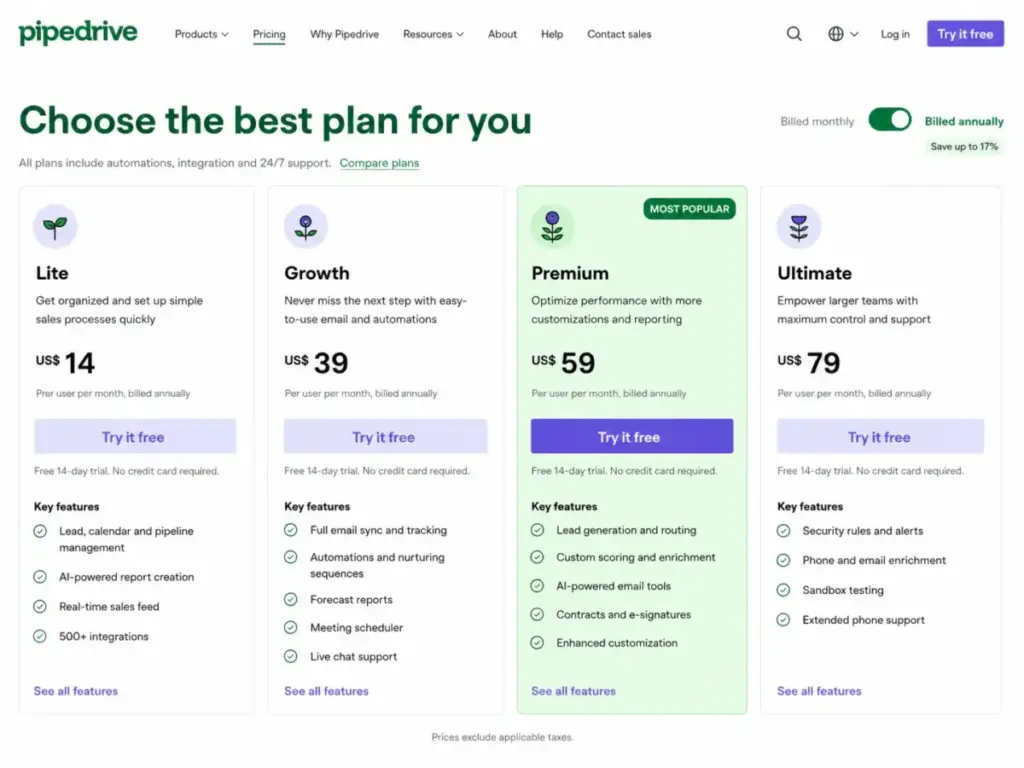
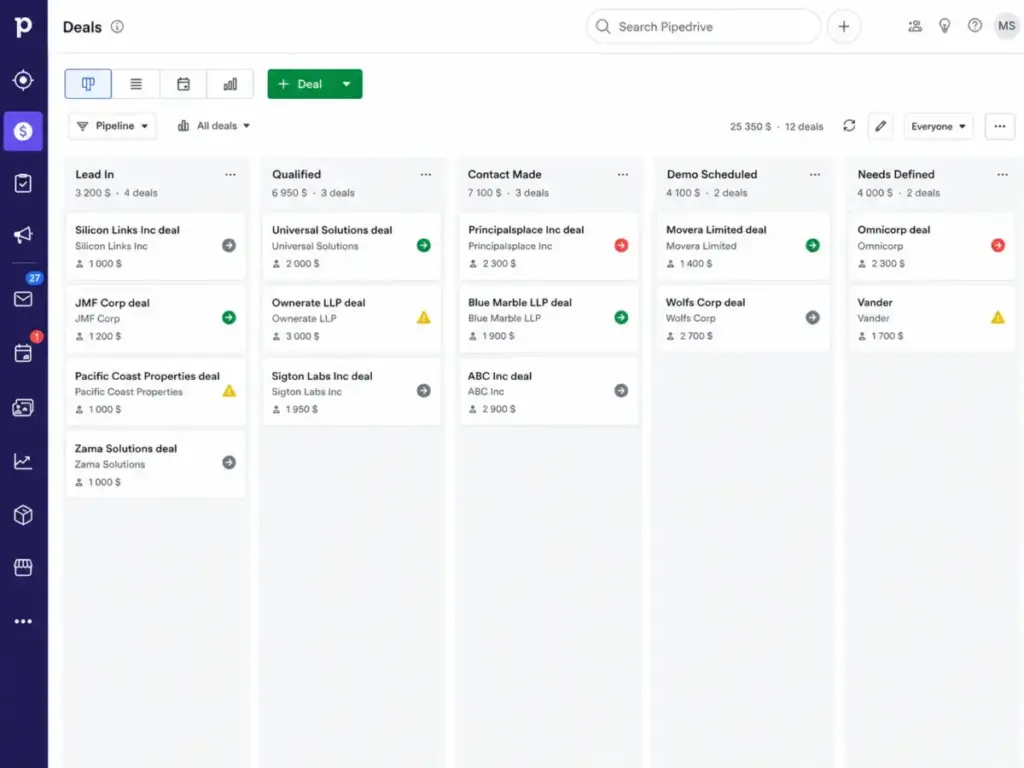
Pipedrive built its entire product around one workflow: visual deal tracking in a drag-and-drop Kanban board. Sales reps see every deal stage, move deals between columns, and log activities without navigating complex menus. The Pipedrive CRM Lite plan at $14/user/month (billed annually) includes core lead, calendar, and pipeline management, AI-powered report creation, a real-time sales feed, and 500+ integrations, according to Pipedrive’s official pricing page (verified May 2026).
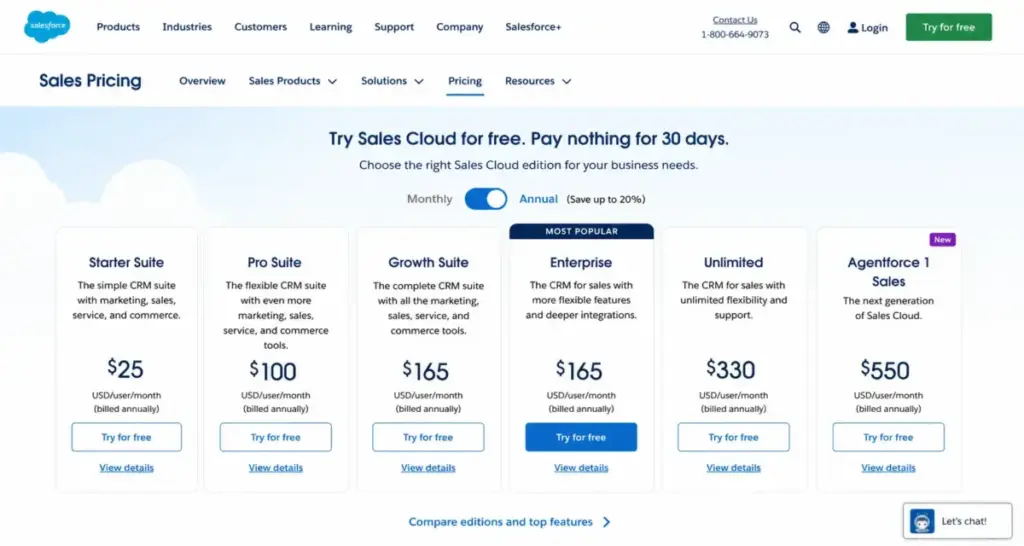
Salesforce approaches pipeline management differently. Opportunities move through stages with configurable probability percentages, and teams can build custom layouts, record types, and approval processes around each stage. The entry point is Salesforce Starter Suite at $25/user/month, which includes lead, account, contact, and opportunity management, built-in sales flows, lead routing, and AI sync for emails, events, and contacts, per Salesforce’s official pricing page (verified May 2026).
The practical difference: a five-person sales team opens Pipedrive and sees a working pipeline in minutes. The same team opening Salesforce needs to define objects, configure page layouts, set permissions, and decide how much of the platform they actually need. That does not make Salesforce worse. It makes it a different tool for a different buyer.
Winner: Pipedrive for teams that need a working pipeline with minimal configuration. Salesforce wins when the pipeline workflow requires approval gates, custom objects, or multi-department coordination.
Workflow 2: Automation, Lead Routing, and Process Control
Pipedrive unlocks automations and nurturing sequences starting at the Growth tier ($39/user/month billed annually). Lead generation, routing, and custom scoring require Premium ($59/user/month). Sandbox testing and fortified security rules require Ultimate ($79/user/month). The automation depth is sufficient for common sales workflows: trigger-based email sequences, deal stage updates, and activity reminders.
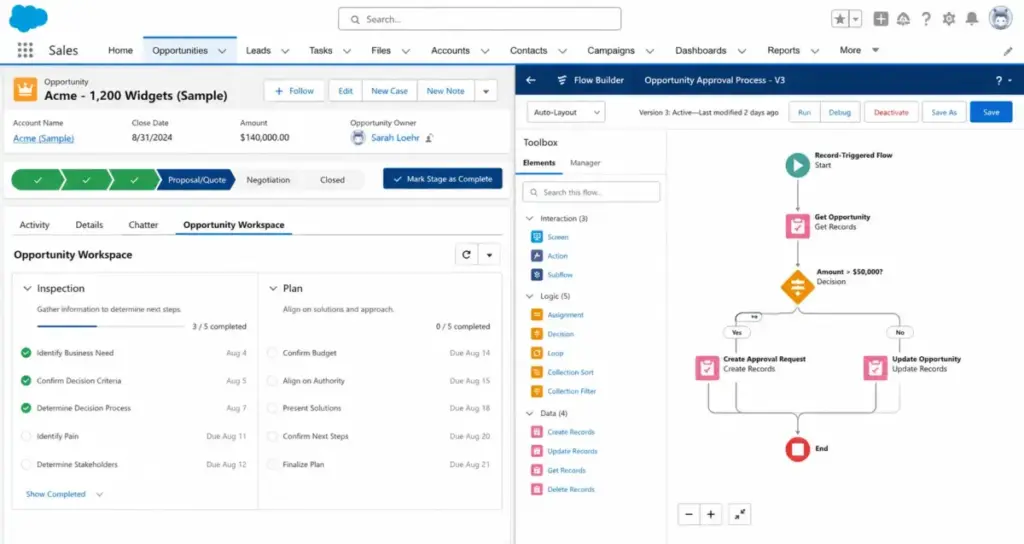
Salesforce’s automation architecture operates on a different scale. Flow Builder handles complex multi-step workflows with branching logic. Approval processes enforce governance. Lightning App Builder lets teams create custom apps without code. Enterprise edition at $175/user/month adds advanced pipeline management, deal insights, conversation intelligence, and Agentforce. The gap between Pipedrive’s workflow automations and Salesforce’s Flow Builder is not incremental; it is architectural.
Feature Gates That Determine the Real Cost
This is the part most comparison articles skip. Features are not “included” or “not included.” They are gated to specific plans, and the plan you need depends on which features your team requires.
| Feature | Pipedrive Plan Gate | Salesforce Plan Gate | Buyer Implication |
|---|---|---|---|
| Email sync and tracking | Growth ($39/user/mo) | Starter Suite ($25/user/mo) | Salesforce includes email sync earlier |
| Workflow automations | Growth ($39/user/mo) | Pro Suite ($100/user/mo) | Pipedrive delivers automation cheaper |
| Lead routing and scoring | Premium ($59/user/mo) | Starter Suite (basic), Enterprise (advanced) | Salesforce splits basic/advanced routing across tiers |
| E-signatures and contracts | Premium ($59/user/mo) | Not natively included; third-party via AppExchange | Pipedrive bundles it; Salesforce requires add-ons |
| Sandbox testing | Ultimate ($79/user/mo) | Unlimited ($350/user/mo) for Full Sandbox | Both gate sandbox access to top tiers |
| AppExchange / marketplace access | All plans (500+ integrations) | Pro Suite ($100/user/mo) and above | Salesforce gates AppExchange behind Pro Suite |
| Advanced pipeline and deal insights | Not available | Enterprise ($175/user/mo) | Salesforce-only capability |
| Predictive AI and Sales Engagement | Not available | Unlimited ($350/user/mo) | Salesforce-only capability at premium price |
| Web API flexibility | All plans (token-based) | Enterprise ($175/user/mo) | Salesforce gates full API access behind Enterprise |
| Premier Success Plan | N/A | 30% of net license fees or bundled with Unlimited | Major Salesforce hidden cost |
Want a deeper look at each platform’s individual pricing? See our Pipedrive pricing breakdown and Salesforce pricing analysis.
Winner: Salesforce for automation depth. Pipedrive covers 80% of what most sales teams under 25 reps need. Salesforce covers the remaining 20% that enterprise teams cannot live without.
Workflow 3: Cost at Scale and Hidden Expenses
The entry-price comparison tells one story. The cost-at-scale comparison tells a different one. I modeled both platforms using their lowest paid tiers, excluding add-ons, taxes, and implementation.
Cost at Scale: Pipedrive Lite vs Salesforce Starter Suite
| Team Size | Pipedrive Lite (annual billing) | Salesforce Starter Suite | Monthly Savings with Pipedrive |
|---|---|---|---|
| 5 users | $70/month | $125/month | $55/month |
| 10 users | $140/month | $250/month | $110/month |
| 25 users | $350/month | $625/month | $275/month |
| 50 users | $700/month | $1,250/month | $550/month |
At 50 users, Pipedrive Lite saves $6,600/year compared to Salesforce Starter Suite. That gap widens when teams move up tiers: Pipedrive Growth ($39) vs Salesforce Pro Suite ($100) is a $61/user/month difference.
Pipedrive Is Cheaper, but Not Always All-Inclusive
Pipedrive’s add-on pricing can shift the budget story. According to Pipedrive’s pricing page, optional add-ons include LeadBooster from $32.50/month, Projects from $6.67/month, Campaigns from $13.33/month, Web Visitors from $41/month, and Smart Docs from $32.50/month. A team that needs lead generation, project tracking, and visitor intelligence could add $80+/month on top of their per-seat cost.
Salesforce’s Hidden Cost Layer Is Larger
Salesforce’s base seat price understates total cost when teams require Premier Success Plan, implementation partners, or add-ons. The Salesforce pricing page lists several add-ons: Agentforce for Sales from $125/user/month, Sales Programs from $100/user/month, Revenue Intelligence from $220/user/month, and Revenue Cloud from $200/user/month.
The Premier Success Plan costs 30% of net license fees unless bundled with Unlimited or Agentforce 1 editions. For a 25-user Enterprise team paying $175/user/month ($52,500/year), Premier Support adds approximately $15,750/year. That is a support cost most comparison articles never quantify.
Implementation and admin costs vary by scope but can be material. I did not estimate a fixed Salesforce implementation cost because it depends on data model complexity, migration scope, customization, and partner fees. What I can say is that Pipedrive’s self-serve setup path is significantly less expensive for teams that do not have dedicated CRM administrators.
Winner: Pipedrive on total cost at every team size modeled. Salesforce’s higher cost can be justified if the team uses its customization, AppExchange, and automation capabilities. If those features go unused, the premium is wasted.
The API and Integration Ceiling Most Reviews Ignore
For RevOps teams, data engineers, or anyone planning CRM sync with enrichment tools, reporting warehouses, or automation platforms, API limits matter more than feature checklists.
Pipedrive API Budget
Pipedrive uses a token-based API rate-limiting system. According to Pipedrive’s API documentation, the daily token budget equals 30,000 base tokens x plan multiplier x number of seats, plus any purchased top-ups. Plan multipliers are: Lite (1x), Growth (2x), Premium (5x), Ultimate (7x).
A 10-seat Growth team gets 600,000 daily tokens. Individual API calls cost between 2 tokens (single entity GET) and 40 tokens (search endpoints). For high-volume sync workflows, that budget can run thin, especially on Lite where the multiplier is just 1x.
Salesforce API Allocation
Salesforce’s API access depends on edition. According to Salesforce API documentation, an example Enterprise Edition org with 15 licenses gets 115,000 API requests (100,000 base + 15 x 1,000 per license). Full web API flexibility requires Enterprise edition or above.
Both platforms can handle moderate integration loads. Salesforce’s allocation scales better for large orgs with heavy API usage. Pipedrive’s token system is more predictable but can constrain high-volume data enrichment or bi-directional sync workflows on lower tiers.
Security, Compliance, and Governance
Both platforms publish credible security and compliance documentation. The difference is not about which is “more secure” in absolute terms. It is about which compliance posture matches your procurement requirements.
Pipedrive states on its privacy and security page that customer data is stored in separate databases, accounts are hosted in AWS data centers in Europe and the US, data is encrypted over HTTPS, and backups run daily. Pipedrive adheres to SOC 2, SOC 3, EU-US Data Privacy Framework, ISO/IEC 27001:2013, and ISO 27701:2019.
Salesforce maintains a dedicated compliance portal with SOC 2 reports covering controls around security, availability, and confidentiality. Salesforce also publishes GDPR resources describing privacy and security protections.
For SMB teams, Pipedrive’s compliance coverage is sufficient. For enterprise teams navigating formal audit workflows, vendor security questionnaires, and multi-department governance requirements, Salesforce’s compliance documentation ecosystem and enterprise platform controls are stronger.
Support: Self-Serve Speed vs Enterprise Success Plans
Pipedrive’s support model suits self-serve teams. According to Pipedrive’s support documentation, live chat is available on Growth, Premium, and Ultimate plans. Growth chat runs Monday through Friday during business hours. Premium and Ultimate plans get 24-hour coverage Monday through Sunday. Ultimate adds extended phone support Monday through Friday, 7:00 AM to 11:00 PM CET/CEST.
Salesforce offers a Standard Success Plan included with all licenses. The Premier Success Plan (30% of net license fees, or bundled with Unlimited/Agentforce 1) includes expert guidance, product education, health checks, recommendations, and 24/7 support for business-stopping issues. Signature Success Plan is custom-priced.
Choose Pipedrive if your team can handle configuration and troubleshooting without dedicated support escalation paths. Choose Salesforce if your organization needs formal success plans, designated success managers, and 24/7 critical-issue response.
Migration Friction: Switching Between Pipedrive and Salesforce
Most comparison articles ignore migration. That is a mistake for buyers who want to “start with Pipedrive and move to Salesforce later.”
Pipedrive to Salesforce: Medium to High Difficulty
Moving from Pipedrive to Salesforce requires remapping pipelines into Salesforce objects, opportunity stages, permissions, roles, automations, and reports. Deal stages do not translate 1:1 into Salesforce opportunity stages. Custom fields need mapping. Activity history, email logs, and notes require data migration planning. Integration dependencies (Zapier workflows, marketplace apps) need rebuilding.
Salesforce to Pipedrive: Medium Difficulty
Moving from Salesforce to Pipedrive is simpler for teams with straightforward sales pipelines. Complex orgs lose custom objects, advanced workflow logic, historical reporting structures, AppExchange dependencies, and cross-department CRM architecture. The Salesforce-to-Pipedrive path works best when teams realize they are paying for enterprise capabilities they never configured.
Both platforms support data import/export and API access. Pipedrive supports spreadsheet and CRM imports. Salesforce supports import/export with APIs, but complex orgs require careful mapping of accounts, contacts, leads, opportunities, activities, custom fields, owners, permissions, automations, and historical data.
What Real Users Say
On Gartner Peer Insights, Pipedrive holds a 4.2 rating from 357 reviews and Salesforce holds a 4.4 rating from 2,022 reviews in the Sales Force Automation Platforms market.
Paraphrased sentiment from Reddit discussions: smaller teams without Salesforce admins or consultant budgets often view Pipedrive as easier to get off the ground. Salesforce is frequently praised for its app ecosystem and capabilities but carries consistent warnings about training, admin expertise, and implementation resources.
The pattern is clear. Teams that value speed-to-value and predictable costs gravitate toward Pipedrive. Teams that need institutional control and platform extensibility accept Salesforce’s complexity as the cost of doing business.
The Verdict: Who Should Choose Pipedrive vs Salesforce
There is no single winner. The right choice depends on your team’s admin capacity, process complexity, and 12-to-24-month growth trajectory.
Buyer Scenario Matrix
| Scenario | Better Choice | Reason | Watch-Out |
|---|---|---|---|
| 5-person startup, first CRM | Pipedrive | Lower cost, faster setup, less admin burden | Pipedrive’s automation ceiling at scale |
| 10-person B2B SaaS sales team | Pipedrive | Growth/Premium covers email, automations, forecasting at lower cost | Lead routing and custom scoring require Premium ($59) |
| 50-person sales org with territories | Salesforce | Custom objects, approval processes, Flow Builder, governance | Implementation, admin, and support plan costs |
| Enterprise standardizing sales + service + analytics | Salesforce | Broader platform, Slack/Tableau/Data Cloud, formal success plans | Total cost including Premier Support and add-ons |
| Team outgrowing spreadsheets, no CRM admin | Pipedrive | Structured pipeline without heavy implementation | Limited reporting depth compared to Salesforce CRM |
Decision Framework
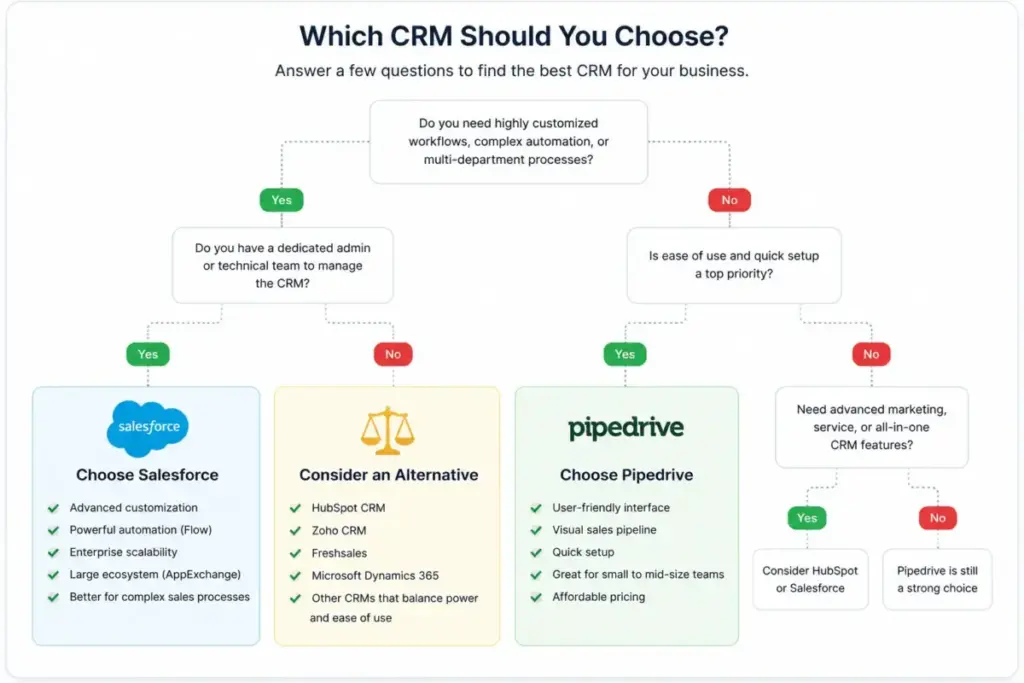
Choose Pipedrive if your team mainly needs a clean sales pipeline, activity tracking, email sync, basic automation, predictable cost, and a CRM that reps can adopt quickly.
Choose Salesforce if your organization needs enterprise customization, advanced forecasting, governance, custom objects, approval flows, complex reporting, a large integration ecosystem, or AI and data platform expansion.
Avoid Pipedrive if your sales process needs deep cross-object workflows, enterprise-grade governance, complex multi-business-unit reporting, or broad customer-platform coverage across sales, service, marketing, commerce, and data.
Avoid Salesforce if your team lacks budget for implementation and admin resources and only needs simple pipeline visibility and sales activity tracking.
When Neither Platform Fits
Consider HubSpot CRM if you want CRM plus marketing automation and a free starting point with a strong inbound marketing engine.
Consider Zoho CRM if you want more customization and automation than Pipedrive at lower cost than Salesforce, with a broader operations suite.
Consider Monday CRM if your sales process overlaps heavily with project management, task tracking, or client delivery workflows.
For more options, browse our Pipedrive alternatives guide or Salesforce alternatives comparison.
FAQ: Pipedrive vs Salesforce
Is Pipedrive better than Salesforce?
Pipedrive is better for small to mid-sized sales teams that need fast setup, visual pipeline management, and predictable per-seat pricing. Salesforce is better for mid-market and enterprise organizations that need advanced automation, custom objects, governance, and platform extensibility. Neither is universally better.
Which is cheaper, Pipedrive or Salesforce?
Pipedrive is cheaper at every comparable tier. Lite starts at $14/user/month vs Salesforce Starter Suite at $25/user/month (both billed annually, verified May 2026). At 25 users, Pipedrive Lite costs $350/month vs Salesforce Starter at $625/month.
Is Salesforce too complex for small businesses?
For teams under 10 users without a dedicated CRM administrator, Salesforce’s configuration requirements, implementation costs, and support plan pricing often exceed the value delivered. Pipedrive or a simpler CRM for small business is a better fit for most small teams.
Can Pipedrive replace Salesforce?
Pipedrive can replace Salesforce for teams that primarily need pipeline management, email tracking, and basic automation. Pipedrive cannot replace Salesforce for organizations using custom objects, Flow Builder, AppExchange apps, multi-department workflows, or enterprise-grade reporting and governance.
When should a company move from Pipedrive to Salesforce?
Consider switching when your team needs territory management, approval workflows, custom objects, complex multi-business-unit reporting, or a broader platform covering sales, service, marketing, and analytics. Plan the migration carefully: deal stages, custom fields, automations, and integrations all require remapping.
Does Salesforce require an admin?
Salesforce does not technically require a dedicated admin for Starter Suite. In practice, teams using Pro Suite and above benefit from a Salesforce administrator or consultant to manage configuration, permissions, automations, data model design, and AppExchange integrations.
How much does Salesforce cost for 10 users?
On Starter Suite at $25/user/month (billed annually), 10 users cost $250/month or $3,000/year. On Pro Suite at $100/user/month, the cost jumps to $1,000/month or $12,000/year, before add-ons and Premier Support.
How does Pipedrive handle API rate limits?
Pipedrive uses token-based API rate limiting. Daily budget equals 30,000 base tokens multiplied by the plan multiplier (Lite 1x, Growth 2x, Premium 5x, Ultimate 7x) and the number of seats. High-volume sync workflows on Lite or Growth plans need careful modeling before purchase.
What unexpected costs come with Salesforce?
Premier Success Plan costs 30% of net license fees (unless bundled with Unlimited). Add-ons include Agentforce for Sales ($125/user/month), Revenue Intelligence ($220/user/month), and Revenue Cloud ($200/user/month). Implementation partner fees, admin time, training, and AppExchange app subscriptions add further cost.
Which CRM is better for B2B SaaS sales teams?
For B2B SaaS teams under 25 reps, Pipedrive Growth or Premium covers email sync, automations, nurturing sequences, and lead scoring at a fraction of Salesforce’s Pro Suite cost. For SaaS teams above 50 reps with complex deal structures and enterprise prospects, Salesforce’s customization and ecosystem give it an edge.