Every engineering team I talk to has an opinion about Jira. Half swear by it. The other half swear at it. And that split tells you more about this Jira review than any feature list ever will, because Jira is not a tool you casually adopt. It is an operating system for how technical teams plan, track, and ship work. The teams that succeed with it commit to the configuration overhead. The teams that struggle treat it like a simple task board and get buried under workflow rules they never asked for.
This review maps exactly where Jira delivers real workflow control, where its plan gates force upgrade decisions, and where the admin burden crosses from strategic advantage into avoidable overhead. I evaluated Jira across official documentation, project management software comparisons, third-party review validation from Capterra, G2, TrustRadius, and Software Advice, and pricing data verified directly from Atlassian’s pricing page (as of May 2026).
TL;DR: Quick Verdict
| Category | Detail |
|---|---|
| Score | 7.8/10 |
| Best for | Engineering, DevOps, QA, and product teams running Scrum or Kanban with formal sprint ceremonies |
| Not for | Non-technical teams wanting a clean visual board with minimal setup and no dedicated Jira admin |
| Starting price | $0 (Free, up to 10 users) |
| Paid plans | Standard at$7.91/user/month, Premium at $14.54/user/month, Enterprise at custom pricing (as of May 2026) |
| Verdict | Try if your team runs structured agile workflows; Skip if you need fast onboarding with zero admin |
Jira earns a 7.8 because the workflow engine is genuinely unmatched for technical delivery teams, but the configuration tax, automation ceilings, and plan-gated controls mean most teams pay more (in time and money) than the pricing page suggests.
Check Jira’s current pricing before choosing a plan, since annual totals vary by user count and billing setup.
The 60-Second Version
Jira is Atlassian’s agile project management and issue-tracking platform. It runs Scrum boards, Kanban boards, backlog grooming, sprint planning, bug tracking, release coordination, and cross-team roadmap planning. The Free plan covers up to 10 users with core tracking features.
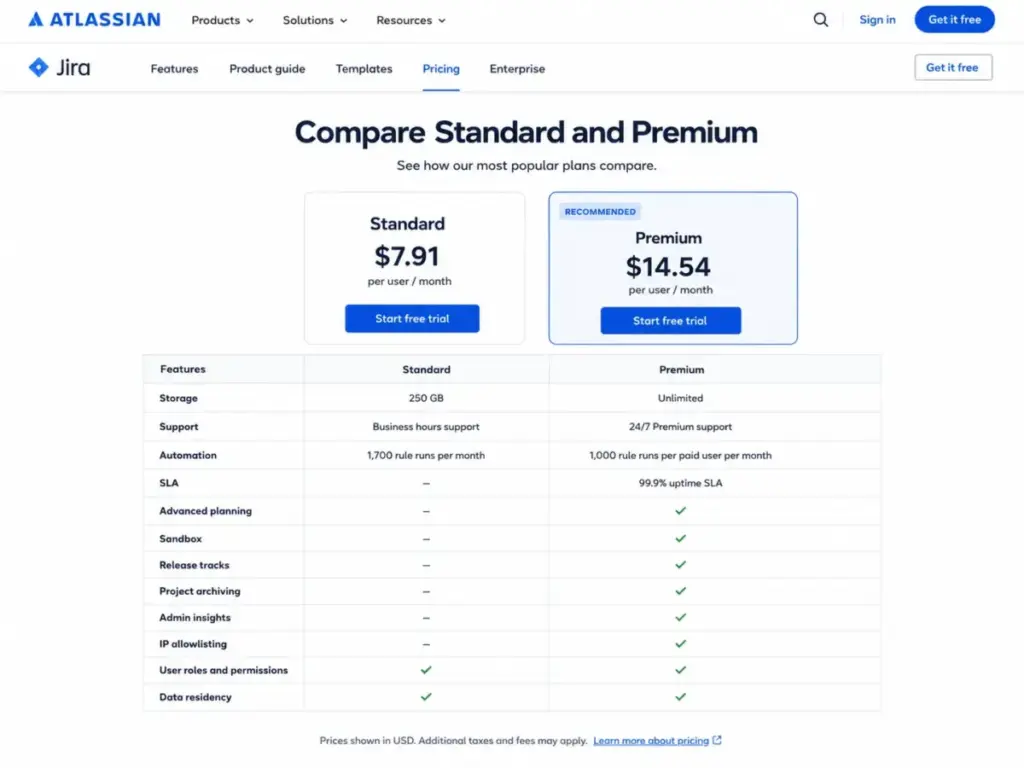
Standard ($7.91/user/month) adds permissions, 250 GB storage, and data residency. Premium ($14.54/user/month) unlocks advanced planning, unlimited storage, 99.9% SLA, sandbox environments, and 24/7 support. Enterprise adds multi-site governance for up to 150 instances with a 99.95% SLA. Rovo AI is available on Standard, Premium, and Enterprise plans.
The real cost goes beyond seat price: Marketplace apps, admin time, Atlassian Guard for non-Enterprise orgs, and workflow governance add up. Jira is the right pick for teams that need workflow control and can justify admin ownership. It is the wrong pick for teams that want simplicity first.
The 3 Problems Jira Solves Better Than Almost Anything Else
Jira’s complexity is not an accident. It exists because technical teams face workflow problems that simpler tools cannot solve. Here are the three areas where Jira earns its reputation.
Problem 1: Multi-Team Sprint Coordination With Dependency Tracking
Most free project management tools handle single-team Kanban boards well enough. Jira pulls ahead when three or four engineering squads share a release timeline and need to track cross-project dependencies, blockers, and handoffs in one place.
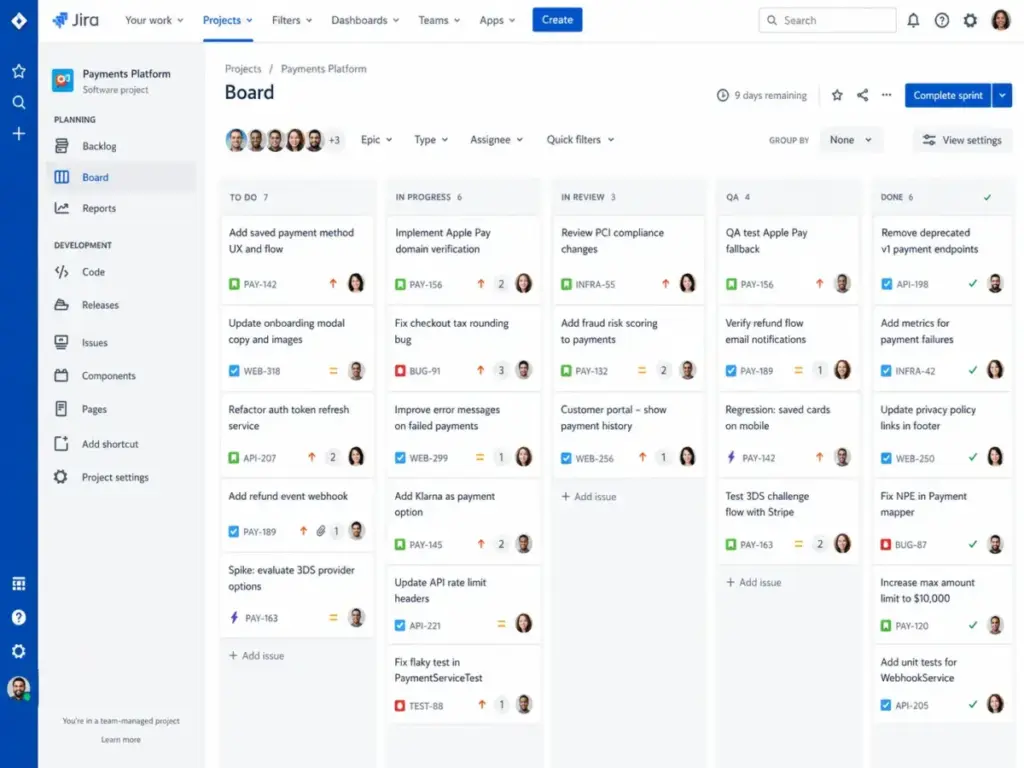
Jira’s customizable workflows let each team define its own issue lifecycle (To Do, In Progress, Code Review, QA, Done) while project-level boards aggregate status across all of them. Sprint planning, backlog grooming, and velocity charts connect directly to these workflows. That feedback loop between planning and execution is where Jira creates the most value.
Does a 5-person startup need this? Almost never. But a 45-person engineering org with separate frontend, backend, QA, and infrastructure squads? This is table stakes.
Problem 2: Issue-Level Granularity for Bug Tracking and QA
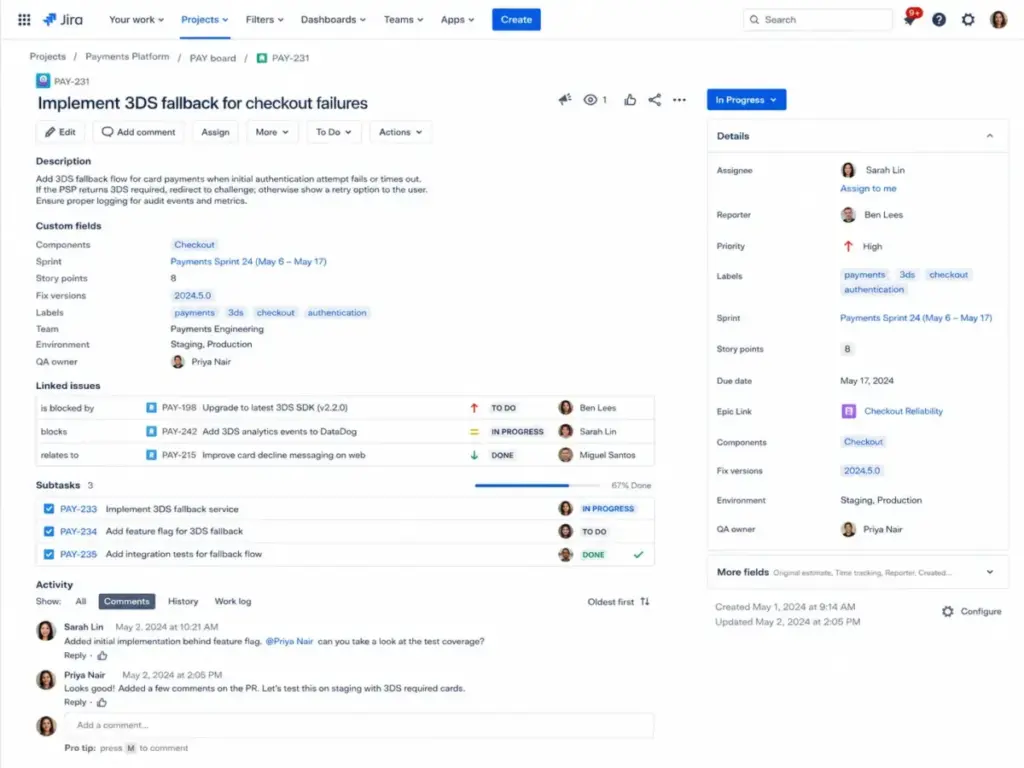
Bug tracking is not task management. Bugs need severity levels, environment fields, reproduction steps, linked pull requests, and audit trails. Jira’s custom fields and issue types handle this natively, without forcing teams to hack a generic task board into a bug tracker.
QA teams can create dedicated issue types with required fields, attach test cases, link parent stories to child bugs, and filter backlogs using JQL (Jira Query Language). Based on the documentation and review patterns, one practical takeaway is : the JQL filtering alone saves QA leads hours of manual triage every sprint cycle. It is one of those features that seems minor on the sales page but becomes indispensable in daily use.
Problem 3: Release Planning With Audit Trails and Compliance Visibility
Regulated industries and enterprise engineering teams need release planning that goes beyond “drag a card to Done.” Jira connects epics to sprints to releases, provides version-level tracking, and maintains full audit logs of every status change, field edit, and comment.
According to Atlassian’s Premium plan documentation, the Premium tier adds advanced planning views, project archiving, and admin insights. For teams with SOC 2 or compliance requirements, these audit capabilities matter. The data is encrypted in transit and at rest, and data residency is available starting at Standard.
The 2 Problems Jira Creates (And Why They Matter for Your Buying Decision)
Every review on the first page of Google says Jira is “powerful but complex.” That framing misses the point. The real question is: does the complexity serve your team, or does it drain them?
The Admin Tax
Jira’s biggest hidden cost is not the monthly seat price. It is the admin time required to keep the system working well.
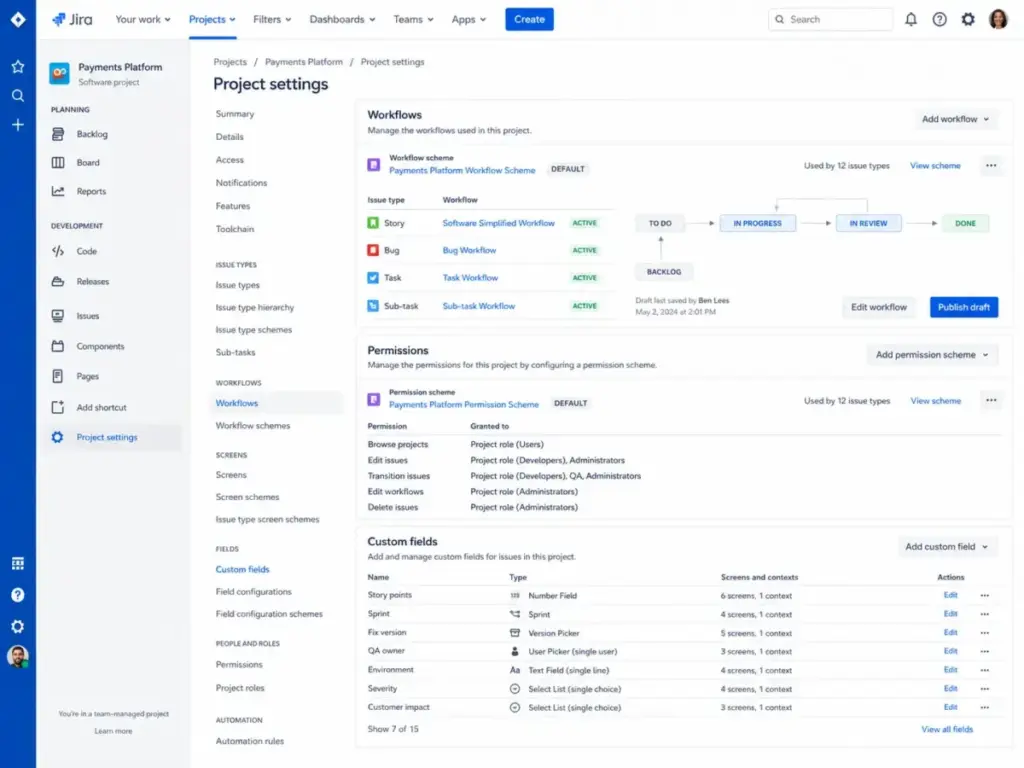
Here is what Jira administration actually involves for a company-managed project:
- Designing and maintaining custom workflows per project type
- Managing permission schemes across teams and roles
- Configuring custom fields and screen schemes
- Building and debugging automation rules
- Governing Marketplace app installations and updates
- Setting up notification schemes that do not overwhelm inboxes
- Maintaining board filters, dashboards, and saved queries
For team-managed projects, the overhead is lighter. But the moment an organization needs cross-project consistency, shared custom fields, or workflow governance, someone has to own the Jira configuration.
A Capterra reviewer (Ildaphonse C., Software Engineer) put it directly: “Can sometimes feel overly complex for small teams or simple projects.”
TrustRadius review patterns confirm the same tension: users praise Jira for project management, dashboards, and integration capabilities, while requesting improvements to search simplification and time logging. G2 reviewers highlight tracking, timelines, and team alignment as strengths, but complexity and missing native features appear as recurring negatives.
The admin tax is not a bug. It is the operational cost of Jira-level workflow control. The question is whether your team can afford it.
The Automation Ceiling
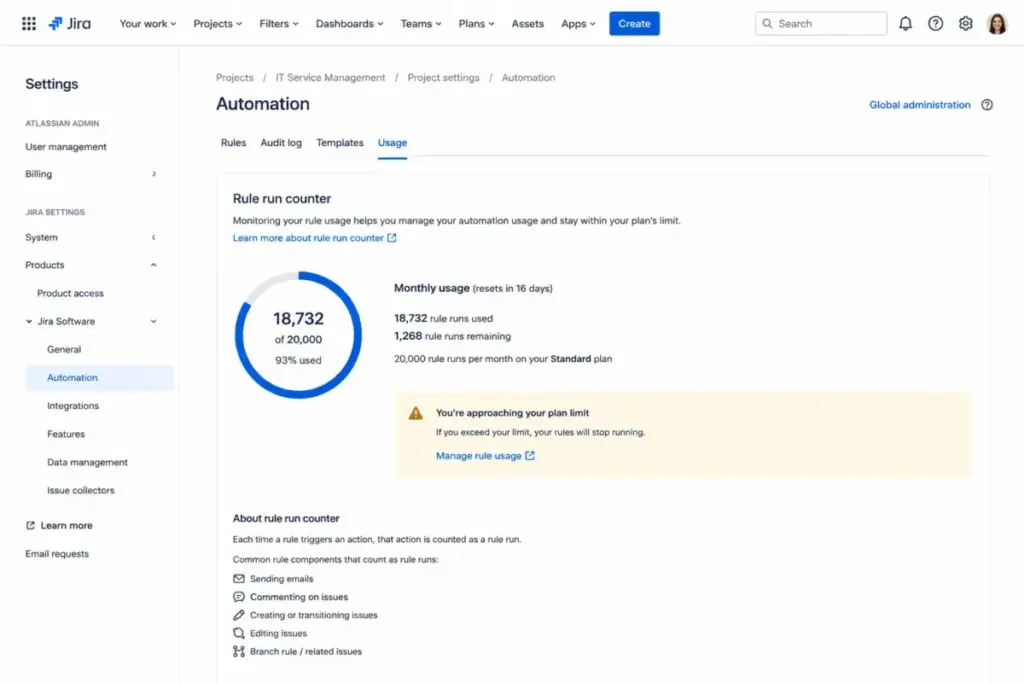
Jira’s automation engine handles rule-based triggers (when issue transitions, when field changes, when sprint starts) without code. That saves time. But the limits are plan-gated, and most reviews skip this detail entirely.
According to Atlassian’s official plan documentation (as of May 2026):
- Standard plan: 1,700 automation rule runs per month (total, not per user)
- Premium plan: 1,000 automation rule runs per paid user per month
A 20-person Standard team gets 1,700 total monthly runs. That sounds like enough until you stack assignment rules, notification triggers, status transitions, and Slack alerts. Teams that automate heavily hit this ceiling faster than expected.
A practical takeaway from Jira’s plan limits is : review your automation rules quarterly. Teams pile them up and forget, which burns through your action limits without anyone noticing until the rules stop firing mid-sprint. If automation reliability is the switching trigger, evaluate Jira replacement options by automation caps, sprint workflow continuity, notification rules, and whether limits interrupt work during an active iteration.
Jira Pricing in 2026: Plan Gates That Drive the Real Decision
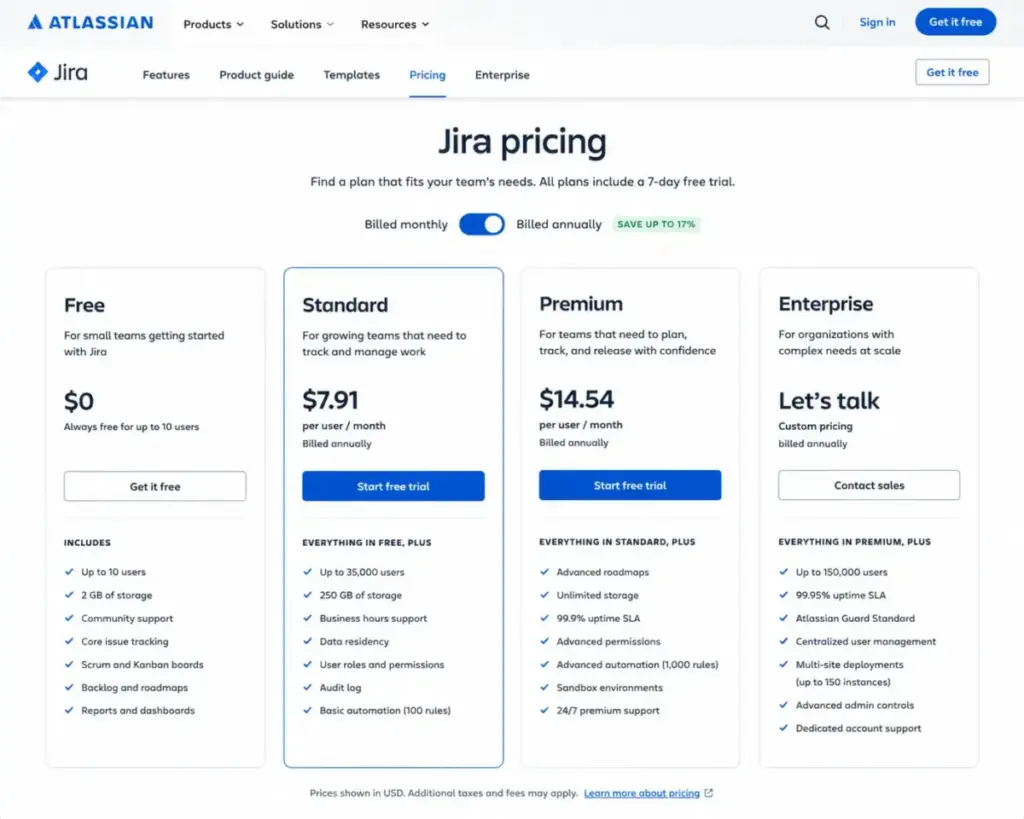
Jira’s pricing page shows four tiers. The seat price is the easy part. The hard part is understanding which buyer need forces each upgrade.
| Plan | Price | Storage | Support | Automation Runs | Key Gate |
|---|---|---|---|---|---|
| Free | $0 | 2 GB | Community only | Limited | 10-user cap |
| Standard | $7.91/user/month | 250 GB | Business-hours | 1,700/month total | Permissions, data residency |
| Premium | $14.54/user/month | Unlimited | 24/7 Premium | 1,000/user/month | Advanced planning, sandbox, 99.9% SLA |
| Enterprise | Custom | Unlimited | 24/7 Enterprise | Enterprise-level | Multi-site (up to 150), Guard Standard, 99.95% SLA |
Pricing verified from Atlassian’s Jira pricing page (as of May 2026). Annual totals vary by user count and billing configuration. Verify in Atlassian’s live calculator before purchase.
The Plan-Gate Decision Map
This table maps your specific buyer need to the plan that unlocks it. Most SERP reviews list features. This tells you when you are forced to upgrade.
| Your Need | Minimum Plan Required |
|---|---|
| More than 10 users | Standard |
| User roles and permissions | Standard |
| 250 GB file storage | Standard |
| Data residency | Standard |
| Business-hours support | Standard |
| Advanced planning and cross-project views | Premium |
| Sandbox environment for testing changes | Premium |
| Release tracks and project archiving | Premium |
| 99.9% uptime SLA | Premium |
| 24/7 support with faster response | Premium |
| IP allowlisting | Premium |
| Admin insights | Premium |
| Multiple Jira sites (up to 150 instances) | Enterprise |
| Atlassian Guard Standard included | Enterprise |
| Enterprise-only admin features | Enterprise |
| 99.95% uptime SLA | Enterprise |
Where Pricing Starts to Pinch
The seat price is not where most teams feel the cost pressure. Here are three scenarios showing what Jira actually costs beyond the headline number.
Scenario 1: 8-person software startup. Jira Free covers core agile tracking for up to 10 users at $0. Storage caps at 2 GB, and support is community-only. If the team needs no permissions governance and 2 GB is enough, this works as a real operating plan, not just a trial.
Scenario 2: 45-person SaaS engineering team. At Standard pricing, that is roughly $356/month for seat cost alone. Add Marketplace apps for time tracking, test management, or advanced reporting (prices vary by vendor and user tier), Atlassian Guard if you need SSO and user provisioning outside Enterprise, and 1-2 hours of weekly admin governance time. The real monthly cost easily exceeds the seat price by 30-50% depending on stack complexity.
Scenario 3: 300-person regulated enterprise. Enterprise pricing is custom and sales-led. Add the internal cost of Jira administration across multiple sites, training for new teams, implementation consulting, and Marketplace apps at enterprise scale. The per-seat price becomes a fraction of the total investment. The 99.95% SLA, Guard Standard inclusion, and multi-site governance justify the cost only if your organization actually needs those controls.
Jira Features Worth Evaluating (and the Ones Most Reviews Overclaim)
Scrum and Kanban Boards
Jira’s board system supports both Scrum (sprint-based) and Kanban (continuous flow) methodologies natively. Boards connect to backlogs, filters, and workflow statuses. Sprint velocity charts, burndown charts, and cumulative flow diagrams provide agile reporting that most project management alternatives cannot match at the same depth.
But here is the catch: board performance depends heavily on configuration quality. A well-configured Jira board with tight filters and clean workflows feels fast. A board with hundreds of ungroomed tickets, loose JQL queries, and too many custom fields feels sluggish. The tool does not protect you from your own configuration debt.
Customizable Workflows and Fields
Every issue type in Jira can have its own workflow, screen scheme, and required fields. Bugs follow one path. Stories follow another. Epics have their own status flow. This is Jira’s core differentiator for technical teams.
The trade-off: every custom workflow, field, and scheme adds governance overhead. Without an admin maintaining standards, teams create conflicting configurations that fragment reporting and make cross-project visibility harder.
Agile Reporting and Dashboards
Jira includes sprint reports, velocity charts, burndown/burnup charts, and customizable dashboards with gadgets. These reports pull directly from issue data, which means they are only as good as the team’s tracking discipline.
For teams that log work consistently and groom their backlog, Jira’s reporting is genuinely useful. For teams that treat Jira as a passive checklist, the reports show noise.
Jira AI in 2026: What Rovo Actually Does
Atlassian positions Jira as “project management for the AI era.” The AI capability is delivered through Rovo, which provides AI agents and summaries inside Jira.
According to Atlassian’s Jira AI page (as of May 2026):
- Rovo is available to customers with Standard, Premium, or Enterprise Cloud plans
- AI is automatically activated for Premium and Enterprise plans
- Organization admins can deactivate AI-powered features, including Rovo Chat and Rovo agents
This matters for privacy-conscious organizations. If your security team needs to disable AI features, admins have that control. But Rovo availability means Free plan users do not get AI capabilities, and Standard plan users get access but without auto-activation.
Is Rovo a reason to choose Jira over competitors? Not yet. It is an incremental productivity layer, not a buying differentiator. The value of Jira in 2026 still comes from its workflow engine, not its AI features.
Integrations, API, and the Rate-Limit Reality
Marketplace and Native Integrations
Jira connects to the Atlassian Marketplace with thousands of apps covering time tracking, test management, advanced reporting, diagramming, and specialized integrations. Native integrations include Confluence, Bitbucket, Slack, Microsoft Teams, Google Workspace, Zoom, Figma, Jenkins, Opsgenie, GitHub, and GitLab.
The ecosystem is a strength and a cost driver. Every Marketplace app adds a subscription, a configuration surface, and potential update conflicts. Teams running 5-10 Marketplace apps should budget for app management as part of their Jira administration.
API and Rate Limits (The Part Most Reviews Skip)
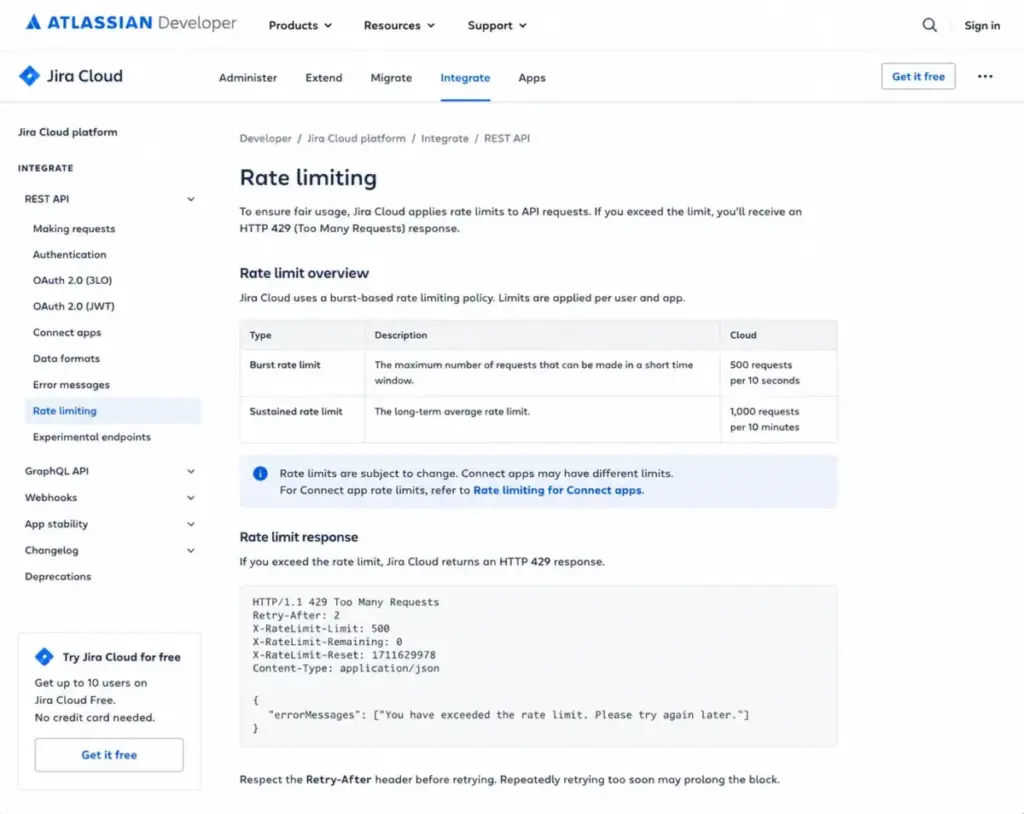
According to Atlassian’s developer documentation (as of May 2026), Jira Cloud API uses burst rate limits per tenant and per API resource path. When exceeded, the API returns HTTP 429 Too Many Requests responses.
The REST API v3 documentation confirms that pagination uses startAt and maxResults parameters, and operation-specific maxResults limits can change without notice.
Why does this matter? If your DevOps or data team builds heavy integrations, syncs Jira with external systems, or runs batch operations, you need rate-limit planning. This is not a casual API. Teams that build Jira integrations without handling 429 responses and pagination limits will hit production failures.
Mobile App: What Jira Mobile Supports
According to Atlassian’s mobile app page, Jira Mobile is available for iOS and Android. It supports accessing projects, creating and editing work items, attaching files, receiving push notifications, and syncing updates back to Jira Cloud.
I did not score app performance without hands-on mobile testing. The feature set covers field-team basics (triage, update, approve), but Jira’s power features (workflow configuration, JQL-heavy filtering, advanced planning) remain desktop experiences.
Security and Compliance
Jira Cloud provides SOC 2 reporting through the Atlassian Compliance Resource Center, GDPR commitment, encryption in transit and at rest, data residency (Standard and above), and SAML/SSO capabilities.
For organizations needing identity and security controls beyond the base product, Atlassian Guard Standard provides single sign-on, user provisioning, API token management, and data security controls. Guard Standard is included with Enterprise plans. Non-Enterprise organizations pay separately, which is a hidden cost most pricing comparisons miss.
Jira Pros and Cons
What Jira Gets Right
- Unmatched workflow customization for agile teams. No other project management tool offers the same depth of custom workflows, issue types, screens, and field configurations for Scrum and Kanban. This is Jira’s core moat.
- Deep integration ecosystem. The Atlassian Marketplace and native connections to GitHub, GitLab, Bitbucket, Confluence, Slack, and Jenkins cover most engineering toolchains.
- Granular permissions and governance. Standard and above offer user roles, permission schemes, and data residency that satisfy enterprise compliance requirements.
- Free plan that actually works for small teams. Up to 10 users with core work tracking at $0 is a genuine operating plan for a small engineering team, not just a conversion trap.
- Plan-gated SLAs and support. Premium’s 99.9% SLA and 24/7 support, and Enterprise’s 99.95% SLA, provide contractual reliability that budget tools cannot match.
What Jira Gets Wrong
- Admin burden scales with team size. As teams grow beyond 15-20 users, Jira requires dedicated admin ownership for workflows, permissions, automations, and field governance. This is operational cost that the pricing page never shows.
- Automation limits are plan-gated and restrictive. Standard’s 1,700 total monthly runs and Premium’s 1,000 runs per paid user per month create automation ceilings that force teams to prioritize which rules stay active.
- Onboarding complexity is real. A simple team-managed Kanban board takes minutes. A company-managed project with custom workflows, fields, permissions, and automations takes days or weeks to configure properly.
- Marketplace app costs add up. Time tracking, test management, advanced reporting, and BI integrations are Marketplace apps with their own subscriptions. A 50-person team running 5 apps can add hundreds per month beyond seat cost.
- Support tiers are plan-gated. Free plan users get community forums only. Standard gets business-hours support. 24/7 support requires Premium or Enterprise. If your team runs production-critical workflows in Jira, the support gate matters.
- API rate limits need engineering awareness. Teams building heavy integrations or data syncs need to design for burst limits, HTTP 429 handling, and pagination constraints. This is not a plug-and-play API for high-volume operations.
What Jira Is and Is Not
Jira is agile project management, work management, issue tracking, and software delivery planning built by Atlassian. It is not a lightweight task board for non-technical teams.
This review covers Jira for project and issue tracking. If you need IT service management (incident handling, SLA tracking, customer portals), look at Jira Service Management. If you need product discovery and prioritization, look at Jira Product Discovery. These are separate Atlassian products with different pricing and capabilities.
| If You Need | Look At |
|---|---|
| Software project management, sprint planning, issue tracking | Jira (this review) |
| IT service desk, incident management, SLA enforcement | Jira Service Management |
| Product idea prioritization and discovery | Jira Product Discovery |
| Team wiki and documentation | Confluence |
User Reviews: What Capterra, G2, and TrustRadius Patterns Show
I triangulated third-party review sentiment across four platforms to validate the buyer tension described above.
Capterra: The platform verdict highlights Jira as strong for software development teams due to integrations with Confluence and Bitbucket, while noting a steep learning curve and complex navigation for non-tech-savvy users.
G2: Review snippets show users praise Jira for work tracking, timelines, visibility, and team alignment. Recurring negatives include complexity and missing-feature complaints.
TrustRadius: Reviews show Jira commonly used for project management, resource management, dashboards/reporting, tasks, stories, bugs, Kanban, and Scrum. Search simplification and time logging appear as improvement areas.
Software Advice: Excerpts show positive sentiment around cross-department consolidation but negative comments about missing core functionality, rigidity, and product-workflow fit.
The pattern is consistent: Jira excels at structured technical work. It struggles when teams want simplicity or use it outside its core agile domain.
Who Should Use Jira
Choose Jira if your team:
- Runs formal Scrum or Kanban ceremonies with sprint planning and backlog grooming
- Needs custom workflows per project type (bugs, stories, epics, tasks)
- Has a dedicated admin or technical PM who owns the Jira configuration
- Requires audit trails, compliance visibility, and permission governance
- Builds integrations with GitHub, GitLab, Bitbucket, Jenkins, or CI/CD pipelines
- Needs cross-team dependency tracking and release coordination
Who Should Not Use Jira
Avoid Jira if your team:
| Team Type | Why Jira Is a Poor Fit | Consider Instead |
|---|---|---|
| Small non-technical team (marketing, ops) | Admin overhead and agile terminology are unnecessary friction | Trello, Asana, monday.com |
| Solo founder or 2-3 person startup | Configuration weight exceeds the value for basic task tracking | Todoist, Linear, GitHub Issues |
| Client services team needing external collaboration | Jira’s internal-team model does not optimize for client-facing project visibility | Teamwork, Basecamp, ClickUp |
| Team without admin ownership | Ungoverned Jira becomes a configuration mess within months | Linear, Asana |
| Team needing built-in time tracking and productivity monitoring | Jira lacks native time/productivity tracking; requires Marketplace apps | Wrike, ClickUp |
Jira Alternatives by Scenario
| Scenario | Best Choice | Why |
|---|---|---|
| Code-centric team wanting issues close to the repo | Linear or GitHub Issues | Lower ceremony, tighter developer workflow integration |
| Visual task board for mixed teams | Trello or monday.com | Faster onboarding, no admin required, better for non-technical members |
| Enterprise work management across departments | Asana or Wrike | Broader use-case fit beyond engineering, easier cross-department adoption |
| Engineering team that wants agile without the setup weight | Linear | Opinionated defaults, minimal configuration, fast sprint workflow |
| Budget-conscious team under 15 users | ClickUp or Jira Free | ClickUp offers more features on free/low tiers; Jira Free is capped at 10 users |
For a deeper look at ClickUp’s feature set, see the ClickUp review. Teams comparing Jira to Asana should check Asana’s review for the workflow coordination differences.
If your team is evaluating Trello (which Atlassian also owns), the Trello review covers where Trello’s simplicity wins and where it hits the ceiling. And for teams leaning toward a developer-first tool, the Linear review explains why Linear’s opinionated approach appeals to engineering teams that find Jira too configurable.
FAQ
Is Jira worth it in 2026?
Jira is worth it for engineering, DevOps, QA, and product delivery teams that run structured agile workflows and can justify admin ownership. It is not worth it for teams that mainly need a lightweight task board with fast onboarding. The value depends on whether your team actually uses Jira-level workflow control.
How much does Jira cost?
Jira’s Free plan is $0 for up to 10 users. Standard costs $7.91/user/month. Premium costs $14.54/user/month. Enterprise uses custom pricing through Atlassian sales. Annual totals vary by user count and billing configuration. Verify in Atlassian’s pricing calculator before purchase.
What is the difference between Jira Standard and Premium?
Standard provides 250 GB storage, user roles, permissions, data residency, business-hours support, and 1,700 automation rule runs per month. Premium adds unlimited storage, 99.9% SLA, 24/7 Premium support, advanced planning, sandbox, release tracks, project archiving, admin insights, IP allowlisting, and 1,000 automation runs per paid user per month.
Is Jira free for small teams?
Yes. Jira’s Free plan supports up to 10 users at $0 with core work tracking features, 2 GB storage, and community support. It works as a real agile workspace for small engineering teams, not just a trial. The cap is 10 users, and support is self-help only.
Is Jira hard to learn?
A team-managed Kanban board is fast to set up and easy to learn. Company-managed projects with custom workflows, permissions, and automation rules require meaningful learning investment and admin ownership. The difficulty depends on which Jira you are using.
Is Jira only for software teams?
Jira supports software development, marketing, and project management use cases according to Atlassian’s product page. But Jira’s terminology, workflow model, and configuration depth are built for technical teams. Non-technical teams often find simpler tools like Asana or monday.com easier to adopt.
Does Jira include AI features?
Jira includes Rovo AI for summaries and AI agents. Rovo is available on Standard, Premium, and Enterprise Cloud plans. AI is automatically activated on Premium and Enterprise. Admins can deactivate AI-powered features including Rovo Chat and Rovo agents.
Does Jira integrate with GitHub and Slack?
Yes. Jira integrates natively with GitHub, GitLab, Bitbucket, Slack, Microsoft Teams, Google Workspace, Zoom, Figma, Jenkins, and Opsgenie. The Atlassian Marketplace adds thousands more integrations.
What Jira plan should I choose?
Choose Free if your team is under 10 users and needs basic agile tracking. Choose Standard if you need permissions, data residency, and support for a growing team. Choose Premium if you need advanced planning, sandbox, 99.9% SLA, and 24/7 support. Choose Enterprise if you need multi-site governance, Guard Standard, and 99.95% SLA.
What are Jira's biggest disadvantages?
Jira’s biggest disadvantages are admin burden at scale, automation limits that are plan-gated, onboarding complexity for company-managed projects, Marketplace app costs beyond seat price, and API rate limits that require engineering-level integration planning. These are not deal-breakers for the right team, but they are real operational costs.
Which Jira plan do I need for advanced roadmaps?
Advanced planning features require the Premium plan at $14.54/user/month. Standard does not include cross-project planning views, sandbox environments, or release tracks. If your team needs roadmap-level visibility across multiple projects, Premium is the minimum plan.
Can Jira replace Trello?
Jira can do everything Trello does, but with significantly more configuration overhead. If your team uses Trello for simple Kanban boards and lightweight task tracking, switching to Jira adds admin complexity your team may not need. Jira replaces Trello only when your workflow complexity outgrows Trello’s capabilities.
Final Verdict: Jira Scores 7.8/10
Jira earns 7.8/10. It is the strongest agile execution system available for technical teams that run formal sprints, need custom workflows, and can commit to configuration ownership.
Buy Jira Standard or Premium if you are a 15-50 person engineering team with QA, product, and release dependencies that simpler tools cannot coordinate. The workflow control, integration depth, and compliance features justify the investment.
Try Jira Free if you are a small engineering team under 10 users evaluating agile trackers. The free tier is a genuine starting point for sprint-based work.
Skip Jira if you are a non-technical team, a solo founder, or a small team that wants visual task management with zero admin. Asana, Linear, or Trello will get you productive faster with less overhead.
Choose Linear if your engineering team wants opinionated agile defaults without Jira’s configuration weight. Choose ClickUp if you want broader feature coverage at a lower price point. Choose Wrike if your team spans engineering and business operations.
One pricing warning: the gap between Jira’s seat price and its operational cost (admin time, Marketplace apps, Guard licensing, training) is where most buying decisions get complicated. Budget for the system, not just the seats.
This Jira review reflects pricing and feature data verified as of May 2026. Check Atlassian’s Jira pricing page for the latest rates and plan details. For the full evaluation framework behind this score, see our review methodology.