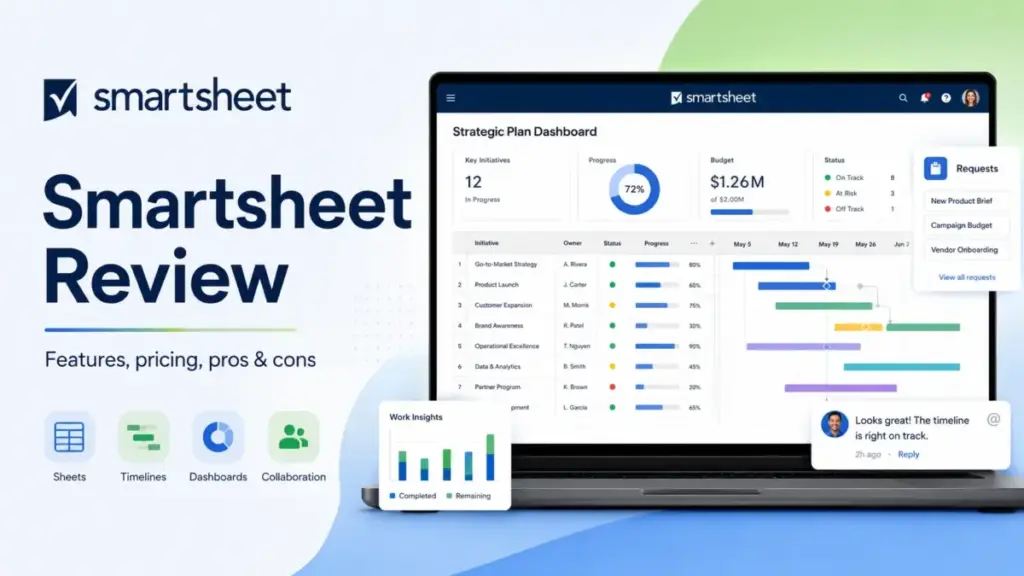
Your team runs on spreadsheets. Status trackers, project timelines, intake forms, approval chains, all living inside rows and columns that everyone sort of understands.
Smartsheet promises to turn that familiar grid into a governed, reportable system that competes with the best project management software for PMOs and operations teams that think in spreadsheet logic.
This Smartsheet review breaks down what the platform actually unlocks at each plan tier, where the pricing math gets uncomfortable, and when a different tool fits better.
The catch is not whether Smartsheet works. It does. The catch is whether the licensing model, add-on costs, and admin overhead match the scale and budget your team operates at. Most reviews skip that part. I will not.
This review draws on official Smartsheet documentation, pricing verification, third-party user sentiment from G2, Capterra, and TrustRadius, and competitive analysis across the workflow automation category (as of May 2026).
Quick Verdict: Smartsheet scores 7.8/10.
| Category | Detail |
|---|---|
| Best for | PMOs, operations teams, and spreadsheet-comfortable departments managing structured projects, forms, dashboards, and cross-functional reporting |
| Not for | Small teams needing a free plan, visual-first task managers, agile software teams, or organizations unwilling to manage license governance |
| Starting price | $9/Member/month (Pro, billed yearly) |
| Free plan | No permanent free plan. 30-day free trial, no credit card required |
| Verdict | Try (Business plan for most teams; Enterprise or Advanced Work Management for portfolio-scale PMOs) |
The 60-Second Version
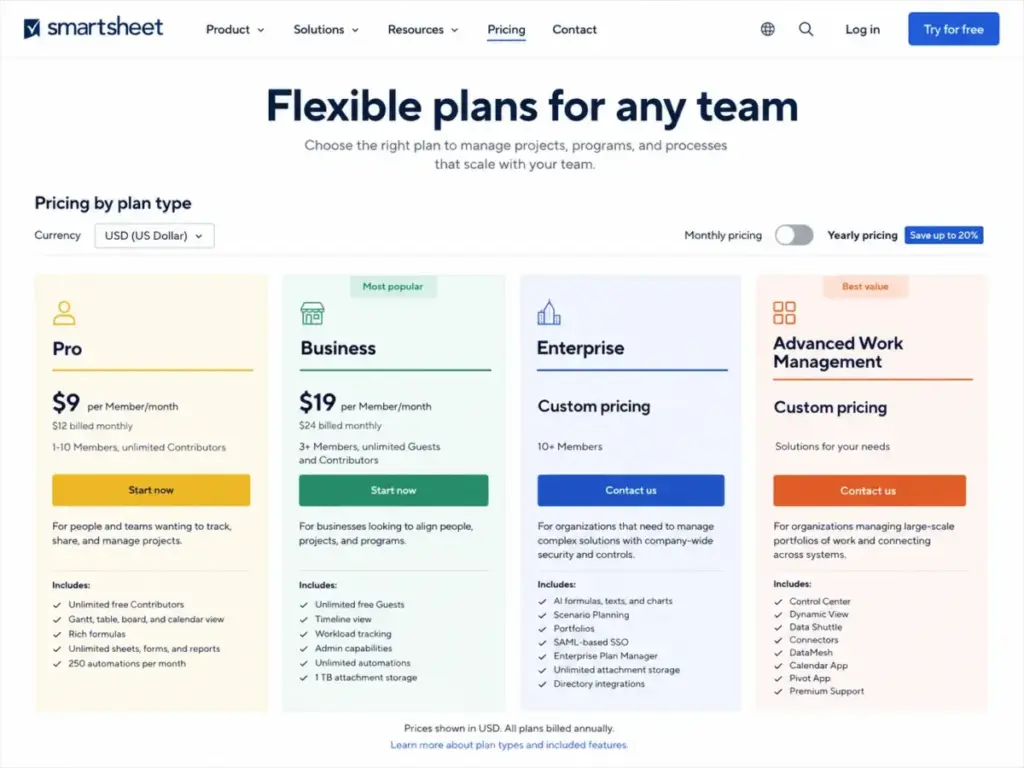
Smartsheet is a collaborative work management platform built on a spreadsheet-style grid. It supports Gantt, calendar, board, timeline, and card views. Every plan includes unlimited sheets, forms, reports, and dashboards. According to the official Smartsheet pricing page (as of May 2026), Pro starts at $9/Member/month billed yearly, Business at $19/Member/month billed yearly, and Enterprise and Advanced Work Management require custom sales quotes. The real cost question is not the per-seat price. It is which plan gates block the features your team actually needs, and how fast add-ons like Dynamic View ($125/month), Data Shuttle ($100/month), and Resource Management push the bill higher than the sticker price suggests.
Three Problems Smartsheet Solves
Spreadsheet chaos across departments
Operations teams drown in disconnected spreadsheets. Version control breaks. Data lives in personal drives. Nobody trusts the numbers in the Monday morning status meeting.
Smartsheet replaces that chaos with centralized, permission-controlled sheets that feed into cross-sheet reports and dashboards. Every row has an owner. Every update has a timestamp. Every change flows to a shared report without someone manually copying data between files.
For a 12-person operations team tracking projects across multiple clients, that single-source-of-truth shift eliminates the “which version is correct?” problem entirely.
Intake and approval bottlenecks
Request intake is one of Smartsheet’s strongest use cases. Forms capture requests directly into sheets. Automations route approvals based on conditions. Update requests push specific rows to stakeholders for input without exposing the full sheet.
On Business and higher plans, conditional form logic lets you build branching intake forms that route different request types to different workflows. Pro limits you to 250 automated triggers per month, which sounds generous until a 10-person team with three active projects burns through that quota in the first two weeks.
One pattern from the pricing limits and user feedback is clear: teams should review automation rules quarterly. Teams pile them up and forget, which burns through your action limits on Pro faster than expected.
Portfolio reporting without a BI tool
Smartsheet dashboards pull data from multiple sheets into a single view. Cross-sheet reports aggregate rows across projects based on criteria you define. For PMOs that need to answer “where are all our projects right now?” without opening 15 separate files, this is the core value proposition.
Business plan unlocks report grouping and summary, which turns flat row exports into structured views. Enterprise adds Portfolios and Scenario Planning. Advanced Work Management adds Control Center for standardized project templates across programs.
The portfolio reporting depth separates Smartsheet from lighter tools like Trello and Todoist.
Two Problems Smartsheet Creates
The add-on cost spiral
The per-seat price looks reasonable until your team needs the premium apps.
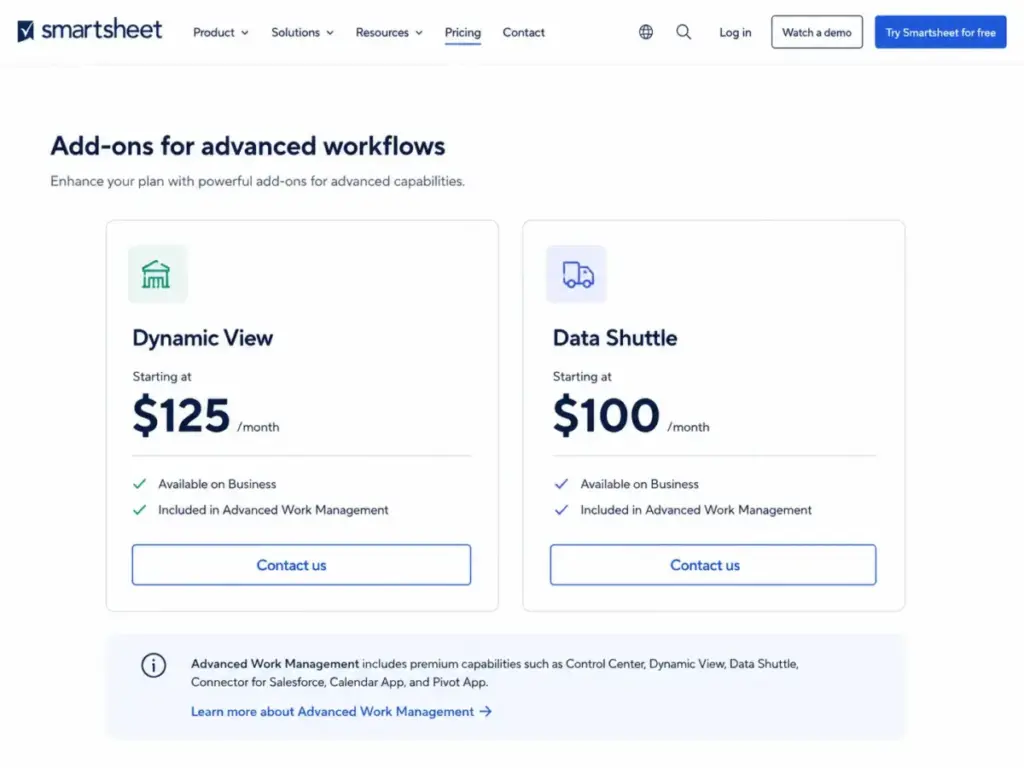
According to the official pricing page (as of May 2026), Dynamic View starts at $125/month on Business. Data Shuttle starts at $100/month on Business. Resource Management pricing varies and requires a sales quote. Premium Support is an add-on for Pro and Business. Calendar App, DataMesh, Pivot App, Connectors, and Bridge appear as add-ons or bundled features depending on plan tier.
Here is what the pricing page does not make obvious:
| Add-on / Feature | First Available Plan | Cost |
|---|---|---|
| Dynamic View | Business | Starting at $125/month (included in AWM) |
| Data Shuttle | Business | Starting at $100/month (included in AWM) |
| Resource Management | Business+ | Sales quote required |
| Premium Support | Pro (add-on) | Add-on for Pro/Business/Enterprise; included in AWM |
| Control Center | Advanced Work Management | Included in AWM only |
| SAML-based SSO | Enterprise | Included in Enterprise+ |
| AI formulas/text/charts | Enterprise | Included in Enterprise+ |
A 25-person Business team at $19/Member/month billed yearly pays $475/month in seat costs. Add Dynamic View and Data Shuttle, and the bill jumps to at least $700/month before Resource Management, premium support, or professional services enter the picture. That is the gap between the marketing price and the operational cost.
License governance overhead
Smartsheet uses a User Subscription Model that distinguishes between Members, Guests, Viewers, and Contributors. According to official Smartsheet help documentation, provisional access and reconciliation periods can affect which users become paid.
Before you commit, watch out for provisional member governance. When users perform paid activities during a provisional access window, they can trigger license consumption that administrators must review during reconciliation cycles. Official materials reference provisional access lasting at least 30 days and reconciliation repeating every 60-90 days, though exact terms should be confirmed with your sales agreement.
For a 50-person department where project managers frequently add external collaborators, this license model requires active monitoring. If your admin team is not prepared to review seat types, paid activity triggers, and true-up timing before each reconciliation, the renewal conversation can include unexpected cost increases.
Community discussions on Reddit and the Smartsheet Community reflect recurring frustration about pricing-model changes, Dynamic View costs, and true-up confusion. These are community sentiments, not statistically representative, but the pattern is consistent enough to flag.
Smartsheet Pricing Reality in 2026
According to the official pricing page (as of May 2026), Smartsheet offers four plan tiers:
| Plan | Monthly Price | Annual Price | Member Limit | Storage | Key Gates |
|---|---|---|---|---|---|
| Pro | $12/Member/month | $9/Member/month | 1-10 Members | 20 GB | 250 automations/month, 10 widgets/dashboard, 1 sheet/report |
| Business | $24/Member/month | $19/Member/month | 3+ Members | 1 TB | Unlimited automations, Timeline view, Workload tracking, API calls, conditional forms |
| Enterprise | Custom | Custom | 10+ Members | Unlimited | AI tools, Portfolios, SAML SSO, Scenario Planning, directory integrations |
| Advanced Work Management | Custom | Custom | 10+ Members | Unlimited | Enterprise + Control Center, Dynamic View, Data Shuttle, Connectors, DataMesh, Premium Support |
Pro is available only to new customers according to the pricing page note.
Where pricing starts to pinch
The pinch point hits at the Pro-to-Business jump. Pro caps automations at 250/month, limits dashboards to 10 widgets, restricts reports to 1 sheet per report, and caps Members at 10. A growing operations team hits at least one of those walls within the first quarter.
Business at $19/Member/month (annual) unlocks the features most teams actually need: unlimited automations, Timeline view, Workload tracking, conditional form logic, API access, and admin capabilities. For a 15-person team, that is $285/month, which is competitive. The cost pressure comes from add-ons, not the base seat price.
Enterprise and Advanced Work Management pricing require sales contact. If your PMO needs Control Center, Dynamic View, Data Shuttle, Connectors, or DataMesh, those are bundled only in Advanced Work Management or purchased as individual add-ons on lower tiers.
The Plan-Gate Map: What Each Tier Actually Unlocks
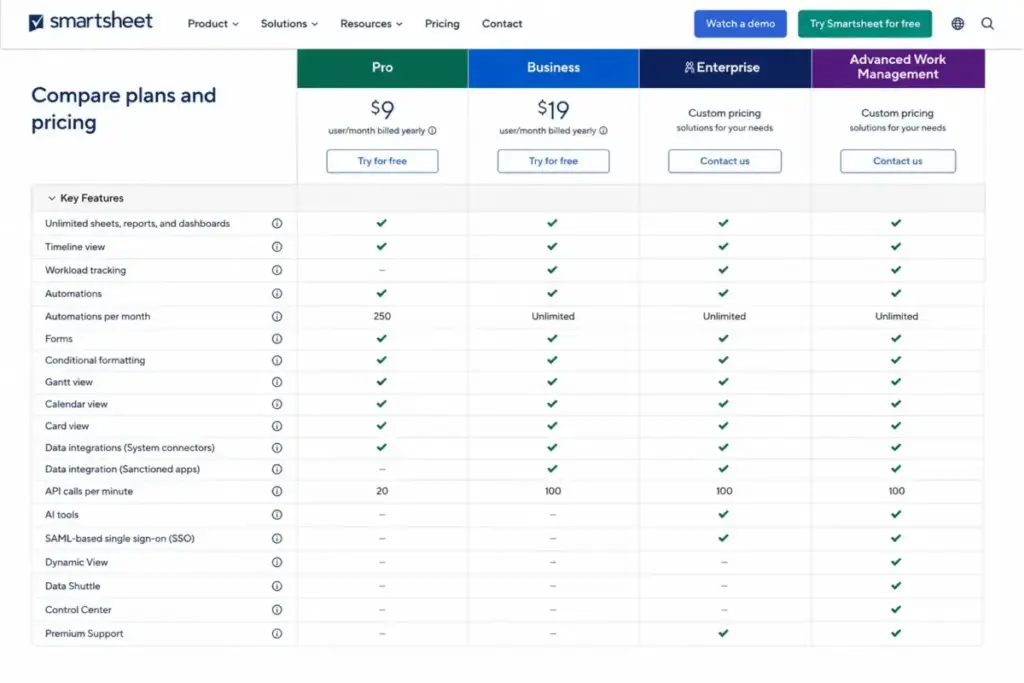
This is the part most reviews skip. Here is which buyer-relevant capability requires which minimum plan:
| Capability | First Available Plan |
|---|---|
| Unlimited sheets, forms, reports, dashboards | Pro |
| 250 automations/month | Pro |
| Unlimited automations | Business |
| Timeline view | Business |
| Workload tracking | Business |
| Conditional form logic | Business |
| Baselines | Business |
| Report grouping and summary | Business |
| Activity log | Business |
| Document builder | Business |
| API access | Business |
| Power BI, Tableau, Claude integrations | Business |
| Proofing | Business |
| Custom colors and logos | Business |
| AI formulas, text, charts | Enterprise |
| Scenario Planning | Enterprise |
| Portfolios | Enterprise |
| SAML-based SSO | Enterprise |
| Directory integrations | Enterprise |
| Enterprise Plan Manager | Enterprise |
| Control Center | Advanced Work Management |
| Dynamic View | Advanced Work Management (or add-on) |
| Data Shuttle | Advanced Work Management (or add-on) |
| Connectors (Jira, Salesforce) | Advanced Work Management (or add-on) |
| DataMesh | Advanced Work Management |
| Premium Support (included) | Advanced Work Management |
The biggest surprise for first-time buyers: API access is gated to Business and above. If your team builds integrations or connects Smartsheet to other systems, Pro is not an option.
Technical Limits That Data-Heavy Teams Hit
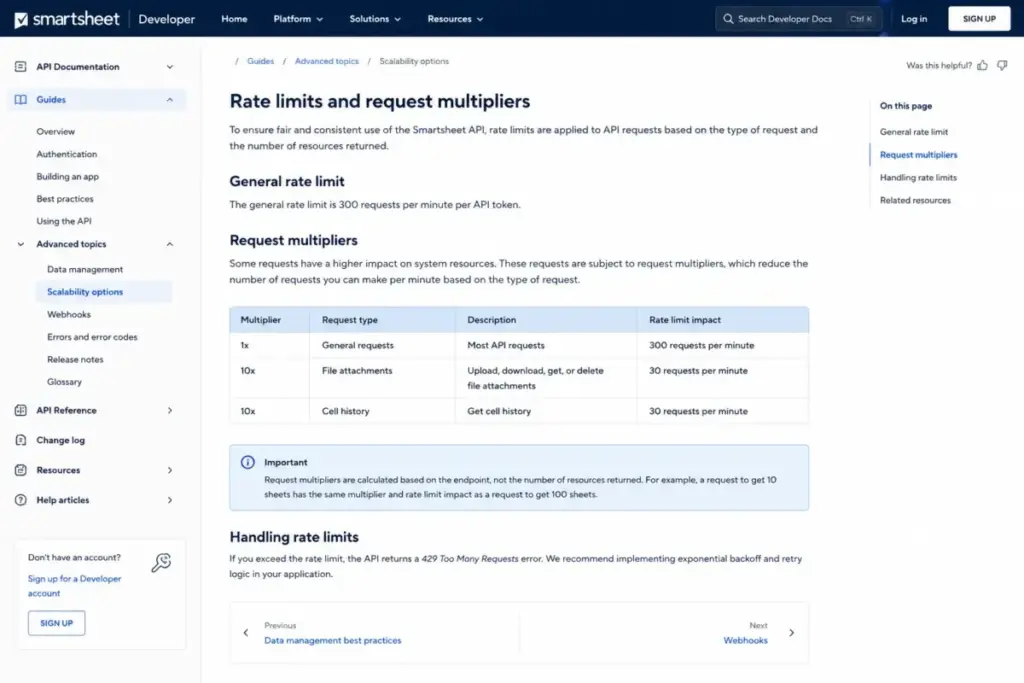
According to official Smartsheet developer documentation, the platform enforces these limits:
- General API rate limit: 300 requests per minute per API token
- File attachments and cell history: 30 requests per minute (10x multiplier)
- Maximum cells per sheet: 500,000
- Webhooks automatically disabled on sheets exceeding 20,000 rows, 400 columns, or 500,000 cells
Teams treating Smartsheet like a lightweight database will hit cell limits. A sheet with 100 columns and 5,000 rows is already at 500,000 cells. If your workflow generates large data sets or relies on webhook-driven integrations at scale, evaluate whether Airtable or a database-backed workflow fits better before committing to Smartsheet’s grid model. If that limit is a deal-breaker, compare Smartsheet alternatives before building around the grid model.
Who Wins and Who Loses
Choose Smartsheet if:
- Your team already thinks in spreadsheet logic and wants governed project tracking, not another tool to learn from scratch
- You need cross-sheet reporting, dashboards, and forms feeding into structured workflows
- Your PMO standardizes project templates across 50+ projects using Control Center
- You manage external stakeholders through forms, update requests, and controlled sharing
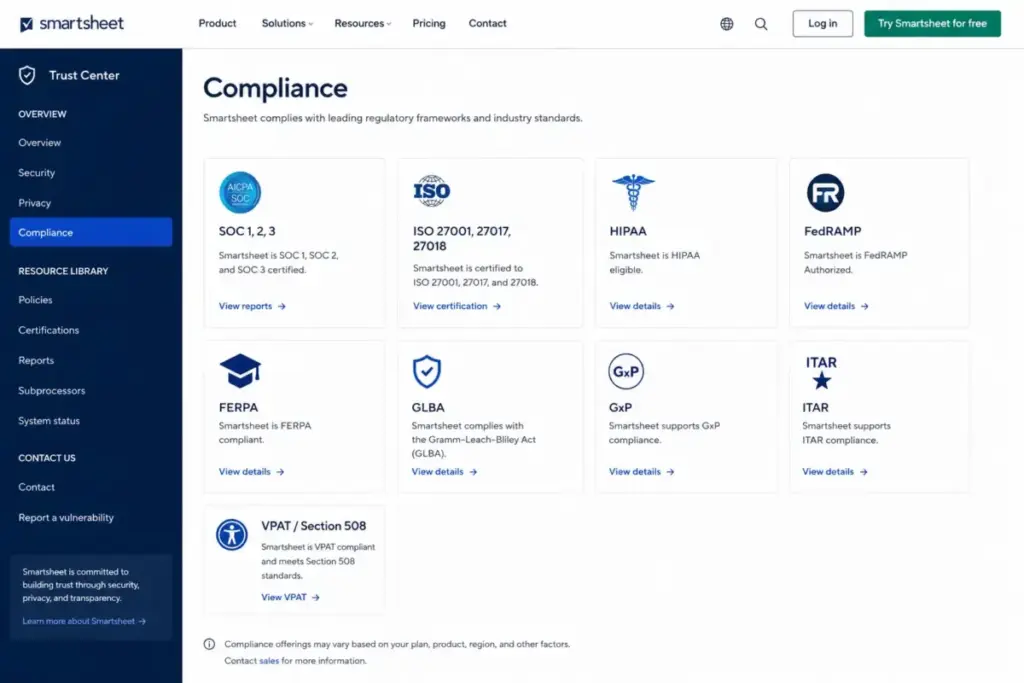
- Compliance matters: Smartsheet’s Trust Center lists SOC, ISO, HIPAA, FedRAMP, FERPA, GLBA, GxP, ITAR, and VPAT/Section 508 frameworks, with TLS 1.2 and AES-256 encryption at rest
Avoid Smartsheet if:
- You need a permanent free plan. Smartsheet offers only a 30-day trial
- Your team prefers visual-first boards over grids. ClickUp and Asana handle that better
- You run agile software sprints. Jira is purpose-built for that workflow
- Your organization will not actively manage member licensing, seat types, and reconciliation cycles
- You need deep Gantt scheduling with resource leveling comparable to Microsoft Project
What Real Users Keep Saying
I reviewed user sentiment across G2, Capterra, TrustRadius, Trustpilot, Reddit, and the Smartsheet Community. Here is the pattern.
Consistent praise:
- Flexibility and familiarity for spreadsheet users
- Project tracking, collaboration, and task ownership
- Automation capabilities on Business and higher
- Dashboard and reporting for stakeholder visibility
- Form-based intake workflows
Consistent complaints:
- Steep learning curve for advanced features (cross-sheet formulas, Control Center, permissions architecture)
- Pricing increases and licensing model confusion
- Limited customization in some workflow areas
- Reporting not always intuitive to configure
- Performance concerns with large, complex sheets
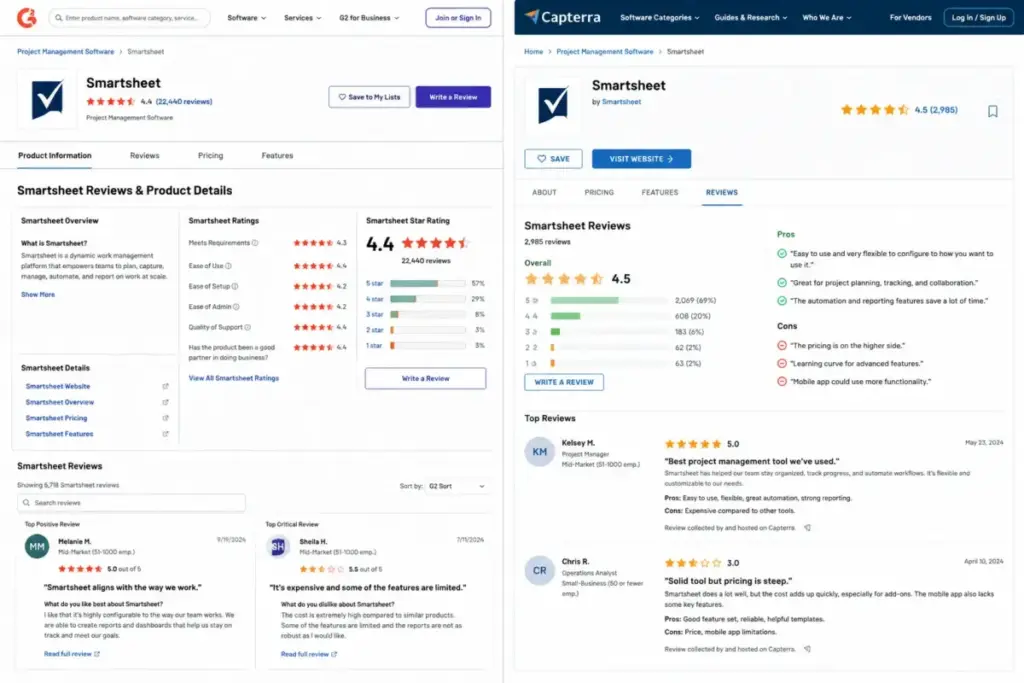
G2 shows Smartsheet at 4.4/5 from 21,824 reviews (G2 Smartsheet reviews). Capterra reports 4.5 overall from 3,470 reviews with 4.3 in ease of use and features (Capterra Smartsheet page). TrustRadius sentiment from enterprise users highlights strength in managing competing priorities and deadline alerts, with friction around reporting customization (TrustRadius Smartsheet reviews).
Trustpilot shows a smaller, negative-skewed sample with complaints about support response times and version recovery. That sample is too small to be statistically representative, but the support complaints align with the fact that Premium Support is an add-on for most plans.
Smartsheet Pros and Cons
- Unlimited sheets, forms, reports, and dashboards on every paid plan, giving teams room to build without artificial content caps
- Spreadsheet-familiar grid model reduces adoption friction for operations teams already working in Excel or Google Sheets
- Cross-sheet reporting and dashboards create portfolio visibility without a separate BI tool
- Form-based intake with conditional logic (Business+) replaces email-based request workflows
- Compliance depth covers regulated industries: SOC, ISO, HIPAA, FedRAMP, and more per official Trust Center
- Mobile app supports grid editing, dashboard tracking, form filling, barcode scanning, and approval responses on iOS and Android
- No permanent free plan. Only a 30-day trial with no credit card, which means budget-constrained teams cannot test long-term viability before committing
- Premium apps like Dynamic View ($125/month) and Data Shuttle ($100/month) create add-on cost pressure that the headline seat price does not reveal
- Standard Support is an add-on for Business. Premium Support is an add-on for Pro, Business, and Enterprise. Only Advanced Work Management includes Premium Support with 24/7 phone, email, and live chat
- Pro plan caps automations at 250/month, limits dashboard widgets to 10, and restricts Members to 10, creating early upgrade pressure for growing teams
- Advanced features (cross-sheet formulas, permissions, Control Center configuration) require significant onboarding investment. This is not a “sign up and start in 10 minutes” product for anything beyond basic project tracking
- API rate limits (300 requests/minute) and sheet cell limits (500,000 cells) constrain teams using Smartsheet as an integration hub or data-heavy repository
Best Smartsheet Alternatives by Scenario
No single tool replaces Smartsheet for every use case. The right alternative depends on which Smartsheet friction point matters most to your team.
| Scenario | Best Alternative | Why |
|---|---|---|
| Visual-first task management for teams under 15 | ClickUp or Asana | Both offer stronger visual boards, modern task UX, and free or lower-cost entry tiers |
| Agile software development | Jira | Purpose-built for sprints, backlogs, epics, and developer workflows. Not a spreadsheet tool |
| Database-like structured workflows | Airtable or SmartSuite | Relational data, custom views, and fewer cell-count limits than Smartsheet’s grid |
| Visual operations management | monday.com | Stronger visual interface for marketing, creative, and operations teams that dislike grids |
| Microsoft-centric project management | Microsoft Project or Planner | Native Microsoft 365 integration. Planner is free with Microsoft 365. Project handles complex scheduling |
| Budget-constrained teams needing a free plan | Zoho Projects, Trello, or ClickUp | All offer permanent free tiers that Smartsheet lacks |
| Enterprise collaboration with proofing | Wrike | Strong proofing, time tracking, and enterprise collaboration. Competes directly at Business/Enterprise tier |
If your team needs visual operations boards more than governed spreadsheet systems, monday.com project management is the closer fit. If your team runs agile sprints, start with Jira’s developer workflows. Before choosing that visual operations path, compare monday.com alternatives by board usability, governance controls, agile fit, reporting depth, and whether spreadsheet-style control is still required.
FAQ
Is Smartsheet worth it in 2026?
Smartsheet is worth it for PMOs and operations teams that need governed, reportable project systems built on spreadsheet logic. It is not worth it for small teams needing a free plan or visual-first task management. The value depends on whether your team needs Business-tier features and can absorb add-on costs.
How much does Smartsheet cost?
According to the official pricing page (as of May 2026), Pro costs $9/Member/month billed yearly or $12 monthly. Business costs $19/Member/month yearly or $24 monthly. Enterprise and Advanced Work Management use custom pricing requiring sales contact.
Does Smartsheet have a free plan?
No. Smartsheet does not list a permanent free plan on its official pricing page. It offers a 30-day free trial with no credit card required.
What is the difference between Smartsheet Pro and Business?
Business unlocks unlimited automations (Pro caps at 250/month), Timeline view, Workload tracking, conditional form logic, API access, baselines, report grouping, admin capabilities, 1 TB storage, and unlimited Guests. Pro restricts Members to 1-10 and limits dashboard widgets to 10.
What is Smartsheet Advanced Work Management?
Advanced Work Management bundles Enterprise features plus Control Center, Dynamic View, Data Shuttle, Connectors, DataMesh, Calendar App, Pivot App, and Premium Support. It is designed for portfolio-scale PMOs that need standardized project templates and system-connected workflows.
Is Smartsheet good for small businesses?
Smartsheet can work for small businesses that think in spreadsheets, but the lack of a free plan and the early Pro-plan limitations (250 automations, 10 Members max) push growing teams toward Business quickly. Small teams needing lightweight task management find better value in ClickUp, Trello, or Asana’s starter plans.
What are the best Smartsheet alternatives?
The best alternative depends on your workflow. ClickUp and Asana fit visual task management. Jira fits agile software teams. Airtable fits database-like workflows. monday.com fits visual operations. Wrike fits enterprise collaboration with proofing.
Is Smartsheet secure?
According to the Smartsheet Trust Center, the platform holds SOC, ISO, HIPAA, FedRAMP, FERPA, and other compliance certifications. Security documentation states TLS 1.2 for data in transit and AES-256 encryption at rest.
Can Smartsheet replace Excel and Microsoft Project?
Smartsheet replaces Excel for collaborative project tracking with governance, version control, and automation. It does not fully replace Microsoft Project’s advanced scheduling, resource leveling, and critical path analysis. For teams that need both spreadsheet collaboration and enterprise scheduling, evaluate whether Smartsheet’s project management features cover your specific planning depth.
What are Smartsheet's API limits?
Official developer documentation states a general API rate limit of 300 requests per minute per token, with file attachments and cell history limited to 30 requests per minute. Sheets cannot exceed 500,000 cells, and webhooks are disabled on sheets exceeding 20,000 rows, 400 columns, or 500,000 cells.
Final Verdict: 7.8/10
Smartsheet earns 7.8/10. It is the strongest choice for spreadsheet-comfortable PMOs and operations teams that need governed project tracking, cross-sheet reporting, form-based intake, and dashboard visibility across portfolios. The grid model works because it meets teams where they already are: in rows and columns.
It is not the right fit for teams that dislike spreadsheets, need a permanent free plan, prefer visual-first task boards, or run agile software workflows. And the true cost of Smartsheet is not the $19/seat Business price. It is the seat price plus Dynamic View, Data Shuttle, Resource Management, premium support, and the admin time to manage license reconciliation.
Choose ClickUp if you need a generous free tier and all-in-one flexibility. Choose Jira if your team ships software. Choose Airtable if your workflow looks more like a database than a project plan.
If your team already lives in spreadsheets and needs to scale that model into governed, automated, reportable work management, Smartsheet Business is the starting plan. Enterprise and Advanced Work Management justify the custom pricing only when your PMO needs Control Center, SAML SSO, AI features, or premium app bundles at portfolio scale.
Start with the 30-day free trial and test whether the grid-first model fits your team’s daily workflow before committing to annual seats.