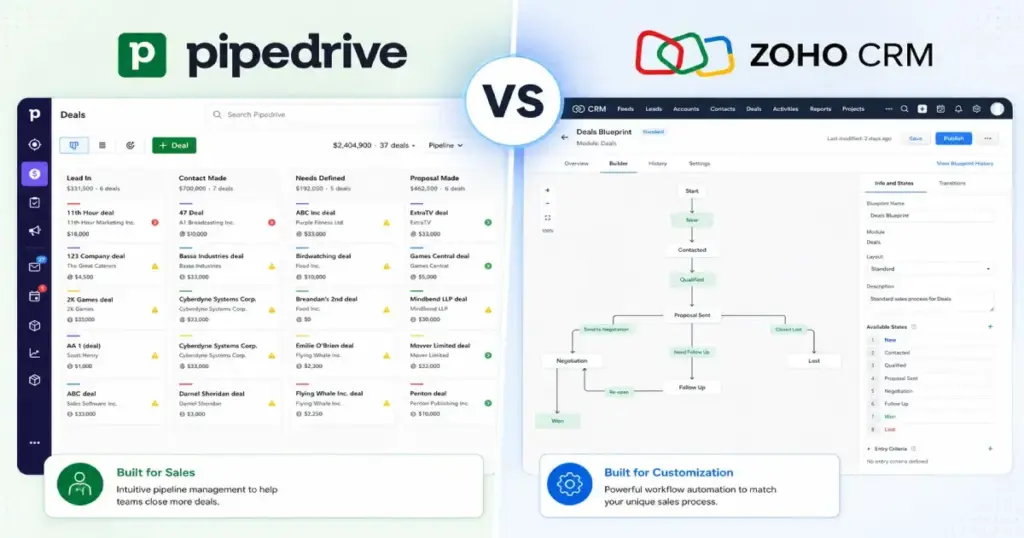
Pipedrive costs $39/user/month on its automation-ready Growth plan (annual billing). Zoho CRM Professional costs $23/user/month for comparable automation depth. At 25 users, that gap becomes $975 versus $575 per month. The Pipedrive vs Zoho CRM decision looks like a pricing question, but it is really a question about operational drag: how much friction does each platform create after you factor in plan gates, support tiers, API limits, and migration constraints?
I evaluated both platforms through official documentation, pricing pages, feature-gate analysis, and verified user review patterns across Gartner Peer Insights. This comparison uses 2026 plan names and pricing verified as of May 2026, because several competing guides still reference Pipedrive’s old tier names. If you are evaluating CRM software for a sales team, the cost-at-scale math and plan-gate details below will change how you compare these two platforms.
The short version: Pipedrive wins when rep adoption speed matters more than configuration depth. Zoho CRM wins when lower per-seat cost, broader customization, and ecosystem breadth outweigh the setup effort. Neither wins outright, and declaring a single winner without knowing your team size, admin capacity, and sales motion is the mistake most CRM comparison guides make.
Pipedrive vs Zoho CRM at a Glance
Before diving into workflows, here is the decision matrix by buyer scenario.
| Category | Winner | Why |
|---|---|---|
| Pricing and total cost at scale | Zoho CRM | Free edition for up to 3 users; lower automation-ready cost at every team size from 5 to 50 |
| Ease of use and rep adoption | Pipedrive | Visual pipeline focus, faster onboarding, less configuration overhead |
| Customization and process depth | Zoho CRM | Custom modules, Blueprint automation, journey orchestration, portals, custom functions |
| Sales pipeline execution | Pipedrive | Drag-and-drop deal stages, deal rotting alerts, activity-first workflow |
| Integrations and ecosystem | Zoho CRM | Native depth across Zoho Desk, Projects, Finance Suite, Campaigns, Analytics, and marketplace |
| API and automation limits | Tie | Different models: Pipedrive uses burst tokens and daily budgets; Zoho uses API credits and concurrency |
| Support access | Depends | Pipedrive gates live chat and phone by plan; Zoho charges 20% of license fee for Premium Support |
How Each Platform Handles Daily Sales Workflows
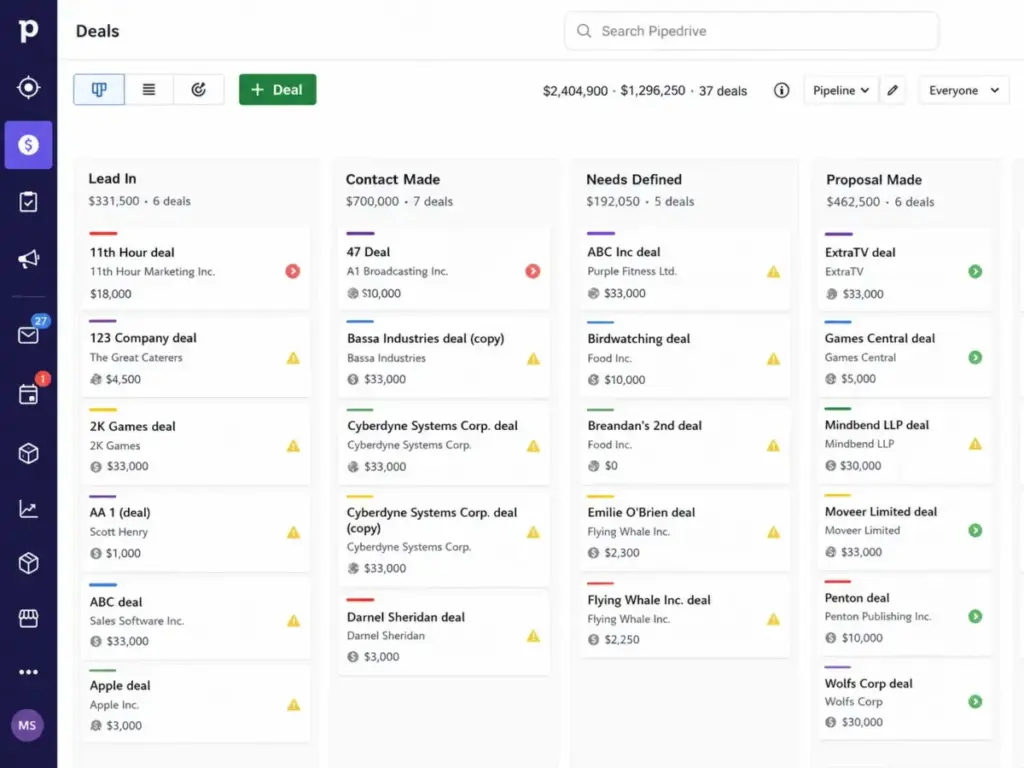
Pipedrive treats the visual pipeline as the center of everything. Every deal sits on a Kanban board, reps drag cards between stages, and the system flags deals that have gone stale. Activity reminders, email tracking (Growth and above), and a contacts timeline keep reps focused on next actions rather than data entry. For a 10-person outbound team running daily pipeline reviews, Pipedrive’s interface requires less training and less documentation time.
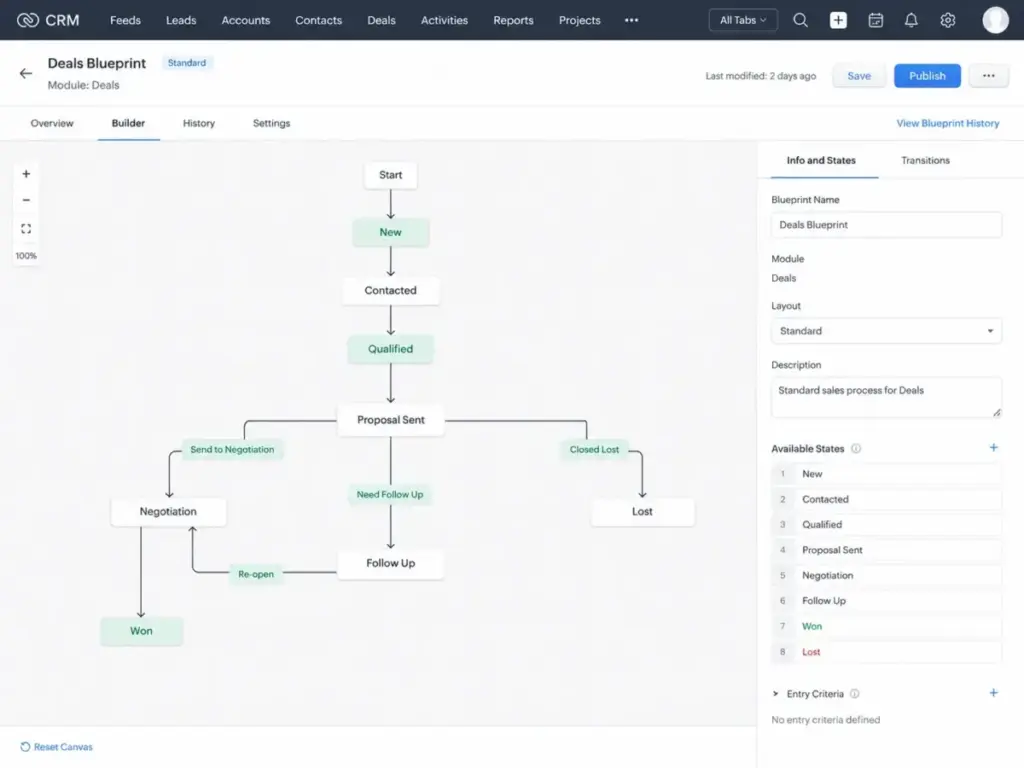
Zoho CRM approaches daily work differently. The platform offers lead, account, contact, and deal management inside a broader system that also handles workflow rules, assignment rules, reports, dashboards, and sales forecasting. On Professional and above, Blueprint process automation enforces stage-by-stage compliance. On Enterprise and above, Zia AI assists with predictions, anomaly detection, and workflow suggestions. Journey orchestration and customer portals add cross-department process capability.
The difference shows up in the first week. Pipedrive reps are typically productive on day one or two. Zoho CRM reps need someone to configure page layouts, set up workflow rules, and design Blueprint sequences before the system performs at its best. If nobody on your team owns CRM implementation, Zoho’s depth becomes a liability rather than a strength.
The Real Pricing Comparison in 2026
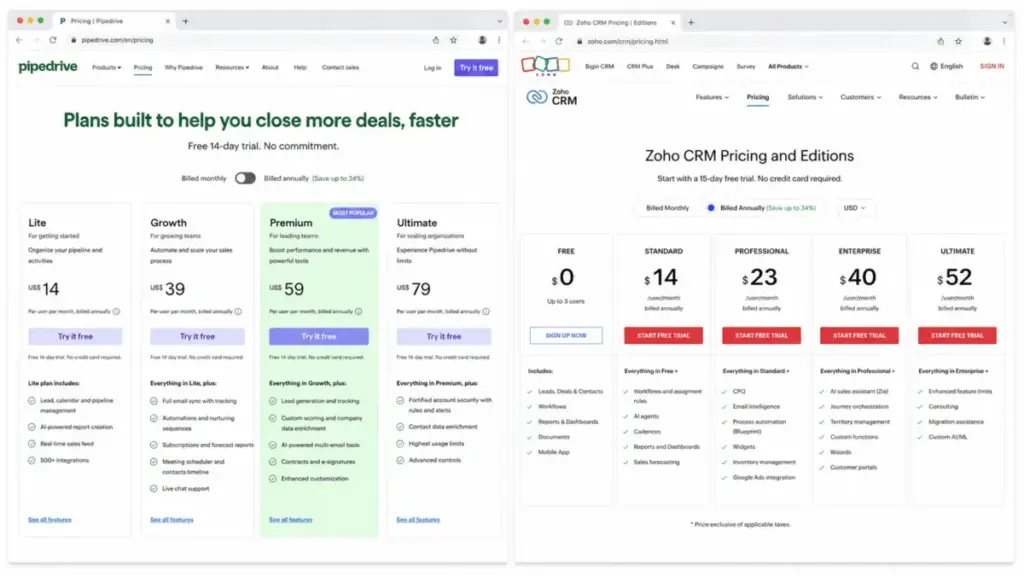
Pipedrive restructured its plans in 2025. The current tiers are Lite, Growth, Premium, and Ultimate. Old guides that reference Essential, Advanced, Professional, Power, or Enterprise are using stale plan names. According to Pipedrive’s official pricing page (as of May 2026):
| Plan | Monthly | Annual (per user/month) | Key Additions |
|---|---|---|---|
| Lite | $24 | $14 | Core CRM, visual pipeline, contacts, calendar, reporting, AI report creation, API, mobile apps |
| Growth | $49 | $39 | Full email sync, email tracking, meeting scheduler, automations, sequences, forecast view, live chat support |
| Premium | $79 | $59 | LeadBooster, Projects, Smart Docs, custom scoring, phone support, 24/7 live chat |
| Ultimate | $99 | $79 | Highest usage limits, fortified security, enrichment credits, enterprise controls |
According to Zoho CRM’s official pricing page (as of May 2026):
| Plan | Monthly | Annual (per user/month) | Key Additions |
|---|---|---|---|
| Free | $0 | $0 | Up to 3 users: leads, deals, workflows, reports, documents, mobile app |
| Standard | $20 | $14 | Workflows, assignment rules, AI agents, cadences, reports, dashboards, forecasting |
| Professional | $35 | $23 | CPQ, email intelligence, Blueprint, widgets, inventory management, Google Ads integration |
| Enterprise | $50 | $40 | Zia AI, journey orchestration, territory management, custom functions, wizards, portals |
| Ultimate | $65 | $52 | Enhanced limits, consulting, migration assistance, custom AI/ML |
Automation-Ready Cost at Scale
The entry price tells you almost nothing about what you will actually pay. To run automations, email sequences, and workflow rules, Pipedrive requires Growth ($39/user/month annual) and Zoho CRM requires Professional ($23/user/month annual). Here is what that looks like at scale:
| Team Size | Pipedrive Growth (Annual) | Zoho CRM Professional (Annual) | Monthly Savings with Zoho |
|---|---|---|---|
| 5 users | $195/month | $115/month | $80 |
| 10 users | $390/month | $230/month | $160 |
| 25 users | $975/month | $575/month | $400 |
| 50 users | $1,950/month | $1,150/month | $800 |
Zoho CRM wins the cost comparison at every team size. At 50 users, the annual difference is $9,600. That gap alone funds a dedicated CRM administrator, which is exactly what Zoho’s configuration depth demands.
What the Pricing Pages Do Not Show
Pipedrive hidden costs: LeadBooster, Projects, and Smart Docs are paid add-ons on Lite and Growth. They are included only on Premium ($59/user/month annual) and above. If your team needs lead capture forms, post-sale project tracking, or document automation on a lower tier, add-on fees increase the real cost. Pipedrive has no free-forever plan, only a 14-day trial.
Zoho CRM hidden costs: Some Zoho and third-party integrations require paid licenses from both Zoho CRM and the integrated product. Premium Support costs 20% of the license fee on top of your subscription. API add-on credits incur additional monthly charges. Implementation services add cost for complex deployments. The sticker price is lower, but the operational cost depends on how much configuration and support your team consumes.
Feature Gates That Change the Real Price
Features look similar on marketing pages. The plan gate determines when you actually get them. Here is the comparison that matters for buying decisions.
| Feature | Pipedrive Plan Gate | Zoho CRM Plan Gate | Practical Impact |
|---|---|---|---|
| Email sync and tracking | Growth ($39/mo annual) | Standard ($14/mo annual) | Zoho gives email capability at a lower tier |
| Workflow automations | Growth ($39/mo annual) | Standard ($14/mo annual) | Zoho includes basic automation earlier |
| Blueprint / process enforcement | Not available | Professional ($23/mo annual) | Zoho offers stage-by-stage process compliance |
| CPQ (configure-price-quote) | Not available | Professional ($23/mo annual) | Zoho adds quoting and inventory at mid-tier |
| LeadBooster / lead capture | Premium ($59/mo annual) or add-on | Standard (web forms) | Pipedrive gates lead capture tools higher |
| AI assistant (predictive) | Basic AI on Lite; more on Premium+ | Zia AI on Enterprise ($40/mo annual) | Both gate meaningful AI behind higher tiers |
| Custom modules | Not available | Enterprise ($40/mo annual) | Zoho allows entirely custom data objects |
| Journey orchestration | Not available | Enterprise ($40/mo annual) | Zoho maps multi-touchpoint buyer journeys |
| Customer portals | Not available | Enterprise ($40/mo annual) | Zoho enables external-facing customer access |
| Phone support | Premium ($59/mo annual) | Classic Support (all paid plans) | Zoho includes phone on all paid plans; Pipedrive gates it |
The pattern: Pipedrive optimizes for a cleaner experience by including fewer features per tier. Zoho CRM packs more capability per tier but requires someone to configure it. If your team values a sales pipeline that works out of the box, Pipedrive’s narrower feature set is a strength. If your team needs CPQ, custom modules, or journey orchestration, Zoho is the only option.
API Limits and Automation Constraints
Most CRM comparisons skip API limits. If your team connects the CRM to marketing tools, billing systems, or custom dashboards, these limits determine whether your integrations break under load.
| API Factor | Pipedrive | Zoho CRM | Buyer Warning |
|---|---|---|---|
| Rate limit model | Burst tokens per 2-second window | API credits per 24-hour window | Different mental models; check your integration volume |
| Entry-tier burst/credits | Lite: 20 requests/2s | Free: 5,000 credits/day | Both are restrictive at entry level |
| Mid-tier burst/credits | Growth: 40 requests/2s | Professional: 50,000 + (500 x users), max 3M | Zoho scales higher with user count |
| Top-tier burst/credits | Ultimate: 120 requests/2s | Ultimate: 50,000 + (2,000 x users), unlimited max | Zoho Ultimate removes the credit ceiling |
| Daily token budget (Pipedrive) | 30,000 x seats (Lite) to 210,000 x seats (Ultimate), max 100M | N/A (credit model) | Pipedrive caps daily volume regardless of plan |
| Concurrency | Not specified per plan | Free: 5, Standard: 10, Professional: 15, Enterprise: 20, Ultimate: 25 | Zoho limits simultaneous API connections |
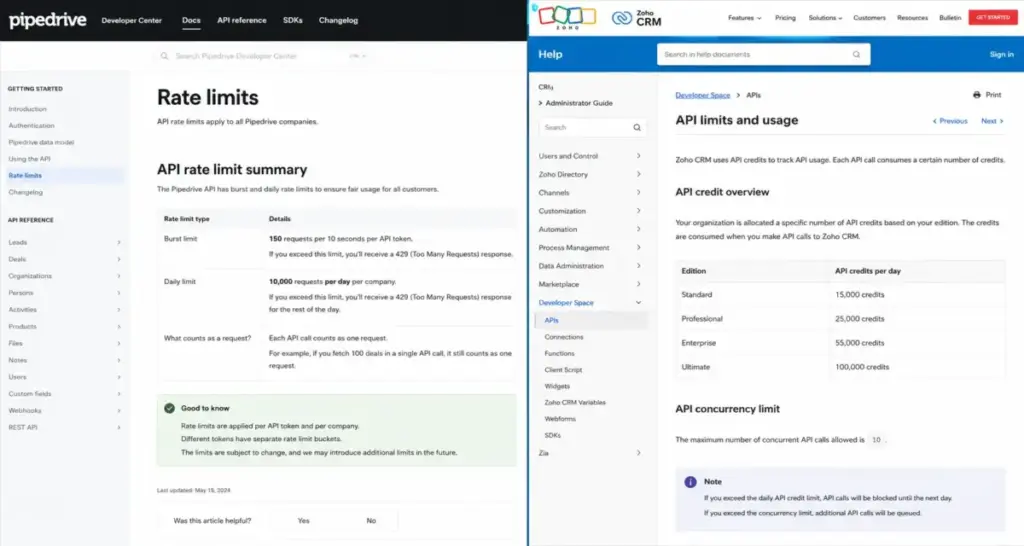
According to Pipedrive’s API documentation, burst limits are per API token and per OAuth app. According to Zoho CRM’s API limits documentation, credits are consumed per API call type.
For a 10-user team on Pipedrive Growth, the daily token budget is 600,000 requests. On Zoho CRM Professional, the daily credit pool is 55,000 credits. Pipedrive is easier to reason about for simple sync workflows. Zoho scales higher at Enterprise and Ultimate but introduces credit and concurrency complexity that requires monitoring.
Support Access: What You Get Before You Pay Extra
Pipedrive support by plan (as of May 2026, per Pipedrive’s support page):
- All plans: Email support around the clock, chatbot support
- Growth and above: Live chat (Growth is Monday-Friday business hours; Premium and Ultimate are 24/7)
- Premium and above: Phone support for users with account settings access
Zoho CRM support by plan (as of May 2026, per Zoho CRM’s support plans page):
- Free edition: Basic Support via email/request portal, community, and knowledge base (1-2 business day handling)
- All paid plans: Classic Support by email, call, chat, and remote assistance
- Premium Support (add-on): 24×5 live chat, phone, email, community, onboarding, and 1-on-1 sessions for 20% of license fee
The support comparison depends on what you are willing to pay. Pipedrive bundles clearer support tiers into its plan pricing. Zoho includes Classic Support on all paid plans but charges extra for Premium Support. At 25 users on Zoho Professional annual ($575/month), Premium Support adds approximately $115/month (20% of $575). That narrows the cost gap with Pipedrive.
Security and Compliance
Both platforms meet baseline security requirements for SMB and mid-market CRM deployments.
Pipedrive states compliance with GDPR and adherence to SOC 2, SOC 3, EU-US Data Privacy Framework, ISO/IEC 27001:2013, and ISO 27701:2019. Data is hosted in AWS data centers in Europe and the US. Information is encrypted via HTTPS and backed up daily.
Zoho CRM holds SOC 2 Type 2 compliance across cloud services and on-premise products. Zoho’s compliance materials also reference SOC 1 Type 2 and SOC 2 plus HIPAA Type 2 coverage. Zoho CRM HIPAA materials describe ePHI encryption, access control, and audit logs.
If your organization handles protected health information (ePHI), Zoho CRM’s HIPAA coverage is a differentiator. Pipedrive does not list HIPAA compliance in its public security documentation.
Switching Between Platforms: Migration Reality
Switching CRM platforms is not free, even when the tools support data import.
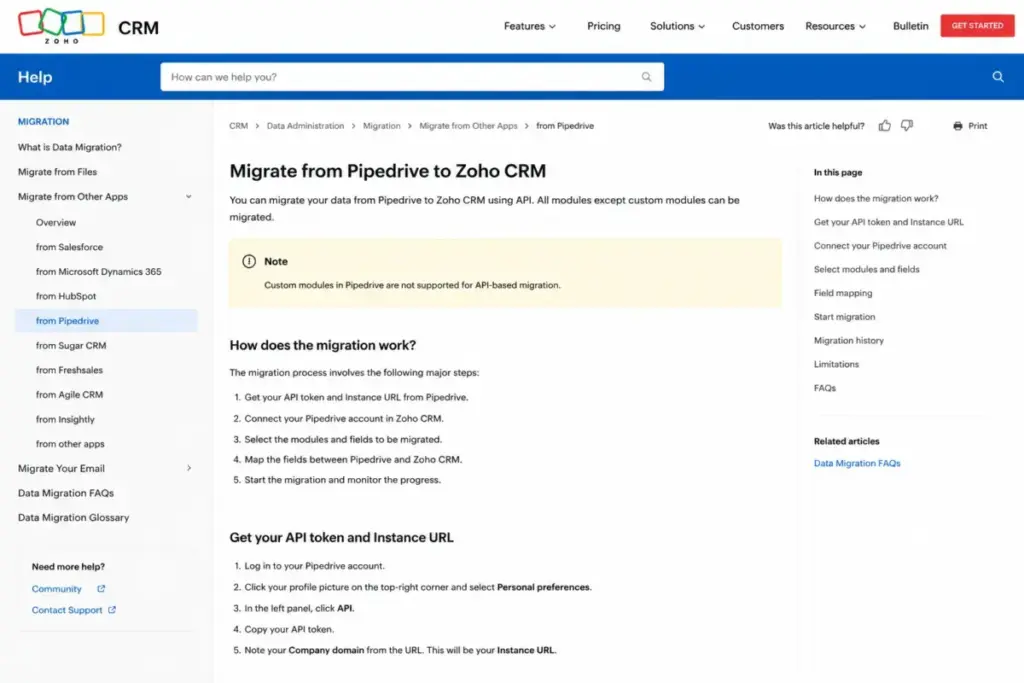
Pipedrive to Zoho CRM: Zoho CRM offers an official migration path using your Pipedrive API token and instance URL. According to Zoho’s Pipedrive migration documentation, the migration runs in the backend, sends a completion email, and can be undone or rerun up to 3 times. The catch: Zoho does not support custom modules in API migrations from Pipedrive. If you built custom data structures in Pipedrive, you will need to recreate and manually import that data.
Zoho CRM to Pipedrive: Pipedrive supports import from Zoho via spreadsheet import with field matching, duplicate handling, and import history. The process is manual: export from Zoho, map fields, import into Pipedrive. Custom fields and module relationships require careful mapping to avoid data loss.
Both directions carry medium migration difficulty. The risk increases with custom fields, workflow automations, and integration dependencies that do not transfer automatically.
The Verdict by Team Type
There is no single winner. The right choice depends on your team size, sales motion, admin capacity, and budget.
5-Person Startup Choosing Its First CRM
Zoho CRM wins on budget. The free plan supports up to 3 users with essentials. Standard at $14/user/month (annual) adds workflows and forecasting. If the team has someone willing to configure the system, Zoho’s lower cost makes sense.
Pipedrive wins on speed. If nobody wants to spend time configuring CRM layouts and workflows, Pipedrive Lite ($14/user/month annual) or Growth ($39/user/month annual) gets reps into a visual pipeline faster.
10-Person Outbound Sales Team Running Daily Pipeline Reviews
Choose Pipedrive. The visual pipeline, deal rotting alerts, and activity-first design match outbound sales workflows. Growth tier at $390/month (10 users, annual billing) is more expensive than Zoho Professional at $230/month, but the lower adoption friction pays for itself in rep productivity. Read the full Pipedrive CRM review for a deeper look at pipeline management.
25-Person Team Needing Automation, CPQ, and Workflow Controls
Choose Zoho CRM. Professional and Enterprise tiers unlock Blueprint, CPQ, custom functions, and workflow depth at $575 to $1,000/month (25 users, annual billing). Pipedrive cannot match this level of process automation at any tier. Review the detailed Zoho CRM evaluation for customization specifics.
50-Person Sales, Marketing, and Support Organization
Choose Zoho CRM. At this scale, Zoho CRM’s integration depth with Zoho Desk, Zoho Projects, Finance Suite, Analytics, Campaigns, and Forms creates a connected operating system across departments. Pipedrive is a sales-only tool that requires third-party connectors for marketing and support workflows. The annual cost savings of $9,600 (50 users, Growth vs Professional) funds dedicated admin resources.
Integration-Heavy Sales Ops Team with Custom API Workflows
It depends on your integration pattern. Pipedrive’s token-budget model is simpler to predict for lightweight sync workflows. Zoho’s credit model scales higher at Enterprise and Ultimate but introduces concurrency limits and credit-type complexity. Audit your daily API call volume before choosing.
When Neither Platform Is the Right Choice
Pipedrive and Zoho CRM cover most SMB and mid-market sales scenarios. They fall short in three specific situations:
You need a free CRM with stronger marketing automation. Neither Pipedrive (no free plan) nor Zoho CRM Free (limited to 3 users with basic features) matches HubSpot’s free CRM for marketing-led growth. If inbound marketing drives your pipeline, consider HubSpot CRM as a starting point.
You need enterprise-grade sales operations. If your organization has mature sales ops, complex territory rules, advanced forecasting models, and deep governance requirements, both Pipedrive and Zoho CRM reach their limits before Salesforce does. Teams with the budget and admin resources for enterprise CRM should read our Salesforce CRM review before committing.
You want a middle ground between pipeline simplicity and ecosystem depth. Freshsales offers built-in phone, email, and AI assistance at SMB-friendly pricing. It fills the gap for teams that find Pipedrive too sales-only and Zoho too configuration-heavy.
For a broader view of CRM options by team type, see our guide to the best CRM platforms for sales teams.
Decision Tree: Pipedrive or Zoho CRM?
Use this framework to choose:
- Do you need reps productive in the first week with minimal configuration? Choose Pipedrive.
- Is per-seat cost your primary constraint at 10 or more users? Compare Pipedrive pricing against Zoho CRM pricing. Zoho wins on seat cost at every comparable tier.
- Does your team need CPQ, Blueprint automation, or custom modules? Choose Zoho CRM. Pipedrive does not offer these.
- Does anyone on your team own CRM administration, process design, and integration governance? If yes, Zoho’s depth is an asset. If no, Zoho’s depth becomes shelfware.
- Do your workflows depend on high API volume? Compare Pipedrive’s daily token budgets against Zoho’s API credit model before committing.
- Does neither platform fit? Explore Pipedrive alternatives or Zoho CRM alternatives for options outside this comparison.
FAQ
Is Zoho CRM cheaper than Pipedrive?
Yes. Zoho CRM is cheaper at every comparable plan tier. The free edition supports up to 3 users. Zoho Professional ($23/user/month annual) includes automation, CPQ, and Blueprint. Pipedrive Growth ($39/user/month annual) includes automation and email tracking but no CPQ or process enforcement. At 25 users, the monthly difference is $400 on annual billing.
Does Pipedrive have a free plan?
No. Pipedrive offers a 14-day free trial but no free-forever CRM plan. Zoho CRM offers a free edition for up to 3 users with basic lead, deal, and workflow capabilities.
Is Pipedrive easier to use than Zoho CRM?
Pipedrive is simpler for visual pipeline management and daily rep workflows. Verified review patterns on Gartner Peer Insights show Pipedrive at 4.2 stars (357 reviews), with users consistently associating it with usability and pipeline clarity. Zoho CRM scores 4.4 stars (556 reviews) with users associating it with capability breadth and customization depth. Easier depends on what you are measuring: Pipedrive wins on first-week adoption; Zoho wins on long-term configuration flexibility.
Can I migrate from Pipedrive to Zoho CRM?
Yes. Zoho CRM supports Pipedrive migration using your API token and instance URL. The migration runs in the backend and can be undone or rerun up to 3 times. The limitation: Zoho does not support custom modules in API migrations from Pipedrive. Custom data structures require manual recreation and import.
Can I migrate from Zoho CRM to Pipedrive?
Yes. Pipedrive supports import from Zoho via spreadsheet files with field matching and duplicate handling. The process is manual: export your Zoho data, map fields to Pipedrive’s structure, and import. Complex custom fields and module relationships need careful mapping.
Which CRM has better automation?
Both platforms offer workflow automation, but they differ in depth and plan gating. Pipedrive Growth includes automations and sequences. Zoho CRM Standard includes workflows and assignment rules; Professional adds Blueprint process automation; Enterprise adds journey orchestration and custom functions. Zoho CRM offers deeper automation capability at a lower per-seat price, but requires more setup effort.
Which CRM is better for a 10-person sales team?
For a sales-focused team doing outbound prospecting and daily pipeline reviews, Pipedrive is the stronger fit. The visual pipeline, activity tracking, and deal rotting features are built for rep-facing daily use. The cost premium ($390/month vs $230/month at 10 users on annual billing) buys faster adoption and less training overhead.
Which CRM has better integrations?
Pipedrive lists 500-plus marketplace integrations including Google, Microsoft, Slack, Zoom, Zapier, and Mailchimp. Zoho CRM integrates natively with the Zoho app ecosystem (Desk, Projects, Finance Suite, Campaigns, Analytics, Forms) plus third-party tools like Google Workspace, Slack, WhatsApp Business, and LinkedIn Sales Navigator. Zoho wins on ecosystem breadth; Pipedrive wins on marketplace simplicity.
Which has better AI features in 2026?
Pipedrive includes AI-powered report creation on all plans and additional AI email capabilities on Premium and above. Zoho CRM gates Zia AI behind the Enterprise plan ($40/user/month annual), where it provides predictive scoring, anomaly detection, and workflow suggestions. Zoho Ultimate adds custom AI/ML capacity. Both platforms gate meaningful AI behind higher tiers, but Zoho offers deeper AI capability at a higher plan gate.
Does Pipedrive integrate with Zoho?
Pipedrive and Zoho CRM are competing products and do not offer a native integration between them. Data migration between the two platforms is supported through API-based migration tools and spreadsheet imports, not through live sync.