Your team keeps losing decisions inside email threads, files live in three different apps, and nobody can agree on where the latest version of the project brief actually lives. That is the exact frustration Basecamp was built to fix.
This Basecamp review breaks down what the platform solves, what it creates new friction around, and whether its 2026 pricing model actually saves your team money or quietly costs more than you expect.
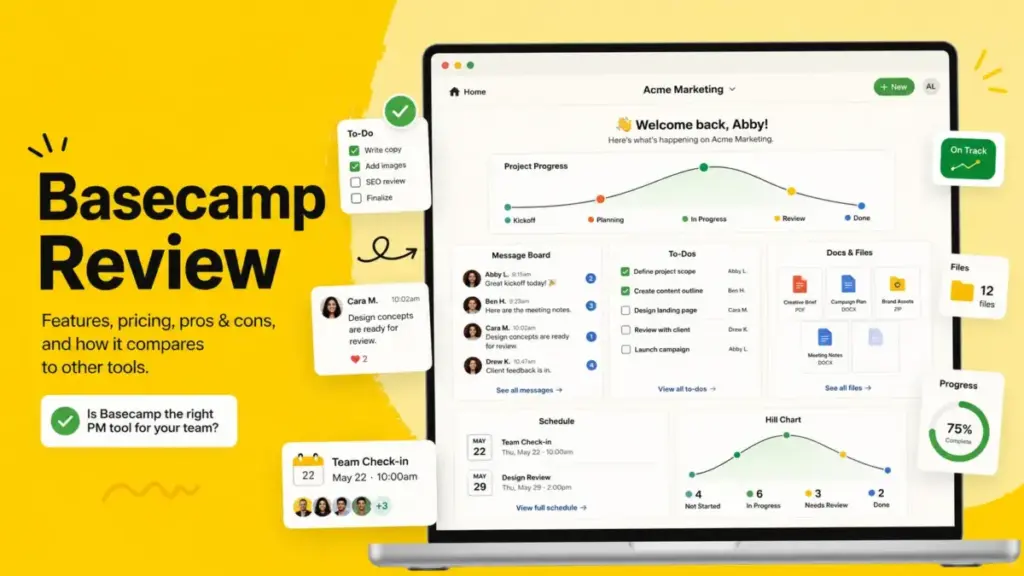
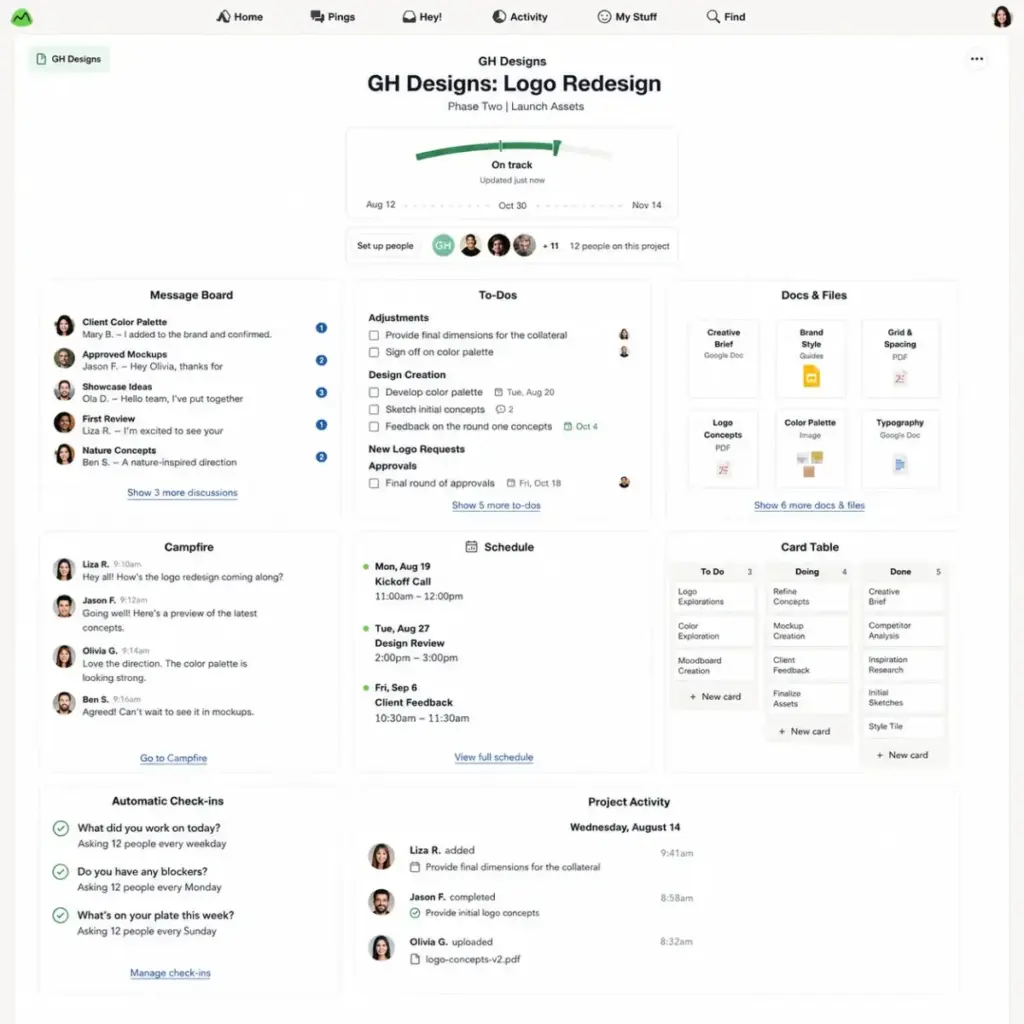
Basecamp is a project management and team collaboration platform built by 37signals LLC. It bundles Message Boards, To-dos, Campfire group chat, Pings, Docs & Files, Scheduling, Card Tables, Automatic Check-ins, and client visibility controls into one standardized project workspace. Teams evaluating the best project management software for async client work frequently land on Basecamp as a strong candidate.
I researched Basecamp’s official documentation, verified pricing from the official pricing page, cross-referenced user sentiment across G2, Capterra, and TrustRadius, and analyzed the platform’s 2026 API and agent-accessible direction to produce this review.
Quick Verdict: Basecamp Scores 7.4/10
| Category | Detail |
|---|---|
| Score | 7.4/10 |
| Best for | Agencies, consultancies, and remote teams under 30 employees that need one calm place for client projects, files, decisions, and async updates |
| Not for | Software teams running sprints, PMO-led organizations needing Gantt charts, dependencies, workload balancing, or portfolio dashboards |
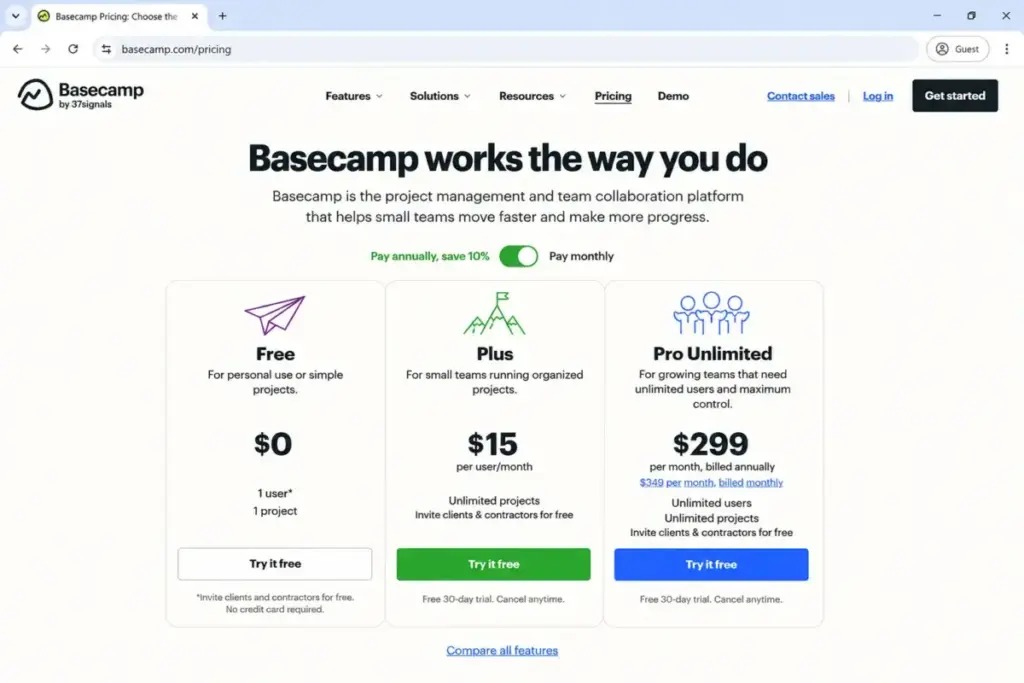
| Pricing | Free ($0, 1 project), Plus ($15/user/month), Pro Unlimited ($299/month annual) |
| Recommendation | Try for communication-first teams; Skip for complex PM needs |
The 60-Second Version
Basecamp keeps every project inside an identical set of tools: Message Boards, To-dos, Docs & Files, Schedule, Campfire chat, and Card Tables. That consistency is its biggest strength and its clearest limit.
The pricing model charges per employee on Plus (clients and contractors join free), and Pro Unlimited becomes cheaper than Plus at roughly 20 employees on annual billing. Time tracking now exists as the Timesheet add-on or Pro inclusion.
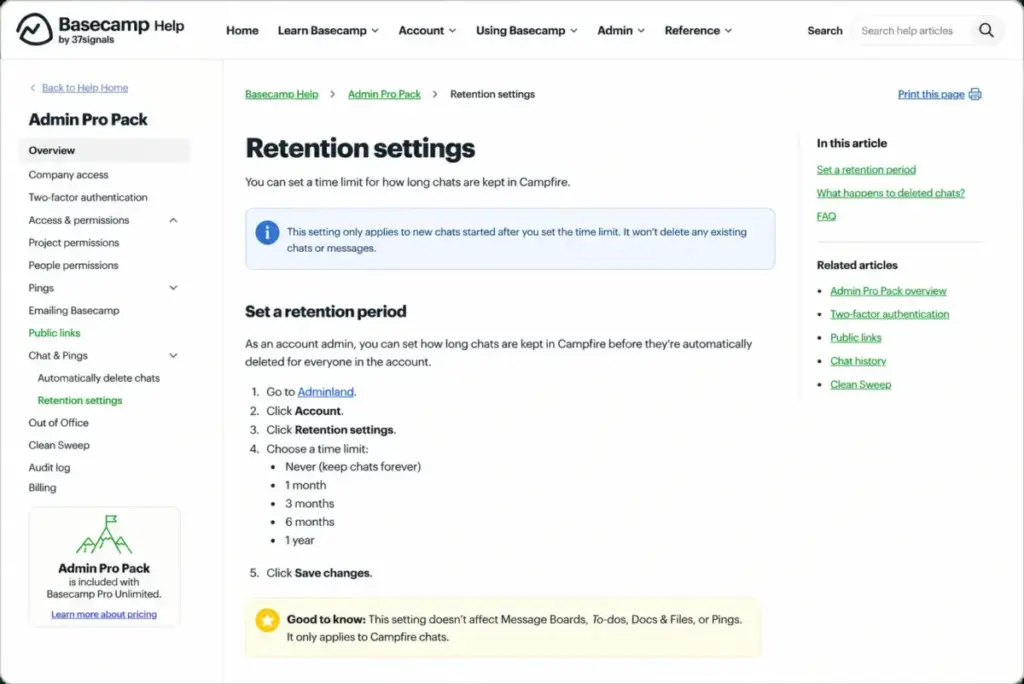
Admin controls like 2FA enforcement and chat retention settings live behind the Admin Pro Pack, which costs $50/month on non-Pro packages.
If your team needs dependencies, custom fields, Gantt charts, or sprint planning, Basecamp is the wrong tool. If those gaps matter, compare Basecamp alternatives before choosing a simpler project hub.
If your team needs a single, predictable project hub for async communication and client collaboration, Basecamp earns its spot on the shortlist.
The 3 Problems Basecamp Solves
Most reviews describe Basecamp as “simple.” That is true but incomplete. The deeper story is what specific operational problems that simplicity eliminates.
Problem 1: Decisions Buried in Email and Chat
Basecamp’s Message Boards force every discussion into a named, threaded, searchable location inside a project. That sounds basic until you compare it to teams using Slack channels where conversations scroll past, or email threads where half the team gets left off the CC line.
According to Basecamp’s official product page, over 75,000 organizations across 166 countries use the platform, primarily companies with fewer than 100 full-time employees. The pattern in third-party reviews confirms why: teams adopt Basecamp because it gives every project one place for decisions instead of scattering them across tools.
“I enjoy being able to view and share documents very easily. Drag & drop works fantastic. It is very easy to use and seems quite user-friendly.” – Trennis S., Mid-Market reviewer, G2
One detail most reviews miss about Basecamp is that Automatic Check-ins let you replace recurring status meetings with scheduled questions. The team answers asynchronously, and the responses stay attached to the project. For remote teams tired of “quick sync” meetings that eat 45 minutes, that feature alone justifies the trial.
Problem 2: Client Collaboration That Creates Cost or Permission Chaos
Basecamp Plus bills employees only. Clients and temporary contractors join for $0 (as of May 2026, per the Basecamp pricing page). For an 8-person creative agency managing 15 active clients, that means the monthly bill stays at $120/month regardless of how many external collaborators participate.
Compare that to per-seat tools where adding a client reviewer or a freelance designer triggers another license fee. The economics shift even further at scale: a 25-person consultancy on Plus pays $375/month, while Pro Unlimited at $299/month (annual) eliminates per-user math entirely and includes Timesheet, Admin Pro Pack, priority support, 5 TB storage, and personal onboarding.
Basecamp also lets you control exactly which project tools clients can see. You can share specific Message Boards and To-dos while keeping internal discussions, Campfire chats, and files hidden. That visibility toggle is built into every project, not buried in a settings menu.
Problem 3: Onboarding New Team Members Into Complex PM Tools
The biggest mistake most teams make with project management tools is picking the most feature-rich option and then watching half the team ignore it. Basecamp takes the opposite approach. Every project uses the same six tools. There is no view-switching between Kanban, Gantt, timeline, and list. No custom field configurations. No workflow builder with conditional logic.
That standardization means a new team member can open any project and immediately know where to find messages, tasks, files, and the schedule. According to Basecamp’s official documentation, the platform is available on Mac, Windows, iOS, Android, the web, and the command line. Mobile apps support commenting, catching up, chat, and snoozing notifications, which means the daily workflow transfers across devices without a separate learning curve.
Is that simplicity a ceiling? For some teams, yes. But for agencies, nonprofits, schools, and consultancies that rotate staff across projects, the predictable structure removes a real adoption barrier.
The 2 Problems Basecamp Creates
Basecamp’s simplicity is not free. It creates two specific friction points that intensify as teams grow or workflows become more complex.
The Governance Gap
Basecamp gives every project the same set of tools, but it does not enforce how your team uses them. After three months of active use, many teams end up with projects where critical decisions live in Campfire chat instead of Message Boards, To-dos have no assignee, and five people post the same file in different locations.
That is a problem Basecamp does not solve natively. You need internal conventions: when to use Messages versus Campfire, how to name projects, who controls client visibility, and when to archive completed work. Without those rules, simplicity becomes clutter.
The Admin Pro Pack (included in Pro Unlimited or $50/month on Plus) adds controls that help: Ping restrictions, project-detail editing limits, public-link control, a 15-minute comment and chat editing window, 2FA requirement enforcement, chat retention settings, and the ability to set Out of Office for others. Here is the full breakdown of what you get:
| Admin Pro Pack Control | What It Does |
|---|---|
| Ping restrictions | Limit who can send direct Pings |
| Project-detail editing | Restrict who edits project names and descriptions |
| People editing | Control who can add or remove people |
| Move/archive/delete | Limit who can restructure or remove content |
| Public-link control | Disable public link sharing |
| Comment/chat editing window | 15-minute editing limit after posting |
| 2FA requirement | Force two-factor authentication for all users |
| Chat retention | Set automatic chat history retention policies |
| Out of Office | Set OOO status for other team members |
| Clean Sweep | Bulk-manage notifications and activity |
Without the Admin Pro Pack, Basecamp Plus has limited governance controls. That matters for teams handling sensitive client data or regulated workflows.
The Feature Ceiling for Complex Project Work
Basecamp does not have Gantt charts. No task dependencies. No custom fields. No sprint planning. No workload balancing. No portfolio dashboards. No burndown reports.
That is not a bug; it is a design choice. But independent reviews consistently identify these gaps as the reason teams with complex project requirements move to other tools. A TrustRadius reviewer pattern shows users praising messaging, calendars, and file sharing while noting friction in project navigation and limited advanced functionality.
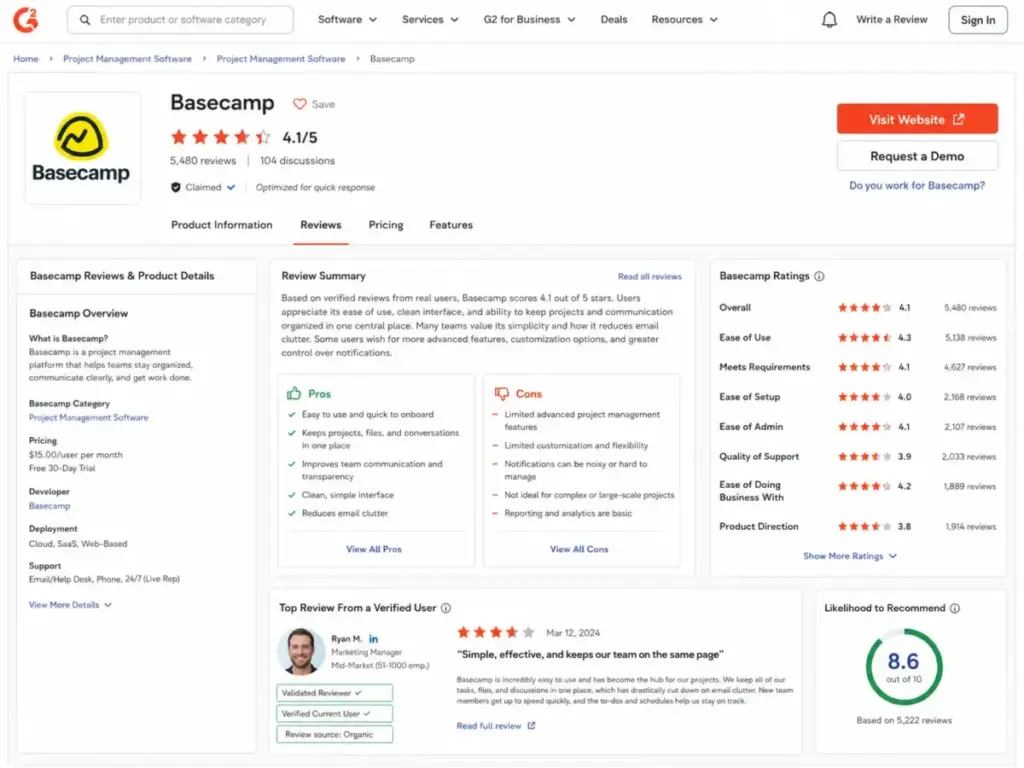
On G2, Basecamp holds 4.1 stars from about 5,480 reviews. Positive themes cluster around ease of use, team collaboration, and organization. Negative themes center on missing features, limited functionality, and task management limitations.
Capterra tells a similar story: 4.3 stars from 14,402 reviews, with task management and file sharing as strengths, but bugs, notification overload, slow search, and limited customization as recurring complaints.
“Basecamp loses notifications frequently, when I click on the them they are gone forever if I don’t handle them right away.” – Nicholas E., Content Specialist, Capterra
That notification complaint surfaces repeatedly across platforms. For teams that depend on real-time task alerts, this friction adds up.
Basecamp Pricing Reality in 2026
Basecamp’s pricing page lists three packages (as of May 2026). The math gets interesting when you add employees and compare plans.
| Plan | Price | Storage | Users | Support | Timesheet | Admin Pro Pack |
|---|---|---|---|---|---|---|
| Free | $0 forever | 1 GB | Up to 20 | Standard | No | No |
| Plus | $15/user/month | 500 GB | Unlimited (bills employees only) | 24/7/365 | $50/month add-on | $50/month add-on |
| Pro Unlimited | $299/month (annual) or $349/month (monthly) | 5 TB | Unlimited (no per-user fees) | Priority 24/7/365 | Included | Included |
Nonprofits receive 10% off, and qualifying K-12, homeschool, or university class-work use can be free. Annual Pro cancellation is prorated back to the credit card.
Where Pricing Starts to Pinch
The break-even math between Plus and Pro Unlimited determines which plan actually costs less. Here is the comparison by team size:
| Employees | Plus Cost (monthly) | Plus + Timesheet + Admin Pro Pack | Pro Unlimited (annual) |
|---|---|---|---|
| 5 | $75 | $175 | $299 |
| 10 | $150 | $250 | $299 |
| 14 | $210 | $310 | $299 |
| 20 | $300 | $400 | $299 |
| 25 | $375 | $475 | $299 |
| 50 | $750 | $850 | $299 |
Pro Unlimited breaks even with Plus at roughly 20 employees on base pricing alone. If your Plus account needs both Timesheet and Admin Pro Pack add-ons ($100/month combined), Pro becomes cheaper at around 14 employees.
Extra storage beyond package limits costs $50/month per additional 1 TB.
Before you commit, watch out for the add-on math. A 12-person team on Plus that adds Timesheet and Admin Pro Pack pays $280/month, which is within $19 of annual Pro. At that point, Pro gives you everything included plus priority support, 5 TB storage, and personal onboarding.
Does Basecamp Have Time Tracking in 2026?
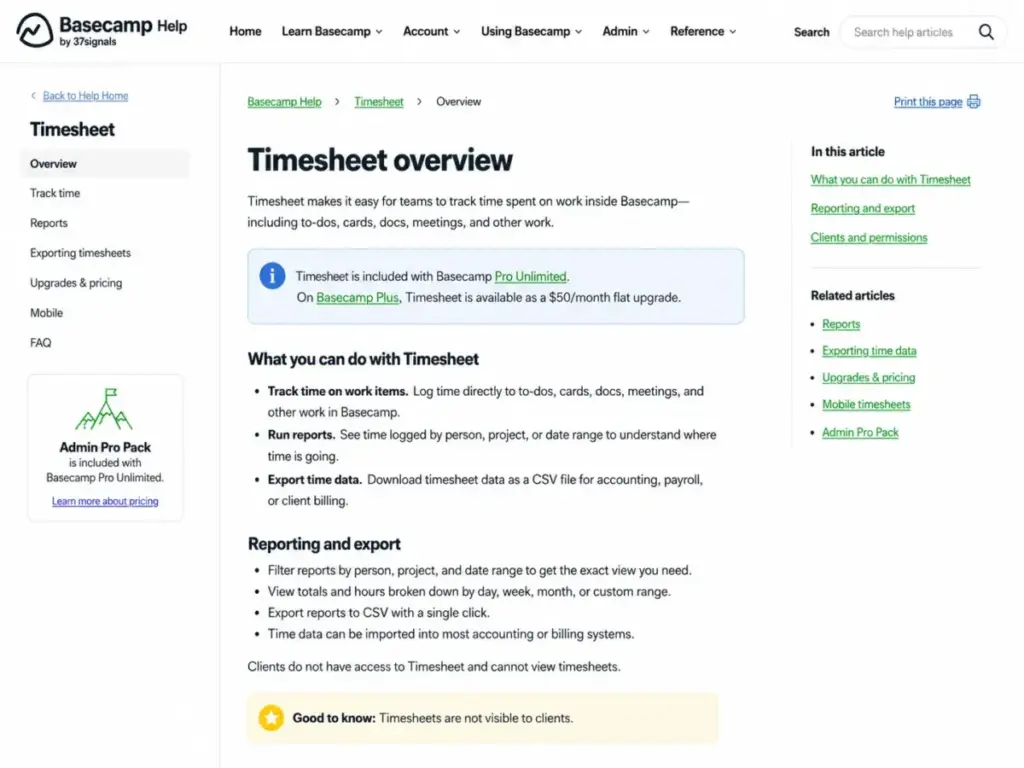
A common misconception about Basecamp is that it has no time tracking. That changed. Timesheet supports project-level or item-level time tracking, reports with filters by person, project, and date range, CSV export, and mobile access. Timesheets are not viewable by clients.
Timesheet is included with Pro Unlimited and available as an upgrade on other packages for $50/month flat (as of May 2026, per Basecamp help documentation).
For agencies billing hourly, the native Timesheet removes the need for a separate tool like Harvest or Toggl. But if you need invoice-level time tracking or automated billing workflows, you will still need a third-party integration from the Basecamp integrations page.
What Changed in 2026: Basecamp’s Agent-Accessible Direction
One detail most reviews skip entirely: Basecamp has started positioning itself as agent-accessible. According to the Basecamp agents page, the company is laying groundwork for users to bring their own AI agents to Basecamp. An official CLI and Agent Skill can manage projects, to-dos, messages, and more from the terminal or through supported agents.
The Basecamp API uses REST-style JSON with OAuth 2.0, pagination via Link and X-Total-Count headers, webhooks with HTTPS-only payload URLs and retry logic (up to 10 retries before deactivation), and API clients and SDKs. The first commonly encountered rate limit is 50 requests per 10 seconds per IP address, with additional dynamic limits beyond that.
This probably matters more for technical teams and agencies building custom workflows than for a 10-person consultancy using Basecamp for client check-ins. But it signals a direction that none of the current SERP reviews cover.
Security and Compliance: What Basecamp Documents (and What It Does Not)
| Security Area | What Basecamp States | What Remains Unclear |
|---|---|---|
| Data in transit | HTTPS for all data | Specific TLS version not stated |
| Files at rest | Encrypted at rest | Encryption standard not specified for files |
| Database backups | Encrypted using GPG | Backup frequency confirmed as daily |
| Credit card processing | PCI-compliant network | PCI level not specified |
| Data centers | Multiple US locations | No data centers outside the US |
| Custom security questionnaires | Does not fill them out | Buyers must rely on published security summary |
| SOC 2 | Not verified from official public sources | Do not assume certification |
| GDPR | DPA with Standard Contractual Clauses; subprocessors in the US | Interface in English only |
Source: 37signals security overview
Security-sensitive buyers needing custom vendor questionnaires or non-US data residency should verify whether Basecamp’s published documentation satisfies their procurement process before committing.
Who Wins and Who Loses with Basecamp
| Buyer Scenario | Verdict | Why |
|---|---|---|
| 8-person creative agency with many clients | Buy Plus | Employee-only billing plus free clients keeps costs predictable while supporting client approvals and async updates |
| 25-person consultancy tired of per-seat pricing | Buy Pro Unlimited | At $299/month annual, cheaper than Plus before counting included Timesheet, Admin Pro Pack, and 5 TB storage |
| Solo freelancer testing project tools | Try Free | One project, 1 GB storage, 20 users. Enough to evaluate the workflow |
| Software team running sprints with dependencies | Skip | Basecamp’s strengths are communication and simple coordination, not sprint planning, burndown charts, or dependency mapping |
| Security buyer needing non-US data residency | Skip | US-only data centers, no custom security questionnaires, English-only interface |
- Employee-only billing on Plus. Clients and contractors join free, which directly reduces collaboration costs for agencies and consultancies managing external stakeholders.
- Standardized project structure. Every project uses the same tools, which eliminates the “where do I find this?” friction that plagues more configurable platforms.
- Automatic Check-ins replace status meetings. Scheduled async questions with team-wide visibility reduce unnecessary calendar load for remote teams.
- Timesheet is now available. Project-level time tracking with reporting, CSV export, and mobile access (included in Pro or $50/month add-on on Plus).
- Flat Pro Unlimited pricing at scale. At 20+ employees, $299/month annual is cheaper than per-seat alternatives and includes all add-ons.
- Client visibility controls per project. Fine-grained control over what clients see without separate permission systems.
- No Gantt charts, dependencies, or custom fields. Complex project workflows require external tools or a different platform entirely.
- Admin and governance controls are plan-gated. 2FA enforcement, chat retention, and permission restrictions require Admin Pro Pack ($50/month on Plus or included in Pro).
- Notification reliability concerns. Multiple Capterra and G2 reviewers report lost or disappearing notifications that require immediate attention to avoid missing updates.
- US-only data centers. No current hosting outside the United States, and Basecamp does not fill out custom security questionnaires.
- No workload balancing or resource forecasting. Teams needing capacity planning across projects must use external tools.
- English-only interface. International teams working in other languages have no localization option.
- Search limitations. Capterra reviewers flag slow search as a recurring friction point when projects accumulate content over months.
Better Alternatives When Basecamp Does Not Fit
Knowing what project management is at a structural level helps clarify why Basecamp handles async communication well but hands off complex planning to other tools. When it does not fit, these alternatives address specific gaps.
Asana: When You Need Workflow Automation and Views
Asana offers timeline views, dependencies, custom fields, rules-based automation, and portfolio dashboards that Basecamp intentionally excludes. For teams managing 20+ concurrent projects with cross-team dependencies, Asana fills the structural gaps.
The trade-off: Asana charges per seat for all users, and its Advanced tier gates the strongest automation features. If that per-seat model is the concern, compare Asana alternatives by flat-rate pricing, automation access, portfolio depth, client collaboration, and whether the tool avoids the same upgrade pressure.
ClickUp: When You Need Maximum Customization
ClickUp packs custom fields, Gantt charts, time tracking, dashboards, goals, and multiple view types into a single platform. It is the opposite of Basecamp’s standardized approach. Teams that want granular control over every workflow detail will find more flexibility in ClickUp, but the learning curve and configuration load are significantly higher.
Teamwork: When You Need Client Billing and PM in One Tool
Teamwork combines project management with native time tracking, invoicing, and client billing features. Agencies that need the client-facing simplicity of Basecamp but also want built-in billing workflows should evaluate Teamwork as the closer operational fit.
| Scenario | Best Choice | Why |
|---|---|---|
| Client projects, async communication, simple to-dos | Basecamp | Standardized workspace, free clients, low onboarding friction |
| Complex workflows with dependencies and automation | Asana | Timeline, rules, portfolios, custom fields |
| Maximum feature depth and customization | ClickUp | More view types, dashboards, goals, but steeper learning curve |
| Agency billing integrated with PM | Teamwork | Native invoicing and client billing |
| Sprint planning with developer workflows | Jira | Backlog management, sprint boards, release tracking |
For sprint-heavy engineering teams, Jira remains the default choice with backlog management, sprint velocity tracking, and release planning that Basecamp does not attempt to replicate.
Frequently Asked Questions
Is Basecamp worth it in 2026?
Basecamp is worth it for teams that value communication-first project management over complex PM workflows. It scores 7.4/10 in this review. Choose Basecamp if your team needs a calm, predictable project hub. Skip it if you need dependencies, Gantt charts, or custom fields.
How much does Basecamp cost?
Basecamp Free costs $0 for one project, 1 GB storage, and up to 20 users. Plus costs $15/user/month (employees only; clients free). Pro Unlimited costs $299/month billed annually or $349/month if paid monthly. All pricing verified from the official pricing page as of May 2026.
Does Basecamp have a free plan?
Yes. Basecamp Free is free forever for one project, 1 GB storage, and up to 20 users. No credit card is required.
Does Basecamp have time tracking?
Yes. Timesheet is included with Pro Unlimited and available as an add-on for $50/month on other packages. It supports project-level or item-level time tracking, reports, CSV export, and mobile access. Clients cannot view Timesheets.
What are the main limitations of Basecamp?
Basecamp lacks Gantt charts, task dependencies, custom fields, sprint planning, workload management, portfolio analytics, and advanced reporting. Admin controls like 2FA enforcement require the Admin Pro Pack. Data centers are US-only. The interface is English-only.
Who should use Basecamp?
Client-service teams, agencies with 5-30 employees, remote teams prioritizing async communication, consultancies managing multiple client projects, and nonprofits or schools needing a simple project hub with predictable pricing.
Who should avoid Basecamp?
Software engineering teams running sprints, PMO-led organizations needing resource planning, operations groups requiring dependencies and Gantt charts, and security-sensitive buyers needing non-US data residency or custom vendor questionnaires.
Can clients use Basecamp for free?
Yes. On Basecamp Plus, clients and temporary contractors are free. Only employees and full users are billed at $15/user/month.
What is the best Basecamp alternative?
The best alternative depends on the gap you need to fill. Choose Asana for workflow automation and portfolio dashboards. Choose ClickUp for maximum customization. Choose Teamwork for integrated client billing. Choose Jira for sprint planning and developer workflows.
Does Basecamp have an API?
Yes. Basecamp has a REST-style API with OAuth 2.0, JSON responses, pagination, webhooks, API clients, SDKs, and a CLI. The first commonly encountered rate limit is 50 requests per 10 seconds per IP address.
Is Basecamp secure?
Basecamp uses HTTPS for data in transit, encrypts uploaded files at rest, encrypts database backups using GPG, and processes credit cards on a PCI-compliant network. Data centers are in the US only. This review did not verify SOC 2 certification from public official sources. Basecamp states it does not fill out custom security questionnaires.
At what team size does Basecamp Pro Unlimited become cheaper than Plus?
Pro Unlimited at $299/month (annual) breaks even with Plus at roughly 20 employees on base pricing. If Plus also needs Timesheet and Admin Pro Pack add-ons ($100/month combined), Pro becomes cheaper at around 14 employees.
Final Verdict: Basecamp Earns 7.4/10
Basecamp earns 7.4/10. It is best for agencies with 5-30 employees managing client projects, remote teams that prioritize async communication over real-time dashboards, and consultancies that want predictable costs without per-seat fees for external collaborators.
It is not the right fit for software teams that need sprint velocity tracking, PMO departments requiring portfolio-level resource planning, or any team that considers Gantt charts and task dependencies as table stakes.
If I could give just one piece of advice about Basecamp, it would be this: run the break-even math before choosing a plan. At 14-20 employees, Pro Unlimited costs less than Plus with add-ons and includes everything. That single calculation determines whether Basecamp saves your team money or quietly overcharges.
Choose Asana if you need workflow automation and portfolio views. Choose Teamwork if you need integrated time tracking and invoicing for client billing. Stay with Basecamp if what your team actually needs is one quiet place where projects, decisions, files, and client conversations live together without complexity.