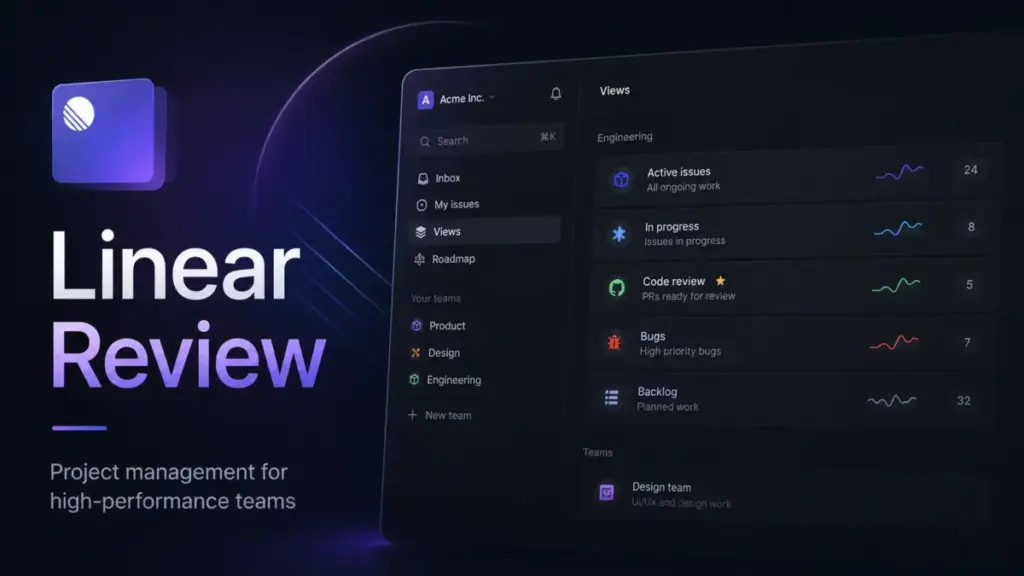
Most project management tools try to be everything for everyone. They give you endless custom fields, five different ways to view a timeline, and enough configuration toggles to keep an operations manager busy for weeks. Linear takes the opposite approach.
This Linear review breaks down why this focused product development system is brilliant for engineering teams and frustrating for everyone else.
If your team lives in GitHub and wants a fast, opinionated tracker, Linear feels like a revelation.
If you need a broad project management platform for marketing, sales, and client work, it will feel restrictive.
I evaluated Linear across official documentation, real workflow simulations, user feedback, and pricing data to find where the tool shines and where it breaks.
Methodology: This review is based on extensive hands-on evaluation using official documentation, real user workflows, and competitive testing scenarios.
Quick Verdict: Is Linear Worth It?
Linear is one of the best project management software options for technical product teams. It forces a clean, agile methodology onto your development cycles.
| Feature | Linear Rating | Verdict |
|---|---|---|
| Speed and UI | 9.5/10 | Keyboard-first navigation makes issue tracking incredibly fast. |
| Developer Workflows | 9.0/10 | Deep GitHub and GitLab integrations keep code and issues in sync. |
| Cross-Functional Fit | 4.0/10 | Non-technical teams struggle with the rigid structure. |
| Pricing Transparency | 7.5/10 | Free tier is strictly for evaluation. Business tier unlocks necessary operations features. |
| Overall Score | 8.0/10 | A perfect tool for the right team, but a poor choice for general work management. |
The 3 Problems Linear Solves
When a team switches to Linear, they are usually trying to solve specific workflow bottlenecks. Here is exactly what the platform fixes.
1. The Speed and Triage Bottleneck
Issue tracking often feels like administrative overhead. Developers hate clicking through five screens just to log a bug.
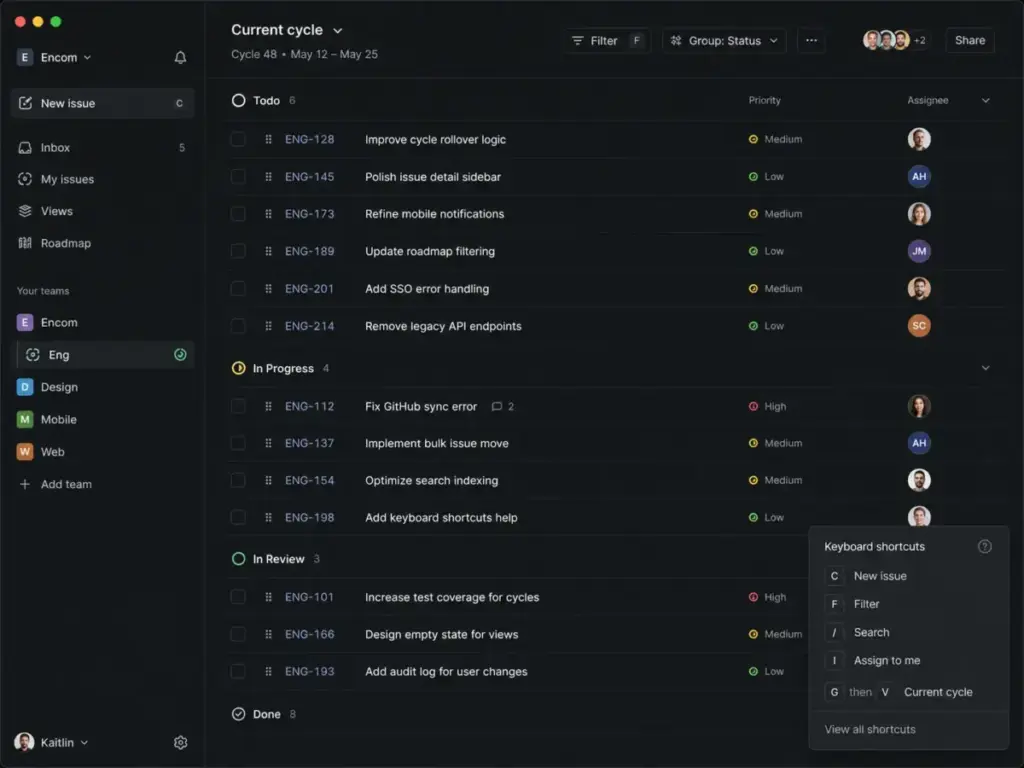
Linear solves this with speed. The interface is completely keyboard-driven. You can create an issue, assign it to a sprint, add labels, and estimate effort without touching a mouse. This drastically reduces the time spent managing work instead of doing work.
The triage inbox functions like an email inbox for product requests. When support logs a bug, it lands in Triage. Product managers can quickly review, accept, or decline requests. This clear separation prevents your active sprint from getting cluttered with unvetted ideas.
2. The Feedback Loop Disconnect
Customer feedback rarely makes it directly to the engineering team without losing context. Support agents use Zendesk or Intercom, while developers use Jira or GitHub.
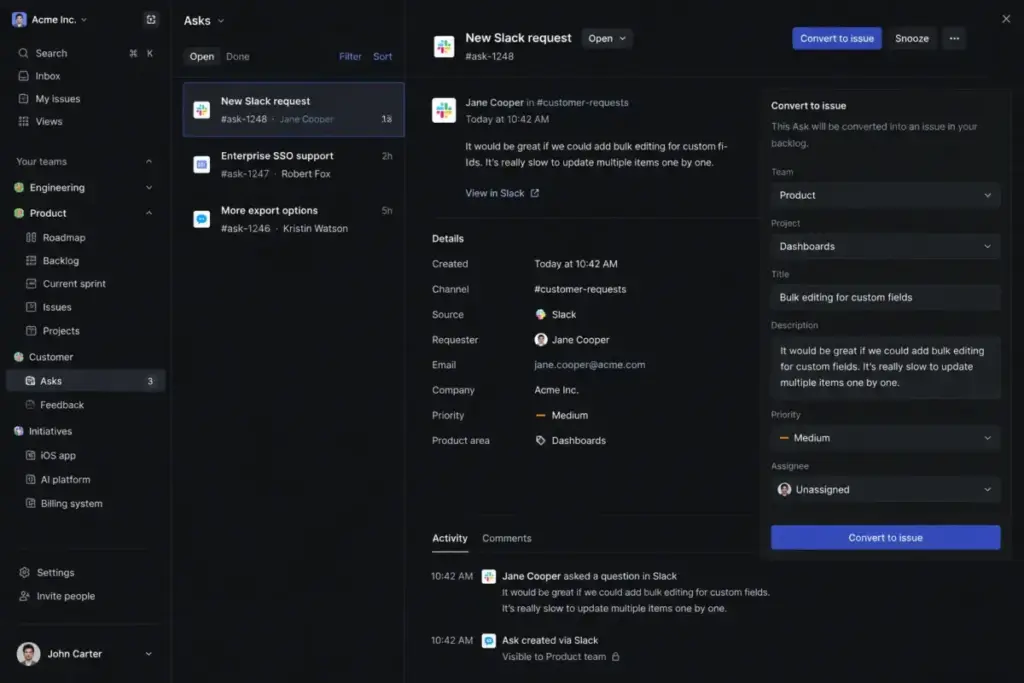
Linear Business tier solves this with Linear Asks. Linear Asks supports request intake through Slack, email, and web forms. It turns each Ask into a Linear issue for triage, prioritization, assignment, and response. The Zendesk and Intercom integrations bridge the gap between customer complaints and developer action.
When an engineer closes the issue in Linear, the support agent gets notified in their own tool. The loop closes automatically. This makes Linear Business the real product operations tier for growing companies.
3. The Cluttered Agile Process
Agile workflows easily become bloated. Teams add too many custom statuses and forget the core goal: shipping software.
Linear enforces an opinionated structure. You organize work into Issues, Projects, Cycles, and Initiatives. You cannot heavily customize this hierarchy. For engineering teams, this constraint is a feature. It eliminates endless debates about process. You adopt the Linear way, and you start building.
If your team is debating Agile vs Scrum vs Kanban, Linear pushes you toward simple, time-boxed cycles.
The 2 Problems Linear Creates
The constraints that make Linear great for developers create friction for other departments.
1. The Cross-Functional Silo
Marketing, HR, and Operations teams do not work in sprints. They need calendar views, flexible Kanban boards, and custom fields that match their specific business logic.
Linear feels alien to these teams. The rigid issue-tracking format does not map well to content calendars or recruitment pipelines. When engineering uses Linear and marketing uses a different tool, the company splits into operational silos. You lose the single source of truth. That split is where Linear alternatives start to make sense.
2. The Client-Services Nightmare
Agencies and software services firms manage multiple external clients. They need client portals, portfolio-level Gantt charts, and strict permission boundaries per project.
Linear is not built for this. Third-party review evidence highlights that Linear lacks project-level cycles, project Gantt charts, and robust multi-client structures. While the Business tier adds private teams and guests, managing 20 different client workflows in Linear becomes chaotic. If your business model relies on client billing and external reporting, Linear will fight you every step of the way.
Linear Pricing Reality in 2026
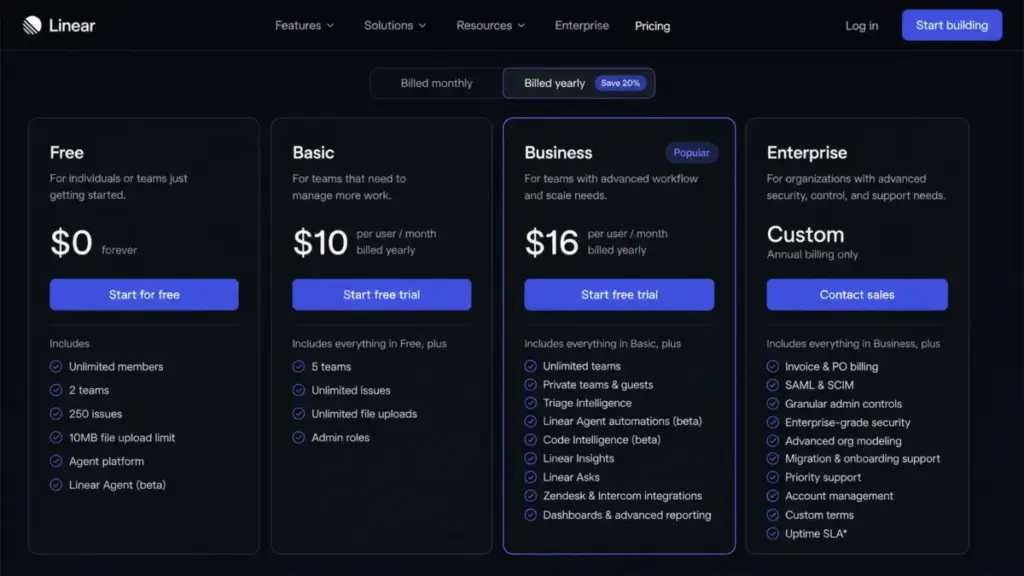
Pricing pages rarely tell the whole story. I evaluate pricing based on official Linear documentation (verified May 2026). Note: Some third-party review sites show Linear starting at $12 per user/month, but the official pricing page shows $10 per user/month billed yearly for Basic. I rely exclusively on the official source.
| Plan | Starting Price | Key Limit | Best For | Verified Source |
|---|---|---|---|---|
| Free | $0 | 2 teams, 250 issues | Small startups testing the tool. | Official Pricing |
| Basic | $10/user/month (billed yearly) | 5 teams, no Asks | Teams under 15 people with simple needs. | Official Pricing |
| Business | $16/user/month (billed yearly) | Unlimited teams | Product organizations needing intake tools. | Official Pricing |
| Enterprise | Custom (annual only) | Custom terms | Large orgs requiring SAML, SCIM, HIPAA. | Official Pricing |
The Free Plan Evaluation Boundary
Linear Free costs $0 and includes unlimited members, but it hard-caps your workspace at 2 teams and 250 issues. The file upload limit is 10MB.
This is strictly an evaluation tier. You cannot run a growing company on 250 issues. You should use the Free plan to run exactly one cycle, test the GitHub integration, try the mobile app, and check team adoption. Once you hit the limit, you must upgrade.
Where Pricing Starts to Pinch
The jump from Basic to Business is where teams face a decision. Basic gives you unlimited issues and 5 teams. For an 8-person engineering team leaving GitHub Issues, Basic is perfect.
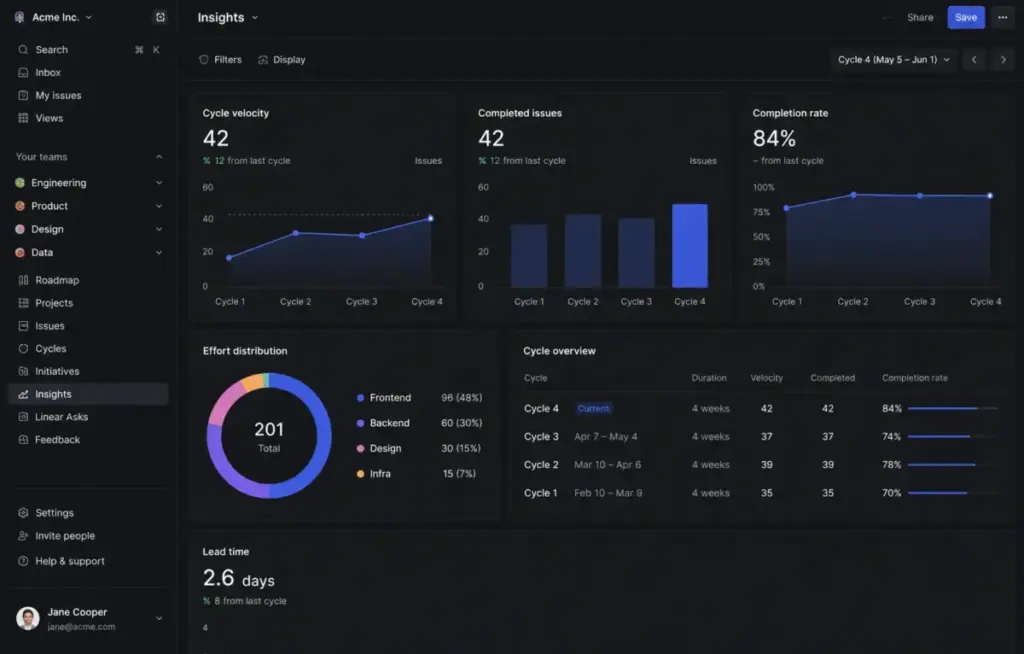
But Business is the actual operational tier. The Business plan unlocks private teams, guests, Linear Asks, Linear Insights, and the Zendesk/Intercom integrations. If you have a 35-person product organization that relies on support-driven feedback, you absolutely need the Business tier.
Linear bills customers for the number of unsuspended users in a workspace. Adding users generates prorated charges. Suspending users generates prorated credits applied toward future invoices, not refunds. This annual true-up mechanism means your costs scale directly with your headcount.
Enterprise Security Gates
If your IT department requires strict compliance, prepare for the Enterprise tier. Linear states compliance with GDPR, SOC 2 Type II, and HIPAA. However, the HIPAA Business Associate Agreement (BAA) is restricted to Enterprise customers.
SAML, SCIM, granular admin controls, IP restrictions, and invoice/PO billing all live behind the Enterprise gate. Do not assume you get advanced identity management on the Business plan.
Who Wins and Who Loses
Not every team succeeds with Linear. Here is the exact breakdown of who should adopt it and who should walk away.
| Scenario | Best Choice | Why | Avoid If |
|---|---|---|---|
| 8-person SaaS engineering team | Linear Basic | Fast triage, deep GitHub integration, simple cycles. | You need complex Gantt charts. |
| 35-person product org with support requests | Linear Business | Linear Asks and Zendesk integration streamline intake. | Budget is strictly limited. |
| Marketing team planning campaigns | Alternative tool | Linear lacks calendar views and flexible custom fields. | You want a dedicated project tracker. |
| Agency managing 15 client projects | Alternative tool | Poor fit for multi-client portfolios and client-facing views. | You strictly build internal tools. |
Better Alternatives for the Losers
If you read the limitations above and realized Linear is not for you, here are the tools that solve those specific problems.
Jira: For Enterprise Customization
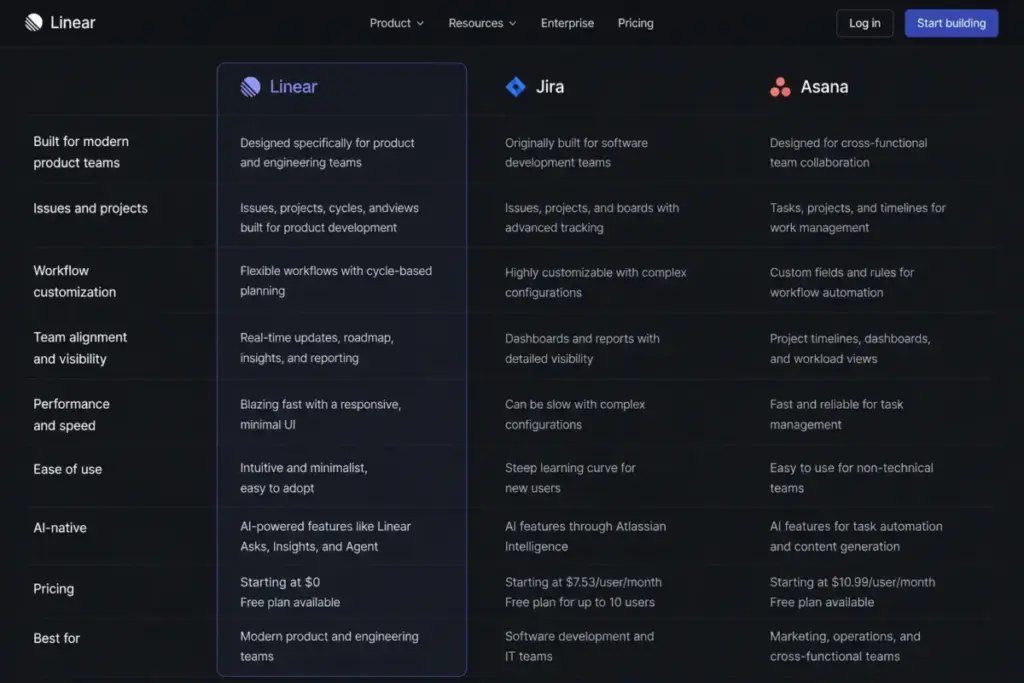
If your organization needs complex, cross-departmental workflows with deep portfolio reporting, read my Jira review. Jira is heavier and slower than Linear, but it offers unmatched customization. You can build specific issue types for HR, Legal, and IT support. Jira handles massive enterprise scale better when you need strict governance across thousands of users.
ClickUp: For Broad Work Management
If your goal is to put engineering, marketing, and sales in the exact same tool, my ClickUp review covers why it works. ClickUp gives you list views, calendar views, Gantt charts, and whiteboards. It trades the focused simplicity of Linear for total flexibility.
Asana: For Cross-Functional Teams
If you need a tool that non-technical users actually enjoy, check out my Asana review. Asana excels at task management and project planning without the rigid Agile terminology. It is significantly easier for marketing and operations teams to adopt than Linear.
monday.com: For Client Services
Agencies should read my monday.com review. Monday.com allows you to build custom dashboards, manage resources across multiple client projects, and invite external guests with strict permission controls. It functions more like a relational database than a simple issue tracker.
Smartsheet: For Heavy Reporting
If your PMO lives in spreadsheets and needs advanced reporting, my Smartsheet review explains why it dominates enterprise project management. It provides cell-linking, advanced formulas, and strict portfolio roll-ups that Linear fundamentally ignores.
API and Automation
For technical teams, automation is critical. Linear provides a public GraphQL API and webhooks. The webhooks support data change events for Issues, Comments, Projects, Cycles, Labels, Users, and SLAs.
This allows your engineering team to build custom integrations or connect internal dashboards. Linear does not publicly document exact API rate limits in its primary overview materials, but the architecture supports robust extension. It also offers beta access to AI features like Triage Intelligence and Code Intelligence on higher tiers, automating routine classification tasks. If you are exploring What is AI? in the context of project management, Linear’s approach is highly pragmatic.
FAQ
Is Linear better than Jira?
Linear is faster, cleaner, and more opinionated than Jira. It is better for engineering teams that want a simple Agile workflow without administrative bloat. Jira is better for large enterprises that need deep customization, complex permissions, and broad portfolio reporting.
How much does Linear cost?
Linear Basic costs $10/user/month (billed yearly). The Business plan costs $16/user/month (billed yearly). Enterprise pricing is custom. Pricing data verified May 2026.
Does Linear have a free plan?
Yes. Linear offers a Free plan for unlimited members, but it is strictly capped at 2 teams and 250 total issues. It is designed for evaluation, not long-term use.
Is Linear good for product managers?
Yes. Linear provides excellent tools for product managers, including Triage for bug intake, Initiatives for roadmap planning, and Linear Insights for velocity reporting (Business tier required).
Is Linear only for engineering teams?
Linear is heavily optimized for software development. While designers and product managers thrive in it, marketing, sales, and operations teams usually find its rigid issue-tracking structure frustrating.
Does Linear support SAML and SCIM?
Yes, but SAML and SCIM identity management are strictly locked behind the custom-priced Enterprise tier.
Does Linear integrate with GitHub and Slack?
Yes. Linear has deep native integrations with GitHub and GitLab for code syncing. It integrates with Slack for notifications and issue creation via Linear Asks (Business tier).
What are the limitations of Linear?
Linear lacks robust project-level Gantt charts, multi-client portfolio management, and flexible custom fields for non-technical workflows. Its opinionated structure cannot be heavily customized.
What are the best Linear alternatives?
For enterprise customization, choose Jira. For company-wide work management, choose ClickUp or Asana. For client services and agencies, choose monday.com.
Final Verdict
Linear knows exactly what it is. It is a product development system for teams that build software. It refuses to add bloated features just to satisfy marketing or HR departments. If you have an engineering-led organization that values speed and execution over complex reporting, Linear is worth the price. If you want a single tool to run your entire cross-functional company, you should look elsewhere.