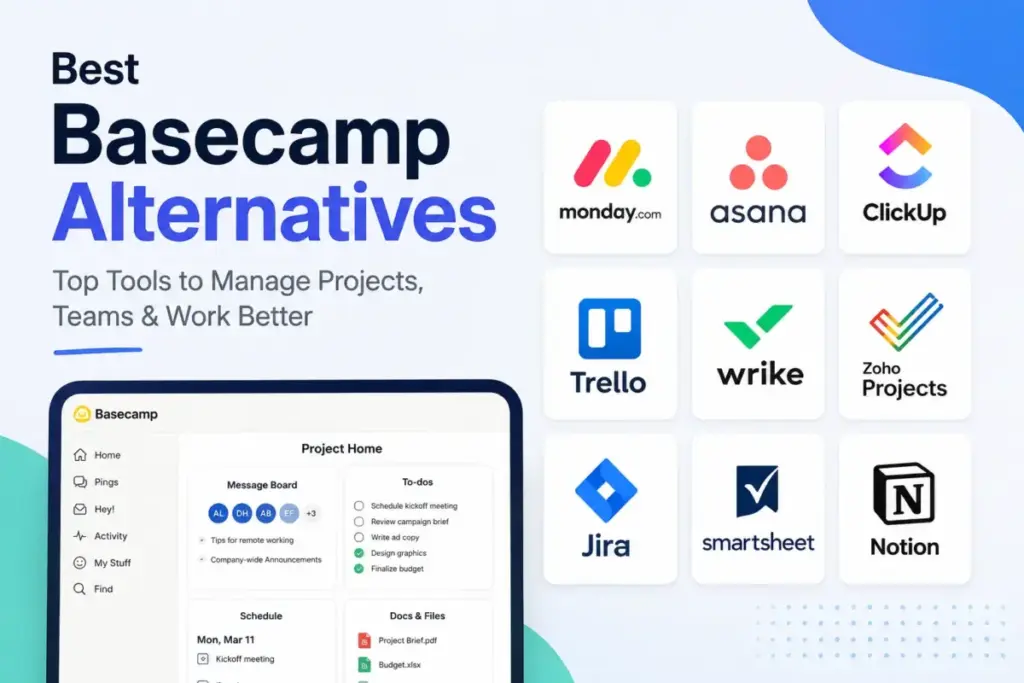
Basecamp remains a beloved standard for calm, flat-priced collaboration. But teams often run into its limits when they need advanced dashboards, automated workflows, or native billing tools.
If you are shopping for Basecamp Alternatives, you are likely trading that simple, flat-rate pricing for deeper project control.
Switching to a per-seat tool can increase your monthly bill by 2x to 3x depending on team size.
This guide compares the 10 best best project management software options for 2026. We rank them by pricing, feature gates, and migration difficulty.
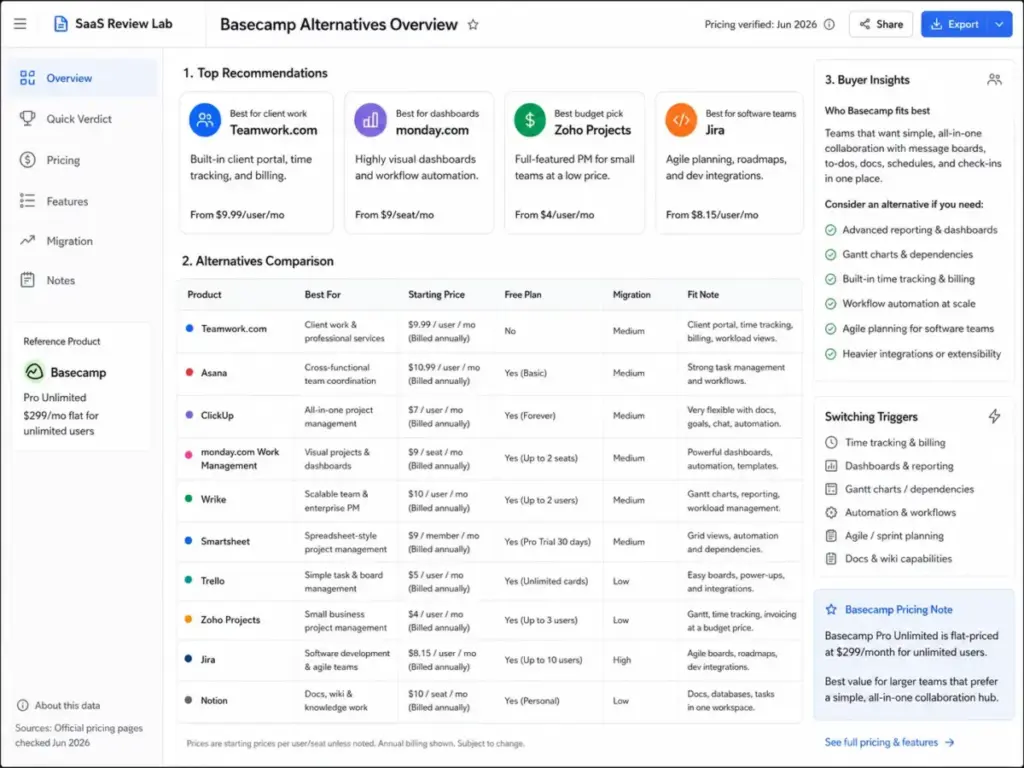
Quick Verdict: Best Basecamp Alternatives by Switching Trigger
The table below summarizes the best replacements for Basecamp based on the specific frustration that is driving your team to switch.
| If you are leaving Basecamp because… | Best alternative | Why |
|---|---|---|
| Need native time tracking and client profitability | Teamwork.com | Focuses on client work with project health, planned-versus-actual visibility, and built-in timesheet reporting. |
| Need dashboards and cross-project visibility | monday.com Work Management | Offers visual boards and dashboards that track multiple projects and workloads simultaneously. |
| Need advanced dependencies or Gantt planning | Wrike | Adds interactive Gantt charts, dependency scheduling, and advanced project control capabilities. |
| Need stronger workflow automation | ClickUp | Consolidates tasks, docs, and automation with custom rules at a low starting price. |
| Need software or agile delivery workflows | Jira | Provides software-specific issue tracking, sprints, backlogs, and detailed release planning. |
| Need a lower-cost small-team path | Zoho Projects | Delivers budget-friendly tasks, time logs, and Gantt charts starting at $4 per user. |
| Need wiki/documentation plus lightweight project tracking | Notion | Combines docs, wikis, and database tables in a single flexible team workspace. |
What this means: Leaving Basecamp is rarely about finding a clone. It is about identifying the exact operational bottleneck, whether it is client billing, cross-project dashboards, or software development sprints, and choosing the platform designed for that specific workflow.
The Basecamp Problem Map: Why Teams Seek Alternatives
While Basecamp is excellent for general team collaboration, its flat structure can limit operational growth. Understanding what project management actually means within a growing team will simplify your search.
The Time Tracking and Client Profitability Barrier
Basecamp includes its Timesheet feature only in the Pro Unlimited tier or as a flat fifty dollar monthly upgrade on the Pro package. For teams doing billable client work, tracking hours and matching them to budgets is a daily requirement. Lacking native, plan-integrated time logs makes it difficult to run reports on project profitability without buying third-party add-ons.
The Cross-Project Visibility Gap
Operations teams often need to see status updates across dozens of projects at once. Basecamp organizes work into isolated project spaces. It does not provide native portfolio dashboards or workload planning views. This setup makes it hard for managers to identify team capacity issues or cross-project delays without opening each space manually.
The Gantt Chart and Dependency Roadblock
Basecamp offers scheduling boards and card tables. However, it lacks interactive Gantt charts and automated task dependency management. When a task in Basecamp gets delayed, you must manually shift every subsequent task. For complex projects, this manual work wastes valuable administrative hours.
The Manual Workflow Limitation
Basecamp is built for direct human communication. It does not include automated workflow rules, task routing, or conditional automation. Teams with recurring processes often want tasks to assign themselves or transition stages automatically based on project updates.
The Agile Delivery Friction
Engineering departments require backlogs, sprint planning boards, and bug tracking systems. Basecamp lacks software-specific development templates and sprint velocity charts. Trying to manage software releases in a general collaboration tool often alienates development teams.
Basecamp Strengths, Limitations, and Pricing Tiers

Before switching, it is important to analyze what you will lose if you leave Basecamp. The tool has key advantages that per-seat platforms struggle to match.
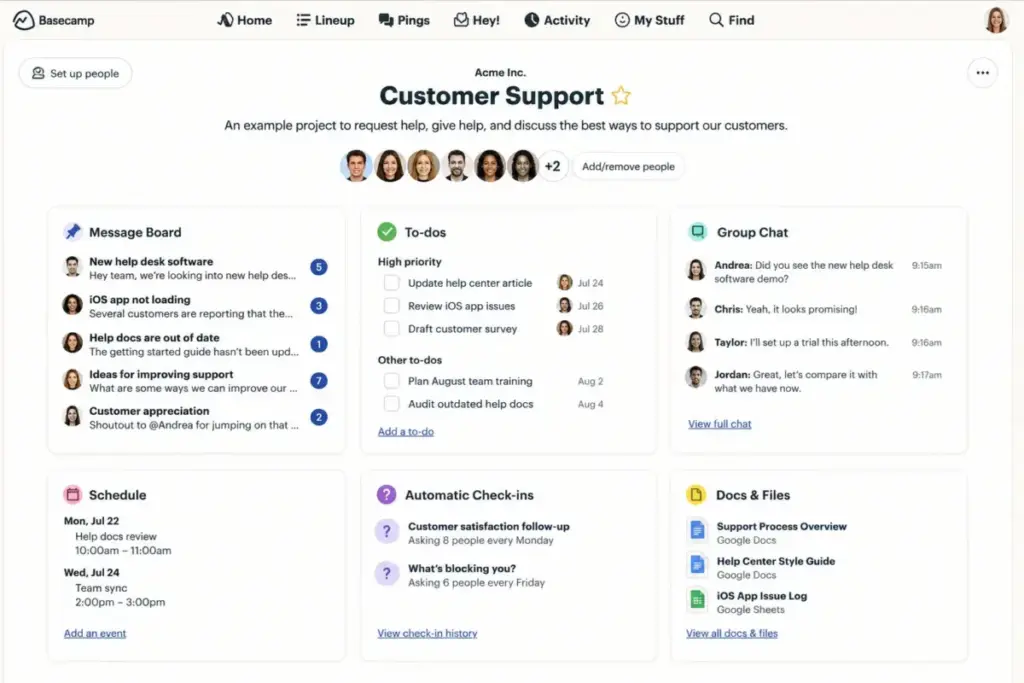
Basecamp Pricing Reality (as of June 2026)
Basecamp offers a free package limited to one project and 20 users. The paid Pro plan is $15 per user per month billed monthly. The Pro Unlimited tier is $299 per month flat billed annually, which covers unlimited users and includes 5TB of storage.
| Plan | Pricing basis | Target team size | Key features included | Gated capabilities |
|---|---|---|---|---|
| Free | Flat free | 1–5 users | 1 project, basic to-dos, chat | Multi-project, timesheets, Admin Pack |
| Pro | $15/user/month | 5–20 users | Unlimited projects, 500GB storage | Timesheet upgrade ($50/mo), Admin Pro Pack ($50/mo) |
| Pro Unlimited | $299/month flat | 20+ users | Unlimited users, 5TB storage, Timesheet, Admin Pro Pack | Custom external domain name integration |
What this means: Basecamp pricing is highly favorable for larger teams. If you have 30 users, the Pro Unlimited plan costs about $10 per user per month. At 100 users, that cost drops to three dollars per user per month, making it far cheaper than per-seat alternatives.
Basecamp Strengths
Basecamp excels at keeping project details organized in one room. Each project space includes a message board, to-do lists, a card table, a group chat room, a schedule, document storage, and automatic check-in questions. The client access controls are secure and free. You can invite external clients into specific project rooms without paying for additional user seats.
Basecamp Limitations
The simplicity that makes Basecamp easy to adopt also creates limitations. According to Capterra verified user reviews, “advanced features are missing for more complex projects.” Users on G2 verified user reviews also report that it is a “simple to-do list for individuals, but limited for complex workflows.” For a deeper analysis of its features, you can read our detailed Basecamp review and analysis.
Alternatives That Fix the Operations and Client-Profitability Gap
If you are leaving Basecamp because you need to track billable hours, manage client budgets, or coordinate team capacity, these three tools provide the necessary depth.
Teamwork.com: Best for Client-Service Teams

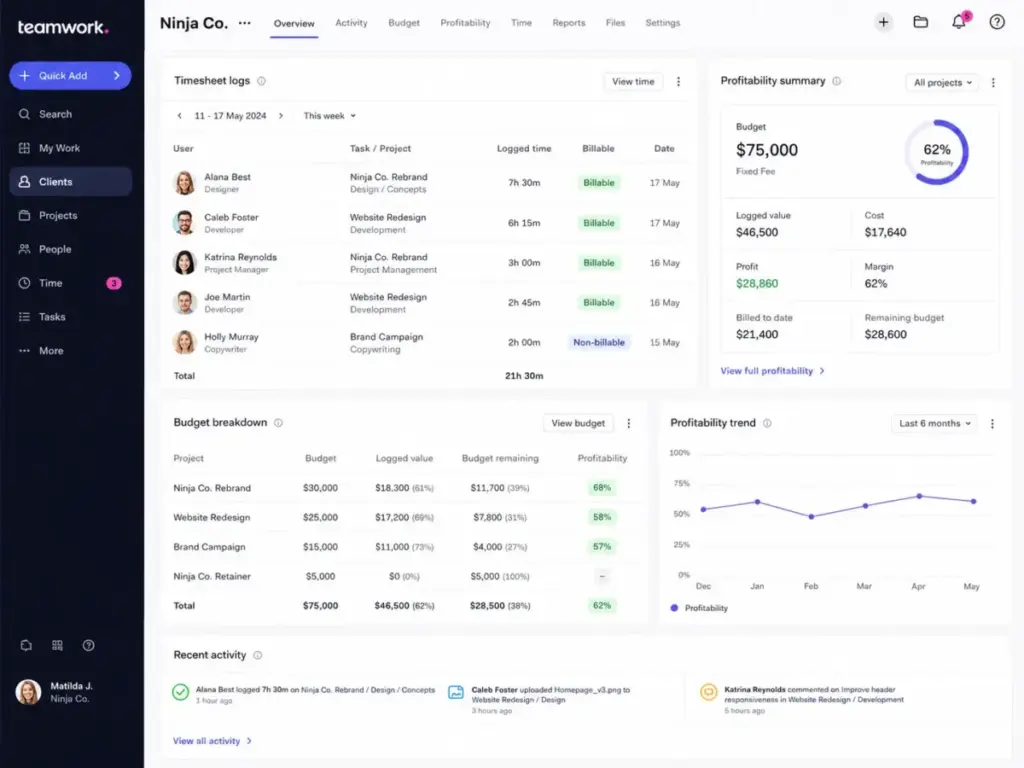
Teamwork.com is the strongest alternative for teams leaving Basecamp because they run client projects and need to manage profitability. The platform is built specifically for client work, offering integrated time tracking, budget forecasting, and capacity planning.
Pricing starts at $9.99 per user per month (as of June 2026) billed yearly, with a 30-day free trial. The practical plan for most switchers is the Basics tier. It enables critical time logging and status reporting features.
Based on official documentation, Teamwork.com does better than Basecamp by offering native time tracking and client billing. It includes planned-versus-actual analysis, letting you compare estimated task hours against real logged time. The tradeoff is that the interface is heavier than Basecamp’s calm spaces. It requires more training for non-technical users. That training burden is a real reason to check Teamwork alternative tools.
Evaluating the team workflow in Teamwork.com shows that logging billable hours and generating client reports takes just a few clicks. The platform connects task cards directly to project budgets, updating financial charts automatically.
Does this tool work the same way at 50 users as it does at 5?
Yes, but at 50 users, you will face “the guest-user tax.” While Basecamp allows unlimited free client access, Teamwork.com gates advanced client collaboration features behind higher paid tiers.
Best for:
- Professional services agencies
- Teams of 5 to 50 users tracking client hours
- Consulting firms needing budget visibility
Avoid if:
- You only manage internal tasks and do not track billable time.
Migration difficulty: Medium. Rebuilding client permission schemes takes time.
Verdict: Choose Teamwork.com if your business relies on client services and you need to track hours and budgets in the same tool. Learn more in our Teamwork review and evaluation.
Asana: Best for Structured Project Tracking

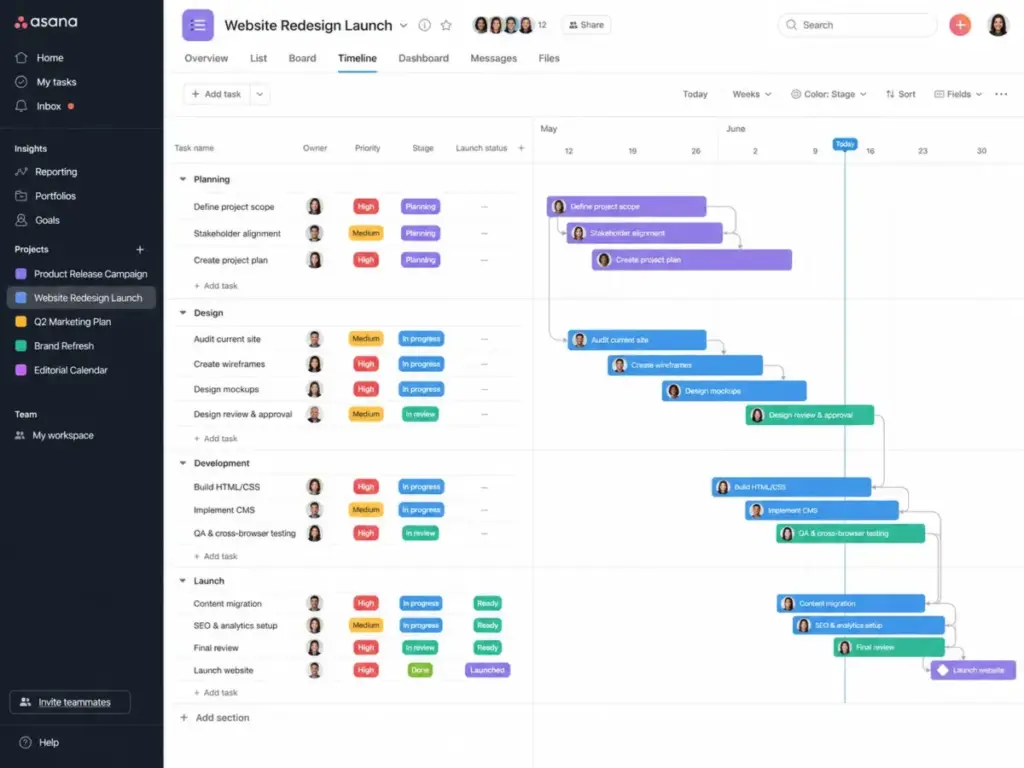
Asana is the best alternative for marketing and operations teams that need structured project layouts, custom fields, and task dependency mapping. It trades Basecamp’s flat project spaces for visual timelines and goal tracking.
Pricing starts at $10.99 per user per month (as of June 2026) billed annually, with a Free Personal plan. The practical plan is the Starter tier, which enables task timelines and custom fields.
Based on our evaluation of customer reviews, Asana does better than Basecamp by providing clear task dependencies. If a project phase gets delayed, the timeline adjusts automatically. The tradeoff is that Asana can feel like homework for your team. You can easily spend more time configuring notification rules than managing tasks.
Evaluating the setup experience shows that importing tasks from spreadsheets is clean. However, Asana lacks native time tracking in its standard plans. You must pay for the Timesheets and Budgets add-on at $5.99 per user per month billed annually to track hours.
Does this tool work the same way at 50 users as it does at 5?
No. At 5 users, Asana is fast and simple. At 50 users, the view-switching problem becomes a hurdle. You will need to build portfolio dashboards to prevent team members from getting lost in nested task lists.
Best for:
- Marketing and design teams
- Teams of 10 to 50 users running cross-functional campaigns
- Organizations needing clear task dependency mapping
Avoid if:
- You need built-in client invoicing or have a tight budget that cannot support high per-user pricing.
Migration difficulty: Medium. Direct import wizards are available, but mapping custom fields requires manual cleanup.
Verdict: Choose Asana if you need structured project views and automated dependency scheduling across multiple teams. Read our Asana alternatives list and comparison to see how it compares.
ClickUp: Best for Feature-Dense Consolidation

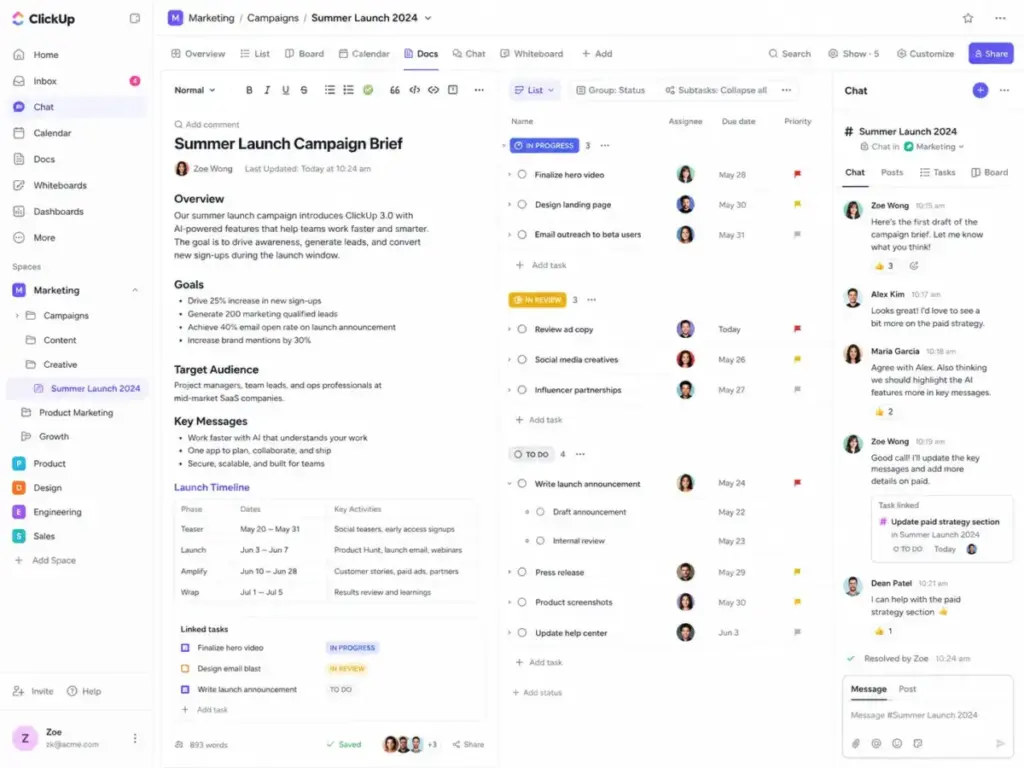
ClickUp is the best alternative for teams that want to consolidate docs, tasks, goals, and chat into one workspace. It offers an exceptionally broad set of features at a lower entry price than Asana or Monday.
Pricing starts at $7 per user per month (as of June 2026) billed yearly, with a Free Forever plan. The practical plan is the Unlimited tier to enable Gantt charts, custom fields, and native time tracking.
Our research shows ClickUp does better than Basecamp by providing thorough workflow automation. It includes a native doc editor, mind maps, and goals tracking in one platform. The main tradeoff is setup complexity. The platform has so many settings that team members can easily configure confusing workspaces.
Evaluating the setup experience shows that ClickUp’s import tool handles Basecamp CSV data smoothly. One insider tip I learned: review your automation rules quarterly. Teams pile them up and forget, which burns through your action limits.
Does this tool work the same way at 50 users as it does at 5?
Yes, but at 50 users, the notification noise becomes a friction point. If you do not configure your notification settings carefully, team members will get overwhelmed by alerts.
Best for:
- Startups and agencies consolidating tools
- Teams of 10 to 100 users seeking feature depth
- Businesses looking for a cheaper per-seat PM tool
Avoid if:
- Your team prefers a simple, calm interface and dislikes complex configuration menus.
Migration difficulty: High. Rebuilding nested folder structures and custom statuses requires a planned approach.
Verdict: Choose ClickUp if you want to consolidate multiple collaboration tools into one platform at a low cost. For details, read our ClickUp pricing plans breakdown.
Alternatives That Fix the Complex Gantt and Automation Gap
If you need automated status updates, interactive Gantt charts, or resource capacity tracking, these three alternatives deliver advanced controls.
monday.com Work Management: Best for Visual Status

monday.com Work Management is the best alternative for growing teams that need visual project dashboards, automated status tracking, and department alignment. It replaces Basecamp’s text-heavy message boards with highly visual data boards.
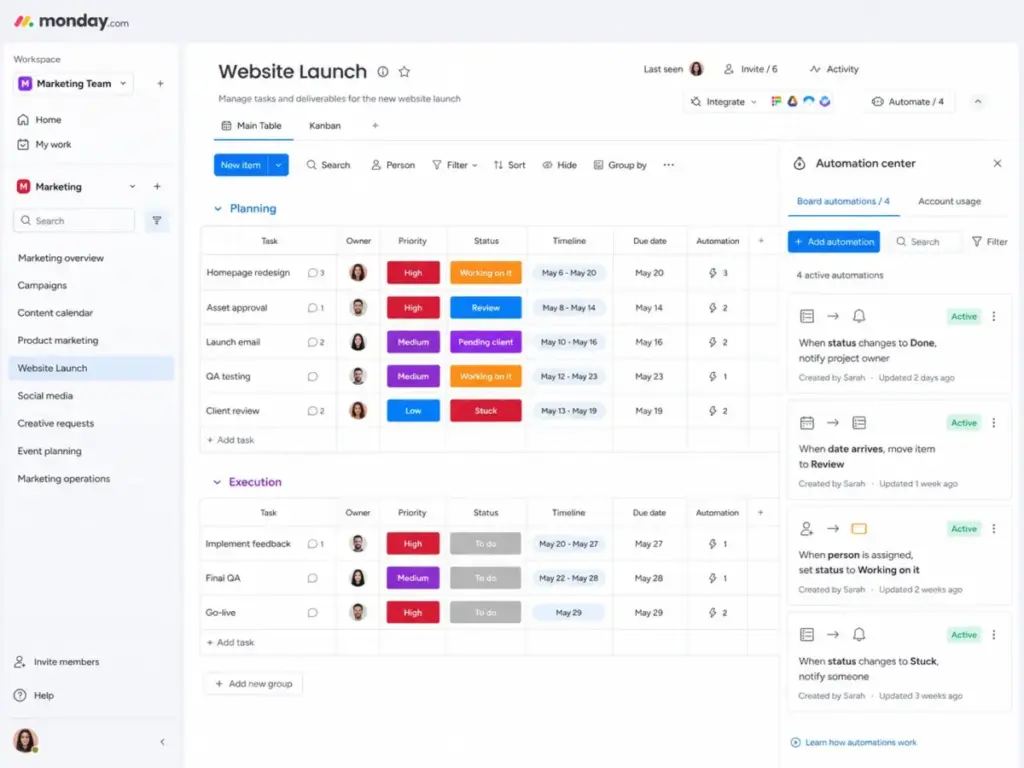
Pricing starts at $9 per seat per month (as of June 2026) billed annually, with a 14-day free trial. The practical plan is the Standard tier, which enables automated actions and timeline views.
Based on official documentation, monday.com does better than Basecamp by providing customizable status columns and real-time dashboards. You can automate repetitive tasks, such as notifying a manager when a design status changes to “Review.” The tradeoff is that monday.com has a 3-seat minimum purchase limit. Solo users or tiny teams will pay for seats they do not use.
Analyzing the workflow shows that setting up a board is fast due to pre-built templates. The board view is highly interactive, but you will hit automation caps quickly on lower plans.
Does this tool work the same way at 50 users as it does at 5?
No. As you scale past 20 users, you will need to build dashboards to track your dashboards. The board views that feel intuitive for a small team can become cluttered at scale.
Best for:
- Creative and marketing agencies
- Teams of 10 to 50 users needing visual project boards
- Operations teams tracking department workloads
Avoid if:
- You need built-in time tracking with billing, as this requires their CRM or dev lines.
Migration difficulty: Medium. Rebuilding custom board automations requires manual setup.
Verdict: Choose monday.com if you want visual project boards and basic task automation to keep stakeholders aligned without meetings.
Wrike: Best for Resource Planning

Wrike is the best alternative for professional services and PMO teams that need formal project governance, Gantt schedules, and resource workload mapping. It is built for complex, multi-tiered project management.
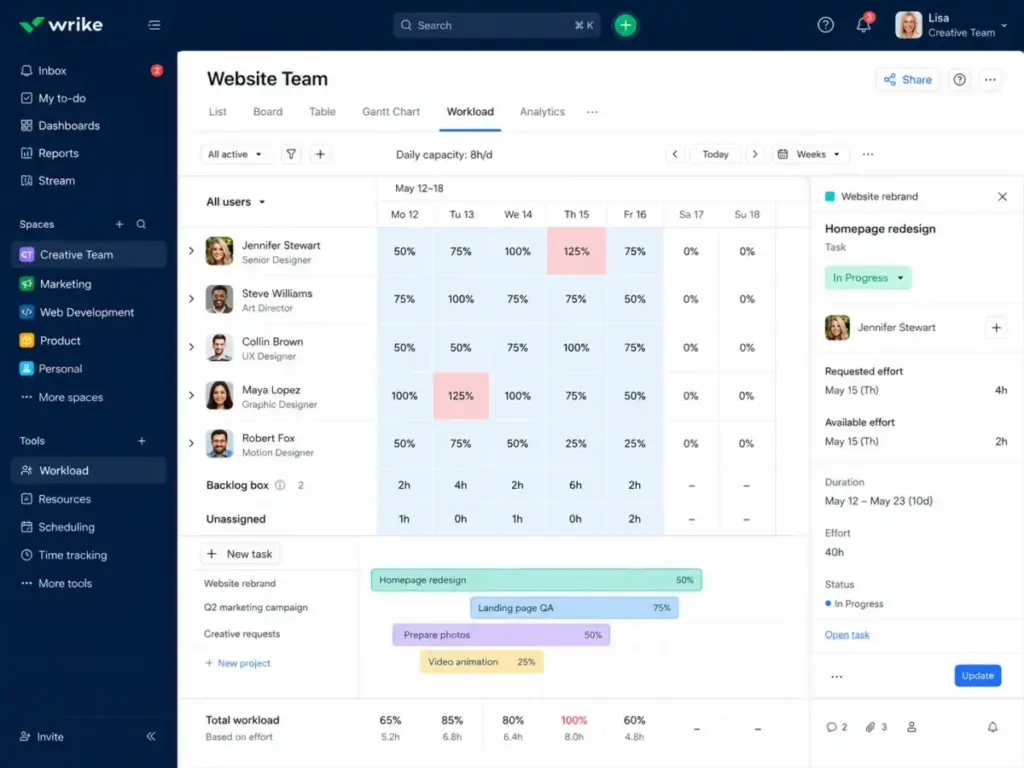
Pricing starts at $10 per user per month (as of June 2026), with a free plan available. The practical plan is Business at $25/user/month. This tier provides resource management and custom request forms.
Based on our evaluation of customer reviews, Wrike does better than Basecamp by providing interactive Gantt charts and workload tracking. It allows you to balance team capacity, ensuring no single employee is overallocated. The tradeoff is that Wrike feels corporate and rigid. It lacks the relaxed, conversational atmosphere of Basecamp’s spaces.
Evaluating the setup experience shows that Wrike requires significant onboarding. Non-technical teams will struggle to adopt the folder structures without training sessions.
Does this tool work the same way at 50 users as it does at 5?
Yes. Wrike is built to scale. Its folder taxonomy and security controls work better for a 50-user department than a 5-user startup.
Best for:
- Professional services and PMO teams
- Teams of 20 to 100+ users managing complex resources
- Organizations requiring custom request intake forms
Avoid if:
- You are a small creative team that wants a simple, casual communication tool.
Migration difficulty: High. Configuring folder hierarchies and mapping resource capacity rules requires professional setup.
Verdict: Choose Wrike if you need enterprise-level project control, detailed Gantt timelines, and active capacity management. Learn more in our Wrike review and feature analysis.
Smartsheet: Best Spreadsheet-Style Execution

Smartsheet is the best alternative for spreadsheet-centric teams. It provides automated workflows, Gantt charts, and dashboards. It turns Excel-style grids into project spaces.
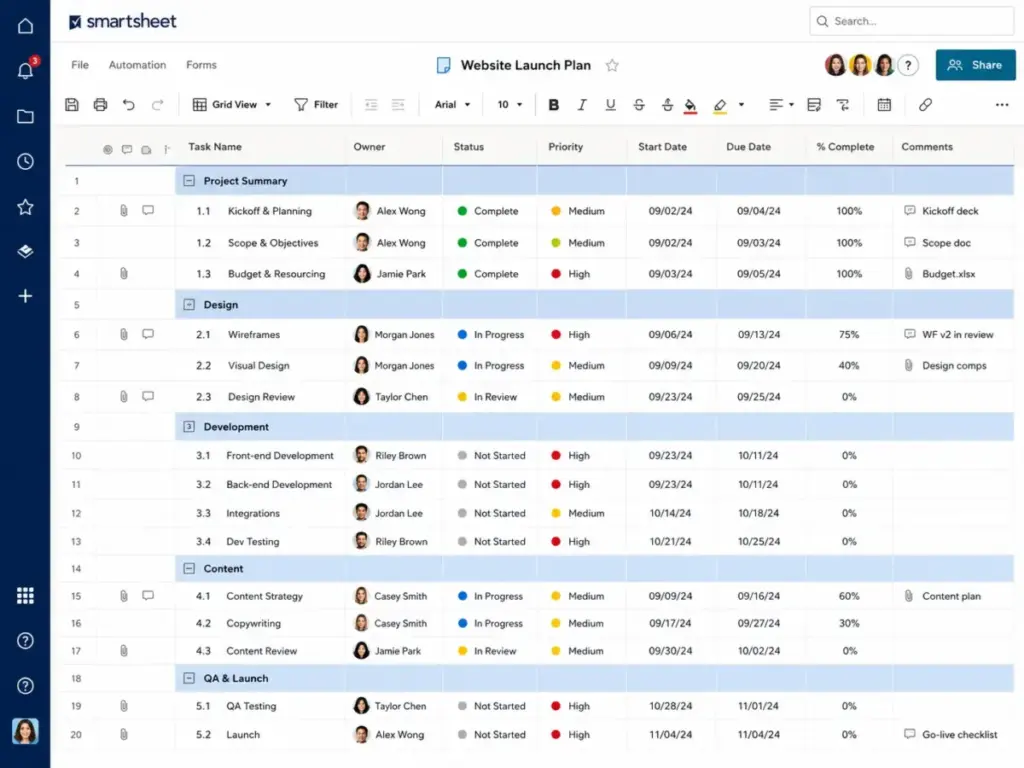
Pricing starts around $9 per member per month (as of June 2026) billed yearly, with a 30-day free trial. The practical plan is the Business tier, which enables automated workflows, dashboards, and custom forms.
Based on official documentation, Smartsheet does better than Basecamp by allowing complex formulas, cell linking, and massive data grids. It provides a familiar spreadsheet interface that connects to automated status alerts. The main tradeoff is that Smartsheet lacks a conversational team chat space. It is less naturally client-friendly than Basecamp’s message-board model.
Evaluating the workflow shows that teams comfortable with Excel will adopt Smartsheet quickly. However, several advanced features, such as Dynamic View and Data Shuttle, are sold as expensive add-ons.
Does this tool work the same way at 50 users as it does at 5?
Yes, but managing sheet access at scale becomes critical. If you do not lock down columns and set clear permissions, users can easily break cell formulas.
Best for:
- Operations and finance departments
- Teams of 10 to 100+ users comfortable with spreadsheets
- Businesses managing large datasets and portfolio reports
Avoid if:
- Your team relies on central chat boards and informal document sharing to collaborate.
Migration difficulty: High. Transitioning data out of Basecamp’s card tables into structured grids requires careful spreadsheet formatting.
Verdict: Choose Smartsheet if your team’s workflow revolves around spreadsheets, and you need Gantt charts and automated alerts in that format. Check out our Smartsheet alternatives to consider for more options.
Alternatives That Fix the Budget and Agile Delivery Gaps
If you need a budget-friendly starting plan or software development workflows, these three alternatives support agile and cost-sensitive teams.
Trello: Best Lightweight Kanban

Trello is the best alternative for small teams. It replaces Basecamp’s layouts with a simple, card-based task board. It is the easiest tool to adopt on this list.
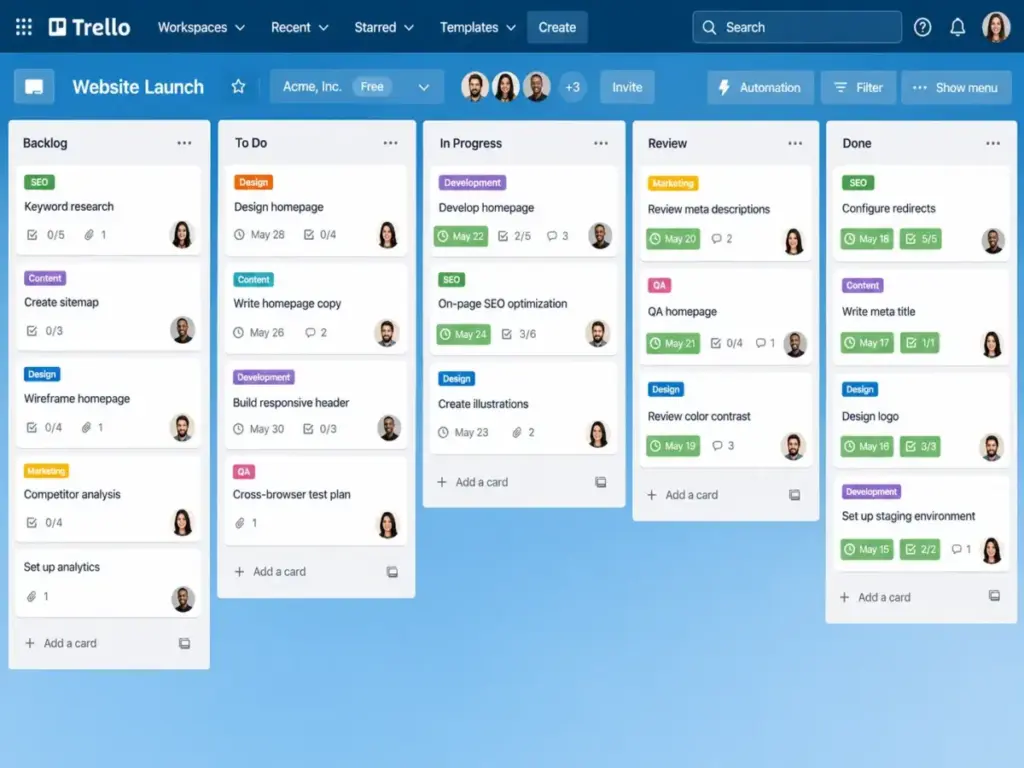
Pricing starts with a free plan; the Standard plan is $5 per user per month (as of June 2026). The practical plan for most switchers is the Standard tier, which provides unlimited boards and custom fields.
Based on our evaluation of customer reviews, Trello does better than Basecamp by providing a pure Kanban workflow. Moving cards across columns is intuitive and fast. The tradeoff is that Trello lacks built-in document editing, detailed schedules, or team chat out of the box. You must rely on Power-Ups to connect external tools.
Evaluating the setup experience shows that Trello takes less than 10 minutes to run. No onboarding wizard is required, and teams can start managing tasks immediately.
Does this tool work the same way at 50 users as it does at 5?
No. Trello does not scale gracefully past 15 users. The visual boards that feel simple at 5 users become cluttered and hard to track at scale.
Best for:
- Freelancers and teams under 10 users
- Teams with simple, linear workflows
- Creative projects needing visual task tracking
Avoid if:
- You need to manage project budgets, client billing, or complex task dependencies.
Migration difficulty: Low. Direct board importers are available, and the learning curve is minimal.
Verdict: Choose Trello if you want the simplest visual task board to coordinate basic workflows without setup friction.
Zoho Projects: Best Budget-Friendly Tracking
Zoho Projects is the best choice for cost-sensitive teams. It provides Gantt charts, timesheets, and dependencies without high per-seat costs. It provides deep project features at a low price.
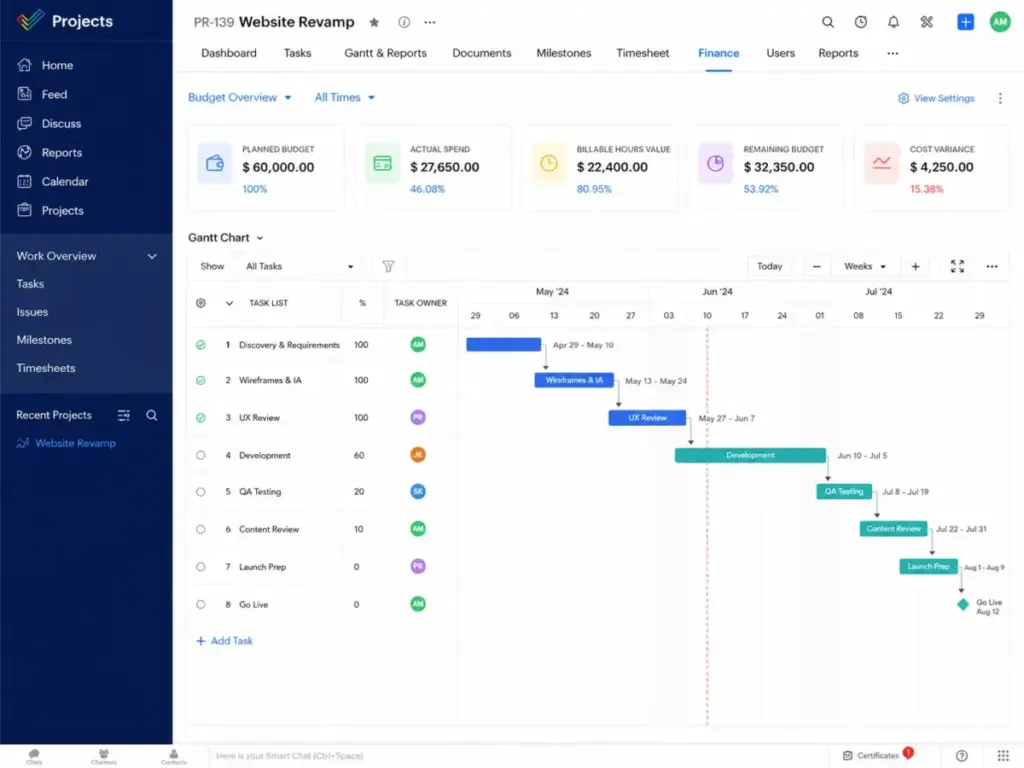
Pricing starts at $4 per user per month (as of June 2026) billed yearly, with a free plan up to 5 users. The practical plan is the Premium tier, which enables timesheets and task dependencies.
Our research shows Zoho Projects does better than Basecamp by offering native time logs, timesheet approvals, and project budgets. It includes basic Zia AI capabilities on higher tiers. The main tradeoff is that the interface is utilitarian. It lacks the modern, conversational feel of Basecamp’s message boards.
Analyzing the setup shows that configuring statuses and blueprints requires some admin work. The platform connects naturally to the wider Zoho ecosystem, which is ideal if you already use Zoho CRM.
Does this tool work the same way at 50 users as it does at 5?
Yes. Zoho Projects handles large teams smoothly. However, you need the Enterprise tier for SSO and custom domains.
Best for:
- Budget-conscious small businesses
- Teams of 5 to 15 users needing Gantt charts
- Organizations using other Zoho business tools
Avoid if:
- You require a highly polished, modern design and client-facing communication templates.
Migration difficulty: Medium. Importing data via CSV files is straightforward, but configuring blueprints takes time.
Verdict: Choose Zoho Projects if your primary constraint is cost, but you still need native time tracking and Gantt charts to manage tasks.
Jira: Best for Software Teams

Jira is the best alternative for engineering teams. It provides sprint tracking, backlogs, and agile project management. It is the industry standard for software teams.
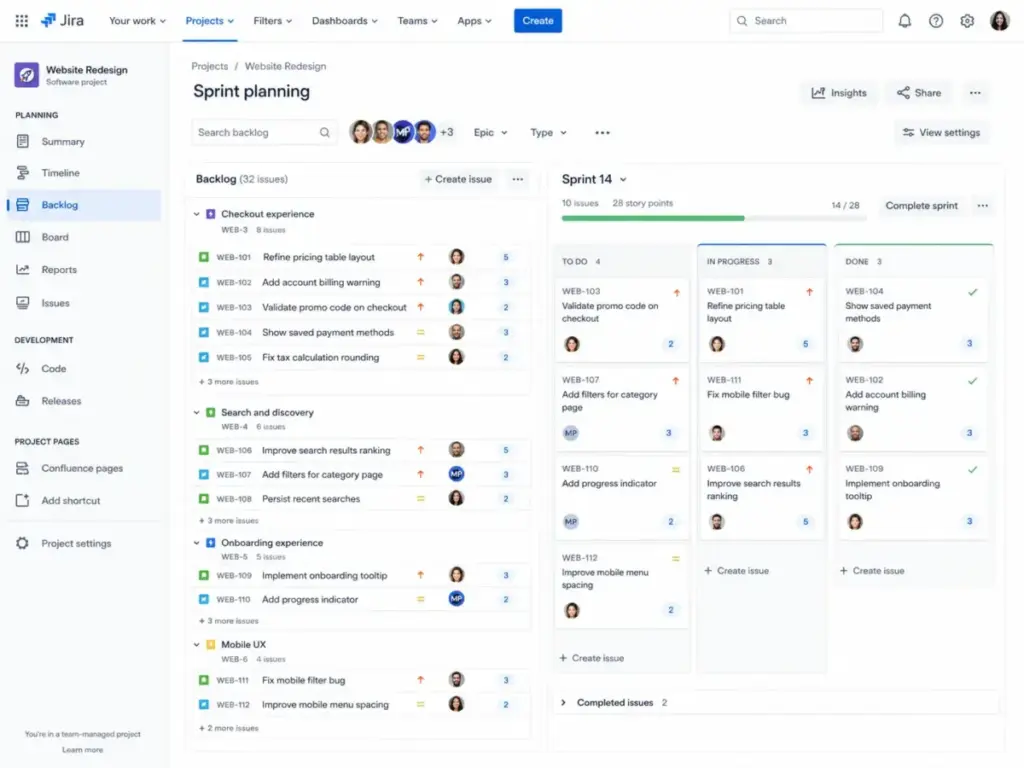
Jira is free for up to 10 users. Paid plans start around $8.15 to $8.60 per user per month (as of June 2026). The practical plan is the Standard tier, which provides advanced permissions and file storage.
Based on official documentation, Jira does better than Basecamp by offering dedicated Scrum boards, backlog management, and release tracking. The tradeoff is that the interface is technical and administrative. Non-technical teams like marketing or HR often find Jira confusing and hard to adopt.
Evaluating the setup shows that Jira requires significant configuration. You must set up issue types, workflow transitions, and permission schemes before your team can start working.
Does this tool work the same way at 50 users as it does at 5?
Yes. Jira is built for scale. It handles hundreds of developers across multiple departments, though its administration complexity increases at scale.
Best for:
- Software development and product teams
- Teams of 10 to 100+ users running Scrum sprints
- Organizations needing direct integration with Git code repositories
Avoid if:
- You are a non-technical business team that does not use agile terminology.
Migration difficulty: High. Rebuilding workflows and configuring agile sprint permissions requires dedicated administration time.
Verdict: Choose Jira if you are building software and need developer-centric issue tracking, release roadmaps, and sprint reporting. Check out our list of Jira alternatives for software teams for other options.
The Alternative Nobody Mentions: Notion

Most comparison guides list Asana or Monday.com as the obvious Basecamp replacements. However, many teams use Basecamp primarily for its “Docs & Files” and “Message Board” spaces. If your team’s daily workflow is document-centric and you need a knowledge wiki with lightweight task tracking, Notion is the strongest underdog alternative.
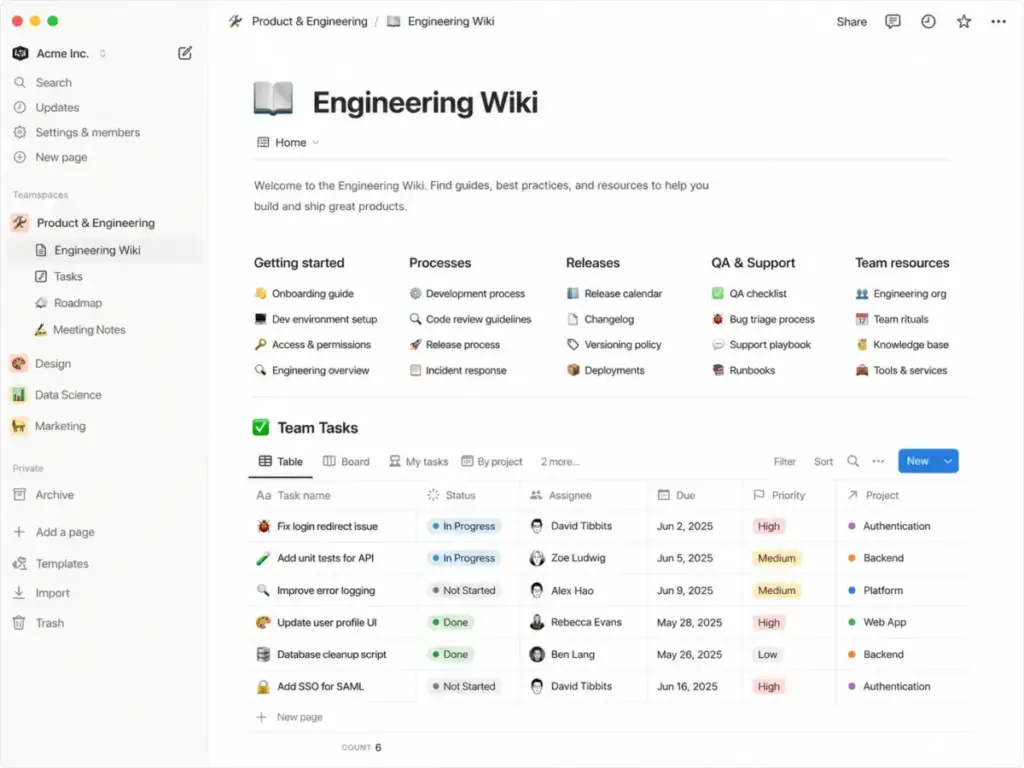
Pricing starts with a free plan; the Plus plan is $10 per seat per month (as of June 2026) billed annually. The practical plan is the Plus tier, which enables collaborative teamspaces and larger file uploads.
Based on our evaluation of customer reviews, Notion does better than Basecamp by combining documents, wikis, and databases in a single workspace. You can build custom dashboards, meeting notes repositories, and project trackers using blocks. The main tradeoff is that Notion lacks native project management controls, such as automated workload planning or time tracking.
Evaluating the setup shows that Notion is highly flexible. However, this freedom can lead to messy workspaces without strict templates.
Does this tool work the same way at 50 users as it does at 5?
At 50 users, you must organize teamspaces and set strict page permissions to keep data organized.
Best for:
- Remote and knowledge-heavy teams
- Small businesses (5 to 30 users) prioritizing documentation
- Creative teams needing shared client portals and resources
Avoid if:
- You need native time tracking, billing, or automated workload capacity planning.
Migration difficulty: Medium. Importing text documents is simple, but rebuilding database relationships requires manual effort.
Verdict: Choose Notion if you need document organization and a flexible workspace for task databases. For details, read our Notion review and workspace analysis.
Pricing Comparison: Starting Price vs Practical Tier
The table below compares the 11 products by starting price, practical plan, and 10-user monthly cost.
| Product | Starting Price | Practical Tier | 10-User Monthly Cost | Free Plan | Free Trial |
|---|---|---|---|---|---|
| Basecamp | $15/user/month | Pro | $150/month | Yes (1 project) | 30-day |
| Teamwork.com | $9.99/user/month | Basics | $99.90/month | No | 30-day |
| Asana | $10.99/user/month | Starter | $109.90/month | Yes | Yes |
| ClickUp | $7/user/month | Unlimited | $70/month | Yes | Yes |
| monday.com Work | $9/seat/month | Standard | $90/month | Yes (2 seats) | 14-day |
| Wrike | $10/user/month | Team | $100/month | Yes | Yes |
| Smartsheet | $9/member/month | Pro | $90/month | No | 30-day |
| Trello | $5/user/month | Standard | $50/month | Yes | Yes |
| Zoho Projects | $4/user/month | Premium | $40/month | Yes (5 users) | Yes |
| Jira | $8.15/user/month | Standard | $81.50/month | Yes (10 users) | Yes |
| Notion | $10/seat/month | Plus | $100/month | Yes | Yes |
Note: Pricing data verified as of June 2, 2026. All prices are listed in USD and exclude local taxes. Per-user plans are billed annually unless otherwise noted.
What this means: Zoho Projects and Trello are cheaper at small team sizes. However, the advantage shifts as you scale. For teams over 20, Basecamp’s flat-rate $299/month Pro Unlimited plan is cheaper than per-seat tools.
Feature Gate Comparison: What Each Alternative Offers
Features are frequently gated behind higher pricing plans. The table below outlines what you get on the practical tier of each alternative.
| Product | Basic Automation | Advanced Reporting | Native Time Tracking | Custom Permissions | API Access |
|---|---|---|---|---|---|
| Basecamp | Limited | Basic | Pro Upgrade ($50/mo) | Limited | Yes |
| Teamwork.com | Basics tier | Yes | Basics tier | Yes | Yes |
| Asana | Standard tier | Advanced tier | Add-on ($5.99) | Advanced tier | Yes |
| ClickUp | Yes | Yes | Yes | Business tier | Yes |
| monday.com Work | Standard tier | Pro tier | No | Pro tier | Standard tier |
| Wrike | Team tier | Business tier | Business tier | Business tier | Yes |
| Smartsheet | Business tier | Business tier | No | Business tier | Yes |
| Trello | Yes | No (needs Power-Up) | No | Premium tier | Standard tier |
| Zoho Projects | Premium tier | Premium tier | Yes | Enterprise tier | Yes |
| Jira | Standard tier | Standard tier | No | Standard tier | Yes |
| Notion | Plus tier | Plus tier | No | Plus tier | Yes |
What this means: Features like native time tracking and custom permissions are frequently gated behind higher tiers. If switching from Basecamp for these features, calculate costs using the practical plan instead of the starting price.
Migration Difficulty and Estimated Timelines
Transitioning your project data out of Basecamp requires planning. The matrix below outlines the typical effort required to move your team.
| Alternative | Difficulty Level | Primary Migration Risk | Estimated Timeline |
|---|---|---|---|
| Teamwork.com | Medium | Client permission mapping errors | 1 to 2 weeks |
| Asana | Medium | Custom field formatting loss | 1 to 2 weeks |
| ClickUp | High | Workspace hierarchy configuration errors | 2 to 3 weeks |
| monday.com Work | Medium | Automated workflow breakages | 1 to 2 weeks |
| Wrike | High | Resource capacity mapping misalignment | 2 to 3 weeks |
| Smartsheet | High | Cell formula and reference breakages | 3 to 4 weeks |
| Trello | Low | Multi-project task clutter | 2 to 3 days |
| Zoho Projects | Medium | Blueprint custom transition blockages | 1 to 2 weeks |
| Jira | High | Agile permission scheme misconfigurations | 3 to 4 weeks |
| Notion | Medium | Page layout and database link breakages | 1 to 2 weeks |
Migration difficulty is an editorial estimate based on data model complexity, workflow rebuild effort, integration requirements, and setup depth.
What this means: Rebuilding tasks and moving files out of Basecamp’s flat project folders requires planning. Moving to Trello is fast. But migrating data to Smartsheet or Jira takes weeks and requires team retraining.
Which Alternative Should You Avoid?
Not every alternative fits your specific team size or workflow. The table below highlights when you should skip certain tools.
| Product | Avoid If… | Best Alternative Instead |
|---|---|---|
| Teamwork.com | You only manage internal tasks and prefer simple task checklists. | Trello |
| Asana | Your budget is tight and you cannot afford high per-user pricing jumps. | ClickUp |
| ClickUp | Your team gets easily overwhelmed by complex settings and interface options. | Trello |
| monday.com Work | You need built-in time tracking and client invoicing features. | Teamwork.com |
| Wrike | You are a small creative team that wants a casual, simple workspace. | Notion |
| Smartsheet | Your team dislikes spreadsheets and prefers conversational task cards. | monday.com Work |
| Trello | You need to manage project budgets, client billing, or complex task dependencies. | Zoho Projects |
| Zoho Projects | You require a modern, highly polished user interface with minimal setup effort. | Asana |
| Jira | You are a non-technical team that does not use software agile terminology. | ClickUp |
| Notion | You need to track resource capacity, workloads, or complex Gantt schedules. | Wrike |
What this means: Every tool has a specific trade-off. Choosing an alternative means accepting its specific failure mode rather than chasing a perfect feature list.
How to Choose the Right Basecamp Alternative
To choose the correct platform, ask your team these six key questions:
- Are you running billable client work? If yes, choose Teamwork.com or Zoho Projects to get integrated timesheets and profitability reporting.
- Do you need visual dashboards? If yes, choose monday.com or Asana to track workloads across multiple projects.
- Do you manage complex schedules? If yes, choose Wrike or Smartsheet to get automated Gantt charts.
- Are you an engineering team running software sprints? If yes, choose Jira to get developer-centric issue tracking and backlog management.
- Is your team small and budget-conscious? If yes, choose Zoho Projects, Trello, or ClickUp to keep starting seat costs low.
- Is your primary need document organization and wiki storage? If yes, choose Notion to get a flexible, page-based collaborative workspace.
When to Stay with Basecamp
Before you export your data, verify if leaving is truly necessary. Staying with Basecamp makes the most sense if your team fits these scenarios:
- You have over 30 users: At this scale, Basecamp’s flat-rate plan is cheaper than per-seat tools.
- You invite many external clients: Basecamp allows you to invite unlimited clients into project rooms for free. Per-seat tools often charge guest licenses or restrict client views.
- Your team hates complex software: If your employees struggle with settings menus and click-heavy interfaces, moving to ClickUp or Jira will create adoption friction.
- You rely on automatic check-ins: Basecamp’s daily check-in questions are excellent for remote teams. Replacing them requires setting up custom automation rules in other tools.
Final Verdict: Best Basecamp Alternative for Most Teams
If your team has outgrown Basecamp and you want a balanced upgrade, our final recommendation is monday.com Work Management. It provides the best mix of visual boards, dashboard reporting, and workflow automation for general business teams.
If budget-conscious and under 10 users, choose Zoho Projects for Gantt charts and timesheets at $4/user/month. For software development teams, Jira is the clear selection.
If you run a client-facing agency, choose Teamwork.com to track billability and project health. If you primarily need a structured document wiki, select Notion.
Frequently Asked Questions
What is the best alternative to Basecamp?
The best alternative depends on your switching trigger. If you need client time tracking, Teamwork.com is the best pick. If you want visual dashboards, choose monday.com. For software teams, Jira is the standard.
Is there a free alternative to Basecamp?
Yes, several alternatives offer free plans. Trello, ClickUp, Asana, and Jira provide free versions for small teams. Trello and ClickUp are the most generous for basic task tracking.
Which Basecamp alternative is best for agencies?
Teamwork.com is the best choice for agencies. It builds time tracking, budgets, and client portals directly into workflows.
Is Basecamp better than Asana?
Basecamp is better if you want simple collaboration and flat-rate pricing for a large team. Asana is better if you need structured workflows, custom fields, portfolios, and task dependency mapping.
Is ClickUp better than Basecamp?
ClickUp is better if you want a feature-dense platform that combines docs, tasks, and dashboards at a low per-user cost. Basecamp is better if you want to avoid configuration complexity and UI clutter.
Does Basecamp have native time tracking?
Basecamp includes timesheets only in Pro Unlimited or as a $50/month upgrade on the Pro plan. Teams often prefer alternatives with integrated time logs.
Does Basecamp have Gantt charts?
No, Basecamp does not have native Gantt charts. It offers a Schedule view and Card Tables. If your workflows require interactive Gantt charts and dependency tracking, Wrike or Smartsheet are better choices.
How do I migrate from Basecamp to another tool?
Most project management platforms provide direct Basecamp import wizards. You can import projects, tasks, and files. However, custom folder structures and messaging boards must be reorganized manually.