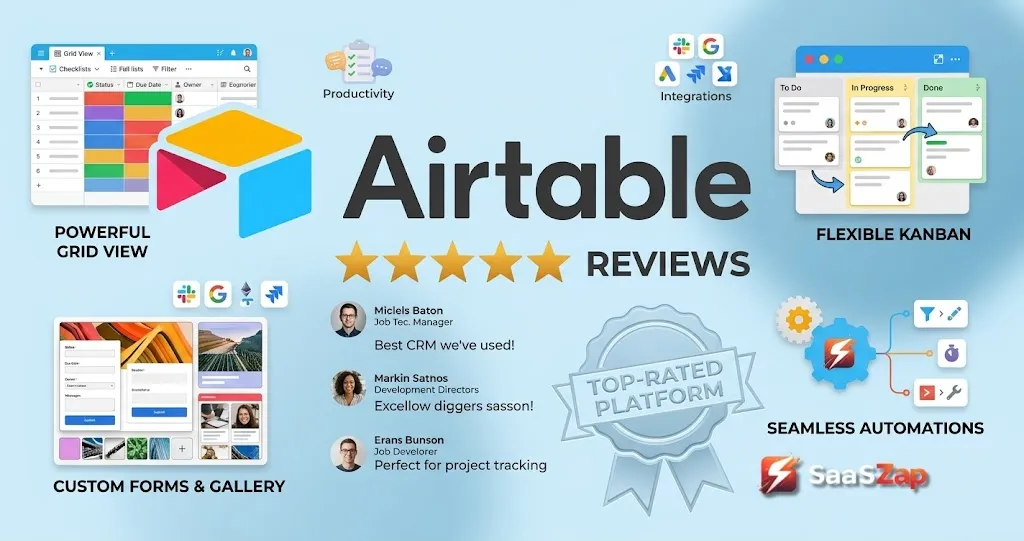
Your team outgrew spreadsheets six months ago. Columns keep breaking, filters clash, and nobody trusts the “master” version anymore. So you search for something better, and every recommendation thread points to Airtable.
This Airtable review cuts through the “spreadsheets on steroids” cliche that dominates most coverage and focuses on what actually determines whether your team keeps using it past month one: record limits, collaborator billing traps, AI credit economics, and the governance discipline Airtable demands once you move beyond a single base.
I evaluated Airtable across official documentation, third-party review patterns on G2, Capterra, and TrustRadius, and competitive analysis against the best project management software in the current market.
This review reflects a documentation-based evaluation cross-referenced with over 2,000 verified user reviews, not a surface-level feature walkthrough. I did not score this product based on brand popularity alone.
Quick Verdict: Airtable at a Glance
Airtable earns 7.8/10. It is the strongest option for teams that need a structured operational data layer with custom views, automations, and internal apps, and that can assign a dedicated system owner to maintain architecture quality. It is not the right pick for teams that want a tool built around what project management is at its simplest, or for teams that need heavy reporting and BI.
| Category | Verdict |
|---|---|
| Best for | Operations, marketing ops, product teams needing multi-table relational data with different views per role |
| Not for | Teams wanting classic PM task execution, heavy analytics, self-hosted databases, or cheap external user access |
| Score | 7.8/10 |
| Pricing | Free ($0), Team ($20/user/month annual), Business ($45/user/month annual), Enterprise Scale (custom) |
| Recommendation | Try for structured operational workflows with a system owner. Skip for pure project management or BI. |
| Top alternative | monday.com for visual PM, Notion for docs-first teams, Smartsheet for spreadsheet-scale enterprise |
The 60-Second Version
Airtable is a relational database platform that lets non-technical teams build structured apps with linked records, multiple views (grid, Kanban, calendar, timeline, Gantt, gallery), automations, and Interface Designer. According to Airtable’s official pricing page (as of May 2026), plans run from $0 to $45/user/month billed annually, with Enterprise Scale requiring a sales conversation. The Free plan caps at 1,000 records per base and 5 editors. The Team plan at $20/user/month unlocks 50,000 records, automations, extensions, and Gantt views, but bills commenters. The Business plan at $45/user/month raises the ceiling to 125,000 records and makes commenters non-billable. The catch: Airtable rewards structured thinking and punishes chaos. Without a system owner, bases multiply, data fragments, and costs spiral. If your team treats it like a spreadsheet replacement, you will hit walls fast.
Day 1: Setup and First Impressions
Account creation takes under two minutes. Airtable drops you into a workspace with a sample base, and the grid view feels instantly familiar to anyone who has lived in Google Sheets. That familiarity is both the hook and the trap.
The first real decision hits immediately: how to structure your base. A single table works for a simple tracker. The moment you need a second table, linked records, rollup fields, or lookup columns, you are building a relational data model. Most spreadsheet users have never done this.
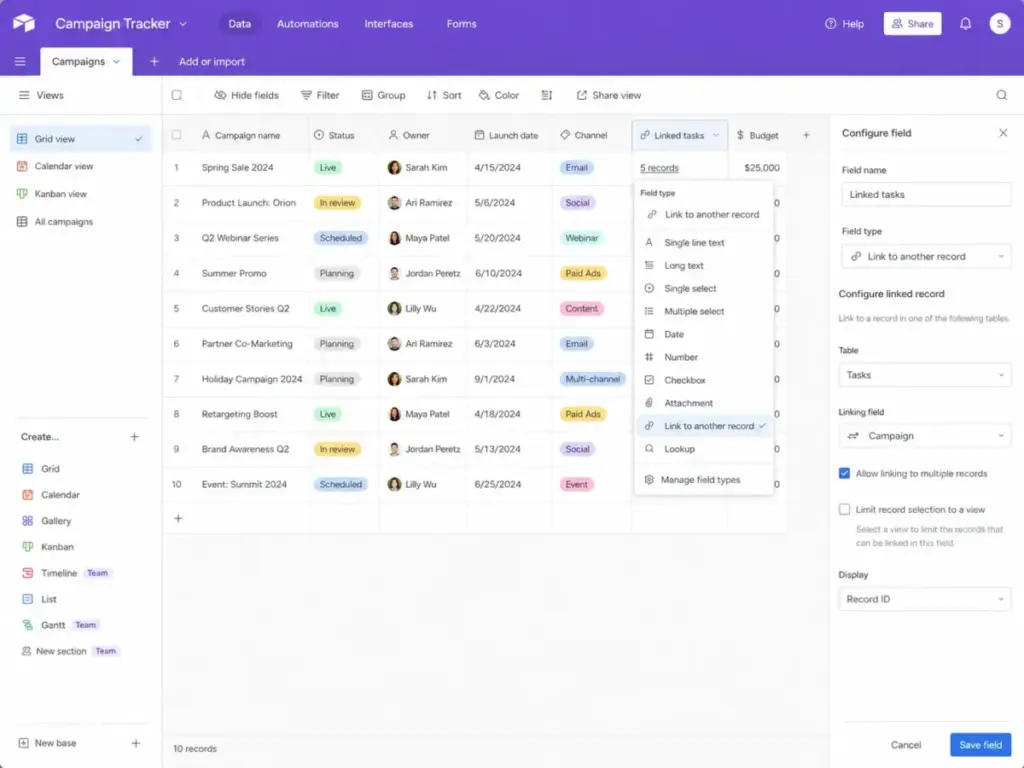
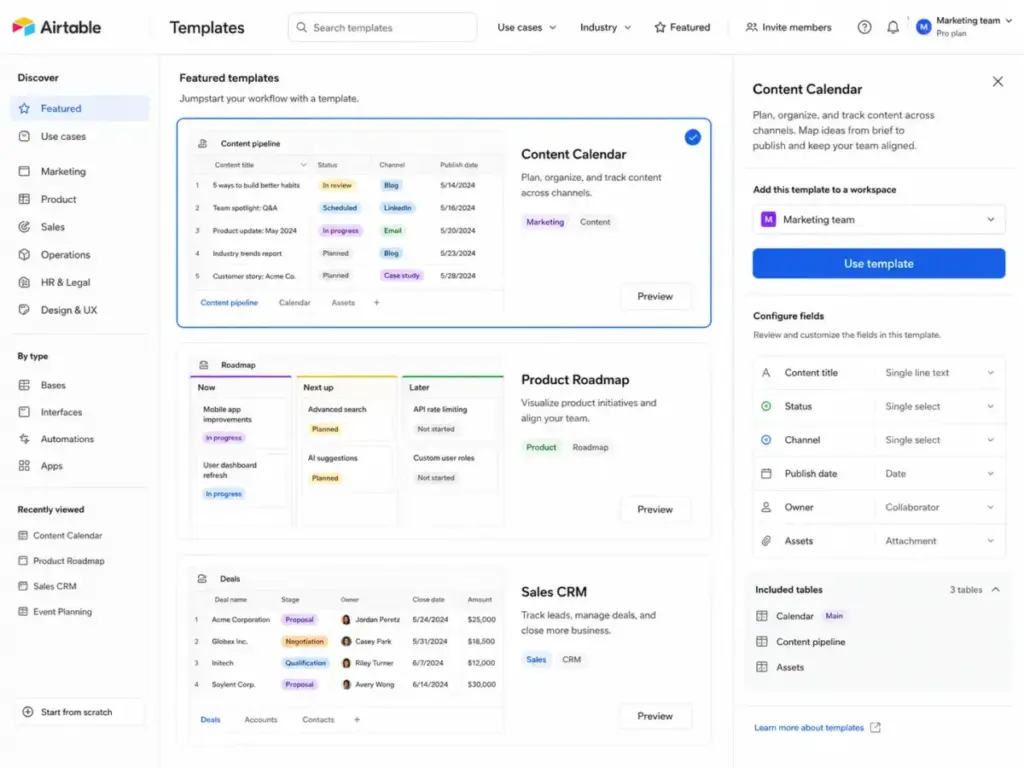
Templates help. Airtable offers dozens of pre-built bases for content calendars, product roadmaps, CRM extensions, and project trackers. They give you a head start, but they also teach bad habits if you do not understand the underlying data model. I suspect most teams start with a template and spend the next month rebuilding it once they understand linked records.
The free plan gives you room to experiment: 1,000 records per base, 1 GB of attachment storage, 5 editors, and 50 commenters. According to Airtable’s plan documentation (as of May 2026), Free also includes 500 AI credits per editor per month and 1,000 API calls per workspace per month. No extensions. No record coloring. Limited forms. Two weeks of revision history.
That is enough for a solo user testing the waters. For any team workflow, the ceiling arrives fast.
What the First Hour Teaches You
The view system is where Airtable separates from spreadsheets. Grid is your starting point. Switch to Kanban and your records become cards grouped by a single-select field. Calendar view maps records to date fields. Gallery displays attachment-heavy records as visual cards. Timeline and Gantt views (Team plan and above) arrange records on a horizontal axis by date range.
Each view is a lens on the same underlying data. Change a record in grid view, and the Kanban card updates instantly. This is the core value proposition: one source of truth, multiple perspectives for different team members.
But here is the catch. Views require discipline. A 10-person team with three departments will create dozens of views. Without naming conventions and ownership rules, view sprawl becomes the new version of spreadsheet chaos.
One thing I learned from reviewing user feedback across G2 and TrustRadius: teams that appoint a “base admin” in the first week report significantly higher satisfaction than teams where everyone builds their own views and automations.
Week 1: Real Workflows Under Load
Building Your First Real Workflow
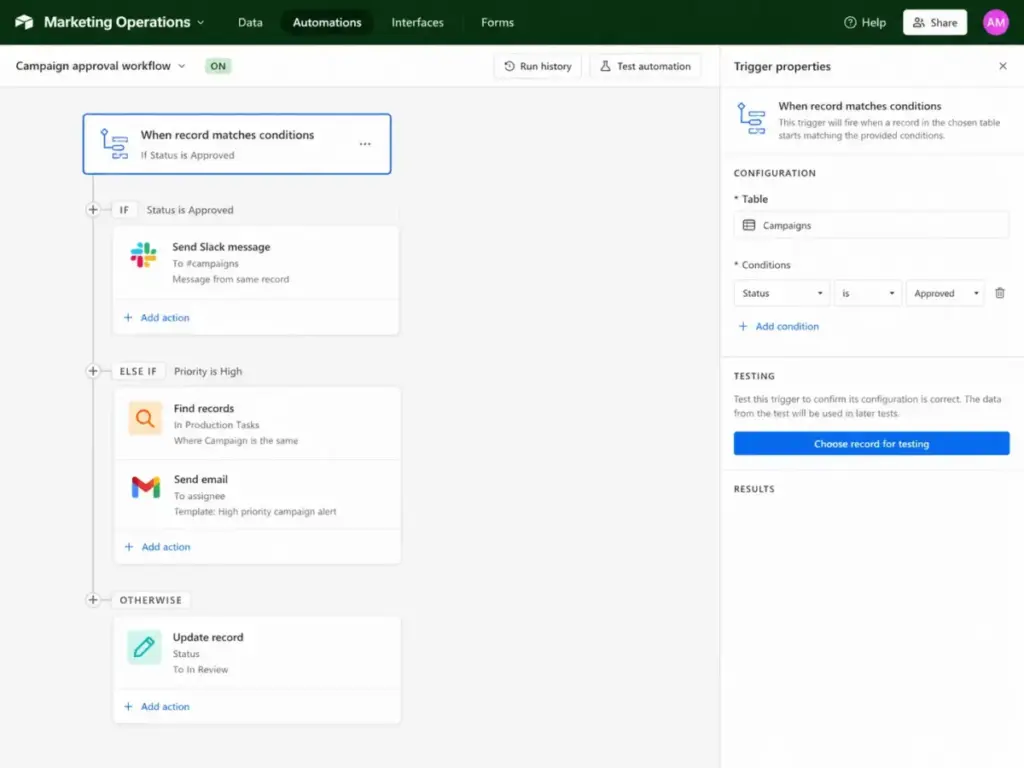
By day three, most teams move past basic data entry and start building actual workflows. Automations (available on Team plan and above) let you trigger actions when records match conditions: send a Slack notification when a status changes, create a record in another table when a form submission arrives, or update a field when a date passes.
The automation builder uses a visual trigger-action flow. Triggers include record creation, field changes, form submissions, and scheduled times. Actions include sending emails, creating records, updating records, and running scripts.
According to Airtable’s automation documentation (as of May 2026), email recipient limits differ by plan: Free sends only to verified collaborators. Team allows 100 unique non-collaborators per day. Business allows 1,000. Enterprise Scale has no documented daily non-collaborator limit.
Interface Designer: The Internal App Layer
Interface Designer is Airtable’s answer to “we need a front end, but we do not have engineers.” It lets you build record detail pages, dashboards, and filtered views as standalone interfaces that sit on top of your base data.
For operations teams, this is where Airtable stops being a database and starts being an app. A marketing team can build an intake form interface for campaign requests. A product team can build a roadmap dashboard filtered by quarter. An HR team can build an employee directory with search and filters.
The limitation: Interface Designer works best for internal teams. External users, clients, and vendors need share links, published forms, or third-party portal tools like Softr or Stacker. Airtable’s own Portals feature exists but adds cost complexity. Is the Interface Designer worth the Team plan price? For teams with three or more internal workflows, yes. For teams that primarily need external-facing views, the cost-per-interface gets hard to justify.
The Airtable AI Layer
Airtable now positions itself as an AI app-building platform. The practical AI features fall into three categories: AI fields (field agents), Omni, and AI-powered automations.
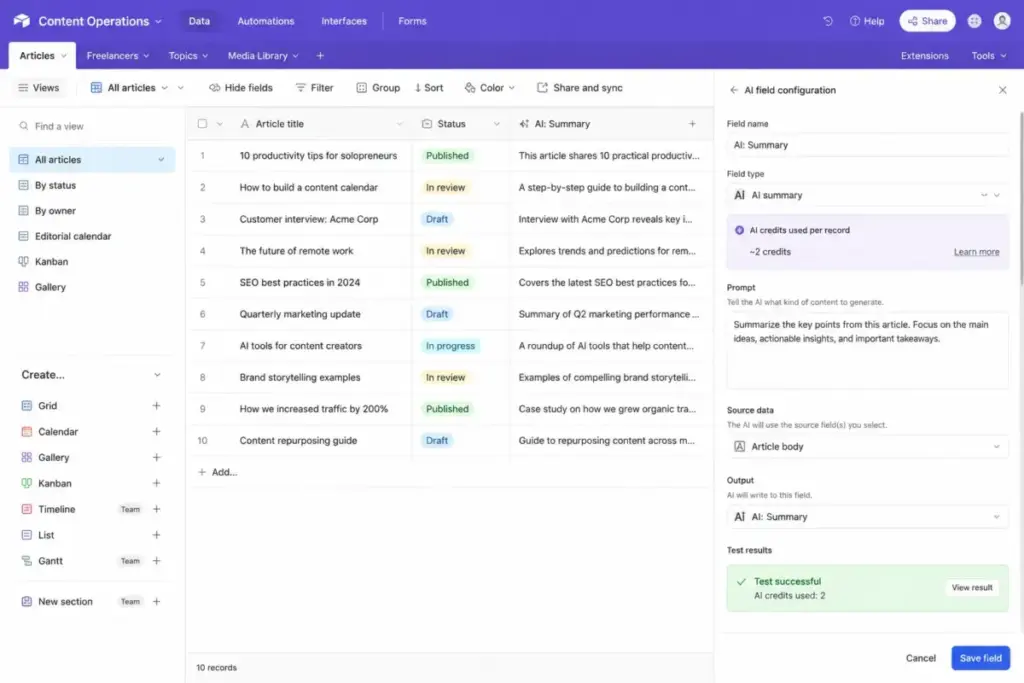
AI field agents analyze, classify, generate, and retrieve data at the cell level. According to Airtable’s AI field documentation (as of May 2026), field agents can analyze documents, search the web, and generate content. They consume AI credits on each run.
One detail most reviews miss about Airtable AI: field agents cannot run inside Airtable forms, and they cannot access PDFs stored in Google My Drive personal folders. Google Drive PDFs must sit in a Shared Drive that the integration can access. These edge cases matter for document-heavy intake workflows.
According to Airtable’s AI billing documentation (as of May 2026), AI credits are pooled at the workspace level and allocated per plan:
| Plan | AI Credits per Billable User/Month |
|---|---|
| Free | 500 per editor |
| Team | 15,000 per billable collaborator |
| Business | 20,000 per paid user |
| Enterprise Scale | 25,000 per paid user |
Extra credit packs start at $40/month for 20,000 credits ($400/year), scaling to $400/month for 200,000 credits ($4,000/year). A 10-person Team plan gets 150,000 pooled credits per month. That sounds generous until you run document analysis or web search agents across hundreds of records. Credits burn fast on retrieval-heavy tasks.
Integrations and the API Question
Airtable connects to Slack, Google Drive, Salesforce, Jira, and Zendesk natively, with additional marketplace extensions and third-party automation via Zapier and Make.
The API is where technical teams run into plan-gated walls. According to Airtable’s API troubleshooting documentation (as of May 2026), two separate limits apply:
Monthly API call caps: Free gets 1,000 calls per workspace/month. Team gets 100,000. Business and Enterprise get unlimited monthly calls.
Rate limit: All plans face a hard cap of 5 requests per base per second.
These are different constraints. A Team plan with 100,000 monthly calls still throttles at 5 requests/second per base. A Business plan with unlimited monthly calls still throttles at 5/second. Teams syncing Airtable with external systems through custom scripts or n8n workflows need to design around this rate limit regardless of plan.
So does the API meet enterprise needs? For read-heavy dashboards and periodic syncs, yes. For real-time, high-frequency integrations, the 5-request-per-second ceiling creates friction that neither plan upgrades nor money can solve.
Month 1: What Breaks at Scale
The Record Limit Wall
Airtable’s record limits are cumulative across tables in a base. According to Airtable’s plan documentation (as of May 2026), a Team plan base with one table of 30,000 records and another of 20,000 records has hit the 50,000-record ceiling. Business raises this to 125,000 records per base.
The biggest mistake most operations teams make with Airtable is treating it as an unlimited database. It is not. Here is when you will outgrow each plan:
| Plan | Record Limit/Base | Attachment Storage/Base | API Calls/Workspace/Month | Likely Upgrade Trigger |
|---|---|---|---|---|
| Free | 1,000 | 1 GB | 1,000 | Any team workflow |
| Team | 50,000 | 20 GB | 100,000 | Growth past 40K records or heavy API sync |
| Business | 125,000 | 100 GB | Unlimited | Approaching 100K+ records or governance needs |
| Enterprise Scale | Custom | Custom | Unlimited | Org-level admin, data residency, EKM |
Teams approaching the 50,000-record wall on Team have three options: upgrade to Business, archive old records, or split into multiple bases with synced tables. Each option has trade-offs. Business costs more than double per seat. Archiving loses historical access. Multi-base architectures add sync complexity.
The Collaborator Billing Trap
This is the part most reviews skip. The cost difference between Team and Business is not just the headline per-seat price. It is who counts as a billable seat.
On Team, commenters are billable. Every stakeholder who needs to comment on records, leave feedback on interfaces, or participate in review workflows counts toward your bill at $20/user/month (annual). On self-serve Business, commenters are non-billable. Only owners, creators, and editors pay at $45/user/month (annual).
Here is the math that flips the equation:
Scenario A: Editor-heavy team (8 editors, 2 commenters)
- Team: 10 users × $20 = $200/month
- Business: 8 paid users × $45 = $360/month
- Winner: Team saves $160/month
Scenario B: Reviewer-heavy department (3 editors, 12 commenters)
- Team: 15 users × $20 = $300/month
- Business: 3 paid users × $45 = $135/month
- Winner: Business saves $165/month
The right plan depends on your permission mix, not the headline price. Before you commit, count your editors versus your commenters.
Mobile, Reporting, and Output Limitations
Airtable has mobile apps for iOS and Android. Records display as tap-friendly cards, and basic data entry works well on the go. The limitation: mobile is better for capture and quick updates than for full administration, interface building, or complex workflow design. Review sentiment on Capterra (4.7 overall based on 2,214 reviews, as of May 2026) consistently flags reporting depth and mobile access as the two most common drawbacks.
Before you commit, here is what to watch for:
| Limitation | Who It Hurts | Workaround | When to Choose an Alternative |
|---|---|---|---|
| Mobile building restricted | Field teams, remote-first orgs | Use desktop for admin, mobile for data capture | Need full mobile PM: try monday.com or Asana |
| No built-in BI or advanced reporting | Data-heavy ops teams | Export to Looker, Tableau, or Google Sheets | Need deep analytics: try Smartsheet or Quickbase |
| CSV/export friction | Teams sharing data externally | Use API or Zapier for automated exports | Need heavy Excel workflows: try Smartsheet |
| Interface Designer limits | External-facing apps | Use Softr, Stacker, or Noloco as portal front-ends | Need public-facing apps: evaluate custom build |
| Document generation gaps | Teams needing templated outputs | Use third-party doc-gen extensions | Need proposal/contract automation: try Coda or dedicated tools |
A paraphrased insight from Capterra review patterns: users consistently praise Airtable’s customization and task editing flexibility, while reporting depth and mobile access surface as the most common frustrations.
The Governance Problem
Airtable’s flexibility is a double-edged sword. A 20-person team with no naming conventions, no base ownership rules, and no permission reviews will generate a collection of disconnected bases within three months. Data duplicates. Automations conflict. Nobody knows which base is the source of truth.
This is something I wish I had known before recommending Airtable to larger departments: the product does not enforce governance. You enforce governance. Teams that succeed with Airtable treat it like a system, not a tool.
Who should own Airtable internally:
- Assign a “base architect” per department (or per workspace for smaller orgs)
- Review permissions quarterly: who has editor access that should be a commenter?
- Audit automations every 90 days: teams pile them up and forget, which burns through action limits and creates conflicting triggers
- Establish naming conventions for bases, tables, views, and fields before scaling past 3 bases
- Schedule data model reviews at month 1, month 3, and quarterly thereafter
Security and Enterprise Readiness
According to Airtable’s trust and security page (as of May 2026), the platform holds SOC 2 Type 2, ISO/IEC 27001, ISO/IEC 27701 certifications, runs GDPR and CCPA/CPRA compliance programs, offers a Data Processing Agreement, and supports EU data residency and Enterprise Key Management for Enterprise customers. Additional questionnaires include CAIQ, SIG Lite, and HECVAT. Airtable also maintains a HackerOne bug bounty program.
The catch: most enterprise security features gate behind Business or Enterprise Scale. The admin panel requires Business. Enterprise Key Management requires Enterprise Scale. Private business email domain is mandatory for Business and Enterprise Scale plans. Teams on Free or Team cannot access org-level admin controls.
| Security Feature | Plan Required |
|---|---|
| SOC 2 Type 2, ISO 27001 | All plans (platform-wide) |
| Admin panel | Business and above |
| Two-way sync | Business and above |
| Private email domain | Business and Enterprise Scale (mandatory) |
| EU data residency | Enterprise Scale |
| Enterprise Key Management | Enterprise Scale |
| Org-level governance | Enterprise Scale |
Enterprise buyers should verify current HIPAA-related support directly with Airtable, as official documentation on this topic requires careful review.
The Pricing Math Nobody Shows You
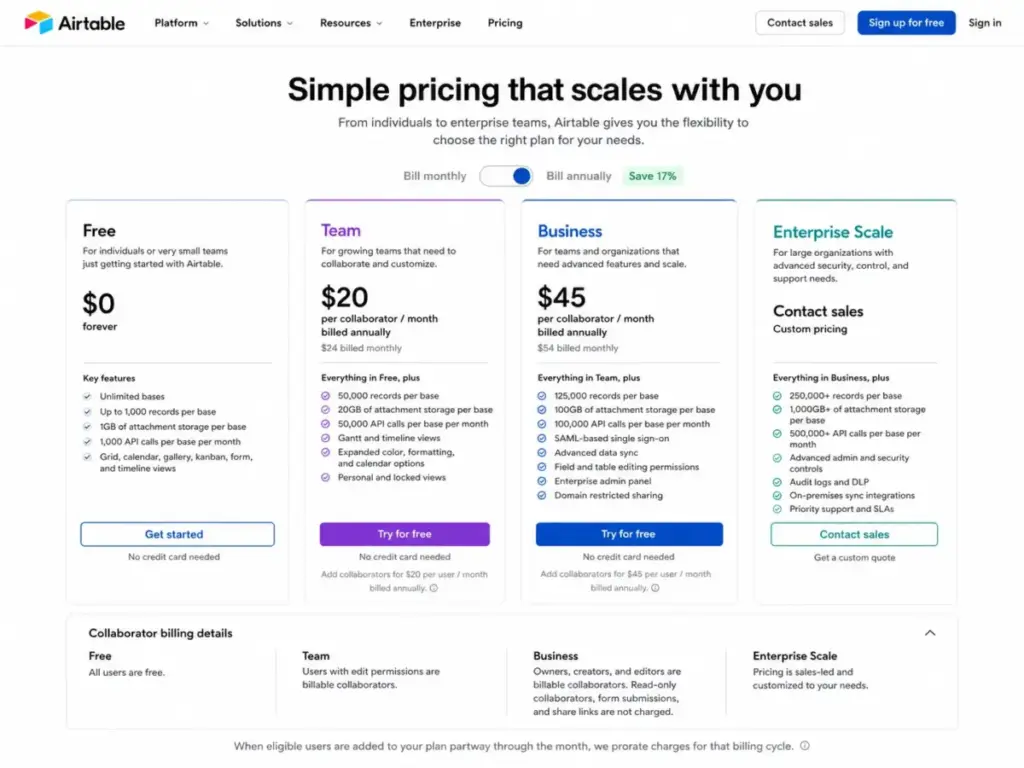
Airtable’s pricing (as of May 2026, per Airtable’s pricing page) runs across four tiers:
| Plan | Monthly Price | Annual Price | Records/Base | API Calls/Workspace/Month | Attachments/Base | Key Gates |
|---|---|---|---|---|---|---|
| Free | $0 | $0 | 1,000 | 1,000 | 1 GB | 5 editors, 50 commenters, no extensions, 2-week history |
| Team | $24/user | $20/user | 50,000 | 100,000 | 20 GB | Automations, extensions, Gantt, Interface Designer, commenters billable |
| Business | $54/user | $45/user | 125,000 | Unlimited | 100 GB | Two-way sync, admin panel, commenters non-billable, private domain required |
| Enterprise Scale | Custom | Custom | Custom | Unlimited | Custom | Advanced governance, org-level controls, EKM, EU data residency |
Where Pricing Starts to Pinch
10-person marketing operations team replacing campaign spreadsheets: Team plan at $20/user/month annual = $200/month ($2,400/year). This unlocks 50,000 records, automations, interfaces, timeline/Gantt, extensions, and 150,000 pooled AI credits. For most campaign operations, this is the realistic starting point.
Department with 5 editors and 15 reviewers: Team bills all 20 users at $20 = $400/month. Business bills only 5 editors at $45 = $225/month. Business saves $175/month and adds 125,000-record bases, unlimited API calls, and two-way sync. The upgrade pays for itself.
Growing team approaching 50,000 records: The record wall forces the Team-to-Business decision. Business at $45/user raises the cap to 125,000 records, but teams with predictable data growth past that point should not treat Airtable as an unlimited database. Evaluate Smartsheet or Quickbase for data volumes that exceed Airtable’s ceiling. If Smartsheet is on your list for larger data sets, compare Smartsheet alternatives before moving off Airtable.
AI-heavy workflow teams: A 10-person Business plan generates 200,000 pooled AI credits per month. Running document analysis agents across 500 records consumes credits rapidly. Extra credit packs ($40/month for 20,000 additional credits) add up. Budget for at least one extra pack if AI field agents are central to your workflow.
Before you commit, watch out for these hidden costs: professional services packages for complex implementations, Portals or third-party tools for external user access, and the private business email domain requirement that blocks Business plan access for teams using Gmail or Outlook personal addresses.
Airtable Pros and Cons
What Airtable Gets Right
- Relational data model accessible to non-developers. Linked records, rollups, and lookups let operations teams build real data architectures without SQL. This matters because spreadsheet-dependent teams can model multi-table relationships without engineering support.
- View diversity for different team roles. Grid, Kanban, calendar, timeline, Gantt, gallery, and forms give each stakeholder the lens they need on the same data. A project manager sees the timeline. A designer sees the gallery. A director sees the Kanban.
- Interface Designer creates internal apps without code. Teams can build intake dashboards, approval workflows, and filtered record views as standalone interfaces. For operations teams that need custom internal tools, this replaces months of development work.
- AI field agents add data enrichment at the cell level. Document analysis, content generation, and web search agents embedded directly in fields reduce manual data processing. The value scales with data volume.
- Strong integration ecosystem. Native connections to Slack, Google Drive, Salesforce, Jira, and Zendesk, plus marketplace extensions and API access, let Airtable sit at the center of a multi-tool stack.
- Template library accelerates onboarding. Pre-built bases for common workflows (content calendars, product roadmaps, asset tracking, vendor management) give new teams a working starting point within minutes.
What Airtable Gets Wrong
- Record limits create hard operational ceilings. 1,000 records on Free, 50,000 on Team, 125,000 on Business. These are cumulative across tables in a base. Teams with growing datasets hit walls that require plan upgrades, data archiving, or architectural splits.
- Collaborator billing on Team plan charges commenters. Every reviewer, stakeholder, or interface commenter costs $20/month on Team. This pricing structure punishes organizations with many occasional contributors and few full-time editors.
- Mobile experience limits administration and building. Mobile apps handle data capture and quick edits well but cannot support interface building, complex automation design, or full administrative workflows. A paraphrased insight from TrustRadius review patterns: templates, attachments, and collaboration are strengths, while advanced features and Excel import/export workflows can be intimidating or painful.
- Reporting and analytics remain shallow. Airtable provides summary bars, charts, and dashboard blocks, but teams needing cross-base reporting, pivot-table-depth analysis, or BI-grade visualizations must export data to external tools.
- AI credits consume unevenly and can become a cost variable. Credit consumption varies by agent type, and heavy retrieval or document analysis workflows can exhaust pooled credits before the monthly reset. Extra credit packs start at $40/month.
- Governance is user-enforced, not platform-enforced. Without disciplined naming, permission reviews, and base architecture standards, Airtable deployments degrade into disconnected data silos. The platform does not prevent sprawl.
- External user access lacks a clean, affordable path. Share links and published forms cover basic read-only and submission use cases. Anything beyond that (editing, commenting, portal-style interaction) requires Portals, third-party front-end tools, or paid collaborator seats. For teams serving many external stakeholders, costs escalate.
Where Airtable Beats PM Tools (and Where It Loses)
Airtable sits in an unusual category overlap. Many buyers compare it against dedicated project management tools like Asana, monday.com, or Jira. The comparison is misleading without context.
Airtable wins when the core need is structured, multi-table operational data with different views for different roles. It loses when the core need is task execution, dependency management, workload planning, or agile ceremony support.
| Scenario | Best Choice | Why |
|---|---|---|
| Content operations with asset tracking and campaign data | Airtable | Multi-table relational structure, gallery views, forms, Interface Designer |
| Sprint planning and software delivery | Jira or Linear | Native agile boards, issue linking, dev integrations, velocity tracking |
| Cross-functional visual project tracking | monday.com or Asana | Purpose-built PM workflows, workload views, native dependencies |
| Spreadsheet-scale enterprise with governance | Smartsheet | Row-level control, enterprise admin, familiar grid UX for spreadsheet teams |
| Docs-first team knowledge and lightweight databases | Notion | Combined wiki + database approach, lower cost per user, better for docs |
| Open-source or self-hosted database need | Baserow or NocoDB | Self-hosting, no record limits, full backend control |
A paraphrased insight from G2 review patterns: Airtable works well as a database-app-builder hybrid for operational workflows, but scale depends on thoughtful structure and upfront design.
Airtable Alternatives by Scenario
Choose the alternative that matches your specific failure mode with Airtable:
| If Airtable Fails You Because… | Try Instead | Why It Fits |
|---|---|---|
| Cost spirals from many commenters on Team plan | monday.com or ClickUp | Flat viewer pricing, built-in PM features |
| Record limits block data growth | Quickbase, Baserow, or NocoDB | Higher or unlimited row counts, self-hosting options |
| Need deep project management with dependencies | Asana, Wrike, or Jira | Purpose-built PM with Gantt, workload, and agile |
| Need docs + databases in one tool | Notion or Coda | Combined documentation and structured data |
| Need spreadsheet familiarity at enterprise scale | Smartsheet | Grid-first UX, enterprise governance, familiar formulas |
| Need affordable external user portals | Baserow + custom front end | Open-source backend, no per-seat portal cost |
| Need advanced reporting and BI | Smartsheet or custom database + Looker | Native dashboards, advanced chart types, SQL access |
Verdict: Keep It or Kill It?
Airtable earns 7.8/10. It is best for operations, marketing, product, and cross-functional teams that need a flexible relational data layer with custom views, interfaces, automations, and integrations, and that can appoint an internal system owner to maintain data architecture quality. It is not the best fit for teams that want traditional project management, need heavy reporting or BI, require cheap external user access, or want a traditional database with self-hosting and deep backend control.
Choose Airtable if your team has multi-table operational data, needs different views for different roles, wants internal apps without heavy engineering, and can commit to governance discipline. Avoid Airtable if your primary need is sprint planning, dependency tracking, workload management, or if your team exceeds 125,000 records per base with no data archiving strategy.
The simplest way to think about Airtable: it is an operational app layer, not a spreadsheet replacement and not a project management tool. Teams that understand this distinction extract the most value. Teams that do not will blame the platform for problems that started with unclear expectations.
If you want the fastest path to a working Airtable deployment, skip the blank-base approach and start with a template closest to your workflow. Rebuild it once you understand linked records and view architecture. That sequence saves weeks.
If your budget is tight and you need docs alongside structured data, evaluate Notion or Coda first. If you need PM depth, evaluate monday.com or Asana. If your data volume makes record limits a constraint within 12 months, evaluate Quickbase or Baserow before committing to Airtable as your system of record.
For the full evaluation framework behind this review, see our review methodology.
Frequently Asked Questions
Is Airtable worth it in 2026?
Airtable is worth it for teams that need structured, relational operational data with custom views, automations, and internal apps. The Team plan at $20/user/month (annual) is the realistic starting point for any team workflow. It is not worth it for teams that only need basic task management, heavy reporting, or cheap access for many external users. Budget-conscious teams with simple needs should evaluate Notion or ClickUp first.
How much does Airtable cost?
Airtable costs $0 (Free, 1,000 records), $20/user/month billed annually on Team (50,000 records), $45/user/month billed annually on Business (125,000 records), or custom pricing on Enterprise Scale. Monthly billing costs more: $24/user for Team, $54/user for Business. Additional AI credit packs start at $40/month for 20,000 credits.
What is the difference between Airtable Team and Business?
Team costs $20/user/month annual with 50,000 records/base, 100,000 API calls/month, and bills commenters. Business costs $45/user/month annual with 125,000 records/base, unlimited API calls, two-way sync, admin panel, and commenters included as non-billable. Business requires a private business email domain. For teams with many reviewers and few editors, Business can cost less total than Team.
What are Airtable's record limits?
Free allows 1,000 records per base. Team allows 50,000. Business allows 125,000. Enterprise Scale offers custom limits. Record counts are cumulative across all tables in a base. One table with 30,000 records and another with 20,000 records together consume 50,000 against the Team plan limit.
Can Airtable replace a project management tool?
Airtable can handle structured project tracking, content calendars, and operational workflows. It cannot replace dedicated PM tools for sprint planning, native dependency management, workload balancing, or agile ceremony support.
Teams needing task execution depth should evaluate Asana, monday.com, Jira, or Linear for those workflows, and use Airtable for the structured data layer alongside. If Asana is one of those task-execution candidates, compare Asana alternatives by dependency handling, workload visibility, database flexibility, setup effort, and whether Airtable should remain the operational data layer.
Does Airtable have API limits?
Yes. Free gets 1,000 API calls per workspace/month. Team gets 100,000. Business and Enterprise get unlimited monthly calls. All plans face a hard 5 requests per base per second rate limit. These are separate constraints: upgrading to Business removes monthly caps but does not increase the per-second rate limit.
What are the best Airtable alternatives?
The best alternative depends on what Airtable fails at for your team. For project management depth, choose Asana or monday.com. For docs-first teams, choose Notion. For spreadsheet-scale enterprise, choose Smartsheet. For open-source self-hosting, choose Baserow or NocoDB. For data-heavy operations beyond 125,000 records, evaluate Quickbase or a custom database.
How do Airtable AI credits work?
AI credits are pooled at the workspace level. Each plan includes a monthly allocation per billable user: 500 on Free, 15,000 on Team, 20,000 on Business, 25,000 on Enterprise Scale. Credits are consumed variably by AI field agents, with document analysis and web search using more credits per operation. Extra packs start at $40/month for 20,000 credits.
Is Airtable good for CRM?
Airtable can serve as a lightweight CRM extension for tracking contacts, deals, and interactions with linked records and views. It is not a full CRM replacement. It lacks native email integration, lead scoring, pipeline automation depth, and sales forecasting found in a dedicated CRM platform shortlist. Use Airtable as a CRM supplement, not a substitute.
Who should avoid Airtable?
Avoid Airtable if your team needs classic project management with native dependencies and agile boards, heavy reporting or BI capabilities, large-scale external user access at low cost, a traditional relational database with self-hosting or deep backend control, or if your data will predictably exceed 125,000 records per base within 12 months. Teams without a willing system owner for data architecture should also look elsewhere.