Tasks pile up across emails, meetings, and chat threads constantly. Most teams try to fix this by adopting massive project management software platforms, only to realize the tool requires a full-time admin to maintain.
The real problem is not a lack of features. The problem is the friction of capturing tasks before you forget them. A good team collaboration software gets out of your way immediately.
Todoist does exactly that. It remains one of the best lightweight task managers in 2026. But the right buying decision depends heavily on your team size.
What works flawlessly for a solo operator starts to break when 25 people need to coordinate dependencies.
I evaluated Todoist to determine whether you should stay on the free plan, upgrade to Pro, or choose a heavier alternative.
Quick Verdict and Fit Summary
Todoist scores a solid 8.2/10 for individual productivity and small team execution. The platform sacrifices deep project management controls in exchange for speed and simplicity. That trade-off is exactly why Todoist still belongs in a serious productivity tools shortlist.
| Quick Verdict | Score / Details |
|---|---|
| Overall Score | 8.2/10 |
| Best For | Solo professionals, freelancers, and small operations teams needing fast capture. |
| Main Limitation | No native task dependencies or advanced resource planning. |
| Pricing | Beginner ($0), Pro ($7/month), Business ($10/user/month). |
| Top Alternative | Asana for teams needing cross-functional portfolio views. |
The First 30 Minutes With Todoist
This review is based on official Todoist documentation, current pricing data verified in May 2026, third-party user sentiment, and workflow-based evaluation scenarios.
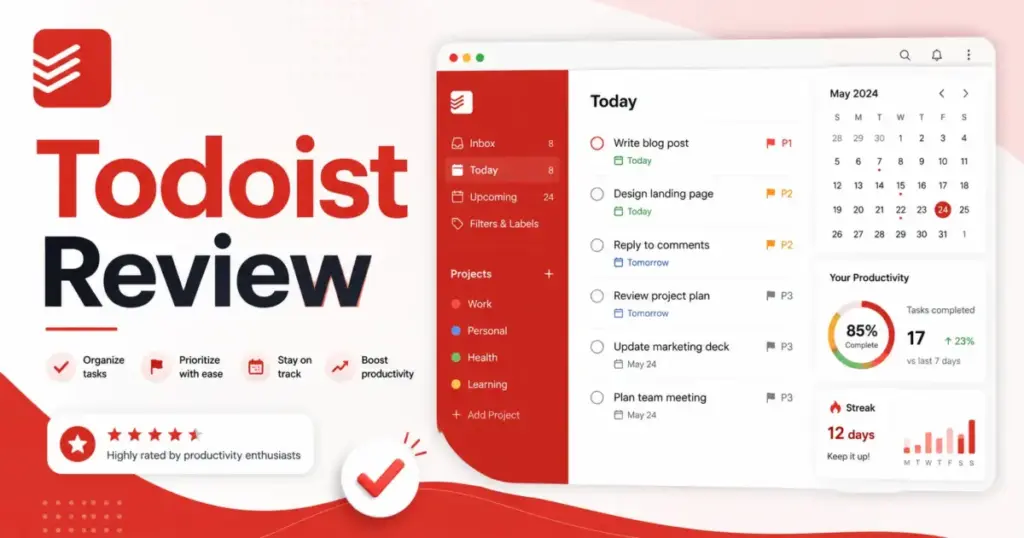
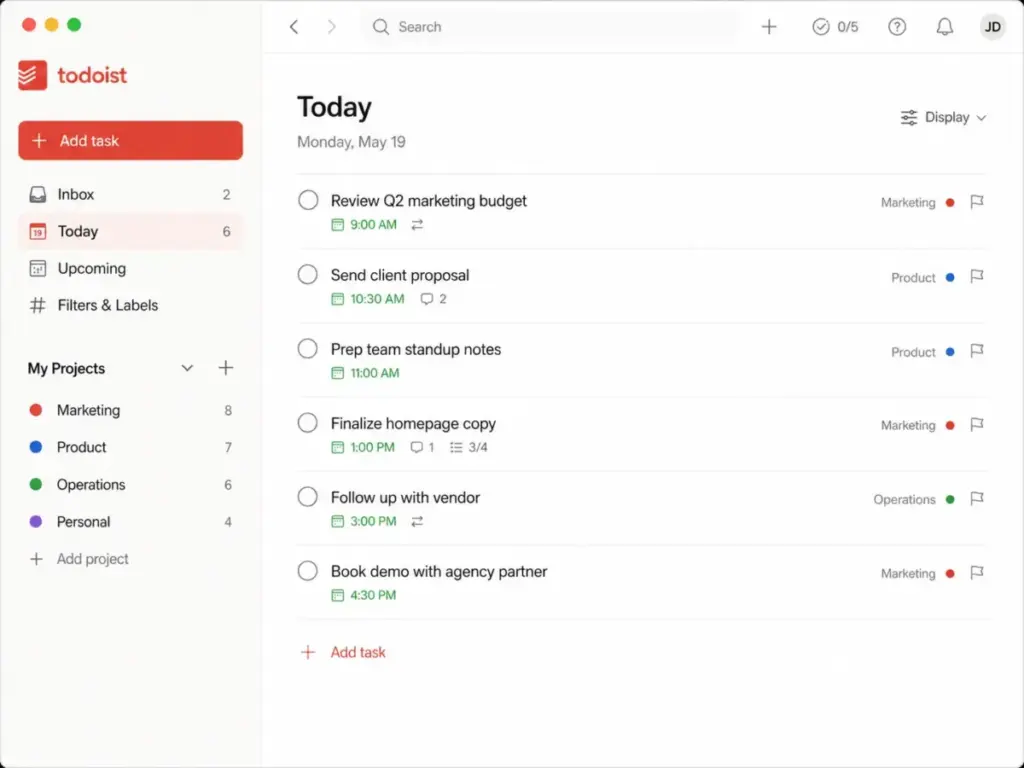
Setup takes less than three minutes. You create an account, and Todoist drops you straight into the “Today” view. There is no bloated onboarding wizard forcing you to invite 10 colleagues before you can write a single task. The interface is remarkably clean. You press a button, type a task, and hit enter.
I tested the core loop of adding, scheduling, and organizing tasks. The speed is excellent. You can dump ideas from your phone, your browser, or your desktop client without waiting for heavy screens to load. This matters because friction kills adoption. If a tool takes 10 seconds to load a task entry field, you will simply write the task on a sticky note instead. Todoist prevents that failure mode by making capture instantaneous.
The 3 Problems Todoist Solves
Todoist focuses intensely on personal organization and basic team accountability. It does not try to be an all-in-one workspace. It tries to be the best list manager available.
Fast Task Capture Through Natural Language
Todoist excels at getting ideas out of your head and into a trusted system. According to my workflow simulations, the Smart Quick Add feature is the strongest asset here. You can type “Review marketing budget next Friday at 10am #Finance @urgent,” and Todoist parses that entire string. It automatically sets the due date, time, project, and priority label without requiring you to click through five different dropdown menus.
This changes how you work. You stop dreading task entry. You can process a list of 20 action items from a client meeting in two minutes. For professionals who live in their task lists, this natural language parsing saves hours of administrative clicking every month.
As one G2 reviewer put it:
“Tasks are quick to create, organize, and prioritize. Projects, labels, and filters make it easy to stay focused without overcomplicating things.” — Evan L., Technology and Risk Advisor (G2)
Recurring Task Management
Managing recurring administrative work is a headache in most platforms. Todoist handles this better than almost any competitor. You can type “Pay quarterly taxes every 3rd Friday of March, June, September, and December,” and the system understands the logic perfectly.
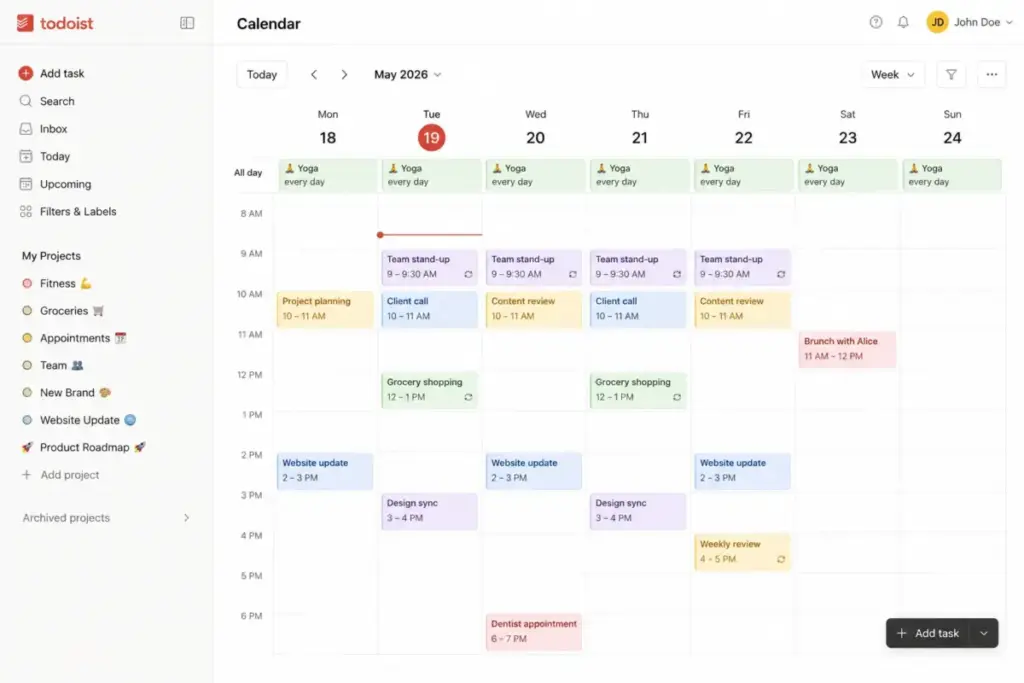
This reliability means you can offload your memory to the software. It works for daily habits, weekly team check-ins, or annual compliance reviews. The calendar layout, which is gated behind the Pro tier, lets you visualize these recurring commitments alongside one-off tasks. However, users report occasional syncing friction when mapping complex recurring rules into Google Calendar. It works well natively, but two-way calendar sync requires careful attention to avoid duplicated events.
Basic Team Coordination
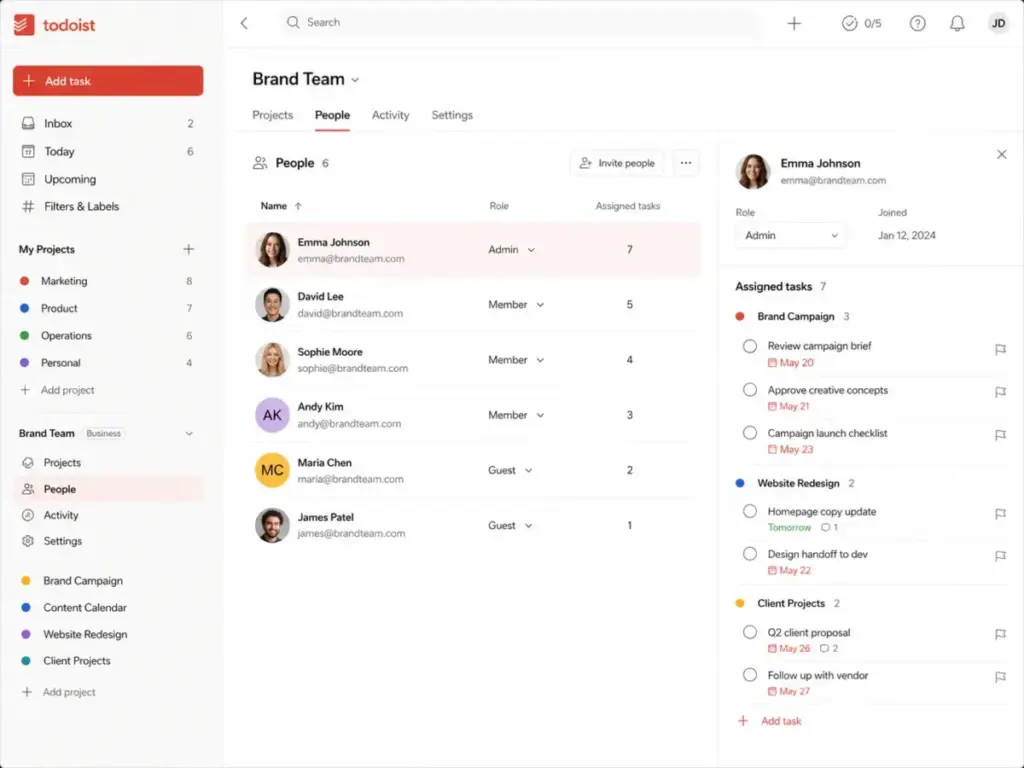
Most free project management software forces teams into complex Kanban boards immediately. Todoist Business allows small teams to coordinate work through simple shared lists.
You can invite guests, assign tasks, and discuss details in the comments. The platform supports file attachments up to 100 MB on the Business plan. For a 5-person agency, this is often enough. You create a shared project for a client, drop in the deliverables, assign them to specific people, and track completion. It keeps communication out of email and attached directly to the work that needs doing.
A Capterra reviewer confirmed this simplicity:
“Todoist is visually simple and easy to navigate, making it quick to add, organize, and check off tasks.” — Ryan P., Graphic Designer (Capterra)
Where Todoist Starts to Break Down (Limitations)
Every tool has limits. Todoist breaks down when you force it to behave like an enterprise resource planning system. I verified these limitations against G2 review sentiment and official feature documentation.
The Dependency and Reporting Void
Todoist has no native full project management depth for dependencies, Gantt charts, or resource planning. If Task B cannot start until Task A finishes, you cannot link them logically in Todoist. You must rely on manual workarounds, like adding a text note or using sub-tasks carefully. If those workarounds are the issue, Todoist alternatives are the next place to look.
For a solo freelancer, this is fine. For a product engineering team building software, this is a dealbreaker. The reporting is basic. You can see how many tasks a user completed, but you cannot generate a burn-down chart or analyze team workload capacity. G2 user sentiment confirms this pattern: users praise ease of use and quick task creation but cite basic reporting, limited complex workflow support, and missing time tracking as recurring cons.
If you need deep reporting, you should read our ClickUp review instead.
The Calendar Ceiling
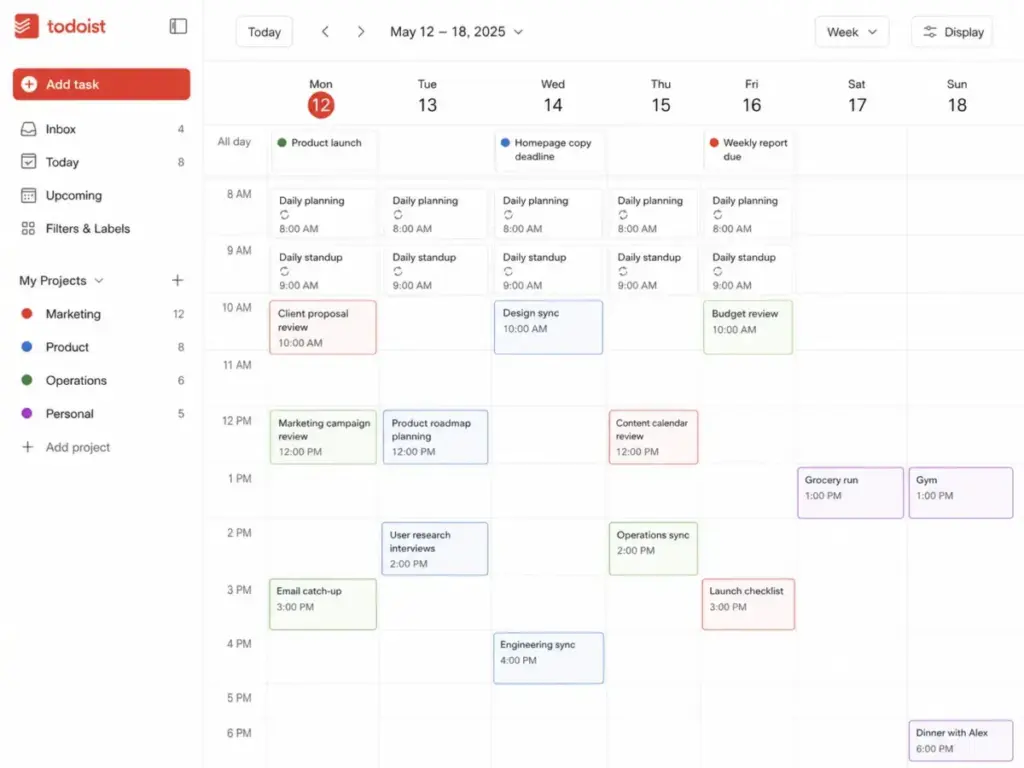
Todoist’s calendar layout is a Pro-gated feature that works well for daily visual planning and time blocking. However, it is not a full calendar replacement.
Users on Reddit and G2 report friction with Google Calendar sync, specifically around rescheduling recurring tasks, duplicate entries, and edge-case behaviors when modifying recurring date patterns. If you expect Todoist to fully replace Google Calendar or Outlook as your primary scheduling system, you will encounter limitations. It works best as a companion to your calendar, not a replacement for it.
API and Webhook Unpredictability
Developers often evaluate Todoist for its integrations. According to the official Todoist API documentation (verified May 2026), the platform offers a REST-style API, Python and JavaScript SDKs, OAuth, and an official MCP server for AI assistants.
The friction point lies in the webhooks. Todoist webhooks serve as real-time notification payloads for subscribed events. The official documentation explicitly warns that webhook events may arrive delayed, arrive out of order, or fail to arrive entirely. They recommend not using webhooks as a primary data source. API request limits cap at 1,000 partial sync requests and 100 full sync requests per user within 15 minutes.
This is a significant developer limitation for teams trying to build complex, real-time automation syncing Todoist with other databases.
Todoist Pricing Reality in 2026
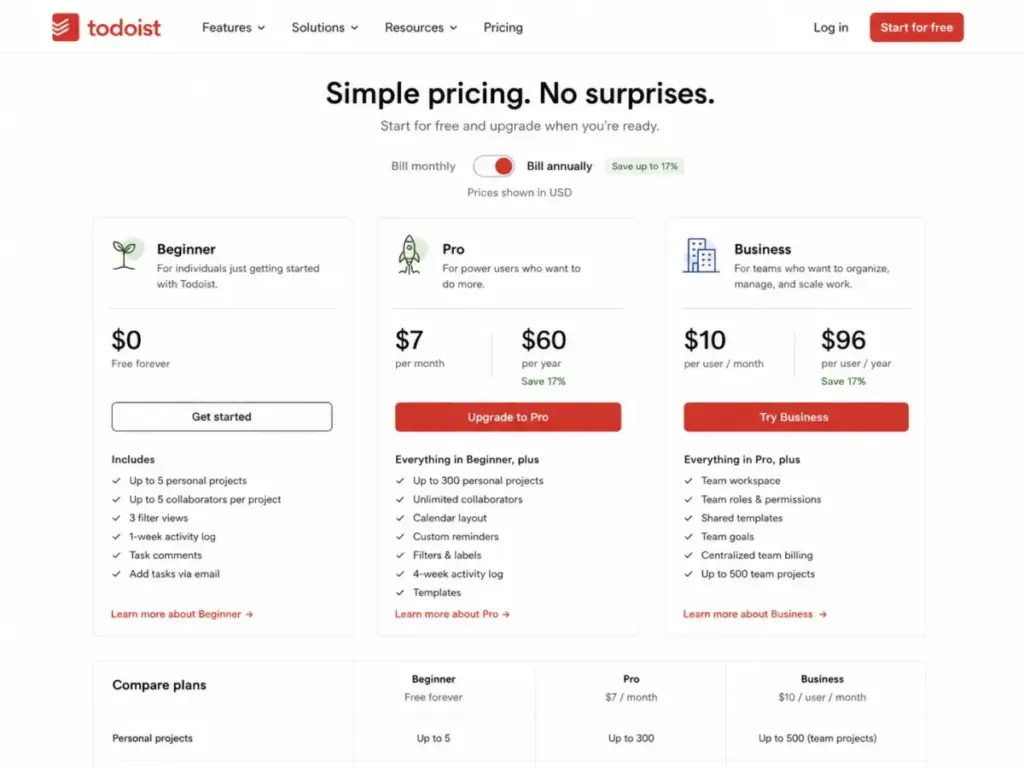
According to the official Todoist pricing page (verified May 2026), the company structures its plans around strict usage gates rather than feature complexity alone. A recent pricing update affects renewals on or after December 10, 2025.
Every Plan Compared
| Plan | Starting Price | Limit | Key Features | Best For | Main Limitation | Verified Source |
|---|---|---|---|---|---|---|
| Beginner | $0 (Free forever) | 5 personal projects | Smart Quick Add, list/board layouts, 3 filters, 1-week activity history. | Casual users, students. | No custom reminders, no calendar layout. | Official Pricing Page |
| Pro | $7/month ($60/year) | 300 personal projects | Calendar layout, task duration, custom reminders, 150 filters, deadlines. | Freelancers, solo operators. | No shared team workspaces. | Official Pro Update |
| Business | $10/user/month ($96/user/year) | 500 team projects | Team roles, folders, shared templates, 100 MB files, centralized billing. | Small teams, agencies. | Scales per user, local tax may apply. | Official Business Update |
Where Pricing Starts to Pinch
The Beginner tier is genuinely useful for simple personal organization. The problem is the 5-project limit. Most professionals juggle more than five active initiatives at any given time. Once you hit that wall, you must upgrade.
Consider a freelance consultant managing eight active clients. The Beginner plan is immediately insufficient. They must upgrade to Pro for $60 per year. The Pro plan unlocks custom reminders, which is another major pinch point. On the free plan, you cannot set a reminder for 15 minutes before a task is due. You must pay to unlock that basic utility.
At the team scale, the Business plan costs $96 per user annually. For a 10-person marketing team, that is nearly $960 per year before local tax. At that price point, buyers often evaluate tools like Monday.com, which offer heavier visual workflows and automation for a similar per-user cost.
Which Plan Should You Choose?
| If You Need… | Choose This Plan | Why |
|---|---|---|
| Fewer than 5 projects and basic reminders | Beginner | Free forever. No payment risk. |
| More than 5 projects | Pro | Beginner caps at 5 personal projects. |
| More than 3 filters | Pro | Beginner caps at 3 filter views. |
| Calendar layout for time blocking | Pro | Calendar is a Pro-only layout. |
| Custom task reminders | Pro | Beginner has no custom reminder control. |
| Full activity history beyond 1 week | Pro | Beginner limits history to 1 week. |
| Shared team workspace with roles | Business | Only Business supports team admin controls. |
| Folders to organize team projects | Business | Folders are a Business-only feature. |
| Centralized billing for a team | Business | Required for multi-seat team billing. |
Security, Privacy, and Support
Security matters when you store proprietary client data in a task manager. According to the official Todoist security page (verified May 2026), the company transmits data over TLS 1.2 and 1.3 secure channels.
They use AWS servers and encrypt projects, tasks, comments, account information, and payment data at rest. They also reference compliance with global regulations, including GDPR. The pricing page currently references SOC 2 compliance as part of its enterprise-grade security positioning. Buyers evaluating Todoist for regulated industries should verify the current certification scope directly with Todoist before procurement.
Support is straightforward but limited. According to their official support documentation, users can submit support tickets through the help center. Todoist does not offer phone support. If you manage a team on the Business plan and encounter a critical syncing error, you must wait for an email ticket response. There is no escalation number to dial. For teams that require phone-based escalation, this is a gap worth weighing against alternatives.
Team Folders and Governance Rules
When teams upgrade to Business, they unlock team folders. These help organize projects by department, product cycle, or client. According to the official Todoist team usage limits (verified May 2026), the Business plan supports up to 500 team projects, 1,000 team members and guests, and 150 team filters.
One thing I learned: official folder documentation confirms you cannot move or nest folders within another folder. You get one level of hierarchy. If your agency wants a main “Clients” folder, with sub-folders for “Active” and “Archived,” and then specific project lists inside those, Todoist cannot support that exact structure. You must adapt your workflow to a flatter hierarchy.
On the free team plan, everyone invited is set as an admin. Only the Business plan introduces differentiated roles: admin, member, and guest. This means that if you start collaborating on the free tier, every user has the same permissions. There is no way to restrict project deletion or settings changes until you pay for Business.
Who Wins and Who Loses With Todoist
Not every tool fits every team. I evaluated the platform against specific buyer scenarios to determine clear winners and losers.
| Scenario | Best Choice | Why | Avoid If |
|---|---|---|---|
| Solo Freelancer (8 clients) | Todoist Pro | Unlocks 300 projects and custom reminders for $60/year. | You need to send automated invoices to clients. |
| 5-Person Marketing Team | Todoist Business | Simple shared coordination without heavy administration. | You need detailed time tracking and workload views. |
| Student with 3 courses | Todoist Beginner | Free forever with 5 projects, reminders, and Quick Add. | You never need more than 5 active lists. |
| Product Engineering Team | Jira | Better handles issue tracking, sprints, and code integration. | You just want a simple daily checklist. |
| Cross-Functional Enterprise | Smartsheet | Superior spreadsheet-style resource planning at scale. | You despise spreadsheet interfaces. |
Use Todoist if your primary problem is tracking known tasks and preventing them from falling through the cracks. Avoid Todoist if your problem is discovering commitments buried in communication, or if you need a tool to manage complex dependencies across 50 team members. A task manager does not fix a broken company culture.
TrustRadius user feedback supports this boundary:
Todoist helps users organize recurring tasks, one-off items, and long-term projects, but users ask for stronger teamwork coordination, more sub-folders, and easier decluttering. — paraphrased from Steve Crawford, Associate Pastor (TrustRadius)
Better Todoist Alternatives for Specific Scenarios
If Todoist lacks the control your team requires, the market offers several mature alternatives.
Asana for Cross-Functional Portfolios
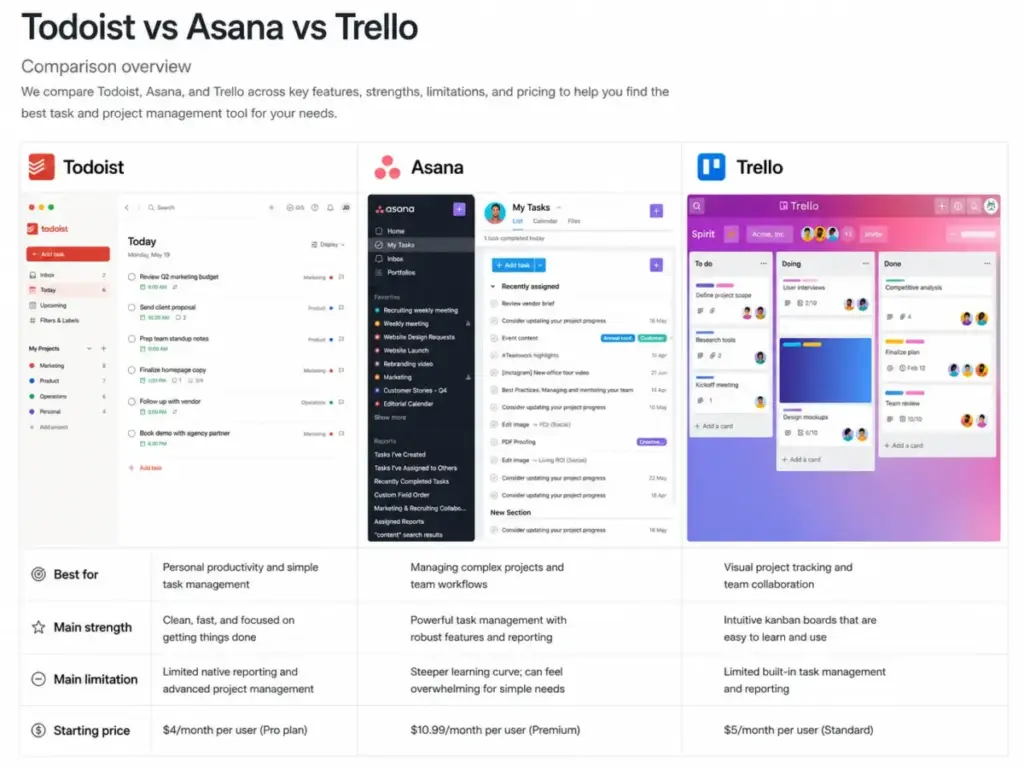
Asana provides the reporting depth that Todoist lacks. It offers timeline views, workload management, and cross-project portfolio reporting. If you need executives to see the health of 20 concurrent projects at a glance, Asana delivers that visibility natively. You can compare their pricing economics in our Asana pricing guide.
Trello for Visual Kanban Operations
If your team thinks strictly in boards and stages, Trello is a stronger alternative. Todoist has a board layout, but Trello’s entire ecosystem revolves around moving cards from left to right. It is often easier for non-technical teams to adopt because it mimics a physical whiteboard perfectly.
Notion for Document-Driven Work
Notion dominates when tasks require heavy documentation. Todoist attaches comments and files to a task, but Notion allows a task to be an entire document with embedded databases. If your team writes heavy specifications before executing tasks, Notion combines the knowledge base and the task list into one platform.
Wrike for Operations-Heavy Teams
If your organization manages complex, multi-phase campaigns with resource dependencies, Wrike is a better fit. It provides Gantt charts, workload views, and approval workflows that Todoist does not support.
Todoist Pros and Cons
- Fastest task capture in the category. Smart Quick Add with natural language parsing turns a sentence into a fully scheduled, labeled, and prioritized task in seconds.
- Reliable cross-device sync. Todoist runs on web, macOS, Windows, Linux, iOS, iPadOS, Android, Apple Watch, and Wear OS. The experience is consistent across all platforms.
- Genuinely useful free tier. Beginner includes Smart Quick Add, task reminders, list and board layouts, and integrations. It works for users with fewer than 5 active projects.
- Recurring date logic is best-in-class. Complex natural language patterns like “every other weekday” or “every last Friday of the month” are parsed correctly.
- Clean, distraction-free design. The interface does not overwhelm new users. Onboarding is near-instant for individuals.
- Strong integration ecosystem. Over 90 official integrations including Slack, Google Calendar, Jira, Microsoft Teams, Zapier, and IFTTT. The platform connects to 1,000+ apps through automation partners.
- 5-project limit on Beginner creates upgrade pressure fast. Most professionals exceed 5 active projects within weeks.
- No native task dependencies. You cannot link tasks sequentially. This forces manual workarounds for any sequential workflow.
- No phone support on any plan. Business teams paying $96/user/year still rely on ticket-based support only.
- Calendar layout gated behind Pro. Visual time planning requires a paid subscription.
- Basic reporting. Activity history on Beginner is limited to 1 week. Even on Pro, reporting lacks burn-down charts, workload capacity, or portfolio-level views.
- Team folders cannot be nested. Operations teams with many projects lose organizational depth.
- Webhook reliability is not guaranteed. Official docs warn events may arrive late, out of order, or not at all.
FAQ
Is Todoist worth it in 2026?
Yes. Todoist Pro is worth $60 per year for professionals who need fast, reliable task capture across all devices. The Business plan is worth it for small teams that want simple coordination without paying for heavy enterprise features they will never use.
How much does Todoist cost in 2026?
Todoist offers a free Beginner plan. The Pro plan costs $7 per month (or $60 per year). The Business plan costs $10 per user per month (or $96 per user per year). These updated prices apply to renewals on or after December 10, 2025.
What are the main pros and cons of Todoist?
The main pros are instantaneous task capture, excellent natural language date parsing, and reliable cross-platform syncing. The main cons are the restrictive 5-project limit on the free plan, the lack of native task dependencies, and the inability to nest team project folders.
Who should use Todoist?
Solo professionals, freelancers, students, and executives should use Todoist for personal task management. Small teams of 3 to 10 people should use the Business plan for lightweight, low-friction project coordination.
Who should avoid Todoist?
Product, engineering, agency, or operations teams that require Gantt charts, complex resource planning, native time tracking, or advanced portfolio reporting should avoid Todoist. These teams are better served by Asana, ClickUp, Monday.com, or Jira.
What is the best Todoist alternative?
The best alternative for visual project tracking is Trello. The best alternative for complex dependencies and portfolio management is Asana. For engineering teams, Jira or Linear are stronger picks.
Does Todoist have a calendar view?
Yes. Todoist offers a calendar layout that helps users visualize tasks and block time. This calendar layout is locked behind the paid Pro and Business tiers. It is not available on the free Beginner plan.
Does Todoist have task dependencies?
No. Todoist does not support native task dependencies. You cannot link Task B to start only after Task A completes. Users who need dependency management should evaluate Asana, ClickUp, or Wrike instead.
Is Todoist secure?
According to official documentation (as of May 2026), Todoist uses AWS hosting, transmits data over TLS 1.2 and 1.3, encrypts data at rest, and references compliance with GDPR. The pricing page also references SOC 2 compliance. Buyers should verify the latest certification scope before procurement.
Is Todoist good for small teams?
Todoist Business supports small teams with shared workspaces, up to 500 team projects, 1,000 members and guests, and differentiated roles. It works well for teams of 3 to 10 that need simple shared task lists. Teams above 15 to 20 users with complex workflows are better served by dedicated project management platforms.