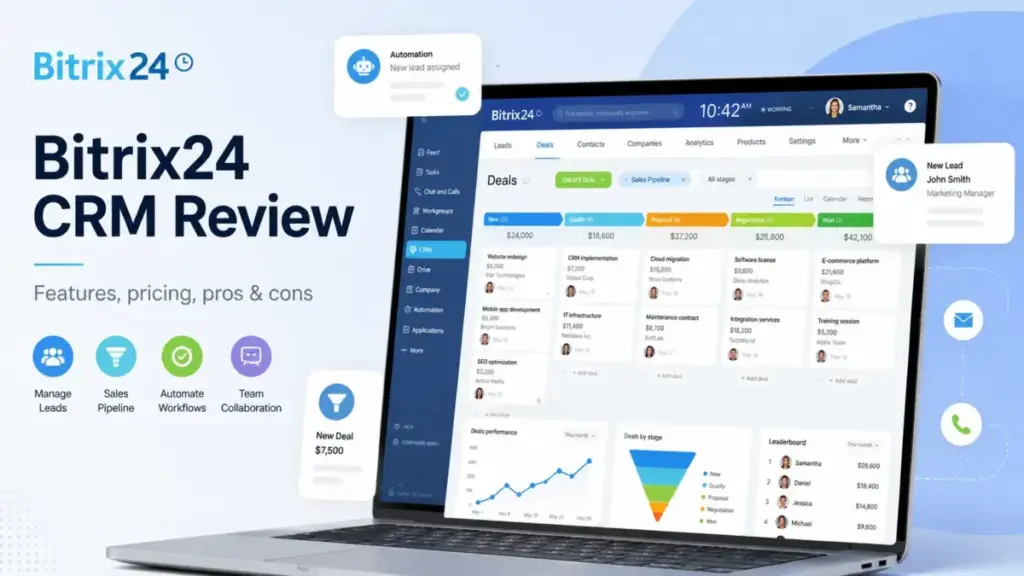
Bitrix24 is not a CRM. It is a business workspace that happens to include a CRM, and that distinction changes everything about how you should evaluate it. Most Bitrix24 CRM reviews treat it like a standard sales pipeline tool and praise the generous free plan.
The real buying question is different: does consolidating CRM, projects, chat, telephony, websites, HR, and automation into one flat-rate subscription reduce your tool sprawl, or does it bury your sales team under features they never asked for?
I evaluated Bitrix24 across official documentation, verified pricing data, third-party review validation from G2, Capterra, and TrustRadius, and competitive benchmarking against the best CRM software on the market.
This review covers what buyers need to understand about what CRM software is before committing to Bitrix24: plan-gated CRM limits, telephony costs that sit outside your subscription, a free plan with contradictory official messaging, and which team profiles get real value versus which ones should look elsewhere.
| Category | Detail |
|---|---|
| Product | Bitrix24 by Bitrix, Inc. |
| Category | CRM + all-in-one business workspace |
| Best for | 5-100 person teams wanting CRM, projects, chat, and automation in one subscription |
| Not for | Small sales teams wanting a clean, simple pipeline CRM |
| Starting price | US$0 (Free) to US$399/mo annual (Professional, 100 users) |
| Score | 6.8/10 |
| Verdict | Try if you need breadth; skip if you need CRM depth |
The 3 Problems Bitrix24 Solves
Bitrix24 earns its place in CRM conversations not because of CRM depth, but because of workspace breadth. Three specific problems make it a legitimate contender.
Problem 1: Tool Sprawl for Operations-Heavy Teams
A 20-person service business running separate tools for CRM, project management, internal chat, video calls, website hosting, and document storage pays for 5-7 subscriptions. Bitrix24 Standard at US$99/month billed annually covers 50 users and bundles CRM pipelines, unlimited projects, recurring tasks, invoicing, estimates, online payments, WhatsApp marketing, e-commerce, chat, video calls, shared calendars, and 100 GB storage into one flat-rate bill (Bitrix24 pricing page, verified May 2026).
That is the value proposition in one number. A 20-person team on Standard pays US$4.95 per user per month. Try matching that per-user cost with separate CRM, PM, and communication tools.
Problem 2: Flat-Rate Pricing Versus Per-Seat Escalation
Most CRM tools charge per seat. Bitrix24 charges per organization with user caps. The math favors Bitrix24 as teams grow within a tier.
At 5 users on Basic (US$49/month annual), you pay US$9.80 per user. At 50 users on Standard (US$99/month annual), you pay US$1.98 per user. At 100 users on Professional (US$199/month annual), you pay US$1.99 per user. Compare that to a per-seat CRM at US$25/user: a 50-person team pays US$1,250/month versus Bitrix24’s US$99/month.
The flat-rate model rewards organizations that fill their user cap. It punishes teams that buy a tier for features but only use a fraction of the seats.
Problem 3: CRM-Adjacent Workflows in One Data Layer
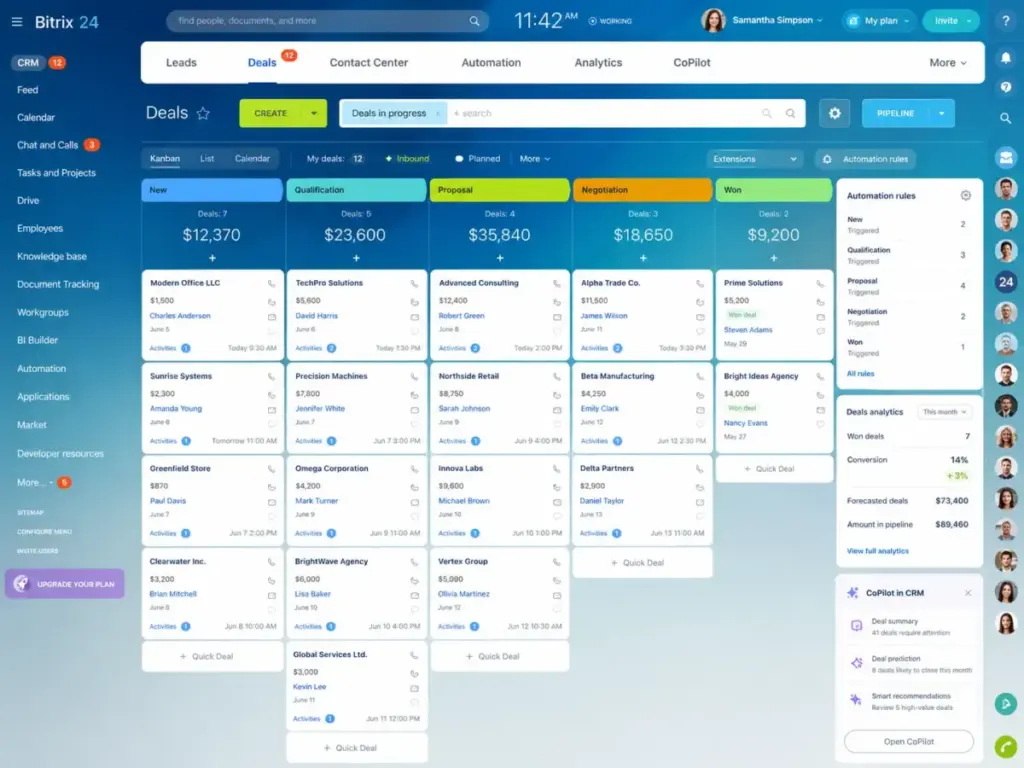
Bitrix24’s CRM modules span sales management, marketing, contact center, analytics, mobile CRM, and automation. The CoPilot AI assistant handles call transcription summaries and field auto-completion on qualifying plans. The integration with built-in tasks, projects, chat, and telephony means a deal closed in CRM can trigger a project, assign tasks, and notify the delivery team without leaving the platform.
On the Professional plan, workflow automation, RPA, e-signature, booking, and HR management tools connect to the same data layer. For agencies and service businesses that hand off sales deals to project teams, this single-system handoff removes the Zapier glue and CSV exports that plague multi-tool setups.
According to G2’s review summary, users value the integrated CRM, project management, and communication scope (G2 Bitrix24 reviews). Capterra reviewers confirm strong contact organization and activity tracking (Capterra Bitrix24 listing).
The 2 Problems Bitrix24 Creates
The same breadth that solves tool sprawl creates two friction points that most reviews understate.
Problem 1: Onboarding Complexity and Interface Overload
Bitrix24 combines CRM, projects, collaboration, telephony, automation, websites, HR, and documents into one interface. For a team that only wants pipeline management and deal tracking, the surrounding modules create noise.
G2 reviewers note that the interface can feel cluttered and overwhelming for newcomers. Capterra sentiment mentions occasional complexity and limited free customization. TrustRadius reviews reference mobile-version limitations alongside praise for collaboration features.
This is not a minor UX complaint. Onboarding complexity directly affects CRM adoption rates. If your sales reps find the interface confusing, they stop logging activities. A CRM that nobody uses is worse than no CRM at all.
Bitrix24’s support structure compounds the problem. According to Bitrix24 support documentation, AI support chat is available on all plans. Transfer to a live support specialist is available only on commercial (paid) plans. Free plan users rely on self-support resources. If your team hits a wall during setup on the Free plan, your options are help articles and community forums.
Partner implementation, customization, and training services exist but carry separate costs. Budget for onboarding investment if your team adopts more than basic CRM functions.
Problem 2: CRM Value Is Plan-Gated
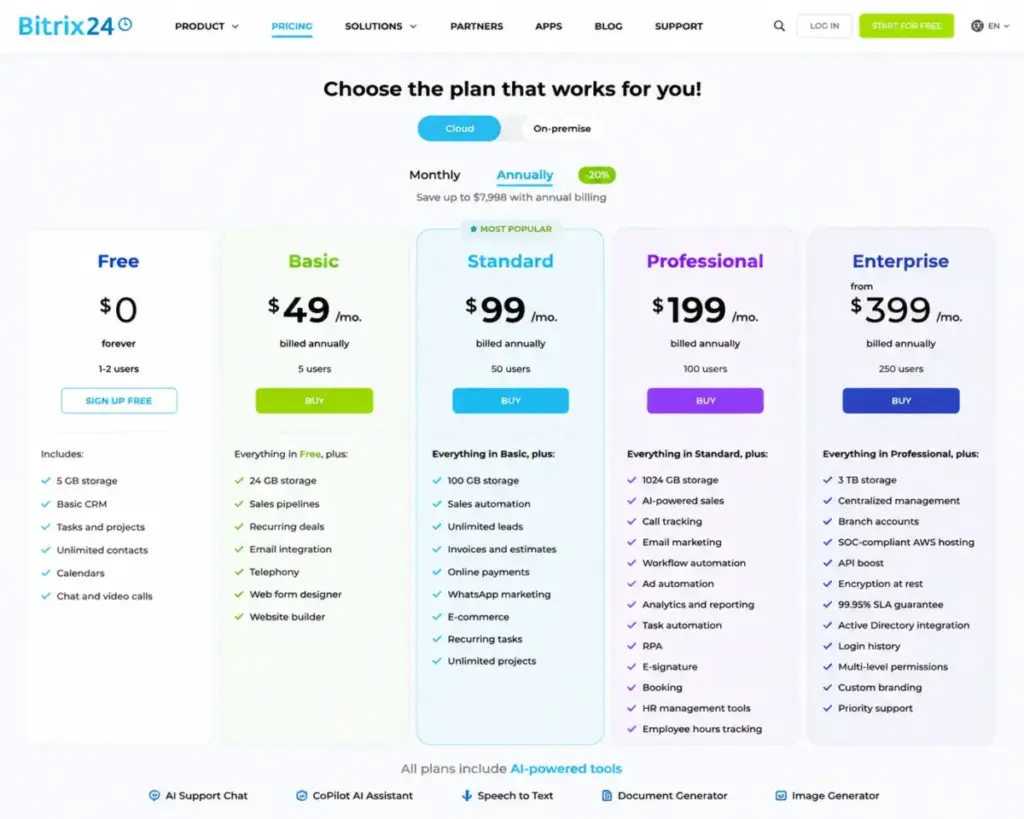
Bitrix24’s CRM capabilities scale sharply by tier. The Free plan includes basic CRM. Basic adds sales pipelines and recurring deals. Standard unlocks sales automation, unlimited leads, invoices, and estimates. Professional gates AI-powered sales, call tracking, analytics and reporting tools, workflow automation, and RPA behind US$199/month annual.
The gap between “Bitrix24 has a CRM” and “Bitrix24 has a CRM that competes with dedicated sales tools” sits at the Standard-to-Professional boundary. Teams that need automation rules, custom analytics, or AI-assisted selling pay Professional pricing. At that point, the per-user math still favors Bitrix24 over per-seat competitors, but the feature set competes against tools like Salesforce’s enterprise CRM and HubSpot’s sales platform that have deeper CRM-specific capabilities.
Bitrix24 Pricing Reality in 2026
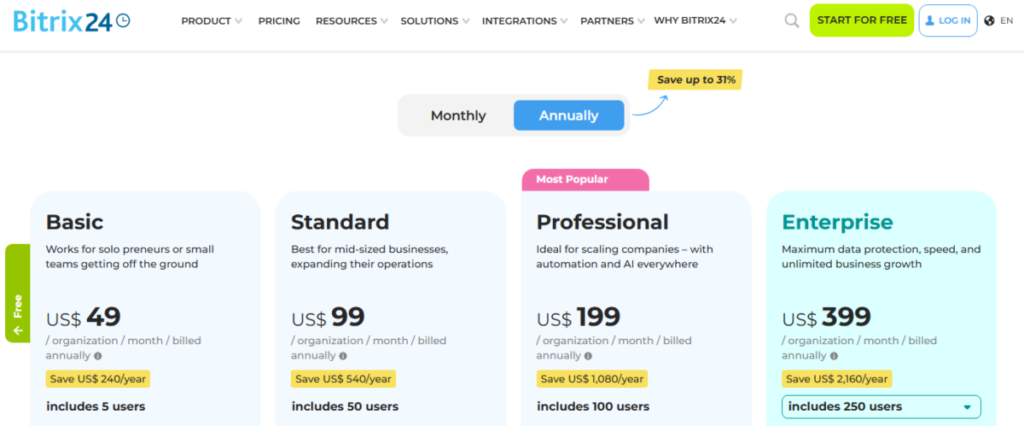
Bitrix24’s pricing is flat-rate per organization, not per user. That structure is the product’s strongest financial argument, and also the source of its most confusing buyer trap.
The Plan Breakdown
All prices verified from Bitrix24’s official pricing page as of May 2026.
| Plan | Monthly Price | Annual Price | Users | Storage | Key CRM Additions |
|---|---|---|---|---|---|
| Free | US$0 | US$0 | See note below | 5 GB | Basic CRM, tasks, chat, video calls |
| Basic | US$69/mo | US$49/mo | 5 | 24 GB | Sales pipelines, recurring deals, email integration, telephony, web forms, website builder |
| Standard | US$144/mo | US$99/mo | 50 | 100 GB | Sales automation, unlimited leads, invoices, payments, WhatsApp marketing, e-commerce |
| Professional | US$289/mo | US$199/mo | 100 | 1,024 GB | AI-powered sales, call tracking, email marketing, workflow automation, RPA, e-signature, analytics, HR tools |
| Enterprise | From US$579/mo | From US$399/mo | 250-10,000 | 3-100 TB | Branch accounts, centralized management, API boost, encryption at rest, 99.95% SLA, Active Directory, priority support |
Enterprise scales up to US$11,499/month (monthly billing) or US$7,999/month (annual billing) for 10,000 users with up to 100 TB storage.
The Free Plan Warning
This is the part most reviews get wrong. Bitrix24’s US pricing card currently lists the Free plan as “100% free for 1-2 users” with 5 GB storage. The official plan comparison page and pricing FAQ still reference unlimited users for the Free plan.
I cannot tell you which number is correct because Bitrix24’s own pages conflict. If you plan to roll out the Free plan to more than 2 users, verify your account limits directly with Bitrix24 before committing your team. Do not assume unlimited free users based on older documentation.
Where the Hidden Costs Live
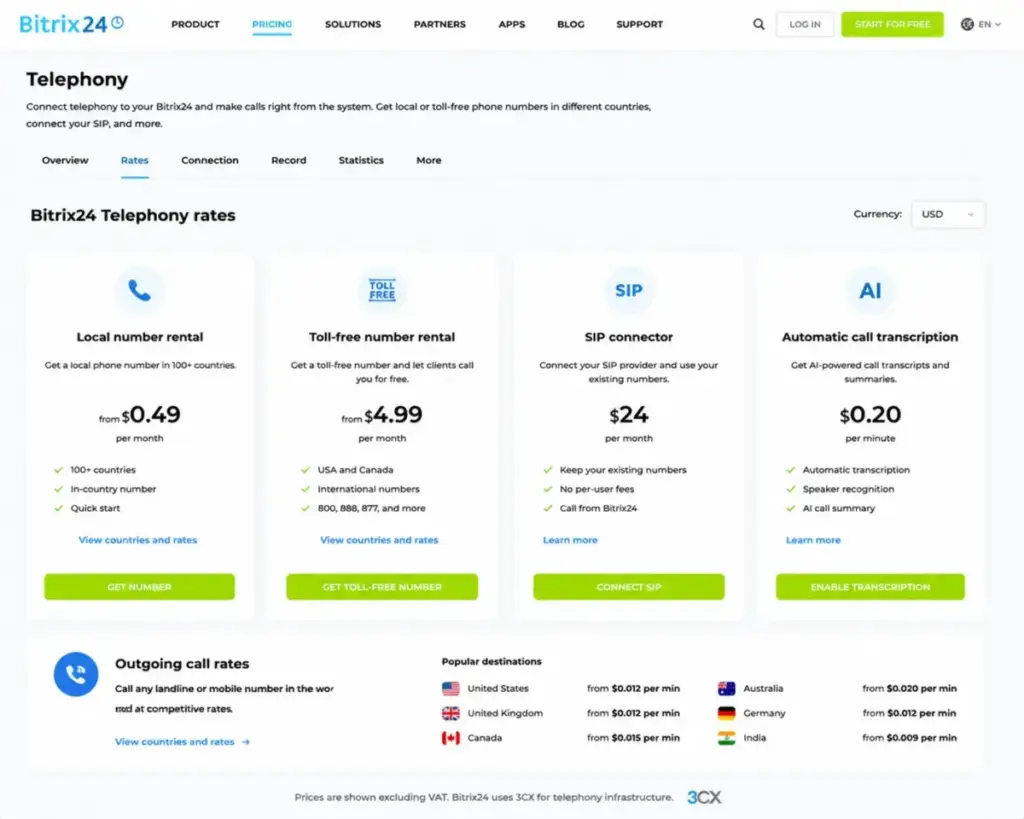
Bitrix24’s subscription price is not the full cost for teams that use telephony. Telephony add-ons sit outside the flat-rate subscription and generate separate charges.
According to Bitrix24’s telephony pricing page, verified May 2026:
| Telephony Add-On | Cost |
|---|---|
| Local number rental | US$4-US$11/month |
| Toll-free number rental | US$6/month |
| SIP connector | US$49/month |
| Automatic call transcription | US$0.05/minute |
A sales team making 500 minutes of outbound calls per month with automatic transcription adds US$25/month in transcription costs alone, plus number rental and any per-minute calling charges. For call-heavy teams, telephony can add US$50-US$150/month on top of the subscription.
Partner implementation, customization, and training services carry separate quote-based fees. Marketplace apps from the Bitrix24 Market can add further costs.
What the 15-Day Trial Does Not Prove
Bitrix24 offers a 15-day trial of Professional-plan features, but with restrictions that limit how much you can actually validate:
- Email campaigns via Marketing: unavailable
- CRM forms: unavailable
- BI Builder: unavailable
- CRM analytics: limited to 1,000 items
- Telephony: paid separately during trial
- Bitrix24 Support: not available for Free plan users in trial mode
The trial can only be activated once. You cannot reset it. Plan your evaluation carefully, and focus trial time on the CRM automation, workflow, and reporting features that justify the Professional price point, because those are the capabilities you cannot test on lower plans.
Bitrix24 Security and Compliance by Tier
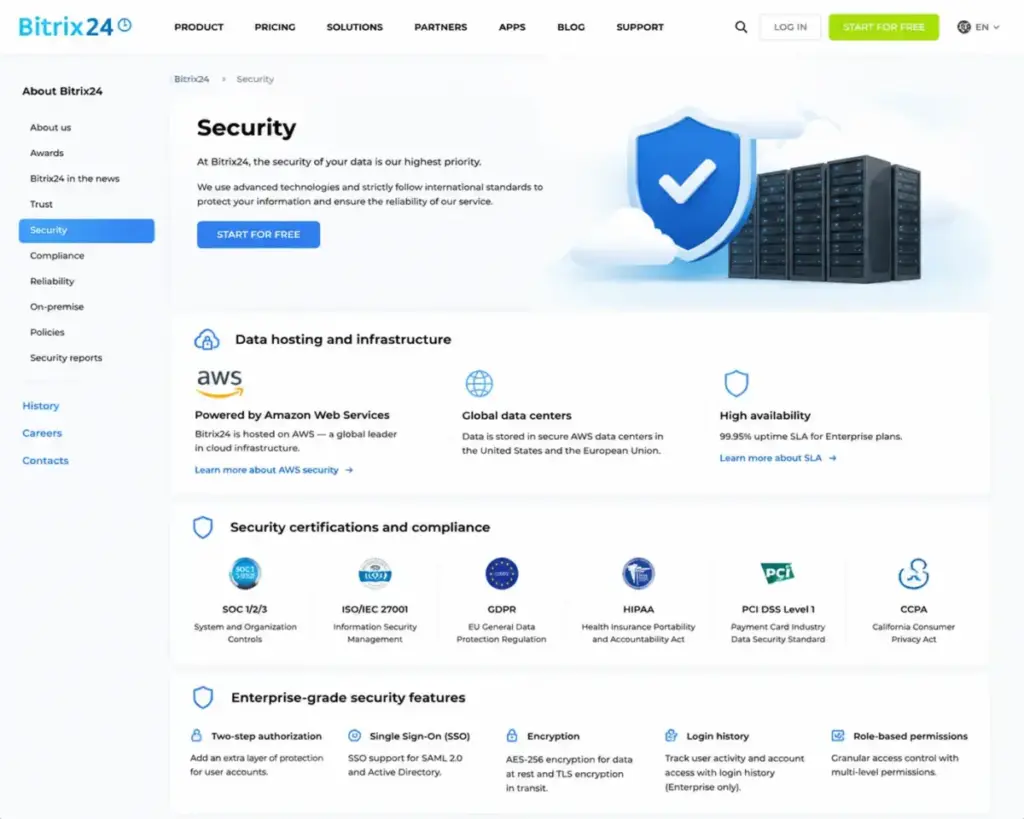
Security claims for Bitrix24 require tier-specific context. Most reviews say “Bitrix24 is secure” without distinguishing between general cloud protections and Enterprise-only controls.
According to Bitrix24’s security page, the platform provides privacy and security protections for HIPAA, GDPR, and other compliance frameworks. Bitrix24 Helpdesk documentation confirms cloud data is stored on AWS servers in the United States and European Union, with AWS meeting standards including HIPAA, GDPR, ISO 27001, SOC 1/2/3, and PCI DSS Level 1.
The distinction matters at the Enterprise tier. Enterprise-specific controls include two-step authorization, AES-256 encryption at rest, SSO, login history, Active Directory integration, 99.95% SLA guarantee, custom branding, and priority support. These controls are positioned as Enterprise features, not available on lower plans.
| Security Layer | All Plans | Enterprise Only |
|---|---|---|
| AWS hosting (US + EU) | Yes | Yes |
| GDPR, HIPAA protections | Yes | Yes |
| Two-step authorization | Yes | Yes |
| AES-256 encryption at rest | No | Yes |
| SSO and Active Directory | No | Yes |
| Login history | No | Yes |
| 99.95% SLA guarantee | No | Yes |
| Priority support | No | Yes |
If your compliance requirements include encryption at rest, SSO, login history, or an SLA guarantee, you need Enterprise. There is no middle path.
Bitrix24 Mobile CRM and API
Bitrix24 offers a free mobile app for iOS and Android with tasks, chat, documents, and CRM access (Bitrix24 mobile app page). The official positioning frames it as an all-in-one mobile workspace.
User sentiment is mixed. TrustRadius reviews praise collaboration and CRM use cases on mobile but note limitations in the mobile version, with some features unavailable compared to the desktop experience (TrustRadius Bitrix24 reviews). Field sales teams should test mobile CRM workflows during the trial period before committing.
On the API side, Bitrix24 supports REST API, inbound and outbound webhooks, and custom app development. According to Bitrix24 developer documentation, any user can create webhooks, while only administrators can create apps. Enterprise includes an API boost for higher throughput.
Exact public API rate limits were not verified during this evaluation. Technical teams planning custom integrations should confirm expected API load with Bitrix24 or a certified partner before building.
Who Wins and Who Loses with Bitrix24
Not every team benefits equally from Bitrix24’s breadth. The verdict depends on your operating model and team size.
Who Wins
| Team Profile | Recommended Plan | Why |
|---|---|---|
| 5-person startup wanting CRM + projects + communication | Basic (US$49/mo annual) | Flat rate covers pipelines, recurring deals, email integration, telephony, web forms, and website builder for 5 users |
| 50-person service business combining sales, delivery, and internal tasks | Standard (US$99/mo annual) | Sales automation, invoices, payments, unlimited projects, and recurring tasks for cross-functional teams at US$1.98/user |
| 100-person company needing automation, AI, reporting, and HR | Professional (US$199/mo annual) | Workflow automation, RPA, analytics, AI-powered sales, e-signature, and HR tools at US$1.99/user |
| Enterprise with branch accounts and central administration | Enterprise (from US$399/mo annual) | Branch accounts, centralized management, API boost, encryption at rest, SLA, and Active Directory |
Who Loses
- Small sales teams (3-10 reps) wanting only pipeline CRM. The surrounding project management, HR, website, and collaboration modules add interface weight without CRM value. A focused CRM like Pipedrive gets reps selling faster with less setup.
- Teams that prioritize CRM reporting and analytics. Bitrix24’s analytics are plan-gated, and the depth does not match dedicated CRM platforms. If reporting drives your buying decision, Salesforce Sales Cloud or Zoho CRM offer deeper CRM-specific analytics at comparable or lower cost for small teams.
- Buyers who need fast self-serve onboarding. Bitrix24’s breadth creates a steeper setup curve than single-purpose CRM tools. If your team needs to be productive within a day, not a week, a simpler tool wins.
- Organizations needing polished mobile CRM. Mobile limitations noted by users suggest the desktop experience is the primary interface. Field-first sales teams should test carefully.
Bitrix24 earns 6.8/10. It is a workspace, not a CRM. That is a strength for operations-heavy teams and a weakness for pure sales organizations.
Better Alternatives for Teams That Should Not Use Bitrix24
If Bitrix24’s breadth creates more friction than value for your team, these alternatives solve specific pain points.
HubSpot CRM: When You Want Simpler CRM Adoption
HubSpot CRM offers a free tier with unlimited users and a cleaner onboarding path for sales teams that want pipeline management without project management, HR, or website builder modules attached. The CRM-specific UX is more polished. The trade-off: HubSpot’s per-seat pricing at Professional tier (Sales Hub) escalates faster than Bitrix24’s flat rate for larger teams. Choose HubSpot if CRM adoption speed matters more than workspace breadth. Read our full HubSpot CRM analysis for the detailed pricing math, or see how the two compare in our Bitrix24 vs HubSpot breakdown.
Pipedrive: When Your Team Only Needs Pipeline Management
Pipedrive strips CRM to its core: visual pipeline, deal tracking, activity management. No project management module, no website builder, no HR tools. For a 10-person sales team that wants reps logging activities in under 5 minutes per day, Pipedrive delivers faster adoption. It ranks among the best CRM tools for sales teams for exactly this reason. Pipedrive charges per seat, so the cost comparison favors Bitrix24 at 25+ users but favors Pipedrive at 5-10 users who only need CRM.
Zoho CRM: When You Want CRM Depth at Lower Cost
Zoho CRM’s tiered approach offers deeper CRM-specific features (lead scoring, territory management, custom modules) at per-user pricing that competes with Bitrix24’s flat rate for smaller teams. Zoho’s ecosystem also includes Zoho Projects, Zoho Desk, and Zoho Analytics as separate products, giving you modular expansion without the all-in-one interface overhead.
Monday CRM: When Your Team Thinks in Work Management
Monday CRM bridges CRM and project management with a work-management-first interface. For teams that already think in boards, automations, and dashboards, monday CRM feels more intuitive than Bitrix24’s module-heavy layout. The automation limits per plan are tighter than Bitrix24 Professional, but the learning curve is shorter.
| Scenario | Best Choice | Why | Avoid If |
|---|---|---|---|
| 5-person team wanting CRM only | Pipedrive | Fastest pipeline setup, clean UX | You also need projects and chat |
| 10-person team wanting CRM + marketing | HubSpot CRM | Stronger marketing automation integration | Per-seat cost at 25+ users exceeds budget |
| 50-person team wanting CRM + everything | Bitrix24 Standard | US$1.98/user flat rate with projects, invoicing, chat | Team only needs sales pipeline |
| CRM depth and analytics priority | Zoho CRM | Deeper CRM-specific modules | You want all-in-one workspace |
| Work-management-first team | Monday CRM | Intuitive board-based CRM | You need advanced automation at scale |
Bitrix24 CRM Review: FAQ
Is Bitrix24 actually free?
Bitrix24 offers a Free plan, but the user count is unclear. The US pricing card says “100% free for 1-2 users” with 5 GB storage, while the official plan comparison and FAQ reference unlimited users. Verify your account limits with Bitrix24 before rolling out the Free plan to a team. The Free plan includes basic CRM, tasks, shared calendars, chat, and video calls.
How much does Bitrix24 CRM cost in 2026?
Bitrix24 uses flat-rate organization pricing, not per-user pricing. Basic costs US$49/month annual (5 users), Standard costs US$99/month annual (50 users), Professional costs US$199/month annual (100 users), and Enterprise starts at US$399/month annual (250 users). Telephony, SIP connector, and call transcription generate separate costs outside these subscription prices.
Does Bitrix24 charge per user?
No. Bitrix24 charges per organization with user caps per plan. Basic includes 5 users, Standard includes 50, Professional includes 100, and Enterprise starts at 250. You pay the same flat rate whether you use 1 seat or fill the cap. This model favors teams that maximize their user allocation.
What are the main limitations of Bitrix24 CRM?
The interface combines CRM with project management, chat, HR, and website tools, which creates clutter for teams that only want sales pipeline management. CRM analytics, automation, and AI features are gated behind higher plans. Telephony costs sit outside the subscription. Free plan support is limited to AI chat and self-service resources, with no live specialist access. Mobile app functionality is more limited than the desktop experience.
Who should use Bitrix24?
Operations-heavy SMBs (5-100 users), agencies, and service teams that want CRM, tools from the best project management software category, chat, telephony, website builder, and automation under one flat-rate subscription. The value is strongest when your team actively uses at least 3-4 modules and fills the user cap on your plan.
Who should avoid Bitrix24?
Small sales teams (under 10 reps) that only need clean pipeline CRM. Teams that prioritize polished CRM reporting over breadth. Organizations that need fast self-serve onboarding with minimal configuration. Buyers who want best-in-class CRM UX over workspace scope.
What is the best Bitrix24 alternative?
For simple pipeline CRM, choose Pipedrive. For CRM with marketing automation, choose HubSpot CRM. For CRM depth at lower per-user cost, choose Zoho CRM. For work-management-friendly CRM, choose monday CRM. For complex enterprise CRM with mature reporting, choose Salesforce Sales Cloud. Your best alternative depends on whether you are leaving Bitrix24 for simplicity, CRM depth, or better UX. For a broader switching framework, compare Bitrix24 alternatives by CRM depth, workspace breadth, setup complexity, and the specific reason your team is leaving Bitrix24.
Does Bitrix24 have good customer support?
AI support chat is available on all plans. Live support specialist access requires a commercial (paid) plan. Free plan users rely on self-support resources: help articles, community forums, and documentation. Bitrix24 partners offer implementation, customization, training, and local-language support as paid services. Enterprise users get priority support.
Is Bitrix24 secure?
Bitrix24 stores cloud data on AWS servers in the US and EU. AWS infrastructure meets HIPAA, GDPR, ISO 27001, SOC 1/2/3, and PCI DSS Level 1 standards. Enterprise-tier controls add AES-256 encryption at rest, SSO, Active Directory integration, login history, custom branding, and a 99.95% SLA guarantee. Lower plans rely on general cloud security without these Enterprise-specific controls.
Can Bitrix24 replace project management software?
Bitrix24 includes tasks, projects, Kanban boards, Gantt charts, recurring tasks, and time tracking. Standard and Professional plans unlock unlimited projects. For teams that need basic-to-moderate project management alongside CRM, Bitrix24 covers both. For teams with complex PM needs (resource management, advanced dependencies, sprint planning), a dedicated PM tool paired with a simpler CRM provides better depth in both categories.
Which Bitrix24 plan should I choose?
Start with Basic (US$49/month annual, 5 users) if you want CRM pipelines, email, and telephony. Move to Standard (US$99/month annual, 50 users) if you need sales automation, invoicing, and unlimited projects. Choose Professional (US$199/month annual, 100 users) only if you need workflow automation, AI-powered sales, analytics, RPA, or HR tools. Enterprise is for organizations requiring branch accounts, central administration, security controls, and SLA guarantees.