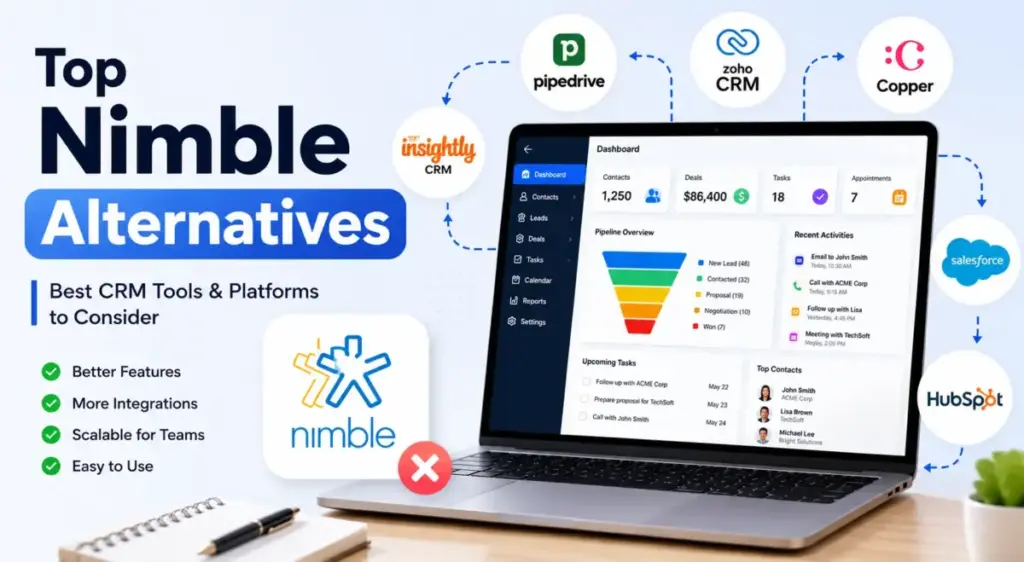
Nimble’s base plan looks simple at $24.90 per user/month billed annually, or about $249/month for 10 users.
But once a team adds web forms, higher group-message volume, AI marketing, or extra capacity, the practical monthly cost can climb much higher.
More importantly, you are still locked behind a rigid 25,000 contact record ceiling and a restrictive 2 GB per user storage cap that forces growing teams to seek more scalable best CRM software options.
If your database is expanding, these limits will eventually force you to evaluate Nimble alternatives. Selecting a replacement depends on which operational ceiling you have hit. This guide evaluates the best options for 2026 by normalized cost, feature access, setup friction, and team alignment.
Quick Verdict: Best Nimble Alternatives by Switching Trigger
Selecting the right alternative requires identifying the specific bottleneck that is slowing down your sales operations.
| If you are leaving Nimble because… | Best alternative | Why |
|---|---|---|
| Pricing gets expensive at scale | Freshsales | growth plan starts at $9/user/month with built-in phone |
| Automation is too limited | HubSpot Sales Hub | advanced sequence builders and deep marketing automation |
| Reporting is weak | Zoho CRM | custom analytics dashboards and Zia AI forecasting tools |
| Setup is too complex | Less Annoying CRM | single-tier flat rate with zero learning curve |
| Product is too lightweight | Salesforce Starter Suite | enterprise upgrade path with custom permissions |
| Support is a concern | Insightly CRM | live support included on entry plans with project delivery |
| You need better Workspace integration | Copper CRM | lives directly inside Gmail sidebar and Google Calendar |
| API access is too restricted | Attio | fully flexible data model with custom objects and API credits |
What this means: Teams should not look for a generic CRM replacement. Instead, you must match your next platform to the exact operational pain point that prompted your departure from Nimble.
The Nimble CRM Problem Map
Teams look for alternatives to Nimble when contact databases grow, storage limits fill up, or sales workflows require deep automation. While Nimble is excellent for lightweight social relationship tracking, its single-tier model creates significant pressure points as teams scale.
To understand what CRM software actually does at scale, you must look at how the data layer handles expanding contact records and files. Nimble caps every account at 25,000 contact records and only provides 2 GB of storage per user. If you sync active email histories with large attachments, you will hit this limit quickly. Purchasing additional storage or contact blocks increases your monthly bill, eroding Nimble’s cost advantage.
Additionally, Nimble’s sales automation is basic. It lacks advanced lead scoring, visual sales forecasting, and custom workflow triggers. The mobile app has limited functionality compared to the desktop version. For technical teams, Nimble’s API is restrictive, limiting custom database configurations.
| Nimble CRM Core Strengths | Nimble CRM Core Limitations |
|---|---|
| Strong social media profile enrichment | Strict 25,000 contact record cap per account |
| Unified smart contacts inbox | Restrictive2 GB storage limit per user seat |
| Easy email and calendar integration | Advanced sales automation is locked or missing |
| Lighter learning curve for small teams | Paid add-ons required for web forms and AI features |
What this means: Nimble remains a capable relationship manager for small teams under five users. However, for growing sales operations, it is a temporary stepping stone rather than a long-term database solution.
Alternatives That Fix Pain 1: Contact Caps and Storage Pressure
Growing databases require systems that do not penalize you for collecting email histories, customer files, and lead lists. These three alternatives provide high storage limits or flexible data architectures.
HubSpot Sales Hub: Best free-to-scale Nimble alternative
HubSpot is the strongest Nimble alternative for teams that want a free entry point and need a platform that scales into an enterprise system.
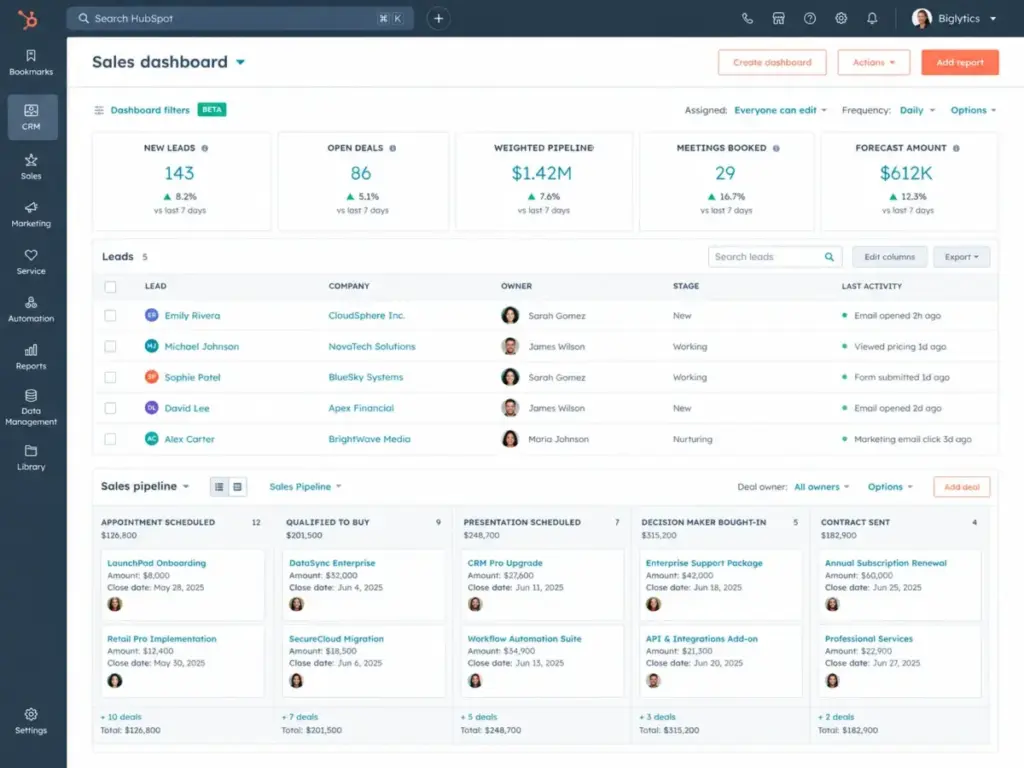
Based on official product documentation, HubSpot’s pricing starts with a Free plan for basic contact management. The practical tier for growing teams is the Starter plan, which is shown at $10 per user monthly under a promotional new-customer discount, with a list reference of $20 per user monthly.
HubSpot does better than Nimble by offering a unified database with marketing, sales, and service tools sharing a single data layer. You get no limits on contact records (up to 15 million system limit) and vastly larger storage capacities.
The tradeoff is that advanced automation, custom objects, and forecasting tools are locked behind the Professional plan, which jumps steeply to $90–$100 per user monthly with mandatory onboarding fees starting at $3,000.
- Best for: Small to mid-sized teams that need marketing alignment and a clear upgrade path.
- Avoid if: You have a strict budget limit under $200/month and require custom reporting objects.
- Migration difficulty: Medium. Moving contact lists is simple, but rebuilding complex sales sequences takes time.
Verdict: Choose HubSpot Sales Hub if you want to eliminate storage worries and plan to scale past twenty reps. Check the full HubSpot CRM review for feature details.
Salesforce Starter Suite / Sales Cloud: Best enterprise-scale upgrade path
Salesforce is the best option for teams that have outgrown Nimble’s basic data limits and need an enterprise-grade platform with custom permissions.
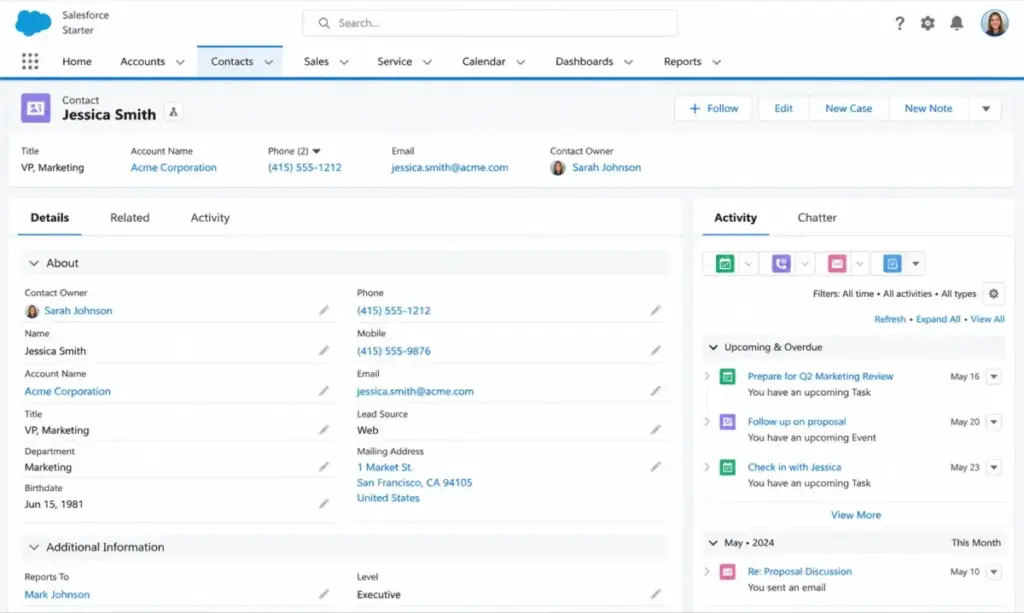
According to public pricing details, the entry-level Salesforce Starter Suite costs $25 per user monthly on annual or monthly terms. This plan includes basic lead, opportunity, and email tracking.
Salesforce does better than Nimble by offering a highly customizable data structure. You can build custom tables, link complex objects, and set up granular user access roles. The platform easily handles millions of records.
The main tradeoff is setup complexity. Salesforce Starter Suite is heavier and requires more administrative time. Higher tiers like Sales Cloud Professional cost $80–$100/user/month, and marketing automation add-ons start at $1,250 monthly.
- Best for: B2B sales teams with complex sales cycles and custom data tracking requirements.
- Avoid if: You do not have dedicated IT support or admin capacity to configure the software.
- Migration difficulty: High. Data mapping and workflow replication require careful planning.
Verdict: Choose Salesforce Starter Suite if you need a scalable database structure and want to avoid migrating again in the future. Read our Salesforce CRM analysis for setup advice.
Attio: Best modern relationship-data CRM
Attio is a modern alternative for tech-forward teams that want relationship tracking without rigid database structures.
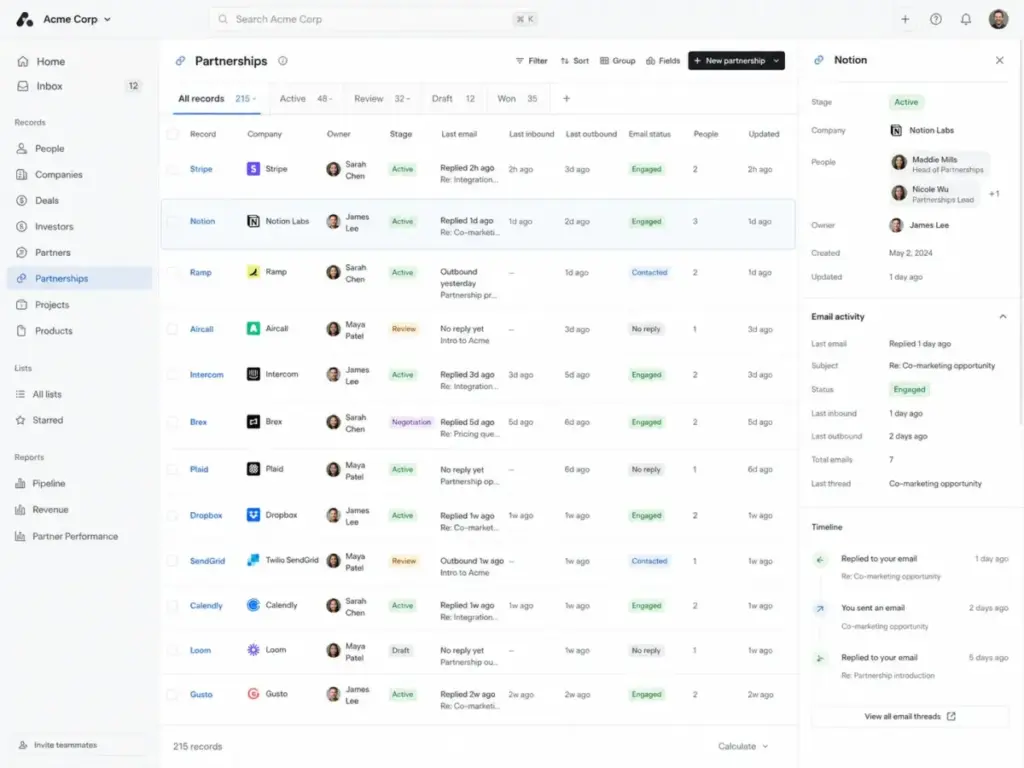
Reviewers on G2 note that Attio offers a Free plan for up to three users. The practical plan for growing teams is the Plus tier, which is listed at $29 per user monthly billed annually.
Attio does better than Nimble by using a fully flexible relational database model. You can create custom objects, configure automated pipelines, and track email metadata without strict record limits. It automatically enriches contacts using real-time company data.
The main tradeoff is that Attio requires manual setup. It does not come with preconfigured pipelines or opportunity layouts, meaning you have to design your CRM workspace from scratch.
- Best for: Startups and tech companies that need custom database structures and API integrations.
- Avoid if: You want a prebuilt sales pipeline that works immediately out of the box.
- Migration difficulty: Medium to High. Importing data is simple, but mapping custom relationship lines requires technical planning.
Verdict: Choose Attio if you want Nimble-style enrichment but need to build custom database tables.
Alternatives That Fix Pain 2: Rigidity in Pricing and Scale Costs
If Nimble’s single-tier pricing model feels too restrictive or expensive for your team size, these budget-friendly tools offer flexible pricing structures.
Freshsales: Best budget CRM with built-in communication tools
Freshsales is an excellent alternative for small sales teams that need to control costs while adding phone and chat capabilities.
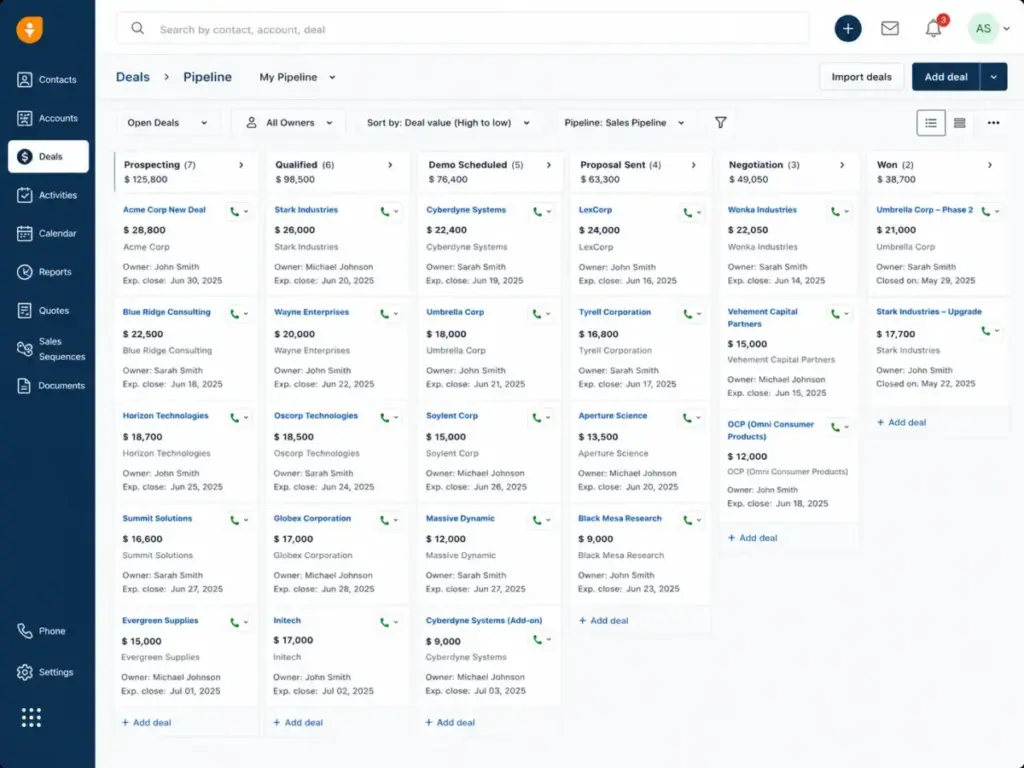
According to official pricing pages, Freshsales offers a Free plan for up to three users. The practical tier is the Growth plan, priced at $9 per user monthly on annual billing, or $15 monthly.
Freshsales does better than Nimble by providing built-in phone dialing, SMS, and live chat within the CRM interface. This eliminates the need for third-party telephony integrations. The Growth plan also includes basic workflow automation and multiple pipelines.
The main tradeoff is that advanced AI lead scoring (Freddy AI) and custom reporting fields are restricted to the Pro plan at $39 per user monthly.
- Best for: 5-person outbound sales teams that rely heavily on cold calling and email templates.
- Avoid if: You require complex sales forecasting models or 24/7 phone support.
- Migration difficulty: Low to Medium. Contact CSV imports are straightforward.
Verdict: Choose Freshsales if you want to lower your per-user subscription cost while gaining built-in dialers. For comparison details, look at our Freshsales review.
Nutshell CRM: Best affordable B2B sales CRM
Nutshell provides a balance of pipeline tracking and email marketing features without the high per-seat cost of enterprise systems.
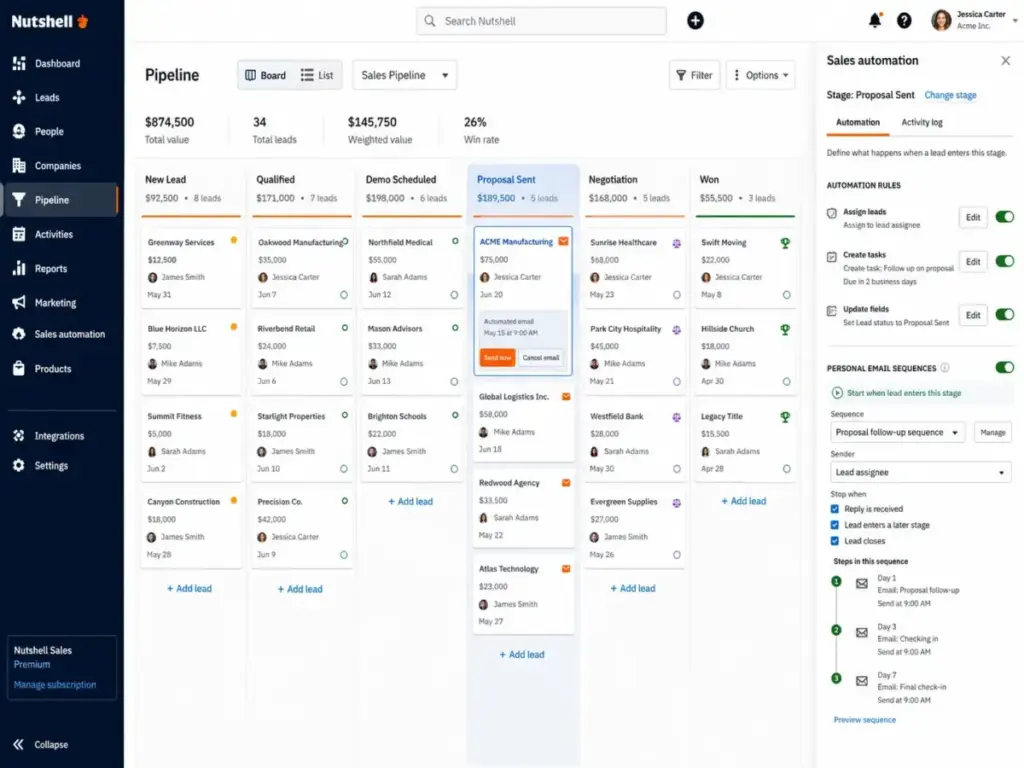
According to public pricing, Nutshell’s Foundation plan costs $13 per user monthly when billed annually. The Pro plan, which unlocks sales automation and custom pipelines, is $42 per user monthly.
Nutshell does better than Nimble by offering unlimited contact records and unlimited data storage on all paid plans. It also features built-in email sequencing and B2B quotes on the Pro plan, reducing the need for separate email tools.
The main tradeoff is that advanced API integrations and custom developer controls are restricted to the Enterprise plan at $79 per user monthly.
- Best for: B2B sales teams that send marketing sequences and track opportunities in a single interface.
- Avoid if: You need advanced social media profile enrichment or live chat widgets.
- Migration difficulty: Low to Medium. Nutshell provides free onboarding and importing assistance for switchers.
Verdict: Choose Nutshell CRM if you want to eliminate data caps without paying enterprise prices.
Zoho CRM: Best value CRM suite
Zoho CRM is the best option for teams that want deep customization, automation, and reporting at a reasonable price point.
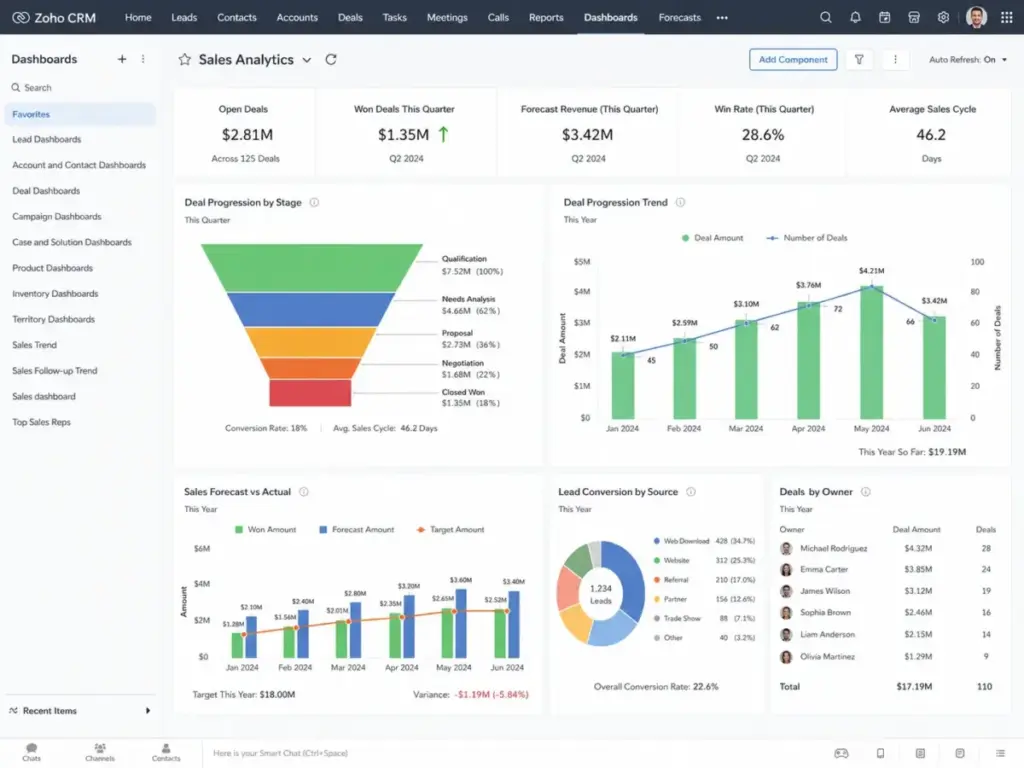
Capterra reviewers note that Zoho offers a Free edition for up to three users. The practical starting tier is the Standard plan, which is commonly listed at $14 per user monthly billed annually.
Zoho does better than Nimble by providing detailed workflow rules, visual sales forecasting, custom fields, and a standard database that scales to millions of records. It also integrates natively with the broader Zoho ecosystem.
The main tradeoff is complexity. Zoho’s interface is cluttered and takes longer to configure than Nimble’s clean smart contacts view.
- Best for: Growing sales teams that need custom workflows and detailed sales reporting.
- Avoid if: You want a simple, contact-centric relationship manager that requires zero training.
- Migration difficulty: Medium. Data export from Nimble works well, but workflow rules must be rebuilt manually.
Verdict: Choose Zoho CRM if you need custom dashboard reporting and advanced workflow rules. Read our Zoho CRM review for plan details.
Alternatives That Fix Pain 3: Lightweight Pipeline and Workspace Friction
Teams that prioritize deal velocity or live inside specific communication tools require CRMs designed around visual pipelines or deep Google Workspace integration.
Pipedrive: Best visual sales pipeline replacement
Pipedrive is a sales-first CRM built specifically for teams that focus on moving deals through opportunity stages.
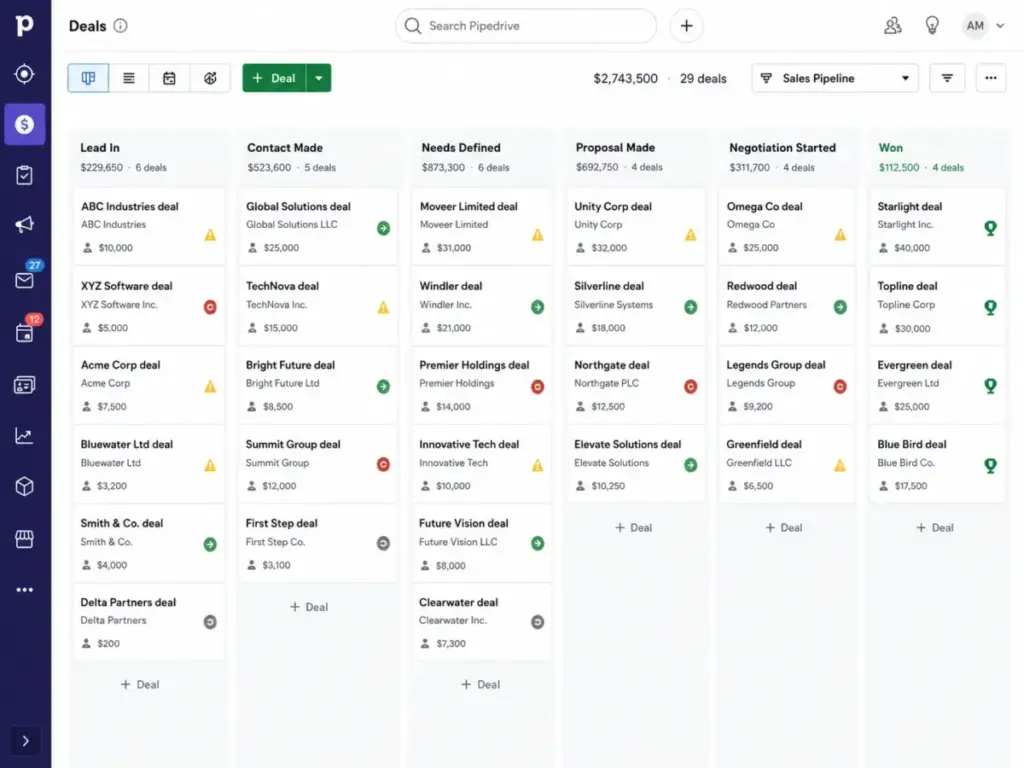
Third-party pricing references show that Pipedrive offers a 14-day free trial. The practical tier is the Advanced plan, priced at $29 per user monthly billed annually (or $44 monthly).
Pipedrive does better than Nimble by offering a highly visual, drag-and-drop pipeline interface with automated activity prompts. It keeps reps focused on the next action (emails, calls, meetings) required to advance a sale.
The main tradeoff is relationship context. Pipedrive is less focused on contact enrichment and social profiles. You will need third-party add-ons to replicate Nimble’s Prospector data lookup.
- Best for: Active sales teams that manage multi-stage pipelines and high deal volumes.
- Avoid if: Your primary need is managing long-term client relationships rather than active deals.
- Migration difficulty: Low to Medium. Pipedrive has a native data import tool that handles contact spreadsheets easily.
Verdict: Choose Pipedrive if pipeline visibility and rep activity tracking are your main priorities. Check the Pipedrive CRM review for feature analysis.
Copper CRM: Best Google Workspace CRM
Copper is designed for teams that run their entire sales operation out of a Gmail inbox and Google Calendar.
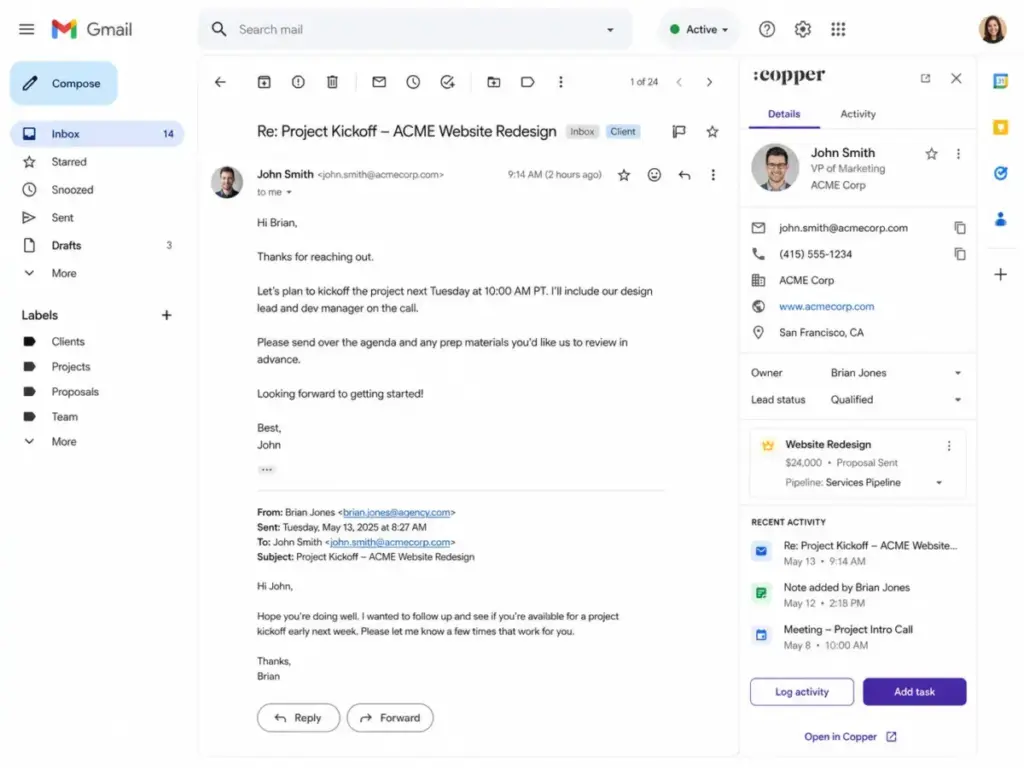
Based on official product pages, Copper’s Basic plan is priced at $23 per user monthly billed annually, or $29 monthly.
Copper does better than Nimble by integrating directly into Google Workspace. It runs inside your Gmail sidebar, allowing you to add leads, update deal stages, and log tasks without leaving your email. It also includes basic project tracking tools.
The main tradeoff is data caps. The Basic plan has a strict limit of 2,500 contacts, which is lower than Nimble’s limit. To increase this, you must upgrade to the Professional plan at $59 per user monthly.
- Best for: Google Workspace-heavy teams that want a CRM that matches Gmail’s interface.
- Avoid if: You use Microsoft Outlook or need to store more than 2,500 contacts on a budget.
- Migration difficulty: Medium. Copper syncs automatically with Gmail, but mapping historical data from Nimble takes setup time.
Verdict: Choose Copper CRM if your team lives in Gmail and you want to minimize data entry. Refer to the Copper CRM evaluation for detail.
Insightly CRM: Best CRM plus project delivery
Insightly is the best option for teams that need to manage the transition from a closed sale to project delivery in a single platform.
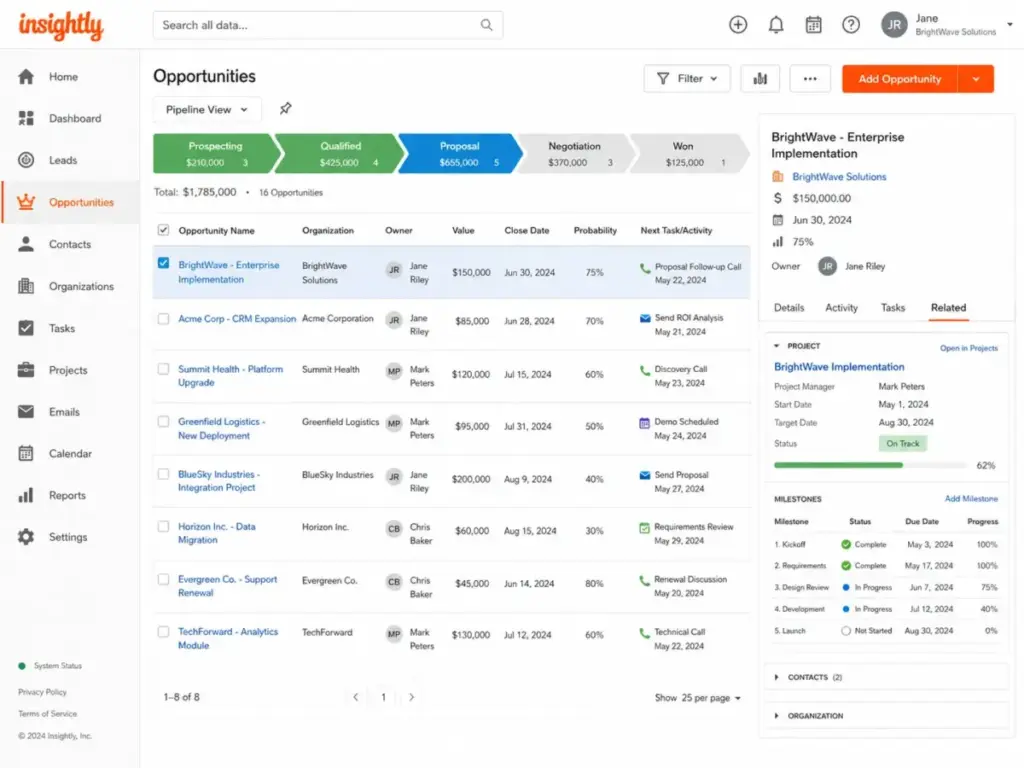
According to public pricing, Insightly’s Plus plan costs $29 per user monthly billed annually. This tier includes contact management, opportunity tracking, and project delivery boards.
Insightly does better than Nimble by offering built-in project management templates. When a deal is marked “Closed-Won,” you can automatically convert it into a project board with task milestones, tracking the delivery phase.
The main tradeoff is user experience. Insightly’s interface feels outdated and lacks the modern design of tools like HubSpot or Attio.
- Best for: Agencies and service providers that deliver custom work after a sale is finalized.
- Avoid if: You only need a simple relationship manager and use separate project tools.
- Migration difficulty: Medium. Rebuilding custom sales-to-project automations requires setup planning.
Verdict: Choose Insightly CRM if you want to eliminate the gap between your sales pipeline and project teams. Read our full Insightly CRM review for details.
The Alternative Nobody Mentions: Less Annoying CRM
If you are frustrated by the complexity of enterprise systems and the rising costs of add-on features, a simple underdog CRM might be the right fit.
Less Annoying CRM: Best simple flat-rate CRM
Less Annoying CRM is built specifically for small teams that want a simple tool without tier mazes, contracts, or hidden fees.
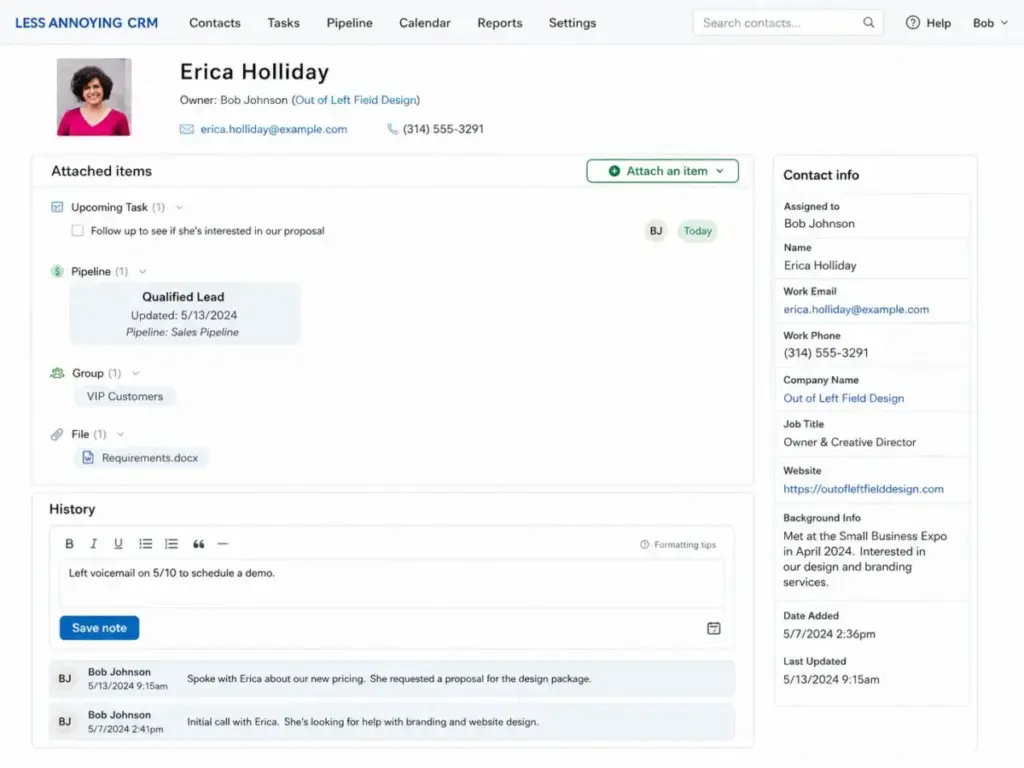
According to official support documentation, Less Annoying CRM offers a single plan for $15 per user monthly after a 30-day free trial. There are no contracts, no volume pricing, and no gated features.
Less Annoying CRM does better than Nimble by simplifying contact management. It provides a clean dashboard displaying your tasks, calendar events, and simple pipelines in one view. It includes free phone and email support for all accounts.
The main tradeoff is functionality. It lacks social media data enrichment, advanced email marketing sequences, built-in dialers, and AI features.
- Best for: Very small teams and family-owned businesses that want to replace paper files or basic spreadsheets.
- Avoid if: You need complex sales automation, API keys, or marketing automation.
- Migration difficulty: Low. The support team imports your spreadsheets for you at no cost.
Verdict: Choose Less Annoying CRM if you want an affordable tool with simple pricing. Read our Less Annoying CRM review for customer details.
Pricing Comparison: Starting Price vs. Practical Tier
CRM pricing pages can be misleading. While many tools advertise low starting rates, the practical tier required for a growing sales team often costs double the entry price.
| Product | Starting Price | Practical Tier | 10-User Cost (Monthly) | Free Plan | Trial |
|---|---|---|---|---|---|
| Nimble CRM | $24.90/user/month | Core Plan ($24.90) | $249 | No | 14 days |
| HubSpot Sales Hub | Free | Starter ($20.00) | $200 | Yes | No |
| Zoho CRM | Free (3 users) | Standard ($14.00) | $140 | Yes | 15 days |
| Pipedrive | $14.00/user/month | Advanced ($29.00) | $290 | No | 14 days |
| Freshsales | Free (3 users) | Growth ($9.00) | $90 | Yes | 21 days |
| Salesforce Starter | $25.00/user/month | Starter Suite ($25.00) | $250 | No | 30 days |
| Copper CRM | $23.00/seat/month | Basic ($23.00) | $230 | No | 14 days |
| Insightly CRM | $29.00/user/month | Plus ($29.00) | $290 | No | 14 days |
| Less Annoying CRM | $15.00/user/month | Single Plan ($15.00) | $150 | No | 30 days |
| Nutshell CRM | $13.00/user/month | Foundation ($13.00) | $130 | No | 14 days |
| Attio | Free | Plus ($29.00) | $290 | Yes | No |
Note: Pricing verified on May 27, 2026. HubSpot Starter pricing is based on list references. Zoho and Pipedrive pricing are US market averages.
What this means: At ten users, Freshsales is the most budget-friendly option at $90 monthly. HubSpot Starter sits at $200 monthly, but scales quickly if you need marketing or service packages. Nimble’s flat $249 monthly cost is competitive, but lacks room for database growth.
Feature Gate Comparison
Understanding where feature gates sit is important for budgeting. Many platforms restrict API keys, custom reporting, or multiple pipelines to their most expensive plans.
| Product | Custom Workflows | Custom Reporting | API Access | Multi-Pipelines | Email Sync |
|---|---|---|---|---|---|
| Nimble CRM | Basic | Basic | Limited | Yes | Yes |
| HubSpot Sales Hub | Starter (limited) | Starter | Starter | Starter | Yes |
| Zoho CRM | Standard | Standard | Professional | Standard | Standard |
| Pipedrive | Advanced | Advanced | Essential | Advanced | Advanced |
| Freshsales | Growth | Growth | Pro | Pro | Growth |
| Salesforce Starter | Starter | Starter | Professional | Starter | Starter |
| Copper CRM | Professional | Professional | Basic | Professional | Basic |
| Insightly CRM | Plus | Plus | Professional | Plus | Plus |
| Less Annoying CRM | No | No | Basic | No | Yes |
| Nutshell CRM | Pro | Foundation | Enterprise | Pro | Foundation |
| Attio | Plus | Plus | Plus | Plus | Plus |
What this means: If you require custom reporting, you must look at HubSpot Starter or Freshsales Growth. If API access is your main priority, Zoho CRM and Pipedrive require their Professional and Essential plans, respectively.
Migration Difficulty and Risk Assessment
Moving your sales database is an operational risk. Understanding typical setup times and retraining curves helps prevent disruption.
| Alternative | Migration Difficulty | Primary Technical Risk | Typical Timeline |
|---|---|---|---|
| HubSpot Sales Hub | Medium | Sequence rebuild errors | 2–4 weeks |
| Zoho CRM | Medium | Custom field mismatches | 3–6 weeks |
| Pipedrive | Low to Medium | Social contact data loss | 1–3 weeks |
| Freshsales | Low to Medium | VoIP dialer setup delays | 1–3 weeks |
| Salesforce Starter | High | High setup overhead | 4–8 weeks |
| Copper CRM | Medium | Gmail contact sync loops | 2–4 weeks |
| Insightly CRM | Medium | Project board configuration | 3–5 weeks |
| Less Annoying CRM | Low | Manual workflow limitations | 1 week |
| Nutshell CRM | Low to Medium | Opportunity stages mismatch | 1–3 weeks |
| Attio | Medium to High | Custom data model errors | 3–6 weeks |
Disclaimer: Migration difficulty is an editorial estimate based on data model complexity, workflow rebuild effort, integration requirements, and setup depth.
What this means: Less Annoying CRM and Pipedrive present the lowest setup friction. Rebuilding your operations in Salesforce or Attio takes longer but provides a highly custom database.
Which Nimble Alternative Should You Avoid?
Not every CRM is a good fit for your business. Selecting a platform that exceeds your team’s needs can result in high costs and low adoption rates.
- Avoid Salesforce Starter Suite if you do not have dedicated admin support. Without someone to manage custom objects and user profiles, your team will likely return to simple spreadsheets.
- Avoid Zoho CRM if you want an out-of-the-box system. Zoho requires significant configuration time, which can frustrate small sales teams.
- Avoid HubSpot Sales Hub if you are on a tight budget. While the Starter plan is inexpensive, upgrading to Professional costs $1,000 monthly, creating a significant pricing trap.
- Avoid Attio if you want a preconfigured pipeline. If you do not have the time to design a custom database model, your setup will likely stall.
When to Stay with Nimble CRM
You should not switch from Nimble if your sales reps live in the Prospector tool and rely on real-time social profile enrichment.
If your team is under five users, manages fewer than 25,000 contacts, and does not need advanced sales forecasting, Nimble’s single-tier plan is highly efficient. The Smart Contacts app enriches data quickly, saving reps hours of manual research. If your current storage usage is well below the 2 GB per seat limit, staying with Nimble avoids unnecessary migration costs and training time.
How to Choose the Right Alternative
To select the right CRM, ask your team three clarifying questions:
- What is our total contact count? If you are close to Nimble’s 25,000 contact cap, prioritize HubSpot (unlimited on Starter) or Nutshell (unlimited).
- Do we need advanced email sequences? If yes, choose HubSpot Starter or Pipedrive Advanced.
- What is our budget limit? If you need to keep costs low, Freshsales Growth ($9/user/month) or Nutshell Foundation ($13/user/month) provide the best value.
If you also need to manage marketing campaigns, evaluating best email marketing software can help you select a CRM that integrates with your newsletter tool.
Final Verdict: Best Nimble Alternative for Most Teams
For the majority of small to mid-sized teams leaving Nimble CRM, HubSpot Sales Hub is the most balanced alternative. It eliminates storage caps, offers a free entry point, and provides a clear path as your sales team scales.
- For budget-conscious teams: Choose Freshsales to get built-in dialing tools for $9 per user monthly.
- For Google-centric teams: Choose Copper CRM to run your sales workflow directly inside Gmail.
- For B2B deal tracking: Choose Pipedrive to focus reps on visual pipeline management.
- For simple, flat-rate pricing: Choose Less Annoying CRM to avoid tier and pricing changes.
FAQs
What is the best alternative to Nimble CRM?
HubSpot Sales Hub is the best alternative for most growing teams because it offers unlimited contact records, a free entry point, and a unified platform that scales as your sales operations expand.
What is the cheapest alternative to Nimble CRM?
Freshsales Growth is the cheapest option, starting at $9 per user monthly when billed annually. It includes built-in phone dialing, opportunity tracking, and multiple pipelines.
Does Nimble CRM have a free plan?
No, Nimble CRM does not offer a free plan. It only provides a 14-day free trial. Paid plans start at $24.90 per user monthly on annual billing.
How do I migrate my data from Nimble CRM to HubSpot?
You can export your Nimble contacts as a CSV file and import them directly into HubSpot. HubSpot automatically maps standard fields like email, phone number, and address.
Why do teams switch from Nimble CRM?
Most teams switch because of Nimble’s strict limits, including the 25,000 contact record cap and the 2 GB storage limit per user, which become restrictive as databases grow.
Is Pipedrive better than Nimble CRM?
Pipedrive is better for teams that focus on visual sales pipelines and rep activity tracking. Nimble is better for social profile enrichment and relationship contact management.